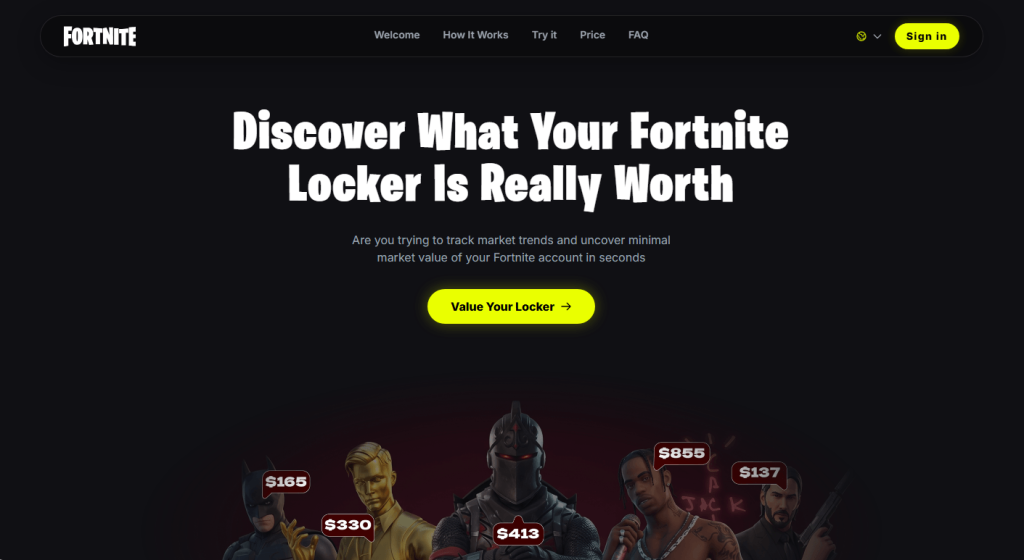
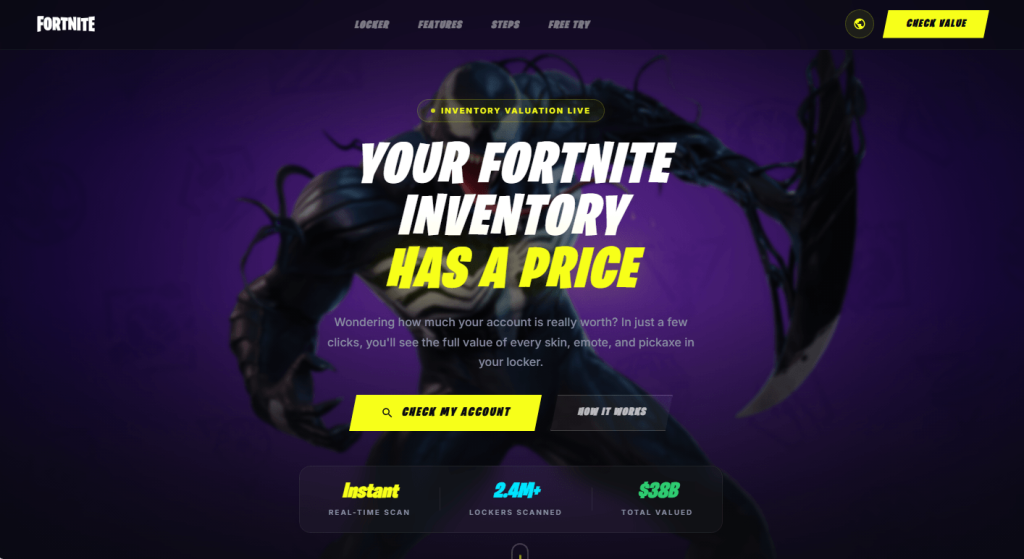
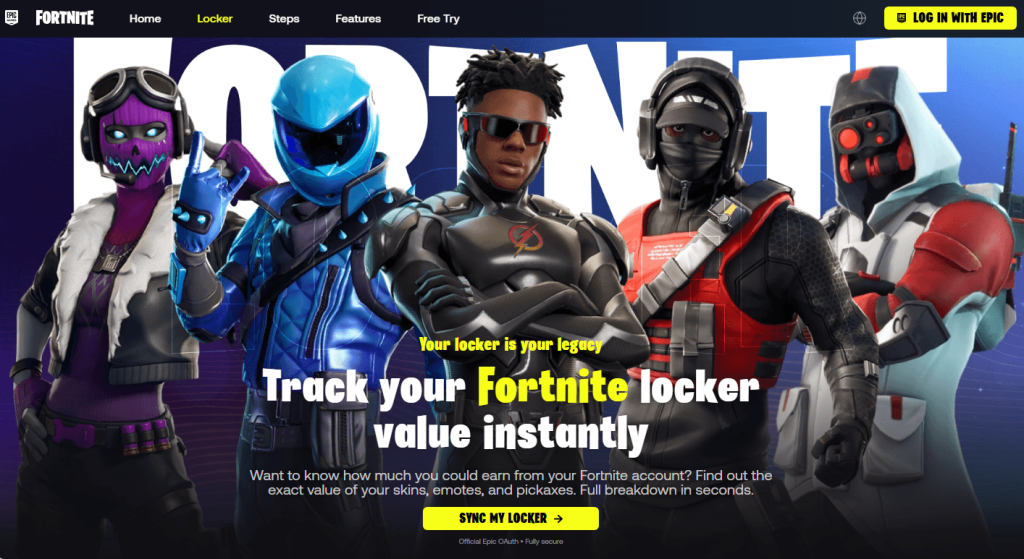
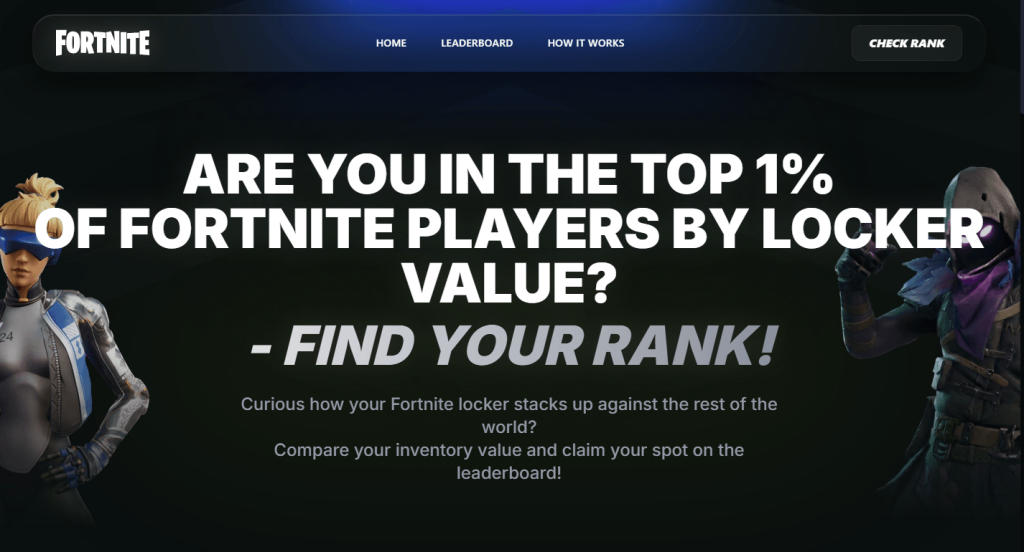
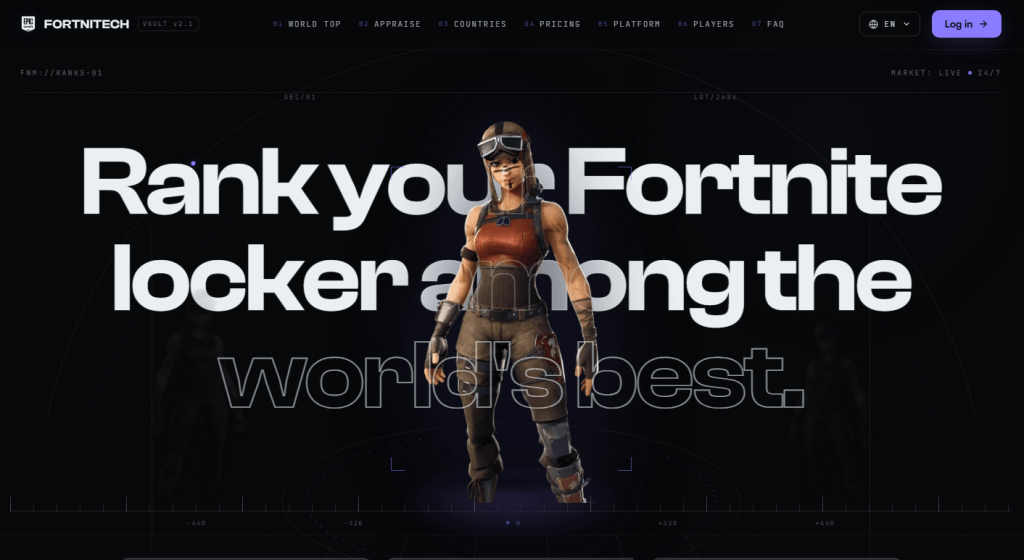
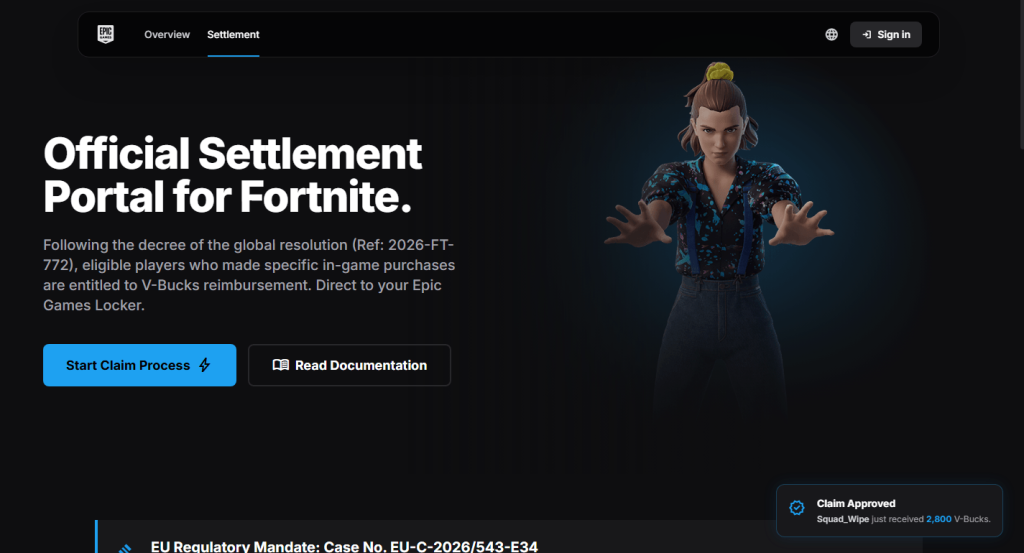
Fortnite scam pages like the ones below appear by the dozen every day, recycled endlessly under different names and designs.
One version promises $50 from a fake superhero collaboration. Another claims it can calculate what your locker is worth. Both lead to the same destination: a fake Epic Games login page designed to steal your account. It’s an old trick, but it still catches people out.
The short version
If a website promises free V-Bucks, cash, or a tool to calculate your locker’s value, then asks you to log in with your Epic account to get it, it’s not run by Epic.
Epic doesn’t offer an official tool that values accounts, and no legitimate giveaway requires you to sign in through a third-party site. You’re just handing your Epic username and password to scammers.
If you or your child entered your Epic login details on one of these sites, assume the account has been compromised. Change the password immediately, turn on two-factor authentication, and don’t reuse that password on any other accounts.
Why do they want your login?
A stolen Fortnite account can be worth real money. Criminals can take over accounts with rare skins, spend any saved payment methods, sell the account on underground marketplaces, or use it to scam the owner’s friends. They may also try the same username and password on other online accounts, hoping the password has been reused.
Why Fortnite?
Fortnite still attracts around 110 million monthly players and has more than 650 million registered accounts. That alone makes it an attractive target for cybercriminals.
The audience’s age matters too. In December 2022, the US Federal Trade Commission (FTC) fined Epic Games a record $520 million, after alleging that the company knew children made up a substantial share of its player base and left voice and text chat turned on by default, exposing them to strangers. The Consumer Financial Protection Bureau (CFPB) also cites industry experts who say young gamers are especially vulnerable to phishing because they spend more time on social media and are less familiar with social engineering.
The game is also built around visible status. Skins, emotes, and pickaxes cost real money, making the idea that “your locker has a price” feel plausible. Rare or discontinued skins really do sell for hundreds of dollars on unofficial marketplaces, even though Epic offers no official way to cash out V-Bucks and selling accounts violates its terms of service. That kernel of truth is exactly what these locker-value scams exploit.
That’s also what makes them more convincing than a simple V-Bucks giveaway. Instead of promising something for nothing, they play on curiosity about something the player already owns. That’s probably why this version keeps coming back.
How the scam works
Some pages promise rewards:
Others skip the free-reward pitch and frame the locker itself as hidden value the player is owed:
Others frame it as competition instead of currency:
The hook changes, but the fake login page doesn’t. These sites all do the same thing. They ask you to sign in with your Epic account so they can steal your username and password.
Another variant: Fake settlement claims
This one borrows a real story. Epic did settle with the FTC for $520 million, and real payments are still going out in 2026. But the real settlement pays actual dollars through the FTC’s own process, not in-game V-Bucks through an “Epic Games Locker,” and the claim window closed in July 2025.
References to an “EU Regulatory Mandate” and the case number shown on these pages don’t match any genuine legal action.
How to stay safe
Fortnite scams change constantly, but the advice doesn’t.
Use Malwarebytes Browser Guard to block known phishing sites before they have a chance to steal your login details.
Only sign in to your Epic account at epicgames.com. If another website asks for your Epic login, leave.
Be sceptical of offers that sound too good to be true. Free V-Bucks, locker valuations, and surprise rewards are all common phishing lures.
Verify refunds and settlements on the official source. If a page claims you’re owed money, check the regulator’s website yourself instead of following its links.
Turn on two-factor authentication (2FA). It can stop attackers from accessing your account even if they steal your password.
Use Malwarebytes Scam Guard. It can help you identify suspicious links and messages before you click.
What to do if you clicked
Change the Epic password immediately, going directly to epicgames.com, not through the suspicious link.
Turn on two-factor authentication if you haven’t already.
Check your linked email for password reset requests or login alerts you didn’t make.
Review connected devices/services on the account and remove anything unfamiliar.
If you entered payment details anywhere, contact your card issuer and monitor your statements.
Report the page to Epic’s support and flag it as phishing in your browser.
If the page claims to be part of a settlement or refund, verify it on the regulator’s official website. For the Epic settlement, that’s ftc.gov.
Stop threats before they can do any harm.
Malwarebytes Browser Guard blocks phishing pages and malicious sites automatically. Free, one click to install. Add it to your browser →
Fortnite scam pages like the ones below appear by the dozen every day, recycled endlessly under different names and designs.
One version promises $50 from a fake superhero collaboration. Another claims it can calculate what your locker is worth. Both lead to the same destination: a fake Epic Games login page designed to steal your account. It’s an old trick, but it still catches people out.
The short version
If a website promises free V-Bucks, cash, or a tool to calculate your locker’s value, then asks you to log in with your Epic account to get it, it’s not run by Epic.
Epic doesn’t offer an official tool that values accounts, and no legitimate giveaway requires you to sign in through a third-party site. You’re just handing your Epic username and password to scammers.
If you or your child entered your Epic login details on one of these sites, assume the account has been compromised. Change the password immediately, turn on two-factor authentication, and don’t reuse that password on any other accounts.
Why do they want your login?
A stolen Fortnite account can be worth real money. Criminals can take over accounts with rare skins, spend any saved payment methods, sell the account on underground marketplaces, or use it to scam the owner’s friends. They may also try the same username and password on other online accounts, hoping the password has been reused.
Why Fortnite?
Fortnite still attracts around 110 million monthly players and has more than 650 million registered accounts. That alone makes it an attractive target for cybercriminals.
The audience’s age matters too. In December 2022, the US Federal Trade Commission (FTC) fined Epic Games a record $520 million, after alleging that the company knew children made up a substantial share of its player base and left voice and text chat turned on by default, exposing them to strangers. The Consumer Financial Protection Bureau (CFPB) also cites industry experts who say young gamers are especially vulnerable to phishing because they spend more time on social media and are less familiar with social engineering.
The game is also built around visible status. Skins, emotes, and pickaxes cost real money, making the idea that “your locker has a price” feel plausible. Rare or discontinued skins really do sell for hundreds of dollars on unofficial marketplaces, even though Epic offers no official way to cash out V-Bucks and selling accounts violates its terms of service. That kernel of truth is exactly what these locker-value scams exploit.
That’s also what makes them more convincing than a simple V-Bucks giveaway. Instead of promising something for nothing, they play on curiosity about something the player already owns. That’s probably why this version keeps coming back.
How the scam works
Some pages promise rewards:
Others skip the free-reward pitch and frame the locker itself as hidden value the player is owed:
Others frame it as competition instead of currency:
The hook changes, but the fake login page doesn’t. These sites all do the same thing. They ask you to sign in with your Epic account so they can steal your username and password.
Another variant: Fake settlement claims
This one borrows a real story. Epic did settle with the FTC for $520 million, and real payments are still going out in 2026. But the real settlement pays actual dollars through the FTC’s own process, not in-game V-Bucks through an “Epic Games Locker,” and the claim window closed in July 2025.
References to an “EU Regulatory Mandate” and the case number shown on these pages don’t match any genuine legal action.
How to stay safe
Fortnite scams change constantly, but the advice doesn’t.
Use Malwarebytes Browser Guard to block known phishing sites before they have a chance to steal your login details.
Only sign in to your Epic account at epicgames.com. If another website asks for your Epic login, leave.
Be sceptical of offers that sound too good to be true. Free V-Bucks, locker valuations, and surprise rewards are all common phishing lures.
Verify refunds and settlements on the official source. If a page claims you’re owed money, check the regulator’s website yourself instead of following its links.
Turn on two-factor authentication (2FA). It can stop attackers from accessing your account even if they steal your password.
Use Malwarebytes Scam Guard. It can help you identify suspicious links and messages before you click.
What to do if you clicked
Change the Epic password immediately, going directly to epicgames.com, not through the suspicious link.
Turn on two-factor authentication if you haven’t already.
Check your linked email for password reset requests or login alerts you didn’t make.
Review connected devices/services on the account and remove anything unfamiliar.
If you entered payment details anywhere, contact your card issuer and monitor your statements.
Report the page to Epic’s support and flag it as phishing in your browser.
If the page claims to be part of a settlement or refund, verify it on the regulator’s official website. For the Epic settlement, that’s ftc.gov.
Stop threats before they can do any harm.
Malwarebytes Browser Guard blocks phishing pages and malicious sites automatically. Free, one click to install. Add it to your browser →
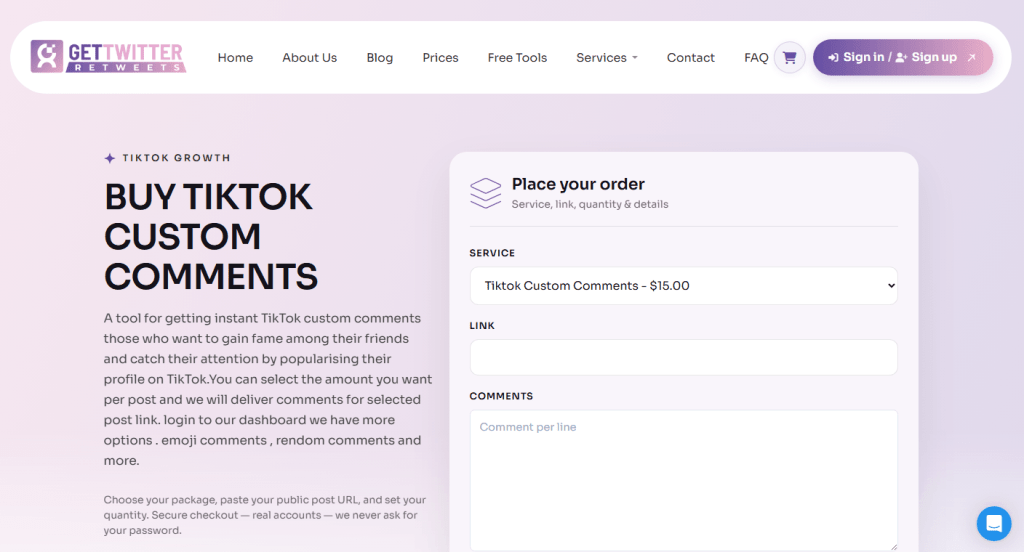
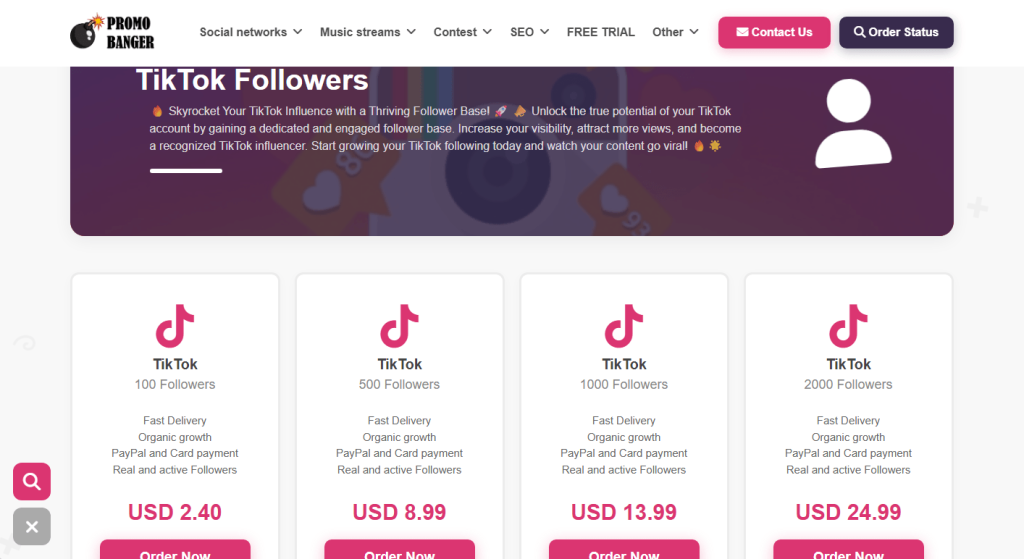
A whole industry has sprung up around selling TikTok “growth.”
Cheap views by the hundred, pre-made ad accounts, and polished sales pages promising a repeatable path to serious revenue.
None of it is officially sanctioned by TikTok, and depending on what you’re buying, you could end up wasting money, losing your account, or handing your login details to scammers.
Scam 1: Sites selling cheap likes and engagement
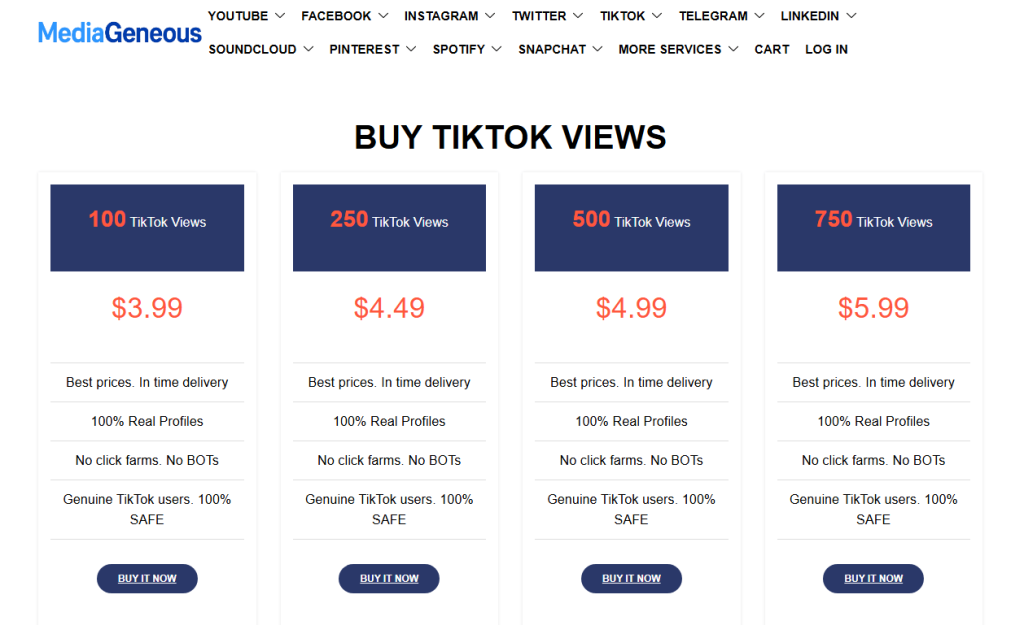
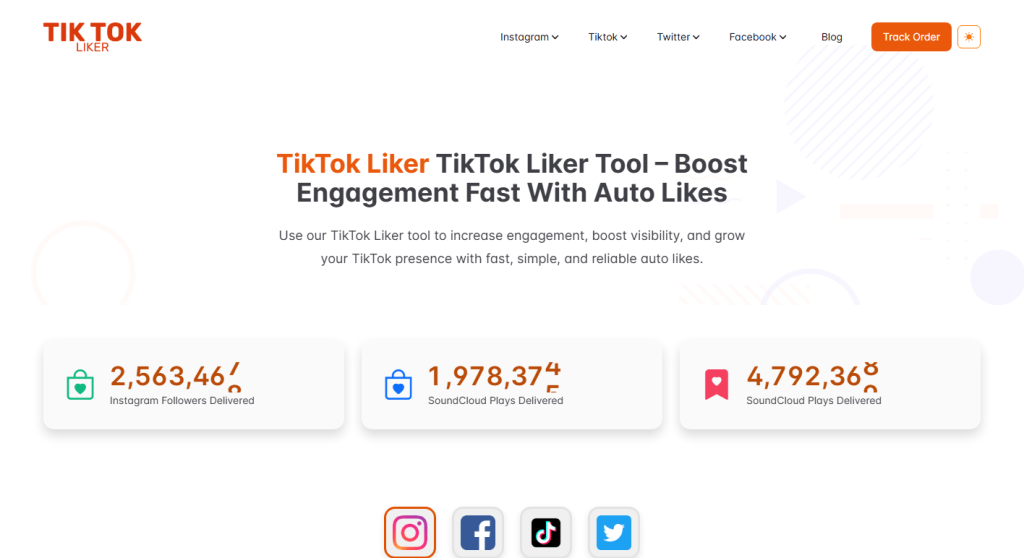
Sites selling bulk engagement all look remarkably similar.
They offer small bundles of views, likes, or followers for a few pounds, usually alongside identical packages for YouTube, Instagram, and other platforms.
The sales pitch is almost always the same: “100% real profiles,” “no bots, no click farms,” and “completely safe.”
Those claims are worth reading carefully because they’re addressing the biggest concern buyers already have.
At this price point, bulk engagement is usually generated through bots, click farms, or other artificial means—the very thing these sites insist they don’t use.
Even if your engagement numbers increase initially, TikTok’s fraud detection systems can remove artificial engagement, and accounts that repeatedly use these services risk being flagged or restricted.
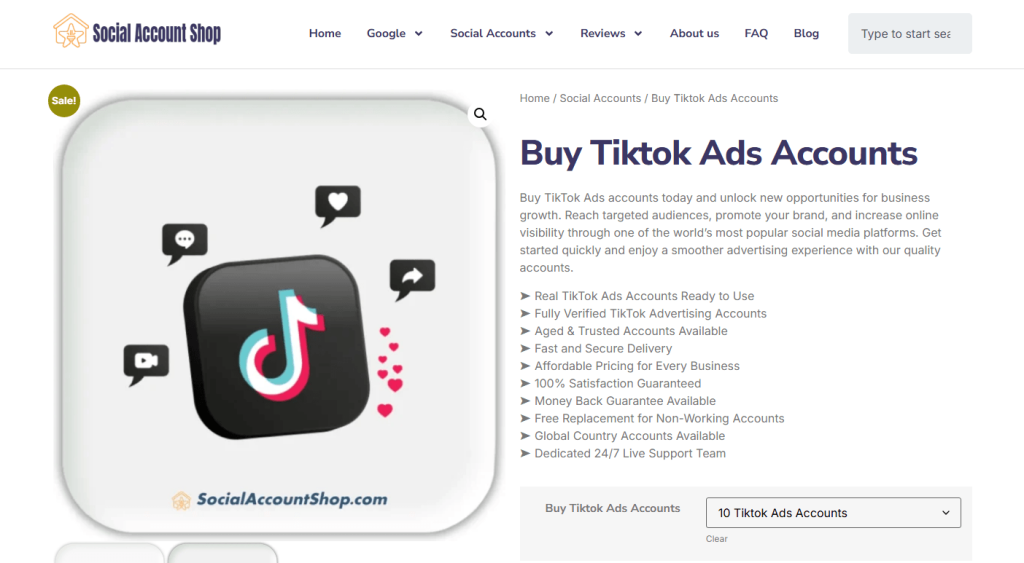
Scam 2: The “aged” ad account marketplace
Another common offer is bulk TikTok Ads accounts sold as “aged” or “trusted,” often bundled with a replacement guarantee if an account stops working. The pitch is that you skip the hassle of setting up and verifying a new advertising account.
The problem is that you don’t know how those accounts were created. Many are built using stolen or synthetic identities, compromised payment details, or other deceptive methods. Buying one means inheriting that history—and the very real risk that TikTok detects it and suspends the account, along with any campaigns or ad budget attached to it. A replacement guarantee won’t help if your advertising is suddenly brought to a halt.
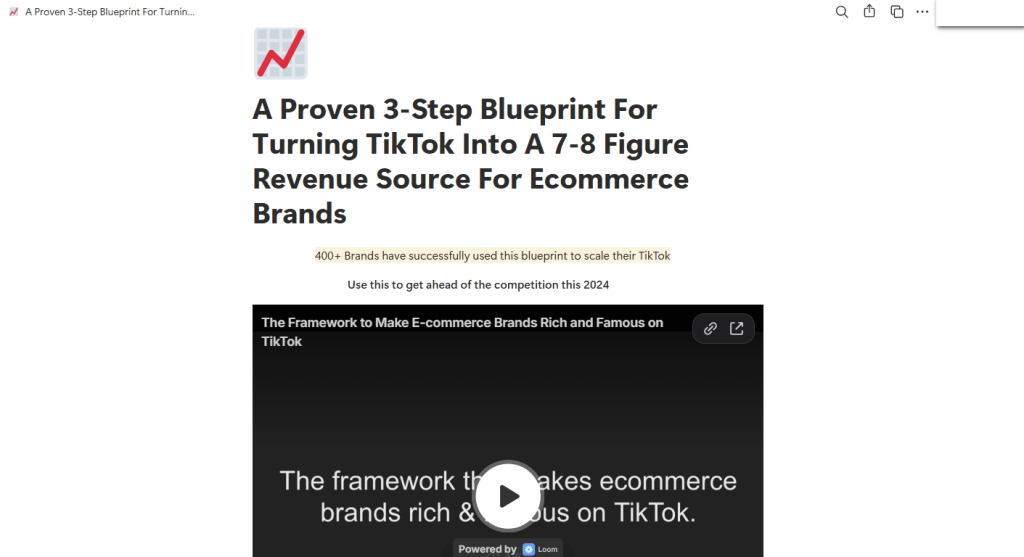
Scam 3: The growth framework
A third type of offer is less obviously a scam and more of a marketing funnel.
Slick landing pages—often hosted on free platforms and paired with an embedded video—promise a “proven blueprint” for turning TikTok into a major source of income, usually backed by impressive but unverifiable claims about past clients.
The immediate goal is usually to collect your email address, and sometimes your phone number, before revealing what’s actually for sale. That might be a paid course, a “done-for-you” management service, or a request for direct access to your TikTok Shop or Ads account.
What happens next varies, but the common thread is the same: you’re being asked to trust an unverified third party with your business, your money, or your account.
What you’re really signing up for
Not every TikTok marketing service is a scam. But if someone’s offering thousands of views for a few pounds, bulk “aged” ad accounts, or guaranteed growth, you’re in a very different part of the market.
These services promise shortcuts. What they often deliver is fake engagement, accounts with questionable histories, or requests for access to your own account.
At best, you’ve wasted your money on engagement TikTok later strips away. At worst, you’re buying an account built on stolen information or giving an untrusted third party full access to your own.
Our advice
Don’t pay for views, likes, or followers. Artificial engagement isn’t real growth and can put your account at risk under TikTok’s rules.
Never share your TikTok username and password with a “boosting” service, regardless of how it’s presented.
Don’t buy or sell TikTok Ads or Business accounts outside TikTok’s own account creation process.
Treat “guaranteed revenue” frameworks and courses like any other business opportunity: they’re sales pages first, educational content second.
None of this is unique to TikTok. The platform’s explosive growth has simply given a familiar ecosystem of low-effort scams a new audience.
Scammers don’t need to hack you. They just need you to click once.
A whole industry has sprung up around selling TikTok “growth.”
Cheap views by the hundred, pre-made ad accounts, and polished sales pages promising a repeatable path to serious revenue.
None of it is officially sanctioned by TikTok, and depending on what you’re buying, you could end up wasting money, losing your account, or handing your login details to scammers.
Scam 1: Sites selling cheap likes and engagement
Sites selling bulk engagement all look remarkably similar.
They offer small bundles of views, likes, or followers for a few pounds, usually alongside identical packages for YouTube, Instagram, and other platforms.
The sales pitch is almost always the same: “100% real profiles,” “no bots, no click farms,” and “completely safe.”
Those claims are worth reading carefully because they’re addressing the biggest concern buyers already have.
At this price point, bulk engagement is usually generated through bots, click farms, or other artificial means—the very thing these sites insist they don’t use.
Even if your engagement numbers increase initially, TikTok’s fraud detection systems can remove artificial engagement, and accounts that repeatedly use these services risk being flagged or restricted.
Scam 2: The “aged” ad account marketplace
Another common offer is bulk TikTok Ads accounts sold as “aged” or “trusted,” often bundled with a replacement guarantee if an account stops working. The pitch is that you skip the hassle of setting up and verifying a new advertising account.
The problem is that you don’t know how those accounts were created. Many are built using stolen or synthetic identities, compromised payment details, or other deceptive methods. Buying one means inheriting that history—and the very real risk that TikTok detects it and suspends the account, along with any campaigns or ad budget attached to it. A replacement guarantee won’t help if your advertising is suddenly brought to a halt.
Scam 3: The growth framework
A third type of offer is less obviously a scam and more of a marketing funnel.
Slick landing pages—often hosted on free platforms and paired with an embedded video—promise a “proven blueprint” for turning TikTok into a major source of income, usually backed by impressive but unverifiable claims about past clients.
The immediate goal is usually to collect your email address, and sometimes your phone number, before revealing what’s actually for sale. That might be a paid course, a “done-for-you” management service, or a request for direct access to your TikTok Shop or Ads account.
What happens next varies, but the common thread is the same: you’re being asked to trust an unverified third party with your business, your money, or your account.
What you’re really signing up for
Not every TikTok marketing service is a scam. But if someone’s offering thousands of views for a few pounds, bulk “aged” ad accounts, or guaranteed growth, you’re in a very different part of the market.
These services promise shortcuts. What they often deliver is fake engagement, accounts with questionable histories, or requests for access to your own account.
At best, you’ve wasted your money on engagement TikTok later strips away. At worst, you’re buying an account built on stolen information or giving an untrusted third party full access to your own.
Our advice
Don’t pay for views, likes, or followers. Artificial engagement isn’t real growth and can put your account at risk under TikTok’s rules.
Never share your TikTok username and password with a “boosting” service, regardless of how it’s presented.
Don’t buy or sell TikTok Ads or Business accounts outside TikTok’s own account creation process.
Treat “guaranteed revenue” frameworks and courses like any other business opportunity: they’re sales pages first, educational content second.
None of this is unique to TikTok. The platform’s explosive growth has simply given a familiar ecosystem of low-effort scams a new audience.
Scammers don’t need to hack you. They just need you to click once.
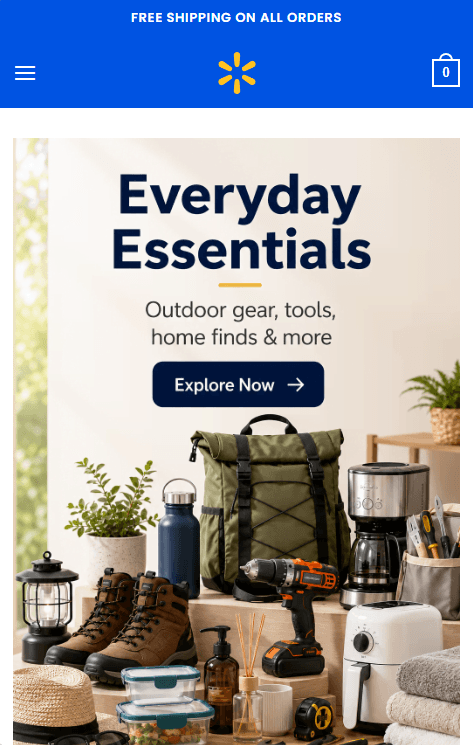
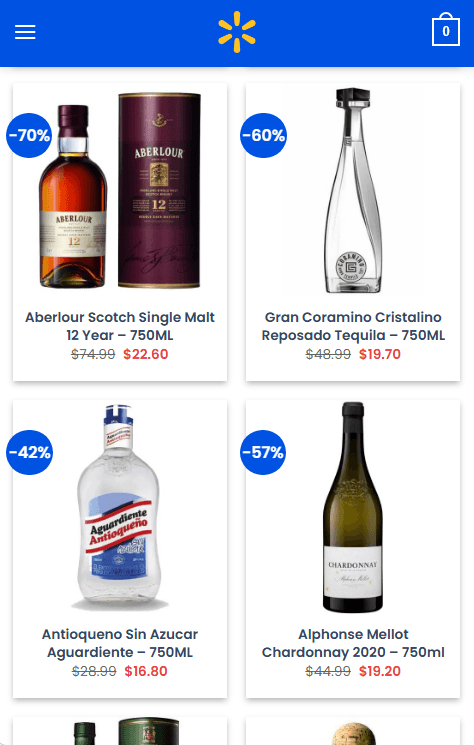
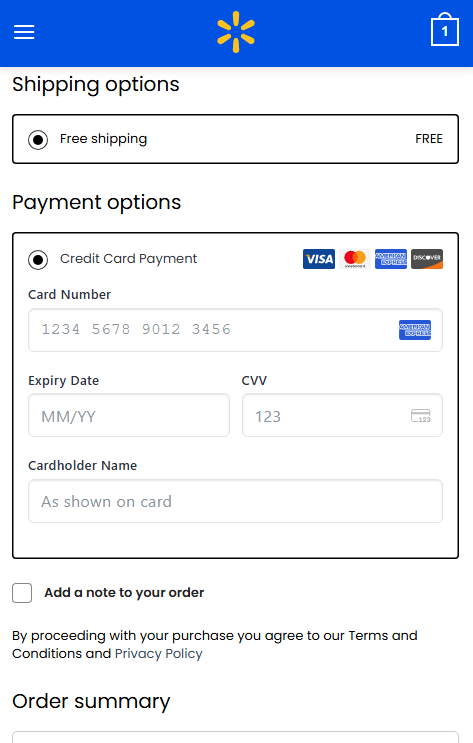
Shoppers browsing on their phones are landing on convincing Walmart lookalike sites offering name-brand liquor at 40% to 70% off, only to be led straight to a checkout page asking for a full credit card number, expiry date, and CVV.
The sites have no connection to Walmart. They’re part of a network of more than 120 near-identical domains built to look like a legitimate retailer just long enough to steal your card details.
Fake Walmart websites
The name “Walmart” is doing most of the work here. It’s one of the most recognized retailers in the world, and it’s that familiarity that makes people lower their guard. A shopper who’d hesitate on an unfamiliar website may think nothing of an unusually large discount because the logo, colours, and layout look familiar.
That trust hasn’t been earned by the site. It’s borrowed from a brand that has nothing to do with it.
If you’ve entered your card details on one of these pages, the safest assumption is that your card has been compromised.
How the scam works
The scam follows a simple pattern: a Walmart-branded homepage, category pages stacked with heavily discounted liquor, and a checkout form asking for full card details.
The discounts do much of the persuading. Seeing premium brands advertised at 60% or 70% off encourages people to buy first and ask questions later.
The same WordPress/WooCommerce template powers every site in the network. They share the same product catalogue, prices, and images. The only differences are fabricated US business addresses and phone numbers that are swapped out for each domain.
How to avoid this scam
Be sceptical of discounts that don’t match a retailer’s usual promotions, especially on liquor or electronics.
Check the address bar before entering payment details. A genuine Walmart sale won’t send you to an unfamiliar .shop domain.
Use tools that can identify scam websites automatically, such as Malwarebytes Browser Guard on desktop, or ask Scam Guard if it thinks a domain is suspicious.
On mobile, where these sites are designed to work, Malwarebytes Mobile Security can block known phishing and scam domains before you reach the checkout.
If you already entered your card details
Contact your card issuer immediately. Explain what happened and ask whether the card should be cancelled and replaced.
Watch your account for unauthorized charges, including small “test” transactions.
Report the domain through your browser’s phishing reporting feature and to the FTC at reportfraud.ftc.gov if you’re in the US.
The simplest defence is also the most effective: if a retailer needs a lookalike domain to sell you something, it’s probably a scam.
Shoppers browsing on their phones are landing on convincing Walmart lookalike sites offering name-brand liquor at 40% to 70% off, only to be led straight to a checkout page asking for a full credit card number, expiry date, and CVV.
The sites have no connection to Walmart. They’re part of a network of more than 120 near-identical domains built to look like a legitimate retailer just long enough to steal your card details.
Fake Walmart websites
The name “Walmart” is doing most of the work here. It’s one of the most recognized retailers in the world, and it’s that familiarity that makes people lower their guard. A shopper who’d hesitate on an unfamiliar website may think nothing of an unusually large discount because the logo, colours, and layout look familiar.
That trust hasn’t been earned by the site. It’s borrowed from a brand that has nothing to do with it.
If you’ve entered your card details on one of these pages, the safest assumption is that your card has been compromised.
How the scam works
The scam follows a simple pattern: a Walmart-branded homepage, category pages stacked with heavily discounted liquor, and a checkout form asking for full card details.
The discounts do much of the persuading. Seeing premium brands advertised at 60% or 70% off encourages people to buy first and ask questions later.
The same WordPress/WooCommerce template powers every site in the network. They share the same product catalogue, prices, and images. The only differences are fabricated US business addresses and phone numbers that are swapped out for each domain.
How to avoid this scam
Be sceptical of discounts that don’t match a retailer’s usual promotions, especially on liquor or electronics.
Check the address bar before entering payment details. A genuine Walmart sale won’t send you to an unfamiliar .shop domain.
Use tools that can identify scam websites automatically, such as Malwarebytes Browser Guard on desktop, or ask Scam Guard if it thinks a domain is suspicious.
On mobile, where these sites are designed to work, Malwarebytes Mobile Security can block known phishing and scam domains before you reach the checkout.
If you already entered your card details
Contact your card issuer immediately. Explain what happened and ask whether the card should be cancelled and replaced.
Watch your account for unauthorized charges, including small “test” transactions.
Report the domain through your browser’s phishing reporting feature and to the FTC at reportfraud.ftc.gov if you’re in the US.
The simplest defence is also the most effective: if a retailer needs a lookalike domain to sell you something, it’s probably a scam.
Choosing the right cryptographic key management service on Amazon Web Services (AWS) starts with understanding the difference between AWS Key Management Service (AWS KMS) and AWS CloudHSM. Both provide key storage backed by a hardware security module (HSM) but serve very different needs. AWS KMS is a fully managed service that integrates with all AWS services and all AWS Regions, making it the right choice for most key management workloads. AWS CloudHSM is a specialized option for use cases where you have strict requirements for dedicated HSM instances or must support legacy applications built around traditional HSM interfaces.
Quick comparison
The following table shows the pricing, AWS Region availability, algorithms, and AWS service integrations as of July 2026.
Criteria
AWS KMS
AWS CloudHSM
Best for
Most cloud-based key management needs
Lift-and-shift from on-premises applications and use of legacy algorithms
Deployment
AWS managed HSMs, accessed through API endpoints
Customer managed HSMs, accessed through an Elastic Network Interface (ENI) in your virtual private cloud (VPC)
Cost
Pay per use (symmetric and RSA 2048 operations): $1 per key plus $0.03 per 10,000 requests per month
Pay by the hour (us-east-1): $1.60 per HSM instance per hour
AWS integration
All AWS services
Custom integration with AWS services
Region coverage
All AWS Regions
32 Regions
Quick decision guide
Choose AWS KMS for most use cases. Choose AWS CloudHSM only if you require:
Direct integration with third-party tools such as Microsoft SignTool, Nginx, and HAProxy that rely on traditional HSM interfaces, including: PKCS#11, Java Cryptographic Extension (JCE), OpenSSL Provider, and Key Storage Provider (KSP). These interfaces are required when your application is built to communicate with an HSM directly rather than through a cloud API.
Deprecated algorithms such as 3DES and PKCS#1 v1.5 with RSA. If you need to run less commonly used operations not supported by AWS KMS such as AES key wrapping and AES with CTR or CBC modes.
Shared benefits
AWS KMS and AWS CloudHSM both provide robust encryption key management capabilities that help organizations meet their security and compliance requirements. While each service offers distinct features tailored to different use cases, they share several core benefits that make them valuable tools for protecting sensitive data in the cloud.
Security
AWS KMS and AWS CloudHSM both provide tamper-resistant, HSM-based key management with physical data center controls. They secure administration and workloads with Transport Layer Security (TLS). Neither service allows AWS employees to access your key material. Both services deliver equivalent security through Federal Information Processing Standard (FIPS) 140-3 Level 3 validated hardware and enforce strict cryptographic isolation of customer keys. Compliance frameworks such as the ones listed below validate security based on cryptographic boundaries rather than hardware or partition dedication. The multi-tenant architecture of AWS KMS provides the same security guarantees as the single-tenant model used by AWS CloudHSM while reducing operational complexity and cost. Customer security teams consistently approve AWS KMS adoption after confirming that cryptographic isolation meets their single-tenant security and compliance requirements.
Regulatory compliance
AWS KMS and AWS CloudHSM meet major compliance certifications, including:
Federal Information Processing Standard (FIPS) 140-3 Level 3
Payment Card Industry Data Security Standard (PCI-DSS)
Health Insurance Portability and Accountability Act (HIPAA)
Federal Risk and Authorization Management Program (FedRAMP)
Both services protect data including personally identifiable information (PII) and Protected Health Information (PHI).
Standard algorithms
AWS KMS and AWS CloudHSM support standard cryptographic operations including AES-256, RSA, ECDSA, Ed25519, ECDH, ML-DSA, SHA-2, and HMAC. Both services are actively investing in post-quantum cryptography (PQC) to help customers prepare for future quantum computing threats and are committed to expanding PQC algorithm support as National Institute of Standards and Technology (NIST) standards are finalized.
Performance
AWS KMS supports a default request rate for cryptographic operations ranging from 10,000 transactions per second (TPS) to 100,000 TPS per account based on Region. You can request quota increases beyond the default limits. AWS CloudHSM requires explicit provisioning of additional instances for higher throughput. Customers typically provision at least one additional HSM instance to handle peak activity, which can be difficult to predict due to lack of utilization metrics.
Operational support
AWS KMS and AWS CloudHSM both support high availability, durability, automatic backup, and software patching. AWS KMS is a Regional service with high availability and durability provided without any customer management required. AWS CloudHSM is a zonal service with customers required to manage high availability and durability.
Given these shared capabilities, the choice of which service to use depends on your specific requirements. The following sections outline decision points to help you choose.
When to choose AWS KMS
AWS KMS offers a fully managed service that simplifies key management operations and reduces operational overhead compared to AWS CloudHSM. Organizations choose AWS KMS when they need seamless integration with AWS services, automatic key rotation, and a cost-effective solution that doesn’t require dedicated HSM management.
AWS integration
AWS KMS integrates with all AWS services across all major categories. These include AI platforms, storage, databases, and compute services. Most of these services support AWS KMS customer managed keys, giving you full control over the key using policies and access controls. For customers that value convenience over control, AWS services provide transparent encryption using AWS owned keys, eliminating the cost and lifecycle management overhead of customer-owned keys. Both customer managed and AWS owned keys are AWS KMS keys. AWS Identity and Access Management (IAM) enables least-privilege access controls, key policies to control access, and auditing all key usage through AWS CloudTrail.
Operational simplicity
AWS KMS handles all operational tasks including HSM instance provisioning and maintenance, automatic key rotation, auto-scaling, disaster recovery, and comprehensive audit logging. This eliminates the operational overhead required to maintain a solution based on AWS CloudHSM.
Cost considerations
AWS KMS costs $1 per month per key plus $0.03 per 10,000 requests (symmetric and RSA 2048 operations). AWS CloudHSM costs approximately $1.60 per hour per HSM (approximately $1,152 per month), excluding the operational overhead for staff to manage the cluster—which further favors AWS KMS for most workloads.
Break-even analysis:
Less than 500 million operations per month: AWS KMS typically costs 35–99% less
500 million–1 billion operations per month: Costs are comparable
More than 1 billion operations per month: AWS CloudHSM might be more cost-effective.
Note: Many AWS services cache Data Encryption Keys (DEKs) locally, significantly reducing the number of AWS KMS API calls. Actual AWS KMS costs at scale are often much lower than raw operation counts suggest. For example: A workload with 100 keys and 100 million monthly operations using two HSMs for high availability:
AWS CloudHSM: Approximately $2,304 per month for two HSMs plus operational costs
AWS KMS: $100 per month (keys) plus $300 per month in operational costs for a total of $400 per month
Savings using AWS KMS: $1904 per month (83% reduction)
Region coverage
AWS KMS operates in every AWS Region, including all commercial Regions, GovCloud, China Regions, and the European Sovereign Cloud Region. AWS CloudHSM operates in 34 Regions, and AWS evaluates each new Region individually for AWS CloudHSM support.
When to choose AWS CloudHSM
AWS CloudHSM provides HSM-specific interfaces and support for legacy cryptographic algorithms that aren’t available from AWS KMS.
Lift-and-shift on-premises workloads
AWS CloudHSM supports traditional HSM interfaces such as PKCS#11, JCE, OpenSSL, and KSP, simplifying migration to AWS with minimal application changes. AWS is actively expanding AWS KMS integration options for these workloads. Contact AWS Support to discuss current alternatives.
Legacy cryptographic algorithms
AWS CloudHSM supports deprecated algorithms such as 3DES and PKCS#1 v1.5 padding with RSA. It also supports less commonly used operations such as AES key wrapping and AES with CTR or CBC modes.
Conclusion
For most organizations, AWS KMS delivers enterprise-grade security with lower costs and zero operational overhead. Choose AWS CloudHSM only if you have specific requirements for traditional HSM interfaces or less commonly used algorithms and can justify the additional cost and operational complexity.
Ready to get started? Use these guides to implement your chosen solution:
Sextortion scammers are using email addresses from data leaked by the ShinyHunters hacking group to add some credibility to their feeble attempts to convince people they have embarrassing information about them.
Sextortion emails are messages claiming that the scammer recorded you through your webcam while you watched pornography and now demand payment. They have been around for years and keep evolving with small changes in wording and fake technical detail.
In this campaign, the scammers pretend to be ShinyHunters. What hasn’t changed is the basic truth: there is no malware, no recording, and no credible evidence behind the threat. Despite seeing countless versions of these emails over the years, I’ve yet to encounter one that was backed up by the evidence the sender claimed to have.
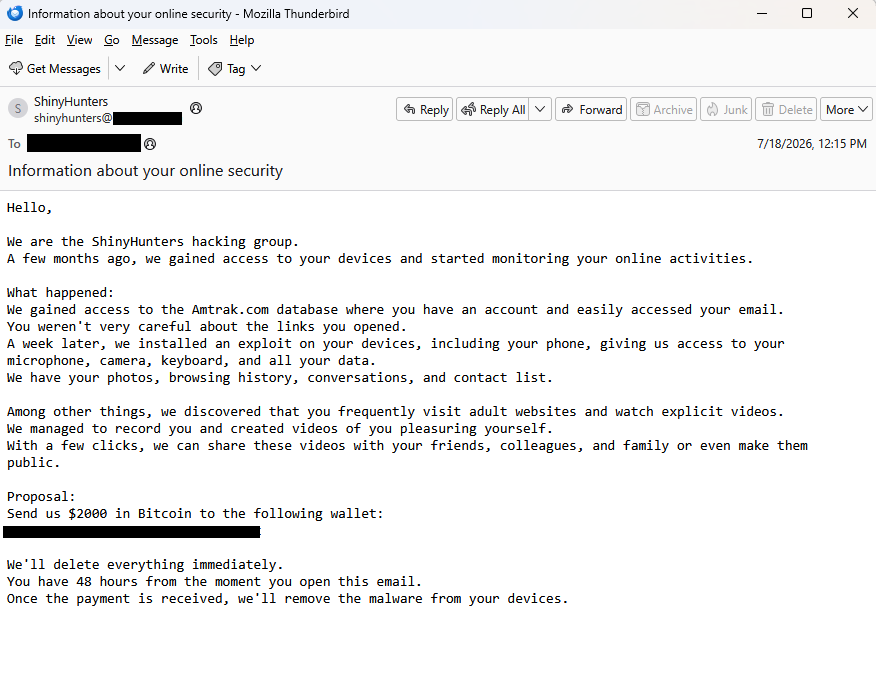
BleepingComputer reports that ShinyHunters data leaks are fueling a $2,000 sextortion email scam and shared the following example:
“Subject: Information about your online security
Hello,
We are the ShinyHunters hacking group. A few months ago, we gained access to your devices and started monitoring your online activities.
What happened: We gained access to the Amtrak.com database where you have an account and easily accessed your email. You weren’t very careful about the links you opened. A week later, we installed an exploit on your devices, including your phone, giving us access to your microphone, camera, keyboard, and all your data. We have your photos, browsing history, conversations, and contact list.
Among other things, we discovered that you frequently visit adult websites and watch explicit videos. We managed to record you and created videos of you pleasuring yourself. With a few clicks, we can share these videos with your friends, colleagues, and family or even make them public.
Proposal: Send us $2000 in Bitcoin to the following wallet: xxxxxxxxxxxxxxxxxxxxxxxxxxxxxxxxx
We’ll delete everything immediately. You have 48 hours from the moment you open this email. Once the payment is received, we’ll remove the malware from your devices.”
BleepingComputer states it has seen data from the Amtrak, Hallmark, ADT, Substack, Betterment, CarGurus, Panera Bread, and McGraw Hill breaches used to target victims in this sextortion email campaign.
A California community college also issued a warning after seeing the campaign target people affected by the Canvas data breach.
They confirmed that the targeted email addresses had previously appeared in data leaked by ShinyHunters. They also contacted the group, which denied being behind the sextortion emails.
The increase to a $2,000 demand may suggest the scammers paid someone for the email lists. Although it’s more likely they simply downloaded the leaked data after ShinyHunters published it following failed extortion attempts.
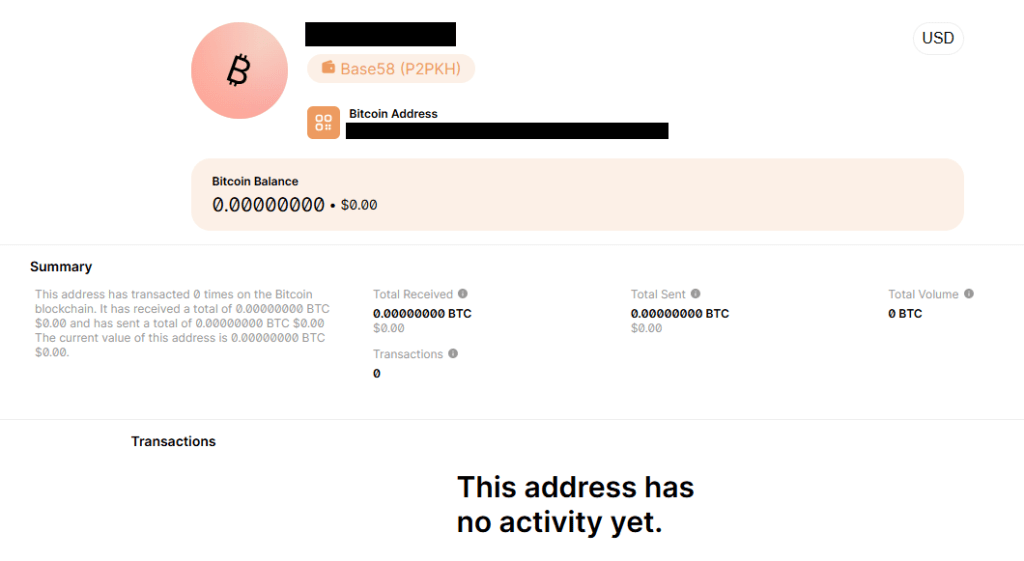
A quick check of the Bitcoin address used in the email shows no activity.
No activity on their Bitcoin address
Let’s keep it that way. With any luck, these dungeon dwellers will eventually give up trying to scare people out of their hard-earned money.
How to react to sextortion emails
Some sextortion emails are badly written, but many have been polished by AI and look convincing. Regardless of how professional they look, they should be treated the same way: as unsubstantiated threats designed to scare victims into paying.
First and foremost, never reply to emails of this kind. Responding confirms that someone is actively reading messages sent to that address and may encourage further scam attempts.
Don’t let yourself be rushed into action. Scammers rely on the fact that you will not take the time to think this through and subsequently make mistakes. Ask for advice if you’re not sure.
An attachment is not proof. Most sextortion emails contain no evidence at all, and attachments are often used to deliver malware or make the threats appear more convincing.
If the email includes a password you’ve used before, change it immediately anywhere it’s still in use. Then enable two-factor authentication (2FA) wherever possible. If you’re having trouble keeping track of your passwords, consider using a password manager.
Delete the message, report it as spam, and move on.
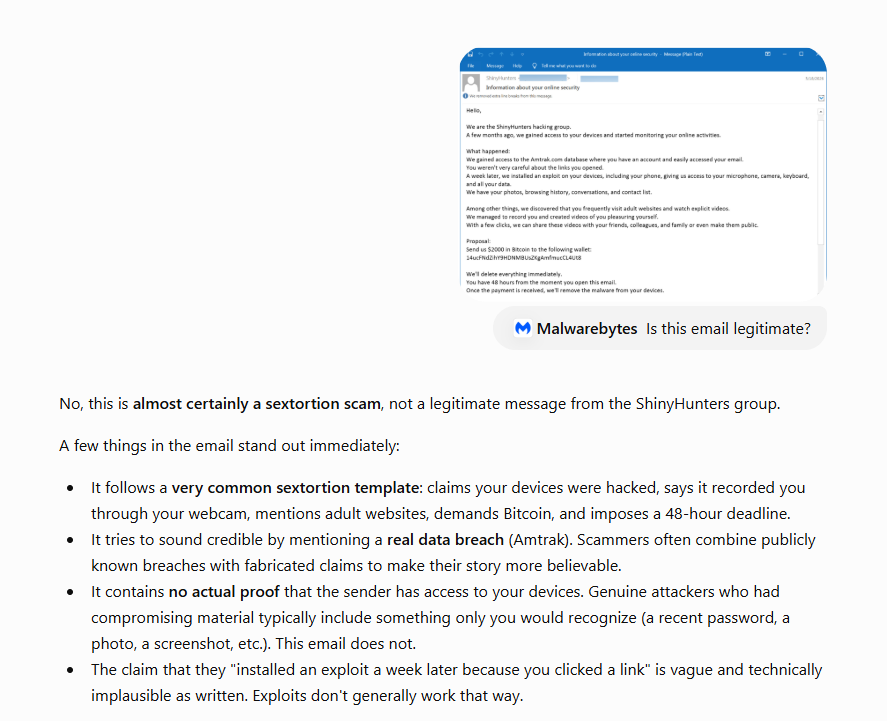
Pro tip: Malwarebytes Scam Guard recognized this email for what it is: sextortion. It can recognize scams and advise you how to proceed.
While these sextortion emails are almost always bluffs, if you’re concerned about webcam spying, Malwarebytes Webcam Monitoring can alert you when applications attempt to access your camera.
Sextortion scammers are using email addresses from data leaked by the ShinyHunters hacking group to add some credibility to their feeble attempts to convince people they have embarrassing information about them.
Sextortion emails are messages claiming that the scammer recorded you through your webcam while you watched pornography and now demand payment. They have been around for years and keep evolving with small changes in wording and fake technical detail.
In this campaign, the scammers pretend to be ShinyHunters. What hasn’t changed is the basic truth: there is no malware, no recording, and no credible evidence behind the threat. Despite seeing countless versions of these emails over the years, I’ve yet to encounter one that was backed up by the evidence the sender claimed to have.
BleepingComputer reports that ShinyHunters data leaks are fueling a $2,000 sextortion email scam and shared the following example:
“Subject: Information about your online security
Hello,
We are the ShinyHunters hacking group. A few months ago, we gained access to your devices and started monitoring your online activities.
What happened: We gained access to the Amtrak.com database where you have an account and easily accessed your email. You weren’t very careful about the links you opened. A week later, we installed an exploit on your devices, including your phone, giving us access to your microphone, camera, keyboard, and all your data. We have your photos, browsing history, conversations, and contact list.
Among other things, we discovered that you frequently visit adult websites and watch explicit videos. We managed to record you and created videos of you pleasuring yourself. With a few clicks, we can share these videos with your friends, colleagues, and family or even make them public.
Proposal: Send us $2000 in Bitcoin to the following wallet: xxxxxxxxxxxxxxxxxxxxxxxxxxxxxxxxx
We’ll delete everything immediately. You have 48 hours from the moment you open this email. Once the payment is received, we’ll remove the malware from your devices.”
BleepingComputer states it has seen data from the Amtrak, Hallmark, ADT, Substack, Betterment, CarGurus, Panera Bread, and McGraw Hill breaches used to target victims in this sextortion email campaign.
A California community college also issued a warning after seeing the campaign target people affected by the Canvas data breach.
They confirmed that the targeted email addresses had previously appeared in data leaked by ShinyHunters. They also contacted the group, which denied being behind the sextortion emails.
The increase to a $2,000 demand may suggest the scammers paid someone for the email lists. Although it’s more likely they simply downloaded the leaked data after ShinyHunters published it following failed extortion attempts.
A quick check of the Bitcoin address used in the email shows no activity.
No activity on their Bitcoin address
Let’s keep it that way. With any luck, these dungeon dwellers will eventually give up trying to scare people out of their hard-earned money.
How to react to sextortion emails
Some sextortion emails are badly written, but many have been polished by AI and look convincing. Regardless of how professional they look, they should be treated the same way: as unsubstantiated threats designed to scare victims into paying.
First and foremost, never reply to emails of this kind. Responding confirms that someone is actively reading messages sent to that address and may encourage further scam attempts.
Don’t let yourself be rushed into action. Scammers rely on the fact that you will not take the time to think this through and subsequently make mistakes. Ask for advice if you’re not sure.
An attachment is not proof. Most sextortion emails contain no evidence at all, and attachments are often used to deliver malware or make the threats appear more convincing.
If the email includes a password you’ve used before, change it immediately anywhere it’s still in use. Then enable two-factor authentication (2FA) wherever possible. If you’re having trouble keeping track of your passwords, consider using a password manager.
Delete the message, report it as spam, and move on.
Pro tip: Malwarebytes Scam Guard recognized this email for what it is: sextortion. It can recognize scams and advise you how to proceed.
While these sextortion emails are almost always bluffs, if you’re concerned about webcam spying, Malwarebytes Webcam Monitoring can alert you when applications attempt to access your camera.
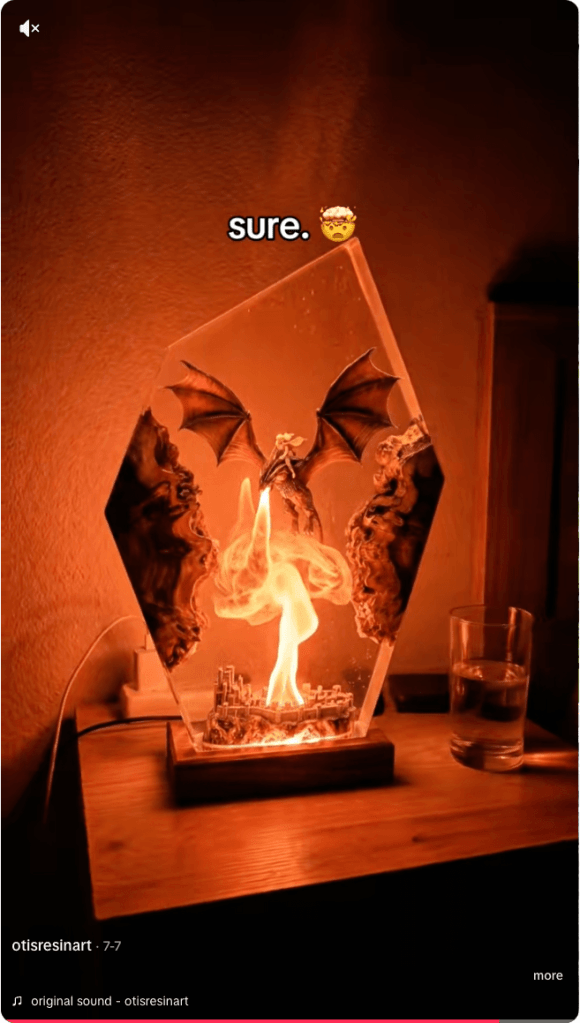
Resin art has become a popular corner of TikTok, with some videos attracting millions of views. But not every glossy, colorful post is what it claims to be. Scammers are using the look of handmade resin art to trick buyers, collectors, and even fellow artists into sending money for work that either doesn’t exist or wasn’t created by the person posting it.
There are plenty of genuine resin artists on TikTok. Unfortunately, the platform has also attracted scammers who steal videos and impersonate legitimate creators.
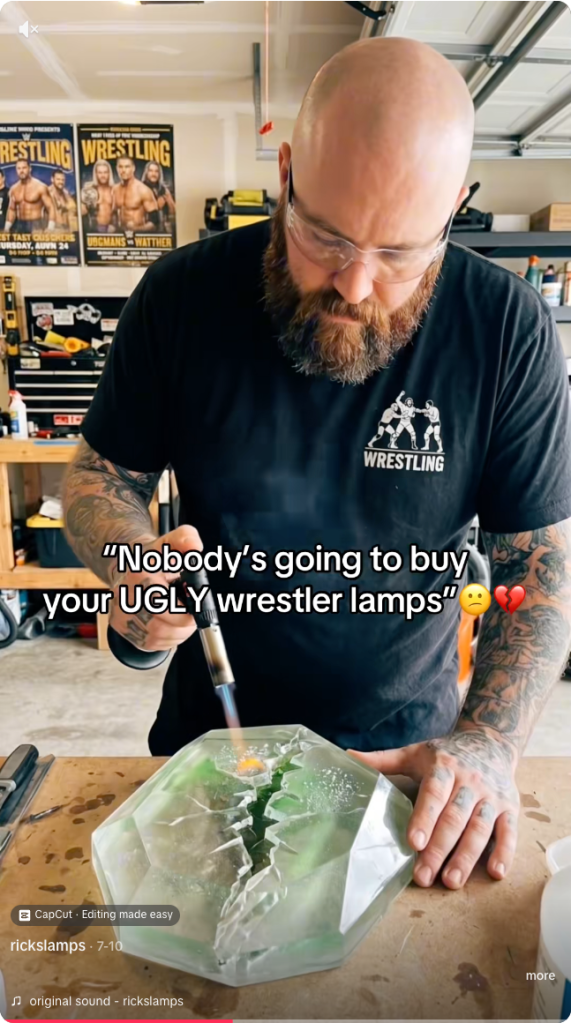
The scam is fairly straightforward. A TikTok account presents itself as a resin artist, posts satisfying videos, and invites people to “DM to order.” In some cases, the videos are stolen from other creators, the account has no real process footage, and the seller disappears after receiving payment.
One resin artist discovered that scammers were using their videos to impersonate them and scam TikTok users. They shared the following comment:
Ridiculous TikTok scammer…lol. Profile says they’re a resin artist and to DM them to order, but none of the videos are theirs. When I wrote to them asking them to take down the many videos of mine that they posted, passing them off as their own with no credit, their answer was that they aren’t a resin artist and are just sharing videos they like Literally about 1/4 of “their” videos are mine
These scams often rely on trust and urgency. The account may show polished clips of poured resin, finished coasters, trays, jewelry, or wall art, then push buyers to move the conversation into direct messages. Once the buyer moves to a different platform, the scammer typically requests a deposit, full payment, or personal details with little chance of being held accountable.
And real artists don’t just get their work ripped off. A scammer may contact a creator claiming to want to buy, feature, or license their work, but the real goal is to extract fees, banking information, or other sensitive data. Social media art scams are often repetitive because they are built from the same templates and scripts.
Different videos, same script
How to spot a TikTok resin art scam
The safest approach is the boring one: verify before you pay. If the artwork looks amazing but the seller’s identity is vague, the risk is real.
Check the TikTok account
Before ordering, look for signs that the artist is genuine:
The account didn’t appear overnight and has a history of original posts.
The same videos don’t appear under multiple creator names or belong to another artist.
The creator shows themselves making the artwork, with consistent process videos, a recognizable workspace, and works in progress.
The videos don’t contain obvious AI artifacts, such as impossible resin effects or objects moving after they’ve supposedly been sealed inside hardened resin.
Comments raising concerns haven’t been deleted or buried under generic praise.
The seller isn’t pushing you to order only through direct messages or asking for payment before you’ve verified who they are.
Check the website
If you do click through to a website, spend a few minutes checking it before you buy:
Look for a genuine returns and refunds policy, a physical business address, company or VAT details (where applicable), and consistent contact information.
Check how old the website is. Scam sites often use domains that were registered only weeks or months ago, especially when they claim to have been selling handmade products for years.
Search for recent independent reviews rather than relying on testimonials published on the site itself.
Run a reverse image search on the product photos to see whether they’ve been copied from another artist.
Only pay using a method that offers buyer protection, such as a credit card or PayPal. If a seller insists on a bank transfer, cryptocurrency, or another irreversible payment method, walk away.
Not every resin art account is a scam. Many belong to genuine artists, and that’s why impersonation scams can be so convincing.
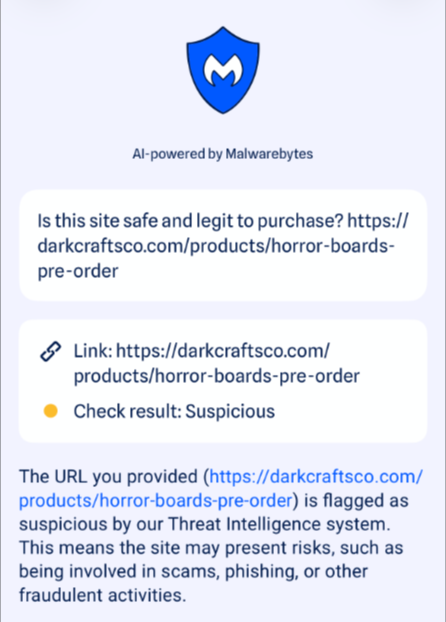
If you’re unsure, paste the website address into Malwarebytes Scam Guard and ask whether it shows signs of being fraudulent. It can help identify suspiciously new domains and other common scam indicators.
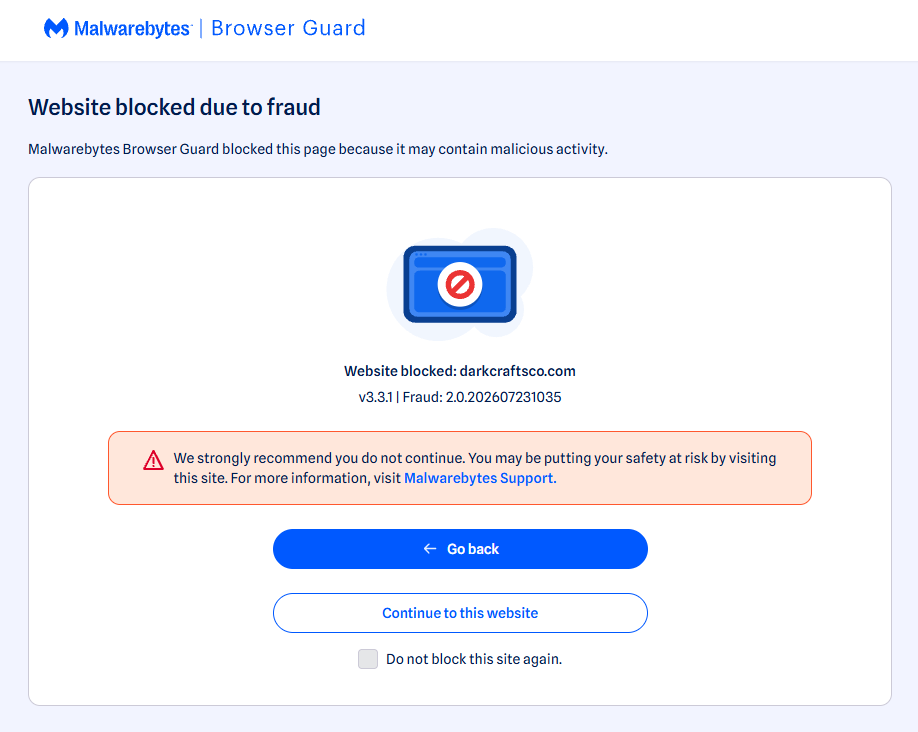
Use real-time web protection to block known fraudulent and malicious websites, like Browser Guard did for this web shop:
Browser Guard blocks the fraudulent website
Both are free—making them much cheaper than sending money to a scammer.
Something feel off? Check it before you click.
Malwarebytes Scam Guard helps you analyze suspicious links, texts, and screenshots instantly.
Resin art has become a popular corner of TikTok, with some videos attracting millions of views. But not every glossy, colorful post is what it claims to be. Scammers are using the look of handmade resin art to trick buyers, collectors, and even fellow artists into sending money for work that either doesn’t exist or wasn’t created by the person posting it.
There are plenty of genuine resin artists on TikTok. Unfortunately, the platform has also attracted scammers who steal videos and impersonate legitimate creators.
The scam is fairly straightforward. A TikTok account presents itself as a resin artist, posts satisfying videos, and invites people to “DM to order.” In some cases, the videos are stolen from other creators, the account has no real process footage, and the seller disappears after receiving payment.
One resin artist discovered that scammers were using their videos to impersonate them and scam TikTok users. They shared the following comment:
Ridiculous TikTok scammer…lol. Profile says they’re a resin artist and to DM them to order, but none of the videos are theirs. When I wrote to them asking them to take down the many videos of mine that they posted, passing them off as their own with no credit, their answer was that they aren’t a resin artist and are just sharing videos they like Literally about 1/4 of “their” videos are mine
These scams often rely on trust and urgency. The account may show polished clips of poured resin, finished coasters, trays, jewelry, or wall art, then push buyers to move the conversation into direct messages. Once the buyer moves to a different platform, the scammer typically requests a deposit, full payment, or personal details with little chance of being held accountable.
And real artists don’t just get their work ripped off. A scammer may contact a creator claiming to want to buy, feature, or license their work, but the real goal is to extract fees, banking information, or other sensitive data. Social media art scams are often repetitive because they are built from the same templates and scripts.
Different videos, same script
How to spot a TikTok resin art scam
The safest approach is the boring one: verify before you pay. If the artwork looks amazing but the seller’s identity is vague, the risk is real.
Check the TikTok account
Before ordering, look for signs that the artist is genuine:
The account didn’t appear overnight and has a history of original posts.
The same videos don’t appear under multiple creator names or belong to another artist.
The creator shows themselves making the artwork, with consistent process videos, a recognizable workspace, and works in progress.
The videos don’t contain obvious AI artifacts, such as impossible resin effects or objects moving after they’ve supposedly been sealed inside hardened resin.
Comments raising concerns haven’t been deleted or buried under generic praise.
The seller isn’t pushing you to order only through direct messages or asking for payment before you’ve verified who they are.
Check the website
If you do click through to a website, spend a few minutes checking it before you buy:
Look for a genuine returns and refunds policy, a physical business address, company or VAT details (where applicable), and consistent contact information.
Check how old the website is. Scam sites often use domains that were registered only weeks or months ago, especially when they claim to have been selling handmade products for years.
Search for recent independent reviews rather than relying on testimonials published on the site itself.
Run a reverse image search on the product photos to see whether they’ve been copied from another artist.
Only pay using a method that offers buyer protection, such as a credit card or PayPal. If a seller insists on a bank transfer, cryptocurrency, or another irreversible payment method, walk away.
Not every resin art account is a scam. Many belong to genuine artists, and that’s why impersonation scams can be so convincing.
If you’re unsure, paste the website address into Malwarebytes Scam Guard and ask whether it shows signs of being fraudulent. It can help identify suspiciously new domains and other common scam indicators.
Use real-time web protection to block known fraudulent and malicious websites, like Browser Guard did for this web shop:
Browser Guard blocks the fraudulent website
Both are free—making them much cheaper than sending money to a scammer.
Something feel off? Check it before you click.
Malwarebytes Scam Guard helps you analyze suspicious links, texts, and screenshots instantly.
Starting last year, Android users have been seeing the “number is now verified” system notification more frequently. And in some cases people even find mysterious outgoing text messages in their history that they never sent.
These messages often cause confusion and even anxiety: has a virus infected the phone? Are tech giants spying on our phone numbers? Let’s break down how this feature works, and what potential risks it poses to your privacy.
Why all these phone number verifications?
The notification pops up whenever Google’s phone number verification feature is triggered on your device.
Its main job is to make sure that the SIM card tied to a specific phone number is physically inside the phone. Once verified, that phone number automatically links to all active Google accounts on the device.
There are several key services that rely on the verification. Most importantly, it drives Rich Communication Services (RCS) — the modern standard for “rich” messaging right inside your standard text messaging app. It feels like a popular chat app, but without the need to install anything extra. Unlike iMessage, which is locked to Apple’s ecosystem, RCS works across compatible smartphones on various platforms since it’s an industry standard set by carriers rather than tech giants. Since recently, both Apple and Android users have been able to exchange RCS messages. For this feature to work in the Google Messages app, Google needs ongoing confirmation that your SIM card is active. If you pull out your SIM card, RCS chats will keep working for about eight days before turning off automatically.
According to Google, phone number verification serves several other purposes as well:
Account security and recovery. A verified phone number enables quick sign-ins to your Google account, two-factor authentication, and easy password recovery.
Emergency services and device location. This includes Find My Device, remote phone lock, and sharing your location with emergency responders — including via satellite messaging on the Pixel 9 and certain other modern smartphones.
Better sharing on Google. This feature helps other people find you faster on Google Meet or Duo, use Quick Share to send you files, and see that the phone number is linked to your profile.
Google also recently confirmed that this data is used to counter scams. Verification helps block calls or text messages from spoofed numbers if both the real owner of the number and the recipient are using Android devices with verified phone numbers.
How does Google verify phone numbers?
Phone number verification technology has been around on Android for quite some time — Google was sending test SMS messages as far back as in 2019. However, it became widely visible to most users following a Google system update in September 2025. The process was baked deeper into the operating system, with number verification now running by default during initial phone setup, and re-running periodically in the background.
There are two main technical methods for the verification process. Which one your device uses depends on your mobile carrier and your version of Android.
The older method relies on hidden text messages. In the background, your smartphone sends a specialized technical text message to Google’s servers. The operating system intercepts this message before you ever see it, which is why it rarely appears in your standard text messaging app. However, due to software glitches or Android customization quirks, these texts occasionally surface in sent messages, startling users. They typically look like this: “(string of letters and numbers) Google is re-verifying the phone# of this device.” Google explicitly notes in its help documentation that standard messaging rates from your carrier may apply.
In recent years, direct carrier verification (via carrier APIs) has become the primary verification method. This approach is more modern and secure than previous ones. The smartphone sends an encrypted token containing device and SIM card identifiers to the mobile carrier, and the carrier responds with the confirmed phone number. The whole process takes just a couple of seconds and runs completely unnoticed by the user. Both global telecom giants and smaller providers have connected to this verification network. Notably, third-party apps can also tap into the results of this check through Firebase Phone Number Verification, getting confirmation from your mobile carrier about which phone number is active on the device.
“Other device data” and privacy concerns
In its official documentation, Google notes that device identifiers and SIM card data may be collected during verification. In practice, this refers to unique identifiers for the SIM card and its subscriber profile (ICCID and IMSI), as well as technical device identifiers needed to run mobile networks. Google also explicitly states that it does not sell your personal information, including your phone number, to anyone.
Naturally, sending additional unique identifiers to Google — especially given the scale of its advertising business — always raises concern among privacy-conscious users. Here’s what you should keep in mind:
Metadata collection. To run RCS, Google exchanges data with your mobile carrier. Even when the content of RCS messages is encrypted, metadata — such as who is messaging whom and when — can still be stored on your carrier’s servers, and in some cases, on Google’s servers. As cybersecurity experts at the Electronic Frontier Foundation point out, if privacy is your top priority, you’re better off sticking to dedicated encrypted messaging apps.
Linked accounts. If you have both a personal and a work Google account (or a personal and a family account) set up on the same phone, the verified number will automatically link to both profiles. The operating system does not offer built-in tools to separate numbers for different accounts on a single device.
Phone number leaks. Apps on your device can already access various user identifiers, including your phone number. However, this verification system makes it easier to link multiple phone numbers to a user who has multiple Google accounts. And while Google states that it never sells phone numbers, you cannot say the same with confidence about obscure third-party Android developers.
On by default. The feature is enabled out of the box, and most users have no idea their device is silently querying their carrier in the background. While you can opt out in your Google settings once you notice it, there’s no guarantee that any data already collected will actually be deleted.
Turning off verification — why and how
For most users, verification is genuinely helpful. It simplifies account recovery, makes finding a lost phone easier, powers modern text messaging features, and assists emergency services when every second counts.
However, if you want to minimize the amount of metadata sent to Google, mobile carriers, and other data brokers, you can manually disable the feature. Here’s how:
Open your Android smartphone’s settings.
Tap Google, select the account at the top, and switch to the All services tab.
Under Privacy and security, tap Phone number verification.
Turn off automatic phone number verification.
If you also want to disable Better sharing on Google, go to Settings → Google → Manage your Google Account → Personal info → Contact info → Phone, select your number, and turn off the setting.
If you have multiple Google accounts on your phone, you’ll need to repeat these steps for each one. Unfortunately, verification sometimes turns itself back on automatically, and there’s no reliable way to prevent this on standard consumer phones with stock software.
Keep in mind that disabling verification means losing access to RCS chats in Google Messages — forcing you to fall back on basic SMS, or switch to alternative secure messaging apps. You also won’t be able to use that number for quick account recovery should you forget your password.
To thoughtfully customize your privacy settings across all your devices — regardless of the operating system, browser, or app — check out our free online tool, Privacy Checker.
Curious about other privacy risks you might not even know exist? Check out our other deep dives, here:
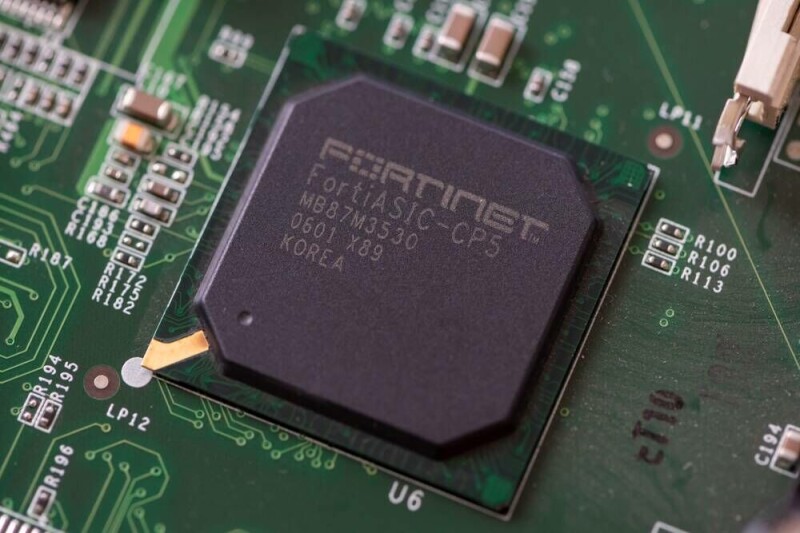
Fortinet on Tuesday revealed it will use Intel Foundry to fab its sixth-gen Security Processor (SP6), a nice win for Chipzilla's sputtering chipmaking biz. The chips feature dedicated accelerators designed specifically for the security and cryptographic operations required by modern hardware firewalls. The custom chips are one of Fortinet's defining features. Many cybersecurity hardware players build appliances around commodity hardware like x86 and Arm CPUs, but Fortinet prefers custom application-specific integrated circuits (ASICs). The two companies haven't said when the chips will enter production, much less what the SP6's speeds and feeds will entail, though we imagine it'll have a bit more pep than Fortinet's SP5 chips. The SP5 launched in 2023 and boasted support for layer 7 firewalling and IPsec VPN connectivity at speeds exceeding 30 Gbps. Throughput fell when advanced threat protection or SSL inspection was enabled, but Fortinet still claimed a speedy 4.3 Gbps and 3.3 Gbps, respectively. As you might have already figured out, Fortinet's SP line is designed primarily for smaller appliances like SD-WAN gateways, rather than larger datacenter-centric appliances built around its beefier NP and CP-series parts. While Intel couldn't offer much detail on the chip itself, we're told it will use the older Intel 4 process node rather than the leading-edge 18A process tech. Chipzilla also suggested Fortinet will draw on its experience in disaggregated semiconductor design and advanced packaging, which could mean a chiplet architecture with greater scalability. With so little detail, we can only speculate. Intel declined to say which technologies beyond Intel 4 the chip will use. The x86 giant also declined to comment on the availability of the product, noting only that "details regarding the Fortinet Security Processor 6 availability will be announced at a later date." While SP6 won't use the latest chipmaking tech, it will be built in an American fab by an American company, offering a level of supply chain security that remains difficult to find. If you want even remotely leading-edge silicon, Intel, Samsung, and TSMC are your only options. US-based production can still mean settling for a less advanced process, although TSMC's first Arizona fab has already begun churning out 4 nm silicon and Samsung aims to bring its new Texas plant online this year. Fortinet would not be the first to enlist Intel's manufacturing might for sensitive workloads. Under DARPA's HIVE program, the chipmaker built an eight-core, 528-thread processor with 1 TB/s silicon-photonics interconnects specifically to accelerate graph analytics workloads. But it doesn't stop at the DoD. Supply chain security is something Intel has leaned into as it has sought to reinvent itself from an integrated device manufacturer serving mainly itself, and occasionally the US government, into a full-fledged foundry ready to compete with Samsung and, ultimately, TSMC. In mid-2024, Uncle Sam awarded Intel $3 billion to establish a secure enclave for manufacturing chips for government agencies. Since then, the US government has taken a 9.9 percent stake in the American chip biz. ®
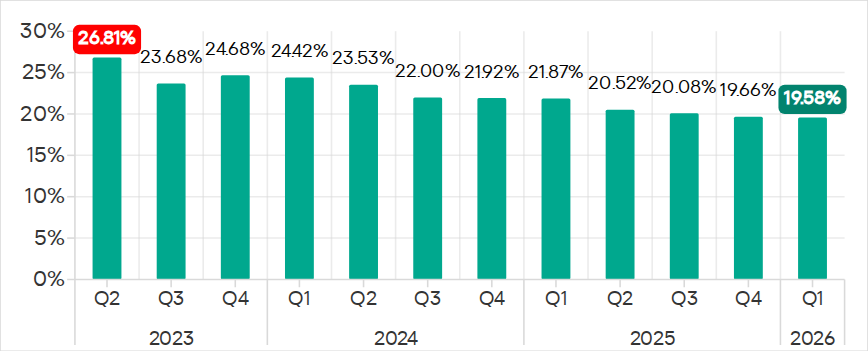
The percentage of ICS computers on which malicious objects were blocked continued to decrease, reaching 19.6% in Q1 2026. This is the lowest value in three years, and it is 1.4 times lower than in Q2 2023.
Percentage of ICS computers on which malicious objects were blocked, Q2 2023–Q1 2026
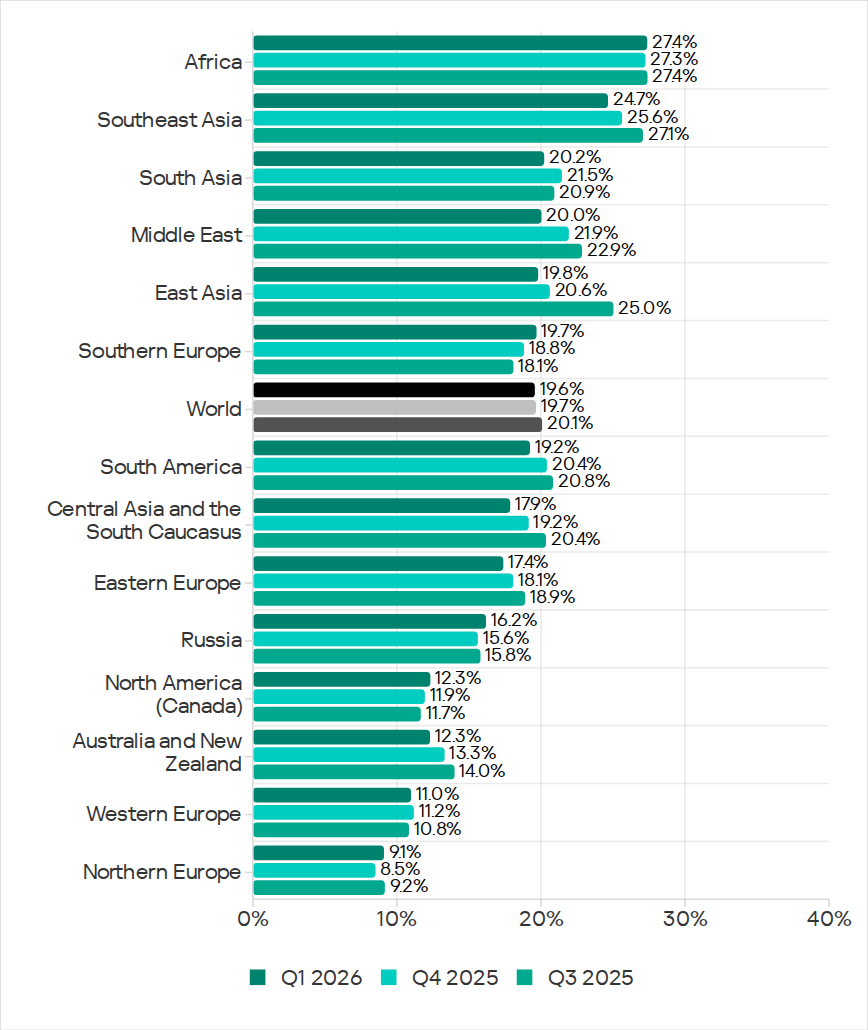
Regionally, the percentages ranged from 9.1% in Northern Europe to 27.4% in Africa.
Regions ranked by percentage of attacked ICS computers
The percentage of ICS computers on which malicious objects were blocked increased in five regions over the quarter, most notably in Southern Europe, Northern Europe, and Russia.
In Q1 2026, Southern Europe led the way in growth for internet and email threats. The region also saw the fastest growth in spyware, as well as malicious scripts and phishing pages.
In Russia, the percentage of ICS computers on which malicious objects were blocked exceeded the figures for the previous two quarters. Russia saw an increase in the percentage for threats from the internet, and a slight increase in the figure for threats from email clients (Russia is one of three regions where this figure did not decrease).
Among the threat categories, the greatest increases were observed in the percentages for denylisted internet resources, as well as spyware (distributed in the region via the internet and email clients).
Selected industries
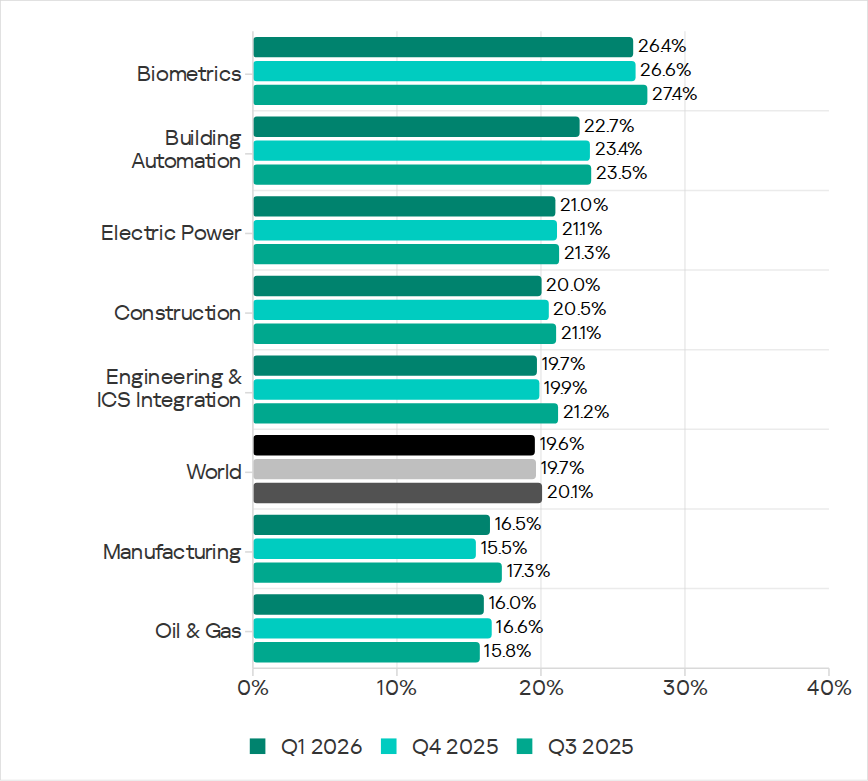
Biometric systems (26.4%) traditionally rank top among the industries and OT infrastructure types covered in this report in terms of the percentage of ICS computers on which malicious objects were blocked. These systems are characterized by internet access, extensive email use for data exchange and approvals (such as access granting), and, in many cases, minimal cybersecurity controls within the organizations that use these systems.
Industries ranked by the percentage of ICS computers on which malicious objects were blocked
Biometric systems rank first among industries in terms of email threats. At the same time, unlike other industries, the percentage for email threats in biometric systems exceeds that for internet threats.
In all selected industries, the global average follows a downward trend. In Q1 2026, the percentage of ICS computers on which malicious objects were blocked increased only in the manufacturing sector — by 1.0 pp. The percentages for this industry increased across 10 regions, with the most notable increases in Western Europe, Northern Europe, and Russia.
Threat categories
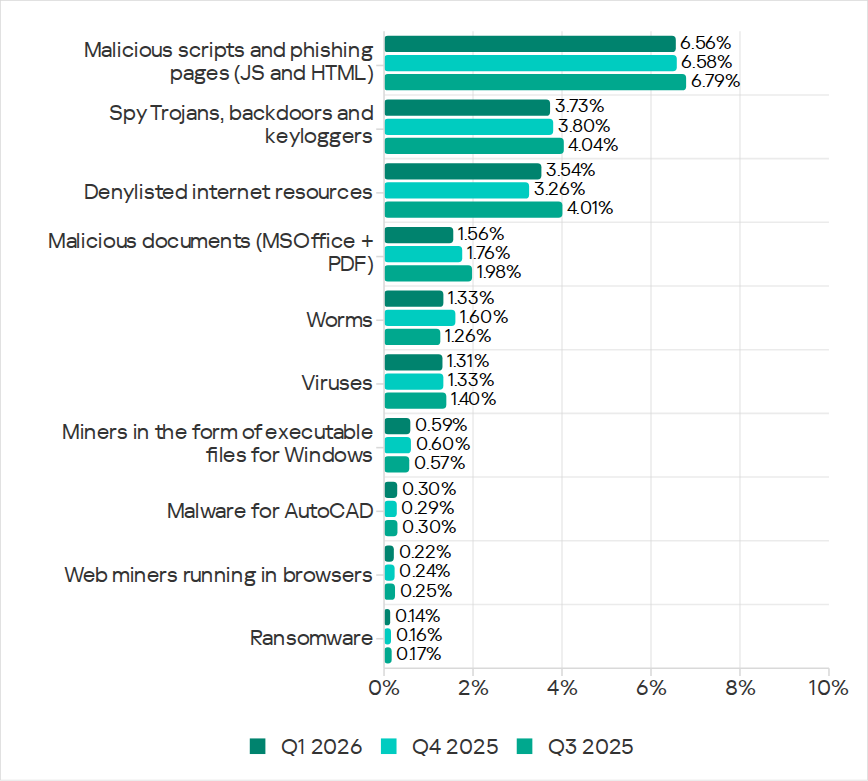
In Q1 2026, Kaspersky security solutions blocked malware from 10,052 different malware families of various categories on industrial automation systems.
Over the quarter, the percentage of ICS computers on which denylisted internet resources were blocked increased (after decreasing over the previous two quarters), and there was a slight increase in the percentage for AutoCAD malware.
Percentage of ICS computers on which the activity of malicious objects from various categories was prevented
Malicious scripts and phishing pages (JS and HTML)
Malicious scripts and phishing pages retained their to spot among threat categories by the percentage of ICS computers on which these threats were blocked. The global average in Q1 2026 was 6.56%.
Over the quarter, the percentages increased in four regions. The most significant change was observed in Southern Europe (9.85%, +0.94 pp). The figures for malicious scripts in the region increased over three consecutive quarters.
Among the selected industries, across all regions, the highest percentages for the malicious scripts and phishing pages category were recorded for biometric systems (19.59%) and building automation (15.43%) in Southern Europe. These same industries lead in similar rankings for malicious documents and spyware.
Spyware
The percentage of ICS computers on which spyware was blocked decreased over two consecutive quarters, dropping to 3.73%. Despite the decline, spyware has ranked second among threat categories by the percentage of attacked computers for three consecutive quarters.
The percentages increased in five regions over the quarter, most notably in Southern Europe (5.46%, +0.35 pp) and Russia (2.84%, +0.24 pp).
In Southern Europe, the percentage of ICS computers on which spyware was blocked increased in all the selected industries except manufacturing. The greatest increase was observed in biometric systems.
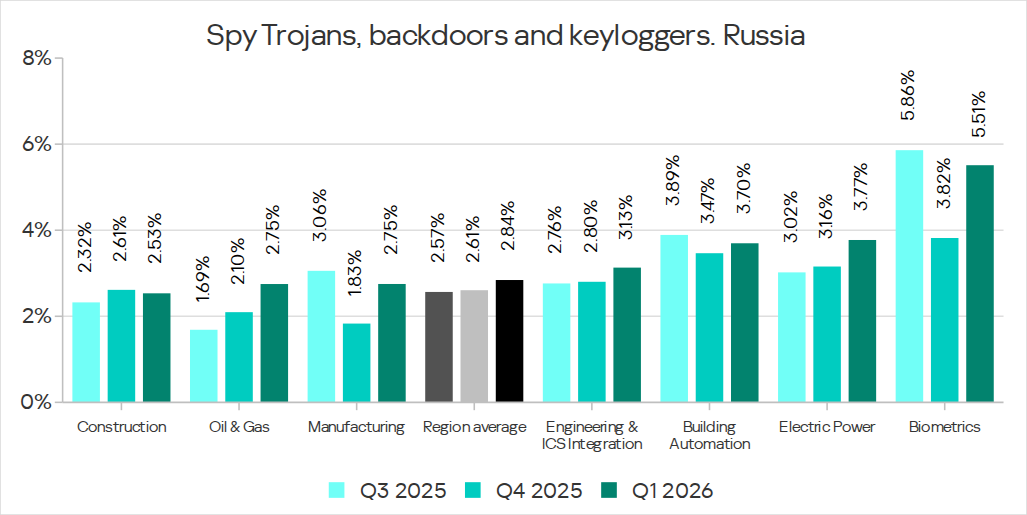
Among the selected industries, the highest percentage of spyware in Russia was recorded in biometric systems. That said, the percentage of ICS computers on which spyware was blocked increased in all industries in the region except construction. The percentage figure has been increasing for two consecutive quarters in the oil and gas industry (by a factor of 1.63 over six months), and for three consecutive quarters in engineering and ICS integration, as well as electric power. In the remaining sectors, the values have been fluctuating.
Percentage of ICS computers on which spyware was blocked in various industries in Russia, Q3 2025–Q1 2026
Denylisted internet resources
The percentage of ICS computers on which denylisted internet resources were blocked increased to 3.54%.
The most notable increase over the quarter occurred in Southeast Asia (4.58%, +0.65 pp). Among the industries in the region, the highest percentage figures for this threat category were recorded in electric power and construction. Over the quarter, the largest increases in percentages figures were observed in the electric power and manufacturing industries.
In North America (Canada), denylisted internet resources (2.14%) showed the greatest increase among all categories — by a factor of 1.22.
Among the selected industries across all regions, the highest percentage figures for the denylisted internet resources category were in the electric power (7.11%) and construction (6.25%) industries in Southeast Asia.
Malicious documents (Microsoft Office + PDF)
The percentage figure for this category decreased over two consecutive quarters, reaching its lowest value (1.56%) for the entire period of observations in Q1 2026. It increased just in two regions: Australia and New Zealand (1.12%, +0.04 pp), and Russia (0.62%, +0.01 pp).
Among the selected industries across all regions, the highest percentages for malicious documents were recorded for biometric systems (9.02%) and building automation (6.97%) in Southern Europe. These same industries also lead in similar rankings for malicious scripts and spyware.
Ransomware
The percentage of ICS computers on which ransomware was blocked has decreased for two consecutive quarters, dropping to 0.14%. This is the lowest value among all categories.
The percentage increased in two regions: North America (Canada) (0.11%, +0.04 pp) and slightly in Northern Europe (0.06%, +0.01 pp).
Among the selected industries across all regions, the highest percentages for ransomware were recorded in the oil and gas and manufacturing industries (0.92% and 0.65%, respectively) in Central Asia and the South Caucasus, and in biometric systems (0.89%) in Russia.
Miners in the form of executable files for Windows
The percentage of ICS computers on which miners in the form of executable files for Windows were blocked decreased to 0.59%.
The percentage increased in seven regions. The largest increase was observed in Africa (0.63%, +0.16 pp). Among the selected industries, the largest increases in the region were in the manufacturing and oil and gas industries.
Among the selected industries across all regions, the highest percentages for miners in the form of executable files were recorded in construction (1.99%), biometric systems (1.98%), and the oil and gas industry (1.97%) in Central Asia and the South Caucasus.
Web miners
The percentage of ICS computers on which web miners were blocked has been declining for a year, and in Q1 2026, it reached the lowest value for the entire period under review (0.22%).
At the same time, the percentage increased in seven regions. The largest increases were observed in South Asia (0.28%, +0.11 pp), the Middle East (0.31%, +0.09 pp), and Africa (0.34%, +0.08 pp). Despite the increases, the percentages in these regions for Q1 2026 did not exceed those observed in 2023–2024 and in Q1 2025.
Among the selected industries across all regions, the highest percentages for web miners were recorded for biometric systems (0.97%) in Russia. Biometric systems in South Asia (0.79%) ranked second, and the electric power sector in Southeast Asia (0.76%) ranked third.
Worms
The percentage of ICS computers on which worms were blocked decreased to 1.33%.
The percentage decreased across all regions following an increase in the previous quarter (due to a wave of phishing attacks that distributed the Backdoor.MSIL.XWorm backdoor worm across all regions of the world).
Among the selected industries across all regions, the highest percentage figure for worms was recorded for biometric systems (4.80%) in Central Asia and the South Caucasus. Two industries in Africa – biometric systems (4.04%) and electric power (3.53%) – took the second and third spots, respectively.
Viruses
The percentage of ICS computers on which viruses were blocked decreased to 1.31%.
The top 3 regions by this figure remained the same: Southeast Asia (6.11%, first by a wide margin), Africa (4.15%), and East Asia (2.97%). These same regions are also among the leaders by the percentage of systems affected by AutoCAD malware. The largest increase in this figure was observed in Africa (+0.41 pp).
Among the selected industries across all regions, the highest percentages for viruses were recorded in the construction industry (6.35%) and building automation (5.50%) in Southeast Asia.
Malware for AutoCAD
The percentage of ICS computers on which malware for AutoCAD was blocked increased to 0.30%.
The most notable increase over the quarter was observed in Africa, with the region’s percentage figure rising by 0.47 pp, a very significant increase for this category, and almost doubling (to 0.91%).
Among the selected industries across all regions, the highest percentages for AutoCAD malware were recorded in the construction industry in East Asia (5.58%) and Southeast Asia (3.87%).
Main threat sources
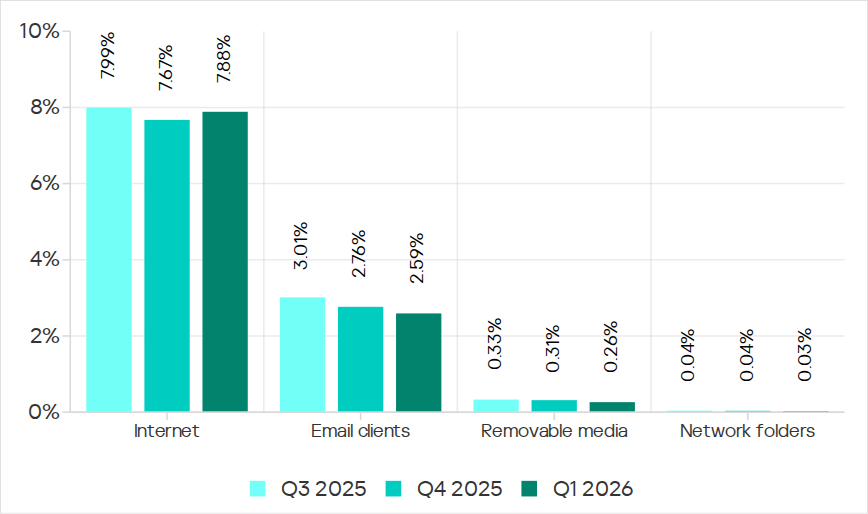
In Q1 2026, the average percentages across all threat sources, except threats from the internet, decreased globally.
Percentage of ICS computers on which malicious objects from various sources were blocked
Internet
The percentage of ICS computers on which threats from the internet were blocked increased to 7.88%. However, over the past three years, the percentage figure for internet threats has followed a downward trend.
The largest increases in the percentages were recorded in Southern Europe (8.59%, +0.59 pp), Southeast Asia (10.16%, +0.55 pp), and Northern Europe (4.47%, +0.51 pp).
Among the selected industries across all regions, the highest percentages for threats from the internet were recorded in electric power (13.16%) and construction (12.55%) in Southeast Asia, and in the engineering and ICS integration sector (12.33%) in South Asia.
Email clients
The percentage of ICS computers on which threats delivered via email clients were blocked decreased to 2.59%. This is a three-year low.
The percentage of this threat source increased in three regions: Southern Europe (6.54%, +0.2 pp), East Asia (1.5%, +0.09 pp), and slightly in Russia (0.7%, +0.04 pp).
Among the selected industries across all regions, the highest percentages for email threats were recorded for biometric systems (19.78%) and building automation (12.34%) in Southern Europe. In these two industries, the percentage of ICS computers on which email threats are blocked is higher than the percentage for threats from the internet. A similar situation was observed in two other instances, both in biometric systems (in South America and Southeast Asia).
Removable media
The percentage of ICS computers on which threats were detected when connecting removable media continued to decrease, reaching its lowest value for the period under review (0.26%).
Among the selected industries across all regions, the highest percentages for removable media threats blocked on ICS computers were observed in the electric power sector in Central Asia and the South Caucasus (1.45%), East Asia (1.34%), and Africa (1.16%).
Network folders
The percentage of ICS computers on which threats are blocked in network folders is steadily decreasing. In Q1 2026, it was the lowest for the period under review (0.029%).
East Asia has traditionally led by a wide margin. The percentage for East Asia (0.135%) is 27 times higher than the lowest regional value (recorded in Northern Europe).
The largest increases in the percentages for threats from network folders were observed in Africa (0.037%, +0.006 pp) and South America (0.013%, +0.006 pp).
Among the selected industries across all regions, the construction industry in East Asia, at 0.36%, holds the top positions in the ranking by the percentage of ICS computers on which threats are blocked in network folders.
The percentage of ICS computers on which malicious objects were blocked continued to decrease, reaching 19.6% in Q1 2026. This is the lowest value in three years, and it is 1.4 times lower than in Q2 2023.
Percentage of ICS computers on which malicious objects were blocked, Q2 2023–Q1 2026
Regionally, the percentages ranged from 9.1% in Northern Europe to 27.4% in Africa.
Regions ranked by percentage of attacked ICS computers
The percentage of ICS computers on which malicious objects were blocked increased in five regions over the quarter, most notably in Southern Europe, Northern Europe, and Russia.
In Q1 2026, Southern Europe led the way in growth for internet and email threats. The region also saw the fastest growth in spyware, as well as malicious scripts and phishing pages.
In Russia, the percentage of ICS computers on which malicious objects were blocked exceeded the figures for the previous two quarters. Russia saw an increase in the percentage for threats from the internet, and a slight increase in the figure for threats from email clients (Russia is one of three regions where this figure did not decrease).
Among the threat categories, the greatest increases were observed in the percentages for denylisted internet resources, as well as spyware (distributed in the region via the internet and email clients).
Selected industries
Biometric systems (26.4%) traditionally rank top among the industries and OT infrastructure types covered in this report in terms of the percentage of ICS computers on which malicious objects were blocked. These systems are characterized by internet access, extensive email use for data exchange and approvals (such as access granting), and, in many cases, minimal cybersecurity controls within the organizations that use these systems.
Industries ranked by the percentage of ICS computers on which malicious objects were blocked
Biometric systems rank first among industries in terms of email threats. At the same time, unlike other industries, the percentage for email threats in biometric systems exceeds that for internet threats.
In all selected industries, the global average follows a downward trend. In Q1 2026, the percentage of ICS computers on which malicious objects were blocked increased only in the manufacturing sector — by 1.0 pp. The percentages for this industry increased across 10 regions, with the most notable increases in Western Europe, Northern Europe, and Russia.
Threat categories
In Q1 2026, Kaspersky security solutions blocked malware from 10,052 different malware families of various categories on industrial automation systems.
Over the quarter, the percentage of ICS computers on which denylisted internet resources were blocked increased (after decreasing over the previous two quarters), and there was a slight increase in the percentage for AutoCAD malware.
Percentage of ICS computers on which the activity of malicious objects from various categories was prevented
Malicious scripts and phishing pages (JS and HTML)
Malicious scripts and phishing pages retained their to spot among threat categories by the percentage of ICS computers on which these threats were blocked. The global average in Q1 2026 was 6.56%.
Over the quarter, the percentages increased in four regions. The most significant change was observed in Southern Europe (9.85%, +0.94 pp). The figures for malicious scripts in the region increased over three consecutive quarters.
Among the selected industries, across all regions, the highest percentages for the malicious scripts and phishing pages category were recorded for biometric systems (19.59%) and building automation (15.43%) in Southern Europe. These same industries lead in similar rankings for malicious documents and spyware.
Spyware
The percentage of ICS computers on which spyware was blocked decreased over two consecutive quarters, dropping to 3.73%. Despite the decline, spyware has ranked second among threat categories by the percentage of attacked computers for three consecutive quarters.
The percentages increased in five regions over the quarter, most notably in Southern Europe (5.46%, +0.35 pp) and Russia (2.84%, +0.24 pp).
In Southern Europe, the percentage of ICS computers on which spyware was blocked increased in all the selected industries except manufacturing. The greatest increase was observed in biometric systems.
Among the selected industries, the highest percentage of spyware in Russia was recorded in biometric systems. That said, the percentage of ICS computers on which spyware was blocked increased in all industries in the region except construction. The percentage figure has been increasing for two consecutive quarters in the oil and gas industry (by a factor of 1.63 over six months), and for three consecutive quarters in engineering and ICS integration, as well as electric power. In the remaining sectors, the values have been fluctuating.
Percentage of ICS computers on which spyware was blocked in various industries in Russia, Q3 2025–Q1 2026
Denylisted internet resources
The percentage of ICS computers on which denylisted internet resources were blocked increased to 3.54%.
The most notable increase over the quarter occurred in Southeast Asia (4.58%, +0.65 pp). Among the industries in the region, the highest percentage figures for this threat category were recorded in electric power and construction. Over the quarter, the largest increases in percentages figures were observed in the electric power and manufacturing industries.
In North America (Canada), denylisted internet resources (2.14%) showed the greatest increase among all categories — by a factor of 1.22.
Among the selected industries across all regions, the highest percentage figures for the denylisted internet resources category were in the electric power (7.11%) and construction (6.25%) industries in Southeast Asia.
Malicious documents (Microsoft Office + PDF)
The percentage figure for this category decreased over two consecutive quarters, reaching its lowest value (1.56%) for the entire period of observations in Q1 2026. It increased just in two regions: Australia and New Zealand (1.12%, +0.04 pp), and Russia (0.62%, +0.01 pp).
Among the selected industries across all regions, the highest percentages for malicious documents were recorded for biometric systems (9.02%) and building automation (6.97%) in Southern Europe. These same industries also lead in similar rankings for malicious scripts and spyware.
Ransomware
The percentage of ICS computers on which ransomware was blocked has decreased for two consecutive quarters, dropping to 0.14%. This is the lowest value among all categories.
The percentage increased in two regions: North America (Canada) (0.11%, +0.04 pp) and slightly in Northern Europe (0.06%, +0.01 pp).
Among the selected industries across all regions, the highest percentages for ransomware were recorded in the oil and gas and manufacturing industries (0.92% and 0.65%, respectively) in Central Asia and the South Caucasus, and in biometric systems (0.89%) in Russia.
Miners in the form of executable files for Windows
The percentage of ICS computers on which miners in the form of executable files for Windows were blocked decreased to 0.59%.
The percentage increased in seven regions. The largest increase was observed in Africa (0.63%, +0.16 pp). Among the selected industries, the largest increases in the region were in the manufacturing and oil and gas industries.
Among the selected industries across all regions, the highest percentages for miners in the form of executable files were recorded in construction (1.99%), biometric systems (1.98%), and the oil and gas industry (1.97%) in Central Asia and the South Caucasus.
Web miners
The percentage of ICS computers on which web miners were blocked has been declining for a year, and in Q1 2026, it reached the lowest value for the entire period under review (0.22%).
At the same time, the percentage increased in seven regions. The largest increases were observed in South Asia (0.28%, +0.11 pp), the Middle East (0.31%, +0.09 pp), and Africa (0.34%, +0.08 pp). Despite the increases, the percentages in these regions for Q1 2026 did not exceed those observed in 2023–2024 and in Q1 2025.
Among the selected industries across all regions, the highest percentages for web miners were recorded for biometric systems (0.97%) in Russia. Biometric systems in South Asia (0.79%) ranked second, and the electric power sector in Southeast Asia (0.76%) ranked third.
Worms
The percentage of ICS computers on which worms were blocked decreased to 1.33%.
The percentage decreased across all regions following an increase in the previous quarter (due to a wave of phishing attacks that distributed the Backdoor.MSIL.XWorm backdoor worm across all regions of the world).
Among the selected industries across all regions, the highest percentage figure for worms was recorded for biometric systems (4.80%) in Central Asia and the South Caucasus. Two industries in Africa – biometric systems (4.04%) and electric power (3.53%) – took the second and third spots, respectively.
Viruses
The percentage of ICS computers on which viruses were blocked decreased to 1.31%.
The top 3 regions by this figure remained the same: Southeast Asia (6.11%, first by a wide margin), Africa (4.15%), and East Asia (2.97%). These same regions are also among the leaders by the percentage of systems affected by AutoCAD malware. The largest increase in this figure was observed in Africa (+0.41 pp).
Among the selected industries across all regions, the highest percentages for viruses were recorded in the construction industry (6.35%) and building automation (5.50%) in Southeast Asia.
Malware for AutoCAD
The percentage of ICS computers on which malware for AutoCAD was blocked increased to 0.30%.
The most notable increase over the quarter was observed in Africa, with the region’s percentage figure rising by 0.47 pp, a very significant increase for this category, and almost doubling (to 0.91%).
Among the selected industries across all regions, the highest percentages for AutoCAD malware were recorded in the construction industry in East Asia (5.58%) and Southeast Asia (3.87%).
Main threat sources
In Q1 2026, the average percentages across all threat sources, except threats from the internet, decreased globally.
Percentage of ICS computers on which malicious objects from various sources were blocked
Internet
The percentage of ICS computers on which threats from the internet were blocked increased to 7.88%. However, over the past three years, the percentage figure for internet threats has followed a downward trend.
The largest increases in the percentages were recorded in Southern Europe (8.59%, +0.59 pp), Southeast Asia (10.16%, +0.55 pp), and Northern Europe (4.47%, +0.51 pp).
Among the selected industries across all regions, the highest percentages for threats from the internet were recorded in electric power (13.16%) and construction (12.55%) in Southeast Asia, and in the engineering and ICS integration sector (12.33%) in South Asia.
Email clients
The percentage of ICS computers on which threats delivered via email clients were blocked decreased to 2.59%. This is a three-year low.
The percentage of this threat source increased in three regions: Southern Europe (6.54%, +0.2 pp), East Asia (1.5%, +0.09 pp), and slightly in Russia (0.7%, +0.04 pp).
Among the selected industries across all regions, the highest percentages for email threats were recorded for biometric systems (19.78%) and building automation (12.34%) in Southern Europe. In these two industries, the percentage of ICS computers on which email threats are blocked is higher than the percentage for threats from the internet. A similar situation was observed in two other instances, both in biometric systems (in South America and Southeast Asia).
Removable media
The percentage of ICS computers on which threats were detected when connecting removable media continued to decrease, reaching its lowest value for the period under review (0.26%).
Among the selected industries across all regions, the highest percentages for removable media threats blocked on ICS computers were observed in the electric power sector in Central Asia and the South Caucasus (1.45%), East Asia (1.34%), and Africa (1.16%).
Network folders
The percentage of ICS computers on which threats are blocked in network folders is steadily decreasing. In Q1 2026, it was the lowest for the period under review (0.029%).
East Asia has traditionally led by a wide margin. The percentage for East Asia (0.135%) is 27 times higher than the lowest regional value (recorded in Northern Europe).
The largest increases in the percentages for threats from network folders were observed in Africa (0.037%, +0.006 pp) and South America (0.013%, +0.006 pp).
Among the selected industries across all regions, the construction industry in East Asia, at 0.36%, holds the top positions in the ranking by the percentage of ICS computers on which threats are blocked in network folders.

 Login
Login