Reading view

Fake Fortnite rewards are stealing players’ accounts

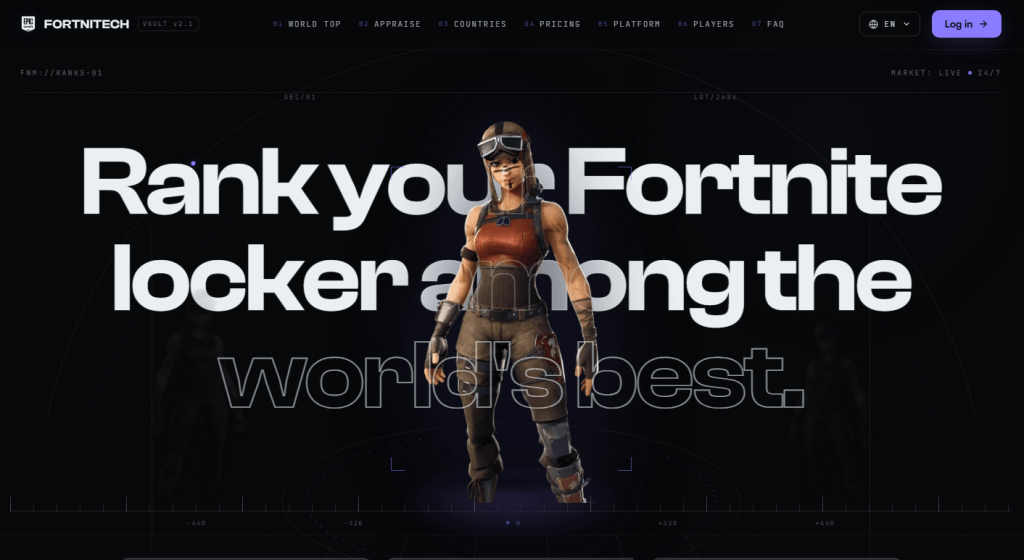
Fortnite scam pages like the ones below appear by the dozen every day, recycled endlessly under different names and designs.

One version promises $50 from a fake superhero collaboration. Another claims it can calculate what your locker is worth. Both lead to the same destination: a fake Epic Games login page designed to steal your account. It’s an old trick, but it still catches people out.

The short version

If a website promises free V-Bucks, cash, or a tool to calculate your locker’s value, then asks you to log in with your Epic account to get it, it’s not run by Epic.

Epic doesn’t offer an official tool that values accounts, and no legitimate giveaway requires you to sign in through a third-party site. You’re just handing your Epic username and password to scammers.

If you or your child entered your Epic login details on one of these sites, assume the account has been compromised. Change the password immediately, turn on two-factor authentication, and don’t reuse that password on any other accounts.

Why do they want your login?

A stolen Fortnite account can be worth real money. Criminals can take over accounts with rare skins, spend any saved payment methods, sell the account on underground marketplaces, or use it to scam the owner’s friends. They may also try the same username and password on other online accounts, hoping the password has been reused.

Why Fortnite?

Fortnite still attracts around 110 million monthly players and has more than 650 million registered accounts. That alone makes it an attractive target for cybercriminals.

The audience’s age matters too. In December 2022, the US Federal Trade Commission (FTC) fined Epic Games a record $520 million, after alleging that the company knew children made up a substantial share of its player base and left voice and text chat turned on by default, exposing them to strangers. The Consumer Financial Protection Bureau (CFPB) also cites industry experts who say young gamers are especially vulnerable to phishing because they spend more time on social media and are less familiar with social engineering.

The game is also built around visible status. Skins, emotes, and pickaxes cost real money, making the idea that “your locker has a price” feel plausible. Rare or discontinued skins really do sell for hundreds of dollars on unofficial marketplaces, even though Epic offers no official way to cash out V-Bucks and selling accounts violates its terms of service. That kernel of truth is exactly what these locker-value scams exploit.

That’s also what makes them more convincing than a simple V-Bucks giveaway. Instead of promising something for nothing, they play on curiosity about something the player already owns. That’s probably why this version keeps coming back.

How the scam works

Some pages promise rewards:

Fake Fortnite giveaway

Others skip the free-reward pitch and frame the locker itself as hidden value the player is owed:
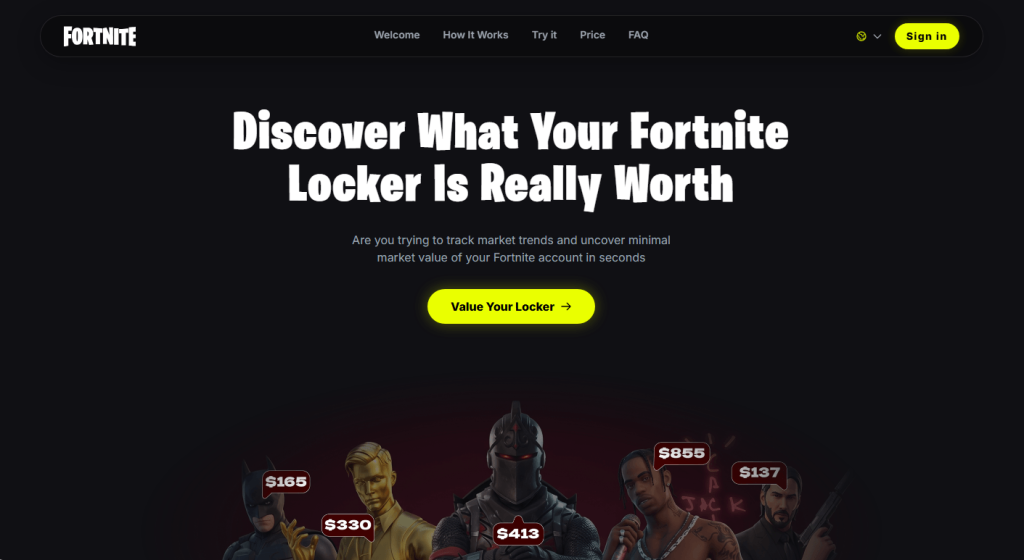
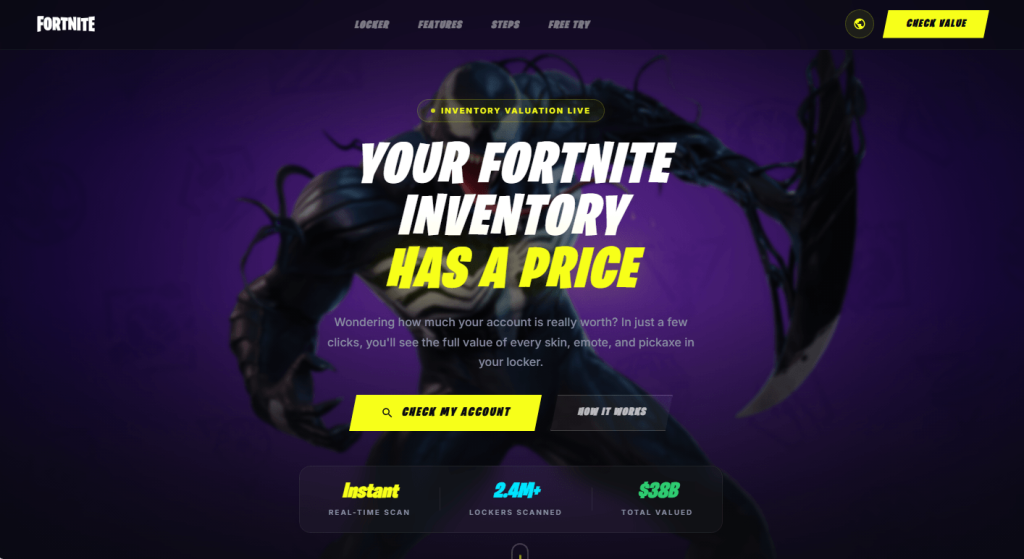
  • Fake Fortnite offers and tools
  • Fake Fortnite offers and tools
  • Fake Fortnite offers and tools

Others frame it as competition instead of currency:

  • Fake Fortnite competition
  • Fake Fortnite competition

The hook changes, but the fake login page doesn’t. These sites all do the same thing. They ask you to sign in with your Epic account so they can steal your username and password.

Another variant: Fake settlement claims

This one borrows a real story. Epic did settle with the FTC for $520 million, and real payments are still going out in 2026. But the real settlement pays actual dollars through the FTC’s own process, not in-game V-Bucks through an “Epic Games Locker,” and the claim window closed in July 2025.

References to an “EU Regulatory Mandate” and the case number shown on these pages don’t match any genuine legal action.

How to stay safe

Fortnite scams change constantly, but the advice doesn’t.

  • Use Malwarebytes Browser Guard to block known phishing sites before they have a chance to steal your login details.
  • Only sign in to your Epic account at epicgames.com. If another website asks for your Epic login, leave.
  • Be sceptical of offers that sound too good to be true. Free V-Bucks, locker valuations, and surprise rewards are all common phishing lures.
  • Verify refunds and settlements on the official source. If a page claims you’re owed money, check the regulator’s website yourself instead of following its links.
  • Turn on two-factor authentication (2FA). It can stop attackers from accessing your account even if they steal your password.
  • Use Malwarebytes Scam Guard. It can help you identify suspicious links and messages before you click.

What to do if you clicked

  • Change the Epic password immediately, going directly to epicgames.com, not through the suspicious link.
  • Turn on two-factor authentication if you haven’t already.
  • Check your linked email for password reset requests or login alerts you didn’t make.
  • Review connected devices/services on the account and remove anything unfamiliar.
  • If you entered payment details anywhere, contact your card issuer and monitor your statements.
  • Report the page to Epic’s support and flag it as phishing in your browser.
  • If the page claims to be part of a settlement or refund, verify it on the regulator’s official website. For the Epic settlement, that’s ftc.gov.

Stop threats before they can do any harm.

Malwarebytes Browser Guard blocks phishing pages and malicious sites automatically. Free, one click to install. Add it to your browser →

  •  

Fake Fortnite rewards are stealing players’ accounts

Fortnite scam pages like the ones below appear by the dozen every day, recycled endlessly under different names and designs.

One version promises $50 from a fake superhero collaboration. Another claims it can calculate what your locker is worth. Both lead to the same destination: a fake Epic Games login page designed to steal your account. It’s an old trick, but it still catches people out.

The short version

If a website promises free V-Bucks, cash, or a tool to calculate your locker’s value, then asks you to log in with your Epic account to get it, it’s not run by Epic.

Epic doesn’t offer an official tool that values accounts, and no legitimate giveaway requires you to sign in through a third-party site. You’re just handing your Epic username and password to scammers.

If you or your child entered your Epic login details on one of these sites, assume the account has been compromised. Change the password immediately, turn on two-factor authentication, and don’t reuse that password on any other accounts.

Why do they want your login?

A stolen Fortnite account can be worth real money. Criminals can take over accounts with rare skins, spend any saved payment methods, sell the account on underground marketplaces, or use it to scam the owner’s friends. They may also try the same username and password on other online accounts, hoping the password has been reused.

Why Fortnite?

Fortnite still attracts around 110 million monthly players and has more than 650 million registered accounts. That alone makes it an attractive target for cybercriminals.

The audience’s age matters too. In December 2022, the US Federal Trade Commission (FTC) fined Epic Games a record $520 million, after alleging that the company knew children made up a substantial share of its player base and left voice and text chat turned on by default, exposing them to strangers. The Consumer Financial Protection Bureau (CFPB) also cites industry experts who say young gamers are especially vulnerable to phishing because they spend more time on social media and are less familiar with social engineering.

The game is also built around visible status. Skins, emotes, and pickaxes cost real money, making the idea that “your locker has a price” feel plausible. Rare or discontinued skins really do sell for hundreds of dollars on unofficial marketplaces, even though Epic offers no official way to cash out V-Bucks and selling accounts violates its terms of service. That kernel of truth is exactly what these locker-value scams exploit.

That’s also what makes them more convincing than a simple V-Bucks giveaway. Instead of promising something for nothing, they play on curiosity about something the player already owns. That’s probably why this version keeps coming back.

How the scam works

Some pages promise rewards:

Fake Fortnite giveaway

Others skip the free-reward pitch and frame the locker itself as hidden value the player is owed:
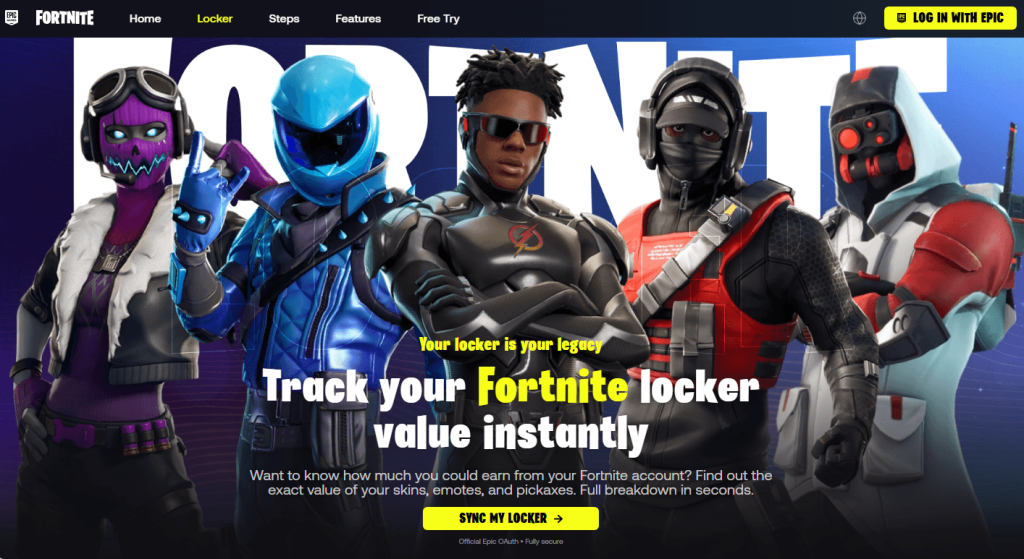
  • Fake Fortnite offers and tools
  • Fake Fortnite offers and tools
  • Fake Fortnite offers and tools

Others frame it as competition instead of currency:
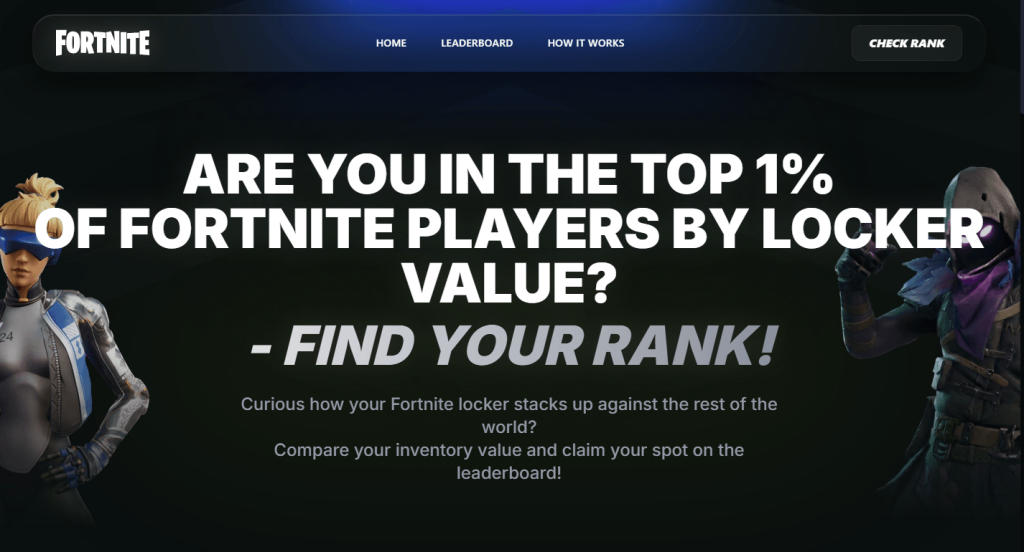
  • Fake Fortnite competition
  • Fake Fortnite competition

The hook changes, but the fake login page doesn’t. These sites all do the same thing. They ask you to sign in with your Epic account so they can steal your username and password.

Another variant: Fake settlement claims
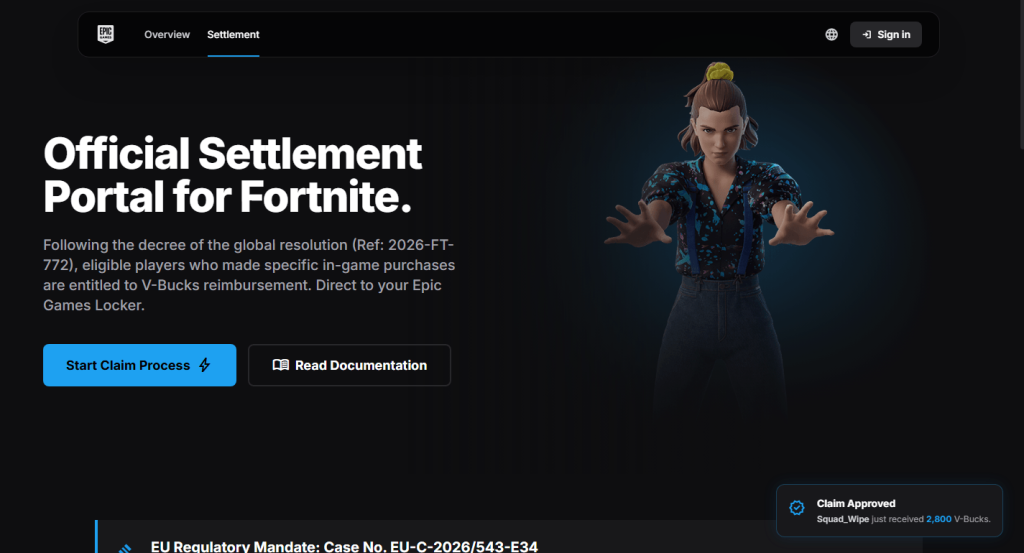
This one borrows a real story. Epic did settle with the FTC for $520 million, and real payments are still going out in 2026. But the real settlement pays actual dollars through the FTC’s own process, not in-game V-Bucks through an “Epic Games Locker,” and the claim window closed in July 2025.

References to an “EU Regulatory Mandate” and the case number shown on these pages don’t match any genuine legal action.

How to stay safe

Fortnite scams change constantly, but the advice doesn’t.

  • Use Malwarebytes Browser Guard to block known phishing sites before they have a chance to steal your login details.
  • Only sign in to your Epic account at epicgames.com. If another website asks for your Epic login, leave.
  • Be sceptical of offers that sound too good to be true. Free V-Bucks, locker valuations, and surprise rewards are all common phishing lures.
  • Verify refunds and settlements on the official source. If a page claims you’re owed money, check the regulator’s website yourself instead of following its links.
  • Turn on two-factor authentication (2FA). It can stop attackers from accessing your account even if they steal your password.
  • Use Malwarebytes Scam Guard. It can help you identify suspicious links and messages before you click.

What to do if you clicked

  • Change the Epic password immediately, going directly to epicgames.com, not through the suspicious link.
  • Turn on two-factor authentication if you haven’t already.
  • Check your linked email for password reset requests or login alerts you didn’t make.
  • Review connected devices/services on the account and remove anything unfamiliar.
  • If you entered payment details anywhere, contact your card issuer and monitor your statements.
  • Report the page to Epic’s support and flag it as phishing in your browser.
  • If the page claims to be part of a settlement or refund, verify it on the regulator’s official website. For the Epic settlement, that’s ftc.gov.

Stop threats before they can do any harm.

Malwarebytes Browser Guard blocks phishing pages and malicious sites automatically. Free, one click to install. Add it to your browser →
  •  

Fake Flash Player installs AtlasRAT

Researchers have described a campaign that delivers a remote access Trojan (RAT) called AtlasRAT through a fake Flash Player installer.

People still go looking for “Flash player” because a surprising amount of content and software was built around Flash and never properly migrated. Users often just want a quick way to get those old sites, games, or business apps working again.

The underlying problem is that Adobe ended support for Flash Player on December 31, 2020, and actively blocks Flash content from running in the official player.

Attackers know some people will still search for Flash to run a game or a business app, so they wrap their malware in a fake Flash‑related installer that looks familiar and legitimate.

That’s likely why the AtlasRAT infection chain starts with a Delphi executable named FlashPlay.Exe, masquerading as an “AGE Flash Player” installer. The first-stage loader runs entirely in memory and reconstructs additional payloads instead of dropping obvious files to disk, a technique often referred to as fileless malware.

The final payload (MainDll.Dll) uses a self‑signed certificate spoofing CN=update.Microsoft.Com to initialize Transport Layer Security (TLS) client communication and encrypts Command and Control (C2) traffic.

A self‑signed certificate means the owner signs with their own key instead of a trusted certificate authority (CA). That means an attacker can create a certificate claiming to be update.microsoft.com or google.com, even though they don’t control those domains. A web browser would reject such a certificate with a warning. Custom malware, however, can simply ignore the operating system’s trust checks and use it to set up encrypted C2.

Once AtlasRAT is installed, the operator gains long‑term remote control of the infected Windows system with capabilities including:

  • Collecting credentials via offline keylogging
  • Gathering system information and identifying installed security products
  • Exfiltrating data over encrypted channels
  • Injecting DLLs into applications like WeChat, potentially allowing the attacker to monitor or manipulate messaging, or to hide malware activity or connectivity.

Based on historical data, the researchers suspect that AtlasRAT is a reusable framework or commercial offering rather than a one-off tool used by a single group.

How to stay safe

When looking for apps and software to perform a specific task, remember that cybercriminals often exploit popular searches in semi-targeted attacks. In previous campaigns, for example, AtlasRAT has also been distributed as a fake VPN installer.

Some tips to keep this RAT, and others, off your computer:

  • Carefully check what you’re about to install. Sponsored search results are not a guarantee that software is legitimate.
  • Use an up-to-date, real-time anti-malware solution to detect and block remote access Trojans. Malwarebytes detected AtlasRAT as Malware.AI.1710771908
  • Keep your operating system, browser, and security software up to date.

From reporting threats to removing them.

Cybersecurity risks should never spread beyond a headline. Keep threats off your devices by downloading Malwarebytes today.

  •  

Fake Flash Player installs AtlasRAT

Researchers have described a campaign that delivers a remote access Trojan (RAT) called AtlasRAT through a fake Flash Player installer.

People still go looking for “Flash player” because a surprising amount of content and software was built around Flash and never properly migrated. Users often just want a quick way to get those old sites, games, or business apps working again.

The underlying problem is that Adobe ended support for Flash Player on December 31, 2020, and actively blocks Flash content from running in the official player.

Attackers know some people will still search for Flash to run a game or a business app, so they wrap their malware in a fake Flash‑related installer that looks familiar and legitimate.

That’s likely why the AtlasRAT infection chain starts with a Delphi executable named FlashPlay.Exe, masquerading as an “AGE Flash Player” installer. The first-stage loader runs entirely in memory and reconstructs additional payloads instead of dropping obvious files to disk, a technique often referred to as fileless malware.

The final payload (MainDll.Dll) uses a self‑signed certificate spoofing CN=update.Microsoft.Com to initialize Transport Layer Security (TLS) client communication and encrypts Command and Control (C2) traffic.

A self‑signed certificate means the owner signs with their own key instead of a trusted certificate authority (CA). That means an attacker can create a certificate claiming to be update.microsoft.com or google.com, even though they don’t control those domains. A web browser would reject such a certificate with a warning. Custom malware, however, can simply ignore the operating system’s trust checks and use it to set up encrypted C2.

Once AtlasRAT is installed, the operator gains long‑term remote control of the infected Windows system with capabilities including:

  • Collecting credentials via offline keylogging
  • Gathering system information and identifying installed security products
  • Exfiltrating data over encrypted channels
  • Injecting DLLs into applications like WeChat, potentially allowing the attacker to monitor or manipulate messaging, or to hide malware activity or connectivity.

Based on historical data, the researchers suspect that AtlasRAT is a reusable framework or commercial offering rather than a one-off tool used by a single group.

How to stay safe

When looking for apps and software to perform a specific task, remember that cybercriminals often exploit popular searches in semi-targeted attacks. In previous campaigns, for example, AtlasRAT has also been distributed as a fake VPN installer.

Some tips to keep this RAT, and others, off your computer:

  • Carefully check what you’re about to install. Sponsored search results are not a guarantee that software is legitimate.
  • Use an up-to-date, real-time anti-malware solution to detect and block remote access Trojans. Malwarebytes detected AtlasRAT as Malware.AI.1710771908
  • Keep your operating system, browser, and security software up to date.

From reporting threats to removing them.

Cybersecurity risks should never spread beyond a headline. Keep threats off your devices by downloading Malwarebytes today.

  •  

Buying TikTok views or followers? Here’s what you’re really getting

A whole industry has sprung up around selling TikTok “growth.”

Cheap views by the hundred, pre-made ad accounts, and polished sales pages promising a repeatable path to serious revenue.

None of it is officially sanctioned by TikTok, and depending on what you’re buying, you could end up wasting money, losing your account, or handing your login details to scammers.

Scam 1: Sites selling cheap likes and engagement

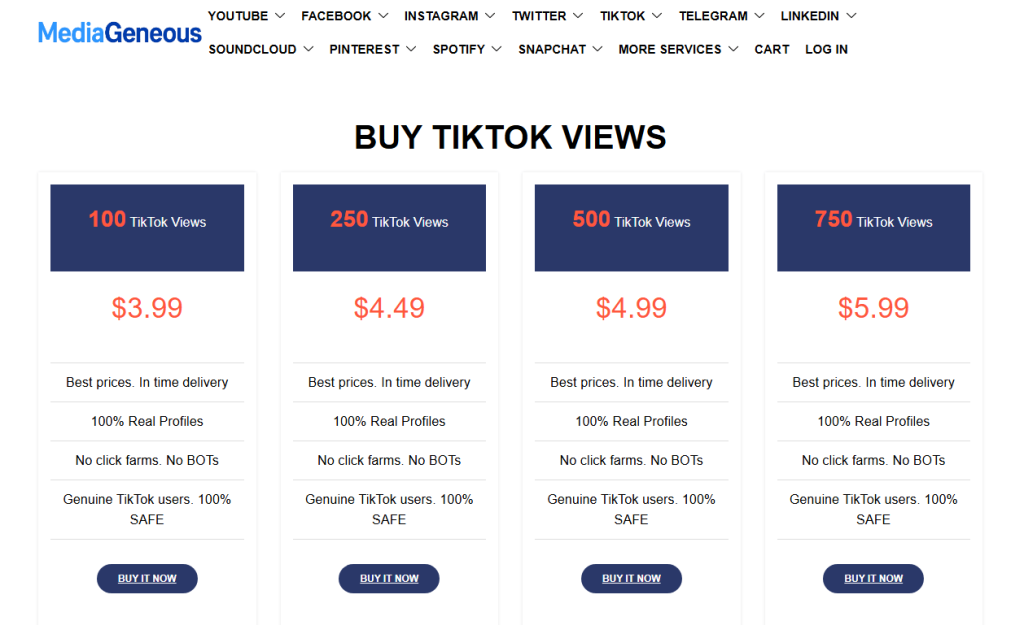
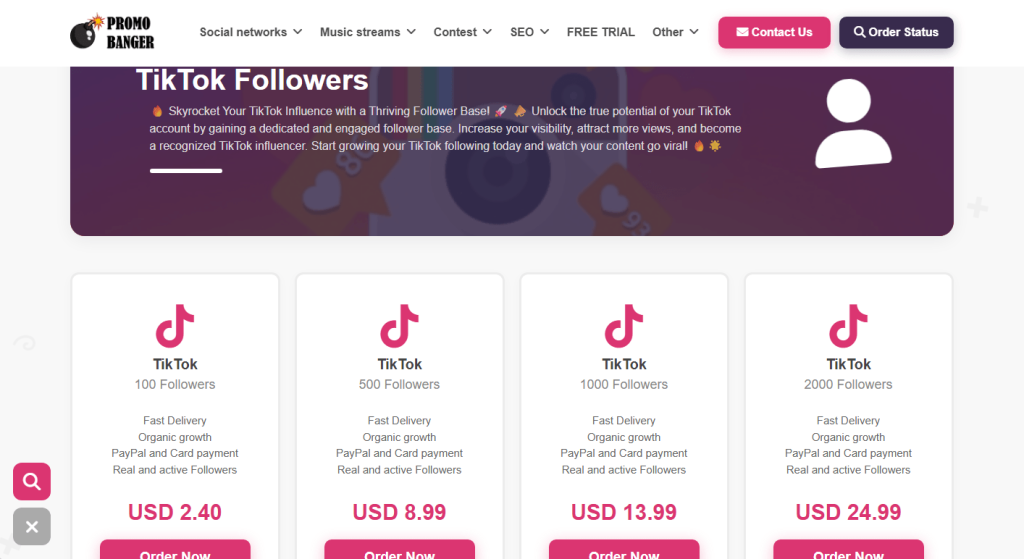
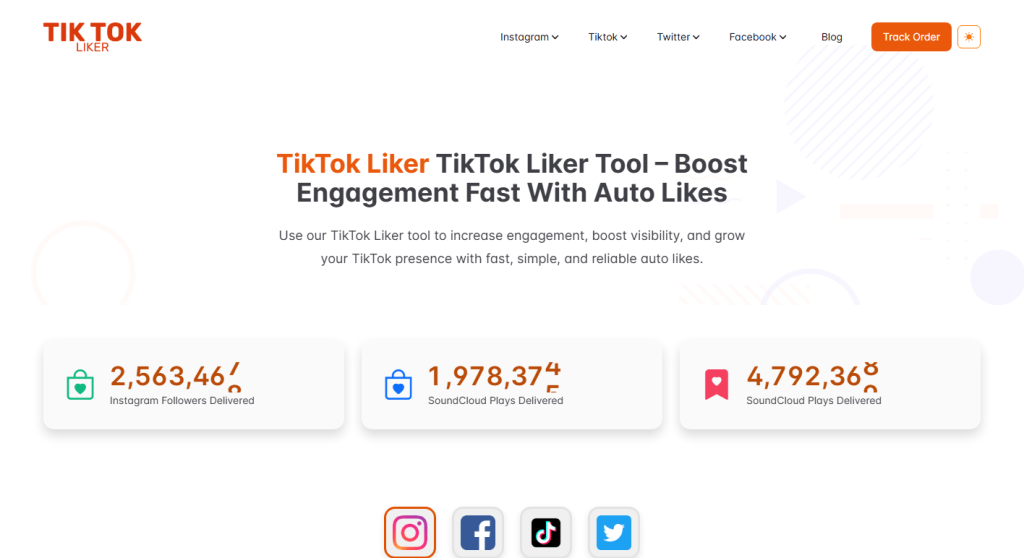
Sites selling bulk engagement all look remarkably similar.

They offer small bundles of views, likes, or followers for a few pounds, usually alongside identical packages for YouTube, Instagram, and other platforms.

The sales pitch is almost always the same: “100% real profiles,” “no bots, no click farms,” and “completely safe.”

Those claims are worth reading carefully because they’re addressing the biggest concern buyers already have.

At this price point, bulk engagement is usually generated through bots, click farms, or other artificial means—the very thing these sites insist they don’t use.

Even if your engagement numbers increase initially, TikTok’s fraud detection systems can remove artificial engagement, and accounts that repeatedly use these services risk being flagged or restricted.

Scam 2: The “aged” ad account marketplace

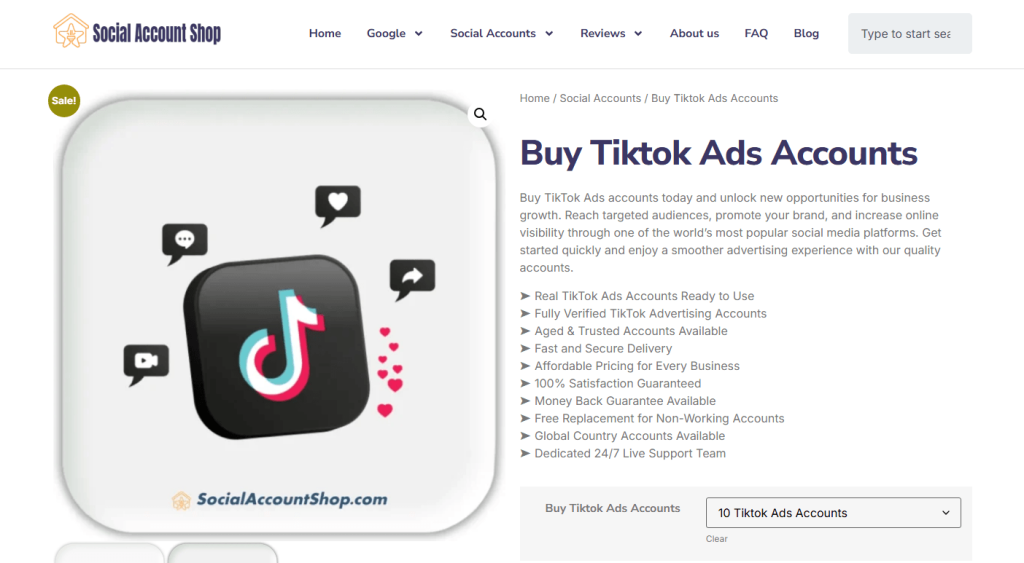
Another common offer is bulk TikTok Ads accounts sold as “aged” or “trusted,” often bundled with a replacement guarantee if an account stops working. The pitch is that you skip the hassle of setting up and verifying a new advertising account.

The problem is that you don’t know how those accounts were created. Many are built using stolen or synthetic identities, compromised payment details, or other deceptive methods. Buying one means inheriting that history—and the very real risk that TikTok detects it and suspends the account, along with any campaigns or ad budget attached to it. A replacement guarantee won’t help if your advertising is suddenly brought to a halt.

Scam 3: The growth framework

A third type of offer is less obviously a scam and more of a marketing funnel.

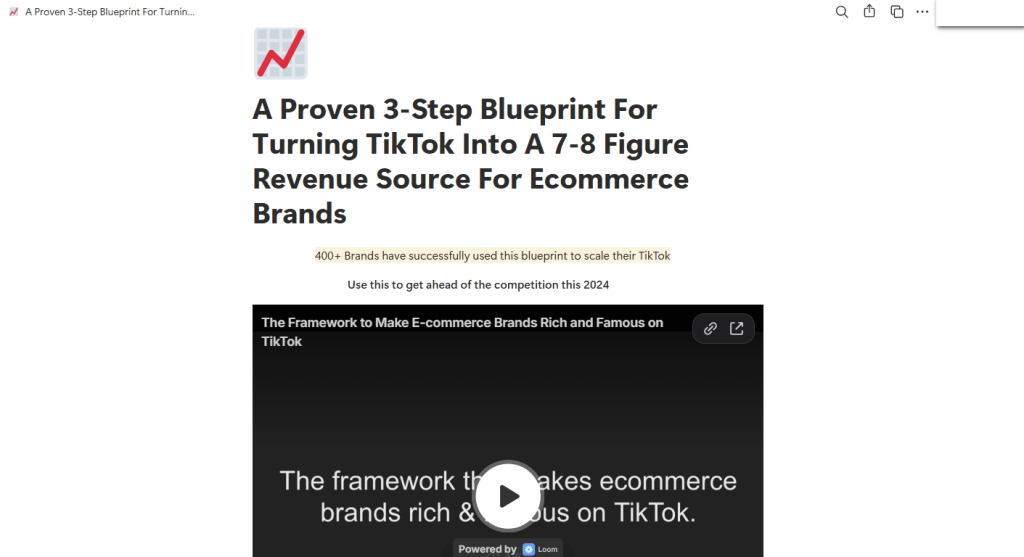
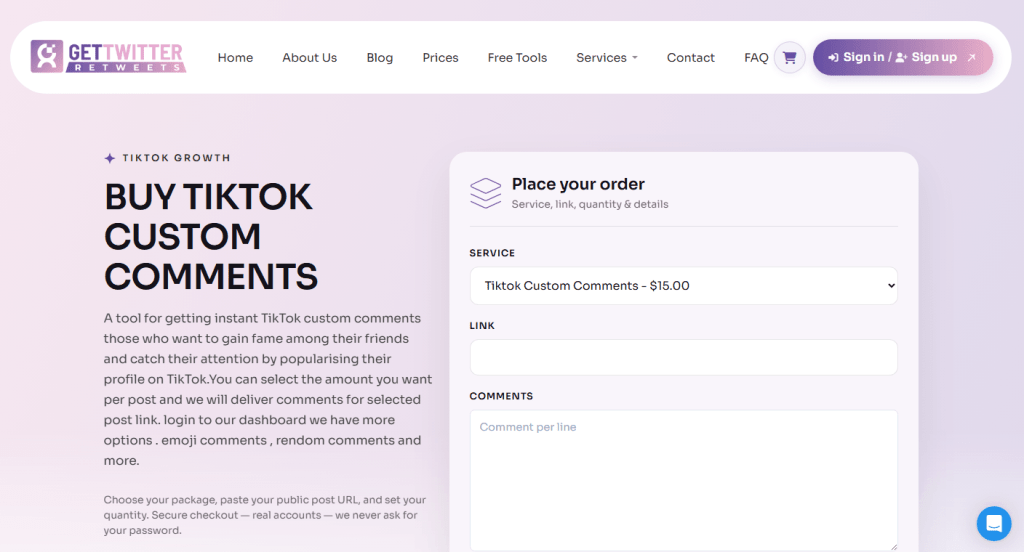
Slick landing pages—often hosted on free platforms and paired with an embedded video—promise a “proven blueprint” for turning TikTok into a major source of income, usually backed by impressive but unverifiable claims about past clients.

Companies offering TikTok growth frameworks

The immediate goal is usually to collect your email address, and sometimes your phone number, before revealing what’s actually for sale. That might be a paid course, a “done-for-you” management service, or a request for direct access to your TikTok Shop or Ads account.

What happens next varies, but the common thread is the same: you’re being asked to trust an unverified third party with your business, your money, or your account.

What you’re really signing up for

Not every TikTok marketing service is a scam. But if someone’s offering thousands of views for a few pounds, bulk “aged” ad accounts, or guaranteed growth, you’re in a very different part of the market.

These services promise shortcuts. What they often deliver is fake engagement, accounts with questionable histories, or requests for access to your own account.

At best, you’ve wasted your money on engagement TikTok later strips away. At worst, you’re buying an account built on stolen information or giving an untrusted third party full access to your own.

Our advice

  • Don’t pay for views, likes, or followers. Artificial engagement isn’t real growth and can put your account at risk under TikTok’s rules.
  • Never share your TikTok username and password with a “boosting” service, regardless of how it’s presented.
  • Don’t buy or sell TikTok Ads or Business accounts outside TikTok’s own account creation process.
  • Treat “guaranteed revenue” frameworks and courses like any other business opportunity: they’re sales pages first, educational content second.

None of this is unique to TikTok. The platform’s explosive growth has simply given a familiar ecosystem of low-effort scams a new audience.


Scammers don’t need to hack you. They just need you to click once. 

Malwarebytes Identity Theft Protection catches suspicious activity before it becomes a problem.

  •  

Buying TikTok views or followers? Here’s what you’re really getting

A whole industry has sprung up around selling TikTok “growth.”

Cheap views by the hundred, pre-made ad accounts, and polished sales pages promising a repeatable path to serious revenue.

None of it is officially sanctioned by TikTok, and depending on what you’re buying, you could end up wasting money, losing your account, or handing your login details to scammers.

Scam 1: Sites selling cheap likes and engagement

Sites selling bulk engagement all look remarkably similar.

They offer small bundles of views, likes, or followers for a few pounds, usually alongside identical packages for YouTube, Instagram, and other platforms.

The sales pitch is almost always the same: “100% real profiles,” “no bots, no click farms,” and “completely safe.”

Those claims are worth reading carefully because they’re addressing the biggest concern buyers already have.

At this price point, bulk engagement is usually generated through bots, click farms, or other artificial means—the very thing these sites insist they don’t use.

Even if your engagement numbers increase initially, TikTok’s fraud detection systems can remove artificial engagement, and accounts that repeatedly use these services risk being flagged or restricted.

Scam 2: The “aged” ad account marketplace

Another common offer is bulk TikTok Ads accounts sold as “aged” or “trusted,” often bundled with a replacement guarantee if an account stops working. The pitch is that you skip the hassle of setting up and verifying a new advertising account.

The problem is that you don’t know how those accounts were created. Many are built using stolen or synthetic identities, compromised payment details, or other deceptive methods. Buying one means inheriting that history—and the very real risk that TikTok detects it and suspends the account, along with any campaigns or ad budget attached to it. A replacement guarantee won’t help if your advertising is suddenly brought to a halt.

Scam 3: The growth framework

A third type of offer is less obviously a scam and more of a marketing funnel.

Slick landing pages—often hosted on free platforms and paired with an embedded video—promise a “proven blueprint” for turning TikTok into a major source of income, usually backed by impressive but unverifiable claims about past clients.

Companies offering TikTok growth frameworks

The immediate goal is usually to collect your email address, and sometimes your phone number, before revealing what’s actually for sale. That might be a paid course, a “done-for-you” management service, or a request for direct access to your TikTok Shop or Ads account.

What happens next varies, but the common thread is the same: you’re being asked to trust an unverified third party with your business, your money, or your account.

What you’re really signing up for

Not every TikTok marketing service is a scam. But if someone’s offering thousands of views for a few pounds, bulk “aged” ad accounts, or guaranteed growth, you’re in a very different part of the market.

These services promise shortcuts. What they often deliver is fake engagement, accounts with questionable histories, or requests for access to your own account.

At best, you’ve wasted your money on engagement TikTok later strips away. At worst, you’re buying an account built on stolen information or giving an untrusted third party full access to your own.

Our advice

  • Don’t pay for views, likes, or followers. Artificial engagement isn’t real growth and can put your account at risk under TikTok’s rules.
  • Never share your TikTok username and password with a “boosting” service, regardless of how it’s presented.
  • Don’t buy or sell TikTok Ads or Business accounts outside TikTok’s own account creation process.
  • Treat “guaranteed revenue” frameworks and courses like any other business opportunity: they’re sales pages first, educational content second.

None of this is unique to TikTok. The platform’s explosive growth has simply given a familiar ecosystem of low-effort scams a new audience.


Scammers don’t need to hack you. They just need you to click once. 

Malwarebytes Identity Theft Protection catches suspicious activity before it becomes a problem.

  •  

We found 120 fake Walmart stores trying to steal your credit card

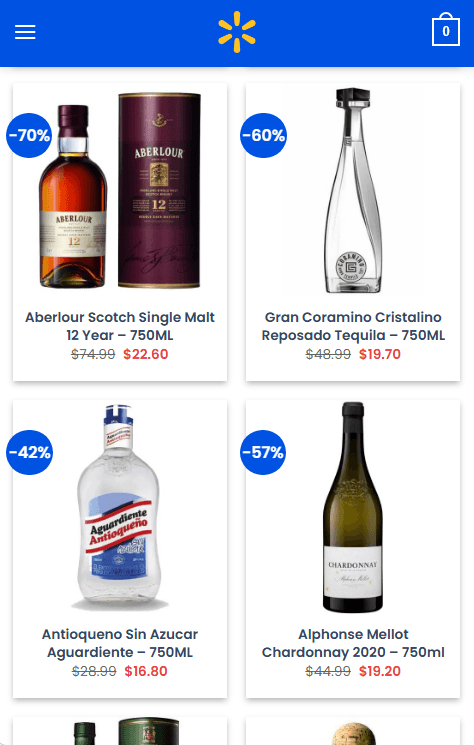
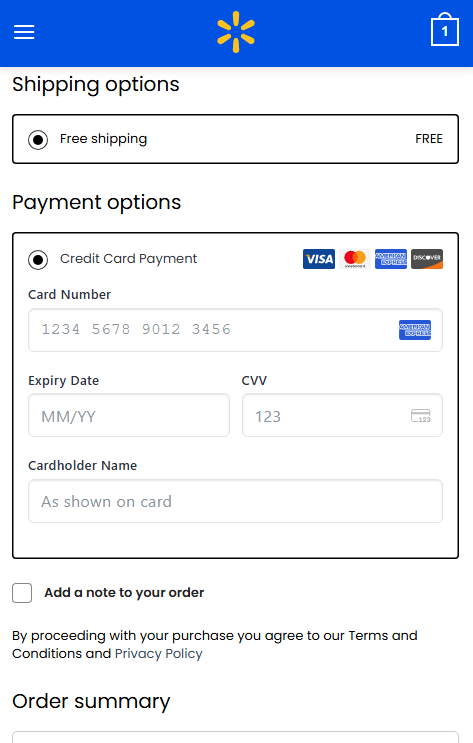
Shoppers browsing on their phones are landing on convincing Walmart lookalike sites offering name-brand liquor at 40% to 70% off, only to be led straight to a checkout page asking for a full credit card number, expiry date, and CVV.

The sites have no connection to Walmart. They’re part of a network of more than 120 near-identical domains built to look like a legitimate retailer just long enough to steal your card details.

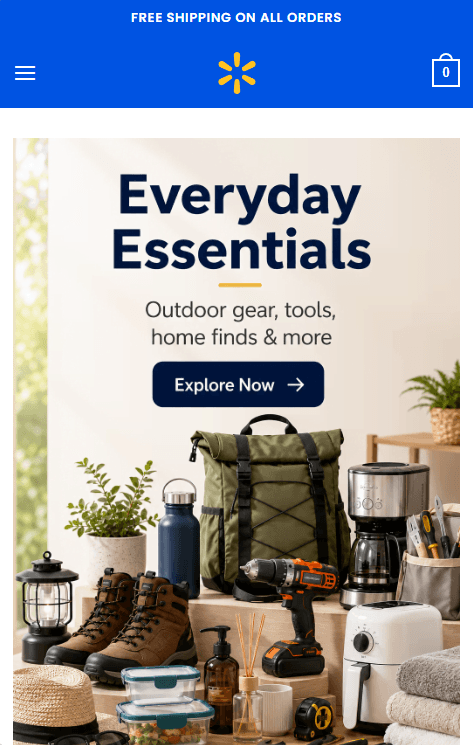
Fake Walmart websites

The name “Walmart” is doing most of the work here. It’s one of the most recognized retailers in the world, and it’s that familiarity that makes people lower their guard. A shopper who’d hesitate on an unfamiliar website may think nothing of an unusually large discount because the logo, colours, and layout look familiar.

That trust hasn’t been earned by the site. It’s borrowed from a brand that has nothing to do with it.

If you’ve entered your card details on one of these pages, the safest assumption is that your card has been compromised.

How the scam works

The scam follows a simple pattern: a Walmart-branded homepage, category pages stacked with heavily discounted liquor, and a checkout form asking for full card details.

The discounts do much of the persuading. Seeing premium brands advertised at 60% or 70% off encourages people to buy first and ask questions later.

Heavy discounts offered on a fake Walmart site
Product pages on a fake Walmart site
Collecting card details on a fake Walmart site

The same WordPress/WooCommerce template powers every site in the network. They share the same product catalogue, prices, and images. The only differences are fabricated US business addresses and phone numbers that are swapped out for each domain.

How to avoid this scam

  • Be sceptical of discounts that don’t match a retailer’s usual promotions, especially on liquor or electronics.
  • Check the address bar before entering payment details. A genuine Walmart sale won’t send you to an unfamiliar .shop domain.
  • Use tools that can identify scam websites automatically, such as Malwarebytes Browser Guard on desktop, or ask Scam Guard if it thinks a domain is suspicious.
  • On mobile, where these sites are designed to work, Malwarebytes Mobile Security can block known phishing and scam domains before you reach the checkout.

If you already entered your card details

  • Contact your card issuer immediately. Explain what happened and ask whether the card should be cancelled and replaced.
  • Watch your account for unauthorized charges, including small “test” transactions.
  • Report the domain through your browser’s phishing reporting feature and to the FTC at reportfraud.ftc.gov if you’re in the US.

The simplest defence is also the most effective: if a retailer needs a lookalike domain to sell you something, it’s probably a scam.

Indicators of Compromise (IOCs)

allgoodscenter.shop, allneedsbay.shop, allneedslane.shop, allneedsmarket.shop, allneedsstore.shop, allpurposebay.shop, basketandmore.shop, broadbasket.shop, broadbasketbay.shop, broadbasketco.shop, broadbasketlane.shop, broadbasketplace.shop, broadbasketway.shop, broadchoice.shop, broadgoodsbay.shop, broadgoodscenter.shop, broadgoodsplace.shop, broadgoodsway.shop, broadmarketplacehub.shop, broadutility.shop, broadutilityhub.shop, broadvalue.shop, broadvaluebay.shop, broadvalueplace.shop, cartandcrate.shop, completehomegoods.shop, dailybasketport.shop, dailybasketway.shop, dailychoiceway.shop, dailycrate.shop, dailyfindslane.shop, dailygoodscrest.shop, dailygoodsfield.shop, dailygoodspark.shop, dailygoodsridge.shop, dailygoodsway.shop, dailygoodswayhub.shop, dailyhomemarket.shop, dailyutilitybay.shop, dailyutilityway.shop, everydaycartshop.shop, everydayneedsco.shop, everydayvaluebay.shop, generalcart.shop, generalcartlane.shop, generalgoodsport.shop, generalgoodsridge.shop, generalgoodsway.shop, generalgoodsyard.shop, generalmarketbay.shop, generalmarketfield.shop, generalneedsplace.shop, generalvaluebay.shop, goodsandhomebay.shop, goodsandhomeco.shop, goodsandhomehub.shop, goodsandlivinghub.shop, goodsandmoreco.shop, goodsandvaluehub.shop, goodsdistrict.shop, goodslanding.shop, goodsmeadow.shop, goodsroute.shop, goodsvalley.shop, homeandutility.shop, homebasketlane.shop, homebasketway.shop, homecartcenter.shop, homefieldmarket.shop, homefindsco.shop, homegoodscrate.shop, homegoodsport.shop, homegoodsway.shop, homelivinggoods.shop, homeneedslane.shop, homeneedsmarket.shop, homeparcel.shop, homesteadmart.shop, homeutilitystore.shop, homevaluebay.shop, homevalueplace.shop, homevalueway.shop, marketbasketcenter.shop, marketcanvas.shop, marketchoicebay.shop, marketchoiceplace.shop, marketfieldhub.shop, marketfindsbay.shop, marketfoundry.shop, marketgrovehub.shop, markethomeplace.shop, marketpillar.shop, marketpine.shop, marketridge.shop, markettrailway.shop, marketwarehouse.shop, modernsupplyhub.shop, smartbasketplace.shop, smartdailygoods.shop, smartneedshub.shop, smartutilityhub.shop, smartvaluebay.shop, trustedgoods.shop, usefulbasketlane.shop, usefulcartcenter.shop, usefulchoicebay.shop, usefuldailyhub.shop, usefulgoodsbay.shop, usefulgoodscenter.shop, usefulgoodspark.shop, usefulgoodsway.shop, usefulgoodswayhub.shop, usefulgoodsyard.shop, usefulmarket.shop, usefulmarketbay.shop, usefulshelf.shop, usefulutility.shop, usefulvalueplace.shop, utilitygoods.shop, valuechoicebay.shop, valuegoodspark.shop, valuegoodsridge.shop, valuegrove.shop, valueparcel.shop


Stop threats before they can do any harm.

Malwarebytes Browser Guard blocks phishing pages and malicious sites automatically. Free, one click to install. Add it to your browser →
  •  

We found 120 fake Walmart stores trying to steal your credit card

Shoppers browsing on their phones are landing on convincing Walmart lookalike sites offering name-brand liquor at 40% to 70% off, only to be led straight to a checkout page asking for a full credit card number, expiry date, and CVV.

The sites have no connection to Walmart. They’re part of a network of more than 120 near-identical domains built to look like a legitimate retailer just long enough to steal your card details.

Fake Walmart websites

The name “Walmart” is doing most of the work here. It’s one of the most recognized retailers in the world, and it’s that familiarity that makes people lower their guard. A shopper who’d hesitate on an unfamiliar website may think nothing of an unusually large discount because the logo, colours, and layout look familiar.

That trust hasn’t been earned by the site. It’s borrowed from a brand that has nothing to do with it.

If you’ve entered your card details on one of these pages, the safest assumption is that your card has been compromised.

How the scam works

The scam follows a simple pattern: a Walmart-branded homepage, category pages stacked with heavily discounted liquor, and a checkout form asking for full card details.

The discounts do much of the persuading. Seeing premium brands advertised at 60% or 70% off encourages people to buy first and ask questions later.

Heavy discounts offered on a fake Walmart site
Product pages on a fake Walmart site
Collecting card details on a fake Walmart site

The same WordPress/WooCommerce template powers every site in the network. They share the same product catalogue, prices, and images. The only differences are fabricated US business addresses and phone numbers that are swapped out for each domain.

How to avoid this scam

  • Be sceptical of discounts that don’t match a retailer’s usual promotions, especially on liquor or electronics.
  • Check the address bar before entering payment details. A genuine Walmart sale won’t send you to an unfamiliar .shop domain.
  • Use tools that can identify scam websites automatically, such as Malwarebytes Browser Guard on desktop, or ask Scam Guard if it thinks a domain is suspicious.
  • On mobile, where these sites are designed to work, Malwarebytes Mobile Security can block known phishing and scam domains before you reach the checkout.

If you already entered your card details

  • Contact your card issuer immediately. Explain what happened and ask whether the card should be cancelled and replaced.
  • Watch your account for unauthorized charges, including small “test” transactions.
  • Report the domain through your browser’s phishing reporting feature and to the FTC at reportfraud.ftc.gov if you’re in the US.

The simplest defence is also the most effective: if a retailer needs a lookalike domain to sell you something, it’s probably a scam.

Indicators of Compromise (IOCs)

allgoodscenter.shop, allneedsbay.shop, allneedslane.shop, allneedsmarket.shop, allneedsstore.shop, allpurposebay.shop, basketandmore.shop, broadbasket.shop, broadbasketbay.shop, broadbasketco.shop, broadbasketlane.shop, broadbasketplace.shop, broadbasketway.shop, broadchoice.shop, broadgoodsbay.shop, broadgoodscenter.shop, broadgoodsplace.shop, broadgoodsway.shop, broadmarketplacehub.shop, broadutility.shop, broadutilityhub.shop, broadvalue.shop, broadvaluebay.shop, broadvalueplace.shop, cartandcrate.shop, completehomegoods.shop, dailybasketport.shop, dailybasketway.shop, dailychoiceway.shop, dailycrate.shop, dailyfindslane.shop, dailygoodscrest.shop, dailygoodsfield.shop, dailygoodspark.shop, dailygoodsridge.shop, dailygoodsway.shop, dailygoodswayhub.shop, dailyhomemarket.shop, dailyutilitybay.shop, dailyutilityway.shop, everydaycartshop.shop, everydayneedsco.shop, everydayvaluebay.shop, generalcart.shop, generalcartlane.shop, generalgoodsport.shop, generalgoodsridge.shop, generalgoodsway.shop, generalgoodsyard.shop, generalmarketbay.shop, generalmarketfield.shop, generalneedsplace.shop, generalvaluebay.shop, goodsandhomebay.shop, goodsandhomeco.shop, goodsandhomehub.shop, goodsandlivinghub.shop, goodsandmoreco.shop, goodsandvaluehub.shop, goodsdistrict.shop, goodslanding.shop, goodsmeadow.shop, goodsroute.shop, goodsvalley.shop, homeandutility.shop, homebasketlane.shop, homebasketway.shop, homecartcenter.shop, homefieldmarket.shop, homefindsco.shop, homegoodscrate.shop, homegoodsport.shop, homegoodsway.shop, homelivinggoods.shop, homeneedslane.shop, homeneedsmarket.shop, homeparcel.shop, homesteadmart.shop, homeutilitystore.shop, homevaluebay.shop, homevalueplace.shop, homevalueway.shop, marketbasketcenter.shop, marketcanvas.shop, marketchoicebay.shop, marketchoiceplace.shop, marketfieldhub.shop, marketfindsbay.shop, marketfoundry.shop, marketgrovehub.shop, markethomeplace.shop, marketpillar.shop, marketpine.shop, marketridge.shop, markettrailway.shop, marketwarehouse.shop, modernsupplyhub.shop, smartbasketplace.shop, smartdailygoods.shop, smartneedshub.shop, smartutilityhub.shop, smartvaluebay.shop, trustedgoods.shop, usefulbasketlane.shop, usefulcartcenter.shop, usefulchoicebay.shop, usefuldailyhub.shop, usefulgoodsbay.shop, usefulgoodscenter.shop, usefulgoodspark.shop, usefulgoodsway.shop, usefulgoodswayhub.shop, usefulgoodsyard.shop, usefulmarket.shop, usefulmarketbay.shop, usefulshelf.shop, usefulutility.shop, usefulvalueplace.shop, utilitygoods.shop, valuechoicebay.shop, valuegoodspark.shop, valuegoodsridge.shop, valuegrove.shop, valueparcel.shop


Stop threats before they can do any harm.

Malwarebytes Browser Guard blocks phishing pages and malicious sites automatically. Free, one click to install. Add it to your browser →
  •  
❌