
Reading view

Update WhatsApp now: Two new flaws could expose you to malicious files

Meta has published a new security advisory for messaging app WhatsApp, announcing patches for two vulnerabilities.

WhatsApp has fixed two security flaws that could be abused to interfere with how media and attachments are handled on your device. There is no evidence that either bug has been exploited in the wild.

These bugs don’t automatically infect devices, but they lower the barrier for social engineering and could be chained with other vulnerabilities for more serious attacks.

Malicious messages

The first issue, tracked as CVE‑2026‑23866, affects how WhatsApp processes AI‑generated “rich response messages” that embed Instagram Reels. On affected iOS and Android versions, incomplete validation means a specially crafted message could cause the app to load media from an attacker‑controlled URL. In some cases, this could trigger operating system‑level custom URL scheme handlers.

In other words: a booby‑trapped message could prompt your device to open content from an untrusted source.

How to update WhatsApp for Android

You can easily update WhatsApp from the Google Play Store.

  1. Open the Google Play Store
  2. Search for WhatsApp Messenger
  3. Tap Update

Note: Updates may not be available immediately in all regions.

How to update WhatsApp on iOS

To update WhatsApp on iOS:

  • Open the App Store
  • Tap your profile icon
  • Scroll to find WhatsApp and tap Update

If it’s not listed, search for WhatsApp to check if an “Update” button is available.

Misleading filenames

The second bug, CVE‑2026‑23863, affects WhatsApp for Windows before version 2.3000.1032164386.258709.

In this case, WhatsApp did not correctly handle filenames containing embedded NUL bytes. This could allow a file to appear as a harmless type in the interface while actually being treated as an executable when opened. That’s a classic recipe for social engineering: “click the PDF,” but get an .exe file.

How to update WhatsApp for Windows

You can find your WhatsApp for Windows version number by clicking on your profile picture and selecting Help and feedback.
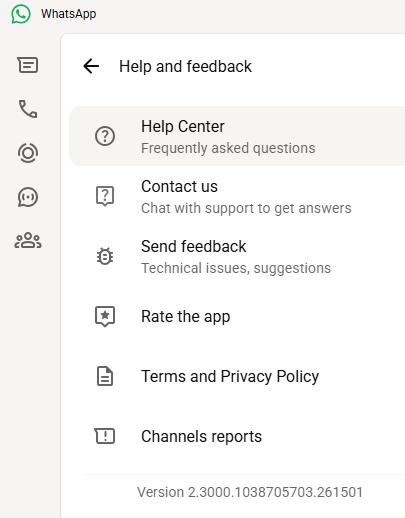
Version 2.3000.1038705703.261501

If your version number is earlier than 2.3000.1032164386.258709, update via the Microsoft Store:

  1. Click the Start menu and search for Microsoft Store to open it
  2. Click Library located at the bottom-left corner
  3. Find WhatsApp Desktop
  4. Click Get Updates or Update

Once installed, restart the app to apply the changes.

Automatic updates on Windows

My WhatsApp was already up to date because I have automatic updates turned on. Here’s how to turn it on:

  1. Click the Start menu and search for Microsoft Store to open it
  2. Select Profile (your account picture) > Settings
  3. Make sure App updates is toggled to On
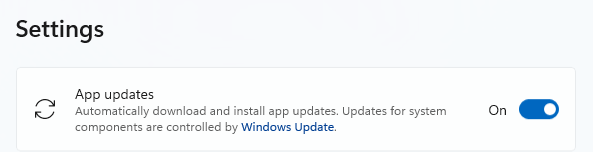
Auto updates on Windows

Scammers don’t need to hack you. They just need you to click once. 

Malwarebytes Identity Theft Protection catches suspicious activity before it becomes a problem.

  •  

Update WhatsApp now: Two new flaws could expose you to malicious files

Meta has published a new security advisory for messaging app WhatsApp, announcing patches for two vulnerabilities.

WhatsApp has fixed two security flaws that could be abused to interfere with how media and attachments are handled on your device. There is no evidence that either bug has been exploited in the wild.

These bugs don’t automatically infect devices, but they lower the barrier for social engineering and could be chained with other vulnerabilities for more serious attacks.

Malicious messages

The first issue, tracked as CVE‑2026‑23866, affects how WhatsApp processes AI‑generated “rich response messages” that embed Instagram Reels. On affected iOS and Android versions, incomplete validation means a specially crafted message could cause the app to load media from an attacker‑controlled URL. In some cases, this could trigger operating system‑level custom URL scheme handlers.

In other words: a booby‑trapped message could prompt your device to open content from an untrusted source.

How to update WhatsApp for Android

You can easily update WhatsApp from the Google Play Store.

  1. Open the Google Play Store
  2. Search for WhatsApp Messenger
  3. Tap Update

Note: Updates may not be available immediately in all regions.

How to update WhatsApp on iOS

To update WhatsApp on iOS:

  • Open the App Store
  • Tap your profile icon
  • Scroll to find WhatsApp and tap Update

If it’s not listed, search for WhatsApp to check if an “Update” button is available.

Misleading filenames

The second bug, CVE‑2026‑23863, affects WhatsApp for Windows before version 2.3000.1032164386.258709.

In this case, WhatsApp did not correctly handle filenames containing embedded NUL bytes. This could allow a file to appear as a harmless type in the interface while actually being treated as an executable when opened. That’s a classic recipe for social engineering: “click the PDF,” but get an .exe file.

How to update WhatsApp for Windows

You can find your WhatsApp for Windows version number by clicking on your profile picture and selecting Help and feedback.

Version 2.3000.1038705703.261501

If your version number is earlier than 2.3000.1032164386.258709, update via the Microsoft Store:

  1. Click the Start menu and search for Microsoft Store to open it
  2. Click Library located at the bottom-left corner
  3. Find WhatsApp Desktop
  4. Click Get Updates or Update

Once installed, restart the app to apply the changes.

Automatic updates on Windows

My WhatsApp was already up to date because I have automatic updates turned on. Here’s how to turn it on:

  1. Click the Start menu and search for Microsoft Store to open it
  2. Select Profile (your account picture) > Settings
  3. Make sure App updates is toggled to On
Auto updates on Windows

Scammers don’t need to hack you. They just need you to click once. 

Malwarebytes Identity Theft Protection catches suspicious activity before it becomes a problem.

  •  

Actively exploited cPanel bug exposes millions of websites to takeover

Security researchers are warning about a newly discovered vulnerability in the widely used web server management software cPanel and WebHost Manager (WHM). 

This is a critical, actively exploited authentication-bypass bug in cPanel/WHM that lets attackers gain administrative access to the interface without credentials, potentially take over servers and all hosted sites.

The vulnerability, tracked as CVE-2026-41940, has been added to the Known Exploited Vulnerabilities catalog by the Cybersecurity and Infrastructure Security Agency (CISA), meaning there is evidence it is being used in real-world attacks.

Because cPanel/WHM is used by over a million sites worldwide, including banks and health organizations, the potential impact is huge. In simple terms, the bug can act like a front‑door key to a big chunk of the web’s hosting infrastructure.

cPanel released patches on April 28, 2026, and urged all customers and hosts to update. It said all supported versions after 11.40 are affected, including DNSOnly and WP Squared.

Hosting providers including Namecheap, HostGator, and KnownHost temporarily blocked access to cPanel interfaces while patching, treating this as a critical authentication bypass and reporting exploit attempts going back to late February 2026.

How to stay safe

While it’s up to the hosting companies and website owners to patch as quickly as possible, there are ways to reduce your risk if a site you use is compromised.

As always, limit the data you share with websites to what’s absolutely necessary. Data they don’t have can’t be stolen.

When ordering from an online retailer, don’t tick the box to save your card details for future purchases as they will be stored on the server.

If there’s an option to check out as a guest, use it. It reduces the amount of personal data tied to an account.

Don’t reuse passwords. When one site is compromised, having the same credentials in several places turns it into a multi‑account takeover problem. A password manager can help you create complex unique passphrases, and remember them for you.

Where possible, pay by credit card. In many regions, this gives you stronger fraud protection.


Personal Data Remover

Your details are probably already for sale. 


When a site you trust gets hacked

If you think you’ve been affected by a data breach, take the following steps:

  • Check the company’s advice. Every breach is different, so check with the company to find out what’s happened and follow any specific advice it offers.
  • Change your password. You can make a stolen password useless to thieves by changing it. Choose a strong password that you don’t use for anything else. Better yet, let a password manager choose one for you.
  • Enable two-factor authentication (2FA). If you can, use a FIDO2-compliant hardware key, laptop, or phone as your second factor. Some forms of 2FA can be phished just as easily as a password, but 2FA that relies on a FIDO2 device can’t be phished.
  • Watch out for impersonators. The thieves may contact you posing as the breached platform. Check the official website to see if it’s contacting victims and verify the identity of anyone who contacts you using a different communication channel.
  • Take your time. Phishing attacks often impersonate people or brands you know, and use themes that require urgent attention, such as missed deliveries, account suspensions, and security alerts.
  • Consider not storing your card details. It’s definitely more convenient to let sites remember your card details, but it increases risk if a retailer suffers a breach.
  • Set up identity monitoring, which alerts you if your personal information is found being traded illegally online and helps you recover after.

What do cybercriminals know about you?

Use Malwarebytes’ free Digital Footprint scan to see whether your personal information has been exposed online.

  •  

Actively exploited cPanel bug exposes millions of websites to takeover

Security researchers are warning about a newly discovered vulnerability in the widely used web server management software cPanel and WebHost Manager (WHM). 

This is a critical, actively exploited authentication-bypass bug in cPanel/WHM that lets attackers gain administrative access to the interface without credentials, potentially take over servers and all hosted sites.

The vulnerability, tracked as CVE-2026-41940, has been added to the Known Exploited Vulnerabilities catalog by the Cybersecurity and Infrastructure Security Agency (CISA), meaning there is evidence it is being used in real-world attacks.

Because cPanel/WHM is used by over a million sites worldwide, including banks and health organizations, the potential impact is huge. In simple terms, the bug can act like a front‑door key to a big chunk of the web’s hosting infrastructure.

cPanel released patches on April 28, 2026, and urged all customers and hosts to update. It said all supported versions after 11.40 are affected, including DNSOnly and WP Squared.

Hosting providers including Namecheap, HostGator, and KnownHost temporarily blocked access to cPanel interfaces while patching, treating this as a critical authentication bypass and reporting exploit attempts going back to late February 2026.

How to stay safe

While it’s up to the hosting companies and website owners to patch as quickly as possible, there are ways to reduce your risk if a site you use is compromised.

As always, limit the data you share with websites to what’s absolutely necessary. Data they don’t have can’t be stolen.

When ordering from an online retailer, don’t tick the box to save your card details for future purchases as they will be stored on the server.

If there’s an option to check out as a guest, use it. It reduces the amount of personal data tied to an account.

Don’t reuse passwords. When one site is compromised, having the same credentials in several places turns it into a multi‑account takeover problem. A password manager can help you create complex unique passphrases, and remember them for you.

Where possible, pay by credit card. In many regions, this gives you stronger fraud protection.


Personal Data Remover

Your details are probably already for sale. 


When a site you trust gets hacked

If you think you’ve been affected by a data breach, take the following steps:

  • Check the company’s advice. Every breach is different, so check with the company to find out what’s happened and follow any specific advice it offers.
  • Change your password. You can make a stolen password useless to thieves by changing it. Choose a strong password that you don’t use for anything else. Better yet, let a password manager choose one for you.
  • Enable two-factor authentication (2FA). If you can, use a FIDO2-compliant hardware key, laptop, or phone as your second factor. Some forms of 2FA can be phished just as easily as a password, but 2FA that relies on a FIDO2 device can’t be phished.
  • Watch out for impersonators. The thieves may contact you posing as the breached platform. Check the official website to see if it’s contacting victims and verify the identity of anyone who contacts you using a different communication channel.
  • Take your time. Phishing attacks often impersonate people or brands you know, and use themes that require urgent attention, such as missed deliveries, account suspensions, and security alerts.
  • Consider not storing your card details. It’s definitely more convenient to let sites remember your card details, but it increases risk if a retailer suffers a breach.
  • Set up identity monitoring, which alerts you if your personal information is found being traded illegally online and helps you recover after.

What do cybercriminals know about you?

Use Malwarebytes’ free Digital Footprint scan to see whether your personal information has been exposed online.

  •  

Microsoft won’t patch PhantomRPC: Feature or bug?

A researcher has discovered a weakness called PhantomRPC that Microsoft does not consider a vulnerability it plans to patch.

PhantomRPC involves Windows Remote Procedure Call (RPC), the core of communication between Windows processes. The vulnerability lets a process with impersonation rights escalate to SYSTEM by impersonating high‑privileged clients that connect to a fake RPC server.

The researcher presented a detailed technical report outlining five exploitation paths, including coercion, user interaction, or background services. They warned that potential vectors are “effectively unlimited” because the root issue is architectural.

Microsoft, however, classified the issue as “moderate,” refused a bounty, declined to assign a CVE (a spot in the list of Common Vulnerabilities and Exposures), and closed the case without tracking. Its position is that the technique requires an already‑compromised machine and does not provide unauthenticated or remote access.

Experts disagreed with Microsoft’s assessment. Their concern is that Microsoft is downplaying a systemic local privilege escalation technique that exists in all supported Windows versions.

The issue

At the core of this issue is that the Windows RPC runtime does not sufficiently verify that the server a high‑privileged client connects to is the intended legitimate endpoint.

If a legitimate RPC server is not reachable (for example because the service stopped, was misconfigured, not installed, or due to a race condition), an attacker with SeImpersonatePrivilege can spin up a fake RPC server that “fills the gap” using the same interface and endpoint.

When a SYSTEM or high‑privileged client connects to this fake server, using an impersonation level that allows the server to impersonate the client, the attacker can call RpcImpersonateClient and immediately escalate their privileges to SYSTEM.

From Microsoft’s perspective, the ability to run a rogue RPC server in this way falls under the category of “already compromised.”

SeImpersonatePrivilege

To understand the issue better, we need to dig into what SeImpersonatePrivilege does.

Basically, SeImpersonatePrivilege is the Windows permission that lets a program “pretend to be you” after you’ve already logged in, so it can do things on your behalf using your level of access.

It’s needed because many system services and server‑type apps (file sharing, RPC servers, COM servers, web apps) have to perform actions on behalf of a user, like reading their files or applying group policy.

If an attacker gains this privilege, they can create a fake service or server and wait for a more powerful account to talk to it. When that high‑privilege service connects, the attacker can grab its security token and impersonate it, effectively upgrading from an account with lower privileges to full SYSTEM control on that machine.

Protection

A Microsoft spokesperson provided the following statement:

“This technique requires an already-compromised machine and does not grant unauthenticated or remote access. Any update is a balance between existing compatibility and customer risk, and we remain committed to continually hardening our products. We recommend customers follow security best practices, including limiting administrative privileges and applying the principle of least privilege.”

In our opinion, mitigating PhantomRPC properly would require deep changes to the RPC architecture, which is hard to do on existing Windows versions without breaking compatibility. It’s maybe something we’ll see in future versions, given the scale of change needed.

What you can do:

  • As PhantomRPC is a piece in a larger chain, it is still very important to keep Windows updated.
  • Use your admin account sparingly and only for the tasks that need that kind of privilege.
  • Use an up-to-date, real-time anti-malware solution that can detect and block suspicious privilege‑escalation activity.
  • Avoid disabling or “hardening” services blindly since a malicious service might step in their place.

To answer the question in the title: it looks like a “feature” that can be abused in many ways; one that has outlived its original threat model. Defenders have to treat them as ongoing risks, rather than one‑off CVEs.


CNET Editors' Choice Award 2026

“One of the best cybersecurity suites on the planet.” 

According to CNET. Read their review


  •  

Microsoft won’t patch PhantomRPC: Feature or bug?

A researcher has discovered a weakness called PhantomRPC that Microsoft does not consider a vulnerability it plans to patch.

PhantomRPC involves Windows Remote Procedure Call (RPC), the core of communication between Windows processes. The vulnerability lets a process with impersonation rights escalate to SYSTEM by impersonating high‑privileged clients that connect to a fake RPC server.

The researcher presented a detailed technical report outlining five exploitation paths, including coercion, user interaction, or background services. They warned that potential vectors are “effectively unlimited” because the root issue is architectural.

Microsoft, however, classified the issue as “moderate,” refused a bounty, declined to assign a CVE (a spot in the list of Common Vulnerabilities and Exposures), and closed the case without tracking. Its position is that the technique requires an already‑compromised machine and does not provide unauthenticated or remote access.

Experts disagreed with Microsoft’s assessment. Their concern is that Microsoft is downplaying a systemic local privilege escalation technique that exists in all supported Windows versions.

The issue

At the core of this issue is that the Windows RPC runtime does not sufficiently verify that the server a high‑privileged client connects to is the intended legitimate endpoint.

If a legitimate RPC server is not reachable (for example because the service stopped, was misconfigured, not installed, or due to a race condition), an attacker with SeImpersonatePrivilege can spin up a fake RPC server that “fills the gap” using the same interface and endpoint.

When a SYSTEM or high‑privileged client connects to this fake server, using an impersonation level that allows the server to impersonate the client, the attacker can call RpcImpersonateClient and immediately escalate their privileges to SYSTEM.

From Microsoft’s perspective, the ability to run a rogue RPC server in this way falls under the category of “already compromised.”

SeImpersonatePrivilege

To understand the issue better, we need to dig into what SeImpersonatePrivilege does.

Basically, SeImpersonatePrivilege is the Windows permission that lets a program “pretend to be you” after you’ve already logged in, so it can do things on your behalf using your level of access.

It’s needed because many system services and server‑type apps (file sharing, RPC servers, COM servers, web apps) have to perform actions on behalf of a user, like reading their files or applying group policy.

If an attacker gains this privilege, they can create a fake service or server and wait for a more powerful account to talk to it. When that high‑privilege service connects, the attacker can grab its security token and impersonate it, effectively upgrading from an account with lower privileges to full SYSTEM control on that machine.

Protection

A Microsoft spokesperson provided the following statement:

“This technique requires an already-compromised machine and does not grant unauthenticated or remote access. Any update is a balance between existing compatibility and customer risk, and we remain committed to continually hardening our products. We recommend customers follow security best practices, including limiting administrative privileges and applying the principle of least privilege.”

In our opinion, mitigating PhantomRPC properly would require deep changes to the RPC architecture, which is hard to do on existing Windows versions without breaking compatibility. It’s maybe something we’ll see in future versions, given the scale of change needed.

What you can do:

  • As PhantomRPC is a piece in a larger chain, it is still very important to keep Windows updated.
  • Use your admin account sparingly and only for the tasks that need that kind of privilege.
  • Use an up-to-date, real-time anti-malware solution that can detect and block suspicious privilege‑escalation activity.
  • Avoid disabling or “hardening” services blindly since a malicious service might step in their place.

To answer the question in the title: it looks like a “feature” that can be abused in many ways; one that has outlived its original threat model. Defenders have to treat them as ongoing risks, rather than one‑off CVEs.


CNET Editors' Choice Award 2026

“One of the best cybersecurity suites on the planet.” 

According to CNET. Read their review


  •  
❌