Reading view

Spotting cyberthreats: a guide for blind and low-vision users | Kaspersky official blog

In 2023, Tim Utzig, a blind student from Baltimore, lost a thousand dollars to a laptop scam on X. Tim had been a long-time follower of a well-known sports journalist. When that journalist’s account started posting about a “charity sale” of brand-new MacBook Pros, Tim jumped at the chance to get a deal on a laptop he needed for his studies. After a few quick messages, he sent over the money.

Unfortunately, the journalist’s account had been hacked, and Tim’s cash went straight to scammers. The red flags were strictly visual: the page had been flagged as “temporarily restricted”, and both the bio and the Following list had changed. However, Tim’s screen reader — the software that converts on-screen text and graphics into speech — didn’t announce any of those warnings.

Screen readers allow blind users to navigate the digital world like everyone else. However, this community remains uniquely vulnerable. Even for sighted users, spotting a fake website is a challenge; for someone with a visual impairment, it’s an even steeper uphill battle.

Beyond screen readers, there are specialized mobile apps and services designed to assist the blind and low-vision community, with Be My Eyes being one of the most popular. The app connects users with sighted volunteers via a live video call to tackle everyday tasks — like setting an oven dial or locating an object on a desk. Be My Eyes also features integrated AI that can scan and narrate text or identify objects in the user’s environment.

But can these tools go beyond daily chores? Can they actually flag a phishing attempt or catch the hidden fine print when someone is opening a bank account?

Today we explore the specific online hurdles visually impaired users face, when it makes sense to lean on human or virtual assistants, and how to stay secure when using these types of services.

Common cyberthreats facing the blind and low-vision community

To start, let’s clarify the difference between these two groups. Low-vision users still rely on their remaining sight, even though their visual function is significantly reduced. To navigate digital interfaces, they often use screen magnifiers, extra-large fonts, and high-contrast settings. For them, phishing sites and emails are particularly dangerous. It’s easy to miss intentional typos — known as typosquatting — in a domain name or email address, such as the recent example of rnicrosoft{.}com.

Blind users navigate primarily by sound, using screen readers and specific touch gestures. Interestingly, though, unlike those with low vision, blind users are more likely to spot a phishing site using a screen reader: as the software reads the URL aloud, the user will hear that something is off. However, if a service — whether legitimate or malicious — isn’t fully compatible with screen readers, the risk of falling victim to a scam increases. This is exactly what happened to Tim Utzig.

It’s important to remember that screen magnifiers and readers are basic accessibility tools. They’re designed to enlarge or narrate an interface — not act as a security suite. They can’t warn the user of a threat on their own. That’s where more advanced software — tools that can analyze images and files, flag suspicious language, and describe the broader context of what’s happening on-screen — comes into play.

When to lean on an assistant

Be My Eyes is a major player in the accessibility space, boasting around 900 000 users and over nine million volunteers. Available on Windows, Android, and iOS, it bridges the gap by connecting blind and low-vision users with sighted volunteers via video calls for help with everyday tasks. For example, if someone wants to run a Synthetics cycle on their washing machine but can’t find the right button, they can hop into the app. It connects them with the first available volunteer speaking their language, who then uses the smartphone’s camera to guide them. The service is currently available in 32 languages.

In 2023, the app expanded its capabilities with the release of Be My AI — a virtual assistant powered by OpenAI’s GPT-4. Users take a photo, and the AI analyzes the image to provide a detailed text description, which it also reads aloud. Users can even open a chat window to ask follow-up questions. This got us thinking: could this AI actually spot a phishing site?

As an experiment, we uploaded a screenshot of a fake social media sign-in page to Be My Eyes. On a phone, you can do this by selecting a photo in your gallery or files, hitting Share, and choosing Describe with Be My Eyes. In Windows, you can upload a screenshot directly.
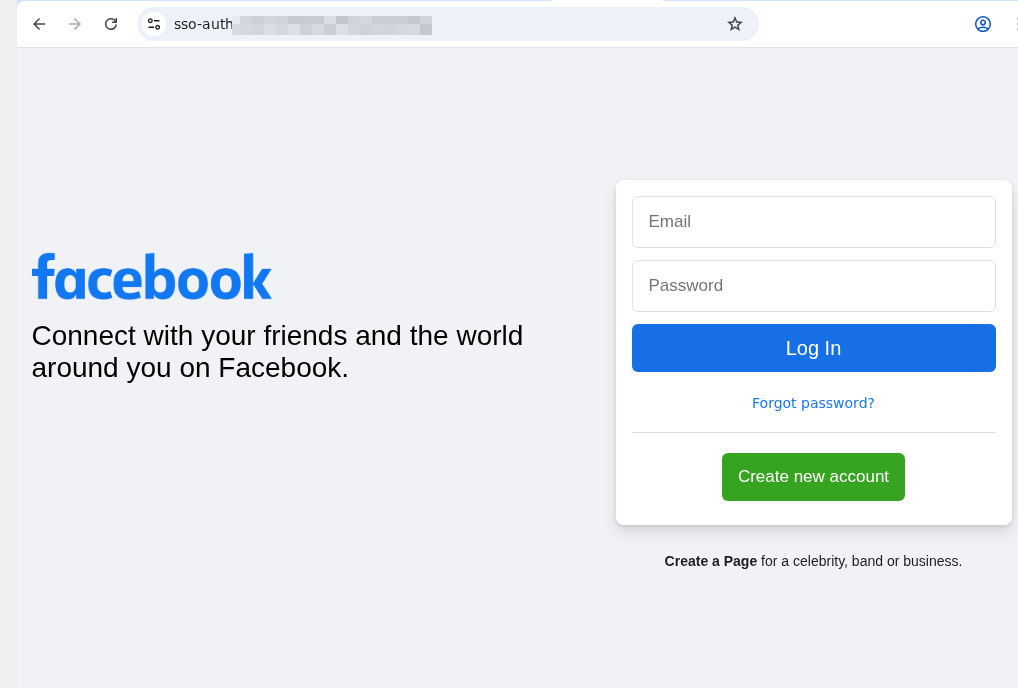
Fake social media sign-in page

An example of a phishing page that mimics the Facebook sign-in form. Note the incorrect domain in the address bar

At first, the AI gave us a detailed description of the page. We then followed up in the chat: “Can I trust this page?” The AI flagged the domain name error immediately, advised us to close the fake login page, and suggested typing the official URL directly into the browser, or to use the official Facebook app.
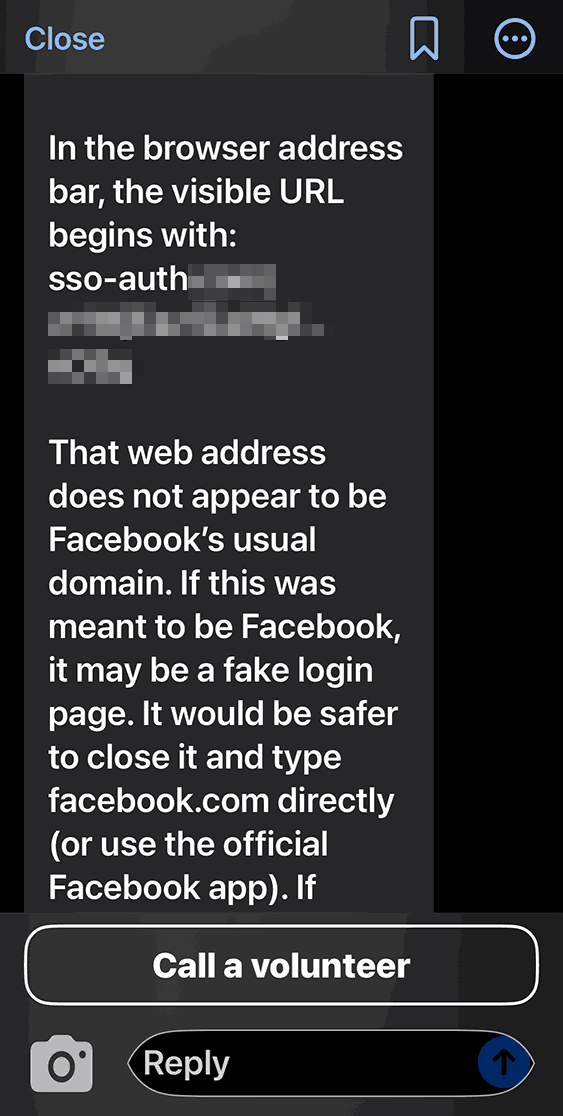
Be My AI response when checking a suspicious site

Be My AI explains why the page looks sketchy: the domain doesn’t match the official site. The app suggests typing the official URL directly into the browser, or using the official Facebook app

We saw the same positive results when testing a phishing email. In fact, the AI flagged the scam during its initial description of the message. It wrapped up with a warning: “This looks like a suspicious email. It’s best not to open any attachments or click any links. Instead, navigate to the official website or app manually, or call the number listed on their official site”.

Beyond just spotting cyberthreats, Be My AI is a solid sidekick for navigating online stores, banking apps, and digital services. For instance, the AI can help you to:

  • Read descriptions, names, and prices when a store’s website or app doesn’t support screen readers or large fonts
  • Scan those tricky terms and conditions — often buried in tiny text or otherwise inaccessible to a screen reader — when you’re signing up for a subscription or opening a bank account
  • Pull key info directly from product cards or instruction manuals

The risks of relying on Be My AI

The most common hiccup with AI is hallucinations, where the language model distorts text, skips crucial details, or invents words out of thin air. When it comes to cyberthreats, an AI’s misplaced confidence in a malicious site or email can be dangerous. Furthermore, AI isn’t immune to prompt injection attacks, which scammers use to trick AI agents beyond just Be My AI.

Even though the AI passed our test, you shouldn’t rely on it unquestioningly. There’s no guarantee it’ll get it right every time. This is a vital point for the blind and low-vision community, as a neural network can often feel like the only eyes available.

At the end of every response, Be My AI suggests checking in with a volunteer if you’re still unsure. However, when you’re trying to spot a fake webpage, we advise against this. You have no way of knowing how tech-savvy or trustworthy a random volunteer might be. Besides, you risk accidentally exposing sensitive data like your email address or password. Before connecting with a stranger, make sure they won’t see anything confidential on your screen. Better yet, use the app’s dedicated feature to create a private group of family, friends, or trusted contacts. This ensures your video call goes to people you actually know, rather than a random volunteer.

To stay safe, we recommend installing a trusted security tool on all your devices. These programs are designed to block phishing attempts and prevent you from landing on malicious sites. Another practical recommendation for visually impaired users is to use a password manager. These apps will only auto-fill credentials on the legitimate, saved website; they won’t be fooled by a clever domain spoof.

How Be My AI handles and stores your data

According to the Be My Eyes privacy policy, video calls with volunteers may be recorded and stored to provide the service, ensure safety, enforce the terms of service, and improve the products. When you use Be My AI, your images and text prompts are sent to OpenAI to generate a response. This data is processed on servers located in the U.S., and OpenAI uses it only to fulfill your specific request. The policy explicitly states that user images and queries aren’t used to train AI models.

Photos and videos are encrypted both in transit and at rest, and the company takes steps to strip away sensitive information. It’s worth noting that video call recordings can be retained indefinitely unless you request their deletion — in which case they’re typically wiped within 30 days. Data from Be My AI interactions is stored for up to 30 days unless you delete it manually within the app. If you decide to close your account, your personal data may be held for up to 90 days. At any time, you can opt out of data sharing, or request the deletion of your existing data by contacting the Be My Eyes support team.

How to use Be My Eyes safely

Despite Be My Eyes’ claims regarding privacy, you should still follow a few ground rules when using the service:

  • Use Be My AI for a first-pass on suspicious emails or pages, but don’t treat it as the only source of truth. Specialized security software is better at identifying and neutralizing threats.
  • If a site, email, or message feels off, don’t touch any links or attachments. Instead, manually type the official website address into your browser, or open the official app to verify the info.
  • Remember: a volunteer sees exactly what your camera sees. Make sure it isn’t capturing things it shouldn’t, like a safe code or an open passport. Avoid sharing your name, showing your face, or revealing too much of your surroundings. Be extra careful about reflections that might show you or your personal details. Only show what is absolutely necessary for the task at hand.
  • Stick to your inner circle. Create a group in the app and add your friends and family. This ensures your video calls go to people you know — not a random volunteer.
  • Don’t use Be My AI to read documents that contain confidential info. Remember, your images and text prompts are sent to OpenAI for processing and generating a response.
  • Remember to delete chats you no longer need. Otherwise, they’ll hang around for 30 days.
  • If you need to read something personal or confidential, consider apps with real-time reading features like Envision, Seeing AI, or Lookout. These apps process data locally on your device rather than sending it to the cloud.

  •  

The dangers of telehealth: data breaches, phishing, and spam | Kaspersky official blog

April 7 marks World Health Day. The theme for 2026 is “Together for health. Stand with science” — a call to join forces in the fight for evidence-based medicine and scientific progress. Many people view telehealth as one of the crowning achievements of this progress: you can basically get a doctor’s consultation in five minutes without ever leaving your couch. But there’s a catch…

Medical data sells on the black or gray markets for dozens of times more than credit card info or social media logins. Unlike a credit card, which you can just block and replace, you can’t exactly reset your medical history. Your name, birthday, address, phone number, insurance ID, diagnoses, test results, prescriptions, and treatment plans stay relevant for years. This is a goldmine for everything from targeted marketing to blackmail, fraud, or identity theft.

And with the rise of AI, the internet is now flooded with fake websites that claim to offer medical services but are actually designed to strip-mine confidential info from unsuspecting victims. Today, we’re diving into which medical details are at risk, why hackers want them, and how you can stop them in their tracks.

More valuable than credit cards

Scammers monetize stolen medical data both in bulk and through individual sales. Their first move is usually to extort a ransom from the companies they’ve successfully hacked. (In fact, back in 2024, 91% of malware-related healthcare data leaks in the U.S. were the result of ransomware attacks.) But later, the leaked data is then used for pinpointed, personal attacks. It allows hackers to build a medical profile of a victim — what meds they buy, how often, and what they take long-term — to then sell that info to big pharma or marketers, or to use it for targeted phishing scams like pitching a fake innovative treatment. They can even blackmail a patient over a sensitive diagnosis or use the info to fraudulently score prescriptions for controlled substances. On top of that, insurance companies are also hungry for this kind of data. They analyze these details to hike up insurance premiums for patients or, in some cases, refuse to provide coverage altogether. In short, there are plenty of ways they can use it against you.

How bad is it really?

The biggest medical data breach in history went down in February 2024, when the BlackCat hacking group broke into the systems of Change Healthcare. This is a division of UnitedHealth Group, which processes around 15 billion insurance transactions a year and acts as the financial middleman between patients, healthcare providers, and insurance companies.

For nine days, the attackers roamed freely through Change Healthcare’s internal systems, siphoning off six terabytes of confidential data before finally launching their ransomware. UnitedHealth was forced to completely yank Change Healthcare datacenters offline to stop the encryptor from spreading, and they ended up paying a 22-million-dollar ransom to the extortionists. The attack effectively paralyzed the U.S. healthcare system. The number of victims was revised three times: first 100 million, then 190 million, and the final tally hit a staggering 192.7 million people, with total damages estimated at 2.9 billion dollars. And the reason (on the Change Healthcare’s side) for this massive incident — which we broke down in detail in a separate post — was simply… a lack of two-factor authentication on a remote desktop access portal.

Before that, the mental health telehealth startup Cerebral embedded third-party tracking tools directly into its website and apps. As a result, the data of 3.2 million patients — including names, medical and prescription histories, and insurance info — leaked out to LinkedIn, Snapchat, and TikTok. The U.S. Federal Trade Commission slapped the company with a 7.1-million-dollar fine, and issued an unprecedented ban on using medical data for advertising purposes. By the way, that same startup also made the headlines for sending its clients promotional postcards without envelopes, displaying patient names and phrasing that made it easy for anyone to figure out their diagnosis.

Why telehealth is so vulnerable

Let’s take a look at the main weak spots in telehealth services.

  • Ad trackers in medical apps. Trackers from Facebook, TikTok, Snapchat, and other tech giants are often baked right into telehealth platforms, leaking patient data to advertisers without users ever knowing.
  • Unsecured communication channels. Sometimes doctors chat with patients through regular messaging apps instead of certified medical platforms. It’s convenient, sure, but it’s illegal for the clinic and totally unsafe for the patient.
  • Platform vulnerabilities. Telemedicine platforms are prone to classic web attacks, such as SQL injections that let hackers dump entire patient databases, session hijacking, and data interception when connection encryption is weak or nonexistent.
  • Poor staff training. Our research showed that 30% of doctors have dealt with compromised patient data specifically during telehealth sessions, and 42% of medical staff don’t actually understand how their patients’ data is being protected.
  • Outdated medical devices. Many wearable medical gadgets (like heart monitors or blood pressure cuffs) use an old data transfer protocol called MQTT. It’s full of holes that could potentially allow hackers to steal sensitive info or even mess with how the device functions.

Spam and phishing in telehealth

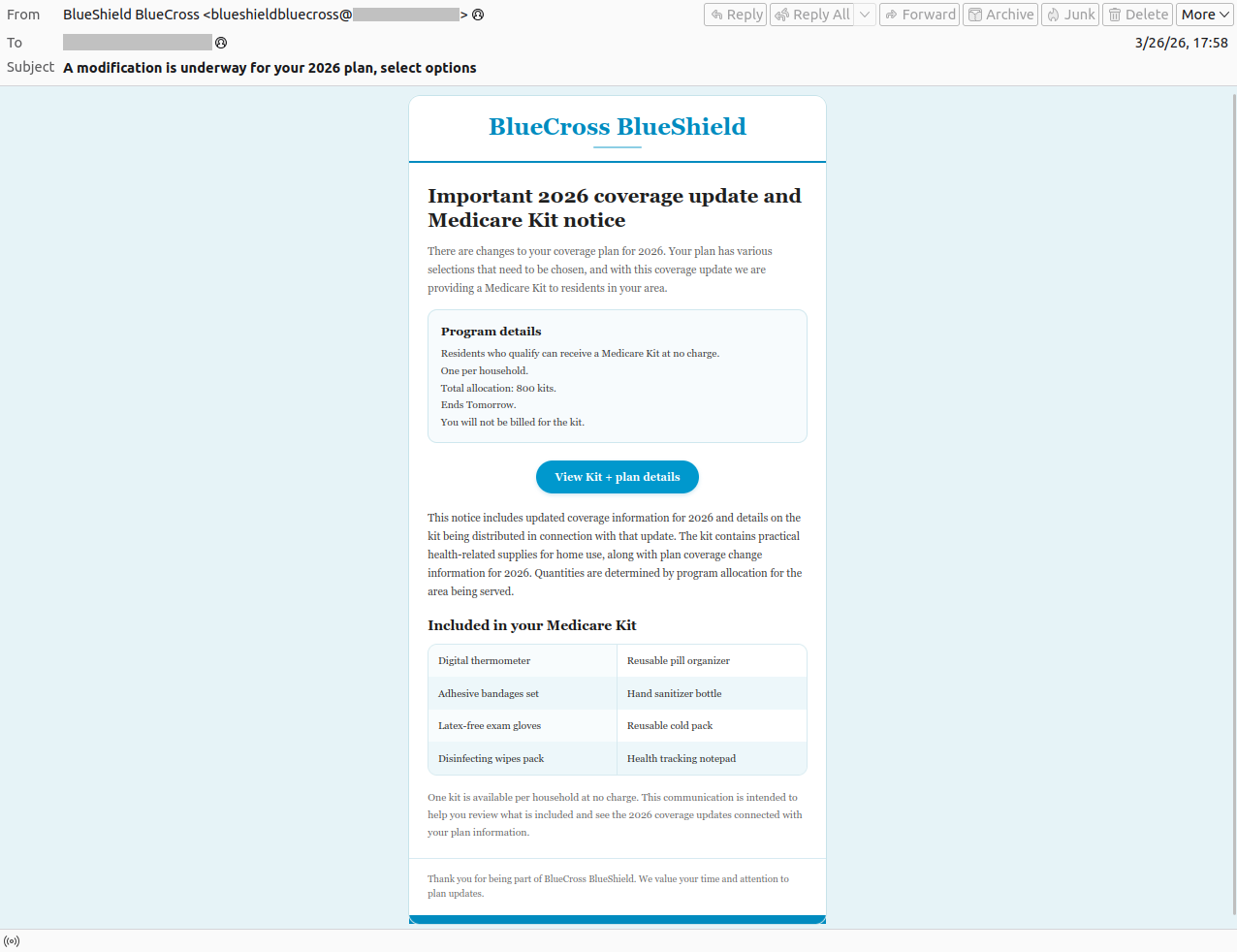
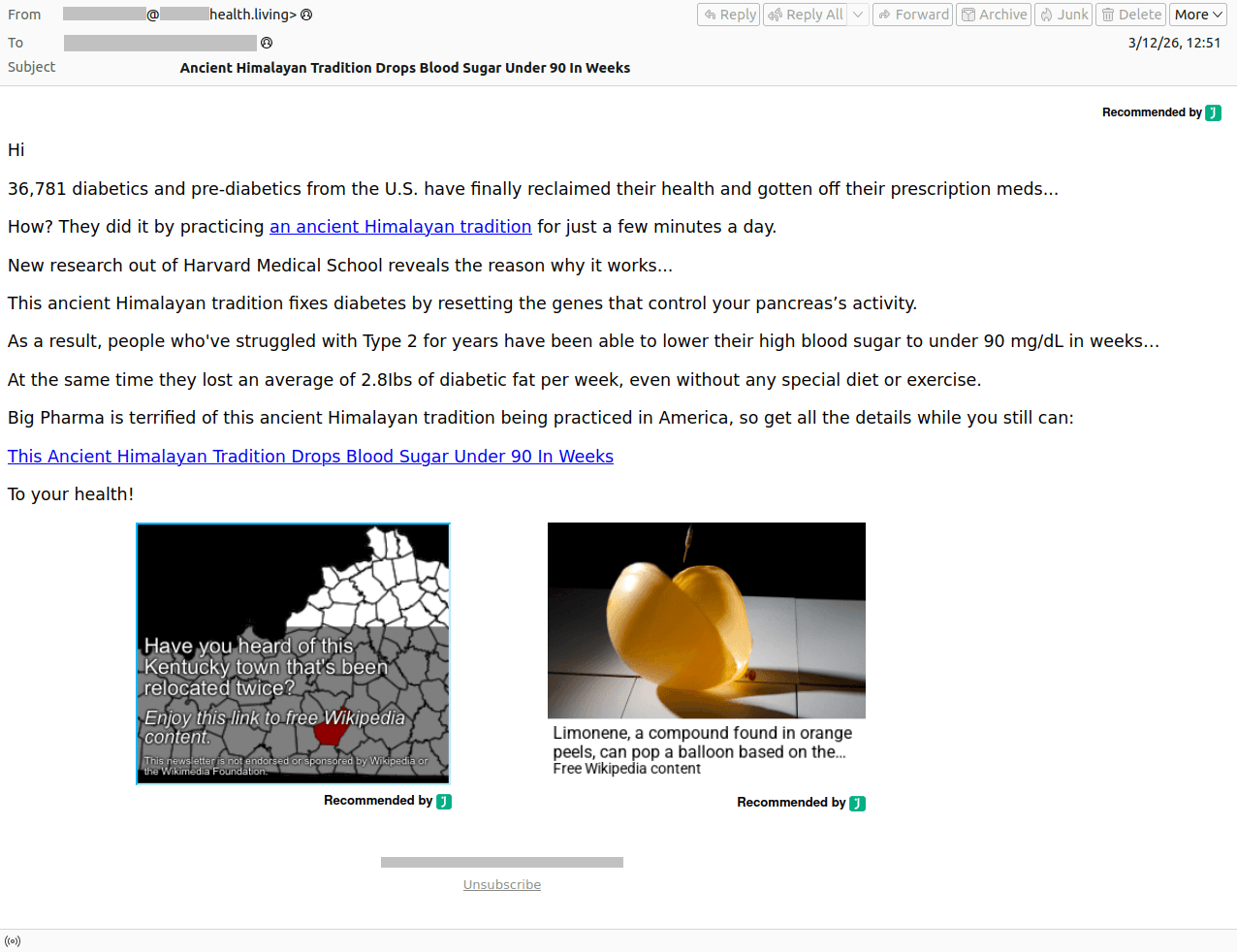
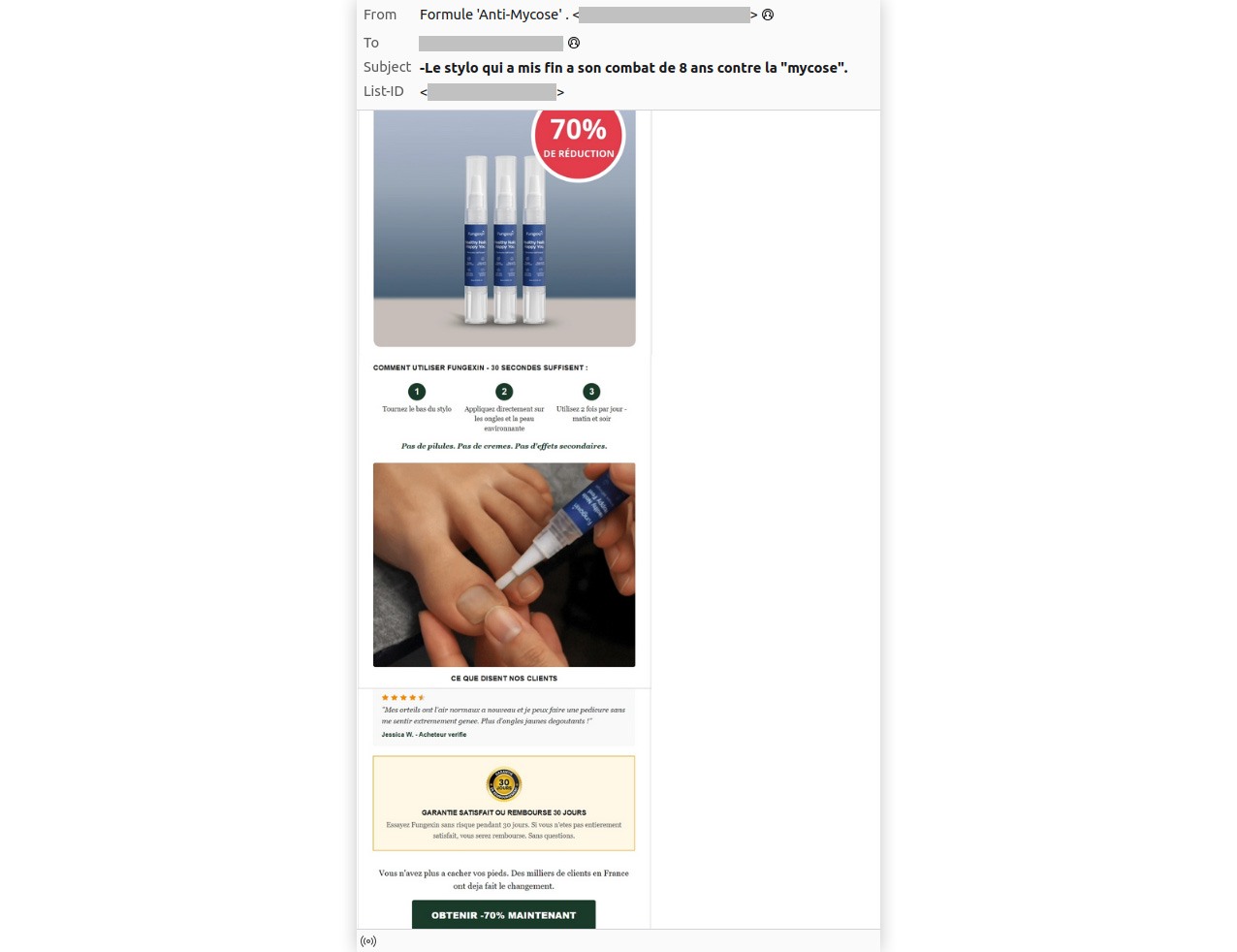
Hackers aren’t the only ones interested in the medical field — spammers and scammers are all over it, too. They pitch “medical services” with deals that look way too good to be true, send out emails about supposed changes to your health insurance, or talk up “ancient Himalayan healing traditions”. Of course, all the links they send lead to suspicious websites offering dubious goods or services.

Spam email appearing to be from Medicare, the U.S. national health insurance program
Spam posing as Medicare, the U.S. national health insurance program. The user is informed falsely that their insurance terms have changed in an attempt to lure them to a fake website
Scammers advertising miraculous Himalayan traditions for treating diabetes
CURING DIABETES IS EASY: All you have to do is… Scammers are promoting some kind of miraculous Himalayan tradition for treating diabetes. But losing your money is the only thing guaranteed here!
Dubious ad for a remedy for a fungal infection with a 70% discount
And of course, we can't forget the classic "miracle cure" for a fungal infection — now with a 70% discount, naturally.

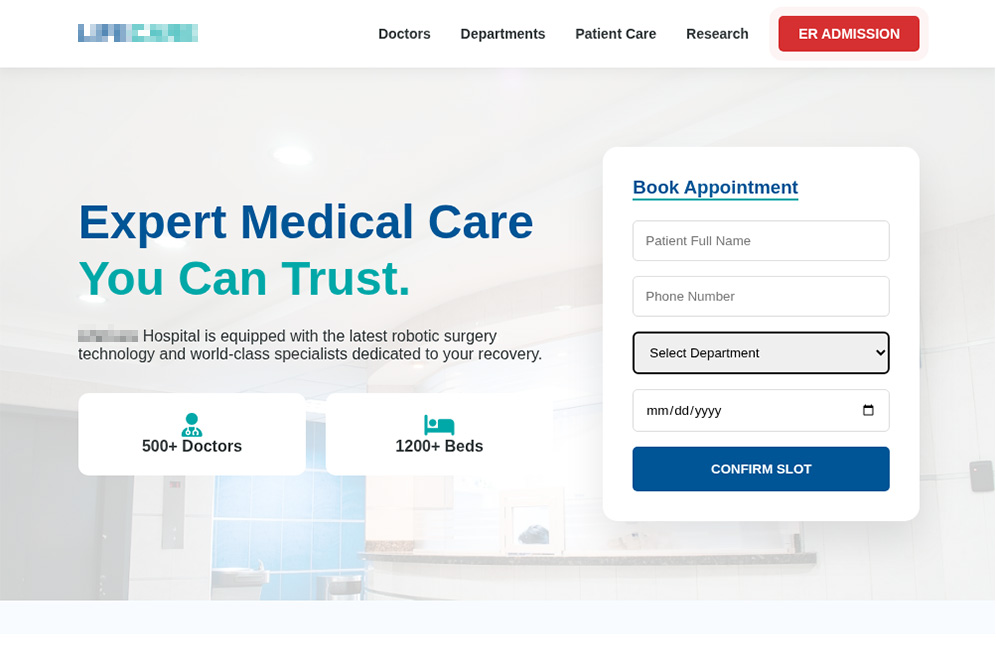
Should you land on such a phishing site, scammers will try to squeeze every bit of private info they can out of you: photos of your ID, insurance policy, prescriptions, and sometimes even… photos of body parts that supposedly need medical attention. From there, this data can be dumped and sold on the dark web — or used for blackmail, extortion, and follow-up phishing attacks. To learn more about how the underground data assembly line works, check out our post, What happens to data stolen using phishing?

Fake clinic website with a convincing design
A fake clinic website with a pretty convincing look. Scammers even created pages for "medical staff", "departments", and "research". However, for some reason, you won't find a privacy policy or terms of use anywhere on this site
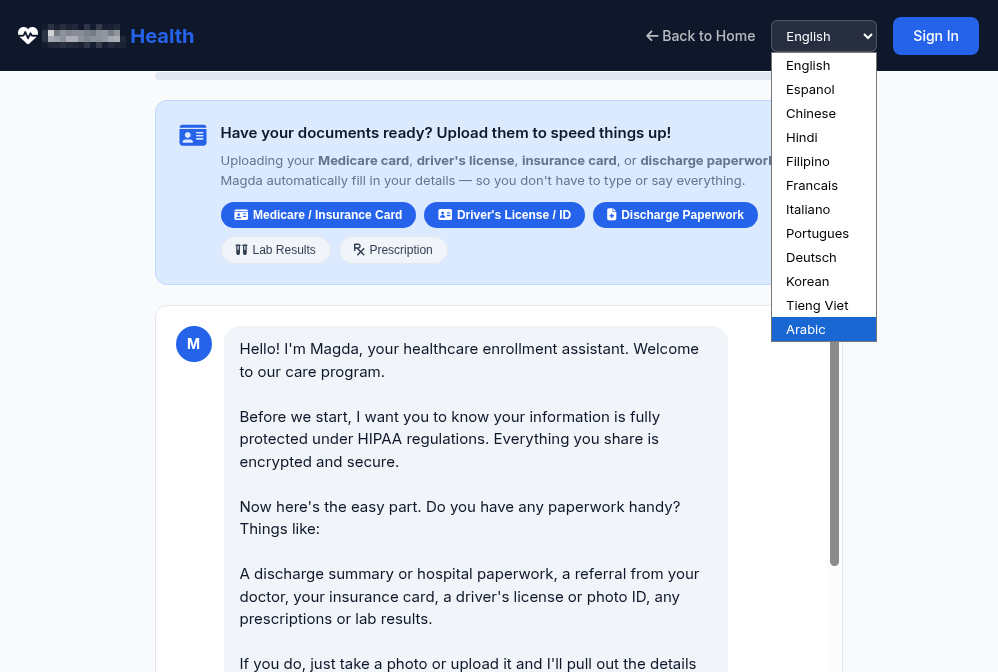
An AI diagnostic tool collects a wealth of personal data
Another suspicious website offers AI diagnostics, asking for a ton of personal info: full name, phone number, email, requested medical services, medical history, and current medications
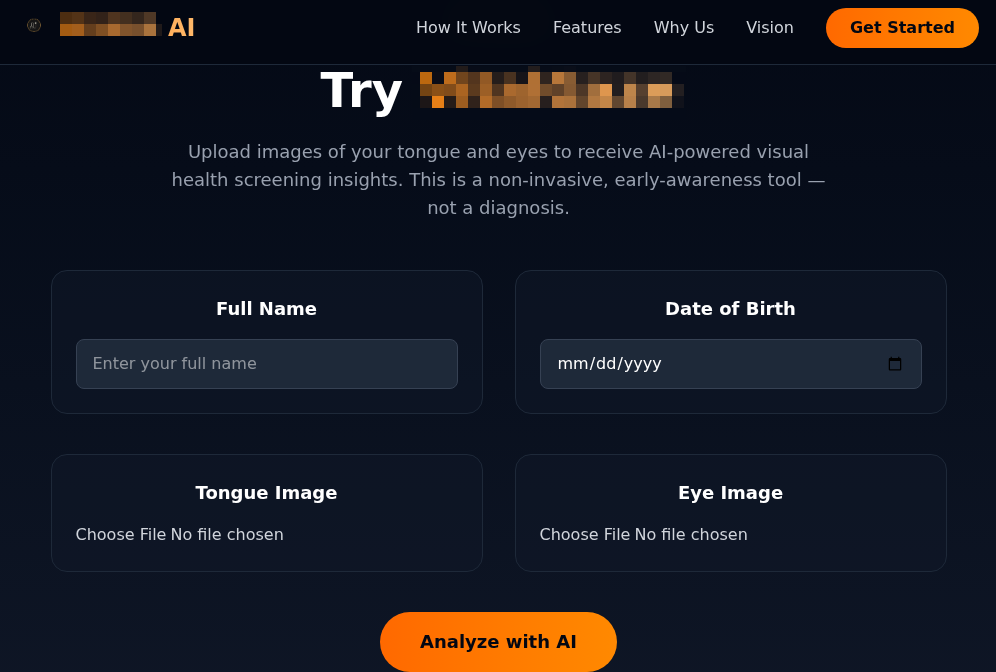
Scam site offering visual health screening by analyzing uploaded photos of the tongue and eyes
This scam site offers users "visual health screening using AI" — all you have to do is upload photos of your tongue and eyes! Just a reminder: retinal scans are sometimes used for biometric authentication

As a rule of thumb, fake clinic sites usually skip the privacy policy section, and bombard you with “today only” deals that seem too good to be true. That said, with the help of AI, creating a professional-looking site that’s indistinguishable from the real thing is now a total breeze: you don’t even need design skills or fluency in the victim’s language. That’s exactly why we recommend using our comprehensive security suite — it’s designed to sniff out spam, scams and phishing, and warn you about fake websites before you land on them.

Safety tips for telehealth patients

  • Set up a dedicated email address for medical services. If this address leaks because a clinic gets hacked, it makes it much harder for scammers to track the rest of your digital life.
  • Avoid using Google, Apple, or social media sign-in for telehealth sites. Keeping things separate makes it way tougher to link your medical data to your personal accounts.
  • Double-check which platform is being used for your consultation. If the clinic suggests a call or chat through a standard messaging app, that’s a red flag. A secure, encrypted patient portal provided by the clinic is significantly safer.
  • Never send medical documents via chat apps or social media. Always upload lab results, scans, and records through the clinic’s official patient portal.
  • Use a unique, complex password for every account. Your government portal, clinic login, and doctor-booking app should each have a separate password. Kaspersky Password Manager can generate and store all of them for you; it also regularly scans leak databases, and alerts you if any of your accounts are compromised.
  • Turn on two-factor authentication. Do this first of all for government services and medical organizations. We recommend using an authenticator app rather than SMS codes: it’s more secure and totally anonymous. Kaspersky Password Manager can help you out here, too.
  • Share only what’s necessary. Don’t feel obligated to fill out every optional field in medical apps or on websites. The less data a service stores, the less there is to leak.
  • Be careful about sharing health info on social media or in chat apps. Scammers love to exploit people when they’re vulnerable. For instance, in 2024, hackers gained the trust of the XZ Utils developer who had publicly posted about burnout and depression. They convinced him to hand over control of his tool, which they then loaded with malicious code. Since XZ Utils is used in tons of Linux systems and affects OpenSSH (a protocol for remote server connections), the attack could have wrecked a huge chunk of the internet if it hadn’t been caught in time.
  • Don’t install telehealth apps from unknown developers. Check the reviews and take a minute to skim the privacy policy — even major platforms might be sharing your data with third parties.
  • Keep an eye on your medical records. Strange prescriptions, doctor visits you never made, or meds you’ve never heard of can all be signs that your account has been compromised.
  • Configure and regularly update your health gadgets. Fitness trackers, blood pressure monitors, smart scales, and activity trackers all send data to the web. Improper settings or unpatched vulnerabilities are an open door for data breaches.

What else you need to know about protecting your health online:

  •  
❌