
Reading view

How Push Notifications Can Betray Your Privacy (and What to Do About It)

Update April 22, 2026. Apple has reportedly addressed part of the issue with the notification database in iOS 26.4.2 and 18.7.8, released today. With this update, notifications marked for deletion should no longer be stored in the notification database.

A phone’s push notifications can contain a significant amount of information about you, your communications, and what you do throughout the day. They’re important enough to government investigations that Apple and Google now both require a judge’s order to hand details about push notifications over to law enforcement, and even with that requirement Apple shares data on hundreds of users. More recently, we also learned from a 404 Media report that law enforcement forensic extraction tools can unearth the text from deleted notifications, including those from secure messaging tools, like Signal. The good news is that you can mitigate some of this risk. 

There are two points where notifications may betray your privacy: when they’re transmitted over cloud servers and once they land on the device. Let’s start with the cloud. It might seem like push notifications come directly from an app, but they are typically routed through either Apple or Google’s servers first (depending on if you use iOS or Android). According to a letter sent to the Department of Justice by Senator Wyden, the content of those notifications may be visible to Apple and Google, and at the very least the companies collect some metadata about what apps send a notification and when. App providers have to make the decision to hide the content from Apple and Google and implement that functionality; Signal is one app that does this. 

Then, once the notifications land on your phone, depending on your settings, the notification content may be visible on your lock screen without needing to unlock the device. This can be dangerous if you lose your device, someone steals it, or it’s confiscated by law enforcement. 

You may clear notifications after looking at them. But it turns out the content notifications get recorded in your device’s internal storage, which then makes them susceptible to recovery with certain types of forensic tools. Notification content may even persist after the app is deleted, if the OS doesn’t fully purge the app’s notification data. 

We still have a lot of unanswered questions about how the notification databases work on devices. We do not know how long notifications are stored, or whether they’re backed up to the cloud, in which case the cloud provider could get backdoor access to the content of messages if the backups are enabled and not end-to-end encrypted. This may also make backups vulnerable to law enforcement demands for data. 

Which is all to say that there are myriad ways that law enforcement can access the content or metadata of push notifications. Let’s fix that.

Consider the Strongest Notification Protections for Your Secure Messaging Apps

Secure chat tools are designed to keep the content of the messages safe inside the app. So, for secure chat apps like WhatsApp and Signal, that means the company that makes those apps cannot see the content of your messages, and they’re only accessible on your and your recipients’ devices. Once messages land on a device, it’s still important to consider some privacy precautions, particularly with notifications. 

Signal
Signal offers three levels of information to include in notifications, all which are pretty self explanatory:

  • Name, Content, and Actions (Name and message on Android) shows the entirety of a message as well as who sent it (on iPhone you can also slide to reply, mark as read, or call back). 
  • Name only only shows the name of the sender. 
  • No Name or Content (No name or message on Android) will only show that you have a message from Signal, not who sent it or what it’s about. 

To change your settings:

  • On iPhone: Tap your profile picture, then Settings > Notifications > Show.
  • On Android: Tap your profile picture, then Notifications > Show

WhatsApp
WhatsApp only has one option for this, and it’s currently limited to iPhone, but you can at least tell the app not to include the content of a message in the notification:

  • Open WhatsApp for iPhone, tap the “You” bar, then Notifications, and disable the Show preview option.

Check your other apps to see if they offer similar settings.

Limit Your Notifications Device-Wide

Since Apple and Google manage push notifications for their respective devices, they also have some visibility into certain data. Push notification data can include certain types of metadata, like which app sent a notification and when, as well as the account ID associated with the phone. In some cases, Apple and Google may have access to unencrypted content, including the content of the text in a notification or other information from the app itself. 

For most app notifications, there’s no simple way to easily figure out what metadata might be gleaned from a notification, or if the notification is unencrypted or not. But some app developers have described details along these lines. For example, Signal president Meredith Whittaker explained on social media how the Signal app handles notifications entirely on-device. Searching online for an app name along with “notification privacy,” “notification encryption” or “notification metadata” may help answer your questions, or you may need to dig around in support forums for the app.
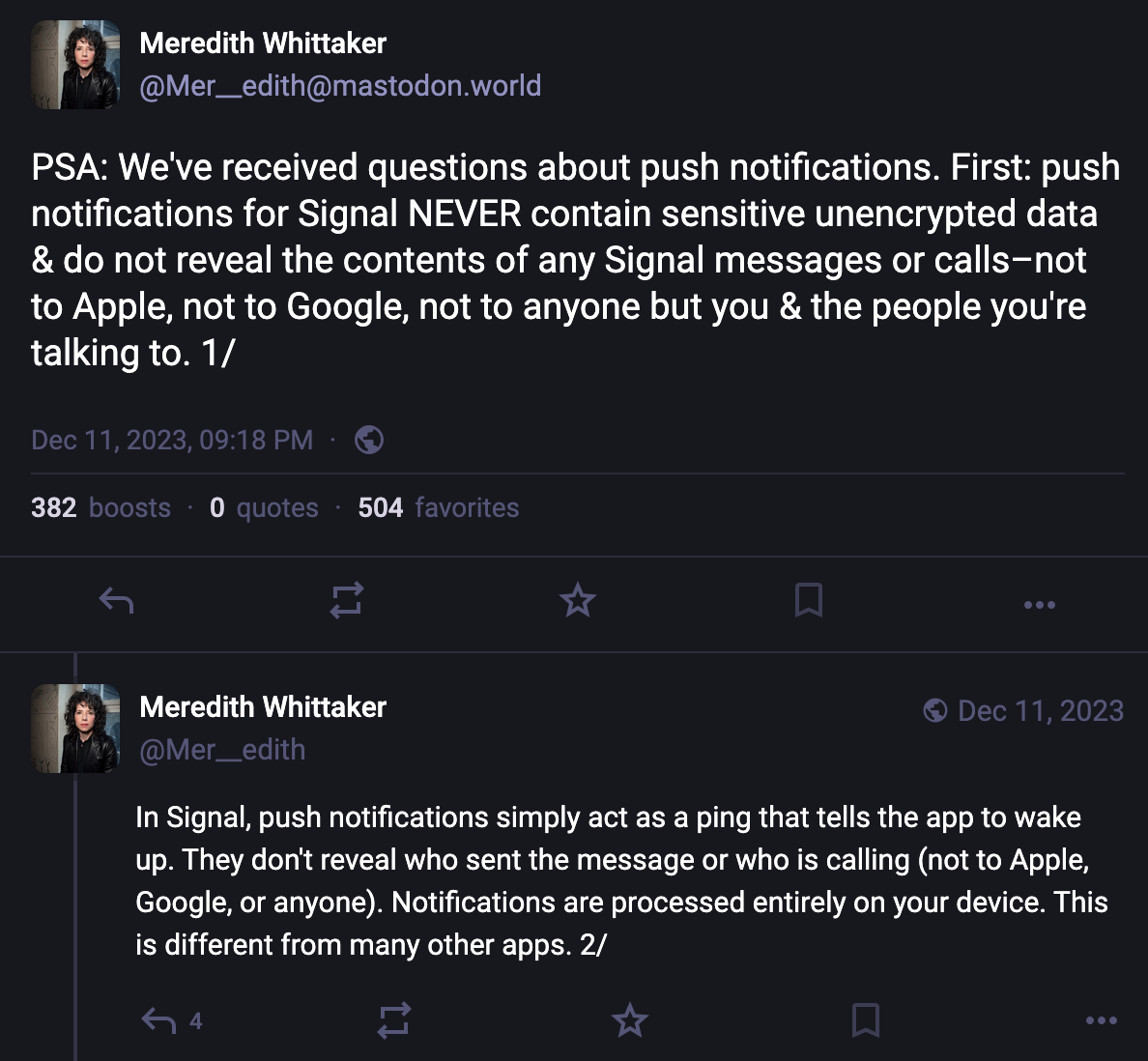
 push notifications for Signal NEVER contain sensitive unencrypted data & do not reveal the contents of any Signal messages or calls-not to Apple, not to Google, not to anyone but you & the people you're talking to. 1/ In Signal, push notifications simply act as a ping that tells the app to wake up. They don't reveal who sent the message or who is calling (not to Apple, Google, or anyone). Notifications are processed entirely on your device. This

It’s also good to reconsider whether any app should be sending you notifications to begin with. Aside from a potential decrease in the number of distractions you endure throughout the day, or the level of chaos on display on your lockscreen, limiting the apps that can send notifications and what content is visible in them can improve your privacy with respect to the sorts of metadata that may be gathered by the companies, as well as any content that may be viewable if someone has physically accessed your device.

To check and change your settings on iPhone

  • Open Settings > Notifications.
  • On the Show Previews option, you can choose whether to show the content of notifications on the lock screen, “Always,” which doesn’t require unlocking the device, “When Unlocked,” which does, and “Never,” which means notifications won’t have any details, just that you have a notification in an app. 
  • Alternatively, you can scroll down and change these settings per app. Just tap the app name, then the Show Previews menu, and choose how you’d like them to appear. Or, if you’ve decided you don’t want notifications from that app at all, uncheck the Allow Notifications option.

To check and change your settings on Android
The core version of Android relies on app developers to develop specific settings more than controlling them on a platform-wide level.

  • Open Settings > Notifications > App notifications to disable notifications from any app completely. Some apps may also offer internal notification options for specific types of notices, like new messages, that you can control in the app itself. Tap an app name, then tap the Addition settings in the app option to potentially customize it more.
  • You can also experiment with the sensitive content setting. This is up to the developer to set properly, but when done so, most notifications will require at least unlocking the device to see them. Open Settings > Notifications > Notifications on lock screen and disable “Show sensitive content.”

Control What Notifications AI Tools Can Access

In an attempt to make notifications easier to skim, both Android and iOS offer optional ways to get notification summaries using their AI tools that summarize the content of notifications. On an individual app level, WhatsApp offers this as well. Some of these summarization tools, like Apple’s, run on the device, while others, like WhatsApp’s, do not. This can all be a lot to keep track of, and sending data off device may create some level of risk for some messages.

Since this is a bit more complicated, we have another blog post that walks through the steps to take to protect messaging from accidentally ending up in AI tools built into Apple and Google's devices. For WhatsApp specifically, we have a blog detailing when you might want to turn on the app’s “Advanced Chat Privacy” feature, which can disable summaries for both yourself and others in the chat.

Balancing security, privacy, and usability with something like push notifications is a complicated task. At the very least, Apple and Google should better ensure that the content of these notifications isn’t transmitted over their servers in plain text. The companies need to also make sure that device operating systems don’t back up the notification database to the cloud, and when an app is deleted, that all notification data is purged.

We appreciate that apps like Signal allow you to control what’s visible with notifications on a per-app basis, and we’d like to see this level of granularity of choices in other secure messaging tools, like WhatsApp. Likewise, more apps should handle push notifications similarly to the way Signal does, where a ping is sent to wake up the app to check for messages, and the content of that message is never sent across servers.
  •  

Yikes, Encryption’s Y2K Moment is Coming Years Early

Google moved up its estimated deadline for quantum preparedness in cryptography to 2029—only 33 months from now. That’s earlier than previous deadlines, and they proposed the new post-quantum migration deadline because of two new papers that comprise a big jump in the state of the technology. It’s ahead of schedule, but not altogether unexpected. Cryptographers and engineers have been working on this for years, and as the deadline gets closer, it’s not surprising to see more precise timeline estimates come up.

The preparation for the Y2K bug is not a perfect analogy. Like Y2K, if systems are not updated in time, anyone with a powerful enough quantum computer will be able to more easily insert malware into the core systems of a computer and fake authentication to allow impersonation merely by observing network traffic. These are the threats whose mitigation timelines have been moved up.

But unlike Y2K, there’s a second sort of attack that we already need to be prepared for: quantum computers will be able to decrypt years of captured messages sent over encrypted messaging platforms shared any time before those platforms updated to quantum-proof encryption. That type of attack has been the main focus of engineering efforts so far and mitigation is well on its way, since anything before the upgrade might eventually be compromised.

Fortunately, not all cryptography is broken by quantum computers. Notably, symmetric encryption is quantum resistant. That means that if you have disk encryption turned on, you shouldn’t have to worry about quantum computers breaking into your phone, as long as your system’s keys are long enough. The problem is how you get the keys to do that encryption, and how you authenticate software on your device and in the cloud.

Engineers: Time to Lock In

For those whose work touches on any sort of cryptographic deployment, you’re hopefully already working on the post-quantum transition. If not, you really should be; there are quite a few relevant posts and updates with more information about what this news means for you. Your key agreement systems should be upgraded soon if they’re not already because of store-now-decrypt-later attacks. Now it’s time to prepare for authentication attacks on forged signatures as well.

In some cases, you may need to wait on others to finish their work first. If you’re using NGINX to host websites on Ubuntu, for example, the security settings you need to upgrade key agreement were just released in version 26.04. Updates are rolling out, so keep checking in and upgrade your systems as soon as you’re able to.

Users: Stay Updated, Check on Your Chats

But if you’re not in any position to be updating software or hardware, there may be some additional steps you can take to make sure you're as protected as possible. You’ll want to get the latest post-quantum protections as soon as they're available, so if you don't already have a habit of applying software updates in a timely manner, now’s a good time to start.

If you want to know if the website you’re using or the encrypted messaging app you’re chatting over will leak its data in a few years to anyone storing traffic now, you can search for its name with the word "quantum." The engineers are usually pretty proud of their work and have announced their post-quantum support (like what we’ve seen from Signal and iMessage). If you can’t find that information, you may want to have extra consideration for what you say over the internet, or switch the tools you're using. Those are the big areas to worry about now, before quantum computers are actually here, because they could result in the mass leakage of old messages.

The new deadline means that some technologies are simply not going to make it in time and will have to be left by the wayside, like trusted execution environments (TEEs), due to the slower speed of hardware deployments. TEEs are how companies do private processing on user data in the cloud, and they’re particularly relevant to AI offerings. 

Even now, though they offer more protection than processing data in the clear, TEEs are not as secure as homomorphic encryption or doing the processing on device. Post-quantum, the security level gets much closer to computation on cleartext, and even with strong user controls, that makes it way too easy to accidentally backdoor your own encrypted chats. If you’re worried about the contents of messages in an encrypted chat being exposed, you’ll probably want to completely avoid using AI features that might leak that content, such as summarization of recent chat history and notifications, and reply composition assistance. 

How’s the Transition Going So Far?

The work to update the world to post-quantum is well on its way. NIST finalized the standards for post-quantum cryptographic algorithms back in 2024. The larger platforms, websites, and hosting providers have already updated their algorithms, so even now, you’re probably already using post-quantum algorithms to access some of the internet. Measurements vary pretty widely, but up to about 4 in 10 websites currently support a post-quantum key exchange.

There’s still some work to be done in figuring out how to make the needed changes—for example, the way you find out a website’s private key to make HTTPS possible is being reworked to make room for larger signatures. Some technologies are just coming to market, like the post-quantum root of trust available now in some Chromebooks. In practice, this means that as you think about replacing your current devices in the next few years, you may want to check if you’re picking up hardware that has post-quantum support, if those specific protections are required for your threat model.

For the areas that still need updating, how much can we expect to actually get ready by the new deadline? It’s likely that not every cryptographically-capable device and deployment will be ready in time, and hardware with hard-coded certificates will probably be the last to update. We saw that happen when SHA-1 was deprecated; Point of Sale systems in particular were late adopters. While governments and large companies with quantum computers may not be interested in stealing money from cash registers, they will be interested in accessing secrets about people’s private lives. That’s why it’s so important that everyone does their part to upgrade, to protect the details of private communications and browsing. 

And there’s a good chance that older devices that won’t receive quantum-resistant updates were probably vulnerable to some other attack already. Quantum computation is just one type of attack on cryptography that’s notable for the scale of migration required, and how every public-key cryptosystem and authentication scheme has to do the work to prepare. That’s not a difference in kind, it’s a difference in scale, and some systems will inevitably be left behind.

Quantum preparedness hits different industries and services in different ways, but services that handle communications and financial information are particularly susceptible to risk, and need to act quickly to protect the privacy and security of billions of people.

  •  

EU Parliament Blocks Mass-Scanning of Our Chats—What's Next?

The EU’s so-called Chat Control plan, which would mandate mass scanning and other encryption breaking measures, has had some good news lately. The most controversial idea, the forced requirement to scan encrypted messages, was given up by EU member states. And now, another win for privacy: the EU Parliament has dealt a real blow to voluntary mass-scanning of chats by voting to not prolong an interim derogation from e-Privacy rules in the EU. These rules allowed service providers, temporarily, to scan private communication.  

But no one should celebrate just yet. We said there is more to it, and voluntary scanning is a key part. Unlike in the U.S., where there is no comprehensive federal privacy law, the general and indiscriminate scanning of people’s messages is not legal in the EU without a specific legal basis. The e-Privacy derogation law, which gave (limited) cover for such activities, has now expired. Does that mean mass scanning will stop overnight?  

Not really. 

Companies have continued similar scanning practices during past gaps. Google, Meta, Microsoft, and Snap have already signaled in a joint statement to “continue to take voluntary action on our relevant Interpersonal Communication Services.” Whether this indicates continued scanning of our private communication is not entirely clear, but what is clear is that such activity would now risk breaching EU law. Then again, lack of compliance with EU data protection and privacy rules is nothing new for big tech in Europe. 

Most importantly, the “Chat Control” proposal for mandatory detection of child abuse material (CSAM) is still alive and being negotiated. It has shifted the focus toward so-called risk mitigation measures, such as problematic age verification and voluntary activities. If platforms are expected to adopt these as part of their compliance, they risk no longer being truly voluntary. While mass scanning may be gone on paper, some broader concerns remain.  

So, where does this leave us? The immediate priority is to make sure the expired exception for mass scanning is not revived. At the same time, lawmakers need to pull the teeth from the currently negotiated Chat Control proposal by narrowing risk mitigation measures. This means ensuring that age verification does not become a default requirement and “voluntary activities” are not turned into an expectation to scan our communications.   

As we said before, this is a zombie proposal. It keeps coming back and must not be allowed to return through the back door. 

  •  
❌