Login
Login
Apple patches WebKit bug that could let sites access your data
Apple has released a Background Security Improvement to patch a flaw that could allow malicious websites to bypass browser protections and access data from other sites.
What is it?
The patched WebKit vulnerability is described as:
“A cross-origin issue in the Navigation API was addressed with improved input validation.”
WebKit vulnerabilities refer to security flaws in Apple’s web rendering engine, which powers Safari, Mail, and the App Store on iOS and macOS.
What this means is that the CVE-2026-20643 vulnerability makes it possible for a malicious website to pretend to be another site, maybe one you trust, and then read or steal information that should be kept separate. Normally, browsers enforce a rule called the “same‑origin policy,” which is like a strict fence that stops one site from peeking into another site’s data. This bug could help cybercriminals cut through that fence.
In practical terms, an attacker would first have to lure you to a specially crafted web page. If you visited it, that page could try to bypass the normal isolation between sites and access things it should not see, such as data from another tab or embedded content from a different service.
Attackers do not currently appear to exploit this flaw in the wild, but they like to chain issues like this with other bugs to steal accounts or sensitive data, which likely prompted Apple to ship it as a Background Security Improvement. Apple’s fix tightens how WebKit checks and handles cross‑site navigation.
What to do
This patch for a WebKit vulnerability, tracked as CVE-2026-20643, installs on top of versions 26.3.1/26.3.2 and not as a separate full OS version. Background Security Improvements are only available on the latest OS branch (26.x) and apply silently in the background if you’re on the latest version.
For iOS and iPadOS users, you can check if you’re using the latest software version by going to Settings > General > Software Update. It’s also worth turning on Automatic Updates if you haven’t already. You can do that on the same screen.
For macOS Tahoe users, you can find out if you’re on the latest 26.3 version from the Apple menu. In the upper-left corner of your screen, choose About This Mac. The information shown there includes the macOS name and version number. If you need to know the build number as well, click the version number to see it.
This Background Security Improvement is only available for Mac users running Tahoe 26.3.1 and MacBook Neo users running 26.3.2.
All users have to do is to check if they have the Background Security Improvements option set to enabled.
For iPhone and iPad users, this setting can be found under Privacy & Security, where you can scroll down and look for the Background Security Improvements toggle.
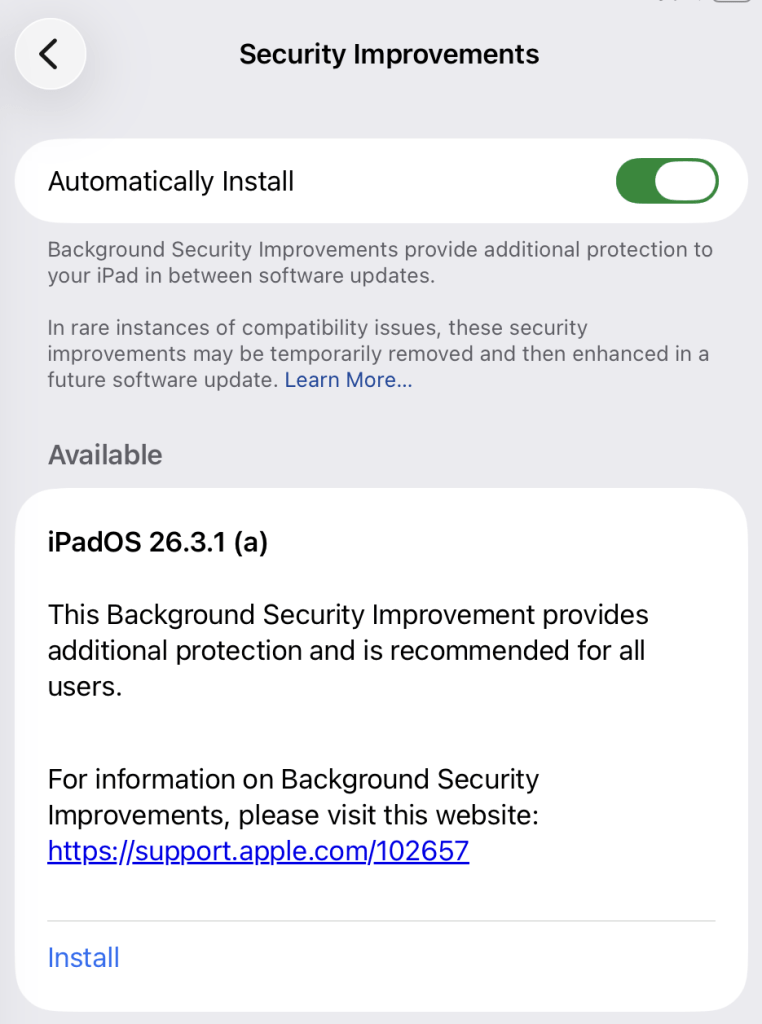
On a Mac (macOS Tahoe 26.3.+ only), you can check by following these instructions:
- Click the Apple menu > System Settings.
- In the sidebar, click Privacy & Security.
- Scroll down on the right and click Background Security Improvements.
- Make sure Automatically Install is turned on. If it’s off, the Mac won’t get Background Security Improvements until the fixes are rolled into a later full update.
The Install option in my screenshot means that you can speed up the process by clicking it. But it’s fine to wait until it happens automatically.
After the update, your OS version should show 26.3.1 (a), except for MacBook Neos which should be at 26.3.2 (a).
We don’t just report on phone security—we provide it
Cybersecurity risks should never spread beyond a headline. Keep threats off your mobile devices by downloading Malwarebytes for iOS, and Malwarebytes for Android today.