Reading view

Catch spyware in the act with Windows Webcam Monitoring

You’re working hard late at night, replying to emails and planning the week ahead. Then suddenly, a PDF file requests access to your camera.  Why would a PDF need camera access? 

Cybercriminals often disguise spyware inside seemingly harmless files and programs. An unexpected request for access to your webcam can be a red flag that something is amiss. 

Malwarebytes Windows Webcam Monitoring alerts you if a program tries to access your camera, so you can allow trusted programs to continue or block suspicious ones instantly. 

Spyware doesn’t just steal passwords. Some malicious apps try to access webcams to secretly spy on victims or capture sensitive information. 

What does Windows Webcam Monitoring do?  

  • Sends you an instant alert when a program tries to access your webcam.  
  • Allows only the programs you trust to access your camera, blocking everything else. 
  • Lets you manage notification preferences in Privacy Controls. A dedicated “Webcam Monitoring” table shows recognized programs and gives you control over which apps trigger alerts, and which don’t. 

With the benefit of real-time alerts, Windows Webcam Monitoring gives you visibility into which programs are trying to access your devices. And when it’s something you don’t recognize, it may even help you stop spyware before it can spy on you. 

At Malwarebytes, we believe security shouldn’t be complicated. Windows Webcam Monitoring is another step toward giving you simple, proactive protection that works automatically, so you can stay focused on pretty much anything else.  

Ready to take control?

Update Malwarebytes for Windows, go to Privacy Controls and enable Webcam Monitoring.


Real-time protection. Zero effort. 


  •  

Catch spyware in the act with Windows Webcam Monitoring

You’re working hard late at night, replying to emails and planning the week ahead. Then suddenly, a PDF file requests access to your camera.  Why would a PDF need camera access? 

Cybercriminals often disguise spyware inside seemingly harmless files and programs. An unexpected request for access to your webcam can be a red flag that something is amiss. 

Malwarebytes Windows Webcam Monitoring alerts you if a program tries to access your camera, so you can allow trusted programs to continue or block suspicious ones instantly. 

Spyware doesn’t just steal passwords. Some malicious apps try to access webcams to secretly spy on victims or capture sensitive information. 

What does Windows Webcam Monitoring do?  

  • Sends you an instant alert when a program tries to access your webcam.  
  • Allows only the programs you trust to access your camera, blocking everything else. 
  • Lets you manage notification preferences in Privacy Controls. A dedicated “Webcam Monitoring” table shows recognized programs and gives you control over which apps trigger alerts, and which don’t. 

With the benefit of real-time alerts, Windows Webcam Monitoring gives you visibility into which programs are trying to access your devices. And when it’s something you don’t recognize, it may even help you stop spyware before it can spy on you. 

At Malwarebytes, we believe security shouldn’t be complicated. Windows Webcam Monitoring is another step toward giving you simple, proactive protection that works automatically, so you can stay focused on pretty much anything else.  

Ready to take control?

Update Malwarebytes for Windows, go to Privacy Controls and enable Webcam Monitoring.


Real-time protection. Zero effort. 


  •  

Firefox 151 packs big privacy upgrades into a small update

Mozilla has published release notes for Firefox browser version 151.0, and this update includes several genuinely meaningful privacy and security improvements.

Three changes stand out in particular:

  • Stronger anti‑fingerprinting
  • Broader protection for local network access
  • More control over private sessions and permissions

Note that Mozilla says several Firefox 151 features are “part of a progressive roll out,” meaning they will appear for some users first and be expanded over time. So, you may not see all of them immediately.

Privacy

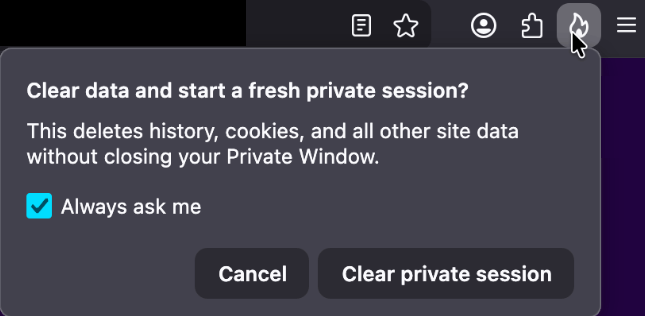
One of the more visible additions is a new “end private session” control in Private Browsing Mode. Instead of closing every private window to clear your traces, you now get a dedicated fire‑icon button next to the address bar that wipes the current private session’s data and immediately starts a fresh one.

End private session button

Under the hood, this clears the usual private browsing artifacts for that session, including history, cookies, cached files, and other site data that would normally disappear only when the last private window closes.

For people who routinely mix normal and private windows, this is safer and less error‑prone than hunting down every private tab before you walk away from the machine.

Firefox 151 also tightens its defenses against browser fingerprinting in the default “Standard” Enhanced Tracking Protection (ETP) mode. Mozilla says Firefox now limits the amount of device and browser information exposed to websites in a way that reduces the number of uniquely identifiable users by about 14% overall, and by roughly 49% on macOS.

This makes it harder for trackers to pick you out of the crowd, especially on platforms with fewer users to begin with (like certain macOS configurations). This reduces the privacy risk surface by default, which makes it harder for phishing and landing pages that redirect visitors to “categorize” you.

Another important change is Firefox’s “local network access restrictions,” which are now rolling out to all users, not just those who turned Enhanced Tracking Protection to Strict.

This means that when a website wants to communicate with devices on your local network, or with apps and services running on your machine, Firefox now asks for permission first. Chrome and Edge have been rolling out similar permission prompts.

Security

Firefox 151 also quietly fixes several security vulnerabilities.

The most notable example is CVE‑2026‑8953, a sandbox escape due to a use‑after‑free in the Disability Access APIs component. While there are currently no reports of in‑the‑wild exploitation for this specific bug at the time of writing, this is the kind of bug cybercriminals love.

A use-after-free (UAF) is a software memory vulnerability where a program attempts to access a memory location after it has been freed. If the program fails to clear the pointer to that freed memory, attackers can manipulate the error to crash the system or execute arbitrary code. A memory corruption leading to a sandbox escape is exactly the kind of link attackers want to complete a browser exploit chain.

How to update

If you’re running Firefox in a home or small‑office environment, we recommend updating to Firefox 151 as soon as possible to get the fingerprinting protections, local network access prompts, and security patches.

To update Firefox:

  • Open Firefox
  • Click the menu (three stacked lines) in the upper-right corner
  • Go to Help > About Firefox
  • Firefox will automatically check for updates and begin downloading them
  • Restart the browser when prompted to complete the update

Once your Firefox browser has been updated, it will show a green checkmark along with the message: “Firefox is up to date.”

Firefox is up to date

Let’s face it, an incognito window can only do so much. 
 
Breaches, dark web trading, credit fraud. Malwarebytes Identity Theft Protection monitors for all of it, alerts you fast, and comes with identity theft insurance. 

  •  

Firefox 151 packs big privacy upgrades into a small update

Mozilla has published release notes for Firefox browser version 151.0, and this update includes several genuinely meaningful privacy and security improvements.

Three changes stand out in particular:

  • Stronger anti‑fingerprinting
  • Broader protection for local network access
  • More control over private sessions and permissions

Note that Mozilla says several Firefox 151 features are “part of a progressive roll out,” meaning they will appear for some users first and be expanded over time. So, you may not see all of them immediately.

Privacy

One of the more visible additions is a new “end private session” control in Private Browsing Mode. Instead of closing every private window to clear your traces, you now get a dedicated fire‑icon button next to the address bar that wipes the current private session’s data and immediately starts a fresh one.

End private session button

Under the hood, this clears the usual private browsing artifacts for that session, including history, cookies, cached files, and other site data that would normally disappear only when the last private window closes.

For people who routinely mix normal and private windows, this is safer and less error‑prone than hunting down every private tab before you walk away from the machine.

Firefox 151 also tightens its defenses against browser fingerprinting in the default “Standard” Enhanced Tracking Protection (ETP) mode. Mozilla says Firefox now limits the amount of device and browser information exposed to websites in a way that reduces the number of uniquely identifiable users by about 14% overall, and by roughly 49% on macOS.

This makes it harder for trackers to pick you out of the crowd, especially on platforms with fewer users to begin with (like certain macOS configurations). This reduces the privacy risk surface by default, which makes it harder for phishing and landing pages that redirect visitors to “categorize” you.

Another important change is Firefox’s “local network access restrictions,” which are now rolling out to all users, not just those who turned Enhanced Tracking Protection to Strict.

This means that when a website wants to communicate with devices on your local network, or with apps and services running on your machine, Firefox now asks for permission first. Chrome and Edge have been rolling out similar permission prompts.

Security

Firefox 151 also quietly fixes several security vulnerabilities.

The most notable example is CVE‑2026‑8953, a sandbox escape due to a use‑after‑free in the Disability Access APIs component. While there are currently no reports of in‑the‑wild exploitation for this specific bug at the time of writing, this is the kind of bug cybercriminals love.

A use-after-free (UAF) is a software memory vulnerability where a program attempts to access a memory location after it has been freed. If the program fails to clear the pointer to that freed memory, attackers can manipulate the error to crash the system or execute arbitrary code. A memory corruption leading to a sandbox escape is exactly the kind of link attackers want to complete a browser exploit chain.

How to update

If you’re running Firefox in a home or small‑office environment, we recommend updating to Firefox 151 as soon as possible to get the fingerprinting protections, local network access prompts, and security patches.

To update Firefox:

  • Open Firefox
  • Click the menu (three stacked lines) in the upper-right corner
  • Go to Help > About Firefox
  • Firefox will automatically check for updates and begin downloading them
  • Restart the browser when prompted to complete the update

Once your Firefox browser has been updated, it will show a green checkmark along with the message: “Firefox is up to date.”

Firefox is up to date

Let’s face it, an incognito window can only do so much. 
 
Breaches, dark web trading, credit fraud. Malwarebytes Identity Theft Protection monitors for all of it, alerts you fast, and comes with identity theft insurance. 

  •  

Microsoft Took a Step Toward Human Rights Accountability. Google and Amazon (and Others) Should Pay Attention!

For years, civil society organizations, workers, journalists, and human rights experts have warned that major technology companies risk enabling grave human rights abuses when they provide cloud computing, AI, and surveillance infrastructure to governments implicated in violations of international and humanitarian law. While many companies pay lip service to evaluating customers and contracts for human rights implications (lip service Exhibit A: Palantir!), too often those processes fail to provide any meaningful accountability when their standards are not met or are simply ignored. But recent developments at Microsoft suggest that accountability for failing to uphold the human rights standards that a company itself sets, even if incomplete, is possible. 

According to recent reporting, Microsoft’s Israel chief has departed amid an escalating ethical controversy surrounding the company’s business relationships with the Israeli Ministry of Defense. The move follows months of scrutiny, internal dissent, and sustained pressure from inside the organization along with press and civil society, especially after a report by The Guardian revealed that Microsoft technologies were used in systems connected to mass surveillance and military targeting operations in Gaza in ways that appeared to violate Microsoft’s own standards. This did not happen overnight.

In September 2025, Microsoft reportedly suspended certain services after initial investigations raised serious concerns about how its cloud and AI infrastructure may have been used. That alone distinguished Microsoft from many of its peers. Rather than simply dismissing mounting concerns or hiding behind vague claims of neutrality, Microsoft appeared to recognize that providing technology in conflict settings creates real human rights responsibilities. Now, after additional investigation and continued public scrutiny, it appears the company has taken another step, one that should send a strong signal to others that violating Microsoft’s human rights commitments could cost you your job. This is important. 

There is still much more Microsoft should do, of course. The company has yet to fully disclose the scope of its findings, explain exactly which services were suspended, or clarify what safeguards remain in place to prevent its technologies from contributing to human rights abuses in the future. We shouldn’t have to infer the connection between this employment action and the company’s investigation. 

Just prior to reports that Microsoft had fired its Israel Country General Manager, EFF joined Access Now, Amnesty International, Fight for the Future, and 7amleh in a joint May 7, 2026 letter to Microsoft leadership calling on the company to publicly release the findings of its investigation, suspend business relationships tied to serious human rights abuses, and implement meaningful safeguards to prevent its technologies from contributing to further harm. The letter detailed allegations regarding Microsoft’s reported provision of Azure cloud and AI services to Israeli military and intelligence units involved in surveillance and targeting operations, while also pressing the company to take concrete human rights due diligence measures going forward. Those demands remain urgent, even as Microsoft appears to be taking some of the steps we urged.

But even as we push for more, it is important to recognize when a company takes steps in the right direction. Because this is what it means to put human rights commitments into practice. It means acknowledging that human rights policies are not just branding exercises or transparency reports. It means accepting that companies providing cloud infrastructure and AI services have responsibilities when credible evidence emerges that their technologies may be enabling violations of international law. And it means taking concrete action when those risks become known.

The allegations facing Microsoft are serious. Human rights organizations and investigative reporting have documented claims that Microsoft Azure services were used by Israeli military and intelligence units to process large-scale surveillance data, support AI-assisted targeting systems, and sustain military cloud infrastructure during the war in Gaza. The concerns raised extend beyond ordinary business risk; they implicate potential complicity in violations of international humanitarian and human rights law.

Faced with these allegations, Microsoft could have chosen the path many tech companies take: deny everything, attack critics, suppress worker dissent, and continue business as usual. Instead, the company appears to have begun responding to the evidence.

Technology companies are not powerless bystanders. Cloud providers and AI companies make choices every day about who gets access to their infrastructure, under what conditions, and with what oversight. When companies claim to uphold human rights principles, those commitments should have operational consequences. Too many companies, in both international and domestic policing contexts, provide technology to institutions that violate people’s human rights and civil liberties, then fall back on the claim that they are merely providing a service that their customers can use how they see fit. This is an ethical failing that falls short of most companies’ publicly expressed commitments. Microsoft’s recent actions suggest that sustained public pressure, worker organizing, investigative journalism, and civil society advocacy can force even the world’s largest technology companies to respond.

Google and Amazon should especially see this as a clear example to follow. Both companies also provide services to the Israeli Ministry of Defense and have faced years of criticism over those contracts and services, including from EFF. Yet neither has demonstrated the level of responsiveness or accountability that Microsoft has shown. If Microsoft can suspend services, investigate allegations, and make leadership changes amid mounting evidence and ethical concerns, then other cloud giants can no longer pretend that meaningful action is impossible.

The technology industry has spent years insisting that ethics and human rights matter. The real test has always been whether those principles survive when profits, government contracts, and geopolitical pressure are on the line. Microsoft’s recent steps are not the end of that story, but they may mark the beginning of what real accountability can look like.

We’re looking at you, Amazon and Google. If Microsoft can do it, why can’t you?

  •  

YouTube wants your face to fight deepfakes

If you’re worried about deepfake likenesses of yourself showing up online, you’re not alone; YouTube is worried for you. It wants to protect you by having you upload a selfie video and government ID to its site.

The idea is that the video giant will use its own AI to patrol the service for fake videos using your likeness. In exchange, you get the chance to have them taken down.

This isn’t available for everyone, though. It’s for celebs, those in vulnerable jobs, and now, most YouTube creators.

YouTube has been working on this concept, which it calls its “likeness detection” system, since it first floated the idea publicly in September 2024. That December, it launched a partnership with the Creative Artists Agency that saw it using the technology with sporting and entertainment figures.

In October last year, it expanded likeness detection to cover more creators, and then in March it expanded it again to cover politicians and journalists. And last month, it widened the net again, offering the service to Hollywood celebs. They can use it regardless of whether they have a YouTube account, it added.

Now, in its latest move, anyone 18 or older with a selfie and ID can sign up. At least in theory, as it hasn’t rolled out to everyone yet. It’s also for faces only; AI-generated voice clones are another problem entirely.

The privacy risk

Privacy advocates warned that YouTube’s likeness detection system could normalize handing biometric data to large tech platforms, even if YouTube says the data is only used to improve likeness detection models with creator permission.

On the help page for the likeness detection service, YouTube says creators can separately choose whether their face and voice templates are used to improve its likeness detection models.

“When you sign up for Likeness detection, you also have the option to allow YouTube to use your face and voice templates to develop and improve likeness detection models. This helps us build better, more accurate likeness detection technologies.”

Adding:

“You can opt out of YouTube’s use of this data for development and improvement of likeness models at any time.”

YouTube supports legislation intended to tackle deepfakes, such as the NO FAKES and TAKE IT DOWN acts. These are designed to help stop the misappropriation of someone’s image online. TAKE IT DOWN, which became law a year ago, focuses purely on “nonconsensual intimate imagery.” But that doesn’t cover other kinds of deepfakes, such as fake politicians or celebrity endorsements. Those are becoming increasingly common. NO FAKES, which hasn’t yet become law, is far broader in scope, assigning people federal rights over their own image.

So is it worth the trade?

Deepfakes, intimate and otherwise, are definitely a threat, especially for YouTubers who become popular. And the barrier to entry is lowering all the time. Google’s own DeepMind researchers found most generative AI misuse isn’t sophisticated; it’s mundane likeness manipulation by anyone with a browser.

So do you hand over your face and government ID for your protection, to a company whose broader data collection practices have faced years of scrutiny, and hope its policies don’t change? Or do you skip it and hope that the deepfake merchants don’t decide to target you?

Creators commenting on YouTube’s video revealing the service six months ago were less than impressed. One commenter said:

“I was 100% on board, up until the ID upload. That makes me very uncomfortable.”

Echoing several others who complained that it’s difficult to get takedown requests actioned, another added:

“If YouTube actually acted upon these kinds of reports, then I’d be more in favour of this.”

Whether you decide to sign up for the service or not, just be sure to do it with your eyes open.


Someone’s watching your accounts. Make sure it’s us.


  •  

YouTube wants your face to fight deepfakes

If you’re worried about deepfake likenesses of yourself showing up online, you’re not alone; YouTube is worried for you. It wants to protect you by having you upload a selfie video and government ID to its site.

The idea is that the video giant will use its own AI to patrol the service for fake videos using your likeness. In exchange, you get the chance to have them taken down.

This isn’t available for everyone, though. It’s for celebs, those in vulnerable jobs, and now, most YouTube creators.

YouTube has been working on this concept, which it calls its “likeness detection” system, since it first floated the idea publicly in September 2024. That December, it launched a partnership with the Creative Artists Agency that saw it using the technology with sporting and entertainment figures.

In October last year, it expanded likeness detection to cover more creators, and then in March it expanded it again to cover politicians and journalists. And last month, it widened the net again, offering the service to Hollywood celebs. They can use it regardless of whether they have a YouTube account, it added.

Now, in its latest move, anyone 18 or older with a selfie and ID can sign up. At least in theory, as it hasn’t rolled out to everyone yet. It’s also for faces only; AI-generated voice clones are another problem entirely.

The privacy risk

Privacy advocates warned that YouTube’s likeness detection system could normalize handing biometric data to large tech platforms, even if YouTube says the data is only used to improve likeness detection models with creator permission.

On the help page for the likeness detection service, YouTube says creators can separately choose whether their face and voice templates are used to improve its likeness detection models.

“When you sign up for Likeness detection, you also have the option to allow YouTube to use your face and voice templates to develop and improve likeness detection models. This helps us build better, more accurate likeness detection technologies.”

Adding:

“You can opt out of YouTube’s use of this data for development and improvement of likeness models at any time.”

YouTube supports legislation intended to tackle deepfakes, such as the NO FAKES and TAKE IT DOWN acts. These are designed to help stop the misappropriation of someone’s image online. TAKE IT DOWN, which became law a year ago, focuses purely on “nonconsensual intimate imagery.” But that doesn’t cover other kinds of deepfakes, such as fake politicians or celebrity endorsements. Those are becoming increasingly common. NO FAKES, which hasn’t yet become law, is far broader in scope, assigning people federal rights over their own image.

So is it worth the trade?

Deepfakes, intimate and otherwise, are definitely a threat, especially for YouTubers who become popular. And the barrier to entry is lowering all the time. Google’s own DeepMind researchers found most generative AI misuse isn’t sophisticated; it’s mundane likeness manipulation by anyone with a browser.

So do you hand over your face and government ID for your protection, to a company whose broader data collection practices have faced years of scrutiny, and hope its policies don’t change? Or do you skip it and hope that the deepfake merchants don’t decide to target you?

Creators commenting on YouTube’s video revealing the service six months ago were less than impressed. One commenter said:

“I was 100% on board, up until the ID upload. That makes me very uncomfortable.”

Echoing several others who complained that it’s difficult to get takedown requests actioned, another added:

“If YouTube actually acted upon these kinds of reports, then I’d be more in favour of this.”

Whether you decide to sign up for the service or not, just be sure to do it with your eyes open.


Someone’s watching your accounts. Make sure it’s us.


  •  

We Must Not Normalize Digital Surveillance Abuses. EFF’s New Guide Underlines Concrete Steps to Fight Back.

Poor accountability, feeble control mechanisms, and insufficient legal frameworks have led to systematic human rights violations in the Americas, with no consistent remedy or reparation to victims. What's needed is to materialize essential guarantees and measures to combat repeated surveillance abuses in the region. To help build a path for solutions, EFF launches the guide Tackling Arbitrary Digital Surveillance in the Americas, adding to our extensive work leveraging human rights norms to confront state privacy violations.

The document compiles privacy, data protection, and access to information guarantees established within the Inter-American Human Rights System to provide concrete, actionable guidance to governments in the Americas to curb the vicious cycle of state digital surveillance abuses. It outlines the safeguards and institutional measures necessary to protect individuals and details rules, parameters, and standards to overcome current pernicious practices and trends. 

As concerns over national and public security intensify, countries in the region seem to increasingly normalize the pervasiveness of digital surveillance technologies and their arbitrary use by security forces as a distorted form of protection. However, no actual protection can arise from arbitrary surveillance. 

When public security, intelligence, and law enforcement agencies neglect or harm settled rights in the name of national security or public order, they too become a threat. Tolerating rights violations creates the dire situation that the Freedom of Expression Special Rapporteur of the Inter-American Commission on Human Rights thoroughly analyzed in his report about the serious impacts of digital surveillance on freedom of expression in the Americas.

The great majority of states in Latin America have ratified the American Convention on Human Rights. As such, the parameters and rules our new guide describes stem directly from their obligations before international human rights law. State agents and institutions must take the necessary measures to make them a reality.

As EFF’s guide points out, states must implement clear and precise legal frameworks that:

  • define surveillance powers and limitations;
  • ensure all surveillance measures pursue legitimate aims without discriminatory ends;
  • subject interference with privacy to rigorous necessity and proportionality analysis;
  • require prior judicial authorization for digital surveillance measures;
  • maintain detailed records of surveillance operations;
  • establish independent civilian oversight institutions with technical expertise and enforcement powers;
  • guarantee individuals' right to informational self-determination and proper notification; and
  • provide effective remedies and reparation for victims of surveillance abuses.

States must also put in place the institutional processes and structures to give effect to these legal guarantees. As we stress in the document, States that embrace the guide’s recommendations will not only comply with their international obligations, but will also build more resilient, rights-respecting security architectures capable of addressing genuine threats without sacrificing the freedoms they exist to protect. 

Civil society leaders, activists, legal experts, public defenders, oversight institutions, and state officials committed to human rights must gather and ramp up the fight against the normalization of digital surveillance abuses in the Americas. We hope that EFF’s new guide can serve as a crucial tool in strengthening this fight, one that we have joined since our early days.

  •  

Microsoft is changing Edge’s plaintext password behavior

Microsoft said it will change Edge’s password handling as a “defense‑in‑depth” measure.

Originally, Edge decrypted the entire saved‑password store on startup and kept all credentials resident in process memory in clear text for the whole browser session, regardless of whether a given credential was ever used or not.

A short while ago, Microsoft said this plaintext password behavior was by design. Now, Microsoft has changed course, and the new password-handling behavior is already present in Canary (the experimental preview version of Microsoft Edge), with rollout prioritized across all channels.

The researcher who originally flagged the issue said:

“Edge is the only Chromium‑based browser I’ve tested that behaves this way. By contrast, Chrome uses a design that makes it far harder for attackers to extract saved passwords by simply reading process memory.”

Microsoft Edge Security Lead Gareth Evans said Microsoft is now taking a broader view and has committed to changing Edge so that saved passwords are no longer loaded into memory on startup as clear text. As a result, exposure will be reduced as a defense‑in‑depth improvement. That means even if an attacker has administrative control of a device, it becomes harder to harvest all the passwords.

According to Microsoft:

“Going forward, Microsoft Edge will no longer load all saved passwords into memory at browser startup. Instead, passwords will be decrypted only when needed for autofill or password management operations.”

The change is already live in the Edge Canary channel and will be included in the next update for all supported Edge releases (build 148 and newer across Stable, Beta, Dev, Canary, and Extended Stable).

The reason for this change is probably more reputational and strategic rather than an acknowledgment of an exploitable vulnerability. Microsoft seems to want to align reality with its “secure by design” messaging and reduce a very visible, easy‑to‑demo weakness, even if it still doesn’t treat it as a classic memory‑disclosure bug.

Passwords in your browser

Please note that this change just means Edge will become roughly as secure an option to store passwords as every other Chromium-based browser.

Your browser password manager gives you ease of use, but that comes with some security tradeoffs. Of course, password managers aren’t foolproof either, so it’s important to decide for yourself where you store your passwords.

If you’re confident a website is safe, and anyone who can access it under your account wouldn’t learn anything sensitive, feel free to store the password in your browser, but disable autofill so you stay in control.

Use MFA where possible. It enormously reduces the risk if someone gets hold of your password. And avoid using the browser password manager to store your credit card details or other sensitive personally identifiable information, such as medical information.


Let’s face it, an incognito window can only do so much. 
 
Breaches, dark web trading, credit fraud. Malwarebytes Identity Theft Protection monitors for all of it, alerts you fast, and comes with identity theft insurance. 

  •  

Microsoft is changing Edge’s plaintext password behavior

Microsoft said it will change Edge’s password handling as a “defense‑in‑depth” measure.

Originally, Edge decrypted the entire saved‑password store on startup and kept all credentials resident in process memory in clear text for the whole browser session, regardless of whether a given credential was ever used or not.

A short while ago, Microsoft said this plaintext password behavior was by design. Now, Microsoft has changed course, and the new password-handling behavior is already present in Canary (the experimental preview version of Microsoft Edge), with rollout prioritized across all channels.

The researcher who originally flagged the issue said:

“Edge is the only Chromium‑based browser I’ve tested that behaves this way. By contrast, Chrome uses a design that makes it far harder for attackers to extract saved passwords by simply reading process memory.”

Microsoft Edge Security Lead Gareth Evans said Microsoft is now taking a broader view and has committed to changing Edge so that saved passwords are no longer loaded into memory on startup as clear text. As a result, exposure will be reduced as a defense‑in‑depth improvement. That means even if an attacker has administrative control of a device, it becomes harder to harvest all the passwords.

According to Microsoft:

“Going forward, Microsoft Edge will no longer load all saved passwords into memory at browser startup. Instead, passwords will be decrypted only when needed for autofill or password management operations.”

The change is already live in the Edge Canary channel and will be included in the next update for all supported Edge releases (build 148 and newer across Stable, Beta, Dev, Canary, and Extended Stable).

The reason for this change is probably more reputational and strategic rather than an acknowledgment of an exploitable vulnerability. Microsoft seems to want to align reality with its “secure by design” messaging and reduce a very visible, easy‑to‑demo weakness, even if it still doesn’t treat it as a classic memory‑disclosure bug.

Passwords in your browser

Please note that this change just means Edge will become roughly as secure an option to store passwords as every other Chromium-based browser.

Your browser password manager gives you ease of use, but that comes with some security tradeoffs. Of course, password managers aren’t foolproof either, so it’s important to decide for yourself where you store your passwords.

If you’re confident a website is safe, and anyone who can access it under your account wouldn’t learn anything sensitive, feel free to store the password in your browser, but disable autofill so you stay in control.

Use MFA where possible. It enormously reduces the risk if someone gets hold of your password. And avoid using the browser password manager to store your credit card details or other sensitive personally identifiable information, such as medical information.


Let’s face it, an incognito window can only do so much. 
 
Breaches, dark web trading, credit fraud. Malwarebytes Identity Theft Protection monitors for all of it, alerts you fast, and comes with identity theft insurance. 

  •  

Canvas hack: is it ever a good idea to pay a ransom, and what happens to the data?

Businesses are advised against paying – but many are prepared to deal to protect users’ privacy

After a week of outages, hundreds of millions of students’ data stolen, delayed assignment due dates and school login pages being defaced by hackers, the US tech firm Instructure – which operates the education platform Canvas, used by education providers worldwide – announced it had “reached an agreement with the unauthorised actor” behind the ransomware attack.

Experts read the careful language as a sign that a ransom has been paid. The company has not confirmed this.

Continue reading...

© Photograph: Boonchai Wedmakawand/Getty Images

© Photograph: Boonchai Wedmakawand/Getty Images

© Photograph: Boonchai Wedmakawand/Getty Images

  •  

Meta’s confusing new approach to chat privacy

Recent news had us wondering whether Meta actually knows what it wants.

On one platform, Meta is promoting AI chats that it says even it cannot read. On another, it has removed one of the few features that genuinely prevented Meta from accessing private conversations.

“Meta removed support for end-to-end encrypted chats from Instagram as of May 8, 2026.”

Meta adds fully private AI chats to WhatsApp.”

At the moment, Meta is heavily promoting a new Incognito Chat mode for its Meta AI assistant in WhatsApp, built on top of a system it calls Private Processing. According to WhatsApp’s own announcement, Incognito Chat is:

 “Truly private — no one can read your conversation, not even us.”

When you start an Incognito chat with Meta AI, you get a temporary conversation where messages aren’t saved and disappear by default, which Meta pitches as “a space to think and explore ideas without anyone watching.”

BBC News and others report that these AI chats are text‑only for now, run in a sandboxed environment, and are separate from your regular end‑to‑end encrypted (E2EE) messaging with other people on WhatsApp.

Meta is also preparing “Side Chat,” which will let you invoke Meta AI inside other WhatsApp chats, again using this Private Processing infrastructure to claim AI assistance without breaking the underlying encryption.

On paper, that’s an impressive technical and marketing story: powerful AI, wrapped in layers of privacy‑preserving infrastructure, added to an app that already has a strong reputation for end‑to‑end encryption by default.

Meanwhile, on Instagram…

Now contrast that with what’s happening on Instagram. On 8 May 2026, Meta removed optional end‑to‑end encryption for Instagram Direct Messages (DMs) entirely. Users who had previously turned the feature on were shown notices that “end‑to‑end encrypted messaging on Instagram is no longer supported as of 8 May 2026,” and were urged to download backups of their encrypted conversations before the cutoff.

End‑to‑end encryption ensures that only the sender and recipient can read their conversations. Instagram offered this as an opt‑in feature since late 2023, but it was buried several taps deep inside individual conversation settings and never turned on by default. Meta’s explanation for shutting it down is that “very few people” used encrypted DMs and that maintaining a separate encrypted system added complexity. Critics have pointed out the circular logic. The company hid the feature, did not advertise it, and is now using low adoption as the reason to kill it rather than, say, making it easier to find or turning it on by default.

What all this means

From a user’s perspective, the result is confusing: one Meta product introduces stronger privacy than ever for AI chats, while another removes the one feature that truly stopped Meta from reading your conversations.

The key point to remember here is that “incognito” and “private” are marketing words, while end‑to‑end encryption is a technical guarantee.

For security‑conscious users, this split personality means you can no longer treat all Meta chats the same. WhatsApp remains end‑to‑end encrypted for person‑to‑person messages and adds optional privacy features around its AI, while Instagram DMs should now be assumed readable by Meta and potentially accessible to law enforcement, advertisers, or attackers who gain access to Meta’s systems.


To boldly browse, away from prying eyes. 


Why make AI chats private?

We’ve seen that AI chats have suddenly turned up in search results without users’ knowledge. So there definitely is a positive side to this new feature.

We also know there have been lawsuits against chatbot providers in cases where the outcome of an AI conversation led to very undesirable results. But how would you be able to provide evidence when messages auto-disappear?

How to proceed

Meta’s recent moves show that strong privacy features can be added where they support a strategic narrative and removed where they conflict with business or regulatory priorities. Users can’t control those decisions, but they can respond by choosing where they hold their most sensitive conversations and by assuming that if a chat isn’t end‑to‑end encrypted by default, it is ultimately readable by someone other than the people in it.

So, what’s a safe way to move forward?

  • Treat Instagram DMs as postcard-level privacy. Now that E2EE is gone, assume Meta can read and scan your messages and that content could be accessed under legal orders or in a breach. Do not send passwords, recovery codes, banking details, or compromising photos over Instagram.
  • When someone asks you to move a conversation to Signal, WhatsApp, or another E2EE messenger, ask them why. It does make sense when you’re sharing financial details, personal images, health information, or anything you would not want a platform provider to read. But sometimes scammers prefer encrypted platforms too, because they’re harder to monitor.
  • Do not confuse “incognito” AI chats with full encryption. WhatsApp’s Incognito mode for Meta AI may be a privacy improvement over standard cloud AI chats, but it is still a conversation with a large language model owned by the same company that runs the platform. Share only what you’re comfortable entrusting to Meta.
  • Regularly review your privacy and security settings. Check which devices are logged in, enable two‑factor authentication, and verify which of your chat apps are actually end‑to‑end encrypted by default.

Scammers know more about you than you think. 

Malwarebytes Mobile Security protects you from phishing, scam texts, malicious sites, and more. With real-time AI-powered Scam Guard built right in. 

Download for iOS → Download for Android → 

  •  

Meta’s confusing new approach to chat privacy

Recent news had us wondering whether Meta actually knows what it wants.

On one platform, Meta is promoting AI chats that it says even it cannot read. On another, it has removed one of the few features that genuinely prevented Meta from accessing private conversations.

“Meta removed support for end-to-end encrypted chats from Instagram as of May 8, 2026.”

Meta adds fully private AI chats to WhatsApp.”

At the moment, Meta is heavily promoting a new Incognito Chat mode for its Meta AI assistant in WhatsApp, built on top of a system it calls Private Processing. According to WhatsApp’s own announcement, Incognito Chat is:

 “Truly private — no one can read your conversation, not even us.”

When you start an Incognito chat with Meta AI, you get a temporary conversation where messages aren’t saved and disappear by default, which Meta pitches as “a space to think and explore ideas without anyone watching.”

BBC News and others report that these AI chats are text‑only for now, run in a sandboxed environment, and are separate from your regular end‑to‑end encrypted (E2EE) messaging with other people on WhatsApp.

Meta is also preparing “Side Chat,” which will let you invoke Meta AI inside other WhatsApp chats, again using this Private Processing infrastructure to claim AI assistance without breaking the underlying encryption.

On paper, that’s an impressive technical and marketing story: powerful AI, wrapped in layers of privacy‑preserving infrastructure, added to an app that already has a strong reputation for end‑to‑end encryption by default.

Meanwhile, on Instagram…

Now contrast that with what’s happening on Instagram. On 8 May 2026, Meta removed optional end‑to‑end encryption for Instagram Direct Messages (DMs) entirely. Users who had previously turned the feature on were shown notices that “end‑to‑end encrypted messaging on Instagram is no longer supported as of 8 May 2026,” and were urged to download backups of their encrypted conversations before the cutoff.

End‑to‑end encryption ensures that only the sender and recipient can read their conversations. Instagram offered this as an opt‑in feature since late 2023, but it was buried several taps deep inside individual conversation settings and never turned on by default. Meta’s explanation for shutting it down is that “very few people” used encrypted DMs and that maintaining a separate encrypted system added complexity. Critics have pointed out the circular logic. The company hid the feature, did not advertise it, and is now using low adoption as the reason to kill it rather than, say, making it easier to find or turning it on by default.

What all this means

From a user’s perspective, the result is confusing: one Meta product introduces stronger privacy than ever for AI chats, while another removes the one feature that truly stopped Meta from reading your conversations.

The key point to remember here is that “incognito” and “private” are marketing words, while end‑to‑end encryption is a technical guarantee.

For security‑conscious users, this split personality means you can no longer treat all Meta chats the same. WhatsApp remains end‑to‑end encrypted for person‑to‑person messages and adds optional privacy features around its AI, while Instagram DMs should now be assumed readable by Meta and potentially accessible to law enforcement, advertisers, or attackers who gain access to Meta’s systems.


To boldly browse, away from prying eyes. 


Why make AI chats private?

We’ve seen that AI chats have suddenly turned up in search results without users’ knowledge. So there definitely is a positive side to this new feature.

We also know there have been lawsuits against chatbot providers in cases where the outcome of an AI conversation led to very undesirable results. But how would you be able to provide evidence when messages auto-disappear?

How to proceed

Meta’s recent moves show that strong privacy features can be added where they support a strategic narrative and removed where they conflict with business or regulatory priorities. Users can’t control those decisions, but they can respond by choosing where they hold their most sensitive conversations and by assuming that if a chat isn’t end‑to‑end encrypted by default, it is ultimately readable by someone other than the people in it.

So, what’s a safe way to move forward?

  • Treat Instagram DMs as postcard-level privacy. Now that E2EE is gone, assume Meta can read and scan your messages and that content could be accessed under legal orders or in a breach. Do not send passwords, recovery codes, banking details, or compromising photos over Instagram.
  • When someone asks you to move a conversation to Signal, WhatsApp, or another E2EE messenger, ask them why. It does make sense when you’re sharing financial details, personal images, health information, or anything you would not want a platform provider to read. But sometimes scammers prefer encrypted platforms too, because they’re harder to monitor.
  • Do not confuse “incognito” AI chats with full encryption. WhatsApp’s Incognito mode for Meta AI may be a privacy improvement over standard cloud AI chats, but it is still a conversation with a large language model owned by the same company that runs the platform. Share only what you’re comfortable entrusting to Meta.
  • Regularly review your privacy and security settings. Check which devices are logged in, enable two‑factor authentication, and verify which of your chat apps are actually end‑to‑end encrypted by default.

Scammers know more about you than you think. 

Malwarebytes Mobile Security protects you from phishing, scam texts, malicious sites, and more. With real-time AI-powered Scam Guard built right in. 

Download for iOS → Download for Android → 

  •  

Why Malwarebytes blocks some Yahoo Mail redirects

Some Malwarebytes users have recently noticed frequent web protection alerts while reading email in Yahoo Mail’s web interface. These alerts are caused by background connections from the Yahoo Mail page to a set of third‑party domains that our products and other security tools currently classify as risky.

What we are seeing under the hood

When you open Yahoo Mail in a browser, the page loads various embedded components for navigation, features, and metrics. As part of this, the interface makes calls to domains such as cook.howduhtable.com and related subdomains, sometimes in the context of URLs that include /ybar/mail.yahoo.com/ and a long encoded parameter. That encoded string often resolves to a URL like:

https://gpt.mail.yahoo.net/sandbox?client=novation&version=0.1&haq=1&cache=1

This suggests the traffic is being routed through what appears to be a sandboxed web component that Yahoo can use for things like telemetry, testing infrastructure, or mail features. It may also be part of an advertising or tracking flow, but at this time we cannot say with certainty exactly what purpose Yahoo is using it for.

Regardless of intent, multiple security systems have observed these redirect domains and assigned them poor reputations. Characteristics include:

  • Frequently changing, opaque subdomains that do not resemble normal consumer‑facing Yahoo addresses
  • Use of encoded parameters and chained redirects that make it difficult for users, and sometimes defenders, to see the final destination at a glance
  • Existing detections and blocklists from other vendors that classify the infrastructure as suspicious or potentially malicious

Because of these signals, Malwarebytes Web Protection and Browser Guard have been blocking a growing list of related subdomains to protect users, which is why some people see repeated alerts while using Yahoo Mail.

What we are not saying

It is important to be clear about what we do and do not know.

We have not established that Yahoo Mail itself is compromised or that Yahoo is deliberately distributing malware through its mail platform. What we can say is that third‑party or internal components invoked from within the Yahoo Mail web interface are making connections through domains that behave very similarly to infrastructure commonly associated with malicious or deceptive advertising and tracking.

From a security standpoint, this creates unnecessary risk. Any mechanism that injects content or runs sandboxed components via opaque redirect chains could, if misused or subverted in the future, expose users to harmful content without them ever clicking a suspicious link.

Blocking these domains is a precautionary step in line with our normal protection standards.

Why Malwarebytes blocks these redirects

Our decision to block these connections is based on a combination of technical behavior and third‑party reputation data:

  • The redirects are triggered by embedded components in the Yahoo Mail interface, not by users intentionally browsing to those domains
  • The infrastructure relies on frequently changing, non‑descriptive domains and subdomains, a pattern we often see in malicious or evasive advertising and tracking systems
  • Multiple security vendors and automated reputation feeds already flag these domains as risky or malicious, and some have seen them associated with unwanted or harmful activity

Because of this, Malwarebytes products currently block connections to these third‑party domains when they are invoked as part of Yahoo Mail’s web experience. This does not mean that all of Yahoo Mail is considered malicious. It means we are specifically interrupting a narrow set of background calls that present elevated risk.

What this means for users

If you use Yahoo Mail in a browser with Malwarebytes enabled, you may see:

  • Web protection or MWAC alerts referencing domains like cook.howduhtable.com or similar names while you are reading or composing email
  • Multiple alerts in a short period, because the mail interface may retry or rotate through different subdomains or IP addresses in the same family

In most cases, your email content itself still loads, though certain embedded elements, metrics, or ad‑related content may fail to load or behave differently.

How to stay safe and reduce interruptions

You should not need to lower your protection to continue using Yahoo Mail. Here are some practical steps you can take:

  • Keep Malwarebytes protection enabled
    Leaving Web Protection and Browser Guard on ensures blocks remain in place if these redirects change behavior or begin serving harmful content in the future.
  • Avoid allowlisting the suspicious domains
    While it’s technically possible to add exclusions for individual domains, doing so would allow their traffic to load unfiltered in your browser. We don’t recommend this unless you fully understand and accept the risk.
  • Use private/incognito windows for Yahoo Mail
    Accessing Yahoo Mail in a private/incognito session can help reduce persistence of certain tracking and advertising data because the browser discards cookies and local storage when you close the window.
  • Clear cookies and site data periodically
    If you see repeated alerts, clearing Yahoo‑related cookies and cached data may reduce some of the underlying tracking behavior that triggers these redirects.
  • Consider fewer‑ads options
    Yahoo offers paid plans that reduce or remove ads, and users can also use reputable content‑blocking extensions alongside Malwarebytes to cut down on ad‑driven behavior in webmail interfaces.

Our ongoing monitoring

The domains and infrastructure involved in these redirects are operated outside Malwarebytes, and their configuration or behavior may change over time. We are actively monitoring telemetry, sandbox reports, and reputation data for these domains and related infrastructure, and we will adjust our detections if new information emerges.

Our priority is to keep users safe while being transparent about why protection events occur, especially in widely used services such as webmail. If we learn more about the exact role of this component within Yahoo Mail, or if Yahoo provides additional clarity, we will update this article accordingly.


Stop threats before they can do any harm.

Malwarebytes Browser Guard blocks phishing pages and malicious sites automatically. Free, one click to install. Add it to your browser →

  •  

Why Malwarebytes blocks some Yahoo Mail redirects

Some Malwarebytes users have recently noticed frequent web protection alerts while reading email in Yahoo Mail’s web interface. These alerts are caused by background connections from the Yahoo Mail page to a set of third‑party domains that our products and other security tools currently classify as risky.

What we are seeing under the hood

When you open Yahoo Mail in a browser, the page loads various embedded components for navigation, features, and metrics. As part of this, the interface makes calls to domains such as cook.howduhtable.com and related subdomains, sometimes in the context of URLs that include /ybar/mail.yahoo.com/ and a long encoded parameter. That encoded string often resolves to a URL like:

https://gpt.mail.yahoo.net/sandbox?client=novation&version=0.1&haq=1&cache=1

This suggests the traffic is being routed through what appears to be a sandboxed web component that Yahoo can use for things like telemetry, testing infrastructure, or mail features. It may also be part of an advertising or tracking flow, but at this time we cannot say with certainty exactly what purpose Yahoo is using it for.

Regardless of intent, multiple security systems have observed these redirect domains and assigned them poor reputations. Characteristics include:

  • Frequently changing, opaque subdomains that do not resemble normal consumer‑facing Yahoo addresses
  • Use of encoded parameters and chained redirects that make it difficult for users, and sometimes defenders, to see the final destination at a glance
  • Existing detections and blocklists from other vendors that classify the infrastructure as suspicious or potentially malicious

Because of these signals, Malwarebytes Web Protection and Browser Guard have been blocking a growing list of related subdomains to protect users, which is why some people see repeated alerts while using Yahoo Mail.

What we are not saying

It is important to be clear about what we do and do not know.

We have not established that Yahoo Mail itself is compromised or that Yahoo is deliberately distributing malware through its mail platform. What we can say is that third‑party or internal components invoked from within the Yahoo Mail web interface are making connections through domains that behave very similarly to infrastructure commonly associated with malicious or deceptive advertising and tracking.

From a security standpoint, this creates unnecessary risk. Any mechanism that injects content or runs sandboxed components via opaque redirect chains could, if misused or subverted in the future, expose users to harmful content without them ever clicking a suspicious link.

Blocking these domains is a precautionary step in line with our normal protection standards.

Why Malwarebytes blocks these redirects

Our decision to block these connections is based on a combination of technical behavior and third‑party reputation data:

  • The redirects are triggered by embedded components in the Yahoo Mail interface, not by users intentionally browsing to those domains
  • The infrastructure relies on frequently changing, non‑descriptive domains and subdomains, a pattern we often see in malicious or evasive advertising and tracking systems
  • Multiple security vendors and automated reputation feeds already flag these domains as risky or malicious, and some have seen them associated with unwanted or harmful activity

Because of this, Malwarebytes products currently block connections to these third‑party domains when they are invoked as part of Yahoo Mail’s web experience. This does not mean that all of Yahoo Mail is considered malicious. It means we are specifically interrupting a narrow set of background calls that present elevated risk.

What this means for users

If you use Yahoo Mail in a browser with Malwarebytes enabled, you may see:

  • Web protection or MWAC alerts referencing domains like cook.howduhtable.com or similar names while you are reading or composing email
  • Multiple alerts in a short period, because the mail interface may retry or rotate through different subdomains or IP addresses in the same family

In most cases, your email content itself still loads, though certain embedded elements, metrics, or ad‑related content may fail to load or behave differently.

How to stay safe and reduce interruptions

You should not need to lower your protection to continue using Yahoo Mail. Here are some practical steps you can take:

  • Keep Malwarebytes protection enabled
    Leaving Web Protection and Browser Guard on ensures blocks remain in place if these redirects change behavior or begin serving harmful content in the future.
  • Avoid allowlisting the suspicious domains
    While it’s technically possible to add exclusions for individual domains, doing so would allow their traffic to load unfiltered in your browser. We don’t recommend this unless you fully understand and accept the risk.
  • Use private/incognito windows for Yahoo Mail
    Accessing Yahoo Mail in a private/incognito session can help reduce persistence of certain tracking and advertising data because the browser discards cookies and local storage when you close the window.
  • Clear cookies and site data periodically
    If you see repeated alerts, clearing Yahoo‑related cookies and cached data may reduce some of the underlying tracking behavior that triggers these redirects.
  • Consider fewer‑ads options
    Yahoo offers paid plans that reduce or remove ads, and users can also use reputable content‑blocking extensions alongside Malwarebytes to cut down on ad‑driven behavior in webmail interfaces.

Our ongoing monitoring

The domains and infrastructure involved in these redirects are operated outside Malwarebytes, and their configuration or behavior may change over time. We are actively monitoring telemetry, sandbox reports, and reputation data for these domains and related infrastructure, and we will adjust our detections if new information emerges.

Our priority is to keep users safe while being transparent about why protection events occur, especially in widely used services such as webmail. If we learn more about the exact role of this component within Yahoo Mail, or if Yahoo provides additional clarity, we will update this article accordingly.


Stop threats before they can do any harm.

Malwarebytes Browser Guard blocks phishing pages and malicious sites automatically. Free, one click to install. Add it to your browser →

  •  

Deepfake sextortion forces schools to remove student photos from websites

Schools love a good photo, whether it’s from a trip to a castle, a science prize ceremony, or sports day shot from three angles. For two decades, celebratory images like these have gone straight onto school websites, captioned with a name and a grade. But those days are gone, because it’s the internet in 2026 and we can’t have nice things.

As first reported by the Guardian, experts are now urging schools to take those pictures down. According to the UK’s National Crime Agency, the Internet Watch Foundation, and an advisory body called the Early Warning Working Group (EWWG), blackmailers have been scraping ordinary school photos, feeding them through AI deepfake tools to manufacture child sexual abuse material (CSAM), and demanding payment to keep the images offline.

One school, 150 images

Late last year, cybercriminals contacted an unnamed UK secondary school with that demand. The IWF classified 150 of the resulting images as CSAM under UK law and generated digital fingerprints for each image so major platforms could block reuploads.

The IWF isn’t naming the school or the police force, and it doesn’t believe this was an isolated case. The EWWG says it’s “only a matter of time” before more schools face similar demands.

UK safeguarding minister Jess Phillips called it a “deeply worrying emerging threat.” In February 2025, the UK became the first country to ban AI tools designed specifically to generate CSAM.

How we got here

This threat didn’t appear overnight, and it isn’t limited to the UK. It’s an evolution of a long-time threat: sextortion, when someone uses intimate images to blackmail you. Traditionally, sextortion relied on real intimate images that were stolen or shared, but deepfake AI has changed everything.

The FBI’s Internet Crime Complaint Center (IC3) logged more than 16,000 sextortion complaints in the first half of 2021, with losses exceeding $8 million. By June 2023, the bureau warned the playbook had shifted: attackers were using ordinary social media photos to create fake explicit images and extort minors.

UK children’s counseling helpline Childline has seen similar shifts as deepfake tools become more accessible. It already logs many sextortion cases each year, many from kids who were manipulated into sharing intimate images of themselves. Now, the organization is getting calls from children who are being sent deepfake CSAM images of themselves without any prior contact.

One 15-year-old girl, for example, was sent a “really convincing” fake nude built from her Instagram photos.

By November 2025, IWF reports of AI-generated CSAM had more than doubled year over year, rising from 199 to 426. Girls accounted for 94% of the victims. Reported cases included children ranging from newborns to two-year-olds, according to the organization.

The ecosystem around these tools is industrial. In April 2025, a researcher found an exposed AWS S3 bucket belonging to South Korean “nudify” app GenNomis containing 93,485 AI-generated images alongside the prompts that produced them.

What the schools are being told

The EWWG’s advice is to replace close-up, identifiable photos with images taken from a distance, blurred images, or photos shot from behind. It also advises schools to remove full names from captions, audit existing images, and ask parents to re-sign consent forms.

In fact, it advises schools to rethink whether they need to publish children’s photos online at all.

Some schools have already acted. According to the Guardian, Loughborough Schools Foundation, a group of three private schools sharing a website, removed recognizable pupil images entirely last year.

The UK Information Commissioner’s Office (ICO) says that it “would still generally expect you to offer an opt-out to parents” when publishing an identifiable photo of a child, but says this isn’t legally the same as consent, which has a higher bar.

Things get murkier in the US, where states often have their own student privacy statutes. Broadly, though, under the Family Educational Rights and Privacy Act (FERPA), schools typically include identifiable photos of students under the category of directory information. This category also covers name, address, telephone listing, date and place of birth, participation in officially recognized activities and sports, and dates of attendance.

Under FERPA, schools can publish this type of information unless the child’s guardian specifically opts out. They have to notify a guardian when they want to publish it, but that process may not apply indefinitely after a student leaves the school.

That means student photos and information can remain online long after families assume they have disappeared.

What happens next

Back in the UK, Childline’s Report Remove service allows children to flag explicit images or videos of themselves that have been posted online. The service took 394 blackmail reports from under-18s last year, up by one-third compared to 2024.

Meanwhile, the UK government is amending the Crime and Policing Bill, forcing platforms to take flagged intimate images down within 48 hours or face fines of 10% of global revenue.

We anticipate a race between regulators and AI-enabled cybercriminals. Right now, attackers still have to manually find the photos themselves. The concern is that this process could soon become automated, allowing criminals to scrape names and photos from school websites and social media platforms at scale.

For parents, the simplest protection may be limiting how many identifiable pictures of your children are available online. That includes being vigilant not just with your child’s school, but their sports clubs, extracurricular activities, and social media accounts.


Someone’s watching your accounts. Make sure it’s us.


  •  

Deepfake sextortion forces schools to remove student photos from websites

Schools love a good photo, whether it’s from a trip to a castle, a science prize ceremony, or sports day shot from three angles. For two decades, celebratory images like these have gone straight onto school websites, captioned with a name and a grade. But those days are gone, because it’s the internet in 2026 and we can’t have nice things.

As first reported by the Guardian, experts are now urging schools to take those pictures down. According to the UK’s National Crime Agency, the Internet Watch Foundation, and an advisory body called the Early Warning Working Group (EWWG), blackmailers have been scraping ordinary school photos, feeding them through AI deepfake tools to manufacture child sexual abuse material (CSAM), and demanding payment to keep the images offline.

One school, 150 images

Late last year, cybercriminals contacted an unnamed UK secondary school with that demand. The IWF classified 150 of the resulting images as CSAM under UK law and generated digital fingerprints for each image so major platforms could block reuploads.

The IWF isn’t naming the school or the police force, and it doesn’t believe this was an isolated case. The EWWG says it’s “only a matter of time” before more schools face similar demands.

UK safeguarding minister Jess Phillips called it a “deeply worrying emerging threat.” In February 2025, the UK became the first country to ban AI tools designed specifically to generate CSAM.

How we got here

This threat didn’t appear overnight, and it isn’t limited to the UK. It’s an evolution of a long-time threat: sextortion, when someone uses intimate images to blackmail you. Traditionally, sextortion relied on real intimate images that were stolen or shared, but deepfake AI has changed everything.

The FBI’s Internet Crime Complaint Center (IC3) logged more than 16,000 sextortion complaints in the first half of 2021, with losses exceeding $8 million. By June 2023, the bureau warned the playbook had shifted: attackers were using ordinary social media photos to create fake explicit images and extort minors.

UK children’s counseling helpline Childline has seen similar shifts as deepfake tools become more accessible. It already logs many sextortion cases each year, many from kids who were manipulated into sharing intimate images of themselves. Now, the organization is getting calls from children who are being sent deepfake CSAM images of themselves without any prior contact.

One 15-year-old girl, for example, was sent a “really convincing” fake nude built from her Instagram photos.

By November 2025, IWF reports of AI-generated CSAM had more than doubled year over year, rising from 199 to 426. Girls accounted for 94% of the victims. Reported cases included children ranging from newborns to two-year-olds, according to the organization.

The ecosystem around these tools is industrial. In April 2025, a researcher found an exposed AWS S3 bucket belonging to South Korean “nudify” app GenNomis containing 93,485 AI-generated images alongside the prompts that produced them.

What the schools are being told

The EWWG’s advice is to replace close-up, identifiable photos with images taken from a distance, blurred images, or photos shot from behind. It also advises schools to remove full names from captions, audit existing images, and ask parents to re-sign consent forms.

In fact, it advises schools to rethink whether they need to publish children’s photos online at all.

Some schools have already acted. According to the Guardian, Loughborough Schools Foundation, a group of three private schools sharing a website, removed recognizable pupil images entirely last year.

The UK Information Commissioner’s Office (ICO) says that it “would still generally expect you to offer an opt-out to parents” when publishing an identifiable photo of a child, but says this isn’t legally the same as consent, which has a higher bar.

Things get murkier in the US, where states often have their own student privacy statutes. Broadly, though, under the Family Educational Rights and Privacy Act (FERPA), schools typically include identifiable photos of students under the category of directory information. This category also covers name, address, telephone listing, date and place of birth, participation in officially recognized activities and sports, and dates of attendance.

Under FERPA, schools can publish this type of information unless the child’s guardian specifically opts out. They have to notify a guardian when they want to publish it, but that process may not apply indefinitely after a student leaves the school.

That means student photos and information can remain online long after families assume they have disappeared.

What happens next

Back in the UK, Childline’s Report Remove service allows children to flag explicit images or videos of themselves that have been posted online. The service took 394 blackmail reports from under-18s last year, up by one-third compared to 2024.

Meanwhile, the UK government is amending the Crime and Policing Bill, forcing platforms to take flagged intimate images down within 48 hours or face fines of 10% of global revenue.

We anticipate a race between regulators and AI-enabled cybercriminals. Right now, attackers still have to manually find the photos themselves. The concern is that this process could soon become automated, allowing criminals to scrape names and photos from school websites and social media platforms at scale.

For parents, the simplest protection may be limiting how many identifiable pictures of your children are available online. That includes being vigilant not just with your child’s school, but their sports clubs, extracurricular activities, and social media accounts.


Someone’s watching your accounts. Make sure it’s us.


  •  

Help EFF Solve an Issue That's Bigger than Creepy Ads

Millions of people around the world use EFF's Privacy Badger. This browser extension blocks the hidden trackers that twist your web browsing into a commodity for Big Tech, advertisers, scammers, and data brokers. But did you know that we’re trying to solve an issue that’s even bigger than creepy ads and user profiling? You can help.

JOIN EFF

Online tracking isn't just creepy and unethical. It also enables government surveillance. Widespread commercial surveillance and weak privacy laws allow data brokers to harvest your data and sell it to law enforcement agencies including the FBI, CBP, and ICE. The government exploits this system to buy sensitive information about you that they would ordinarily need a warrant to collect, like your location over time

With your help, EFF is fighting back. Our team is working to enact stronger laws to uphold your privacy. We’re advocating for consumer rights in the courts. We’re investigating how these technologies affect our communities. And we’re cutting off surveillance advertising at the source with tools like Privacy Badger for everyone. You can support this work as an EFF member.

End Mass Surveillance

Privacy is a human right because it gives you a fundamental measure of security and freedom. That is why we at EFF focus on your ability to have private conversations and interact with the world using technologies that you choose. But when tools that many of us must rely on serve corporate surveillance, they also feed government surveillance. We owe it to ourselves to fight the mass spying used to control and intimidate people. Let’s do this.

A person wearing a black sweatshirt with an embroidered Privacy Badger mascot on the chest over the characters for ‘privacy” in Traditional Chinese.

For a limited time, you can join EFF as a monthly or one-time donor and pick up a new Privacy Badger Crewneck sweatshirt. The embroidered Privacy Badger mascot appears above Traditional Chinese for "privacy” because human rights are universal.

You can also get a set of puffy stickers as a token of thanks. Our little Ghostie protects privacy in Arabic, English, Japanese, Persian, Russian, and Spanish.

Claw Back! This year’s member t-shirt is hot off the press featuring an orange cat swatting at the street-level surveillance equipment multiplying in our communities. You might empathize with him, but there’s a better way. Let’s end the law enforcement contracts, harmful practices, and twisted logic that enable mass spying in the first place.

You can support our mission for technology in the public interest today. Join the movement and become an EFF member.

____________________

EFF is a member-supported U.S. 501(c)(3) organization. We've received top ratings from the nonprofit watchdog Charity Navigator since 2013! Your donation is tax-deductible as allowed by law.

  •  

Texas sued Netflix over claims it secretly collected and sold users’ data

Attorney General (AG) of Texas Ken Paxton announced that he sued Netflix for spying on Texans, including children, and collecting users’ data without their knowledge or consent.  

The suit alleges Netflix secretly tracks and monetizes detailed viewing behavior of users, including children, while misleading users about its data practices. The case could reshape how Netflix collects data, targets ads, and designs “addictive” features, especially for minors. 

According to the complaint, Netflix allegedly ran what the AG’s office calls a “surveillance program,” turning every click, pause, and binge session into data that could be sold to advertisers and data brokers.

Netflix firmly denies the accusations, calling the lawsuit “inaccurate” and claiming it complies with privacy laws wherever it operates. Spokesperson Jamil Walker said:

“The suit lacks merit and is based on inaccurate and distorted information.”

But regardless of how this specific case plays out, the lawsuit raises a bigger question for all subscribers: Just how much does your streaming service really know about you, and what does it do with that information?

The Texas complaint paints a picture of Netflix as a data company first and a streaming service second. Paxton’s office even describes Netflix as:

“A logging company that records and monetizes billions of behavioral events—and occasionally streams movies.”

The complaint also references a 2024 ruling by the Dutch Data Protection Authority, which said Netflix does not disclose the true scale or granularity of this data collection. The lawsuit claims Netflix did not just use this data internally for recommendations but also sold it to commercial data brokers and ad tech companies, generating “billions of dollars” annually. 

The AG wants to stop the unlawful collection and disclosure of user data, require Netflix to disable autoplay by default on kid’s profiles, and impose other injunctive relief and civil penalties.

For customers, the main consequences could include potential changes to data collection, targeted advertising, autoplay defaults, and clearer consent and privacy controls. For subscribers on Netflix’s ad‑supported plans, this could slightly change how “personal” ads feel, at least in jurisdictions where regulators clamp down.

Plus, the lawsuit serves as a reminder that streaming habits may be far more trackable than users assumed. Even if Netflix ultimately wins or settles without admitting wrongdoing, the lawsuit puts a spotlight on what the company collects and why.

Netflix privacy and account settings

It will probably take a while before this lawsuit leads to any changes. But there are a few things you can do to protect your privacy:

  • Netflix lets users view and remove entries from their watch history per profile, which can reduce how much historical behavior feeds into recommendations.
  • Where available, turn off non‑essential marketing emails or in‑app promotions that rely on behavioral profiling.
  • Use the parental controls Netflix offers you and turn off autoplay previews.

Basically, treat your Netflix account like any other online account: Review every profile, remove old ones, and take five minutes to walk through the privacy- and playback‑related options.


Scammers don’t need to hack you. They just need you to click once. 

Malwarebytes Identity Theft Protection catches suspicious activity before it becomes a problem.

  •  

Texas sued Netflix over claims it secretly collected and sold users’ data

Attorney General (AG) of Texas Ken Paxton announced that he sued Netflix for spying on Texans, including children, and collecting users’ data without their knowledge or consent.  

The suit alleges Netflix secretly tracks and monetizes detailed viewing behavior of users, including children, while misleading users about its data practices. The case could reshape how Netflix collects data, targets ads, and designs “addictive” features, especially for minors. 

According to the complaint, Netflix allegedly ran what the AG’s office calls a “surveillance program,” turning every click, pause, and binge session into data that could be sold to advertisers and data brokers.

Netflix firmly denies the accusations, calling the lawsuit “inaccurate” and claiming it complies with privacy laws wherever it operates. Spokesperson Jamil Walker said:

“The suit lacks merit and is based on inaccurate and distorted information.”

But regardless of how this specific case plays out, the lawsuit raises a bigger question for all subscribers: Just how much does your streaming service really know about you, and what does it do with that information?

The Texas complaint paints a picture of Netflix as a data company first and a streaming service second. Paxton’s office even describes Netflix as:

“A logging company that records and monetizes billions of behavioral events—and occasionally streams movies.”

The complaint also references a 2024 ruling by the Dutch Data Protection Authority, which said Netflix does not disclose the true scale or granularity of this data collection. The lawsuit claims Netflix did not just use this data internally for recommendations but also sold it to commercial data brokers and ad tech companies, generating “billions of dollars” annually. 

The AG wants to stop the unlawful collection and disclosure of user data, require Netflix to disable autoplay by default on kid’s profiles, and impose other injunctive relief and civil penalties.

For customers, the main consequences could include potential changes to data collection, targeted advertising, autoplay defaults, and clearer consent and privacy controls. For subscribers on Netflix’s ad‑supported plans, this could slightly change how “personal” ads feel, at least in jurisdictions where regulators clamp down.

Plus, the lawsuit serves as a reminder that streaming habits may be far more trackable than users assumed. Even if Netflix ultimately wins or settles without admitting wrongdoing, the lawsuit puts a spotlight on what the company collects and why.

Netflix privacy and account settings

It will probably take a while before this lawsuit leads to any changes. But there are a few things you can do to protect your privacy:

  • Netflix lets users view and remove entries from their watch history per profile, which can reduce how much historical behavior feeds into recommendations.
  • Where available, turn off non‑essential marketing emails or in‑app promotions that rely on behavioral profiling.
  • Use the parental controls Netflix offers you and turn off autoplay previews.

Basically, treat your Netflix account like any other online account: Review every profile, remove old ones, and take five minutes to walk through the privacy- and playback‑related options.


Scammers don’t need to hack you. They just need you to click once. 

Malwarebytes Identity Theft Protection catches suspicious activity before it becomes a problem.

  •  
❌