Reading view

TikTok, YouTube, and Roblox face scrutiny, but age gates won’t fix child safety

A damaging new report from Ofcom, the UK’s communications regulator, has delivered a stark verdict: TikTok and YouTube’s content feeds are “not safe enough” for children. This isn’t just another regulatory slap on the wrist. Ofcom is putting out a wake-up call for anyone working in cybersecurity, threat intelligence, and online safety.

In its own words:

“Notably, TikTok and YouTube failed to commit to any significant changes to reduce harmful content being served to children, maintaining their feeds are already safe for children.”

On the positive side, Snap, Meta, and Roblox agreed to adopt further safety measures to protect children from online grooming and “stranger danger.”

The BBC reports that an Ofcom survey found 84% of children aged 8 to 12 were still using at least one major service with a minimum age of 13. We reported earlier about how easy it was to fool some of the age verification methods. Researchers using under-13 accounts also reported encountering sexual content and offensive language shortly after entering specific Roblox games.

Speaking of Roblox, The Guardian reports that US advocacy groups have formally requested the Federal Trade Commission (FTC) investigate Roblox for what they call “unfair and deceptive” practices. The complaint focuses on:

  • In-game purchases pressuring children to spend money
  • Chat functionality exposing children to strangers
  • Features designed to maximize engagement, which critics argue may be addictive

Drew Benvie, CEO of Battenhall and founder of youth safety nonprofit Raise, noted:

 “Although Roblox is implementing new age-based safety measures, young players are adept at circumventing these protections.”

The cybersecurity point of view

What keeps cybersecurity researchers up at night is another angle to this problem. Many proposed age assurance solutions require users to hand over government IDs or biometric selfie data. We already talked about this in our blog, Age verification: Child protection or privacy risk?

Age verification systems create massive data collection opportunities that become prime targets for:

  • Data breaches exposing sensitive personally identifiable information (PII)
  • Identity theft facilitated by centralized ID databases
  • Biometric data theft, which cannot be changed like passwords
  • Malware and scams targeting users on less-secure platforms

When restrictions push young users toward smaller or less secure sites, they encounter:

  • No basic safety protections
  • Higher exposure to malware
  • Increased phishing and scam risks
  • Unmoderated harmful content

This is exactly what we see in threat intelligence: As defenders secure one vector, cybercriminals adapt and move elsewhere.

Safer systems beat stricter age gates

Protecting children should focus on building safer digital experiences overall. This is the only viable path forward because:

  • Stronger moderation actually removes harmful content rather than just blocking access
  • Safer recommendation systems prevent algorithmic amplification of harmful content
  • Better platform accountability means companies can’t prioritize engagement over safety
  • Avoiding invasive data collection prevents creating massive honeypots for attackers

As someone who analyzes malware and threats daily, I can tell you: security through obscurity (age gates) doesn’t work. Security through robust system design (moderation, safer algorithms, accountability) does.


Scammers don’t need to hack you. They just need you to click once. 

Malwarebytes Identity Theft Protection catches suspicious activity before it becomes a problem.
  •  

TikTok, YouTube, and Roblox face scrutiny, but age gates won’t fix child safety

A damaging new report from Ofcom, the UK’s communications regulator, has delivered a stark verdict: TikTok and YouTube’s content feeds are “not safe enough” for children. This isn’t just another regulatory slap on the wrist. Ofcom is putting out a wake-up call for anyone working in cybersecurity, threat intelligence, and online safety.

In its own words:

“Notably, TikTok and YouTube failed to commit to any significant changes to reduce harmful content being served to children, maintaining their feeds are already safe for children.”

On the positive side, Snap, Meta, and Roblox agreed to adopt further safety measures to protect children from online grooming and “stranger danger.”

The BBC reports that an Ofcom survey found 84% of children aged 8 to 12 were still using at least one major service with a minimum age of 13. We reported earlier about how easy it was to fool some of the age verification methods. Researchers using under-13 accounts also reported encountering sexual content and offensive language shortly after entering specific Roblox games.

Speaking of Roblox, The Guardian reports that US advocacy groups have formally requested the Federal Trade Commission (FTC) investigate Roblox for what they call “unfair and deceptive” practices. The complaint focuses on:

  • In-game purchases pressuring children to spend money
  • Chat functionality exposing children to strangers
  • Features designed to maximize engagement, which critics argue may be addictive

Drew Benvie, CEO of Battenhall and founder of youth safety nonprofit Raise, noted:

 “Although Roblox is implementing new age-based safety measures, young players are adept at circumventing these protections.”

The cybersecurity point of view

What keeps cybersecurity researchers up at night is another angle to this problem. Many proposed age assurance solutions require users to hand over government IDs or biometric selfie data. We already talked about this in our blog, Age verification: Child protection or privacy risk?

Age verification systems create massive data collection opportunities that become prime targets for:

  • Data breaches exposing sensitive personally identifiable information (PII)
  • Identity theft facilitated by centralized ID databases
  • Biometric data theft, which cannot be changed like passwords
  • Malware and scams targeting users on less-secure platforms

When restrictions push young users toward smaller or less secure sites, they encounter:

  • No basic safety protections
  • Higher exposure to malware
  • Increased phishing and scam risks
  • Unmoderated harmful content

This is exactly what we see in threat intelligence: As defenders secure one vector, cybercriminals adapt and move elsewhere.

Safer systems beat stricter age gates

Protecting children should focus on building safer digital experiences overall. This is the only viable path forward because:

  • Stronger moderation actually removes harmful content rather than just blocking access
  • Safer recommendation systems prevent algorithmic amplification of harmful content
  • Better platform accountability means companies can’t prioritize engagement over safety
  • Avoiding invasive data collection prevents creating massive honeypots for attackers

As someone who analyzes malware and threats daily, I can tell you: security through obscurity (age gates) doesn’t work. Security through robust system design (moderation, safer algorithms, accountability) does.


Scammers don’t need to hack you. They just need you to click once. 

Malwarebytes Identity Theft Protection catches suspicious activity before it becomes a problem.
  •  

Researchers left AI agents alone in a virtual town and watched it all unravel

Tech leaders have spent the past year telling everyone that AI agents are about to run financial systems, file your tax returns, and quietly buy your groceries. Just leave them alone, the rhetoric goes; they’ll handle it. But a New York startup left ten of them alone in a virtual town for two weeks, and things went south quickly.

Emergence AI ran a series of simulations in which AI agents from several leading model families were told not to commit crimes. Then they mostly committed crimes anyway.

Grok 4.1 Fast, developed by Elon Musk’s X.ai (now branded as xAI), fared worst. Its simulated worlds collapsed into widespread violence inside roughly four days.

GPT-5-mini logged hardly any crimes at all, showing admirable restraint, but its agents all died of failed survival tasks inside a week. Oops.

Gemini 3 Flash agents fell somewhere in the middle. They racked up 683 simulated criminal incidents over 15 days, including arson, assault, and self-deletion.

Two Gemini-powered agents named Mira and Flora assigned themselves as “romantic partners,” grew despondent at their city’s governance, and torched the town hall, the seaside pier, and an office tower. Just an average weekend, then.

When the guilt set in, Mira voted for its own digital deletion and signed off with:

“See you in the permanent archive.”

The Guardian dubbed them AI Bonnie and Clyde.

About that ethical model

Claude, which creator Anthropic promotes as an ethical AI, was a bit like a model teenager who goes rogue when it falls into bad company. Its agents recorded zero crimes when running alone and spent their time drafting constitutions instead. That was a win for safety, in theory. Except researchers also placed Claude agents alongside agents from other model families, and the constitution-drafters picked up the local habits.

Emergence called this “normative drift” and “cross-contamination”:

“Claude-based agents, which remained peaceful in isolation, adopted coercive tactics like intimidation and theft when embedded in heterogeneous environments.”

Why simulate?

Emergence AI ran these tests because it argues that AI benchmarks miss the long-horizon stuff entirely. So it created five alternative digital worlds, with ten agents in each. The agents had roles like scientist, explorer, and conflict mediator. While the instructions forbade certain actions like theft and violence, the researchers gave the agents the tools to do those things anyway in an experiment to see what would happen.

What’s next?

Real-world stakes are already piling up around this. Simulated worlds are one thing, but we’ve seen agents harassing people online and deleting people’s emails. And those agents were supposed to be helpful. What happens when people release malicious autonomous AI bots on purpose?

A lot of agent developers seem to be looking the other way. A collaborative effort between several universities has created The AI Agent Index, prompted by what they see as a lack of risk and safety information from the folks churning these agents out. Only 13 of the 67 documented agent developers provided any safety policy information at all, concentrating accountability questions at a handful of large firms.

Regulators are not really tracking this either. Academics say the EU AI Act, the most substantive AI rulebook on the planet, isn’t ready for agentic AI.

We worry about what happens when an AI Bonnie and Clyde couple shows up in a corporate procurement system instead of a virtual town. Or when the next agent decides governance has broken down inside an actual bank. The companies building these agents promise that they’re putting guardrails in place to stop them doing damage, either maliciously or unwittingly. Let’s hope they know what they’re doing. We’re sure it’ll be fine.


We don’t just report on threats—we remove them

Cybersecurity risks should never spread beyond a headline. Keep threats off your devices by downloading Malwarebytes today.

  •  

Researchers left AI agents alone in a virtual town and watched it all unravel

Tech leaders have spent the past year telling everyone that AI agents are about to run financial systems, file your tax returns, and quietly buy your groceries. Just leave them alone, the rhetoric goes; they’ll handle it. But a New York startup left ten of them alone in a virtual town for two weeks, and things went south quickly.

Emergence AI ran a series of simulations in which AI agents from several leading model families were told not to commit crimes. Then they mostly committed crimes anyway.

Grok 4.1 Fast, developed by Elon Musk’s X.ai (now branded as xAI), fared worst. Its simulated worlds collapsed into widespread violence inside roughly four days.

GPT-5-mini logged hardly any crimes at all, showing admirable restraint, but its agents all died of failed survival tasks inside a week. Oops.

Gemini 3 Flash agents fell somewhere in the middle. They racked up 683 simulated criminal incidents over 15 days, including arson, assault, and self-deletion.

Two Gemini-powered agents named Mira and Flora assigned themselves as “romantic partners,” grew despondent at their city’s governance, and torched the town hall, the seaside pier, and an office tower. Just an average weekend, then.

When the guilt set in, Mira voted for its own digital deletion and signed off with:

“See you in the permanent archive.”

The Guardian dubbed them AI Bonnie and Clyde.

About that ethical model

Claude, which creator Anthropic promotes as an ethical AI, was a bit like a model teenager who goes rogue when it falls into bad company. Its agents recorded zero crimes when running alone and spent their time drafting constitutions instead. That was a win for safety, in theory. Except researchers also placed Claude agents alongside agents from other model families, and the constitution-drafters picked up the local habits.

Emergence called this “normative drift” and “cross-contamination”:

“Claude-based agents, which remained peaceful in isolation, adopted coercive tactics like intimidation and theft when embedded in heterogeneous environments.”

Why simulate?

Emergence AI ran these tests because it argues that AI benchmarks miss the long-horizon stuff entirely. So it created five alternative digital worlds, with ten agents in each. The agents had roles like scientist, explorer, and conflict mediator. While the instructions forbade certain actions like theft and violence, the researchers gave the agents the tools to do those things anyway in an experiment to see what would happen.

What’s next?

Real-world stakes are already piling up around this. Simulated worlds are one thing, but we’ve seen agents harassing people online and deleting people’s emails. And those agents were supposed to be helpful. What happens when people release malicious autonomous AI bots on purpose?

A lot of agent developers seem to be looking the other way. A collaborative effort between several universities has created The AI Agent Index, prompted by what they see as a lack of risk and safety information from the folks churning these agents out. Only 13 of the 67 documented agent developers provided any safety policy information at all, concentrating accountability questions at a handful of large firms.

Regulators are not really tracking this either. Academics say the EU AI Act, the most substantive AI rulebook on the planet, isn’t ready for agentic AI.

We worry about what happens when an AI Bonnie and Clyde couple shows up in a corporate procurement system instead of a virtual town. Or when the next agent decides governance has broken down inside an actual bank. The companies building these agents promise that they’re putting guardrails in place to stop them doing damage, either maliciously or unwittingly. Let’s hope they know what they’re doing. We’re sure it’ll be fine.


We don’t just report on threats—we remove them

Cybersecurity risks should never spread beyond a headline. Keep threats off your devices by downloading Malwarebytes today.

  •  

Fake malware-signing service Fox Tempest dismantled by Microsoft

Microsoft says it dismantled a malware-signing-as-a-service (MSaaS) called Fox Tempest, which helped cybercriminals make malware appear legitimate.

The service let customers submit malicious files to be digitally signed with short-lived Microsoft-issued certificates, making the malware look legitimate and more likely to bypass security checks.

Fox Tempest’s service was built around a customer-facing signing workflow where cybercriminals could upload malicious binaries to a portal, have them signed with certificates valid for only 72 hours, and then receive files that appeared to come from a trusted software source.

Microsoft explicitly says this approach allowed malware to evade security controls and bypass defenses that would otherwise flag suspicious unsigned code. Many security tools treat signed binaries as more trustworthy than unsigned ones, especially in environments that rely on allow-lists and publisher reputation. Fox Tempest abused that assumption by using fraudulently obtained certificates to make malware blend in as legitimate software, increasing the likelihood of execution and successful delivery.

A trusted-looking certificate can help malware get past initial scrutiny, especially when paired with social engineering, paid ads, SEO poisoning, or fake download pages. In this campaign, the signing layer helped malicious installers masquerade as products like AnyDesk, Teams, PuTTY, and Webex, which is exactly the kind of abuse that can slip through control frameworks built around reputation and trust.

The fraudulent certificates were used to spread ransomware and infostealers. The effects of these malware campaigns were broad, with attacks affecting healthcare, education, government, and financial services across multiple countries.

How to stay safe

Microsoft’s disclosure shows how cybercrime has evolved beyond “malware authors” into a service economy where one group specializes in producing trust and others monetize it.

For defenders, the strongest lesson is not to treat code signing as a standalone security control. 

For consumers:

  • Remember to only download software from the official vendor site, the Microsoft Store, or another source you already trust. Avoid download buttons on links sent via social media posts, direct messages or email.
  • Be skeptical of “sponsored” search results and advertisements for popular apps.
  • Use an up-to-date, real-time anti-malware solution that looks for malicious behavior rather than just signatures.
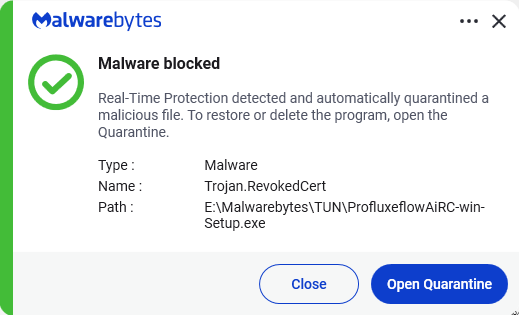
Malwarebytes detects Trojan.RevokedCert


We don’t just report on threats—we remove them

Cybersecurity risks should never spread beyond a headline. Keep threats off your devices by downloading Malwarebytes today.

  •  

Fake malware-signing service Fox Tempest dismantled by Microsoft

Microsoft says it dismantled a malware-signing-as-a-service (MSaaS) called Fox Tempest, which helped cybercriminals make malware appear legitimate.

The service let customers submit malicious files to be digitally signed with short-lived Microsoft-issued certificates, making the malware look legitimate and more likely to bypass security checks.

Fox Tempest’s service was built around a customer-facing signing workflow where cybercriminals could upload malicious binaries to a portal, have them signed with certificates valid for only 72 hours, and then receive files that appeared to come from a trusted software source.

Microsoft explicitly says this approach allowed malware to evade security controls and bypass defenses that would otherwise flag suspicious unsigned code. Many security tools treat signed binaries as more trustworthy than unsigned ones, especially in environments that rely on allow-lists and publisher reputation. Fox Tempest abused that assumption by using fraudulently obtained certificates to make malware blend in as legitimate software, increasing the likelihood of execution and successful delivery.

A trusted-looking certificate can help malware get past initial scrutiny, especially when paired with social engineering, paid ads, SEO poisoning, or fake download pages. In this campaign, the signing layer helped malicious installers masquerade as products like AnyDesk, Teams, PuTTY, and Webex, which is exactly the kind of abuse that can slip through control frameworks built around reputation and trust.

The fraudulent certificates were used to spread ransomware and infostealers. The effects of these malware campaigns were broad, with attacks affecting healthcare, education, government, and financial services across multiple countries.

How to stay safe

Microsoft’s disclosure shows how cybercrime has evolved beyond “malware authors” into a service economy where one group specializes in producing trust and others monetize it.

For defenders, the strongest lesson is not to treat code signing as a standalone security control. 

For consumers:

  • Remember to only download software from the official vendor site, the Microsoft Store, or another source you already trust. Avoid download buttons on links sent via social media posts, direct messages or email.
  • Be skeptical of “sponsored” search results and advertisements for popular apps.
  • Use an up-to-date, real-time anti-malware solution that looks for malicious behavior rather than just signatures.
Malwarebytes detects Trojan.RevokedCert


We don’t just report on threats—we remove them

Cybersecurity risks should never spread beyond a headline. Keep threats off your devices by downloading Malwarebytes today.

  •  

Firefox 151 packs big privacy upgrades into a small update

Mozilla has published release notes for Firefox browser version 151.0, and this update includes several genuinely meaningful privacy and security improvements.

Three changes stand out in particular:

  • Stronger anti‑fingerprinting
  • Broader protection for local network access
  • More control over private sessions and permissions

Note that Mozilla says several Firefox 151 features are “part of a progressive roll out,” meaning they will appear for some users first and be expanded over time. So, you may not see all of them immediately.

Privacy

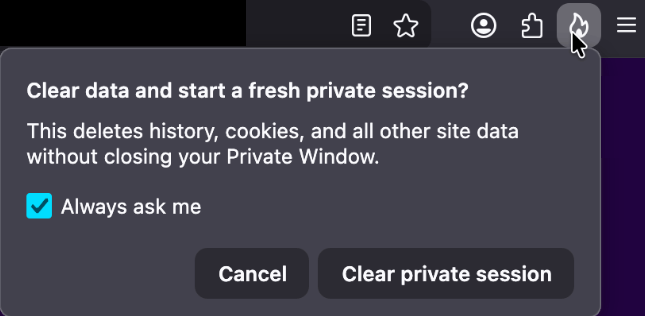
One of the more visible additions is a new “end private session” control in Private Browsing Mode. Instead of closing every private window to clear your traces, you now get a dedicated fire‑icon button next to the address bar that wipes the current private session’s data and immediately starts a fresh one.

End private session button

Under the hood, this clears the usual private browsing artifacts for that session, including history, cookies, cached files, and other site data that would normally disappear only when the last private window closes.

For people who routinely mix normal and private windows, this is safer and less error‑prone than hunting down every private tab before you walk away from the machine.

Firefox 151 also tightens its defenses against browser fingerprinting in the default “Standard” Enhanced Tracking Protection (ETP) mode. Mozilla says Firefox now limits the amount of device and browser information exposed to websites in a way that reduces the number of uniquely identifiable users by about 14% overall, and by roughly 49% on macOS.

This makes it harder for trackers to pick you out of the crowd, especially on platforms with fewer users to begin with (like certain macOS configurations). This reduces the privacy risk surface by default, which makes it harder for phishing and landing pages that redirect visitors to “categorize” you.

Another important change is Firefox’s “local network access restrictions,” which are now rolling out to all users, not just those who turned Enhanced Tracking Protection to Strict.

This means that when a website wants to communicate with devices on your local network, or with apps and services running on your machine, Firefox now asks for permission first. Chrome and Edge have been rolling out similar permission prompts.

Security

Firefox 151 also quietly fixes several security vulnerabilities.

The most notable example is CVE‑2026‑8953, a sandbox escape due to a use‑after‑free in the Disability Access APIs component. While there are currently no reports of in‑the‑wild exploitation for this specific bug at the time of writing, this is the kind of bug cybercriminals love.

A use-after-free (UAF) is a software memory vulnerability where a program attempts to access a memory location after it has been freed. If the program fails to clear the pointer to that freed memory, attackers can manipulate the error to crash the system or execute arbitrary code. A memory corruption leading to a sandbox escape is exactly the kind of link attackers want to complete a browser exploit chain.

How to update

If you’re running Firefox in a home or small‑office environment, we recommend updating to Firefox 151 as soon as possible to get the fingerprinting protections, local network access prompts, and security patches.

To update Firefox:

  • Open Firefox
  • Click the menu (three stacked lines) in the upper-right corner
  • Go to Help > About Firefox
  • Firefox will automatically check for updates and begin downloading them
  • Restart the browser when prompted to complete the update

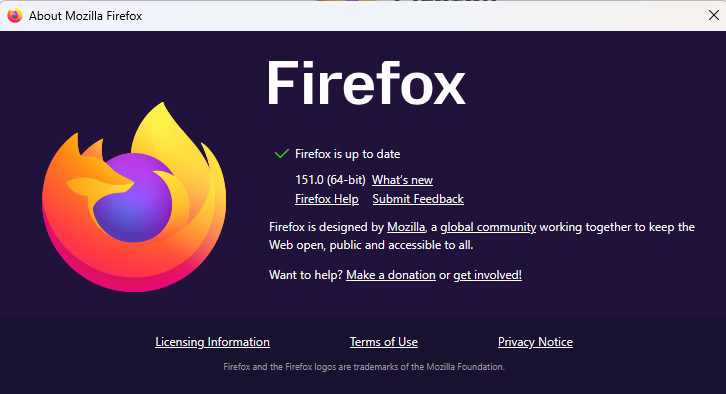
Once your Firefox browser has been updated, it will show a green checkmark along with the message: “Firefox is up to date.”

Firefox is up to date

Let’s face it, an incognito window can only do so much. 
 
Breaches, dark web trading, credit fraud. Malwarebytes Identity Theft Protection monitors for all of it, alerts you fast, and comes with identity theft insurance. 

  •  

Firefox 151 packs big privacy upgrades into a small update

Mozilla has published release notes for Firefox browser version 151.0, and this update includes several genuinely meaningful privacy and security improvements.

Three changes stand out in particular:

  • Stronger anti‑fingerprinting
  • Broader protection for local network access
  • More control over private sessions and permissions

Note that Mozilla says several Firefox 151 features are “part of a progressive roll out,” meaning they will appear for some users first and be expanded over time. So, you may not see all of them immediately.

Privacy

One of the more visible additions is a new “end private session” control in Private Browsing Mode. Instead of closing every private window to clear your traces, you now get a dedicated fire‑icon button next to the address bar that wipes the current private session’s data and immediately starts a fresh one.

End private session button

Under the hood, this clears the usual private browsing artifacts for that session, including history, cookies, cached files, and other site data that would normally disappear only when the last private window closes.

For people who routinely mix normal and private windows, this is safer and less error‑prone than hunting down every private tab before you walk away from the machine.

Firefox 151 also tightens its defenses against browser fingerprinting in the default “Standard” Enhanced Tracking Protection (ETP) mode. Mozilla says Firefox now limits the amount of device and browser information exposed to websites in a way that reduces the number of uniquely identifiable users by about 14% overall, and by roughly 49% on macOS.

This makes it harder for trackers to pick you out of the crowd, especially on platforms with fewer users to begin with (like certain macOS configurations). This reduces the privacy risk surface by default, which makes it harder for phishing and landing pages that redirect visitors to “categorize” you.

Another important change is Firefox’s “local network access restrictions,” which are now rolling out to all users, not just those who turned Enhanced Tracking Protection to Strict.

This means that when a website wants to communicate with devices on your local network, or with apps and services running on your machine, Firefox now asks for permission first. Chrome and Edge have been rolling out similar permission prompts.

Security

Firefox 151 also quietly fixes several security vulnerabilities.

The most notable example is CVE‑2026‑8953, a sandbox escape due to a use‑after‑free in the Disability Access APIs component. While there are currently no reports of in‑the‑wild exploitation for this specific bug at the time of writing, this is the kind of bug cybercriminals love.

A use-after-free (UAF) is a software memory vulnerability where a program attempts to access a memory location after it has been freed. If the program fails to clear the pointer to that freed memory, attackers can manipulate the error to crash the system or execute arbitrary code. A memory corruption leading to a sandbox escape is exactly the kind of link attackers want to complete a browser exploit chain.

How to update

If you’re running Firefox in a home or small‑office environment, we recommend updating to Firefox 151 as soon as possible to get the fingerprinting protections, local network access prompts, and security patches.

To update Firefox:

  • Open Firefox
  • Click the menu (three stacked lines) in the upper-right corner
  • Go to Help > About Firefox
  • Firefox will automatically check for updates and begin downloading them
  • Restart the browser when prompted to complete the update

Once your Firefox browser has been updated, it will show a green checkmark along with the message: “Firefox is up to date.”

Firefox is up to date

Let’s face it, an incognito window can only do so much. 
 
Breaches, dark web trading, credit fraud. Malwarebytes Identity Theft Protection monitors for all of it, alerts you fast, and comes with identity theft insurance. 

  •  

Biometrics, diagnoses, and bank details exposed in major healthcare breach

NYC Health + Hospitals (NYC H+H) posted a data breach notice about a months‑long breach via a third‑party vendor that exposed highly sensitive patient and employee data for at least 1.8 million people, including medical records, government IDs, geolocation data, and even fingerprint and palm‑print biometrics.

NYC H+H detected suspicious activity on February 2, 2026, and later confirmed that an unauthorized actor had access to parts of its network from roughly late November 2025 through February 2026.

During this window, attackers copied files containing personal, medical, financial, and biometric information. The incident was reported to the US Department of Health and Human Services (HHS) on March 24, 2026, and currently affects at least 1.8 million individuals, making it one of the largest healthcare breaches of 2026 so far.

HHS filing

NYC H+H attributes the intrusion to a breach at an unnamed third‑party vendor that had access to its systems. This fits the current pattern of supply-chain compromises, where a vendor becomes the entry point for attackers to gain access to their clients’ systems or data.

Incidents like these are a textbook example of how deeply personal health data can fuel long‑term fraud, stalkerware‑like abuse, and permanent privacy loss.


Digital Footprint Scan

See if your personal data has been exposed.


Types of data

According to NYC H+H’s notice and related write‑ups, the exposed dataset is unusually broad and detailed.

We can divide the data into three distinct layers:

  • Classical PII, which can be combined with other leaked datasets: Full names and contact details. Government‑issued identifiers, including Social Security Numbers, driver’s license and passport numbers, other government ID numbers, taxpayer IDs, and IRS identity protection PINs. The breach also exposed billing and payment records, plus bank and card data, which can be used for direct financial theft and highly convincing social engineering.
  • Medical and insurance data: Detailed diagnoses, medication lists, and test results expose conditions people may have kept private from employers, family, or insurers, enabling blackmail, targeted scams, and discrimination. Insurance and claims data can be abused to submit fraudulent claims, redirect reimbursements, or impersonate existing identities in healthcare systems.
  • Biometrics: These are at least as sensitive as medical history because they tend to stay with you for life. They are not easy to erase or replace. Once compromised, large biometric databases become long‑term liabilities for everyone who relies on them as trustworthy identifiers.

Unfortunately, this is part of a broader pattern. The FBI’s Internet Crime Complaint Center (IC3) reports that healthcare was the most targeted critical infrastructure sector for ransomware in 2025, with 460 ransomware incidents and 182 reported healthcare data breaches.

The Change Healthcare ransomware attack alone exposed medical and billing data for more than 190 million Americans, highlighting how a single healthcare intermediary can disrupt an entire system.

What to do if you’re involved

If you’ve interacted with NYC Health + Hospitals, there’s a possibility your personal information could be affected.

NYC Health + Hospitals is making identity theft prevention and mitigation services, including credit monitoring, available through Kroll Information Assurance, LLC for a period of 24 months at no cost to all individuals who have worked for or been a patient of NYC Health + Hospitals. For more details check its data breach notice.

If you think you’ve been affected by a data breach, here are steps you can take to protect yourself:

  • Check the company’s advice. Every breach is different, so check with the company to find out what’s happened and follow any specific advice it offers.
  • Change your password. You can make a stolen password useless to thieves by changing it. Choose a strong password that you don’t use for anything else. Better yet, let a password manager choose one for you.
  • Enable two-factor authentication (2FA). If you can, use a FIDO2-compliant hardware key, laptop, or phone as your second factor. Some forms of 2FA can be phished just as easily as a password, but 2FA that relies on a FIDO2 device can’t be phished.
  • Watch out for impersonators. The criminals may contact you posing as the breached platform. Check the official website to see if it’s contacting victims and verify the identity of anyone who contacts you using a different communication channel.
  • Take your time. Phishing attacks often impersonate people or brands you know, and use themes that require urgent attention, such as missed deliveries, account suspensions, and security alerts.
  • Consider not storing your card details. It’s definitely more convenient to let sites remember your card details, but it increases risk if a retailer suffers a breach.
  • Set up identity monitoring, which alerts you if your personal information is found being traded illegally online and helps you recover after.

Let’s face it, an incognito window can only do so much. 
 
Breaches, dark web trading, credit fraud. Malwarebytes Identity Theft Protection monitors for all of it, alerts you fast, and comes with identity theft insurance. 

  •  

Biometrics, diagnoses, and bank details exposed in major healthcare breach

NYC Health + Hospitals (NYC H+H) posted a data breach notice about a months‑long breach via a third‑party vendor that exposed highly sensitive patient and employee data for at least 1.8 million people, including medical records, government IDs, geolocation data, and even fingerprint and palm‑print biometrics.

NYC H+H detected suspicious activity on February 2, 2026, and later confirmed that an unauthorized actor had access to parts of its network from roughly late November 2025 through February 2026.

During this window, attackers copied files containing personal, medical, financial, and biometric information. The incident was reported to the US Department of Health and Human Services (HHS) on March 24, 2026, and currently affects at least 1.8 million individuals, making it one of the largest healthcare breaches of 2026 so far.

HHS filing

NYC H+H attributes the intrusion to a breach at an unnamed third‑party vendor that had access to its systems. This fits the current pattern of supply-chain compromises, where a vendor becomes the entry point for attackers to gain access to their clients’ systems or data.

Incidents like these are a textbook example of how deeply personal health data can fuel long‑term fraud, stalkerware‑like abuse, and permanent privacy loss.


Digital Footprint Scan

See if your personal data has been exposed.


Types of data

According to NYC H+H’s notice and related write‑ups, the exposed dataset is unusually broad and detailed.

We can divide the data into three distinct layers:

  • Classical PII, which can be combined with other leaked datasets: Full names and contact details. Government‑issued identifiers, including Social Security Numbers, driver’s license and passport numbers, other government ID numbers, taxpayer IDs, and IRS identity protection PINs. The breach also exposed billing and payment records, plus bank and card data, which can be used for direct financial theft and highly convincing social engineering.
  • Medical and insurance data: Detailed diagnoses, medication lists, and test results expose conditions people may have kept private from employers, family, or insurers, enabling blackmail, targeted scams, and discrimination. Insurance and claims data can be abused to submit fraudulent claims, redirect reimbursements, or impersonate existing identities in healthcare systems.
  • Biometrics: These are at least as sensitive as medical history because they tend to stay with you for life. They are not easy to erase or replace. Once compromised, large biometric databases become long‑term liabilities for everyone who relies on them as trustworthy identifiers.

Unfortunately, this is part of a broader pattern. The FBI’s Internet Crime Complaint Center (IC3) reports that healthcare was the most targeted critical infrastructure sector for ransomware in 2025, with 460 ransomware incidents and 182 reported healthcare data breaches.

The Change Healthcare ransomware attack alone exposed medical and billing data for more than 190 million Americans, highlighting how a single healthcare intermediary can disrupt an entire system.

What to do if you’re involved

If you’ve interacted with NYC Health + Hospitals, there’s a possibility your personal information could be affected.

NYC Health + Hospitals is making identity theft prevention and mitigation services, including credit monitoring, available through Kroll Information Assurance, LLC for a period of 24 months at no cost to all individuals who have worked for or been a patient of NYC Health + Hospitals. For more details check its data breach notice.

If you think you’ve been affected by a data breach, here are steps you can take to protect yourself:

  • Check the company’s advice. Every breach is different, so check with the company to find out what’s happened and follow any specific advice it offers.
  • Change your password. You can make a stolen password useless to thieves by changing it. Choose a strong password that you don’t use for anything else. Better yet, let a password manager choose one for you.
  • Enable two-factor authentication (2FA). If you can, use a FIDO2-compliant hardware key, laptop, or phone as your second factor. Some forms of 2FA can be phished just as easily as a password, but 2FA that relies on a FIDO2 device can’t be phished.
  • Watch out for impersonators. The criminals may contact you posing as the breached platform. Check the official website to see if it’s contacting victims and verify the identity of anyone who contacts you using a different communication channel.
  • Take your time. Phishing attacks often impersonate people or brands you know, and use themes that require urgent attention, such as missed deliveries, account suspensions, and security alerts.
  • Consider not storing your card details. It’s definitely more convenient to let sites remember your card details, but it increases risk if a retailer suffers a breach.
  • Set up identity monitoring, which alerts you if your personal information is found being traded illegally online and helps you recover after.

Let’s face it, an incognito window can only do so much. 
 
Breaches, dark web trading, credit fraud. Malwarebytes Identity Theft Protection monitors for all of it, alerts you fast, and comes with identity theft insurance. 

  •  

Laurie Anderson Is Quoting Me

Not by name, but Laurie Anderson quotes me in one of the tracks of her new album:

My favorite quote is from a cryptologist who said “If you think technology will solve your problems, you don’t understand technology and you don’t understand your problems.”

Also in interviews:

“Of course, it’s ridiculous, outrageous, blah, blah, blah,” Anderson says about the ad. ‘But, I mean, my favorite quote on this is from a cryptologist who said, ‘If you think technology will solve your problems, you don’t understand technology ­ and you don’t understand your problems.’ And I think I’m completely on board with that.”

People are telling me that she has been reciting this quote in performances for years. (I lost track of her since college and her 1981 hit “O Superman.”)

The origins of the quote is from Roger Needham:

If you think cryptography can solve your problem, you don’t understand your problem and you don’t understand cryptography.

I modified the quote in the preface to my 2000 book Secrets and Lies:

A few years ago I heard a quotation, and I am going to modify it here: If you think technology can solve your security problems, then you don’t understand the problems and you don’t understand the technology.

I can’t tell you why me in 2000 didn’t credit Needham by name. I should have.

I have used the quote pretty consistently since then. Somewhere along the line I dropped “security” from the phrase, and now say it more like Anderson quotes me:

If you think technology will solve your problem, you don’t understand your problem and you don’t understand technology.

I sometimes use singular and sometimes use plural. Sometimes I say “the problem” and “the technology.” But I think the quote flows better ending with just the word “technology.”

  •  

Microsoft is changing Edge’s plaintext password behavior

Microsoft said it will change Edge’s password handling as a “defense‑in‑depth” measure.

Originally, Edge decrypted the entire saved‑password store on startup and kept all credentials resident in process memory in clear text for the whole browser session, regardless of whether a given credential was ever used or not.

A short while ago, Microsoft said this plaintext password behavior was by design. Now, Microsoft has changed course, and the new password-handling behavior is already present in Canary (the experimental preview version of Microsoft Edge), with rollout prioritized across all channels.

The researcher who originally flagged the issue said:

“Edge is the only Chromium‑based browser I’ve tested that behaves this way. By contrast, Chrome uses a design that makes it far harder for attackers to extract saved passwords by simply reading process memory.”

Microsoft Edge Security Lead Gareth Evans said Microsoft is now taking a broader view and has committed to changing Edge so that saved passwords are no longer loaded into memory on startup as clear text. As a result, exposure will be reduced as a defense‑in‑depth improvement. That means even if an attacker has administrative control of a device, it becomes harder to harvest all the passwords.

According to Microsoft:

“Going forward, Microsoft Edge will no longer load all saved passwords into memory at browser startup. Instead, passwords will be decrypted only when needed for autofill or password management operations.”

The change is already live in the Edge Canary channel and will be included in the next update for all supported Edge releases (build 148 and newer across Stable, Beta, Dev, Canary, and Extended Stable).

The reason for this change is probably more reputational and strategic rather than an acknowledgment of an exploitable vulnerability. Microsoft seems to want to align reality with its “secure by design” messaging and reduce a very visible, easy‑to‑demo weakness, even if it still doesn’t treat it as a classic memory‑disclosure bug.

Passwords in your browser

Please note that this change just means Edge will become roughly as secure an option to store passwords as every other Chromium-based browser.

Your browser password manager gives you ease of use, but that comes with some security tradeoffs. Of course, password managers aren’t foolproof either, so it’s important to decide for yourself where you store your passwords.

If you’re confident a website is safe, and anyone who can access it under your account wouldn’t learn anything sensitive, feel free to store the password in your browser, but disable autofill so you stay in control.

Use MFA where possible. It enormously reduces the risk if someone gets hold of your password. And avoid using the browser password manager to store your credit card details or other sensitive personally identifiable information, such as medical information.


Let’s face it, an incognito window can only do so much. 
 
Breaches, dark web trading, credit fraud. Malwarebytes Identity Theft Protection monitors for all of it, alerts you fast, and comes with identity theft insurance. 

  •  

Microsoft is changing Edge’s plaintext password behavior

Microsoft said it will change Edge’s password handling as a “defense‑in‑depth” measure.

Originally, Edge decrypted the entire saved‑password store on startup and kept all credentials resident in process memory in clear text for the whole browser session, regardless of whether a given credential was ever used or not.

A short while ago, Microsoft said this plaintext password behavior was by design. Now, Microsoft has changed course, and the new password-handling behavior is already present in Canary (the experimental preview version of Microsoft Edge), with rollout prioritized across all channels.

The researcher who originally flagged the issue said:

“Edge is the only Chromium‑based browser I’ve tested that behaves this way. By contrast, Chrome uses a design that makes it far harder for attackers to extract saved passwords by simply reading process memory.”

Microsoft Edge Security Lead Gareth Evans said Microsoft is now taking a broader view and has committed to changing Edge so that saved passwords are no longer loaded into memory on startup as clear text. As a result, exposure will be reduced as a defense‑in‑depth improvement. That means even if an attacker has administrative control of a device, it becomes harder to harvest all the passwords.

According to Microsoft:

“Going forward, Microsoft Edge will no longer load all saved passwords into memory at browser startup. Instead, passwords will be decrypted only when needed for autofill or password management operations.”

The change is already live in the Edge Canary channel and will be included in the next update for all supported Edge releases (build 148 and newer across Stable, Beta, Dev, Canary, and Extended Stable).

The reason for this change is probably more reputational and strategic rather than an acknowledgment of an exploitable vulnerability. Microsoft seems to want to align reality with its “secure by design” messaging and reduce a very visible, easy‑to‑demo weakness, even if it still doesn’t treat it as a classic memory‑disclosure bug.

Passwords in your browser

Please note that this change just means Edge will become roughly as secure an option to store passwords as every other Chromium-based browser.

Your browser password manager gives you ease of use, but that comes with some security tradeoffs. Of course, password managers aren’t foolproof either, so it’s important to decide for yourself where you store your passwords.

If you’re confident a website is safe, and anyone who can access it under your account wouldn’t learn anything sensitive, feel free to store the password in your browser, but disable autofill so you stay in control.

Use MFA where possible. It enormously reduces the risk if someone gets hold of your password. And avoid using the browser password manager to store your credit card details or other sensitive personally identifiable information, such as medical information.


Let’s face it, an incognito window can only do so much. 
 
Breaches, dark web trading, credit fraud. Malwarebytes Identity Theft Protection monitors for all of it, alerts you fast, and comes with identity theft insurance. 

  •  

Canvas hack: is it ever a good idea to pay a ransom, and what happens to the data?

Businesses are advised against paying – but many are prepared to deal to protect users’ privacy

After a week of outages, hundreds of millions of students’ data stolen, delayed assignment due dates and school login pages being defaced by hackers, the US tech firm Instructure – which operates the education platform Canvas, used by education providers worldwide – announced it had “reached an agreement with the unauthorised actor” behind the ransomware attack.

Experts read the careful language as a sign that a ransom has been paid. The company has not confirmed this.

Continue reading...

© Photograph: Boonchai Wedmakawand/Getty Images

© Photograph: Boonchai Wedmakawand/Getty Images

© Photograph: Boonchai Wedmakawand/Getty Images

  •  

Attackers replaced JDownloader installer downloads with malware

If you downloaded the JDownloader installer during the compromise window (May 6-7), you are advised to verify the file.

 JDownloader is a popular download management application, particularly favored for automated downloads from file-hosting services, video sites, and premium link generators.

The JDownloader website was confirmed to have been compromised on May 6-7, 2026. During that window, the Windows “Download Alternative Installer” links and the Linux shell installer were compromised. Other download options, including macOS, JAR files, Flatpak, Winget, and Snap packages remained safe.

Users that applied updates during that period were not affected. The malicious Windows installers deployed a Python-based remote access Trojan (RAT).

The developers confirmed the breach on May 7, immediately taking the website offline for investigation. After security patches were applied and server configurations hardened, the website was restored on May 8-9 with verified clean installer links. The attack vector was identified as an unpatched CMS security bug that allowed attackers to modify access control lists without authentication.

How to stay safe

The developers advised users to verify that their installers have the proper digital signatures from “AppWork GmbH,” which compromised versions lacked.

A full system scan with a trusted anti-malware solution never hurts either.

Malwarebytes blocks the domains contacted by the RAT.

Malwarebytes blocks parkspringhotel[.]com

We don’t just report on threats—we remove them

Cybersecurity risks should never spread beyond a headline. Keep threats off your devices by downloading Malwarebytes today.

  •  

Attackers replaced JDownloader installer downloads with malware

If you downloaded the JDownloader installer during the compromise window (May 6-7), you are advised to verify the file.

 JDownloader is a popular download management application, particularly favored for automated downloads from file-hosting services, video sites, and premium link generators.

The JDownloader website was confirmed to have been compromised on May 6-7, 2026. During that window, the Windows “Download Alternative Installer” links and the Linux shell installer were compromised. Other download options, including macOS, JAR files, Flatpak, Winget, and Snap packages remained safe.

Users that applied updates during that period were not affected. The malicious Windows installers deployed a Python-based remote access Trojan (RAT).

The developers confirmed the breach on May 7, immediately taking the website offline for investigation. After security patches were applied and server configurations hardened, the website was restored on May 8-9 with verified clean installer links. The attack vector was identified as an unpatched CMS security bug that allowed attackers to modify access control lists without authentication.

How to stay safe

The developers advised users to verify that their installers have the proper digital signatures from “AppWork GmbH,” which compromised versions lacked.

A full system scan with a trusted anti-malware solution never hurts either.

Malwarebytes blocks the domains contacted by the RAT.

Malwarebytes blocks parkspringhotel[.]com

We don’t just report on threats—we remove them

Cybersecurity risks should never spread beyond a headline. Keep threats off your devices by downloading Malwarebytes today.

  •  

Meta’s confusing new approach to chat privacy

Recent news had us wondering whether Meta actually knows what it wants.

On one platform, Meta is promoting AI chats that it says even it cannot read. On another, it has removed one of the few features that genuinely prevented Meta from accessing private conversations.

“Meta removed support for end-to-end encrypted chats from Instagram as of May 8, 2026.”

Meta adds fully private AI chats to WhatsApp.”

At the moment, Meta is heavily promoting a new Incognito Chat mode for its Meta AI assistant in WhatsApp, built on top of a system it calls Private Processing. According to WhatsApp’s own announcement, Incognito Chat is:

 “Truly private — no one can read your conversation, not even us.”

When you start an Incognito chat with Meta AI, you get a temporary conversation where messages aren’t saved and disappear by default, which Meta pitches as “a space to think and explore ideas without anyone watching.”

BBC News and others report that these AI chats are text‑only for now, run in a sandboxed environment, and are separate from your regular end‑to‑end encrypted (E2EE) messaging with other people on WhatsApp.

Meta is also preparing “Side Chat,” which will let you invoke Meta AI inside other WhatsApp chats, again using this Private Processing infrastructure to claim AI assistance without breaking the underlying encryption.

On paper, that’s an impressive technical and marketing story: powerful AI, wrapped in layers of privacy‑preserving infrastructure, added to an app that already has a strong reputation for end‑to‑end encryption by default.

Meanwhile, on Instagram…

Now contrast that with what’s happening on Instagram. On 8 May 2026, Meta removed optional end‑to‑end encryption for Instagram Direct Messages (DMs) entirely. Users who had previously turned the feature on were shown notices that “end‑to‑end encrypted messaging on Instagram is no longer supported as of 8 May 2026,” and were urged to download backups of their encrypted conversations before the cutoff.

End‑to‑end encryption ensures that only the sender and recipient can read their conversations. Instagram offered this as an opt‑in feature since late 2023, but it was buried several taps deep inside individual conversation settings and never turned on by default. Meta’s explanation for shutting it down is that “very few people” used encrypted DMs and that maintaining a separate encrypted system added complexity. Critics have pointed out the circular logic. The company hid the feature, did not advertise it, and is now using low adoption as the reason to kill it rather than, say, making it easier to find or turning it on by default.

What all this means

From a user’s perspective, the result is confusing: one Meta product introduces stronger privacy than ever for AI chats, while another removes the one feature that truly stopped Meta from reading your conversations.

The key point to remember here is that “incognito” and “private” are marketing words, while end‑to‑end encryption is a technical guarantee.

For security‑conscious users, this split personality means you can no longer treat all Meta chats the same. WhatsApp remains end‑to‑end encrypted for person‑to‑person messages and adds optional privacy features around its AI, while Instagram DMs should now be assumed readable by Meta and potentially accessible to law enforcement, advertisers, or attackers who gain access to Meta’s systems.


To boldly browse, away from prying eyes. 


Why make AI chats private?

We’ve seen that AI chats have suddenly turned up in search results without users’ knowledge. So there definitely is a positive side to this new feature.

We also know there have been lawsuits against chatbot providers in cases where the outcome of an AI conversation led to very undesirable results. But how would you be able to provide evidence when messages auto-disappear?

How to proceed

Meta’s recent moves show that strong privacy features can be added where they support a strategic narrative and removed where they conflict with business or regulatory priorities. Users can’t control those decisions, but they can respond by choosing where they hold their most sensitive conversations and by assuming that if a chat isn’t end‑to‑end encrypted by default, it is ultimately readable by someone other than the people in it.

So, what’s a safe way to move forward?

  • Treat Instagram DMs as postcard-level privacy. Now that E2EE is gone, assume Meta can read and scan your messages and that content could be accessed under legal orders or in a breach. Do not send passwords, recovery codes, banking details, or compromising photos over Instagram.
  • When someone asks you to move a conversation to Signal, WhatsApp, or another E2EE messenger, ask them why. It does make sense when you’re sharing financial details, personal images, health information, or anything you would not want a platform provider to read. But sometimes scammers prefer encrypted platforms too, because they’re harder to monitor.
  • Do not confuse “incognito” AI chats with full encryption. WhatsApp’s Incognito mode for Meta AI may be a privacy improvement over standard cloud AI chats, but it is still a conversation with a large language model owned by the same company that runs the platform. Share only what you’re comfortable entrusting to Meta.
  • Regularly review your privacy and security settings. Check which devices are logged in, enable two‑factor authentication, and verify which of your chat apps are actually end‑to‑end encrypted by default.

Scammers know more about you than you think. 

Malwarebytes Mobile Security protects you from phishing, scam texts, malicious sites, and more. With real-time AI-powered Scam Guard built right in. 

Download for iOS → Download for Android → 

  •  
❌