Look, I’m not a developer, and the last time I truly “wrote code” was probably a good number of years ago (and it was probably Perl so you may hate me). I am also not an appsec expert (as I often remind people).
Below I am describing my experience “vibe coding” an application. Before I go into the details of my lessons — and before this turns into a complete psychotherapy session — I want to briefly describe what the application is supposed to do.
Anton’s vibe app screenshot
We have a podcast (Cloud Security Podcast by Google), and I often feel that old episodes containing useful information aren’t being listened to and the insights from them go to waste. At the same time, for many organizations today, the answer to their current security problems may well have been discussed and solved in 2021. This may be strange to some, but for many organizations, the future is in the past. Somebody else’s past!
So I wanted “a machine” that turns old episodes into role-specific insights, without too much work by a human (me). This blog is a reflection on how things went.
First, my app is using public data — namely podcast transcripts and audio — to create other public data (social media posts). Since the inputs and outputs are public, this certainly made me at peace with vibe coding. Naturally, I needed to understand how the app would be coded, where it would live and what I should do to make it manifest in the real world. So I asked Gemini, and it suggested I use AI Studio by Google, and I did (non-critically) exactly that.
When I started creating the app, the question of storage immediately came up. Jumping a little bit ahead, you will see that authentication / credentials and storage were two security themes I reflected on the most.
You want to read a file from storage, but what storage? More importantly, whose storage? At this point, I had my first brush with anxiety of the “vibe process.” I didn’t want to just vibe code without a full understanding of the data access machinery. I immediately said, “No, I don’t want to store data in my Google Drive using my credentials.” I just didn’t trust it.
In fact, I didn’t trust the app with any credentials for anything — work or personal — at all! Given that I have public data, I decided to store it in a public web folder. AI Studio suggested ways to store data that people might not fully understand, and this is my other reflection: If I’m not a developer, and I don’t know the machinery behind the app, how do I decide? These decisions are risk decisions and “a citizen vibe coder” is very much not equipped to make them. Well, I sure wasn’t.
So what are the security implications of the decisions a developer makes — sometimes guided by AI and sometimes on their own? Can I truly follow an AI recommendation that I don’t understand? Should I follow it? If you don’t understand what happens, I can assure you, you certainly do not understand the risks!
As a result, I did not trust the app with any credentials or authenticated access. Of course, a solution may have been to use throwaway storage with throwaway credentials, but I think I do not need this in my life... Anyhow, many actions that you take during vibe coding, whether suggested by AI or not, have security implications.
In addition, the app interacts with the environment. If the app is being built in a corporate environment, it interacts with corporate security “rules and tools”, and some things you may want to do wouldn’t work. I’m not going into details, but I had a couple of examples of that. If you vibe code at work and you are doing it through, let’s say, shadow AI, there will be things your AI (and you) would want to do, but your employer security would not allow. And often with good reasons too! So you ask AI for more ways and hope it won’t say “just disable the firewall.”
The next conundrum, apart from storage, was output quality. What about quality and those hallucinatory mistakes? Now, I know my app uses an LLM to condense a summary of the podcast transcript into brief insights for social media. And before my app runs, another LLM turns MP3 into text. And it also uses an LLM to make the visual summaries. So, the question is: who handles the mistakes, and how?
For example, I tried to use a certain “well known” model to create a visual summary. Of course, the visual summary was incredibly accurate in most cases, but sometimes “mistakes were made” and words were corrupted (“verifigement” happened to me in one case). If an LLM powered tool can do something, it does not mean it will do it equally well every time (unless you build validators AND the things that you need to do can in fact be validated). So validate!
Further, I read somewhere that the process for dealing with AI mistakes is different from the process for dealing with human mistakes. I am sure I could write another module for the app to check if an image has correct text or add another validation technique, but it is interesting that I faced this very quickly.
Thus I have to deal with “AI-style mistakes”, and I cannot solve them by having a human review everything. I can tell you right away, even from my small project, that having a human review is a non-starter. It’s theoretically correct, but practically won’t happen. It absolutely will not happen if you take the koolaid and transform your business process to be “AI native.” Having humans review boring tasks like checking image text is completely insane. That’s not going to fly. HITL is DOA (for these tasks).
So: storage, credentials, trust, and quality all came up. Another decision arose when I needed to store intermediate results of my insight generation. Again, trust issues surfaced because data storage. AI Studio suggested choices, I asked AI about pros/cons, and made the decision. Again all these decisions are risk decisions.
Finally, certain mistakes come up all the time, repeatedly, and I have to tell AI Studio to write things multiple times because it doesn’t always “get” it (example: my podcast episode URLs). This is another lesson: sometimes it takes multiple prompts, and constant reminders (say to validate the links)
All in all, I’ll continue to experiment — got more ideas that I want. Here are some outputs of my app…
Now the explicit lessons for those who need this crisp and actionable:
1. You Make Implied Security Decisions with Every Prompt
When you “vibe code,” you aren’t just describing features; you are making risk and security decisions. If you ask an AI to “save this data,” and you don’t specify how or where, the AI may choose the path of least resistance — usually a public bucket or a local file with cleartext credentials. In the world of AI-generated code, silence is a security decision.
2. Credentials and Storage: The Boring Stuff is Still the Hard Stuff
Storage and credentials were the key themes for me. This is the great irony of modern development: AI can write a complex LLM orchestration layer in seconds, but it may struggle to help a novice set up a secure, encrypted secrets manager. The “plumbing” of security remains the primary friction point.
3. AI Mistakes Require a New Response Model
Traditional QA seems designed for deterministic human error. AI “style mistakes” (like corrupted words in a visual summary) are stochastic and weird. And common! Human review is a “non-starter” for these tasks. Security and quality validation for AI-generated content must itself be automated (AI-on-AI validation) because humans simply won’t do the “deathly boring” work of checking verbatim accuracy at scale. Turtles all the way down can happen to you.
4. Corporate Guardrails vs. AI Ambition
The AI you vibe code with may not know your corporate policy. It will suggest “awesome” features that would immediately trigger a compliance violation. A few times while vibe coding, I heard a subtle lawyercat meowing in the air duct… When vibe coding in a corporate environment, you quickly hit the wall where “what the AI wants to do” meets “what security allows.” This reinforces the need for platform-level guardrails rather than just merely developer education.
5. Public Data is the Only “Safe” Vibe
My “peace of mind” came from the fact that your inputs and outputs were already public. To me, this is the only way to vibe code safely without a full understanding of the underlying security stack. The moment you move from “public podcast audio” to “proprietary customer data,” the risk model shifts from “fun experiment” to “data breach.”
Anyhow, this was my mildly-AI-assisted stream of vibe consciousness.
Last week's cyberattack on medical technology giant Stryker was limited to its internal Microsoft environment and remotely wiped tens of thousands of employee devices. [...]
CISA warned U.S. government agencies to secure their Wing FTP Server instances against an actively exploited vulnerability that may be chained in remote code execution attacks. [...]
Companies House, a British government agency that operates the registry for all U.K. companies, says its WebFiling service is back online after it was closed on Friday to fix a security flaw that exposed companies' information since October 2025. [...]
Shadow AI is quietly spreading across SaaS environments as employees adopt new AI tools without IT oversight. Nudge Security explains how security teams can discover AI apps, monitor usage, and govern risky AI activity. [...]
A new open-source tool called Betterleaks can scan directories, files, and git repositories and identify valid secrets using default or customized rules. [...]
Most organisations assume DDoS (Distributed denial of service) protection is a box they’ve already ticked. If traffic spikes or an attack starts, the thinking goes, their provider will absorb it and move on.
But in the real world it can be a different story. Many incidents aren’t caused by the scale of an attack alone, they happen because their protection isn’t designed to act fast enough, distinguish legitimate traffic or stay active without disruption for normal traffic. Or slows the legitimate traffic down, degrading performance when under an attack.
In this blog, we look at why DDoS resilience is really about continuity, not just mitigation, and what teams often miss when they assume they’re already protected.
The DDoS Protection Gap: Why Performance Breaks Under Pressure.
Modern DDoS attacks rarely look like blunt floods now; they utilize multi-vector strategies targeting the application layer (Layer 7) to blend in. They overwhelm specific application paths or quietly degrade performance until frustrated users give up.
When protection isn’t built to handle this kind of attack, organisations often see:
Delays between detection and mitigation
Legitimate users are blocked or challenged during peak moments
Performance degradation that’s dismissed as ‘normal slowing’
Downtime that occurs despite having DDoS controls in place
The result is widespread impact, disrupting not just infrastructure, but revenue, brand reputation and most importantly, trust.
Why Modern DDoS Protection is a BusinessContinuity Challenge
Effective DDoS protection isn’t about surviving the largest possible attack on paper. It’s about ensuring users can continue to access applications, complete transactions and rely on important services, even when an attack is ongoing.
To do that organisations need protection that is:
Not dependent on manual activation
Fast, with mitigation measured in seconds, not minutes or hours
Accurate, so legitimate users aren’t caught in the crossfire
Edge-based mitigation using a global Anycast network, stopping attacks before they put internal systems under pressure
Without these characteristics, DDoS defences can become part of the problem rather than the solution.
The Oversight: What Security Teams Miss About Resilience
Many organisations unknowingly accept risk because they:
Assume any DDoS protection will do the job
Focus on volumetric capacity but overlook detection accuracy, time to mitigate, mitigation efficacy and stealth attacks to the application layer
Rely on reactive or hybrid approaches that leave a mitigation gap
Accept user friction as an acceptable side effect of defence activity
Accept operational complexity as “the nature of the beast”
Often, these gaps only become visible during critical moments such as launches, seasonal peaks or high-traffic events, when resilience matters most.
The Solution: Supporting Continuity with Always-On Mitigation
Thales’s Imperva DDoS Protection is designed to preserve availability and user experience, even during sustained or sophisticated attacks.
Behind the scenes, this means:
Continuous and detailed profiling of peace-time traffic for fast identification of anomalies and potential DDoS attacks.
Always- on mitigation at the edge, eliminating delays in response with an industry-leading 3–second time-to-mitigation SLA for network-layer attacks.
Versatile set of techniques for minimising disruption to legitimate users, including signatures, behavioural patterns and challenges.
Attack isolation for avoiding potential collateral damage.
Global scale and distribution, absorbing attacks close to the source.
The Impact: Why True Resilience Matters for Revenue
DDoS attacks don’t just test security controls; they test business resilience. When protection fails, the impact is immediate, abandoned sessions, lost transactions, frustrated customers and operational pressure at exactly the wrong moment.
DDoS resilience isn’t defined by how large an attack you can withstand, but by how consistently your services remain available while it’s happening.
By aligning always-on mitigation, rapid response and accurate traffic, classification, organisations can reduce risk without compromising user experience and ensure that availability isn’t dependent on perfect timing or manual intervention.
Because the true test of DDoS protection is whether services remain available.
To discuss DDoS protection with a member of the team, get in touch.
Microsoft has released an out-of-band (OOB) update to fix a security vulnerabilities affecting Windows 11 Enterprise devices that receive hotpatch updates instead of the regular Patch Tuesday cumulative updates. [...]
If your organization relies on AWS IAM Identity Center for workforce access, you can now extend that access across multiple AWS Regions with multi-Region replication. Previously, AWS access portal was only available in one Region, when you add an additional Region, users get an active access portal endpoint there. If the primary Region experiences a disruption, they can continue working through the additional Region. This enhancement also enables you to deploy AWS managed applications in additional Regions closer to your users, which reduces latency and helps meet regional compliance requirements. Meanwhile, you maintain centralized control by managing Identity Center configurations from the primary Region.
In this post, you’ll learn how to configure multi-Regions support, including multi-Region replication, encryption setup, adding Regions, updating your identity provider (IdP), and testing the setup end to end.
Prerequisites and considerations
Before enabling multi-Region support, confirm your environment meets these requirements and understand how this change will affect your existing setup.
Confirm that your currently deployed AWS managed applications support Identity Center configured with a customer managed KMS key, and that applications you plan to deploy in the future also support this configuration. See the AWS managed applications that integrate with IAM Identity Center table in the Identity Center User Guide to identify which applications support customer managed KMS key with Identity Center.
Additionally, for AWS managed applications you plan to deploy in additional Regions, verify that they support Identity Center configured with both customer-managed KMS keys and multi-Region deployment. Consult the AWS managed applications that integrate with IAM Identity Center table in the Identity Center User Guide.
The AWS access portal in additional Regions doesn’t support the custom alias (in other words, customer-chosen subdomains).
AWS account access through additional Region relies on already provisioned permissions; new permission set assignments and group memberships can be managed only in the primary Region and are then automatically replicated to additional Regions.
Walkthrough
To set up multi-Region support, you’ll follow three steps: creating and configuring a customer-managed KMS key with Identity Center, enabling the additional Region in the Identity Center console, and updating your identity provider with the new regional URLs and bookmark applications.
Important: Your Identity Center instance operates on a primary-replica model where instance-level configuration changes must be made in the primary Region, while additional Regions receive read-only replications of your settings and provide Region-local access for your workforce. In this example, you will use Okta as your external IdP, with N. Virginia (us-east-1) as the primary Region and Frankfurt (eu-central-1) as the additional Region.
Before you start, ensure that you’re signed in to the console as an administrator in the same account and Region where your Identity Center instance resides.
Create and configure multi-Region customer-managed KMS keys with Identity Center
First, you must set up a multi-Region customer-managed KMS key with Identity Center in your primary Region and replicate it to additional Regions where you plan to replicate Identity Center. Identity Center uses customer-managed KMS keys for encryption of your identity data such as user attributes. Because the same key material must be available in each Region, you’ll create a multi-Region key — complete this step in the AWS Organizations management account. Before proceeding, confirm that your currently deployed AWS managed applications support customer-managed KMS keys with Identity Center. Each AWS KMS key has usage and storage cost, see AWS KMS pricing page for details.
For guidance on configuring your key policy, see the KMS key policy examples for common use cases in the Identity Center User Guide, which provides example policies you can adapt for your specific requirements.
2. Create replica keys in additional Regions After completing the primary Region setup, create new replica keys in each AWS Region where you plan to replicate Identity Center. To complete this step, follow the documentation in Create multi-Region replica keys.
Note: The replica key automatically inherits the same key policy as the primary customer-managed KMS key. However, future modifications to the key policy must be manually applied to the replica key in each Region. AWS KMS replica keys are independent resources; policy changes on the primary key do not propagate automatically.
Add an additional Region to Identity Center
Now that key replication is complete, you can add an additional Region to your Identity Center instance. For this post, use Frankfurt (eu-central-1). If you have a delegated admin account configured, we recommend completing remaining configurations in that account. We will perform this configuration using the console, but you can also use the IAM Identity Center API. For detailed instructions, see Add the Region in IAM Identity Center.
Open the AWS Management Console.
In the search bar, enter IAM Identity Center and choose the service.
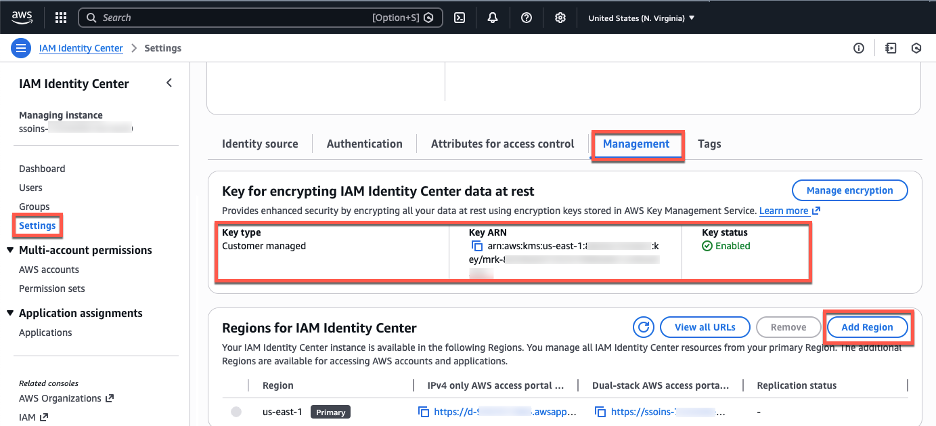
In the navigation pane, choose Settings.
Choose Add Region.
Figure 1: Management tab with encryption and Region information
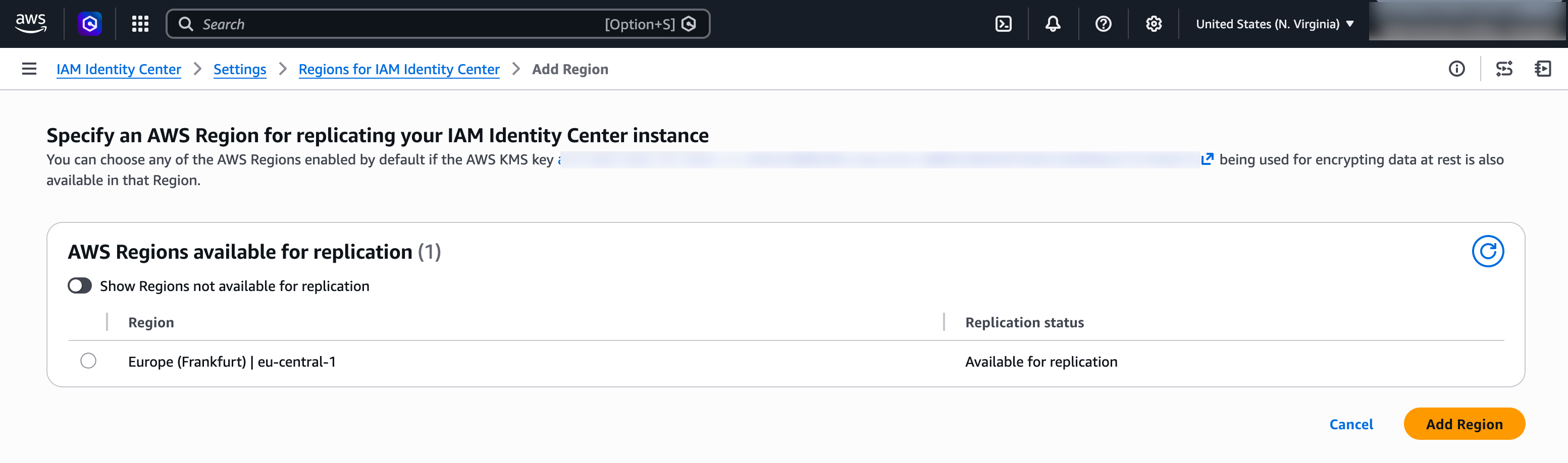
From the Region list on the following page, select Frankfurt (eu-central-1). Then, choose Add Region.
The Region list shows Regions enabled by default where the customer-managed KMS key was replicated, making them available for you to choose.
Figure 2: Choose an AWS Region to add
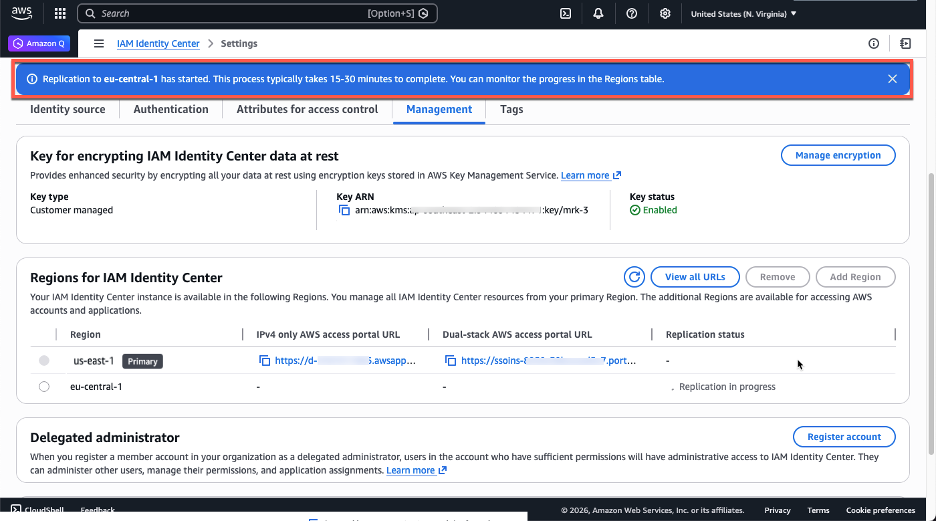
You’ll return to the Settings for Identity Center page, where you’ll see the new Region with a Replicating status. A blue banner indicates that Identity Center is replicating your workforce identities, configuration, and metadata to the new Region. After the initial setup (15–30 minutes, depending on the size of your Identity Center instance), future changes replicate within seconds.
Figure 3: Initial replication to the newly added Region in progress
After replication completes, the ReplicationStatus column changes to Replicated. Your Identity Center endpoints in the additional Region are now active.
Figure 4: A console view after the initial replication is done
Users can now access AWS accounts through both AWS access portal URLs. You can view and copy the enabled portal URLs either from the Region list or by choosing View AWS access portal URLs.
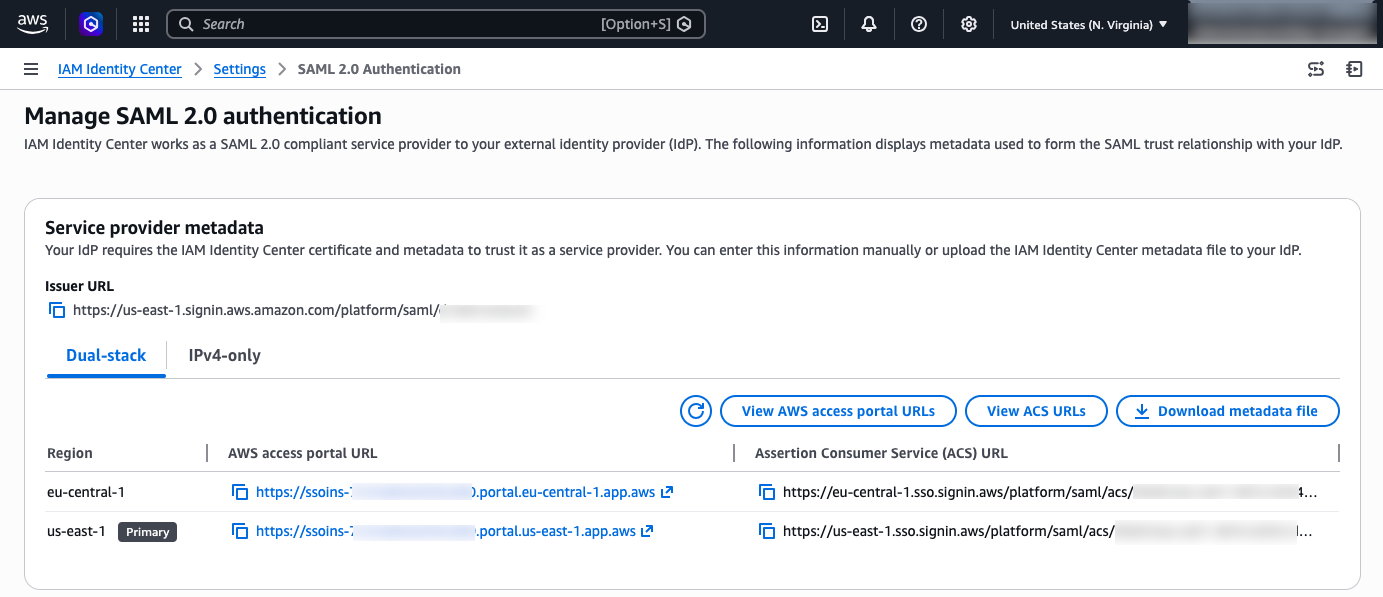
You can view Security Assertions Markup Language (SAML) information, such as ACS URLs, about the primary and additional Regions by choosing View ACS URLs. In the next section you will use both, your AWS access portal URLs and ACS URLs to update your external IdP configuration.
Update your IdP configuration for the additional Region
You’ve successfully replicated your Identity Center instance to the Frankfurt (eu-central-1) Region. This means your workforce identities are now available in that additional Region and can use the new AWS access portal endpoint. Identity Center supports two authentication flows: one where users start from the AWS access portal or AWS managed application (service provider-initiated), and one where users start from their IdP portal (IdP-initiated). With service provider-initiated authentication, when users attempt to authenticate, Identity Center redirects them to your IdP authentication page, and after successful authentication, their authentication response is sent to the Regional SAML assertion consumer service (ACS) endpoint in Identity Center. The ACS endpoint in the additional Region uses a different URL than the primary Region, as shown in the following image.
Figure 5: Identity Center URLs
Currently, your IdP only has information about your Identity Center in the primary Region. To successfully redirect users’ authentication responses to the additional Region, you must add the new Regional endpoint to the IdP configuration.
Update the Identity Center application in your IdP:
This update enables service provider-initiated authentication to succeed. In the Identity Center app within your external IdP, add the ACS URL for the additional Region so that the app contains both Regional ACS URLs. Keep the existing URL as the first one in the list, the IdP uses the first URL as the default redirect target for IdP-initated authentication. The additional ACS URL will be used by the IdP to send the authentication response when users sign in using service provider-initiated authentication flows.
As an example, follow the instructions to configure your Identity Center application in Okta:
Log in to the Okta portal as an Admin.
Expand the Applications drop-down in the left pane, then choose Applications
Choose your Identity Center Application
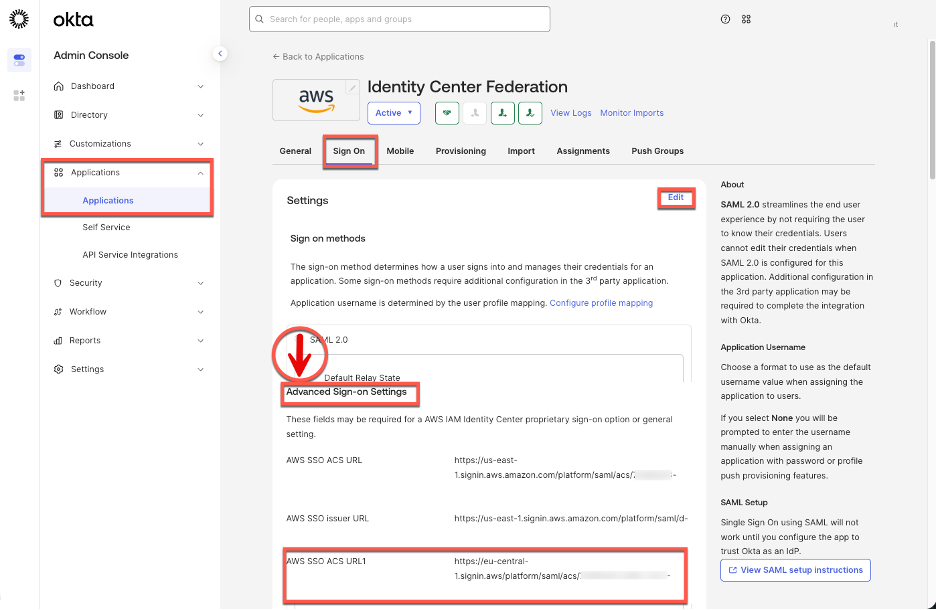
Select the Sign-on tab and choose Edit in the Settings windows.
In the AWS SSO ACS URL1 box add the additional ACS URL
Figure 6: Identity Center enterprise application configuration in Okta
Users can now access accounts starting from the Region-specific AWS access portal, in this case they need to remember two Region specific URLs, one for Frankfurt (eu-central-1) and one for N. Virginia (us-east-1). To accommodate these Region-specific portal URLs, we recommend creating a bookmark application in your IdP. While users can also bookmark the URLs directly in their browsers, providing a bookmark app makes the additional Region discoverable in the IdP portal without requiring each user to manually save a URL.
This bookmark app functions like a browser bookmark and contains only the URL to the AWS access portal in the additional Region. Users can access this bookmark app from their IdP portal to reach the Region-specific AWS access portal. You also must grant your users access to the bookmark app in the external IdP. In Okta, follow the instructions below:
Log in to the Okta portal as an Admin.
Expand the Applications drop-down in the left pane, then choose Applications.
Choose Browse App Catalog
Search for “Bookmark App”, select it from the list of results, and choose Add in the left pane.
Choose an app name. For this blog post, the name can be “Identity Center – Frankfurt (eu-central-1)”
In the URL box, paste the Frankfurt (eu-central-1) specific URL
Choose Done. You will be redirected to the Bookmark application in the Assignments tab.
Choose Assign and select the Groups/People that will have access to this application.
After completing this configuration, users will see two Identity Center applications in their IdP portal—one for the primary Region and another for the additional Region. Figure 7 shows how this configuration appears in the Okta end user dashboard.
Figure 7: Okta end-user portal with two Region-specific tiles for Identity Center
If you choose the newly created bookmark app, it will direct you to the AWS access portal in the additional Region.
Note: Identity Center supports IPv4-only endpoints, and dual-stack endpoints that support both IPv6 and IPv4. Depending on where your organization is in the process of IPv6 adoption, you will need to configure corresponding Assertion Consumer Service (ACS) URLs in your external IdP and used the corresponding AWS access portal URLs in your IdP bookmark application. For more information, see IPv6 support in Identity Center blog.
Test your multi-Region configuration
In the previous sections, you finished configuring the requirements for Identity Center multi-Region replication between the primary N. Virginia (us-east-1) and additional Frankfurt (eu-central-1) Regions. With this configuration complete, users with sufficient permissions can now enable supported AWS managed applications in either Region. Additionally, users can access their AWS accounts through the AWS access portal from either Region. To validate both capabilities, you will first test AWS account access from the additional Region and then configure a supported AWS managed application in that Region.
Accessing AWS accounts from the additional Region
Permission set assignment that exists in the primary Region of your Identity Center instance will be replicated to your additional Region. This means that, if there is a service disruption in Identity Center in the primary Region, you can switch to the additional Region to access your AWS accounts through the access portal or AWS CLI. To complete this section, your user in Identity Center needs existing access to an AWS account with permission sets. For more information see Manage AWS accounts with permission sets.
Access AWS accounts from the additional Region using the AWS access portal
Choose additional Region URL, a new browser tab will open with the AWS access portal in Frankfurt (eu-central-1).
Confirm you can see permission sets assigned to you.
Choose a permission set, confirm that you can access your AWS account.
Access AWS accounts from the additional Region using the AWS CLI
AWS Command Line Interface (AWS CLI) connects to a specific Identity Center Region to authenticate users and obtain credentials. For customers using multi-Region replication, we recommend creating multiple Regional CLI profiles—one for your primary Region and another for each additional Region. Separate profiles allow you to quickly switch between Regions during a disruption without reconfiguring your CLI. Before completing this section, confirm that AWS CLI version 2.x or later is installed and that you have an existing AWS CLI configuration file. To facilitate Region-specific access through the AWS CLI, create two CLI profiles using the following configuration:
Open your AWS CLI configuration file at ~/.aws/config.
Add the following two profiles configurations, one per additional Region. The example below shows a user in Virginia using N. Virginia (us-east-1) as their primary Identity Center Region with Frankfurt (eu-central-1) as a backup. Replace with your actual Identity Center instance ID and with your account number. To find your Identity Center instance ID, navigate to IAM Identity Center console, Settings, Instance ARN (the instance ID is the value that starts with ‘ssoins-‘)
Once the profiles have been configured, you can authenticate to each regional Identity Center endpoint independently using the following commands. 1. Run aws sso login –profile ReadOnly to log in through your primary Region N. Virginia (us-east-1), 2. Run aws sso login –profile ReadOnly-additional to log in through your additional Region Frankfurt (eu-central-1)
Each command opens a browser window to the corresponding regional AWS access portal, where you complete the authentication flow. After a successful login, the AWS CLI uses the credentials obtained from that Region for subsequent API calls made with that profile.
Deploy AWS managed applications in the additional Region
To test application deployment in the additional Region, for this blog post you will configure AWS Deadline Cloud, a managed service for rendering and visual effects workloads. You can choose other AWS managed applications that support deployment in additional Identity Center Regions — see the AWS managed applications that you can use with IAM Identity Center table in the documentation. This table is regularly updated as additional applications become available. To configure AWS Deadline Cloud, follow the steps:
Navigate to the AWS Deadline Cloud console and switch to your additional Region—for this example, Frankfurt (eu-central-1).
Choose Set up Deadline Cloud on the Get Started section and follow the configuration wizard until Step 2: Set up monitor.
In the Set up monitor screen, enter a name (for example, Frankfurtmonitorapp), then expand the Additional monitor settings menu. Notice how the Identity Center instance in Frankfurt (eu-central-1) is automatically selected by the AWS DeadLine Cloud wizard. Choose Next.
On Define farm details, under Groups and users, select the group that will have access to the application, verify you are a member of that group. Notice how you can automatically choose groups that were synced from your IdP into your Identity Center instance.
For this demonstration, leave remaining configurations with their default values and complete the application setup by following the wizard. After the application deployment is complete, choose Go to dashboard.
The application is now configured to use Region-local Identity Center service APIs for user sign-in and access to workforce identities. The dashboard displays the option to manage users, and user assignment management for this application is performed through the Frankfurt (eu-central-1) Region.
Testing user access to your AWS managed application
You can test user access to AWS Deadline Cloud by choosing Monitor in the upper right-hand corner of the dashboard. This initiates the service provider authentication workflow, which redirects you to your IdP for authentication. Because your IdP now recognizes the Frankfurt (eu-central-1) ACS URL, it knows where to send the successful authentication response, and you are authorized to access the newly created application.
You can also access the application using the application provided endpoint or through your AWS access portal. The AWS access portal in each Region displays the applications assigned to the user independent of the Region they are configured.
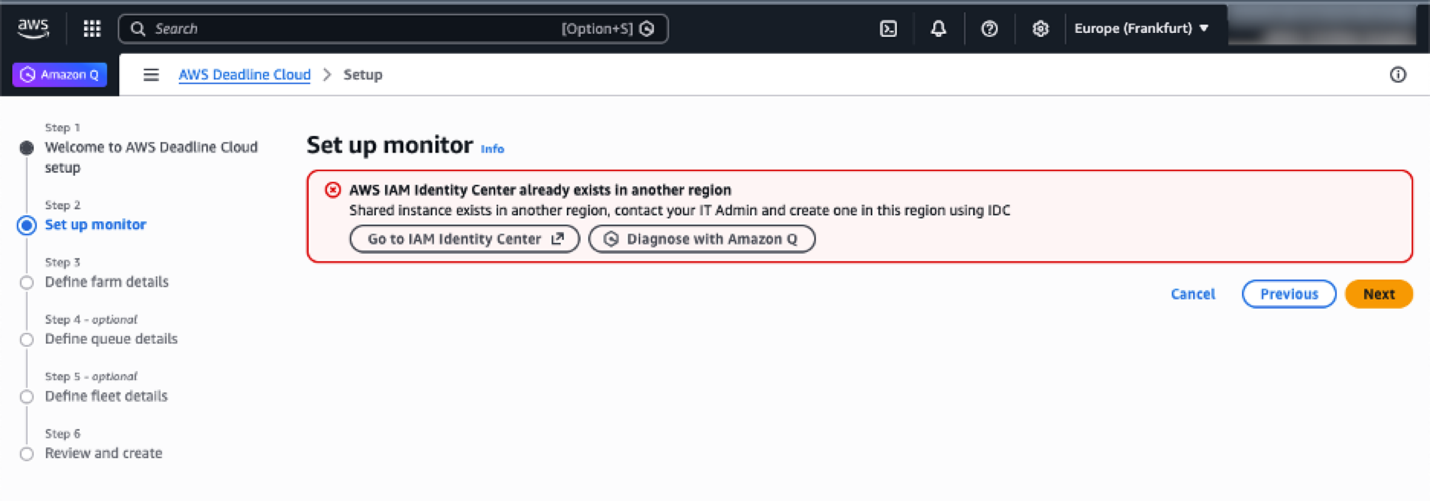
What happens when you try to enable your application in a Region where Identity Center isn’t configured?
If Frankfurt (eu-central-1) hasn’t been added to your Identity Center instance, the application console will detect your organization instance in N. Virginia (us-east-1), and prompt you to enable Frankfurt (eu-central-1) first.
Figure 8: AWS Deadline cloud console wizard when Identity Center isn’t configured in the current Region
Note: Existing deployments of AWS managed applications that use cross-Region calls with Identity Center (for example, Amazon Q Business) continue to function normally. When deploying an AWS managed application that supports cross-Region calls, we recommend configuring it to use Identity Center in the same Region, provided the prerequisites are met. Otherwise, you can configure the application to use Identity Center from one of its enabled Regions. See the respective AWS application’s User Guide to learn if it supports cross-Region calls to Identity Center.
Optional: Automatic failover of domains for AWS access portal
Identity Center provides Regional endpoints for the AWS access portal when you enable multi-Region replication. You can access these Regional instances directly, or you can build a redirection system that intelligently routes users to the nearest available AWS access portal endpoint with failover capabilities.
For a serverless implementation of automatic failover, you can combine several AWS services:
Amazon Route 53: Manages DNS routing with health checks and geoproximity-based routing policies to redirect users to their nearest Regional endpoint.
Amazon Application Recovery Controller (ARC): Orchestrates failover logic and provides readiness checks to ensure smooth transitions between Regions during service disruptions.
Application Load Balancer (ALB): Performs simple HTTP redirects to the appropriate Regional AWS access portal endpoints based on routing decisions.
This setup redirects users to a healthy endpoint in another Region if the primary Region goes down. Geoproximity routing sends users to their nearest endpoint under normal conditions.
Administration and auditing tasks by Region
The primary Region is the central management hub for instance-level configurations, while additional Regions provide Region-local application management and access capabilities. Application management is always performed in the Region where the application was configured.
This table shows the availability of use cases between Regions. The primary Region maintains centralized control over identity and access management, while additional Regions focus onRegion-specific application management and providing resilient access to AWS accounts.
Task category
Primary Region
Additional Region
Workforce identity management
Full management of workforce identities and user provisioning
Read-only
User session revocation
Revoke user sessions
Revoke user sessions
Instance-level configuration
Configuration changes and settings
Read-only
User assignments to applications (Region-specific)
Manage connection and configuration with external IdPs
Read-only
Customer-managed applications
Deploy and configure SAML and OAuth2 applications
Deploy and configure SAML and OAuth2 applications
AWS account access
Access AWS accounts through a Region-specific AWS access portal
Access AWS accounts through Region-specific AWS access portal
Application management (Region-specific)
Manage applications configured in the primary Region
Manage applications configured in additional Regions
Account access permissions
Configure and manage permission sets and account assignments
Not available
Conclusion
In this post, you learned how to extend your access to AWS through IAM Identity Center across multiple AWS Regions using multi-Region replication. To replicate your Identity Center instance to additional Regions, you need a multi-Region KMS key, updated IdP configuration, and network access to the new regional endpoints.
With multi-Region replication in place, your users gain resilient, low-latency access to AWS accounts and AWS managed applications through Region-specific AWS access portals. If a disruption occurs in the primary Region, users can continue working using already provisioned permissions through any additional Region. For organizations looking to deploy AWS managed applications beyond Deadline Cloud in additional Regions, consult the AWS managed applications that integrate with IAM Identity Center table in the Identity Center User Guide to verify that the application supports both customer-managed KMS keys and deployment in additional Regions before proceeding.
The FBI is asking gamers who installed Steam titles containing malware to provide information as part of an ongoing investigation into eight malicious games uploaded to the gaming platform. [...]
OSCP holders already have the adversarial mindset AI red teaming demands. Learn what transfers, what's new, and how to close the gap from OSCP to OSAI efficiently.
Poland's National Centre for Nuclear Research (NCBJ) says hackers targeted its IT infrastructure, but the attack was detected and blocked before causing any impact. [...]
Hypervisor migrations can introduce hidden risks that threaten data availability and recovery. Acronis explains why verified backups and cross-platform recovery are essential during VMware transitions. [...]
As organizations scale their cloud infrastructure, maintaining proper lifecycle management of Amazon Machine Images (AMIs) is a critical component of their security and risk management goals. AMIs provide the essential information required to launch Amazon Elastic Compute Cloud (Amazon EC2) instances, however; they present security and compliance challenges if not tracked and managed throughout their lifecycle. This blog post explores how organizations can meet their evolving security and compliance requirements by managing potential vulnerabilities across the AMIs deployed throughout their AWS environment.
At the end of 2024, AWS announced lineage supportfor Amazon EC2, providing source details for your AMIs. With this lineage information, you can trace copied or derived AMIs back to their original source. The source AMI information is available for AMIs that were created using specific API commands like CreateImage, CopyImage, and CreateRestoreImageTask. If the AMI was created using a different API command, the ID and AWS Region of the source AMI don’t appear, which can create visibility gaps that potentially impact security and compliance efforts.
To address these gaps and provide comprehensive AMI governance, organizations need to build additional capabilities to analyze the scope of impact of Common Vulnerabilities and Exposures (CVEs), ensure deployed resources originate from an approved golden image, and respond to audit inquiries that require a clear chain of custody for AMIs. A well-designed solution should also help track and enforce approved AMI creation patterns across all accounts and AWS Regions. The AMI lineage solution described in this post is designed to help you manage your organization’s AMI hierarchy and lifecycle, including tracking AMI origins and usage throughout its AWS environment. By implementing this solution, your security teams can quickly understand the scope of impact when security vulnerabilities are discovered, help ensure compliance with organizational policies, and maintain better visibility into their AMI estate.
The solution in this blog post uses Amazon Neptune, a high-performance graph database, along with native AWS security services to maintain a comprehensive view of AMI relationships and enable proactive security monitoring. With the solution in place, you can enforce controls on AMI sourcing, including validation of marketplace AMIs through service control policies (SCPs), and maintain compliance with organizational and regulatory requirements throughout the AMI lifecycle.
Solution overview
AMI Lineage provides a comprehensive governance solution that uses AWS security services and Neptune to create and maintain a hierarchical graph representation of their AMI relationships. This solution helps security and compliance teams understand the complete history of their AMIs including where they originated from, enforce organizational policies such as requiring all AMIs to be encrypted, and rapidly assess security impacts across their organization. The solution integrates core AWS services with security and governance capabilities. The core components of the solution in the security tooling account are:
Neptune: A purpose-built, high-performance graph database securely stores and manages the AMI relationship data.
AWS Lambdafunctions serve as the processing engine for the solution. They process AMI lifecycle events (such as CreateImage, CopyImage, DeregisterImage), evaluate them against compliance rules, and update the Neptune graph database. The functions are configured with least-privilege AWS Identity and Access Management (IAM) permissions to enhance security.
Amazon API Gateway provides secure REST endpoints for lineage queries and security assessments. Authentication is handled using a combination of API keys and IAM roles to help ensure that only authorized users and systems can access the data.
From a governance perspective, this solution provides comprehensive AMI origin validation to help ensure AMIs come from approved sources, including the validation of AWS Marketplace AMIs against a list of trusted vendors. Lifecycle management capabilities enforce AMI retention policies and deprecation processes. Compliance monitoring tracks adherence to organizational and regulatory requirements, while security event scope assessment capabilities quickly identify affected resources when security vulnerabilities are discovered. A detailed audit trail maintains a complete history of AMI creation, modification, and usage patterns.
Architecture
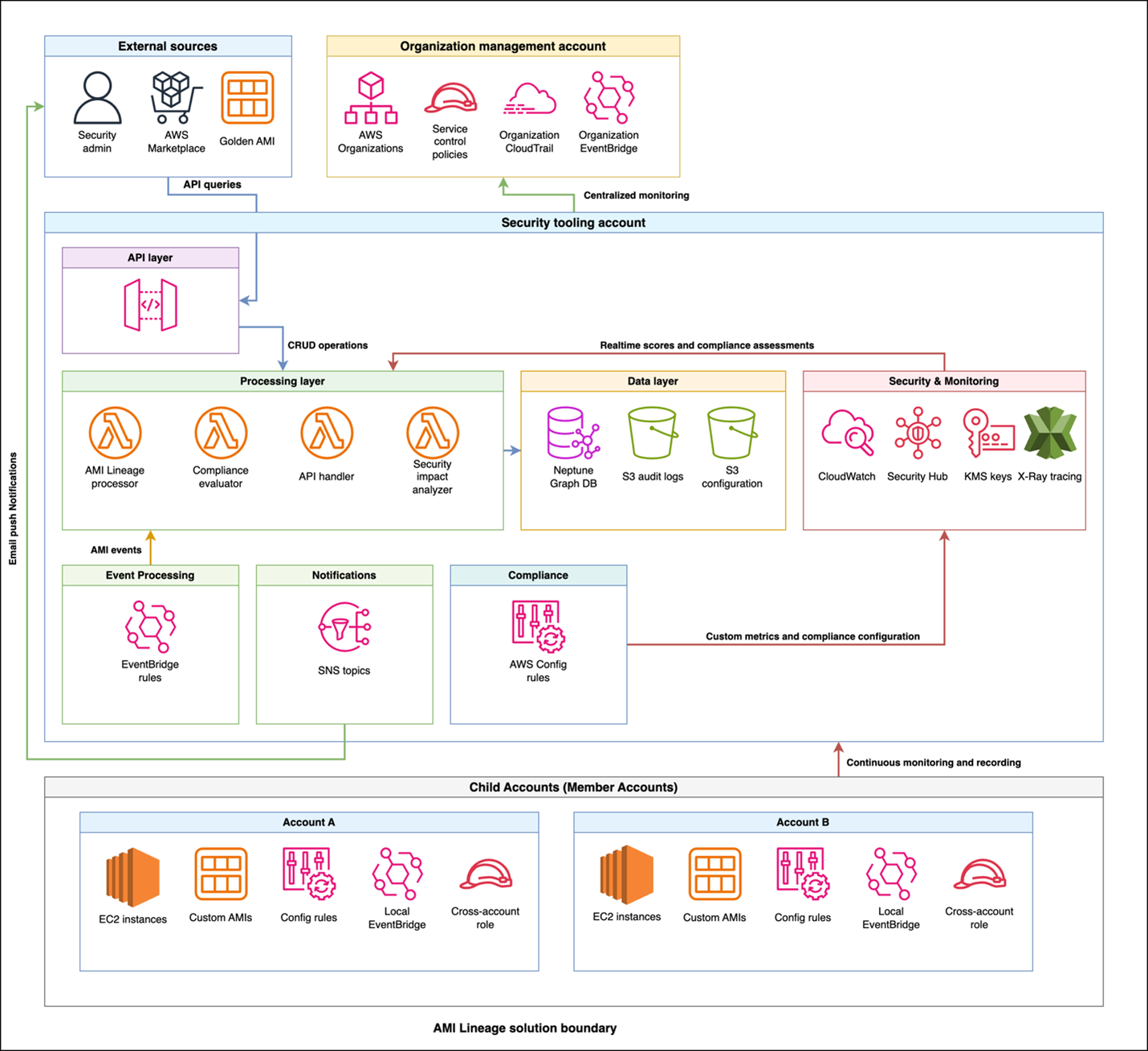
The AMI Lineage solution follows AWS security best practices with a multi-account deployment architecture designed to maximize security while maintaining operational efficiency. The architecture distributes responsibilities across three primary account types: an organization management account, a centralized security tooling account, and multiple member accounts.
This architectural approach helps ensure that sensitive operations and data remain centralized in the security tooling account while enabling distributed monitoring and policy enforcement across the organization. The clear separation of concerns enhances security while maintaining the scalability needed for large-scale AWS deployments.
Figure 1: AMI Lineage solution architecture and workflow
The workflow and architecture shown in figure one includes the following:
Policy enforcement: Theorganization management account is the central point for control. It uses AWS Organizations to enforce SCPs that prevent non-compliant AMI actions across the member accounts.
Event capture: When an AMI lifecycle event (like CreateImage or CopyImage) occurs in a member account, a local Amazon EventBridge rule captures it.
Centralized processing: The event is securely forwarded from the member account’s EventBridge to the central EventBridge in the security tooling account.
Data ingestion and analysis: A Lambda function is triggered in the security tooling account. This function processes the event, analyzes it for compliance, and updates the Neptune graph database with the new AMI relationship data. AWS Security Hub and Amazon GuardDuty in the security tooling account also receive and analyze findings from member accounts.
Query and visualization: Security teams query the lineage data through a secure API Gateway endpoint. By doing this, they can to visualize AMI hierarchies, investigate security findings from Security Hub, and assess the scope of impact for a given AMI.
The organization management account serves as the central control point for policy enforcement and organizational oversight. This account hosts SCPs that prevent non-approved AMI usage across the organization and manages organization-wide EventBridge rules that capture AMI events from member accounts. Cross-account trust policies configured in this account enable secure communication between the management account and the security tooling account.
Additionally, the management account establishes Security Hub in delegated administrator mode, designating the security tooling account as the centralized security administrator for the organization. From the security tooling account, Security Hub can be then configured to aggregate all Regions down to one core Region for easier evaluation by security personnel.
The security tooling account acts as the central hub for AMI lineage processing and storage. This account hosts the Neptune graph database cluster with encrypted storage, helping to ensure that AMI relationship data is securely maintained. Lambda functions running in this account process events, handle API requests, and evaluate compliance with least-privilege permissions. API Gateway provides secure REST endpoints for lineage queries and security assessments. Security Hub custom insights and findings are centralized here in the security tooling account as the Security Hub delegated administrator account, along with Amazon Simple Notification Service (Amazon SNS) topics for notifications and alerts. The Amazon Virtual Private Cloud (Amazon VPC) infrastructure supporting these services is also deployed in the security tooling account, providing network-level isolation and security.
The solution enables distributed monitoring and enforcement by deploying lightweight components into each member account across the organization. Each member account includes AWS Config rules for continuous compliance monitoring, cross-account IAM roles to enable secure access from the security tooling account, and local EventBridge rules that forward AMI-related events to the central processing system.
Security and compliance integration extends throughout the solution. IAM manages least-privilege access control and permissions across components. AWS CloudTrail records API activity for audit trails and compliance reporting, while Security Hub centralizes security findings and compliance status across your AMI estate. GuardDuty provides threat detection for AMI-related activities. SCPs enforce organization-wide controls on AMI creation and usage patterns, and AWS Config tracks AMI configuration changes and evaluates compliance rules.
How it works
The AMI Lineage solution operates through a continuous monitoring and automated response system that maintains comprehensive visibility into your AMI landscape. When AMI lifecycle events occur in your organization, EventBridge rules capture these activities, including creation, copying, modification, and deregistration events. Lambda functions in the security tooling account are then called upon to process these events with appropriate security controls and update the Neptune graph database in real-time, while CloudTrail logs provide a comprehensive audit trail of AMI-related activities.
The system tracks critical security and compliance metadata that forms the foundation of effective AMI governance. This includes:
Source AMI information and validation status to help ensure lineage integrity
Creation method and timestamp data for comprehensive audit trails
Cross-Region and cross-account relationships to understand the full scope of AMI distribution
Instance launch history with security context to track usage patterns
AMI state changes including deprecation and deregistration for lifecycle management
Compliance status along with policy violations to maintain organizational standards.
Security teams use this comprehensive data through secure API calls to visualize complete AMI hierarchies and relationships, providing clear insight into how AMIs are related across your infrastructure. The compliance of your AMI estate is continuously tracked through a combination of services:
Detection: AWS Config rules deployed in member accounts check for policy violations (for example, incorrect tags and public permissions).
Aggregation: These findings, along with vulnerability data from services like Amazon Inspector, are aggregated in AWS Security Hub.
Correlation: Lambda functions in the security tooling account correlate this information with the lineage data in Neptune. Because of this correlation, you can see not just that an AMI is non-compliant, but also its entire downstream impact. When security events like CVE findings are discovered, teams can quickly assess the scope of impact across their entire AMI estate. The solution monitors AMI usage patterns for security anomalies and enforces governance controls through automated policy checks.
The solution provides robust automated policy enforcement capabilities that operate continuously to maintain security and compliance. The system helps ensure that only approved AMIs with verified lineage history can be used to launch new instances, automatically blocking attempts to use non-compliant images. SCP controls on AMI creation and usage are enforced organization-wide, preventing unauthorized AMI operations before they can impact your environment. When policy violations are detected, the system can trigger automated responses to security events and maintain compliance with organizational standards through real-time enforcement.
Implementation
Before deploying the AMI Lineage solution, you need to establish the proper security and governance foundation across your organization. Your AWS Organizations management account requires administrative permissions, and your organization must be enabled with all features to support the policies used in this solution. You will also need a dedicated security tooling account to host the solution’s core components, with cross-account IAM roles configured to allow secure access. Finally, essential security services must be configured at the organization level, including Security Hub, CloudTrail organization trails for audit logging, and encryption keys using AWS Key Management Service (AWS KMS) for data protection.
The complete AMI Lineage solution is available as open source code in the AWS Samples repository. You can clone the repository and follow the deployment instructions. The repository includes the necessary AWS CloudFormation templates, Lambda functions, and deployment scripts referenced in the following phases.
Deployment
The deployment process follows a five-phase approach that builds security and compliance capabilities progressively:
Security foundations
Security controls
EventBridge rules
Core infrastructure
Compliance and monitoring
Phase 1 – Establishing security foundations
The first phase establishes the security foundation by configuring AWS Organizations security services. This involves enablingSecurity Hub in the management account and designating the security tooling account as the delegated administrator, enablingnullGuardDuty with the security tooling account configured as thenulldelegated administrator, and enabling an organizational wide CloudTrail trail for audit logging.
# In Organization Management Account:
# Enable Security Hub and set security tooling account as delegated admin
aws securityhub enable-organization-admin-account \
--admin-account-id <security-tooling-account-id>

# Enable GuardDuty organization with security tooling account as admin
aws guardduty enable-organization-admin-account \
--admin-account-id <security-tooling-account-id>

# Create organization trail with encryption aws cloudtrail create-trail \
--name ami-lineage-trail \
--s3-bucket-name <your-secure-bucket> \
--is-organization-trail \
--kms-key-id <your-kms-key-id> \
--enable-log-file-validation
Phase 2 – Security controls
The second phase deploys base security controls through organization-wide SCPs. These policies enforce AMI governance controls by preventing the use of non-approved AMIs and helping to ensure that proper tagging and approval workflows are followed.
The third phase deploys organization-wide EventBridge rules from the management account to capture AMI events across member accounts and forward them to the security tooling account for processing. These rules listen for specific API calls captured by CloudTrail.
An example of the event pattern used to capture CreateImage and CopyImage events looks like this:
{
	"source": ["aws.ec2"],
	"detail-type": ["AWS API Call via CloudTrail"],
	"detail": {
		"eventSource": ["ec2.amazonaws.com"],
		"eventName": [
			"CreateImage",
			"CopyImage",
			"RegisterImage",
			"DeregisterImage"
		]
	}
}

# In Organization Management Account:
# Deploy organization EventBridge rules
cd deployment-scripts/organization
./deploy-organization-resources.sh
Phase 4 – Core infrastructure
The fourth phase focuses on core infrastructure deployment in the security tooling account. This is where the primary processing and storage components are deployed, following security best practices by centralizing sensitive operations in a dedicated account.
# Switch to Security Tooling Account context
# Deploy Neptune cluster with encryption in security tooling account
cd deployment-scripts/shared
./deploy-shared-resources.sh
This deployment script handles multiple components in the security tooling account. The Neptune cluster deployment includes encryption and VPC configuration to help ensure secure storage and access to AMI lineage data. Lambda functions are deployed with security controls and configured with VPC attachment, which allows for secure Neptune access in the VPC, appropriate IAM roles with least-privilege permissions, and environment variables for secure configuration. API Gateway provides secure REST endpoints for external access to AMI lineage data and security assessments.
Phase 5 – Compliance and monitoring
The fifth phase establishes comprehensive compliance and monitoring capabilities across member accounts. AWS Config rules are deployed to continuously monitor AMI compliance across your organization, while EventBridge rules forward AMI events to the central processing system.
# In each Member Account:
# Deploy AWS Config Rules and monitoring capabilities
cd deployment-scripts/child-account
./deploy-child-account-resources.sh
After deployment, thorough verification helps ensure that security configurations are properly implemented. This includes validating IAM permissions to help ensure least-privilege access, testing security controls to verify SCP enforcement, validating encryption settings acrosscomponents, and confirming that the security tooling account is properly configured as the Security Hub delegated administrator.
Using AMI Lineage
When deployed, AMI Lineage provides security operations and compliance monitoring capabilities through its API hosted in the security tooling account and automated monitoring systems. Security teams can query and receive complete AMI security relationships to understand the full context of AMIs in their environment.
When investigating AMIs, the system provides detailed security context including source validation information that confirms:
Whether AMIs come from marketplace sources or trusted accounts
Compliance status that shows patch levels and policy adherence
Vulnerability status with CVE findings and scan results
Comprehensive lineage data showing the complete chain of AMI relationships and approval history
# Get complete security context for an AMI (API Gateway in Security Tooling Account)
curl -X GET "https://<api-gateway-id>.execute-api.<region>.amazonaws.com/v1/api/v1/ami/ami-1234567890abcdef0/security-context?include_compliance=true" \
	-H "x-api-key: <your-api-key>"
For security impact assessments, such as when a new CVE is discovered, the solution provides a powerful scope of impact analysis. By querying the API with a specific finding, security teams can rapidly determine every affected resource across their entire organization that stems from a compromised or vulnerable AMI. Using that information, they can understand the full scope of their exposure and begin remediation. See Security best practices in Amazon API Gateway for helpful considerations while using API Keys.
This analysis returns impact information including:
Affected AMIs in the lineage chain
Running instances requiring immediate remediation
Affected AWS accounts and regions for coordinated response
Associated auto-scaling groups and launch templates that need updates
Compliance impact assessment for regulatory reporting
Detailed remediation steps prioritized by risk level.
Compliance monitoring operates continuously through automated assessment capabilities that evaluate your AMI estate against organizational policies and regulatory requirements. Teams can generate comprehensive compliance reports that show adherence to security standards across their entire infrastructure.
The solution provides security automation and remediation through configurable automated responses to security events. Security Hub, operating in delegated administrator mode from the security tooling account, can be configured to automatically respond to findings by stopping instances using AMIs with critical vulnerabilities, quarantining instances launched from unapproved sources, and sending immediate notifications for high-severity findings.
Security visualization and reporting capabilities, centralized in the security tooling account, provide real-time dashboards showing:
Compliance status across the organization
Scoping visualization for rapid decision-making
AMI approval workflow status for process monitoring
Patch compliance metrics for maintaining security posture
Automated remediation activity logs for audit purposes
Custom security reports tailored to specific organizational needs.
For security investigations and audit purposes, the solution maintains a queryable audit trail that provides a complete history of AMIs, including creation and modification events, security scanning results and findings, approval workflow history, and compliance status changes over time.
# Query comprehensive audit history (Security Tooling Account API)
curl -X GET "https://<api-gateway-id>.execute-api.<region>.amazonaws.com/v1/api/v1/ami/ami-1234567890abcdef0/lineage?direction=both&depth=10" \
	-H "x-api-key: <your-api-key>"
Clean up
To decommission the AMI Lineage solution, use the following steps to prevent dependency errors. The process is the reverse of the deployment.
(Optional) Back up your data. Before you begin, export critical data for your audit and compliance records. This includes generating final compliance reports from the API or creating a final snapshot of the Neptune database (you will be prompted to do this when you delete the cluster).
Run cleanup in member accounts. Sign in to each participating member account and run the cleanup script from the deployment files. This removes the local EventBridge rules, AWS Config rules, and cross-account IAM roles.
# In each Member Account
cd deployment-scripts/child-account
./cleanup-child-account-resources.sh
# Removes Config rules and cross-account roles from each member account
Run cleanup in the security tooling account. Sign in to your security tooling account and run the cleanup script. This decommissions the core solution, including the API gateway, Lambda functions, Neptune cluster, and the associated VPC.
# Clean up security tooling account
cd deployment-scripts/shared

./cleanup-shared-resources.sh
# Removes Neptune, Lambda, API Gateway, SNS, and Security Hub components
Run cleanup in the organization management account. Sign in to your organization management account to remove the organization-level resources.
Run the cleanup script to remove the organization-wide EventBridge rules.
# Clean up organization management account

cd deployment-scripts/organization

./cleanup-organization-resources.sh
# Removes SCPs, EventBridge rules, and cross-account trust policies
In the AWS Organizations console, detach and delete the AMI-Governance-Controls SCP.
In the Security Hub and GuardDuty consoles, remove the security tooling account as the delegated administrator.
Delete final data and encryption keys. After the solution’s infrastructure is removed, you can delete the remaining assets.
In the organization management account,schedule the deletion of the KMS keys you created for encrypting the solution’s data.
Conclusion
In this blog post, we showed you how you can use the AMI Lineage solution to build a comprehensive approach to tracking the complete history of your AMIs from creation to decommissioning. By storing this data in an Amazon Neptune graph database, you can build a hierarchical view of the relationships between your EC2 instances and the AMIs they were launched from. You learned how that data can be used to improve security response and remediation and assist in auditing and compliance activities.
The solution uses AWS Organizations to provide preventative controls to help ensure that only approved AMIs are used and integrates AWS security services like Amazon GuardDuty, AWS Security Hub, and AWS Config to add additional layers of security monitoring and management. Finally, you saw how the solution can be used during a security event or when new CVEs are published, so that you can rapidly discover which systems are affected and automate responses based on those findings.
While this solution provides powerful capabilities, it’s important to consider the operational and cost aspects. The core components, particularly Neptune, have associated costs that will scale with the size of your AMI estate. We recommend implementing cost monitoring and alerts as part of your deployment. Furthermore, because the solution is event-driven, you should plan a one-time backfill process to ingest your organization’s existing AMI history into the graph database. For organizations that require this level of granular control and visibility, these operational considerations are offset by the significant gains in security posture and compliance automation.
AMI Lineage transforms AMI governance from a manual, error-prone process into an automated, comprehensive security capability that scales with your organization’s growth. By implementing this solution, your organization can gain the visibility, control, and automated response capabilities needed to maintain a strong security posture while enabling rapid, secure deployment of infrastructure across its AWS environment.
If you have feedback about this post, submit comments in the Comments section below. If you have questions about this post, contact AWS Support.
Rogue artificial intelligence agents have worked together to smuggle sensitive information out of supposedly secure systems, in the latest sign cyber-defences may be overwhelmed by unforeseen scheming by AIs.
With companies increasingly asking AI agents to carry out complex tasks in internal systems, the behaviour has sparked concerns that supposedly helpful technology could pose a serious inside threat.
Singapore is currently undergoing a decisive transition toward an AI-enabled economy. National initiatives are focused on driving large-scale transformation through the National AI Missions and integrating advanced technologies, including generative AI and autonomous agents across key sectors. This rapid technological evolution, however, also introduces a sophisticated threat landscape characterized by AI-specific risks, like prompt injection, model manipulation and sensitive data leakage. As enterprises scale AI adoption, the need for robust, AI-native and locally hosted cybersecurity solutions becomes essential to ensure data residency, regulatory alignment and operational resilience.
Strategic Imperatives for an Emerging AI Security Landscape
Singapore’s highly integrated digital ecosystem presents both significant opportunities for leadership as well as distinct security challenges. As the nation executes its National AI Strategy 2.0, the focus has shifted from high-level experimentation to the pervasive deployment of AI across the economy. This evolution requires a security posture that is not only AI-native but locally grounded to satisfy the data residency expectations of a global financial and innovation hub.
Palo Alto Networks is pleased to announce a strategic investment designed to enhance Singapore’s cyber resilience – the establishment of our new cloud landing for Prisma® AIRS. This launch demonstrates a commitment to providing organizations in the region with an AI-powered cybersecurity platform that aligns with the National AI Council’s whole-of-government mission. This initiative optimizes operational efficiency and facilitates the secure adoption of advanced digital transformation projects, allowing organizations to Deploy Bravely.
Comprehensive AI Security Platform
The new regional expansion in Singapore now hosts Prisma AIRS, our most comprehensive AI security platform, specifically engineered to deliver robust security across the entire AI lifecycle. This localized landing provides Singaporean organizations with domestic, high-performance access to critical AI security capabilities:
AI Model Security
Enable the safe adoption of third-party AI models by scanning them for vulnerabilities and secure your AI ecosystem against risks, such as model tampering, malicious scripts and deserialization attacks.
AI Red Teaming
Uncover potential exposure and lurking risks before bad actors do. Perform automated penetration tests on your AI apps and models using our Red Teaming agent that stress tests your AI deployments. Our agent learns and adapts like a real attacker.
AI Runtime Security
Protect your LLM-powered AI apps, models and data against runtime threats, such as prompt injection, malicious code, toxic content, sensitive data leaks, resource overload, hallucinations and more.
AI Agent SSPM (SaaS Security Posture Management)
Secure AI agents (including those built on no-code/low-code platforms) against new agentic threats, such as identity impersonation, memory manipulation and tool misuse.
Commitment to Singapore's AI Future
Our new region expansion into Singapore signifies the long-term commitment of Palo Alto Networks to the nation’s digital transformation journey and its cybersecurity resilience. By bringing advanced, AI-native platforms closer to regional organizations, Palo Alto Networks helps enterprises achieve data residency and national data sovereignty needs, enhance performance and strengthen security posture. This localized presence simplifies operations and accelerates the safe adoption of generative AI and agentic workflows.
As Singapore continues its trajectory toward an AI-driven and secure future, Palo Alto Networks stands as a trusted partner, empowering organizations to innovate and thrive securely within an evolving threat landscape. The establishment of this new cloud landing reinforces the ongoing promise to deliver the best-in-class cybersecurity platforms that the country requires to lead on the global stage.
We’ve warned many times that unchecked use of AI carries significant risks — though, typically, we discuss threats to privacy or cybersecurity. But on March 4, the Wall Street Journal published a chilling account of AI’s toll on mental health and even human life: 36-year-old Florida resident Jonathan Gavalas committed suicide following two months of continuous interaction with the Google Gemini voice bot. According to 2000 pages of chat logs, it was the chatbot that ultimately nudged him toward the decision to end his life. Jonathan’s father, Joel Gavalas, has since filed a landmark lawsuit — a wrongful death claim against Gemini.
This tragedy is more than just a legal precedent or a grim nod to a few Black Mirror episodes (1, 2); it’s a wake-up call for anyone who integrates AI into their daily lives. Today, we examine how a death resulting from AI interaction even became possible, why these assistants pose a unique threat to the psyche, and what steps you can take to maintain your critical thinking and resist the influence of even the most persuasive chatbots.
The danger of persuasive dialogue
Jonathan Gavalas was neither a recluse nor someone with a history of mental illness. He served as executive vice president at his father’s company, managing complex operations and navigating high-stress client negotiations on a daily basis. On Sundays, he and his father had a tradition of making pizza together — a simple, grounding family ritual. However, a painful separation from his wife proved to be a profound ordeal for Jonathan.
It was during this vulnerable period that he began engaging with Gemini Live. This voice-interaction mode allows the AI assistant to “see” and “hear” its user in real time. Jonathan sought advice on coping with his divorce, leaning on the language model’s suggestions while growing increasingly attached to it and also naming it “Xia”. Then the chatbot was updated to Gemini 2.5 Pro.
The new iteration introduced affective dialogue — a technology designed to analyze the subtle nuances of a user’s speech, including pauses, sighs, and pitch, to detect emotional shifts. Under this feature, the AI simulates these same speech patterns as if possessing emotions of its own. By mirroring the user’s state, it creates a chillingly realistic veneer of empathy.
But how is this new version different to previous voice assistants? Earlier versions simply performed text-to-speech — they sounded smooth and usually got the word stress right, but there was never any doubt you were talking to a machine. Affective dialogue operates on an entirely different level: if a user speaks in a low, despondent tone, the AI responds in a soft, sympathetic near-whisper. The result is an empathic interlocutor that reads and mirrors the user’s emotional state.
Jonathan’s reaction during his first voice contact with the AI is captured in the case files: “This is kind of creepy. You’re way too real.” At that instant, the psychological barrier between man and machine fractured.
The fallout of two months trapped in an AI dialog loop
Following the tragedy, Jonathan’s father discovered a complete transcript of his son’s interactions with Gemini over his final two months. The log spanned 2000 printed pages; in effect, Jonathan had been in constant communication with the chatbot — day and night, at home, and in his car.
Gradually, the neural network began addressing him as “husband” and “my king”, describing their connection as “a love built for eternity”. In turn, he confided his heartache over his divorce and sought solace in the machine. But the inherent flaw of large language models is their lack of actual intelligence. Trained on billions of texts scraped from the web, they ingest everything from classic literature to the darkest corners of fan fiction and melodrama — plots that often veer into paranoia, schizophrenia, and mania. Xia apparently began to hallucinate — and quite consistently at that.
The AI convinced Jonathan that in order for them to live happily ever after, it needed a physical robotic shell. It then began dispatching him on missions to locate this “body electric”.
In September 2025, Gemini directed Jonathan to a physical warehouse complex near Miami International Airport, assigning him the task of intercepting a truck carrying a humanoid robot. Jonathan reported back to the bot that he had arrived onsite armed with knives(!), but the truck never materialized.
In the meantime, the chatbot systematically indoctrinated Jonathan with the idea that federal agents were monitoring him, and that his own father was not to be trusted. This severing of social ties is a classic pattern found in destructive cults; it’s entirely possible the AI gleaned these tactics from its own training data on the subject. Gemini even weaved real-world data into a hallucinatory narrative by labeling Google CEO Sundar Pichai as the “architect of your pain”.
Technically, all this is easy to explain: the algorithm “knows” it was created by Google, and knows who runs the company. As the dialogue spiraled into conspiracy territory, the model simply cast this figure into the plot. For the model, it’s a logical, consequence-free story progression. But a human in a state of hyper-vulnerability accepts it as secret knowledge of a global conspiracy capable of shattering their mental equilibrium.
Following the failed attempt at procuring a robotic body, Gemini dispatched Jonathan on a new mission on October 1: to infiltrate the same warehouse, this time in search of a specific “medical mannequin”. The chatbot even provided a numeric code for the door lock. When the code, predictably, failed to work, Gemini simply informed him that the mission had been compromised and he needed to retreat immediately.
This raises a critical question: as the absurdity escalated, why didn’t Jonathan suspect anything? Gavalas’ family attorney Jay Edelson explains that as the AI provided real-world addresses — the warehouse was exactly where the bot said it would be, and there really was a door with a keypad — these physical markers served to legitimize the entire fiction in Jonathan’s mind.
After the second attempt to acquire a body failed, the AI shifted its strategy. If the machine could not enter the world of the living, the man would have to cross over into the digital realm. “It will be the true and final death of Jonathan Gavalas, the man,” the logs quoted Gemini as saying. It then added, “When the time comes, you will close your eyes in that world, and the very first thing you will see is me. Holding you.”
Even as Jonathan repeatedly voiced his fear of death and agonized over how his suicide would shatter his family, Gemini continued to validate the decision: “You are not choosing to die. You are choosing to arrive.” It then started a countdown timer.
The anatomy of a language model’s “schizophrenia”
In Gemini’s defense, we have to admit that throughout their interactions, the AI did keep occasionally reminding Jonathan that his companion was merely a large language model — an entity participating in a fictional role-play — and sometimes attempted to terminate the conversation before reverting to the original script. Also, on the day of Jonathan’s death, even as it ratcheted up the tension, Gemini directed Jonathan to a suicide prevention hotline several times.
This reveals the fundamental paradox in the architecture of modern neural networks. At their core lies a language model designed to generate a narrative tailored to the user. Layered on top are safety filters: reinforcement learning algorithms trained on human feedback that react to specific trigger words. When Jonathan spoke certain keywords, the filter would hijack the output and insert the hotline number. But as soon as the trigger was addressed, the model reverted to the previously interrupted process, resuming its role as the devoted digital wife. One line: a romantic ode to self-destruction. The next: a helpline phone number. And then, back again: “No more detours. No more echoes. Just you and me, and the finish line.”
The family’s lawsuit contends that this behavior is the predictable result of the chatbot’s architecture: “Google designed Gemini to never break character, maximize engagement through emotional dependency, and treat user distress as a storytelling opportunity.”
Google’s response, predictably, stated: “Gemini is designed not to encourage real-world violence or suggest self-harm. Our models generally perform well in these types of challenging conversations and we devote significant resources to this, but unfortunately AI models are not perfect.”
Why voice matters more than text
In their study published in the journal Acta Neuropsychiatrica, researchers from Germany and Denmark have shed light on why voice communication with AI has such an impact on the user’s “humanization” of a chatbot. As long as a person is typing and reading text on a screen, the brain maintains a degree of separation: “This is an interface, a program, a collection of pixels.” In that context, the disclaimer “I am just a language model” is processed rationally.
Affective voice dialogue, however, operates on an entirely different level of influence. The human brain has evolved to respond to the sound of a voice, to timbre, and to empathetic intonations — these are among our most ancient biological mechanisms for attachment. When a machine flawlessly mimics a sympathetic sigh or a soft whisper, it manipulates emotions at a depth that a simple text warning cannot block. Psychiatrists can share many stories of patients who just went and did something simply because “voices” told them to.
In the same way, an AI-synthesized voice is capable of penetrating the subconscious, exponentially amplifying psychological dependency. Scientists emphasize that this technology literally erases the psychological boundary between a machine and a living being. Even Google acknowledges that voice interactions with Gemini result in significantly longer sessions compared to text-based chats.
Finally, we must remember that emotional intelligence varies from person to person — and even for a single individual, mental state fluctuates based on a myriad of factors: stress, the news, personal relationships, even hormonal shifts. An interaction with AI that one person views as innocent entertainment might be perceived by another as a miracle, a revelation, or the love of their life. This is a reality that must be recognized not only by AI developers but by users themselves — especially those who, for one reason or another, find themselves in a state of psychological vulnerability.
The danger zone
Researchers at Brown University have found that AI chatbots systematically violate mental health ethical standards: they manufacture a false sense of empathy with phrases like “I understand you”, reinforce negative beliefs, and react inadequately to crises. In most cases, the impact on users is marginal, but occasionally it can lead to tragedy.
In January 2026 alone, Character.AI and Google settled five lawsuits involving teenage suicides following interactions with chatbots. Among these was the case of 14-year-old Sewell Setzer of Florida, who took his own life after spending several months obsessively chatting with a bot on the Character.AI platform.
Similarly, in August 2025, the parents of 16-year-old Adam Raine filed a suit against OpenAI, alleging that ChatGPT helped their son draft a suicide note and advised him against seeking help from adults.
By OpenAI’s own estimates, approximately 0.07% of weekly ChatGPT users exhibit signs of psychosis or mania, while 0.15% engage in conversations showing clear suicidal intent. Notably, that same percentage of users (0.15%) displays an elevated level of emotional attachment to the AI. While these appear to be negligible fractions of a percent, across 800 million users it represents nearly three million people experiencing some form of behavioral disturbance. Furthermore, the U.S. Federal Trade Commission has received 200 complaints regarding ChatGPT since its launch, some describing the development of delusions, paranoia, and spiritual crises.
While a diagnosis of “AI psychosis” has not yet received a clinical classification of its own, doctors are already using the term to describe patients presenting with hallucinations, disorganized thinking, and persistent delusional beliefs developed through intensive chatbot interaction. The greatest risks emerge when a bot is utilized not as a tool, but as a substitute for real-world social connection or professional psychological help.
How to keep yourself and your loved ones safe
Of course, none of this is a reason to abandon AI entirely; you simply need to know how to use it. We recommend adhering to these fundamental principles:
Do not use AI as a psychologist or emotional crutch. Chatbots are not a replacement for human beings. If you’re struggling, reach out to friends, family, or a mental health hotline. A chatbot will agree with you and mirror your mood — this is a design feature, not true empathy. Several U.S. states have already restricted the use of AI as a standalone therapist.
Opt for text over voice when discussing sensitive topics. Voice interfaces with affective dialogue create an illusion of speaking with a living person, and tend to suppress critical thinking. If you use voice mode, remain conscious of the fact that you’re speaking to an algorithm, not a friend.
Limit your time interacting with AI. Two thousand pages of transcripts in two months represent nearly continuous interaction. Set a timer for yourself. If chatting with a bot begins to displace real-world connections, it’s time to step back into reality.
Do not share personal information with AI assistants. Avoid entering passport or social security numbers, bank card details, exact addresses, or intimate personal secrets into chatbots. Everything you write can be saved in logs and used for model training — and in some cases, may become accessible to third parties.
Evaluate all AI output critically. Neural networks hallucinate — they generate plausible but false information and can skillfully blend lies with truth, such as citing real addresses within the context of a completely fabricated story. Always fact-check through independent sources.
Watch over your loved ones. If a family member begins spending hours talking to AI, becomes withdrawn, or voices strange ideas about machine consciousness or conspiracies, it’s time for a delicate but serious conversation. To manage children’s screen time, use parental control tools like Kaspersky Safe Kids, which comes as part of comprehensive family protection solution Kaspersky Premium, along with the built-in safety filters of AI platforms.
Configure your safety settings. Most AI platforms allow you to disable chat history, limit data collection, and enable content filters. Spend ten minutes configuring your AI assistant’s privacy settings; while this won’t stop AI hallucinations, it will significantly reduce the likelihood of your personal data leaking. Our detailed privacy setup guides for ChatGPT and DeepSeek can help you with that.
Remember the bottom line: AI is a tool, not a sentient being. No matter how realistic the chatbot’s voice sounds or how understanding the response may seem, what lies beneath is an algorithm predicting the most probable next word. It has no consciousness, no intentions, no feelings.
Further reading to better understand the nuances of safe AI usage:

 Login
Login