Since the headline-grabbing outages of 2021, we’ve had recurring conversations with large enterprises asking some version of the same question.
Do we really want our CDN, security, and routing control to live in the same place?
This issue of control has become more urgent after a series of well‑publicized, multi‑hour outages across major cloud‑based DDoS protection and security platforms. These incidents are rare but appear to be increasing in frequency. And when they happen, they expose architectural decisions many organisations haven’t revisited in years. The fact is that architectures assumed providers would never fail. Reality proved them wrong.
The concern isn’t whether cloud DDoS mitigation works. At scale, it does. The issue is control: whether customers retain the ability to reroute traffic independently if the provider itself goes down.
Many DDoS protection services simplify onboarding by originating customer prefixes and returning traffic via static paths. Under normal conditions, this works. During a provider outage, especially one affecting routing or orchestration, customers may lose the ability to reroute traffic
independently. Recovery depends on provider‑side changes at the worst possible moment.
That’s when a DDoS mitigation service can become a single point of failure.
Protection and control are different problems
One thing we consistently hear from network and security teams is that DDoS attack mitigation and traffic control are often treated as the same problem. They aren’t.
Resilient architectures separate them:
Function
Who Should Control It
Attack mitigation
DDoS provider
Traffic routing decisions
Customer network
The Internet already provides a mechanism to enforce this separation: the Border Gateway Protocol (BGP). This is the Internet’s routing protocol; it determines how traffic is directed between the networks.
So, the real question isn’t whether to use cloud‑based DDoS protection. It’s whether that protection operates with your routing policy, or instead of it.
Resilient architectures treat attack mitigation and traffic control as separate concerns. Providers absorb DDoS attacks. Customers retain routing authority using BGP, enabling them to decide how traffic flows during failures.
When customers control BGP, outages take on a different character. They become routing events, not service outages. Traffic can be redirected faster, the blast radius is reduced, and network teams respond using familiar controls instead of escalation paths.
Designing for the inevitable
No provider is immune to failure. CDNs, hyperscalers, and DDoS mitigation services all operate complex, global control planes.
Resilience doesn’t come from assuming outages won’t happen. It comes from designing so that when they do, customers still control the outcome.
That’s why more organizations are adopting architectures where:
DDoS protection is cloud‑delivered
Routing authority remains customer‑owned
BGP is the final decision layer for traffic steering
This approach preserves the benefits of cloud‑scale mitigation while avoiding the creation of new single points of failure.
A practical next step
If you’re rethinking your DDoS architecture, your best starting point isn’t a product demo; it’s an architectural review. Here are some questions to ask yourself:
Who originates your prefixes today?
How quickly can you reroute traffic if a provider is unavailable?
What dependencies exist between mitigation availability and network availability?
Those answers usually reveal more than any outage postmortem.
On the Internet, control of routing is control of availability, and we think that control should always remain in customer’s hands.
Want to discuss what customer‑controlled DDoS protection looks like in practice? Get in touch with Thales to review your architecture.
As APIs power the majority of modern web applications, implementing robust API security is no longer optional – it’s a critical necessity for data protection. This guide explores how to seamlessly integrate API gateway security into your Imperva on-premises environment to mitigate OWASP Top 10 threats, ensuring both web application and business logic threats are effectively managed.
The Need for API Security Integration
APIs not only enable communication between systems but also expose vulnerabilities that can be exploited by attackers. A strong API security solution safeguards your applications against threats ranging from SQL injections and cross-site scripting to more nuanced business logic attacks. With Imperva’s security capabilities integrated into your gateway, you benefit from:
Comprehensive API Protection: Defend against the OWASP API Top 10 risks, including BOLA and Broken Authentication, by stopping malicious traffic at the gateway.
Operational Simplicity: Leverages the powerful capabilities of the Imperva gateway without adding unnecessary complexity.
Flexibility and Scalability: Supports on-premises, cloud-native, and Kubernetes environments, adapting to your organization’s evolving needs.
Key Technical Aspects of the Integration
Dynamic Profiling and Application Insight
Imperva’s patented Dynamic Profiling technology is at the core of this integration. It automatically learns the structure and usage of your web applications by monitoring every URL, parameter, cookie, and HTTP method. This continuous learning process helps to:
Automatically Adjust Security Profiles: Minimal manual tuning is required as the system adapts to your application’s normal behavior.
Detect Anomalies: By comparing real-time data against expected usage models, the solution quickly identifies suspicious activities that could indicate an attack.
Protocol Validation and Attack Signatures
The integration offers a dual-layer defense strategy:
Protocol Validation: Every API request is checked to ensure compliance with HTTP protocol standards, filtering out malformed or malicious requests.
Attack Signatures: With a comprehensive database of over 6,500 attack signatures that are regularly updated by expert teams, the WAF GW swiftly identifies and blocks known threats.
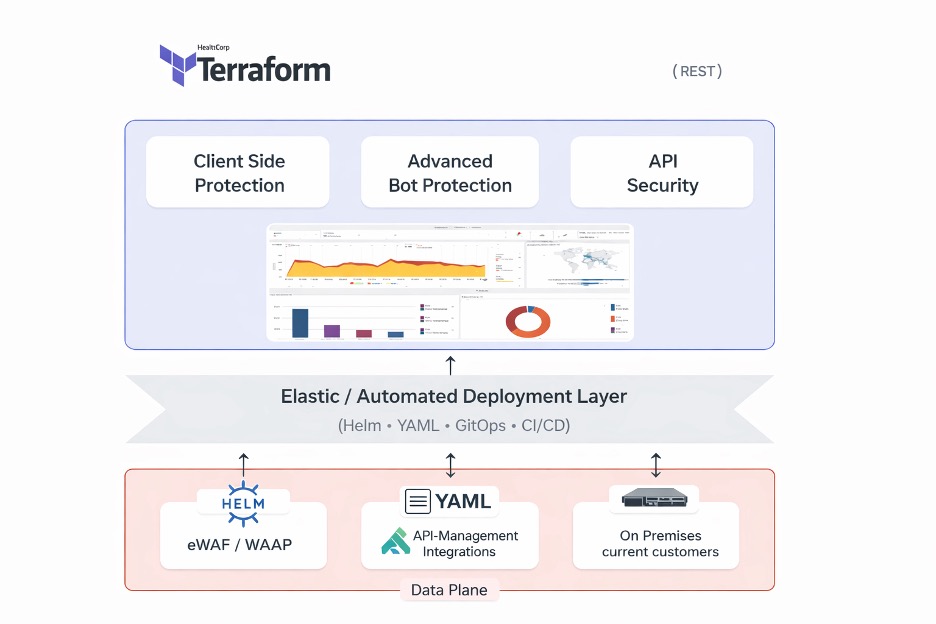
Diagram: Imperva Security Layer Architecture – This diagram illustrates the layered approach of Imperva’s security, showing how protocol validation, signature matching, and dynamic profiling work together to secure API traffic.
Application Profiling and the Correlation Engine
Understanding your application’s normal behavior is key to spotting potential threats. By profiling real-time usage and employing a sophisticated correlation engine, the solution:
Detects Business Logic Attacks: Identifies vulnerabilities such as Broken Object Level Authorization (BOLA) and Broken Function Level Authorization (BFLA).
Enhances Threat Verification: Integrates data analysis with vertical integration to validate and remediate suspicious activities effectively.
Seamless Integration with Leading API Management Tools
Imperva’s API-Anywhere solution provides a gateway-agnostic approach, integrating leading tools like Kong API Gateway via a dedicated plugin. This gateway-agnostic approach ensures:
Selective Traffic Handling: Only validated, non-malicious traffic is forwarded to the API controller, maintaining optimal performance.
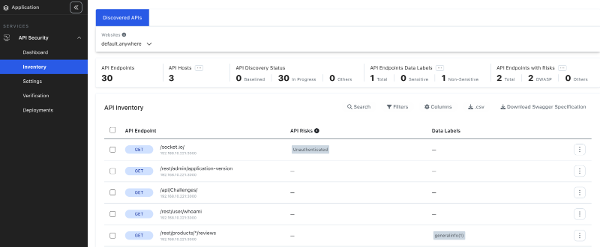
Automated API Discovery: The system continuously identifies, classifies, and monitors API endpoints, including deprecated and unauthenticated ones, reducing manual effort and accelerating the development cycle.
Flexibility in deployment is a key benefit of the Imperva API security solution. Whether your infrastructure is based on cloud-native technologies like Kubernetes or traditional hypervisors like VMware, integration is straightforward.
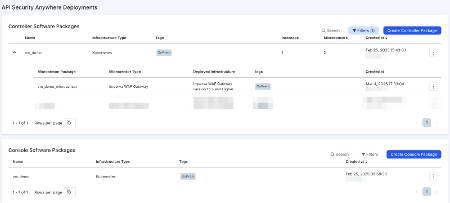
Generate the Installation Package:
Use the provided HELM chart to generate configuration files and prepare the console.
Impv-a-console-x.x.x.tgz (This Package includes the Helm Chart of the Console)
Values.yaml (This file contains the configuration)
Deploy the Console:
Install the console in your environment. This can be managed either via the Imperva Cloud Console or a local self-managed option.helm install impv-apisec-console -f values.yaml -n impv-anywhere –create-namespace
Enable the API-Security Policy on Your Gateways:
With the console active, enable the API security policy on your gateways. The gateway begins populating data to the Imperva Unified Management Console (UMC) either in the cloud or on premises, based on your configuration.
Ongoing API Discovery and Verification:
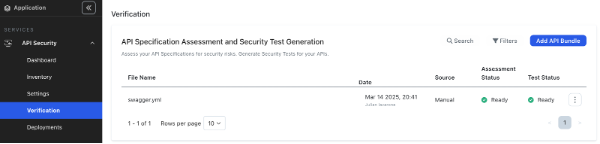
Continuous API discovery and Swagger file verification ensure that all endpoints are monitored, classified, and secured, significantly reducing the risk of overlooked vulnerabilities.
Benefits and Added Value
Integrating API security with the Imperva gateway delivers tangible benefits:
Streamlined Security Operations: Automated profiling and centralized management reduce the operational burden on your security teams.
Enhanced Developer Productivity: Automated API discovery and inventory management expedite the development cycle.
Robust Protection Across Environments: Whether your APIs are public-facing or internal, legacy or cloud-native, the solution offers comprehensive security without compromising performance.
Actionable Insights and Compliance: Gain granular visibility into traffic to support GDPR, PCI DSS, and HIPAA data governance and protect sensitive PII.
Conclusion
A robust API security strategy must be flexible, comprehensive, and easy to deploy. Imperva’s API-Anywhere solution integrated with your gateway environment meets these requirements by offering:
A Gateway Agnostic Security Solution: Seamlessly integrates with multiple API management tools.
Automated API Inventory and Protection: Continuously monitors and updates API endpoints, uncovering any shadow or deprecated APIs.
Dual-Level Threat Mitigation: Protects against both application-level and business logic attacks through dynamic profiling, protocol validation, and advanced correlation engines.
By integrating this solution, organizations can protect critical assets, streamline operations, and maintain high levels of security and compliance, all while enabling a faster, more agile development process.
We’re excited to announce the launch of Upload Scan and Control, an essential new feature for Imperva Cloud WAF. This add-on tackles one of the most critical vulnerabilities facing web applications today—insecure file uploads—offering protection with scalability, simplicity, and enterprise-grade control.
Why Secure File Upload Protection Is Critical for Modern Web Applications
File upload functionality is now a staple in web applications; from job portals accepting résumés to customer support platforms collecting documents.
Unfortunately, attackers exploit this functionality to inject malware, ransomware, and other malicious payloads into systems. This also can become the main source for remote code executions.
With Upload Scan and Control integrated into your Web Application Firewall (WAF), you’ll soon be able to enforce file size and type restrictions, blocking unauthorized or suspicious files before they enter your environment, ensuring your upload capabilities remain safe and compliant.
According to the OWASP Top Ten, insecure file uploads remain one of the most exploited web application vulnerabilities worldwide.
The Growing Risk of Malicious File Uploads
Across the Cloud WAF user base, we process over 20 million file uploads daily, with more than 800 customers across industries like finance, healthcare, retail, and government.
Cyber attackers are becoming more sophisticated and often target file uploads as an initial entry point. The earlier you can block malicious content, before it hits an endpoint or server, the greater your chances of preventing a breach entirely.
Endpoint antivirus and EDR tools play a critical role in detection, but they typically act after malicious files land on your system. At this stage, it may already be too late. Investigations take longer, the damage may already be done, and attackers may have gained a foothold.
Upload Scan and Control stops threats at the edge, before files are saved or executed, enabling true prevention over delayed remediation before they even reach your network layer.
Advantages of Imperva Upload Scan and Control for Cloud WAF
Our new feature delivers several enterprise-grade benefits:
Full visibility across all upload points: Identify which applications allow file uploads and monitor activity from a single dashboard.
Instant, one-click activation: Protect all current and future apps automatically, eliminating developer integration work.
Scalable security for large enterprises: No additional requirements for app owners or developers to introduce additional integrations significantly reducing operational overheads.
Peace of Mind for Security Leaders and Compliance Teams
With Upload Scan and Control, enterprises can:
Block threats at the edge before they reach your network.
Trace file origins and identify the responsible user or IP.
Maintain audit-ready compliance records (such as GDPR, CCPA, and HIPAA) without adding complexity to existing security stacks.
As cloud-native adoption accelerates and threat actors adapt, features like this are becoming essential to maintaining a secure, compliant perimeter.
Get Ready to Enable Upload Scan and Control
If you’re already using Imperva Cloud WAF today, check your Imperva console to see which apps you currently allow file uploads against and start protecting them today. Get in touch so you can activate Upload Scan and Control within your Cloud WAF environment or to schedule a demo, contact your Imperva account team.
In an era marked by escalating cyber threats and evolving risk landscapes, organisations face mounting pressure to strengthen their security posture whilst maintaining seamless user experiences. At Thales, we recognise that robust security must be foundational – embedded into products and services by design, not bolted on as an afterthought. This principle underpins our commitment to the U.S. Cybersecurity and Infrastructure Security Agency (CISA)’s Secure-by-Design pledge, which calls on software manufacturers to establish security features like multi-factor authentication (MFA) as standard across their product portfolios.
As digital transformation accelerates and attack surfaces expand, the gap between security capabilities and emerging threats continues to widen. According to the 2025 Thales Data Threat Report, organisations are grappling with unprecedented challenges: 69% regard the fast-moving ecosystem as the most concerning GenAI security risk, whilst 83% report that strong MFA is used more than 40% of the time. This indicates both progress and significant opportunity for improvement. These findings underscore a critical reality: whilst security tools and technologies have advanced, comprehensive deployment and consistent enforcement remain essential challenges that demand immediate attention.
This blog examines the pivotal role of multi-factor authentication in modern cybersecurity strategies. We explore the fundamentals of MFA, analyse the evolving threat landscape that necessitates its adoption, and provide practical guidance on implementation. Whether you are a security professional seeking to strengthen your organisation’s defences or an individual user looking to protect personal accounts, this resource offers the insights and actionable steps needed to embrace MFA with confidence and rigour.
Understanding Multi-Factor Authentication: The Basics
Multi-factor authentication verifies your identity using two different forms of identification. Typically this involves something you know (like a password) and something you have (like a code on your phone). Think of it like using an ATM: you need both your bank card and your PIN to withdraw cash.
This dual-layer approach creates a significant barrier for attackers. Even if someone steals your password, they still can’t log in without that second factor. It’s elegantly simple, yet remarkably powerful – your password alone is no longer enough to unlock the door.
The Growing Threat Landscape: Why MFA Is No Longer Optional
Cyberattacks have grown increasingly sophisticated, with stolen passwords at the heart of many breaches. According to the 2023 Verizon Data Breach Investigations Report, nearly 49% of data breaches involved the use of stolen credentials.
MFA directly addresses this vulnerability. Our own research at Thales demonstrates the critical importance of strong authentication measures. According to the 2025 Thales Data Threat Report, 83% of organisations report that strong MFA is used more than 40% of the time, yet significant challenges remain in achieving comprehensive deployment. This data underscores both the growing recognition of MFA’s importance and the continued need for organisations to strengthen their authentication posture.
Furthermore, our 2025 Digital Trust Index – Third-Party Edition reveals a concerning reality: 40% of users reset passwords once or twice a month, highlighting the inherent weakness of password-only authentication systems. These frequent password resets not only frustrate users but also create security vulnerabilities that MFA effectively mitigates.
How MFA Defeats Common Attack Methods
MFA thwarts the most prevalent attack techniques:
Brute-force and credential stuffing attacks: These automated attacks become practically futile with MFA enabled because guessing the password isn’t enough to break in.
Phishing attacks: Even if you unwittingly hand over your password to a phisher, they still can’t access your account without the one-time code or second factor that MFA requires.
It’s no surprise that CISA’s Secure-by-Design guidelines explicitly call for making MFA a built-in, default security feature. In today’s threat landscape, MFA has evolved from a nice-to-have extra to an essential safeguard.
Thales’ Commitment: Security by Design and by Default
At Thales, we build security into our products by design, baked into our products and services. Our commitment to CISA’s Secure-by-Design pledge is reflected in how we develop features like MFA.
We already implement robust MFA across our cloud services to help safeguard your accounts and data. By requiring two forms of identification to access the Thales Cloud Security Console, we add an extra layer of protection that makes it “much harder for unauthorised users to access sensitive information”. This significantly reduces the risk of breaches and builds trust.
The Principle of Shared Responsibility
Thales’ approach recognises shared responsibility. “Security by default” means we provide secure settings and features right out of the box. However, security is also a partnership – we provide the tools, whilst you play a crucial role by using them.
We’ve made MFA available and straightforward to configure, and we actively encourage customers to use advanced authentication methods. Whilst MFA might not be mandated on all accounts by default today, we strongly recommend that you activate it. By choosing to enable MFA now, you’re not only protecting yourself immediately but also aligning with best practices that Thales and the cybersecurity community advocate globally.
Getting Started: How to Set Up MFA
Enabling multi-factor authentication on your Thales account is quick and straightforward. Here’s how:
Log in and navigate to your user settings. Go to Account Settings or Profile, where you’ll find security settings for MFA management. You can find these options in the Thales Cloud Security Console setup checklist.
Locate the Multi-Factor Authentication option and click to begin setup.
Select your preferred MFA method: authenticator app, SMS, or email.
Configure the chosen method:
For an authenticator app, scan the displayed QR code with your app ( MobilPASS+, Google Authenticator, Microsoft Authenticator, Authy, etc.).
For SMS, enter your mobile number to receive a verification code.
For email, a code will be sent to your registered email address.
Save your backup codes. These are your safety net if you lose access to your MFA device. Store them in a secure location like a password manager.
Complete and test the setup. Once verified, MFA will be enabled. Log out and log in again to ensure everything works properly.
That’s it! You’ve added a powerful extra layer of security in just a few minutes.
Choosing Your MFA Method: A Comparison
For organisations seeking a comprehensive overview of authentication options, Thales offers an extensive portfolio of MFA tokens and authenticators. Our OneWelcome Authenticators Portfolio includes FIDO2 passkeys, hardware tokens, smart cards, and software authenticators, ensuring secure access across different environments and devices . This breadth of choice allows organisations to select the authentication method best suited to their security requirements and user needs
When setting up MFA, you have several authentication options:
Authenticator App (recommended): Generates a new 6-digit code every 30 seconds. This method is very secure, works offline, and is significantly more phishing-resistant. Pros: High security, no network dependency. Cons: Requires your phone.
Text Message (SMS): Sends a one-time code to your mobile phone. Pros: Easy to use, no app required. Cons: Slightly less secure than authenticator apps due to potential SIM-swapping attacks, but still greatly improves security over no MFA. CISA recommends SMS-based authentication only as a “last resort” when more secure options aren’t available
Email Codes: Sends verification codes to your registered email. Pros: No extra device needed. Cons: Least secure option if your email is compromised. Use only if other methods aren’t feasible, and ensure your email itself has MFA.
Hardware Security Keys: Physical devices, such as Thales FIDO Security Keys that you plug in or tap to verify login. Pros: Highest level of security, phishing-resistant. Cons: Requires purchasing a device.
Which should you choose? If possible, use an authenticator app or hardware key, as these are most secure. For most users, an authenticator app strikes an excellent balance. SMS is a solid fallback, and email can work if necessary – just be aware of the security trade-offs.
Whilst MFA significantly strengthens security, the most forward-thinking organisations are taking the next step: eliminating passwords altogether. Passwordless authentication removes the vulnerabilities inherent in password-based systems – no passwords to steal, phish, or reuse.
Thales’ SafeNet Trusted Access empowers organisations to build comprehensive passwordless policies using FIDO2 passkeys, biometrics, and hardware authenticators. Our Passwordless 360 approach provides a detailed framework for implementing passwordless authentication across your organisation, combining security, user experience, and regulatory compliance.
Troubleshooting and Frequently Asked Questions
Q: Do I have to enter an MFA code every single time I log in?
A: Often not every time. Many systems offer the option to “remember” a device for a certain period (e.g., 14 days). This means you won’t need to enter a code each time on that trusted device. However, use this feature only on personal devices you control, not shared or public computers.
Q: I’m not receiving the MFA code, or it says the code is wrong. What should I do?
A: Common solutions include: For SMS, check your signal and that your phone number is correct in account settings. Wait a moment and click “Resend code” if available. For authenticator apps, ensure your phone’s clock is accurate, as codes are time-based. For email, check your spam folder.
Q: What if I lose access to my phone or MFA device?
A: Use your saved backup codes to log in. If you’ve lost those as well, contact Thales support for account recovery assistance.
Q: Can we use our own IdP?
A: Yes, you can leverage external IdPs like SafeNet Trusted Access by Thales, which allows you to build adaptive authentication policies and leverage a broad range of MFA options.
Q: Can I switch MFA methods?
A: Yes. You can disable MFA and re-enable it with a new method anytime through your account settings.
Q: Is MFA required?
A: Whilst not mandatory on all accounts today, we strongly recommend enabling it. It’s one of the most effective ways to protect your account.
Understanding Digital Trust: Research from Thales
Thales’ research demonstrates the critical importance of strong identity and access management. Our 2025 Digital Trust Index – Third-Party Edition reveals that 96% of third-party users face issues logging into partner systems, wasting 48 minutes a month on average. Additionally, 40% reset passwords once or twice a month – highlighting the need for more secure, passwordless methods like MFA.
The 2025 Data Threat Report further emphasises this urgency. According to our research, 83% of organisations report that strong MFA is used more than 40% of the time, yet challenges remain. As organisations adopt AI and face evolving quantum threats, robust authentication becomes even more critical.
Thales’ comprehensive Identity and Access Management solutions provide organisations with the capabilities needed to improve user experiences whilst strengthening security. From Multi-Factor Authentication and Single Sign-On to passwordless authentication and passkeys, Thales delivers the tools to make IAM processes straightforward and dependable.
Final Thought
Cybersecurity is a shared responsibility. We design secure systems, and you make them stronger by turning on protections like MFA. Enable MFA today in your Thales account settings. It takes just a few minutes and makes a significant difference.
The surge in AI-driven traffic is transforming how websites manage their content. With AI bots and agents visiting sites at unprecedented rates (often scraping without permission, payment, or attribution) content owners face a critical challenge: how to protect their intellectual property while capitalizing on legitimate AI use cases.
Today, we’re excited to announce Imperva’s integration with TollBit, a groundbreaking solution that enables our Cloud Web Application Firewall (CWAF) customers to monetize traffic from AI bots and crawlers that would otherwise scrape their content without permission or compensation.
Meeting the AI Traffic Challenge
The traditional ad-supported and subscription-based content models are being disrupted by AI. This integration provides a new economic model where value flows fairly between content creators and AI developers, transforming unauthorized scraping into a sustainable revenue stream.
How Imperva and TollBit Work Together
The integration leverages Imperva’s industry-leading Web Application Firewall capabilities alongside TollBit’s analytics and monetization platform to create a comprehensive solution:
Detection & Enforcement: Imperva CWAF identifies AI bot traffic at the edge, providing the critical first layer of protection.
Intelligent Redirection: Using Imperva’s redirect rules, requests from AI bots are automatically redirected to a TollBit subdomain (e.g., tollbit.example.com), with CWAF returning an HTTP 302 response.
Payment Gateway: The TollBit subdomain returns an HTTP 402 response code (payment required), prompting AI bot operators to obtain valid TollBit tokens for authorized access.
Analytics & Insights: Through SIEM log integration, Imperva Access and Security logs flow to TollBit’s analytics engine, providing executives with clear, AI-specific analytics that show how bots are engaging with their content and the business impact of that traffic both within Tollbit and Imperva’s UMC.
Implementation Architecture
The integration requires a straightforward setup process:
Onboard your domain to Imperva Cloud WAF
Create a TollBit account and verify domain ownership via DNS TXT records
Configure a TollBit subdomain with appropriate DNS NS records
Create redirect rules in Imperva’s management console to route AI bot traffic
Set up AWS S3 bucket integration for log processing and analytics
To ensure compatibility with TollBit’s requirements, an AWS Lambda function prefixes dates to Imperva log file names, enabling seamless ingestion into TollBit’s analytics platform.
A Shared Vision for Fair Compensation
This partnership represents a fundamental shift in how content owners approach AI traffic. Rather than simply blocking all bots or allowing unrestricted scraping, sites now have granular control to enforce access rules and pricing on their own terms.
Content owners deserve fair compensation for how their content powers the AI ecosystem. By combining Imperva’s security capabilities with TollBit’s monetization tools, we’re enabling the transition from unauthorized scraping to sustainable, licensed transactions.
What This Means for Imperva Customers
With this integration, Imperva CWAF customers gain:
Robust protection against unauthorized AI scraping at the application layer
Complete visibility into AI traffic patterns and behaviors through dedicated analytics
Flexible control to decide which AI agents can access content and under what conditions
New revenue streams that turn scraping attempts into legitimate, paid transactions
The agent economy is here, and autonomous AI visitors are becoming a permanent fixture of web traffic. With Imperva and TollBit, you can ensure these interactions happen on your terms—fairly, transparently, and profitably.
Get Started
If you’re an Imperva Cloud WAF customer and want to activate the integration:
The more critical APIs become, the more sensitive data they carry identities, payment details, health records, customer preferences, tokens, keys, and more.
And this is where organizations face a painful, often invisible problem:
To protect APIs, many organizations end up exposing the very data they are trying to secure.
Most API security tools still rely on raw-payload logging, traffic replay, or shipping full request bodies into external analytics systems. That means sensitive customer data:
Leaves controlled environments
Gets stored in multiple systems
Crosses borders without intention
Lands in tools not designed to hold PII
Multiplies breach risk and regulatory pressure
This creates a direct conflict between security, privacy, and compliance, and businesses are caught in the middle.
The Real-World Impact: When Privacy Becomes a Security Liability
Across industries – financial services, retail, healthcare, travel, public sector, the story repeats:
1. Breach blast radius expands
The more systems that hold raw API payloads, the bigger the impact when any one of them is compromised.
2. Compliance becomes harder, not easier
GDPR, CCPA, HIPAA, PCI, and emerging data-sovereignty regulations penalize:
unnecessary data retention
cross-border data transfers
third-party exposure
lack of data-minimization controls
Most API security tools inadvertently violate all four.
3. Data residency rules block API security deployments
Organizations operating in multiple regions can’t centralize raw API data in a single cloud service, but many tools require doing exactly that.
4. Dev and QA environments become privacy risks
When security tests are based on production payload replays, sensitive data leaks into non-production systems.
5. Security teams lose visibility if they avoid raw logging
Many leaders try to “lock down” data flows, but that often leaves API blind spots, making it harder to detect business logic abuse, scraping, or session-based attacks.
This is the API privacy paradox:
You either weaken privacy to strengthen security or weaken security to preserve privacy.
The Industry Approach Is Broken
The traditional API security model makes three flawed assumptions:
You must log or store raw payloads to get visibility.
You must centralize traffic for analytics.
You must replay production data to test API security.
These assumptions create privacy exposure, compliance failure, and operational friction.
Imperva Solves This by Rethinking the Architecture
API security should not require exposing sensitive data, ever.
The architecture flips the traditional model:
1. Inspect at the PoP (where traffic lives)
Traffic is parsed in-memory at the Point-of-Presence closest to the application, SaaS PoP or on-prem.
Raw values never leave the PoP.
2. Convert sensitive values into privacy-safe artifacts
Classification + hashing replaces raw payloads with:
label
schema fragments
one-way irreversible hashes
This is the only data that ever moves upstream.
3. Detect and respond using metadata only
Anomaly detection uses metadata such as:
data labels
schema context
session identifiers
hashed tokens
No raw content is needed or exposed.
4. Enforce using hashes, not identities
Hash-based enforcement enables:
per-session blocking
token-level mitigation
behavior-based decisions
without seeing or sharing the sensitive value behind the hash.
5. Same privacy guarantees across all deployments
Cloud, on-prem, hybrid – the mechanics never change.
What This Means for the Business
This is where Imperva’s architecture translates directly into measurable, enterprise-wide value:
Smaller blast radius = lower breach liability
Fewer systems hold PII, drastically reducing what attackers can steal and what you must disclose.
Faster compliance alignment
Local data processing and zero raw persistence align with GDPR, HIPAA minimum-necessary, and sovereignty rules.
Real-time protection with zero added exposure
Inline, in-PoP inspection gives detection teams full visibility without raw payload retention.
Safer automation in Dev/QA
Privacy-aware test artifacts eliminate the risk of production PII leaking into pipelines.
Reduced third-party risk
Vendors never receive raw payloads, only metadata and hashes.
A future-proof privacy posture
As regulatory pressure increases, architectures like this become mandatory, not optional.
Why This Whitepaper Matters
This whitepaper breaks down exactly how Imperva delivers production-grade API protection while preserving privacy, with clear explanations and practical examples.
You’ll learn:
How to get deep visibility without storing raw payloads
Why in-PoP processing reduces exposure and simplifies compliance
How hash-based enforcement protects identities while enabling precise blocking
How to design a privacy-first architecture that works across hybrid/multi-cloud
In other words:
If you need to secure APIs and meet privacy, residency, or compliance requirements – this is essential reading.
Ready to See How Privacy-First API Security Really Works?
Download the whitepaper and learn how Imperva protects APIs without exposing sensitive data.

 Login
Login






 Smaller blast radius = lower breach liability