
 Login

Reading view
Autumn Dragon: China-nexus APT Group Targets South East Asia
In this report, we describe how we tracked for several months a sustained espionage campaign against the government, media, and news sectors in several countries including Laos, Cambodia, Singapore, the Philippines and Indonesia.

Since early 2025, China’s involvement in the Indo-Pacific has been more prolific, from escalating maritime tensions, to being peacebroker in Myanmar’s military junta and more recently, espionage activities on joint exercises the Philippines naval forces have been conducting together with the US, Australia, Canada and New Zealand.
The attacker, which we believe is a China-nexus threat actor, showcases a love of DLL sideloading techniques in order to compromise their targets of interest. Governments and media are high-value targets because they shape policy, public opinion, and international alignment.
The report details the full attack chain of one particular compromise we discovered, and goes further into detail on victimology, other campaigns and finally lists indicators of compromise.
Link to the report: https://cyberarmor.tech/blog/autumn-dragon-china-nexus-apt-group-targets-south-east-asia
Earth Estries alive and kicking
Earth Estries, also known as Salt Typhoon and a few other names, is a China-nexus APT actor, and is known to have used multiple implants such as Snappybee (Deed RAT), ShadowPad, and several more.
In their latest campaign, the actor leverages one of the latest WinRAR vulnerabilities that will ultimately lead to running shellcode.
The execution flow is as follows:

That is all. Find below indicators of compromise and Yara rules.
| Indicator | Type | Purpose |
| f8c119bfc057dc027e6c54b966d168ee1ef38c790e581fb44cf965ca0408db1d | SHA256 Hash | CAB file storing ccwkrlib.dll |
| 94aa6619c61d434e96ca8d128731eb7ee81e399a59a17f751a31b564a7f3a722 | SHA256 Hash | Encrypted stub |
| 3c84a5255e0c08e96278dea9021e52c276b4a6c73af9fa81520aefb4a8040a8b | SHA256 Hash | CAB file storing RES.RC |
| 3822207529127eb7bdf2abc41073f6bbe4cd6e9b95d78b6d7dd04f42d643d2c3 | SHA256 Hash | Dropper |
| 64ca55137ba9fc5d005304bea5adf804b045ec10c940f6c633ffde43bc36ff3f | SHA256 Hash | Fake PDF with ADS stream |
| 6c6af015e0bfec69f7867f8c957958aa25a13443df1de26fa88d56a240bdd5ad | SHA256 Hash | Hijacked DLL, bloated |
| 5e062fee5b8ff41b7dd0824f0b93467359ad849ecf47312e62c9501b4096ccda | SHA256 Hash | Hijacked DLL |
| 3b47df790abb4eb3ac570b50bf96bb1943d4b46851430ebf3fc36f645061491b | SHA256 Hash | Downloads CommonSDK.exe |
| ccwkrlib.dll | Filename | Hijacked DLL |
| RES.RC | Filename | Encrypted stub |
| CommonSDK.exe | Filename | Fake PDF with ADS stream |
| doc20250921133625.pdf | Filename | Fake PDF with ADS stream |
| startup.bat | Filename | Downloads CommonSDK.exe |
| WindowsTarys | Filename | Scheduled task |
| 38[.]54[.]105[.]114 | IP Address | Download server |
| mimosa[.]gleeze[.]com | Domain | C2 Server |
Associated Yara rules are available on my Github:
https://github.com/bartblaze/Yara-rules
Rule names:
- EE_Loader
- EE_Dropper
- WinRAR_ADS_Traversal
References / Resources:
WinRAR CVE:
https://nvd.nist.gov/vuln/detail/CVE-2025-8088
Earth Estries:
https://jsac.jpcert.or.jp/archive/2025/pdf/JSAC2025_1_5_leon-chang_theo-chen_en.pdfhttps://www.trendmicro.com/en_us/research/25/j/premier-pass-as-a-service.html
https://malpedia.caad.fkie.fraunhofer.de/actor/earth_estries
https://malpedia.caad.fkie.fraunhofer.de/actor/ghostemperor

Steam Phishing: popular as ever
A month or so ago a friend of mine received the following message on Steam from someone in their Friends list (they were already friends):
 | ||||||||||
| Figure 1 - 'this is for you' |
The two links are different and refer to a Gift Card on Steam's community platform. As you might have noticed, the domain is not related to Steam at all, but rather is an attempt at phishing.
The URLs are:
stermcormmunity[.]com/gift-card/
steamcoummuniity[.]com/gift-card/
The differences are subtle enough that you may just miss it. When you click on the link, you are redirected to a 'Summer Gift Marathon'.
 |
| Figure 2 - Fake Steam website |
Once you log in to the fake Steam website, your credentials are stolen and will be used to spread more phishing, likely steal your inventory items and so on.
Other phishing sites related to this campaign are:
steam-pubgvn[.]top
steamauthconnection[.]store
steamcommnunity[.]com
steamcommunitay[.]com
steamcommunitfy[.]com
steamcommunitihy[.]icu
steamcommunitiny[.]com
steamcommunitweya[.]art
steamcommunl1ty[.]com
steamcommunllity[.]com
steamcommunty[.]ru
steamcommununity[.]cam
steamcommunutiy[.]com
steamcomnunityty[.]com
steamcomnunlity[.]com
steamcomnuty[.]com
steamcomrnnunlty[.]com
steamcomun1ty[.]com
steamcomuniry[.]com
steamconmunify[.]com
steamconnection[.]store
steamcornmunlty[.]ru
steamcornrnunlty[.]ru
steamlinks-short[.]com
stearncommunjty[.]com
stearncommunnity[.]com
stearncomnunity[.]com
stearncornnunity[.]com
steeamcommunitty[.]com
unevwsteeamcommunitty[.]com
New ones do pop up from time to time, so stay vigilant.
Tips
Only log in on the legitimate Steam community website, this being https://steamcommunity.com/. An extra tip is to bookmark the legitimate site, so even if you do get a message like this, you can go straight to your bookmark and search what you need from there.
If someone new tries to add you as a Friend and immediately sends a message like the above, alarm bells should start ringing.
If someone already on your Friends list suddenly sends a random message with an even more random link out of the blue, cue the alarm bells again.
If you want to check the website out in a safe manner, then you can use URLscan.io, which will give you a verdict of the website as well as an image preview. In addition, you can use VirusTotal to review a website's reputation.
Note that an 'all clean' does not necessarily mean it is. Caution above all!
Follow Steam's Account Security Recommendations to stay safe.

Microsoft Word and Sandboxes
Today's post is a brief one on some Microsoft Word and sandbox detection / discovery / fun.
Collect user name from Microsoft Office
Most sandboxes will trigger somehow or something if a tool or malware tries to collect system information or user information. But what if we collect the user name via the registry and more specifically, what user info Microsoft Office sees?
This information is stored in the Current User hive, Software\Microsoft\
10-second code and we can whip up:

Text form:
$userName = (Get-ItemProperty -Path "HKCU:\Software\Microsoft\
Start-Process -FilePath "notepad.exe" -ArgumentList $userNameOffice\Common\UserInfo"). UserName
And we get something like:

and the process tree:

Some sandboxes had a username of "Admin", "admin" or a completely random name.
In short, it's a potential technique for more stealth reconaissance that may not trigger a sandbox or detection mechanism.
Run a Microsoft Word doc with.. .asd extension
When Microsoft Word crashes, it will (usually) attempt to create a backup copy of all your opened documents. It typically saves these backups as .wbk (Word Backup) or .asd (Autosave or Autorecover) files.
These will be saved in one of these directories in normal circumstances:
- C:\Users\USERNAME\AppData\Local\Microsoft\Word
- C:\Users\USERNAME\AppData\Roaming\Microsoft\Word
- C:\Users\USERNAME\AppData\Local\Temp
- C:\Users\USERNAME\\AppData\Local\Microsoft\Office\UnsavedFiles
Most sandboxes however will be able to open the file just fine, but not all...:

I haven't seen much use of actual .asd files, likely as the documents will need to be loaded from one of the above directories, however... after crafting your malicious document, you can simply rename it from badfile.docx to badfile.asd, and it will run fine.
It seems at least 1 actor has used an .asd extension before, as reported on by Didier Stevens:
https://isc.sans.edu/diary/CrowdStrike+Outage+Themed+Maldoc/31116
In short, it's another way of evading sandboxes or other potential detection mechanisms that may not support these .asd or .wbk extensions or even consider them harmless.

New North Korean based backdoor packs a punch

In recent months, North Korean based threat actors have been ramping up attack campaigns in order to achieve a myriad of their objectives, whether it be financial gain or with espionage purposes in mind. The North Korean cluster of attack groups is peculiar seeing there is quite some overlap with one another, and it is not always straightforward to attribute a specific campaign to a specific threat actor.
In this research paper we analyse a new threat campaign, discovered in late May, and which features multiple layers and ultimately delivers a seemingly new and previously undocumented backdoor.
The threat campaign is specifically focused on Aerospace and Defense companies: sectors appealing to multiple threat actors, but of particular interest to North Korean threat groups in other recent campaigns. We have named this threat campaign “Niki” as it refers to the potential malware developer(s).
Read the report here: https://cyberarmor.tech/new-north-korean-based-backdoor-packs-a-punch/
Direct link to report, PDF: https://cyberarmor.tech/wp-content/uploads/2024/06/New-North-Korean-based-backdoor-packs-a-punch.pdf
Analyse, hunt and classify malware using .NET metadata
Introduction
Earlier last week, I ran into a sample that turned out to be PureCrypter, a loader and obfuscator for all different kinds of malware such as Agent Tesla and RedLine.
Upon further investigation, I developed Yara rules for the various stages, which can be found here (excluding the final payload):
- PureZip
- 2nd stage downloader (PureLogStealer related)
With that out of the way, all of this reminded me of the fact that we can also write Yara rules for unique identifiers specific to malware written in .NET, or any other .NET assemblies for that matter.
A bit of history
This isn’t my first encounter with analysing .NET malware at scale: several years ago, I co-authored a presentation with Santiago on hunting SteamStealer malware, which was surging exponentially at the time (the malware intended to steal your Steam inventory items and/or your account). A huge thanks goes to Brian Wallace who had developed a tool at the time called GetNetGUIDs which made it trivial to extract all the GUID types and start clustering to identify patterns: basically, which of the malware samples are likely authored by the same person or belong to the same attack campaign.
.NET assemblies or binaries often contain all sorts of metadata, such as the internal assembly name and GUIDs, specifically; the MVID and TYPELIB.
GUID: Also known as the TYPELIB ID, generated when creating a new project.
MVID: Module Version ID, a unique identifier for a .NET module, generated at build time.
TYPELIB: the TYBELIB version – or number of the type library (think major & minor version).
These specific identifiers can be parsed with the strings command and a simple regular expression (regex): [a-fA-F0-9]{8}-[a-fA-F0-9]{4}-[a-fA-F0-9]{4}-[a-fA-F0-9]{4}-[a-fA-F0-9]{12}
Taking a sample of PureLogStealer posted by James_in_the_box, you could then write a Yara rule based on the MVID or Typelib detected.
As shown on VirusTotal for this sample:
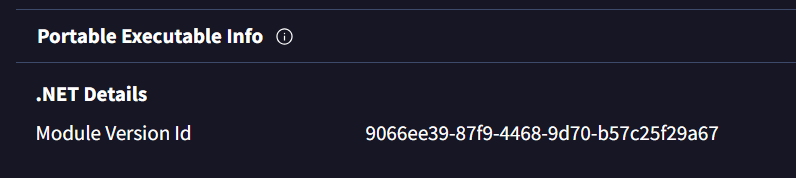 |
| Figure 1 - Sample with MVID 9066ee39-87f9-4468-9d70-b57c25f29a67 |
And the resulting (simple) Yara rule, could then be as follows:
rule PureLogStealer_GUID
{
strings:
$mvid = "9066ee39-87f9-4468-9d70-b57c25f29a67" ascii wide fullword
condition:
$mvid
}
There are however some issues with this:
The MVID is stored as a binary value rather than a string, whereas the Typelib GUID is effectively stored as a string and since we only have the MVID here, the sample above will not be detected with this rule.
It is important to note that VirusTotal does not seem to report the Typelib.
It is cumbersome to “do it the manual way” with strings and regex, especially on larger data sets – and it’s prone to issues such as:
false positives: if you run "strings" on the sample and then use the following CyberChef recipe – we get plenty of GUIDs, but only 1 is the actual Typelib;
false negatives: we miss out on unique identifiers, which means we might miss detection of samples, campaigns or actors.
Note that with tools such as IlSpy or dnSpy(Ex), you can also view the Typelib GUID and MVID, however, not all tools display all data, for example:
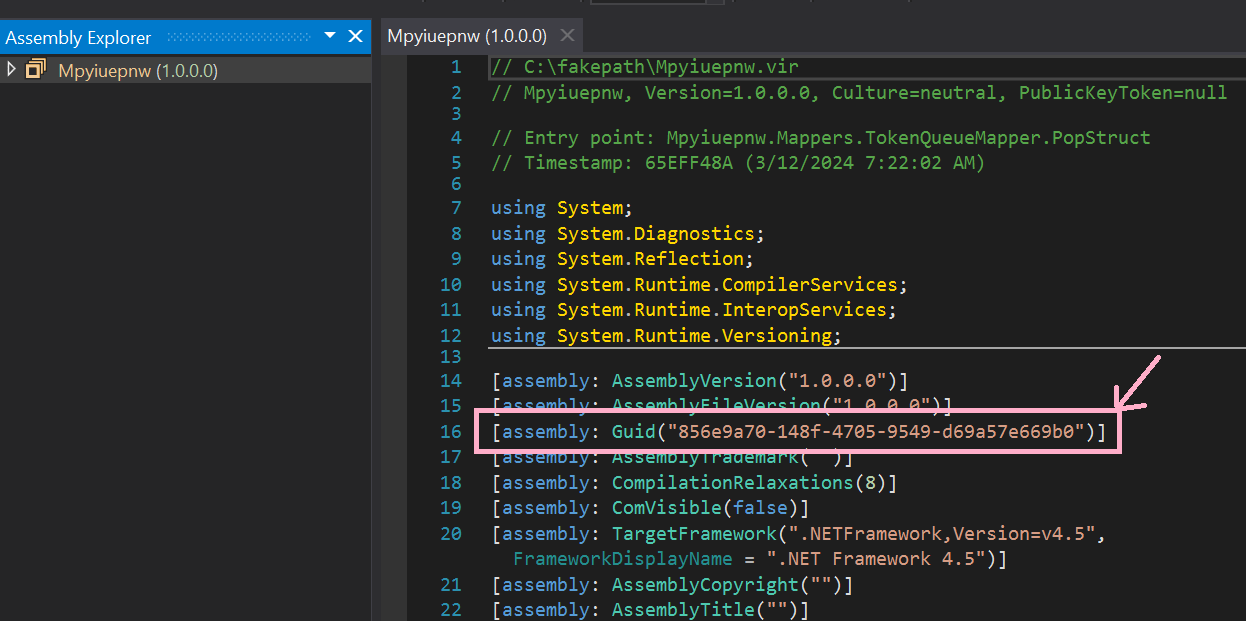 |
| Figure 2 - dnSpy detects the Typelib GUID of the sample |
And if we go the "oldschool" route using ildasm:
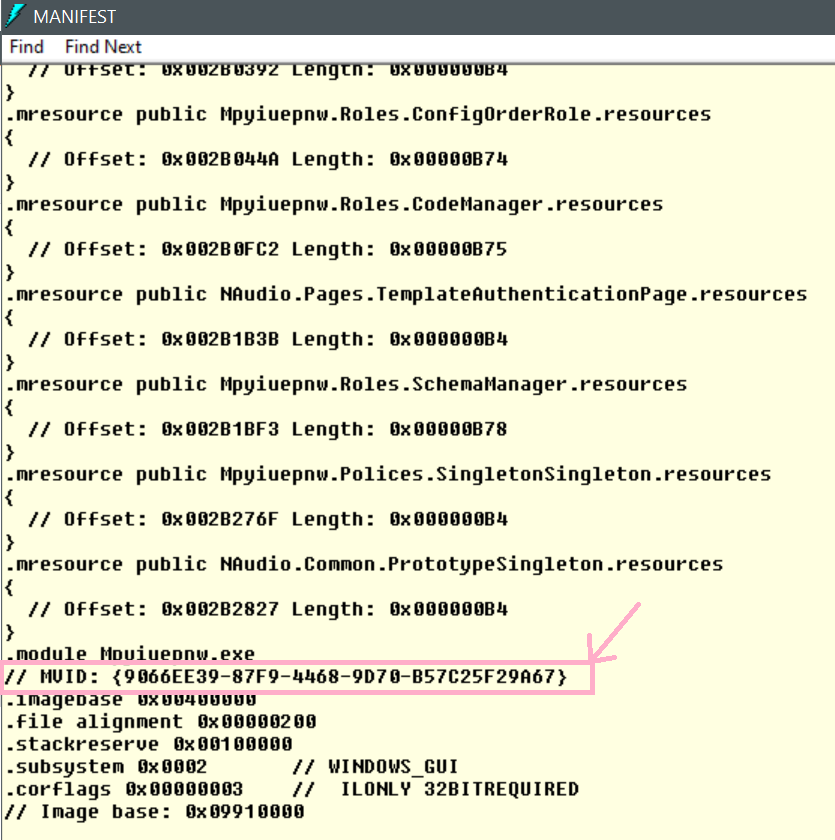 |
| Figure 3 - ildasm displays the MVID or Module Version ID |
For all the above reasons, let’s go beyond and do more: both with Yara, and with a new Python tool I’ve created.
The now and the tooling
Before we dive into the tooling, some final history to say that Yara has evolved and thanks to that, we can now hunt and detect more effectively due to the following modules added:
This means that using the .NET module, we can now write a Yara rule like so instead:
import "dotnet"
rule PureLogStealer_GUID
{
condition:
dotnet.guids[0]== "9066ee39-87f9-4468-9d70-b57c25f29a67"
}
And indeed:
 |
| Figure 4 - Yara now detects the sample |
Yara rule
Let’s now leverage the power of Yara and its dotnet and console modules to write a new Yara rule that displays useful data of any given .NET sample that can be leveraged to create meaningful rules, for example: assembly name, typelib and MVID.
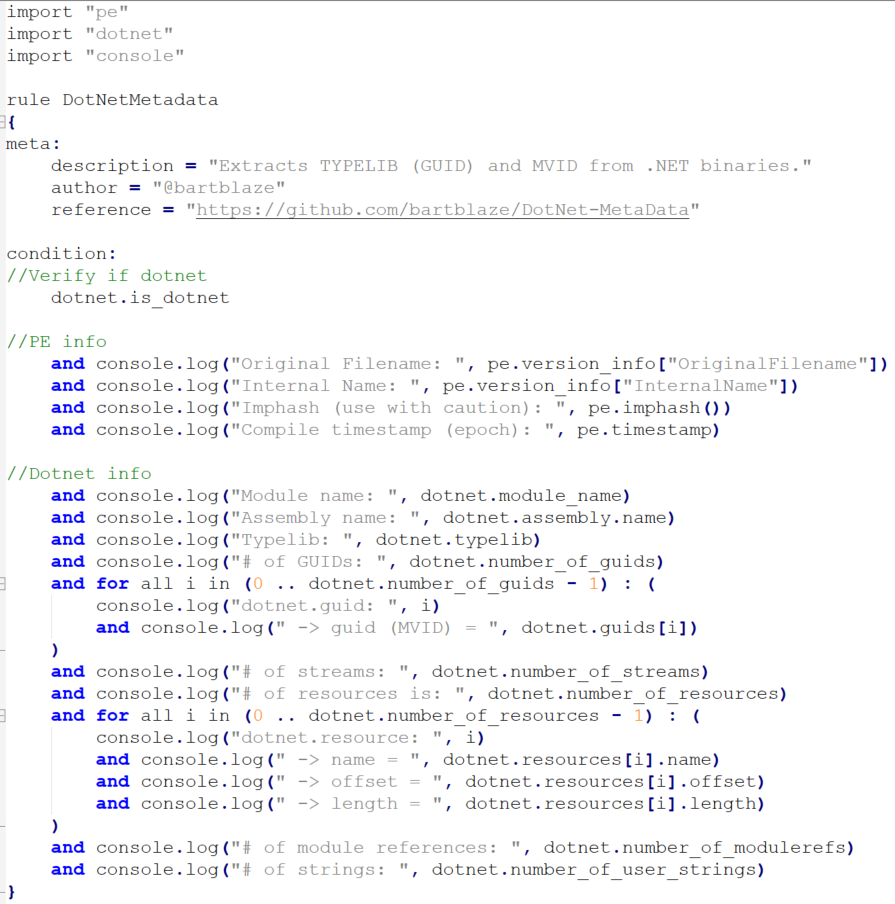 |
| Figure 5 - Yara rule to display .NET information to the console |
We first verify if the binary is a .NET compiled file, if so, log certain Portable Executable (PE) or binary information to the console as well, and then display all relevant .NET information.
And the output will be, again for the same sample:
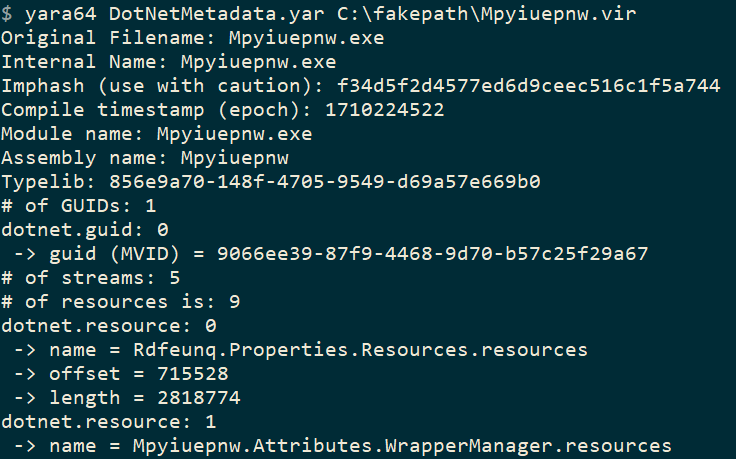 |
| Figure 6 - Yara rule output: sample metadata! |
Meaning we can now write a rule as follows:
import "dotnet"
rule PureLogStealer_GUID
{
condition:
dotnet.guids[0]=="9066ee39-87f9-4468-9d70-b57c25f29a67" or
dotnet.typelib=="856e9a70-148f-4705-9549-d69a57e669b0"
}
Python tool
But what if we want to run this on a large set of samples and produce statistics, which we can then use to hunt or classify malware families, or cluster campaigns?
A newly developed Python tool will help you do exactly just that. It supports both a single file as well as a whole folder of your samples or malware repository. It will skip over any non-.NET binary and simply report the typelib, MVID and typelib ID (if present, which is seldom the case and rarely useful).
If we run it on our single sample like before:
 |
| Figure 7 - New tool output on single sample |
The tool (or script) has the following capabilities:
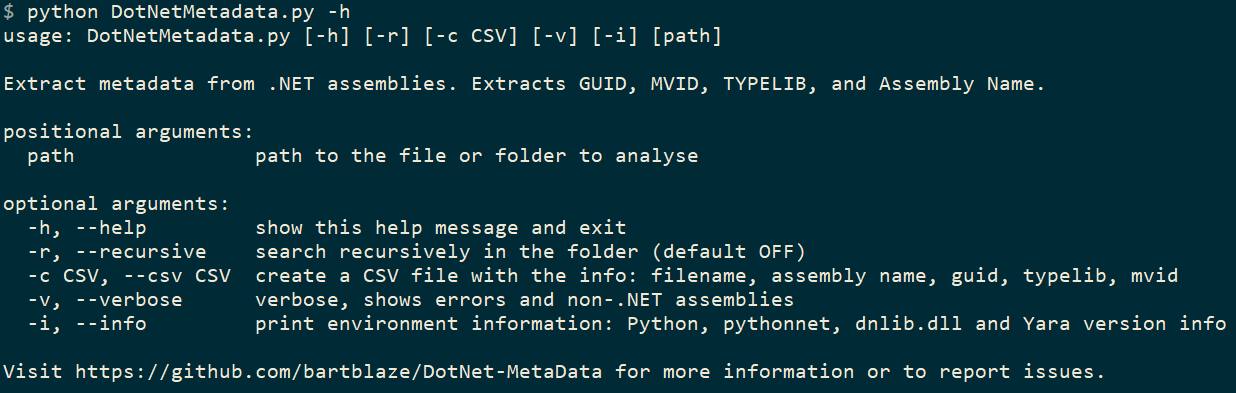 | |
|
You need Python 3, pythonnet and a compiled dnlib.dll in order for it to work.
You are of course not limited to just using the MVID or Typelib for .NET malware hunting: you can also use the assembly name and other features that could be unique, using either the Yara rule or the Python tool to extract the data you’d like.
Both the Yara rule and the Python tool are published on the following GitHub page: https://github.com/bartblaze/DotNet-MetaData
I highly recommend to use the tool rather than the Yara rule, as it detects .NET metadata more reliably. Both Yara rule and Python tool can be adapted to display less or more information according to your needs.
Clustering
Tracking attacker’s campaigns is always an exercise, and can be both fun and exhausting, depending on how many rabbit holes you (want to) go through. An example of clustering campaigns as well as malware developers was done in the work I did with Santiago as mentioned earlier, which resulted in the following graphics:
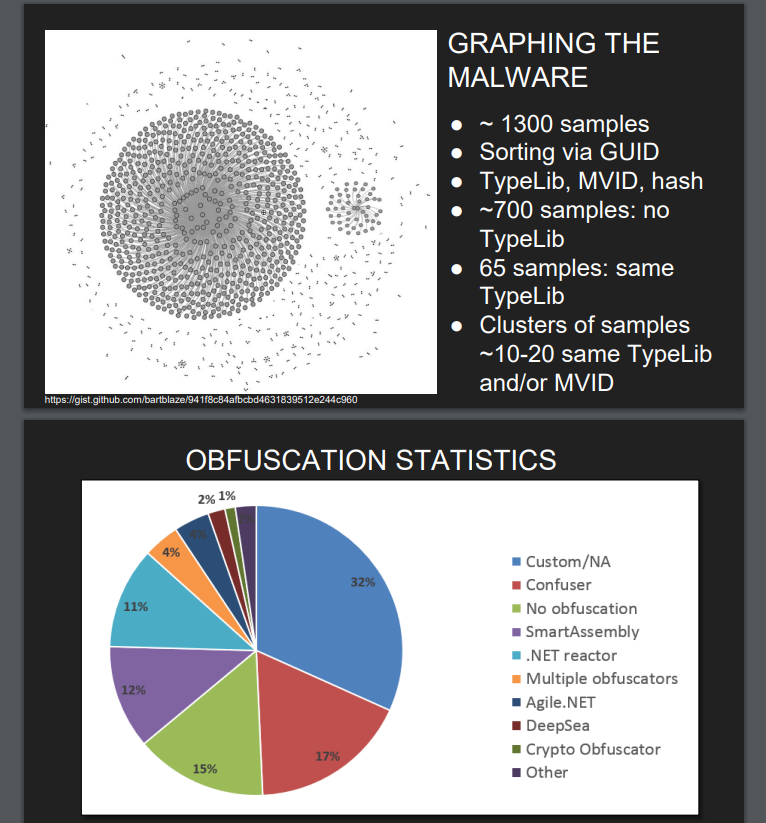 |
| Figure 9 - Statistics from 2016 research (bonus obfuscation stats) |
This was a pretty large dataset (1.300 samples!) and specific to SteamStealers at the time.
For our analysis purposes, I took 4 of the most current popular malware (that are .NET based or have at least a .NET variant) according to Any.run’s Malware Trends: https://any.run/malware-trends/. These are:
RedLine
Agent Tesla
Quasar
Pure*: basically anything related to PureCrypter, PureLogs, …
Downloading the latest available samples per family from MalwareBazaar, then running my DotNetMetadata Python script, and playing around with pandas and matplot, we can create the following graphs per family:
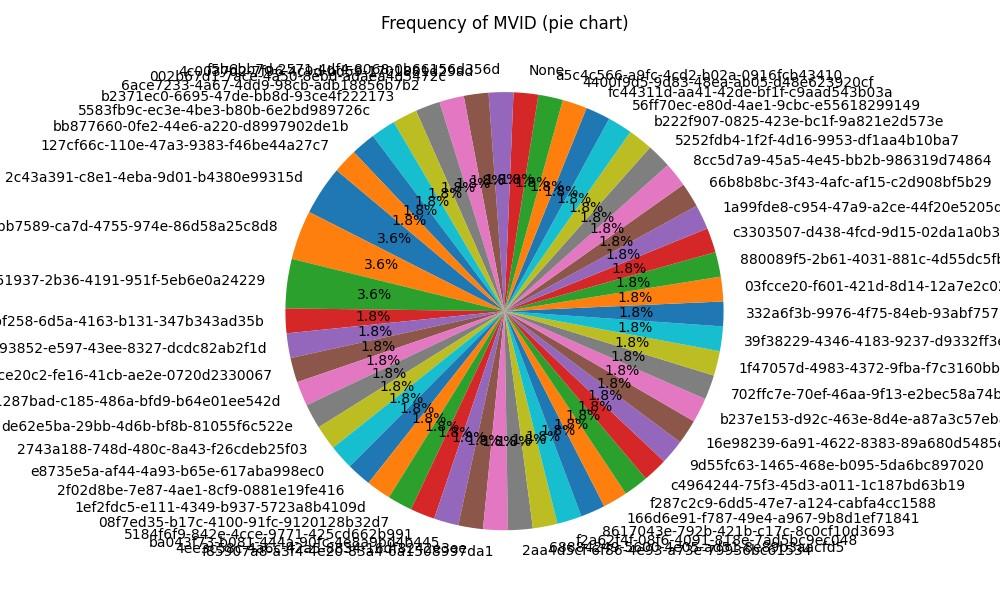
RedLine – 56 samples
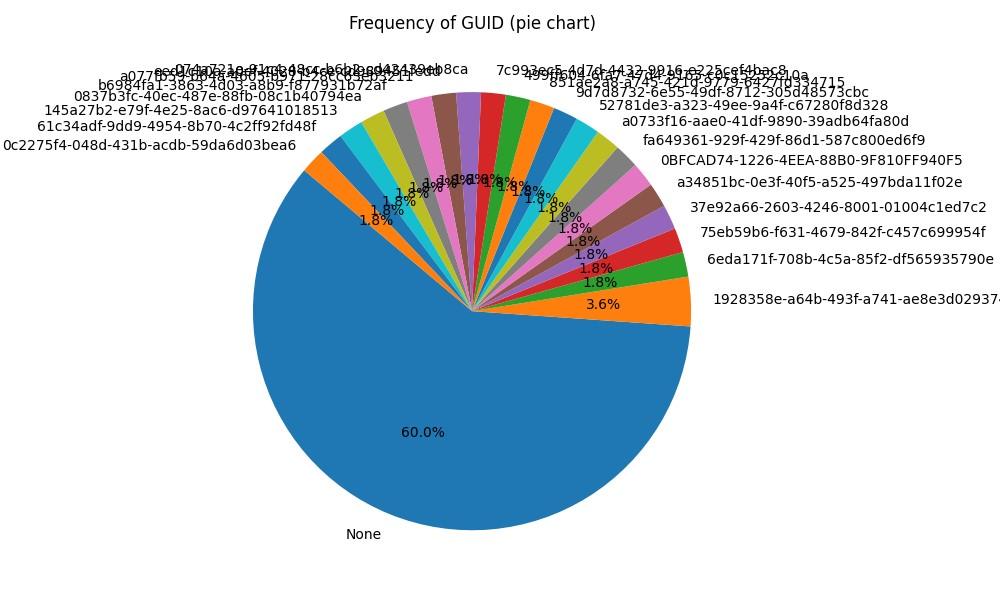 |
| Figure 10 - RedLine Typelib GUID frequency |
 | |
|
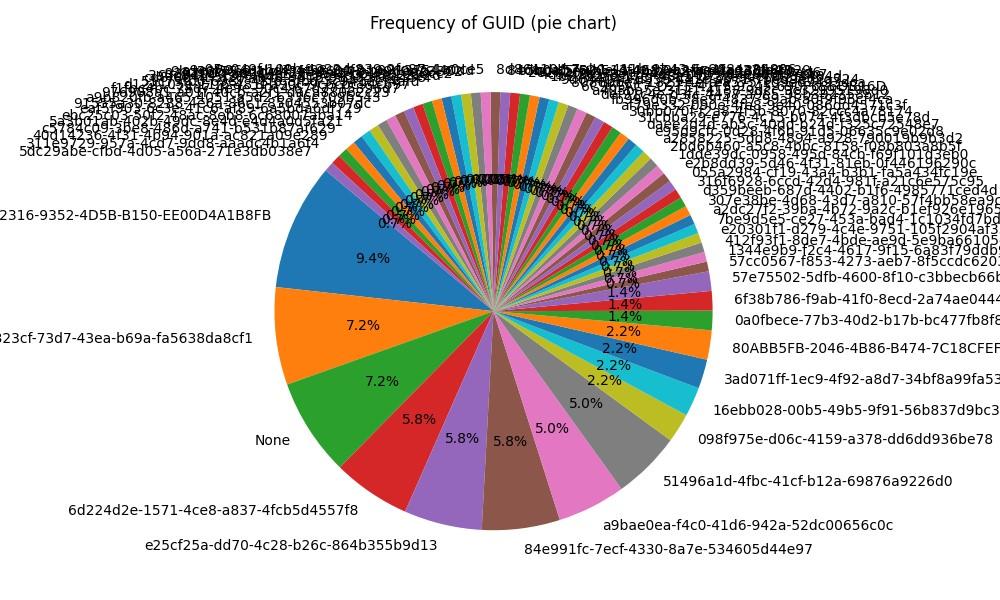
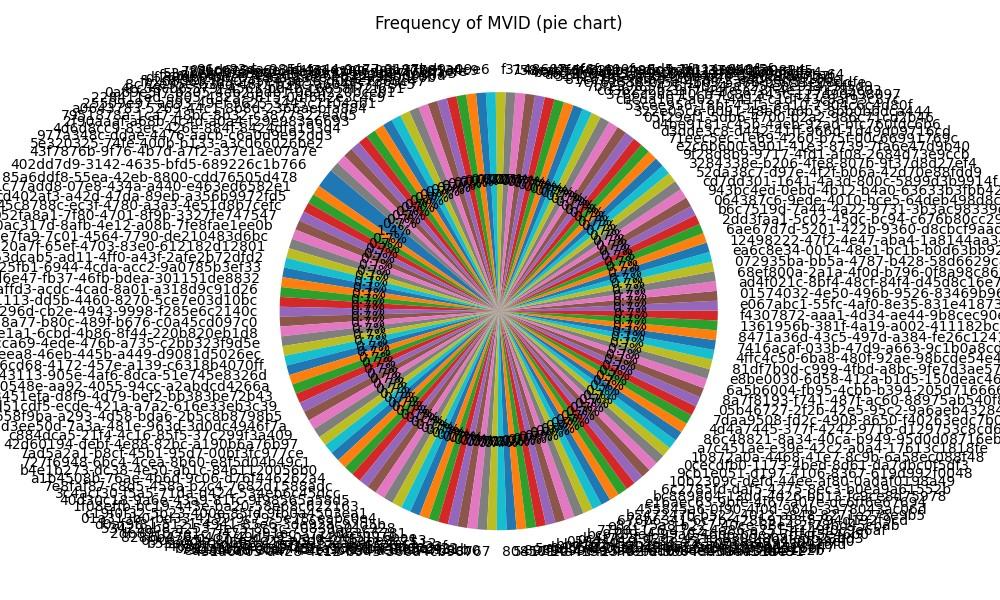
Agent Tesla – 140 samples
 | |
|
 | |
|
Quasar – 141 samples
| |
|
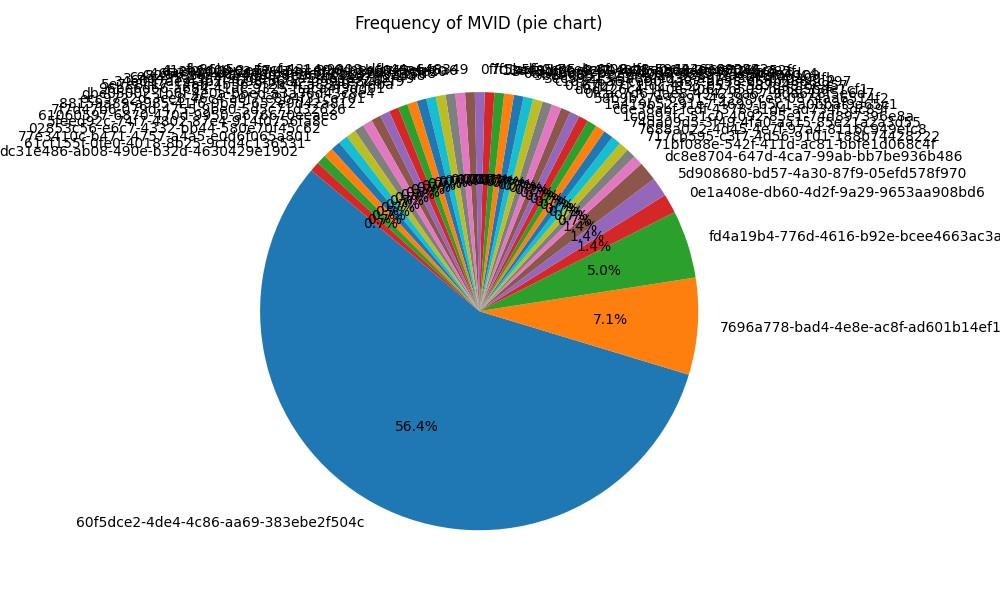 |
| Figure 15 -Quasar MVID frequency |
Pure* family - 194 samples
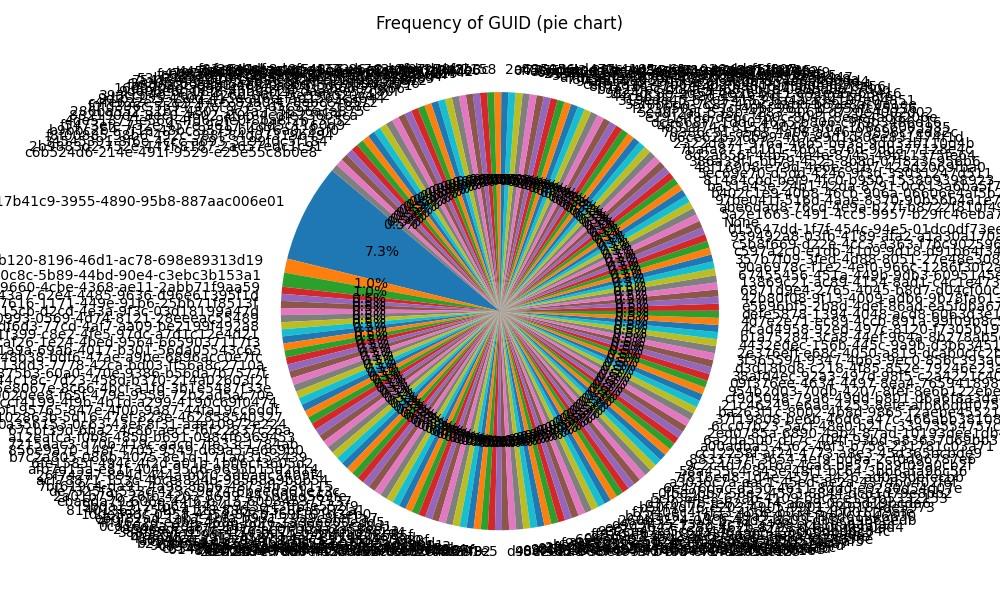 |
| Figure 16 - Pure* Typelib GUID frequency |
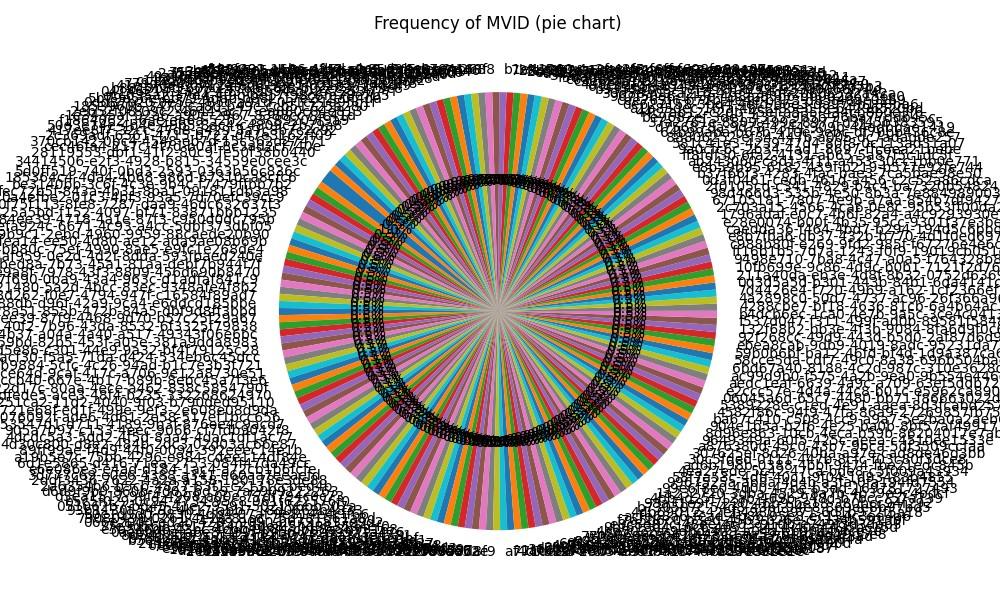 |
| Figure 17 -Pure* MVID frequency |
While these piecharts are certainly hypnotic and display the frequency - or occurrence of the same typelib or MVID, we can also leverage these and create meaningful Yara rules for clustering samples per family, especially in the case of Quasar, the MVID with GUID "60f5dce2-4de4-4c86-aa69-383ebe2f504c" appears like a good candidate.
You might think that while these charts look visually appealing (depending on your art preferences), they may not be particularly useful because they don't scale well with larger datasets. You’re exactly right! By limiting the amount of results displayed, we can indeed produce even better results. In our sample dataset for the 4 malware families above, so a total of 531 samples, let’s run our visualisations again and now we will:
Run it on the whole sample set
Extract the assembly name
List only the top 10 of assembly names
Use a bar chart instead of a pie
And the result:
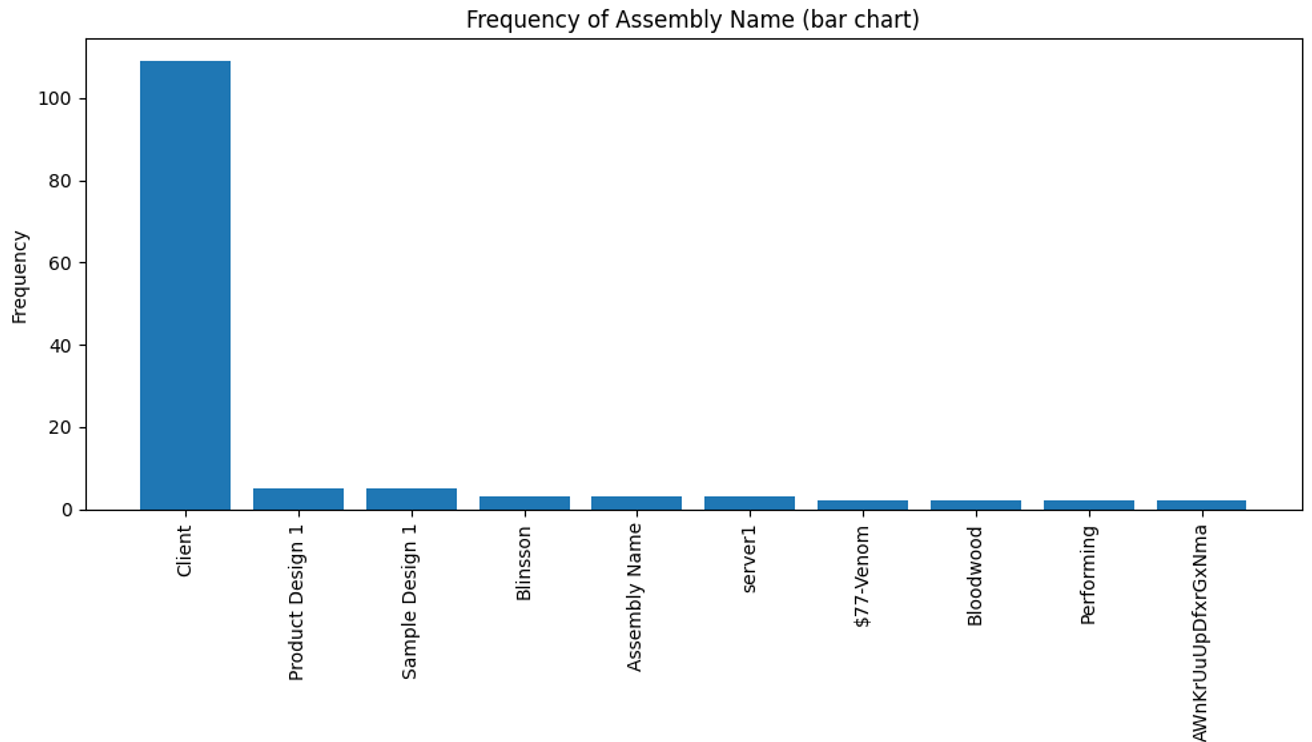 |
| Figure 18 - Assembly name frequency - looking better right? |
The top 3 is then:
“Client”: Quasar family
“Product Design 1”: Pure family
“Sample Design 1”: Pure family
Client is likely the default assembly name when compiling the Quasar malware (project), and Product Design and Sample Design are likely default assembly names from the PureCrypter builder.
If we then want to write a Yara rule for Quasar based on the default assembly name:
import "dotnet"
rule Quasar_AssemblyName
{
condition:
dotnet.assembly.name == "Client"
}
But why stop there? We can build a Yara rule to classify our malware dataset or repository:
import "dotnet"
import "console"
rule DotNet_Malware_Classifier
{
condition:
(dotnet.assembly.name == "Client" and console.log(“Likely Quasar, assembly name: ", dotnet.assembly.name)) or
(dotnet.assembly.name == "Product Design 1" and console.log("Likely Pure family, assembly name: ", dotnet.assembly.name)) or
(dotnet.assembly.name == "Sample Design 1" and console.log("Likely Pure family, assembly name: ", dotnet.assembly.name))
}
And we run this new Yara rule on the combined samples of the Pure family and Quasar:
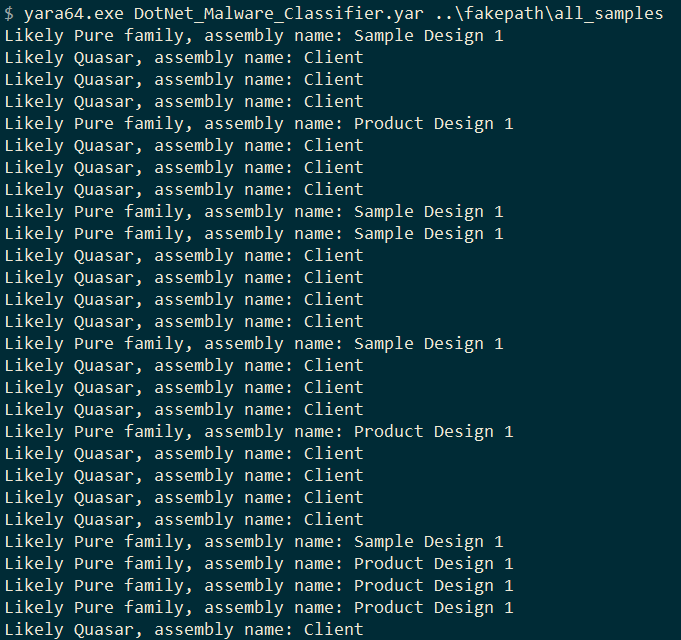 |
| Figure 19 - Simple "malware classifier" |
We can combine sets of Yara rules bases on assembly name, Typelib, MVID and so on to create rules with a higher confidence, and we can use this in further hunting, classification and... much more.
Bonus
If you’ve made it this far, it only makes sense to add in an additional extra use-case for all of this: finding new crypters or obfuscators!
When I ran the script on the +500 samples, there was 1 assembly / binary that stood out:
 |
| Figure 20 - Potential new crypter "Cronos" |
Making a simple Yara rule again:
import "dotnet"
rule cronos_crypter
{
strings:
$cronos = "Cronos-Crypter" ascii wide nocase
condition:
dotnet.is_dotnet and $cronos
}
Running this on the Unpac.me dataset yields:
 |
| Figure 21 - Unpac.me Yara hunt results |
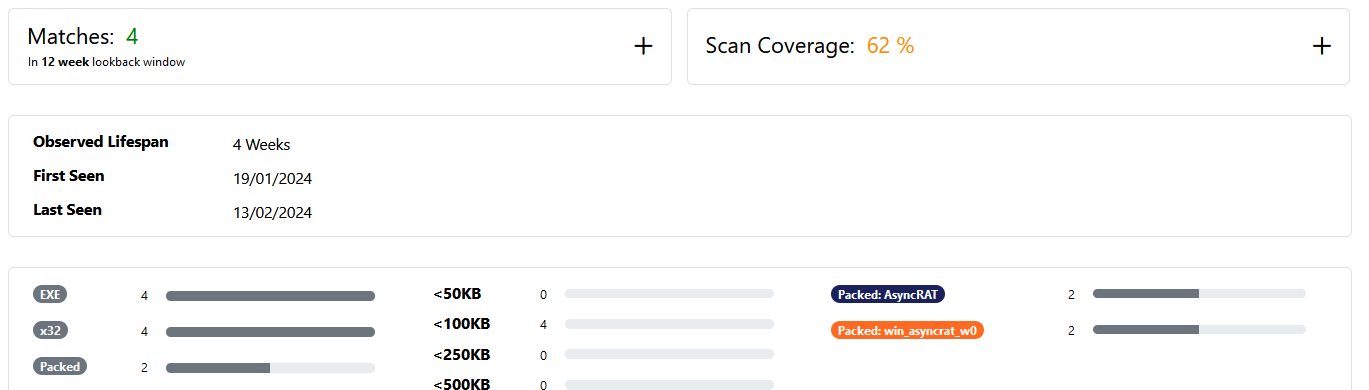
4 matches in 12 weeks: it appears this crypter is not popular (yet): 2 Async RAT samples and 2 PovertyStealer samples have used it so far.
Bonus on Bonus
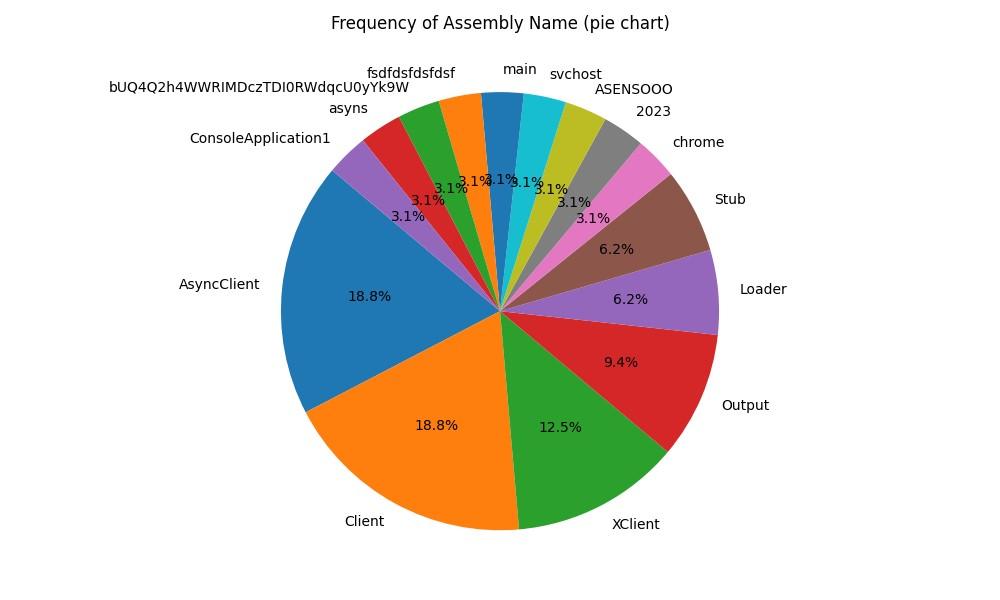
Let’s go with a final bonus round: improving the previous “classification” rule by also reviewing results for Async RAT. Seeing the previous crypter was used on at least 2 Async RAT samples, I wanted to see some statistics for this malware as well, for just the assembly name. This results in the following, based on 86 samples:
 | ||
| Figure 22 - Another pie chart: AsyncRat top used assembly names |
Jumping out are the following assembly names:
AsyncClient
Client --> Also seen in Quasar!
XClient
Output
Loader
Stub
AsyncClient is likely the default name when building the Async RAT project. But we are interested in widening the net: from the previous rule DotNet_Malware_Classifier, let’s update it with these new “generic” or default assembly names:
import "dotnet"
import "console"
rule DotNet_Malware_Classifier
{
condition:
(dotnet.assembly.name == "Client" and console.log("Suspicious assembly name: ", dotnet.assembly.name)) or
(dotnet.assembly.name == "Output" and console.log("Suspicious assembly name: ", dotnet.assembly.name)) or
(dotnet.assembly.name == "Loader" and console.log("Suspicious assembly name: ", dotnet.assembly.name)) or
(dotnet.assembly.name == "Stub" and console.log("Suspicious assembly name: ", dotnet.assembly.name))
}
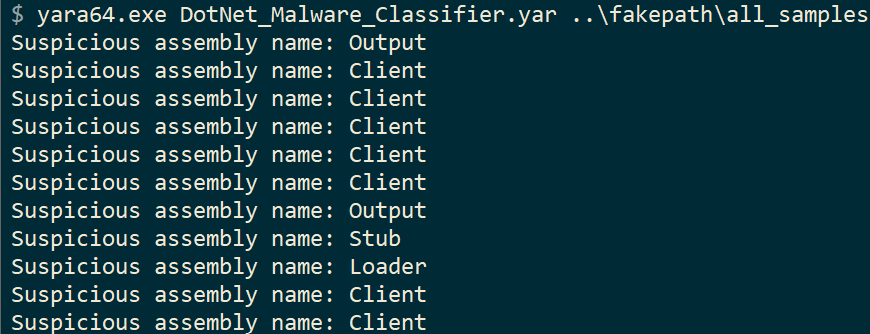 |
| Figure 23 - Classifier Yara rule results |
Conclusion
In this blog post, two new tools were presented to extract metadata from .NET malware samples. Specifically, we can now reliably extract 2 unique GUIDs: the Typelib and the MVID.
The Python script is capable of extracting the desired data from a large set of .NET assemblies, whereas the Yara rule is tailored for use with one particular sample. Of course, either of them can be used interchangeably: you can still fine-tune the Yara rule for a large set and work this way if you don’t want to rely on an external script. Similarly, the script can be extended to extract more data to be used.
Based on the output of these tools, you can then create Yara hunting rules, combine it with your existing rule sets, or use them in an attempt to classify malware families or specific attack campaigns.
Some closing remarks:
GUIDs could be spoofed or even removed. No method is 100% reliable.
However, this method can enhance already existing rulesets, especially those where .NET obfuscators (e.g. SmartAssembly) obfuscate (user) strings, modules and more, making it harder to write Yara rules for a malware family. Detecting based on GUID however, can work regardless of obfuscation method.
That said, obfuscating or deobfuscating may also alter the GUIDs. Keep this in mind when creating your detection rules based on an original or unpacked/deobfuscated sample.
If you encounter a GUID comprised entirely of zeros, such as 00000000-0000-0000-0000-000000000000, avoid using it for hunting since it's an empty GUID. This indicates the value may not be set or has been altered. This would make for a poor hunting rule as it can be a default value for any .NET project.
You can also use this methodology and tooling for .NET assemblies that are not malicious: extract developer information and other metadata per your use case or purpose.
The Python tool in addition, just as the Yara rule, allows for analysing, classifying and hunting on much more .NET (meta)data.
Happy .NET hunting! You can find the tools and some of the example Yara rules in the repository: https://github.com/bartblaze/DotNet-MetaData
As always, feedback is welcomed.

Fara: Faux YARA
FARA, or Faux YARA, is a simple repository that contains a set of purposefully erroneous Yara rules. It is meant as a training vehicle for new security analysts, those that are new to Yara and even Yara veterans that want to keep their rule writing (and debugging) sharp.
 |
| Example "faux" rule |
Find it over on Github:
https://github.com/bartblaze/FARA

Yara rules collection
Quite a while ago, I've published some of my private Yara rules online, on Github.
They can be found here:
https://github.com/bartblaze/Yara-rules
There's two workflows running on that Github repository:
- YARA-CI: runs automatically to detect signature errors, as well as false positives and negatives.
- Package Yara rules: allows download of a complete rules file (all Yara rules from this repo in one file) for convenience from the Actions tab > Artifacts (see image below).

The Yara rules are divided into:
- APT
- Crimeware
- Generic
- Hacktools
- Ransomware
Furthermore, the rules can work natively with AssemblyLine due to the CCCS Yara rule standard adoption.
PR's are welcome where you see fit.
Digital artists targeted in RedLine infostealer campaign
2021-06-17: updated with information from Twitter user ARC
In this post, we'll look at a campaign, that targeted multiple 3D or digital artists using NFT, with malware named RedLine. This malware is a so called "infostealer" or "information stealer" that is capable of extracting sensitive data from your machine (such as wallet information, credentials, and so on). As a side-note; NFTs, or non-fungible tokens, are digital tokens tied to assets that can be bought, sold and traded.
This blog post is divided into four parts:
- Introduction: provides an overview of what happened
- Analysis: analysis of the attack and the malware used
- Detection: how to detect and remove the malware (skip to Detection if you just want to clean this up)
- Prevention: how to prevent this from happening again
- Conclusion: a brief conclusion and additional thoughts
Introduction
From at least last Thursday, 10th of June 2021, multiple users report on Twitter that they got hacked after being approached to create new digital art. These users, accomplished digital artists and publishing their work on NFT marketplaces, were approached either via Instagram, Twitter DM (message) or directly via email. The attacker has masqueraded themselves behind multiple personas, often claiming to be from South Korea. A few of the users that reported the attack:
Ariel:
Small thread on the recent attacks to NFT artists, and how to prevent it. #NFTLamers #StolenNFT #NFTArt pic.twitter.com/KvrsuyQaeT
— 🌈 ArielBeckerArt.eth #SquidGang 🦑 (@arielbeckerart) June 10, 2021
fvckrender:
Be really careful out there I was dumb enough to not overlook this and open their SCR file and got my metamask swiped from à to Z all my tokens gone. They tried to access other app but my 2fa blocked them to. I’m an idiot don’t me an idiot like me and secure your shit. pic.twitter.com/gAins00taH
— FVCKRENDER (@fvckrender) June 11, 2021
Nicole:
Really terrible day. My Metamask got hacked and now my @withFND account is compromised. Opened a scam project proposal with a .scr file and a Microsoft Word icon. Anyone experience this before? Trying to figure out what to do
— Nicole Ruggiero (@_NicoleRuggiero) June 11, 2021
ARC:
New scam just dropped, specifically targeting artists, the file seems to be a virus pic.twitter.com/IFv8N5RBSg
— ARC (@arc4g) June 11, 2021
Cloudy Night:
WARNING TO ALL ARTISTS
— Cloudy Night ☁️ (@CloudyNight_k) June 11, 2021
Got a DM from "John Billmate" claiming to be "Responsible for distribution of photo editor" from @SkylumSoftware
DO NOT OPEN ANY LINKS FROM THIS PERSON. This is a scam, and if you got this DM, or get a dm in the future, block it. #NFTCommunity #skylum pic.twitter.com/yQv68bRIjW
There are many, many more examples - however, we won't list them here. Of note is Ariel's tweet, where you can note the presence of a file named "Rizin_Fight_Federation_Presentation.scr". I'll circle back to that in the next section, Analysis.
Analysis
After scouring the internet for a while, I was unable to discover any of the files mentioned by the artists that reported the attack, that is until I stumbled upon Cloudy Night's tweet - their screenshot included a link to a website "skylumpro.com".

As expected, this is not the legitimate website, but rather a clever copycat of the real Skylum product website (to note, the real website is: https://skylum.com/luminar-ai-b). After clicking the "Download Now" button, a file named "SkylumLuminar (NFT Beta).rar" is downloaded, which you need to unzip with the password "NFT", as we can observe from Cloudy Night's tweet.
The unzipped content looks as follows:

One of the first things you may notice is the large filesize of the so called beta version. As you've seen from before in Ariel's tweet, the filesize was 745MB, while this file is a whopping 791MB!
But why is this file so large and why does it matter?
- The attacker has appended their original file with a large chunk of overlay data; to put it simply - a bunch of extra data that does nothing.
- The attacker has increased the filesize this much to try and evade antivirus software and scanning tools; for example, a well-known service to scan suspicious files, VirusTotal, only accepts files up to 650MB, while some antivirus scanners may not even scan a file this large.
- While you could upload the original RAR file; the attacker has password-protected it and VirusTotal will be unable to scan it properly. You could re-package it, but the file itself may not be scanned.
Having said all that, after removing the excessive overlay, a much more reasonable filesize is obtained: 175KB. This new file's properties are:
- MD5: d93de731781723b3bb43fa806c5da7d1
- SHA-1: 1d49e7d163bce8cc6591ea33984796c531893b47
- SHA-256: b9923cdcd07e3e490a729560aa6f7c9b153ac0359cc7fa212c65b08531575a5a
- Creation Time: 2021-06-12 20:46:31
- VirusTotal results: https://www.virustotal.com/gui/file/b9923cdcd07e3e490a729560aa6f7c9b153ac0359cc7fa212c65b08531575a5a/detection
Of note is the creation or compilation time: this is the date and time the file has originally been created. While this can be spoofed, I do not believe it is the case here. This time matches with when the attack appeared. It is however highly likely more files, such as the one in Ariel's tweet, do the round.
This file will then execute a new file; which is the RedLine infostealer malware. This file has the following properties:
- MD5: b7df882c1b75c753186eec8fcb878932
- SHA-1: a04339be16a3b48d06017f44db7e86b3c8982110
- SHA-256: 2917305ac2959a98296578c46345691ccf638bdcc0559134432f5993da283faa
- Creation Time: 2042-10-31 08:29:02
- VirusTotal results: https://www.virustotal.com/gui/file/2917305ac2959a98296578c46345691ccf638bdcc0559134432f5993da283faa/detection
Note the creation time is different: set in 2042 - this is obviously faked by the attacker to reveal when exactly it has been created. However, with the above data, we can assume it was created in the last 5 days or so.
As mentioned before, once you execute the SkylumLuminarNFTBetaVersion.exe file, you will be infected with the RedLine infostealer malware. ProofPoint has reported on this malware first in March 2020: New Redline Password Stealer Malware. This malware has many capabilities, including, but not limited to:
- Steal username and password from browsers;
- Collect extensive system information;
- Execute commands, such as downloading and uploading other files, opening links and so on;
- Steal cryptowallet information - both from Chrome extensions as well as typical wallet.dat files. The extensions targeted are:
- YoroiWallet
- Tronlink
- NiftyWallet
- Metamask (refer also to Nicole's tweet)
- MathWallet
- Coinbase
- BinanceChain
- BraveWallet
- GuardaWallet
- EqualWallet
- JaxxxLiberty
- BitAppWallet
- Steal data from other software, such as:
- Steam;
- Telegram;
- FTP clients such as FileZilla.
The screenshot below displays part of RedLine's functionalities:

RedLine will first gather some basic information about your machine, such as the machine name, external IP address, your geography and so on. It gathers external information by querying one of the following IP lookup services:
- https://api.ipify.org
- https://icanhazip.com
- https://wtfismyip.com/text
- http://bot.whatismyipaddress.com/
- http://checkip.dyndns.org
Note these services are not malicious, they are simply being used by the attacker to gather more information. Interestingly enough, RedLine will use SOAP HTTP (POST) requests to its command and control server (the server or machine controlled by the attacker where your data will end up) using the following IP:
- 185.215.113.60;
- On port 59472;
- This IP resides in the Seychelles.
Another domain and IP observed is (from ARC's tweet above, the files in that archive were almost 600MB):
- xtfoarinat.xyz;
- On IP 92.38.163.189;
- This IP also has sinaryaror.xyz resolve to it, another RedLine command and control server.
One may also observe connections to tempuri.org. This is a default placeholder for web services, and is not atypical when using SOAP over HTTP. Tempuri is not malicious.
Finally, after receiving all this data, the attacker can start logging into your accounts, attempt to steal your tokens, impersonate you and so on. The attacker can also install other malware if they wish, such as ransomware.
What now? Detection
Good news:
The variant discussed in this blog does not appear to persist: in other words, after a reboot, its process will not be active anymore, at least for the variant discussed in this blog post.
Bad news:
Everything else - unfortunately, RedLine works pretty fast and a few minutes are enough to exfiltrate all your data and for the attacker to fully compromise all your accounts.
Luckily for us, RedLine stealer should be detected by most commercial and free antivirus software products on the market. A few recommendations to get rid of the RedLine variant discussed in this blog post - note this may not fully cover the variant you encountered:
- Contact your NFT provider, cryptowallet provider and so on as soon as possible via telephone call or another computer and inform them of what happened; ask for a temporary block of your account or to at least temporarily block any funds from now on.
>>> It is very important you do this first! <<< - If you can, change your credentials from another machine; such as your phone, your partner's laptop, ... Note it's recommended to change your credentials at least for your email accounts and for your wallets - focus on the most important accounts first! If you do not have this possibility, continue with the steps below.
- Open Task Manager, go to the Details tab and search for any process with the following names:
- SkylumLuminarNFTBetaVersion.exe;
Flamingly.exe;
FieldTemplateFactory.exe;
PaintingPromoProject;
Alternatively, the name of the file you executed. - Now, kill the process by right-clicking on it > select End Process (or End Task).
- If you have a firewall or proxy, block the IPs 185.215.113.60 and 92.38.163.189.
- Run a scan with your currently installed antivirus and a scan with an alternative product, for example, Malwarebytes (has a free version);
- You can also use Eset's Online Scanner (free): https://www.eset.com/int/home/online-scanner/
- Enable the Windows Firewall: https://support.microsoft.com/en-us/windows/turn-microsoft-defender-firewall-on-or-off-ec0844f7-aebd-0583-67fe-601ecf5d774f
- While this might not have much impact at this point, it will give you an additional layer of protection from other threats;
- Delete all the files you have previously downloaded if they still exist on your system; if you'd like me to analyse them, you may send me a copy first;
- If the above scans have turned up:
- Clean: have you executed the file?
- If not, you are not infected.
- If you did, and the scanners turn up with nothing, it's possible your current antivirus product has blocked the attack.
- You might also want to Refresh your PC to have peace of mind.
- Not clean (there were detections): let the above product (e.g. Malwarebytes or Eset) clean them up and reboot your computer.
It's important to follow these steps as soon as possible to prevent any damages.
Prevention
You've come this far, or perhaps you simply skipped to this part - arguably the most important one: to prevent this attack from happening in the first place. So how can this be achieved?
- First and foremost: ensure you are using Windows 8.1 or later. Older Operating Systems, such as Windows 7, are no longer supported by Microsoft and have additional vulnerabilities attackers may exploit;
- Install an antivirus and enable the Windows Firewall. It does not matter if the antivirus is free or not; paid versions do offer more features, but a free version will do just as much.
- Starting from Windows 10, Windows Defender should protect adequately from attacks such as the one described in this blog post. Other free alternatives are Kaspersky's free cloud antivirus and Malwarebytes.
- When you get any file, scan it with your antivirus first! (typically done by right-clicking on the file or folder)
- When in doubt, upload the file to VirusTotal. Note however the tactics used here: if there's a really large file, it
may not be able to be scanned properly - this can be an indication of
malicious intent!
- Set UAC (User Account Control) to the maximum level: Always Notify - this will stop some additional attacks (you will get more prompts; if you do, take a pause and verify what's on the screen should indeed be executed). Here's how to do that: https://www.digitalcitizen.life/how-change-user-account-control-uac-levels/
- Enable file extensions: some extensions, such as .scr, historically a screensaver file; are in fact executables - which could contain malicious code, as was the case in Ariel's tweet. Do not open or run these files. This will also protect you against the "double extensions" trick. A file named commission.jpg.exe will now be visible as such - if file extensions are disabled, you would see commission.jpg - see the difference? Here's how you can enable file extensions: https://www.howtogeek.com/205086/beginner-how-to-make-windows-show-file-extensions/
- Create unique passwords where possible; if feasible; use a password manager;
- Enable MFA (or 2FA if MFA is not available) on all your sensitive accounts; this will add an additional layer which is typically very hard for the attacker to guess or crack. Google "your service/ account + MFA" for specific instructions;
- If you receive a new commission or request to create art, stop and think first - ask yourself these questions:
- Is this coming from a reputable account or from a totally new account?
- If reputable, can I verify their claim or request somehow?
- If from a new account: be extra wary!
- If from an account with very low followers/following: be extra wary!
- How will they pay me?
- Are they using a verified cryptowallet, or trying to set me up for something shady?
- Do they have any reviews on their (public) profile, if any?
- What are they asking of me exactly?
- Are they indeed sending just images, or is there an executable file or "special software" I am supposed to download/open?
- Where are their links or attachments leading to?
- Are these leading to another service, e.g. imgur.com, or something different altogether?
- I have downloaded the file(s), but I do not trust the source;
- Delete it or ask for more information;
- Block the sender if you are suspect and report their account, delete any files;
- You can double-check by scanning the files with your antivirus, or uploading it to VirusTotal. The same nuance as above applies however.
- You can also Google any information they send through to further verify their claims.
- Finally and where possible;
- Use a hardware instead of software wallet;
- Secure your seed phrase; store it offline, for example, on an external drive or use pen and paper;
- Verify the security settings in your wallet or crypto provider: perform a check of which other security features you can enable, and enable them.
Manifold, a company that creates blockchain products for NFT communities, has also written an excellent post-mortem of this attack which includes additional advice - I highly recommend you to read it: https://manifoldxyz.substack.com/p/the-fvckrender-hack-post-mortem
Conclusion and afterthoughts
It's not the first time a highly targeted or specific attack occurs on communities that use crypto in some form or another, for example, at the end of 2019, Monero's download site and binaries were compromised for a brief time.
If you have been targeted by this attack, and you have been compromised, follow the advice in this blog as soon as possible to clean it up and to prevent any future attack.
This attack was quite specific and targeted - there is really no need to feel bad if you have been affected, as it can happen to anyone. Explain to your crypto provider what happened, and they should be able to help you out.
I'd like to thank all the vigilant users on Twitter out there for creating awareness, and I hope this blog has provided further insight. If you were affected, and you'd like me to analyse any suspicious file, or would just like to comment, use the comment section below or contact me on Twitter. Refer to my About me page for even more contact details.

Blue Team Puzzle
Several years ago, I created a "malware puzzle" - basically, a crossword puzzle but with terms related to malware. You can find that puzzle here: https://bartblaze.blogspot.com/2013/08/malware-puzzle.html
Seeing crosswords are a hobby of mine, I thought it'd be fun to create another one more than seven years later - this time, all things blue team! Obviously you don't need to be part of a blue team to fill in the puzzle, it's for anyone in information or cyber security - but it does help if you've been on the defense side of things.
You can print the puzzle and fill it in, or you can use Adobe Reader to complete the PDF version, or use any tool to your liking (mspaint is also a candidate). There are no spaces - all words are one word.

You can find the puzzle in the following formats:
PNG: https://www.mediafire.com/view/0iuzvxal8redjz2/crossword-iiRh073oLn.png/file
PNG mirror: https://imgur.com/a/ASATRXf
PDF: https://www.mediafire.com/file/b3v7pebohp6c8vn/crossword-xp6dZUU9Ar.pdf/file
PDF mirror: https://www.filedropper.com/crossword-xp6dzuu9ar
If you have the solution, feel free to create a comment or @ me on Twitter: https://twitter.com/bartblaze.
To make things more interesting, you can set up a competition between your fellow defenders to see who can complete it first!
If you're stuck, I can always send you a hint - see my About page for contact information, use Twitter, or leave a comment. Note there may be spoilers around.

Satan ransomware rebrands as 5ss5c ransomware
In a previous blog post, Satan ransomware adds EternalBlue exploit, I described how the group behind Satan ransomware has been actively developing its ransomware, adding new functionalities (specifically then: EternalBlue) and techniques with each run. Then, it appeared the group halted operations on at least the ransomware front for several months.
However, as it turns out, the group has been working on new ransomware - 5ss5c - since at least November 2019.
The following tweet got my attention:
🧐Unknown #Ransomware captured tonight from #China, Encrypt only compressed files.— onion (@jishuzhain) January 12, 2020
Email:5ss5c@mail.ru
ext:.5ss5c
IP:61.186.243.2 58.221.158.90@demonslay335 @Amigo_A_ @GrujaRS @BleepinComputer @Rmy_Reserve @VK_Intel pic.twitter.com/dTdgnMfoLX
After some quick checks, it appears this is a downloader for the 5ss5c ransomware, which is extremely reminiscent of how Satan ransomware operated:
 |
| Figure 1 - 5ss5c downloader |
The malware will leverage certutil and even contains logging:
 |
| Figure 2 - certutil logging |
It will download and leverage:
- Spreader (EternalBlue and hardcoded credentials);
- Mimikatz and what appears another password dumper/stealer;
- The actual ransomware.
The following hashes are relevant to this new variant:
Name: down.txt
URL: http://58.221.158[.]90:88/car/down.txt
Purpose: Downloader
MD5: 680d9c8bb70e38d3727753430c655699
SHA1: 5e72192360bbe436a3f4048717320409fb1a8009
SHA256: ddfd1d60ffea333a1565b0707a7adca601dafdd7ec29c61d622732117416545f
Compilation timestamp: 2020-01-11 19:04:24
VirusTotal report:
ddfd1d60ffea333a1565b0707a7adca601dafdd7ec29c61d622732117416545f
down.txt is, as mentioned, the downloader for the spreader module and for the actual ransomware:
Name: c.dat
URL: http://58.221.158[.]90:88/car/c.dat
Purpose: spreader
MD5: 01a9b1f9a9db526a54a64e39a605dd30
SHA1: a436e3f5a9ee5e88671823b43fa77ed871c1475b
SHA256: 9a1365c42f4aca3e9c1c5dcf38b967b73ab56e4af0b4a4380af7e2bf185478bc
Compilation timestamp: 2020-01-11 19:19:54
VirusTotal report:
9a1365c42f4aca3e9c1c5dcf38b967b73ab56e4af0b4a4380af7e2bf185478bc
Name: cpt.dat
URL: http://58.221.158[.]90:88/car/cpt.dat
Purpose: ransomware
MD5: 853358339279b590fb1c40c3dc0cdb72
SHA1: 84825801eac21a8d6eb060ddd8a0cd902dcead25
SHA256: ca154fa6ff0d1ebc786b4ea89cefae022e05497d095c2391331f24113aa31e3c
Compilation timestamp: 2020-01-11 19:54:25
VirusTotal report:
ca154fa6ff0d1ebc786b4ea89cefae022e05497d095c2391331f24113aa31e3c
Fun fact: file version information contains "TODO: 5SS5C Encoder".
The compilation times are sequential, which makes sense - the downloader has been developed (and compiled) first, then the spreader and the actual ransomware.
Note that cpt.exe as filename has already been observed in Satan ransomware.
Further indicators, such as hashes, URLs, file paths and so on will be posted at the end of this blog post.
5ss5c - still in development - and with oddities
There's quite some curiosities that indicate 5ss5c is still in active development and stems from Satan ransomware, for example:
- There are several logs created, e.g. there is a file "C:\Program Files\Common Files\System\Scanlog" that simply logs whether IPC SMB is open/available;
- Certutil logging (successful download or not);
- There are several Satan ransomware artefacts;
- Other Tactics, Techniques and Procedures (TTP) align with both Satan (and DBGer), and slightly overlap with Iron:
- One of these is, for example, the use of multiple packers to protect their droppers and payloads.
- This time however, they decided to use both MPRESS and Enigma, and even Enigma VirtualBox! (Note: Enigma and Enigma VirtualBox are not the same - the latter is a virtualised packer and also referred to as EnigmaVM.)
However, there are quite some curiosities, one of them being what appear to be hardcoded credentials:
 |
| Figure 3 - Hardcoded creds |
These hardcoded credentials will be leveraged in an attempt to connect to an SQL database with the xp_cmdshell command:
Curiously, we can identify the following data inside the ransomware in regards to the SQL database:
- ecology.url
- ecology.password
- ecology.user
Searching a bit further, we can discover a company named Finereport (https://www.finereport.com/en/company), which claims to be "Top 1 in China’s BI market share in IDC "China BI Software Tracker, 2018". You guessed it - it uses SQL as database.
What else is new is, as mentioned before, the use of Enigma VirtualBox for packing an additional spreader module, aptly named poc.exe. This suggest they may be experimenting (poc often is an acronym for proof of concept).
This file will be dropped to C:\ProgramData\poc.exe and will run the following command:
cd /D C:\ProgramData&star.exe --OutConfig a --TargetPort 445 --Protocol SMB --Architecture x64 --Function RunDLL --DllPayload C:\ProgramData\down64.dll --TargetIpNow compare this to Satan ransomware's command:
cmd /c cd /D C:\Users\Alluse~1\&blue.exe --TargetIp & star.exe --OutConfig a --TargetPort 445 --Protocol SMB --Architecture x64 --Function RunDLL --DllPayload down64.dll --TargetIpSomething looks similar here... :-)
5ss5c ransomware - how it operates
Back to the actual ransomware. It will create the following mutexes:
- SSSS_Scan (in previous iterations SSS_Scan has also been observed)
- 5ss5c_CRYPT
Just like its predecessor, 5ss5c also has an exclusion list, where it will not encrypt specific files as well as files in the following folders:
 |
| Figure 4 - Exclusion list |
For example, the following folders belonging to Qihoo 360 (an internet security company based in China also offering antivirus) were already excluded in Satan and DBGer ransomware:
- 360rec
- 360sec
- 360sand
While these are new in 5ss5c ransomware:
- 360downloads
- 360safe
As in previous iterations, 5ss5c ransomware will stop database-related services and processes.
It will however only encrypt files with the following extensions:
7z, bak, cer, csv, db, dbf, dmp, docx, eps, ldf, mdb, mdf, myd, myi, ora, pdf, pem, pfx, ppt, pptx, psd, rar, rtf, sql, tar, txt, vdi, vmdk, vmx, xls, xlsx, zipThis extension list is not like before, and includes mostly documents, archives, database files and VMware-related extensions such as vmdk.
The ransomware will then create the following URI structure to communicate with the C2 server (61.186.243[.]2):
- /api/data.php?code=
- &file=
- &size=
- &status=
- &keyhash=
It will also create a ransomware note on the C:\ drive as: _如何解密我的文件_.txt which translates to _How to decrypt my file_.txt. Example content is as follows:
 |
| Figure 5 - ransom note |
The content reads:
部分文件已经被加密
如果你想找回加密文件,发送 (1) 个比特币到我的钱包
从加密开始48小时之内没有完成支付,解密的金额会发生翻倍.
如果有其他问题,可以通过邮件联系我
您的解密凭证是 :
Email:[5ss5c@mail.ru]
Translated:
Some files have been encrypted
If you want to retrieve the encrypted file, send (1) Bitcoins to my wallet
If payment is not completed within 48 hours from the start of encryption, the amount of decryption will double.
If you have other questions, you can contact me by email
Your decryption credentials are:
Email: [5ss5c@mail.ru]
Interestingly, the ransomware note does not contain a Bitcoin address. Additionally, the note only contains instructions in Chinese, not Korean nor English like previous iterations. Is 5ss5c ransomware more targeted, or just actively being tested by the group/developers behind it?
Encrypted files will have the actor's email address prepended and a unique token with the ransomware's name will be appended, for example;
test.txt becomes [5ss5c@mail.ru]test.txt.Y54GUHKIG1T2ZLN76II9F3BBQV7MK4UOGSQUND7U.5ss5c.
Prevention
- Enable UAC;
- Enable Windows Update, and install updates (especially verify if MS17-010 is installed);
- Install an antivirus, and keep it up-to-date and running;
- Install a firewall, or enable the Windows Firewall;
- Restrict, where possible, access to shares (ACLs);
- Create backups! (and test them)
More ransomware prevention can be found here.
Conclusion
Satan is dead, long live 5ss5c! It just doesn't sound as good, does it?
Whoever's behind the development of Satan, DBGer, Lucky and likely Iron ransomware, is back in business with the 5ss5c ransomware, and it appears to be in active development - and is trying to increase (or perhaps focus?) its targeting and spread of the ransomware.
It is recommended organisations detect and/or search for the indicators of compromise (IOCs) below, and have proper prevention controls in place. MITRE ATT&CK IDs can also be found below.
Indicators of Compromise:
| Type | Indicator |
|---|---|
| File | C:\Program Files\Common Files\System\Scanlog |
| File | C:\Program Files\Common Files\System\cpt.exe |
| File | C:\Program Files\Common Files\System\tmp |
| File | C:\ProgramData\5ss5c_token |
| File | C:\ProgramData\blue.exe |
| File | C:\ProgramData\blue.fb |
| File | C:\ProgramData\blue.xml |
| File | C:\ProgramData\down64.dll |
| File | C:\ProgramData\mmkt.exe |
| File | C:\ProgramData\poc.exe |
| File | C:\ProgramData\star.exe |
| File | C:\ProgramData\star.fb |
| File | C:\ProgramData\star.xml |
| Registry key | SOFTWARE\Microsoft\Windows\CurrentVersion\Run\5ss5cStart |
| Command | C:\Windows\system32\cmd.exe /c cd /D C:\ProgramData&blue.exe --TargetIp |
| Command | star.exe --OutConfig a --TargetPort 445 --Protocol SMB --Architecture x64 --Function RunDLL --DllPayload C:\ProgramData\down64.dll --TargetIp |
| Mutex | SSSS_Scan |
| Mutex | 5ss5c_CRYPT |
| 5ss5c@mail.ru | |
| URL | http://58.221.158.90:88/car/down.txt |
| URL | http://58.221.158.90:88/car/c.dat |
| URL | http://58.221.158.90:88/car/cpt.dat |
| IP | 58.221.158.90 |
| IP | 61.186.243.2 |
| Hash | 82ed3f4eb05b76691b408512767198274e6e308e8d5230ada90611ca18af046d |
| Hash | dc3103fb21f674386b01e1122bb910a09f2226b1331dd549cbc346d8e70d02df |
| Hash | 9a1365c42f4aca3e9c1c5dcf38b967b73ab56e4af0b4a4380af7e2bf185478bc |
| Hash | af041f6ac90b07927696bc61e08a31a210e265a997a62cf732f7d3f5c102f1da |
| Hash | ca154fa6ff0d1ebc786b4ea89cefae022e05497d095c2391331f24113aa31e3c |
| Hash | e685aafc201f851a47bc926dd39fb12f4bc920f310200869ce0716c41ad92198 |
| Hash | e5bb194413170d111685da51b58d2fd60483fc7bebc70b1c6cb909ef6c6dd4a9 |
| Hash | ddfd1d60ffea333a1565b0707a7adca601dafdd7ec29c61d622732117416545f |
| Hash | ef90dcc647e50c2378122f92fba4261f6eaa24b029cfa444289198fb0203e067 |
| Hash | 47fa9c298b904d66a5eb92c67dee602198259d366ef4f078a8365beefb9fdc95 |
| Hash | 68e644aac112fe3bbf4e87858f58c75426fd5fda93f194482af1721bc47f1cd7 |
| Hash | ea7caa08e115dbb438e29da46b47f54c62c29697617bae44464a9b63d9bddf18 |
| Hash | 23205bf9c36bbd56189e3f430c25db2a27eb089906b173601cd42c66a25829a7 |
| Hash | a46481cdb4a9fc1dbdcccc49c3deadbf18c7b9f274a0eb5fdf73766a03f19a7f |
| Hash | cf33a92a05ba3c807447a5f6b7e45577ed53174699241da360876d4f4a2eb2de |
| Hash | 8e348105cde49cad8bfbe0acca0da67990289e108799c88805023888ead74300 |
| Hash | ad3c0b153d5b5ba4627daa89cd2adbb18ee5831cb67feeb7394c51ebc1660f41 |
| Hash | de3c5fc97aecb93890b5432b389e047f460b271963fe965a3f26cb1b978f0eac |
| Hash | bd291522025110f58a4493fad0395baec913bd46b1d3fa98f1f309ce3d02f179 |
| Hash | 75d543aaf9583b78de645f13e0efd8f826ff7bcf17ea680ca97a3cf9d552fc1f |
| Hash | 50e771386ae200b46a26947665fc72a2a330add348a3c75529f6883df48c2e39 |
| Hash | 0aa4b54e9671cb83433550f1d7950d3453ba8b52d8546c9f3faf115fa9baad7e |
| Hash | 5d12b1fc6627b0a0df0680d6556e782b8ae9270135457a81fe4edbbccc0f3552 |
These indicators are also available on AlienVault OTX:
Satan ransomware rebrands as 5ss5c ransomware
MITRE ATT&CK techniques

Monero download site and binaries compromised
Introduction
Earlier this evening I saw a tweet appear which claimed Monero has been hacked and a malicious binary (instead of the real one) has been served:
Warning Monero users: If you downloaded Monero in the past 24 hours you may have installed malware. Monero's official website served compromised binaries for at least 30 minutes during the past 24 hours. Investigations are ongoing. https://t.co/geqA4dIPar— dark.fail (@DarkDotFail) November 19, 2019
Post on Reddit:
https://www.reddit.com/r/Monero/comments/dyfozs/security_warning_cli_binaries_available_on/
Github issue:
https://github.com/monero-project/monero/issues/6151
Linux binary
Thanks to user nikitasius I was able to retrieve the malicious binary:
https://github.com/monero-project/monero/issues/6151#issuecomment-555511805
This binary is an ELF file with the following properties:
The seed will be sent to: node.hashmonero[.]com.
cryptonote::simple_wallet::send_to_cc
As you may have guessed, this function will send data off to the CC or C2 (command and control) server - this will be stolen funds.
Sending funds to the C2 is handled using an HTTP POST request to the following C2 servers:
As far I can see, it doesn't seem to create any additional files or folders - it simply steals your seed and attempts to exfiltrate funds from your wallet.
Windows binary
The C2 server 45.9.148[.]65 also hosts a Windows binary with the following properties:
The Windows version is essentially doing the same things as the Linux version - stealing your seed and wallet funds - the function names are just different, e.g. _ZN10cryptonote13simple_wallet9send_seedERKN4epee15wipeable_stringE.
Note: this doesn’t mean the official Windows binary was also compromised - it simply means there’s also a compromised Windows binary out there. Only the Monero team can confirm if other binaries (besides the Linux one mentioned in this blog) have been compromised.
Detection
There's an additional analysis by SerHack here:
https://serhack.me/articles/cli-binaries-compromised-monero-analysis/
The Monero team has issued a statement as follows:
Warning: The binaries of the CLI wallet were compromised for a short time:
On AlienVault:
https://otx.alienvault.com/pulse/5dd4574fc7c82cddbdcb8d12
MITRE ATT&CK techniques
ID: T1195 - Supply Chain Compromise
ID: T1199 - Trusted Relationship
https://www.reddit.com/r/Monero/comments/dyfozs/security_warning_cli_binaries_available_on/
Github issue:
https://github.com/monero-project/monero/issues/6151
Linux binary
Thanks to user nikitasius I was able to retrieve the malicious binary:
https://github.com/monero-project/monero/issues/6151#issuecomment-555511805
This binary is an ELF file with the following properties:
- MD5: d267be7efc3f2c4dde8e90b9b489ed2a
- SHA-1: 394bde8bb86d75eaeee69e00d96d8daf70df4b0a
- SHA-256: 7ab9afbc5f9a1df687558d570192fbfe9e085712657d2cfa5524f2c8caccca31
- File type: ELF
- Magic: ELF 64-bit LSB shared object, x86-64, version 1 (GNU/Linux), dynamically linked (uses shared libs), for GNU/Linux 3.2.0, from 'x)', not stripped
- File size: 27.63 MB (28967688 bytes)
- VirusTotal report: https://www.virustotal.com/gui/file/7ab9afbc5f9a1df687558d570192fbfe9e085712657d2cfa5524f2c8caccca31/summary
When comparing the legitimate file and this ELF file, we notice the file size is different, and a few new functions have been added:
cryptonote::simple_wallet::send_seed
This function is immediately called after either opening or creating a new wallet, as can be seen in Figure 1 and 2 below.
 |
| Figure 1 - Create wallet (legitimate) |
 |
| Figure 2 - Call new seed function |
The seed will be sent to: node.hashmonero[.]com.
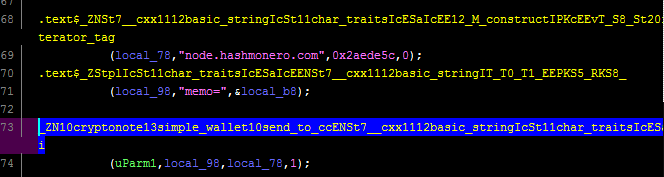
cryptonote::simple_wallet::send_to_cc
As you may have guessed, this function will send data off to the CC or C2 (command and control) server - this will be stolen funds.
 |
| Figure 3 - Send to cc |
Sending funds to the C2 is handled using an HTTP POST request to the following C2 servers:
- node.xmrsupport[.]co
- 45.9.148[.]65
As far I can see, it doesn't seem to create any additional files or folders - it simply steals your seed and attempts to exfiltrate funds from your wallet.
Windows binary
The C2 server 45.9.148[.]65 also hosts a Windows binary with the following properties:
- MD5: 72417ab40b8ed359a37b72ac8d399bd7
- SHA-1: 6bd94803b3487ae1997238614c6c81a0f18bcbb0
- SHA-256: 963c1dfc86ff0e40cee176986ef9f2ce24fda53936c16f226c7387e1a3d67f74
- File type: Win32 EXE
- Magic: PE32+ executable for MS Windows (console) Mono/.Net assembly
- File size: 65.14 MB (68302960 bytes)
- VirusTotal report: https://www.virustotal.com/gui/file/963c1dfc86ff0e40cee176986ef9f2ce24fda53936c16f226c7387e1a3d67f74/summary
The Windows version is essentially doing the same things as the Linux version - stealing your seed and wallet funds - the function names are just different, e.g. _ZN10cryptonote13simple_wallet9send_seedERKN4epee15wipeable_stringE.
 |
| Figure 4 - Send to cc |
Note: this doesn’t mean the official Windows binary was also compromised - it simply means there’s also a compromised Windows binary out there. Only the Monero team can confirm if other binaries (besides the Linux one mentioned in this blog) have been compromised.
Detection
- If you have a firewall or proxy, whether hardware or software, verify if you had any network traffic or connections to;
- node.hashmonero[.]com
- node.xmrsupport[.]co
- 45.9.148[.]65
- 91.210.104[.]245
- Remove all the binaries listed in this blog post;
- Verify the hashes of your Monero setup or installer file. Guides to do that here;
- Beginner: https://src.getmonero.org/resources/user-guides/verification-windows-beginner.html
- Advanced: https://src.getmonero.org/resources/user-guides/verification-allos-advanced.html
- Note: hashes list is available here: https://web.getmonero.org/downloads/hashes.txt.
Note: What is a hash? A hash is a unique identifier. This can be for a file, a word, ... It is preferred to use SHA256 hashes for file integration checks, as it is more secure.
You may also use the following Yara rule to detect the malicious or compromised binaries:
There's an additional analysis by SerHack here:
https://serhack.me/articles/cli-binaries-compromised-monero-analysis/
Recommendations
- Install an antivirus, and if possible, use a firewall (free or paid is of less importance);
- If you already use an antivirus: it may be a good idea to not exclude a specific folder in your antivirus when using Monero (or other miners), and if needed, only do so after the hashes have been verified;
- Restore your seed or account;
- How to restore your account: https://web.getmonero.org/resources/user-guides/restore_account.html
- Recovering wallet using the mnemonic seed: https://monero.stackexchange.com/questions/10/how-can-i-recover-a-wallet-using-the-mnemonic-seed
- Monitor your account/wallet for the next days and verify there have been no fraudulent transactions. Contact the Monero team for support.
Note: Especially go through the steps if at any point you downloaded, used or installed new binaries between these dates: Monday 18th 1:30 AM UTC and 5:30 PM UTC. Download the latest version from: https://web.getmonero.org/downloads/.
Monero team statement
Monero team statement
The Monero team has issued a statement as follows:
Warning: The binaries of the CLI wallet were compromised for a short time:
https://web.getmonero.org/2019/11/19/warning-compromised-binaries.html
I expect this statement to be updated the following days, so monitor it as well.
I expect this statement to be updated the following days, so monitor it as well.
Conclusion
Monero is not the first, nor will it likely be the last cryptocurrency (in this case, its website and binaries) that gets compromised.
Follow the steps in this blog post to protect yourself and always watch your online accounts closely, especially those where you have financially invested in. Use strong passwords, use MFA (or 2FA) where possible and always be vigilant. Verify hashes when a new version is available.
Note: this blog post is not intended to be a full analysis, but rather a quick report on the facts, including recommendations. Questions or feedback? Happy to hear it!
Let me know in the comments below or on Twitter.
Monero is not the first, nor will it likely be the last cryptocurrency (in this case, its website and binaries) that gets compromised.
Follow the steps in this blog post to protect yourself and always watch your online accounts closely, especially those where you have financially invested in. Use strong passwords, use MFA (or 2FA) where possible and always be vigilant. Verify hashes when a new version is available.
Note: this blog post is not intended to be a full analysis, but rather a quick report on the facts, including recommendations. Questions or feedback? Happy to hear it!
Let me know in the comments below or on Twitter.
Indicators
| Indicator type | Indicator |
|---|---|
| FileHash-SHA256 | 7ab9afbc5f9a1df687558d570192fbfe9e085712657d2cfa5524f2c8caccca31 |
| FileHash-SHA256 | 963c1dfc86ff0e40cee176986ef9f2ce24fda53936c16f226c7387e1a3d67f74 |
| hostname | www.hashmonero.com |
| hostname | node.xmrsupport.co |
| hostname | node.hashmonero.com |
| FileHash-MD5 | d267be7efc3f2c4dde8e90b9b489ed2a |
| FileHash-MD5 | 72417ab40b8ed359a37b72ac8d399bd7 |
| FileHash-SHA1 | 6bd94803b3487ae1997238614c6c81a0f18bcbb0 |
| FileHash-SHA1 | 394bde8bb86d75eaeee69e00d96d8daf70df4b0a |
| IPv4 | 91.210.104.245 |
| IPv4 | 45.9.148.65 |
| domain | hashmonero.com |
| domain | xmrsupport.co |
On AlienVault:
https://otx.alienvault.com/pulse/5dd4574fc7c82cddbdcb8d12
MITRE ATT&CK techniques
ID: T1195 - Supply Chain Compromise
ID: T1199 - Trusted Relationship


