Login

Best practices for integrating IAM Roles Anywhere with your PKI
Using temporary credentials is a security best practice to reduce the risk from credentials getting compromised. With AWS IAM Roles Anywhere, now your workloads outside of Amazon Web Services (AWS) will be able to access AWS resources by obtaining temporary security credentials in AWS Identity and Access Management (IAM). IAM Roles Anywhere relies on public key infrastructure (PKI) to establish trust between your AWS account and certificate authorities that issues certificates to your workloads that run outside AWS. PKI involves the generation, distribution, and verification of digital certificates through public key encryption.
In this post, we show you some best practices, considerations, and solutions for integrating your PKI with IAM Roles Anywhere. In this post, we assume that you have a foundational knowledge of IAM and IAM Roles Anywhere. For more information, see the IAM and IAM Roles Anywhere documentation.
Note: As of July 2026, AWS Certificate Manager (ACM) supports exportable public certificates that can be used on workloads outside AWS (containers or on-premises). Additionally, ACM supports the ACME protocol for automated certificate issuance and renewal on external workloads. These capabilities complement IAM Roles Anywhere by providing both identity (using X.509 certificates for IAM Roles Anywhere) and encryption (using ACM public/private certificates) for hybrid environments.
X.509 certificates for workload identity
If you’re running multiple workloads in your infrastructure, you’re probably assigning unique workload identities and specific user permissions. In this environment, your workloads can use PKI tools like Active Directory Certificate Services to centrally manage and monitor the identities and permissions at scale. The same principles of segregating unrelated workloads apply to PKI and IAM Roles Anywhere. If you’re issuing certificates to your workloads today, they can probably be used with IAM Roles Anywhere without any changes.
As shown in Figure 1, the access boundary and permissions of Workload A can be very different from that of Workload B when accessing AWS resources, depending on the organization’s needs. In such scenarios, it’s recommended to establish a unique machine identity for each workload. This can be achieved by issuing a separate X.509 certificate with distinct identity attributes signed by your certificate authority (CA). To set up an effective PKI solution for machine identities, you must configure the appropriate certificate attributes and anchor the trust model around those attributes.
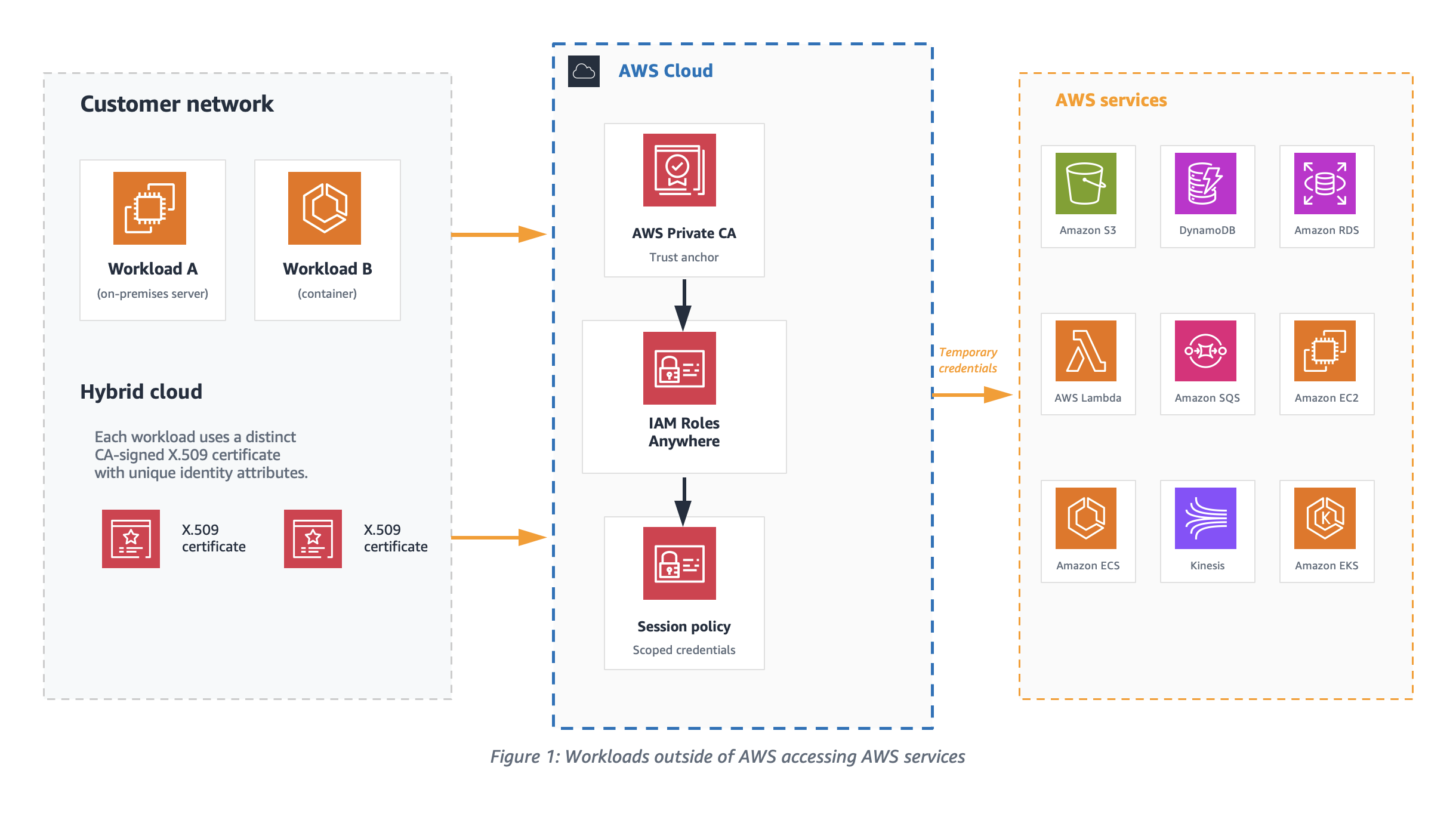
Figure 1: Workloads outside of AWS accessing AWS services
Temporary access credentials
Workloads with distinct CA signed X.509 certificates exchange certificates with IAM, as shown in Figure 2, to get temporary security credentials for the session. The signature validation process used by IAM Roles Anywhere verifies the certificate issuer and the subject before providing the temporary credentials. To enable this verification process, an IAM Roles Anywhere trust model should be set up by either uploading your CA’s digital certificate as a trust anchor or by referencing an existing AWS Private Certificate Authority (AWS Private CA) certificate. In this post, we focus on using a trust anchor.
To help define the appropriate scope for the temporary credentials, it’s recommended to configure distinct IAM roles for each workload to assume. Workloads must use X.509 certificates issued by your CA. These certificates are exchanged with IAM to get temporary security credentials for the session.
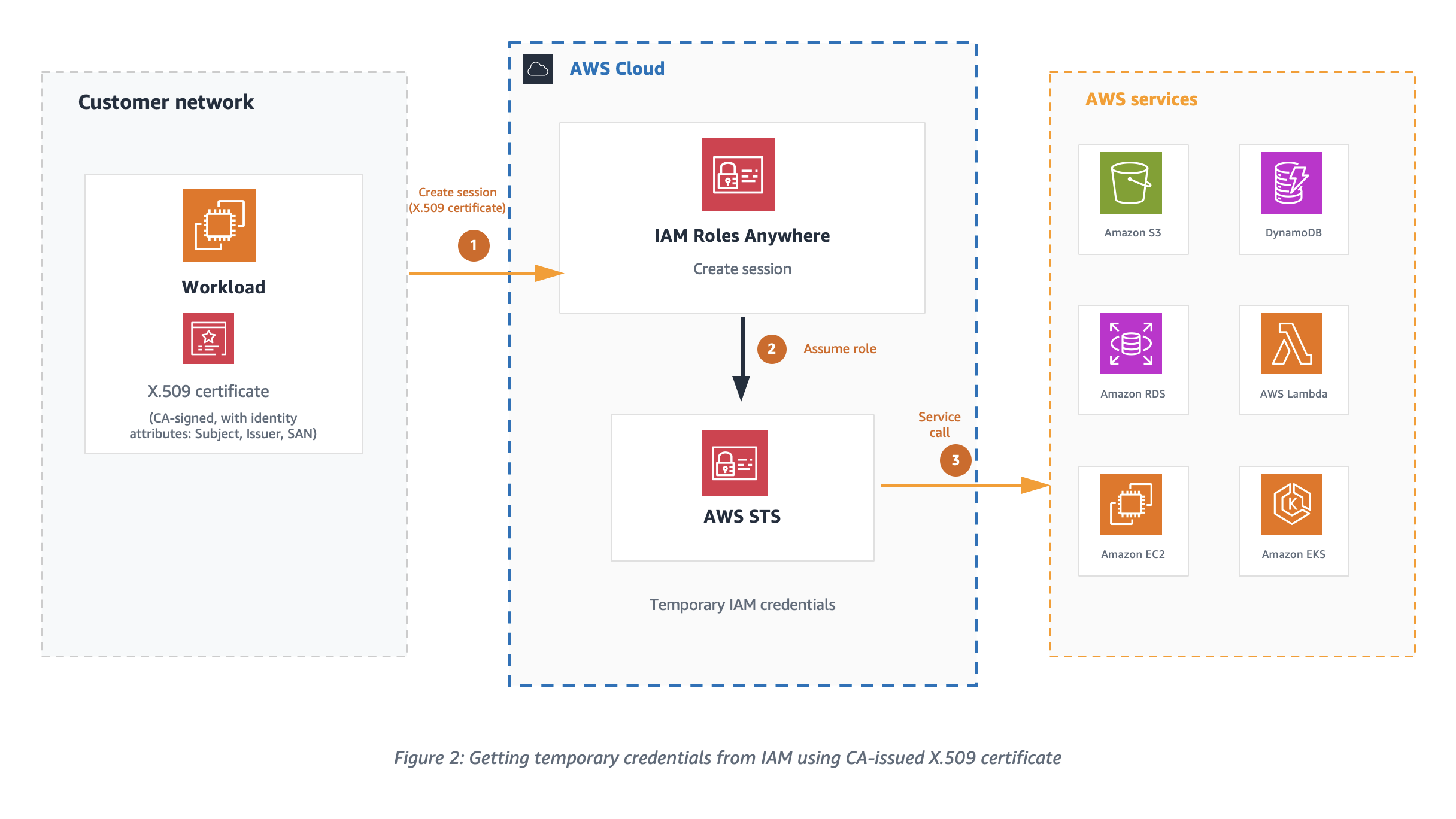
Figure 2: Getting temporary credentials from IAM using CA issued X.509 certificate
Setting up a trust model for IAM Roles Anywhere is a three-step process, see Extend AWS IAM Roles Anywhere to workloads outside of AWS for more information.
- Create a trust anchor.
- Set up IAM roles with the IAM Roles Anywhere trust policy that will be assumed by your non-AWS workload.
- Configure profiles with IAM roles and attach relevant session policies. This instructs IAM Roles Anywhere to use your selected session policies whenever you request credentials for any of the attached roles.
Trust model
The trust model is centered around setting up the right trust relationship between IAM Roles Anywhere and your CA by configuring a trust anchor. The model connects the role, the IAM Roles Anywhere service principal, and identities encoded in X509 certificates that are issued by a CA.
Certificate attributes
Certificates are a binary record with encoded key/value pairs as certificate attributes. Let’s look at one of the X.509 certificates to understand different attributes of certificate that are important for IAM Roles Anywhere PKI validation.
The following is an example PEM encoded certificate file that can be decoded with tools like openssl.
-----BEGIN CERTIFICATE-----
MIIKOzCCCSOgAwIBAgIQDlnyZvBeKjgHm1jJ++CbgDANBgkqhkiG9w0BAQsFADBE
MQswC ...........
-----END CERTIFICATE----


Certificate:
    Data:
        Version: 3 (0x2)
        Serial Number:
            e0:5d:b7:72:56:fa:75:e3
    Signature Algorithm: ecdsa-with-SHA512
        Issuer: C=US, ST=CA, L=San Francisco, O=MyCompany Inc., OU=AC, CN=MyCompany CA
        Validity
            Not Before: Sep 15 00:09:17 2023 GMT
            Not After : Sep 18 00:09:17 2023 GMT
        Subject: C=US, O=MyCompany, OU=eCommerce, CN=WorkloadA
        Subject Public Key Info:
            Public Key Algorithm: id-ecPublicKey
                Public-Key: (384 bit)
                pub:
                    04:3b:74:e1:68:06:fa:b0:3d:fe:f7:5f:74:80:05:
        X509v3 extensions:
            X509v3 Subject Alternative Name:
                DNS:ecommerce.mycompany.com, DNS:*ecommerce.mycompany.com, URI:spiffe://mycompany.com/workload/ecommerce
            X509v3 Basic Constraints: critical
                CA:FALSE
            X509v3 Key Usage: critical
                Digital Signature
    Signature Algorithm: ecdsa-with-SHA512
         30:64:02:30:19:a7:a0:33:49:ce:e1:cb:76:6e:c0:f3:c5:66:
IAM Roles Anywhere extracts values from the subject Common Name (CN), issuer, and Subject Alternative Name (SAN) fields of the authenticating certificate and makes them available for policy evaluation through the sts:sourceIdentity and principal tags. When configuring your PKI, set short validity periods on the certificates issued to workloads. Short-lived certificates limit the window of exposure if a certificate is compromised and reduce the need for active revocation.
"aws:PrincipalTag/x509Subject/CN": "WorkloadA"
"aws:PrincipalTag/x509Issuer/CN": "MyCompany CA"
"aws:PrincipalTag/x509SAN/DNS": "ecommerce.mycompany.com"
"aws:PrincipalTag/x509SAN/URI": "spiffe://mycompany.com/workload/ecommerce" "aws:PrincipalTag/x509SAN/Name/CN": "WorkloadA"Note: An empty Subject CN in a certificate isn’t supported by IAM Roles Anywhere.
Trust policy and effective permissions of credentials
IAM Roles Anywhere clients fetch temporary credentials for IAM Roles using the API method CreateSession. To successfully authorize this API call, the IAM role trust policy should trust the IAM Roles Anywhere service principal as shown in the following example.
{
    "Version": "2012-10-17",
    "Statement": [
        {
            "Effect": "Allow",
            "Principal": {
                "Service": "rolesanywhere.amazonaws.com"
            },
            "Action": [
                "sts:AssumeRole",
                "sts:TagSession",
                "sts:SetSourceIdentity"
            ],
            "Condition": {
                "StringEquals": {
                    "aws:PrincipalTag/x509Issuer/CN": "MyCompany CA",
                    "aws:PrincipalTag/x509Subject/CN": "WorkloadA",
                    "aws:PrincipalTag/x509SAN/Name/CN": "WorkloadA"
                },
                "ArnEquals": {
                    "aws:SourceArn": [
                        "arn:aws:rolesanywhere:region:account:trust-anchor/TA_ID"
                    ]
                }
            }
        }
    ]
}
As a security best practice, consider using additional condition statements to evaluate the session PrincipalTag attributes extracted from the certificate to further restrict authorization of temporary credentials. If the workloads have ephemeral certificates with a dynamic subject CN, then the issuer or SAN principal tags can be used to define condition statements in the trust policy. The trust anchor shown in the preceding trust policy helps establish the trust between IAM Roles Anywhere and the CA in your PKI.
Plan for trust anchor placement
Depending on the CA platform, you can configure one or more intermediate certificates in your PKI certificate hierarchy, as shown in Figure 3. The certificate level the trust anchor is placed at affects which end-entity certificates IAM Roles Anywhere accepts, and therefore which workloads are authorized to assume a role. To create a trust anchor, export the certificate bundle for the issuing CA certificate from your external CA platform in PEM-encoded format and upload it to the trust anchor console.
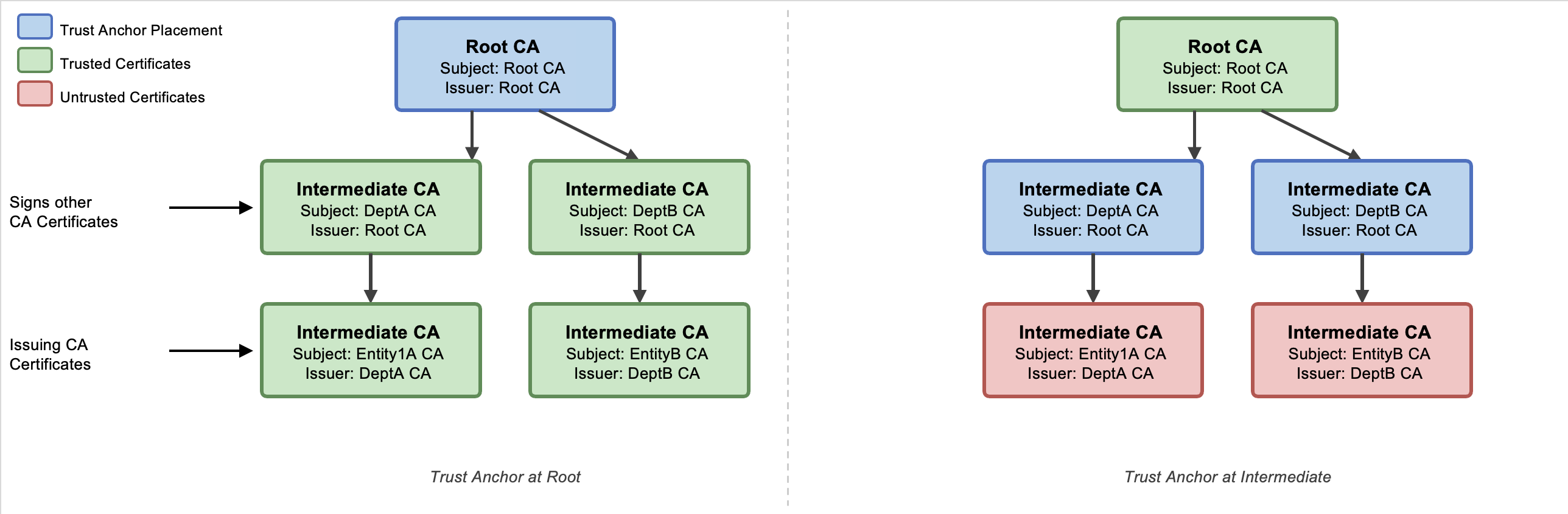
Figure 3: Certificate hierarchy in an external PKI
See the Solution deployment section to onboard a sample solution and verify your certificate bundle.
Fine-grained access control is vital for security because it allows organizations to precisely define and restrict permissions, minimizing the risk of unauthorized access and data breaches. The effective permissions of the temporary security credentials are an intersection of resource-based, identity-based, and session policies as shown in Figure 4. By setting up the trust anchor and profile configuration in IAM Roles Anywhere with session policies, you can limit the permissions for each session.
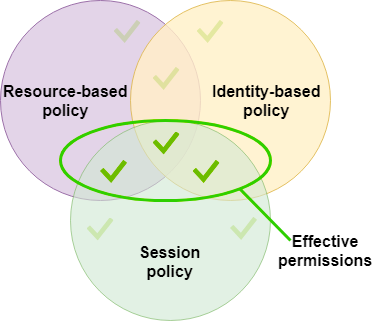
Figure 4: Effective permissions of session credentials
Credential helper
To obtain temporary security credentials from IAM Roles Anywhere, use the credential helper tool. This tool is compatible with the credential_process feature available across the AWS SDKs. The credential helper manages the process of obtaining temporary security credentials using IAM Roles Anywhere and returns them in JSON format. The private key of the workload and its CA signed certificate are the two critical parameters provided to the credential helper tool. To use this tool, you need both an end-entity certificate and a trust anchor created in IAM Roles Anywhere. As of December 2024, the credential helper (version 1.4.0 and later) supports Trusted Platform Module (TPM) 2.0.
The following is an example of how to obtain temporary security credentials:
$ ./aws_signing_helper credential-process \
--certificate /path/to/certificate \
--private-key /path/to/private-key \
--trust-anchor-arn arn:aws:rolesanywhere:region:account:trust-anchor/TA_ID \
--profile-arn arn:aws:rolesanywhere:region:account:profile/PROFILE_ID \
--role-arn arn:aws:iam::account:role/role-name-with-path
When credential-process is used with AWS SDKs, the temporary credentials are stored in memory and refreshed automatically. However, the AWS Command Line Interface (AWS CLI) invokes credential-process on every command. Each invocation creates a new IAM Roles Anywhere session, which adds latency to every CLI call. To avoid this delay when using the AWS CLI, we recommend using the update command, which writes refreshed credentials to a file that the CLI reads on each invocation without calling credential-process again.
When you use update, credentials are written to a credential file on disk and any user or process who can read the credential file might be able to read and use those AWS credentials, so it’s recommended to use serve unless your business has a specific use case that needs to read AWS credentials from a file. The serve command can be used to vend temporary credentials through an endpoint running on the local host using the same URIs and request headers as Instance Metadata Service Version 2 (IMDSv2). When using serve, no AWS configuration files are needed because the AWS SDKs can discover the server endpoint.
Just-in-time compared to short-lived certificates as workload identities
To help mitigate the risk around the exposure of your business-critical resources to compromised certificate user sessions, it’s recommended to use certificates with just-in-time credentials or short-lived access credentials. Just-in-time certificates are issued by a CA for immediate use for authentication on a system or application. The CA uses the roles and policies defined in IAM to determine when, and under what conditions, a workload can establish a session. With just-in-time access, admins don’t have to worry about revoking access if the users’ access roles change. Because the access credentials are recreated for each access request, any role changes can be applied in real time. Just-in-time access requires support from your CA, so verify compatibility with your CA before implementing it.
It’s recommended to tailor the validity periods for short-lived certificates to align with business requirements, workload lifecycle, and your organization’s risk tolerance. AWS Private CA offers a short-lived CA mode specifically designed for certificates with validity periods under 7 days. This mode is priced at $50 per month (compared to $400 per month for general-purpose CA mode), making it cost-effective for high-volume, ephemeral workload identities such as containers and serverless functions. For more information, see AWS Private Certificate Authority and How to use AWS Private CA short-lived certificate mode. See Zero trust on AWS for information about how short-lived credentials support a zero trust architecture.
Best practices for private key storage
Safeguarding private keys is of paramount importance in any environment. A private key is created by the certificate owner when requesting certificates with a Certificate Signing Request (CSR). The CA providing your certificate doesn’t create or have your private key. In fact, it’s recommended that no one outside your administrators should ever be given access to this material. Guardrails should be implemented to make sure the keys aren’t stored in an online repository.
Using the credential helper with IAM Roles Anywhere, you can integrate with PKCS #11-compatible modules. For implementation details, see How to implement cryptographic modules to secure private keys used with IAM Roles Anywhere. With the credential helper (version 1.1.0 and later), IAM Roles Anywhere supports PKCS #11 integration, so you can use private keys stored in hardware security modules (HSMs) or software-based secure stores and avoid storing them to disk. Additionally, as of December 2024, the credential helper supports Trusted Platform Module (TPM) 2.0, enabling private keys to be generated inside the TPM and marked as non-exportable. With TPM-backed keys, the private keys can’t be extracted even if the workload host is compromised. This is the strongest private key protection available for on-premises and hybrid workloads using IAM Roles Anywhere.
If your organization doesn’t implement PKCS #11–compatible modules, IAM Roles Anywhere supports credential helper version 1.0.5 for X.509 certificates and private keys stored in macOS and Windows certificate stores. This delegates the signing operations to keys stored within those OS-specific certificate stores. In Windows, both CryptoAPI and Cryptography API: Next Generation (CNG) are supported; in macOS, Keychain is supported. In these environments, the private key will never be directly readable, and the signing operation would be delegated to the secure store instead, which will improve security posture of your environment. If you have multiple certificates, then use the --cert-selector flag of the credential helper tool to search for a specific certificate (and associated private key) through the certificate subject, issuer, and serial number. The corresponding keys are x509Subject, x509Issuer, and x509Serial, respectively. These keys can be specified either through a JSON file format or through the command line. The following is an example of both approaches:
If you want to use a JSON file, it should be similar to this:
[
  {
    "Key": "x509Subject",
    "Value": "CN=Subject"
  },
  {
    "Key": "x509Issuer",
    "Value": "CN=Issuer"
  },
  {
    "Key": "x509Serial",
    "Value": "15D19632234BF759A32802C0DA88F9E8AFC8702D"
  }
]
If the preceding example is placed in a file called selector.json, it can be specified with the --cert-selector flag through file://path/to/selector.json.
The same certificate selector argument can be specified through the command line as shown in the following:
--cert-selector Key=x509Subject, Value=CN=Subject Key=x509Issuer, Value=CN=Issuer Key=x509Serial, Value=15D19632Monitoring trust anchor certificates
Monitoring certificate expiry in PKI is crucial for maintaining secure communication, because expired certificates can lead to authentication failures, leaving systems vulnerable to unauthorized access. Compliance and regulatory requirements often mandate timely renewal of certificates, making monitoring certificate expiry essential to avoid legal penalties and maintain organizational integrity.
Using IAM Roles Anywhere, you can receive notifications for CA certificate expiry and end-entity certificate expiry. IAM Roles Anywhere can send metrics, events, and notifications through multiple notification channels as shown in the following table:
| Event | Channel | Threshold | Enabled |
| CA certificate expiry | CloudWatch, Amazon EventBridge, and AWS Health | 45 days before expiry | TRUE |
| End-entity certificate expiry | EventBridge and AWS Health | 45 days before expiry | TRUE |
The preceding notifications thresholds are default settings, which you can customize using the steps in Customize notification settings in IAM Roles Anywhere.
Best practices for trust anchor certificate rotation
Consider rotating your certificates using blue/green deployments to seamlessly roll out new certificates without affecting service availability. Use automation to integrate certificate rotation testing in your blue/green deployment pipeline. See the sample AWS CloudFormation template in the Solution deployment section to build your automation pipeline.
As shown in Figure 5, two trust anchors have been created; one for each environment. Using this approach, you can test the certificate rotation process in a controlled staging environment before applying it to the production environment, thus reducing the risk of certificate-related outages.
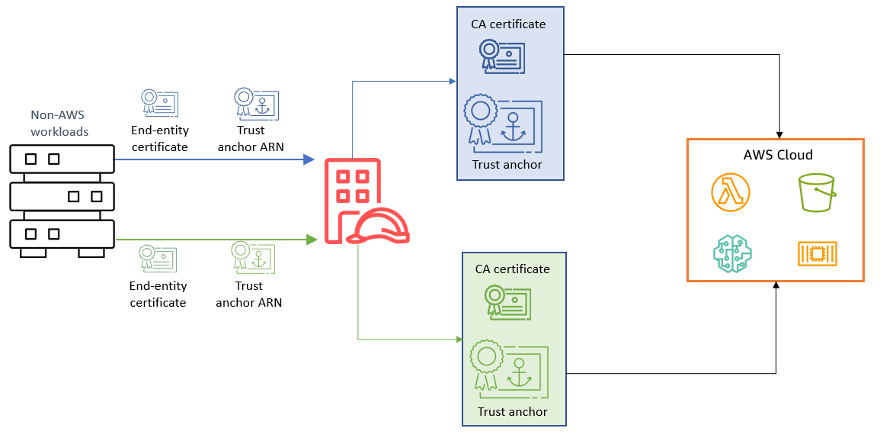
Figure 5: Trust anchor certificate rotation in blue/green deployment
Solution deployment
The sample solution template is available in the IAM Roles Anywhere — External PKI Integration repository on GitHub. It contains the following main steps:
- Creates a distinct IAM role with policies scoped to the resources that workload requires.
- Assigns a trust relationship to a IAM Roles Anywhere principal.
- Creates a trust anchor using a certificate bundle from an external CA.
- Creates a profile with the required IAM Roles.
Parameters for this deployment are shown in the following table:
| Parameter | Required | Default | Description |
| TrustAnchorCertificateBody | Yes | — | PEM-encoded X.509 certificate of your CA (includes BEGIN and END markers) |
| WorkloadSubjectCN | No | WorkloadA | Subject CN from the workload certificate, used in trust policy conditions |
| WorkloadIssuerCN | No | MyCompany CA | Issuer CN from the CA certificate, used in trust policy conditions |
| WorkloadSANCN | No | WorkloadA | SAN CN from the workload certificate, provides additional identity assertion |
| SessionDurationSeconds | No | 3600 | Maximum session duration in seconds (900–43200) |
| NotificationEmail | No | (empty) | Email address for certificate expiry notifications. When provided, creates an Amazon Simple Notification Service (Amazon SNS) topic and an EventBridge rule |
Important: The
SessionDurationSecondsvalue must not exceed the IAM role’sMaxSessionDurationsetting, which defaults to 3600 seconds (1 hour). If you request a longer session than the role allows, theCreateSessionAPI returns an error. The companion template keeps both values in sync by setting the role’s MaxSessionDuration to the same parameter value. If you configure the role separately, update its MaxSessionDuration to match your desired session length. For more information, see IAM Roles Anywhere CreateSession API.
If the workload’s subject CN (WorkloadSubjectCN) doesn’t match the x509Subject CN of the authenticating certificate, the CreateSession call is denied. The same conditional verification applies to WorkloadIssuerCN and WorkloadSANCN.
The template enforces three certificate attribute conditions in the IAM trust policy: issuer CN, subject CN, and SAN CN must all match the values configured as parameters. Additionally, the trust policy scopes role assumption to the specific trust anchor Amazon Resource Name (ARN), preventing other trust anchors in the same account from assuming that role.
Conclusion
In this post, we discussed how AWS IAM Roles Anywhere, empowered by X.509 certificates, introduces a dynamic and secure way to manage workload identities and issue temporary access credentials. By understanding the trust model, using certificate attributes, and implementing fine-grained authorization, organizations can gain granular control over the effective permissions of these credentials.
The choice between just-in-time and short-lived certificates as workload identities depends on your specific requirements.
Adhering to best practices for private key storage is essential to maintain the integrity of your security infrastructure. Regularly rotating trust anchor certificates helps ensure the long-term trustworthiness of your system.
As you embark on your journey to implement IAM Roles Anywhere and integrate it with your PKI, remember that a well-architected approach to certificate management is a cornerstone of robust and resilient cloud security.
For additional deployment guidance, see Planning for your IAM Roles Anywhere deployment, which covers end-to-end deployment planning including network architecture, monitoring, and operational considerations.
If you have questions, you can start a new thread on AWS re:Post or reach out to AWS Support.