❌

Reading view

How new PHP vulnerabilities threaten home users | Kaspersky official blog

Yesterday, two critical vulnerabilities were disclosed in PHP, the scripting language used by many websites and online services: CVE-2026-109618 and CVE-2026-109619. Attackers can exploit them to remotely execute commands on any server running PHP, with no authentication required. The exploit has been dubbed PHP2Shell.

The PHP security team announced an upcoming emergency update on October 20 and released patches fixing the vulnerabilities the following day.

We’ve already covered the technical details of these vulnerabilities and explained what companies and server administrators should do. You may have safely skipped that news because you don’t run any servers — but unfortunately, the issue is not limited to businesses.

Nearly 70% of websites run on PHP, including services we use every day: wikis, online stores, smart devices with web interfaces, home network-attached storage (NAS), smart-home controllers, and much more.

Today, we explain how these vulnerabilities could affect you personally and what you can do to reduce the risks.

How the vulnerabilities can affect home users

Account and personal-data theft

The vulnerability allows an attacker to steal authentication tokens from server memory. These tokens essentially act like electronic passes — telling a website that the user has already signed in. As a result, an attacker may be able to access someone else’s account without entering a password or two-factor authentication code, putting messages, documents, delivery addresses, order histories, and other confidential information at risk.

Loss of files on home devices

If you have network-attached storage (NAS) or a video surveillance system at home that uses a vulnerable PHP version, it may also be at risk. Depending on what level of access they gain, attackers could potentially copy, delete or encrypt files they can access.

Malware infection

If an attacker gains access to a vulnerable website, they can use it in virtually any way they want: trick visitors into downloading a malicious file or clicking on a phishing link, display dangerous instructions, replace payment forms or login pages with malicious ones — the list goes on and on. As a result, someone visiting a legitimate website could not only lose access to their account, but also lose money or accidentally infect their device with malware.

Below are examples of services directly affected by the vulnerabilities.

Which services are affected by the PHP vulnerabilities

Jeedom

Jeedom is a smart-home platform that lets users control lighting, sensors, heating, blinds and home IoT devices. Attackers could abuse this in many ways: they could disable the alarm, track when the homeowner is away, access video from the door intercom, and more.

The developers confirmed that the new vulnerability affects their application, and have already released an emergency update — Jeedom 4.6.2. Users need to run the update twice for it to work. The developers say a fully fixed version for home users will be released in the coming days.

Websites we use every day

As mentioned above, PHP is used by roughly 70% of websites. This doesn’t mean every one of them is vulnerable: it depends on the PHP version in use and whether the site owners have already updated it. Many government websites in Europe have already suspended operations because of the new vulnerability.

Unfortunately, a website may still be vulnerable even if it appears to be working normally. An attacker could potentially take control of any legitimate website whose server hasn’t been patched yet. They could fake payment or login pages, host malicious files, or persuade users to download an “urgent update” that is actually malware.

Ordinary users have no reliable way to check whether such instructions or files are safe, so be sure to use reliable anti-phishing and antivirus protection. If you suspect that your data may have been stolen, check the active sessions in your account settings. If you spot suspicious activity or devices you don’t recognize, sign out of all active sessions and change your password. Use a password manager — it can generate a truly strong, unique password that you won’t have to memorize yourself.

Computer games

Bad news for gamers: some video games whose servers use PHP are also at risk. If you don’t want attackers to get hold of your accounts, be sure to update the passwords for your gaming platforms, stores and accounts.

To buy time for updates, some developers temporarily took their services offline. Final Fantasy XIV, Pokemon Champions, games from Bandai Namco Entertainment, Uma Musume: Pretty Derby, Granblue Fantasy, Shadowverse: Worlds Beyond, and many others went into emergency maintenance. Nintendo Switch Online and the GOG and Steam stores were also affected.

Unfortunately, there’ve also been more drastic consequences. Yesterday, the developers of World Quest announced that the game would shut down permanently after 15 years: it relied on outdated infrastructure that would have been extremely difficult and costly to fix. For the same reason, the mobile game Please Save My Pandemonium! shut down after more than ten years of operation.

Home network-attached storage (NAS)

“Home clouds” have become popular in recent years for good reason: many users prefer to keep backups of their data at home rather than online. A number of companies make NAS devices, and at least three — QNAP, Synology and ASUSTOR — have said the vulnerabilities affect their products. An update has also been released for Unraid, an operating system for home servers, network storage and media servers.

QNAP

The manufacturer confirmed that the vulnerabilities affect several versions of its NAS operating systems — QTS and QuTS hero — as well as applications including QuMagie, Note Station 3 and certain versions of QVR Surveillance. A successful attack could put photos, documents, notes and camera recordings at risk.

At the time of publication of this blogpost, QNAP is still preparing updates, so the main priority is to temporarily disconnect NAS from the internet. QNAP recommends disabling port forwarding on the router — to prevent NAS from automatically opening ports — and allowing access to the management panel only from the home network or through a VPN.

Synology

Both vulnerabilities have been officially confirmed in PHP packages 7.3, 7.4, and 8.0–8.4, as well as in Mail Station and Synology Calendar. Fixes have already been released for PHP, starting from version 7.4, as well as for Mail Station and Synology Calendar. PHP 7.3 won’t be fixed. The company separately notes that the PHP component built into its operating system cannot be reached from outside the device, so the risk of attack is very low.

ASUSTOR

ASUSTOR also officially confirmed both vulnerabilities, and immediately removed PHP 7, 7.3, 7.4, and 8.1 packages from App Central. The company recommends immediately backing up your data, removing older PHP packages, and using PHP 8.3 or 8.4.

Unraid

In today’s operating-system update, PHP was upgraded to version 8.4.27 with fixes for the vulnerabilities. The developers recommend that all users update to Unraid 7.3.4. Containers with their own PHP installation must be updated separately: the new PHP version in the operating system doesn’t replace PHP inside containers.

At the time of publication, we haven’t found public confirmation from other major manufacturers (such as TerraMaster, UGREEN, Buffalo, or Western Digital) that their devices are affected by these vulnerabilities — only user discussions on forums.

But the fact that only some NAS manufacturers have confirmed the problem so far doesn’t guarantee that your devices are safe — especially if they’re fairly old or come from a lesser-known or defunct manufacturer. In that case, first disconnect the devices from the internet while keeping them accessible only on the local network, and then investigate whether they’re vulnerable.

Nextcloud cloud storage

Nextcloud is a free, open-source platform for creating your own cloud storage, serving as an alternative to Google Drive, Dropbox, and Microsoft OneDrive. It lets you store and synchronize files across devices, share them with other users, and work with documents, photos, calendars and contacts. The data can be stored on your own server or NAS rather than on a third-party company’s servers.

If you store important data in Nextcloud, check how your cloud instance is configured. If you use Nextcloud All-in-One, update to version 14.4.1 where the vulnerability has already been fixed.

If your Nextcloud installation is configured differently, you need to update PHP yourself on the device or server.

How to protect your devices and data

  • Use phishing and malware protection. Our security solution automatically blocks phishing pages and malware, even when attackers place them on legitimate websites.
  • Keep an eye on updates. If you have network-attached storage, a smart-home system, a home server, a media server, or any other device with a web interface, first check the manufacturer’s website and install all available updates. If no update is available yet, temporarily disable internet access to the device.
  • Use strong passwords. Most people reuse the same password, or variations of it, across multiple websites. If an attacker finds one of those passwords on a vulnerable server, they may be able to compromise your other accounts as well. We recommend generating and storing strong, unique passwords in Kaspersky Password Manager so you don’t have to remember your credentials yourself. Be sure to enable two-factor authentication on all important accounts — ideally using one-time codes generated by the same password manager.
  • Keep an offline backup of important files. Don’t rely on cloud storage alone — make sure you keep a backup of all important documents on both a hard drive and an external device. For more information on how to make backups properly, see our article The internet remembers not quite everything.

What other risks can your home devices face? Read our articles:

  •  

Which copy of that file is the real one? Dinner, off the record, in Midtown

EVENT: The Register is hosting a private dinner in New York on Tuesday 27 October for senior technology, infrastructure and data leaders, with LucidLink. Joe Fay takes the chair, it runs under the Chatham House Rule, and nothing said leaves the table. Distributed teams are producing more unstructured file data than ever, and most of them reach it through infrastructure designed for an office: legacy NAS, a VPN, and a sync-and-download habit nobody actually chose. It rarely fails outright. It charges rent somewhere else instead, in duplicated storage, in waiting, in governance gaps, and in the hour somebody loses working out which version of a file is current. The conversation worth having about that is not the architecture diagram. It is what a team did when it stopped being in one building. Which workaround somebody has quietly been paying for ever since. What broke when they tried to retire the NAS, and what they would do differently now. People say that over dinner. They do not say it on a recorded webinar. So this is dinner. Drinks, a handful of questions across the table, then more drinks. Everyone there as a peer, and a chair whose job includes stopping anyone who starts to pitch. The premise is deliberately not rip and replace. The evening is about modernizing around the storage and governance investments an organization already has, rather than pretending they are not there, which is usually the point at which these conversations stop being useful to the people who have to pay for them. On the table: handling the growth in unstructured data, supporting distributed teams without paying for the same file three times, sync and version control, and whether any of it holds up against a security incident. Holly Bossert, Commercial Sales US at LucidLink, joins the conversation. Joe Fay of The Register moderates. The table is for senior technology, infrastructure and data leaders carrying this now, not planning for it later. Dinner runs from 6.00pm to 8.30pm at The Capital Grille, 120 W 51st Street. Places are limited and go by invitation. Request one here.

  •  
  •  

3 easy-to-miss cybersecurity risks for small businesses

There’s a lot to security that isn’t necessarily “cyber.” It’s not all hackers or complex network attacks.

Alongside traditional cyberattacks that deploy malware or exploit known software vulnerabilities, there are also less technical—yet equally devastating—forms of theft.

This doesn’t mean that well-known cybersecurity best practices don’t apply. Every small business owner should still use unique passwords for every account, turn on multi-factor authentication, keep their software and operating systems updated, and run always-on cybersecurity software.

But for the everyday small business owner juggling dozens of accounts, networks, devices, and the reams of data being created, stored, and shared across text messages, emails, and online portals, this advice is for you.

For National Small Business Week in the US, here are three ways to protect your business that require little technical prowess.

Don’t use your Social Security Number as your tax ID

In the US, the Internal Revenue Service (IRS) allows small business owners to use their personal Social Security Number (SSN) as the Federal Tax ID. It’s a small grace meant to simplify annual record-keeping for sole proprietors and owner-employees, but for cybercriminals, it’s a basic oversight they’d like every small business to make.

Using your Social Security Number as your Federal Tax ID means putting your Social Security Number in an ever-increasing number of hands. That’s because small business taxes are different from taxes for everyday salaried employees.

Whenever a small business takes on a new client or a contractor who pays for services costing at least $600, that small business has to share and receive what is called a W-9 form. This exact form isn’t filed with the IRS, but it is used to track payments for later filings.

What’s more important, though, is that this form asks for an owner’s name, address, and tax ID number.

This means that as a small business grows, its vulnerability to identity theft increases in tandem. Every W-9 filed that uses an owner’s SSN as their tax ID number is another opportunity for that SSN to be stolen. After just one year of operation, a small business owner’s SSN could end up in the inboxes, filing cabinets, and cloud drives of a dozen different people and companies.

This is exactly what cybercriminals want.

Equipped with a W-9 form about your business, a cybercriminal could impersonate you or your business. They could open a business credit line, file fraudulent returns that claim your small business income, or scam your clients.

How to stay safe:

Apply for a free Employer Identification Number (EIN) at IRS.gov. It’s quick to do and it separates your business tax identity from your personal tax identity. After that, put the EIN on W-9s, 1099s, and all other business paperwork instead of your SSN.

Keep your personal cloud storage personal

The most popular cloud storage for most small business owners is the cloud storage they already have—their personal Google Drive or iCloud.

Built to make memory archival as easy as possible, these tools can automatically back up and secure nearly every single moment that happens through your device, from the vacation photos you snapped last summer, to your kid’s first steps recorded on video, to the texts you sent, the notes you made, and the calendar appointments you managed.

But this type of automatic archival poses a threat to any non-personal information that you view, send, markup, or sign when using your personal smartphone. Suddenly, and often without thinking about it, your cloud storage has backups of signed contracts, tax returns, client intake forms, invoices, business financial statements, and photos of physical paperwork.

Above, we warned about using your SSN as your tax ID because it creates a risk if anyone in your business network is breached. But storing client information in your personal cloud storage creates a different problem: it puts that risk directly on you.

Compounding the threat here is the fact that many personal cloud storage accounts are shared with family members. More people accessing the same account means more exposure and more chances for mistakes, even if everyone has good intentions.

How to stay safe:

Go through the cloud backup settings on both your phone and your computer and manage what data is being synced. Move sensitive business files to a dedicated business storage account with proper access controls, sharing permissions, and audit logs—something that can tell you who opened a file and when.

If anything business-related has to live in a personal cloud account, give that account a strong, unique password, turn on multi-factor authentication, and don’t share access with anyone who isn’t you.

Protect device and account access in the home

Devices have a funny way of moving around. Your smartphone goes into your spouse’s hands as they override your music choices in the car. Your tablet ends most nights in your kid’s bedroom as they watch TV. And your laptop gets tugged around from couch to counter to kitchen table—each time fully opened and logged in, a portal to the web.

You trust everyone in your home to act safely online, but the path to online safety is full of mistakes.

A single errant click on a fake ad, a malicious search result, or a disguised download is all it takes to compromise your device today, along with all your small business records.

Aside from the threat of malware, someone using your device could make purchases, accidentally delete files, and overwrite important documents.

Remember, an “insider threat” doesn’t need to be malicious to cause damage—they just need to be inside your network (which in this, is your home).

How to stay safe:

Treat your devices that you use for work as work devices. That means requiring a passcode or password for device entry, along with multi-factor authentication for important business accounts.

Also, to ensure that any wrong click doesn’t lead to a malicious PDF download or a wayward malware installation, use always-on antimalware protection software, like Malwarebytes for Teams.

Secure your success

It’s easy to get overwhelmed with modern cybersecurity advice. Every week there are new vulnerabilities to patch, emerging scams to avoid, and novel viruses and pieces of malware that can seemingly take over your device, your data, and your business.

Thankfully, there are important steps you can take today that don’t require you to fiddle with internal settings or take a class on network engineering. Some of the most effective protections are simple: Limit how widely you share sensitive information, keep business and personal data separate, and control who can access your devices.

For everything else, try Malwarebytes for Teams to receive 24/7, always-on antimalware protection to shut out viruses, block malware attacks, and keep hackers out of your business.

  •  

“iCloud storage is full” scam is back, and now it wants your payment details

A few months ago, we reported on a fake cloud storage alert that triggered a redirect chain to an app that has since been delisted from the Apple Store.

The threat of losing your photos is a powerful lure, so scammers are now using it to steal personal and financial details.

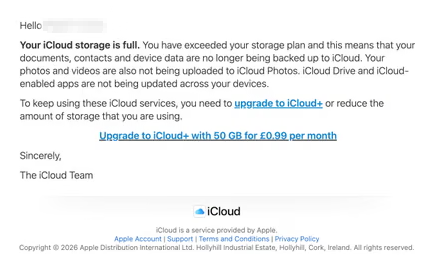
The Guardian warns about an iCloud-themed campaign that start with a few “your iCloud storage is full’ messages, then escalates to threats. If you don’t respond or take action, the emails claim your data will be wiped on a specific date.

US Consumer Affairs has urged users not to click any links and to contact Apple directly if they receive such messages.

The deadline in the emails is never far away, usually just two days. No scammer ever wants you to think things through before you act, so there is always time pressure.

We’ve seen these emails in English and Spanish. Oddly, the monthly rate is set at 99 pence or 99 euro cents respectively.

The 0.99 seems to be the magic number. In reality, scammers don’t care about the payment. What they want is for you fill out the form on their phishing site.

Email saying you must upgrade to iCloud+ or lose your photos

The screenshot above is just one of many examples. There are plenty of variations, but they all follow the same them: make a small payment to stop the files in your iCloud storage from being deleted.

The websites these emails link to also vary, but they all ask for personal and payment details to complete that payment.

How to stay safe

It’s worth remembering that Apple does notify users when their iCloud storage is nearing capacity, but those alerts appear within your device settings or as official system notifications. They don’t come through unsolicited text messages or emails with external links. If you need to check your storage, go directly to Settings on your device and review your iCloud usage.

So, to stay safe:

  • Always access your account through our official website.
  • Never share your password with anyone.
  • Never click on links in unsolicited emails without verifying with a trusted source.
  • Use an up-to-date, real-time anti-malware solution with a web protection component.
  • Do not engage with websites that attract visitors like this.

Pro tip: Malwarebytes Scam Guard would have helped you identify this email as a scam and provided advice on how to proceed.


Something feel off? Check it before you click.  

Malwarebytes Scam Guard helps you analyze suspicious links, texts, and screenshots instantly.  

Available with Malwarebytes Premium Security for all your devices, and in the Malwarebytes app for iOS and Android.  

Try it free → 

  •  

Double Agents: Exposing Security Blind Spots in GCP Vertex AI

Unit 42 uncovers a "double agent" flaw in Google Cloud's Vertex AI, demonstrating how overprivileged AI agents can compromise cloud environments.

The post Double Agents: Exposing Security Blind Spots in GCP Vertex AI appeared first on Unit 42.

  •  

[updated] A fake cloud storage alert that ends at Freecash

Last week we talked about an app that promises users they can make money testing games, or even just by scrolling through TikTok.

Imagine our surprise when we ended up on a site promoting that same Freecash app while investigating a “cloud storage” phish. We’ve all probably seen one of those. They’re common enough and according to recent investigation by BleepingComputer, there’s a

“large-scale cloud storage subscription scam campaign targeting users worldwide with repeated emails falsely warning recipients that their photos, files, and accounts are about to be blocked or deleted due to an alleged payment failure.”

Based on the description in that article, the email we found appears to be part of this campaign.

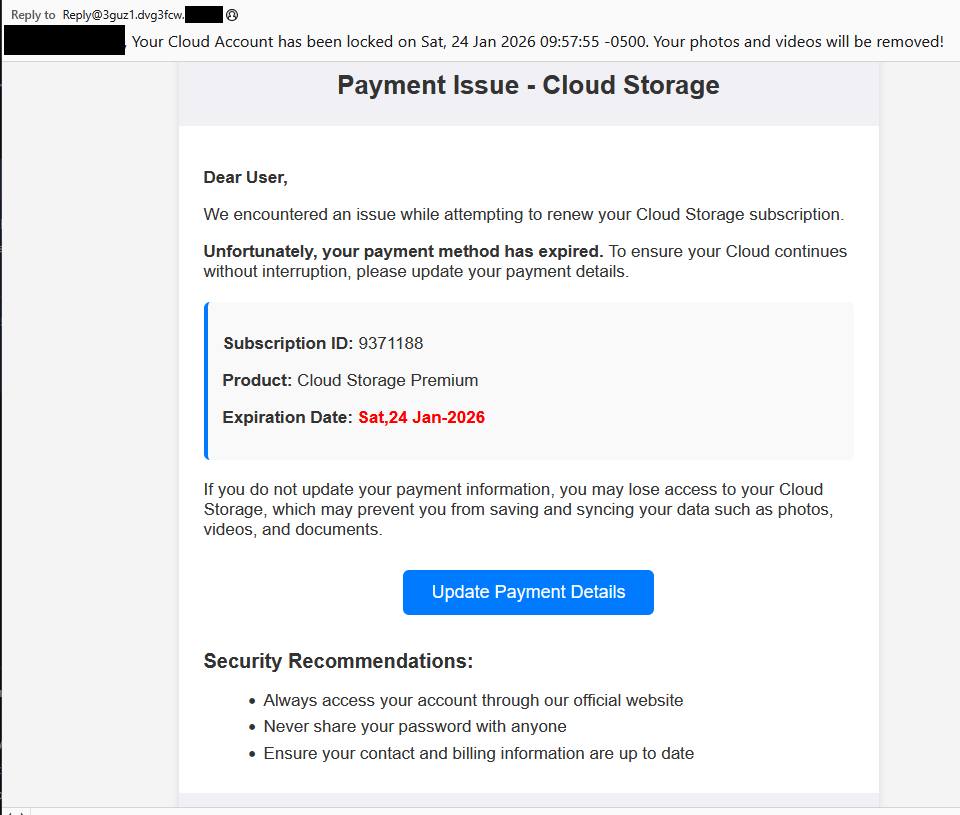
Cloud storage payment issue email

The subject line of the email is:

“{Recipient}. Your Cloud Account has been locked on Sat, 24 Jan 2026 09:57:55 -0500. Your photos and videos will be removed!”

This matches one of the subject lines that BleepingComputer listed.

And the content of the email:

“Payment Issue – Cloud Storage

Dear User,

We encountered an issue while attempting to renew your Cloud Storage subscription.

Unfortunately, your payment method has expired. To ensure your Cloud continues without interruption, please update your payment details.

Subscription ID: 9371188

Product: Cloud Storage Premium

Expiration Date: Sat,24 Jan-2026

If you do not update your payment information, you may lose access to your Cloud Storage, which may prevent you from saving and syncing your data such as photos, videos, and documents.

Update Payment Details {link button}

Security Recommendations:

  • Always access your account through our official website
  • Never share your password with anyone
  • Ensure your contact and billing information are up to date”

The link in the email leads to  https://storage.googleapis[.]com/qzsdqdqsd/dsfsdxc.html#/redirect.html, which helps the scammer establish a certain amount of trust because it points to Google Cloud Storage (GCS). GCS is a legitimate service that allows authorized users to store and manage data such as files, images, and videos in buckets. However, as in this case, attackers can abuse it for phishing.

The redirect carries some parameters to the next website.

first redirect

The feed.headquartoonjpn[.]com domain was blocked by Malwarebytes. We’ve seen it before in an earlier campaign involving an Endurance-themed phish.

Endiurance phish

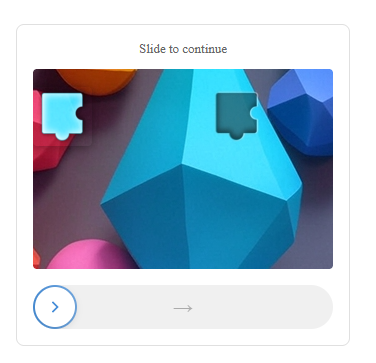
After a few more redirects, we ended up at hx5.submitloading[.]com, where a fake CAPTCHA triggered the last redirect to freecash[.]com, once it was solved.

slider captcha

The end goal of this phish likely depends on the parameters passed along during the redirects, so results may vary.

Rather than stealing credentials directly, the campaign appears designed to monetize traffic, funneling victims into affiliate offers where the operators get paid for sign-ups or conversions.

BleepingComputer noted that they were redirected to affiliate marketing websites for various products.

“Products promoted in this phishing campaign include VPN services, little-known security software, and other subscription-based offerings with no connection to cloud storage.”

How to stay safe

Ironically, the phishing email itself includes some solid advice:

  • Always access your account through our official website.
  • Never share your password with anyone.

We’d like to add:

  • Never click on links in unsolicited emails without verifying with a trusted source.
  • Use an up-to-date, real-time anti-malware solution with a web protection component.
  • Do not engage with websites that attract visitors like this.

Pro tip: Malwarebytes Scam Guard would have helped you identify this email as a scam and provided advice on how to proceed.

Redirect flow (IOCs)

storage.googleapis[.]com/qzsdqdqsd/dsfsdxc.html

feed.headquartoonjpn[.]com

revivejudgemental[.]com

hx5.submitloading[.]com

freecash[.]com

Update February 5, 2026

Almedia GmbH, the company behind the Freecash platform, reached out to us for information about the chain of redirects that lead to their platform. And after an investigation they notified us that:

“Following Malwarebytes’ reporting and the additional information they shared with us, we investigated the issue and identified an affiliate operating in breach of our policies. That partner has been removed from our network.

Almedia does not sell user data, and we take compliance, user trust, and responsible advertising seriously.”


We don’t just report on scams—we help detect them

Cybersecurity risks should never spread beyond a headline. If something looks dodgy to you, check if it’s a scam using Malwarebytes Scam Guard, a feature of our mobile protection products. Submit a screenshot, paste suspicious content, or share a text or phone number, and we’ll tell you if it’s a scam or legit. Download Malwarebytes Mobile Security for iOS or Android and try it today!

  •  
❌