
Reading view

3 easy-to-miss cybersecurity risks for small businesses

There’s a lot to security that isn’t necessarily “cyber.” It’s not all hackers or complex network attacks.

Alongside traditional cyberattacks that deploy malware or exploit known software vulnerabilities, there are also less technical—yet equally devastating—forms of theft.

This doesn’t mean that well-known cybersecurity best practices don’t apply. Every small business owner should still use unique passwords for every account, turn on multi-factor authentication, keep their software and operating systems updated, and run always-on cybersecurity software.

But for the everyday small business owner juggling dozens of accounts, networks, devices, and the reams of data being created, stored, and shared across text messages, emails, and online portals, this advice is for you.

For National Small Business Week in the US, here are three ways to protect your business that require little technical prowess.

Don’t use your Social Security Number as your tax ID

In the US, the Internal Revenue Service (IRS) allows small business owners to use their personal Social Security Number (SSN) as the Federal Tax ID. It’s a small grace meant to simplify annual record-keeping for sole proprietors and owner-employees, but for cybercriminals, it’s a basic oversight they’d like every small business to make.

Using your Social Security Number as your Federal Tax ID means putting your Social Security Number in an ever-increasing number of hands. That’s because small business taxes are different from taxes for everyday salaried employees.

Whenever a small business takes on a new client or a contractor who pays for services costing at least $600, that small business has to share and receive what is called a W-9 form. This exact form isn’t filed with the IRS, but it is used to track payments for later filings.

What’s more important, though, is that this form asks for an owner’s name, address, and tax ID number.

This means that as a small business grows, its vulnerability to identity theft increases in tandem. Every W-9 filed that uses an owner’s SSN as their tax ID number is another opportunity for that SSN to be stolen. After just one year of operation, a small business owner’s SSN could end up in the inboxes, filing cabinets, and cloud drives of a dozen different people and companies.

This is exactly what cybercriminals want.

Equipped with a W-9 form about your business, a cybercriminal could impersonate you or your business. They could open a business credit line, file fraudulent returns that claim your small business income, or scam your clients.

How to stay safe:

Apply for a free Employer Identification Number (EIN) at IRS.gov. It’s quick to do and it separates your business tax identity from your personal tax identity. After that, put the EIN on W-9s, 1099s, and all other business paperwork instead of your SSN.

Keep your personal cloud storage personal

The most popular cloud storage for most small business owners is the cloud storage they already have—their personal Google Drive or iCloud.

Built to make memory archival as easy as possible, these tools can automatically back up and secure nearly every single moment that happens through your device, from the vacation photos you snapped last summer, to your kid’s first steps recorded on video, to the texts you sent, the notes you made, and the calendar appointments you managed.

But this type of automatic archival poses a threat to any non-personal information that you view, send, markup, or sign when using your personal smartphone. Suddenly, and often without thinking about it, your cloud storage has backups of signed contracts, tax returns, client intake forms, invoices, business financial statements, and photos of physical paperwork.

Above, we warned about using your SSN as your tax ID because it creates a risk if anyone in your business network is breached. But storing client information in your personal cloud storage creates a different problem: it puts that risk directly on you.

Compounding the threat here is the fact that many personal cloud storage accounts are shared with family members. More people accessing the same account means more exposure and more chances for mistakes, even if everyone has good intentions.

How to stay safe:

Go through the cloud backup settings on both your phone and your computer and manage what data is being synced. Move sensitive business files to a dedicated business storage account with proper access controls, sharing permissions, and audit logs—something that can tell you who opened a file and when.

If anything business-related has to live in a personal cloud account, give that account a strong, unique password, turn on multi-factor authentication, and don’t share access with anyone who isn’t you.

Protect device and account access in the home

Devices have a funny way of moving around. Your smartphone goes into your spouse’s hands as they override your music choices in the car. Your tablet ends most nights in your kid’s bedroom as they watch TV. And your laptop gets tugged around from couch to counter to kitchen table—each time fully opened and logged in, a portal to the web.

You trust everyone in your home to act safely online, but the path to online safety is full of mistakes.

A single errant click on a fake ad, a malicious search result, or a disguised download is all it takes to compromise your device today, along with all your small business records.

Aside from the threat of malware, someone using your device could make purchases, accidentally delete files, and overwrite important documents.

Remember, an “insider threat” doesn’t need to be malicious to cause damage—they just need to be inside your network (which in this, is your home).

How to stay safe:

Treat your devices that you use for work as work devices. That means requiring a passcode or password for device entry, along with multi-factor authentication for important business accounts.

Also, to ensure that any wrong click doesn’t lead to a malicious PDF download or a wayward malware installation, use always-on antimalware protection software, like Malwarebytes for Teams.

Secure your success

It’s easy to get overwhelmed with modern cybersecurity advice. Every week there are new vulnerabilities to patch, emerging scams to avoid, and novel viruses and pieces of malware that can seemingly take over your device, your data, and your business.

Thankfully, there are important steps you can take today that don’t require you to fiddle with internal settings or take a class on network engineering. Some of the most effective protections are simple: Limit how widely you share sensitive information, keep business and personal data separate, and control who can access your devices.

For everything else, try Malwarebytes for Teams to receive 24/7, always-on antimalware protection to shut out viruses, block malware attacks, and keep hackers out of your business.
  •  

3 easy-to-miss cybersecurity risks for small businesses

There’s a lot to security that isn’t necessarily “cyber.” It’s not all hackers or complex network attacks.

Alongside traditional cyberattacks that deploy malware or exploit known software vulnerabilities, there are also less technical—yet equally devastating—forms of theft.

This doesn’t mean that well-known cybersecurity best practices don’t apply. Every small business owner should still use unique passwords for every account, turn on multi-factor authentication, keep their software and operating systems updated, and run always-on cybersecurity software.

But for the everyday small business owner juggling dozens of accounts, networks, devices, and the reams of data being created, stored, and shared across text messages, emails, and online portals, this advice is for you.

For National Small Business Week in the US, here are three ways to protect your business that require little technical prowess.

Don’t use your Social Security Number as your tax ID

In the US, the Internal Revenue Service (IRS) allows small business owners to use their personal Social Security Number (SSN) as the Federal Tax ID. It’s a small grace meant to simplify annual record-keeping for sole proprietors and owner-employees, but for cybercriminals, it’s a basic oversight they’d like every small business to make.

Using your Social Security Number as your Federal Tax ID means putting your Social Security Number in an ever-increasing number of hands. That’s because small business taxes are different from taxes for everyday salaried employees.

Whenever a small business takes on a new client or a contractor who pays for services costing at least $600, that small business has to share and receive what is called a W-9 form. This exact form isn’t filed with the IRS, but it is used to track payments for later filings.

What’s more important, though, is that this form asks for an owner’s name, address, and tax ID number.

This means that as a small business grows, its vulnerability to identity theft increases in tandem. Every W-9 filed that uses an owner’s SSN as their tax ID number is another opportunity for that SSN to be stolen. After just one year of operation, a small business owner’s SSN could end up in the inboxes, filing cabinets, and cloud drives of a dozen different people and companies.

This is exactly what cybercriminals want.

Equipped with a W-9 form about your business, a cybercriminal could impersonate you or your business. They could open a business credit line, file fraudulent returns that claim your small business income, or scam your clients.

How to stay safe:

Apply for a free Employer Identification Number (EIN) at IRS.gov. It’s quick to do and it separates your business tax identity from your personal tax identity. After that, put the EIN on W-9s, 1099s, and all other business paperwork instead of your SSN.

Keep your personal cloud storage personal

The most popular cloud storage for most small business owners is the cloud storage they already have—their personal Google Drive or iCloud.

Built to make memory archival as easy as possible, these tools can automatically back up and secure nearly every single moment that happens through your device, from the vacation photos you snapped last summer, to your kid’s first steps recorded on video, to the texts you sent, the notes you made, and the calendar appointments you managed.

But this type of automatic archival poses a threat to any non-personal information that you view, send, markup, or sign when using your personal smartphone. Suddenly, and often without thinking about it, your cloud storage has backups of signed contracts, tax returns, client intake forms, invoices, business financial statements, and photos of physical paperwork.

Above, we warned about using your SSN as your tax ID because it creates a risk if anyone in your business network is breached. But storing client information in your personal cloud storage creates a different problem: it puts that risk directly on you.

Compounding the threat here is the fact that many personal cloud storage accounts are shared with family members. More people accessing the same account means more exposure and more chances for mistakes, even if everyone has good intentions.

How to stay safe:

Go through the cloud backup settings on both your phone and your computer and manage what data is being synced. Move sensitive business files to a dedicated business storage account with proper access controls, sharing permissions, and audit logs—something that can tell you who opened a file and when.

If anything business-related has to live in a personal cloud account, give that account a strong, unique password, turn on multi-factor authentication, and don’t share access with anyone who isn’t you.

Protect device and account access in the home

Devices have a funny way of moving around. Your smartphone goes into your spouse’s hands as they override your music choices in the car. Your tablet ends most nights in your kid’s bedroom as they watch TV. And your laptop gets tugged around from couch to counter to kitchen table—each time fully opened and logged in, a portal to the web.

You trust everyone in your home to act safely online, but the path to online safety is full of mistakes.

A single errant click on a fake ad, a malicious search result, or a disguised download is all it takes to compromise your device today, along with all your small business records.

Aside from the threat of malware, someone using your device could make purchases, accidentally delete files, and overwrite important documents.

Remember, an “insider threat” doesn’t need to be malicious to cause damage—they just need to be inside your network (which in this, is your home).

How to stay safe:

Treat your devices that you use for work as work devices. That means requiring a passcode or password for device entry, along with multi-factor authentication for important business accounts.

Also, to ensure that any wrong click doesn’t lead to a malicious PDF download or a wayward malware installation, use always-on antimalware protection software, like Malwarebytes for Teams.

Secure your success

It’s easy to get overwhelmed with modern cybersecurity advice. Every week there are new vulnerabilities to patch, emerging scams to avoid, and novel viruses and pieces of malware that can seemingly take over your device, your data, and your business.

Thankfully, there are important steps you can take today that don’t require you to fiddle with internal settings or take a class on network engineering. Some of the most effective protections are simple: Limit how widely you share sensitive information, keep business and personal data separate, and control who can access your devices.

For everything else, try Malwarebytes for Teams to receive 24/7, always-on antimalware protection to shut out viruses, block malware attacks, and keep hackers out of your business.

  •  

“iCloud storage is full” scam is back, and now it wants your payment details

A few months ago, we reported on a fake cloud storage alert that triggered a redirect chain to an app that has since been delisted from the Apple Store.

The threat of losing your photos is a powerful lure, so scammers are now using it to steal personal and financial details.

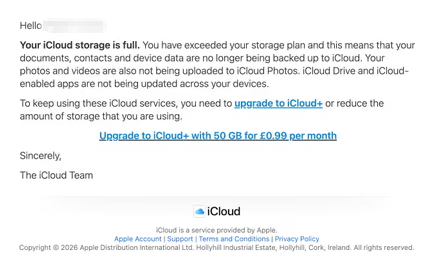
The Guardian warns about an iCloud-themed campaign that start with a few “your iCloud storage is full’ messages, then escalates to threats. If you don’t respond or take action, the emails claim your data will be wiped on a specific date.

US Consumer Affairs has urged users not to click any links and to contact Apple directly if they receive such messages.

The deadline in the emails is never far away, usually just two days. No scammer ever wants you to think things through before you act, so there is always time pressure.

We’ve seen these emails in English and Spanish. Oddly, the monthly rate is set at 99 pence or 99 euro cents respectively.

The 0.99 seems to be the magic number. In reality, scammers don’t care about the payment. What they want is for you fill out the form on their phishing site.

Email saying you must upgrade to iCloud+ or lose your photos

The screenshot above is just one of many examples. There are plenty of variations, but they all follow the same them: make a small payment to stop the files in your iCloud storage from being deleted.

The websites these emails link to also vary, but they all ask for personal and payment details to complete that payment.

How to stay safe

It’s worth remembering that Apple does notify users when their iCloud storage is nearing capacity, but those alerts appear within your device settings or as official system notifications. They don’t come through unsolicited text messages or emails with external links. If you need to check your storage, go directly to Settings on your device and review your iCloud usage.

So, to stay safe:

  • Always access your account through our official website.
  • Never share your password with anyone.
  • Never click on links in unsolicited emails without verifying with a trusted source.
  • Use an up-to-date, real-time anti-malware solution with a web protection component.
  • Do not engage with websites that attract visitors like this.

Pro tip: Malwarebytes Scam Guard would have helped you identify this email as a scam and provided advice on how to proceed.


Something feel off? Check it before you click.  

Malwarebytes Scam Guard helps you analyze suspicious links, texts, and screenshots instantly.  

Available with Malwarebytes Premium Security for all your devices, and in the Malwarebytes app for iOS and Android.  

Try it free → 

  •  

“iCloud storage is full” scam is back, and now it wants your payment details

A few months ago, we reported on a fake cloud storage alert that triggered a redirect chain to an app that has since been delisted from the Apple Store.

The threat of losing your photos is a powerful lure, so scammers are now using it to steal personal and financial details.

The Guardian warns about an iCloud-themed campaign that start with a few “your iCloud storage is full’ messages, then escalates to threats. If you don’t respond or take action, the emails claim your data will be wiped on a specific date.

US Consumer Affairs has urged users not to click any links and to contact Apple directly if they receive such messages.

The deadline in the emails is never far away, usually just two days. No scammer ever wants you to think things through before you act, so there is always time pressure.

We’ve seen these emails in English and Spanish. Oddly, the monthly rate is set at 99 pence or 99 euro cents respectively.

The 0.99 seems to be the magic number. In reality, scammers don’t care about the payment. What they want is for you fill out the form on their phishing site.

Email saying you must upgrade to iCloud+ or lose your photos

The screenshot above is just one of many examples. There are plenty of variations, but they all follow the same them: make a small payment to stop the files in your iCloud storage from being deleted.

The websites these emails link to also vary, but they all ask for personal and payment details to complete that payment.

How to stay safe

It’s worth remembering that Apple does notify users when their iCloud storage is nearing capacity, but those alerts appear within your device settings or as official system notifications. They don’t come through unsolicited text messages or emails with external links. If you need to check your storage, go directly to Settings on your device and review your iCloud usage.

So, to stay safe:

  • Always access your account through our official website.
  • Never share your password with anyone.
  • Never click on links in unsolicited emails without verifying with a trusted source.
  • Use an up-to-date, real-time anti-malware solution with a web protection component.
  • Do not engage with websites that attract visitors like this.

Pro tip: Malwarebytes Scam Guard would have helped you identify this email as a scam and provided advice on how to proceed.


Something feel off? Check it before you click.  

Malwarebytes Scam Guard helps you analyze suspicious links, texts, and screenshots instantly.  

Available with Malwarebytes Premium Security for all your devices, and in the Malwarebytes app for iOS and Android.  

Try it free → 

  •  

Palo Alto Networks at Nutanix .NEXT 2026

Securing the AI-Powered Hybrid Multicloud

At the core of every modern enterprise is a fundamental need: The ability to innovate across hybrid environments without sacrificing security. For over five years, Palo Alto Networks and Nutanix have partnered to meet this need, building a collaborative ecosystem where industry-leading infrastructure meets the world’s most comprehensive AI-powered security.

As we look toward the future of the enterprise at Nutanix .NEXT 2026, our focus remains on a shared vision for the "Secure Nutanix Cloud."

2026 Global Security Partner of the Year

We are deeply honored to be named the Nutanix 2026 Global Security Partner of the Year. This recognition reflects our commitment to delivering integrated, automated security that feels like a native part of the Nutanix experience. Together, we have helped thousands of joint customers move from reactive security to a proactive, zero trust posture that spans the data center, the edge and the public cloud.

The Existing Partnership Is the Foundation of Trust

Our partnership is built on the belief that security should be invisible, automated and inseparable from the infrastructure it protects. We’ve worked alongside Nutanix to enable enterprises to scale their hybrid multicloud, and their security posture scales with it. Current integrations provide zero trust protection across the Nutanix environment:

  • VM-Series Virtual Firewalls – Seamlessly integrated with Nutanix AHV and Flow Network Security, our virtual firewalls provide Layer 7 visibility and advanced threat prevention for east-west traffic. This integration leverages Nutanix Flow service chaining to automatically steer traffic through VM-Series firewalls for deep packet inspection without manual reconfiguration. It delivers full functional parity and operational continuity for Nutanix AHV environments, allowing security teams to maintain high-performance standards using familiar Panorama® management and persistent, tag-based policies that migrate with workloads across clusters.
  • Hybrid Cloud Security – We provide consistent security for Nutanix Cloud Clusters (NC2) on both AWS and Azure, enabling your policies to follow your workloads wherever they reside.
  • Automation & Orchestration – Leveraging the Panorama® plugin for Nutanix, teams can automate security provisioning and use Dynamic Address Groups to sync application attributes instantly.

New Integration Secures Nutanix Enterprise AI (NAI)

Building on this foundation, the highlight of this year’s show is our groundbreaking integration designed to accelerate Enterprise AI adoption. NAI provides a simplified, cloud-native stack that allows organizations to deploy and scale large language models (LLMs) across their choice of infrastructure with push-button simplicity. We are collaborating on a first-of-its-kind, end-to-end security solution for NAI.

This integration, launching soon, will bring AI Model Security and AI Red Teaming directly into the NAI, creating a seamless experience where security is built in, not bolted on. By allowing only Prisma AIRS™ validated models to reach production, we eliminate security friction at the start of the AI lifecycle. Every model will undergo rigorous scans for known vulnerabilities before deployment, providing a "clean room" environment for AI development. Providing a proactive test of AI defenses, Prisma AIRS AI Red Teaming will be available within NAI as an autonomous solution that integrates seamlessly into the development pipeline, utilizing a combination of a profiler and an attacker agent to perform contextual iterative simulations that mirror real-world attacker behavior. By providing detailed reports that map vulnerabilities directly to the OWASP Top 10 for LLMs and NIST AI RMF, it equips teams with the precise context needed to secure AI applications continuously and effectively.

By proactively identifying and neutralizing emerging threats, we will give organizations the confidence to deploy AI bravely, knowing their innovation is anchored in the world’s most robust security platform.

Powered by Prisma AIRS, this integration will bring a "security-first" approach to your AI deployments:

  • AI Model Security – Scans AI models during the download phase to block malicious code and hidden backdoors before they reach your environment.
  • AI Red Teaming – Provides continuous, autonomous vulnerability hunting on models, application and agent endpoints, testing your AI behavior against more than 750 real-world attack scenarios and contextual agentic risk assessment.
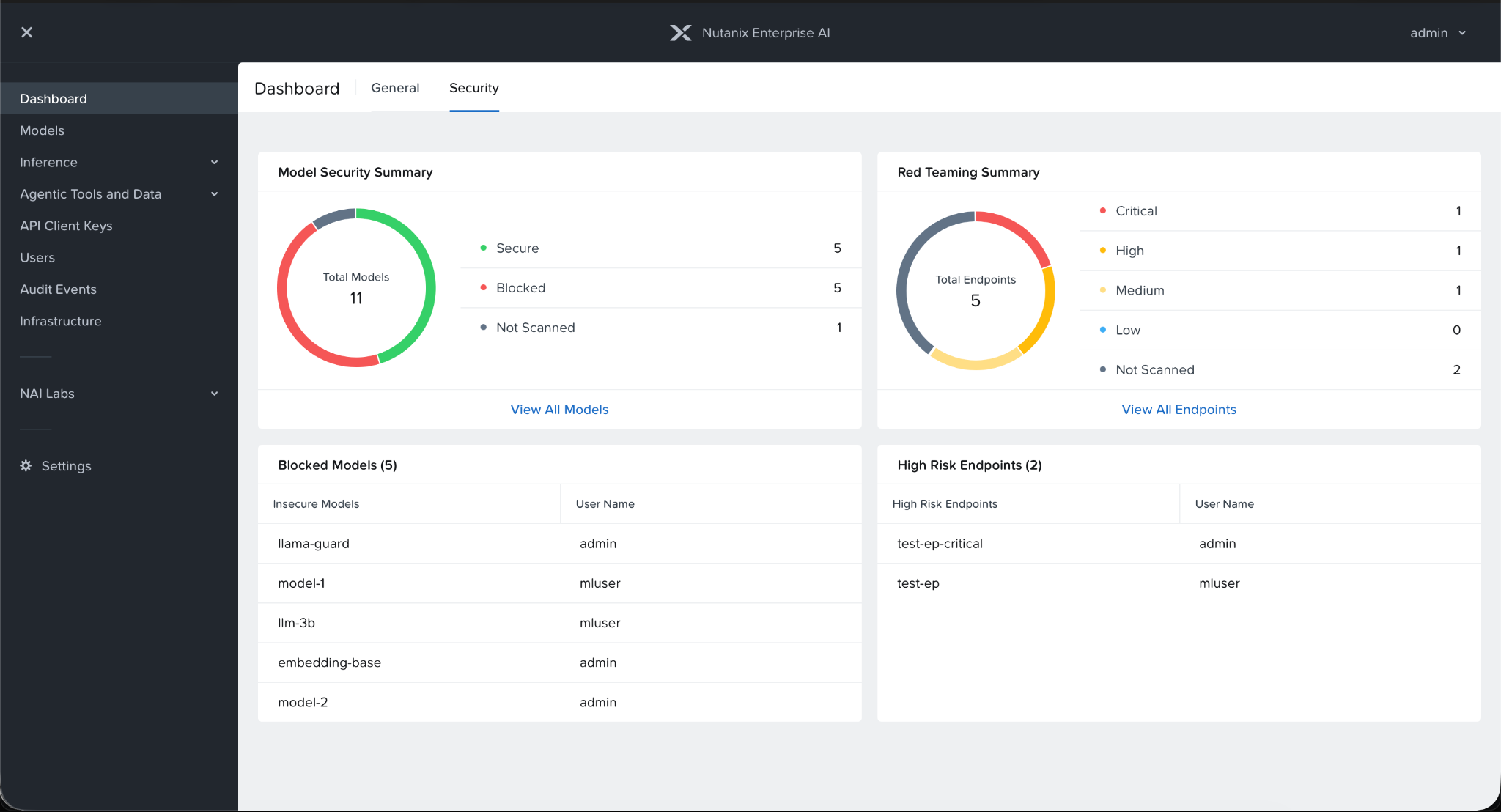
  • Unified Visibility – Provides a complete overview of your AI risk posture and scan summaries directly within your NAI dashboards.
Screenshot of Nutanix Enterprise AI dashboard.
Unified Security Dashboard with AI Model Security and AI Red Teaming

Benefits:

Seamless and Frictionless Deployment

We will prioritize a fast and frictionless deployment experience, ensuring that robust AI security does not come at the cost of development speed. By integrating these controls directly into the NAI workflow, organizations will be able to deploy and scale their AI initiatives with "push-button" simplicity, removing the traditional complexity and friction associated with securing large language models.

Proactive Protection Against Emerging Threats

Leveraging our deep expertise in threat prevention, this solution will proactively identify and block vulnerable or malicious models before they can impact the enterprise environment. By scanning models for hidden backdoors and malicious code during the initial download phase, we will stop threats at the perimeter, allowing only validated, secure models to ever reach your production environment.

A Comprehensive Enterprise Cloud AI Solution

This integration will deliver a comprehensive enterprise cloud AI solution, merging Nutanix’s industry-leading infrastructure with our next-generation security controls. The result will be a unified, cloud-native stack where security is built in rather than bolted on after the workload deployment, providing a secured deployment environment, which is consistent across the data center, the edge and public cloud.

Evolving Insights and Real-Time Remediation

The vulnerability insights from AI Red Teaming are coupled with remediation insights. The platform will provide a prioritized list of remediation steps that are tailor-made for the endpoint. This allows organizations to battle-test their inference endpoints before deploying them at scale.

Key Takeaways

  • A Proven, Award-Winning Partnership: Celebrating five years of collaboration, Palo Alto Networks has been named the Nutanix 2026 Global Security Partner of the Year, highlighting a shared commitment to delivering native, automated zero trust security for hybrid multicloud environments.
  • Seamless Zero Trust for Hybrid Workloads: Through deep integrations with VM-Series virtual firewalls and Nutanix Cloud Clusters (NC2), organizations can maintain consistent Layer 7 visibility and tag-based security policies that automatically follow workloads across on-premises data centers and public clouds.
  • Securing the AI Lifecycle with Prisma AIRS: The new integration with NAI, launching soon, will bring a security-first approach to AI adoption, utilizing Prisma AIRS to scan LLMs for vulnerabilities during download, and perform autonomous Red Teaming to neutralize emerging threats before they reach production.

Don’t Miss Our Speaking Session

Want to see the integration in action? Join our experts, Shrikant Brahmbhatt (Palo Alto Networks) and Ashwini Vasanth (Nutanix), on Tuesday April 7 3:30-4pm for an exclusive look at how we are securing the "Challenge of Hybrid AI." We’ll dive into the architecture that allows you to discover, assess and protect your entire AI ecosystem (apps, agents and models alike).

Visit Us at Booth #G2

Stop by the Palo Alto Networks booth (#G2) to meet our team of over 19,000 active threat researchers and see live demos of our joint solutions. Whether you are building the next generation of agentic AI or securing your virtual desktop infrastructure (VDI), we have the tools to help you innovate at machine speed.

Ready to secure your journey? Visit the Palo Alto Networks partner directory or learn more about Prisma AIRS.

Forward-Looking Statements

This blog contains forward-looking statements that involve risks, uncertainties and assumptions, including, without limitation, statements regarding the benefits, impact, or performance or potential benefits, impact or performance of our products and technologies or future products and technologies. These forward-looking statements are not guarantees of future performance, and there are a significant number of factors that could cause actual results to differ materially from statements made in this blog, including, without limitation: developments and changes in general market, political, economic, and business conditions; risks associated with managing our growth; risks associated with new products and subscription and support offerings; shifts in priorities or delays in the development or release of new offerings, or the failure to timely develop, release and achieve market acceptance of new products and subscriptions as well as existing products and subscription and support offerings; failure of our business strategies; rapidly evolving technological developments in the market for security products and subscription and support offerings; our customers’ purchasing decisions and the length of sales cycles; our competition; our ability to attract and retain new customers; and our ability to acquire and integrate other companies, products, or technologies. We identify certain important risks and uncertainties that could affect our results and performance in our most recent Annual Report on Form 10-K, our most recent Quarterly Report on Form 10-Q, and our other filings with the U.S. Securities and Exchange Commission from time-to-time, each of which are available on our website at investors.paloaltonetworks.com and on the SEC's website at www.sec.gov. All forward-looking statements in this blog are based on information available to us as of the date hereof, and we do not assume any obligation to update the forward-looking statements provided to reflect events that occur or circumstances that exist after the date on which they were made.

The post Palo Alto Networks at Nutanix .NEXT 2026 appeared first on Palo Alto Networks Blog.

  •  
❌