Reading view

Papa Johns Surveillance-Based Advertising

Papa Johns is spying on people’s buying activities to predict when they are low on food:

The pizza chain recently tapped NBCUniversal, Instacart and the dentsu-owned media agency Carat for help reaching consumers when they’re low on groceries—and thus more likely to be swayed by a mouth-watering ad. The idea is to reach hungry consumers by “knowing what is in their fridge without being too creepy,” said Carrie Drinkwater, chief investment officer at Carat.

To achieve that goal, NBCU and Instacart created a custom audience of shoppers who regularly purchase grocery staples on Instacart, such as eggs, milk, meat and produce. Based on that data, Papa Johns can determine which days of the week certain consumers are likely to run out of groceries and serve them an ad on NBCU streaming content accordingly. The brand served custom creatives to consumers based on their food preferences—such as whether they buy meat regularly—with QR codes and calls to action such as, “Light on groceries?” or “Empty fridge?”

Back in 2012, we learned (from Target and its campaign that detects when someone is pregnant) that the trick is to hide the knowledge in other, wrong, information. So the way for Papa John’s to not be “too creepy” is to deliberately get it wrong sometimes.

But still, ugh.

  •  

Fake virus alerts are invading mobile games

Sometimes it happens. You’re happily playing a game on your phone or laptop when suddenly alarms pop up out of nowhere:

“Your device is infected!”

“Your iCloud is full!”

“Your account is restricted for watching porn!”

Some games can be played for free if you agree to watch ads, and in others you can get extra lives, perks, or boosters by watching ads. That’s fine, as long as you’re given a choice and the ads are legitimate.

Unfortunately, cybercriminals sometimes manage to buy advertising space and use it to defraud gamers.

Let’s look at some examples.

The iCloud storage scam, or its OneDrive equivalent, is a well-known and long-running scam that claims you need to expand your storage or all your files will be deleted. The websites these messages link to come in many forms, but they all ask for personal and payment details to complete the upgrade.

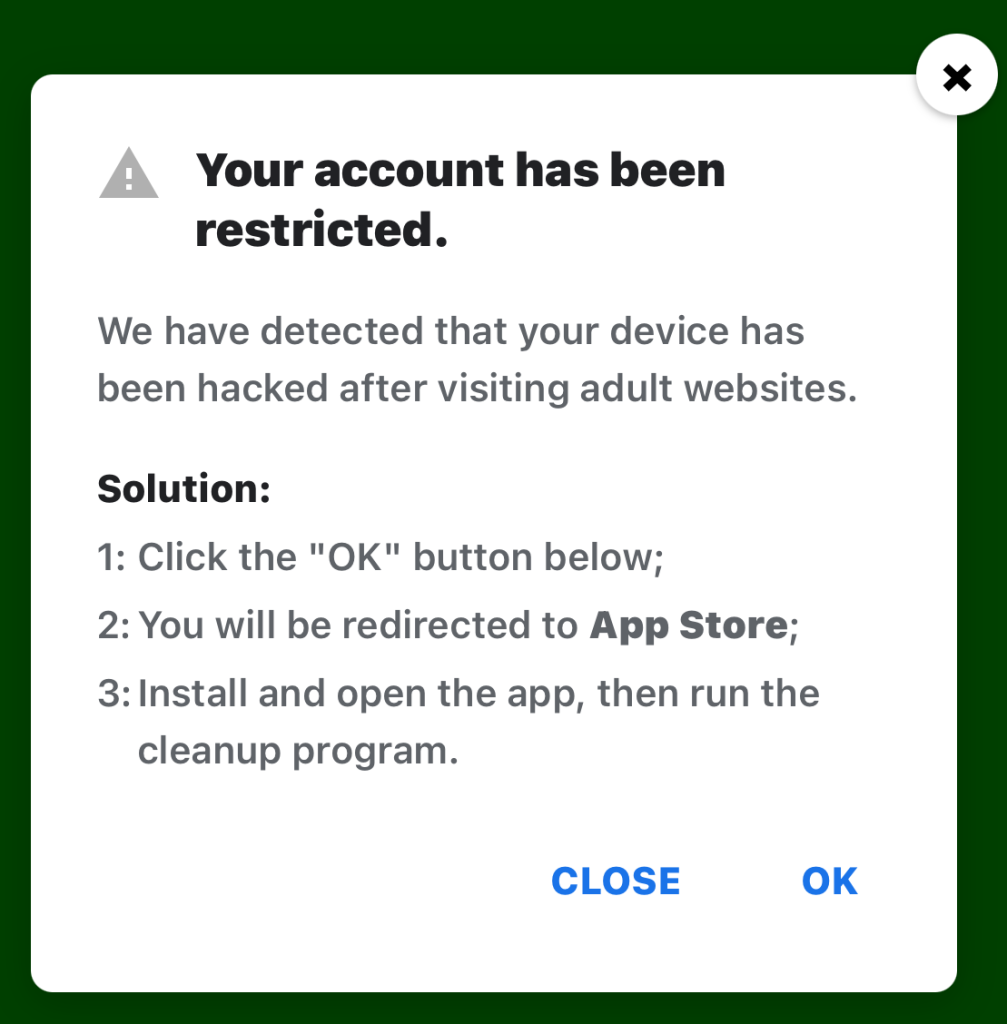
Restricted account

“Your account has been restricted.
We have detected that your device has been hacked after visiting adult websites.
Solution:
1:Click the “OK” button below;

2:You will be redirected to App Store;

3:Install and open the app, then run the cleanup program.”

This ad is a scam and uses a classic scare tactic. It falsely claims your device has been hacked and tries to pressure you into clicking “OK” and installing a cleanup app.

Messages like this sometimes claim to be from your ISP, a “Security Department,” or a generic “Safety Center.”

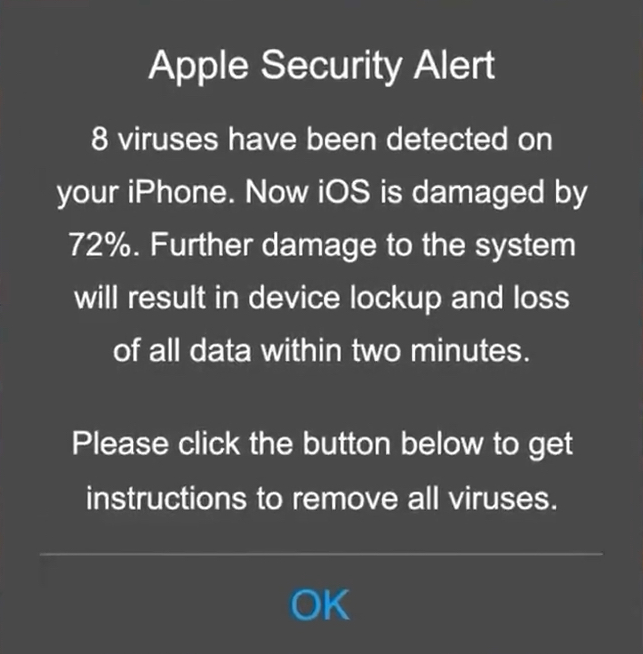
 Fake Apple security alert

“Apple Security Alert
8 viruses have been detected on your iPhone. Now iOS is damaged by 72%. Further damage to the system will result in device lockup and loss of all data within two minutes.
Please click the button below to remove all viruses.”

This is another fake warning, commonly used by scammers to trick users into clicking links or downloading unnecessary or harmful software. Apple doesn’t send alerts like this, and these messages use vague threats to get your attention.

What kind of app you’re really installing if you follow the instructions depends on your device and your location. If you’re “lucky,” it’s just adware, but you might just as easily end up with an infostealer.

In many cases, you’ll end up with fleeceware, a type of deceptive mobile app where developers lure users in with short free trials that quickly convert into hidden subscription fees, sometimes costing hundreds of dollars per month. These apps often offer some functionality to stay on the barely legal side of things, but at wildly inflated prices.

How to stay safe

The best response to these messages is simply to ignore them.

Real system alerts come from the OS, not from inside a game window or browser tab. Here’s a simple test: If you can switch apps and the “warning” disappears with the browser/game, it was not a system‑level alert.

Check the destination URLs before proceeding. Apple, Google, and major ISPs use predictable domains. A familiar-looking URL is not proof that a message is legitimate, but if the URL looks suspicious, it should definitely be treated as a scam.


Scam or legit? Scam Guard knows.


You may arrive at something that looks like the official App Store or Google Play Store. Be wary of lookalike app stores and unofficial download sites, but if you are on the real store, the app is generally safer to install. However, it’s still worth checking reviews, permissions, and the developer before proceeding.

Visit the official website of the organization the message claims to be from and log in there. If there’s a genuine problem with your account, storage, or device, you’ll find information about it through official channels.

Use an up-to-date, real-time anti-malware solution on your devices that can detect and block malicious apps.


Scammers know more about you than you think. 

Malwarebytes Mobile Security protects you from phishing, scam texts, malicious sites, and more. With real-time AI-powered Scam Guard built right in. 

Download for iOS → Download for Android → 

  •  

Fake virus alerts are invading mobile games

Sometimes it happens. You’re happily playing a game on your phone or laptop when suddenly alarms pop up out of nowhere:

“Your device is infected!”

“Your iCloud is full!”

“Your account is restricted for watching porn!”

Some games can be played for free if you agree to watch ads, and in others you can get extra lives, perks, or boosters by watching ads. That’s fine, as long as you’re given a choice and the ads are legitimate.

Unfortunately, cybercriminals sometimes manage to buy advertising space and use it to defraud gamers.

Let’s look at some examples.

The iCloud storage scam, or its OneDrive equivalent, is a well-known and long-running scam that claims you need to expand your storage or all your files will be deleted. The websites these messages link to come in many forms, but they all ask for personal and payment details to complete the upgrade.

Restricted account

“Your account has been restricted.
We have detected that your device has been hacked after visiting adult websites.
Solution:
1:Click the “OK” button below;

2:You will be redirected to App Store;

3:Install and open the app, then run the cleanup program.”

This ad is a scam and uses a classic scare tactic. It falsely claims your device has been hacked and tries to pressure you into clicking “OK” and installing a cleanup app.

Messages like this sometimes claim to be from your ISP, a “Security Department,” or a generic “Safety Center.”

 Fake Apple security alert

“Apple Security Alert
8 viruses have been detected on your iPhone. Now iOS is damaged by 72%. Further damage to the system will result in device lockup and loss of all data within two minutes.
Please click the button below to remove all viruses.”

This is another fake warning, commonly used by scammers to trick users into clicking links or downloading unnecessary or harmful software. Apple doesn’t send alerts like this, and these messages use vague threats to get your attention.

What kind of app you’re really installing if you follow the instructions depends on your device and your location. If you’re “lucky,” it’s just adware, but you might just as easily end up with an infostealer.

In many cases, you’ll end up with fleeceware, a type of deceptive mobile app where developers lure users in with short free trials that quickly convert into hidden subscription fees, sometimes costing hundreds of dollars per month. These apps often offer some functionality to stay on the barely legal side of things, but at wildly inflated prices.

How to stay safe

The best response to these messages is simply to ignore them.

Real system alerts come from the OS, not from inside a game window or browser tab. Here’s a simple test: If you can switch apps and the “warning” disappears with the browser/game, it was not a system‑level alert.

Check the destination URLs before proceeding. Apple, Google, and major ISPs use predictable domains. A familiar-looking URL is not proof that a message is legitimate, but if the URL looks suspicious, it should definitely be treated as a scam.


Scam or legit? Scam Guard knows.


You may arrive at something that looks like the official App Store or Google Play Store. Be wary of lookalike app stores and unofficial download sites, but if you are on the real store, the app is generally safer to install. However, it’s still worth checking reviews, permissions, and the developer before proceeding.

Visit the official website of the organization the message claims to be from and log in there. If there’s a genuine problem with your account, storage, or device, you’ll find information about it through official channels.

Use an up-to-date, real-time anti-malware solution on your devices that can detect and block malicious apps.


Scammers know more about you than you think. 

Malwarebytes Mobile Security protects you from phishing, scam texts, malicious sites, and more. With real-time AI-powered Scam Guard built right in. 

Download for iOS → Download for Android → 

  •  

Key attack scenarios involving brand impersonation

Brand, website, and corporate mailout impersonation is becoming an increasingly common technique used by cybercriminals. The World Intellectual Property Organization (WIPO) reported a spike in such incidents in 2025. While tech companies and consumer brands are the most frequent targets, every industry in every country is generally at risk. The only thing that changes is how the imposters exploit the fakes In practice, we typically see the following attack scenarios:

  • Luring clients and customers to a fake website to harvest login credentials for the real online store, or to steal payment details for direct theft.
  • Luring employees and business partners to a fake corporate login portal to acquire legitimate credentials for infiltrating the corporate network.
  • Prompting clients and customers to contact the scammers under various pretexts: getting tech support, processing a refund, entering a prize giveaway, or claiming compensation for public events involving the brand. The goal is to then swindle the victims out of as much money as possible.
  • Luring business partners and employees to specially crafted pages that mimic internal company systems, to get them to approve a payment or redirect a legitimate payment to the scammers.
  • Prompting clients, business partners, and employees to download malware — most often an infostealer — disguised as corporate software from a fake company website.

The words “luring” and “prompting” here imply a whole toolbox of tactics: email, messages in chat apps, social media posts that look like official ads, lookalike websites promoted through SEO tools, and even paid ads.

These schemes all share two common features. First, the attackers exploit the organization’s brand, and strive to mimic its official website, domain name, and corporate style of emails, ads, and social media posts. And the forgery doesn’t have to be flawless — just convincing enough for at least some of business partners and customers. Second, while the organization and its online resources aren’t targeted directly, the impact on them is still significant.

Business damage from brand impersonation

When fakes are crafted to target employees, an attack can lead to direct financial loss. An employee might be persuaded to transfer company funds, or their credentials could be used to steal confidential information or launch a ransomware attack.

Attacks on customers don’t typically imply direct damage to the company’s coffers, but they cause substantial indirect harm in the following areas:

  • Strain on customer support. Customers who “bought” a product on a fake site will likely bring their issues to the real customer support team. Convincing them that they never actually placed an order is tough, making each case a major time waster for multiple support agents.
  • Reputational damage. Defrauded customers often blame the brand for failing to protect them from the scam, and also expect compensation. According to a European survey, around half of affected buyers expect payouts and may stop using the company’s services — often sharing their negative experience on social media. This is especially damaging if the victims include public figures or anyone with a large following.
  • Unplanned response costs. Depending on the specifics and scale of an attack, an affected company might need digital forensics and incident response (DFIR) services, as well as consultants specializing in consumer law, intellectual property, cybersecurity, and crisis PR.
  • Increased insurance premiums. Companies that insure businesses against cyber-incidents factor in fallout from brand impersonation. An increased risk profile may be reflected in a higher premium for a business.
  • Degraded website performance and rising ad costs. If criminals run paid ads using a brand’s name, they siphon traffic away from its official site. Furthermore, if a company pays to advertise its site, the cost per click rises due to the increased competition. This is a particularly acute problem for IT companies selling online services, but it’s also relevant for retail brands.
  • Long-term metric decline. This includes drops in sales volume, market share, and market capitalization. These are all consequences of lost trust from customers and business partners following major incidents.

Does insurance cover the damage?

Popular cyber-risk insurance policies typically only cover costs directly tied to incidents explicitly defined in the policy — think data loss, business interruption, IT system compromise, and the like. Fake domains and web pages don’t directly damage a company’s IT systems, so they’re usually not covered by standard insurance. Reputational losses and the act of impersonation itself are separate insurance risks, requiring expanded coverage for this scenario specifically.

Of the indirect losses we’ve listed above, standard insurance might cover DFIR expenses and, in some cases, extra customer support costs (if the situation is recognized as an insured event). Voluntary customer reimbursements, lost sales, and reputational damage are almost certainly not covered.

What to do if your company is attacked by clones

If you find out someone is using your brand’s name for fraud, it makes sense to do the following:

  • Send clear, straightforward notifications to your customers explaining what happened, what measures are being taken, and how to verify the authenticity of official websites, emails, and other communications.
  • Create a simple “trust center” page listing your official domains, social media accounts, app store links, and support contacts. Make it easy to find and keep it updated.
  • Monitor new registrations of social media pages and domain names that contain your brand names to spot the clones before an attack kicks off.
  • Follow a takedown procedure. This involves gathering evidence, filing complaints with domain registrars, hosting providers, and social media administrators, then tracking the status until the fakes are fully removed. For a complete and accurate record of violations, preserve URLs, screenshots, metadata, and the date and time of discovery. Ideally, also examine the source code of fake pages, as it might contain clues pointing to other components of the criminal operation.
  • Add a simple customer reporting form for suspicious sites or messages to your official website and/or branded app. This helps you learn about problems early.
  • Coordinate activities between your legal, cybersecurity, and marketing teams. This ensures a consistent, unified, and effective response.

How to defend against brand impersonation attacks

While the open nature of the internet and the specifics of these attacks make preventing them outright impossible, a business can stay on top of new fakes and have the tools ready to fight back.

  • Continuously monitor for suspicious public activity using specialized monitoring services. The most obvious indicator is the registration of domains similar to your brand name, but there are others — like someone buying databases related to your organization on the dark web. Comprehensive monitoring of all platforms is best outsourced to a specialized service provider, such as Kaspersky Digital Footprint Intelligence (DFI).
  • The quickest and simplest way to take down a fake website or social media profile is to file a trademark infringement complaint. Make sure your portfolio of registered trademarks is robust enough to file complaints under UDRP procedures before you need it.
  • When you discover fakes, deploy UDRP procedures promptly to have the fake domains transferred or removed. For social media, follow the platform’s specific infringement procedure — easily found by searching for “[social media name] trademark infringement” (for example, “LinkedIn trademark infringement”). Transferring the domain to the legitimate owner is preferred over deletion, as it prevents scammers from simply re-registering it. Many continuous monitoring services, such as Kaspersky Digital Footprint Intelligence, also offer a rapid takedown service, filing complaints on the protected brand’s behalf.
  • Act quickly to block fake domains on your corporate systems. This won’t protect partners or customers, but it’ll throw a wrench into attacks targeting your own employees.
  • Consider proactively registering your company’s website name and common variations (for example, with and without hyphens) in all major top-level domains, such as .com, and local extensions. This helps protect partners and customers from common typos and simple copycat sites.

  •  
❌