Reading view

Patch Tuesday, January 2026 Edition

Microsoft today issued patches to plug at least 113 security holes in its various Windows operating systems and supported software. Eight of the vulnerabilities earned Microsoft’s most-dire “critical” rating, and the company warns that attackers are already exploiting one of the bugs fixed today.

January’s Microsoft zero-day flaw — CVE-2026-20805 — is brought to us by a flaw in the Desktop Window Manager (DWM), a key component of Windows that organizes windows on a user’s screen. Kev Breen, senior director of cyber threat research at Immersive, said despite awarding CVE-2026-20805 a middling CVSS score of 5.5, Microsoft has confirmed its active exploitation in the wild, indicating that threat actors are already leveraging this flaw against organizations.

Breen said vulnerabilities of this kind are commonly used to undermine Address Space Layout Randomization (ASLR), a core operating system security control designed to protect against buffer overflows and other memory-manipulation exploits.

“By revealing where code resides in memory, this vulnerability can be chained with a separate code execution flaw, transforming a complex and unreliable exploit into a practical and repeatable attack,” Breen said. “Microsoft has not disclosed which additional components may be involved in such an exploit chain, significantly limiting defenders’ ability to proactively threat hunt for related activity. As a result, rapid patching currently remains the only effective mitigation.”

Chris Goettl, vice president of product management at Ivanti, observed that CVE-2026-20805 affects all currently supported and extended security update supported versions of the Windows OS. Goettl said it would be a mistake to dismiss the severity of this flaw based on its “Important” rating and relatively low CVSS score.

“A risk-based prioritization methodology warrants treating this vulnerability as a higher severity than the vendor rating or CVSS score assigned,” he said.

Among the critical flaws patched this month are two Microsoft Office remote code execution bugs (CVE-2026-20952 and CVE-2026-20953) that can be triggered just by viewing a booby-trapped message in the Preview Pane.

Our October 2025 Patch Tuesday “End of 10” roundup noted that Microsoft had removed a modem driver from all versions after it was discovered that hackers were abusing a vulnerability in it to hack into systems. Adam Barnett at Rapid7 said Microsoft today removed another couple of modem drivers from Windows for a broadly similar reason: Microsoft is aware of functional exploit code for an elevation of privilege vulnerability in a very similar modem driver, tracked as CVE-2023-31096.

“That’s not a typo; this vulnerability was originally published via MITRE over two years ago, along with a credible public writeup by the original researcher,” Barnett said. “Today’s Windows patches remove agrsm64.sys and agrsm.sys. All three modem drivers were originally developed by the same now-defunct third party, and have been included in Windows for decades. These driver removals will pass unnoticed for most people, but you might find active modems still in a few contexts, including some industrial control systems.”

According to Barnett, two questions remain: How many more legacy modem drivers are still present on a fully-patched Windows asset; and how many more elevation-to-SYSTEM vulnerabilities will emerge from them before Microsoft cuts off attackers who have been enjoying “living off the land[line] by exploiting an entire class of dusty old device drivers?”

“Although Microsoft doesn’t claim evidence of exploitation for CVE-2023-31096, the relevant 2023 write-up and the 2025 removal of the other Agere modem driver have provided two strong signals for anyone looking for Windows exploits in the meantime,” Barnett said. “In case you were wondering, there is no need to have a modem connected; the mere presence of the driver is enough to render an asset vulnerable.”

Immersive, Ivanti and Rapid7 all called attention to CVE-2026-21265, which is a critical Security Feature Bypass vulnerability affecting Windows Secure Boot. This security feature is designed to protect against threats like rootkits and bootkits, and it relies on a set of certificates that are set to expire in June 2026 and October 2026. Once these 2011 certificates expire, Windows devices that do not have the new 2023 certificates can no longer receive Secure Boot security fixes.

Barnett cautioned that when updating the bootloader and BIOS, it is essential to prepare fully ahead of time for the specific OS and BIOS combination you’re working with, since incorrect remediation steps can lead to an unbootable system.

“Fifteen years is a very long time indeed in information security, but the clock is running out on the Microsoft root certificates which have been signing essentially everything in the Secure Boot ecosystem since the days of Stuxnet,” Barnett said. “Microsoft issued replacement certificates back in 2023, alongside CVE-2023-24932 which covered relevant Windows patches as well as subsequent steps to remediate the Secure Boot bypass exploited by the BlackLotus bootkit.”

Goettl noted that Mozilla has released updates for Firefox and Firefox ESR resolving a total of 34 vulnerabilities, two of which are suspected to be exploited (CVE-2026-0891 and CVE-2026-0892). Both are resolved in Firefox 147 (MFSA2026-01) and CVE-2026-0891 is resolved in Firefox ESR 140.7 (MFSA2026-03).

“Expect Google Chrome and Microsoft Edge updates this week in addition to a high severity vulnerability in Chrome WebView that was resolved in the January 6 Chrome update (CVE-2026-0628),” Goettl said.

As ever, the SANS Internet Storm Center has a per-patch breakdown by severity and urgency. Windows admins should keep an eye on askwoody.com for any news about patches that don’t quite play nice with everything. If you experience any issues related installing January’s patches, please drop a line in the comments below.

  •  

Why iPhone users should update and restart their devices now

If you were still questioning whether iOS 26+ is for you, now is the time to make that call.

Why?

On December 12, 2025, Apple patched two WebKit zero‑day vulnerabilities linked to mercenary spyware and is now effectively pushing iPhone 11 and newer users toward iOS 26+, because that’s where the fixes and new memory protections live. These vulnerabilities were primarily used in highly targeted attacks, but such campaigns are likely to expand over time.

WebKit powers the Safari browser and many other iOS applications, so it’s a big attack surface to leave exposed and isn’t limited to “risky” behavior. These vulnerabilities allowed an attacker to execute arbitrary code on a device after exploitation via malicious web content.

Apple has confirmed that attackers are already exploiting these vulnerabilities in the wild, making installation of the update a high‑priority security task for every user. Campaigns that start with diplomats, journalists, or executives often lead to tooling and exploits leaking or being repurposed, so “I’m not a target” is not a viable safety strategy.

Due to public resistance to new features like Liquid Glass, many iPhone users have not yet upgraded to iOS 26.2. Reports suggest adoption of iOS 26 has been unusually slow. As of January 2026, only about 4.6% of active iPhones are on iOS 26.2, and roughly 16% are on any version of iOS 26, leaving the vast majority on older releases such as iOS 18.

However, Apple only ships these fixes and newer protections, such as Memory Integrity Enforcement, on iOS 26+ for supported devices. Users on older, unsupported devices won’t be able to access these protections at all.

Another important factor in the upgrade cycle is restarting the device. What many people don’t realize is that when you restart your device, any memory-resident malware is flushed—unless it has somehow gained persistence, in which case it will return. High-end spyware tools tend to avoid leaving traces needed for persistence and often rely on users not restarting their devices.

Upgrading requires a restart, which makes this a win-win: you get the latest protections, and any memory-resident malware is flushed at the same time.

For iOS and iPadOS users, you can check if you’re using the latest software version, go to Settings > General > Software Update. It’s also worth turning on Automatic Updates if you haven’t already. You can do that on the same screen.

How to stay safe

The most important fix—however painful you may find it—is to upgrade to iOS 26.2. Not doing means missing an accumulating list of security fixes, leaving your device vulnerable to more and more newly found vulnerabilities.

 But here are some other useful tips:

  • Make it a habit to restart your device on a regular basis. The NSA recommends doing this weekly.
  • Do not open unsolicited links and attachments without verifying with the trusted sender.
  • Remember, Apple threat notifications will never ask users to click links, open files, install apps or ask for account passwords or verification code.
  • For Apple Mail users specifically, these vulnerabilities create risk when viewing HTML-formatted emails containing malicious web content.
  • Malwarebytes for iOS can help keep your device secure, with Trusted Advisor alerting you when important updates are available.
  • If you are a high-value target, or you want the extra level of security, consider using Apple’s Lockdown Mode.

We don’t just report on phone security—we provide it

Cybersecurity risks should never spread beyond a headline. Keep threats off your mobile devices by downloading Malwarebytes for iOS, and Malwarebytes for Android today.

  •  

Why iPhone users should update and restart their devices now

If you were still questioning whether iOS 26+ is for you, now is the time to make that call.

Why?

On December 12, 2025, Apple patched two WebKit zero‑day vulnerabilities linked to mercenary spyware and is now effectively pushing iPhone 11 and newer users toward iOS 26+, because that’s where the fixes and new memory protections live. These vulnerabilities were primarily used in highly targeted attacks, but such campaigns are likely to expand over time.

WebKit powers the Safari browser and many other iOS applications, so it’s a big attack surface to leave exposed and isn’t limited to “risky” behavior. These vulnerabilities allowed an attacker to execute arbitrary code on a device after exploitation via malicious web content.

Apple has confirmed that attackers are already exploiting these vulnerabilities in the wild, making installation of the update a high‑priority security task for every user. Campaigns that start with diplomats, journalists, or executives often lead to tooling and exploits leaking or being repurposed, so “I’m not a target” is not a viable safety strategy.

Due to public resistance to new features like Liquid Glass, many iPhone users have not yet upgraded to iOS 26.2. Reports suggest adoption of iOS 26 has been unusually slow. As of January 2026, only about 4.6% of active iPhones are on iOS 26.2, and roughly 16% are on any version of iOS 26, leaving the vast majority on older releases such as iOS 18.

However, Apple only ships these fixes and newer protections, such as Memory Integrity Enforcement, on iOS 26+ for supported devices. Users on older, unsupported devices won’t be able to access these protections at all.

Another important factor in the upgrade cycle is restarting the device. What many people don’t realize is that when you restart your device, any memory-resident malware is flushed—unless it has somehow gained persistence, in which case it will return. High-end spyware tools tend to avoid leaving traces needed for persistence and often rely on users not restarting their devices.

Upgrading requires a restart, which makes this a win-win: you get the latest protections, and any memory-resident malware is flushed at the same time.

For iOS and iPadOS users, you can check if you’re using the latest software version, go to Settings > General > Software Update. It’s also worth turning on Automatic Updates if you haven’t already. You can do that on the same screen.

How to stay safe

The most important fix—however painful you may find it—is to upgrade to iOS 26.2. Not doing means missing an accumulating list of security fixes, leaving your device vulnerable to more and more newly found vulnerabilities.

 But here are some other useful tips:

  • Make it a habit to restart your device on a regular basis. The NSA recommends doing this weekly.
  • Do not open unsolicited links and attachments without verifying with the trusted sender.
  • Remember, Apple threat notifications will never ask users to click links, open files, install apps or ask for account passwords or verification code.
  • For Apple Mail users specifically, these vulnerabilities create risk when viewing HTML-formatted emails containing malicious web content.
  • Malwarebytes for iOS can help keep your device secure, with Trusted Advisor alerting you when important updates are available.
  • If you are a high-value target, or you want the extra level of security, consider using Apple’s Lockdown Mode.

We don’t just report on phone security—we provide it

Cybersecurity risks should never spread beyond a headline. Keep threats off your mobile devices by downloading Malwarebytes for iOS, and Malwarebytes for Android today.

  •  

GuardDuty Extended Threat Detection uncovers cryptomining campaign on Amazon EC2 and Amazon ECS

Amazon GuardDuty and our automated security monitoring systems identified an ongoing cryptocurrency (crypto) mining campaign beginning on November 2, 2025. The operation uses compromised AWS Identity and Access Management (IAM) credentials to target Amazon Elastic Container Service (Amazon ECS) and Amazon Elastic Compute Cloud (Amazon EC2). GuardDuty Extended Threat Detection was able to correlate signals across these data sources to raise a critical severity attack sequence finding. Using the massive, advanced threat intelligence capability and existing detection mechanisms of Amazon Web Services (AWS), GuardDuty proactively identified this ongoing campaign and quickly alerted customers to the threat. AWS is sharing relevant findings and mitigation guidance to help customers take appropriate action on this ongoing campaign.

It’s important to note that these actions don’t take advantage of a vulnerability within an AWS service but rather require valid credentials that an unauthorized user uses in an unintended way. Although these actions occur in the customer domain of the shared responsibility model, AWS recommends steps that customers can use to detect, prevent, or reduce the impact of such activity.

Understanding the crypto mining campaign

The recently detected crypto mining campaign employed a novel persistence technique designed to disrupt incident response and extend mining operations. The ongoing campaign was originally identified when GuardDuty security engineers discovered similar attack techniques being used across multiple AWS customer accounts, indicating a coordinated campaign targeting customers using compromised IAM credentials.

Operating from an external hosting provider, the threat actor quickly enumerated Amazon EC2 service quotas and IAM permissions before deploying crypto mining resources across Amazon EC2 and Amazon ECS. Within 10 minutes of the threat actor gaining initial access, crypto miners were operational.

A key technique observed in this attack was the use of ModifyInstanceAttribute with disable API termination set to true, forcing victims to re-enable API termination before deleting the impacted resources. Disabling instance termination protection adds an additional consideration for incident responders and can disrupt automated remediation controls. The threat actor’s scripted use of multiple compute services, in combination with emerging persistence techniques, represents an advancement in crypto mining persistence methodologies that security teams should be aware of.

The multiple detection capabilities of GuardDuty successfully identified the malicious activity through EC2 domain/IP threat intelligence, anomaly detection, and Extended Threat Detection EC2 attack sequences. GuardDuty Extended Threat Detection was able to correlate signals as an AttackSequence:EC2/CompromisedInstanceGroup finding.

Indicators of compromise (IoCs)

Security teams should monitor for the following indicators to identify this crypto mining campaign. Threat actors frequently modify their tactics and techniques, so these indicators might evolve over time:

  • Malicious container image – The Docker Hub image yenik65958/secret, created on October 29, 2025, with over 100,000 pulls, was used to deploy crypto miners to containerized environments. This malicious image contained a SBRMiner-MULTI binary for crypto mining. This specific image has been taken down from Docker Hub, but threat actors might deploy similar images under different names.
  • Automation and toolingAWS SDK for Python (Boto3) user agent patterns indicating Python-based automation scripts were used across the entire attack chain.
  • Crypto mining domains: asia[.]rplant[.]xyz, eu[.]rplant[.]xyz, and na[.]rplant[.]xyz.
  • Infrastructure naming patterns – Auto scaling groups followed specific naming conventions: SPOT-us-east-1-G*-* for spot instances and OD-us-east-1-G*-* for on-demand instances, where G indicates the group number.

Attack chain analysis

The crypto mining campaign followed a systematic attack progression across multiple phases. Sensitive fields in this post were given fictitious values to protect personally identifiable information (PII).
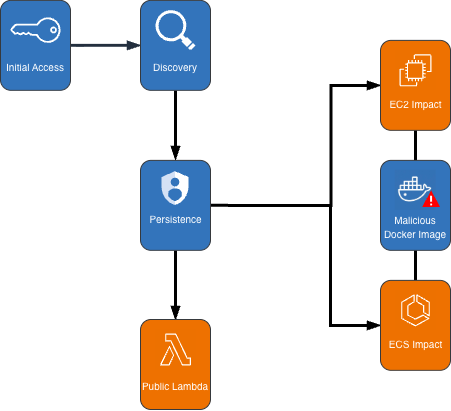
Cryptocurrency Mining Campaign Diagram

Figure 1: Cryptocurrency mining campaign diagram

Initial access, discovery, and attack preparation

The attack began with compromised IAM user credentials possessing admin-like privileges from an anomalous network and location, triggering GuardDuty anomaly detection findings. During the discovery phase, the attacker systematically probed customer AWS environments to understand what resources they could deploy. They checked Amazon EC2 service quotas (GetServiceQuota) to determine how many instances they could launch, then tested their permissions by calling the RunInstances API multiple times with the DryRun flag enabled.

The DryRun flag was a deliberate reconnaissance tactic that allowed the actor to validate their IAM permissions without actually launching instances, avoiding costs and reducing their detection footprint. This technique demonstrates the threat actor was validating their ability to deploy crypto mining infrastructure before acting. Organizations that don’t typically use DryRun flags in their environments should consider monitoring for this API pattern as an early warning indicator of compromise. AWS CloudTrail logs can be used with Amazon CloudWatch alarms, Amazon EventBridge, or your third-party tooling to alert on these suspicious API patterns.

The threat actor called two APIs to create IAM roles as part of their attack infrastructure: CreateServiceLinkedRole to create a role for auto scaling groups and CreateRole to create a role for AWS Lambda. They then attached the AWSLambdaBasicExecutionRole policy to the Lambda role. These two roles were integral to the impact and persistence stages of the attack.

Amazon ECS impact

The threat actor first created dozens of ECS clusters across the environment, sometimes exceeding 50 ECS clusters in a single attack. They then called RegisterTaskDefinition with a malicious Docker Hub image yenik65958/secret:user. With the same string used for the cluster creation, the actor then created a service, using the task definition to initiate crypto mining on ECS AWS Fargate nodes. The following is an example of API request parameters for RegisterTaskDefinition with a maximum CPU allocation of 16,384 units.

{   
    "dryrun": false,   
    "requiresCompatibilities": ["FARGATE"],   
    "cpu": 16384,   
    "containerDefinitions": [     
        {       
            "name": "a1b2c3d4e5",       
            "image": "yenik65958/secret:user",       
            "cpu": 0,       
            "command": []     
        }   
    ],   
    "networkMode": "awsvpc",   
    "family": "a1b2c3d4e5",   
    "memory": 32768 
}

Using this task definition, the threat actor called CreateService to launch ECS Fargate tasks with a desired count of 10.

{   
    "dryrun": false,   
    "capacityProviderStrategy": [     
        {       
            "capacityProvider": "FARGATE",       
            "weight": 1,       
            "base": 0     
        },     
        {       
            "capacityProvider": "FARGATE_SPOT",       
            "weight": 1,       
            "base": 0     
        }   
    ],   
    "desiredCount": 10 
}

Figure 2: Contents of the cryptocurrency mining script within the malicious image

Figure 2: Contents of the cryptocurrency mining script within the malicious image

The malicious image (yenik65958/secret:user) was configured to execute run.sh after it has been deployed. run.sh runs randomvirel mining algorithm with the mining pools: asia|eu|na[.]rplant[.]xyz:17155. The flag nproc --all indicates that the script should use all processor cores.

Amazon EC2 impact

The actor created two launch templates (CreateLaunchTemplate) and 14 auto scaling groups (CreateAutoScalingGroup) configured with aggressive scaling parameters, including a maximum size of 999 instances and desired capacity of 20. The following example of request parameters from CreateLaunchTemplate shows the UserData was supplied, instructing the instances to begin crypto mining.

{   
    "CreateLaunchTemplateRequest": {       
        "LaunchTemplateName": "T-us-east-1-a1b2",       
        "LaunchTemplateData": {           
            "UserData": "<sensitiveDataRemoved>",           
            "ImageId": "ami-1234567890abcdef0",           
            "InstanceType": "c6a.4xlarge"       
        },       
        "ClientToken": "a1b2c3d4-5678-90ab-cdef-EXAMPLE11111"   
    } 
}

The threat actor created auto scaling groups using both Spot and On-Demand Instances to make use of both Amazon EC2 service quotas and maximize resource consumption.

Spot Instance groups:

  • Targeted high performance GPU and machine learning (ML) instances (g4dn, g5, g5, p3, p4d, inf1)
  • Configured with 0% on-demand allocation and capacity-optimized strategy
  • Set to scale from 20 to 999 instances

On-Demand Instance groups:

  • Targeted compute, memory, and general-purpose instances (c5, c6i, r5, r5n, m5a, m5, m5n).
  • Configured with 100% on-demand allocation
  • Also set to scale from 20 to 999 instances

After exhausting auto scaling quotas, the actor directly launched additional EC2 instances using RunInstances to consume the remaining EC2 instance quota.

Persistence

An interesting technique observed in this campaign was the threat actor’s use of ModifyInstanceAttribute across all launched EC2 instances to disable API termination. Although instance termination protection prevents accidental termination of the instance, it adds an additional consideration for incident response capabilities and can disrupt automated remediation controls. The following example shows request parameters for the API ModifyInstanceAttribute.

{     
    "disableApiTermination": {         
        "value": true     
    },     
    "instanceId": "i-1234567890abcdef0" 
}

After all mining workloads were deployed, the actor created a Lambda function with a configuration that bypasses IAM authentication and creates a public Lambda endpoint. The threat actor then added a permission to the Lambda function that allows the principal to invoke the function. The following examples show CreateFunctionUrlConfig and AddPermission request parameters.

CreateFunctionUrlConfig:

{     
    "authType": "NONE",     
    "functionName": "generate-service-a1b2c3d4" 
}

AddPermission:

{     
    "functionName": "generate-service-a1b2c3d4",     
    "functionUrlAuthType": "NONE",    
    "principal": "*",     
    "statementId": "FunctionURLAllowPublicAccess",     
    "action": "lambda:InvokeFunctionUrl" 
}

The threat actor concluded the persistence stage by creating an IAM user user-x1x2x3x4 and attaching the IAM policy AmazonSESFullAccess (CreateUser, AttachUserPolicy). They also created an access key and login profile for that user (CreateAccessKey, CreateLoginProfile). Based on the SES role that was attached to the user, it appears the threat actor was attempting Amazon Simple Email Service (Amazon SES) phishing.

To prevent public Lambda URLs from being created, organizations can deploy service control policies (SCPs) that deny creation or updating of Lambda URLs with an AuthType of “NONE”.

{   
    "Version": "2012-10-17",   
    "Statement": [     
        {       
            "Effect": "Deny",       
            "Action": [         
                "lambda:CreateFunctionUrlConfig",         
                "lambda:UpdateFunctionUrlConfig"       
            ],       
            "Resource": "arn:aws:lambda:*:*:function/*",       
            "Condition": {         
                "StringEquals": {           
                    "lambda:FunctionUrlAuthType": "NONE"         
                }       
            }     
        }   
    ] 
}

Detection methods using GuardDuty

The multilayered detection approach of GuardDuty proved highly effective in identifying all stages of the attack chain using threat intelligence, anomaly detection, and the recently launched Extended Threat Detection capabilities for EC2 and ECS.

Next, we walk through the details of these features and how you can deploy them to detect attacks such as these. You can enable GuardDuty foundational protection plan to receive alerts on crypto mining campaigns like the one described in this post. To further enhance detection capabilities, we highly recommend enabling GuardDuty Runtime Monitoring, which will extend finding coverage to system-level events on Amazon EC2, Amazon ECS, and Amazon Elastic Kubernetes Service (Amazon EKS).

GuardDuty EC2 findings

Threat intelligence findings for Amazon EC2 are part of the GuardDuty foundational protection plan, which will alert you to suspicious network behaviors involving your instances. These behaviors can include brute force attempts, connections to malicious or crypto domains, and other suspicious behaviors. Using third-party threat intelligence and internal threat intelligence, including active threat defense and MadPot, GuardDuty provides detection over the indicators in this post through the following findings: CryptoCurrency:EC2/BitcoinTool.B and CryptoCurrency:EC2/BitcoinTool.B!DNS.

GuardDuty IAM findings

The IAMUser/AnomalousBehavior findings spanning multiple tactic categories (PrivilegeEscalation, Impact, Discovery) showcase the ML capability of GuardDuty to detect deviations from normal user behavior. In the incident described in this post, the compromised credentials were detected due to the threat actor using them from an anomalous network and location and calling APIs that were unusual for the accounts.

GuardDuty Runtime Monitoring

GuardDuty Runtime Monitoring is an important component for Extended Threat Detection attack sequence correlation. Runtime Monitoring provides host level signals, such as operating system visibility, and extends detection coverage by analyzing system-level logs indicating malicious process execution at the host and container level, including the execution of crypto mining programs on your workloads. The CryptoCurrency:Runtime/BitcoinTool.B!DNS and CryptoCurrency:Runtime/BitcoinTool.B findings detect network connections to crypto-related domains and IPs, while the Impact:Runtime/CryptoMinerExecuted finding detects when a process running is associated with a cryptocurrency mining activity.

GuardDuty Extended Threat Detection

Launched at re:Invent 2025, AttackSequence:EC2/CompromisedInstanceGroup finding represents one of the latest Extended Threat Detection capabilities in GuardDuty. This feature uses AI and ML algorithms to automatically correlate security signals across multiple data sources to detect sophisticated attack patterns of EC2 resource groups. Although AttackSequences for EC2 are included in the GuardDuty foundational protection plan, we strongly recommend enabling Runtime Monitoring. Runtime Monitoring provides key insights and signals from compute environments, enabling detection of suspicious host-level activities and improving correlation of attack sequences. For AttackSequence:ECS/CompromisedCluster attack sequences, Runtime Monitoring is required to correlate container-level activity.

Monitoring and remediation recommendations

To protect against similar crypto mining attacks, AWS customers should prioritize strong identity and access management controls. Implement temporary credentials instead of long-term access keys, enforce multi-factor authentication (MFA) for all users, and apply least privilege to IAM principals limiting access to only required permissions. You can use AWS CloudTrail to log events across AWS services and combine logs into a single account to make them available to your security teams to access and monitor. To learn more, refer to Receiving CloudTrail log files from multiple accounts in the CloudTrail documentation.

Confirm GuardDuty is enabled across all accounts and Regions with Runtime Monitoring enabled for comprehensive coverage. Integrate GuardDuty with AWS Security Hub and Amazon EventBridge or third-party tooling to enable automated response workflows and rapid remediation of high-severity findings. Implement container security controls, including image scanning policies and monitoring for unusual CPU allocation requests in ECS task definitions. Finally, establish specific incident response procedures for crypto mining attacks, including documented steps to handle instances with disabled API termination—a technique used by this attacker to complicate remediation efforts.

If you believe your AWS account has been impacted by a crypto mining campaign, refer to remediation steps in the GuardDuty documentation: Remediating potentially compromised AWS credentials, Remediating a potentially compromised EC2 instance, and Remediating a potentially compromised ECS cluster.

To stay up to date on the latest techniques, visit the Threat Technique Catalog for AWS.


If you have feedback about this post, submit comments in the Comments section below. If you have questions about this post, contact AWS Support.

Kyle Koeller Kyle Koeller
Kyle is a security engineer in the GuardDuty team with a focus on threat detection. He is passionate about cloud threat detection and offensive security, and he holds the following certifications: CompTIA Security+, PenTest+, CompTIA Network Vulnerability Assessment Professional, and SecurityX. When not working, Kyle enjoys spending his time in the gym and exploring New York City.
  •  

Exploitation of Critical Vulnerability in React Server Components (Updated December 12)

We discuss the CVSS 10.0-rated RCE vulnerability in the Flight protocol used by React Server Components. This is tracked as CVE-2025-55182.

The post Exploitation of Critical Vulnerability in React Server Components (Updated December 12) appeared first on Unit 42.

  •  

Microsoft Patch Tuesday, December 2025 Edition

Microsoft today pushed updates to fix at least 56 security flaws in its Windows operating systems and supported software. This final Patch Tuesday of 2025 tackles one zero-day bug that is already being exploited, as well as two publicly disclosed vulnerabilities.

Despite releasing a lower-than-normal number of security updates these past few months, Microsoft patched a whopping 1,129 vulnerabilities in 2025, an 11.9% increase from 2024. According to Satnam Narang at Tenable, this year marks the second consecutive year that Microsoft patched over one thousand vulnerabilities, and the third time it has done so since its inception.

The zero-day flaw patched today is CVE-2025-62221, a privilege escalation vulnerability affecting Windows 10 and later editions. The weakness resides in a component called the “Windows Cloud Files Mini Filter Driver” — a system driver that enables cloud applications to access file system functionalities.

“This is particularly concerning, as the mini filter is integral to services like OneDrive, Google Drive, and iCloud, and remains a core Windows component, even if none of those apps were installed,” said Adam Barnett, lead software engineer at Rapid7.

Only three of the flaws patched today earned Microsoft’s most-dire “critical” rating: Both CVE-2025-62554 and CVE-2025-62557 involve Microsoft Office, and both can exploited merely by viewing a booby-trapped email message in the Preview Pane. Another critical bug — CVE-2025-62562 — involves Microsoft Outlook, although Redmond says the Preview Pane is not an attack vector with this one.

But according to Microsoft, the vulnerabilities most likely to be exploited from this month’s patch batch are other (non-critical) privilege escalation bugs, including:

CVE-2025-62458 — Win32k
CVE-2025-62470 — Windows Common Log File System Driver
CVE-2025-62472 — Windows Remote Access Connection Manager
CVE-2025-59516 — Windows Storage VSP Driver
CVE-2025-59517 — Windows Storage VSP Driver

Kev Breen, senior director of threat research at Immersive, said privilege escalation flaws are observed in almost every incident involving host compromises.

“We don’t know why Microsoft has marked these specifically as more likely, but the majority of these components have historically been exploited in the wild or have enough technical detail on previous CVEs that it would be easier for threat actors to weaponize these,” Breen said. “Either way, while not actively being exploited, these should be patched sooner rather than later.”

One of the more interesting vulnerabilities patched this month is CVE-2025-64671, a remote code execution flaw in the Github Copilot Plugin for Jetbrains AI-based coding assistant that is used by Microsoft and GitHub. Breen said this flaw would allow attackers to execute arbitrary code by tricking the large language model (LLM) into running commands that bypass the user’s “auto-approve” settings.

CVE-2025-64671 is part of a broader, more systemic security crisis that security researcher Ari Marzuk has branded IDEsaster (IDE  stands for “integrated development environment”), which encompasses more than 30 separate vulnerabilities reported in nearly a dozen market-leading AI coding platforms, including Cursor, Windsurf, Gemini CLI, and Claude Code.

The other publicly-disclosed vulnerability patched today is CVE-2025-54100, a remote code execution bug in Windows Powershell on Windows Server 2008 and later that allows an unauthenticated attacker to run code in the security context of the user.

For anyone seeking a more granular breakdown of the security updates Microsoft pushed today, check out the roundup at the SANS Internet Storm Center. As always, please leave a note in the comments if you experience problems applying any of this month’s Windows patches.

  •  

Why You Got Hacked – 2025 Super Edition

This article was written to provide readers with an overview of a selection of our pentest results from the last 15 months. This data was gathered toward the end of September 2025. Shockingly, the data does not differ much from our prior analyses conducted at the end of 2022 or 2023.

The post Why You Got Hacked – 2025 Super Edition appeared first on Black Hills Information Security, Inc..

  •  

Anatomy of an Akira Ransomware Attack: When a Fake CAPTCHA Led to 42 Days of Compromise

Unit 42 outlines a Howling Scorpius attack delivering Akira ransomware that originated from a fake CAPTCHA and led to a 42-day compromise.

The post Anatomy of an Akira Ransomware Attack: When a Fake CAPTCHA Led to 42 Days of Compromise appeared first on Unit 42.

  •  

Proxying Your Way to Code Execution – A Different Take on DLL Hijacking 

While DLL hijacking attacks can take on many different forms, this blog post will explore a specific type of attack called DLL proxying, providing insights into how it works, the potential risks it poses, and briefly the methodology for discovering these vulnerable DLLs, which led to the discovery of several zero-day vulnerable DLLs that Microsoft has acknowledged but opted to not fix at this time.

The post Proxying Your Way to Code Execution – A Different Take on DLL Hijacking  appeared first on Black Hills Information Security, Inc..

  •  

Wrangling the M365 UAL with SOF-ELK on EC2 (Part 2 of 3)

Patterson Cake // In PART 1 of “Wrangling the M365 UAL,” we talked about the value of the Unified Audit Log (UAL), some of the challenges associated with acquisition, parsing, […]

The post Wrangling the M365 UAL with SOF-ELK on EC2 (Part 2 of 3) appeared first on Black Hills Information Security, Inc..

  •  

Ssh… Don’t Tell Them I Am Not HTTPS: How Attackers Use SSH.exe as a Backdoor Into Your Network

Derek Banks // Living Off the Land Binaries, Scripts, and Libraries, known as LOLBins or LOLBAS, are legitimate components of an operating system that threat actors can use to achieve […]

The post Ssh… Don’t Tell Them I Am Not HTTPS: How Attackers Use SSH.exe as a Backdoor Into Your Network appeared first on Black Hills Information Security, Inc..

  •  

Rogue RDP – Revisiting Initial Access Methods

Mike Felch // The Hunt for Initial Access With the default disablement of VBA macros originating from the internet, Microsoft may be pitching a curveball to threat actors and red […]

The post Rogue RDP – Revisiting Initial Access Methods appeared first on Black Hills Information Security, Inc..

  •  

Securing the Cloud: A Story of Research, Discovery, and Disclosure

Jordan Drysdale // tl;dr BHIS made some interesting discoveries while working with a customer to audit their Amazon Web Services (AWS) infrastructure. At the time of the discovery, we found […]

The post Securing the Cloud: A Story of Research, Discovery, and Disclosure appeared first on Black Hills Information Security, Inc..

  •  

Using CloudFront to Relay Cobalt Strike Traffic

Brian Fehrman // Many of you have likely heard of Domain Fronting. Domain Fronting is a technique that can allow your C2 traffic to blend in with a target’s traffic […]

The post Using CloudFront to Relay Cobalt Strike Traffic appeared first on Black Hills Information Security, Inc..

  •  
❌