Reading view

Meta confirms it’s working on premium subscription for its apps

Meta plans to test exclusive features that will be incorporated in paid versions of Facebook, Instagram, and WhatsApp. It confirmed these plans to TechCrunch.

But these plans are not to be confused with the ad-free subscription options that Meta introduced for Facebook and Instagram in the EU, the European Economic Area, and Switzerland in late 2023 and framed as a way to comply with General Data Protection Regulation (GDPR) and Digital Markets Act requirements.

From November 2023, users in those regions could either keep using the services for free with personalized ads or pay a monthly fee for an ad‑free experience. European rules require Meta to get users’ consent in order to show them targeted ads, so this was an obvious attempt to recoup advertising revenue when users declined to give that consent.

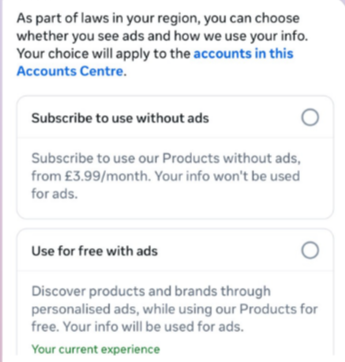
This year, users in the UK were given the same choice: use Meta’s products for free or subscribe to use them without ads. But only grudgingly, judging by the tone in the offer… “As part of laws in your region, you have a choice.”

As part of laws in your region, you have a choice
The ad-free option that has been rolling out coincides with the announcement of Meta’s premium subscriptions.

That ad-free option, however, is not what Meta is talking about now.

The newly announced plans are not about ads, and they are also separate from Meta Verified, which starts at around $15 a month and focuses on creators and businesses, offering a verification badge, better support, and anti‑impersonation protection.

Instead, these new subscriptions are likely to focus on additional features—more control over how users share and connect, and possibly tools such as expanded AI capabilities, unlimited audience lists, seeing who you follow that doesn’t follow you back, or viewing stories without the poster knowing it was you.

These examples are unconfirmed. All we know for sure is that Meta plans to test new paid features to see which ones users are willing to pay for and how much they can charge.

Meta has said these features will focus on productivity, creativity, and expanded AI.

My opinion

Unfortunately, this feels like another refusal to listen.

Most of us aren’t asking for more AI in our feeds. We’re asking for a basic sense of control: control over who sees us, what’s tracked about us, and how our data is used to feed an algorithm designed to keep us scrolling.

Users shouldn’t have to choose between being mined for behavioral data or paying a monthly fee just to be left alone. The message baked into “pay or be profiled” is that privacy is now a luxury good, not a default right. But while regulators keep saying the model is unlawful, the experience on the ground still nudges people toward the path of least resistance: accept the tracking and move on.

Even then, this level of choice is only available to users in Europe.

Why not offer the same option to users in the US? Or will it take stronger US privacy regulation to make that happen?


We don’t just report on threats – we help protect your social media

Cybersecurity risks should never spread beyond a headline. Protect your social media accounts by using Malwarebytes Identity Theft Protection.

  •  

Meta confirms it’s working on premium subscription for its apps

Meta plans to test exclusive features that will be incorporated in paid versions of Facebook, Instagram, and WhatsApp. It confirmed these plans to TechCrunch.

But these plans are not to be confused with the ad-free subscription options that Meta introduced for Facebook and Instagram in the EU, the European Economic Area, and Switzerland in late 2023 and framed as a way to comply with General Data Protection Regulation (GDPR) and Digital Markets Act requirements.

From November 2023, users in those regions could either keep using the services for free with personalized ads or pay a monthly fee for an ad‑free experience. European rules require Meta to get users’ consent in order to show them targeted ads, so this was an obvious attempt to recoup advertising revenue when users declined to give that consent.

This year, users in the UK were given the same choice: use Meta’s products for free or subscribe to use them without ads. But only grudgingly, judging by the tone in the offer… “As part of laws in your region, you have a choice.”

As part of laws in your region, you have a choice
The ad-free option that has been rolling out coincides with the announcement of Meta’s premium subscriptions.

That ad-free option, however, is not what Meta is talking about now.

The newly announced plans are not about ads, and they are also separate from Meta Verified, which starts at around $15 a month and focuses on creators and businesses, offering a verification badge, better support, and anti‑impersonation protection.

Instead, these new subscriptions are likely to focus on additional features—more control over how users share and connect, and possibly tools such as expanded AI capabilities, unlimited audience lists, seeing who you follow that doesn’t follow you back, or viewing stories without the poster knowing it was you.

These examples are unconfirmed. All we know for sure is that Meta plans to test new paid features to see which ones users are willing to pay for and how much they can charge.

Meta has said these features will focus on productivity, creativity, and expanded AI.

My opinion

Unfortunately, this feels like another refusal to listen.

Most of us aren’t asking for more AI in our feeds. We’re asking for a basic sense of control: control over who sees us, what’s tracked about us, and how our data is used to feed an algorithm designed to keep us scrolling.

Users shouldn’t have to choose between being mined for behavioral data or paying a monthly fee just to be left alone. The message baked into “pay or be profiled” is that privacy is now a luxury good, not a default right. But while regulators keep saying the model is unlawful, the experience on the ground still nudges people toward the path of least resistance: accept the tracking and move on.

Even then, this level of choice is only available to users in Europe.

Why not offer the same option to users in the US? Or will it take stronger US privacy regulation to make that happen?


We don’t just report on threats – we help protect your social media

Cybersecurity risks should never spread beyond a headline. Protect your social media accounts by using Malwarebytes Identity Theft Protection.

  •  

WhatsApp rolls out new protections against advanced exploits and spyware

WhatsApp is quietly rolling out a new safety layer for photos, videos, and documents, and it lives entirely under the hood. It won’t change how you chat, but it will change what happens to the files that move through your chats—especially the kind that can hide malware.

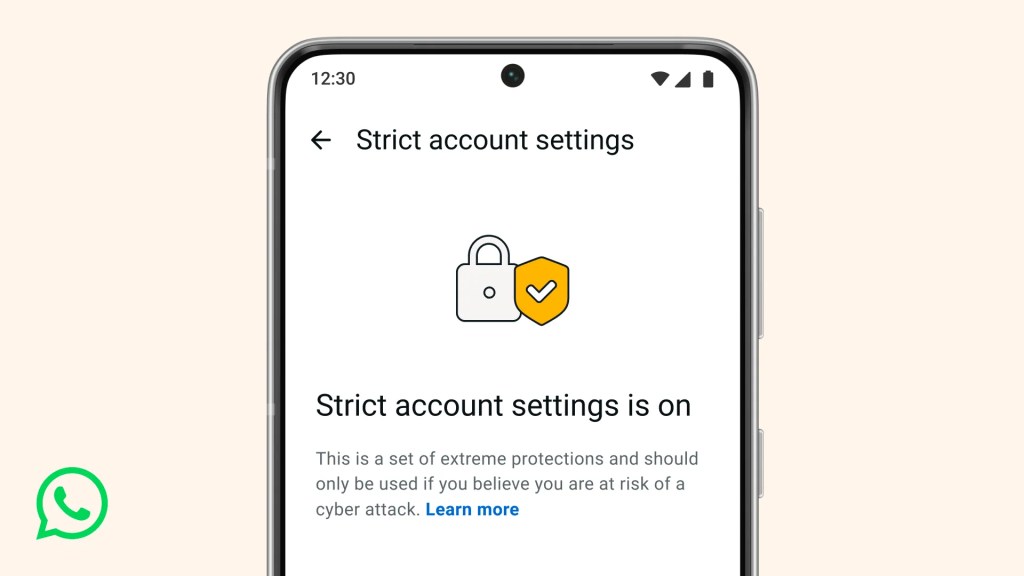
The new feature, called Strict Account Settings, is rolling out gradually over the coming weeks. To see whether you have the option—and to enable it—go to Settings > Privacy > Advanced.

Strict account settings
Image courtesy of WhatsApp

Yesterday, we wrote about a WhatsApp bug on Android that made headlines because a malicious media file in a group chat could be downloaded and used as an attack vector without you tapping anything. You only had to be added to a new group to be exposed to the booby-trapped file. That issue highlighted something security folks have worried about for years: media files are a great vehicle for attacks, and they do not always exploit WhatsApp itself, but bugs in the operating system or its media libraries.

In Meta’s explanation of the new technology, it points back to the 2015 Stagefright Android vulnerability, where simply processing a malicious video could compromise a device. Back then, WhatsApp worked around the issue by teaching its media library to spot broken MP4 files that could trigger those OS bugs, buying users protection even if their phones were not fully patched.

What’s new is that WhatsApp has now rebuilt its core media-handling library in Rust, a memory-safe programming language. This helps eliminate several types of memory bugs that often lead to serious security problems. In the process, it replaced about 160,000 lines of older C++ code with roughly 90,000 lines of Rust, and rolled the new library out to billions of devices across Android, iOS, desktop apps, wearables, and the web.

On top of that, WhatsApp has bundled a series of checks into an internal system it calls “Kaleidoscope.” This system inspects incoming files for structural oddities, flags higher‑risk formats like PDFs with embedded content or scripts, detects when a file pretends to be something it’s not (for example, a renamed executable), and marks known dangerous file types for special handling in the app. It won’t catch every attack, but it should prevent malicious files from poking at more fragile parts of your device.

For everyday users, the Rust rebuilt and Kaleidoscope checks are good news. They add a strong, invisible safety net around photos, videos and other files you receive, including in group chats where the recent bug could be abused. They also line up neatly with our earlier advice to turn off automatic media downloads or use Advanced Privacy Mode, which limits how far a malicious file can travel on your device even if it lands in WhatsApp.

WhatsApp is the latest platform to roll out enhanced protections for users: Apple introduced Lockdown Mode in 2022, and Android followed with Advanced Protection Mode last year. WhatsApp’s new Strict Account Settings takes a similar high-level approach, applying more restrictive defaults within the app, including blocking attachments and media from unknown senders.

However, this is no reason to rush back to WhatsApp, or to treat these changes as a guarantee of safety. At the very least, Meta is showing that it is willing to invest in making WhatsApp more secure.


We don’t just report on phone security—we provide it

Cybersecurity risks should never spread beyond a headline. Keep threats off your mobile devices by downloading Malwarebytes for iOS, and Malwarebytes for Android today.

  •  

WhatsApp rolls out new protections against advanced exploits and spyware

WhatsApp is quietly rolling out a new safety layer for photos, videos, and documents, and it lives entirely under the hood. It won’t change how you chat, but it will change what happens to the files that move through your chats—especially the kind that can hide malware.

The new feature, called Strict Account Settings, is rolling out gradually over the coming weeks. To see whether you have the option—and to enable it—go to Settings > Privacy > Advanced.

Strict account settings
Image courtesy of WhatsApp

Yesterday, we wrote about a WhatsApp bug on Android that made headlines because a malicious media file in a group chat could be downloaded and used as an attack vector without you tapping anything. You only had to be added to a new group to be exposed to the booby-trapped file. That issue highlighted something security folks have worried about for years: media files are a great vehicle for attacks, and they do not always exploit WhatsApp itself, but bugs in the operating system or its media libraries.

In Meta’s explanation of the new technology, it points back to the 2015 Stagefright Android vulnerability, where simply processing a malicious video could compromise a device. Back then, WhatsApp worked around the issue by teaching its media library to spot broken MP4 files that could trigger those OS bugs, buying users protection even if their phones were not fully patched.

What’s new is that WhatsApp has now rebuilt its core media-handling library in Rust, a memory-safe programming language. This helps eliminate several types of memory bugs that often lead to serious security problems. In the process, it replaced about 160,000 lines of older C++ code with roughly 90,000 lines of Rust, and rolled the new library out to billions of devices across Android, iOS, desktop apps, wearables, and the web.

On top of that, WhatsApp has bundled a series of checks into an internal system it calls “Kaleidoscope.” This system inspects incoming files for structural oddities, flags higher‑risk formats like PDFs with embedded content or scripts, detects when a file pretends to be something it’s not (for example, a renamed executable), and marks known dangerous file types for special handling in the app. It won’t catch every attack, but it should prevent malicious files from poking at more fragile parts of your device.

For everyday users, the Rust rebuilt and Kaleidoscope checks are good news. They add a strong, invisible safety net around photos, videos and other files you receive, including in group chats where the recent bug could be abused. They also line up neatly with our earlier advice to turn off automatic media downloads or use Advanced Privacy Mode, which limits how far a malicious file can travel on your device even if it lands in WhatsApp.

WhatsApp is the latest platform to roll out enhanced protections for users: Apple introduced Lockdown Mode in 2022, and Android followed with Advanced Protection Mode last year. WhatsApp’s new Strict Account Settings takes a similar high-level approach, applying more restrictive defaults within the app, including blocking attachments and media from unknown senders.

However, this is no reason to rush back to WhatsApp, or to treat these changes as a guarantee of safety. At the very least, Meta is showing that it is willing to invest in making WhatsApp more secure.


We don’t just report on phone security—we provide it

Cybersecurity risks should never spread beyond a headline. Keep threats off your mobile devices by downloading Malwarebytes for iOS, and Malwarebytes for Android today.

  •  

A WhatsApp bug lets malicious media files spread through group chats

WhatsApp is going through a rough patch. Some users would argue it has been ever since Meta acquired the once widely trusted messaging platform. User sentiment has shifted from “trusted default messenger” to a grudgingly necessary Meta product.

Privacy-aware users still see WhatsApp as one of the more secure mass-market messaging platforms if you lock down its settings. Even then, many remain uneasy about Meta’s broader ecosystem, and wish all their contacts would switch to a more secure platform.

Back to current affairs, which will only reinforce that sentiment.

Google’s Project Zero has just disclosed a WhatsApp vulnerability where a malicious media file, sent into a newly created group chat, can be automatically downloaded and used as an attack vector.

The bug affects WhatsApp on Android and involves zero‑click media downloads in group chats. You can be attacked simply by being added to a group and having a malicious file sent to you.

According to Project Zero, the attack is most likely to be used in targeted campaigns, since the attacker needs to know or guess at least one contact. While focused, it is relatively easy to repeat once an attacker has a likely target list.

And to put a cherry on top for WhatsApp’s competitors, a potentially even more serious concern for the popular messaging platform, an international group of plaintiffs sued Meta Platforms, alleging the WhatsApp owner can store, analyze, and access virtually all of users’ private communications, despite WhatsApp’s end-to-end encryption claims.

How to secure WhatsApp

Reportedly, Meta pushed a server change on November 11, 2025, but Google says that only partially resolved the issue. So, Meta is working on a comprehensive fix.

Google’s advice is to disable Automatic Download or enable WhatsApp’s Advanced Privacy Mode so that media is not automatically downloaded to your phone.

And you’ll need to keep WhatsApp updated to get the latest patches, which is true for any app and for Android itself.

Turn off auto-download of media

Goal: ensure that no photos, videos, audio, or documents are pulled to the device without an explicit decision.

  • Open WhatsApp on your Android device.
  • Tap the three‑dot menu in the top‑right corner, then tap Settings.
  • Go to Storage and data (sometimes labeled Data and storage usage).
  • Under Media auto-download, you will see When using mobile data, when connected on Wi‑Fi. and when roaming.
  • For each of these three entries, tap it and uncheck all media types: Photos, Audio, Videos, Documents. Then tap OK.
  • Confirm that each category now shows something like “No media” under it.

Doing this directly implements Project Zero’s guidance to “disable Automatic Download” so that malicious media can’t silently land on your storage as soon as you are dropped into a hostile group.

Stop WhatsApp from saving media to your Android gallery

Even if WhatsApp still downloads some content, you can stop it from leaking into shared storage where other apps and system components see it.

  • In Settings, go to Chats.
  • Turn off Media visibility (or similar option such as Show media in gallery). For particularly sensitive chats, open the chat, tap the contact or group name, find Media visibility, and set it to No for that thread.

WhatsApp is a sandbox, and should contain the threat. Which means, keeping media inside WhatsApp makes it harder for a malicious file to be processed by other, possibly more vulnerable components.

Lock down who can add you to groups

The attack chain requires the attacker to add you and one of your contacts to a new group. Reducing who can do that lowers risk.

  • ​In Settings, tap Privacy.
  • Tap Groups.
  • Change from Everyone to My contacts or ideally My contacts except… and exclude any numbers you do not fully trust.
  • If you use WhatsApp for work, consider keeping group membership strictly to known contacts and approved admins.

Set up two-step verification on your WhatsApp account

Read this guide for Android and iOS to learn how to do that.


We don’t just report on phone security—we provide it

Cybersecurity risks should never spread beyond a headline. Keep threats off your mobile devices by downloading Malwarebytes for iOS, and Malwarebytes for Android today.

  •  

A WhatsApp bug lets malicious media files spread through group chats

WhatsApp is going through a rough patch. Some users would argue it has been ever since Meta acquired the once widely trusted messaging platform. User sentiment has shifted from “trusted default messenger” to a grudgingly necessary Meta product.

Privacy-aware users still see WhatsApp as one of the more secure mass-market messaging platforms if you lock down its settings. Even then, many remain uneasy about Meta’s broader ecosystem, and wish all their contacts would switch to a more secure platform.

Back to current affairs, which will only reinforce that sentiment.

Google’s Project Zero has just disclosed a WhatsApp vulnerability where a malicious media file, sent into a newly created group chat, can be automatically downloaded and used as an attack vector.

The bug affects WhatsApp on Android and involves zero‑click media downloads in group chats. You can be attacked simply by being added to a group and having a malicious file sent to you.

According to Project Zero, the attack is most likely to be used in targeted campaigns, since the attacker needs to know or guess at least one contact. While focused, it is relatively easy to repeat once an attacker has a likely target list.

And to put a cherry on top for WhatsApp’s competitors, a potentially even more serious concern for the popular messaging platform, an international group of plaintiffs sued Meta Platforms, alleging the WhatsApp owner can store, analyze, and access virtually all of users’ private communications, despite WhatsApp’s end-to-end encryption claims.

How to secure WhatsApp

Reportedly, Meta pushed a server change on November 11, 2025, but Google says that only partially resolved the issue. So, Meta is working on a comprehensive fix.

Google’s advice is to disable Automatic Download or enable WhatsApp’s Advanced Privacy Mode so that media is not automatically downloaded to your phone.

And you’ll need to keep WhatsApp updated to get the latest patches, which is true for any app and for Android itself.

Turn off auto-download of media

Goal: ensure that no photos, videos, audio, or documents are pulled to the device without an explicit decision.

  • Open WhatsApp on your Android device.
  • Tap the three‑dot menu in the top‑right corner, then tap Settings.
  • Go to Storage and data (sometimes labeled Data and storage usage).
  • Under Media auto-download, you will see When using mobile data, when connected on Wi‑Fi. and when roaming.
  • For each of these three entries, tap it and uncheck all media types: Photos, Audio, Videos, Documents. Then tap OK.
  • Confirm that each category now shows something like “No media” under it.

Doing this directly implements Project Zero’s guidance to “disable Automatic Download” so that malicious media can’t silently land on your storage as soon as you are dropped into a hostile group.

Stop WhatsApp from saving media to your Android gallery

Even if WhatsApp still downloads some content, you can stop it from leaking into shared storage where other apps and system components see it.

  • In Settings, go to Chats.
  • Turn off Media visibility (or similar option such as Show media in gallery). For particularly sensitive chats, open the chat, tap the contact or group name, find Media visibility, and set it to No for that thread.

WhatsApp is a sandbox, and should contain the threat. Which means, keeping media inside WhatsApp makes it harder for a malicious file to be processed by other, possibly more vulnerable components.

Lock down who can add you to groups

The attack chain requires the attacker to add you and one of your contacts to a new group. Reducing who can do that lowers risk.

  • ​In Settings, tap Privacy.
  • Tap Groups.
  • Change from Everyone to My contacts or ideally My contacts except… and exclude any numbers you do not fully trust.
  • If you use WhatsApp for work, consider keeping group membership strictly to known contacts and approved admins.

Set up two-step verification on your WhatsApp account

Read this guide for Android and iOS to learn how to do that.


We don’t just report on phone security—we provide it

Cybersecurity risks should never spread beyond a headline. Keep threats off your mobile devices by downloading Malwarebytes for iOS, and Malwarebytes for Android today.

  •  
❌