 Login
Login
OpenAI hostname hints at a new ChatGPT feature codenamed "Sonata"
OpenAI is reportedly testing a new feature or product codenamed "Sonata," and it could be related to music or audio-related experiences on ChatGPT. [...]

EFF last summer asked a federal judge to block the federal government from using Medicaid data to identify and deport immigrants.
We also warned about the danger of the Trump administration consolidating all of the government’s information into a single searchable, AI-driven interface with help from Palantir, a company that has a shaky-at-best record on privacy and human rights.
Now we have the first evidence that our concerns have become reality.
“Palantir is working on a tool for Immigration and Customs Enforcement (ICE) that populates a map with potential deportation targets, brings up a dossier on each person, and provides a “confidence score” on the person’s current address,” 404 Media reports today. “ICE is using it to find locations where lots of people it might detain could be based.”
The tool – dubbed Enhanced Leads Identification & Targeting for Enforcement (ELITE) – receives peoples’ addresses from the Department of Health and Human Services (which includes Medicaid) and other sources, 404 Media reports based on court testimony in Oregon by law enforcement agents, among other sources.
This revelation comes as ICE – which has gone on a surveillance technology shopping spree – floods Minneapolis with agents, violently running roughshod over the civil rights of immigrants and U.S. citizens alike; President Trump has threatened to use the Insurrection Act of 1807 to deploy military troops against protestors there. Other localities are preparing for the possibility of similar surges.
Different government agencies necessarily collect information to provide essential services or collect taxes, but the danger comes when the government begins pooling that data and using it for reasons unrelated to the purpose it was collected.
This kind of consolidation of government records provides enormous government power that can be abused. Different government agencies necessarily collect information to provide essential services or collect taxes, but the danger comes when the government begins pooling that data and using it for reasons unrelated to the purpose it was collected.
As EFF Executive Director Cindy Cohn wrote in a Mercury News op-ed last August, “While couched in the benign language of eliminating government ‘data silos,’ this plan runs roughshod over your privacy and security. It’s a throwback to the rightly mocked ‘Total Information Awareness’ plans of the early 2000s that were, at least publicly, stopped after massive outcry from the public and from key members of Congress. It’s time to cry out again.”
In addition to the amicus brief we co-authored challenging ICE’s grab for Medicaid data, EFF has successfully sued over DOGE agents grabbing personal data from the U.S. Office of Personnel Management, filed an amicus brief in a suit challenging ICE’s grab for taxpayer data, and sued the departments of State and Homeland Security to halt a mass surveillance program to monitor constitutionally protected speech by noncitizens lawfully present in the U.S.
But litigation isn’t enough. People need to keep raising concerns via public discourse and Congress should act immediately to put brakes on this runaway train that threatens to crush the privacy and security of each and every person in America.

In 2025, cybersecurity researchers discovered several open databases belonging to various AI image-generation tools. This fact alone makes you wonder just how much AI startups care about the privacy and security of their users’ data. But the nature of the content in these databases is far more alarming.
A large number of generated pictures in these databases were images of women in lingerie or fully nude. Some were clearly created from children’s photos, or intended to make adult women appear younger (and undressed). Finally, the most disturbing part: some pornographic images were generated from completely innocent photos of real people — likely taken from social media.
In this post, we’re talking about what sextortion is, and why AI tools mean anyone can become a victim. We detail the contents of these open databases, and give you advice on how to avoid becoming a victim of AI-era sextortion.
Online sexual extortion has become so common it’s earned its own global name: sextortion (a portmanteau of sex and extortion). We’ve already detailed its various types in our post, Fifty shades of sextortion. To recap, this form of blackmail involves threatening to publish intimate images or videos to coerce the victim into taking certain actions, or to extort money from them.
Previously, victims of sextortion were typically adult industry workers, or individuals who’d shared intimate content with an untrustworthy person.
However, the rapid advancement of artificial intelligence, particularly text-to-image technology, has fundamentally changed the game. Now, literally anyone who’s posted their most innocent photos publicly can become a victim of sextortion. This is because generative AI makes it possible to quickly, easily, and convincingly undress people in any digital image, or add a generated nude body to someone’s head in a matter of seconds.
Of course, this kind of fakery was possible before AI, but it required long hours of meticulous Photoshop work. Now, all you need is to describe the desired result in words.
To make matters worse, many generative AI services don’t bother much with protecting the content they’ve been used to create. As mentioned earlier, last year saw researchers discover at least three publicly accessible databases belonging to these services. This means the generated nudes within them were available not just to the user who’d created them, but to anyone on the internet.
In October 2025, cybersecurity researcher Jeremiah Fowler uncovered an open database containing over a million AI-generated images and videos. According to the researcher, the overwhelming majority of this content was pornographic in nature. The database wasn’t encrypted or password-protected — meaning any internet user could access it.
The database’s name and watermarks on some images led Fowler to believe its source was the U.S.-based company SocialBook, which offers services for influencers and digital marketing services. The company’s website also provides access to tools for generating images and content using AI.
However, further analysis revealed that SocialBook itself wasn’t directly generating this content. Links within the service’s interface led to third-party products — the AI services MagicEdit and DreamPal — which were the tools used to create the images. These tools allowed users to generate pictures from text descriptions, edit uploaded photos, and perform various visual manipulations, including creating explicit content and face-swapping.
The leak was linked to these specific tools, and the database contained the product of their work, including AI-generated and AI-edited images. A portion of the images led the researcher to suspect they’d been uploaded to the AI as references for creating provocative imagery.
Fowler states that roughly 10,000 photos were being added to the database every single day. SocialBook denies any connection to the database. After the researcher informed the company of the leak, several pages on the SocialBook website that had previously mentioned MagicEdit and DreamPal became inaccessible and began returning errors.
Both services — MagicEdit and DreamPal — were initially marketed as tools for interactive, user-driven visual experimentation with images and art characters. Unfortunately, a significant portion of these capabilities were directly linked to creating sexualized content.
For example, MagicEdit offered a tool for AI-powered virtual clothing changes, as well as a set of styles that made images of women more revealing after processing — such as replacing everyday clothes with swimwear or lingerie. Its promotional materials promised to turn an ordinary look into a sexy one in seconds.
DreamPal, for its part, was initially positioned as an AI-powered role-playing chat, and was even more explicit about its adult-oriented positioning. The site offered to create an ideal AI girlfriend, with certain pages directly referencing erotic content. The FAQ also noted that filters for explicit content in chats were disabled so as not to limit users’ most intimate fantasies.
Both services have suspended operations. At the time of writing, the DreamPal website returned an error, while MagicEdit seemed available again. Their apps were removed from both the App Store and Google Play.
Jeremiah Fowler says earlier in 2025, he discovered two more open databases containing AI-generated images. One belonged to the South Korean site GenNomis, and contained 95,000 entries — a substantial portion of which being images of “undressed” people. Among other things, the database included images with child versions of celebrities: American singers Ariana Grande and Beyoncé, and reality TV star Kim Kardashian.
In light of incidents like these, it’s clear that the risks associated with sextortion are no longer confined to private messaging or the exchange of intimate content. In the era of generative AI, even ordinary photos, when posted publicly, can be used to create compromising content.
This problem is especially relevant for women, but men shouldn’t get too comfortable either: the popular blackmail scheme of “I hacked your computer and used the webcam to make videos of you browsing adult sites” could reach a whole new level of persuasion thanks to AI tools for generating photos and videos.
Therefore, protecting your privacy on social media and controlling what data about you is publicly available become key measures for safeguarding both your reputation and peace of mind. To prevent your photos from being used to create questionable AI-generated content, we recommend making all your social media profiles as private as possible — after all, they could be the source of images for AI-generated nudes.
We’ve already published multiple detailed guides on how to reduce your digital footprint online or even remove your data from the internet, how to stop data brokers from compiling dossiers on you, and protect yourself from intimate image abuse.
Additionally, we have a dedicated service, Privacy Checker — perfect for anyone who wants a quick but systematic approach to privacy settings everywhere possible. It compiles step-by-step guides for securing accounts on social media and online services across all major platforms.
And to ensure the safety and privacy of your child’s data, Kaspersky Safe Kids can help: it allows parents to monitor which social media their child spends time on. From there, you can help them adjust privacy settings on their accounts so their posted photos aren’t used to create inappropriate content. Explore our guide to children’s online safety together, and if your child dreams of becoming a popular blogger, discuss our step-by-step cybersecurity guide for wannabe bloggers with them.




Read more about how enterprising hackers have started projects to do counter surveillance against ICE, and learn how to follow the Homeland Security spending trail.
U.S. Immigration and Customs Enforcement (ICE) has a new budget under the current administration, and they are going on a surveillance tech shopping spree. Standing at $28.7 billion dollars for the year 2025 (nearly triple their 2024 budget) and at least another $56.25 billion over the next three years, ICE's budget would be the envy of many national militaries around the world. Indeed, this budget would put ICE as the 14th most well-funded military in the world, right between Ukraine and Israel.
There are many different agencies under U.S. Department of Homeland Security (DHS) that deal with immigration, as well as non-immigration related agencies such as Cybersecurity and Infrastructure Security Agency (CISA) and Federal Emergency Management Agency (FEMA). ICE is specifically the enforcement arm of the U.S. immigration apparatus. Their stated mission is to “[p]rotect America through criminal investigations and enforcing immigration laws to preserve national security and public safety.”
Of course, ICE doesn’t just end up targeting, surveilling, harassing, assaulting, detaining, and torturing people who are undocumented immigrants. They have targeted people on work permits, asylum seekers, permanent residents (people holding “green cards”), naturalized citizens, and even citizens by birth.
While the NSA and FBI might be the first agencies that come to mind when thinking about surveillance in the U.S., ICE should not be discounted. ICE has always engaged in surveillance and intelligence-gathering as part of their mission. A 2022 report by Georgetown Law’s Center for Privacy and Technology found the following:
With a budget for 2025 that is 10 times the size of the agency’s total surveillance spending over the last 13 years, ICE is going on a shopping spree, creating one of the largest, most comprehensive domestic surveillance machines in history.
The entire surveillance industry has been allowed to grow and flourish under both Democratic and Republican regimes. For example, President Obama dramatically expanded ICE from its more limited origins, while at the same time narrowing its focus to undocumented people accused of crimes. Under the first and second Trump administrations, ICE ramped up its operations significantly, increasing raids in major cities far from the southern border and casting a much wider net on potential targets. ICE has most recently expanded its partnerships with sheriffs across the U.S., and deported more than 1.5 million people cumulatively under the Trump administrations (600,000 of those were just during the first year of Trump’s second term according to DHS statistics), not including the 1.6 million people DHS claims have “self-deported.” More horrifying is that in just the last year of the current administration, 4,250 people detained by ICE have gone missing, and 31 have died in custody or while being detained. In contrast, 24 people died in ICE custody during the entirety of the Biden administration.
ICE also has openly stated that they plan to spy on the American public, looking for any signs of left-wing dissent against their domestic military-like presence. Acting ICE Director Todd Lyons said in a recent interview that his agency “was dedicated to the mission of going after” Antifa and left-wing gun clubs.
On a long enough timeline, any surveillance tool you build will eventually be used by people you don’t like for reasons that you disagree with.
On a long enough timeline, any surveillance tool you build will eventually be used by people you don’t like for reasons that you disagree with. A surveillance-industrial complex and a democratic society are fundamentally incompatible, regardless of your political party.
EFF recently published a guide to using government databases to dig up homeland security spending and compiled our own dataset of companies selling tech to DHS components. In 2025, ICE entered new contracts with several private companies for location surveillance, social media surveillance, face surveillance, spyware, and phone surveillance. Let’s dig into each.
One common surveillance tactic of immigration officials is to get physical access to a person’s phone, either while the person is detained at a border crossing, or while they are under arrest. ICE renewed an $11 million contract with a company called Cellebrite, which helps ICE unlock phones and then can take a complete image of all the data on the phone, including apps, location history, photos, notes, call records, text messages, and even Signal and WhatsApp messages. ICE also signed a $3 million contract with Cellebrite’s main competitor Magnet Forensics, makers of the Graykey device for unlocking phones. DHS has had contracts with Cellebrite since 2008, but the number of phones they search has risen dramatically each year, reaching a new high of 14,899 devices searched by ICE’s sister agency U.S. Customs and Border Protection (CBP) between April and June of 2025.
If ICE can’t get physical access to your phone, that won’t stop them from trying to gain access to your data. They have also resumed a $2 million contract with the spyware manufacturer, Paragon. Paragon makes the Graphite spyware, which made headlines in 2025 for being found on the phones of several dozen members of Italian civil society. Graphite is able to harvest messages from multiple different encrypted chat apps such as Signal and WhatsApp without the user ever knowing.
Our concern with ICE buying this software is the likelihood that it will be used against undocumented people and immigrants who are here legally, as well as U.S. citizens who have spoken up against ICE or who work with immigrant communities. Malware such as Graphite can be used to read encrypted messages as they are sent, other forms of spyware can also download files, photos, location history, record phone calls, and even discretely turn on your microphone to record you.
The most effective way to protect yourself from smartphone surveillance would be to not have a phone. But that’s not realistic advice in modern society. Fortunately, for most people there are other ways you can make it harder for ICE to spy on your digital life.
The first and easiest step is to keep your phone up to date. Installing security updates makes it harder to use malware against you and makes it less likely for Cellebrite to break into your phone. Likewise, both iPhone (Lockdown Mode) and Android (Advanced Protection) offer special modes that lock your phone down and can help protect against some malware.
The first and easiest step is to keep your phone up to date.
Having your phone’s software up to date and locked with a strong alphanumeric password will offer some protection against Cellebrite, depending on your model of phone. However, the strongest protection is simply to keep your phone turned off, which puts it in “before first unlock” mode and has been typically harder for law enforcement to bypass. This is good to do if you are at a protest and expect to be arrested, if you are crossing a border, or if you are expecting to encounter ICE. Keeping your phone on airplane mode should be enough to protect against cell-site simulators, but turning your phone off will offer extra protection against cell-site simulators and Cellebrite devices. If you aren’t able to turn your phone off, it’s a good idea to at least turn off face/fingerprint unlock to make it harder for police to force you to unlock your phone. While EFF continues to fight to strengthen our legal protections against compelling people to decrypt their devices, there is currently less protection against compelled face and fingerprint unlocking than there is against compelled password disclosure.
ICE has also spent $5 million to acquire at least two location and social media surveillance tools: Webloc and Tangles, from a company called Pen Link, an established player in the open source intelligence space. Webloc gathers the locations of millions of phones by gathering data from mobile data brokers and linking it together with other information about users. Tangles is a social media surveillance tool which combines web scraping with access to social media application programming interfaces. These tools are able to build a dossier on anyone who has a public social media account. Tangles is able to link together a person’s posting history, posts, and comments containing keywords, location history, tags, social graph, and photos with those of their friends and family. Penlink then sells this information to law enforcement, allowing law enforcement to avoid the need for a warrant. This means ICE can look up historic and current locations of many people all across the U.S. without ever having to get a warrant.
These tools are able to build a dossier on anyone who has a public social media account.
ICE also has established contracts with other social media scanning and AI analysis companies, such as a $4.2 million contract with a company called Fivecast for the social media surveillance and AI analysis tool ONYX. According to Fivecast, ONYX can conduct “automated, continuous and targeted collection of multimedia data” from all major “news streams, search engines, social media, marketplaces, the dark web, etc.” ONYX can build what it calls “digital footprints” from biographical data and curated datasets spanning numerous platforms, and “track shifts in sentiment and emotion” and identify the level of risk associated with an individual.
Another contract is with ShadowDragon for their product Social Net, which is able to monitor publicly available data from over 200 websites. In an acquisition document from 2022, ICE confirmed that ShadowDragon allowed the agency to search “100+ social networking sites,” noting that “[p]ersistent access to Facebook and Twitter provided by ShadowDragon SocialNet is of the utmost importance as they are the most prominent social media platforms.”
ICE has also indicated that they intend to spend between 20 and 50 million dollars on building and staffing a 24/7 social media monitoring office with at least 30 full time agents to comb every major social media website for leads that could generate enforcement raids.
For U.S. citizens, making your account private on social media is a good place to start. You might also consider having accounts under a pseudonym, or deleting your social media accounts altogether. For more information, check out our guide to protecting yourself on social media. Unfortunately, people immigrating to the U.S. might be subject to greater scrutiny, including mandatory social media checks, and should consult with an immigration attorney before taking any action. For people traveling to the U.S., new rules will soon likely require them to reveal five years of social media history and 10 years of past email addresses to immigration officials.
But it’s not just your digital habits ICE wants to surveil; they also want to spy on you in the physical world. ICE has contracts with multiple automated license plate reader (ALPR) companies and is able to follow the driving habits of a large percentage of Americans. ICE uses this data to track down specific people anywhere in the country. ICE has a $6 million contract through a Thomson Reuters subsidiary to access ALPR data from Motorola Solutions. ICE has also persuaded local law enforcement officers to run searches on their behalf through Flock Safety's massive network of ALPR data. CBP, including Border Patrol, also operates a network of covert ALPR systems in many areas.
ICE has also invested in biometric surveillance tools, such as face recognition software called Mobile Fortify to scan the faces of people they stop to determine if they are here legally. Mobile Fortify checks the pictures it takes against a database of 200 million photos for a match (the source of the photos is unknown). Additionally, ICE has a $10 million contract with Clearview AI for face recognition. ICE has also contracted with iris scanning company BI2 technologies for even more invasive biometric surveillance. ICE agents have also been spotted wearing Meta’s Ray-Ban video recording sunglasses.
ICE has acquired trucks equipped with cell-site simulators (AKA Stingrays) from a company called TechOps Specialty Vehicles (likely the cell-site simulators were manufactured by another company). This is not the first time ICE has bought this technology. According to documents obtained by the American Civil Liberties Union, ICE deployed cell-site simulators at least 466 times between 2017 and 2019, and ICE more than 1,885 times between 2013 and 2017, according to documents obtained by BuzzFeed News. Cell-site simulators can be used to track down a specific person in real time, with more granularity than a phone company or tools like Webloc can provide, though Webloc has the distinct advantage of being used without a warrant and not requiring agents to be in the vicinity of the person being tracked.
Taking public transit or bicycling is a great way to keep yourself off ALPR databases, but an even better way is to go to your local city council meetings and demand the city cancels contracts with ALPR companies, like people have done in Flagstaff, Arizona; Eugene, Oregon; and Denver, Colorado, among others.
If you are at a protest, putting your phone on airplane mode could help protect you from cell-site simulators and from apps on your phone disclosing your location, but might leave you vulnerable to advanced targeted attacks. For more advanced protection, turning your phone completely off protects against all radio based attacks, and also makes it harder for tools like Cellebrite to break into your phone as discussed above. But each individual will need to weigh their need for security from advanced radio based attacks against their need to document potential abuses through photo or video. For more information about protecting yourself at a protest, head over to SSD.
There is nothing you can do to change your face, which is why we need more stringent privacy laws such as Illinois’ Biometric Information Privacy Act.
Last but not least, ICE uses tools to combine and search all this data along with the data on Americans they have acquired from private companies, the IRS, TSA, and other government databases.
To search all this data, ICE uses ImmigrationOS, a system that came from a $30-million contract with Palantir. What Palantir does is hard to explain, even for people who work there, but essentially they are plumbers. Palantir makes it so that ICE has all the data they have acquired in one place so it’s easy to search through. Palantir links data from different databases, like IRS data, immigration records, and private databases, and enables ICE to view all of this data about a specific person in one place.
Palantir makes it so that ICE has all the data they have acquired in one place so it’s easy to search through.
The true civil liberties nightmare of Palantir is that they enable governments to link data that should have never been linked. There are good civil liberties reasons why IRS data was never linked with immigration data and was never linked with social media data, but Palantir breaks those firewalls. Palantir has labeled themselves as a progressive, human rights centric company historically, but their recent actions have given them away as just another tech company enabling surveillance nightmares.
Understanding the capabilities and limits of ICE and how to threat model helps you and your community fight back, remain powerful, and protect yourself.
One of the most important things you can do is to not spread rumors and misinformation. Rumors like “ICE has malware so now everyone's phones are compromised” or “Palantir knows what you are doing all the time” or “Signal is broken” don’t help your community. It’s more useful to spread facts, ways to protect yourself, and ways to fight back. For information about how to create a security plan for yourself or your community, and other tips to protect yourself, read our Surveillance Self-Defense guides.
One way to fight back against ICE is in the courts. EFF currently has a lawsuit against ICE over their pressure on Apple and Google to take down ICE spotting apps, like ICEBlock. We also represent multiple labor unions suing ICE over their social media surveillance practices.
We have also demanded the San Francisco Police Department stop sharing data illegally with ICE, and issued a statement condemning the collaboration between ICE and the malware provider Paragon. We also continue to maintain our Rayhunter project for detecting cell-site simulators.
Other civil liberties organizations are also suing ICE. ACLU has sued ICE over a subpoena to Meta attempting to identify the owner of an account providing advice to protestors, and another coalition of groups has thus far successfully sued the IRS to stop sharing taxpayer data with ICE.
We need to have a hard look at the surveillance industry. It is a key enabler of vast and untold violations of human rights and civil liberties, and it continues to be used by aspiring autocrats to threaten our very democracy. As long as it exists, the surveillance industry, and the data it generates, will be an irresistible tool for anti-democratic forces.
Help protect digital privacy & free speech for everyone
This guide was co-written by Andrew Zuker with support from the Heinrich Boell Foundation.
The U.S. government publishes volumes of detailed data on the money it spends, but searching through it and finding information can be challenging. Complex search functions and poor user interfaces on government reporting sites can hamper an investigation, as can inconsistent company profiles and complex corporate ownership structures.
This week, EFF and the Heinrich Boell Foundation released an update to our database of vendors providing technology to components of the U.S. Department of Homeland Security (DHS), such as Immigration and Customs Enforcement (ICE) and Customs and Border Protections (CBP). It includes new vendor profiles, new fields, and updated data on top contractors, so that journalists and researchers have a jumping-off point for their own investigations.
Access the dataset through Google Sheets (Google's Privacy Policy applies) or download the Excel file here.
This time we thought we would also share some of the research methods we developed while assembling this dataset.
This guide covers the key databases that store information on federal spending and contracts (often referred to as "awards"), government solicitations for products and services, and the government's "online shopping superstore," plus a few other deep-in-the-weeds datasets buried in the online bureaucracy. We have provided a step-by-step guide for searching these sites efficiently and help tips for finding information. While we have written this specifically with DHS agencies in mind, it should serve as a useful resource for procurement across the federal government.
Update Jan. 30, 2026: In mid 2026, FPDS.gov's functions will be transferred to SAM.gov. More info here.
The Federal Procurement Data System (FPDS) is the best place to start for finding out what companies are working with DHS. It is the official system for tracking federal discretionary spending and contains current data on contracts with non-governmental entities like corporations and private businesses. Award data is up-to-date and includes detailed information on vendors and awards which can be helpful when searching the other systems. It is a little bit old-school, but that often makes it one of the easiest and quickest sites to search, once you get the hang of it, since it offers a lot of options for narrowing search parameters to specific agencies, vendors, classification of services, etc.
How to Use FDPS
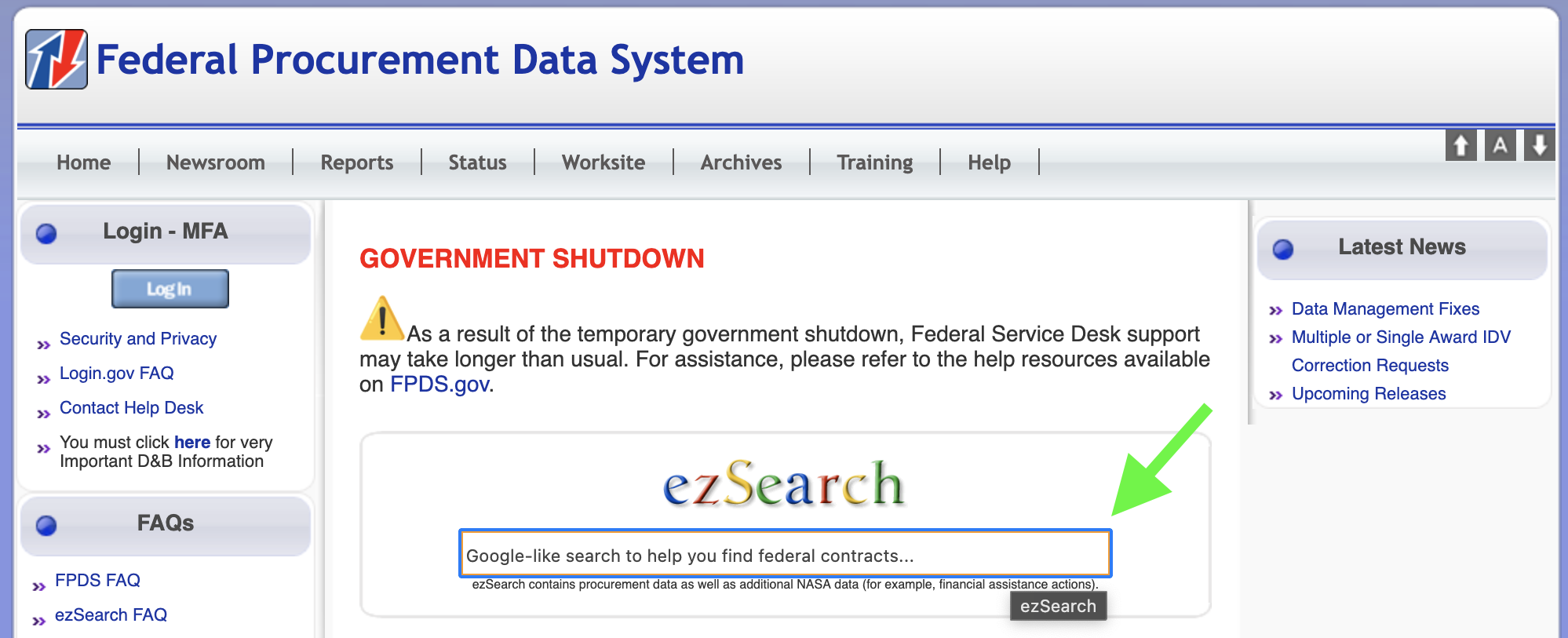
To begin searching Awards for a particular vendor, click into the “ezSearch” field in the center of the page, delete or replace the text “Google-like search to help you find federal contracts…” with a vendor name or keywords, and hit Enter to begin a new search.
A new tab will open automatically with exact matches at the top.
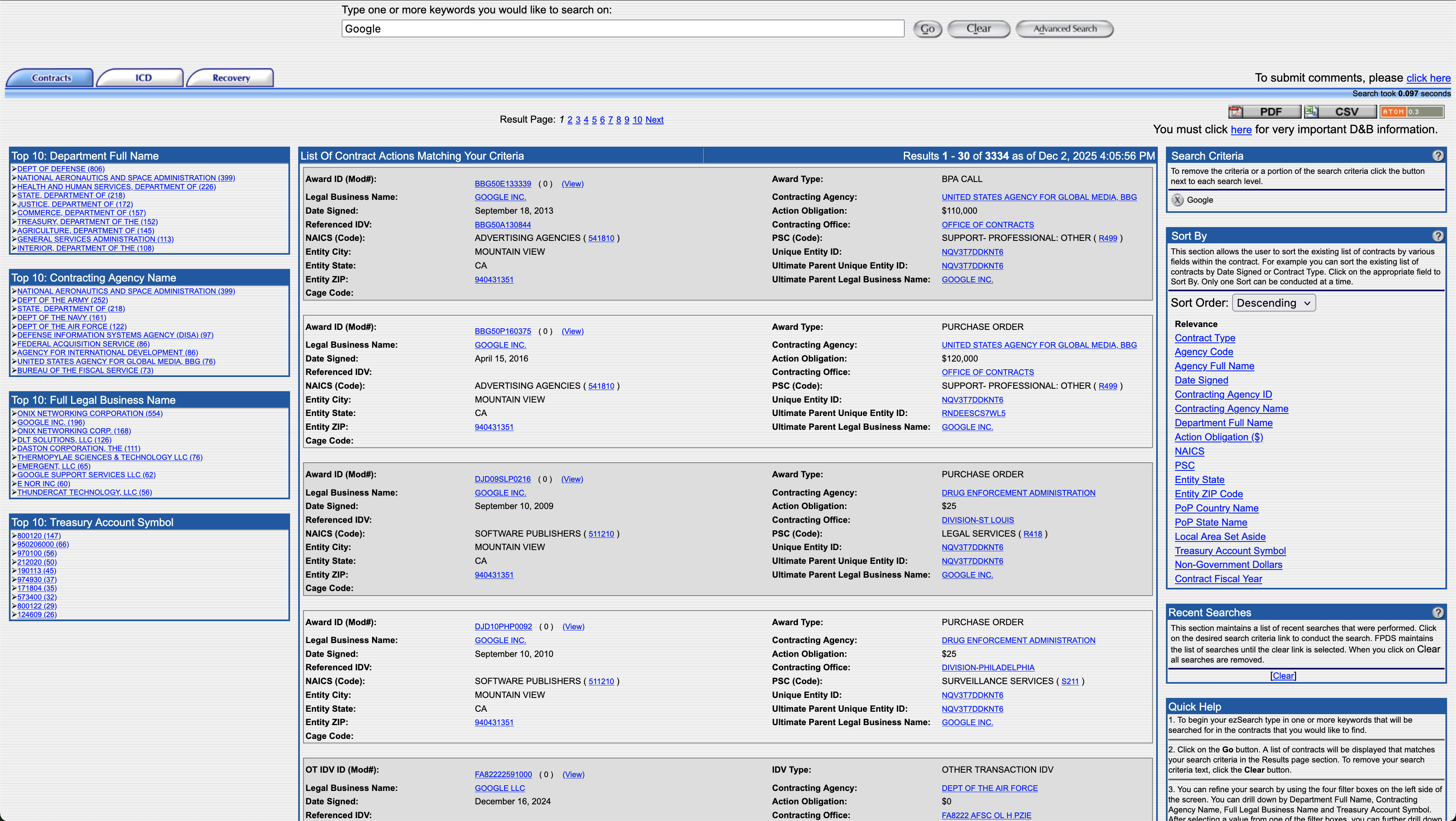
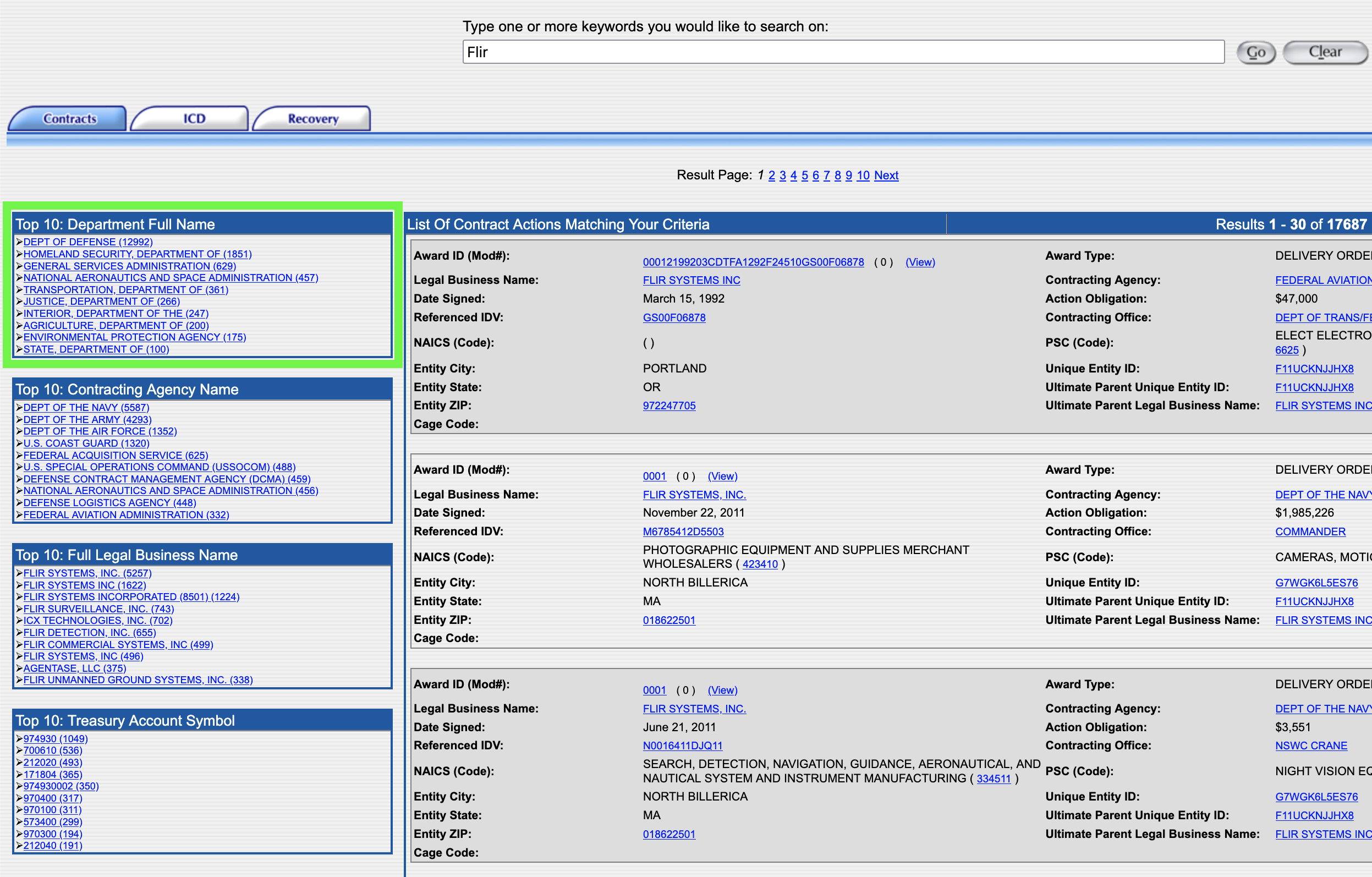
Four “Top 10” modules on the left side of the page link to top results in descending order: Department Full Name, Contracting Agency Name, Full Legal Business Name, and Treasury Account Symbol. These ranked lists help the user quickly narrow in on departments and agencies that vendors do business with. DHS may not appear in the “Top 10” results, which may indicate that the vendor hasn’t yet been awarded DHS or subagency contracts.
For example, if you searched the term “FLIR”, as in Teledyne FLIR who make infrared surveillance systems used along the U.S.-Mexico border, DHS is the 2nd result in the “Top 10: Department Full Name” box.
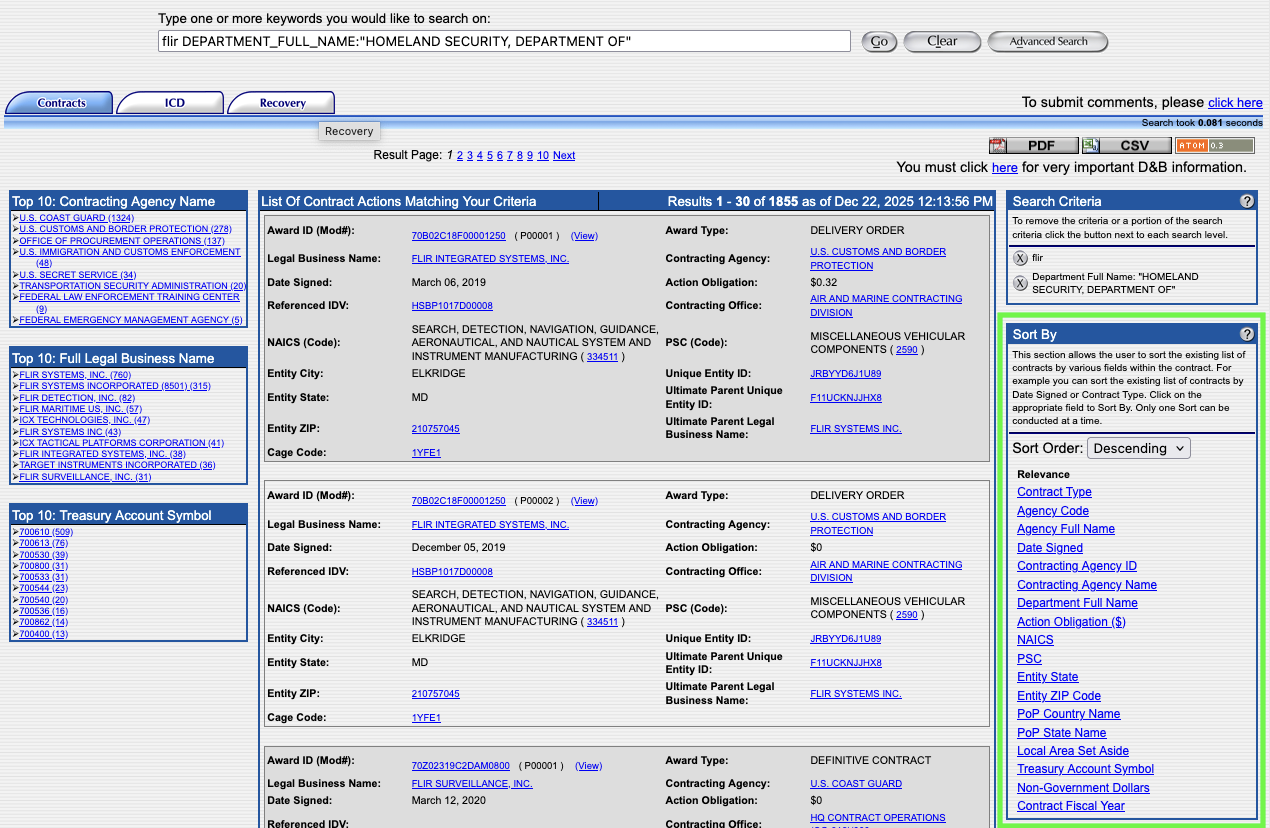
To see all DHS contracts awarded to the vendor, click “Homeland Security, Department of” from the “Top 10 Department Full Name” module. When the page loads, you will see the subcomponents of DHS (e.g., ICE, CBP, or the U.S. Secret Service) in the lefthand menu. You can click on each of those to drill down even further. You can also drill down by choosing a company.
Sorting options can be found on the right side of the page which offer the ability to refine and organize search results. One of the most useful is "Date Signed," which will arrange the results in chronological order.
You don't have to search by a company name. You can also use a product keyword, such as "LPR" (license plate reader). However, because keywords are not consistently used by government agencies, you will need to try various permutations to gather the most data.
Each click or search filter adds a new term to the search both in the main field at the top and in the Search Criteria module on the right. They can be deleted by clicking the X next to the term in this module or by removing the text in the main search field.

For each contract item, you can click "View" to see the specific details. However, these pages don't have permalinks, so you'll want to print-to-pdf if you need to retain a permanent copy of the record.
Often the vendor brand name we know from their marketing or news media is not the same entity that is awarded government contracts. Foreign companies in particular rely on partnerships with domestic entities that are established federal contractors. If you can’t find any spending records for a vendor, search the web for information on the company including acquisitions, partnerships, licensing agreements, parent companies, and subsidiaries. It is likely that one of these types of related companies is the contract holder.
The Federal Funding and Accountability Act (FFATA) of 2006 and the DATA Act of 2014 require the government to publish all spending records and contracts on a single, searchable public website, including agency-specific contracts, using unified reporting standards to ensure consistent, reliable, searchable data. This led to the creation of USA Spending (usaspending.gov).
USA Spending is populated with data from multiple sources including the Federal Procurement Data System (fpds.gov) and the System for Awards Management (sam.gov - which we'll discuss in the next section). It also compiles Treasury Reports and data from the financial systems of dozens of federal agencies. We relied heavily on Awards data from these systems to verify vendor information including contracts with the DHS and its subagencies such as CBP and ICE.
USA Spending has a more modern interface, but is often very slow with the information often hidden in expandable menus. In many ways it is duplicative of FPDS, but with more features, including the ability to bookmark individual pages. We often found ourselves using FPDS to quickly identify data, and then using the "Award ID" number to find the specific record within USA Spending.
USA Spending also has some visualizations and ways to analyze data in chart form, which is not possible with the largely text-based FPDS.
How to Use USA Spending
To begin searching for DHS awards, click on either “Search Award Data” on the navigation bar, or the blue “Start Searching Awards”button.
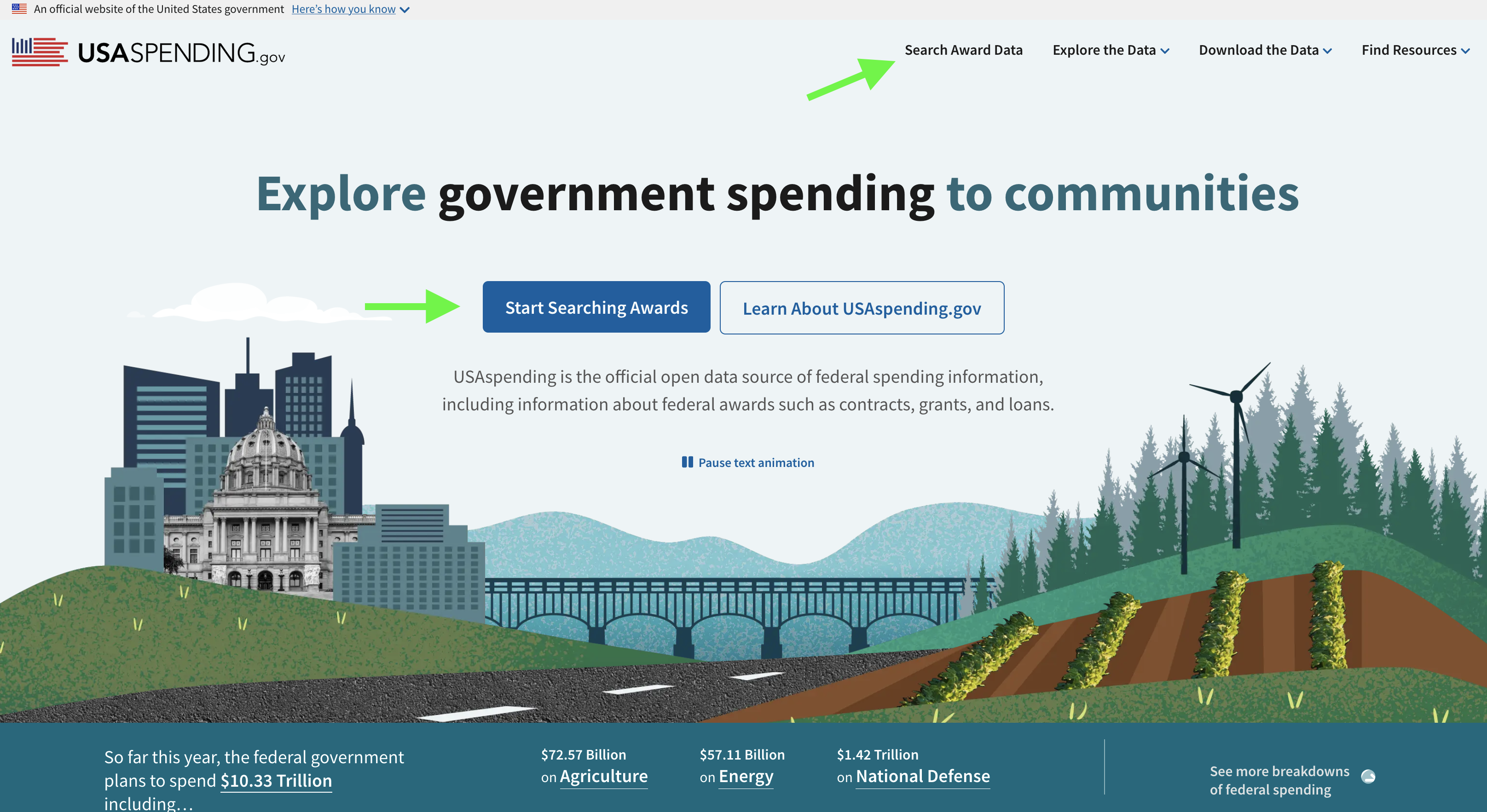
On the left of the Search page are a list of drop down menus with options. You can enter a vendor name as a keyword, or expand the “Recipient” menu if you know the full company name or their Unique Entity Identifier (UEI) number. Expand the “Agency Tab” and enter DHS which will bring up the Department of Homeland Security Option.
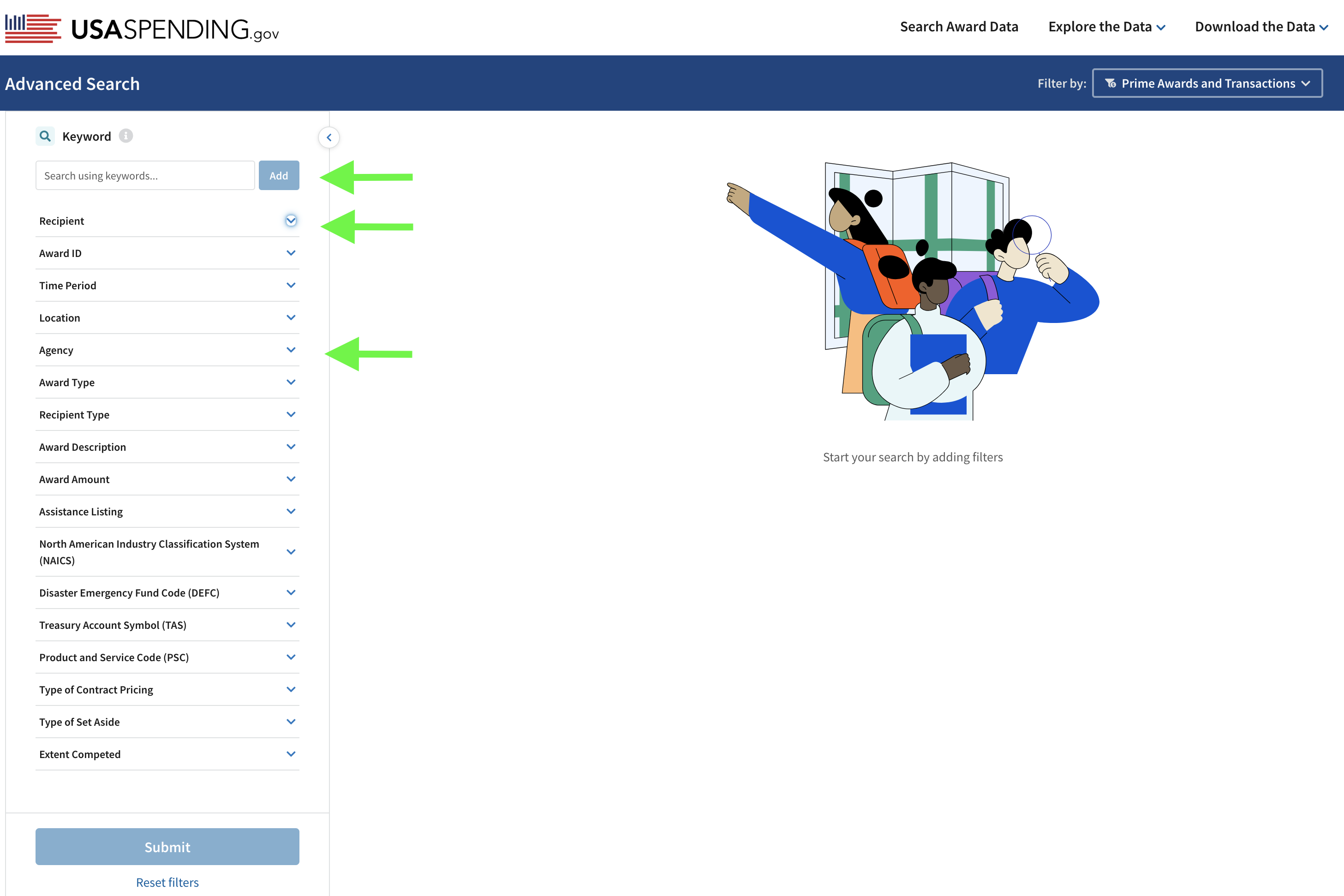
In the example below, we entered “Palantir Technologies” as a keyword, and selected DHS in the Agency dropdown:

For vendors with hundreds of contracts that return many pages of results, consider adding more filters to the search such as a specific time period or specifying a Funding Agency such as ICE or CBP. In this example, the filters “Palantir Technologies” and “DHS” returned 13 results (at the time of publication). It is important to note that the search results table is larger than what displays in that module. You can scroll down to view more Awards and scroll to the right to see much more information.
Scroll down outside of that module to reveal more info including modules for Results by Category, Results over Time, and Results by Geography, all of which can be viewed as a list or graph.
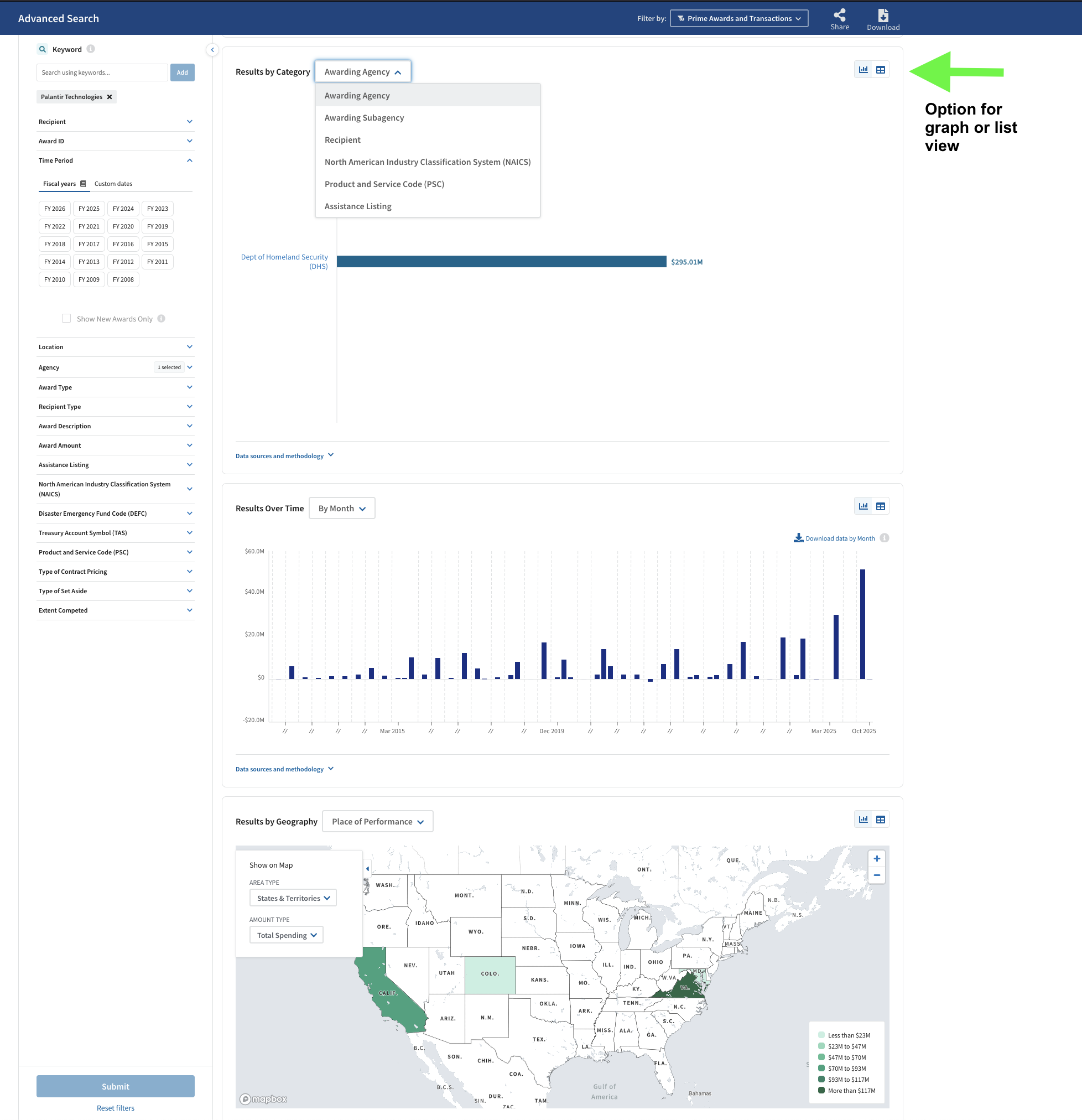
Once you've identified a contract, you can click the "Prime Award ID" to see the granular details for each time.
From the search, you can also select just the agency to see all the contracts on file. Each agency also has its own page showing a breakdown for every fiscal year of how much money they had to spend and which components spent the most. For example, here's DHS's page.
So far we've talked about how to track contracts and spending, but now let's take a step back and look at how those contracts come to be. The System for Award Management, SAM.gov, is the site that allows companies to see what products and services the government intends to buy so they can bid on the contract. But SAM.gov is also open to the public, which means you can see the same information, including a detailed scope of a project and sometimes even technical details.
How to Use Sam.gov
SAM.gov does not require an account for its basic contracting opportunity searches, but you may want to create one in order to save the things you find and to receive keyword- or agency-based alerts via email when new items of interest are posted.
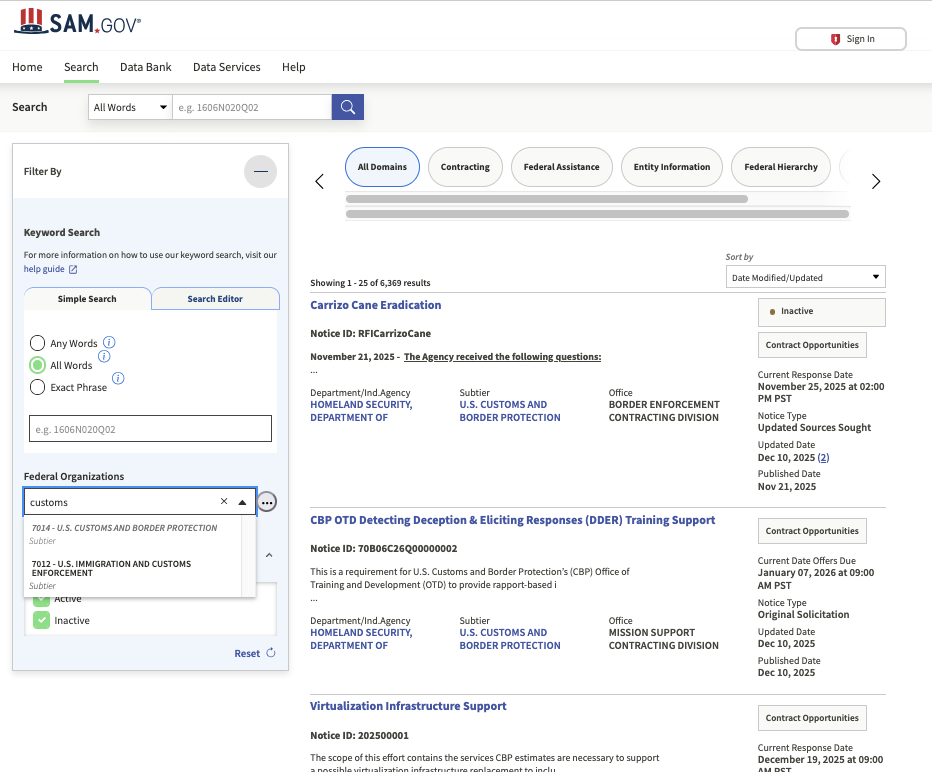
First you will click "Search" in the menu bar, which will bring you to this page:
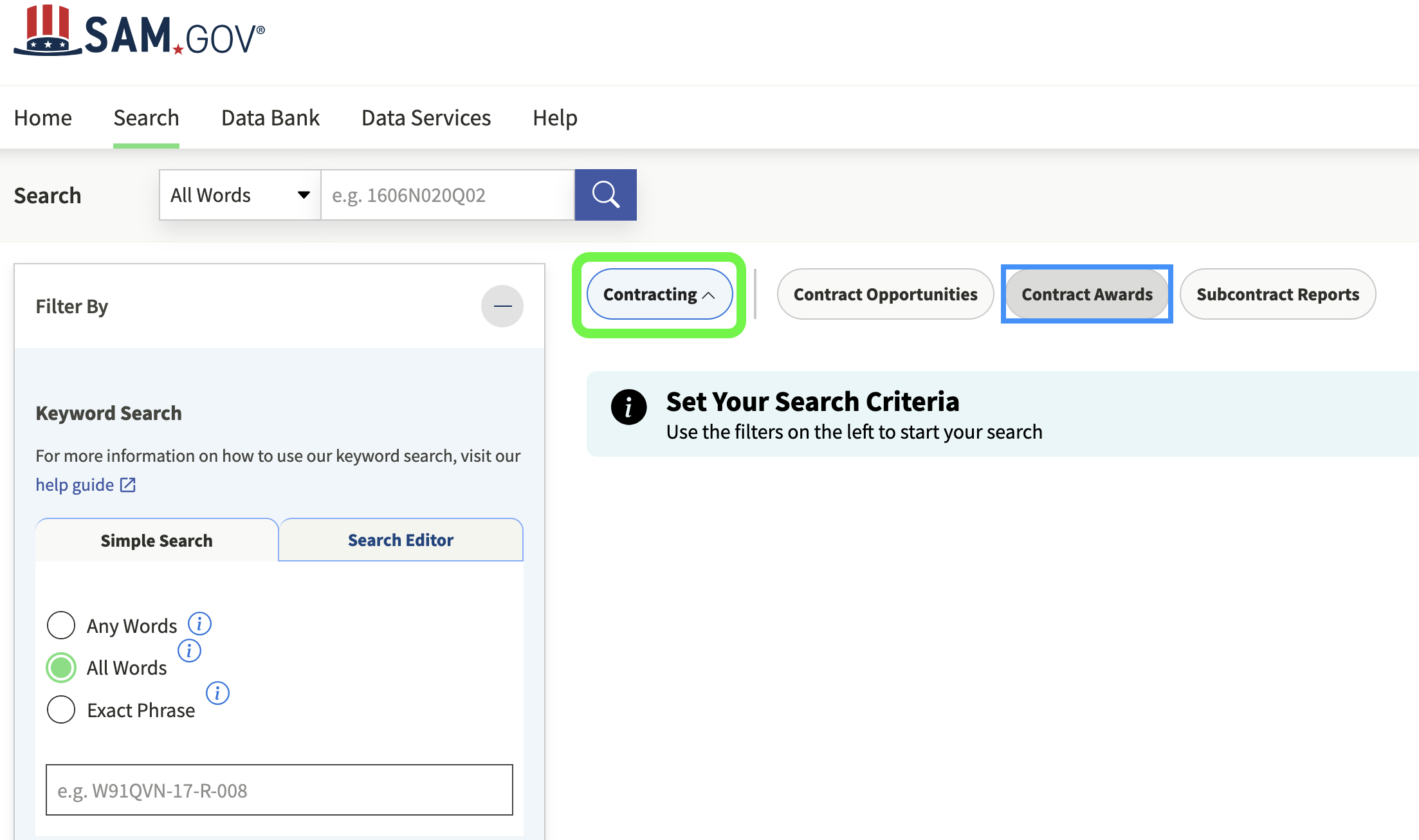
We recommend selecting both "Active" and "Inactive" in the Status menu. Contracts quickly go inactive, and besides, sometimes the contracts you are most interested in are several years old.
If you are researching a particular technology such as unmanned aerial vehicles, you might just type "unmanned" in the Simple Search bar. That will bring up every solicitation with that keyword across the federal government.
One of the most useful features is filtering by agency, while leaving the keyword search blank. This will return a running list of an agency's calls for bids and related procurement activities. It is worth checking regularly. For example, here's what CBP's looks like on a given day:
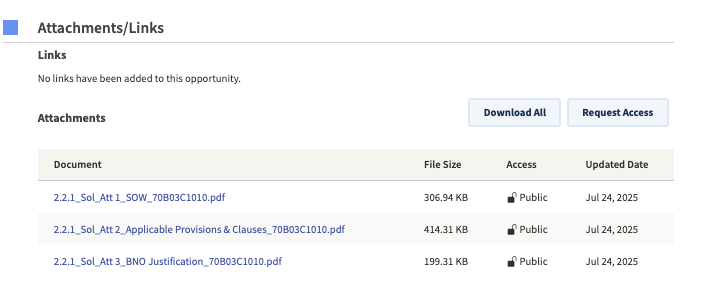
If you click on an item, you should next scroll down to see if there are attachments. These tend to contain the most details. Specifically, you should look for the term "SOW," the abbreviation for "Statement of Work." For example, here are the attachments for a CBP contracting opportunity for "Cellular Covert Cameras":
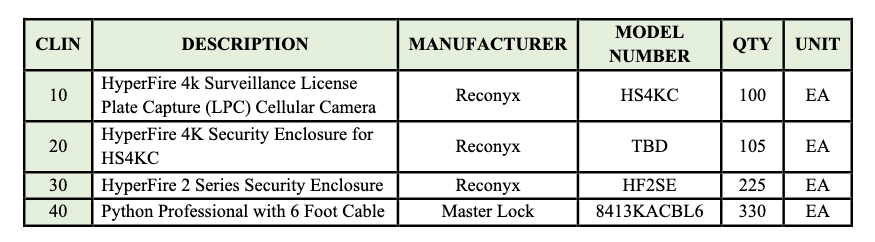
The first document is the Statement of Work, which tells you the exact brand, model, and number of devices they want to acquire:
The attachments also included a "BNO Justification." BNO stands for "Brand Name Only," and this document explains in even more detail why CBP wants that specific product:

If you see the terms "Sole Source" in a listing, that also means that an agency has decided that only one product meets its requirements and it will not open bidding to other companies.
In addition to contracting, many agencies announce "Industry Day" events, usually virtual, that members of the public can join. This is a unique opportunity to listen in on what contractors are being told by government purchasing officials. The presentation slides are also often later uploaded to the SAM.gov page. Occasionally, the list of attendees will also be posted, and you'll find several examples of those lists in our dataset.
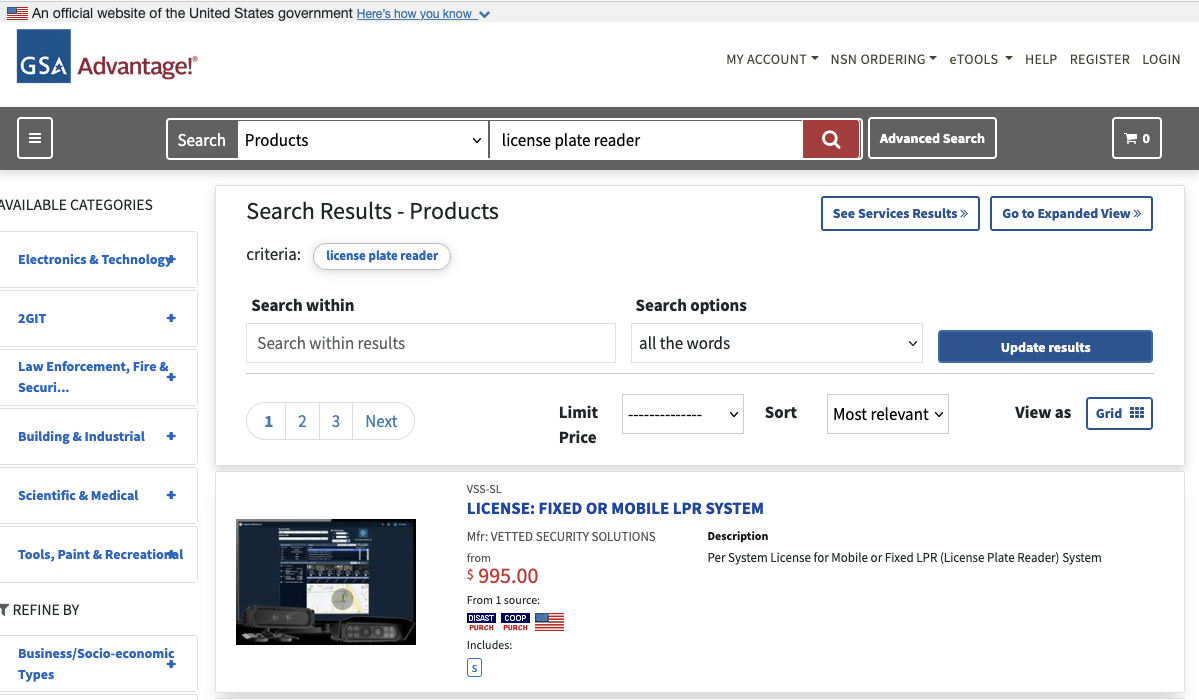
Another way to investigate DHS purchasing is by browsing the catalog of items and services immediately available to them. The General Services Administration operates GSA Advantage, which it describes as "the government's central online shopping superstore." The website's search is open, allowing members of the public to view any vendors' offerings–including both products and services– easily as they would with any online marketplace.
For example, you could search for "license plate reader" and produce a list of available products:
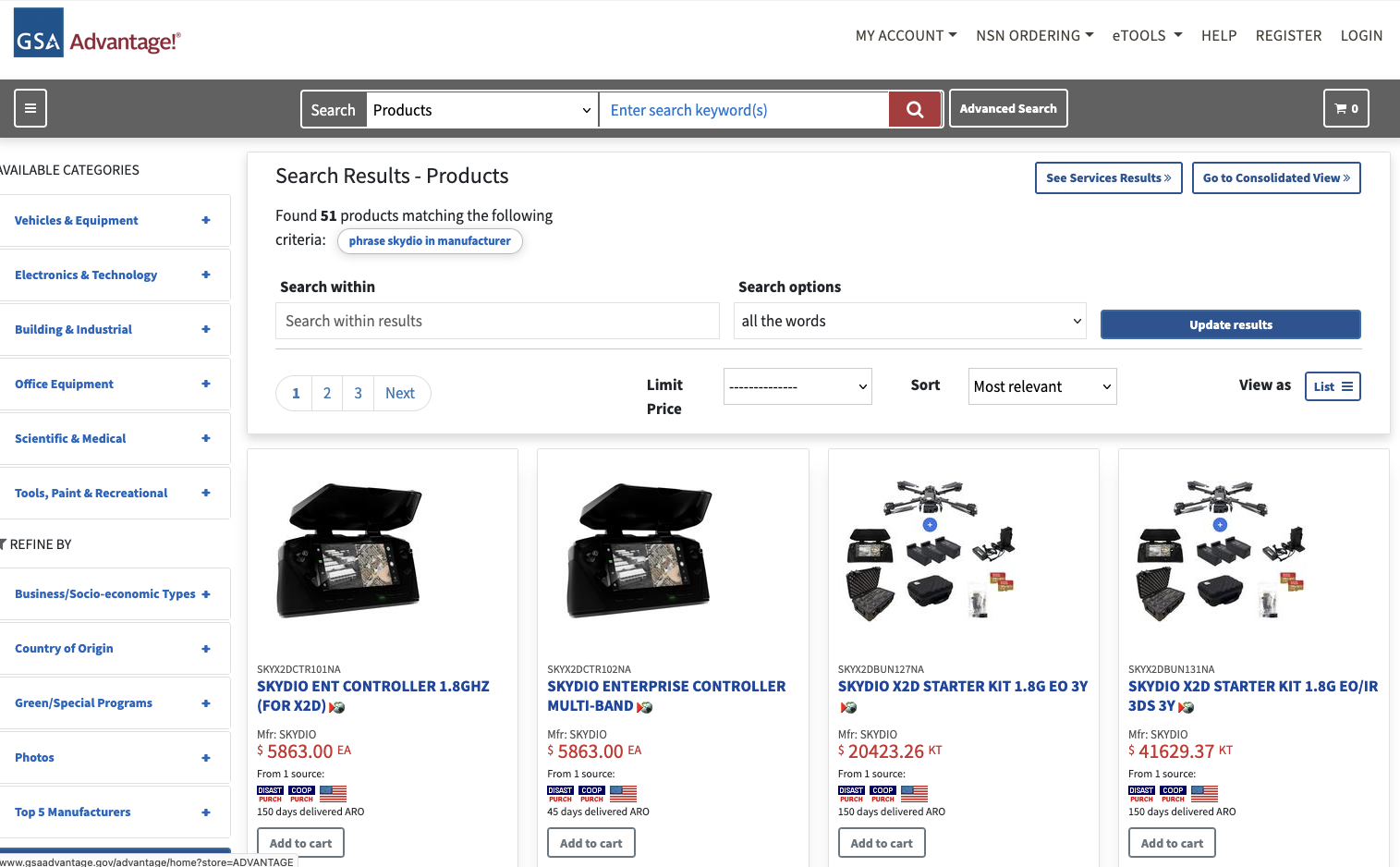
If you click "Advanced Search," you can also isolate every product available from a particular manufacturer. For example, here are the results when you search for products available from Skydio, a drone manufacturer.
If you switch from "Products" to "Services" you can export datasets for each company about their offerings. For example, if you search for "Palantir" you'll get results that look like this:
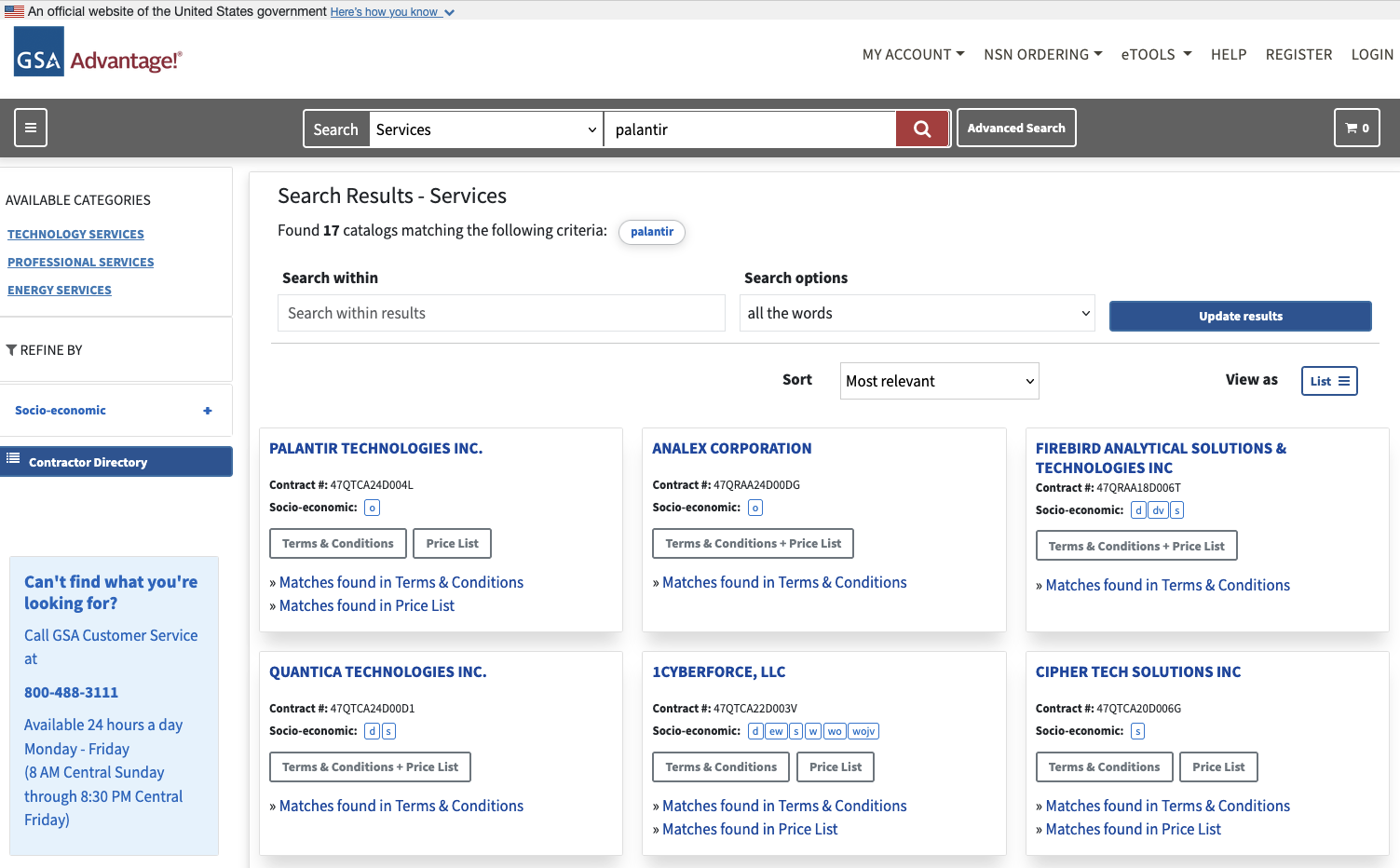
This means all these companies are offering some sort of Palantir-related services. If you click "Matches found in Terms and Conditions," you'll download a PDF with a lot of details about what the company offers.
For example, here's a a screengrab from Anduril's documentation:

If you click "Matches Found in Price List" you'll download a spreadsheet that serves as a blueprint of what the company offers, including contract personnel. Here's a snippet from Palantir's:

Daily Public Report of Covered Contract Awards - Maybe FPDS isn't enough for you and you want to know every day what contracts have been signed. Buried in the DHS website are links to a daily feed of all contracts worth $4 million or more. It's available in XML, JSON, CSV and XLSX formats.
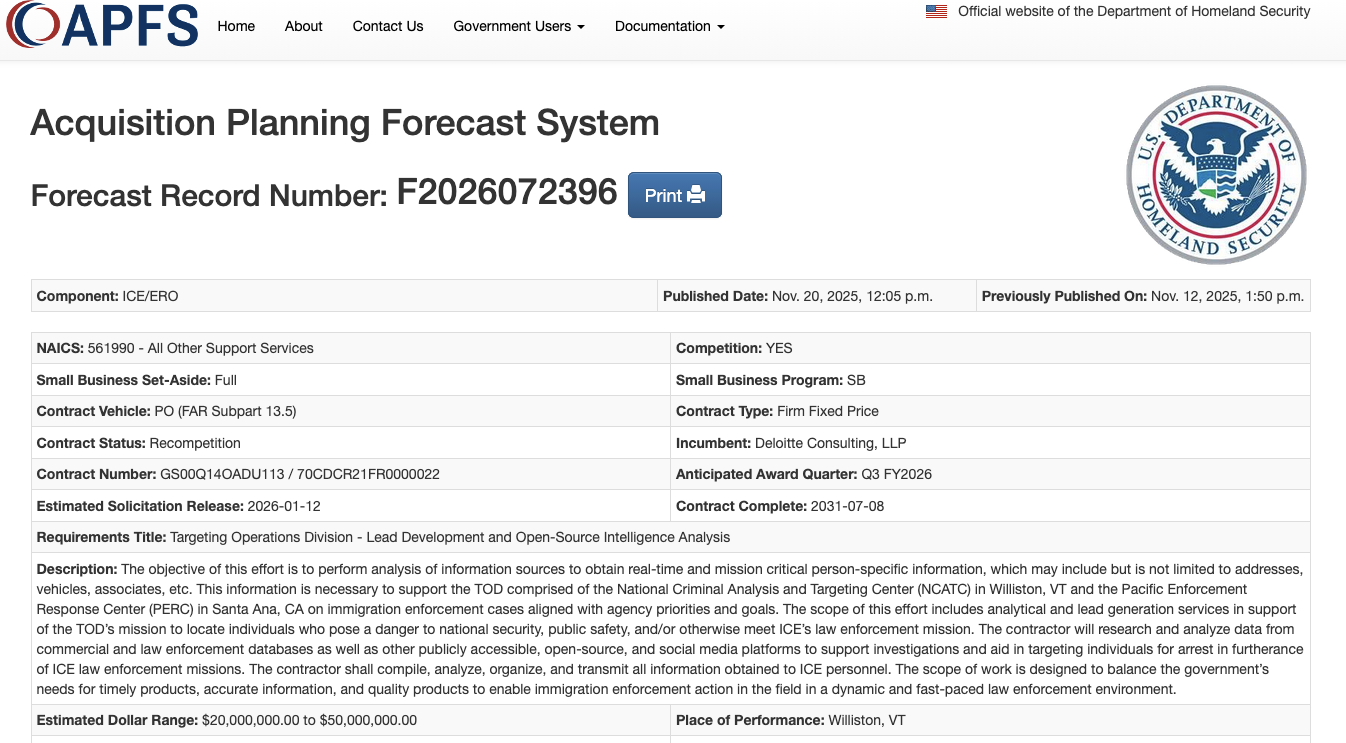
DHS Acquisition Planning Forecast System (APFS) - DHS operates a site for vendors to learn about upcoming contracts greater than $350,000. You can sort by agency at a granular level, such as upcoming projects by ICE Enforcement & Removal Operations. This is one to check regularly for updates.
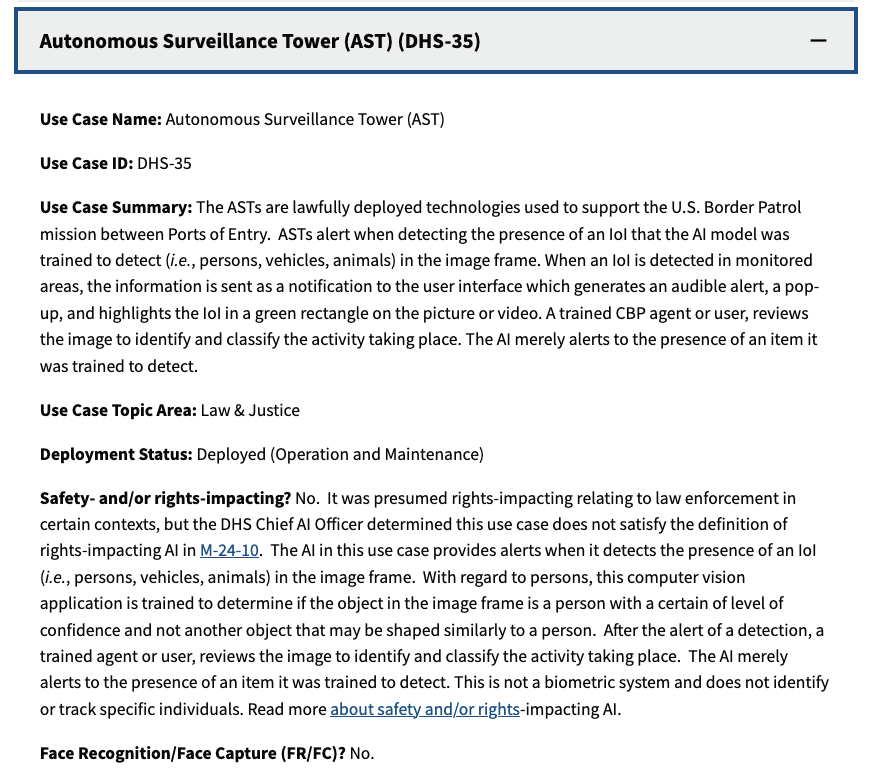
DHS Artificial Intelligence Use Case Inventory - Many federal agencies are required to maintain datasets of "AI Use Cases." DHS has broken these out for each of its subcomponents, including ICE and CBP. Advanced users will find the spreadsheet versions of these inventory more interesting.
NASA Solutions for Enterprise-Wide Procurement (SEWP) - SEWP is a way for agencies to fast track acquisition of "Information Technology, Communication and Audio Visual" products through existing contracts. The site provides an index of existing contract holders, but the somewhat buried "Provider Lookup" has a more comprehensive list of companies involved in this type of contracting, illustrating how the companies serve as passthroughs for one another. Relatedly, DHS's list of "Prime Contractors" shows which companies hold master contracts with the agency and its components.

TechInquiry - Techinquiry is a small non-profit that aggregates records from a wide variety of sources about tech companies, particularly those involved in government contracting.


A SIEM is a complex system offering broad and flexible threat detection capabilities. Due to its complexity, its effectiveness heavily depends on how it is configured and what data sources are connected to it. A one-time SIEM setup during implementation is not enough: both the organization’s infrastructure and attackers’ techniques evolve over time. To operate effectively, the SIEM system must reflect the current state of affairs.
We provide customers with services to assess SIEM effectiveness, helping to identify issues and offering options for system optimization. In this article, we examine typical SIEM operational pitfalls and how to address them. For each case, we also include methods for independent verification.
This material is based on an assessment of Kaspersky SIEM effectiveness; therefore, all specific examples, commands, and field names are taken from that solution. However, the assessment methodology, issues we identified, and ways to enhance system effectiveness can easily be extrapolated to any other SIEM.
The primary audience for the effectiveness assessment report comprises the SIEM support and operation teams within an organization. The main goal is to analyze how well the usage of SIEM aligns with its objectives. Consequently, the scope of checks can vary depending on the stated goals. A standard assessment is conducted across the following areas:
At the same time, these areas are examined not only in isolation but also in terms of their potential influence on one another. Here are a couple of examples illustrating this interdependence:
deviceCustomString1 not contains <string> triggers a large number of alerts. The detection logic itself is correct: the specific event and the specific field it targets should not generate a large volume of data matching the condition. Our review revealed the issue was in the data ingested by the SIEM, where incorrect encoding caused the string targeted by the rule to be transformed into a different one. Consequently, all events matched the condition and generated alerts.The effectiveness assessment consists of several stages:
The assessment produces a list of recommendations. Some of these can be implemented almost immediately, while others require more comprehensive changes driven by process optimization or a transition to a more structured approach to system use.
The problems we identify during a SIEM effectiveness assessment can be divided into three groups:
When building the inventory of event sources for a SIEM, we follow the principle of layered monitoring: the system should have information about all detectable stages of an attack. This principle enables the detection of attacks even if individual malicious actions have gone unnoticed, and allows for retrospective reconstruction of the full attack chain, starting from the attackers’ point of entry.
Problem: During effectiveness assessments, we frequently find that the inventory of connected source types is not updated when the infrastructure changes. In some cases, it has not been updated since the initial SIEM deployment, which limits incident detection capabilities. Consequently, certain types of sources remain completely invisible to the system.
We have also encountered non-standard cases of incomplete source inventory. For example, an infrastructure contains hosts running both Windows and Linux, but monitoring is configured for only one family of operating systems.
How to detect: To identify the problems described above, determine the list of source types connected to the SIEM and compare it against what actually exists in the infrastructure. Identifying the presence of specific systems in the infrastructure requires an audit. However, this task is one of the most critical for many areas of cybersecurity, and we recommend running it on a periodic basis.
We have compiled a reference sheet of system types commonly found in most organizations. Depending on the organization type, infrastructure, and threat model, we may rearrange priorities. However, a good starting point is as follows:
Regardless of how good the detection logic is, it cannot function without telemetry from the data sources.
Problem: The SIEM core is not receiving events from specific sources or collectors. Based on all assessments conducted, the average proportion of collectors that are configured with sources but are not transmitting events is 38%. Correlation rules may exist for these sources, but they will, of course, never trigger. It is also important to remember that a single collector can serve hundreds of sources (such as workstations), so the loss of data flow from even one collector can mean losing monitoring visibility for a significant portion of the infrastructure.
How to detect: The process of locating sources that are not transmitting data can be broken down into two components.
Offline, Stopped, Disabled, and so on.SELECT count(ID), CollectorID, CollectorName FROM `events` GROUP BY CollectorID, CollectorName ORDER BY count(ID)It is essential to specify an optimal time range for collecting these statistics. Too large a range can increase the load on the SIEM, while too small a range may provide inaccurate information for a one-time check – especially for sources that transmit telemetry relatively infrequently, say, once a week. Therefore, it is advisable to choose a smaller time window, such as 2–4 days, but run several queries for different periods in the past.
Additionally, for a more comprehensive approach, it is recommended to use built-in functionality or custom logic implemented via correlation rules and lists to monitor event flow. This will help automate the process of detecting problems with sources.
Problem: The system is not receiving events from all sources of a particular type that exist in the infrastructure. For example, the company uses workstations and servers running Windows. During SIEM deployment, workstations are immediately connected for monitoring, while the server segment is postponed for one reason or another. As a result, the SIEM receives events from Windows systems, the flow is normalized, and correlation rules work, but an incident in the unmonitored server segment would go unnoticed.
How to detect: Below are query variations that can be used to search for unconnected sources.
SELECT count(distinct, DeviceAddress), DeviceVendor, DeviceProduct FROM events GROUP BY DeviceVendor, DeviceProduct ORDER BY count(ID)SELECT count(distinct, DeviceHostName), DeviceVendor, DeviceProduct FROM events GROUP BY DeviceVendor, DeviceProduct ORDER BY count(ID)We have split the query into two variations because, depending on the source and the DNS integration settings, some events may contain either a DeviceAddress or DeviceHostName field.
These queries will help determine the number of unique data sources sending logs of a specific type. This count must be compared against the actual number of sources of that type, obtained from the system owners.
Raw data can be useful for developing custom normalizers or for storing events not used in correlation that might be needed during incident investigation. However, careless use of this setting can cause significantly more harm than good.
Problem: Enabling the Keep raw event option effectively doubles the event size in the database, as it stores two copies: the original and the normalized version. This is particularly critical for high-volume collectors receiving events from sources like NetFlow, DNS, firewalls, and others. It is worth noting that this option is typically used for testing a normalizer but is often forgotten and left enabled after its configuration is complete.
How to detect: This option is applied at the normalizer level. Therefore, it is necessary to review all active normalizers and determine whether retaining raw data is required for their operation.
As with the absence of events from sources, normalization issues lead to detection logic failing, as this logic relies on finding specific information in a specific event field.
Problem: Several issues related to normalization can be identified:
syslog_headers, placing the entire event body into a single field, this field most often being Message.How to detect: Identifying normalization issues is more challenging than spotting source problems due to the high volume of telemetry and variety of parsers. Here are several approaches to narrowing the search:
Linux audit and iptables syslog v2 for Kaspersky SIEM. The new normalizer completely reworks and optimizes the normalization schema for events from this source.SELECT count(ID), DeviceProduct, DeviceVendor, CollectorName FROM `events` GROUP BY DeviceProduct, DeviceVendor, CollectorName ORDER BY count(ID)This query gathers statistics on events from each collector, broken down by the DeviceVendor and DeviceProduct fields. While these fields are not mandatory, they are present in almost any normalization schema. Therefore, their complete absence or empty values may indicate normalization issues. We recommend including these fields when developing custom normalizers.
To simplify the identification of normalization problems when developing custom normalizers, you can implement the following mechanism. For each successfully normalized event, add a Name field, populated from a constant or the event itself. For a final catch-all normalizer that processes all unparsed events, set the constant value: Name = unparsed event. This will later allow you to identify non-normalized events through a simple search on this field.
Collected events alone are, in most cases, only useful for investigating an incident that has already been identified. For a SIEM to operate to its full potential, it requires detection logic to be developed to uncover probable security incidents.
Problem: The mean correlation rule coverage of sources, determined across all our assessments, is 43%. While this figure is only a ballpark figure – as different source types provide different information – to calculate it, we defined “coverage” as the presence of at least one correlation rule for a source. This means that for more than half of the connected sources, the SIEM is not actively detecting. Meanwhile, effort and SIEM resources are spent on connecting, maintaining, and configuring these sources. In some cases, this is formally justified, for instance, if logs are only needed for regulatory compliance. However, this is an exception rather than the rule.
We do not recommend solving this problem by simply not connecting sources to the SIEM. On the contrary, sources should be connected, but this should be done concurrently with the development of corresponding detection logic. Otherwise, it can be forgotten or postponed indefinitely, while the source pointlessly consumes system resources.
How to detect: This brings us back to auditing, a process that can be greatly aided by creating and maintaining a register of developed detection logic. Given that not every detection logic rule explicitly states the source type from which it expects telemetry, its description should be added to this register during the development phase.
If descriptions of the correlation rules are not available, you can refer to the following:
DeviceVendor, DeviceProduct (another argument for including these fields in the normalizer), Name, DeviceAction, DeviceEventCategory, DeviceEventClassID, and others. These can help identify the actual source.One criterion for correlation rules effectiveness is a low false positive rate.
Problem: Detection logic generates an abnormally high number of alerts that are physically impossible to process, regardless of the size of the SOC team.
How to detect: First and foremost, detection logic should be tested during development and refined to achieve an acceptable false positive rate. However, even a well-tuned correlation rule can start producing excessive alerts due to changes in the event flow or connected infrastructure. To identify these rules, we recommend periodically running the following query:
SELECT count(ID), Name FROM `events` WHERE Type = 3 GROUP BY Name ORDER BY count(ID)
In Kaspersky SIEM, a value of 3 in the Type field indicates a correlation event.
Subsequently, for each identified rule with an anomalous alert count, verify the correctness of the logic it uses and the integrity of the event stream on which it triggered.
Depending on the issue you identify, the solution may involve modifying the detection logic, adding exceptions (for example, it is often the case that 99% of the spam originates from just 1–5 specific objects, such as an IP address, a command parameter, or a URL), or adjusting event collection and normalization.
SIEM integrations with other systems are generally a critical part of both event processing and alert enrichment. In at least one specific case, their presence directly impacts detection performance: integration with technical Threat Intelligence data or IoCs (indicators of compromise).
A SIEM allows conveniently checking objects against various reputation databases or blocklists. Furthermore, there are numerous sources of this data that are ready to integrate natively with a SIEM or require minimal effort to incorporate.
Problem: There is no integration with TI data.
How to detect: Generally, IoCs are integrated into a SIEM at the system configuration level during deployment or subsequent optimization. The use of TI within a SIEM can be implemented at various levels:
Furthermore, TI data does not appear in a SIEM out of thin air. It is either provided by external suppliers (commercially or in an open format) or is part of the built-in functionality of the security tools in use. For instance, various NGFW systems can additionally check the reputation of external IP addresses or domains that users are accessing. Therefore, the first step is to determine whether you are receiving information about indicators of compromise and in what form (whether external providers’ feeds have been integrated and/or the deployed security tools have this capability). It is worth noting that receiving TI data only at the security tool level does not always cover all types of IoCs.
If data is being received in some form, the next step is to verify that the SIEM is utilizing it. For TI-related events coming from security tools, the SIEM needs a correlation rule developed to generate alerts. Thus, checking integration in this case involves determining the capabilities of the security tools, searching for the corresponding events in the SIEM, and identifying whether there is detection logic associated with these events. If events from the security tools are absent, the source audit configuration should be assessed to see if the telemetry type in question is being forwarded to the SIEM at all. If normalization is the issue, you should assess parsing accuracy and reconfigure the normalizer.
If TI data comes from external providers, determine how it is processed within the organization. Is there a centralized system for aggregating and managing threat data (such as CyberTrace), or is the information stored in, say, CSV files?
In the former case (there is a threat data aggregation and management system) you must check if it is integrated with the SIEM. For Kaspersky SIEM and CyberTrace, this integration is handled through the SIEM interface. Following this, SIEM event flows are directed to the threat data aggregation and management system, where matches are identified and alerts are generated, and then both are sent back to the SIEM. Therefore, checking the integration involves ensuring that all collectors receiving events that may contain IoCs are forwarding those events to the threat data aggregation and management system. We also recommend checking if the SIEM has a correlation rule that generates an alert based on matching detected objects with IoCs.
In the latter case (threat information is stored in files), you must confirm that the SIEM has a collector and normalizer configured to load this data into the system as events. Also, verify that logic is configured for storing this data within the SIEM for use in correlation. This is typically done with the help of lists that contain the obtained IoCs. Finally, check if a correlation rule exists that compares the event flow against these IoC lists.
As the examples illustrate, integration with TI in standard scenarios ultimately boils down to developing a final correlation rule that triggers an alert upon detecting a match with known IoCs. Given the variety of integration methods, creating and providing a universal out-of-the-box rule is difficult. Therefore, in most cases, to ensure IoCs are connected to the SIEM, you need to determine if the company has developed that rule (the existence of the rule) and if it has been correctly configured. If no correlation rule exists in the system, we recommend creating one based on the TI integration methods implemented in your infrastructure. If a rule does exist, its functionality must be verified: if there are no alerts from it, analyze its trigger conditions against the event data visible in the SIEM and adjust it accordingly.
For a SIEM to run effectively, it must contain current data about the infrastructure it monitors and the threats it’s meant to detect. Both elements change over time: new systems and software, users, security policies, and processes are introduced into the infrastructure, while attackers develop new techniques and tools. It is safe to assume that a perfectly configured and deployed SIEM system will no longer be able to fully see the altered infrastructure or the new threats after five years of running without additional configuration. Therefore, practically all components – event collection, detection, additional integrations for contextual information, and exclusions – must be maintained and kept up to date.
Furthermore, it is important to acknowledge that it is impossible to cover 100% of all threats. Continuous research into attacks, development of detection methods, and configuration of corresponding rules are a necessity. The SOC itself also evolves. As it reaches certain maturity levels, new growth opportunities open up for the team, requiring the utilization of new capabilities.
Problem: The SIEM has not evolved since its initial deployment.
How to detect: Compare the original statement of work or other deployment documentation against the current state of the system. If there have been no changes, or only minimal ones, it is highly likely that your SIEM has areas for growth and optimization. Any infrastructure is dynamic and requires continuous adaptation.
In this article, we have outlined the primary problems we identify during SIEM effectiveness assessments, but this list is not exhaustive. We also frequently encounter:
[dev] test_Add user to admin group_final2.Generally, most issues with SIEM effectiveness stem from the natural degradation (accumulation of errors) of the processes implemented within the system. Therefore, in most cases, maintaining effectiveness involves structuring these processes, monitoring the quality of SIEM engagement at all stages (source onboarding, correlation rule development, normalization, and so on), and conducting regular reviews of all system components and resources.
A SIEM is a powerful tool for monitoring and detecting threats, capable of identifying attacks at various stages across nearly any point in an organization’s infrastructure. However, if improperly configured and operated, it can become ineffective or even useless while still consuming significant resources. Therefore, it is crucial to periodically audit the SIEM’s components, settings, detection rules, and data sources.
If a SOC is overloaded or otherwise unable to independently identify operational issues with its SIEM, we offer Kaspersky SIEM platform users a service to assess its operation. Following the assessment, we provide a list of recommendations to address the issues we identify. That being said, it is important to clarify that these are not strict, prescriptive instructions, but rather highlight areas that warrant attention and analysis to improve the product’s performance, enhance threat detection accuracy, and enable more efficient SIEM utilization.




A SIEM is a complex system offering broad and flexible threat detection capabilities. Due to its complexity, its effectiveness heavily depends on how it is configured and what data sources are connected to it. A one-time SIEM setup during implementation is not enough: both the organization’s infrastructure and attackers’ techniques evolve over time. To operate effectively, the SIEM system must reflect the current state of affairs.
We provide customers with services to assess SIEM effectiveness, helping to identify issues and offering options for system optimization. In this article, we examine typical SIEM operational pitfalls and how to address them. For each case, we also include methods for independent verification.
This material is based on an assessment of Kaspersky SIEM effectiveness; therefore, all specific examples, commands, and field names are taken from that solution. However, the assessment methodology, issues we identified, and ways to enhance system effectiveness can easily be extrapolated to any other SIEM.
The primary audience for the effectiveness assessment report comprises the SIEM support and operation teams within an organization. The main goal is to analyze how well the usage of SIEM aligns with its objectives. Consequently, the scope of checks can vary depending on the stated goals. A standard assessment is conducted across the following areas:
At the same time, these areas are examined not only in isolation but also in terms of their potential influence on one another. Here are a couple of examples illustrating this interdependence:
deviceCustomString1 not contains <string> triggers a large number of alerts. The detection logic itself is correct: the specific event and the specific field it targets should not generate a large volume of data matching the condition. Our review revealed the issue was in the data ingested by the SIEM, where incorrect encoding caused the string targeted by the rule to be transformed into a different one. Consequently, all events matched the condition and generated alerts.The effectiveness assessment consists of several stages:
The assessment produces a list of recommendations. Some of these can be implemented almost immediately, while others require more comprehensive changes driven by process optimization or a transition to a more structured approach to system use.
The problems we identify during a SIEM effectiveness assessment can be divided into three groups:
When building the inventory of event sources for a SIEM, we follow the principle of layered monitoring: the system should have information about all detectable stages of an attack. This principle enables the detection of attacks even if individual malicious actions have gone unnoticed, and allows for retrospective reconstruction of the full attack chain, starting from the attackers’ point of entry.
Problem: During effectiveness assessments, we frequently find that the inventory of connected source types is not updated when the infrastructure changes. In some cases, it has not been updated since the initial SIEM deployment, which limits incident detection capabilities. Consequently, certain types of sources remain completely invisible to the system.
We have also encountered non-standard cases of incomplete source inventory. For example, an infrastructure contains hosts running both Windows and Linux, but monitoring is configured for only one family of operating systems.
How to detect: To identify the problems described above, determine the list of source types connected to the SIEM and compare it against what actually exists in the infrastructure. Identifying the presence of specific systems in the infrastructure requires an audit. However, this task is one of the most critical for many areas of cybersecurity, and we recommend running it on a periodic basis.
We have compiled a reference sheet of system types commonly found in most organizations. Depending on the organization type, infrastructure, and threat model, we may rearrange priorities. However, a good starting point is as follows:
Regardless of how good the detection logic is, it cannot function without telemetry from the data sources.
Problem: The SIEM core is not receiving events from specific sources or collectors. Based on all assessments conducted, the average proportion of collectors that are configured with sources but are not transmitting events is 38%. Correlation rules may exist for these sources, but they will, of course, never trigger. It is also important to remember that a single collector can serve hundreds of sources (such as workstations), so the loss of data flow from even one collector can mean losing monitoring visibility for a significant portion of the infrastructure.
How to detect: The process of locating sources that are not transmitting data can be broken down into two components.
Offline, Stopped, Disabled, and so on.SELECT count(ID), CollectorID, CollectorName FROM `events` GROUP BY CollectorID, CollectorName ORDER BY count(ID)It is essential to specify an optimal time range for collecting these statistics. Too large a range can increase the load on the SIEM, while too small a range may provide inaccurate information for a one-time check – especially for sources that transmit telemetry relatively infrequently, say, once a week. Therefore, it is advisable to choose a smaller time window, such as 2–4 days, but run several queries for different periods in the past.
Additionally, for a more comprehensive approach, it is recommended to use built-in functionality or custom logic implemented via correlation rules and lists to monitor event flow. This will help automate the process of detecting problems with sources.
Problem: The system is not receiving events from all sources of a particular type that exist in the infrastructure. For example, the company uses workstations and servers running Windows. During SIEM deployment, workstations are immediately connected for monitoring, while the server segment is postponed for one reason or another. As a result, the SIEM receives events from Windows systems, the flow is normalized, and correlation rules work, but an incident in the unmonitored server segment would go unnoticed.
How to detect: Below are query variations that can be used to search for unconnected sources.
SELECT count(distinct, DeviceAddress), DeviceVendor, DeviceProduct FROM events GROUP BY DeviceVendor, DeviceProduct ORDER BY count(ID)SELECT count(distinct, DeviceHostName), DeviceVendor, DeviceProduct FROM events GROUP BY DeviceVendor, DeviceProduct ORDER BY count(ID)We have split the query into two variations because, depending on the source and the DNS integration settings, some events may contain either a DeviceAddress or DeviceHostName field.
These queries will help determine the number of unique data sources sending logs of a specific type. This count must be compared against the actual number of sources of that type, obtained from the system owners.
Raw data can be useful for developing custom normalizers or for storing events not used in correlation that might be needed during incident investigation. However, careless use of this setting can cause significantly more harm than good.
Problem: Enabling the Keep raw event option effectively doubles the event size in the database, as it stores two copies: the original and the normalized version. This is particularly critical for high-volume collectors receiving events from sources like NetFlow, DNS, firewalls, and others. It is worth noting that this option is typically used for testing a normalizer but is often forgotten and left enabled after its configuration is complete.
How to detect: This option is applied at the normalizer level. Therefore, it is necessary to review all active normalizers and determine whether retaining raw data is required for their operation.
As with the absence of events from sources, normalization issues lead to detection logic failing, as this logic relies on finding specific information in a specific event field.
Problem: Several issues related to normalization can be identified:
syslog_headers, placing the entire event body into a single field, this field most often being Message.How to detect: Identifying normalization issues is more challenging than spotting source problems due to the high volume of telemetry and variety of parsers. Here are several approaches to narrowing the search:
Linux audit and iptables syslog v2 for Kaspersky SIEM. The new normalizer completely reworks and optimizes the normalization schema for events from this source.SELECT count(ID), DeviceProduct, DeviceVendor, CollectorName FROM `events` GROUP BY DeviceProduct, DeviceVendor, CollectorName ORDER BY count(ID)This query gathers statistics on events from each collector, broken down by the DeviceVendor and DeviceProduct fields. While these fields are not mandatory, they are present in almost any normalization schema. Therefore, their complete absence or empty values may indicate normalization issues. We recommend including these fields when developing custom normalizers.
To simplify the identification of normalization problems when developing custom normalizers, you can implement the following mechanism. For each successfully normalized event, add a Name field, populated from a constant or the event itself. For a final catch-all normalizer that processes all unparsed events, set the constant value: Name = unparsed event. This will later allow you to identify non-normalized events through a simple search on this field.
Collected events alone are, in most cases, only useful for investigating an incident that has already been identified. For a SIEM to operate to its full potential, it requires detection logic to be developed to uncover probable security incidents.
Problem: The mean correlation rule coverage of sources, determined across all our assessments, is 43%. While this figure is only a ballpark figure – as different source types provide different information – to calculate it, we defined “coverage” as the presence of at least one correlation rule for a source. This means that for more than half of the connected sources, the SIEM is not actively detecting. Meanwhile, effort and SIEM resources are spent on connecting, maintaining, and configuring these sources. In some cases, this is formally justified, for instance, if logs are only needed for regulatory compliance. However, this is an exception rather than the rule.
We do not recommend solving this problem by simply not connecting sources to the SIEM. On the contrary, sources should be connected, but this should be done concurrently with the development of corresponding detection logic. Otherwise, it can be forgotten or postponed indefinitely, while the source pointlessly consumes system resources.
How to detect: This brings us back to auditing, a process that can be greatly aided by creating and maintaining a register of developed detection logic. Given that not every detection logic rule explicitly states the source type from which it expects telemetry, its description should be added to this register during the development phase.
If descriptions of the correlation rules are not available, you can refer to the following:
DeviceVendor, DeviceProduct (another argument for including these fields in the normalizer), Name, DeviceAction, DeviceEventCategory, DeviceEventClassID, and others. These can help identify the actual source.One criterion for correlation rules effectiveness is a low false positive rate.
Problem: Detection logic generates an abnormally high number of alerts that are physically impossible to process, regardless of the size of the SOC team.
How to detect: First and foremost, detection logic should be tested during development and refined to achieve an acceptable false positive rate. However, even a well-tuned correlation rule can start producing excessive alerts due to changes in the event flow or connected infrastructure. To identify these rules, we recommend periodically running the following query:
SELECT count(ID), Name FROM `events` WHERE Type = 3 GROUP BY Name ORDER BY count(ID)
In Kaspersky SIEM, a value of 3 in the Type field indicates a correlation event.
Subsequently, for each identified rule with an anomalous alert count, verify the correctness of the logic it uses and the integrity of the event stream on which it triggered.
Depending on the issue you identify, the solution may involve modifying the detection logic, adding exceptions (for example, it is often the case that 99% of the spam originates from just 1–5 specific objects, such as an IP address, a command parameter, or a URL), or adjusting event collection and normalization.
SIEM integrations with other systems are generally a critical part of both event processing and alert enrichment. In at least one specific case, their presence directly impacts detection performance: integration with technical Threat Intelligence data or IoCs (indicators of compromise).
A SIEM allows conveniently checking objects against various reputation databases or blocklists. Furthermore, there are numerous sources of this data that are ready to integrate natively with a SIEM or require minimal effort to incorporate.
Problem: There is no integration with TI data.
How to detect: Generally, IoCs are integrated into a SIEM at the system configuration level during deployment or subsequent optimization. The use of TI within a SIEM can be implemented at various levels:
Furthermore, TI data does not appear in a SIEM out of thin air. It is either provided by external suppliers (commercially or in an open format) or is part of the built-in functionality of the security tools in use. For instance, various NGFW systems can additionally check the reputation of external IP addresses or domains that users are accessing. Therefore, the first step is to determine whether you are receiving information about indicators of compromise and in what form (whether external providers’ feeds have been integrated and/or the deployed security tools have this capability). It is worth noting that receiving TI data only at the security tool level does not always cover all types of IoCs.
If data is being received in some form, the next step is to verify that the SIEM is utilizing it. For TI-related events coming from security tools, the SIEM needs a correlation rule developed to generate alerts. Thus, checking integration in this case involves determining the capabilities of the security tools, searching for the corresponding events in the SIEM, and identifying whether there is detection logic associated with these events. If events from the security tools are absent, the source audit configuration should be assessed to see if the telemetry type in question is being forwarded to the SIEM at all. If normalization is the issue, you should assess parsing accuracy and reconfigure the normalizer.
If TI data comes from external providers, determine how it is processed within the organization. Is there a centralized system for aggregating and managing threat data (such as CyberTrace), or is the information stored in, say, CSV files?
In the former case (there is a threat data aggregation and management system) you must check if it is integrated with the SIEM. For Kaspersky SIEM and CyberTrace, this integration is handled through the SIEM interface. Following this, SIEM event flows are directed to the threat data aggregation and management system, where matches are identified and alerts are generated, and then both are sent back to the SIEM. Therefore, checking the integration involves ensuring that all collectors receiving events that may contain IoCs are forwarding those events to the threat data aggregation and management system. We also recommend checking if the SIEM has a correlation rule that generates an alert based on matching detected objects with IoCs.
In the latter case (threat information is stored in files), you must confirm that the SIEM has a collector and normalizer configured to load this data into the system as events. Also, verify that logic is configured for storing this data within the SIEM for use in correlation. This is typically done with the help of lists that contain the obtained IoCs. Finally, check if a correlation rule exists that compares the event flow against these IoC lists.
As the examples illustrate, integration with TI in standard scenarios ultimately boils down to developing a final correlation rule that triggers an alert upon detecting a match with known IoCs. Given the variety of integration methods, creating and providing a universal out-of-the-box rule is difficult. Therefore, in most cases, to ensure IoCs are connected to the SIEM, you need to determine if the company has developed that rule (the existence of the rule) and if it has been correctly configured. If no correlation rule exists in the system, we recommend creating one based on the TI integration methods implemented in your infrastructure. If a rule does exist, its functionality must be verified: if there are no alerts from it, analyze its trigger conditions against the event data visible in the SIEM and adjust it accordingly.
For a SIEM to run effectively, it must contain current data about the infrastructure it monitors and the threats it’s meant to detect. Both elements change over time: new systems and software, users, security policies, and processes are introduced into the infrastructure, while attackers develop new techniques and tools. It is safe to assume that a perfectly configured and deployed SIEM system will no longer be able to fully see the altered infrastructure or the new threats after five years of running without additional configuration. Therefore, practically all components – event collection, detection, additional integrations for contextual information, and exclusions – must be maintained and kept up to date.
Furthermore, it is important to acknowledge that it is impossible to cover 100% of all threats. Continuous research into attacks, development of detection methods, and configuration of corresponding rules are a necessity. The SOC itself also evolves. As it reaches certain maturity levels, new growth opportunities open up for the team, requiring the utilization of new capabilities.
Problem: The SIEM has not evolved since its initial deployment.
How to detect: Compare the original statement of work or other deployment documentation against the current state of the system. If there have been no changes, or only minimal ones, it is highly likely that your SIEM has areas for growth and optimization. Any infrastructure is dynamic and requires continuous adaptation.
In this article, we have outlined the primary problems we identify during SIEM effectiveness assessments, but this list is not exhaustive. We also frequently encounter:
[dev] test_Add user to admin group_final2.Generally, most issues with SIEM effectiveness stem from the natural degradation (accumulation of errors) of the processes implemented within the system. Therefore, in most cases, maintaining effectiveness involves structuring these processes, monitoring the quality of SIEM engagement at all stages (source onboarding, correlation rule development, normalization, and so on), and conducting regular reviews of all system components and resources.
A SIEM is a powerful tool for monitoring and detecting threats, capable of identifying attacks at various stages across nearly any point in an organization’s infrastructure. However, if improperly configured and operated, it can become ineffective or even useless while still consuming significant resources. Therefore, it is crucial to periodically audit the SIEM’s components, settings, detection rules, and data sources.
If a SOC is overloaded or otherwise unable to independently identify operational issues with its SIEM, we offer Kaspersky SIEM platform users a service to assess its operation. Following the assessment, we provide a list of recommendations to address the issues we identify. That being said, it is important to clarify that these are not strict, prescriptive instructions, but rather highlight areas that warrant attention and analysis to improve the product’s performance, enhance threat detection accuracy, and enable more efficient SIEM utilization.
