Reading view

Operation ForumTroll continues: Russian political scientists targeted using plagiarism reports

Introduction

In March 2025, we discovered Operation ForumTroll, a series of sophisticated cyberattacks exploiting the CVE-2025-2783 vulnerability in Google Chrome. We previously detailed the malicious implants used in the operation: the LeetAgent backdoor and the complex spyware Dante, developed by Memento Labs (formerly Hacking Team). However, the attackers behind this operation didn’t stop at their spring campaign and have continued to infect targets within the Russian Federation.

More reports about this threat are available to customers of the Kaspersky Intelligence Reporting Service. Contact: intelreports@kaspersky.com.

Emails posing as a scientific library

In October 2025, just days before we presented our report detailing the ForumTroll APT group’s attack at the Security Analyst Summit, we detected a new targeted phishing campaign by the same group. However, while the spring cyberattacks focused on organizations, the fall campaign honed in on specific individuals: scholars in the field of political science, international relations, and global economics, working at major Russian universities and research institutions.

The emails received by the victims were sent from the address support@e-library[.]wiki. The campaign purported to be from the scientific electronic library, eLibrary, whose legitimate website is elibrary.ru. The phishing emails contained a malicious link in the format: https://e-library[.]wiki/elib/wiki.php?id=<8 pseudorandom letters and digits>. Recipients were prompted to click the link to download a plagiarism report. Clicking that link triggered the download of an archive file. The filename was personalized, using the victim’s own name in the format: <LastName>_<FirstName>_<Patronymic>.zip.

A well-prepared attack

The attackers did their homework before sending out the phishing emails. The malicious domain, e-library[.]wiki, was registered back in March 2025, over six months before the email campaign started. This was likely done to build the domain’s reputation, as sending emails from a suspicious, newly registered domain is a major red flag for spam filters.

Furthermore, the attackers placed a copy of the legitimate eLibrary homepage on https://e-library[.]wiki. According to the information on the page, they accessed the legitimate website from the IP address 193.65.18[.]14 back in December 2024.

A screenshot of the malicious site elements showing the IP address and initial session date

A screenshot of the malicious site elements showing the IP address and initial session date

The attackers also carefully personalized the phishing emails for their targets, specific professionals in the field. As mentioned above, the downloaded archive was named with the victim’s last name, first name, and patronymic.

Another noteworthy technique was the attacker’s effort to hinder security analysis by restricting repeat downloads. When we attempted to download the archive from the malicious site, we received a message in Russian, indicating the download link was likely for one-time use only:

The message that was displayed when we attempted to download the archive

The message that was displayed when we attempted to download the archive

Our investigation found that the malicious site displayed a different message if the download was attempted from a non-Windows device. In that case, it prompted the user to try again from a Windows computer.

The message that was displayed when we attempted to download the archive from a non-Windows OS

The message that was displayed when we attempted to download the archive from a non-Windows OS

The malicious archive

The malicious archives downloaded via the email links contained the following:

  • A malicious shortcut file named after the victim: <LastName>_<FirstName>_<Patronymic>.lnk;
  • A .Thumbs directory containing approximately 100 image files with names in Russian. These images were not used during the infection process and were likely added to make the archives appear less suspicious to security solutions.
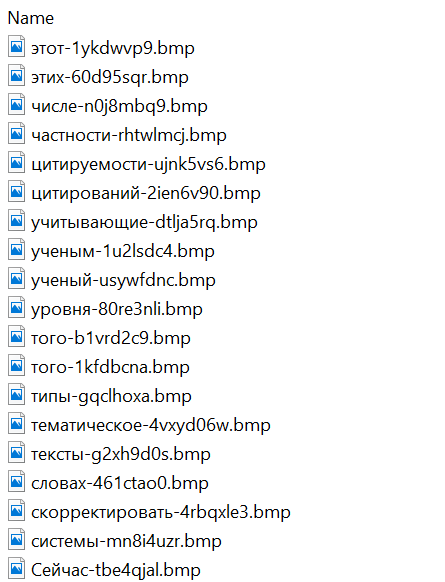
A portion of the .Thumbs directory contents

A portion of the .Thumbs directory contents

When the user clicked the shortcut, it ran a PowerShell script. The script’s primary purpose was to download and execute a PowerShell-based payload from a malicious server.

The script that was launched by opening the shortcut

The script that was launched by opening the shortcut

The downloaded payload then performed the following actions:

  • Contacted a URL in the format: https://e-library[.]wiki/elib/query.php?id=<8 pseudorandom letters and digits>&key=<32 hexadecimal characters> to retrieve the final payload, a DLL file.
  • Saved the downloaded file to %localappdata%\Microsoft\Windows\Explorer\iconcache_<4 pseudorandom digits>.dll.
  • Established persistence for the payload using COM Hijacking. This involved writing the path to the DLL file into the registry key HKCR\CLSID\{1f486a52-3cb1-48fd-8f50-b8dc300d9f9d}\InProcServer32. Notably, the attackers had used that same technique in their spring attacks.
  • Downloaded a decoy PDF from a URL in the format: https://e-library[.]wiki/pdf/<8 pseudorandom letters and digits>.pdf. This PDF was saved to the user’s Downloads folder with a filename in the format: <LastName>_<FirstName>_<Patronymic>.pdf and then opened automatically.

The decoy PDF contained no valuable information. It was merely a blurred report generated by a Russian plagiarism-checking system.

A screenshot of a page from the downloaded report

A screenshot of a page from the downloaded report

At the time of our investigation, the links for downloading the final payloads didn’t work. Attempting to access them returned error messages in English: “You are already blocked…” or “You have been bad ended” (sic). This likely indicates the use of a protective mechanism to prevent payloads from being downloaded more than once. Despite this, we managed to obtain and analyze the final payload.

The final payload: the Tuoni framework

The DLL file deployed to infected devices proved to be an OLLVM-obfuscated loader, which we described in our previous report on Operation ForumTroll. However, while this loader previously delivered rare implants like LeetAgent and Dante, this time the attackers opted for a better-known commercial red teaming framework: Tuoni. Portions of the Tuoni code are publicly available on GitHub. By deploying this tool, the attackers gained remote access to the victim’s device along with other capabilities for further system compromise.

As in the previous campaign, the attackers used fastly.net as C2 servers.

Conclusion

The cyberattacks carried out by the ForumTroll APT group in the spring and fall of 2025 share significant similarities. In both campaigns, infection began with targeted phishing emails, and persistence for the malicious implants was achieved with the COM Hijacking technique. The same loader was used to deploy the implants both in the spring and the fall.

Despite these similarities, the fall series of attacks cannot be considered as technically sophisticated as the spring campaign. In the spring, the ForumTroll APT group exploited zero-day vulnerabilities to infect systems. By contrast, the autumn attacks relied entirely on social engineering, counting on victims not only clicking the malicious link but also downloading the archive and launching the shortcut file. Furthermore, the malware used in the fall campaign, the Tuoni framework, is less rare.

ForumTroll has been targeting organizations and individuals in Russia and Belarus since at least 2022. Given this lengthy timeline, it is likely this APT group will continue to target entities and individuals of interest within these two countries. We believe that investigating ForumTroll’s potential future campaigns will allow us to shed light on shadowy malicious implants created by commercial developers – much as we did with the discovery of the Dante spyware.

Indicators of compromise

e-library[.]wiki
perf-service-clients2.global.ssl.fastly[.]net
bus-pod-tenant.global.ssl.fastly[.]net
status-portal-api.global.ssl.fastly[.]net

  •  

Operation ForumTroll continues: Russian political scientists targeted using plagiarism reports

Introduction

In March 2025, we discovered Operation ForumTroll, a series of sophisticated cyberattacks exploiting the CVE-2025-2783 vulnerability in Google Chrome. We previously detailed the malicious implants used in the operation: the LeetAgent backdoor and the complex spyware Dante, developed by Memento Labs (formerly Hacking Team). However, the attackers behind this operation didn’t stop at their spring campaign and have continued to infect targets within the Russian Federation.

More reports about this threat are available to customers of the Kaspersky Intelligence Reporting Service. Contact: intelreports@kaspersky.com.

Emails posing as a scientific library

In October 2025, just days before we presented our report detailing the ForumTroll APT group’s attack at the Security Analyst Summit, we detected a new targeted phishing campaign by the same group. However, while the spring cyberattacks focused on organizations, the fall campaign honed in on specific individuals: scholars in the field of political science, international relations, and global economics, working at major Russian universities and research institutions.

The emails received by the victims were sent from the address support@e-library[.]wiki. The campaign purported to be from the scientific electronic library, eLibrary, whose legitimate website is elibrary.ru. The phishing emails contained a malicious link in the format: https://e-library[.]wiki/elib/wiki.php?id=<8 pseudorandom letters and digits>. Recipients were prompted to click the link to download a plagiarism report. Clicking that link triggered the download of an archive file. The filename was personalized, using the victim’s own name in the format: <LastName>_<FirstName>_<Patronymic>.zip.

A well-prepared attack

The attackers did their homework before sending out the phishing emails. The malicious domain, e-library[.]wiki, was registered back in March 2025, over six months before the email campaign started. This was likely done to build the domain’s reputation, as sending emails from a suspicious, newly registered domain is a major red flag for spam filters.

Furthermore, the attackers placed a copy of the legitimate eLibrary homepage on https://e-library[.]wiki. According to the information on the page, they accessed the legitimate website from the IP address 193.65.18[.]14 back in December 2024.

A screenshot of the malicious site elements showing the IP address and initial session date

A screenshot of the malicious site elements showing the IP address and initial session date

The attackers also carefully personalized the phishing emails for their targets, specific professionals in the field. As mentioned above, the downloaded archive was named with the victim’s last name, first name, and patronymic.

Another noteworthy technique was the attacker’s effort to hinder security analysis by restricting repeat downloads. When we attempted to download the archive from the malicious site, we received a message in Russian, indicating the download link was likely for one-time use only:

The message that was displayed when we attempted to download the archive

The message that was displayed when we attempted to download the archive

Our investigation found that the malicious site displayed a different message if the download was attempted from a non-Windows device. In that case, it prompted the user to try again from a Windows computer.

The message that was displayed when we attempted to download the archive from a non-Windows OS

The message that was displayed when we attempted to download the archive from a non-Windows OS

The malicious archive

The malicious archives downloaded via the email links contained the following:

  • A malicious shortcut file named after the victim: <LastName>_<FirstName>_<Patronymic>.lnk;
  • A .Thumbs directory containing approximately 100 image files with names in Russian. These images were not used during the infection process and were likely added to make the archives appear less suspicious to security solutions.
A portion of the .Thumbs directory contents

A portion of the .Thumbs directory contents

When the user clicked the shortcut, it ran a PowerShell script. The script’s primary purpose was to download and execute a PowerShell-based payload from a malicious server.

The script that was launched by opening the shortcut

The script that was launched by opening the shortcut

The downloaded payload then performed the following actions:

  • Contacted a URL in the format: https://e-library[.]wiki/elib/query.php?id=<8 pseudorandom letters and digits>&key=<32 hexadecimal characters> to retrieve the final payload, a DLL file.
  • Saved the downloaded file to %localappdata%\Microsoft\Windows\Explorer\iconcache_<4 pseudorandom digits>.dll.
  • Established persistence for the payload using COM Hijacking. This involved writing the path to the DLL file into the registry key HKCR\CLSID\{1f486a52-3cb1-48fd-8f50-b8dc300d9f9d}\InProcServer32. Notably, the attackers had used that same technique in their spring attacks.
  • Downloaded a decoy PDF from a URL in the format: https://e-library[.]wiki/pdf/<8 pseudorandom letters and digits>.pdf. This PDF was saved to the user’s Downloads folder with a filename in the format: <LastName>_<FirstName>_<Patronymic>.pdf and then opened automatically.

The decoy PDF contained no valuable information. It was merely a blurred report generated by a Russian plagiarism-checking system.

A screenshot of a page from the downloaded report

A screenshot of a page from the downloaded report

At the time of our investigation, the links for downloading the final payloads didn’t work. Attempting to access them returned error messages in English: “You are already blocked…” or “You have been bad ended” (sic). This likely indicates the use of a protective mechanism to prevent payloads from being downloaded more than once. Despite this, we managed to obtain and analyze the final payload.

The final payload: the Tuoni framework

The DLL file deployed to infected devices proved to be an OLLVM-obfuscated loader, which we described in our previous report on Operation ForumTroll. However, while this loader previously delivered rare implants like LeetAgent and Dante, this time the attackers opted for a better-known commercial red teaming framework: Tuoni. Portions of the Tuoni code are publicly available on GitHub. By deploying this tool, the attackers gained remote access to the victim’s device along with other capabilities for further system compromise.

As in the previous campaign, the attackers used fastly.net as C2 servers.

Conclusion

The cyberattacks carried out by the ForumTroll APT group in the spring and fall of 2025 share significant similarities. In both campaigns, infection began with targeted phishing emails, and persistence for the malicious implants was achieved with the COM Hijacking technique. The same loader was used to deploy the implants both in the spring and the fall.

Despite these similarities, the fall series of attacks cannot be considered as technically sophisticated as the spring campaign. In the spring, the ForumTroll APT group exploited zero-day vulnerabilities to infect systems. By contrast, the autumn attacks relied entirely on social engineering, counting on victims not only clicking the malicious link but also downloading the archive and launching the shortcut file. Furthermore, the malware used in the fall campaign, the Tuoni framework, is less rare.

ForumTroll has been targeting organizations and individuals in Russia and Belarus since at least 2022. Given this lengthy timeline, it is likely this APT group will continue to target entities and individuals of interest within these two countries. We believe that investigating ForumTroll’s potential future campaigns will allow us to shed light on shadowy malicious implants created by commercial developers – much as we did with the discovery of the Dante spyware.

Indicators of compromise

e-library[.]wiki
perf-service-clients2.global.ssl.fastly[.]net
bus-pod-tenant.global.ssl.fastly[.]net
status-portal-api.global.ssl.fastly[.]net

  •  

Analysing a massive Office 365 phishing campaign


Last week, a friend of mine reached out with a query: a contact in his address book had sent him a suspicious email. As it turns out, it was. In this blog post, we'll have a quick look at an Office 365 phishing campaign, which turned out to be massive. This type of phishing has been on the rise for a while now (at least since 2017), and it's important to point out, as seemingly attacks are only increasing.


Analysis

As mentioned earlier, Office 365 (O365) phishing isn't new, but it is definitely prevalent. A high-level overview of a typical attack is as follows:

Figure 1 - High-level overview of typical O365 phishing


A typical flow of such an attack may be as follows:


  1. An attacker sends an O365 spearphishing email, likely from a spoofed or fake email address;
  2. The user is enticed to click on the link, or open the attachment which includes a link;
  3. The user will then unknowingly enter their credentials on the fake O365 page;
  4. Credentials get sent back to the attacker;
  5. Attacker will access the now compromised user's mailbox; and,
  6. The cycle repeats: the attacker will send spearphish emails to all of the compromised user's contacts - with this difference, it's coming from a legitimate sender.
This is exactly what happened to a friend of mine: he got sent an email from a legitimate email address, which was a contact in his address book - only the sender never intentionally sent this email! 

Let's have a look at the infection chain.

The initial email

The initial email sent looked as follows:

Figure 2 - "P.AYMENT COPY"


Clicking on the "OPEN" button would redirect you to a legitimate but compromised Sharepoint (part of O365) webpage. Seeing as a legitimate business has been compromised, I won't post the link here. Its web administrators have been notified.


Figure 3 - "Access OneDrive"


The PDF document

Next step is hosting a PDF named "INVOICE.PDF", which entices the user to access OneDrive to view the shared file. If the user were to click on "OPEN PDF HERE":


Figure 4 - "Login with Office 365"


URI: https://happymachineit[.]info/Michael/b4fb042ba2b3b35053943467ac22a370/OFE1.htm

The final landing or phishing page


Finally, clicking on "Login with Office 365" will redirect the user to the final phishing page, which will look as follows:

Figure 5 - Final landing page


The final landing page is as follows:
https://happymachineit[.]info/Michael/b4fb042ba2b3b35053943467ac22a370/7hsfabvj2b0b9rguzbzw910d.php

When entering credentials, they will be sent off to the attacker, and the cycle from Figure 1 will repeat itself. Note that other scenarios are possible, for example:
  1. The attacker may try to (re-)sell credentials that have been gathered so far on criminal forums
  2. The attacker may send more targeted spearphishes to potentially interesting victims
  3. The attacker may attempt to access other services or accounts using the same user/password combination
In short, there's countless other possibilities.

The phishing infrastructure

Avid readers will have noticed the phishing website uses a valid SSL certificate, which has the following details:


  • Subject DN: CN=happymachineit.info
  • Issuer DN: C=US, ST=TX, L=Houston, O=cPanel, Inc., CN=cPanel, Inc. Certification Authority
  • Serial: 169382499542171049850152621295591104087
The SSL cert was issued by Comodo in January. Details can be found on Censys.io.

An additional email address is connected with "happymachine": fudtoolshop@gmail.com

The phishing website encountered here, https://happymachineit[.]info, is hosted on the following IP: 178.159.36[.]107

Pivoting on that IP brings us to the following SSL certificate details:

emailAddress=ssl@server.localhost.com, CN=server.localhost.com

This means the certificate is a local and self-signed one. In other words, if you are accessing a secure website, and you see "server.localhost.com" as the SSL certificate, do NOT trust it. This is sometimes from an automatic setup from the hosting provider.

As a side-note, a search for the Common Name (CN) mentioned above with Censys currently yields 473 (unexpired certs) results: https://censys.io/certificates?q=%28server.localhost.com%29+AND+tags.raw%3A+%22unexpired%22&

Performing a search with RiskIQ's PassiveTotal as well as VirusTotal, and after filtering results, we obtain a whopping total of 875 unique Office 365 phishing sites, hosted on that IP alone! It appears this campaign has been active since December 2018.

Searching a bit further, it appears the whole ASN (which is a collection of IP prefixes controlled by a single entity, typically an ISP), AS48666 is in fact riddled with Office 365 as well as other phishing sites. Using URLscan.io we can quickly gauge the ASN is hosting multiple phishing sites for Office 365 as well as Adobe:

Figure 6 - AS48666 hosting badness


General Info:

  • Geo: Russian Federation (RU) — 
  • AS: AS48666 - AS-MAROSNET Moscow, Russia, RU 
  • Registrar: RIPENCC

As shown in this blog post, one IP address can host tons of phishing instances, while the ASN controls multiple IPs. Bonus bad IP: 178.159.36[.]120. 


Detection

For the phishing websites itself, any network traffic that resolves to the IP above.

I've noticed there are countless similar PDFs from this same campaign. Due to the way these are created (likely in bulk), a simple Yara rule can be developed as follows:


The Yara rule can be found on Pastebin here or on Github Gist here.

Note: in specific instances, this rule may false-positive - so use at your own will.

The following MITRE ATT&CK techniques are relevant:


Disinfection

There isn't much to disinfect, since there's no actual malware involved.

However, if you have been affected by this phishing campaign, do the following immediately:

  • Contact your network and/or system administrator or managed services provider if you have one and wait for their response - if not;
  • Note down the phishing page/URL, then close any open phishing pages - in fact, close the whole browser;
  • Perform an antivirus scan with your installed product, and a scan with another application, for example Malwarebytes (better be safe than sorry);
  • Change your O365 password immediately;
  • Change passwords on other websites where you used the same combination;
  • Reach out to the people in your address book you were compromised and they are not to open your email(s) or at least not any attachments or links from your email(s);
  • Verify your "Sent" emails folder (or "Outbox") for any suspicious activity. If there are no Sent emails - the attacker may have deleted them, or you may have a full compromise on your hands.;
  • Verify any (newly) created rules in your mail application (in this case O365), for example, verify there are no new forwarding rules or perhaps rules that delete new incoming emails - forwarding rules and deletion rules are sometimes set up by an attacker to gather more information or as an attempt to remain hidden; and,
  • File a complaint with your CERT, local police station, or whichever authority would handle such cases. If you are unsure how to do so, have a look here for assistance.


Prevention

  • Block the IP (or whole subnet 178.159.36[.]0/24) mentioned in this report in your firewall or proxy or other appliance;
  • Use strong and preferably unique passwords (use a password manager);
  • Set up 2FA for accounts or, preferably, MFA (multi-factor authentication);
  • Enable, deploy or implement anti-spam and anti-phishing protection;
  • Enable, deploy, or implement a URL phishing filter;
  • Trust, but verify: "did this contact really need to send me a "Payment Copy"? - if needed, verify via a phone call - not via email;
  • Be generally cautious with links and attachments. Do not click on links or open attachments from unknown senders;
  • If possible, use Firefox with NoScript enabled; and,
  • If you're in an organisation: create or organise user awareness training.

Conclusion

Phishing has been around for a long time - Office 365 phishing, on the other hand, has been around since, well, Office 365 was created. Every time a new service is created, you can imagine that phishing emails targeting that service will follow - maybe one month later, perhaps a year later - but they will.

Always try to be vigilant and follow the prevention tips mentioned above to stay safe.

As a side-note, the real Office 365 page is: https://outlook.office365.com/owa

You may find more information in the Resources section below.

Resources

Blaze's Security Blog - Cybercrime Report Template
Decent Security - Easily Report Phishing and Malware
Microsoft - Anti-phishing protection in Office 365
Microsoft - Microsoft publishes guidance to boost public sector cloud security
Microsoft - Set up multi-factor authentication
Microsoft - Set up Office 365 ATP anti-phishing and anti-phishing policies

Indicators


  •  
❌