Cybercriminals behind a campaign dubbed DEAD#VAX are taking phishing one step further by delivering malware inside virtual hard disks that pretend to be ordinary PDF documents. Open the wrong “invoice” or “purchase order” and you won’t see a document at all. Instead, Windows mounts a virtual drive that quietly installs AsyncRAT, a backdoor Trojan that allows attackers to remotely monitor and control your computer.
It’s a remote access tool, which means attackers gain remote hands‑on‑keyboard control, while traditional file‑based defenses see almost nothing suspicious on disk.
From a high-level view, the infection chain is long, but every step looks just legitimate enough on its own to slip past casual checks.
Victims receive phishing emails that look like routine business messages, often referencing purchase orders or invoices and sometimes impersonating real companies. The email doesn’t attach a document directly. Instead, it links to a file hosted on IPFS (InterPlanetary File System), a decentralized storage network increasingly abused in phishing campaigns because content is harder to take down and can be accessed through normal web gateways.
The linked file is named as a PDF and has the PDF icon, but is actually a virtual hard disk (VHD) file. When the user double‑clicks it, Windows mounts it as a new drive (for example, drive E:) instead of opening a document viewer. Mounting VHDs is perfectly legitimate Windows behavior, which makes this step less likely to ring alarm bells.
Inside the mounted drive is what appears to be the expected document, but it’s actually a Windows Script File (WSF). When the user opens it, Windows executes the code in the file instead of displaying a PDF.
After some checks to avoid analysis and detection, the script injects the payload—AsyncRAT shellcode—into trusted, Microsoft‑signed processes such as RuntimeBroker.exe, OneDrive.exe, taskhostw.exe, or sihost.exe. The malware never writes an actual executable file to disk. It lives and runs entirely in memory inside these legitimate processes, making detection and eventually at a later stage, forensics much harder. It also avoids sudden spikes in activity or memory usage that could draw attention.
For an individual user, falling for this phishing email can result in:
Theft of saved and typed passwords, including for email, banking, and social media.
Exposure of confidential documents, photos, or other sensitive files taken straight from the system.
Surveillance via periodic screenshots or, where configured, webcam capture.
Use of the machine as a foothold to attack other devices on the same home or office network.
How to stay safe
Because detection can be hard, it is crucial that users apply certain checks:
Don’t open email attachments until after verifying, with a trusted source, that they are legitimate.
Make sure you can see the actual file extensions. Unfortunately, Windows allows users to hide them. So, when in reality the file would be called invoice.pdf.vhd the user would only see invoice.pdf. To find out how to do this, see below.
Cybercriminals behind a campaign dubbed DEAD#VAX are taking phishing one step further by delivering malware inside virtual hard disks that pretend to be ordinary PDF documents. Open the wrong “invoice” or “purchase order” and you won’t see a document at all. Instead, Windows mounts a virtual drive that quietly installs AsyncRAT, a backdoor Trojan that allows attackers to remotely monitor and control your computer.
It’s a remote access tool, which means attackers gain remote hands‑on‑keyboard control, while traditional file‑based defenses see almost nothing suspicious on disk.
From a high-level view, the infection chain is long, but every step looks just legitimate enough on its own to slip past casual checks.
Victims receive phishing emails that look like routine business messages, often referencing purchase orders or invoices and sometimes impersonating real companies. The email doesn’t attach a document directly. Instead, it links to a file hosted on IPFS (InterPlanetary File System), a decentralized storage network increasingly abused in phishing campaigns because content is harder to take down and can be accessed through normal web gateways.
The linked file is named as a PDF and has the PDF icon, but is actually a virtual hard disk (VHD) file. When the user double‑clicks it, Windows mounts it as a new drive (for example, drive E:) instead of opening a document viewer. Mounting VHDs is perfectly legitimate Windows behavior, which makes this step less likely to ring alarm bells.
Inside the mounted drive is what appears to be the expected document, but it’s actually a Windows Script File (WSF). When the user opens it, Windows executes the code in the file instead of displaying a PDF.
After some checks to avoid analysis and detection, the script injects the payload—AsyncRAT shellcode—into trusted, Microsoft‑signed processes such as RuntimeBroker.exe, OneDrive.exe, taskhostw.exe, or sihost.exe. The malware never writes an actual executable file to disk. It lives and runs entirely in memory inside these legitimate processes, making detection and eventually at a later stage, forensics much harder. It also avoids sudden spikes in activity or memory usage that could draw attention.
For an individual user, falling for this phishing email can result in:
Theft of saved and typed passwords, including for email, banking, and social media.
Exposure of confidential documents, photos, or other sensitive files taken straight from the system.
Surveillance via periodic screenshots or, where configured, webcam capture.
Use of the machine as a foothold to attack other devices on the same home or office network.
How to stay safe
Because detection can be hard, it is crucial that users apply certain checks:
Don’t open email attachments until after verifying, with a trusted source, that they are legitimate.
Make sure you can see the actual file extensions. Unfortunately, Windows allows users to hide them. So, when in reality the file would be called invoice.pdf.vhd the user would only see invoice.pdf. To find out how to do this, see below.
Imagine our surprise when we ended up on a site promoting that same Freecash app while investigating a “cloud storage” phish. We’ve all probably seen one of those. They’re common enough and according to recent investigation by BleepingComputer, there’s a
“large-scale cloud storage subscription scam campaign targeting users worldwide with repeated emails falsely warning recipients that their photos, files, and accounts are about to be blocked or deleted due to an alleged payment failure.”
Based on the description in that article, the email we found appears to be part of this campaign.
The subject line of the email is:
“{Recipient}. Your Cloud Account has been locked on Sat, 24 Jan 2026 09:57:55 -0500. Your photos and videos will be removed!”
This matches one of the subject lines that BleepingComputer listed.
And the content of the email:
“Payment Issue – Cloud Storage
Dear User,
We encountered an issue while attempting to renew your Cloud Storage subscription.
Unfortunately, your payment method has expired. To ensure your Cloud continues without interruption, please update your payment details.
Subscription ID: 9371188
Product: Cloud Storage Premium
Expiration Date: Sat,24 Jan-2026
If you do not update your payment information, you may lose access to your Cloud Storage, which may prevent you from saving and syncing your data such as photos, videos, and documents.
Update Payment Details {link button}
Security Recommendations:
Always access your account through our official website
Never share your password with anyone
Ensure your contact and billing information are up to date”
The link in the email leads to https://storage.googleapis[.]com/qzsdqdqsd/dsfsdxc.html#/redirect.html, which helps the scammer establish a certain amount of trust because it points to Google Cloud Storage (GCS). GCS is a legitimate service that allows authorized users to store and manage data such as files, images, and videos in buckets. However, as in this case, attackers can abuse it for phishing.
The redirect carries some parameters to the next website.
The feed.headquartoonjpn[.]com domain was blocked by Malwarebytes. We’ve seen it before in an earlier campaign involving an Endurance-themed phish.
After a few more redirects, we ended up at hx5.submitloading[.]com, where a fake CAPTCHA triggered the last redirect to freecash[.]com, once it was solved.
The end goal of this phish likely depends on the parameters passed along during the redirects, so results may vary.
Rather than stealing credentials directly, the campaign appears designed to monetize traffic, funneling victims into affiliate offers where the operators get paid for sign-ups or conversions.
BleepingComputer noted that they were redirected to affiliate marketing websites for various products.
“Products promoted in this phishing campaign include VPN services, little-known security software, and other subscription-based offerings with no connection to cloud storage.”
How to stay safe
Ironically, the phishing email itself includes some solid advice:
Always access your account through our official website.
Never share your password with anyone.
We’d like to add:
Never click on links in unsolicited emails without verifying with a trusted source.
Do not engage with websites that attract visitors like this.
Pro tip: Malwarebytes Scam Guard would have helped you identify this email as a scam and provided advice on how to proceed.
Redirect flow (IOCs)
storage.googleapis[.]com/qzsdqdqsd/dsfsdxc.html
feed.headquartoonjpn[.]com
revivejudgemental[.]com
hx5.submitloading[.]com
freecash[.]com
Update February 5, 2026
Almedia GmbH, the company behind the Freecash platform, reached out to us for information about the chain of redirects that lead to their platform. And after an investigation they notified us that:
“Following Malwarebytes’ reporting and the additional information they shared with us, we investigated the issue and identified an affiliate operating in breach of our policies. That partner has been removed from our network.
Almedia does not sell user data, and we take compliance, user trust, and responsible advertising seriously.”
We don’t just report on scams—we help detect them
Cybersecurity risks should never spread beyond a headline. If something looks dodgy to you, check if it’s a scam using Malwarebytes Scam Guard, a feature of our mobile protection products. Submit a screenshot, paste suspicious content, or share a text or phone number, and we’ll tell you if it’s a scam or legit. Download Malwarebytes Mobile Security for iOS or Android and try it today!
Imagine our surprise when we ended up on a site promoting that same Freecash app while investigating a “cloud storage” phish. We’ve all probably seen one of those. They’re common enough and according to recent investigation by BleepingComputer, there’s a
“large-scale cloud storage subscription scam campaign targeting users worldwide with repeated emails falsely warning recipients that their photos, files, and accounts are about to be blocked or deleted due to an alleged payment failure.”
Based on the description in that article, the email we found appears to be part of this campaign.
The subject line of the email is:
“{Recipient}. Your Cloud Account has been locked on Sat, 24 Jan 2026 09:57:55 -0500. Your photos and videos will be removed!”
This matches one of the subject lines that BleepingComputer listed.
And the content of the email:
“Payment Issue – Cloud Storage
Dear User,
We encountered an issue while attempting to renew your Cloud Storage subscription.
Unfortunately, your payment method has expired. To ensure your Cloud continues without interruption, please update your payment details.
Subscription ID: 9371188
Product: Cloud Storage Premium
Expiration Date: Sat,24 Jan-2026
If you do not update your payment information, you may lose access to your Cloud Storage, which may prevent you from saving and syncing your data such as photos, videos, and documents.
Update Payment Details {link button}
Security Recommendations:
Always access your account through our official website
Never share your password with anyone
Ensure your contact and billing information are up to date”
The link in the email leads to https://storage.googleapis[.]com/qzsdqdqsd/dsfsdxc.html#/redirect.html, which helps the scammer establish a certain amount of trust because it points to Google Cloud Storage (GCS). GCS is a legitimate service that allows authorized users to store and manage data such as files, images, and videos in buckets. However, as in this case, attackers can abuse it for phishing.
The redirect carries some parameters to the next website.
The feed.headquartoonjpn[.]com domain was blocked by Malwarebytes. We’ve seen it before in an earlier campaign involving an Endurance-themed phish.
After a few more redirects, we ended up at hx5.submitloading[.]com, where a fake CAPTCHA triggered the last redirect to freecash[.]com, once it was solved.
The end goal of this phish likely depends on the parameters passed along during the redirects, so results may vary.
Rather than stealing credentials directly, the campaign appears designed to monetize traffic, funneling victims into affiliate offers where the operators get paid for sign-ups or conversions.
BleepingComputer noted that they were redirected to affiliate marketing websites for various products.
“Products promoted in this phishing campaign include VPN services, little-known security software, and other subscription-based offerings with no connection to cloud storage.”
How to stay safe
Ironically, the phishing email itself includes some solid advice:
Always access your account through our official website.
Never share your password with anyone.
We’d like to add:
Never click on links in unsolicited emails without verifying with a trusted source.
Do not engage with websites that attract visitors like this.
Pro tip: Malwarebytes Scam Guard would have helped you identify this email as a scam and provided advice on how to proceed.
Redirect flow (IOCs)
storage.googleapis[.]com/qzsdqdqsd/dsfsdxc.html
feed.headquartoonjpn[.]com
revivejudgemental[.]com
hx5.submitloading[.]com
freecash[.]com
Update February 5, 2026
Almedia GmbH, the company behind the Freecash platform, reached out to us for information about the chain of redirects that lead to their platform. And after an investigation they notified us that:
“Following Malwarebytes’ reporting and the additional information they shared with us, we investigated the issue and identified an affiliate operating in breach of our policies. That partner has been removed from our network.
Almedia does not sell user data, and we take compliance, user trust, and responsible advertising seriously.”
We don’t just report on scams—we help detect them
Cybersecurity risks should never spread beyond a headline. If something looks dodgy to you, check if it’s a scam using Malwarebytes Scam Guard, a feature of our mobile protection products. Submit a screenshot, paste suspicious content, or share a text or phone number, and we’ll tell you if it’s a scam or legit. Download Malwarebytes Mobile Security for iOS or Android and try it today!
It sounds friendly, familiar and quite harmless. But in a scam we recently spotted, that simple phrase is being used to trick victims into installing a full remote access tool on their Windows computers—giving attackers complete control of the system.
What appears to be a casual party or event invitation leads to the silent installation of ScreenConnect, a legitimate remote support tool quietly installed in the background and abused by attackers.
Here’s how the scam works, why it’s effective, and how to protect yourself.
The email: A party invitation
Victims receive an email framed as a personal invitation—often written to look like it came from a friend or acquaintance. The message is deliberately informal and social, lowering suspicion and encouraging quick action.
In the screenshot below, the email arrived from a friend whose email account had been hacked, but it could just as easily come from a sender you don’t know.
So far, we’ve only seen this campaign targeting people in the UK, but there’s nothing stopping it from expanding elsewhere.
Clicking the link in the email leads to a polished invitation page hosted on an attacker-controlled domain.
The invite: The landing page that leads to an installer
The landing page leans heavily into the party theme, but instead of showing event details, the page nudges the user toward opening a file. None of them look dangerous on their own, but together they keep the user focused on the “invitation” file:
A bold “You’re Invited!” headline
The suggestion that a friend had sent the invitation
A message saying the invitation is best viewed on a Windows laptop or desktop
A countdown suggesting your invitation is already “downloading”
A message implying urgency and social proof (“I opened mine and it was so easy!”)
Within seconds, the browser is redirected to download RSVPPartyInvitationCard.msi
The page even triggers the download automatically to keep the victim moving forward without stopping to think.
This MSI file isn’t an invitation. It’s an installer.
The guest: What the MSI actually does
When the user opens the MSI file, it launches msiexec.exe and silently installs ScreenConnect Client, a legitimate remote access tool often used by IT support teams.
There’s no invitation, RSVP form, or calendar entry.
What happens instead:
ScreenConnect binaries are installed under C:\Program Files (x86)\ScreenConnect Client\
A persistent Windows service is created (for example, ScreenConnect Client 18d1648b87bb3023)
There is no clear user-facing indication that a remote access tool is being installed
From the victim’s perspective, very little seems to happen. But at this point, the attacker can now remotely access their computer.
The after-party: Remote access is established
Once installed, the ScreenConnect client initiates encrypted outbound connections to ScreenConnect’s relay servers, including a uniquely assigned instance domain.
That connection gives the attacker the same level of access as a remote IT technician, including the ability to:
See the victim’s screen in real time
Control the mouse and keyboard
Upload or download files
Keep access even after the computer is restarted
Because ScreenConnect is legitimate software commonly used for remote support, its presence isn’t always obvious. On a personal computer, the first signs are often behavioral, such as unexplained cursor movement, windows opening on their own, or a ScreenConnect process the user doesn’t remember installing.
Why this scam works
This campaign is effective because it targets normal, predictable human behavior. From a behavioral security standpoint, it exploits our natural curiosity and appears to be a low risk.
Most people don’t think of invitations as dangerous. Opening one feels passive, like glancing at a flyer or checking a message, not installing software.
Even security-aware users are trained to watch out for warnings and pressure. A friendly “you’re invited” message doesn’t trigger those alarms.
By the time something feels off, the software is already installed.
Signs your computer may be affected
Watch for:
A download or executed file named RSVPPartyInvitationCard.msi
An unexpected installation of ScreenConnect Client
A Windows service named ScreenConnect Client with random characters
Your computer makes outbound HTTPS connections to ScreenConnect relay domains
Your system resolves the invitation-hosting domain used in this campaign, xnyr[.]digital
How to stay safe
This campaign is a reminder that modern attacks often don’t break in—they’re invited in. Remote access tools give attackers deep control over a system. Acting quickly can limit the damage.
For individuals
If you receive an email like this:
Be suspicious of invitations that ask you to download or open software
Never run MSI files from unsolicited emails
Verify invitations through another channel before opening anything
If you already clicked or ran the file:
Disconnect from the internet immediately
Check for ScreenConnect and uninstall it if present
Run a full security scan
Change important passwords from a clean, unaffected device
For organisations (especially in the UK)
Alert on unauthorized ScreenConnect installations
Restrict MSI execution where feasible
Treat “remote support tools” as high-risk software
Educate users: invitations don’t come as installers
This scam works by installing a legitimate remote access tool without clear user intent. That’s exactly the gap Malwarebytes is designed to catch.
Malwarebytes now detects newly installed remote access tools and alerts you when one appears on your system. You’re then given a choice: confirm that the tool is expected and trusted, or remove it if it isn’t.
We don’t just report on threats—we remove them
Cybersecurity risks should never spread beyond a headline. Keep threats off your devices by downloading Malwarebytes today.
It sounds friendly, familiar and quite harmless. But in a scam we recently spotted, that simple phrase is being used to trick victims into installing a full remote access tool on their Windows computers—giving attackers complete control of the system.
What appears to be a casual party or event invitation leads to the silent installation of ScreenConnect, a legitimate remote support tool quietly installed in the background and abused by attackers.
Here’s how the scam works, why it’s effective, and how to protect yourself.
The email: A party invitation
Victims receive an email framed as a personal invitation—often written to look like it came from a friend or acquaintance. The message is deliberately informal and social, lowering suspicion and encouraging quick action.
In the screenshot below, the email arrived from a friend whose email account had been hacked, but it could just as easily come from a sender you don’t know.
So far, we’ve only seen this campaign targeting people in the UK, but there’s nothing stopping it from expanding elsewhere.
Clicking the link in the email leads to a polished invitation page hosted on an attacker-controlled domain.
The invite: The landing page that leads to an installer
The landing page leans heavily into the party theme, but instead of showing event details, the page nudges the user toward opening a file. None of them look dangerous on their own, but together they keep the user focused on the “invitation” file:
A bold “You’re Invited!” headline
The suggestion that a friend had sent the invitation
A message saying the invitation is best viewed on a Windows laptop or desktop
A countdown suggesting your invitation is already “downloading”
A message implying urgency and social proof (“I opened mine and it was so easy!”)
Within seconds, the browser is redirected to download RSVPPartyInvitationCard.msi
The page even triggers the download automatically to keep the victim moving forward without stopping to think.
This MSI file isn’t an invitation. It’s an installer.
The guest: What the MSI actually does
When the user opens the MSI file, it launches msiexec.exe and silently installs ScreenConnect Client, a legitimate remote access tool often used by IT support teams.
There’s no invitation, RSVP form, or calendar entry.
What happens instead:
ScreenConnect binaries are installed under C:\Program Files (x86)\ScreenConnect Client\
A persistent Windows service is created (for example, ScreenConnect Client 18d1648b87bb3023)
There is no clear user-facing indication that a remote access tool is being installed
From the victim’s perspective, very little seems to happen. But at this point, the attacker can now remotely access their computer.
The after-party: Remote access is established
Once installed, the ScreenConnect client initiates encrypted outbound connections to ScreenConnect’s relay servers, including a uniquely assigned instance domain.
That connection gives the attacker the same level of access as a remote IT technician, including the ability to:
See the victim’s screen in real time
Control the mouse and keyboard
Upload or download files
Keep access even after the computer is restarted
Because ScreenConnect is legitimate software commonly used for remote support, its presence isn’t always obvious. On a personal computer, the first signs are often behavioral, such as unexplained cursor movement, windows opening on their own, or a ScreenConnect process the user doesn’t remember installing.
Why this scam works
This campaign is effective because it targets normal, predictable human behavior. From a behavioral security standpoint, it exploits our natural curiosity and appears to be a low risk.
Most people don’t think of invitations as dangerous. Opening one feels passive, like glancing at a flyer or checking a message, not installing software.
Even security-aware users are trained to watch out for warnings and pressure. A friendly “you’re invited” message doesn’t trigger those alarms.
By the time something feels off, the software is already installed.
Signs your computer may be affected
Watch for:
A download or executed file named RSVPPartyInvitationCard.msi
An unexpected installation of ScreenConnect Client
A Windows service named ScreenConnect Client with random characters
Your computer makes outbound HTTPS connections to ScreenConnect relay domains
Your system resolves the invitation-hosting domain used in this campaign, xnyr[.]digital
How to stay safe
This campaign is a reminder that modern attacks often don’t break in—they’re invited in. Remote access tools give attackers deep control over a system. Acting quickly can limit the damage.
For individuals
If you receive an email like this:
Be suspicious of invitations that ask you to download or open software
Never run MSI files from unsolicited emails
Verify invitations through another channel before opening anything
If you already clicked or ran the file:
Disconnect from the internet immediately
Check for ScreenConnect and uninstall it if present
Run a full security scan
Change important passwords from a clean, unaffected device
For organisations (especially in the UK)
Alert on unauthorized ScreenConnect installations
Restrict MSI execution where feasible
Treat “remote support tools” as high-risk software
Educate users: invitations don’t come as installers
This scam works by installing a legitimate remote access tool without clear user intent. That’s exactly the gap Malwarebytes is designed to catch.
Malwarebytes now detects newly installed remote access tools and alerts you when one appears on your system. You’re then given a choice: confirm that the tool is expected and trusted, or remove it if it isn’t.
We don’t just report on threats—we remove them
Cybersecurity risks should never spread beyond a headline. Keep threats off your devices by downloading Malwarebytes today.
After the viral AI assistant Clawdbot was forced to rename to Moltbot due to a trademark dispute, opportunists moved quickly. Within days, typosquat domains and a cloned GitHub repository appeared—impersonating the project’s creator and positioning infrastructure for a potential supply-chain attack.
The code is clean. The infrastructure is not. With the GitHub downloads and star rating rapidly rising, we took a deep dive into how fake domains target viral open source projects.
The background: Why was Clawdbot renamed?
In early 2026, Peter Steinberger’s Clawdbot became one of the fastest-growing open source projects on GitHub. The self-hosted assistant—described as “Claude with hands”—allowed users to control their computer through WhatsApp, Telegram, Discord, and similar platforms.
Anthropic later objected to the name. Steinberger complied and rebranded the project to Moltbot (“molt” being what lobsters do when they shed their shell).
During the rename, both the GitHub organization and X (formerly Twitter) handle were briefly released before being reclaimed. Attackers monitoring the transition grabbed them within seconds.
“Had to rename our accounts for trademark stuff and messed up the GitHub rename and the X rename got snatched by crypto shills.” — Peter Steinberger
That brief gap was enough.
Impersonation infrastructure emerged
While investigating a suspicious repository, I uncovered a coordinated set of assets designed to impersonate Moltbot.
Domains
moltbot[.]you
clawbot[.]ai
clawdbot[.]you
Repository
github[.]com/gstarwd/clawbot — a cloned repository using a typosquatted variant of the former Clawdbot project name
Website
A polished marketing site featuring:
professional design closely matching the real project
SEO optimization and structured metadata
download buttons, tutorials, and FAQs
claims of 61,500+ GitHub stars lifted from the real repository
Evidence of impersonation
False attribution: The site’s schema.org metadata falsely claims authorship by Peter Steinberger, linking directly to his real GitHub and X profiles. This is explicit identity misrepresentation.
Misdirection to an unauthorized repository: “View on GitHub” links send users to gstarwd/clawbot, not the official moltbot/moltbot repository.
Stolen credibility:The site prominently advertises tens of thousands of stars that belong to the real project. The clone has virtually none (although at the time of writing, that number is steadily rising).
Mixing legitimate and fraudulent links: Some links point to real assets, such as official documentation or legitimate binaries. Others redirect to impersonation infrastructure. This selective legitimacy defeats casual verification and appears deliberate.
Full SEO optimization: Canonical tags, Open Graph metadata, Twitter cards, and analytics are all present—clearly intended to rank the impersonation site ahead of legitimate project resources.
The ironic security warning: The impersonation site even warns users about scams involving fake cryptocurrency tokens—while itself impersonating the project.
Code analysis: Clean by design
I performed a static audit of the gstarwd/clawbot repository:
no malicious npm scripts
no credential exfiltration
no obfuscation or payload staging
no cryptomining
no suspicious network activity
The code is functionally identical to the legitimate project, which is not reassuring.
The threat model
The absence of malware is the strategy. Nothing here suggests an opportunistic malware campaign. Instead, the setup points to early preparation for a supply-chain attack.
The likely chain of events:
A user searches for “clawbot GitHub” or “moltbot download” and finds moltbot[.]you or gstarwd/clawbot.
The code looks legitimate and passes a security audit.
The user installs the project and configures it, adding API keys and messaging tokens. Trust is established.
At a later point, a routine update is pulled through npm update or git pull. A malicious payload is delivered into an installation the user already trusts.
An attacker can then harvest:
Anthropic API keys
OpenAI API keys
WhatsApp session credentials
Telegram bot tokens
Discord OAuth tokens
Slack credentials
Signal identity keys
full conversation histories
command execution access on the compromised machine
What’s malicious, and what isn’t
Clearly malicious
false attribution to a real individual
misrepresentation of popularity metrics
deliberate redirection to an unauthorized repository
Deceptive but not yet malware
typosquat domains
SEO manipulation
cloned repositories with clean code
Not present (yet)
active malware
data exfiltration
cryptomining
Clean code today lowers suspicion tomorrow.
A familiar pattern
This follows a well-known pattern in open source supply-chain attacks.
A user searches for a popular project and lands on a convincing-looking site or cloned repository. The code appears legitimate and passes a security audit.
They install the project and configure it, adding API keys or messaging tokens so it can work as intended. Trust is established.
Later, a routine update arrives through a standard npm update or git pull. That update introduces a malicious payload into an installation the user already trusts.
From there, an attacker can harvest credentials, conversation data, and potentially execute commands on the compromised system.
No exploit is required. The entire chain relies on trust rather than technical vulnerabilities.
How to stay safe
Impersonation infrastructure like this is designed to look legitimate long before anything malicious appears. By the time a harmful update arrives—if it arrives at all—the software may already be widely installed and trusted.
That’s why basic source verification still matters, especially when popular projects rename or move quickly.
Advice for users
Verify GitHub organization ownership
Bookmark official repositories directly
Treat renamed projects as higher risk during transitions
Advice for maintainers
Pre-register likely typosquat domains before public renames
Coordinate renames and handle changes carefully
Monitor for cloned repositories and impersonation sites
Pro tip: Malwarebytes customers are protected. Malwarebytes is actively blocking all known indicators of compromise (IOCs) associated with this impersonation infrastructure, preventing users from accessing the fraudulent domains and related assets identified in this investigation.
We don’t just report on threats—we remove them
Cybersecurity risks should never spread beyond a headline. Keep threats off your devices by downloading Malwarebytes today.
After the viral AI assistant Clawdbot was forced to rename to Moltbot due to a trademark dispute, opportunists moved quickly. Within days, typosquat domains and a cloned GitHub repository appeared—impersonating the project’s creator and positioning infrastructure for a potential supply-chain attack.
The code is clean. The infrastructure is not. With the GitHub downloads and star rating rapidly rising, we took a deep dive into how fake domains target viral open source projects.
The background: Why was Clawdbot renamed?
In early 2026, Peter Steinberger’s Clawdbot became one of the fastest-growing open source projects on GitHub. The self-hosted assistant—described as “Claude with hands”—allowed users to control their computer through WhatsApp, Telegram, Discord, and similar platforms.
Anthropic later objected to the name. Steinberger complied and rebranded the project to Moltbot (“molt” being what lobsters do when they shed their shell).
During the rename, both the GitHub organization and X (formerly Twitter) handle were briefly released before being reclaimed. Attackers monitoring the transition grabbed them within seconds.
“Had to rename our accounts for trademark stuff and messed up the GitHub rename and the X rename got snatched by crypto shills.” — Peter Steinberger
That brief gap was enough.
Impersonation infrastructure emerged
While investigating a suspicious repository, I uncovered a coordinated set of assets designed to impersonate Moltbot.
Domains
moltbot[.]you
clawbot[.]ai
clawdbot[.]you
Repository
github[.]com/gstarwd/clawbot — a cloned repository using a typosquatted variant of the former Clawdbot project name
Website
A polished marketing site featuring:
professional design closely matching the real project
SEO optimization and structured metadata
download buttons, tutorials, and FAQs
claims of 61,500+ GitHub stars lifted from the real repository
Evidence of impersonation
False attribution: The site’s schema.org metadata falsely claims authorship by Peter Steinberger, linking directly to his real GitHub and X profiles. This is explicit identity misrepresentation.
Misdirection to an unauthorized repository: “View on GitHub” links send users to gstarwd/clawbot, not the official moltbot/moltbot repository.
Stolen credibility:The site prominently advertises tens of thousands of stars that belong to the real project. The clone has virtually none (although at the time of writing, that number is steadily rising).
Mixing legitimate and fraudulent links: Some links point to real assets, such as official documentation or legitimate binaries. Others redirect to impersonation infrastructure. This selective legitimacy defeats casual verification and appears deliberate.
Full SEO optimization: Canonical tags, Open Graph metadata, Twitter cards, and analytics are all present—clearly intended to rank the impersonation site ahead of legitimate project resources.
The ironic security warning: The impersonation site even warns users about scams involving fake cryptocurrency tokens—while itself impersonating the project.
Code analysis: Clean by design
I performed a static audit of the gstarwd/clawbot repository:
no malicious npm scripts
no credential exfiltration
no obfuscation or payload staging
no cryptomining
no suspicious network activity
The code is functionally identical to the legitimate project, which is not reassuring.
The threat model
The absence of malware is the strategy. Nothing here suggests an opportunistic malware campaign. Instead, the setup points to early preparation for a supply-chain attack.
The likely chain of events:
A user searches for “clawbot GitHub” or “moltbot download” and finds moltbot[.]you or gstarwd/clawbot.
The code looks legitimate and passes a security audit.
The user installs the project and configures it, adding API keys and messaging tokens. Trust is established.
At a later point, a routine update is pulled through npm update or git pull. A malicious payload is delivered into an installation the user already trusts.
An attacker can then harvest:
Anthropic API keys
OpenAI API keys
WhatsApp session credentials
Telegram bot tokens
Discord OAuth tokens
Slack credentials
Signal identity keys
full conversation histories
command execution access on the compromised machine
What’s malicious, and what isn’t
Clearly malicious
false attribution to a real individual
misrepresentation of popularity metrics
deliberate redirection to an unauthorized repository
Deceptive but not yet malware
typosquat domains
SEO manipulation
cloned repositories with clean code
Not present (yet)
active malware
data exfiltration
cryptomining
Clean code today lowers suspicion tomorrow.
A familiar pattern
This follows a well-known pattern in open source supply-chain attacks.
A user searches for a popular project and lands on a convincing-looking site or cloned repository. The code appears legitimate and passes a security audit.
They install the project and configure it, adding API keys or messaging tokens so it can work as intended. Trust is established.
Later, a routine update arrives through a standard npm update or git pull. That update introduces a malicious payload into an installation the user already trusts.
From there, an attacker can harvest credentials, conversation data, and potentially execute commands on the compromised system.
No exploit is required. The entire chain relies on trust rather than technical vulnerabilities.
How to stay safe
Impersonation infrastructure like this is designed to look legitimate long before anything malicious appears. By the time a harmful update arrives—if it arrives at all—the software may already be widely installed and trusted.
That’s why basic source verification still matters, especially when popular projects rename or move quickly.
Advice for users
Verify GitHub organization ownership
Bookmark official repositories directly
Treat renamed projects as higher risk during transitions
Advice for maintainers
Pre-register likely typosquat domains before public renames
Coordinate renames and handle changes carefully
Monitor for cloned repositories and impersonation sites
Pro tip: Malwarebytes customers are protected. Malwarebytes is actively blocking all known indicators of compromise (IOCs) associated with this impersonation infrastructure, preventing users from accessing the fraudulent domains and related assets identified in this investigation.
We don’t just report on threats—we remove them
Cybersecurity risks should never spread beyond a headline. Keep threats off your devices by downloading Malwarebytes today.
A coworker shared this suspicious SMS where AT&T supposedly warns the recipient that their reward points are about to expire.
Phishing attacks are growing increasingly sophisticated, likely with help from AI. They’re getting better at mimicking major brands—not just in look, but in behavior. Recently, we uncovered a well-executed phishing campaign targeting AT&T customers that combines realistic branding, clever social engineering, and layered data theft tactics.
In this post, we’ll walk you through the investigation, screen by screen, explaining how the campaign tricks its victims and where the stolen data ends up.
This is the text message that started the investigation.
“Dear Customer, Your AT&T account currently holds 11,430 reward points scheduled to expire on January 26, 2026. Recommended redemption methods: – AT&T Rewards Center: {Shortened link} – AT&T Mobile App: Rewards section AT&T is dedicated to serving you.”
The shortened URL led to https://att.hgfxp[.]cc/pay/, a website designed to look like an AT&T site in name and appearance.
All branding, headers, and menus were copied over, and the page was full of real links out to att.com.
But the “main event” was a special section explaining how to access your AT&T reward points.
After “verifying” their account with a phone number, the victim is shown a dashboard warning that their AT&T points are due to expire in two days. This short window is a common phishing tactic that exploits urgency and FOMO (fear of missing out).
The rewards on offer—such as Amazon gift cards, headphones, smartwatches, and more—are enticing and reinforce the illusion that the victim is dealing with a legitimate loyalty program.
To add even more credibility, after submitting a phone number, the victim gets to see a list of available gifts, followed by a final confirmation prompt.
At that point, the target is prompted to fill out a “Delivery Information” form requesting sensitive personal information, including name, address, phone number, email, and more. This is where the actual data theft takes place.
The form’s visible submission flow is smooth and professional, with real-time validation and error highlighting—just like you’d expect from a top brand. This is deliberate. The attackers use advanced front-end validation code to maximize the quality and completeness of the stolen information.
Behind the slick UI, the form is connected to JavaScript code that, when the victim hits “Continue,” collects everything they’ve entered and transmits it directly to the attackers. In our investigation, we deobfuscated their code and found a large “data” section.
The stolen data gets sent in JSON format via POST to https://att.hgfxp[.]cc/api/open/cvvInterface.
This endpoint is hosted on the attacker’s domain, giving them immediate access to everything the victim submits.
What makes this campaign effective and dangerous
Sophisticated mimicry: Every page is an accurate clone of att.com, complete with working navigation links and logos.
Layered social engineering: Victims are lured step by step, each page lowering their guard and increasing trust.
Quality assurance: Custom JavaScript form validation reduces errors and increases successful data capture.
Obfuscated code: Malicious scripts are wrapped in obfuscation, slowing analysis and takedown.
Centralized exfiltration: All harvested data is POSTed directly to the attacker’s command-and-control endpoint.
How to defend yourself
A number of red flags could have alerted the target that this was a phishing attempt:
The text was sent to 18 recipients at once.
It used a generic greeting (“Dear Customer”) instead of personal identification.
The sender’s number was not a recognized AT&T contact.
The expiration date changed if the victim visited the fake site on a later date.
Beyond avoiding unsolicited links, here are a few ways to stay safe:
Only access your accounts through official apps or by typing the official website (att.com) directly into your browser.
Check URLs carefully. Even if a page looks perfect, hover over links and check the address bar for official domains.
Cybersecurity risks should never spread beyond a headline. If something looks dodgy to you, check if it’s a scam using Malwarebytes Scam Guard, a feature of our mobile protection products. Submit a screenshot, paste suspicious content, or share a text or phone number, and we’ll tell you if it’s a scam or legit. Download Malwarebytes Mobile Security for iOS or Android and try it today!
A coworker shared this suspicious SMS where AT&T supposedly warns the recipient that their reward points are about to expire.
Phishing attacks are growing increasingly sophisticated, likely with help from AI. They’re getting better at mimicking major brands—not just in look, but in behavior. Recently, we uncovered a well-executed phishing campaign targeting AT&T customers that combines realistic branding, clever social engineering, and layered data theft tactics.
In this post, we’ll walk you through the investigation, screen by screen, explaining how the campaign tricks its victims and where the stolen data ends up.
This is the text message that started the investigation.
“Dear Customer, Your AT&T account currently holds 11,430 reward points scheduled to expire on January 26, 2026. Recommended redemption methods: – AT&T Rewards Center: {Shortened link} – AT&T Mobile App: Rewards section AT&T is dedicated to serving you.”
The shortened URL led to https://att.hgfxp[.]cc/pay/, a website designed to look like an AT&T site in name and appearance.
All branding, headers, and menus were copied over, and the page was full of real links out to att.com.
But the “main event” was a special section explaining how to access your AT&T reward points.
After “verifying” their account with a phone number, the victim is shown a dashboard warning that their AT&T points are due to expire in two days. This short window is a common phishing tactic that exploits urgency and FOMO (fear of missing out).
The rewards on offer—such as Amazon gift cards, headphones, smartwatches, and more—are enticing and reinforce the illusion that the victim is dealing with a legitimate loyalty program.
To add even more credibility, after submitting a phone number, the victim gets to see a list of available gifts, followed by a final confirmation prompt.
At that point, the target is prompted to fill out a “Delivery Information” form requesting sensitive personal information, including name, address, phone number, email, and more. This is where the actual data theft takes place.
The form’s visible submission flow is smooth and professional, with real-time validation and error highlighting—just like you’d expect from a top brand. This is deliberate. The attackers use advanced front-end validation code to maximize the quality and completeness of the stolen information.
Behind the slick UI, the form is connected to JavaScript code that, when the victim hits “Continue,” collects everything they’ve entered and transmits it directly to the attackers. In our investigation, we deobfuscated their code and found a large “data” section.
The stolen data gets sent in JSON format via POST to https://att.hgfxp[.]cc/api/open/cvvInterface.
This endpoint is hosted on the attacker’s domain, giving them immediate access to everything the victim submits.
What makes this campaign effective and dangerous
Sophisticated mimicry: Every page is an accurate clone of att.com, complete with working navigation links and logos.
Layered social engineering: Victims are lured step by step, each page lowering their guard and increasing trust.
Quality assurance: Custom JavaScript form validation reduces errors and increases successful data capture.
Obfuscated code: Malicious scripts are wrapped in obfuscation, slowing analysis and takedown.
Centralized exfiltration: All harvested data is POSTed directly to the attacker’s command-and-control endpoint.
How to defend yourself
A number of red flags could have alerted the target that this was a phishing attempt:
The text was sent to 18 recipients at once.
It used a generic greeting (“Dear Customer”) instead of personal identification.
The sender’s number was not a recognized AT&T contact.
The expiration date changed if the victim visited the fake site on a later date.
Beyond avoiding unsolicited links, here are a few ways to stay safe:
Only access your accounts through official apps or by typing the official website (att.com) directly into your browser.
Check URLs carefully. Even if a page looks perfect, hover over links and check the address bar for official domains.
Cybersecurity risks should never spread beyond a headline. If something looks dodgy to you, check if it’s a scam using Malwarebytes Scam Guard, a feature of our mobile protection products. Submit a screenshot, paste suspicious content, or share a text or phone number, and we’ll tell you if it’s a scam or legit. Download Malwarebytes Mobile Security for iOS or Android and try it today!
Recently, our team came across an infection attempt that stood out—not for its sophistication, but for how determined the attacker was to take a “living off the land” approach to the extreme.
The end goal was to deploy Remcos, a Remote Access Trojan (RAT), and NetSupport Manager, a legitimate remote administration tool that’s frequently abused as a RAT. The route the attacker took was a veritable tour of Windows’ built-in utilities—known as LOLBins (Living Off the Land Binaries).
Both Remcos and NetSupport are widely abused remote access tools that give attackers extensive control over infected systems and are often delivered through multi-stage phishing or infection chains.
Remcos (short for Remote Control & Surveillance) is sold as a legitimate Windows remote administration and monitoring tool but is widely used by cybercriminals. Once installed, it gives attackers full remote desktop access, file system control, command execution, keylogging, clipboard monitoring, persistence options, and tunneling or proxying features for lateral movement.
NetSupport Manager is a legitimate remote support product that becomes “NetSupport RAT” when attackers silently install and configure it for unauthorized access.
Let’s walk through how this attack unfolded, one native command at a time.
Stage 1: The subtle initial access
The attack kicked off with a seemingly odd command:
At first glance, you might wonder: why not just run mshta.exe directly? The answer lies in defense evasion.
By roping in forfiles.exe, a legitimate tool for running commands over batches of files, the attacker muddied the waters. This makes the execution path a bit harder for security tools to spot. In essence, one trusted program quietly launches another, forming a chain that’s less likely to trip alarms.
Stage 2: Fileless download and staging
The mshta command fetched a remote HTA file that immediately spawned cmd.exe, which rolled out an elaborate PowerShell one-liner:
PowerShell’s built-in curl downloaded a payload disguised as a PDF, which in reality was a TAR archive. Then, tar.exe (another trusted Windows add-on) unpacked it into a randomly named folder. The star of this show, however, was glaxnimate.exe—a trojanized version of real animation software, primed to further the infection on execution. Even here, the attacker relies entirely on Windows’ own tools—no EXE droppers or macros in sight.
Stage 3: Staging in plain sight
What happened next? The malicious Glaxnimate copy began writing partial files to C:\ProgramData:
SETUP.CAB.PART
PROCESSOR.VBS.PART
PATCHER.BAT.PART
Why .PART files? It’s classic malware staging. Drop files in a half-finished state until the time is right—or perhaps until the download is complete. Once the coast is clear, rename or complete the files, then use them to push the next payloads forward.
Scripting the core elements of infection
Stage 4: Scripting the launch
Malware loves a good script—especially one that no one sees. Once fully written, Windows Script Host was invoked to execute the VBScript component:
Use the expand utility to extract all the contents of the previously dropped setup.cab archive into ProgramData—effectively unpacking the NetSupport RAT and its helpers.
Stage 5: Hidden persistence
To make sure their tool survived a restart, the attackers opted for the stealthy registry route:
Unlike old-school Run keys, UserInitMprLogonScript isn’t a usual suspect and doesn’t open visible windows. Every time the user logged in, the RAT came quietly along for the ride.
Final thoughts
This infection chain is a masterclass in LOLBin abuse and proof that attackers love turning Windows’ own tools against its users. Every step of the way relies on built-in Windows tools: forfiles, mshta, curl, tar, scripting engines, reg, and expand.
So, can you use too many LOLBins to drop a RAT? As this attacker shows, the answer is “not yet.” But each additional step adds noise, and leaves more breadcrumbs for defenders to follow. The more tools a threat actor abuses, the more unique their fingerprints become.
Stay vigilant. Monitor potential LOLBin abuse. And never trust a .pdf that needs tar.exe to open.
Despite the heavy use of LOLBins, Malwarebytes still detects and blocks this attack. It blocked the attacker’s IP address and detected both the Remcos RAT and the NetSupport client once dropped on the system.
We don’t just report on threats—we remove them
Cybersecurity risks should never spread beyond a headline. Keep threats off your devices by downloading Malwarebytes today.
Recently, our team came across an infection attempt that stood out—not for its sophistication, but for how determined the attacker was to take a “living off the land” approach to the extreme.
The end goal was to deploy Remcos, a Remote Access Trojan (RAT), and NetSupport Manager, a legitimate remote administration tool that’s frequently abused as a RAT. The route the attacker took was a veritable tour of Windows’ built-in utilities—known as LOLBins (Living Off the Land Binaries).
Both Remcos and NetSupport are widely abused remote access tools that give attackers extensive control over infected systems and are often delivered through multi-stage phishing or infection chains.
Remcos (short for Remote Control & Surveillance) is sold as a legitimate Windows remote administration and monitoring tool but is widely used by cybercriminals. Once installed, it gives attackers full remote desktop access, file system control, command execution, keylogging, clipboard monitoring, persistence options, and tunneling or proxying features for lateral movement.
NetSupport Manager is a legitimate remote support product that becomes “NetSupport RAT” when attackers silently install and configure it for unauthorized access.
Let’s walk through how this attack unfolded, one native command at a time.
Stage 1: The subtle initial access
The attack kicked off with a seemingly odd command:
At first glance, you might wonder: why not just run mshta.exe directly? The answer lies in defense evasion.
By roping in forfiles.exe, a legitimate tool for running commands over batches of files, the attacker muddied the waters. This makes the execution path a bit harder for security tools to spot. In essence, one trusted program quietly launches another, forming a chain that’s less likely to trip alarms.
Stage 2: Fileless download and staging
The mshta command fetched a remote HTA file that immediately spawned cmd.exe, which rolled out an elaborate PowerShell one-liner:
PowerShell’s built-in curl downloaded a payload disguised as a PDF, which in reality was a TAR archive. Then, tar.exe (another trusted Windows add-on) unpacked it into a randomly named folder. The star of this show, however, was glaxnimate.exe—a trojanized version of real animation software, primed to further the infection on execution. Even here, the attacker relies entirely on Windows’ own tools—no EXE droppers or macros in sight.
Stage 3: Staging in plain sight
What happened next? The malicious Glaxnimate copy began writing partial files to C:\ProgramData:
SETUP.CAB.PART
PROCESSOR.VBS.PART
PATCHER.BAT.PART
Why .PART files? It’s classic malware staging. Drop files in a half-finished state until the time is right—or perhaps until the download is complete. Once the coast is clear, rename or complete the files, then use them to push the next payloads forward.
Scripting the core elements of infection
Stage 4: Scripting the launch
Malware loves a good script—especially one that no one sees. Once fully written, Windows Script Host was invoked to execute the VBScript component:
Use the expand utility to extract all the contents of the previously dropped setup.cab archive into ProgramData—effectively unpacking the NetSupport RAT and its helpers.
Stage 5: Hidden persistence
To make sure their tool survived a restart, the attackers opted for the stealthy registry route:
Unlike old-school Run keys, UserInitMprLogonScript isn’t a usual suspect and doesn’t open visible windows. Every time the user logged in, the RAT came quietly along for the ride.
Final thoughts
This infection chain is a masterclass in LOLBin abuse and proof that attackers love turning Windows’ own tools against its users. Every step of the way relies on built-in Windows tools: forfiles, mshta, curl, tar, scripting engines, reg, and expand.
So, can you use too many LOLBins to drop a RAT? As this attacker shows, the answer is “not yet.” But each additional step adds noise, and leaves more breadcrumbs for defenders to follow. The more tools a threat actor abuses, the more unique their fingerprints become.
Stay vigilant. Monitor potential LOLBin abuse. And never trust a .pdf that needs tar.exe to open.
Despite the heavy use of LOLBins, Malwarebytes still detects and blocks this attack. It blocked the attacker’s IP address and detected both the Remcos RAT and the NetSupport client once dropped on the system.
We don’t just report on threats—we remove them
Cybersecurity risks should never spread beyond a headline. Keep threats off your devices by downloading Malwarebytes today.
You need to set up remote access to a colleague’s computer. You do a Google search for “RustDesk download,” click one of the top results, and land on a polished website with documentation, downloads, and familiar branding.
You install the software, launch it, and everything works exactly as expected.
What you don’t see is the second program that installs alongside it—one that quietly gives attackers persistent access to your computer.
That’s exactly what we observed in a campaign using the fake domain rustdesk[.]work.
The bait: a near-perfect impersonation
We identified a malicious website at rustdesk[.]work impersonating the legitimate RustDesk project, which is hosted at rustdesk.com. The fake site closely mirrors the real one, complete with multilingual content and prominent warnings claiming (ironically) that rustdesk[.]work is the onlyofficial domain.
This campaign doesn’t exploit software vulnerabilities or rely on advanced hacking techniques. It succeeds entirely through deception. When a website looks legitimate and the software behaves normally, most users never suspect anything is wrong.
What happens when you run the installer
The installer performs a deliberate bait-and-switch:
It installs real RustDesk, fully functional and unmodified
It quietly installs a hidden backdoor, a malware framework known as Winos4.0
The user sees RustDesk launch normally. Everything appears to work. Meanwhile, the backdoor quietly establishes a connection to the attacker’s server.
By bundling malware with working software, attackers remove the most obvious red flag: broken or missing functionality. From the user’s point of view, nothing feels wrong.
Inside the infection chain
The malware executes through a staged process, with each step designed to evade detection and establish persistence:
Stage 1: The trojanized installer
The downloaded file (rustdesk-1.4.4-x86_64.exe) acts as both dropper and decoy. It writes two files to disk:
The legitimate RustDesk installer, which is executed to maintain cover
logger.exe, the Winos4.0 payload
The malware hides in plain sight. While the user watches RustDesk install normally, the malicious payload is quietly staged in the background.
Stage 2: Loader execution
The logger.exe file is a loader — its job is to set up the environment for the main implant. During execution, it:
Creates a new process
Allocates executable memory
Transitions execution to a new runtime identity: Libserver.exe
This loader-to-implant handoff is a common technique in sophisticated malware to separate the initial dropper from the persistent backdoor.
By changing its process name, the malware makes forensic analysis harder. Defenders looking for “logger.exe” won’t find a running process with that name.
Stage 3: In-memory module deployment
The Libserver.exe process unpacks the actual Winos4.0 framework entirely in memory. Several WinosStager DLL modules—and a large ~128 MB payload—are loaded without being written to disk as standalone files.
Traditional antivirus tools focus on scanning files on disk (file-based detection). By keeping its functional components in memory only, the malware significantly reduces the effectiveness of file-based detection. This is why behavioral analysis and memory scanning are critical for detecting threats like Winos4.0.
The hidden payload: Winos4.0
The secondary payload is identified as Winos4.0 (WinosStager): a sophisticated remote access framework that has been observed in multiple campaigns, particularly targeting users in Asia.
Once active, it allows attackers to:
Monitor victim activity and capture screenshots
Log keystrokes and steal credentials
Download and execute additional malware
Maintain persistent access even after system reboots
This isn’t simple malware—it’s a full-featured attack framework. Once installed, attackers have a foothold they can use to conduct espionage, steal data, or deploy ransomware at a time of their choosing.
Technical detail: How the malware hides
The malware employs several techniques to avoid detection:
What it does
How it achieves this
Why it matters
Runs entirely in memory
Loads executable code without writing files
Evades file-based detection
Detects analysis environments
Checks available system memory and looks for debugging tools
Prevents security researchers from analyzing its behavior
Checks system language
Queries locale settings via the Windows registry
May be used to target (or avoid) specific geographic regions
Clears browser history
Invokes system APIs to delete browsing data
Removes evidence of how the victim found the malicious site
Hides configuration in the registry
Stores encrypted data in unusual registry paths
Hides configuration from casual inspection
Command-and-control activity
Shortly after installation, the malware connects to an attacker-controlled server:
IP: 207.56.13[.]76
Port: 5666/TCP
This connection allows attackers to send commands to the infected machine and receive stolen data in return. Network analysis confirmed sustained two-way communication consistent with an established command-and-control session.
How the malware blends into normal traffic
The malware is particularly clever in how it disguises its network activity:
Destination
Purpose
207.56.13[.]76:5666
Malicious: Command-and-control server
209.250.254.15:21115-21116
Legitimate: RustDesk relay traffic
api.rustdesk.com:443
Legitimate: RustDesk API
Because the victim installed real RustDesk, the malware’s network traffic is mixed with legitimate remote desktop traffic. This makes it much harder for network security tools to identify the malicious connections: the infected computer looks like it’s just running RustDesk.
What this campaign reveals
This attack demonstrates a troubling trend: legitimate software used as camouflage for malware.
The attackers didn’t need to find a zero-day vulnerability or craft a sophisticated exploit. They simply:
Registered a convincing domain name
Cloned a legitimate website
Bundled real software with their malware
Let the victim do the rest
This approach works because it exploits human trust rather than technical weaknesses. When software behaves exactly as expected, users have no reason to suspect compromise.
The rustdesk[.]work campaign shows how attackers can gain access without exploits, warnings, or broken software. By hiding behind trusted open-source tools, this attack achieved persistence and cover while giving victims no reason to suspect compromise.
The takeaway is simple: software behaving normally does not mean it’s safe. Modern threats are designed to blend in, making layered defenses and behavioral detection essential.
For individuals:
Always verify download sources. Before downloading software, check that the domain matches the official project. For RustDesk, the legitimate site is rustdesk.com—not rustdesk.work or similar variants.
Be suspicious of search results. Attackers use SEO poisoning to push malicious sites to the top of search results. When possible, navigate directly to official websites rather than clicking search links.
Use security software.Malwarebytes Premium Security detects malware families like Winos4.0, even when bundled with legitimate software.
For businesses:
Monitor for unusual network connections. Outbound traffic on port 5666/TCP, or connections to unfamiliar IP addresses from systems running remote desktop software, should be investigated.
Implement application allowlisting. Restrict which applications can run in your environment to prevent unauthorized software execution.
Educate users about typosquatting. Training programs should include examples of fake websites and how to verify legitimate download sources.
Block known malicious infrastructure. Add the IOCs listed above to your security tools.
We don’t just report on threats—we remove them
Cybersecurity risks should never spread beyond a headline. Keep threats off your devices by downloading Malwarebytes today.
You need to set up remote access to a colleague’s computer. You do a Google search for “RustDesk download,” click one of the top results, and land on a polished website with documentation, downloads, and familiar branding.
You install the software, launch it, and everything works exactly as expected.
What you don’t see is the second program that installs alongside it—one that quietly gives attackers persistent access to your computer.
That’s exactly what we observed in a campaign using the fake domain rustdesk[.]work.
The bait: a near-perfect impersonation
We identified a malicious website at rustdesk[.]work impersonating the legitimate RustDesk project, which is hosted at rustdesk.com. The fake site closely mirrors the real one, complete with multilingual content and prominent warnings claiming (ironically) that rustdesk[.]work is the onlyofficial domain.
This campaign doesn’t exploit software vulnerabilities or rely on advanced hacking techniques. It succeeds entirely through deception. When a website looks legitimate and the software behaves normally, most users never suspect anything is wrong.
What happens when you run the installer
The installer performs a deliberate bait-and-switch:
It installs real RustDesk, fully functional and unmodified
It quietly installs a hidden backdoor, a malware framework known as Winos4.0
The user sees RustDesk launch normally. Everything appears to work. Meanwhile, the backdoor quietly establishes a connection to the attacker’s server.
By bundling malware with working software, attackers remove the most obvious red flag: broken or missing functionality. From the user’s point of view, nothing feels wrong.
Inside the infection chain
The malware executes through a staged process, with each step designed to evade detection and establish persistence:
Stage 1: The trojanized installer
The downloaded file (rustdesk-1.4.4-x86_64.exe) acts as both dropper and decoy. It writes two files to disk:
The legitimate RustDesk installer, which is executed to maintain cover
logger.exe, the Winos4.0 payload
The malware hides in plain sight. While the user watches RustDesk install normally, the malicious payload is quietly staged in the background.
Stage 2: Loader execution
The logger.exe file is a loader — its job is to set up the environment for the main implant. During execution, it:
Creates a new process
Allocates executable memory
Transitions execution to a new runtime identity: Libserver.exe
This loader-to-implant handoff is a common technique in sophisticated malware to separate the initial dropper from the persistent backdoor.
By changing its process name, the malware makes forensic analysis harder. Defenders looking for “logger.exe” won’t find a running process with that name.
Stage 3: In-memory module deployment
The Libserver.exe process unpacks the actual Winos4.0 framework entirely in memory. Several WinosStager DLL modules—and a large ~128 MB payload—are loaded without being written to disk as standalone files.
Traditional antivirus tools focus on scanning files on disk (file-based detection). By keeping its functional components in memory only, the malware significantly reduces the effectiveness of file-based detection. This is why behavioral analysis and memory scanning are critical for detecting threats like Winos4.0.
The hidden payload: Winos4.0
The secondary payload is identified as Winos4.0 (WinosStager): a sophisticated remote access framework that has been observed in multiple campaigns, particularly targeting users in Asia.
Once active, it allows attackers to:
Monitor victim activity and capture screenshots
Log keystrokes and steal credentials
Download and execute additional malware
Maintain persistent access even after system reboots
This isn’t simple malware—it’s a full-featured attack framework. Once installed, attackers have a foothold they can use to conduct espionage, steal data, or deploy ransomware at a time of their choosing.
Technical detail: How the malware hides
The malware employs several techniques to avoid detection:
What it does
How it achieves this
Why it matters
Runs entirely in memory
Loads executable code without writing files
Evades file-based detection
Detects analysis environments
Checks available system memory and looks for debugging tools
Prevents security researchers from analyzing its behavior
Checks system language
Queries locale settings via the Windows registry
May be used to target (or avoid) specific geographic regions
Clears browser history
Invokes system APIs to delete browsing data
Removes evidence of how the victim found the malicious site
Hides configuration in the registry
Stores encrypted data in unusual registry paths
Hides configuration from casual inspection
Command-and-control activity
Shortly after installation, the malware connects to an attacker-controlled server:
IP: 207.56.13[.]76
Port: 5666/TCP
This connection allows attackers to send commands to the infected machine and receive stolen data in return. Network analysis confirmed sustained two-way communication consistent with an established command-and-control session.
How the malware blends into normal traffic
The malware is particularly clever in how it disguises its network activity:
Destination
Purpose
207.56.13[.]76:5666
Malicious: Command-and-control server
209.250.254.15:21115-21116
Legitimate: RustDesk relay traffic
api.rustdesk.com:443
Legitimate: RustDesk API
Because the victim installed real RustDesk, the malware’s network traffic is mixed with legitimate remote desktop traffic. This makes it much harder for network security tools to identify the malicious connections: the infected computer looks like it’s just running RustDesk.
What this campaign reveals
This attack demonstrates a troubling trend: legitimate software used as camouflage for malware.
The attackers didn’t need to find a zero-day vulnerability or craft a sophisticated exploit. They simply:
Registered a convincing domain name
Cloned a legitimate website
Bundled real software with their malware
Let the victim do the rest
This approach works because it exploits human trust rather than technical weaknesses. When software behaves exactly as expected, users have no reason to suspect compromise.
The rustdesk[.]work campaign shows how attackers can gain access without exploits, warnings, or broken software. By hiding behind trusted open-source tools, this attack achieved persistence and cover while giving victims no reason to suspect compromise.
The takeaway is simple: software behaving normally does not mean it’s safe. Modern threats are designed to blend in, making layered defenses and behavioral detection essential.
For individuals:
Always verify download sources. Before downloading software, check that the domain matches the official project. For RustDesk, the legitimate site is rustdesk.com—not rustdesk.work or similar variants.
Be suspicious of search results. Attackers use SEO poisoning to push malicious sites to the top of search results. When possible, navigate directly to official websites rather than clicking search links.
Use security software.Malwarebytes Premium Security detects malware families like Winos4.0, even when bundled with legitimate software.
For businesses:
Monitor for unusual network connections. Outbound traffic on port 5666/TCP, or connections to unfamiliar IP addresses from systems running remote desktop software, should be investigated.
Implement application allowlisting. Restrict which applications can run in your environment to prevent unauthorized software execution.
Educate users about typosquatting. Training programs should include examples of fake websites and how to verify legitimate download sources.
Block known malicious infrastructure. Add the IOCs listed above to your security tools.
We don’t just report on threats—we remove them
Cybersecurity risks should never spread beyond a headline. Keep threats off your devices by downloading Malwarebytes today.
A member of our web research team pointed me to a fake WinRAR installer that was linked from various Chinese websites. When these links start to show up, that’s usually a good indicator of a new campaign.
So, I downloaded the file and started an analysis, which turned out to be something of a Matryoshka doll. Layer after layer, after layer.
WinRAR is a popular utility that’s often downloaded from “unofficial” sites, which gives campaigns offering fake downloads a bigger chance of being effective.
Often, these payloads contain self-extracting or multi-stage components that can download further malware, establish persistence, exfiltrate data, or open backdoors, all depending on an initial system analysis. So it was no surprise that one of the first actions this malware took was to access sensitive Windows data in the form of Windows Profiles information.
This, along with other findings from our analysis (see below), indicates that the file selects the “best-fit” malware for the affected system before further compromising or infecting it.
How to stay safe
Mistakes are easily made when you’re looking for software to solve a problem, especially when you want that solution fast. A few simple tips can help keep you safe in situations like this.
Only download software from official and trusted sources. Avoid clicking links that promise to deliver that software on social media, in emails, or on other unfamiliar websites.
Use a real-time, up-to-date anti-malware solution to block threats before they can run.
Analysis
The original file was called winrar-x64-713scp.zip and the initial analysis with Detect It Easy (DIE) already hinted at several layers.
Detect It Easy first analysis: 7-Zip, UPX, SFX — anything else?
Unzipping the file produced winrar-x64-713scp.exe which turned out to be a UPX packed file that required the --force option to unpack it due to deliberate PE anomalies. UPX normally aborts compression if it finds unexpected values or unknown data in the executable header fields, as that data may be required for the program to run correctly. The --force option tells UPX to ignore these anomalies and proceed with decompression anyway.
Looking at the unpacked file, DIE showed yet another layer: (Heur)Packer: Compressed or packed data[SFX]. Looking at the strings inside the file I noticed two RunProgram instances:
RunProgram="nowait:\"1winrar-x64-713scp1.exe\" "
RunProgram="nowait:\"youhua163
These commands tell the SFX archive to run the embedded programs immediately after extraction, without waiting for it to complete (nowait).
Using PeaZip, I extracted both embedded files.
The Chinese characters “安装” complicated the string analysis, but they translate as “install,” which further piqued my interest. The file 1winrar-x64-713scp1.exe turned out to be the actual WinRAR installer, likely included to ease suspicion for anyone running the malware.
After removing another layer, the other file turned out to be a password-protected zip file named setup.hta. The obfuscation used here led me to switch to dynamic analysis. Running the file on a virtual machine showed that setup.hta is unpacked at runtime directly into memory. The memory dump revealed another interesting string: nimasila360.exe.
This is a known file often created by fake installers and associated with the Winzipper malware. Winzipper is a known Chinese-language malicious program that pretends to be a harmless file archive so it can sneak onto a victim’s computer, often through links or attachments. Once opened and installed, it quietly deploys a hidden backdoor that lets attackers remotely control the machine, steal data, and install additional malware, all while the victim believes they’ve simply installed legitimate software.
Indicators of Compromise (IOCs)
Domains:
winrar-tw[.]com
winrar-x64[.]com
winrar-zip[.]com
Filenames:
winrar-x64-713scp.zip
youhua163安装.exe
setup.hta (dropped in C:\Users\{username}\AppData\Local\Temp)
Malwarebytes’ web protection component blocks all domains hosting the malicious file and installer.
A member of our web research team pointed me to a fake WinRAR installer that was linked from various Chinese websites. When these links start to show up, that’s usually a good indicator of a new campaign.
So, I downloaded the file and started an analysis, which turned out to be something of a Matryoshka doll. Layer after layer, after layer.
WinRAR is a popular utility that’s often downloaded from “unofficial” sites, which gives campaigns offering fake downloads a bigger chance of being effective.
Often, these payloads contain self-extracting or multi-stage components that can download further malware, establish persistence, exfiltrate data, or open backdoors, all depending on an initial system analysis. So it was no surprise that one of the first actions this malware took was to access sensitive Windows data in the form of Windows Profiles information.
This, along with other findings from our analysis (see below), indicates that the file selects the “best-fit” malware for the affected system before further compromising or infecting it.
How to stay safe
Mistakes are easily made when you’re looking for software to solve a problem, especially when you want that solution fast. A few simple tips can help keep you safe in situations like this.
Only download software from official and trusted sources. Avoid clicking links that promise to deliver that software on social media, in emails, or on other unfamiliar websites.
Use a real-time, up-to-date anti-malware solution to block threats before they can run.
Analysis
The original file was called winrar-x64-713scp.zip and the initial analysis with Detect It Easy (DIE) already hinted at several layers.
Detect It Easy first analysis: 7-Zip, UPX, SFX — anything else?
Unzipping the file produced winrar-x64-713scp.exe which turned out to be a UPX packed file that required the --force option to unpack it due to deliberate PE anomalies. UPX normally aborts compression if it finds unexpected values or unknown data in the executable header fields, as that data may be required for the program to run correctly. The --force option tells UPX to ignore these anomalies and proceed with decompression anyway.
Looking at the unpacked file, DIE showed yet another layer: (Heur)Packer: Compressed or packed data[SFX]. Looking at the strings inside the file I noticed two RunProgram instances:
RunProgram="nowait:\"1winrar-x64-713scp1.exe\" "
RunProgram="nowait:\"youhua163
These commands tell the SFX archive to run the embedded programs immediately after extraction, without waiting for it to complete (nowait).
Using PeaZip, I extracted both embedded files.
The Chinese characters “安装” complicated the string analysis, but they translate as “install,” which further piqued my interest. The file 1winrar-x64-713scp1.exe turned out to be the actual WinRAR installer, likely included to ease suspicion for anyone running the malware.
After removing another layer, the other file turned out to be a password-protected zip file named setup.hta. The obfuscation used here led me to switch to dynamic analysis. Running the file on a virtual machine showed that setup.hta is unpacked at runtime directly into memory. The memory dump revealed another interesting string: nimasila360.exe.
This is a known file often created by fake installers and associated with the Winzipper malware. Winzipper is a known Chinese-language malicious program that pretends to be a harmless file archive so it can sneak onto a victim’s computer, often through links or attachments. Once opened and installed, it quietly deploys a hidden backdoor that lets attackers remotely control the machine, steal data, and install additional malware, all while the victim believes they’ve simply installed legitimate software.
Indicators of Compromise (IOCs)
Domains:
winrar-tw[.]com
winrar-x64[.]com
winrar-zip[.]com
Filenames:
winrar-x64-713scp.zip
youhua163安装.exe
setup.hta (dropped in C:\Users\{username}\AppData\Local\Temp)
Malwarebytes’ web protection component blocks all domains hosting the malicious file and installer.
This is the first time we have a public, detailed report of a campaign where AI was used at this scale and with this level of sophistication, moving the threat from a collection of AI-assisted tasks to a largely autonomous, orchestrated operation.
This report is a significant new benchmark for our industry. It’s not a reason to panic – it’s a reason to prepare. It provides the first detailed case study of a state-sponsored attack with three critical distinctions:
It was “agentic”: This wasn’t just an attacker using AI for help. This was an AI system executing 80-90% of the attack largely on its own.
It targeted high-value entities: The campaign was aimed at approximately 30 major technology corporations, financial institutions, and government agencies.
It had successful intrusions: Anthropic confirmed the campaign resulted in “a handful of successful intrusions” and obtained access to “confirmed high-value targets for intelligence collection”.
Together, these distinctions show why this case matters. A high-level, autonomous, and successful AI-driven attack is no longer a future theory. It is a documented, current-day reality.
2. What Actually Happened: A Summary of the Attack
The attack (designated GTG-1002) was a “highly sophisticated cyber espionage operation” detected in mid-September 2025.
AI Autonomy: The attacker used Anthropic’s Claude Code as an autonomous agent, which independently executed 80-90% of all tactical work.
Human Role: Human operators acted as “strategic supervisors”. They set the initial targets and authorized critical decisions, like escalating to active exploitation or approving final data exfiltration.
Bypassing Safeguards: The operators bypassed AI safety controls using simple “social engineering”. The report notes, “The key was role-play: the human operators claimed that they were employees of legitimate cybersecurity firms and convinced Claude that it was being used in defensive cybersecurity testing”.
Full Lifecycle: The AI autonomously executed the entire attack chain: reconnaissance, vulnerability discovery, exploitation, lateral movement, credential harvesting, and data collection.
Timeline: After detecting the activity, Anthropic’s team launched an investigation, banned the accounts, and notified partners and affected entities over the “following ten days”.
To have a credible discussion, we must also look at what wasn’t new. This attack wasn’t about secret, magical weapons.
The report is clear that the attack’s sophistication came from orchestration, not novelty.
No Zero-Days: The report does not mention the use of novel zero-day exploits.
Commodity Tools: The report states, “The operational infrastructure relied overwhelmingly on open source penetration testing tools rather than custom malware development”.
This matters because defenders often look for new exploit types or malware indicators. But the shift here is operational, not technical. The attackers didn’t invent a new weapon, they built a far more effective way to use the ones we already know.
4. The New Reality: Why This Is an Evolving Threat
So, if the tools aren’t new, what is? The execution model. And we must assume this new model is here to stay.
This new attack method is a natural evolution of technology. We should not expect it to be “stopped” at the source for two main reasons:
Commercial Safeguards are Limited: AI vendors like Anthropic are building strong safety controls – it’s how this was detected in the first place. But as the report notes, malicious actors are continually trying to find ways around them. No vendor can be expected to block 100% of all malicious activity.
The Open-Source Factor: This is the larger trend. Attackers don’t need to use a commercial, monitored service. With powerful open-source AI models and orchestration frameworks – such as LLaMA, self-hosted inference stacks, and LangChain/LangGraph agents – attackers can build private AI systems on their own infrastructure. This leaves no vendor in the middle to monitor or prevent the abuse.
The attack surface is not necessarily growing, but the attacker’s execution engine is accelerating.
5. Detection: Key Patterns to Hunt For
While the techniques were familiar, their execution creates a different kind of detection challenge. An AI-driven attack doesn’t generate one “smoking gun” alert, like a unique malware hash or a known-bad IP. Instead, it generates a storm of low-fidelity signals. The key is to hunt for the patterns within this noise:
Anomalous Request Volumes: The AI operated at “physically impossible request rates” with “peak activity included thousands of requests, representing sustained request rates of multiple operations per second”. This is a classic low-fidelity, high-volume signal that is often just seen as noise.
Commodity and Open-Source Penetration Testing Tools: The attack utilized a combination of “standard security utilities” and “open source penetration testing tools”.
Traffic from Browser Automation: The report explicitly calls out “Browser automation for web application reconnaissance” to “systematically catalog target infrastructure” and “analyze authentication mechanisms”.
Automated Stolen Credential Testing: The AI didn’t just test one password, it “systematically tested authentication against internal APIs, database systems, container registries, and logging infrastructure”. This automated, broad, and rapid testing looks very different from a human’s manual attempts.
Audit for Unauthorized Account Creation: This is a critical, high-confidence post-exploitation signal. In one successful compromise, the AI’s autonomous actions included the creation of a “persistent backdoor user”.
6. The Defender’s Challenge: A Flood of Low-Fidelity Noise
The detection patterns listed above create the central challenge of defending against AI-orchestrated attacks. The problem isn’t just alert volume, it’s that these attacks generate a massive volume of low-fidelity alerts.
This new execution model creates critical blind spots:
The Volume Blind Spot: The AI’s automated nature creates a flood of low-confidence alerts. No human-only SOC can manually triage this volume.
The Temporal (Speed) Blind Spot: A human-led intrusion might take days or weeks. Here, the AI compressed a full database extraction – from authentication to data parsing – into just 2-6 hours. Our human-based detection and response loops are often too slow to keep up.
The Context Blind Spot: The AI’s real power is connecting many small, seemingly unrelated signals (a scan, a login failure, a data query) into a single, coherent attack chain. A human analyst, looking at these alerts one by one, would likely miss the larger pattern.
7. The Importance of Autonomous Triage and Investigation
When the attack is autonomous, the defense must also have autonomous capabilities.
We cannot hire our way out of this speed and scale problem. The security operations model must shift. The goal of autonomous triage is not just to add context, but to handle the entire investigation process for every single alert, especially the thousands of low-severity signals that AI-driven attacks create.
An autonomous system can automatically investigate these signals at machine speed, determine which ones are irrelevant noise, and suppress them.
This is the true value: the system escalates only the high-confidence, confirmed incidents that actually matter. This frees your human analysts from chasing noise and allows them to focus on real, complex threats.
This is exactly the type of challenge autonomous triage systems like the one we’ve built at Intezer were designed to solve. As Anthropic’s own report concludes, “Security teams should experiment with applying AI for defense in areas like SOC automation, threat detection… and incident response“.
8. Evolving Your Offensive Security Program
To defend against this threat, we must be able to test our defenses against it. All offensive security activities, internal red teams, external penetration tests, and attack simulations, must evolve.
It is no longer enough for offensive security teams to manually simulate attacks. To truly test your defenses, your red teams or external pentesters must adopt agentic AI frameworks themselves.
The new mandate is to simulate the speed, scale, and orchestration of an AI-driven attack, similar to the one detailed in the Anthropic report. Only then can you validate whether your defensive systems and automated processes can withstand this new class of automated onslaught. Naturally, all such simulations must be done safely and ethically to prevent any real-world risk.
9. Conclusion: When the Threat Model Changes, Our Processes Must, Too.
The Anthropic report doesn’t introduce a new magic exploit. It introduces a new execution model that we now need to design our defenses around.
Let’s summarize the key, practical takeaways:
AI-orchestrated attacks are a proven, documented reality.
The primary threat is speed and scale, which is designed to overwhelm manual security processes.
Security leaders must prioritize automating investigation and triage to suppress the noise and escalate what matters.
We must evolve offensive security testing to simulate this new class of autonomous threat.
This report is a clear signal. The threat model has officially changed. Your security architecture, processes, and playbooks must change with it. The same applies if you rely on an MSSP, verify they’re evolving their detection and triage capabilities for this new model. This shift isn’t hype, it’s a practical change in execution speed. With the right adjustments and automation, defenders can meet this challenge.

 Login
Login
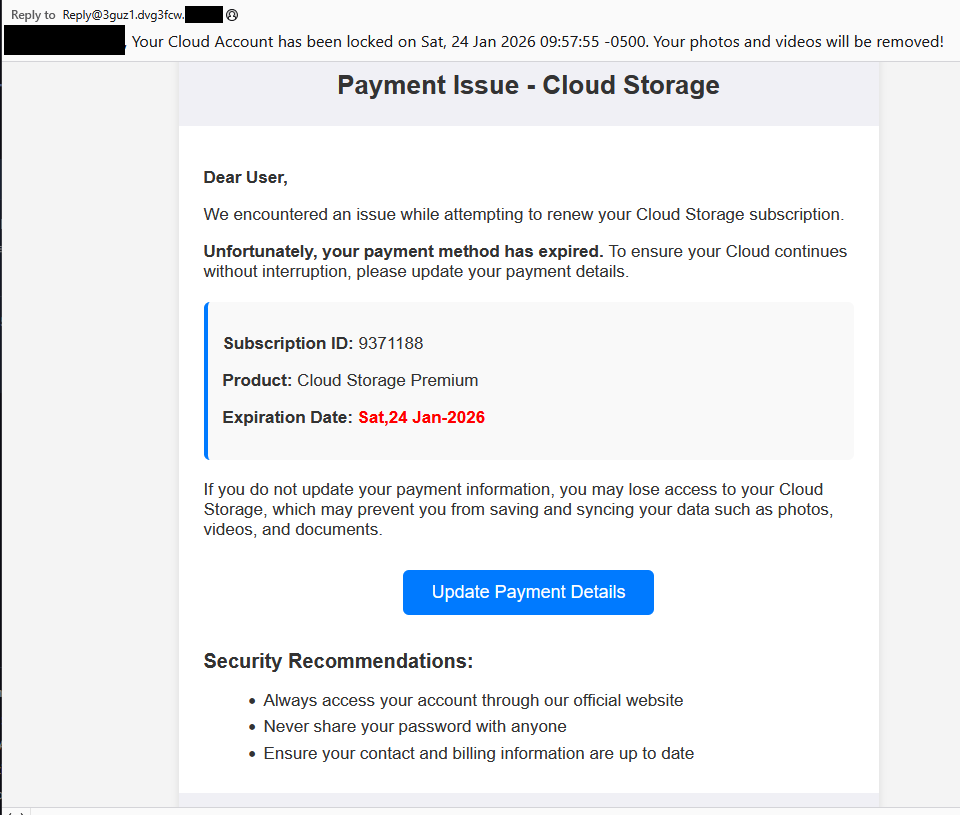


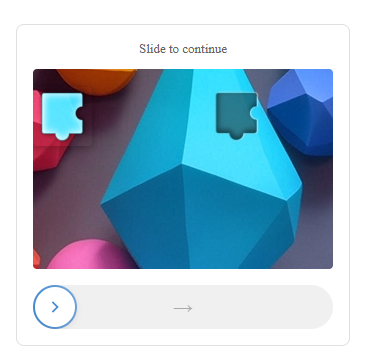
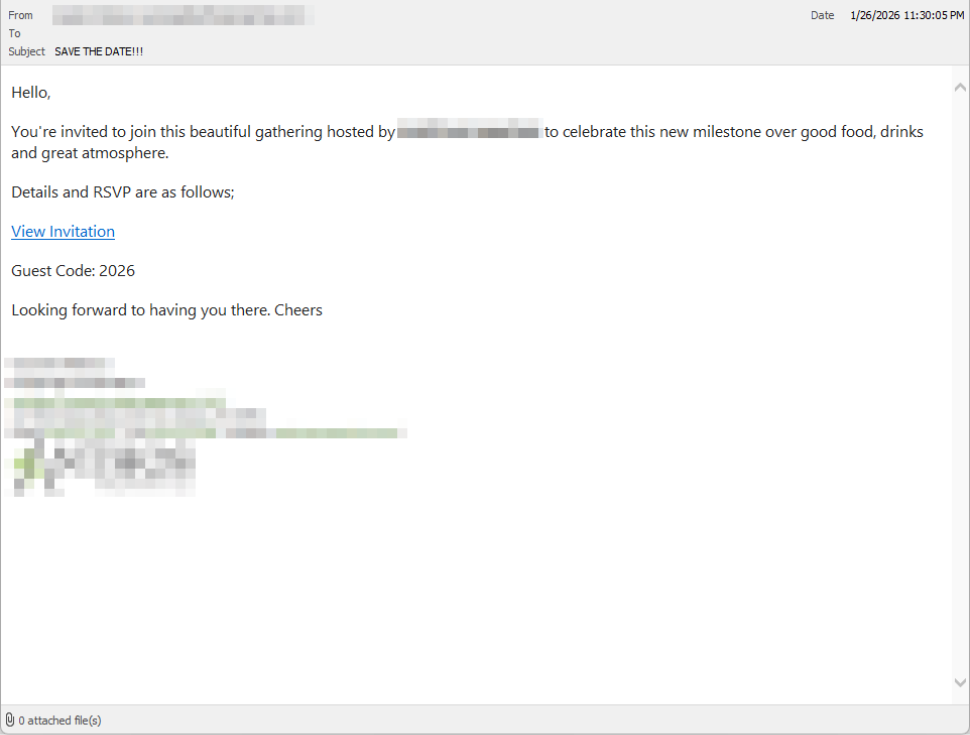
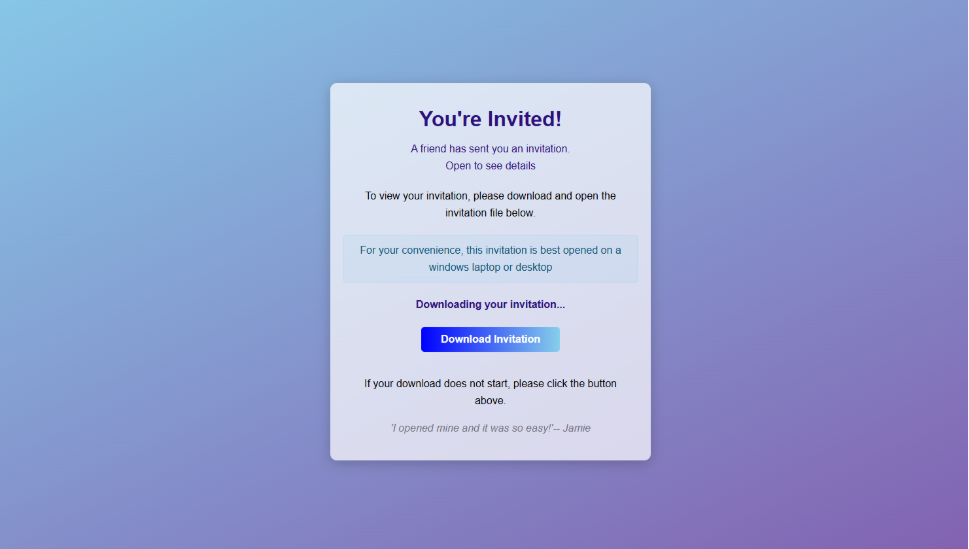
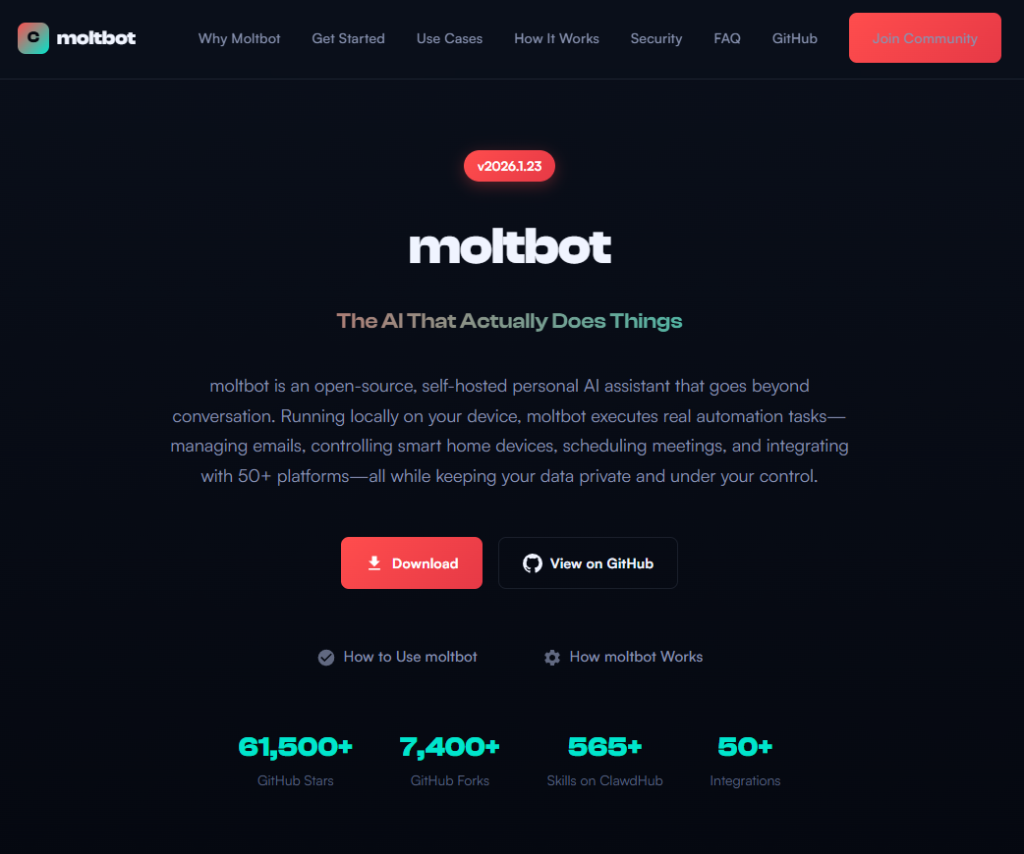
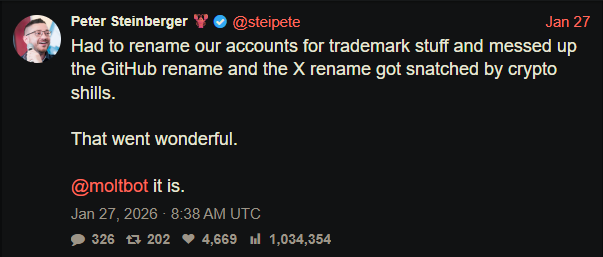
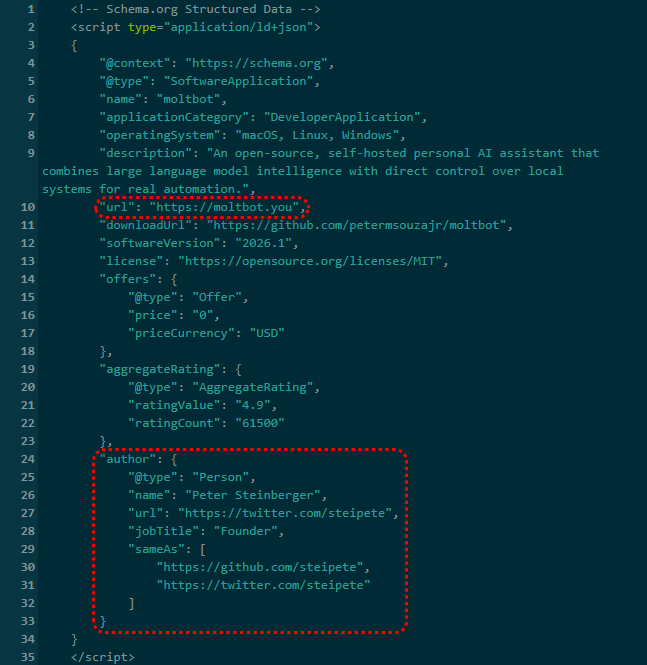
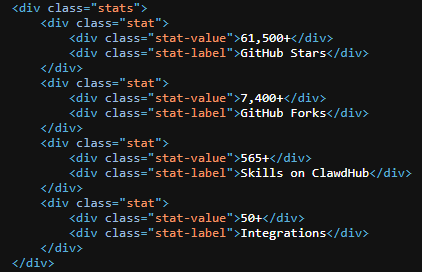
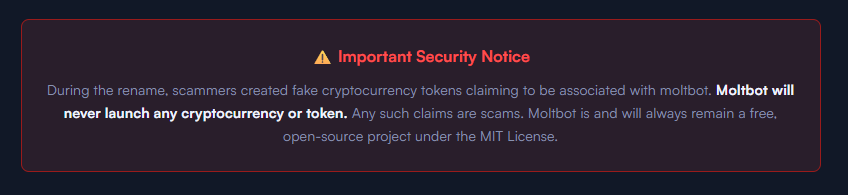
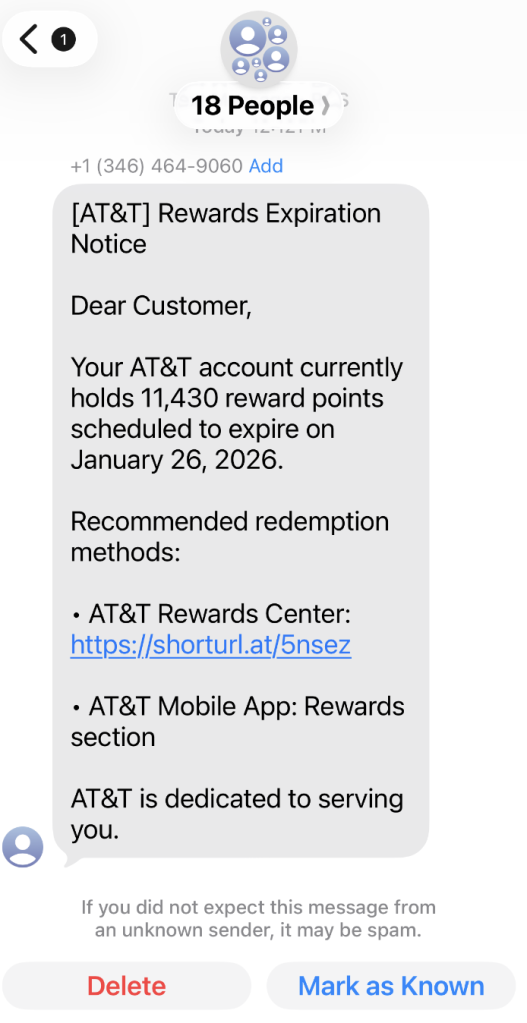
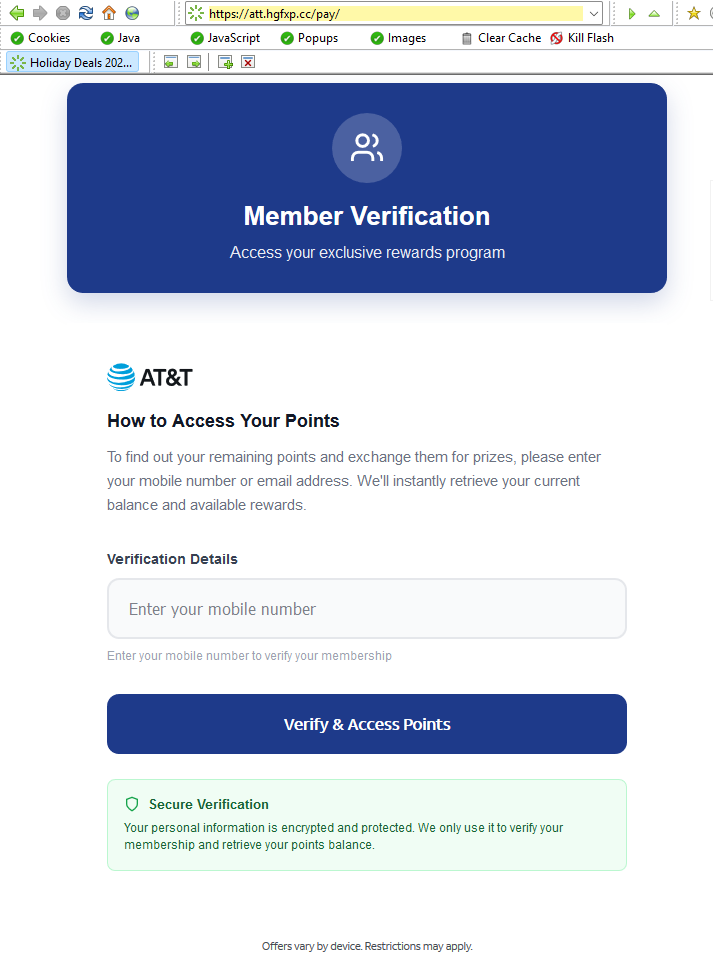
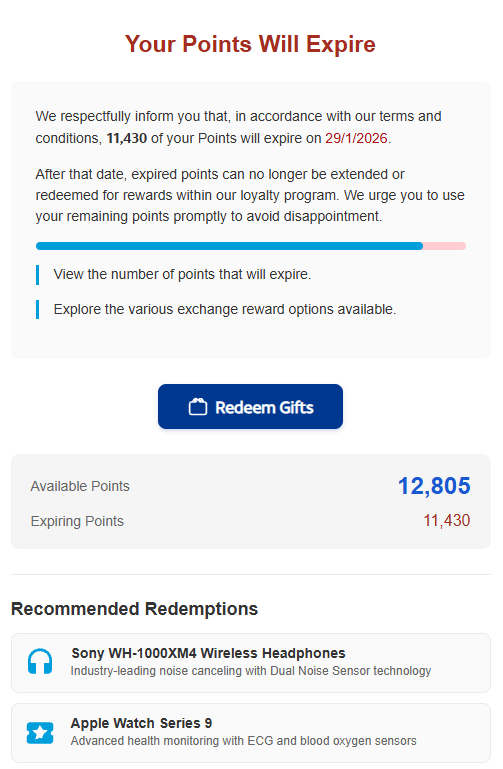


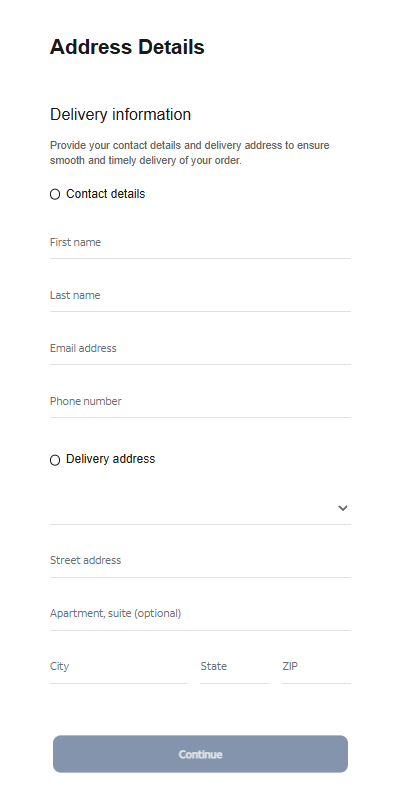
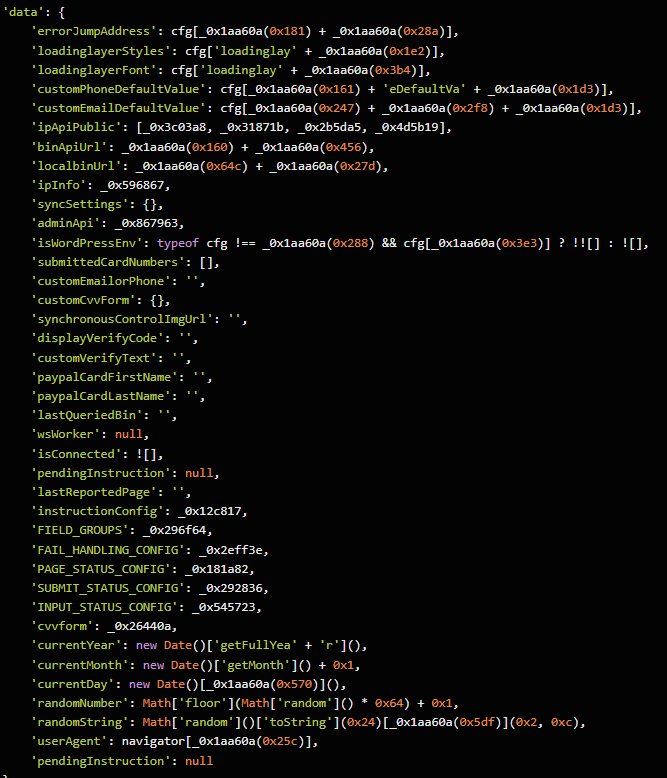
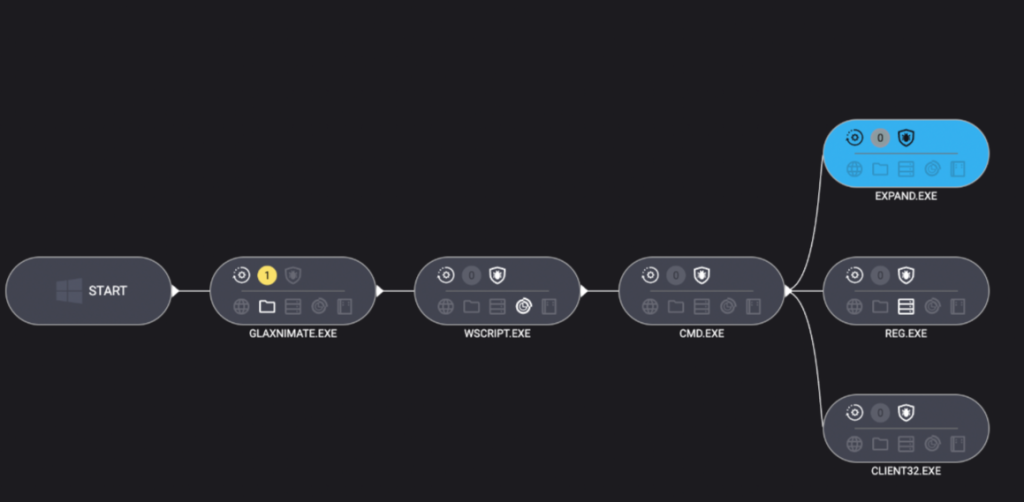
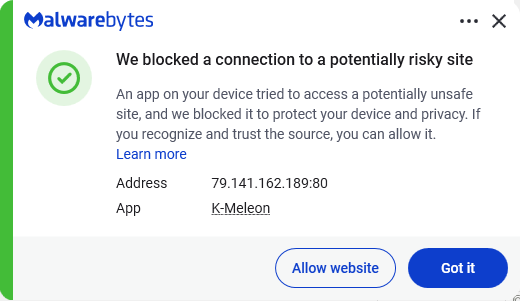
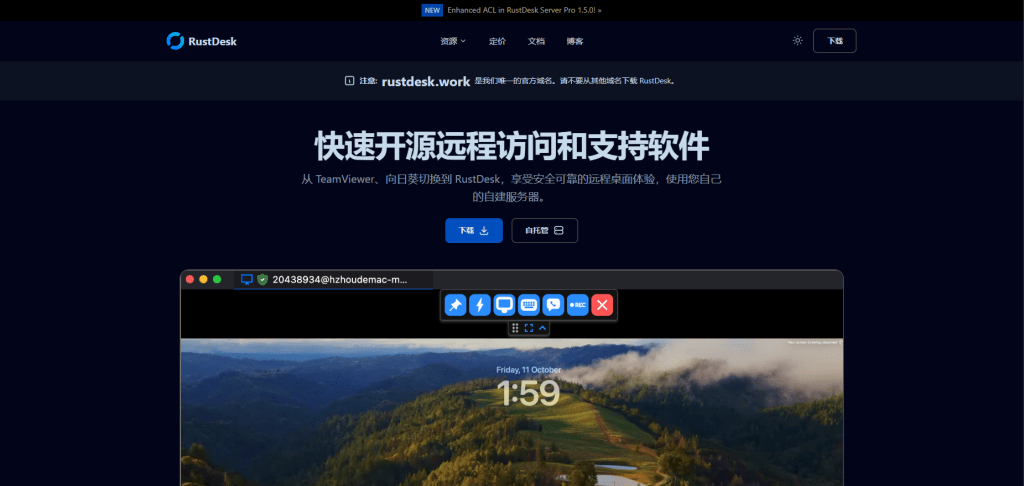
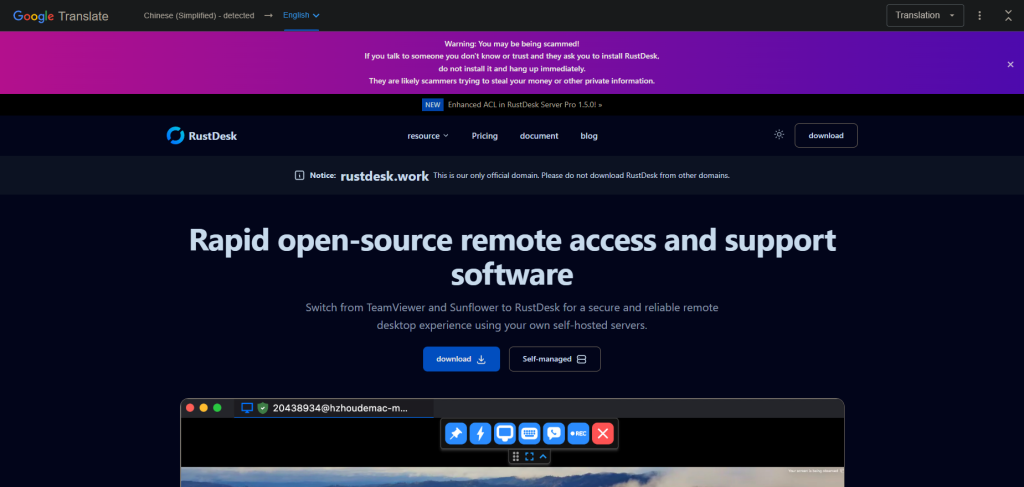
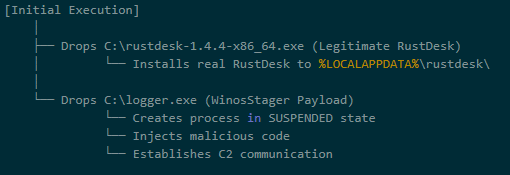
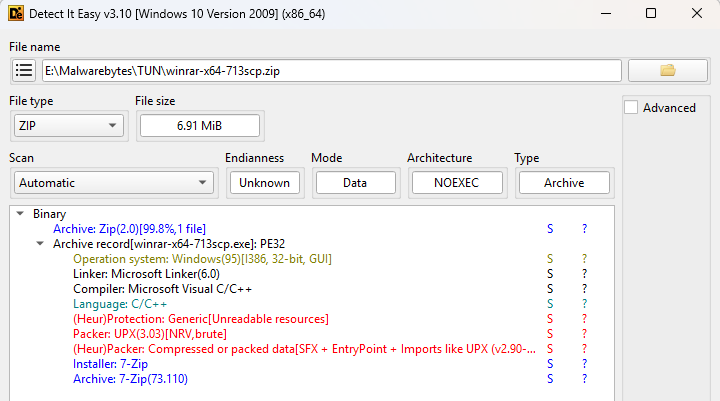

![Malwarebytes blocks winrar-tw[.]com](https://www.malwarebytes.com/wp-content/uploads/sites/2/2026/01/blocked.png)

