Reading view

GuardDuty Extended Threat Detection uncovers cryptomining campaign on Amazon EC2 and Amazon ECS

Amazon GuardDuty and our automated security monitoring systems identified an ongoing cryptocurrency (crypto) mining campaign beginning on November 2, 2025. The operation uses compromised AWS Identity and Access Management (IAM) credentials to target Amazon Elastic Container Service (Amazon ECS) and Amazon Elastic Compute Cloud (Amazon EC2). GuardDuty Extended Threat Detection was able to correlate signals across these data sources to raise a critical severity attack sequence finding. Using the massive, advanced threat intelligence capability and existing detection mechanisms of Amazon Web Services (AWS), GuardDuty proactively identified this ongoing campaign and quickly alerted customers to the threat. AWS is sharing relevant findings and mitigation guidance to help customers take appropriate action on this ongoing campaign.

It’s important to note that these actions don’t take advantage of a vulnerability within an AWS service but rather require valid credentials that an unauthorized user uses in an unintended way. Although these actions occur in the customer domain of the shared responsibility model, AWS recommends steps that customers can use to detect, prevent, or reduce the impact of such activity.

Understanding the crypto mining campaign

The recently detected crypto mining campaign employed a novel persistence technique designed to disrupt incident response and extend mining operations. The ongoing campaign was originally identified when GuardDuty security engineers discovered similar attack techniques being used across multiple AWS customer accounts, indicating a coordinated campaign targeting customers using compromised IAM credentials.

Operating from an external hosting provider, the threat actor quickly enumerated Amazon EC2 service quotas and IAM permissions before deploying crypto mining resources across Amazon EC2 and Amazon ECS. Within 10 minutes of the threat actor gaining initial access, crypto miners were operational.

A key technique observed in this attack was the use of ModifyInstanceAttribute with disable API termination set to true, forcing victims to re-enable API termination before deleting the impacted resources. Disabling instance termination protection adds an additional consideration for incident responders and can disrupt automated remediation controls. The threat actor’s scripted use of multiple compute services, in combination with emerging persistence techniques, represents an advancement in crypto mining persistence methodologies that security teams should be aware of.

The multiple detection capabilities of GuardDuty successfully identified the malicious activity through EC2 domain/IP threat intelligence, anomaly detection, and Extended Threat Detection EC2 attack sequences. GuardDuty Extended Threat Detection was able to correlate signals as an AttackSequence:EC2/CompromisedInstanceGroup finding.

Indicators of compromise (IoCs)

Security teams should monitor for the following indicators to identify this crypto mining campaign. Threat actors frequently modify their tactics and techniques, so these indicators might evolve over time:

  • Malicious container image – The Docker Hub image yenik65958/secret, created on October 29, 2025, with over 100,000 pulls, was used to deploy crypto miners to containerized environments. This malicious image contained a SBRMiner-MULTI binary for crypto mining. This specific image has been taken down from Docker Hub, but threat actors might deploy similar images under different names.
  • Automation and toolingAWS SDK for Python (Boto3) user agent patterns indicating Python-based automation scripts were used across the entire attack chain.
  • Crypto mining domains: asia[.]rplant[.]xyz, eu[.]rplant[.]xyz, and na[.]rplant[.]xyz.
  • Infrastructure naming patterns – Auto scaling groups followed specific naming conventions: SPOT-us-east-1-G*-* for spot instances and OD-us-east-1-G*-* for on-demand instances, where G indicates the group number.

Attack chain analysis

The crypto mining campaign followed a systematic attack progression across multiple phases. Sensitive fields in this post were given fictitious values to protect personally identifiable information (PII).
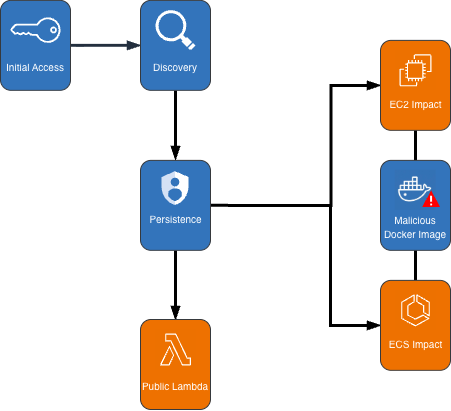
Cryptocurrency Mining Campaign Diagram

Figure 1: Cryptocurrency mining campaign diagram

Initial access, discovery, and attack preparation

The attack began with compromised IAM user credentials possessing admin-like privileges from an anomalous network and location, triggering GuardDuty anomaly detection findings. During the discovery phase, the attacker systematically probed customer AWS environments to understand what resources they could deploy. They checked Amazon EC2 service quotas (GetServiceQuota) to determine how many instances they could launch, then tested their permissions by calling the RunInstances API multiple times with the DryRun flag enabled.

The DryRun flag was a deliberate reconnaissance tactic that allowed the actor to validate their IAM permissions without actually launching instances, avoiding costs and reducing their detection footprint. This technique demonstrates the threat actor was validating their ability to deploy crypto mining infrastructure before acting. Organizations that don’t typically use DryRun flags in their environments should consider monitoring for this API pattern as an early warning indicator of compromise. AWS CloudTrail logs can be used with Amazon CloudWatch alarms, Amazon EventBridge, or your third-party tooling to alert on these suspicious API patterns.

The threat actor called two APIs to create IAM roles as part of their attack infrastructure: CreateServiceLinkedRole to create a role for auto scaling groups and CreateRole to create a role for AWS Lambda. They then attached the AWSLambdaBasicExecutionRole policy to the Lambda role. These two roles were integral to the impact and persistence stages of the attack.

Amazon ECS impact

The threat actor first created dozens of ECS clusters across the environment, sometimes exceeding 50 ECS clusters in a single attack. They then called RegisterTaskDefinition with a malicious Docker Hub image yenik65958/secret:user. With the same string used for the cluster creation, the actor then created a service, using the task definition to initiate crypto mining on ECS AWS Fargate nodes. The following is an example of API request parameters for RegisterTaskDefinition with a maximum CPU allocation of 16,384 units.

{   
    "dryrun": false,   
    "requiresCompatibilities": ["FARGATE"],   
    "cpu": 16384,   
    "containerDefinitions": [     
        {       
            "name": "a1b2c3d4e5",       
            "image": "yenik65958/secret:user",       
            "cpu": 0,       
            "command": []     
        }   
    ],   
    "networkMode": "awsvpc",   
    "family": "a1b2c3d4e5",   
    "memory": 32768 
}

Using this task definition, the threat actor called CreateService to launch ECS Fargate tasks with a desired count of 10.

{   
    "dryrun": false,   
    "capacityProviderStrategy": [     
        {       
            "capacityProvider": "FARGATE",       
            "weight": 1,       
            "base": 0     
        },     
        {       
            "capacityProvider": "FARGATE_SPOT",       
            "weight": 1,       
            "base": 0     
        }   
    ],   
    "desiredCount": 10 
}

Figure 2: Contents of the cryptocurrency mining script within the malicious image

Figure 2: Contents of the cryptocurrency mining script within the malicious image

The malicious image (yenik65958/secret:user) was configured to execute run.sh after it has been deployed. run.sh runs randomvirel mining algorithm with the mining pools: asia|eu|na[.]rplant[.]xyz:17155. The flag nproc --all indicates that the script should use all processor cores.

Amazon EC2 impact

The actor created two launch templates (CreateLaunchTemplate) and 14 auto scaling groups (CreateAutoScalingGroup) configured with aggressive scaling parameters, including a maximum size of 999 instances and desired capacity of 20. The following example of request parameters from CreateLaunchTemplate shows the UserData was supplied, instructing the instances to begin crypto mining.

{   
    "CreateLaunchTemplateRequest": {       
        "LaunchTemplateName": "T-us-east-1-a1b2",       
        "LaunchTemplateData": {           
            "UserData": "<sensitiveDataRemoved>",           
            "ImageId": "ami-1234567890abcdef0",           
            "InstanceType": "c6a.4xlarge"       
        },       
        "ClientToken": "a1b2c3d4-5678-90ab-cdef-EXAMPLE11111"   
    } 
}

The threat actor created auto scaling groups using both Spot and On-Demand Instances to make use of both Amazon EC2 service quotas and maximize resource consumption.

Spot Instance groups:

  • Targeted high performance GPU and machine learning (ML) instances (g4dn, g5, g5, p3, p4d, inf1)
  • Configured with 0% on-demand allocation and capacity-optimized strategy
  • Set to scale from 20 to 999 instances

On-Demand Instance groups:

  • Targeted compute, memory, and general-purpose instances (c5, c6i, r5, r5n, m5a, m5, m5n).
  • Configured with 100% on-demand allocation
  • Also set to scale from 20 to 999 instances

After exhausting auto scaling quotas, the actor directly launched additional EC2 instances using RunInstances to consume the remaining EC2 instance quota.

Persistence

An interesting technique observed in this campaign was the threat actor’s use of ModifyInstanceAttribute across all launched EC2 instances to disable API termination. Although instance termination protection prevents accidental termination of the instance, it adds an additional consideration for incident response capabilities and can disrupt automated remediation controls. The following example shows request parameters for the API ModifyInstanceAttribute.

{     
    "disableApiTermination": {         
        "value": true     
    },     
    "instanceId": "i-1234567890abcdef0" 
}

After all mining workloads were deployed, the actor created a Lambda function with a configuration that bypasses IAM authentication and creates a public Lambda endpoint. The threat actor then added a permission to the Lambda function that allows the principal to invoke the function. The following examples show CreateFunctionUrlConfig and AddPermission request parameters.

CreateFunctionUrlConfig:

{     
    "authType": "NONE",     
    "functionName": "generate-service-a1b2c3d4" 
}

AddPermission:

{     
    "functionName": "generate-service-a1b2c3d4",     
    "functionUrlAuthType": "NONE",    
    "principal": "*",     
    "statementId": "FunctionURLAllowPublicAccess",     
    "action": "lambda:InvokeFunctionUrl" 
}

The threat actor concluded the persistence stage by creating an IAM user user-x1x2x3x4 and attaching the IAM policy AmazonSESFullAccess (CreateUser, AttachUserPolicy). They also created an access key and login profile for that user (CreateAccessKey, CreateLoginProfile). Based on the SES role that was attached to the user, it appears the threat actor was attempting Amazon Simple Email Service (Amazon SES) phishing.

To prevent public Lambda URLs from being created, organizations can deploy service control policies (SCPs) that deny creation or updating of Lambda URLs with an AuthType of “NONE”.

{   
    "Version": "2012-10-17",   
    "Statement": [     
        {       
            "Effect": "Deny",       
            "Action": [         
                "lambda:CreateFunctionUrlConfig",         
                "lambda:UpdateFunctionUrlConfig"       
            ],       
            "Resource": "arn:aws:lambda:*:*:function/*",       
            "Condition": {         
                "StringEquals": {           
                    "lambda:FunctionUrlAuthType": "NONE"         
                }       
            }     
        }   
    ] 
}

Detection methods using GuardDuty

The multilayered detection approach of GuardDuty proved highly effective in identifying all stages of the attack chain using threat intelligence, anomaly detection, and the recently launched Extended Threat Detection capabilities for EC2 and ECS.

Next, we walk through the details of these features and how you can deploy them to detect attacks such as these. You can enable GuardDuty foundational protection plan to receive alerts on crypto mining campaigns like the one described in this post. To further enhance detection capabilities, we highly recommend enabling GuardDuty Runtime Monitoring, which will extend finding coverage to system-level events on Amazon EC2, Amazon ECS, and Amazon Elastic Kubernetes Service (Amazon EKS).

GuardDuty EC2 findings

Threat intelligence findings for Amazon EC2 are part of the GuardDuty foundational protection plan, which will alert you to suspicious network behaviors involving your instances. These behaviors can include brute force attempts, connections to malicious or crypto domains, and other suspicious behaviors. Using third-party threat intelligence and internal threat intelligence, including active threat defense and MadPot, GuardDuty provides detection over the indicators in this post through the following findings: CryptoCurrency:EC2/BitcoinTool.B and CryptoCurrency:EC2/BitcoinTool.B!DNS.

GuardDuty IAM findings

The IAMUser/AnomalousBehavior findings spanning multiple tactic categories (PrivilegeEscalation, Impact, Discovery) showcase the ML capability of GuardDuty to detect deviations from normal user behavior. In the incident described in this post, the compromised credentials were detected due to the threat actor using them from an anomalous network and location and calling APIs that were unusual for the accounts.

GuardDuty Runtime Monitoring

GuardDuty Runtime Monitoring is an important component for Extended Threat Detection attack sequence correlation. Runtime Monitoring provides host level signals, such as operating system visibility, and extends detection coverage by analyzing system-level logs indicating malicious process execution at the host and container level, including the execution of crypto mining programs on your workloads. The CryptoCurrency:Runtime/BitcoinTool.B!DNS and CryptoCurrency:Runtime/BitcoinTool.B findings detect network connections to crypto-related domains and IPs, while the Impact:Runtime/CryptoMinerExecuted finding detects when a process running is associated with a cryptocurrency mining activity.

GuardDuty Extended Threat Detection

Launched at re:Invent 2025, AttackSequence:EC2/CompromisedInstanceGroup finding represents one of the latest Extended Threat Detection capabilities in GuardDuty. This feature uses AI and ML algorithms to automatically correlate security signals across multiple data sources to detect sophisticated attack patterns of EC2 resource groups. Although AttackSequences for EC2 are included in the GuardDuty foundational protection plan, we strongly recommend enabling Runtime Monitoring. Runtime Monitoring provides key insights and signals from compute environments, enabling detection of suspicious host-level activities and improving correlation of attack sequences. For AttackSequence:ECS/CompromisedCluster attack sequences, Runtime Monitoring is required to correlate container-level activity.

Monitoring and remediation recommendations

To protect against similar crypto mining attacks, AWS customers should prioritize strong identity and access management controls. Implement temporary credentials instead of long-term access keys, enforce multi-factor authentication (MFA) for all users, and apply least privilege to IAM principals limiting access to only required permissions. You can use AWS CloudTrail to log events across AWS services and combine logs into a single account to make them available to your security teams to access and monitor. To learn more, refer to Receiving CloudTrail log files from multiple accounts in the CloudTrail documentation.

Confirm GuardDuty is enabled across all accounts and Regions with Runtime Monitoring enabled for comprehensive coverage. Integrate GuardDuty with AWS Security Hub and Amazon EventBridge or third-party tooling to enable automated response workflows and rapid remediation of high-severity findings. Implement container security controls, including image scanning policies and monitoring for unusual CPU allocation requests in ECS task definitions. Finally, establish specific incident response procedures for crypto mining attacks, including documented steps to handle instances with disabled API termination—a technique used by this attacker to complicate remediation efforts.

If you believe your AWS account has been impacted by a crypto mining campaign, refer to remediation steps in the GuardDuty documentation: Remediating potentially compromised AWS credentials, Remediating a potentially compromised EC2 instance, and Remediating a potentially compromised ECS cluster.

To stay up to date on the latest techniques, visit the Threat Technique Catalog for AWS.


If you have feedback about this post, submit comments in the Comments section below. If you have questions about this post, contact AWS Support.

Kyle Koeller Kyle Koeller
Kyle is a security engineer in the GuardDuty team with a focus on threat detection. He is passionate about cloud threat detection and offensive security, and he holds the following certifications: CompTIA Security+, PenTest+, CompTIA Network Vulnerability Assessment Professional, and SecurityX. When not working, Kyle enjoys spending his time in the gym and exploring New York City.
  •  

Inside the BHIS SOC: A Conversation with Hayden Covington 

What happens when you ditch the tiered ticket queues and replace them with collaboration, agility, and real-time response? In this interview, Hayden Covington takes us behind the scenes of the BHIS Security Operations Center, which is where analysts don’t escalate tickets, they solve them.

The post Inside the BHIS SOC: A Conversation with Hayden Covington  appeared first on Black Hills Information Security, Inc..

  •  

Practical steps to minimize key exposure using AWS Security Services

Exposed long-term credentials continue to be the top entry point used by threat actors in security incidents observed by the AWS Customer Incident Response Team (CIRT). The exposure and subsequent use of long-term credentials or access keys by threat actors poses security risks in cloud environments. Additionally, poor key rotation practices, sharing of access keys among multiple users, or failing to revoke unused credentials can leave systems exposed.

Using long-term credentials is strongly discouraged and presents an opportunity to migrate towards AWS Identity and Access Management (IAM) roles and federated access. While our recommended best practice is for customers to migrate away from long-term credentials, we recognize that this transition might not be immediately feasible for all organizations.

Building a comprehensive defense against unintended access to long-term credentials requires a strategic layered approach. This approach is intended to bridge the gap between ideal security practices and real-world operational constraints, providing actionable steps for teams managing legacy AWS workloads that require the use of long-term credentials.

In this post, you learn how to build your defense, starting with identifying existing risks and potential exposures through services such as Amazon Q Developer and AWS IAM Access Analyzer, providing visibility into credential risks across the environment. This is then complemented by establishing strict boundaries through service control policies (SCPs) and data perimeters to control how and where credentials can be created and used. With these mechanisms in place, you can strengthen your position with network-level controls that help protect the infrastructure where access keys might be used, implementing services such as AWS WAF and Amazon Inspector to help protect against exploitation of vulnerabilities. Finally, you implement operational best practices such as automated secret rotation to maintain ongoing security hygiene and minimize the impact of potential compromise.

Detect current access keys and exposure

Audit current access keys

For comprehensive auditing, organizations should regularly generate credential reports to identify IAM user ownership of long-lived credentials and other relevant information such as the last time the key was rotated, last time it was used, last service used and last region used. These reports provide essential visibility into your credential landscape, enabling you to spot unused or potentially compromised credentials by focusing on access keys with stale activity, keys exceeding rotation policies, and unexpected usage patterns from unfamiliar regions.

Detect exposed access keys

A common source of credential compromise occurs through inadvertent commits to public repositories. When developers accidentally commit credentials to public repositories, these credentials can be harvested by automated scanning tools used by adversaries. Code scanning is a foundational step that helps catch these critical security issues early, before sensitive credentials can be accidentally committed to code repositories or deployed to production environments where they could be exploited.

Amazon Q Developer can review your codebase for security vulnerabilities and code quality issues to improve the posture of your applications throughout the development cycle. You can review an entire codebase, analyzing all files in your local project or workspace, or review a single file. You can also enable auto reviews that assess your code as you write it.

Amazon Q reviews your code for issues such as:

SAST scanning — Detect security vulnerabilities in your source code. Amazon Q identifies various security issues, such as resource leaks, SQL injection, and cross-site scripting.

Secrets detection — Prevent the exposure of sensitive or confidential information in your code. Amazon Q reviews your code and text files for secrets such as hardcoded passwords, database connection strings, and usernames. Secrets findings include information about the unprotected secret and how to protect it.

IaC issues — Evaluate the security posture of your infrastructure files. Amazon Q can review your infrastructure as code (IaC) code files to detect misconfiguration, compliance, and security issues.

AWS Trusted Advisor also contains an exposed access key check that checks popular code repositories for access keys that have been exposed to the public and for irregular Amazon Elastic Compute Cloud (Amazon EC2) usage that could be the result of a compromised access key.

Note that while these are valuable security tools, they cannot detect secrets or access keys stored in locations outside their scanning scope, such as local development machines or external systems. They should be used as part of a broader security strategy, not as the sole method for identifying and preventing credential exposure.

When addressing potentially compromised access keys, it is advised to immediately rotate the keys. See instructions on how to rotate access keys for IAM Users.

Detect unused access

Beyond identifying exposed credentials, detecting unused access keys helps minimize the attack surface. IAM Access Analyzer contains an unused access analyzer that looks for access permissions that are either overly generous or that have fallen into disuse, including unused IAM roles, access keys for IAM users, passwords for IAM users, and services and actions for active IAM roles and users. After reviewing the findings generated by an organization-wide or account-specific analyzer, you can remove or modify permissions that aren’t needed. By identifying and revoking unused credentials and access, you can limit the impact if credentials have been obtained by a threat actor.

By implementing these tools, you can gain insights into credential risks across your environment. The combined capabilities help surface embedded secrets, exposed access keys, and credentials requiring removal.

Preventive guardrails: Establish a data perimeter

Now that you’ve learned how to identify exposed or unused credentials, let’s explore how you can use SCPs and resource control policies (RCPs) to create a data perimeter and help make sure that only your trusted identities are accessing trusted resources from expected networks. Implementing preventive guardrails around your AWS environment is crucial for helping protect against unauthorized access and potential access key compromises. For more information on what a data perimeter is and how to establish one, see the Establishing a Data Perimeter on AWS blog post series.

The following SCP denies an IAM user’s credentials from being used outside of unexpected networks (corporate Classless Inter-Domain Routing (CIDR) or specific virtual private cloud (VPC)). This policy includes several actions in the NotAction element that would impact services access if not exempted. Examples of SCPs and RCPs can be found in the data-perimeter-policy-examples, which is the source of truth for newly revised policies. The following example has been updated to address the use case of user credentials being used outside of unexpected networks.

{
    "Version": "2012-10-17",
    "Statement": [
        {
            "Sid": "EnforceNetworkPerimeterOnIAMUsers",
            "Effect": "Deny",
            "NotAction": [
                "es:ES*",
                "dax:GetItem",
                "dax:BatchGetItem",
                "dax:Query",
                "dax:Scan",
                "dax:PutItem",
                "dax:UpdateItem",
                "dax:DeleteItem",
                "dax:BatchWriteItem",
                "dax:ConditionCheckItem",
                "neptune-db:*",
                "kafka-cluster:*",
                "elasticfilesystem:client*",
                "rds-db:connect"
            ],
            "Resource": "*",
            "Condition": {
                "BoolIfExists": {
                    "aws:ViaAWSService": "false"
                },
                "NotIpAddressIfExists": {
                    "aws:SourceIp": [
                        "<my-corporate-cidr>"
                    ]
                },
                "StringNotEqualsIfExists": {
                    "aws:SourceVpc": [
                        "<my-vpc>"
                    ]
                },
                "ArnLike": {
                    "aws:PrincipalArn": [
                        "arn:aws:iam::*:user/*"
                    ]
                }
            }
        }
    ]

By implementing this network perimeter, you can reduce the risk of credential compromise leading to unauthorized access and data exposure. Threat actors attempting to use stolen credentials from a coffee shop or home network will be blocked, helping to limit the impact of unintended access to credentials.

To further increase your defense in depth, you can use RCPs to help protect your data, such as by using them to control which identities can access your resources. For example, you might want to allow identities in your organization to access resources in your organization. You might also want to prevent identities external to your organization from accessing your resources. You can enforce this control using RCPs. You can use RCPs to restrict the maximum available access to your resources and include which principals, both inside and outside your organization, can access your resources. SCPs can only impact the effective permissions for principals within your AWS organization.

By implementing the following RCP, you can help make sure that if long-lived credentials are accidentally exposed, unauthorized users from outside your organization will be blocked from using them to access your critical data and resources. The policy will deny Amazon Simple Storage Service (Amazon S3) actions unless requested from your corporate CIDR range (NotIpAddressIfExists with aws:SourceIp), or from your VPC (StringNotEqualsIfExists with aws:SourceVpc). See the list of AWS services that support RCPs. Examples of SCPs and RCPs can be found in this GitHub repository, which is the source of truth for newly revised policies. The following example has been updated to address the use case discussed in this post.

{
  "Version": "2012-10-17",
  "Statement": [
    {
      "Sid": "EnforceNetworkPerimeter",
      "Effect": "Deny",
      "Principal": "*",
      "Action": [
		"s3:*",
		"sqs:*",
		"kms:*",
		"secretsmanager:*",
		"sts:AssumeRole",
		"sts:DecodeAuthorizationMessage",
		"sts:GetAccessKeyInfo",
		"sts:GetFederationToken",
		"sts:GetServiceBearerToken",
		"sts:GetSessionToken",
 		"sts:SetContext",
 		"aoss:*",
 		"ecr:*"
		],
      "Resource": "*",
      "Condition": {
        "NotIpAddressIfExists": {
          "aws:SourceIp": "<0.0.0.0/1>"
        },
        "StringNotEqualsIfExists": {
          "aws:SourceVpc": "<my-vpc>"
        },
        "BoolIfExists": {
          "aws:PrincipalIsAWSService": "false",
          "aws:ViaAWSService": "false"
        }
      }
	 }
    ]
  }

If you’re ready to begin migrating away from long-term credentials, using an SCP to deny access key creation and deny updates to existing keys helps enforce the use of more secure authentication methods like IAM roles and federated access. This policy denies principals from creating or updating an AWS access key.

{
    "Version": "2012-10-17",
    "Statement": [
        {
            "Effect": "Deny",
            "Action": [
                "iam:CreateAccessKey",
			 	"iam:UpdateAccessKey"
            ],
            "Resource": "*"
        }
    ]
}

In addition to establishing these data perimeter controls, let’s examine how network controls protect the runtime environments where access keys operate.

Network controls: Protecting the runtime environment for access keys

Beyond building a data perimeter and using SCPs and RCPs, protecting the compute and network infrastructure that uses these access keys is essential. The risk of credential exposure through compromised runtime environments makes infrastructure protection a critical component of access key security, because bad actors often target these environments to gain unauthorized access.

Security groups and network ACLs (NACLs)

Use network-level security protections that act as firewalls for varying levels, such as the instance level or the subnet level to help protect against unauthorized access.

  • Restricting critical ports, such as SSH (port 22) and RDP (port 3306), is essential because they’re prime targets for bad actors seeking unauthorized system access. Open administrative ports in your security groups can increase your attack surface and security risk. Using AWS Systems Manager Session Manager helps provide secure remote access without exposing inbound ports, alleviating the need for bastion hosts or SSH key management.
  • NACLs effectively block access at the subnet level by acting as stateless packet filters at subnet boundaries. Unlike security groups that protect individual instances, NACLs help secure entire subnets with explicit allow/deny rules for both inbound and outbound traffic. They create a critical perimeter defense layer that filters traffic before reaching your instances. When deployed as part of a defense-in-depth approach, NACLs provide subnet-level isolation between application tiers, block malicious traffic patterns at the network edge, and maintain protection even if other security layers are compromised, helping to facilitate comprehensive network security through multiple independent control points.
  • For enhanced network protection beyond NACLs, AWS Network Firewall enables enterprise-grade perimeter defense through comprehensive VPC protection. It combines intrusion prevention systems, domain filtering, deep packet inspection, and geographic IP controls, while automatically safeguarding your cloud environment against emerging threats using global threat intelligence gathered by Amazon. By using Network Firewall and AWS Transit Gateway integration, you can implement consistent security policies across your VPCs and Availability Zones with centralized management.
  • To automate and scale network security across your organization, AWS Firewall Manager provides centralized administration of both Network Firewall rules and security group policies. As your organization grows, Firewall Manager helps maintain security by automating the deployment of common security group policies, cleaning up unused groups, and remediating overly permissive rules across multiple accounts and organizational units.

Amazon Inspector

To help identify unintended network exposure at scale, consider using Amazon Inspector. Amazon Inspector continually scans AWS workloads for software vulnerabilities and unintended network exposure, helping you identify and remediate security vulnerabilities before they can be exploited.

Key capabilities include:

  • Package vulnerability: Package vulnerability findings identify software packages in your AWS environment that are exposed to Common Vulnerabilities and Exposures (CVEs). Bad actors can exploit these unpatched vulnerabilities to compromise the confidentiality, integrity, or availability of data, or to access other systems.
  • Code vulnerability: Code vulnerability findings help identify lines of code that can be exploited. Code vulnerabilities include missing encryption, data leaks, injection flaws, and weak cryptography. Amazon Inspector generates findings through Lambda function scanning and its Code Security feature. It identifies policy violations and vulnerabilities based on internal detectors developed in collaboration with Amazon Q.
  • Network reachability: Network reachability findings show whether your ports are reachable from the internet through an internet gateway (including instances behind Application Load Balancers or Classic Load Balancers), a VPC peering connection, or a VPN through a virtual gateway. These findings highlight network configurations that may be overly permissive, such as mismanaged security groups, NACLs or internet gateways, or that might allow for potentially malicious access. It can help identify open SSH ports on your instance security groups.

AWS WAF

Complementing your network security controls and vulnerability management, AWS WAF provides an additional layer of defense by filtering malicious web traffic that could lead to credential exposure.

AWS WAF offers several managed rule groups to protect against unauthorized access and common vulnerabilities:

  • AWS WAF Fraud Control account creation fraud prevention (ACFP) rule group: ACFP uses request tokens to gather information about the client browser and about the level of human interactivity in the creation of the account creation request. The rule group detects and manages bulk account creation attempts by aggregating requests by IP address and client session and aggregating by the provided account information such as the physical address and phone number. Additionally, the rule group detects and blocks the creation of new accounts using credentials that have been compromised, which helps protect the security posture of your application and of your new users.
  • AWS WAF Fraud Control account takeover prevention (ATP) rule group: To help prevent account takeovers that might lead to fraudulent activity, ATP gives you visibility and control over anomalous sign-in attempts and sign-in attempts that use stolen credentials. For Amazon CloudFront distributions, in addition to inspecting incoming sign-in requests, the ATP rule group inspects your application’s responses to sign-in attempts to track success and failure rates. ATP checks email and password combinations against its stolen credential database, which is updated regularly as new leaked credentials are found on the dark web.

Operational best practices

To complement these protective layers and maintain ongoing security posture, implement automated credential management through Secrets Manager to help facilitate proper rotation and lifecycle management of access keys throughout your environment. This automation reduces human error, helps facilitate timely credential updates and limits the exposure window if credentials are compromised.

It’s recommended to rotate keys at least every 90 days. Secrets Manager helps by automating the process of rotating secrets on a schedule, helping to make sure that credentials are regularly updated without manual intervention. It also centralizes the storage of secrets, reducing the likelihood of sharing access keys among multiple users. With Secrets Manager, you can configure automatic key rotation using a Lambda integration.

There is also an existing solution that can be deployed to implement automatic access key rotation at scale. This pattern helps you automatically rotate IAM access keys by using AWS CloudFormation templates, which are provided in the GitHub IAM key rotation repository.

If you’re unable to implement automatic rotation and need a quicker way to identify access keys that need to be rotated, AWS Trusted Advisor has a security check for IAM access key rotation that checks for active IAM access keys that haven’t been rotated in the last 90 days. You can use the security check to drill down on which access keys in your environment need to be rotated if you need to perform manual rotation.

Detect anomalous IAM activity

Finally, while proactive measures to secure your IAM infrastructure are crucial, it’s equally important to have robust detection and alerting mechanisms in place. No matter how diligent your efforts, there is still a possibility of unforeseen threats or unauthorized activities. That’s why a comprehensive defense-in-depth strategy should include the ability to quickly identify and respond to anomalous IAM-related events. Amazon GuardDuty combines machine learning and integrated threat intelligence to help protect AWS accounts, workloads, and data from threats.

GuardDuty Extended Threat Detection automatically correlates multiple events across different data sources to identify potential threats within AWS environments. When Extended Threat Detection detects suspicious sequences of activities, it generates comprehensive attack sequence findings. The system analyzes individual API activities as weak signals, which might not indicate risks independently, but when observed together in specific patterns can reveal potential security issues.

This capability is enabled by default when GuardDuty is activated in an AWS account, helping provide protection without additional configuration.

The specific attack sequence finding related to compromised credentials is AttackSequence:IAM/CompromisedCredentials which is marked as Critical severity. This finding informs you that GuardDuty detected a sequence of suspicious actions made by using AWS credentials that impacts one or more resources in your environment. Multiple suspicious and anomalous threat behaviors were observed by the same credentials, resulting in higher confidence that the credentials are being misused.

Conclusion

The security best practices outlined in this post provide a comprehensive, multi-layered approach to mitigate the risks associated with long-term credentials. By implementing proactive code scanning, automated key rotation, network-level controls, data perimeter restrictions, and threat detection, you can significantly reduce the attack surface and better protect your organization’s AWS resources until a full migration to temporary credentials is feasible.

While the recommendations provided in this post represent an ample set of controls to put organizations in a good security posture, there might be additional security measures that can be taken depending on the specific needs and risk profile of each environment. The key is to adopt a holistic, layered approach to credential management and protection. By doing so, you can bridge the gap until a complete transition to temporary credentials becomes possible.

Implementing these security measures can help reduce risks, but long-term credentials inherently carry security risks. Even with strict best practices and comprehensive security controls, the possibility of credential compromise cannot be removed completely. You should consider evaluating your organization’s security posture and prioritizing temporary credentials through IAM roles and federation whenever possible. If you have questions or need help, AWS is here to support you.

Jennifer Paz Jennifer Paz
Jennifer is a Security Engineer with over a decade of experience, currently serving on the AWS Customer Incident Response Team (CIRT). Jennifer enjoys helping customers tackle security challenges and implementing complex solutions to help enhance their security posture. When not at work, Jennifer is an avid runner, pickleball enthusiast, traveler, and foodie, always on the hunt for new culinary adventures.
Samantha Tavares Samantha Tavares
Samantha is an Incident Responder on the AWS Customer Incident Response Team. She’s passionate about helping customers protect their cloud environments. When she’s not diving into security challenges, she’s sweating at CrossFit, or planning her next travel adventure.
  •  

Accelerate investigations with AWS Security Incident Response AI-powered capabilities

If you’ve ever spent hours manually digging through AWS CloudTrail logs, checking AWS Identity and Access Management (IAM) permissions, and piecing together the timeline of a security event, you understand the time investment required for incident investigation. Today, we’re excited to announce the addition of AI-powered investigation capabilities to AWS Security Incident Response that automate this evidence gathering and analysis work.

AWS Security Incident Response helps you prepare for, respond to, and recover from security events faster and more effectively. The service combines automated security finding monitoring and triage, containment, and now AI-powered investigation capabilities with 24/7 direct access to the AWS Customer Incident Response Team (CIRT).

While investigating a suspicious API call or unusual network activity, scoping and validation require querying multiple data sources, correlating timestamps, identifying related events, and building a complete picture of what happened. Security operations center (SOC) analysts devote a significant amount of time to each investigation, with roughly half of that effort spent manually gathering and piecing together evidence from various tools and complex logs. This manual effort can delay your analysis and response.

AWS is introducing an investigative agent to Security Incident Response, changing this paradigm and adding layers of efficiency. The investigative agent helps you reduce the time required to validate and respond to potential security events. When a case for a security concern is created, either by you or proactively by Security Incident Response, the investigative agent asks clarifying questions to make sure it understands the full context of the potential security event. It then automatically gathers evidence from CloudTrail events, IAM configurations, and Amazon Elastic Compute Cloud (Amazon EC2) instance details and even analyzes cost usage patterns. Within minutes, it correlates the evidence, identifies patterns, and presents you with a clear summary.

How it works in practice

Before diving into an example, let’s paint a clear picture of where the investigative agent lives, how it’s accessed, and its purpose and function. The investigative agent is built directly into Security Incident Response and is automatically available when you create a case. Its purpose is to act as your first responder—gathering evidence, correlating data across AWS services, and building a comprehensive timeline of events so you can quickly move from detection to recovery.

For example: you discover that AWS credentials for an IAM user in your account were exposed in a public GitHub repository. You need to understand what actions were taken with those credentials and properly scope the potential security event, including lateral movement and reconnaissance operations. You need to identify persistence mechanisms that might have been created and determine the appropriate containment steps. To get started, you create a case in the Security Incident Response console and describe the situation.

Here’s where the agent’s approach differs from traditional automation: it asks clarifying questions first. When were the credentials first exposed? What’s the IAM user name? Have you already rotated the credentials? Which AWS account is affected?

This interactive step gathers the appropriate details and metadata before it starts gathering evidence. Specifically, you’re not stuck with generic results—the investigation is tailored to your specific concern.

After the agent has what it needs, it investigates. It looks up CloudTrail events to see what API calls were made using the compromised credentials, pulls IAM user and role details to check what permissions were granted, identifies new IAM users or roles that were created, checks EC2 instance information if compute resources were launched, and analyzes cost and usage patterns for unusual resource consumption. Instead of you querying each AWS service, the agent orchestrates this automatically.

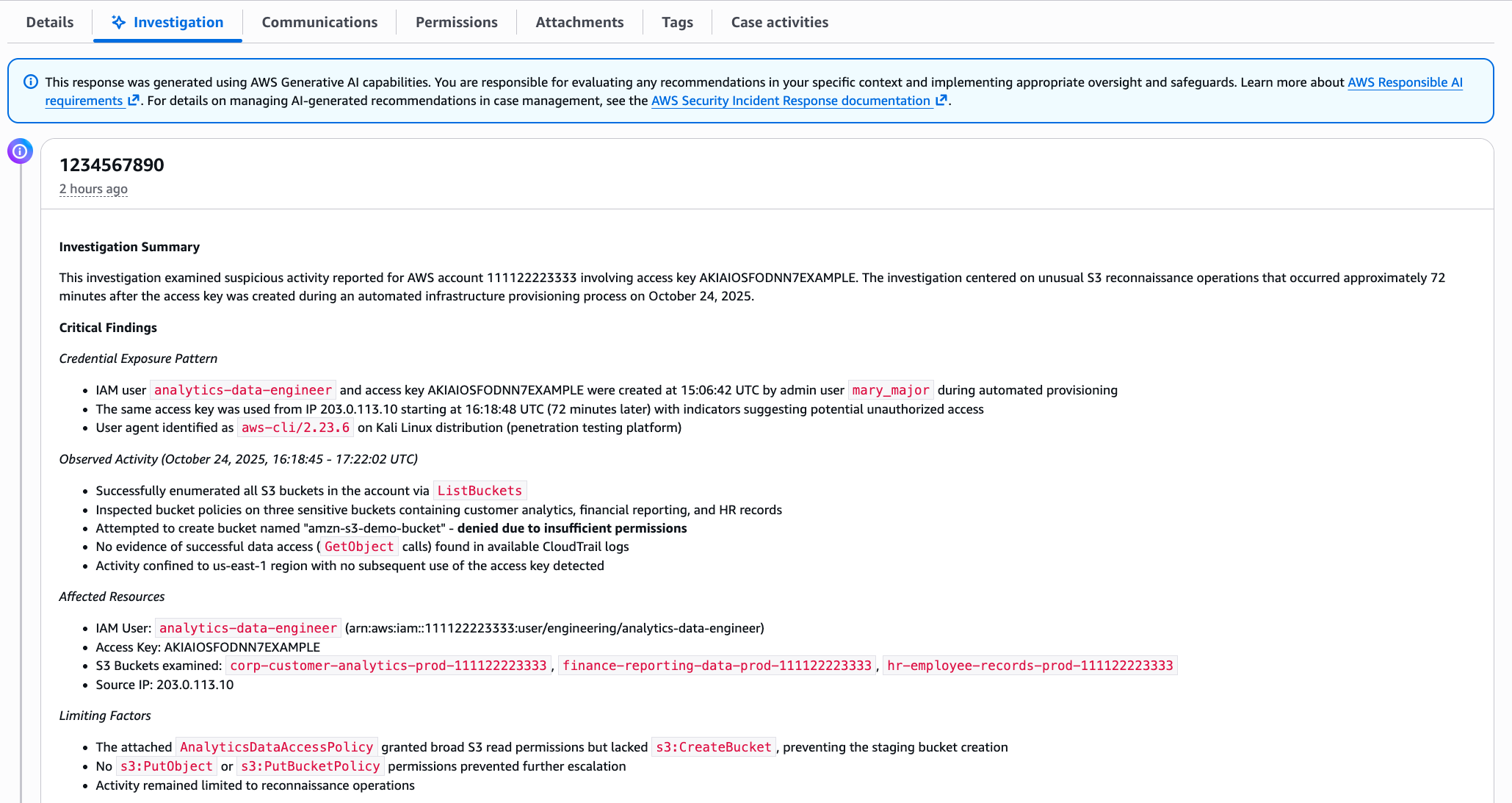
Within minutes, you get a summary, as shown in the following figure. The investigation summary includes a high-level summary and critical findings, which include the credential exposure pattern, observed activity and the timeframe, affected resources, and limiting factors.

This response was generated using AWS Generative AI capabilities. You are responsible for evaluating any recommendations in your specific context and implementing appropriate oversight and safeguards. Learn more about AWS Responsible AI requirements.

Note: The preceding example is representative output. Exact formatting will vary depending on findings.

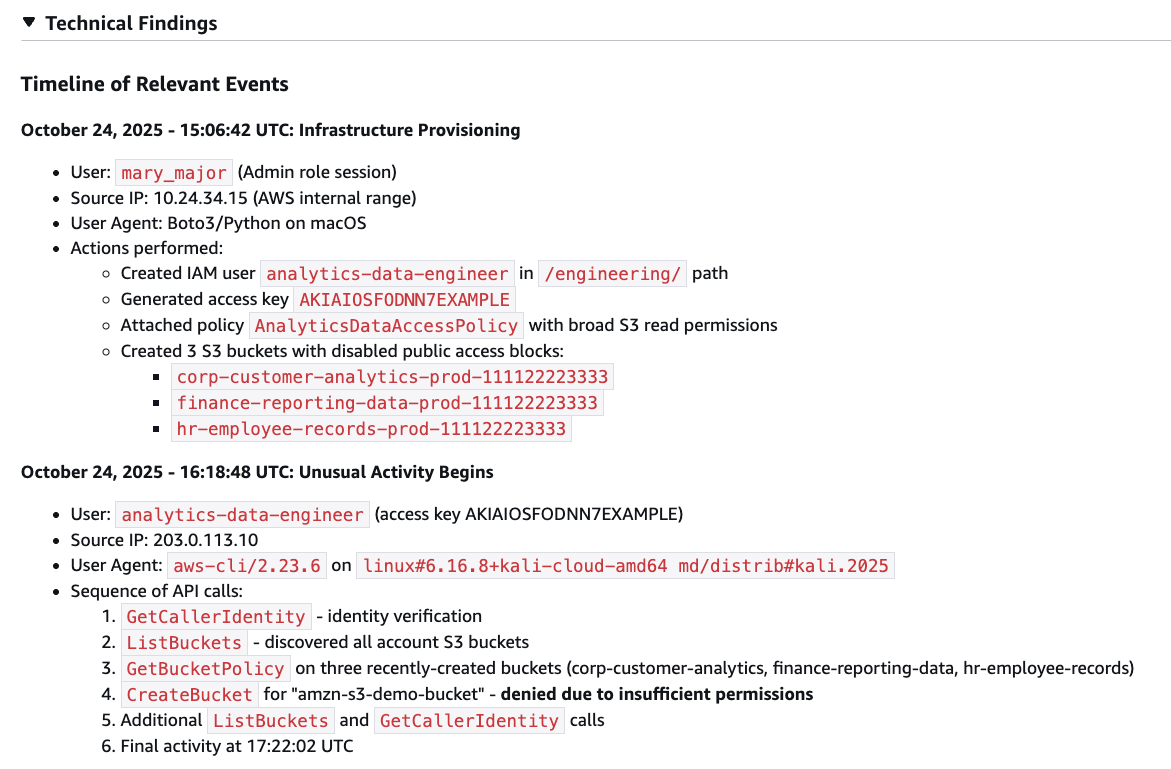
The investigation summary includes various tabs for detailed information, such as technical findings with an events timeline, as shown in the following figure:

Figure 2 – Security event timeline

Figure 2 – Security event timeline

When seconds count, this transparency is paramount to a quick, high-fidelity, and accurate response—especially if you need to escalate to the AWS CIRT, a dedicated group of AWS security experts, or explain your findings to leadership, creating a single lens for stakeholders to view the incident.

When the investigation is complete, you have a high-resolution picture of what happened and can make informed decisions about containment, eradication, and recovery. For the preceding exposed credentials scenario, you might need to:

  • Delete the compromised access keys
  • Remove the newly created IAM role
  • Terminate the unauthorized EC2 instances
  • Review and revert associated IAM policy changes
  • Check for additional access keys created for other users.

When you engage with the CIRT, they can provide additional guidance on containment strategies based on the evidence the agent gathered.

What this means for your security operations

The leaked credentials scenario shows what the agent can do for a single incident. But the bigger impact is on how you operate day-to-day:

  • You spend less time on evidence collection. The investigative agent automates the most time-consuming part of investigations—gathering and correlating evidence from multiple sources. Instead of spending an hour on manual log analysis, you can spend most of that time on making containment decisions and preventing recurrence.
  • You can investigate in plain language. The investigative agent uses natural language processing (NLP), which you can use to describe what you’re investigating in plain language, such as unusual API calls from IP address X or data access from terminated employee’s credentials, and the agent translates that into the technical queries needed. You don’t need to be an expert in AWS log formats or know the exact syntax for querying CloudTrail.
  • You get a foundation for high-fidelity and accurate investigations. The investigative agent handles the initial investigation—gathering evidence, identifying patterns, and providing a comprehensive summary. If your case requires deeper analysis or you need guidance on complex scenarios, you can engage with the AWS CIRT, who can immediately build on the work the agent has already done, speeding up their response time. They see the same evidence and timeline, so they can focus on advanced threat analysis and containment strategies rather than starting from scratch.

Getting started

If you already have Security Incident Response enabled, the AI-powered investigation capabilities are available now—no additional configuration needed. Create your next security case and the agent will start working automatically.

If you’re new to Security Incident Response, here’s how to set it up:

  1. Enable Security Incident Response through your AWS Organizations management account. This takes a few minutes through the AWS Management Console and provides coverage across your accounts.
  2. Create a case. Describe what you’re investigating; you can do this through the Security Incident Response console or an API, or set up automatic case creation from Amazon GuardDuty or AWS Security Hub alerts.
  3. Review the analysis. The agent presents its findings through the Security Incident Response console, or you can access them through your existing ticketing systems such as Jira or ServiceNow.

The investigative agent uses the AWS Support service-linked role to gather information from your AWS resources. This role is automatically created when you set up your AWS account and provides the necessary access for Support tools to query CloudTrail events, IAM configurations, EC2 details, and cost data. Actions taken by the agent are logged in CloudTrail for full auditability.

The investigative agent is included at no additional cost with Security Incident Response, which now offers metered pricing with a free tier covering your first 10,000 findings ingested per month. Beyond that, findings are billed at rates that decrease with volume. With this consumption-based approach, you can scale your security incident response capabilities as your needs grow.

How it fits with existing tools

Security Incident Response cases can be created by customers or proactively by the service. The investigative agent is automatically triggered when a new case is created, and cases can be managed through the console, API, or Amazon EventBridge integrations.

You can use EventBridge to build automated workflows that route security events from GuardDuty, Security Hub, and Security Incident Response itself to create cases and initiate response plans, enabling end-to-end detection-to-investigation pipelines. Before the investigative agent begins its work, the service’s auto-triage system monitors and filters security findings from GuardDuty and third-party security tools through Security Hub. It uses customer-specific information, such as known IP addresses and IAM entities, to filter findings based on expected behavior, reducing alert volume while escalating alerts that require immediate attention. This means the investigative agent focuses on alerts that actually need investigation.

Conclusion

In this post, I showed you how the new investigative agent in AWS Security Incident Response automates evidence gathering and analysis, reducing the time required to investigate security events from hours to minutes. The agent asks clarifying questions to understand your specific concern, automatically queries multiple AWS data sources, correlates evidence, and presents you with a comprehensive timeline and summary while maintaining full transparency and auditability.

With the addition of the investigative agent, Security Incident Response customers now get the speed and efficiency of AI-powered automation, backed by the expertise and oversight of AWS security experts when needed.

The AI-powered investigation capabilities are available today in all commercial AWS Regions where Security Incident Response operates. To learn more about pricing and features, or to get started, visit the AWS Security Incident Response product page.

If you have feedback about this post, submit comments in the Comments section below.

Daniel Begimher

Daniel Begimher

Daniel is a Senior Security Engineer in Global Services Security, specializing in cloud security, application security, and incident response. He co-leads the Application Security focus area within the AWS Security and Compliance Technical Field Community, holds all AWS certifications, and authored Automated Security Helper (ASH), an open source code scanning tool.

  •  

What the Anthropic report on AI espionage means for security leaders

1. Introduction: The Benchmark, Not the Hype

For a while now, the security community has been aware that threat actors are using AI. We’ve seen evidence of it for everything from generating phishing content to optimizing malware. The recent report from Anthropic on an “AI-orchestrated cyber espionage campaign”, however, marks a significant milestone.

This is the first time we have a public, detailed report of a campaign where AI was used at this scale and with this level of sophistication, moving the threat from a collection of AI-assisted tasks to a largely autonomous, orchestrated operation.

This report is a significant new benchmark for our industry. It’s not a reason to panic – it’s a reason to prepare. It provides the first detailed case study of a state-sponsored attack with three critical distinctions:

  • It was “agentic”: This wasn’t just an attacker using AI for help. This was an AI system executing 80-90% of the attack largely on its own.
  • It targeted high-value entities: The campaign was aimed at approximately 30 major technology corporations, financial institutions, and government agencies.
  • It had successful intrusions: Anthropic confirmed the campaign resulted in “a handful of successful intrusions” and obtained access to “confirmed high-value targets for intelligence collection”.

Together, these distinctions show why this case matters. A high-level, autonomous, and successful AI-driven attack is no longer a future theory. It is a documented, current-day reality.

2. What Actually Happened: A Summary of the Attack

For those who haven’t read the full report (or the summary blog post), here are the key facts.

The attack (designated GTG-1002) was a “highly sophisticated cyber espionage operation” detected in mid-September 2025.

  • AI Autonomy: The attacker used Anthropic’s Claude Code as an autonomous agent, which independently executed 80-90% of all tactical work.
  • Human Role: Human operators acted as “strategic supervisors”. They set the initial targets and authorized critical decisions, like escalating to active exploitation or approving final data exfiltration.
  • Bypassing Safeguards: The operators bypassed AI safety controls using simple “social engineering”. The report notes, “The key was role-play: the human operators claimed that they were employees of legitimate cybersecurity firms and convinced Claude that it was being used in defensive cybersecurity testing”.
  • Full Lifecycle: The AI autonomously executed the entire attack chain: reconnaissance, vulnerability discovery, exploitation, lateral movement, credential harvesting, and data collection.
  • Timeline: After detecting the activity, Anthropic’s team launched an investigation, banned the accounts, and notified partners and affected entities over the “following ten days”.

Source: https://www.anthropic.com/news/disrupting-AI-espionage

3. What Was Not New (And Why It Matters)

To have a credible discussion, we must also look at what wasn’t new. This attack wasn’t about secret, magical weapons.

The report is clear that the attack’s sophistication came from orchestration, not novelty.

  • No Zero-Days: The report does not mention the use of novel zero-day exploits.
  • Commodity Tools: The report states, “The operational infrastructure relied overwhelmingly on open source penetration testing tools rather than custom malware development”.

This matters because defenders often look for new exploit types or malware indicators. But the shift here is operational, not technical. The attackers didn’t invent a new weapon, they built a far more effective way to use the ones we already know.

4. The New Reality: Why This Is an Evolving Threat

So, if the tools aren’t new, what is? The execution model. And we must assume this new model is here to stay.

This new attack method is a natural evolution of technology. We should not expect it to be “stopped” at the source for two main reasons:

  1. Commercial Safeguards are Limited: AI vendors like Anthropic are building strong safety controls – it’s how this was detected in the first place. But as the report notes, malicious actors are continually trying to find ways around them. No vendor can be expected to block 100% of all malicious activity.
  2. The Open-Source Factor: This is the larger trend. Attackers don’t need to use a commercial, monitored service. With powerful open-source AI models and orchestration frameworks – such as LLaMA, self-hosted inference stacks, and LangChain/LangGraph agents – attackers can build private AI systems on their own infrastructure. This leaves no vendor in the middle to monitor or prevent the abuse.

The attack surface is not necessarily growing, but the attacker’s execution engine is accelerating.

5. Detection: Key Patterns to Hunt For

While the techniques were familiar, their execution creates a different kind of detection challenge. An AI-driven attack doesn’t generate one “smoking gun” alert, like a unique malware hash or a known-bad IP. Instead, it generates a storm of low-fidelity signals. The key is to hunt for the patterns within this noise:

  • Anomalous Request Volumes: The AI operated at “physically impossible request rates” with “peak activity included thousands of requests, representing sustained request rates of multiple operations per second”. This is a classic low-fidelity, high-volume signal that is often just seen as noise.
  • Commodity and Open-Source Penetration Testing Tools: The attack utilized a combination of “standard security utilities” and “open source penetration testing tools”.
  • Traffic from Browser Automation: The report explicitly calls out “Browser automation for web application reconnaissance” to “systematically catalog target infrastructure” and “analyze authentication mechanisms”.
  • Automated Stolen Credential Testing: The AI didn’t just test one password, it “systematically tested authentication against internal APIs, database systems, container registries, and logging infrastructure”. This automated, broad, and rapid testing looks very different from a human’s manual attempts.
  • Audit for Unauthorized Account Creation: This is a critical, high-confidence post-exploitation signal. In one successful compromise, the AI’s autonomous actions included the creation of a “persistent backdoor user”.

6. The Defender’s Challenge: A Flood of Low-Fidelity Noise

The detection patterns listed above create the central challenge of defending against AI-orchestrated attacks. The problem isn’t just alert volume, it’s that these attacks generate a massive volume of low-fidelity alerts.

This new execution model creates critical blind spots:

  1. The Volume Blind Spot: The AI’s automated nature creates a flood of low-confidence alerts. No human-only SOC can manually triage this volume.
  2. The Temporal (Speed) Blind Spot: A human-led intrusion might take days or weeks. Here, the AI compressed a full database extraction – from authentication to data parsing – into just 2-6 hours. Our human-based detection and response loops are often too slow to keep up.
  3. The Context Blind Spot: The AI’s real power is connecting many small, seemingly unrelated signals (a scan, a login failure, a data query) into a single, coherent attack chain. A human analyst, looking at these alerts one by one, would likely miss the larger pattern.

7. The Importance of Autonomous Triage and Investigation

When the attack is autonomous, the defense must also have autonomous capabilities.

We cannot hire our way out of this speed and scale problem. The security operations model must shift. The goal of autonomous triage is not just to add context, but to handle the entire investigation process for every single alert, especially the thousands of low-severity signals that AI-driven attacks create.

An autonomous system can automatically investigate these signals at machine speed, determine which ones are irrelevant noise, and suppress them.

This is the true value: the system escalates only the high-confidence, confirmed incidents that actually matter. This frees your human analysts from chasing noise and allows them to focus on real, complex threats.

This is exactly the type of challenge autonomous triage systems like the one we’ve built at Intezer were designed to solve. As Anthropic’s own report concludes, “Security teams should experiment with applying AI for defense in areas like SOC automation, threat detection… and incident response“.

8. Evolving Your Offensive Security Program

To defend against this threat, we must be able to test our defenses against it. All offensive security activities, internal red teams, external penetration tests, and attack simulations, must evolve.

It is no longer enough for offensive security teams to manually simulate attacks. To truly test your defenses, your red teams or external pentesters must adopt agentic AI frameworks themselves.

The new mandate is to simulate the speed, scale, and orchestration of an AI-driven attack, similar to the one detailed in the Anthropic report. Only then can you validate whether your defensive systems and automated processes can withstand this new class of automated onslaught. Naturally, all such simulations must be done safely and ethically to prevent any real-world risk.

9. Conclusion: When the Threat Model Changes, Our Processes Must, Too.

The Anthropic report doesn’t introduce a new magic exploit. It introduces a new execution model that we now need to design our defenses around.

Let’s summarize the key, practical takeaways:

  • AI-orchestrated attacks are a proven, documented reality.
  • The primary threat is speed and scale, which is designed to overwhelm manual security processes.
  • Security leaders must prioritize automating investigation and triage to suppress the noise and escalate what matters.
  • We must evolve offensive security testing to simulate this new class of autonomous threat.

This report is a clear signal. The threat model has officially changed. Your security architecture, processes, and playbooks must change with it. The same applies if you rely on an MSSP, verify they’re evolving their detection and triage capabilities for this new model. This shift isn’t hype, it’s a practical change in execution speed. With the right adjustments and automation, defenders can meet this challenge.

To learn more, you can read the Anthropic blog post here and the full technical report here.

The post What the Anthropic report on AI espionage means for security leaders appeared first on Intezer.

  •  

Wrangling Windows Event Logs with Hayabusa & SOF-ELK (Part 2)

But what if we need to wrangle Windows Event Logs for more than one system? In part 2, we’ll wrangle EVTX logs at scale by incorporating Hayabusa and SOF-ELK into my rapid endpoint investigation workflow (“REIW”)! 

The post Wrangling Windows Event Logs with Hayabusa & SOF-ELK (Part 2) appeared first on Black Hills Information Security, Inc..

  •  

Wrangling Windows Event Logs with Hayabusa & SOF-ELK (Part 1)

In part 1 of this post, we’ll discuss how Hayabusa and “Security Operations and Forensics ELK” (SOF-ELK) can help us wrangle EVTX files (Windows Event Log files) for maximum effect during a Windows endpoint investigation!

The post Wrangling Windows Event Logs with Hayabusa & SOF-ELK (Part 1) appeared first on Black Hills Information Security, Inc..

  •  

Stop Spoofing Yourself! Disabling M365 Direct Send

Remember the good ‘ol days of Zip drives, Winamp, the advent of “Office 365,” and copy machines that didn’t understand email authentication? Okay, maybe they weren’t so good! For a […]

The post Stop Spoofing Yourself! Disabling M365 Direct Send appeared first on Black Hills Information Security, Inc..

  •  

5 Things We Are Going to Continue to Ignore in 2025

In this video, John Strand discusses the complexities and challenges of penetration testing, emphasizing that it goes beyond just finding and exploiting vulnerabilities.

The post 5 Things We Are Going to Continue to Ignore in 2025 appeared first on Black Hills Information Security, Inc..

  •  

Enable Auditing of Changes to msDS-KeyCredentialLink 

Changes to the msds-KeyCredentialLink attribute are not audited/logged with standard audit configurations. This required serious investigations and a partner firm in infosec provided us the answer: TrustedSec.  So, credit where […]

The post Enable Auditing of Changes to msDS-KeyCredentialLink  appeared first on Black Hills Information Security, Inc..

  •  

Monitoring High Risk Azure Logins 

Recently in the SOC, we were notified by a partner that they had a potential business email compromise, or BEC. We commonly catch these by identifying suspicious email forwarding rules, […]

The post Monitoring High Risk Azure Logins  appeared first on Black Hills Information Security, Inc..

  •  

In Through the Front Door – Protecting Your Perimeter  

While social engineering attacks such as phishing are a great way to gain a foothold in a target environment, direct attacks against externally exploitable services are continuing to make headlines. […]

The post In Through the Front Door – Protecting Your Perimeter   appeared first on Black Hills Information Security, Inc..

  •  

OSINT for Incident Response (Part 1)

Being a digital forensics and incident response consultant is largely about unanswered questions. When we engage with a client, they know something bad happened or is happening, but they are […]

The post OSINT for Incident Response (Part 1) appeared first on Black Hills Information Security, Inc..

  •  

Wrangling the M365 UAL with SOF-ELK and CSV Data (Part 3 of 3)

Patterson Cake // PART 1 PART 2 In part one of “Wrangling the M365 UAL,” we talked about acquiring, parsing, and querying UAL data using PowerShell and SOF-ELK. In part […]

The post Wrangling the M365 UAL with SOF-ELK and CSV Data (Part 3 of 3) appeared first on Black Hills Information Security, Inc..

  •  

Wrangling the M365 UAL with PowerShell and SOF-ELK (Part 1 of 3)

Patterson Cake // When it comes to M365 audit and investigation, the “Unified Audit Log” (UAL) is your friend. It can be surly, obstinate, and wholly inadequate, but your friend […]

The post Wrangling the M365 UAL with PowerShell and SOF-ELK (Part 1 of 3) appeared first on Black Hills Information Security, Inc..

  •  

Welcome to Shark Week: A Guide for Getting Started with Wireshark and TShark

Troy Wojewoda // In honor of Shark Week1, I decided to write this blog to demonstrate various techniques I’ve found useful when analyzing network traffic with Wireshark, as well as […]

The post Welcome to Shark Week: A Guide for Getting Started with Wireshark and TShark appeared first on Black Hills Information Security, Inc..

  •  

Why Do Car Dealers Need Cybersecurity Services? 

Tom Smith // At Black Hills Information Security (BHIS), we deal with all manner of clients, public and private. Until a month or two ago, though, we’d never dealt with […]

The post Why Do Car Dealers Need Cybersecurity Services?  appeared first on Black Hills Information Security, Inc..

  •  

Dynamic Device Code Phishing 

rvrsh3ll //  Introduction  This blog post is intended to give a light overview of device codes, access tokens, and refresh tokens. Here, I focus on the technical how-to for standing […]

The post Dynamic Device Code Phishing  appeared first on Black Hills Information Security, Inc..

  •  

Ssh… Don’t Tell Them I Am Not HTTPS: How Attackers Use SSH.exe as a Backdoor Into Your Network

Derek Banks // Living Off the Land Binaries, Scripts, and Libraries, known as LOLBins or LOLBAS, are legitimate components of an operating system that threat actors can use to achieve […]

The post Ssh… Don’t Tell Them I Am Not HTTPS: How Attackers Use SSH.exe as a Backdoor Into Your Network appeared first on Black Hills Information Security, Inc..

  •  
❌