Reading view

Streamline security response at scale with AWS Security Hub automation

A new version of AWS Security Hub, is now generally available, introducing new ways for organizations to manage and respond to security findings. The enhanced Security Hub helps you improve your organization’s security posture and simplify cloud security operations by centralizing security management across your Amazon Web Services (AWS) environment. The new Security Hub transforms how organizations handle security findings through advanced automation capabilities with real-time risk analytics, automated correlation, and enriched context that you can use to prioritize critical issues and reduce response times. Automation also helps ensure consistent response procedures and helps you meet compliance requirements.

AWS Security Hub CSPM (cloud security posture management) is now an integral part of the detection engines for Security Hub. Security Hub provides centralized visibility across multiple AWS security services to give you a unified view of your cloud environment, including risk-based prioritization views, attack path visualization, and trend analytics that help you understand security patterns over time.

This is the third post in our series on the new Security Hub capabilities. In our first post, we discussed how Security Hub unifies findings across AWS services to streamline risk management. In the second post, we shared the steps to conduct a successful Security Hub proof of concept (PoC).

In this post, we explore how you can enhance your security operations using AWS Security Hub automation rules and response automation.

We walk through the setup and configuration of automation rules, share best practices for creating effective response workflows, and provide real-world examples of how these tools can be used to automate remediation, escalate high-severity findings, and support compliance requirements.

Security Hub automation enables automatic response to security findings to help ensure critical findings reach the right teams quickly, so that they can reduce manual effort and response time for common security incidents while maintaining consistent remediation processes.

Note: Automation rules evaluate new and updated findings that Security Hub generates or ingests after you create them, not historical findings. These automation capabilities help ensure critical findings reach the right teams quickly.

Why automation matters in cloud security

Organizations often operate across hundreds of AWS accounts, multiple AWS Regions, and diverse services—each producing findings that must be triaged, investigated, and acted upon. Without automation, security teams face high volumes of alerts, duplication of effort, and the risk of delayed responses to critical issues.

Manual processes can’t keep pace with cloud operations; automation helps solve this by changing your security operations in three ways. Automation filters and prioritizes findings based on your criteria, showing your team only relevant alerts. When issues are detected, automated responses trigger immediately—no manual intervention needed.

If you’re managing multiple AWS accounts, automation applies consistent policies and workflows across your environment through centralized management, shifting your security team from chasing alerts to proactively managing risk before issues escalate.

Designing routing strategies for security findings

With Security Hub configured, you’re ready to design a routing strategy for your findings and notifications. When designing your routing strategy, ask whether your existing Security Hub configuration meets your security requirements. Consider whether Security Hub automations can help you meet security framework requirements like NIST 800-53 and identify KPIs and metrics to measure whether your routing strategy works.

Security Hub automation rules and automated responses can help you meet the preceding requirements, however it’s important to understand how your compliance teams, incident responders, security operations personnel, and other security stakeholders operate on a day-to-day basis. For example, do teams use the AWS Management Console for AWS Security Hub regularly? Or do you need to send most findings downstream to an IT systems management (ITSM) tool (such as Jira or ServiceNow) or third-party security orchestration, automation, and response (SOAR) platforms for incident tracking, workflow management, and remediation?

Next, create and maintain an inventory of critical applications. This helps you adjust finding severity based on business context and your incident response playbooks.

Consider the scenario where Security Hub identifies a medium-severity vulnerability on an Elastic Compute Cloud instance. In isolation, this might not trigger immediate action. When you add business context—such as strategic objectives or business criticality—you might discover that this instance hosts a critical payment processing application, revealing the true risk. By implementing Security Hub automation rules with enriched context, this finding can be upgraded to critical severity and automatically routed to ServiceNow for immediate tracking. In addition, by using Security Hub automation with Amazon EventBridge, you can trigger an AWS Systems Manager Automation document to isolate the EC2 instance for security forensics work to then be carried out.

Because Security Hub offers OCSF format and schema, you can use the extensive schema elements that OCSF offers you to target findings for automation and help your organization meet security strategy requirements.

Example use cases

Security Hub automation supports many use cases. Talk with your teams to understand which fit your needs and security objectives. The following are some examples of how you can use security hub automation:

Automated finding remediation

Use automated finding remediation to automatically fix security issues as they’re detected.

Supporting patterns:

  • Direct remediation: Trigger AWS Lambda functions to fix misconfigurations
  • Resource tagging: Add tags to non-compliant resources for tracking
  • Configuration correction: Update resource configurations to match security policies
  • Permission adjustment: Modify AWS Identity and Access Management (IAM) policies to remove excessive permissions

Example:

  • IF finding.type = “Software and Configuration Checks/Industry and Regulatory Standards/CIS AWS Foundations Benchmark”
  • AND finding.title CONTAINS “S3 buckets should have server-side encryption enabled”
  • THEN invoke Lambda function “enable-s3-encryption”

Security finding workflow integration

Integrate findings into your workflow by routing them to the appropriate teams and systems.

Supporting patterns:

  • Ticket creation: Generate JIRA or ServiceNow tickets for manual review
  • Team assignment: Route findings to specific teams based on resource ownership
  • Severity-based routing: Direct critical findings to incident response, others to regular queues
  • Compliance tracking: Send compliance-related findings to GRC systems

Example:

  • IF finding.severity = “CRITICAL” AND finding.productName = “Amazon GuardDuty”
  • THEN send to SNS topic “security-incident-response-team”
  • ELSE IF finding.productFields.resourceOwner = “payments-team”
  • THEN send to SNS topic “payments-security-review”

Automated finding enrichment

Use finding enrichment to add context to findings to improve triage efficiency.

Supporting patterns:

  • Resource context addition: Add business context, owner information, and data classification
  • Historical analysis: Add information about previous similar findings
  • Risk scoring: Calculate custom risk scores based on asset value and threat context
  • Vulnerability correlation: Link findings to known Common Vulnerabilities and Exposures (CVEs) or threat intelligence

Example:

  • IF finding.type CONTAINS “Vulnerability/CVE”
  • THEN invoke Lambda function “enrich-with-threat-intelligence”

Custom security controls

Use custom security controls to meet organization-specific security requirements.

Supporting patterns:

  • Custom policy enforcement: Check for compliance with internal standards
  • Business-specific rules: Apply rules based on business unit or application type
  • Compensating controls: Implement alternatives when primary controls can’t be applied
  • Temporary exceptions: Handle approved deviations from security standards

Example:

  • IF finding.resourceType = “AWS::EC2::Instance” AND
    • finding.resourceTags.Environment = “Production” AND
    • finding.title CONTAINS “vulnerable software version”
  • THEN invoke Lambda function “enforce-patching-policy”

Compliance reporting and evidence collection

Streamline compliance documentation and evidence gathering.

Supporting patterns:

  • Evidence capture: Store compliance evidence in designated S3 buckets
  • Audit trail creation: Document remediation actions for auditors
  • Compliance dashboarding: Update compliance status metrics
  • Regulatory mapping: Tag findings with relevant compliance frameworks

Example:

  • IF finding.complianceStandards CONTAINS “PCI-DSS”
  • THEN invoke Lambda function “capture-pci-compliance-evidence”
  • AND send to SNS topic “compliance-team-notifications”

Set up Security Hub automation

In this section, you’ll walk through enabling up Security Hub and related services and creating automation rules.

Step 1: Enable Security Hub and integrated services

As the first step, follow the instructions in Enable Security Hub.

Note: Security Hub is powered by Amazon GuardDuty, Amazon Inspector, AWS Security Hub CSPM, and Amazon Macie, and these services also need to be enabled to get value from Security Hub.

Step 2: Create automation rules to update finding details and third-party integration

After Security Hub collects findings you can create automation rules to update and route the findings to the appropriate teams. The steps to create automation rules that update finding details or to a set up a third-party integration—such as Jira or ServiceNow—based on criteria you define can be found in Creating automation rules in Security Hub.

With automation rules, Security Hub evaluates findings against the defined rule and then makes the appropriate finding update or calls the APIs to send findings to Jira or ServiceNow. Security Hub sends a copy of every finding to Amazon EventBridge so that you can also implement your own automated response (if needed) for use cases outside of using Security Hub automation rules.

In addition to sending a copy of every finding to EventBridge, Security Hub classifies and enriches security findings according to business context, then delivers them to the appropriate downstream services (such as ITSM tools) for fast response.

Best practices

AWS Security Hub automation rules offer capabilities for automatically updating findings and integrating with other tools. When implementing automation rules, follow these best practices:

  • Centralized management: Only the Security Hub administrator account can create, edit, delete, and view automation rules. Ensure proper access control and management of this account.
  • Regional deployment: Automation rules can be created in one AWS Region and then applied across configured Regions. When using Region aggregation, you can only create rules in the home Region. If you create an automation rule in an aggregation Region, it will be applied in all included Regions. If you create an automation rule in a non-linked Region, it will be applied only in that Region. For more information, see Creating automation rules in Security Hub.
  • Define specific criteria: Clearly define the criteria that findings must match for the automation rule to apply. This can include finding attributes, severity levels, resource types, or member account IDs.
  • Understand rule order: Rule order matters when multiple rules apply to the same finding or finding field. Security Hub applies rules with a lower numerical value first. If multiple findings have the same RuleOrder, Security Hub applies a rule with an earlier value for the UpdatedAt field first (that is, the rule which was most recently edited applies last). For more information, see Updating the rule order in Security Hub.
  • Provide clear descriptions: Include a detailed rule description to provide context for responders and resource owners, explaining the rule’s purpose and expected actions.
  • Use automation for efficiency: Use automation rules to automatically update finding fields (such as severity and workflow status), suppress low-priority findings, or create tickets in third-party tools such as Jira or ServiceNow for findings matching specific attributes.
  • Consider EventBridge for external actions: While automation rules handle internal Security Hub finding updates, use EventBridge rules to trigger actions outside of Security Hub, such as invoking Lambda functions or sending notifications to Amazon Simple Notification Service (Amazon SNS) topics based on specific findings. Automation rules take effect before EventBridge rules are applied. For more information, see Automation rules in EventBridge.
  • Manage rule limits: This is a maximum limit of 100 automation rules per administrator account. Plan your rule creation strategically to stay within this limit.
  • Regularly review and refine: Periodically review automation rules, especially suppression rules, to ensure they remain relevant and effective, adjusting them as your security posture evolves.

Conclusion

You can use Security Hub automation to triage, route, and respond to findings faster through a unified cloud security solution with centralized management. In this post, you learned how to create automation rules that route findings to ticketing systems integrations and upgrade critical findings for immediate response. Through the intuitive and flexible approach to automation that Security Hub provides, your security teams can make confident, data-driven decisions about Security Hub findings that align with your organization’s overall security strategy.

With Security Hub automation features, you can centrally manage security across hundreds of accounts while your teams focus on critical issues that matter most to your business. By implementing the automation capabilities described in this post, you can streamline response times at scale, reduce manual effort, and improve your overall security posture through consistent, automated workflows.

If you have feedback about this post, submit comments in the Comments section. If you have questions about this post, start a new thread on AWS Security, Identity, and Compliance re:Post or contact AWS Support.

 

Ahmed Adekunle Ahmed Adekunle
Ahmed is a Security Specialist Solutions Architect focused on detection and response services at AWS. Before AWS, his background was in business process management and AWS technology consulting, helping customers use cloud technology to transform their business. Outside of work, Ahmed enjoys playing soccer, supporting less privileged activities, traveling, and eating spicy food, specifically African cuisine.
Alex Wadell Alex Waddell
Alex is a Senior Security Specialist Solutions Architect at AWS based in Scotland. Alex provides security architectural guidance and operational best practices to customers of all sizes, helping them implement AWS security services. When not working, Alex enjoys spending time sampling rum from around the world, walking his dogs in the local forest trails, and traveling.
Kyle Shields Kyle Shields
Kyle is a WW Security Specialist Solutions Architect at AWS focused on threat detection and incident response. With over 10 years in cybersecurity and more than 20 years of Army service, he helps customers build effective incident response capabilities while implementing information and cyber security best practices.
  •  

Best Ransomware Detection Tools

Key Takeaways

  • Effective ransomware detection requires three complementary layers: endpoint and extended detection and response (EDR/XDR) to monitor device-level activity, network detection and response (NDR) to catch lateral movement, and threat intelligence tools to provide context that enables efficient prioritization.
  • The most valuable detection happens before ransomware encryption begins. Tools must identify precursor behaviors like reconnaissance, credential theft, and data staging rather than waiting for known indicators of compromise.
  • Intelligence quality determines detection quality: even sophisticated security tools require real-time threat data about active ransomware campaigns, attacker infrastructure, and current tactics, techniques, and procedures (TTPs) to distinguish genuine threats from noise.
  • Recorded Future strengthens the entire detection stack by providing organization-specific threat intelligence, early detection capabilities (in some cases, identifying victims up to 30 days before public extortion), and vulnerability intelligence focused on what ransomware groups are actively exploiting.

Introduction

The ransomware playbook has fundamentally changed. Instead of casting wide nets with opportunistic phishing campaigns, attackers now focus on big-game hunting: targeting high-value enterprises with data theft and double or triple extortion tactics. Threat actors purchase pre-compromised access from brokers, exploit newly disclosed vulnerabilities within hours, and use automation to compress weeks-long campaigns into days.

The results are stark. Ransomware now appears in 44% of breaches, up from 32% the prior year, according to the 2025 Verizon Data Breach Investigations Report. Traditional signature-based detection tools often can't keep pace because ransomware groups continuously rotate their infrastructure, modify malware variants, and adopt new tactics faster than defenses can update. By the time a signature is written, the threat has already evolved.

This gap has created demand for a different approach: intelligence-driven ransomware detection. Rather than waiting for known indicators of compromise, these tools identify the precursor behaviors that happen before encryption (e.g. reconnaissance, credential theft, lateral movement, privilege escalation, and data staging).

The key is continuous external intelligence that maps what's happening in your environment to active campaigns and specific ransomware families operating in the wild.

The most effective defense combines three layers: endpoint and extended detection and response (EDR/XDR) to catch suspicious behaviors on devices, network detection and response (NDR) with deception technology to spot lateral movement, and threat intelligence tools that provide the real-time context tying it all together. When these tools share a common intelligence foundation, they can reveal malicious intent well before encryption begins.

The Ransomware Detection Tool Landscape: Three Pillars of Defense

Effective ransomware detection generally requires three complementary tool categories, each targeting different stages of an attack.

1. Endpoint and Extended Detection and Response (EDR/XDR) Tools

EDR and XDR platforms form the first line of defense, monitoring individual devices and user activity for signs of compromise.

Core Functionality

EDR and XDR solutions monitor endpoints for suspicious behaviors like privilege escalation, credential dumping, unusual process creation, and bulk file modifications. When they detect threats, these tools automatically isolate devices, roll back changes, and contain threats, cutting response time from hours to seconds.

How Threat Intelligence Enhances EDR/XDR

Threat intelligence connects endpoint activity to active campaigns in the wild. When an EDR tool flags suspicious activity, intelligence context reveals whether it matches known campaigns from groups like LockBit, ALPHV/BlackCat, or BlackBasta. This can dramatically reduce false positives by distinguishing unusual-but-legitimate administrative work from activity aligned with active ransomware operations.

Example Tools

  • CrowdStrike Falcon delivers strong behavioral detection capabilities tied to comprehensive actor profiling. The platform's threat graph continuously correlates endpoint telemetry with global threat intelligence, enabling rapid identification of ransomware precursors.
  • Microsoft Defender XDR integrates telemetry across identity systems, endpoints, email, and cloud applications. This unified visibility helps security teams identify cross-domain attack patterns that indicate ransomware preparation, such as credential theft followed by lateral movement.
  • SentinelOne employs behavioral AI to detect malicious activity and offers automated rollback features that can reverse ransomware encryption and file modifications, effectively restoring systems to their pre-attack state.

2. Network Detection and Response (NDR) Tools

While EDR focuses on individual endpoints, NDR tools monitor the network layer to catch attackers as they move between systems.

Core Functionality

NDR platforms watch internal network traffic to catch attackers moving laterally, scanning for targets, or accessing resources they shouldn't. The more advanced versions include deception technology like honeypots, fake credentials, and decoy systems that look like attractive targets. When attackers interact with these decoys during reconnaissance, security teams get early warnings before any real damage occurs.

How Threat Intelligence Improves NDR and Deception

Threat intelligence helps organizations customize deception environments based on active ransomware groups in their industry. When NDR tools spot anomalies such as unusual file sharing, unexpected queries, or abnormal transfers, intelligence matches these to current attack techniques, distinguishing administrative work from reconnaissance patterns before data staging begins.

Example Tools

  • Vectra AI specializes in detecting lateral movement and privilege misuse by correlating network behaviors with active attacker tradecraft. The platform's AI-driven detection identifies subtle deviations from normal network patterns that indicate ransomware reconnaissance.
  • ExtraHop Reveal(x) provides real-time network visibility that identifies reconnaissance activity and command-and-control (C2) communications. The platform's deep packet inspection capabilities reveal malicious traffic even when encrypted or obfuscated.
  • Illusive (now part of Zscaler) deploys deception technology specifically tuned to adversary behaviors. The platform's decoys and fake credentials create a minefield for attackers, triggering high-confidence alerts when threat actors interact with deception assets.

3. Threat Intelligence Tools

The third pillar provides the context that makes endpoint and network detection tools more accurate and actionable.

Core Functionality

Threat intelligence tools pull together global threat data from sources like dark web forums, malware repositories, scanning activity, and criminal infrastructure. They enrich alerts from your other security tools with context about who's behind an attack, which campaign it's part of, and what techniques the attackers are likely to use next.

How Threat Intelligence Strengthens Ransomware Detection

These tools deliver several critical capabilities that transform how security teams identify and respond to ransomware threats:

  • Threat Mapping: Identifies whether your organization matches the targeting profile of active ransomware groups based on your industry, size, region, and technology stack. Specific operators are mapped using their TTPs to determine the intent and opportunity of carrying out a successful attack against your business.
  • Infrastructure Tracking: Monitors ransomware operators' continuous infrastructure shifts in real-time, identifying new C2 servers, drop sites, and payment infrastructure as they emerge.
  • Variant Identification: Rapidly analyzes and disseminates indicators when ransomware groups release new malware variants, enabling detection before signature-based systems receive updates.
  • Exploitation Intelligence: Identifies specific CVEs and misconfigurations that attackers are actively weaponizing, moving vulnerability management from severity-score-driven to threat-driven prioritization.
  • Risk Scoring: Provides real-time scores combining multiple intelligence signals—indicator prevalence, campaign association, TTP alignment—to guide analysts toward genuine threats rather than generic suspicious activity.

Example Tools

  • Recorded Future delivers organization-specific threat intelligence powered by The Intelligence Graph and proprietary AI. The platform provides end-to-end visibility into exposures, while research from its Insikt Group enables early detection of ransomware activity, identifying potential victims up to 30 days before public extortion.
  • Flashpoint specializes in deep and dark web intelligence, monitoring criminal forums, marketplaces, and chat channels where ransomware operators communicate, recruit, and trade access. This visibility into adversary communities provides early warnings about emerging threats and campaigns.
  • Google Threat Intelligence (formerly Mandiant) combines frontline incident response insights with global threat tracking. The platform leverages intelligence from breach investigations to identify ransomware group behaviors and attack patterns as they emerge.

Choosing the Right Ransomware Detection Tools

Security leaders must distinguish between tools that reduce ransomware risk and those that add noise. The most effective tools share several characteristics.

Security leaders should prioritize:

  • Pre-encryption visibility: Detect credential misuse, suspicious access, and lateral movement during reconnaissance and preparation phases when interventions are most effective.
  • Context-rich alerts: Alerts should include TTPs, infrastructure associations, and known actor activity and explain not just what triggered an alert but why it matters.
  • Integration maturity: Smooth data flow into SIEM, SOAR, and existing investigation workflows without creating siloed intelligence or blind spots.
  • Operational efficiency: Tools should reduce alert noise, not add to it, decreasing time-to-detection and time-to-response.
  • Relevance: Intelligence must map to current campaigns. Generic or stale indicators waste analyst time and create false confidence.
  • Scalability: Handle hybrid environments spanning on-premises infrastructure, multiple cloud providers, and remote endpoints without performance degradation.

How Recorded Future Enables Early Ransomware Detection

The quality of threat intelligence directly determines detection effectiveness. Even sophisticated endpoint and network tools require high-fidelity, current threat data to generate value. Security teams have plenty of options for tools; the real challenge is addressing alert fatigue draining analyst time on false positives instead of credible threats.

Recorded Future functions as the continuous intelligence layer strengthening the entire detection stack. Rather than adding another alert-generating tool, it feeds existing security ecosystems with real-time context about ransomware operator behavior.

Real-Time Relevance Through SecOps Intelligence

Every alert that hits your SIEM or endpoint platform gets automatically enriched with real-time risk scores, associated malware and infrastructure, and links to known attacker techniques and campaigns. Security tools can immediately recognize whether an indicator matches an active ransomware operation, cutting triage time from hours to minutes.

Proactive Mitigation Through Vulnerability Intelligence

Recorded Future identifies which vulnerabilities ransomware groups are actually exploiting right now, not just which ones have the highest theoretical severity ratings. This distinction matters because most high-severity vulnerabilities never get exploited in the wild, while some medium-severity vulnerabilities become critical the moment ransomware operators weaponize them.

The platform shows you which vulnerabilities specific ransomware groups are targeting, where exploit code is available, and which vulnerabilities are generating buzz in criminal forums. This lets security teams prioritize patching based on what attackers are actually doing, focusing on the access vectors most likely to result in ransomware incidents.

Victimology and Anticipation

Intelligence about dark web chatter, leak site activity, and victimology patterns reveals which industries, geographies, and technologies are being targeted. When Recorded Future detects increased targeting of specific sectors, SOC analysts can anticipate attack paths, tighten access controls, and implement protective measures before campaigns reach their network.

This closes the gap between reconnaissance and encryption. Most traditional tools don't trigger alerts until ransomware starts encrypting systems, by which point attackers have already stolen data. Intelligence-driven detection can catch the reconnaissance, credential theft, and lateral movement phases that happen first, shifting your response window from reactive damage control to proactive early containment.

Shifting From Reactive Response to Intelligence-Led Prevention

No single tool stops ransomware. The strongest defense is an integrated ecosystem where endpoint detection, network monitoring, and threat analysis platforms work from the same intelligence foundation.

Intelligence elevates these tools from reactive detection to early recognition of adversary behavior during preparation and reconnaissance phases, enabling intervention before ransomware reaches its destructive phase. Organizations that build detection architecture on real-time threat intelligence will adapt as quickly as their adversaries, maintaining effective defenses as the threat landscape evolves.

Frequently Asked Questions

Can behavioral analytics alone stop zero-day ransomware variants?

While powerful, behavioral analytics alone cannot guarantee a stop to a true zero-day ransomware variant. It excels at detecting malicious behavior (like mass file encryption or privilege escalation), even from unknown malware. The most effective defense is a combination of behavioral analytics, up-to-the-minute threat intelligence on emerging TTPs, and controlled execution (sandboxing).

What is the most common weakness of signature-based ransomware detection methods today?

The primary weakness is their reactive nature. Signature-based tools only detect known threats—they require a threat to be analyzed and its signature created before they can flag it. They are easily bypassed by polymorphic ransomware or customized, novel variants that threat actors create to evade detection.

How can Recorded Future's SecOps Intelligence Module help my existing EDR/XDR tool detect ransomware faster?

Recorded Future's SecOps Intelligence Module ingests and correlates massive amounts of external threat data. It directly integrates with your existing EDR/XDR tools, enriching alerts with real-time context (Risk Scores, actor TTPs, associated malware). This helps your existing tools move beyond basic indicators, prioritize critical alerts, and automatically initiate responses before a potential ransomware event escalates.

How does Recorded Future provide victimology data to anticipate ransomware attacks targeting my industry?

Recorded Future's Threat Intelligence Module provides crucial victimology and actor insights. It monitors real-time chatter on the dark web and forums to identify specific ransomware groups, their infrastructure, and the industries or regions they are planning to target next. This allows you to prioritize defenses based on pre-attack relevance.

Is a dedicated deception technology platform considered a primary ransomware detection tool?

Deception technology is not a primary prevention tool, but it is an extremely effective early detection tool. It places fake assets (honeypots, fake credentials) within the network. When an attacker, particularly ransomware moving laterally, interacts with a decoy, it immediately triggers a high-fidelity alert, providing security teams with crucial seconds to isolate the endpoint and stop the attack before encryption begins.

  •  

December 2025 CVE Landscape: 22 Critical Vulnerabilities Mark 120% Surge, React2Shell Dominates Threat Activity

December 2025 witnessed a dramatic 120% increase in high-impact vulnerabilities, with Recorded Future's Insikt Group® identifying 22 vulnerabilities requiring immediate remediation, up from 10 in November. The month was dominated by widespread exploitation of Meta's React Server Components flaw.

What security teams need to know:

  • React2Shell pandemonium: CVE-2025-55182 triggered a global exploitation wave with multiple threat actors deploying diverse malware families
  • China-nexus exploitation intensifies: Earth Lamia, Jackpot Panda, and UAT-9686 leveraged critical flaws for espionage operations
  • Public exploits proliferate: Eleven of 22 vulnerabilities have proof-of-concept code available, accelerating exploitation timelines
  • Legacy vulnerabilities resurface: CISA added 2018-2022 era flaws to its Known Exploited Vulnerabilities (KEV) catalog, highlighting persistent patch gaps

Bottom line: December's surge reflects both new zero-days and renewed interest in legacy vulnerabilities. React2Shell alone demonstrates how quickly modern web frameworks can become global attack vectors.

Quick Reference Table

All 22 vulnerabilities below were actively exploited in December 2025.

#
Vulnerability
Risk
Score
Affected Vendor/Product
Vulnerability Type/Component
Public PoC
1
99
Meta React Server Components
CWE-502 (Deserialization of Untrusted Data)
2
99
Array Networks ArrayOS AG
CWE-78 (OS Command Injection)
No
3
99
Google Android
CWE-306 (Missing Authentication for Critical Function)
No
4
99
Google Android
Insufficient Information
No
5
99
Fortinet Multiple Products
CWE-347 (Improper Verification of Cryptographic Signature)
6
99
Fortinet FortiWeb
CWE-347 (Improper Verification of Cryptographic Signature)
7
99
Microsoft Windows
CWE-416 (Use After Free)
No
8
99
Gogs
CWE-22 (Path Traversal)
9
99
Google Chromium
CWE-787 (Out-of-bounds Write)
10
99
Gladinet CentreStack and Triofox
CWE-798 (Use of Hard-coded Credentials)
11
99
ASUS Live Update
CWE-506 (Embedded Malicious Code)
No
12
99
Cisco Multiple Products
CWE-20 (Improper Input Validation)
13
99
Apple Multiple Products
CWE-416 (Use After Free)
No
14
99
SonicWall SMA1000 appliance
CWE-250 (Execution with Unnecessary Privileges)
No
15
99
WatchGuard Firebox
CWE-787 (Out-of-bounds Write)
No
16
99
MongoDB and MongoDB Server
CWE-130 (Improper Handling of Length Parameter Inconsistency)
17
99
Digiever DS-2105 Pro
CWE-862 (Missing Authorization)
No
18
99
Sierra Wireless AirLink ALEOS
CWE-434 (Unrestricted Upload of File with Dangerous Type)
No
19
99
OSGeo GeoServer
CWE-611 (Improper Restriction of XML External Entity Reference)
20
99
RARLAB WinRAR
CWE-22 (Path Traversal)
21
99
D-Link Routers
CWE-120 (Classic Buffer Overflow)
No
22
99
OpenPLC ScadaBR
CWE-434 (Unrestricted Upload of File with Dangerous Type)

Table 1: List of vulnerabilities that were actively exploited in December based on Recorded Future data (Source: Recorded Future)

Key Trends in December 2025

Affected Vendors

  • Fortinet continued vulnerability concerns with two critical authentication bypass flaws
  • Google faced three vulnerabilities across Android (2) and Chromium (1) platforms
  • Microsoft dealt with a Windows kernel use-after-free vulnerability
  • Meta experienced the month's most impactful vulnerability with React2Shell
  • Additional affected vendors: Array Networks, Gogs, Gladinet, ASUS, Cisco, Apple, SonicWall, WatchGuard, MongoDB, Digiever, Sierra Wireless, OSGeo, RARLAB, D-Link, and OpenPLC

Most Common Weakness Types

  • CWE-22 – Path Traversal
  • CWE-347 – Improper Verification of Cryptographic Signature
  • CWE-416 – Use After Free
  • CWE-434 – Unrestricted Upload of File with Dangerous Type
  • CWE-787 – Out-of-bounds Write

Threat Actor Activity

React2Shell exploitation dominated December’s CVE activity:

  • Threat actors observed to have exploited this vulnerability:
    • China-nexus actors Earth Lamia and Jackpot Panda
    • China-linked clusters UNC6600, UNC6586, UNC6588, UNC6603, and UNC6595
    • North Korea-linked and financially motivated groups
  • Observed payloads included EtherRAT, PeerBlight, CowTunnel, ZinFoq, Kaiji variants, Zndoor, RondoDox, MINOCAT, SNOWLIGHT, COMPOOD, HISONIC, ANGRYREBEL.LINUX, and Weaxor ransomware (using a Cobalt Strike stager)
  • Infrastructure connections to HiddenOrbit relay infrastructure and GobRAT relay component

Additional activity:

  • UAT-9686 exploited Cisco Secure Email Gateway (CVE-2025-20393), deploying AquaShell, AquaPurge, and AquaTunnel
  • Unknown actors leveraged Gogs vulnerability (CVE-2025-8110) for Supershell malware deployment

Priority Alert: Active Exploitation

These vulnerabilities demand immediate attention due to confirmed widespread exploitation.

CVE-2025-55182 | Meta React Server Components (React2Shell)

Risk Score: 99 (Very Critical) | CISA KEV: Added December 5, 2025

Why this matters: Unauthenticated RCE affects React and Next.js, among the world's most popular web frameworks. Multiple threat actors are actively exploiting vulnerable instances with diverse malware payloads.

Affected versions:

  • React packages: react-server-dom-webpack, react-server-dom-parcel, react-server-dom-turbopack (19.0.0, 19.1.0, 19.1.1, and 19.2.0)
  • Next.js: 15.x, 16.x, and Canary builds from 14.3.0-canary.77
  • Also affects: React Router, Waku, RedwoodSDK, Parcel, Vite RSC plugin

Immediate actions:

  • Upgrade React to 19.0.3, 19.1.4, or 19.2.3 immediately
  • Update Next.js to 16.0.7, 15.5.7, 15.4.8, 15.3.6, 15.2.6, 15.1.9, or 15.0.5
  • Monitor for unusual multipart/form-data POST requests consistent with Next.js Server Actions / RSC endpoints
  • Check logs for E{"digest" error patterns indicating exploitation attempts
  • Review server processes for unexpected Node.js child processes

Exposure: ~310,500 Next.js instances on Shodan (US, India, Germany, Japan, Australia)

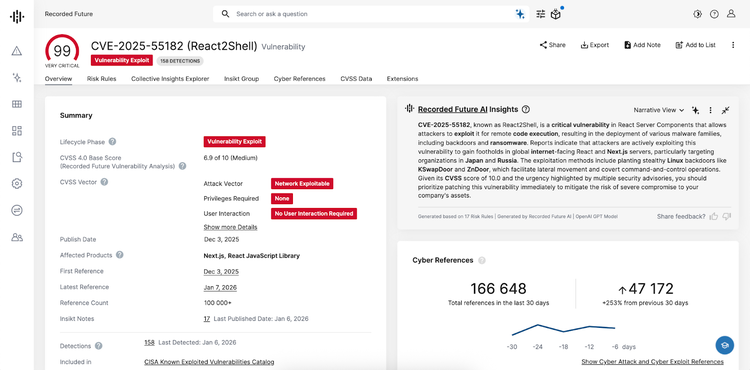
Figure 1: Vulnerability Intelligence Card® for CVE-2025-55182 (React2Shell) in Recorded Future (Source: Recorded Future)

CVE-2025-20393 | Cisco Secure Email Gateway

Risk Score: 99 (Very Critical) | Active exploitation by UAT-9686

Why this matters: Chinese threat actors are actively compromising email security infrastructure to establish persistent access and pivot into internal networks.

Affected products: Cisco Secure Email Gateway and Secure Email and Web Manager running AsyncOS

Immediate actions:

  • Apply Cisco's security updates immediately
  • Monitor Spam Quarantine web interface access logs
  • Check for modifications to /data/web/euq_webui/htdocs/index.py
  • Hunt for AquaShell, AquaPurge, and AquaTunnel indicators
  • Review outbound connections to suspicious IPs

Known C2 infrastructure: 172.233.67.176, 172.237.29.147, 38.54.56.95 (inactive)

  •  
❌