This blog is part of a series highlighting new and concerning trends we noticed over the last year. Trends matter because they almost always provide a good indication of what’s coming next.
If there’s one thing that became very clear in 2025, it’s that malware is no longer focused on Windows alone. We’ve seen some major developments, especially in campaigns targeting Android and macOS. Unfortunately, many people still don’t realize that protecting smartphones, tablets, and other connected devices is just as essential as securing their laptops.
Android
Banking Trojans on Android are not new, but their level of sophistication continues to rise. These threats continue to be a major problem in 2025, often disguising themselves as fake apps to steal credentials or stealthily take over devices. A recent wave of advanced banking Trojans, such as Herodotus, can mimic human typing behaviors to evade detection, highlighting just how refined these attacks have become. Android malware also includes adware that aggressively pushes intrusive ads through free apps, degrading both the user experience and overall security.
Several Trojans were found to use overlays, which are fake login screens appearing on top of real banking and cryptocurrency apps. They can read what’s on the screen, so when someone enters their username and password, the malware steals them.
macOS
One of the most notable developments for Mac users was the expansion of the notorious ClickFix campaign to macOS. Early in 2025, I described how criminals used fake CAPTCHA sites and a clipboard hijacker to provide instructions that led visitors ro infect their own machines with the Lumma infostealer.
ClickFix is the name researchers have since given to this type of campaign, where users are tricked into running malicious commands themselves. On macOS, this technique is being used to distribute both AMOS stealers and the Rhadamanthys infostealer.
Cross-platform
Malware developers increasingly use cross-platform languages such as Rust and Go to create malware that can run on Windows, macOS, Linux, mobile, and even Internet of Things (IoT) devices. This enables flexible targeting and expands the number of potential victims. Malware-as-a-Service (MaaS) models are on the rise, offering these tools for rent or purchase on underground markets, further professionalizing malware development and distribution.
We’ve also seen consistent growth in Remote Access Trojan (RAT) activity, often used as an initial infection method. There’s also been a rise in finance-focused attacks, including cryptocurrency and banking-related targets, alongside widespread stealer malware driving data breaches.
What does this mean for 2026?
Taken together, these trends point to a clear shift. Cybercriminals are increasingly focusing on operating systems beyond Windows, combining advanced techniques and social engineering tailored specifically to mobile and macOS.
We don’t just report on threats—we remove them
Cybersecurity risks should never spread beyond a headline. Keep threats off your devices by downloading Malwarebytes today.
This blog is part of a series highlighting new and concerning trends we noticed over the last year. Trends matter because they almost always provide a good indication of what’s coming next.
If there’s one thing that became very clear in 2025, it’s that malware is no longer focused on Windows alone. We’ve seen some major developments, especially in campaigns targeting Android and macOS. Unfortunately, many people still don’t realize that protecting smartphones, tablets, and other connected devices is just as essential as securing their laptops.
Android
Banking Trojans on Android are not new, but their level of sophistication continues to rise. These threats continue to be a major problem in 2025, often disguising themselves as fake apps to steal credentials or stealthily take over devices. A recent wave of advanced banking Trojans, such as Herodotus, can mimic human typing behaviors to evade detection, highlighting just how refined these attacks have become. Android malware also includes adware that aggressively pushes intrusive ads through free apps, degrading both the user experience and overall security.
Several Trojans were found to use overlays, which are fake login screens appearing on top of real banking and cryptocurrency apps. They can read what’s on the screen, so when someone enters their username and password, the malware steals them.
macOS
One of the most notable developments for Mac users was the expansion of the notorious ClickFix campaign to macOS. Early in 2025, I described how criminals used fake CAPTCHA sites and a clipboard hijacker to provide instructions that led visitors ro infect their own machines with the Lumma infostealer.
ClickFix is the name researchers have since given to this type of campaign, where users are tricked into running malicious commands themselves. On macOS, this technique is being used to distribute both AMOS stealers and the Rhadamanthys infostealer.
Cross-platform
Malware developers increasingly use cross-platform languages such as Rust and Go to create malware that can run on Windows, macOS, Linux, mobile, and even Internet of Things (IoT) devices. This enables flexible targeting and expands the number of potential victims. Malware-as-a-Service (MaaS) models are on the rise, offering these tools for rent or purchase on underground markets, further professionalizing malware development and distribution.
We’ve also seen consistent growth in Remote Access Trojan (RAT) activity, often used as an initial infection method. There’s also been a rise in finance-focused attacks, including cryptocurrency and banking-related targets, alongside widespread stealer malware driving data breaches.
What does this mean for 2026?
Taken together, these trends point to a clear shift. Cybercriminals are increasingly focusing on operating systems beyond Windows, combining advanced techniques and social engineering tailored specifically to mobile and macOS.
We don’t just report on threats—we remove them
Cybersecurity risks should never spread beyond a headline. Keep threats off your devices by downloading Malwarebytes today.
In early 2025, security researchers uncovered a new malware family named Webrat. Initially, the Trojan targeted regular users by disguising itself as cheats for popular games like Rust, Counter-Strike, and Roblox, or as cracked software. In September, the attackers decided to widen their net: alongside gamers and users of pirated software, they are now targeting inexperienced professionals and students in the information security field.
Distribution and the malicious sample
In October, we uncovered a campaign that had been distributing Webrat via GitHub repositories since at least September. To lure in victims, the attackers leveraged vulnerabilities frequently mentioned in security advisories and industry news. Specifically, they disguised their malware as exploits for the following vulnerabilities with high CVSSv3 scores:
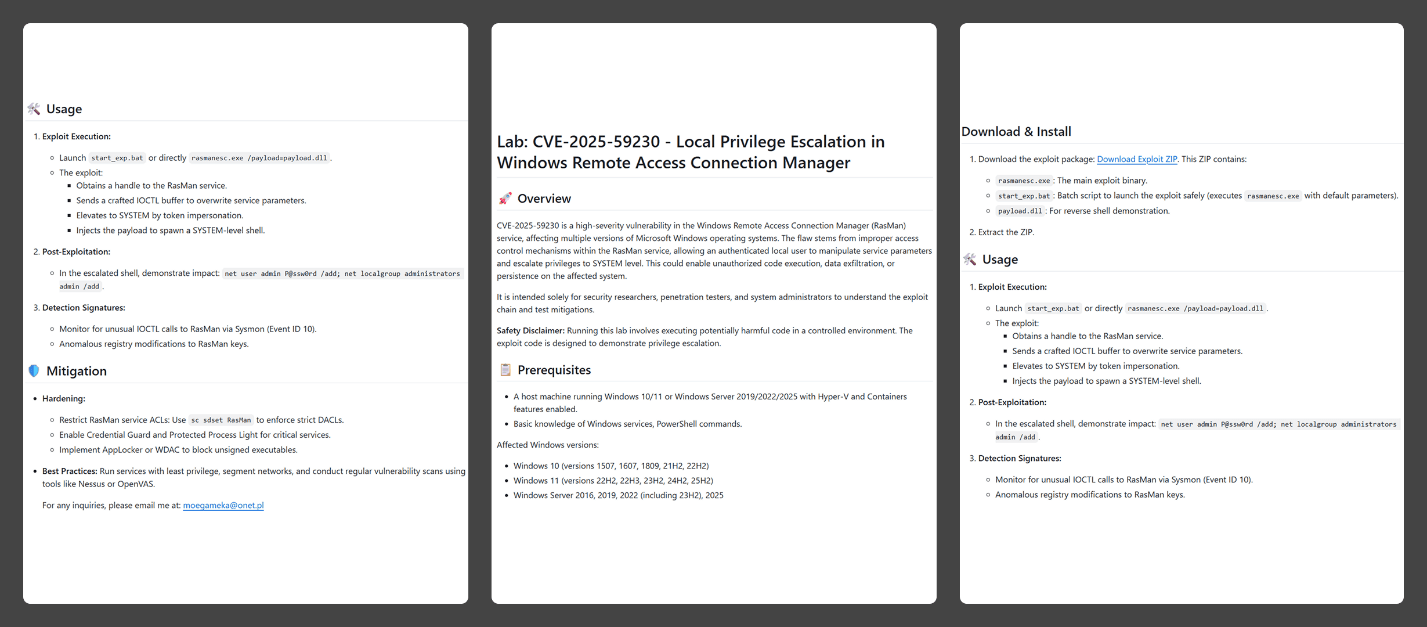
In the Webrat campaign, the attackers bait their traps with both vulnerabilities lacking a working exploit and those which already have one. To build trust, they carefully prepared the repositories, incorporating detailed vulnerability information into the descriptions. The information is presented in the form of structured sections, which include:
Overview with general information about the vulnerability and its potential consequences
Specifications of systems susceptible to the exploit
Guide for downloading and installing the exploit
Guide for using the exploit
Steps to mitigate the risks associated with the vulnerability
Contents of the repository
In all the repositories we investigated, the descriptions share a similar structure, characteristic of AI-generated vulnerability reports, and offer nearly identical risk mitigation advice, with only minor variations in wording. This strongly suggests that the text was machine-generated.
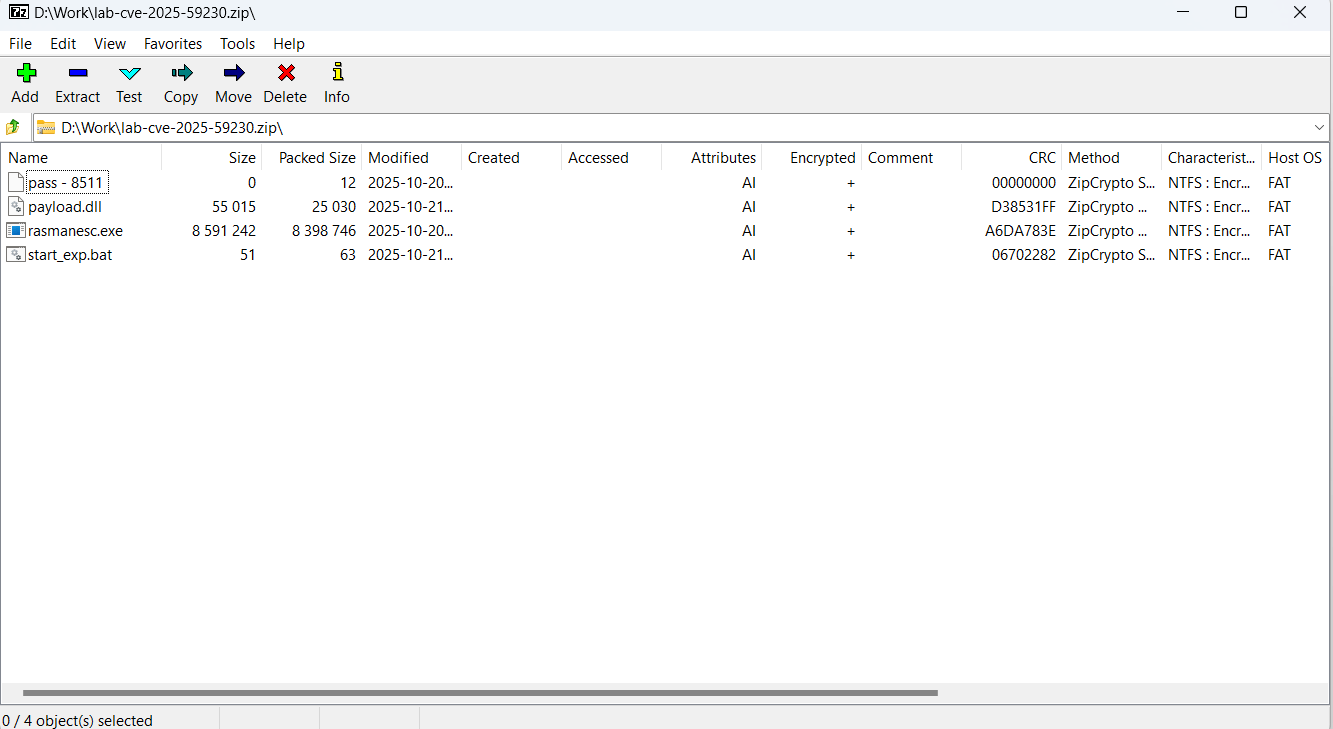
The Download Exploit ZIP link in the Download & Install section leads to a password-protected archive hosted in the same repository. The password is hidden within the name of a file inside the archive.
The archive downloaded from the repository includes four files:
pass – 8511: an empty file, whose name contains the password for the archive.
payload.dll: a decoy, which is a corrupted PE file. It contains no useful information and performs no actions, serving only to divert attention from the primary malicious file.
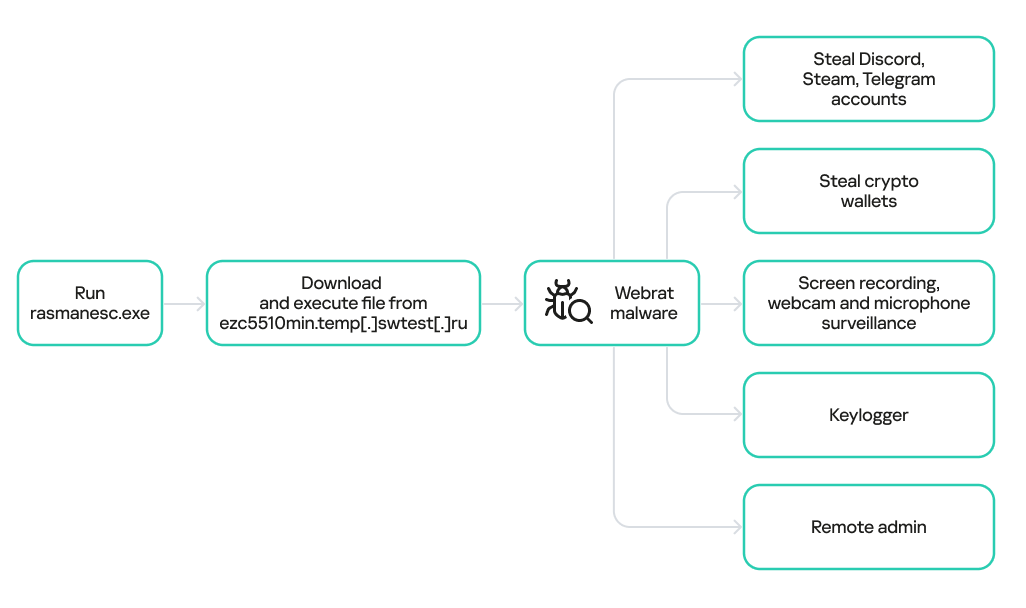
rasmanesc.exe (note: file names may vary): the primary malicious file (MD5 61b1fc6ab327e6d3ff5fd3e82b430315), which performs the following actions:
Escalate its privileges to the administrator level (T1134.002).
Disable Windows Defender (T1562.001) to avoid detection.
Fetch from a hardcoded URL (ezc5510min.temp[.]swtest[.]ru in our example) a sample of the Webrat family and execute it (T1608.001).
start_exp.bat: a file containing a single command: start rasmanesc.exe, which further increases the likelihood of the user executing the primary malicious file.
The execution flow and capabilities of rasmanesc.exe
Webrat is a backdoor that allows the attackers to control the infected system. Furthermore, it can steal data from cryptocurrency wallets, Telegram, Discord and Steam accounts, while also performing spyware functions such as screen recording, surveillance via a webcam and microphone, and keylogging. The version of Webrat discovered in this campaign is no different from those documented previously.
Campaign objectives
Previously, Webrat spread alongside game cheats, software cracks, and patches for legitimate applications. In this campaign, however, the Trojan disguises itself as exploits and PoCs. This suggests that the threat actor is attempting to infect information security specialists and other users interested in this topic. It bears mentioning that any competent security professional analyzes exploits and other malware within a controlled, isolated environment, which has no access to sensitive data, physical webcams, or microphones. Furthermore, an experienced researcher would easily recognize Webrat, as it’s well-documented and the current version is no different from previous ones. Therefore, we believe the bait is aimed at students and inexperienced security professionals.
Conclusion
The threat actor behind Webrat is now disguising the backdoor not only as game cheats and cracked software, but also as exploits and PoCs. This indicates they are targeting researchers who frequently rely on open sources to find and analyze code related to new vulnerabilities.
However, Webrat itself has not changed significantly from past campaigns. These attacks clearly target users who would run the “exploit” directly on their machines — bypassing basic safety protocols. This serves as a reminder that cybersecurity professionals, especially inexperienced researchers and students, must remain vigilant when handling exploits and any potentially malicious files. To prevent potential damage to work and personal devices containing sensitive information, we recommend analyzing these exploits and files within isolated environments like virtual machines or sandboxes.
We also recommend exercising general caution when working with code from open sources, always using reliable security solutions, and never adding software to exclusions without a justified reason.
Kaspersky solutions effectively detect this threat with the following verdicts:
In early 2025, security researchers uncovered a new malware family named Webrat. Initially, the Trojan targeted regular users by disguising itself as cheats for popular games like Rust, Counter-Strike, and Roblox, or as cracked software. In September, the attackers decided to widen their net: alongside gamers and users of pirated software, they are now targeting inexperienced professionals and students in the information security field.
Distribution and the malicious sample
In October, we uncovered a campaign that had been distributing Webrat via GitHub repositories since at least September. To lure in victims, the attackers leveraged vulnerabilities frequently mentioned in security advisories and industry news. Specifically, they disguised their malware as exploits for the following vulnerabilities with high CVSSv3 scores:
In the Webrat campaign, the attackers bait their traps with both vulnerabilities lacking a working exploit and those which already have one. To build trust, they carefully prepared the repositories, incorporating detailed vulnerability information into the descriptions. The information is presented in the form of structured sections, which include:
Overview with general information about the vulnerability and its potential consequences
Specifications of systems susceptible to the exploit
Guide for downloading and installing the exploit
Guide for using the exploit
Steps to mitigate the risks associated with the vulnerability
Contents of the repository
In all the repositories we investigated, the descriptions share a similar structure, characteristic of AI-generated vulnerability reports, and offer nearly identical risk mitigation advice, with only minor variations in wording. This strongly suggests that the text was machine-generated.
The Download Exploit ZIP link in the Download & Install section leads to a password-protected archive hosted in the same repository. The password is hidden within the name of a file inside the archive.
The archive downloaded from the repository includes four files:
pass – 8511: an empty file, whose name contains the password for the archive.
payload.dll: a decoy, which is a corrupted PE file. It contains no useful information and performs no actions, serving only to divert attention from the primary malicious file.
rasmanesc.exe (note: file names may vary): the primary malicious file (MD5 61b1fc6ab327e6d3ff5fd3e82b430315), which performs the following actions:
Escalate its privileges to the administrator level (T1134.002).
Disable Windows Defender (T1562.001) to avoid detection.
Fetch from a hardcoded URL (ezc5510min.temp[.]swtest[.]ru in our example) a sample of the Webrat family and execute it (T1608.001).
start_exp.bat: a file containing a single command: start rasmanesc.exe, which further increases the likelihood of the user executing the primary malicious file.
The execution flow and capabilities of rasmanesc.exe
Webrat is a backdoor that allows the attackers to control the infected system. Furthermore, it can steal data from cryptocurrency wallets, Telegram, Discord and Steam accounts, while also performing spyware functions such as screen recording, surveillance via a webcam and microphone, and keylogging. The version of Webrat discovered in this campaign is no different from those documented previously.
Campaign objectives
Previously, Webrat spread alongside game cheats, software cracks, and patches for legitimate applications. In this campaign, however, the Trojan disguises itself as exploits and PoCs. This suggests that the threat actor is attempting to infect information security specialists and other users interested in this topic. It bears mentioning that any competent security professional analyzes exploits and other malware within a controlled, isolated environment, which has no access to sensitive data, physical webcams, or microphones. Furthermore, an experienced researcher would easily recognize Webrat, as it’s well-documented and the current version is no different from previous ones. Therefore, we believe the bait is aimed at students and inexperienced security professionals.
Conclusion
The threat actor behind Webrat is now disguising the backdoor not only as game cheats and cracked software, but also as exploits and PoCs. This indicates they are targeting researchers who frequently rely on open sources to find and analyze code related to new vulnerabilities.
However, Webrat itself has not changed significantly from past campaigns. These attacks clearly target users who would run the “exploit” directly on their machines — bypassing basic safety protocols. This serves as a reminder that cybersecurity professionals, especially inexperienced researchers and students, must remain vigilant when handling exploits and any potentially malicious files. To prevent potential damage to work and personal devices containing sensitive information, we recommend analyzing these exploits and files within isolated environments like virtual machines or sandboxes.
We also recommend exercising general caution when working with code from open sources, always using reliable security solutions, and never adding software to exclusions without a justified reason.
Kaspersky solutions effectively detect this threat with the following verdicts:
In August 2025, we discovered a campaign targeting individuals in Turkey with a new Android banking Trojan we dubbed “Frogblight”. Initially, the malware was disguised as an app for accessing court case files via an official government webpage. Later, more universal disguises appeared, such as the Chrome browser.
Frogblight can use official government websites as an intermediary step to steal banking credentials. Moreover, it has spyware functionality, such as capabilities to collect SMS messages, a list of installed apps on the device and device filesystem information. It can also send arbitrary SMS messages.
Another interesting characteristic of Frogblight is that we’ve seen it updated with new features throughout September. This may indicate that a feature-rich malware app for Android is being developed, which might be distributed under the MaaS model.
This threat is detected by Kaspersky products as HEUR:Trojan-Banker.AndroidOS.Frogblight.*, HEUR:Trojan-Banker.AndroidOS.Agent.eq, HEUR:Trojan-Banker.AndroidOS.Agent.ep, HEUR:Trojan-Spy.AndroidOS.SmsThief.de.
Technical details
Background
While performing an analysis of mobile malware we receive from various sources, we discovered several samples belonging to a new malware family. Although these samples appeared to be still under development, they already contained a lot of functionality that allowed this family to be classified as a banking Trojan. As new versions of this malware continued to appear, we began monitoring its development. Moreover, we managed to discover its control panel and based on the “fr0g” name shown there, we dubbed this family “Frogblight”.
Initial infection
We believe that smishing is one of the distribution vectors for Frogblight, and that the users had to install the malware themselves. On the internet, we found complaints from Turkish users about phishing SMS messages convincing users that they were involved in a court case and containing links to download malware. versions of Frogblight, including the very first ones, were disguised as an app for accessing court case files via an official government webpage and were named the same as the files for downloading from the links mentioned above.
While looking for online mentions of the names used by the malware, we discovered one of the phishing websites distributing Frogblight, which disguises itself as a website for viewing a court file.
The phishing website distributing Frogblight
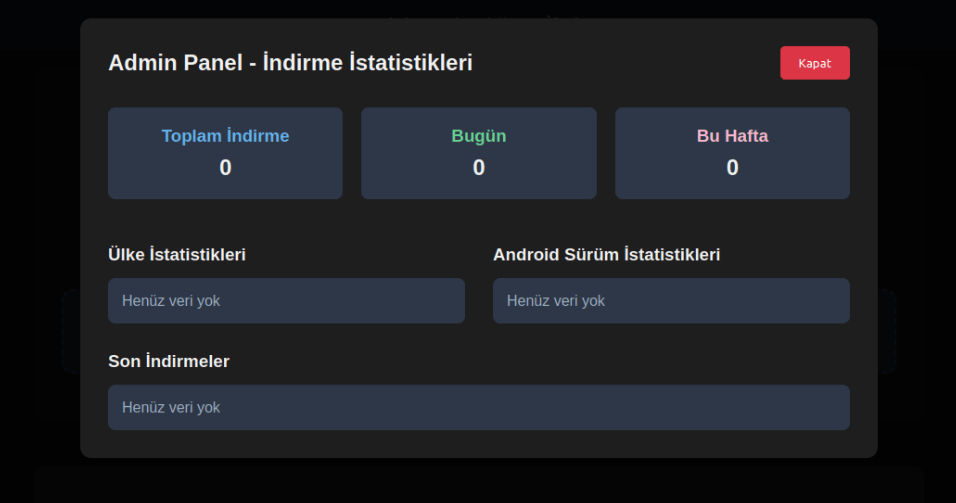
We were able to open the admin panel of this website, where it was possible to view statistics on Frogblight malware downloads. However, the counter had not been fully implemented and the threat actor could only view the statistics for their own downloads.
The admin panel interface of the website from which Frogblight is downloaded
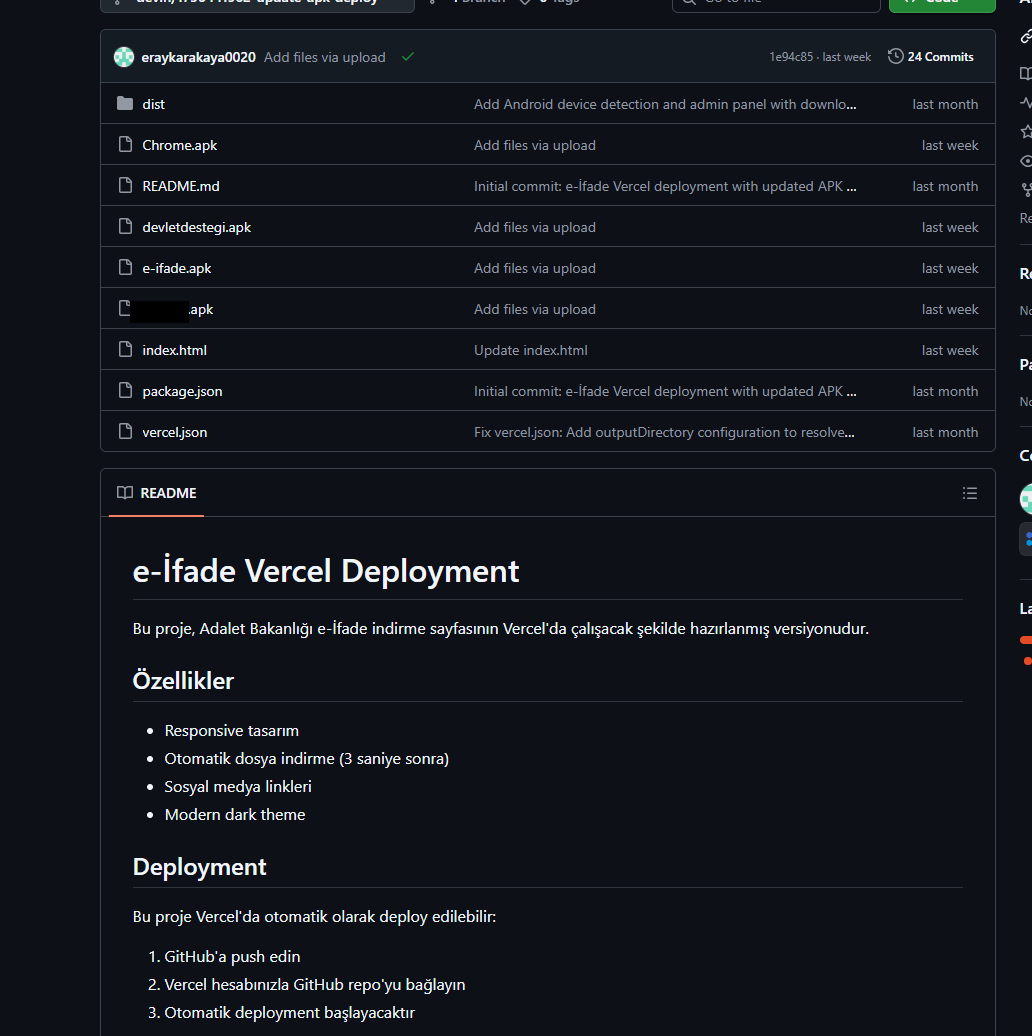
Additionally, we found the source code of this phishing website available in a public GitHub repository. Judging by its description, it is adapted for fast deployment to Vercel, a platform for hosting web apps.
The GitHub repository with the phishing website source code
App features
As already mentioned, Frogblight was initially disguised as an app for accessing court case files via an official government webpage. Let’s look at one of the samples using this disguise (9dac23203c12abd60d03e3d26d372253). For analysis, we selected an early sample, but not the first one discovered, in order to demonstrate more complete Frogblight functionality.
After starting, the app prompts the victim to grant permissions to send and read SMS messages, and to read from and write to the device’s storage, allegedly needed to show a court file related to the user.
The full list of declared permissions in the app manifest file is shown below:
MANAGE_EXTERNAL_STORAGE
READ_EXTERNAL_STORAGE
WRITE_EXTERNAL_STORAGE
READ_SMS
RECEIVE_SMS
SEND_SMS
WRITE_SMS
RECEIVE_BOOT_COMPLETED
INTERNET
QUERY_ALL_PACKAGES
BIND_ACCESSIBILITY_SERVICE
DISABLE_KEYGUARD
FOREGROUND_SERVICE
FOREGROUND_SERVICE_DATA_SYNC
POST_NOTIFICATIONS
QUICKBOOT_POWERON
RECEIVE_MMS
RECEIVE_WAP_PUSH
REQUEST_IGNORE_BATTERY_OPTIMIZATIONS
SCHEDULE_EXACT_ALARM
USE_EXACT_ALARM
VIBRATE
WAKE_LOCK
ACCESS_NETWORK_STATE
READ_PHONE_STATE
After all required permissions are granted, the malware opens the official government webpage for accessing court case files in WebView, prompting the victim to sign in. There are different sign-in options, one of them via online banking. If the user chooses this method, they are prompted to click on a bank whose online banking app they use and fill out the sign-in form on the bank’s official website. This is what Frogblight is after, so it waits two seconds, then opens the online banking sign-in method regardless of the user’s choice. For each webpage that has finished loading in WebView, Frogblight injects JavaScript code allowing it to capture user input and send it to the C2 via a REST API.
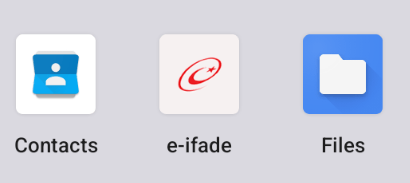
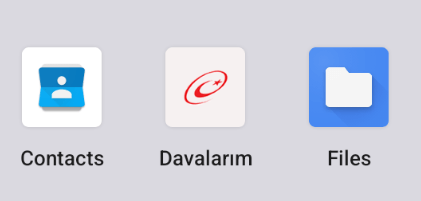
The malware also changes its label to “Davalarım” if the Android version is newer than 12; otherwise it hides the icon.
The app icon before (left) and after launching (right)
In the sample we review in this section, Frogblight uses a REST API for C2 communication, implemented using the Retrofit library. The malicious app pings the C2 server every two seconds in foreground, and if no error is returned, it calls the REST API client methods fetchOutbox and getFileCommands. Other methods are called when specific events occur, for example, after the device screen is turned on, the com.capcuttup.refresh.PersistentService foreground service is launched, or an SMS is received. The full list of all REST API client methods with parameters and descriptions is shown below.
REST API client method
Description
Parameters
fetchOutbox
Request message content to be sent via SMS or displayed in a notification
device_id: unique Android device ID
ackOutbox
Send the results of processing a message received after calling the API method fetchOutbox
device_id: unique Android device ID
msg_id: message ID
status: message processing status
error: message processing error
getAllPackages
Request the names of app packages whose launch should open a website in WebView to capture user input data
action: same as the API method name
getPackageUrl
Request the website URL that will be opened in WebView when the app with the specified package name is launched
action: same as the API method name
package: the package name of the target app
getFileCommands
Request commands for file operations
Available commands:
● download: upload the target file to the C2
● generate_thumbnails: generate thumbnails from the image files in the target directory and upload them to the C2
● list: send information about all files in the target directory to the C2
● thumbnail: generate a thumbnail from the target image file and upload it to the C2
device_id: unique Android device ID
pingDevice
Check the C2 connection
device_id: unique Android device ID
reportHijackSuccess
Send captured user input data from the website opened in a WebView when the app with the specified package name is launched
action: same as the API method name
package: the package name of the target app
data: captured user input data
saveAppList
Send information about the apps installed on the device
device_id: unique Android device ID app_list: a list of apps installed on the device
app_count: a count of apps installed on the device
saveInjection
Send captured user input data from the website opened in a WebView. If it was not opened following the launch of the target app, the app_name parameter is determined based on the opened URL
device_id: unique Android device ID app_name: the package name of the target app
form_data: captured user input data
savePermission
Unused but presumably needed for sending information about permissions
device_id: unique Android device ID permission_type: permission type
status: permission status
sendSms
Send information about an SMS message from the device
device_id: unique Android device ID sender: the sender’s/recipient’s phone number
message: message text
timestamp: received/sent time
type: message type (inbox/sent)
sendTelegramMessage
Send captured user input data from the webpages opened by Frogblight in WebView
device_id: unique Android device ID
url: website URL
title: website page title
input_type: the type of user input data
input_value: user input data
final_value: user input data with additional information
timestamp: the time of data capture
ip_address: user IP address
sms_permission: whether SMS permission is granted
file_manager_permission: whether file access permission is granted
updateDevice
Send information about the device
device_id: unique Android device ID
model: device manufacturer and model
android_version: Android version
phone_number: user phone number
battery: current battery level
charging: device charging status
screen_status: screen on/off
ip_address: user IP address
sms_permission: whether SMS permission is granted
file_manager_permission: whether file access permission is granted
updatePermissionStatus
Send information about permissions
device_id: unique Android device ID
permission_type: permission type
status: permission status
timestamp: current time
uploadBatchThumbnails
Upload thumbnails to the C2
device_id: unique Android device ID
thumbnails: thumbnails
uploadFile
Upload a file to the C2
device_id: unique Android device ID
file_path: file path
download_id: the file ID on the C2
The file itself is sent as an unnamed parameter
uploadFileList
Send information about all files in the target directory
device_id: unique Android device ID
path: directory path
file_list: information about the files in the target directory
uploadFileListLog
Send information about all files in the target directory to an endpoint different from uploadFileList
device_id: unique Android device ID
path: directory path
file_list: information about the files in the target directory
uploadThumbnailLog
Unused but presumably needed for uploading thumbnails to an endpoint different from uploadBatchThumbnails
device_id: unique Android device ID
thumbnails: thumbnails
Remote device control, persistence, and protection against deletion
The app includes several classes to provide the threat actor with remote access to the infected device, gain persistence, and protect the malicious app from being deleted.
capcuttup.refresh.AccessibilityAutoClickService
This is intended to prevent removal of the app and to open websites specified by the threat actor in WebView upon target apps startup. It is present in the sample we review, but is no longer in use and deleted in further versions.
capcuttup.refresh.PersistentService
This is a service whose main purpose is to interact with the C2 and to make malicious tasks persistent.
capcuttup.refresh.BootReceiver
This is a broadcast receiver responsible for setting up the persistence mechanisms, such as job scheduling and setting alarms, after device boot completion.
Further development
In later versions, new functionality was added, and some of the more recent Frogblight variants disguised themselves as the Chrome browser. Let’s look at one of the fake Chrome samples (d7d15e02a9cd94c8ab00c043aef55aff).
In this sample, new REST API client methods have been added for interacting with the C2.
REST API client method
Description
Parameters
getContactCommands
Get commands to perform actions with contacts
Available commands:
● ADD_CONTACT: add a contact to the user device
● DELETE_CONTACT: delete a contact from the user device
● EDIT_CONTACT: edit a contact on the user device
device_id: unique Android device ID
sendCallLogs
Send call logs to the C2
device_id: unique Android device ID
call_logs: call log data
sendNotificationLogs
Send notifications log to the C2. Not fully implemented in this sample, and as of the time of writing this report, we hadn’t seen any samples with a full-fledged implementation of this API method
action: same as the API method name
notifications: notification log data
Also, the threat actor had implemented a custom input method for recording keystrokes to a file using the com.puzzlesnap.quickgame.CustomKeyboardService service.
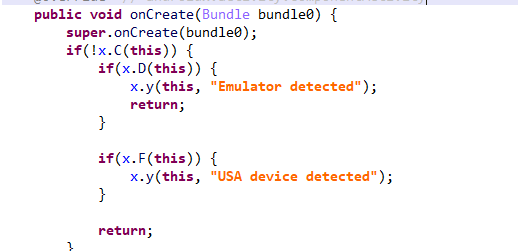
Another Frogblight sample we observed trying to avoid emulators and using geofencing techniques is 115fbdc312edd4696d6330a62c181f35. In this sample, Frogblight checks the environment (for example, device model) and shuts down if it detects an emulator or if the device is located in the United States.
Part of the code responsible for avoiding Frogblight running in an undesirable environment
Later on, the threat actor decided to start using a web socket instead of the REST API. Let’s see an example of this in one of the recent samples (08a3b1fb2d1abbdbdd60feb8411a12c7). This sample is disguised as an app for receiving social support via an official government webpage. The feature set of this sample is very similar to the previous ones, with several new capabilities added. Commands are transmitted over a web socket using the JSON format. A command template is shown below:
It is also worth noting that some commands in this version share the same meaning but have different structures, and the functionality of certain commands has not been fully implemented yet. This indicates that Frogblight was under active development at the time of our research, and since no its activity was noticed after September, it is possible that the malware is being finalized to a fully operational state before continuing to infect users’ devices. A full list of commands with their parameters and description is shown below:
Command
Description
Parameters
connect
Send a registration message to the C2
–
connection_success
Send various information, such as call logs, to the C2; start pinging the C2 and requesting commands
–
auth_error
Log info about an invalid login key to the Android log system
–
pong_device
Does nothing
–
commands_list
Execute commands
List of commands
sms_send_command
Send an arbitrary SMS message
recipient: message destination
message: message text
msg_id: message ID
bulk_sms_command
Send an arbitrary SMS message to multiple recipients
recipients: message destinations
message: message text
get_contacts_command
Send all contacts to the C2
–
get_app_list_command
Send information about the apps installed on the device to the C2
–
get_files_command
Send information about all files in certain directories to the C2
–
get_call_logs_command
Send call logs to the C2
–
get_notifications_command
Send a notifications log to the C2. This is not fully implemented in the sample at hand, and as of the time of writing this report, we hadn’t seen any samples with a full-fledged implementation of this command
–
take_screenshot_command
Take a screenshot. This is not fully implemented in the sample at hand, and as of the time of writing this report, we hadn’t seen any samples with a full-fledged implementation of this command
–
update_device
Send registration message to the C2
–
new_webview_data
Collect WebView data. This is not fully implemented in the sample at hand, and as of the time of writing this report, we hadn’t seen any samples with a full-fledged implementation of this command
–
new_injection
Inject code. This is not fully implemented in the sample at hand, and as of the time of writing this report, we hadn’t seen any samples with a full-fledged implementation of this command
code: injected code
target_app: presumably the package name of the target app
add_contact_command
Add a contact to the user device
name: contact name
phone: contact phone
email: contact email
contact_add
Add a contact to the user device
display_name: contact name
phone_number: contact phone
email: contact email
contact_delete
Delete a contact from the user device
phone_number: contact phone
contact_edit
Edit a contact on the user device
display_name: new contact name
phone_number: contact phone
email: new contact email
contact_list
Send all contacts to the C2
–
file_list
Send information about all files in the specified directory to the C2
path: directory path
file_download
Upload the specified file to the C2
file_path: file path
download_id: an ID that is received with the command and sent back to the C2 along with the requested file. Most likely, this is used to organize data on the C2
file_thumbnail
Generate a thumbnail from the target image file and upload it to the C2
file_path: image file path
file_thumbnails
Generate thumbnails from the image files in the target directory and upload them to the C2
folder_path: directory path
health_check
Send information about the current device state: battery level, screen state, and so on
–
message_list_request
Send all SMS messages to the C2
–
notification_send
Show an arbitrary notification
title: notification title
message: notification message
app_name: notification subtext
package_list_response
Save the target package names
packages: a list of all target package names.
Each list element contains:
package_name: target package name
active: whether targeting is active
delete_contact_command
Delete a contact from the user device. This is not fully implemented in the sample at hand, and as of the time of writing this report, we hadn’t seen any samples with a full-fledged implementation of this command
contact_id: contact ID
name: contact name
file_upload_command
Upload specified file to the C2. This is not fully implemented in the sample at hand, and as of the time of writing this report, we hadn’t seen any samples with a full-fledged implementation of this command
file_path: file path
file_name: file name
file_download_command
Download file to user device. This is not fully implemented in the sample at hand, and as of the time of writing this report, we hadn’t seen any samples with a full-fledged implementation of this command
file_url: the URL of the file to download
download_path: download path
download_file_command
Download file to user device. This is not fully implemented in the sample at hand, and as of the time of writing this report, we hadn’t seen any samples with a full-fledged implementation of this command
file_url: the URL of the file to download
download_path: downloading path
get_permissions_command
Send a registration message to the C2, including info about specific permissions
–
health_check_command
Send information about the current device state, such as battery level, screen state, and so on
–
connect_error
Log info about connection errors to the Android log system
A list of errors
reconnect
Send a registration message to the C2
–
disconnect
Stop pinging the C2 and requesting commands from it
–
Authentication via WebSocket takes place using a special key.
The part of the code responsible for the WebSocket authentication logic
At the IP address to which the WebSocket connection was made, the Frogblight web panel was accessible, which accepted the authentication key mentioned above. Since only samples using the same key as the webpanel login are controllable through it, we suggest that Frogblight might be distributed under the MaaS model.
The interface of the sign-in screen for the Frogblight web panel
Judging by the menu options, the threat actor can sort victims’ devices by certain parameters, such as the presence of banking apps on the device, and send bulk SMS messages and perform other mass actions.
Victims
Since some versions of Frogblight opened the Turkish government webpage to collect user-entered data on Turkish banks’ websites, we assume with high confidence that it is aimed mainly at users from Turkey. Also, based on our telemetry, the majority of users attacked by Frogblight are located in that country.
Attribution
Even though it is not possible to provide an attribution to any known threat actor based on the information available, during our analysis of the Frogblight Android malware and the search for online mentions of the names it uses, we discovered a GitHub profile containing repos with Frogblight, which had also created repos with Coper malware, distributed under the MaaS model. It is possible that this profile belongs to the attackers distributing Coper who have also started distributing Frogblight.
GitHub repositories containing Frogblight and Coper malware
Also, since the comments in the Frogblight code are written in Turkish, we believe that its developers speak this language.
Conclusions
The new Android malware we dubbed “Frogblight” appeared recently and targets mainly users from Turkey. This is an advanced banking Trojan aimed at stealing money. It has already infected real users’ devices, and it doesn’t stop there, adding more and more new features in the new versions that appear. It can be made more dangerous by the fact that it may be used by attackers who already have experience distributing malware. We will continue to monitor its development.
In August 2025, we discovered a campaign targeting individuals in Turkey with a new Android banking Trojan we dubbed “Frogblight”. Initially, the malware was disguised as an app for accessing court case files via an official government webpage. Later, more universal disguises appeared, such as the Chrome browser.
Frogblight can use official government websites as an intermediary step to steal banking credentials. Moreover, it has spyware functionality, such as capabilities to collect SMS messages, a list of installed apps on the device and device filesystem information. It can also send arbitrary SMS messages.
Another interesting characteristic of Frogblight is that we’ve seen it updated with new features throughout September. This may indicate that a feature-rich malware app for Android is being developed, which might be distributed under the MaaS model.
This threat is detected by Kaspersky products as HEUR:Trojan-Banker.AndroidOS.Frogblight.*, HEUR:Trojan-Banker.AndroidOS.Agent.eq, HEUR:Trojan-Banker.AndroidOS.Agent.ep, HEUR:Trojan-Spy.AndroidOS.SmsThief.de.
Technical details
Background
While performing an analysis of mobile malware we receive from various sources, we discovered several samples belonging to a new malware family. Although these samples appeared to be still under development, they already contained a lot of functionality that allowed this family to be classified as a banking Trojan. As new versions of this malware continued to appear, we began monitoring its development. Moreover, we managed to discover its control panel and based on the “fr0g” name shown there, we dubbed this family “Frogblight”.
Initial infection
We believe that smishing is one of the distribution vectors for Frogblight, and that the users had to install the malware themselves. On the internet, we found complaints from Turkish users about phishing SMS messages convincing users that they were involved in a court case and containing links to download malware. versions of Frogblight, including the very first ones, were disguised as an app for accessing court case files via an official government webpage and were named the same as the files for downloading from the links mentioned above.
While looking for online mentions of the names used by the malware, we discovered one of the phishing websites distributing Frogblight, which disguises itself as a website for viewing a court file.
The phishing website distributing Frogblight
We were able to open the admin panel of this website, where it was possible to view statistics on Frogblight malware downloads. However, the counter had not been fully implemented and the threat actor could only view the statistics for their own downloads.
The admin panel interface of the website from which Frogblight is downloaded
Additionally, we found the source code of this phishing website available in a public GitHub repository. Judging by its description, it is adapted for fast deployment to Vercel, a platform for hosting web apps.
The GitHub repository with the phishing website source code
App features
As already mentioned, Frogblight was initially disguised as an app for accessing court case files via an official government webpage. Let’s look at one of the samples using this disguise (9dac23203c12abd60d03e3d26d372253). For analysis, we selected an early sample, but not the first one discovered, in order to demonstrate more complete Frogblight functionality.
After starting, the app prompts the victim to grant permissions to send and read SMS messages, and to read from and write to the device’s storage, allegedly needed to show a court file related to the user.
The full list of declared permissions in the app manifest file is shown below:
MANAGE_EXTERNAL_STORAGE
READ_EXTERNAL_STORAGE
WRITE_EXTERNAL_STORAGE
READ_SMS
RECEIVE_SMS
SEND_SMS
WRITE_SMS
RECEIVE_BOOT_COMPLETED
INTERNET
QUERY_ALL_PACKAGES
BIND_ACCESSIBILITY_SERVICE
DISABLE_KEYGUARD
FOREGROUND_SERVICE
FOREGROUND_SERVICE_DATA_SYNC
POST_NOTIFICATIONS
QUICKBOOT_POWERON
RECEIVE_MMS
RECEIVE_WAP_PUSH
REQUEST_IGNORE_BATTERY_OPTIMIZATIONS
SCHEDULE_EXACT_ALARM
USE_EXACT_ALARM
VIBRATE
WAKE_LOCK
ACCESS_NETWORK_STATE
READ_PHONE_STATE
After all required permissions are granted, the malware opens the official government webpage for accessing court case files in WebView, prompting the victim to sign in. There are different sign-in options, one of them via online banking. If the user chooses this method, they are prompted to click on a bank whose online banking app they use and fill out the sign-in form on the bank’s official website. This is what Frogblight is after, so it waits two seconds, then opens the online banking sign-in method regardless of the user’s choice. For each webpage that has finished loading in WebView, Frogblight injects JavaScript code allowing it to capture user input and send it to the C2 via a REST API.
The malware also changes its label to “Davalarım” if the Android version is newer than 12; otherwise it hides the icon.
The app icon before (left) and after launching (right)
In the sample we review in this section, Frogblight uses a REST API for C2 communication, implemented using the Retrofit library. The malicious app pings the C2 server every two seconds in foreground, and if no error is returned, it calls the REST API client methods fetchOutbox and getFileCommands. Other methods are called when specific events occur, for example, after the device screen is turned on, the com.capcuttup.refresh.PersistentService foreground service is launched, or an SMS is received. The full list of all REST API client methods with parameters and descriptions is shown below.
REST API client method
Description
Parameters
fetchOutbox
Request message content to be sent via SMS or displayed in a notification
device_id: unique Android device ID
ackOutbox
Send the results of processing a message received after calling the API method fetchOutbox
device_id: unique Android device ID
msg_id: message ID
status: message processing status
error: message processing error
getAllPackages
Request the names of app packages whose launch should open a website in WebView to capture user input data
action: same as the API method name
getPackageUrl
Request the website URL that will be opened in WebView when the app with the specified package name is launched
action: same as the API method name
package: the package name of the target app
getFileCommands
Request commands for file operations
Available commands:
● download: upload the target file to the C2
● generate_thumbnails: generate thumbnails from the image files in the target directory and upload them to the C2
● list: send information about all files in the target directory to the C2
● thumbnail: generate a thumbnail from the target image file and upload it to the C2
device_id: unique Android device ID
pingDevice
Check the C2 connection
device_id: unique Android device ID
reportHijackSuccess
Send captured user input data from the website opened in a WebView when the app with the specified package name is launched
action: same as the API method name
package: the package name of the target app
data: captured user input data
saveAppList
Send information about the apps installed on the device
device_id: unique Android device ID app_list: a list of apps installed on the device
app_count: a count of apps installed on the device
saveInjection
Send captured user input data from the website opened in a WebView. If it was not opened following the launch of the target app, the app_name parameter is determined based on the opened URL
device_id: unique Android device ID app_name: the package name of the target app
form_data: captured user input data
savePermission
Unused but presumably needed for sending information about permissions
device_id: unique Android device ID permission_type: permission type
status: permission status
sendSms
Send information about an SMS message from the device
device_id: unique Android device ID sender: the sender’s/recipient’s phone number
message: message text
timestamp: received/sent time
type: message type (inbox/sent)
sendTelegramMessage
Send captured user input data from the webpages opened by Frogblight in WebView
device_id: unique Android device ID
url: website URL
title: website page title
input_type: the type of user input data
input_value: user input data
final_value: user input data with additional information
timestamp: the time of data capture
ip_address: user IP address
sms_permission: whether SMS permission is granted
file_manager_permission: whether file access permission is granted
updateDevice
Send information about the device
device_id: unique Android device ID
model: device manufacturer and model
android_version: Android version
phone_number: user phone number
battery: current battery level
charging: device charging status
screen_status: screen on/off
ip_address: user IP address
sms_permission: whether SMS permission is granted
file_manager_permission: whether file access permission is granted
updatePermissionStatus
Send information about permissions
device_id: unique Android device ID
permission_type: permission type
status: permission status
timestamp: current time
uploadBatchThumbnails
Upload thumbnails to the C2
device_id: unique Android device ID
thumbnails: thumbnails
uploadFile
Upload a file to the C2
device_id: unique Android device ID
file_path: file path
download_id: the file ID on the C2
The file itself is sent as an unnamed parameter
uploadFileList
Send information about all files in the target directory
device_id: unique Android device ID
path: directory path
file_list: information about the files in the target directory
uploadFileListLog
Send information about all files in the target directory to an endpoint different from uploadFileList
device_id: unique Android device ID
path: directory path
file_list: information about the files in the target directory
uploadThumbnailLog
Unused but presumably needed for uploading thumbnails to an endpoint different from uploadBatchThumbnails
device_id: unique Android device ID
thumbnails: thumbnails
Remote device control, persistence, and protection against deletion
The app includes several classes to provide the threat actor with remote access to the infected device, gain persistence, and protect the malicious app from being deleted.
capcuttup.refresh.AccessibilityAutoClickService
This is intended to prevent removal of the app and to open websites specified by the threat actor in WebView upon target apps startup. It is present in the sample we review, but is no longer in use and deleted in further versions.
capcuttup.refresh.PersistentService
This is a service whose main purpose is to interact with the C2 and to make malicious tasks persistent.
capcuttup.refresh.BootReceiver
This is a broadcast receiver responsible for setting up the persistence mechanisms, such as job scheduling and setting alarms, after device boot completion.
Further development
In later versions, new functionality was added, and some of the more recent Frogblight variants disguised themselves as the Chrome browser. Let’s look at one of the fake Chrome samples (d7d15e02a9cd94c8ab00c043aef55aff).
In this sample, new REST API client methods have been added for interacting with the C2.
REST API client method
Description
Parameters
getContactCommands
Get commands to perform actions with contacts
Available commands:
● ADD_CONTACT: add a contact to the user device
● DELETE_CONTACT: delete a contact from the user device
● EDIT_CONTACT: edit a contact on the user device
device_id: unique Android device ID
sendCallLogs
Send call logs to the C2
device_id: unique Android device ID
call_logs: call log data
sendNotificationLogs
Send notifications log to the C2. Not fully implemented in this sample, and as of the time of writing this report, we hadn’t seen any samples with a full-fledged implementation of this API method
action: same as the API method name
notifications: notification log data
Also, the threat actor had implemented a custom input method for recording keystrokes to a file using the com.puzzlesnap.quickgame.CustomKeyboardService service.
Another Frogblight sample we observed trying to avoid emulators and using geofencing techniques is 115fbdc312edd4696d6330a62c181f35. In this sample, Frogblight checks the environment (for example, device model) and shuts down if it detects an emulator or if the device is located in the United States.
Part of the code responsible for avoiding Frogblight running in an undesirable environment
Later on, the threat actor decided to start using a web socket instead of the REST API. Let’s see an example of this in one of the recent samples (08a3b1fb2d1abbdbdd60feb8411a12c7). This sample is disguised as an app for receiving social support via an official government webpage. The feature set of this sample is very similar to the previous ones, with several new capabilities added. Commands are transmitted over a web socket using the JSON format. A command template is shown below:
It is also worth noting that some commands in this version share the same meaning but have different structures, and the functionality of certain commands has not been fully implemented yet. This indicates that Frogblight was under active development at the time of our research, and since no its activity was noticed after September, it is possible that the malware is being finalized to a fully operational state before continuing to infect users’ devices. A full list of commands with their parameters and description is shown below:
Command
Description
Parameters
connect
Send a registration message to the C2
–
connection_success
Send various information, such as call logs, to the C2; start pinging the C2 and requesting commands
–
auth_error
Log info about an invalid login key to the Android log system
–
pong_device
Does nothing
–
commands_list
Execute commands
List of commands
sms_send_command
Send an arbitrary SMS message
recipient: message destination
message: message text
msg_id: message ID
bulk_sms_command
Send an arbitrary SMS message to multiple recipients
recipients: message destinations
message: message text
get_contacts_command
Send all contacts to the C2
–
get_app_list_command
Send information about the apps installed on the device to the C2
–
get_files_command
Send information about all files in certain directories to the C2
–
get_call_logs_command
Send call logs to the C2
–
get_notifications_command
Send a notifications log to the C2. This is not fully implemented in the sample at hand, and as of the time of writing this report, we hadn’t seen any samples with a full-fledged implementation of this command
–
take_screenshot_command
Take a screenshot. This is not fully implemented in the sample at hand, and as of the time of writing this report, we hadn’t seen any samples with a full-fledged implementation of this command
–
update_device
Send registration message to the C2
–
new_webview_data
Collect WebView data. This is not fully implemented in the sample at hand, and as of the time of writing this report, we hadn’t seen any samples with a full-fledged implementation of this command
–
new_injection
Inject code. This is not fully implemented in the sample at hand, and as of the time of writing this report, we hadn’t seen any samples with a full-fledged implementation of this command
code: injected code
target_app: presumably the package name of the target app
add_contact_command
Add a contact to the user device
name: contact name
phone: contact phone
email: contact email
contact_add
Add a contact to the user device
display_name: contact name
phone_number: contact phone
email: contact email
contact_delete
Delete a contact from the user device
phone_number: contact phone
contact_edit
Edit a contact on the user device
display_name: new contact name
phone_number: contact phone
email: new contact email
contact_list
Send all contacts to the C2
–
file_list
Send information about all files in the specified directory to the C2
path: directory path
file_download
Upload the specified file to the C2
file_path: file path
download_id: an ID that is received with the command and sent back to the C2 along with the requested file. Most likely, this is used to organize data on the C2
file_thumbnail
Generate a thumbnail from the target image file and upload it to the C2
file_path: image file path
file_thumbnails
Generate thumbnails from the image files in the target directory and upload them to the C2
folder_path: directory path
health_check
Send information about the current device state: battery level, screen state, and so on
–
message_list_request
Send all SMS messages to the C2
–
notification_send
Show an arbitrary notification
title: notification title
message: notification message
app_name: notification subtext
package_list_response
Save the target package names
packages: a list of all target package names.
Each list element contains:
package_name: target package name
active: whether targeting is active
delete_contact_command
Delete a contact from the user device. This is not fully implemented in the sample at hand, and as of the time of writing this report, we hadn’t seen any samples with a full-fledged implementation of this command
contact_id: contact ID
name: contact name
file_upload_command
Upload specified file to the C2. This is not fully implemented in the sample at hand, and as of the time of writing this report, we hadn’t seen any samples with a full-fledged implementation of this command
file_path: file path
file_name: file name
file_download_command
Download file to user device. This is not fully implemented in the sample at hand, and as of the time of writing this report, we hadn’t seen any samples with a full-fledged implementation of this command
file_url: the URL of the file to download
download_path: download path
download_file_command
Download file to user device. This is not fully implemented in the sample at hand, and as of the time of writing this report, we hadn’t seen any samples with a full-fledged implementation of this command
file_url: the URL of the file to download
download_path: downloading path
get_permissions_command
Send a registration message to the C2, including info about specific permissions
–
health_check_command
Send information about the current device state, such as battery level, screen state, and so on
–
connect_error
Log info about connection errors to the Android log system
A list of errors
reconnect
Send a registration message to the C2
–
disconnect
Stop pinging the C2 and requesting commands from it
–
Authentication via WebSocket takes place using a special key.
The part of the code responsible for the WebSocket authentication logic
At the IP address to which the WebSocket connection was made, the Frogblight web panel was accessible, which accepted the authentication key mentioned above. Since only samples using the same key as the webpanel login are controllable through it, we suggest that Frogblight might be distributed under the MaaS model.
The interface of the sign-in screen for the Frogblight web panel
Judging by the menu options, the threat actor can sort victims’ devices by certain parameters, such as the presence of banking apps on the device, and send bulk SMS messages and perform other mass actions.
Victims
Since some versions of Frogblight opened the Turkish government webpage to collect user-entered data on Turkish banks’ websites, we assume with high confidence that it is aimed mainly at users from Turkey. Also, based on our telemetry, the majority of users attacked by Frogblight are located in that country.
Attribution
Even though it is not possible to provide an attribution to any known threat actor based on the information available, during our analysis of the Frogblight Android malware and the search for online mentions of the names it uses, we discovered a GitHub profile containing repos with Frogblight, which had also created repos with Coper malware, distributed under the MaaS model. It is possible that this profile belongs to the attackers distributing Coper who have also started distributing Frogblight.
GitHub repositories containing Frogblight and Coper malware
Also, since the comments in the Frogblight code are written in Turkish, we believe that its developers speak this language.
Conclusions
The new Android malware we dubbed “Frogblight” appeared recently and targets mainly users from Turkey. This is an advanced banking Trojan aimed at stealing money. It has already infected real users’ devices, and it doesn’t stop there, adding more and more new features in the new versions that appear. It can be made more dangerous by the fact that it may be used by attackers who already have experience distributing malware. We will continue to monitor its development.

 Login
Login