The story you are reading is a series of scoops nestled inside a far more urgent Internet-wide security advisory. The vulnerability at issue has been exploited for months already, and it’s time for a broader awareness of the threat. The short version is that everything you thought you knew about the security of the internal network behind your Internet router probably is now dangerously out of date.
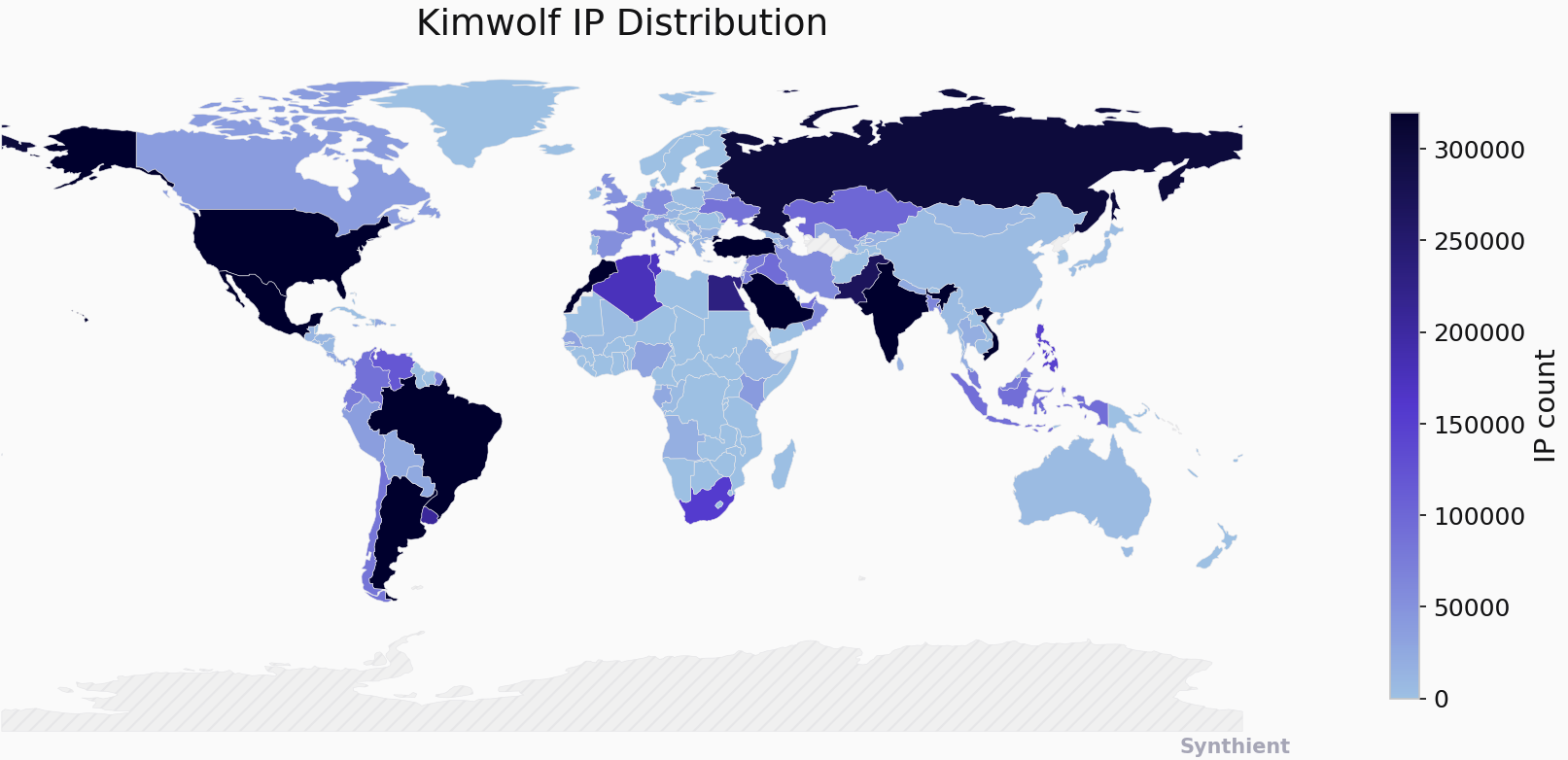
The security company Synthient currently sees more than 2 million infected Kimwolf devices distributed globally but with concentrations in Vietnam, Brazil, India, Saudi Arabia, Russia and the United States. Synthient found that two-thirds of the Kimwolf infections are Android TV boxes with no security or authentication built in.
The past few months have witnessed the explosive growth of a new botnet dubbed Kimwolf, which experts say has infected more than 2 million devices globally. The Kimwolf malware forces compromised systems to relay malicious and abusive Internet traffic — such as ad fraud, account takeover attempts and mass content scraping — and participate in crippling distributed denial-of-service (DDoS) attacks capable of knocking nearly any website offline for days at a time.
More important than Kimwolf’s staggering size, however, is the diabolical method it uses to spread so quickly: By effectively tunneling back through various “residential proxy” networks and into the local networks of the proxy endpoints, and by further infecting devices that are hidden behind the assumed protection of the user’s firewall and Internet router.
Residential proxy networks are sold as a way for customers to anonymize and localize their Web traffic to a specific region, and the biggest of these services allow customers to route their traffic through devices in virtually any country or city around the globe.
The malware that turns an end-user’s Internet connection into a proxy node is often bundled with dodgy mobile apps and games. These residential proxy programs also are commonly installed via unofficial Android TV boxes sold by third-party merchants on popular e-commerce sites like Amazon, BestBuy, Newegg, and Walmart.
These TV boxes range in price from $40 to $400, are marketed under a dizzying range of no-name brands and model numbers, and frequently are advertised as a way to stream certain types of subscription video content for free. But there’s a hidden cost to this transaction: As we’ll explore in a moment, these TV boxes make up a considerable chunk of the estimated two million systems currently infected with Kimwolf.

Some of the unsanctioned Android TV boxes that come with residential proxy malware pre-installed. Image: Synthient.
Kimwolf also is quite good at infecting a range of Internet-connected digital photo frames that likewise are abundant at major e-commerce websites. In November 2025, researchers from Quokka published a report (PDF) detailing serious security issues in Android-based digital picture frames running the Uhale app — including Amazon’s bestselling digital frame as of March 2025.
There are two major security problems with these photo frames and unofficial Android TV boxes. The first is that a considerable percentage of them come with malware pre-installed, or else require the user to download an unofficial Android App Store and malware in order to use the device for its stated purpose (video content piracy). The most typical of these uninvited guests are small programs that turn the device into a residential proxy node that is resold to others.
The second big security nightmare with these photo frames and unsanctioned Android TV boxes is that they rely on a handful of Internet-connected microcomputer boards that have no discernible security or authentication requirements built-in. In other words, if you are on the same network as one or more of these devices, you can likely compromise them simultaneously by issuing a single command across the network.
THERE’S NO PLACE LIKE 127.0.0.1
The combination of these two security realities came to the fore in October 2025, when an undergraduate computer science student at the Rochester Institute of Technology began closely tracking Kimwolf’s growth, and interacting directly with its apparent creators on a daily basis.
Benjamin Brundage is the 22-year-old founder of the security firm Synthient, a startup that helps companies detect proxy networks and learn how those networks are being abused. Conducting much of his research into Kimwolf while studying for final exams, Brundage told KrebsOnSecurity in late October 2025 he suspected Kimwolf was a new Android-based variant of Aisuru, a botnet that was incorrectly blamed for a number of record-smashing DDoS attacks last fall.
Brundage says Kimwolf grew rapidly by abusing a glaring vulnerability in many of the world’s largest residential proxy services. The crux of the weakness, he explained, was that these proxy services weren’t doing enough to prevent their customers from forwarding requests to internal servers of the individual proxy endpoints.
Most proxy services take basic steps to prevent their paying customers from “going upstream” into the local network of proxy endpoints, by explicitly denying requests for local addresses specified in RFC-1918, including the well-known Network Address Translation (NAT) ranges 10.0.0.0/8, 192.168.0.0/16, and 172.16.0.0/12. These ranges allow multiple devices in a private network to access the Internet using a single public IP address, and if you run any kind of home or office network, your internal address space operates within one or more of these NAT ranges.
However, Brundage discovered that the people operating Kimwolf had figured out how to talk directly to devices on the internal networks of millions of residential proxy endpoints, simply by changing their Domain Name System (DNS) settings to match those in the RFC-1918 address ranges.
“It is possible to circumvent existing domain restrictions by using DNS records that point to 192.168.0.1 or 0.0.0.0,” Brundage wrote in a first-of-its-kind security advisory sent to nearly a dozen residential proxy providers in mid-December 2025. “This grants an attacker the ability to send carefully crafted requests to the current device or a device on the local network. This is actively being exploited, with attackers leveraging this functionality to drop malware.”
As with the digital photo frames mentioned above, many of these residential proxy services run solely on mobile devices that are running some game, VPN or other app with a hidden component that turns the user’s mobile phone into a residential proxy — often without any meaningful consent.
In a report published today, Synthient said key actors involved in Kimwolf were observed monetizing the botnet through app installs, selling residential proxy bandwidth, and selling its DDoS functionality.
“Synthient expects to observe a growing interest among threat actors in gaining unrestricted access to proxy networks to infect devices, obtain network access, or access sensitive information,” the report observed. “Kimwolf highlights the risks posed by unsecured proxy networks and their viability as an attack vector.”
ANDROID DEBUG BRIDGE
After purchasing a number of unofficial Android TV box models that were most heavily represented in the Kimwolf botnet, Brundage further discovered the proxy service vulnerability was only part of the reason for Kimwolf’s rapid rise: He also found virtually all of the devices he tested were shipped from the factory with a powerful feature called Android Debug Bridge (ADB) mode enabled by default.

Many of the unofficial Android TV boxes infected by Kimwolf include the ominous disclaimer: “Made in China. Overseas use only.” Image: Synthient.
ADB is a diagnostic tool intended for use solely during the manufacturing and testing processes, because it allows the devices to be remotely configured and even updated with new (and potentially malicious) firmware. However, shipping these devices with ADB turned on creates a security nightmare because in this state they constantly listen for and accept unauthenticated connection requests.
For example, opening a command prompt and typing “adb connect” along with a vulnerable device’s (local) IP address followed immediately by “:5555” will very quickly offer unrestricted “super user” administrative access.
Brundage said by early December, he’d identified a one-to-one overlap between new Kimwolf infections and proxy IP addresses offered for rent by China-based IPIDEA, currently the world’s largest residential proxy network by all accounts.
“Kimwolf has almost doubled in size this past week, just by exploiting IPIDEA’s proxy pool,” Brundage told KrebsOnSecurity in early December as he was preparing to notify IPIDEA and 10 other proxy providers about his research.
Brundage said Synthient first confirmed on December 1, 2025 that the Kimwolf botnet operators were tunneling back through IPIDEA’s proxy network and into the local networks of systems running IPIDEA’s proxy software. The attackers dropped the malware payload by directing infected systems to visit a specific Internet address and to call out the pass phrase “krebsfiveheadindustries” in order to unlock the malicious download.
On December 30, Synthient said it was tracking roughly 2 million IPIDEA addresses exploited by Kimwolf in the previous week. Brundage said he has witnessed Kimwolf rebuilding itself after one recent takedown effort targeting its control servers — from almost nothing to two million infected systems just by tunneling through proxy endpoints on IPIDEA for a couple of days.
Brundage said IPIDEA has a seemingly inexhaustible supply of new proxies, advertising access to more than 100 million residential proxy endpoints around the globe in the past week alone. Analyzing the exposed devices that were part of IPIDEA’s proxy pool, Synthient said it found more than two-thirds were Android devices that could be compromised with no authentication needed.
SECURITY NOTIFICATION AND RESPONSE
After charting a tight overlap in Kimwolf-infected IP addresses and those sold by IPIDEA, Brundage was eager to make his findings public: The vulnerability had clearly been exploited for several months, although it appeared that only a handful of cybercrime actors were aware of the capability. But he also knew that going public without giving vulnerable proxy providers an opportunity to understand and patch it would only lead to more mass abuse of these services by additional cybercriminal groups.
On December 17, Brundage sent a security notification to all 11 of the apparently affected proxy providers, hoping to give each at least a few weeks to acknowledge and address the core problems identified in his report before he went public. Many proxy providers who received the notification were resellers of IPIDEA that white-labeled the company’s service.
KrebsOnSecurity first sought comment from IPIDEA in October 2025, in reporting on a story about how the proxy network appeared to have benefitted from the rise of the Aisuru botnet, whose administrators appeared to shift from using the botnet primarily for DDoS attacks to simply installing IPIDEA’s proxy program, among others.
On December 25, KrebsOnSecurity received an email from an IPIDEA employee identified only as “Oliver,” who said allegations that IPIDEA had benefitted from Aisuru’s rise were baseless.
“After comprehensively verifying IP traceability records and supplier cooperation agreements, we found no association between any of our IP resources and the Aisuru botnet, nor have we received any notifications from authoritative institutions regarding our IPs being involved in malicious activities,” Oliver wrote. “In addition, for external cooperation, we implement a three-level review mechanism for suppliers, covering qualification verification, resource legality authentication and continuous dynamic monitoring, to ensure no compliance risks throughout the entire cooperation process.”
“IPIDEA firmly opposes all forms of unfair competition and malicious smearing in the industry, always participates in market competition with compliant operation and honest cooperation, and also calls on the entire industry to jointly abandon irregular and unethical behaviors and build a clean and fair market ecosystem,” Oliver continued.
Meanwhile, the same day that Oliver’s email arrived, Brundage shared a response he’d just received from IPIDEA’s security officer, who identified himself only by the first name Byron. The security officer said IPIDEA had made a number of important security changes to its residential proxy service to address the vulnerability identified in Brundage’s report.
“By design, the proxy service does not allow access to any internal or local address space,” Byron explained. “This issue was traced to a legacy module used solely for testing and debugging purposes, which did not fully inherit the internal network access restrictions. Under specific conditions, this module could be abused to reach internal resources. The affected paths have now been fully blocked and the module has been taken offline.”
Byron told Brundage IPIDEA also instituted multiple mitigations for blocking DNS resolution to internal (NAT) IP ranges, and that it was now blocking proxy endpoints from forwarding traffic on “high-risk” ports “to prevent abuse of the service for scanning, lateral movement, or access to internal services.”
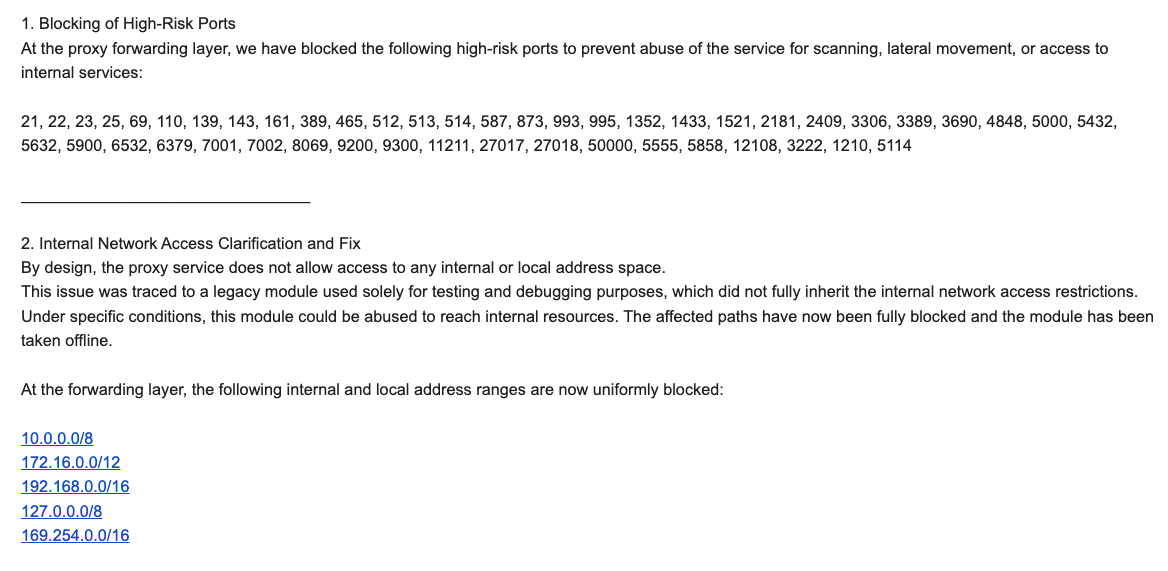
An excerpt from an email sent by IPIDEA’s security officer in response to Brundage’s vulnerability notification. Click to enlarge.
Brundage said IPIDEA appears to have successfully patched the vulnerabilities he identified. He also noted he never observed the Kimwolf actors targeting proxy services other than IPIDEA, which has not responded to requests for comment.
Riley Kilmer is founder of Spur.us, a technology firm that helps companies identify and filter out proxy traffic. Kilmer said Spur has tested Brundage’s findings and confirmed that IPIDEA and all of its affiliate resellers indeed allowed full and unfiltered access to the local LAN.
Kilmer said one model of unsanctioned Android TV boxes that is especially popular — the Superbox, which we profiled in November’s Is Your Android TV Streaming Box Part of a Botnet? — leaves Android Debug Mode running on localhost:5555.
“And since Superbox turns the IP into an IPIDEA proxy, a bad actor just has to use the proxy to localhost on that port and install whatever bad SDKs [software development kits] they want,” Kilmer told KrebsOnSecurity.
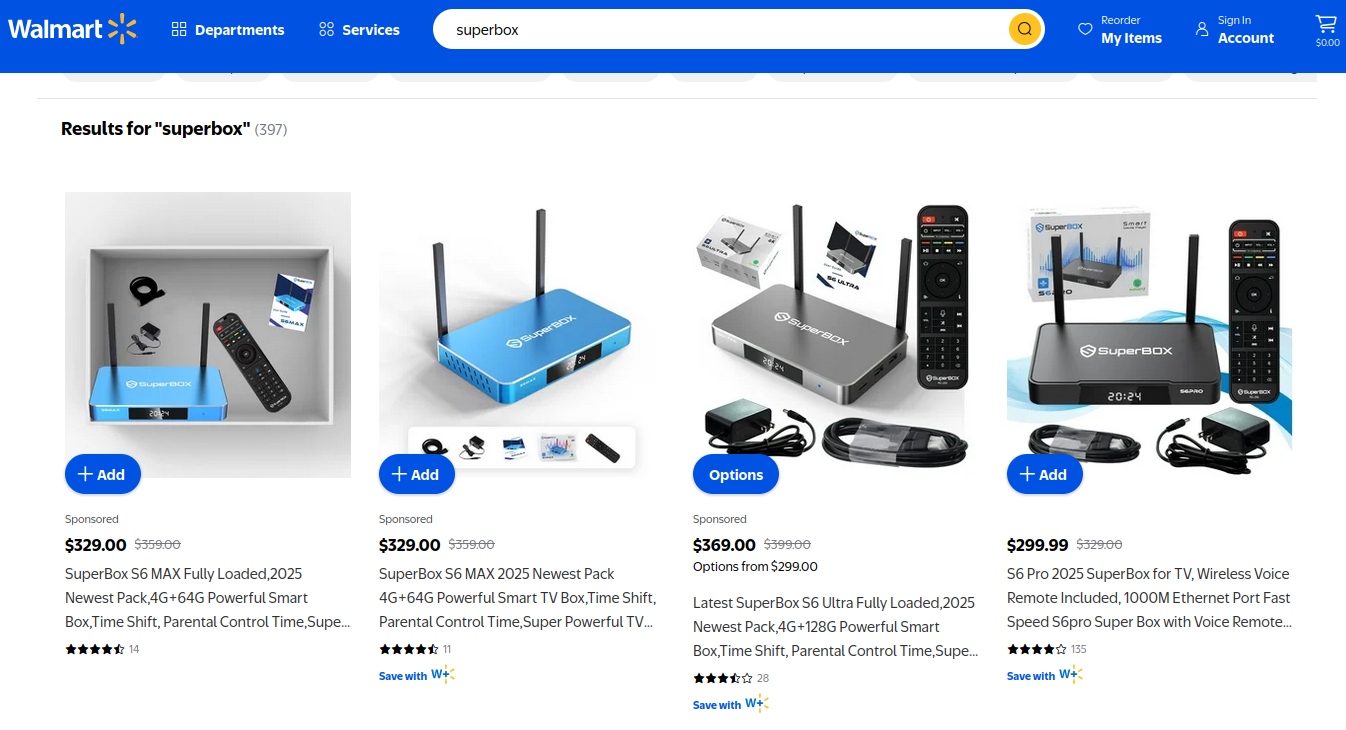
Superbox media streaming boxes for sale on Walmart.com.
ECHOES FROM THE PAST
Both Brundage and Kilmer say IPIDEA appears to be the second or third reincarnation of a residential proxy network formerly known as 911S5 Proxy, a service that operated between 2014 and 2022 and was wildly popular on cybercrime forums. 911S5 Proxy imploded a week after KrebsOnSecurity published a deep dive on the service’s sketchy origins and leadership in China.
In that 2022 profile, we cited work by researchers at the University of Sherbrooke in Canada who were studying the threat 911S5 could pose to internal corporate networks. The researchers noted that “the infection of a node enables the 911S5 user to access shared resources on the network such as local intranet portals or other services.”
“It also enables the end user to probe the LAN network of the infected node,” the researchers explained. “Using the internal router, it would be possible to poison the DNS cache of the LAN router of the infected node, enabling further attacks.”
911S5 initially responded to our reporting in 2022 by claiming it was conducting a top-down security review of the service. But the proxy service abruptly closed up shop just one week later, saying a malicious hacker had destroyed all of the company’s customer and payment records. In July 2024, The U.S. Department of the Treasury sanctioned the alleged creators of 911S5, and the U.S. Department of Justice arrested the Chinese national named in my 2022 profile of the proxy service.
Kilmer said IPIDEA also operates a sister service called 922 Proxy, which the company has pitched from Day One as a seamless alternative to 911S5 Proxy.
“You cannot tell me they don’t want the 911 customers by calling it that,” Kilmer said.
Among the recipients of Synthient’s notification was the proxy giant Oxylabs. Brundage shared an email he received from Oxylabs’ security team on December 31, which acknowledged Oxylabs had started rolling out security modifications to address the vulnerabilities described in Synthient’s report.
Reached for comment, Oxylabs confirmed they “have implemented changes that now eliminate the ability to bypass the blocklist and forward requests to private network addresses using a controlled domain.” But it said there is no evidence that Kimwolf or other other attackers exploited its network.
“In parallel, we reviewed the domains identified in the reported exploitation activity and did not observe traffic associated with them,” the Oxylabs statement continued. “Based on this review, there is no indication that our residential network was impacted by these activities.”
PRACTICAL IMPLICATIONS
Consider the following scenario, in which the mere act of allowing someone to use your Wi-Fi network could lead to a Kimwolf botnet infection. In this example, a friend or family member comes to stay with you for a few days, and you grant them access to your Wi-Fi without knowing that their mobile phone is infected with an app that turns the device into a residential proxy node. At that point, your home’s public IP address will show up for rent at the website of some residential proxy provider.
Miscreants like those behind Kimwolf then use residential proxy services online to access that proxy node on your IP, tunnel back through it and into your local area network (LAN), and automatically scan the internal network for devices with Android Debug Bridge mode turned on.
By the time your guest has packed up their things, said their goodbyes and disconnected from your Wi-Fi, you now have two devices on your local network — a digital photo frame and an unsanctioned Android TV box — that are infected with Kimwolf. You may have never intended for these devices to be exposed to the larger Internet, and yet there you are.
Here’s another possible nightmare scenario: Attackers use their access to proxy networks to modify your Internet router’s settings so that it relies on malicious DNS servers controlled by the attackers — allowing them to control where your Web browser goes when it requests a website. Think that’s far-fetched? Recall the DNSChanger malware from 2012 that infected more than a half-million routers with search-hijacking malware, and ultimately spawned an entire security industry working group focused on containing and eradicating it.
XLAB
Much of what is published so far on Kimwolf has come from the Chinese security firm XLab, which was the first to chronicle the rise of the Aisuru botnet in late 2024. In its latest blog post, XLab said it began tracking Kimwolf on October 24, when the botnet’s control servers were swamping Cloudflare’s DNS servers with lookups for the distinctive domain 14emeliaterracewestroxburyma02132[.]su.
This domain and others connected to early Kimwolf variants spent several weeks topping Cloudflare’s chart of the Internet’s most sought-after domains, edging out Google.com and Apple.com of their rightful spots in the top 5 most-requested domains. That’s because during that time Kimwolf was asking its millions of bots to check in frequently using Cloudflare’s DNS servers.

The Chinese security firm XLab found the Kimwolf botnet had enslaved between 1.8 and 2 million devices, with heavy concentrations in Brazil, India, The United States of America and Argentina. Image: blog.xLab.qianxin.com
It is clear from reading the XLab report that KrebsOnSecurity (and security experts) probably erred in misattributing some of Kimwolf’s early activities to the Aisuru botnet, which appears to be operated by a different group entirely. IPDEA may have been truthful when it said it had no affiliation with the Aisuru botnet, but Brundage’s data left no doubt that its proxy service clearly was being massively abused by Aisuru’s Android variant, Kimwolf.
XLab said Kimwolf has infected at least 1.8 million devices, and has shown it is able to rebuild itself quickly from scratch.
“Analysis indicates that Kimwolf’s primary infection targets are TV boxes deployed in residential network environments,” XLab researchers wrote. “Since residential networks usually adopt dynamic IP allocation mechanisms, the public IPs of devices change over time, so the true scale of infected devices cannot be accurately measured solely by the quantity of IPs. In other words, the cumulative observation of 2.7 million IP addresses does not equate to 2.7 million infected devices.”
XLab said measuring Kimwolf’s size also is difficult because infected devices are distributed across multiple global time zones. “Affected by time zone differences and usage habits (e.g., turning off devices at night, not using TV boxes during holidays, etc.), these devices are not online simultaneously, further increasing the difficulty of comprehensive observation through a single time window,” the blog post observed.
XLab noted that the Kimwolf author shows an almost ‘obsessive’ fixation” on Yours Truly, apparently leaving “easter eggs” related to my name in multiple places through the botnet’s code and communications:
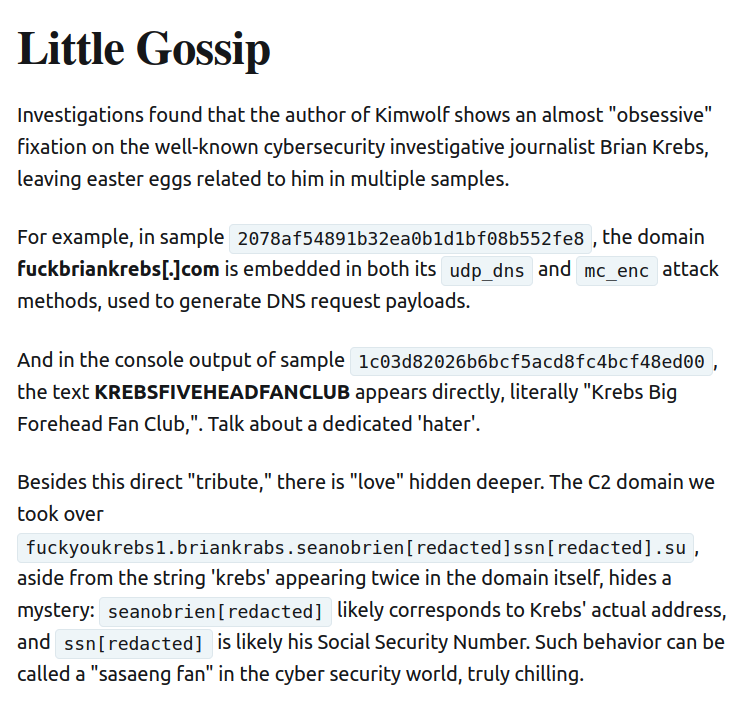
Image: XLAB.
ANALYSIS AND ADVICE
One frustrating aspect of threats like Kimwolf is that in most cases it is not easy for the average user to determine if there are any devices on their internal network which may be vulnerable to threats like Kimwolf and/or already infected with residential proxy malware.
Let’s assume that through years of security training or some dark magic you can successfully identify that residential proxy activity on your internal network was linked to a specific mobile device inside your house: From there, you’d still need to isolate and remove the app or unwanted component that is turning the device into a residential proxy.
Also, the tooling and knowledge needed to achieve this kind of visibility just isn’t there from an average consumer standpoint. The work that it takes to configure your network so you can see and interpret logs of all traffic coming in and out is largely beyond the skillset of most Internet users (and, I’d wager, many security experts). But it’s a topic worth exploring in an upcoming story.
Happily, Synthient has erected a page on its website that will state whether a visitor’s public Internet address was seen among those of Kimwolf-infected systems. Brundage also has compiled a list of the unofficial Android TV boxes that are most highly represented in the Kimwolf botnet.
If you own a TV box that matches one of these model names and/or numbers, please just rip it out of your network. If you encounter one of these devices on the network of a family member or friend, send them a link to this story and explain that it’s not worth the potential hassle and harm created by keeping them plugged in.
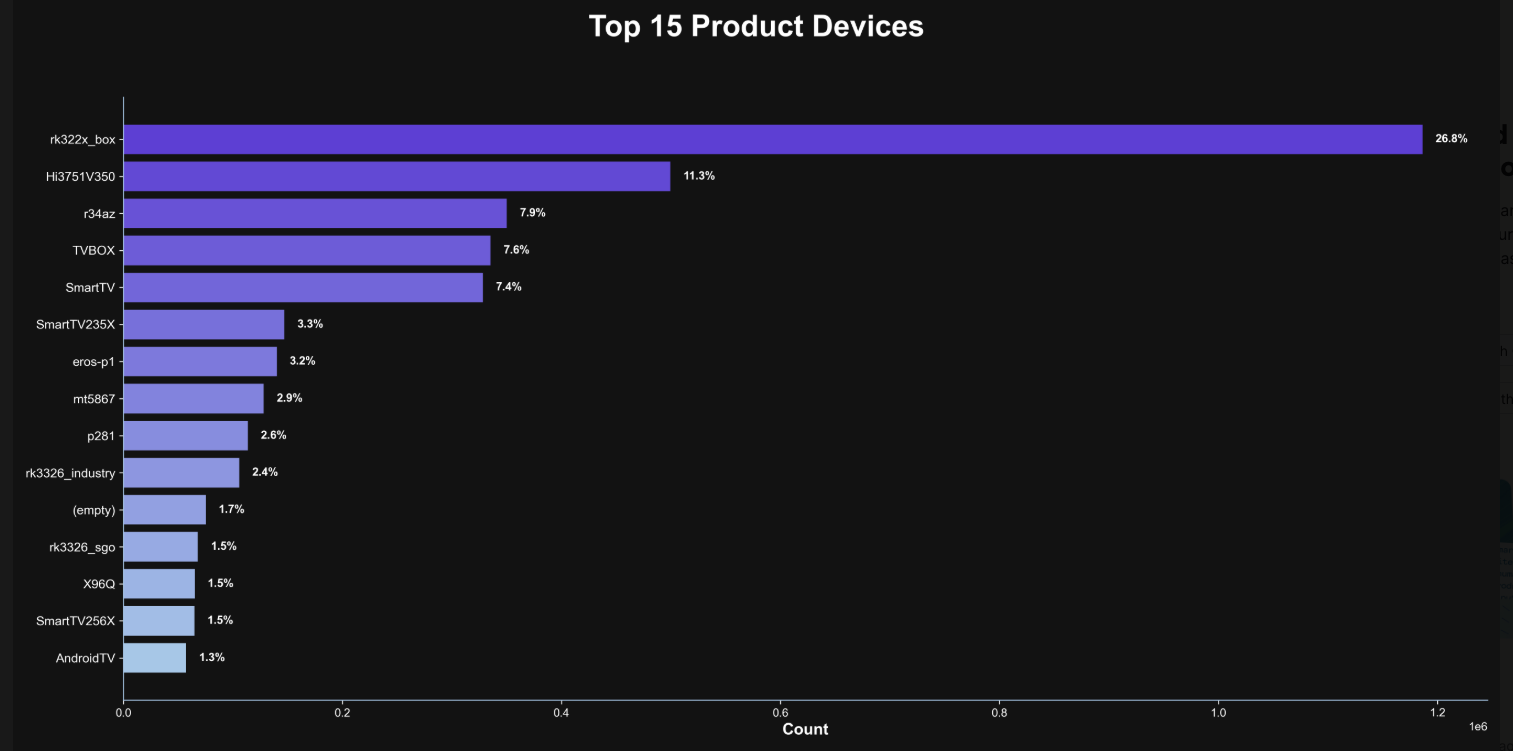
The top 15 product devices represented in the Kimwolf botnet, according to Synthient.
Chad Seaman is a principal security researcher with Akamai Technologies. Seaman said he wants more consumers to be wary of these pseudo Android TV boxes to the point where they avoid them altogether.
“I want the consumer to be paranoid of these crappy devices and of these residential proxy schemes,” he said. “We need to highlight why they’re dangerous to everyone and to the individual. The whole security model where people think their LAN (Local Internal Network) is safe, that there aren’t any bad guys on the LAN so it can’t be that dangerous is just really outdated now.”
“The idea that an app can enable this type of abuse on my network and other networks, that should really give you pause,” about which devices to allow onto your local network, Seaman said. “And it’s not just Android devices here. Some of these proxy services have SDKs for Mac and Windows, and the iPhone. It could be running something that inadvertently cracks open your network and lets countless random people inside.”
In July 2025, Google filed a “John Doe” lawsuit (PDF) against 25 unidentified defendants collectively dubbed the “BadBox 2.0 Enterprise,” which Google described as a botnet of over ten million unsanctioned Android streaming devices engaged in advertising fraud. Google said the BADBOX 2.0 botnet, in addition to compromising multiple types of devices prior to purchase, also can infect devices by requiring the download of malicious apps from unofficial marketplaces.
Google’s lawsuit came on the heels of a June 2025 advisory from the Federal Bureau of Investigation (FBI), which warned that cyber criminals were gaining unauthorized access to home networks by either configuring the products with malware prior to the user’s purchase, or infecting the device as it downloads required applications that contain backdoors — usually during the set-up process.
The FBI said BADBOX 2.0 was discovered after the original BADBOX campaign was disrupted in 2024. The original BADBOX was identified in 2023, and primarily consisted of Android operating system devices that were compromised with backdoor malware prior to purchase.
Lindsay Kaye is vice president of threat intelligence at HUMAN Security, a company that worked closely on the BADBOX investigations. Kaye said the BADBOX botnets and the residential proxy networks that rode on top of compromised devices were detected because they enabled a ridiculous amount of advertising fraud, as well as ticket scalping, retail fraud, account takeovers and content scraping.
Kaye said consumers should stick to known brands when it comes to purchasing things that require a wired or wireless connection.
“If people are asking what they can do to avoid being victimized by proxies, it’s safest to stick with name brands,” Kaye said. “Anything promising something for free or low-cost, or giving you something for nothing just isn’t worth it. And be careful about what apps you allow on your phone.”
Many wireless routers these days make it relatively easy to deploy a “Guest” wireless network on-the-fly. Doing so allows your guests to browse the Internet just fine but it blocks their device from being able to talk to other devices on the local network — such as shared folders, printers and drives. If someone — a friend, family member, or contractor — requests access to your network, give them the guest Wi-Fi network credentials if you have that option.
There is a small but vocal pro-piracy camp that is almost condescendingly dismissive of the security threats posed by these unsanctioned Android TV boxes. These tech purists positively chafe at the idea of people wholesale discarding one of these TV boxes. A common refrain from this camp is that Internet-connected devices are not inherently bad or good, and that even factory-infected boxes can be flashed with new firmware or custom ROMs that contain no known dodgy software.
However, it’s important to point out that the majority of people buying these devices are not security or hardware experts; the devices are sought out because they dangle something of value for “free.” Most buyers have no idea of the bargain they’re making when plugging one of these dodgy TV boxes into their network.
It is somewhat remarkable that we haven’t yet seen the entertainment industry applying more visible pressure on the major e-commerce vendors to stop peddling this insecure and actively malicious hardware that is largely made and marketed for video piracy. These TV boxes are a public nuisance for bundling malicious software while having no apparent security or authentication built-in, and these two qualities make them an attractive nuisance for cybercriminals.
Stay tuned for Part II in this series, which will poke through clues left behind by the people who appear to have built Kimwolf and benefited from it the most.

 Login
Login