Reading view

Local KTAE and the IDA Pro plugin | Kaspersky official blog

In a previous post, we walked through a practical example of how threat attribution helps in incident investigations. We also introduced the Kaspersky Threat Attribution Engine (KTAE) — our tool for making an educated guess about which specific APT group a malware sample belongs to. To demonstrate it, we used the Kaspersky Threat Intelligence Portal — a cloud-based tool that provides access to KTAE as part of our comprehensive Threat Analysis service, alongside a sandbox and a non-attributing similarity-search tool. The advantages of a cloud service are obvious: clients don’t need to invest in hardware, install anything, or manage any software. However, as real-world experience shows, the cloud version of an attribution tool isn’t for everyone…

First, some organizations are bound by regulatory restrictions that strictly forbid any data from leaving their internal perimeter. For the security analysts at these firms, uploading files to a third-party service is out of the question. Second, some companies employ hardcore threat hunters who need a more flexible toolkit — one that lets them work with their own proprietary research alongside Kaspersky’s threat intelligence. That’s why KTAE is available in two flavors: a cloud-based version and an on-prem deployment.

What are the on-prem KTAE advantages over the cloud version?

First off, the local version of KTAE ensures an investigation stays fully confidential. All the analysis takes place right in the organization’s internal network. The threat intelligence source is a database deployed inside the company perimeter; it is packed with the unique indicators and attribution data of every malicious sample known to our experts; and it also contains the characteristics pertaining to legitimate files to exclude false-positive detections. The database gets regular updates, but it operates one-way: no information ever leaves the client’s network.
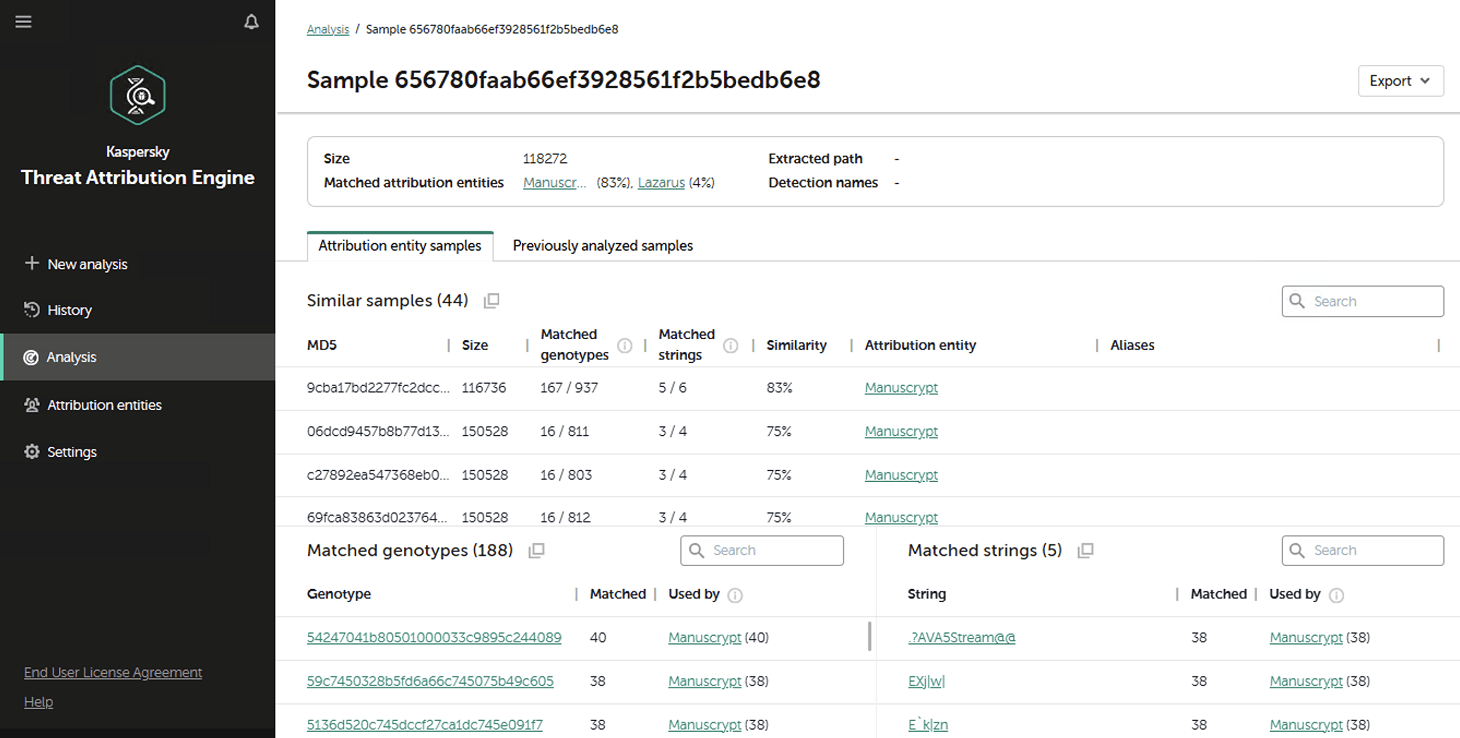
Additionally, the on-prem version of KTAE gives experts the ability to add new threat groups to the database and link them to malware samples they discovered on their own. This means that subsequent attribution of new files will account for the data added by internal researchers. This allows experts to catalog their own unique malware clusters, work with them, and identify similarities.

Here’s another handy expert tool: our team has developed a free plugin for IDA Pro, a popular disassembler, for use with the local version of KTAE.

What’s the purpose of an attribution plugin for a disassembler?

For a SOC analyst on alert triage, attributing a malicious file found in the infrastructure is straightforward: just upload it to KTAE (cloud or on-prem) and get a verdict, like Manuscrypt (83%). That’s sufficient for taking adequate countermeasures against that group’s known toolkit and assessing the overall situation. A threat hunter, however, might not want to take that verdict at face value. Alternatively, they might ask, “Which code fragments are unique across all the malware samples used by this group?” Here an attribution plugin for a disassembler comes in handy.
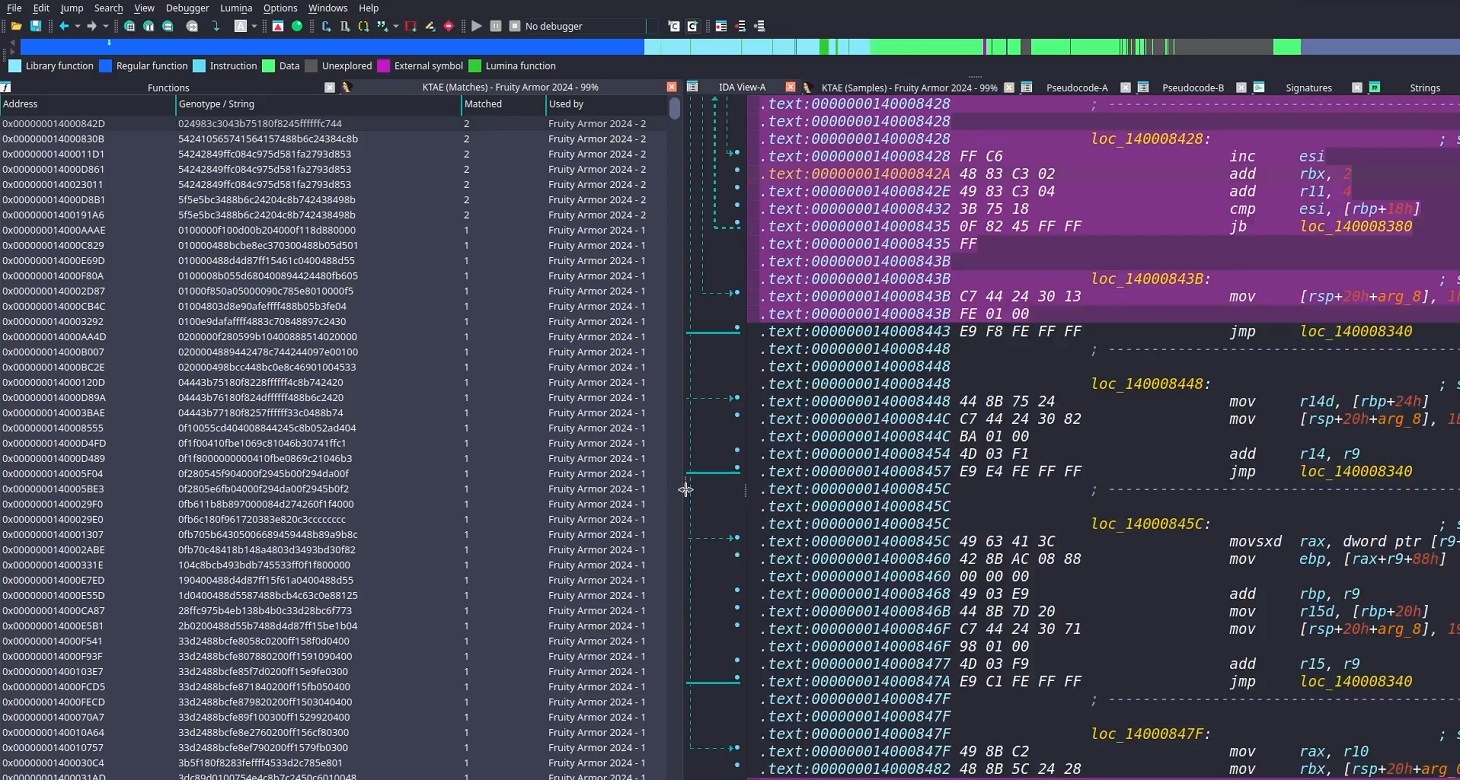

Inside the IDA Pro interface, the plugin highlights the specific disassembled code fragments that triggered the attribution algorithm. This doesn’t just allow for a more expert-level deep dive into new malware samples; it also lets Kaspersky researchers refine attribution rules on the fly. As a result, the algorithm — and KTAE itself — keeps evolving, making attribution more accurate with every run.

How to set up the plugin

The plugin is a script written in Python. To get it up and running you need IDA Pro. Unfortunately, it won’t work in IDA Free, since it lacks support for Python plugins. If you don’t have Python installed yet, you’d need to grab that, set up the dependencies (check the requirements file in our GitHub repository), and make sure IDA Pro environment variables are pointing to the Python libraries.

Next, you’d need to insert the URL for your local KTAE instance into the script body and provide your API token (which is available on a commercial basis) — just like it’s done in the example script described in the KTAE documentation.

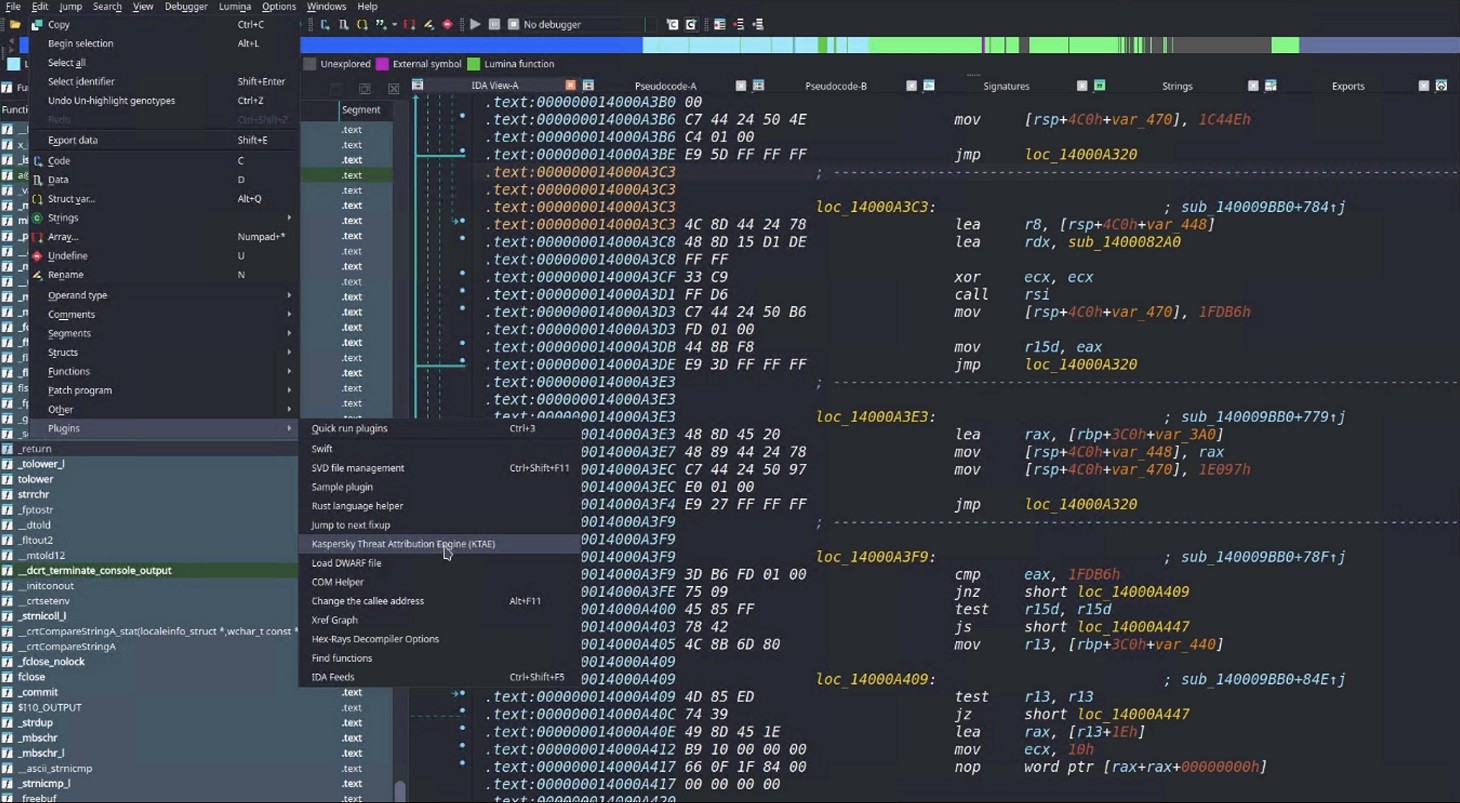
Then you can simply drop the script into your IDA Pro plugins folder and fire up the disassembler. If you’ve done it right, then, after loading and disassembling a sample, you’ll see the option to launch the Kaspersky Threat Attribution Engine (KTAE) plugin under EditPlugins:

How to use the plugin

When the plugin is installed, here’s what happens under the hood: the file currently loaded in IDA Pro is sent via API to the locally installed KTAE service, at the URL configured in the script. The service analyzes the file, and the analysis results are piped right back into IDA Pro.

On a local network, the script usually finishes its job in a matter of seconds (the duration depends on the connection to the KTAE server and the size of the analyzed file). Once the plugin wraps up, a researcher can start digging into the highlighted code fragments. A double-click leads straight to the relevant section in the assembly or binary code (Hex view) for analysis. These extra data points make it easy to spot shared code blocks and track changes in a malware toolkit.

By the way, this isn’t the only IDA Pro plugin the GReAT team has created to make life easier for threat hunters. We also offer another IDA plugin that significantly speeds up and streamlines the reverse-engineering process, and which, incidentally, was a winner in the IDA Plugin Contest 2024.

To learn more about the Kaspersky Threat Attribution Engine and how to deploy it, check out the official product documentation. And to arrange a demonstration or piloting project, please fill out the form on the Kaspersky website.


  •  

How does cyberthreat attribution help in practice?

Not every cybersecurity practitioner thinks it’s worth the effort to figure out exactly who’s pulling the strings behind the malware hitting their company. The typical incident investigation algorithm goes something like this: analyst finds a suspicious file → if the antivirus didn’t catch it, puts it into a sandbox to test → confirms some malicious activity → adds the hash to the blocklist → goes for coffee break. These are the go-to steps for many cybersecurity professionals — especially when they’re swamped with alerts, or don’t quite have the forensic skills to unravel a complex attack thread by thread. However, when dealing with a targeted attack, this approach is a one-way ticket to disaster — and here’s why.

If an attacker is playing for keeps, they rarely stick to a single attack vector. There’s a good chance the malicious file has already played its part in a multi-stage attack and is now all but useless to the attacker. Meanwhile, the adversary has already dug deep into corporate infrastructure and is busy operating with an entirely different set of tools. To clear the threat for good, the security team has to uncover and neutralize the entire attack chain.

But how can this be done quickly and effectively before the attackers manage to do some real damage? One way is to dive deep into the context. By analyzing a single file, an expert can identify exactly who’s attacking his company, quickly find out which other tools and tactics that specific group employs, and then sweep infrastructure for any related threats. There are plenty of threat intelligence tools out there for this, but I’ll show you how it works using our Kaspersky Threat Intelligence Portal.

A practical example of why attribution matters

Let’s say we upload a piece of malware we’ve discovered to a threat intelligence portal, and learn that it’s usually being used by, say, the MysterySnail group. What does that actually tell us? Let’s look at the available intel:

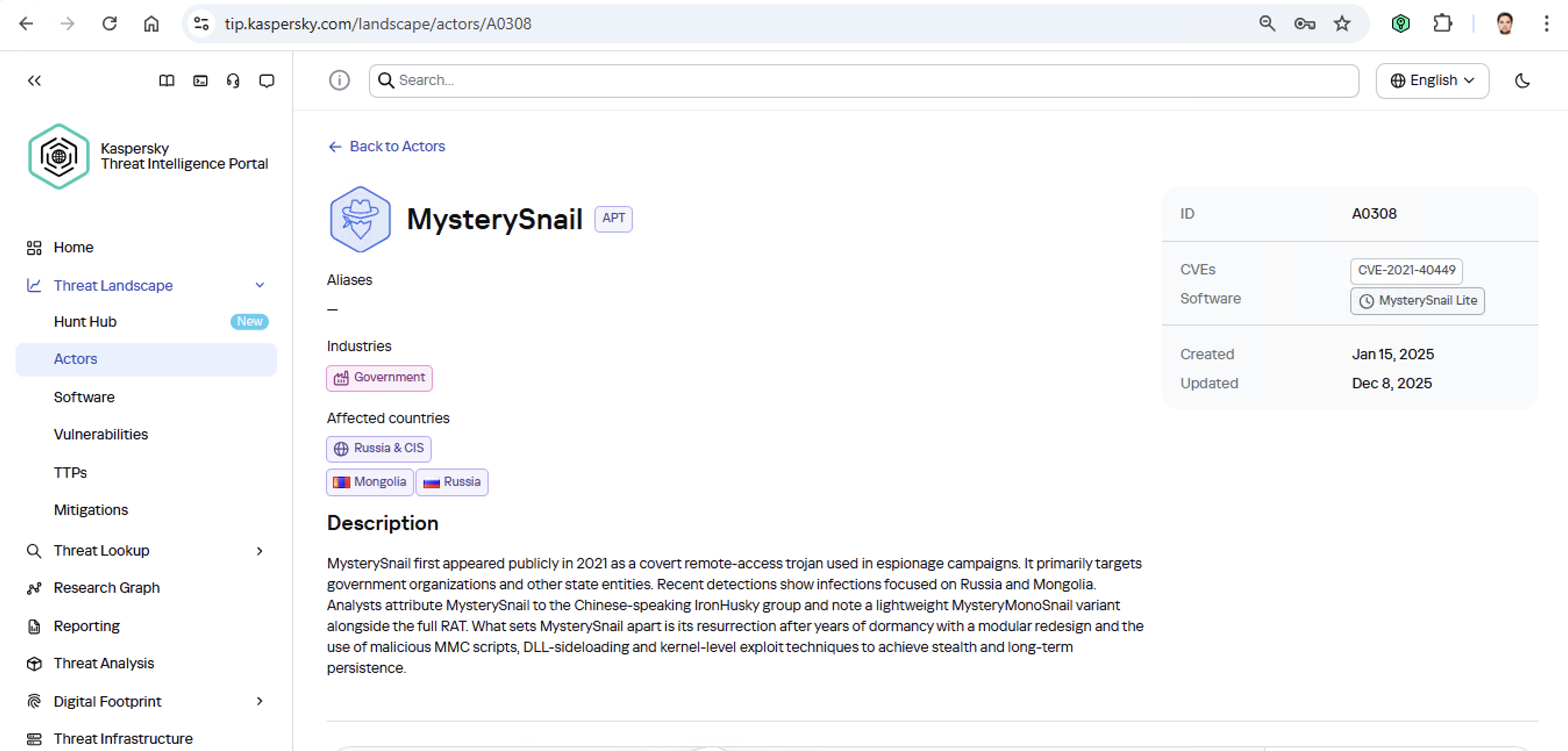
MysterySnail group information

First off, these attackers target government institutions in both Russia and Mongolia. They’re a Chinese-speaking group that typically focuses on espionage. According to their profile, they establish a foothold in infrastructure and lay low until they find something worth stealing. We also know that they typically exploit the vulnerability CVE-2021-40449. What kind of vulnerability is that?

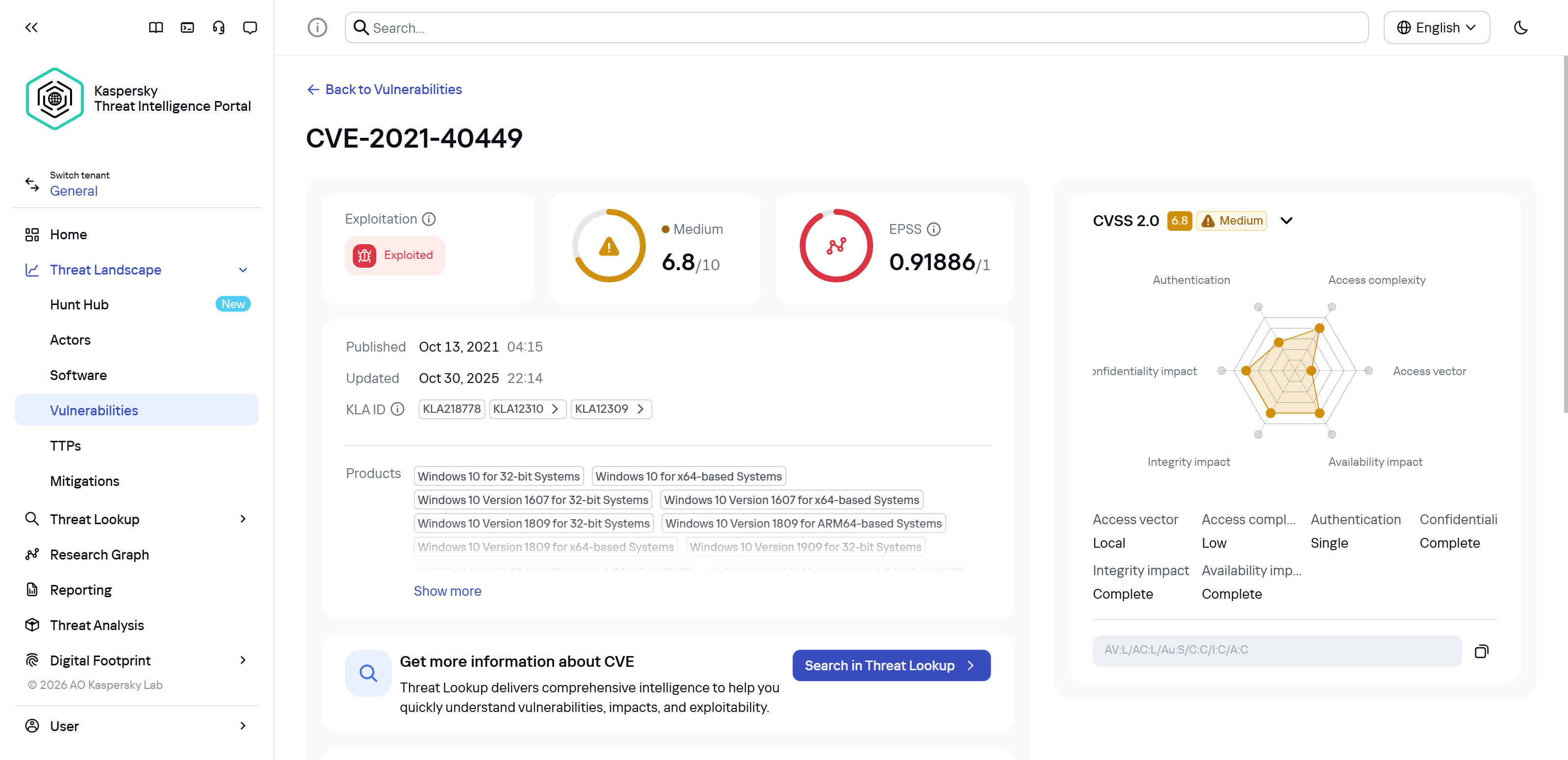
CVE-2021-40449 vulnerability details

As we can see, it’s a privilege escalation vulnerability — meaning it’s used after hackers have already infiltrated the infrastructure. This vulnerability has a high severity rating and is heavily exploited in the wild. So what software is actually vulnerable?

Vulnerable software

Got it: Microsoft Windows. Time to double-check if the patch that fixes this hole has actually been installed. Alright, besides the vulnerability, what else do we know about the hackers? It turns out they have a peculiar way of checking network configurations — they connect to the public site 2ip.ru:

Technique details

So it makes sense to add a correlation rule to SIEM to flag that kind of behavior.

Now’s the time to read up on this group in more detail and gather additional indicators of compromise (IoCs) for SIEM monitoring, as well as ready-to-use YARA rules (structured text descriptions used to identify malware). This will help us track down all the tentacles of this kraken that might have already crept into corporate infrastructure, and ensure we can intercept them quickly if they try to break in again.

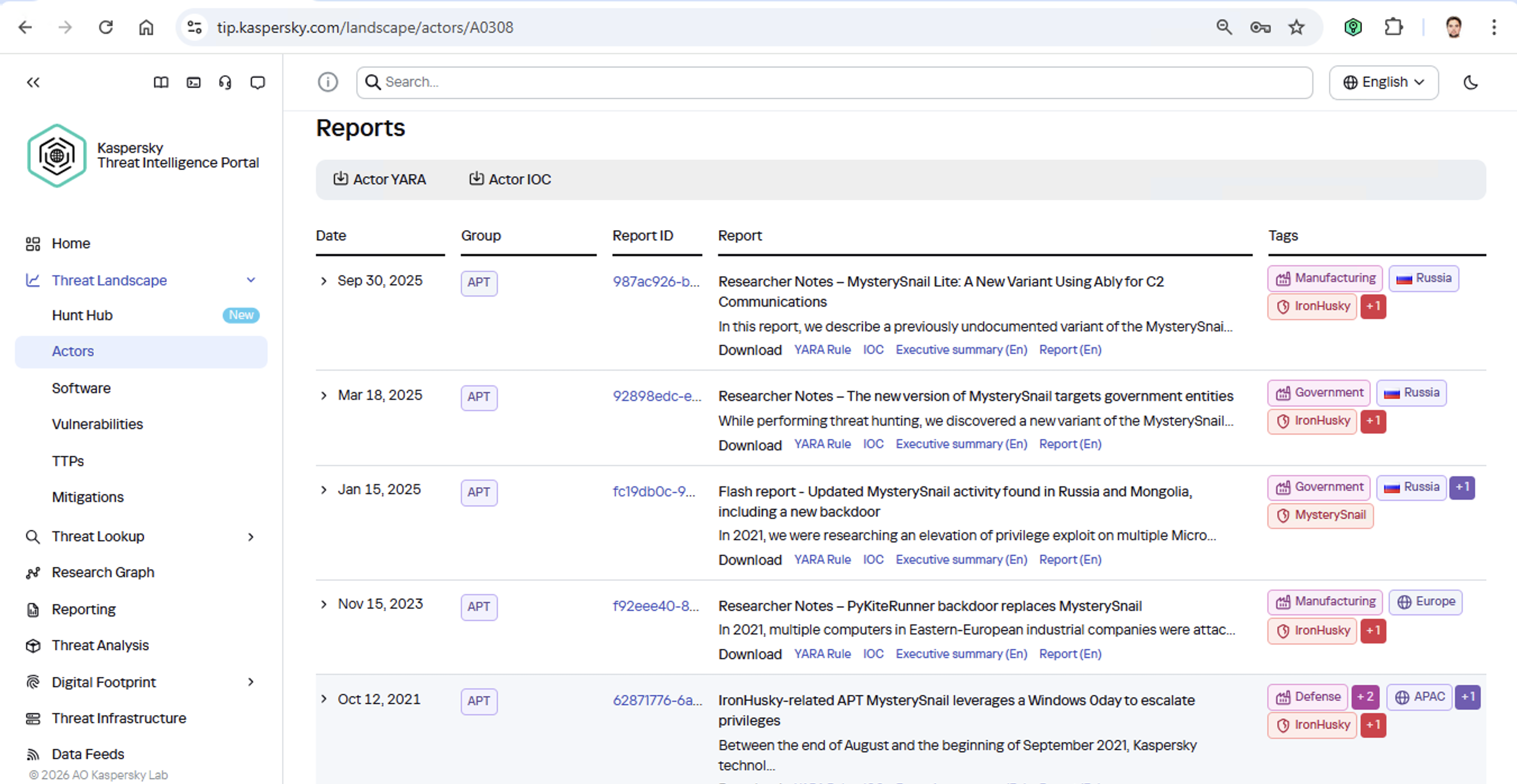
Additional MysterySnail reports

Kaspersky Threat Intelligence Portal provides a ton of additional reports on MysterySnail attacks, each complete with a list of IoCs and YARA rules. These YARA rules can be used to scan all endpoints, and those IoCs can be added into SIEM for constant monitoring. While we’re at it, let’s check the reports to see how these attackers handle data exfiltration, and what kind of data they’re usually hunting for. Now we can actually take steps to head off the attack.

And just like that, MysterySnail, the infrastructure is now tuned to find you and respond immediately. No more spying for you!

Malware attribution methods

Before diving into specific methods, we need to make one thing clear: for attribution to actually work, the threat intelligence provided needs a massive knowledge base of the tactics, techniques, and procedures (TTPs) used by threat actors. The scope and quality of these databases can vary wildly among vendors. In our case, before even building our tool, we spent years tracking known groups across various campaigns and logging their TTPs, and we continue to actively update that database today.

With a TTP database in place, the following attribution methods can be implemented:

  1. Dynamic attribution: identifying TTPs through the dynamic analysis of specific files, then cross-referencing that set of TTPs against those of known hacking groups
  2. Technical attribution: finding code overlaps between specific files and code fragments known to be used by specific hacking groups in their malware

Dynamic attribution

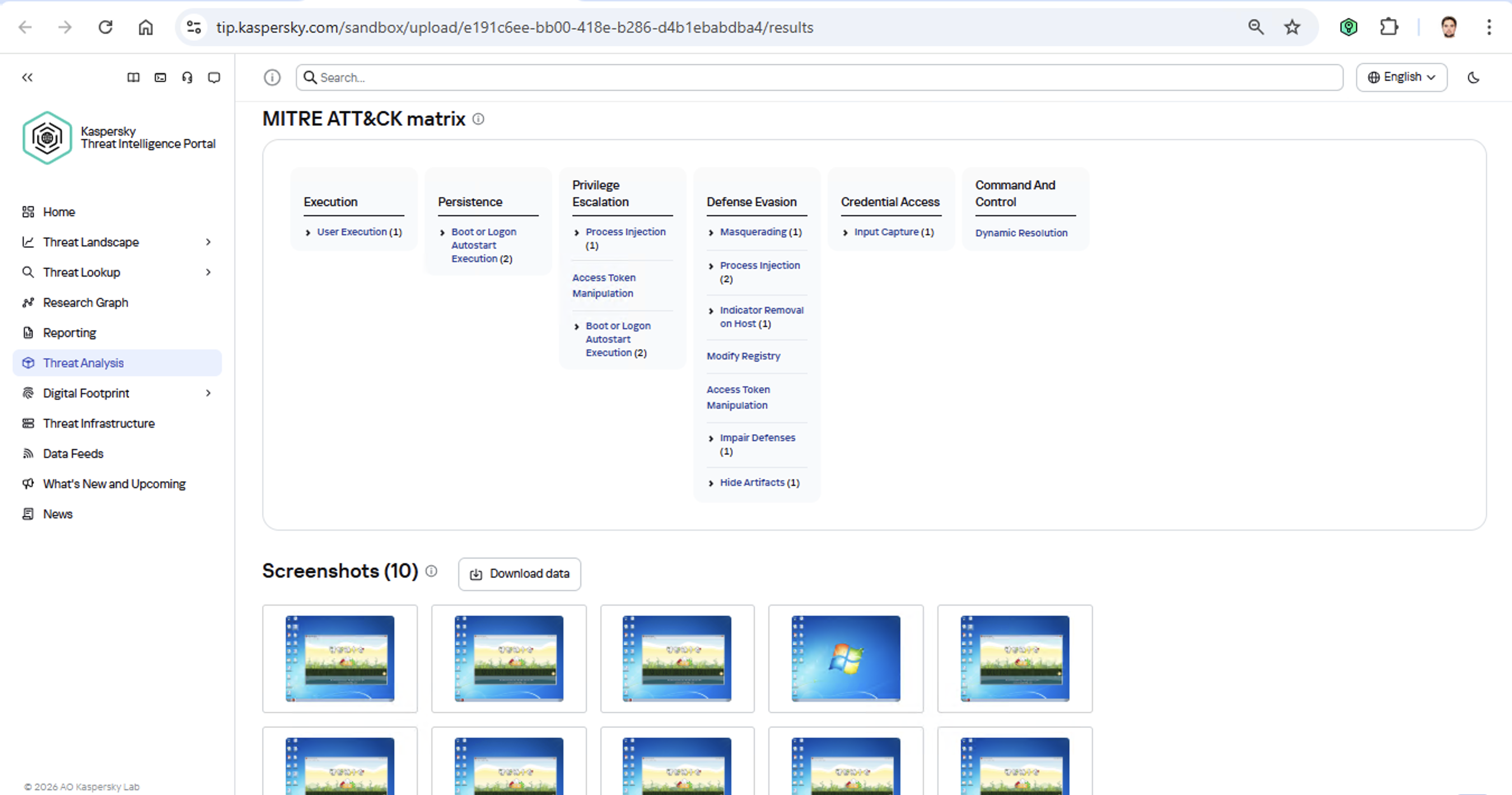
Identifying TTPs during dynamic analysis is relatively straightforward to implement; in fact, this functionality has been a staple of every modern sandbox for a long time. Naturally, all of our sandboxes also identify TTPs during the dynamic analysis of a malware sample:

TTPs of a malware sample

The core of this method lies in categorizing malware activity using the MITRE ATT&CK framework. A sandbox report typically contains a list of detected TTPs. While this is highly useful data, it’s not enough for full-blown attribution to a specific group. Trying to identify the perpetrators of an attack using just this method is a lot like the ancient Indian parable of the blind men and the elephant: blindfolded folks touch different parts of an elephant and try to deduce what’s in front of them from just that. The one touching the trunk thinks it’s a python; the one touching the side is sure it’s a wall, and so on.

Blind men and an elephant

Technical attribution

The second attribution method is handled via static code analysis (though keep in mind that this type of attribution is always problematic). The core idea here is to cluster even slightly overlapping malware files based on specific unique characteristics. Before analysis can begin, the malware sample must be disassembled. The problem is that alongside the informative and useful bits, the recovered code contains a lot of noise. If the attribution algorithm takes this non-informative junk into account, any malware sample will end up looking similar to a great number of legitimate files, making quality attribution impossible. On the flip side, trying to only attribute malware based on the useful fragments but using a mathematically primitive method will only cause the false positive rate to go through the roof. Furthermore, any attribution result must be cross-checked for similarities with legitimate files — and the quality of that check usually depends heavily on the vendor’s technical capabilities.

Kaspersky’s approach to attribution

Our products leverage a unique database of malware associated with specific hacking groups, built over more than 25 years. On top of that, we use a patented attribution algorithm based on static analysis of disassembled code. This allows us to determine — with high precision, and even a specific probability percentage — how similar an analyzed file is to known samples from a particular group. This way, we can form a well-grounded verdict attributing the malware to a specific threat actor. The results are then cross-referenced against a database of billions of legitimate files to filter out false positives; if a match is found with any of them, the attribution verdict is adjusted accordingly. This approach is the backbone of the Kaspersky Threat Attribution Engine, which powers the threat attribution service on the Kaspersky Threat Intelligence Portal.

  •  
❌