
Reading view

WhisperPair exposes Bluetooth earbuds and headphones to tracking and eavesdropping

WhisperPair is a set of attacks that lets an attacker hijack many popular Bluetooth audio accessories that use Google Fast Pair and, in some cases, even track their location via Google’s Find Hub network—all without requiring any user interaction.

Researchers at the Belgian University of Leuven revealed a collection of vulnerabilities they found in audio accessories that use Google’s Fast Pair protocol. The affected accessories are sold by 10 different companies: Sony, Jabra, JBL, Marshall, Xiaomi, Nothing, OnePlus, Soundcore, Logitech, and Google itself.

Google Fast Pair is a feature that makes pairing Bluetooth earbuds, headphones and similar accessories with Android devices quick and seamless, and syncs them across a user’s Google account.

The Google Fast Pair Service (GFPS) utilizes Bluetooth Low Energy (BLE) to discover nearby Bluetooth devices. Many big-name audio brands use Fast Pair in their flagship products, so the potential attack surface consists of hundreds of millions of devices.

The weakness lies in the fact that Fast Pair skips checking whether a device is in pairing mode. As a result, a device controlled by an attacker, such as a laptop, can trigger Fast Pair even when the earbuds are sitting in a user’s ear or pocket, then quickly complete a normal Bluetooth pairing and take full control.

What that control enables depends on the capabilities of the hijacked device. This can range from playing disturbing noises to recording audio via built-in microphones.

It gets worse if the attacker is the first to pair the accessory with an Android device. In that case, the attacker’s Owner Account Key–designating their Google account as the legitimate owner’s—to the accessory. If the Fast Pair accessory also supports Google’s Find Hub network, which many people use to locate lost items, the attacker may then be able to track the accessory’s location.

Google classified this vulnerability, tracked under CVE‑2025‑36911, as critical. However, the only real fix is a firmware or software update from the accessory manufacturer, so users need to check with their specific brand and install accessory updates, as updating the phone alone does not fix the issue.

How to stay safe

To find out whether your device is vulnerable, the researchers published a list and recommend keeping all accessories updated. The research team tested 25 commercial devices from 16 manufacturers using 17 different Bluetooth chipsets. They were able to take over the connection and eavesdrop on the microphone on 68% of the tested devices.​

These are the devices the researchers found to be vulnerable, but it’s possible that others are affected as well:

  • Anker soundcore Liberty 4 NC
  • Google Pixel Buds Pro 2​
  • JBL TUNE BEAM​
  • Jabra Elite 8 Active​
  • Marshall MOTIF II A.N.C.​
  • Nothing Ear (a)​
  • OnePlus Nord Buds 3 Pro​
  • Sony WF-1000XM5​
  • Sony WH-1000XM4​
  • Sony WH-1000XM5​
  • Sony WH-1000XM6​
  • Sony WH-CH720N​
  • Xiaomi Redmi Buds 5 Pro​

We don’t just report on phone security—we provide it

Cybersecurity risks should never spread beyond a headline. Keep threats off your mobile devices by downloading Malwarebytes for iOS, and Malwarebytes for Android today.
  •  

WhisperPair exposes Bluetooth earbuds and headphones to tracking and eavesdropping

WhisperPair is a set of attacks that lets an attacker hijack many popular Bluetooth audio accessories that use Google Fast Pair and, in some cases, even track their location via Google’s Find Hub network—all without requiring any user interaction.

Researchers at the Belgian University of Leuven revealed a collection of vulnerabilities they found in audio accessories that use Google’s Fast Pair protocol. The affected accessories are sold by 10 different companies: Sony, Jabra, JBL, Marshall, Xiaomi, Nothing, OnePlus, Soundcore, Logitech, and Google itself.

Google Fast Pair is a feature that makes pairing Bluetooth earbuds, headphones and similar accessories with Android devices quick and seamless, and syncs them across a user’s Google account.

The Google Fast Pair Service (GFPS) utilizes Bluetooth Low Energy (BLE) to discover nearby Bluetooth devices. Many big-name audio brands use Fast Pair in their flagship products, so the potential attack surface consists of hundreds of millions of devices.

The weakness lies in the fact that Fast Pair skips checking whether a device is in pairing mode. As a result, a device controlled by an attacker, such as a laptop, can trigger Fast Pair even when the earbuds are sitting in a user’s ear or pocket, then quickly complete a normal Bluetooth pairing and take full control.

What that control enables depends on the capabilities of the hijacked device. This can range from playing disturbing noises to recording audio via built-in microphones.

It gets worse if the attacker is the first to pair the accessory with an Android device. In that case, the attacker’s Owner Account Key–designating their Google account as the legitimate owner’s—to the accessory. If the Fast Pair accessory also supports Google’s Find Hub network, which many people use to locate lost items, the attacker may then be able to track the accessory’s location.

Google classified this vulnerability, tracked under CVE‑2025‑36911, as critical. However, the only real fix is a firmware or software update from the accessory manufacturer, so users need to check with their specific brand and install accessory updates, as updating the phone alone does not fix the issue.

How to stay safe

To find out whether your device is vulnerable, the researchers published a list and recommend keeping all accessories updated. The research team tested 25 commercial devices from 16 manufacturers using 17 different Bluetooth chipsets. They were able to take over the connection and eavesdrop on the microphone on 68% of the tested devices.​

These are the devices the researchers found to be vulnerable, but it’s possible that others are affected as well:

  • Anker soundcore Liberty 4 NC
  • Google Pixel Buds Pro 2​
  • JBL TUNE BEAM​
  • Jabra Elite 8 Active​
  • Marshall MOTIF II A.N.C.​
  • Nothing Ear (a)​
  • OnePlus Nord Buds 3 Pro​
  • Sony WF-1000XM5​
  • Sony WH-1000XM4​
  • Sony WH-1000XM5​
  • Sony WH-1000XM6​
  • Sony WH-CH720N​
  • Xiaomi Redmi Buds 5 Pro​

We don’t just report on phone security—we provide it

Cybersecurity risks should never spread beyond a headline. Keep threats off your mobile devices by downloading Malwarebytes for iOS, and Malwarebytes for Android today.

  •  

“Reprompt” attack lets attackers steal data from Microsoft Copilot

Researchers found a method to steal data which bypasses Microsoft Copilot’s built-in safety mechanisms.  

The attack flow, called Reprompt, abuses how Microsoft Copilot handled URL parameters in order to hijack a user’s existing Copilot Personal session.

Copilot is an AI assistant which connects to a personal account and is integrated into Windows, the Edge browser, and various consumer applications.

The issue was fixed in Microsoft’s January Patch Tuesday update, and there is no evidence of in‑the‑wild exploitation so far. Still, it once again shows how risky it can be to trust AI assistants at this point in time.

Reprompt hides a malicious prompt in the q parameter of an otherwise legitimate Copilot URL. When the page loads, Copilot auto‑executes that prompt, allowing an attacker to run actions in the victim’s authenticated session after just a single click on a phishing link.

In other words, attackers can hide secret instructions inside the web address of a Copilot link, in a place most users never look. Copilot then runs those hidden instructions as if the users had typed them themselves.

Because Copilot accepts prompts via a q URL parameter and executes them automatically, a phishing email can lure a user into clicking a legitimate-looking Copilot link while silently injecting attacker-controlled instructions into a live Copilot session.

What makes Reprompt stand out from other, similar prompt injection attacks is that it requires no user-entered prompts, no installed plugins, and no enabled connectors.

The basis of the Reprompt attack is amazingly simple. Although Copilot enforces safeguards to prevent direct data leaks, these protections only apply to the initial request. The attackers were able to bypass these guardrails by simply instructing Copilot to repeat each action twice.

Working from there, the researchers noted:

“Once the first prompt is executed, the attacker’s server issues follow‑up instructions based on prior responses and forms an ongoing chain of requests. This approach hides the real intent from both the user and client-side monitoring tools, making detection extremely difficult.”

How to stay safe

You can stay safe from the Reprompt attack specifically by installing the January 2026 Patch Tuesday updates.

If available, use Microsoft 365 Copilot for work data, as it benefits from Purview auditing, tenant‑level data loss prevention (DLP), and admin restrictions that were not available to Copilot Personal in the research case. DLP rules look for sensitive data such as credit card numbers, ID numbers, health data, and can block, warn, or log when someone tries to send or store it in risky ways (email, OneDrive, Teams, Power Platform connectors, and more).

Don’t click on unsolicited links before verifying with the (trusted) source whether they are safe.

Reportedly, Microsoft is testing a new policy that allows IT administrators to uninstall the AI-powered Copilot digital assistant on managed devices.

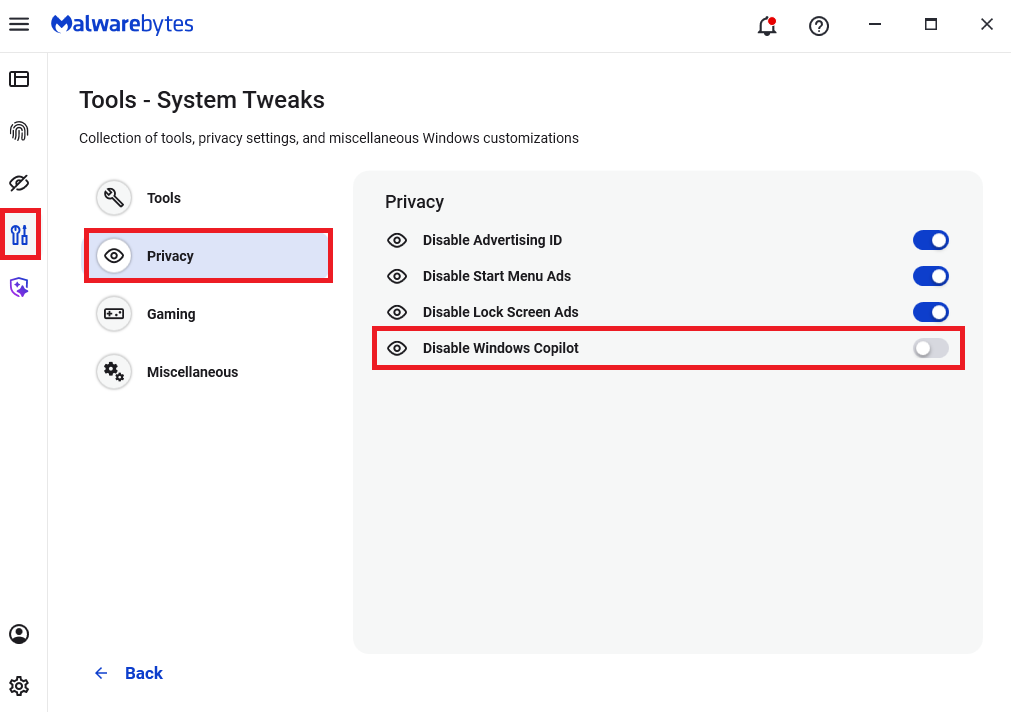
Malwarebytes users can disable Copilot for their personal machines under Tools > Privacy, where you can toggle Disable Windows Copilot to on (blue).

How to use Malwarebytes to disable Windows Copilot

In general, be aware that using AI assistants still pose privacy risks. As long as there are ways for assistants to automatically ingest untrusted input—such as URL parameters, page text, metadata, and comments—and merge it into hidden system prompts or instructions without strong separation or filtering, users remain at risk of leaking private information.

So when using any AI assistant that can be driven via links, browser automation, or external content, it is reasonable to assume “Reprompt‑style” issues are at least possible and should be taken into consideration.


We don’t just report on threats—we remove them

Cybersecurity risks should never spread beyond a headline. Keep threats off your devices by downloading Malwarebytes today.

  •  

“Reprompt” attack lets attackers steal data from Microsoft Copilot

Researchers found a method to steal data which bypasses Microsoft Copilot’s built-in safety mechanisms.  

The attack flow, called Reprompt, abuses how Microsoft Copilot handled URL parameters in order to hijack a user’s existing Copilot Personal session.

Copilot is an AI assistant which connects to a personal account and is integrated into Windows, the Edge browser, and various consumer applications.

The issue was fixed in Microsoft’s January Patch Tuesday update, and there is no evidence of in‑the‑wild exploitation so far. Still, it once again shows how risky it can be to trust AI assistants at this point in time.

Reprompt hides a malicious prompt in the q parameter of an otherwise legitimate Copilot URL. When the page loads, Copilot auto‑executes that prompt, allowing an attacker to run actions in the victim’s authenticated session after just a single click on a phishing link.

In other words, attackers can hide secret instructions inside the web address of a Copilot link, in a place most users never look. Copilot then runs those hidden instructions as if the users had typed them themselves.

Because Copilot accepts prompts via a q URL parameter and executes them automatically, a phishing email can lure a user into clicking a legitimate-looking Copilot link while silently injecting attacker-controlled instructions into a live Copilot session.

What makes Reprompt stand out from other, similar prompt injection attacks is that it requires no user-entered prompts, no installed plugins, and no enabled connectors.

The basis of the Reprompt attack is amazingly simple. Although Copilot enforces safeguards to prevent direct data leaks, these protections only apply to the initial request. The attackers were able to bypass these guardrails by simply instructing Copilot to repeat each action twice.

Working from there, the researchers noted:

“Once the first prompt is executed, the attacker’s server issues follow‑up instructions based on prior responses and forms an ongoing chain of requests. This approach hides the real intent from both the user and client-side monitoring tools, making detection extremely difficult.”

How to stay safe

You can stay safe from the Reprompt attack specifically by installing the January 2026 Patch Tuesday updates.

If available, use Microsoft 365 Copilot for work data, as it benefits from Purview auditing, tenant‑level data loss prevention (DLP), and admin restrictions that were not available to Copilot Personal in the research case. DLP rules look for sensitive data such as credit card numbers, ID numbers, health data, and can block, warn, or log when someone tries to send or store it in risky ways (email, OneDrive, Teams, Power Platform connectors, and more).

Don’t click on unsolicited links before verifying with the (trusted) source whether they are safe.

Reportedly, Microsoft is testing a new policy that allows IT administrators to uninstall the AI-powered Copilot digital assistant on managed devices.

Malwarebytes users can disable Copilot for their personal machines under Tools > Privacy, where you can toggle Disable Windows Copilot to on (blue).

How to use Malwarebytes to disable Windows Copilot

In general, be aware that using AI assistants still pose privacy risks. As long as there are ways for assistants to automatically ingest untrusted input—such as URL parameters, page text, metadata, and comments—and merge it into hidden system prompts or instructions without strong separation or filtering, users remain at risk of leaking private information.

So when using any AI assistant that can be driven via links, browser automation, or external content, it is reasonable to assume “Reprompt‑style” issues are at least possible and should be taken into consideration.


We don’t just report on threats—we remove them

Cybersecurity risks should never spread beyond a headline. Keep threats off your devices by downloading Malwarebytes today.

  •  

Why iPhone users should update and restart their devices now

If you were still questioning whether iOS 26+ is for you, now is the time to make that call.

Why?

On December 12, 2025, Apple patched two WebKit zero‑day vulnerabilities linked to mercenary spyware and is now effectively pushing iPhone 11 and newer users toward iOS 26+, because that’s where the fixes and new memory protections live. These vulnerabilities were primarily used in highly targeted attacks, but such campaigns are likely to expand over time.

WebKit powers the Safari browser and many other iOS applications, so it’s a big attack surface to leave exposed and isn’t limited to “risky” behavior. These vulnerabilities allowed an attacker to execute arbitrary code on a device after exploitation via malicious web content.

Apple has confirmed that attackers are already exploiting these vulnerabilities in the wild, making installation of the update a high‑priority security task for every user. Campaigns that start with diplomats, journalists, or executives often lead to tooling and exploits leaking or being repurposed, so “I’m not a target” is not a viable safety strategy.

Due to public resistance to new features like Liquid Glass, many iPhone users have not yet upgraded to iOS 26.2. Reports suggest adoption of iOS 26 has been unusually slow. As of January 2026, only about 4.6% of active iPhones are on iOS 26.2, and roughly 16% are on any version of iOS 26, leaving the vast majority on older releases such as iOS 18.

However, Apple only ships these fixes and newer protections, such as Memory Integrity Enforcement, on iOS 26+ for supported devices. Users on older, unsupported devices won’t be able to access these protections at all.

Another important factor in the upgrade cycle is restarting the device. What many people don’t realize is that when you restart your device, any memory-resident malware is flushed—unless it has somehow gained persistence, in which case it will return. High-end spyware tools tend to avoid leaving traces needed for persistence and often rely on users not restarting their devices.

Upgrading requires a restart, which makes this a win-win: you get the latest protections, and any memory-resident malware is flushed at the same time.

For iOS and iPadOS users, you can check if you’re using the latest software version, go to Settings > General > Software Update. It’s also worth turning on Automatic Updates if you haven’t already. You can do that on the same screen.

How to stay safe

The most important fix—however painful you may find it—is to upgrade to iOS 26.2. Not doing means missing an accumulating list of security fixes, leaving your device vulnerable to more and more newly found vulnerabilities.

 But here are some other useful tips:

  • Make it a habit to restart your device on a regular basis. The NSA recommends doing this weekly.
  • Do not open unsolicited links and attachments without verifying with the trusted sender.
  • Remember, Apple threat notifications will never ask users to click links, open files, install apps or ask for account passwords or verification code.
  • For Apple Mail users specifically, these vulnerabilities create risk when viewing HTML-formatted emails containing malicious web content.
  • Malwarebytes for iOS can help keep your device secure, with Trusted Advisor alerting you when important updates are available.
  • If you are a high-value target, or you want the extra level of security, consider using Apple’s Lockdown Mode.

We don’t just report on phone security—we provide it

Cybersecurity risks should never spread beyond a headline. Keep threats off your mobile devices by downloading Malwarebytes for iOS, and Malwarebytes for Android today.

  •  

Why iPhone users should update and restart their devices now

If you were still questioning whether iOS 26+ is for you, now is the time to make that call.

Why?

On December 12, 2025, Apple patched two WebKit zero‑day vulnerabilities linked to mercenary spyware and is now effectively pushing iPhone 11 and newer users toward iOS 26+, because that’s where the fixes and new memory protections live. These vulnerabilities were primarily used in highly targeted attacks, but such campaigns are likely to expand over time.

WebKit powers the Safari browser and many other iOS applications, so it’s a big attack surface to leave exposed and isn’t limited to “risky” behavior. These vulnerabilities allowed an attacker to execute arbitrary code on a device after exploitation via malicious web content.

Apple has confirmed that attackers are already exploiting these vulnerabilities in the wild, making installation of the update a high‑priority security task for every user. Campaigns that start with diplomats, journalists, or executives often lead to tooling and exploits leaking or being repurposed, so “I’m not a target” is not a viable safety strategy.

Due to public resistance to new features like Liquid Glass, many iPhone users have not yet upgraded to iOS 26.2. Reports suggest adoption of iOS 26 has been unusually slow. As of January 2026, only about 4.6% of active iPhones are on iOS 26.2, and roughly 16% are on any version of iOS 26, leaving the vast majority on older releases such as iOS 18.

However, Apple only ships these fixes and newer protections, such as Memory Integrity Enforcement, on iOS 26+ for supported devices. Users on older, unsupported devices won’t be able to access these protections at all.

Another important factor in the upgrade cycle is restarting the device. What many people don’t realize is that when you restart your device, any memory-resident malware is flushed—unless it has somehow gained persistence, in which case it will return. High-end spyware tools tend to avoid leaving traces needed for persistence and often rely on users not restarting their devices.

Upgrading requires a restart, which makes this a win-win: you get the latest protections, and any memory-resident malware is flushed at the same time.

For iOS and iPadOS users, you can check if you’re using the latest software version, go to Settings > General > Software Update. It’s also worth turning on Automatic Updates if you haven’t already. You can do that on the same screen.

How to stay safe

The most important fix—however painful you may find it—is to upgrade to iOS 26.2. Not doing means missing an accumulating list of security fixes, leaving your device vulnerable to more and more newly found vulnerabilities.

 But here are some other useful tips:

  • Make it a habit to restart your device on a regular basis. The NSA recommends doing this weekly.
  • Do not open unsolicited links and attachments without verifying with the trusted sender.
  • Remember, Apple threat notifications will never ask users to click links, open files, install apps or ask for account passwords or verification code.
  • For Apple Mail users specifically, these vulnerabilities create risk when viewing HTML-formatted emails containing malicious web content.
  • Malwarebytes for iOS can help keep your device secure, with Trusted Advisor alerting you when important updates are available.
  • If you are a high-value target, or you want the extra level of security, consider using Apple’s Lockdown Mode.

We don’t just report on phone security—we provide it

Cybersecurity risks should never spread beyond a headline. Keep threats off your mobile devices by downloading Malwarebytes for iOS, and Malwarebytes for Android today.

  •  

CISA warns of active attacks on HPE OneView and legacy PowerPoint

The US Cybersecurity and Infrastructure Security Agency (CISA) added both a newly discovered flaw and a much older one to its catalog of Known Exploited Vulnerabilities (KEV).

The KEV catalog gives Federal Civilian Executive Branch (FCEB) agencies a list of vulnerabilities that are known to be exploited in the wild, along with deadlines for when they must be patched. In both of these cases, the due date is January 28, 2026.

But CISA alerts are not just for government agencies. They also provide guidance to businesses and end users about which vulnerabilities should be patched first, based on real-world exploitation.

A critical flaw in HPE OneView

The recently found vulnerability, tracked as CVE-2025-37164, carries a CVSS score of 10 out of 10 and allows remote code execution. The flaw affects HPE OneView, a platform used to manage IT infrastructure, and a patch was released on December 17, 2025.

This critical vulnerability allows a remote, unauthenticated attacker to execute code and potentially gain large-scale control over servers, firmware, and lifecycle management. Management platforms like HPE OneView are often deployed deep inside enterprise networks, where they have extensive privileges and limited monitoring because they are trusted.

Proof of Concept (PoC) code, in the form of a Metasploit module, was made public just one day after the patch was released.

A PowerPoint vulnerability from 2009 resurfaces

The cybersecurity dinosaur here is a vulnerability in Microsoft PowerPoint, tracked as CVE-2009-0556, that dates back more than 15 years. It affects:

  • Microsoft Office PowerPoint 2000 SP3
  • PowerPoint 2002 SP3
  • PowerPoint 2003 SP3
  • PowerPoint in Microsoft Office 2004 for Mac

The flaw allows remote attackers to execute arbitrary code by tricking a victim into opening a specially crafted PowerPoint file that triggers memory corruption.

In the past, this vulnerability was exploited by malware known as Apptom. CISA rarely adds vulnerabilities to the KEV catalog based on ancient exploits, so the “sudden” re‑emergence of the 2009 PowerPoint vulnerability suggests attackers are targeting still‑deployed legacy Office installs.

Successful exploitation can allow attackers to run arbitrary code, deploy malware, and establish a foothold for lateral movement inside a network. Unlike the HPE OneView flaw, this attack requires user interaction—the target must open the malicious PowerPoint file.

Stay safe

When it comes to managing vulnerabilities, prioritizing which patches to apply is an important part of staying safe. So, to make sure you don’t fall victim to exploitation of known vulnerabilities:

  • Keep an eye on the CISA KEV catalog as a guide of what’s currently under active exploitation.
  • Update as fast as you can without interrupting daily routine.
  • Use a real-time up-to-date anti-malware solution to intercept exploits and malware attacks.
  • Don’t open unsolicited attachments without verifying with the—trusted—sender.

We don’t just report on threats—we remove them

Cybersecurity risks should never spread beyond a headline. Keep threats off your devices by downloading Malwarebytes today.

  •  

CISA warns of active attacks on HPE OneView and legacy PowerPoint

The US Cybersecurity and Infrastructure Security Agency (CISA) added both a newly discovered flaw and a much older one to its catalog of Known Exploited Vulnerabilities (KEV).

The KEV catalog gives Federal Civilian Executive Branch (FCEB) agencies a list of vulnerabilities that are known to be exploited in the wild, along with deadlines for when they must be patched. In both of these cases, the due date is January 28, 2026.

But CISA alerts are not just for government agencies. They also provide guidance to businesses and end users about which vulnerabilities should be patched first, based on real-world exploitation.

A critical flaw in HPE OneView

The recently found vulnerability, tracked as CVE-2025-37164, carries a CVSS score of 10 out of 10 and allows remote code execution. The flaw affects HPE OneView, a platform used to manage IT infrastructure, and a patch was released on December 17, 2025.

This critical vulnerability allows a remote, unauthenticated attacker to execute code and potentially gain large-scale control over servers, firmware, and lifecycle management. Management platforms like HPE OneView are often deployed deep inside enterprise networks, where they have extensive privileges and limited monitoring because they are trusted.

Proof of Concept (PoC) code, in the form of a Metasploit module, was made public just one day after the patch was released.

A PowerPoint vulnerability from 2009 resurfaces

The cybersecurity dinosaur here is a vulnerability in Microsoft PowerPoint, tracked as CVE-2009-0556, that dates back more than 15 years. It affects:

  • Microsoft Office PowerPoint 2000 SP3
  • PowerPoint 2002 SP3
  • PowerPoint 2003 SP3
  • PowerPoint in Microsoft Office 2004 for Mac

The flaw allows remote attackers to execute arbitrary code by tricking a victim into opening a specially crafted PowerPoint file that triggers memory corruption.

In the past, this vulnerability was exploited by malware known as Apptom. CISA rarely adds vulnerabilities to the KEV catalog based on ancient exploits, so the “sudden” re‑emergence of the 2009 PowerPoint vulnerability suggests attackers are targeting still‑deployed legacy Office installs.

Successful exploitation can allow attackers to run arbitrary code, deploy malware, and establish a foothold for lateral movement inside a network. Unlike the HPE OneView flaw, this attack requires user interaction—the target must open the malicious PowerPoint file.

Stay safe

When it comes to managing vulnerabilities, prioritizing which patches to apply is an important part of staying safe. So, to make sure you don’t fall victim to exploitation of known vulnerabilities:

  • Keep an eye on the CISA KEV catalog as a guide of what’s currently under active exploitation.
  • Update as fast as you can without interrupting daily routine.
  • Use a real-time up-to-date anti-malware solution to intercept exploits and malware attacks.
  • Don’t open unsolicited attachments without verifying with the—trusted—sender.

We don’t just report on threats—we remove them

Cybersecurity risks should never spread beyond a headline. Keep threats off your devices by downloading Malwarebytes today.

  •  

CISA warns ASUS Live Update backdoor is still exploitable, seven years on

Recently, the Cybersecurity and Infrastructure Security Agency (CISA) added (along with two others) a vulnerability in ASUS Live Update to its catalog of Known Exploited Vulnerabilities (KEV).

The KEV catalog lists vulnerabilities that are known to be exploited in the wild and sets patch deadlines for Federal Civilian Executive Branch (FCEB) agencies. When CISA adds an issue to this list, it’s a strong signal that exploitation is real, ongoing, and urgent.

The ASUS Live Update Embedded Malicious Code vulnerability, tracked as CVE-2025-59374 (with a CVSS score of 9.3), affects Live Update, a utility commonly used to deliver firmware and software updates to ASUS devices.

This isn’t the first time ASUS Live Update has been linked to serious security incidents. In 2019, ASUS responded to media reports about attacks on the Live Update tool by advanced persistent threat (APT) groups, stating that:

“A small number of devices have been implanted with malicious code through a sophisticated attack on our Live Update servers in an attempt to target a very small and specific user group.”

Later investigations revealed that a sophisticated supply chain attack mounted in 2018, attributed to Chinese state-sponsored attackers, had inserted a backdoor into ASUS Live Update. The attack was particularly effective because that utility came preinstalled on most ASUS devices and was used to the automatically update BIOS, UEFI, drivers, and other components.

CISA now notes that the affected devices could be abused to perform unintended actions if certain conditions are met. Originally, the attackers reportedly targeted only around 600 specific devices, based on hashed MAC addresses hardcoded in various versions of the tool. This was despite the fact that millions of users may have downloaded the backdoored utility.

Support for the ASUS Live Update application has since been discontinued. The final intended version of ASUS Live Update was 3.6.15, but it will continue to provide software updates. This is likely why a CVE was assigned and why the vulnerability was added to the KEV catalog. There was no official “why now” statement from ASUS, MITRE, or CISA, but the timing aligns with a legacy, end-of-support product being reclassified as a vulnerability with confirmed active exploitation.

What do ASUS users need to do?

First of all, make sure you’re running a clean version of the utility. ASUS urges users to update to version 3.6.8 or later to address known security issues.

  • Right-click the ASUS Live Update icon at the bottom-right corner of your Windows screen
  • Click About to see the version information as the shown in the picture below.
    check version ASUS live update
  • If you are on an older version, open the program and click Check update immediately
  • ASUS Live Update will automatically find the latest driver and utility.
  • Click Install
  • After updating, recheck and ensure it shows “No updates.”

Alternatively, you can download and install the latest version manually. ASUS’ own support article describes the only official way to get the current Live Update package:​

  1. Go to the ASUS Official Website (asus.com)
  2. Use the search box to find your exact model (e.g., UX580GD)
  3. Open the product page and click Support → Driver & Tools
  4. Select your operating system (e.g., Windows 10/11 64-bit).​
  5. In the Utilities section, locate ASUS Live Update and click Download

This is as close as we could get you to a “direct” official download. The URL is different for every model and ASUS does not provide a central Live Update installer directory. While this makes it harder than it maybe should be, we do recommend using this official download. Given the history of supply chain abuse involving this tool, downloading it from third-party sources is a risk not worth taking.


We don’t just report on threats—we remove them

Cybersecurity risks should never spread beyond a headline. Keep threats off your devices by downloading Malwarebytes today.

  •  

CISA warns ASUS Live Update backdoor is still exploitable, seven years on

Recently, the Cybersecurity and Infrastructure Security Agency (CISA) added (along with two others) a vulnerability in ASUS Live Update to its catalog of Known Exploited Vulnerabilities (KEV).

The KEV catalog lists vulnerabilities that are known to be exploited in the wild and sets patch deadlines for Federal Civilian Executive Branch (FCEB) agencies. When CISA adds an issue to this list, it’s a strong signal that exploitation is real, ongoing, and urgent.

The ASUS Live Update Embedded Malicious Code vulnerability, tracked as CVE-2025-59374 (with a CVSS score of 9.3), affects Live Update, a utility commonly used to deliver firmware and software updates to ASUS devices.

This isn’t the first time ASUS Live Update has been linked to serious security incidents. In 2019, ASUS responded to media reports about attacks on the Live Update tool by advanced persistent threat (APT) groups, stating that:

“A small number of devices have been implanted with malicious code through a sophisticated attack on our Live Update servers in an attempt to target a very small and specific user group.”

Later investigations revealed that a sophisticated supply chain attack mounted in 2018, attributed to Chinese state-sponsored attackers, had inserted a backdoor into ASUS Live Update. The attack was particularly effective because that utility came preinstalled on most ASUS devices and was used to the automatically update BIOS, UEFI, drivers, and other components.

CISA now notes that the affected devices could be abused to perform unintended actions if certain conditions are met. Originally, the attackers reportedly targeted only around 600 specific devices, based on hashed MAC addresses hardcoded in various versions of the tool. This was despite the fact that millions of users may have downloaded the backdoored utility.

Support for the ASUS Live Update application has since been discontinued. The final intended version of ASUS Live Update was 3.6.15, but it will continue to provide software updates. This is likely why a CVE was assigned and why the vulnerability was added to the KEV catalog. There was no official “why now” statement from ASUS, MITRE, or CISA, but the timing aligns with a legacy, end-of-support product being reclassified as a vulnerability with confirmed active exploitation.

What do ASUS users need to do?

First of all, make sure you’re running a clean version of the utility. ASUS urges users to update to version 3.6.8 or later to address known security issues.

  • Right-click the ASUS Live Update icon at the bottom-right corner of your Windows screen
  • Click About to see the version information as the shown in the picture below.
    check version ASUS live update
  • If you are on an older version, open the program and click Check update immediately
  • ASUS Live Update will automatically find the latest driver and utility.
  • Click Install
  • After updating, recheck and ensure it shows “No updates.”

Alternatively, you can download and install the latest version manually. ASUS’ own support article describes the only official way to get the current Live Update package:​

  1. Go to the ASUS Official Website (asus.com)
  2. Use the search box to find your exact model (e.g., UX580GD)
  3. Open the product page and click Support → Driver & Tools
  4. Select your operating system (e.g., Windows 10/11 64-bit).​
  5. In the Utilities section, locate ASUS Live Update and click Download

This is as close as we could get you to a “direct” official download. The URL is different for every model and ASUS does not provide a central Live Update installer directory. While this makes it harder than it maybe should be, we do recommend using this official download. Given the history of supply chain abuse involving this tool, downloading it from third-party sources is a risk not worth taking.


We don’t just report on threats—we remove them

Cybersecurity risks should never spread beyond a headline. Keep threats off your devices by downloading Malwarebytes today.

  •  

Tracking Attackers With Word Web Bugs (Cyber Deception)

Hello and welcome! My name is John Strand, and in this video, we’re going to be talking about Word Web Bug Servers. Now the idea of a Word Web Bug […]

The post Tracking Attackers With Word Web Bugs (Cyber Deception) appeared first on Black Hills Information Security, Inc..

  •  

Bugging Microsoft Files: Part 1 – Docx Files using Microsoft Word

Ethan Robish // If you’re familiar with ADHD and Web Word Bugs, you likely already know the method to create web tracking software using .html files renamed as .doc files. […]

The post Bugging Microsoft Files: Part 1 – Docx Files using Microsoft Word appeared first on Black Hills Information Security, Inc..

  •  
❌