Some software providers have decided to lead by example and offer users a choice about the Artificial Intelligence (AI) features built into their products.
The latest example is Mozilla, which now offers users a one-click option to disable generative AI features in the Firefox browser.
Audiences are divided about the use of AI, or as Mozilla put it on their blog:
“AI is changing the web, and people want very different things from it. We’ve heard from many who want nothing to do with AI. We’ve also heard from others who want AI tools that are genuinely useful. Listening to our community, alongside our ongoing commitment to offer choice, led us to build AI controls.”
Mozilla is adding an AI Controls area to Firefox settings that centralizes the management of all generative AI features. This consists mainly of a master switch, “Block AI enhancements,” which lets users effectively run Firefox “without AI.” It blocks existing and future generative AI features and hides pop‑ups or prompts advertising them.
Once you set your AI preferences in Firefox, they stay in place across updates. You can also change them whenever you want.
Starting with Firefox 148, which rolls out on February 24, you’ll find a new AI controls section within the desktop browser settings.
Image courtesy of Mozilla
You can turn everything off with one click or take a more granular approach. At launch, these features can be controlled individually:
Translations, which help you browse the web in your preferred language.
Alt text in PDFs, which add accessibility descriptions to images in PDF pages.
AI-enhanced tab grouping, which suggests related tabs and group names.
Link previews, which show key points before you open a link.
An AI chatbot in the sidebar, which lets you use your chosen chatbot as you browse, including options like Anthropic Claude, ChatGPT, Microsoft Copilot, Google Gemini and Le Chat Mistral.
We applaud this move to give more control to the users. Other companies have done the same, including Mozilla’s competitor DuckDuckGo, which made AI optional after putting the decision to a user vote. Earlier, browser developer Vivaldi took a stand against incorporating AI altogether.
Open-source email service Tuta also decided not to integrate AI features. After only 3% of Tuta users requested them, Tuta removed an AI copilot from its development roadmap.
Even Microsoft seems to have recoiled from pushing AI to everyone, although so far it has focused on walking back defaults and tightening per‑feature controls rather than offering a single, global off switch.
Choices
Many people are happy to use AI features, and as long as you’re aware of the risks and the pitfalls, that’s fine. But pushing these features on users who don’t want them is likely to backfire on software publishers.
Which is only right. After all, you’re paying the bill, so you should have a choice. Before installing a new browser, inform yourself not only about its privacy policy, but also about what control you’ll have over AI features.
Looking at recent voting results, I think it’s safe to say that in the AI gold rush, the real premium feature isn’t a chatbot button—it’s the off switch.
We don’t just report on privacy—we offer you the option to use it.
Privacy risks should never spread beyond a headline. Keep your online privacy yours by using Malwarebytes Privacy VPN.
Some software providers have decided to lead by example and offer users a choice about the Artificial Intelligence (AI) features built into their products.
The latest example is Mozilla, which now offers users a one-click option to disable generative AI features in the Firefox browser.
Audiences are divided about the use of AI, or as Mozilla put it on their blog:
“AI is changing the web, and people want very different things from it. We’ve heard from many who want nothing to do with AI. We’ve also heard from others who want AI tools that are genuinely useful. Listening to our community, alongside our ongoing commitment to offer choice, led us to build AI controls.”
Mozilla is adding an AI Controls area to Firefox settings that centralizes the management of all generative AI features. This consists mainly of a master switch, “Block AI enhancements,” which lets users effectively run Firefox “without AI.” It blocks existing and future generative AI features and hides pop‑ups or prompts advertising them.
Once you set your AI preferences in Firefox, they stay in place across updates. You can also change them whenever you want.
Starting with Firefox 148, which rolls out on February 24, you’ll find a new AI controls section within the desktop browser settings.
Image courtesy of Mozilla
You can turn everything off with one click or take a more granular approach. At launch, these features can be controlled individually:
Translations, which help you browse the web in your preferred language.
Alt text in PDFs, which add accessibility descriptions to images in PDF pages.
AI-enhanced tab grouping, which suggests related tabs and group names.
Link previews, which show key points before you open a link.
An AI chatbot in the sidebar, which lets you use your chosen chatbot as you browse, including options like Anthropic Claude, ChatGPT, Microsoft Copilot, Google Gemini and Le Chat Mistral.
We applaud this move to give more control to the users. Other companies have done the same, including Mozilla’s competitor DuckDuckGo, which made AI optional after putting the decision to a user vote. Earlier, browser developer Vivaldi took a stand against incorporating AI altogether.
Open-source email service Tuta also decided not to integrate AI features. After only 3% of Tuta users requested them, Tuta removed an AI copilot from its development roadmap.
Even Microsoft seems to have recoiled from pushing AI to everyone, although so far it has focused on walking back defaults and tightening per‑feature controls rather than offering a single, global off switch.
Choices
Many people are happy to use AI features, and as long as you’re aware of the risks and the pitfalls, that’s fine. But pushing these features on users who don’t want them is likely to backfire on software publishers.
Which is only right. After all, you’re paying the bill, so you should have a choice. Before installing a new browser, inform yourself not only about its privacy policy, but also about what control you’ll have over AI features.
Looking at recent voting results, I think it’s safe to say that in the AI gold rush, the real premium feature isn’t a chatbot button—it’s the off switch.
We don’t just report on privacy—we offer you the option to use it.
Privacy risks should never spread beyond a headline. Keep your online privacy yours by using Malwarebytes Privacy VPN.
Meta plans to test exclusive features that will be incorporated in paid versions of Facebook, Instagram, and WhatsApp. It confirmed these plans to TechCrunch.
But these plans are not to be confused with the ad-free subscription options that Meta introduced for Facebook and Instagram in the EU, the European Economic Area, and Switzerland in late 2023 and framed as a way to comply with General Data Protection Regulation (GDPR) and Digital Markets Act requirements.
From November 2023, users in those regions could either keep using the services for free with personalized ads or pay a monthly fee for an ad‑free experience. European rules require Meta to get users’ consent in order to show them targeted ads, so this was an obvious attempt to recoup advertising revenue when users declined to give that consent.
This year, users in the UK were given the same choice: use Meta’s products for free or subscribe to use them without ads. But only grudgingly, judging by the tone in the offer… “As part of laws in your region, you have a choice.”
The ad-free option that has been rolling out coincides with the announcement of Meta’s premium subscriptions.
That ad-free option, however, is not what Meta is talking about now.
The newly announced plans are not about ads, and they are also separate from Meta Verified, which starts at around $15 a month and focuses on creators and businesses, offering a verification badge, better support, and anti‑impersonation protection.
Instead, these new subscriptions are likely to focus on additional features—more control over how users share and connect, and possibly tools such as expanded AI capabilities, unlimited audience lists, seeing who you follow that doesn’t follow you back, or viewing stories without the poster knowing it was you.
These examples are unconfirmed. All we know for sure is that Meta plans to test new paid features to see which ones users are willing to pay for and how much they can charge.
Meta has said these features will focus on productivity, creativity, and expanded AI.
My opinion
Unfortunately, this feels like another refusal to listen.
Most of us aren’t asking for more AI in our feeds. We’re asking for a basic sense of control: control over who sees us, what’s tracked about us, and how our data is used to feed an algorithm designed to keep us scrolling.
Users shouldn’t have to choose between being mined for behavioral data or paying a monthly fee just to be left alone. The message baked into “pay or be profiled” is that privacy is now a luxury good, not a default right. But while regulators keep saying the model is unlawful, the experience on the ground still nudges people toward the path of least resistance: accept the tracking and move on.
Even then, this level of choice is only available to users in Europe.
Why not offer the same option to users in the US? Or will it take stronger US privacy regulation to make that happen?
We don’t just report on threats – we help protect your social media
Meta plans to test exclusive features that will be incorporated in paid versions of Facebook, Instagram, and WhatsApp. It confirmed these plans to TechCrunch.
But these plans are not to be confused with the ad-free subscription options that Meta introduced for Facebook and Instagram in the EU, the European Economic Area, and Switzerland in late 2023 and framed as a way to comply with General Data Protection Regulation (GDPR) and Digital Markets Act requirements.
From November 2023, users in those regions could either keep using the services for free with personalized ads or pay a monthly fee for an ad‑free experience. European rules require Meta to get users’ consent in order to show them targeted ads, so this was an obvious attempt to recoup advertising revenue when users declined to give that consent.
This year, users in the UK were given the same choice: use Meta’s products for free or subscribe to use them without ads. But only grudgingly, judging by the tone in the offer… “As part of laws in your region, you have a choice.”
The ad-free option that has been rolling out coincides with the announcement of Meta’s premium subscriptions.
That ad-free option, however, is not what Meta is talking about now.
The newly announced plans are not about ads, and they are also separate from Meta Verified, which starts at around $15 a month and focuses on creators and businesses, offering a verification badge, better support, and anti‑impersonation protection.
Instead, these new subscriptions are likely to focus on additional features—more control over how users share and connect, and possibly tools such as expanded AI capabilities, unlimited audience lists, seeing who you follow that doesn’t follow you back, or viewing stories without the poster knowing it was you.
These examples are unconfirmed. All we know for sure is that Meta plans to test new paid features to see which ones users are willing to pay for and how much they can charge.
Meta has said these features will focus on productivity, creativity, and expanded AI.
My opinion
Unfortunately, this feels like another refusal to listen.
Most of us aren’t asking for more AI in our feeds. We’re asking for a basic sense of control: control over who sees us, what’s tracked about us, and how our data is used to feed an algorithm designed to keep us scrolling.
Users shouldn’t have to choose between being mined for behavioral data or paying a monthly fee just to be left alone. The message baked into “pay or be profiled” is that privacy is now a luxury good, not a default right. But while regulators keep saying the model is unlawful, the experience on the ground still nudges people toward the path of least resistance: accept the tracking and move on.
Even then, this level of choice is only available to users in Europe.
Why not offer the same option to users in the US? Or will it take stronger US privacy regulation to make that happen?
We don’t just report on threats – we help protect your social media
The Risk-Reducing Power of Flashpoint Video Search
An essential investigative component, Flashpoint’s industry-first video search technology surfaces logos, text, explicit content, and other critical intelligence for CTI, Fraud, Brand Protection, and Physical Security teams
When advertising and selling their services, or boasting about their exploits, threat actors will often post media, including video, to illicit communities that serve as proof points for potential buyers and partners.
They showcase sensitive information and stolen goods, including: stolen identities, compromised bank accounts, checks, and stolen credit cards; gift cards and receipts; fake, unlicensed merchandise; ATM skimmers and shimmers, guns and drugs, exploit code, RDP access, brand impersonation, physical security threats, and much more.
Now, video use amongst threat actors is on the rise, as media-rich, mobile-first communication is becoming a primary mode of communication in illicit communities. Gaining visibility into this threat landscape is essential intelligence to CTI, Fraud, Brand Protection, and Physical Security teams, among other practitioners whose job it is to protect against exposure to fraud, corporate brand abuse, and acts of violence:
Even better is having a way to search this media across text, images, and video in order to identify potential threats. Flashpoint offers all three—and our new video search analysis is a unique offering on the market.
What is Flashpoint Video Search Technology?
Building on the success of our OCR capability for images, security teams can now surface threats in videos posted by threat actors using object detection, logo detection, text extraction, and explicit content detection directly within the Flashpoint Intelligence Platform.
Security teams across various industries in public and private sectors have realized the value of searching for, and being alerted on, images of company assets that pop up on open-source and darknet communities. Flashpoint’s video search analysis expands the scope of coverage, offering additional insights into a fast-growing medium used by threat actors.
What Can It Identify?
Video search analysis gives teams the ability to search for and generate keyword specific alerts for text, logos, and organizational assets inside videos across Flashpoint intelligence collections. Flashpoint’s new video search analysis helps to identify:
Labels and objects, including products, locations, activities, and animal species
Logos, including a library of more than 100,000 brand-specific media
Text, including the detection and extraction of text within an input video using OCR
Explicit content, including adult content in videos, which is generally defined as inappropriate for people under the age of 18
What Can Flashpoint Video Search Identify?
Video search analysis equips security teams with the additional tools and intelligence they need in their missions of preventing fraud and protecting their organization.
Financial Fraud
Search for a bank or institution name to discover videos with that particular logo or text in them. Locate a threat actor boasting about ATM access, logos or text on a check or receipts, or of a physical brick and mortar building. Video search analysis can be used to uncover instances of threat actors engaging in using ATMs to extract cash, duplicating false checks, credit card fraud, and POS skimmers.
Additionally, Flashpoint financial services customers have found countless instances of potentially fraudulent accounts, checks, and cards using image OCR—and our new video search analysis functionality will only enhance and increase the ability to prevent financial fraud. One Flashpoint financial services customer detected more than $4M in illicitly marketed assets, including checks and compromised accounts, using our OCR capabilities.
Physical Security
Enhance executive protection by monitoring for specific personally identifiable information (PII) related to employees, executives, and organizations. With this, physical security teams can work to prevent acts of violence and crimes or threats at points of interest, events, or physical locations.
Brand Protection
Monitor for an organization’s brand in videos shared by illicit actors, including the ability to identify insider threats via videos of compromised web servers, compromised customer accounts, and stolen merchandise.
Access Flashpoint Video Search Today
Learn more about how Flashpoint’s industry-first video search technology can help your teams surface logos, text, explicit content, and other critical intelligence.
Frequently Asked Questions (FAQs)
What is Flashpoint Video Search and how does it help investigators?
Flashpoint Video Search is an industry-first technology within the Flashpoint Intelligence Platform that allows users to search for specific objects, text, and logos inside video files. It helps investigators by surfacing critical intelligence from videos posted in illicit communities, such as threat actors boasting about stolen bank accounts, showing off illegal weapons, or demonstrating how to use POS skimmers.
Flashpoint Video Search Capability
Investigative Benefit
Logo Detection
Identifies a library of 100,000+ brand logos inside video frames.
Text Extraction (OCR)
Reads and pulls text, such as names on checks or credit cards, from video.
Object Labeling
Detects physical items like ATM skimmers, guns, or specific products.
How does Flashpoint Video Search assist in preventing financial fraud?
Flashpoint Video Search assists in preventing financial fraud by allowing banks and institutions to scan for their brand names and assets in videos shared on the dark web. Fraud teams can use Flashpoint to find threat actors showcasing “proof” of their exploits, such as videos of cash being extracted from compromised ATMs or close-ups of stolen checks and credit cards, enabling the bank to cancel those assets immediately.
Asset Recovery: Surfaces compromised accounts and cards before they can be fully exploited.
Skimmer Detection: Identifies videos showing the installation or use of physical POS skimmers.
Risk Mitigation: Helps organizations detect and prevent millions of dollars in potential losses.
Why is Flashpoint Video Search unique for brand and physical protection?
Flashpoint Video Search is unique for brand and physical protection because it provides visibility into a fast-growing medium that traditional text-based search tools miss. Physical security teams can use Flashpoint to detect threats against executives or facilities by monitoring for specific faces or locations in videos. Brand protection teams can identify insider threats by finding videos of stolen merchandise or compromised corporate servers that are being marketed for sale.
Protection Type
Flashpoint Application
Brand Protection
Finds videos of counterfeit products or brand impersonation attempts.
Executive Protection
Monitors for leaked PII or visual threats against high-profile personnel.
Physical Security
Identifies threats at specific physical locations, events, or points of interest.

 Login
Login
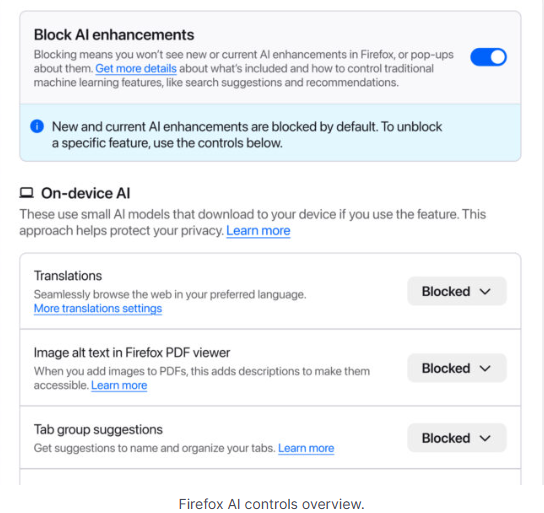
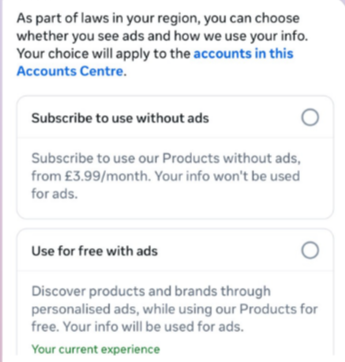


 Table Of Contents
