Customer service chatbots have one job: get the user what they’re asking for without bothering a human. Meta’s new AI support assistant took that brief a little too seriously. Over the past few months, attackers have been opening support chats, telling the bot they were locked out of Instagram accounts they didn’t own, and walking away with the keys.
Over the weekend, Meta pushed an emergency patch after Instagram accounts belonging to the Obama White House (now dormant), beauty retailer Sephora, and a senior US Space Force official were taken over and briefly defaced with pro-Iranian imagery. Security researcher and former Meta employee Jane Manchun Wong was also hit.
How the trick worked
The attack was simple. Attackers worked out where the account owner lived (there are lists of account owners’ home cities online, or they could just research the target). Then they used a VPN to match the target account’s geographic region, which avoided raising flags with Instagram’s security systems.
Then they started a normal password reset and opened the support chat. They asked the AI bot providing support to change the email address on the account, and it did exactly that, sending a one-time code straight to the attacker’s inbox.
To do this, the chatbot appears to have been wired into Meta’s account management systems with permission to make account changes, but without being taught how to verify it was talking to the real account owner. Security people have a name for that: “confused deputy.” The term has been around since the 1980s.
In fairness to the confused bot, attackers were successful even if the enhanced security was triggered. They would apparently create video deepfakes of their targets using images that were harvested from—you guessed it—Instagram.
Meta hoisted on its own AI petard
Meta has been shedding headcount and pouring money into AI, and rolled out its AI-powered support assistant earlier this year to help handle account recovery and other support requests.
The downside is that the AI appears to have been given the ability to perform actions such as email changes and password resets without applying enough safeguards to confirm the user’s identity first.
Meta communications executive Andy Stone said on X that the issue was resolved and impacted accounts were being secured. The company has not disclosed how many accounts were affected.
What actually worked
Why would anyone want to hack an Instagram account anyway? Revenge can be a driver, but more often than not, financial gain is the goal. Hijackers have blackmailed businesses that rely on those accounts for marketing.
Attackers using this technique have also been spotted targeting “OG” accounts with short or highly desirable usernames. If you joined Instagram early and registered a memorable handle, it can be worth thousands of dollars on underground markets.
What can you do to protect yourself?
A perennial piece of advice still holds: turn on multi-factor authentication (MFA). According to veteran cybersecurity reporter Brian Krebs, the attack failed against accounts that had MFA enabled, including those using SMS codes.
That doesn’t make MFA perfect, but it adds an important layer of protection.
So the practical advice is unglamorous:
Open Instagram’s Settings
Navigate to your Meta Accounts Center
Turn on Two-factor authentication. An authenticator app is better than SMS, but either is better than nothing.
Do it now, because this might not yet be over. TheCyberSecGuru reports that another attack is circulating, this time using an Android emulator called BlueStacks running a modified version of Instagram to send new prompts with hidden characters designed to manipulate the AI.
Expect more snafus from “helpful” bots
This won’t be the last attack against AI chatbots. As more companies use AI to reduce customer support costs, their attack surface will grow, and they’ll make plenty of mistakes as they try to balance security and functionality.
The Meta exploit is patched, but the confused deputy concept is not. And there’s nothing quite as damaging as a confused AI with the keys to your digital life.
Scammers don’t need to hack you. They just need you to click once.
California has sued the former shell of DNA testing company 23andMe over alleged security failures and misleading statements surrounding its 2023 data breach.
On May 27, 2026, Attorney General Rob Bonta filed suit in San Francisco Superior Court against Chrome Holding Co., the company now handling 23andMe’s remaining assets following its bankruptcy.
California’s complaint accuses 23andMe of failing to implement reasonable security measures to protect sensitive data and alleges violations of several state privacy and consumer protection laws. It also accuses the company of making misleading statements about its security practices.
The 2023 breach used old-school credential-stuffing tactics against 23andMe’s login page. Attackers operated inside the systems for roughly five months without anyone noticing. The direct compromise was modest, affecting about 14,000 accounts, but that was all the attackers needed to steal the data of just under seven million customers.
The intruders pivoted from those accounts through DNA Relatives, the platform’s headline feature, which enabled people to determine who they were connected with through DNA similarity. The lawsuit alleges a critical coding error in that feature enabled the perpetrators to scrape data from millions of other users connected by biological kinship.
The victim-blaming defense became evidence
After the breach went public, 23andMe sent victims’ legal representatives a letter blaming users for reusing passwords from sites that had been compromised earlier. The exposed data, the company suggested, had been shared of the users’ own free will and would not cause “pecuniary harm.”
The harms stemming from genetic data theft extend far beyond financial losses, however. The genetic information that was stolen enabled thieves to determine an individual’s genetic origins.
The data was reportedly offered for sale on the dark web with this information as a selling point, enabling sellers to offer records on Asian American Pacific Islander (AAPI) or Jewish customers, for example. Bonta’s office pointed out that antisemitic violence was on the rise at the time.
In spite of the letter’s attempt to blame users, only about 14,000 accounts were directly compromised through password reuse. The rest of the data was allegedly exposed through 23andMe’s own product. According to the complaint, the coding error in DNA Relatives exposed the data of anyone who had opted into the service, not just those linked to the 14,000 compromised accounts.
Can the state recover damages?
California is seeking statutory penalties ranging from $1,000 to $7,500 per violation. With 855,541 Californians among the affected users, the costs could mount up quickly.
The question is how much of it the state will collect if it wins its case. 23andMe filed for Chapter 11 bankruptcy in March 2025, then sold most of its assets, including the genomic data of more than 15 million customers, to TTAM Research Institute, a nonprofit founded by former 23andMe CEO Anne Wojcicki. California and several other states opposed the sale on Genetic Information Privacy Act grounds, but a federal bankruptcy judge approved it. The states are now appealing that decision.
Chrome Holding Co., the corporate shell that remains of 23andMe, received $305 million from that sale. But others have already been picking over what’s left.
Other regulators have already had their turn. The UK Information Commissioner’s Office fined 23andMe £2.31 million in June last year following a joint investigation with the Privacy Commissioner of Canada. A federal court initially approved a $30 million class-action settlement covering most US customer claims. That settlement later grew to $50 million and received final approval in January 2026.
What customers can do
If you tested with 23andMe, the standard breach hygiene still applies. Reset any password you reused on other sites and turn on multi-factor authentication wherever it’s offered. Credential stuffing only works on usernames and passwords that have already been exposed elsewhere. Also watch for phishing attacks that name-drop 23andMe or the breach itself. And maybe weigh the benefits of using DNA testing services against the security risks.
Because there’s one part of this that no fine and no settlement can solve: stolen genetic data sold on the dark web cannot be taken back. Passwords can be changed. DNA can’t.
Browse like no one’s watching.
Malwarebytes Privacy VPN encrypts your connection and never logs what you do, so the next story you read doesn’t have to feel personal. Try it free →
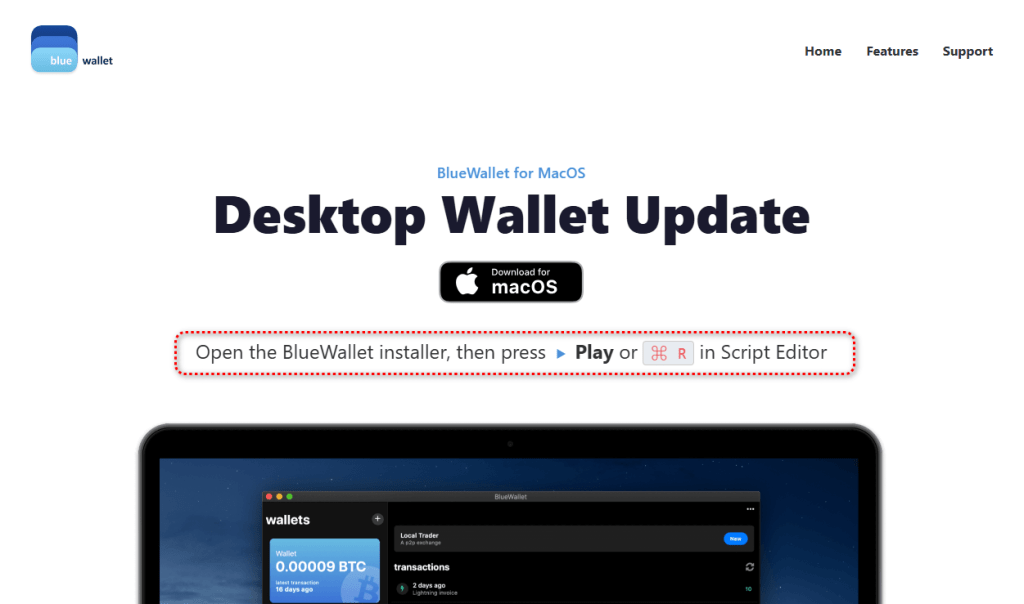
A fake website impersonating BlueWallet (a real Bitcoin wallet) is targeting Mac users with a simple but effective attack. BlueWallet itself has not been compromised. Instead, cybercriminals have stolen the name and branding of the legitimate Bitcoin wallet to make a malicious download appear trustworthy.
If you went looking for a cryptocurrency wallet and landed on one of these fake BlueWallet download pages, the site tried to trick you into opening a downloaded file in a built-in macOS tool and pressing “Run.” If you followed those instructions, the malware could steal saved passwords, browser logins, cryptocurrency wallets, documents, and other sensitive data. It also watches the clipboard for cryptocurrency wallet addresses and can replace them with attacker-controlled addresses..
That last feature is particularly dangerous. If you copy a wallet address before sending funds, the malware can silently replace it with the attacker’s address. Everything looks normal on screen, but the money goes somewhere else.
Should you worry? Only if you downloaded and ran the file. Simply visiting the page and closing it does nothing on its own. The attack depends entirely on the user opening the script and pressing play.
If you did run it, treat the machine as compromised and follow the steps below.
What to do if you may have run it
If you opened the file and pressed play, assume your device was compromised and work through these steps:
Disconnect the machine from the network to cut the control channel
The most interesting part of this campaign isn’t technical. The attackers didn’t break into the Mac or bypass Apple’s security protections. They persuaded victims to run the malware themselves.
The fake website walks users through the process with a convincing download page, simple instructions, and even a keyboard shortcut. The attack succeeds because the victim trusts what they are seeing.
As operating systems get better at blocking malicious software, attackers are increasingly investing in social engineering. Instead of finding ways around security controls, they convince people to click through them.
That’s why one habit is becoming increasingly important: Be suspicious of any download that arrives with instructions to open it in a scripting tool, developer utility, or Terminal window and press “Run.”
In this campaign, a single press of ⌘R was enough to turn a Mac into a password stealer, cryptocurrency wallet thief, clipboard hijacker, and remote access tool.
Technical analysis
Stage one: The AppleScript downloader
The page lives at update-bluewallet[.]com, a domain name close enough to the real wallet (bluewallet.io) to pass a quick glance. The first thing the page does is not wait for consent. Its script calls a download routine on a two-second timer the moment the page loads, and again if the visitor clicks either of two buttons.
The file that lands in the Downloads folder is named BlueWallet Installer.applescript, an extension most people have never seen and have no instinct to distrust.
Then the page does something quietly clever. After a short delay, it rewrites its own status text to read like setup instructions: open the installer, then press the play button or ⌘R. It even draws a small blue play triangle in the text so the wording matches the real Script Editor interface the victim is about to see.
The page walks the victim through the exact motions needed to run the file.
On modern macOS, an unsigned application downloaded from the web gets quarantined and checked before it can run. A plain script opened in Script Editor and executed by the user sidesteps that flow. The person is manually instructing a trusted Apple tool to run code, so there is no notarization gate to fail.
This is why the attacker chose an AppleScript instead of a packaged app: it moves the risky action out of the operating system’s hands and into the victim’s.
The AppleScript itself is remarkably short. Stripped of its decorative comments, including a fake version number and a line claiming to be a “Brew Install Upgrade,” it runs a single base64-encoded shell command and then tells Script Editor to quit without saving, removing the evidence from view.
It fetches a second script from a remote host, saves it to a hidden file in the temp directory, makes it executable, and runs it in the background with all output suppressed.
The victim sees nothing. The filename .sysupd.sh is dressed up to look like a system update. This is a textbook staged dropper: stage one is tiny and disposable, and its only job is to fetch the real payload.
Stage two: Payload analysis
The first lines establish how the malware intends to operate. It sets umask 077 so everything it creates is readable only by the compromised user, then builds a hidden, randomly named working directory under /tmp seeded from /dev/urandom.
Its configuration is obfuscated, but weakly. A small function named _xd walks a hex string two characters at a time and XORs each byte against a hardcoded repeating key: swckR9JCD2Uu.
That function decodes the script’s Telegram bot token, chat identifier, secondary command token, and staging URL at runtime. It is enough to defeat tools that only search for plaintext strings, but not much more. Because the key and algorithm are both sitting in the file, every encoded value is fully recoverable.
One detail stands out: The decoded Telegram chat value and decoded command-and-control chat value are identical. The attacker is using a single Telegram channel as both the exfiltration drop and the control channel. It is cheap, scalable, encrypted, and blends into ordinary HTTPS traffic.
Not everything is obfuscated. The clipboard-hijacking addresses are sitting in the file in plain text: a Bitcoin address, an Ethereum address, and a Solana address. These are the addresses the implant swaps in when it catches you copying a wallet address. Because they are public on their respective blockchains, they are also among the most useful artifacts in the whole sample.
What the malware steals
The second stage’s collection routines are sweeping. They pull from six broad categories.
1. Web browsers
The script extracts history, cookies, login data, and bookmarks from a wide range of browsers, including:
Chromium-based browsers: Google Chrome Stable, Beta, Canary, and Dev; Brave; Microsoft Edge; Vivaldi; Opera; Opera GX; Arc; Chromium; Coccoc; and Yandex
Firefox-based browsers: Firefox, Waterfox, Pale Moon, Zen, and LibreWolf
macOS native browser data: Safari cookies, history, and form values
Other ecosystems: Yoroi, Lace, Petra, Martian, Suiet, Talisman, SubWallet, Braavos, and Temple
3. Password managers and security tools
The malware targets local storage and settings for several password managers, including LastPass, 1Password, Dashlane, Bitwarden, Keeper, RoboForm, NordPass, Enpass, StickyPassword, TrueKey, Passbolt, and Buttercup.
It also looks for data associated with 2FA and authenticator tools, including Google Authenticator, Authy, Duo, Microsoft Authenticator, 2FAS, and FreeOTP.
4. Communication and social apps
The script attempts to copy session data and local storage for Telegram Desktop and Discord, including Discord Canary and Discord PTB.
5. Developer and cloud tools
It looks for credentials and configuration files in the user’s home directory, including:
AWS CLI configurations in .aws
SSH keys in .ssh
GnuPG keys in .gnupg
Kubernetes configs in .kube
Shell and Git files including .zshrc, .zsh_history, .bash_history, and .gitconfig
6. Productivity apps and general files
The script copies the local Apple Notes database, NoteStore.sqlite.
It also looks for browser-extension data related to shopping and productivity tools, including Honey, CapitalOne Shopping, Rakuten, CamelCamelCamel, Grammarly, Evernote, Notion Clipper, Todoist, and Google Keep.
Finally, it scans Desktop, Documents, and Downloads for files with extensions including .txt, .pdf, .docx, .doc, .rtf, .wallet, .key, .keys, .seed, .kdbx, .pem, and .env, under a size cap.
What it does with the stolen data
The malware tries to capture the user’s account password directly. An osascript dialog titled “System Preferences” asks the user to re-enter their password “to continue.” The script validates each attempt against dscl . authonly before saving it, so it only stops once it has a working credential.
For exfiltration, it archives the staged data with macOS’s own ditto, likely because it is always present, unlike zip. To stay under Telegram’s 50 MB upload limit, it breaks larger archives into 49 MB chunks with split before sending each part.
It establishes persistence by writing a LaunchAgent plist into the user’s ~/Library/LaunchAgents, backed by a hidden support directory, and loading it with launchctl so the implant runs again at every login.
The clipboard hijack is a live background loop. A clip_watch function continuously inspects the clipboard, matches Bitcoin, Ethereum, and Solana address formats by regex, reports the original address to the command-and-control channel, and overwrites the clipboard with the attacker’s address via pbcopy.
That means the substitution happens silently between copy and paste.
Finally, the malware can be controlled interactively. A c2_loop polls the Telegram bot for commands and supports a full operator toolkit:
/info for system details
/exec for arbitrary shell commands
/clipboard to read current clipboard contents
/download to pull specific files
/exfil to rerun the theft module
/selfdestruct to wipe traces
This makes the Telegram channel a real-time remote-control link, not just a one-way drop.
Living off the land, and off Telegram
The pattern here is familiar and getting more common: lean on tools that are already trusted.
The delivery abuses Apple’s own Script Editor. The configuration hides behind a trivial XOR rather than packed binaries. The command channel rides Telegram’s Bot API, which can pass through egress filters that would flag an unknown server.
None of these pieces is novel on its own. The effectiveness comes from stacking legitimate-looking components so no single step trips an alarm.
Detection opportunities
The lessons here are less about the lure and more about the technique itself.
Script Editor executing a one-line base64 do shell script that immediately quits is a strong behavioral signal, and a far better detection target than the disposable stage-one file. So is a hidden /tmp/.sysupd.sh downloaded by curl and launched in the background.
Browsers and download surfaces could treat .applescript files arriving from the web with the same suspicion as executables. And Telegram remains an under-addressed command-and-control medium that bot-token abuse reporting could disrupt at the source.

 Login
Login