Reading view

Fake Claude search results lure Mac users into ClickFix attack

Researchers found that cybercriminals are using sponsored search results and shared Claude chats to lure victims into a typical ClickFix attack to install malware on macOS devices.

ClickFix is a social engineering method that tricks users into infecting their own device with malware. Users are instructed to run specific commands that will download malware, usually an infostealer.

The researchers found that when users search for terms like “Claude Mac download,” they may see sponsored Google results that appear to go to the legitimate claude.ai domain.

In reality, the ads resolve to real Claude shared chats, set up to look like official “Claude Code on Mac” or Apple Support guides. Independent research by BleepingComputer found another chat serving the same purpose. The chat instructs victims to open Terminal and paste a base64‑encoded command, which pulls a loader shell script from attacker‑controlled infrastructure and runs it in memory.

The script then profiles the system, pulls down a second-stage payload and runs it through osascript, macOS’s built-in scripting engine. This gives the attacker remote code execution (RCE) without ever dropping a traditional application or binary.

This results in a MacSync‑style payload that harvests browser credentials, cookies, Keychain contents, and crypto wallet data, bundles it, and sends all that information over HTTP to attacker servers.

How to stay safe

Users running macOS Tahoe 26.4 and later will see warnings about possible ClickFix attacks, but other users still have to rely on common sense.

With ClickFix running rampant and inventing new methods all the time, it’s important to stay aware, cautious, and protected.

  • Slow down. Don’t rush to follow instructions on a webpage or prompt, especially if it asks you to run commands on your device or copy and paste code. Attackers rely on urgency to bypass your critical thinking, so be cautious of pages urging immediate action. Sophisticated ClickFix pages add countdowns, user counters, or other pressure tactics to make you act quickly.
  • Avoid running commands or scripts from untrusted sources. Never run code or commands copied from websites, emails, or messages unless you trust the source and understand what the action does.
  • Verify instructions independently. If a website tells you to execute a command or perform a technical action, check through official documentation or contact support before proceeding.
  • Limit copy and paste for commands. Manually typing commands instead of copy and paste can reduce the risk of unknowingly running malicious payloads hidden in copied text.
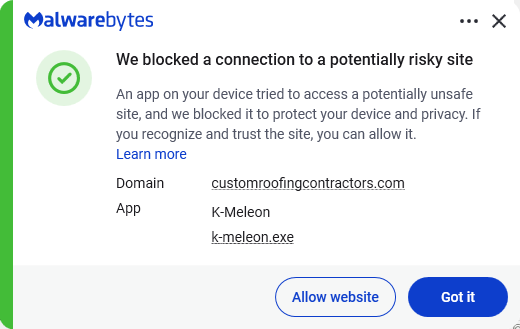
  • Secure your devices. Use an up-to-date, real-time anti-malware solution with web protection. Malwarebytes blocks connections to unsafe sites like these.
    Malwarebytes blocks one of the domains still active
  • Educate yourself on evolving attack techniques. Understanding that attacks may come from unexpected places helps maintain vigilance. Keep reading our blog!
  • Stay away from sponsored ads in search results. Anyone can buy them and make them look legitimate.

Pro tip: The free Malwarebytes Browser Guard extension warns you when a website tries to copy something to your clipboard.


Stop threats before they can do any harm.

Malwarebytes Browser Guard blocks phishing pages and malicious sites automatically. Free, one click to install. Add it to your browser →

  •  

Researcher claims Claude Desktop installs “spyware” on macOS

Security researcher Alexander Hanff wrote an article titled Anthropic secretly installs spyware when you install Claude Desktop.

Claims like that are bound to create two sides, so we searched for an official rebuttal by Anthropic. But we couldn’t find one. It would surprise me very much if they’d be unaware of the claim, since there’s been some noise about it.

Users on Mastodon, Reddit, and LinkedIn are confirming the researcher’s findings and discussing the subject, so it’s hard to imagine Anthropic missed it.

Let’s look at the claims first.

While looking into another matter, the researcher discovered a Native Messaging host manifest on his Mac that he did not knowingly install. On Chrome and other Chromium-based browsers, extensions can exchange messages with native applications if they register a native messaging host that can communicate with the extension. 

By testing on a clean machine, Hanff discovered that Installing Claude Desktop for macOS drops a Native Messaging host manifest into multiple Chromium profiles (Chrome, Edge, Brave, Arc, Vivaldi, Opera, Chromium), even including for browsers that are not actually installed yet.

The Native Messaging host manifest tells a Chromium‑based browser which local executable to invoke when an extension calls a native host, and those hosts run outside the browser sandbox with current users  permissions. Hanff therefore describes this as a “backdoor.” The manifest pre‑authorizes three Chrome extension IDs, so any extension with those IDs can call the helper via connectNative, giving it access to browser automation features.

Another objection is that Claude makes simple deletion futile since the manifest will be recreated the next time the user launches Claude Desktop.

It’s important here to point out that his article is about Claude Desktop, the Electron-based macOS application with bundle identifier com.anthropic.claudefordesktop, distributed as Claude.app. It is not about Claude Code, Anthropic’s command line developer tool. Claude Code is autonomous (“agentic”), allowing you to hand over a task, and it handles the planning and execution until done. So, for Claude Code, it would absolutely make sense to enable communication with browsers, provided they are present on the target system.

So, we have an application that writes into other apps’ profile/support directories (the browsers’ configuration area) and can act as the user, with capabilities like using the logged‑in browser session, DOM inspection, data extraction, form filling, and session recording. This expands the attack surface of every machine this manifest is dropped on, without asking for consent. 

Anthropic’s own launch blog on “Claude for Chrome,” which discusses Anthropic’s internal red‑team experiments, explicitly mentions prompt injection as a key risk and reports attack success rates of 23.6% (no mitigations) and 11.2% (with mitigations). Hanff cites this to argue that a pre‑positioned bridge is a non‑trivial risk.

How bad is it?

Native Messaging is a standard Chromium mechanism. Nothing here is an unknown or exotic technique per se. Chrome’s own documentation explains that Native Messaging hosts run at user privilege and are invoked by browser extensions through a manifest file. And as the researcher pointed out, the bridge does nothing. But it could potentially be abused.

I don’t think it’s fair to say that Claude Desktop installs spyware, but it does open a system up by expanding the attack surface.

Anthropic already had a separate, documented Native Messaging manifest for Claude Code that users sometimes manually copied into other Chromium browsers; the new behavior is that Claude Desktop now drops a Claude‑Desktop‑related manifest into multiple browser paths automatically.

It requires a combination of extension and host. Only combined with a matching browser extension, this bridge enables the user-like capabilities we listed earlier.

What we don’t know yet

Anthropic hasn’t published a detailed technical privacy spec for the Claude Desktop–browser bridge, so we don’t know exactly what data flows when the Chrome integration is used, beyond the general capabilities described in their documentation (session access, DOM reading, etc.).

The detailed analysis and most replication so far are on macOS. We’re in the dark about behavior on Windows and Linux, and the same is true across different browser install paths. That behavior has also not been comprehensively documented in public write‑ups.

I did reach out to Anthropic asking for a response. If and when we get an official response from Anthropic, I’ll add it here, so stay tuned.

Conclusion

Anthropic likely wanted “Claude in Chrome”‑style capabilities across Chromium‑based browsers, but that doesn’t excuse doing it silently and preinstalling the manifest into profile directories for multiple browsers, including ones that are not yet installed.

There are better ways to implement changes like these, and users should at least be made aware of them so they can weigh the advantages against the potential risks.


Stop threats before they can do any harm.

Malwarebytes Browser Guard blocks phishing pages and malicious sites automatically. Free, one click to install. Add it to your browser →

  •  
❌