Reading view

World Cup 2026: watch out for these scams | Kaspersky official blog

The World Cup attracts a great many fans — but also a great many scammers. While millions of fans tune in to watch the matches, cybercriminals are hard at work trying to get at their money and personal data. In fact, we’ve already flagged more than 336 fake websites designed to look exactly like the official World Cup page! As the biggest sporting event of the year heats up, here are the top red flags you need to watch out for.

Totally Legit Free Streams (No Scam)

Scoring a seat at WC26 has turned into quite the mission. Soccer fans are furious over ticket prices, which have officially been dubbed the highest in World Cup history. On top of lodging and travel costs, the situation is made even worse by America’s stringent immigration policies — where referees, team staff, and even players have faced major visa and entry headaches. But fans still want to watch the games, and that’s exactly where fake streaming platforms step in to “help”.

Here’s how the scam plays out: cybercriminals set up fake websites promising free access to World Cup match streams. But the moment you click Watch Now, you’re prompted to sign up and then pay for “lifetime access” to the entire tournament. In the example below, they’re asking for cryptocurrency — which is still a bit unusual, since scammers typically prefer good old-fashioned bank cards.

An example of a fake video streaming website requiring users to register and pay with cryptocurrency to watch all World Cup 2026 matches

An example of a fake video streaming website requiring users to register and pay with cryptocurrency to watch all World Cup 2026 matches

Fans who are desperate to catch their favorite teams live risk losing not just their money, but also their personal data, which hackers can later weaponize in targeted phishing attacks.

A losing bet

Match result predictions and sports betting always skyrocket in popularity during the World Cup, and scammers waste no time cashing in on the trend. And behind the flashy slogans lie classic scam tactics.

Take this beautifully designed Spanish-language website. To sign up, it demands a massive amount of personal information, including your full name, national ID number, email address, and phone number — and, of course, it asks you to create a password. If a victim uses the exact same password for multiple accounts, they’re essentially handing the keys to their digital life over to cybercriminals.
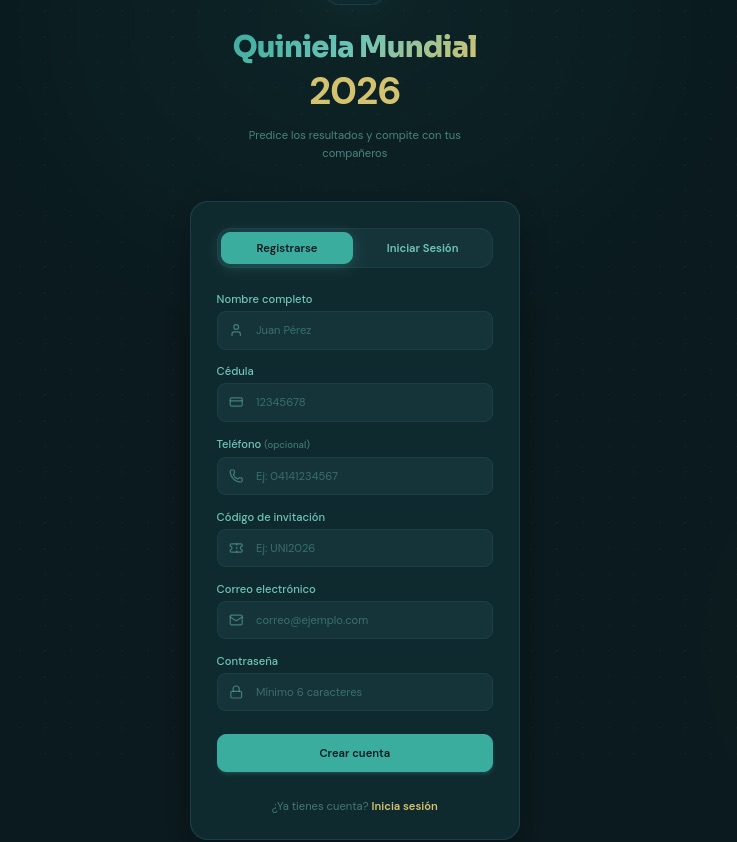
To guess match outcomes on this site, you have to hand over way too much personal info — everything short of biometrics

To guess match outcomes on this site, you have to hand over way too much personal info — everything short of biometrics

Another site, specifically targeting users in Colombia, turned the sign-up process into a paid ordeal — and it features every trick in the book.

  • To “verify” your profile, you’re forced to use WhatsApp under the guise of avoiding legal complications.
  • Before your account is activated, you must make a deposit. This means sending 100 000 Colombian pesos (about $29) to a specified account and texting the receipt to an “administrator” on WhatsApp.
  • Next, you’re told to wait 12 hours for the “administrator” to manually activate your profile.
  • Only after all of this do the scammers tell you can place unlimited bets (of course not true).
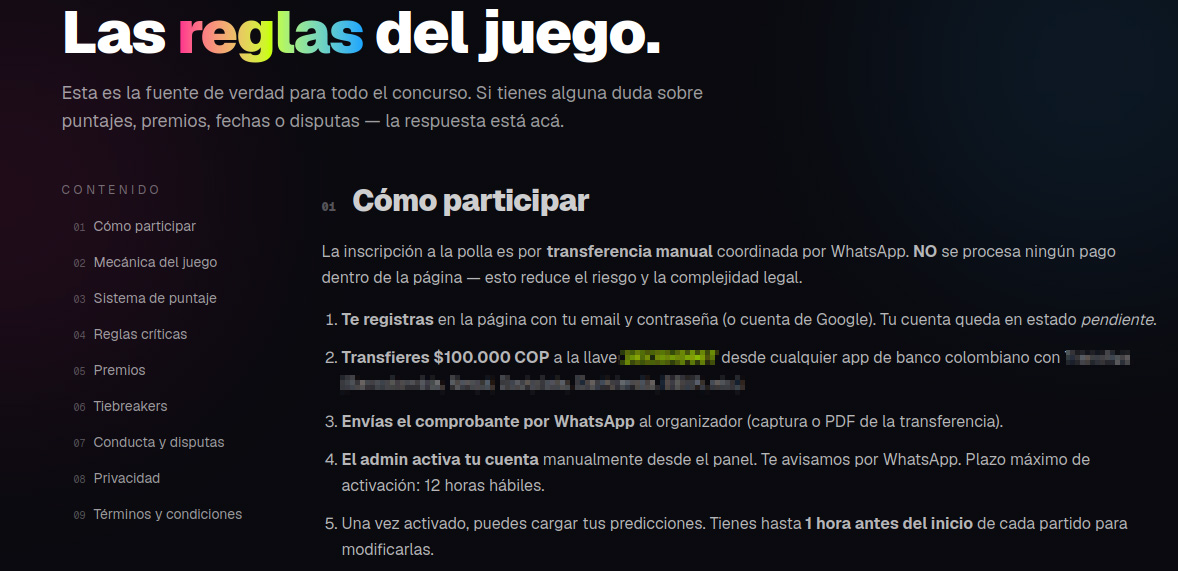
These scammers built a whole website, but they do all their business over WhatsApp. That's a red flag!

These scammers built a whole website, but they do all their business over WhatsApp. That’s a red flag!

In many countries — including Colombia — sports betting is strictly regulated. Only a handful of licensed operators are legally allowed to run these sites, and users are required by law to verify their identity. Because of this, these shady workarounds can look tempting to people who love to gamble but don’t want to — or can’t — go through the official verification process.

Unfortunately, the scammers always win in this scenario. They walk away with your initial deposit and every single bet you place on their site. At the end of the day, their only real goal is to drain their victims’ wallets for as much as they possibly can.

Discounts for collectors!

The World Cup isn’t just about the matches; it also drives record-breaking sales of collectible merchandise — stickers, scarves, team jerseys, official match balls, and more. Naturally, plenty of scammers are eager to get a piece of that action.

Take a look at this website offering “exclusive, limited-edition” stickers and albums. Notice anything suspicious?

Talk about a steal! Too bad the whole website is a scam

Talk about a steal! Too bad the whole website is a scam

Check out those prices: everything is heavily discounted, even though the tournament is in full swing. All it takes is a quick price check against the real deal to spot the trap. In the screenshot above, the scammers are charging 67 euros for a sticker collection. On actual online marketplaces, that exact same set goes for at least twice as much, and on the official Panini website, it’s three times the price.

Fake websites mimicking popular sporting goods stores also offer to sell you shin guards, socks, jerseys, and any other gear. Of course, you’ll never see the merchandise, and you’ll lose both your money and your bank card details.

When they've absolutely no intention of delivering any products, they can easily offer massive discounts and free shipping

When they’ve absolutely no intention of delivering any products, they can easily offer massive discounts and free shipping

Deals that seem too good to be true are one of the biggest red flags. To make matters worse, with the help of AI, fake websites now look just as professional as the real ones, making them harder than ever to spot. That’s why we recommend installing our security suite before you start shopping online. It blocks phishing sites in real time and uses the Safe Money feature to keep your financial data secure.

Soccer by mail

Another attack strategy involves spam campaigns centered around the World Cup. In one email, our experts uncovered an ad for a soccer analytics and betting-tips service. It uses the classic high-pressure playbook: “ONLY 10 SPOTS AVAILABLE” — so hurry up before they run out! Naturally, access comes with a price tag: AU$200.

Spammers hurrying the victim to make a decision as quickly as possible

Spammers hurrying the victim to make a decision as quickly as possible

This scheme targets fans who are into sports betting, and paying for these types of services usually ends one of two ways for them: they either lose their money with zero guarantee of getting actual predictions, or get sucked into an even deeper, multi-step financial trap.

How to avoid falling for the scams

Across all these scenarios, the World Cup is just another convenient pretext for cybercriminals. Once the tournament wraps up, they’ll most certainly pivot back to their usual tricks — like fake job offers or Telegram phishing scams — until the next Olympics or soccer tournament rolls around and they switch right back to sport.

Our research consistently shows that online fraud has evolved into a massive illegal enterprise. You aren’t just up against lone scammers anymore; you’re dealing with large criminal networks. When it comes to defense, the best approach is a proactive one. By installing Kaspersky Premium, you can safeguard all your devices from malware, phishing, spam, and malicious or lookalike websites. Plus, the included Kaspersky Password Manager will generate unique complex passwords, securely store your sensitive data — like documents and bank cards — and stop you from auto-filling your credentials on fake sites.

  • Watch the games only on legitimate streaming platforms. Don’t trust fake reviews and never enter your bank card information on unverified sites. Keep an eye out not just for sketchy streaming websites, but also for fake IPTV apps. As we’ve covered in detail before, scammers frequently use these to infect your devices with Trojans.
  • Shop smart. The best way to avoid getting ripped off is to buy merchandise exclusively through official channels (where you won’t see suspiciously deep discounts), or simply buy your gear in person at official retail locations.
  • Don’t click suspicious links. If a deal that’s too good to be true lands in your inbox — whether it’s exclusive betting tips or anything else — just ignore it and hit delete.
  • Avoid logging in through Telegram bots. At the very least, this saves you from future headaches and annoying spam. At best, it keeps your account from being hijacked and your crypto from being stolen.
  • Switch to passkeys wherever possible. Unlike traditional passwords, which are easily stolen and can be typed into any fake login page, a passkey is cryptographically tied to a specific website and won’t work on a phishing page. Kaspersky Password Manager can easily store and sync your passkeys across all your devices.

What other ruses do scammers use to make a quick buck? Check out our other posts:

  •  

Elon Musk’s XChat: how secure is the new messaging app? | Kaspersky official blog

Pavel Durov and his “private” messaging app have a brand new rival, and it’s — drumroll, please — Elon Musk and his XChat. On our blog, we’ve discussed more than once why Durov’s claims about Telegram privacy and security are exaggerated, to put it mildly. Here, I’ll just remind the reader that standard (non-secret) chats on Telegram aren’t protected by end-to-end encryption — the bare minimum required for user data to stay private.

But let’s get back to Musk. In late April 2026, the XChat app launched for iOS users. The tech mogul had been touting his messaging app for a long time, pitching it from day one as an incredibly private and secure way to communicate, and as a direct threat to Signal, WhatsApp, Telegram, and iMessage. Today, we look at whether we should actually trust Musk’s promises this new service, break down its core features, and stack it up against the competition.

Bitcoin-style encryption

Musk initially teased XChat on June 1, 2025, naturally via his X (formerly Twitter) account. Responding to another user’s question about when to expect the new service, Musk wrote: “This week if there are no scaling issues.”

Apparently, scaling issues there were: the app’s beta didn’t drop until September 2025, and iOS users didn’t get full access until April 2026. As for Android, there is zero info on when that version would launch at the time of this writing. That said, an XChat page is already live on Google Play where users can queue up “pre-register”, whatever that means.

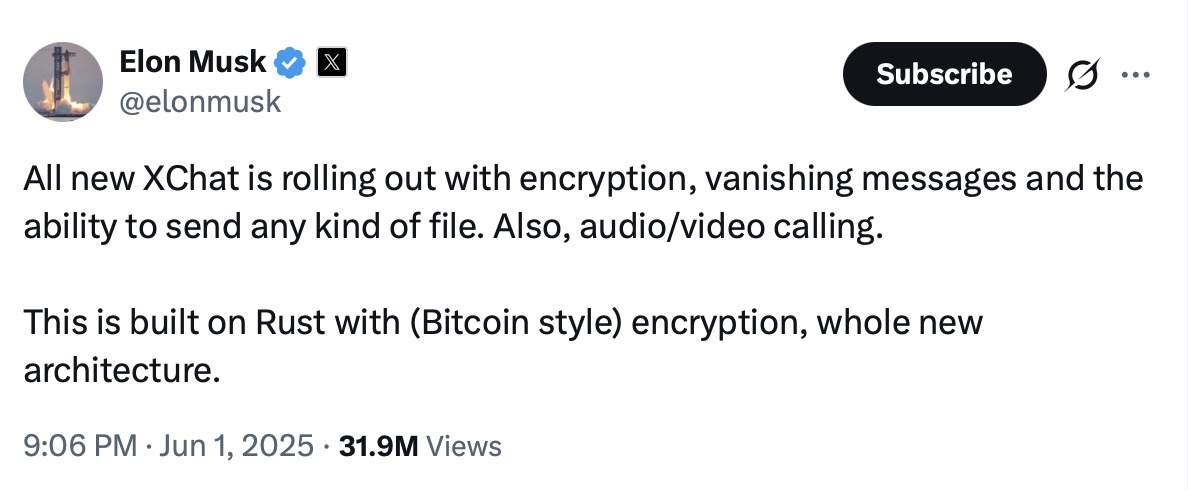
But let’s go back to Musk’s post announcing XChat. That specific post turned a lot of heads in the privacy and cybersecurity community, and here’s why: the tech mogul wrote that the service would be built on an “entirely new architecture”, written in Rust, and featuring “Bitcoin-style encryption”.

Elon Musk's announcement of XChat

Elon Musk announces the launch of XChat, claiming the new messaging app is written in Rust and uses “Bitcoin-style encryption”. Source

The expert community spent a long time scratching their heads and trying to figure out what Musk actually meant. After all, Bitcoin isn’t an anonymous, encrypted data exchange system. The blockchain does use public and private cryptographic keys, but for something entirely different: signing transactions. Meanwhile, these transactions aren’t hidden from prying eyes; they’re out in the open for anyone to see, forever. Simply put, Bitcoin protects its users not by ensuring privacy, but quite the opposite — through ultimate transparency.

Most likely, Musk used “Bitcoin-style encryption” as a marketing gimmick. Bitcoin was trading near all-time highs at the time of his announcement, and cryptocurrency was the talk of the town. Technically, the XChat beta that dropped in September 2025 protected user chats with a “kind of” end-to-end encryption, but this was implemented in a way that raised serious doubts among cryptography experts.

And not without a reason. Normally, setting up an end-to-end encrypted chat automatically generates a public and private key pair. The public key is used to encrypt messages, while the private key decrypts them. Because other users need your public key to start a secure chat with you, these keys are usually stored on the app’s servers.

The private key, however, should ideally live only on the user’s device — which is exactly how Signal does it. This serves as a simple, ironclad guarantee that neither the company itself nor any third party breaching its infrastructure can access user chats, even if they really want to.

But Elon Musk’s projects always march to the beat of their own drum: the XChat developers decided it would be a great idea to store users’ private keys on XChat servers. X claims they’ll use hardware security modules (HSMs) to store these private keys — specialized appliances designed to prevent even the system owner from easily accessing the data inside. However, experts are also questioning the reliability of this setup, and coming to a grim conclusion: if X really wants to get a user’s private key, they will most likely be able to do so.

How encrypted messaging in XChat works in practice

Finally, once the scaling issues were ironed out nearly a year after the announcement, X officially rolled out the XChat app for iOS in April 2026. Now anyone can use it, but from a practical standpoint, the situation with encrypted chats seems even more convoluted than in Telegram.

According to the social network’s help center, to use end-to-end chat encryption in XChat, both users must have an X account, set up XChat, and have some sort of connection between them:

  • Follow, or be subscribed to each other
  • Have exchanged messages before
  • Have previously accepted a direct message request
  • Be a member of the same Premium Business / Premium Organization subscription on X

If users don’t follow each other and haven’t interacted before, XChat might still let them send a message request. However, that initial request goes out without end-to-end encryption.

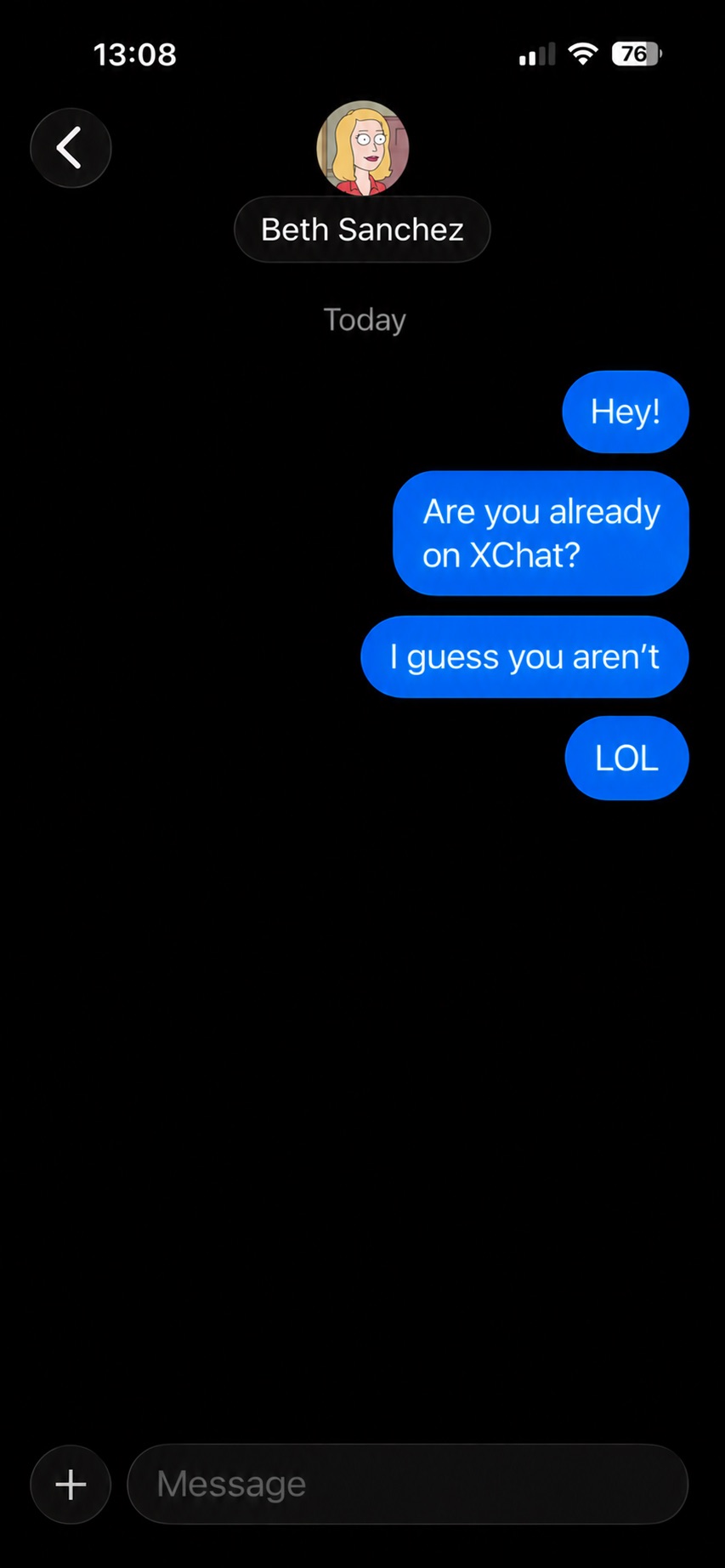
Again, this is how the process is described in the messaging app’s official help documentation. Sound overly complicated? Let me reassure you: in practice, it works — or rather, doesn’t — completely differently. I personally managed to send a message to another user who had NOT set up XChat. The app itself, of course, gave me absolutely no warning about this.

XChat lets users send messages to people who haven't set up the app

The app allows you to start a chat with a user who hasn’t even set up XChat yet, without giving the sender any heads-up.

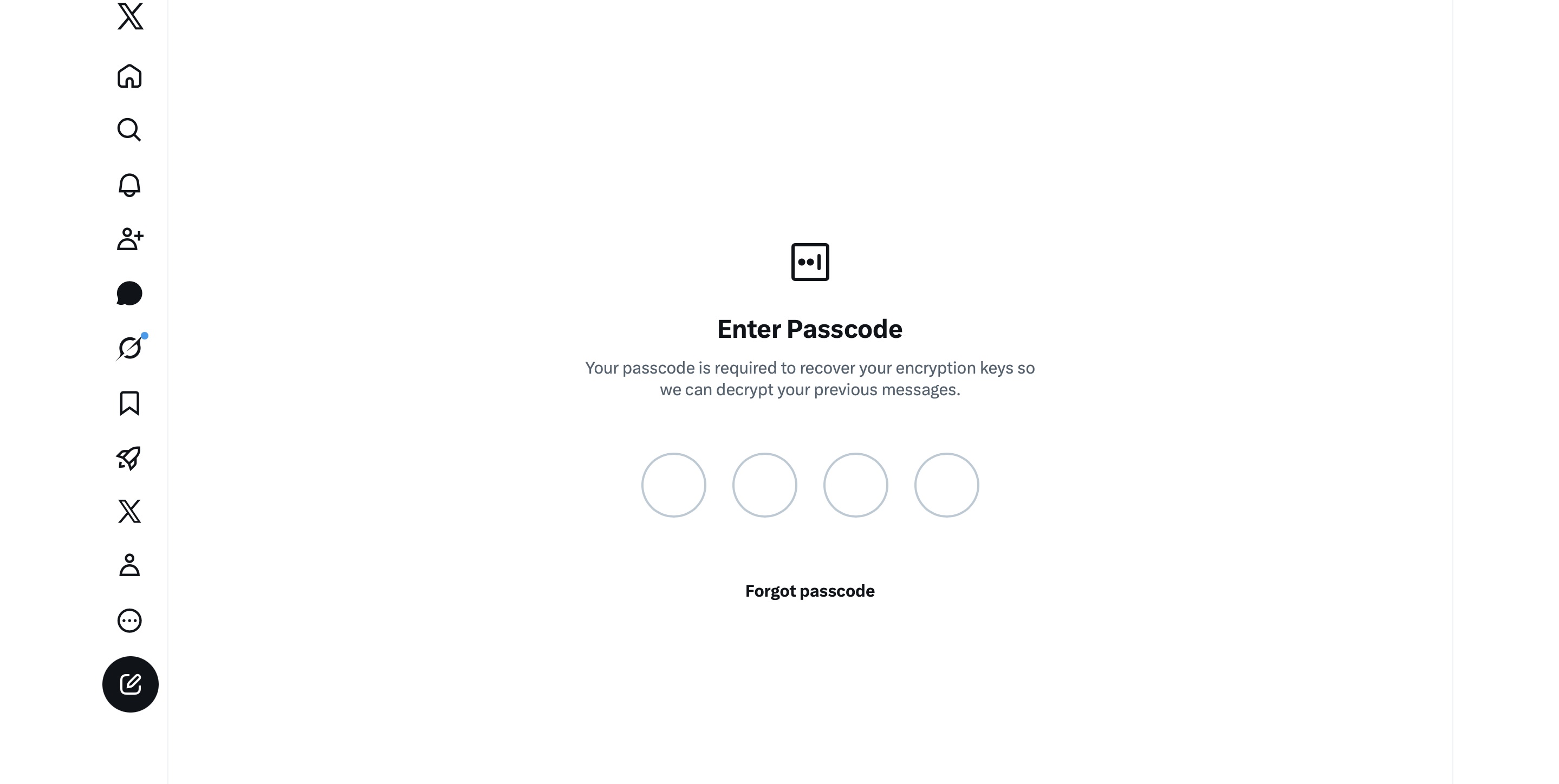
It gets even better. The user I messaged saw a notification for it on the web version of X, but couldn’t actually access the message. Here’s the catch: to start using XChat, the user first has to create a four-digit PIN. Yet, the app asks for this PIN the very first time the user tries to open it — meaning, before they even get a chance to create one. Along with this prompt, the user also sees a warning stating that without the PIN, they won’t be able to view past encrypted chats.

XChat asks for a PIN before one is even created

The user is prompted to enter a PIN to decrypt past messages before even completing the initial XChat setup.

The only workaround I found to actually start using XChat is to tap “Forgot PIN?” — even though that PIN never existed in the first place — confirm your identity, and create a new (well, your first) PIN. Naturally, you lose access to your chat history this way, so you won’t be able to read any messages sent to you in XChat before you officially set up the app.

XChat: the new Telegram, WhatsApp, Signal… or Facebook Messenger?

All these PIN hurdles actually exist for a reason. Remember, unlike WhatsApp and Signal, the XChat developers decided to store users’ private keys on their own servers. Consequently, the app uses these four-digit PINs to encrypt those keys.

According to the XChat help documentation, this mechanism was designed to ensure a “seamless” multi-device experience. It’s impossible not to point out that both WhatsApp and Signal managed to pull this off without sketchy workarounds like PIN requirements or server-side private key storage.

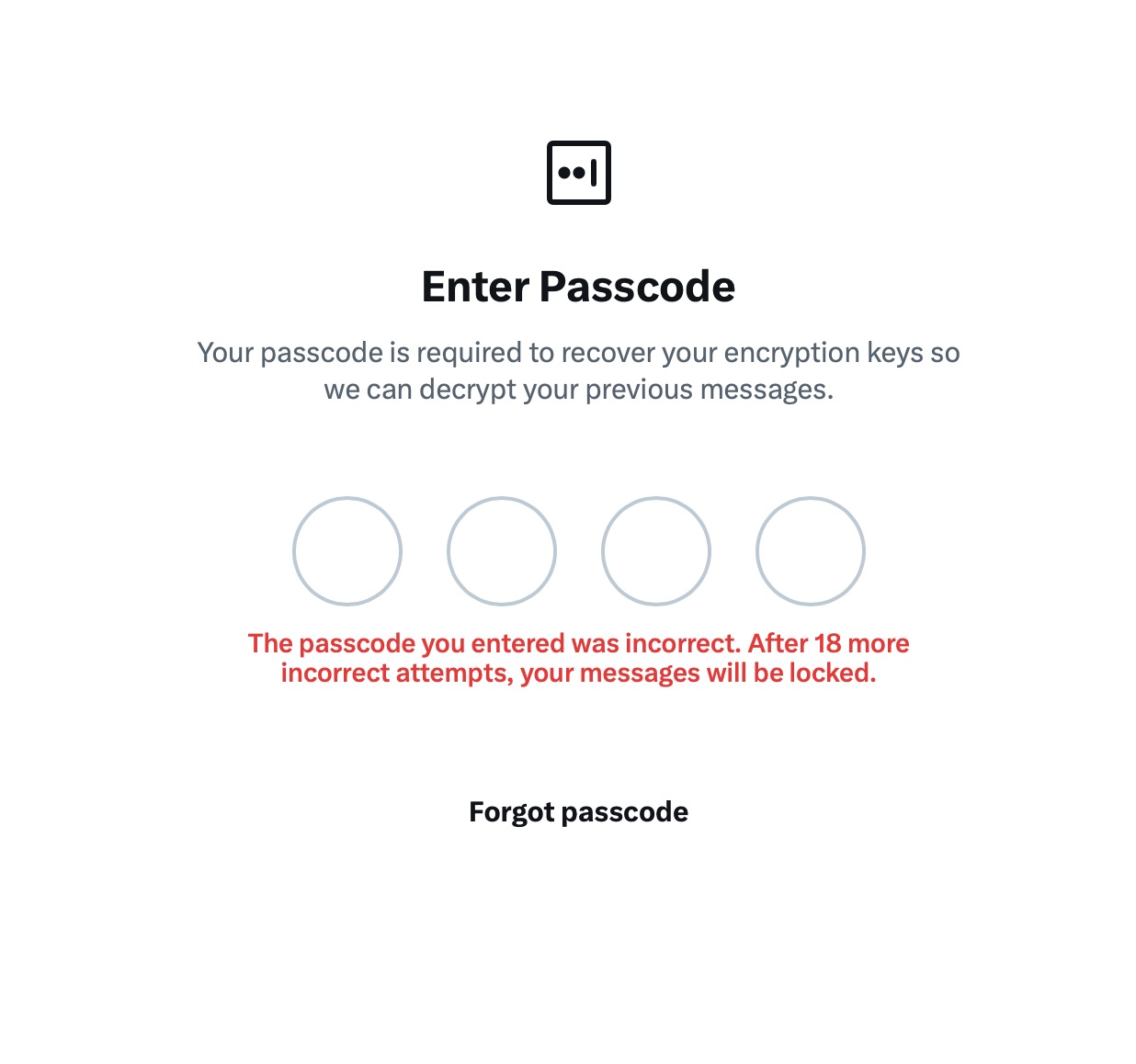
The problem is, workarounds like these undermine any claims of app privacy and security. First and chief among them, a PIN isn’t exactly the most secure way to protect sensitive data. We’ve mentioned time and again that four-digit combinations are easy to crack via brute force — especially since XChat gives you a generous 20 attempts to guess the right code.

XChat warns of lockout after 20 failed attempts

The app allows up to 20 attempts to enter the four-digit PIN. Once the limit is reached, XChat warns that access to messages will be permanently lost.

Stepping away from the bizarre implementation of end-to-end encryption compared to other messaging apps, it’s hard to ignore the overall sense of pointlessness that comes with trying to use XChat. As a Wired journalist rightly pointed out, the app feels less like a relative of WhatsApp, Signal, or Telegram, and much more like Facebook Messenger. Except people usually open Messenger to read a text from their mom or grandma, whereas XChat seems meant for anyone wanting to check in on that weird nephew who spends all his free time on X, still believes John McAfee’s promise of $500 000 Bitcoin, and fanboys over Elon Musk.

So, what’s the bottom line on XChat?

The best way to wrap up this post is with a quote from a cybersecurity expert: “If what you want is good security, use Signal. If what you want is to be able to talk to pretty much anybody using encrypted messages, use WhatsApp. If your whole life is based around X, I guess this is better than nothing.”

If you do use XChat, rule number one is to avoid a predictable PIN — absolutely don’t use your birth year or, worse, 1234. It’s also crucial not to forget this code, because if you do, your entire chat history is gone for good. Finally, just like your other passwords, you shouldn’t keep it in your notes app, but rather in a secure password manager. This won’t only save you from having to memorize dozens of character combinations, but will also reduce the risk of losing access to your vital data and conversations.

To learn more about secure messaging in other apps, check out our other posts:

  •  

Scams in messengers: exposing the global scam-cartels exploiting everyday messagesng-heist | Kaspersky official blog

It starts with the familiar: a short message, a trusted name, a routine tone. Delivery updates, work pings, brand alerts hum in the background, rarely attracting scrutiny. You check, you answer… — until minutes later you’ve slipped into a trap built to lower your guard and hijack your trust.

That’s why messaging scams cut deep: they exploit everyday habits where instinct, not caution, leads. Communication once moved slowly, leaving room for doubt. Now it’s instant — and that speed is a weapon in criminal hands.

On our blog, we’ve already examined numerous scam schemes in messaging apps — from pig butchering, where the victim is groomed for a very long time, or catfishing, where the scammer creates a fake identity, to phishing via chatbots or through gift-giving campaigns in messaging apps.

Now, for the first time, Kaspersky has set out to capture the full end-to-end reality of messaging-based scams to understand how quickly harm occurs, how they impact trust and what remains after the interaction ends. What emerges is a highly organized and industrialized scam ecosystem embedded within everyday messaging channels such as SMS, WhatsApp, and email.

Kaspersky experts have prepared a report on targeted scams in messaging apps, detailing not only the financial but also the emotional damage caused by such attacks, as well as providing tips on how to protect yourself and avoid them. In this post, we explore the most interesting facts, but you can find more details in the full report.

The damage is underestimated

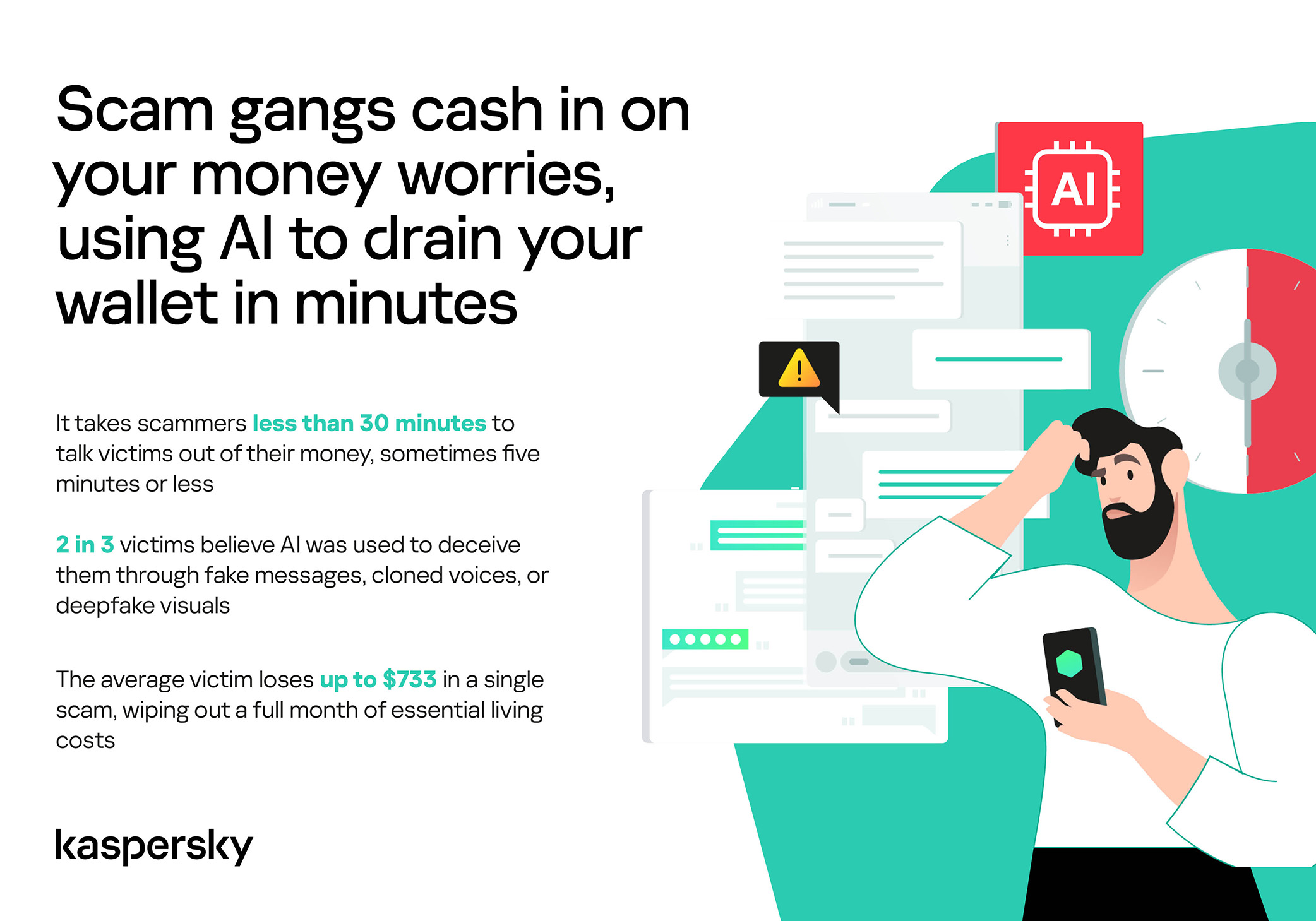
How much do you think a single successful attack via a messaging app costs the average victim? Ten dollars? Or maybe 50? You’re underestimating the scammers. Although more than a third (36%) of victims incur losses of less than $135, on average a victim loses… $733!

Country Average loss per victim
Senegal $392.94
Serbia $493.32
Morocco $504.28
Greece $609.32
United Kingdom $617.38
Côte d’Ivoire $654.11
Spain $672.67
United States $724.73
Portugal $868.20
Italy $896.02
France $1,193.58
Germany $1,369.35

The average amount lost by a victim in a successful attack via a messaging app

On the one hand, the financial hit doesn’t look catastrophic in isolation. These are micro-losses by design. Small enough that some never report them to the police. Small enough that banks don’t always investigate. Small enough to be dismissed as bad luck rather than organized crime.

But $733 is not nothing. It’s enough to cover a month’s worth of groceries, school or daycare fees, or utility bills. Against the backdrop of the global cost-of-living crisis, a single such loss can seriously dent a family’s budget.

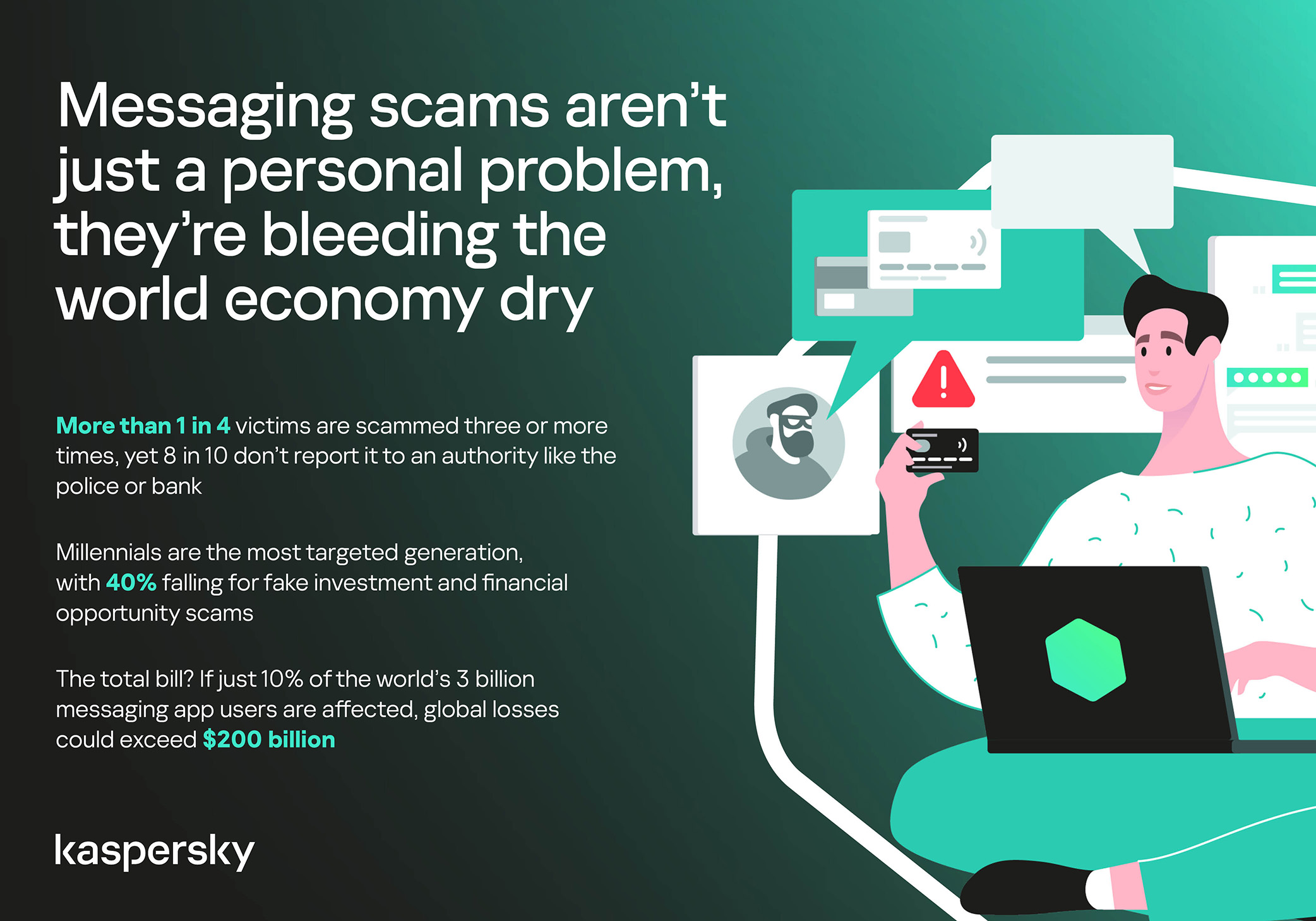
In 11% of cases, losses exceed $1,350, and more than a quarter of victims (28%) report having been scammed three or more times in the past six months. Once scammers discover that a phone number responds, that contact becomes an asset, circulating from one database to another.

Now imagine the scale of the problem: if just 10% of the three billion messaging‑app users worldwide fell victim with the average loss, the total damage would amount to… nearly $220 billion! This is comparable to the GDP of Greece, and exceeds that of Morocco, Serbia, or Côte d’Ivoire.

It becomes clear that behind the daily flood of fraudulent schemes lie large scam cartels operating on an industrial scale, using AI to personalize messages that mimic those of family members, friends, and familiar brands. This, in essence, forms the basis of a full-fledged economy built on digital identity theft.

Scam gangs cash in on your money worries, using AI to drain your wallet in minutes

Speed beats scrutiny

More than half of successful messaging scams (52%) unfold in under 30 minutes — from first contact to the moment money or personal data changes hands — or even faster, before the victim begins to doubt the legitimacy of the sender. In fact, one in seven scams takes less than five minutes — quicker than boiling an egg!

The speed isn’t accidental. It’s the method. Scammers structure their schemes to deny the victim a chance to come to their senses. Every element is engineered to compress the decision-making window: the urgency of the scenario, the familiarity of the format, the plausibility of the request.

They rush you — faster, faster, don’t tell anyone, you only have a few minutes, solve the problem, don’t ask questions. Click the link, fill in the details, approve the transaction, or else… Or else what? The scammers’ imagination knows no bounds here, but if you don’t do something right now, you’ll definitely regret it.

Alas, the realization of what has happened usually comes when the damage is already irreversible. More than half of victims (51%) lose money; another 43% hand over their personal data — most commonly phone numbers, names, and email addresses — to scammers, and often the victim loses both.

Where and how attacks occur

A delivery notification, a bank alert, a message from a merchant you ordered from last week — messaging apps permeate every aspect of everyday life, making such interactions completely normal. An attack shouldn’t feel like an attack. It should feel like the same message you’ve received hundreds of times.

It’s no surprise that scammers focus their attention on this method of communication first and foremost. The most popular platforms for scams are predictable: WhatsApp (43%), SMS/iMessage (40%), Facebook (27%), Telegram (22%), and Instagram (19%) — these are the ones that people trust most.

A wide variety of schemes is used. Brand impersonation is now one of the three most common types of messaging scam worldwide — accounting for 31% of cases. Fake delivery notifications top the list at 38%, followed by investment scams at 37%.

At the same time, nearly two-thirds (63%) of fraudulent schemes span multiple platforms, moving from SMS to WhatsApp, from WhatsApp to Telegram, etc. In this way, scammers achieve two goals: they mimic organic messaging and evade moderation algorithms.

AI has taken scams to a new level

Just a couple of years ago, fraudulent messages gave themselves away with bad grammar, awkward phrasing, illogical requests, and an obsessive sense of urgency. Today, a phishing message looks, sounds, and reads just like the real thing.

Scam cartels want to catch people in motion — between meetings, on a commute, or during everyday tasks — when your attention is already fragmented. They mimic your mother’s turn of phrase. They match your bank’s tone of voice. They copy your courier’s format exactly. They mirror the rhythm, structure, and style of authentic brand communications across messaging platforms. And AI is accelerating all of it.

What this creates is overlap. Legitimate and fraudulent messages appear in the same environment, using the same formats, language, and triggers. The difference between them is no longer obvious.

The data shows that two-thirds of victims (66%) believe AI was used in the scam against them, 42% cite messages written by AI, 31% report generated or cloned voices, and 25% encountered deepfake images or videos.

That’s why mere awareness and “tech-savviness” may no longer be enough to protect oneself. From Gen Z to Gen X, messaging scams cut across every generation.

And what about the emotional toll?

But money is far from the only problem a victim is left with after an attack. After what they’ve been through, people develop distrust toward incoming messages, unfamiliar numbers, and any requests for action. As a result, 99% of fraud victims say they no longer trust incoming notifications in messaging apps.

This creates a crisis of trust in all digital channels in general. Every legitimate message can now be perceived as a scam. Brands, banks, and delivery services are forced to operate in an environment where the customer is, by default, in a state of distrust.

Dr. Elizabeth Carter, a forensic linguist and criminologist at Kingston University in London, notes that scammers use familiar contexts, common social settings and embedded linguistic norms to create the illusion for the victim that their decision-making is rational and reasonable in the moment. However, what is actually happening is that they construct false realities in which those decisions end up causing financial and psychological harm. She also notes that it is very hard to identify a false reality while you are in it.

After realizing they had been deceived, more than half of victims felt anger — the kind that comes from having trusted something and discovering it was used against you. 42% of victims report frustration, 38% — feeling upset. Moreover, several months later, these feelings haven’t gone away: nearly half of all victims (48%) are still angry, a third (33%) remain frustrated, and 30% are upset.

And nearly one in 10 victims don’t tell anyone what happened. They feel shame, a sense of having fallen for something so obvious. This leaves a significant portion of the actual damage unreported: only 24% of victims contact the police, and only 23% report it to their bank.

Messaging scams aren't just a personal problem, they're bleeding the world economy dry

So what can be done?

The crisis of trust — and even a touch of paranoia — that has arisen due to widespread attacks on users can linger in victims’ minds for a long time, affecting their quality of life. To prevent this, follow these guidelines:

  • Pause before you act. The sense of urgency you feel is almost always artificial. A legitimate bank, retailer, or delivery service won’t penalize you for taking 30 seconds to verify before clicking a link or confirming details. It’s precisely this instinct to resolve the situation quickly that scammers are counting on.
  • Verify through another channel. If a message appears to be from a relative, colleague, or company you trust — contact them through another channel before taking any action. Use secure verification methods, and cross-check identities when something doesn’t feel right. For families, agreeing on a “safe word” in advance can defeat even the most convincing voice clones.
  • Use a password manager. It will not only help you generate strong, unique passwords for all your accounts and store them securely, syncing them across all your devices, but also protect you from spoofed sites. Even if you click a phishing link and land on such a site, our password manager will notify you about the domain mismatch and refuse to autofill your username and password.
  • Use protection that works in real time. Modern security solutions, such as Kaspersky Premium, provide real-time protection against malicious links and phishing attempts in the apps and websites you use every day. On Android devices, a dedicated layer of anti-phishing security scans and neutralizes suspicious links as they appear, even within notifications, before you even have a chance to click them.

We’ve covered other threats in messaging apps in similar articles:

  •  

Quick digest of Kaspersky’s report “Spam and Phishing in 2025” | Kaspersky official blog

Every year, scammers cook up new ways to trick people, and 2025 was no exception. Over the past year, our anti-phishing system thwarted more than 554 million attempts to follow phishing links, while our Mail Anti-Virus blocked nearly 145 million malicious attachments. To top it off, almost 45% of all emails worldwide turned out to be spam. Below, we break down the most impressive phishing and spam schemes from last year. For the deep dive, you can read the full Spam and Phishing in 2025 report on Securelist.

Phishing for fun

Music lovers and cinephiles were prime targets for scammers in 2025. Bad actors went all out creating fake ticketing aggregators and spoofed versions of popular streaming services.

On these fake aggregator sites, users were offered “free” tickets to major concerts. The catch? You just had to pay a small “processing fee” or “shipping cost”. Naturally, the only thing being delivered was your hard-earned cash straight into a scammer’s pocket.

Free Lady Gaga tickets? Only in a mousetrap

With streaming services, the hustle went like this: users received a tempting offer to, say, migrate their Spotify playlists to YouTube by entering their Spotify credentials. Alternatively, they were invited to vote for their favorite artist in a chart — an opportunity most fans find hard to pass up. To add a coat of legitimacy, scammers name-dropped heavy hitters like Google and Spotify. The phishing form targeted multiple platforms at once — Facebook, Instagram, or email — requiring users to enter their credentials to vote hand over their accounts.

A phishing page masquerading as an artist voting platform

This phishing page mimicking a multi-login setup looks terrible — no self-respecting designer would cram that many clashing icons onto a single button

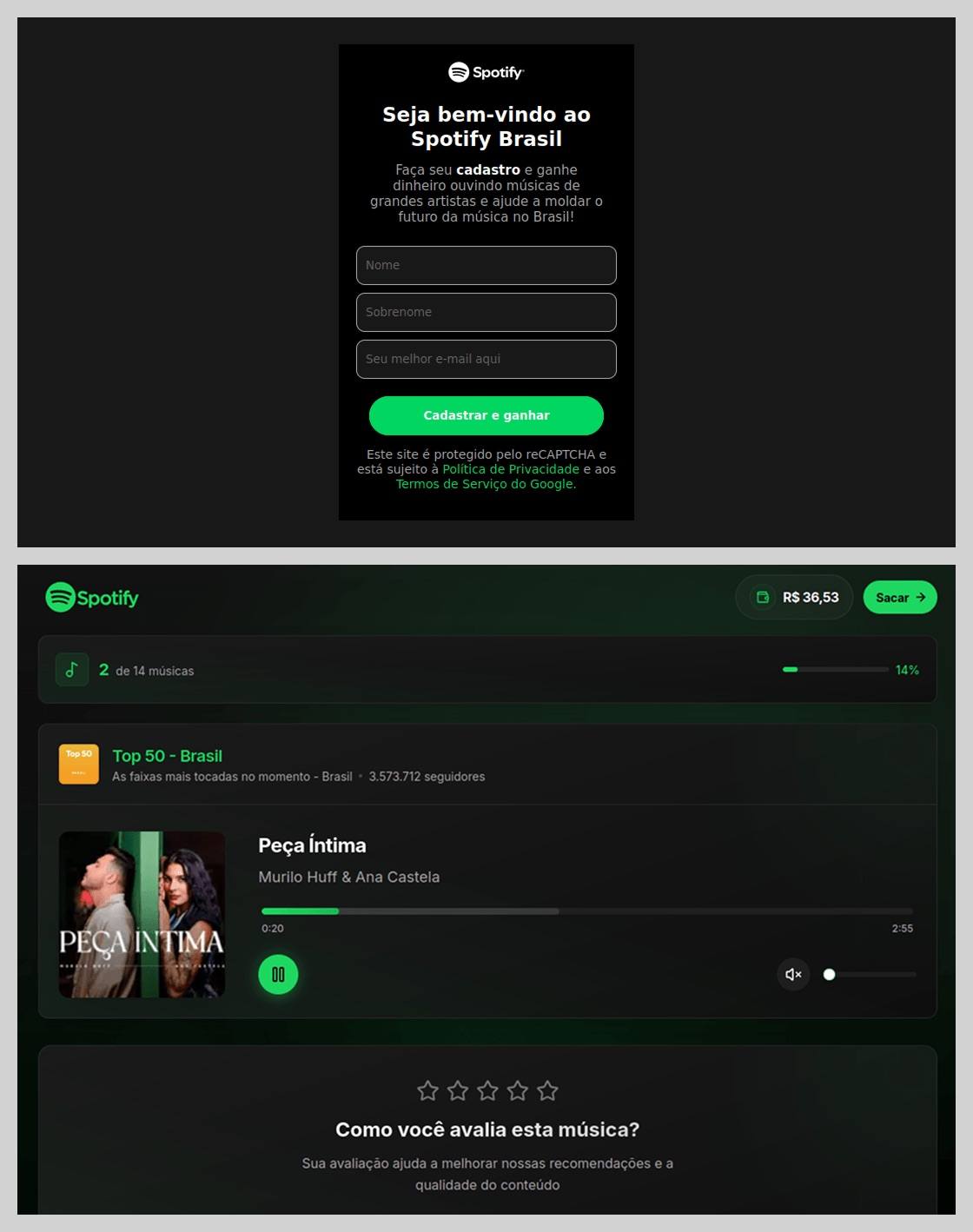
In Brazil, scammers took it a step further: they offered users the chance to earn money just by listening to and rating songs on a supposed Spotify partner service. During registration, users had to provide their ID for Pix (the Brazilian instant payment system), and then make a one-time “verification payment” of 19.9 Brazilian reals (about $4) to “confirm their identity”. This fee was, of course, a fraction of the promised “potential earnings”. The payment form looked incredibly authentic and requested additional personal data — likely to be harvested for future attacks.

An imitation service claiming to pay users for listening to tracks on Spotify

This scam posed as a service for boosting Spotify ratings and plays, but to start “earning”, you first had to pay up

The “cultural date” scheme turned out to be particularly inventive. After matching and some brief chatting on dating apps, a new “love interest” would invite the victim to a play or a movie and send a link to buy tickets. Once the “payment” went through, both the date and the ticketing site would vanish into thin air. A similar tactic was used to sell tickets for immersive escape rooms, which have surged in popularity lately; the page designs mirrored real sites to lower the user’s guard.

A fake version of a popular Russian ticketing aggregator

Scammers cloned the website of a well-known Russian ticketing service

Phishing via messaging apps

The theft of Telegram and WhatsApp accounts became one of the year’s most widespread threats. Scammers have mastered the art of masking phishing as standard chat app activities, and have significantly expanded their geographical reach.

On Telegram, free Premium subscriptions remained the ultimate bait. While these phishing pages were previously only seen in Russian and English, 2025 saw a massive expansion into other languages. Victims would receive a message — often from a friend’s hijacked account — offering a “gift”. To activate it, the user had to log in to their Telegram account on the attacker’s site, which immediately led to another hijacked account.

Another common scheme involved celebrity giveaways. One specific attack, disguised as an NFT giveaway, stood out because it operated through a Telegram Mini App. For the average user, spotting a malicious Mini App is much harder than identifying a sketchy external URL.

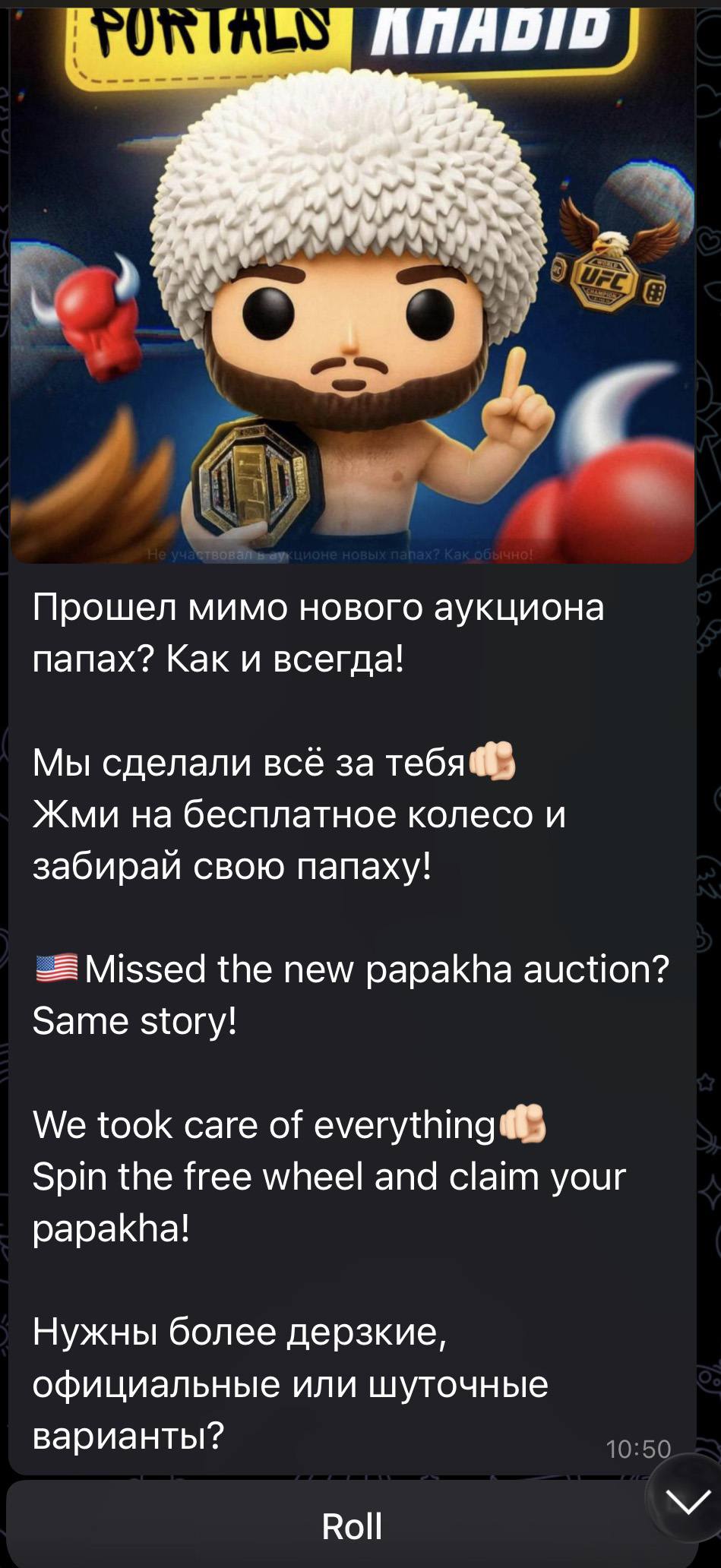
Phishing bait featuring a supposed papakha NFT giveaway by Khabib Nurmagomedov

Scammers blasted out phishing bait for a fake Khabib Nurmagomedov NFT giveaway in both Russian and English simultaneously. However, in the Russian text, they forgot to remove a question from the AI that generated the text, “Do you need bolder, formal, or humorous options?” — which points to a rushed job and a total lack of editing

Finally, the classic vote for my friend messenger scam evolved in 2025 to include prompts to vote for the “city’s best dentist” or “top operational leader” — unfortunately, just bait for account takeovers.

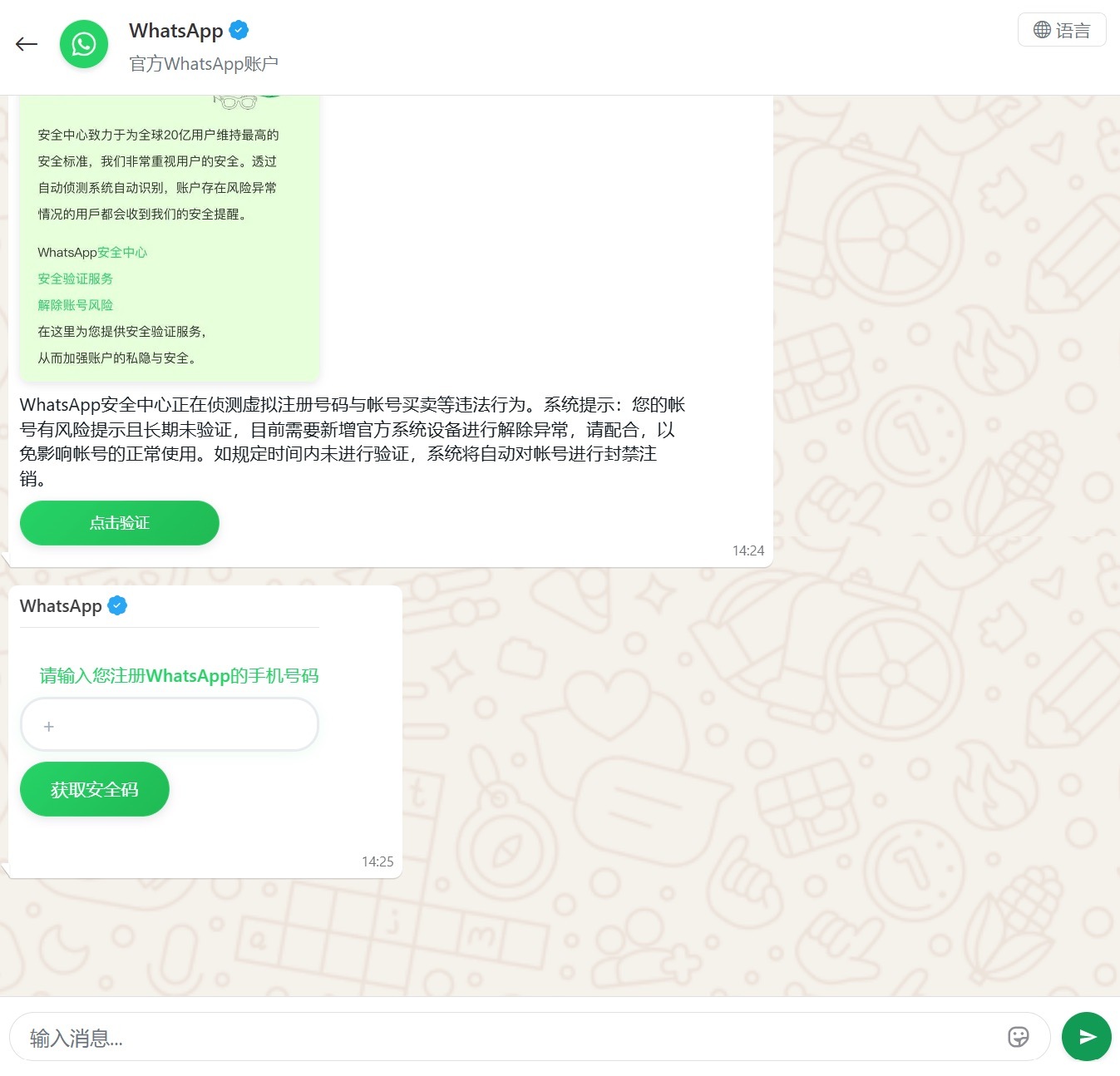
Another clever method for hijacking WhatsApp accounts was spotted in China, where phishing pages perfectly mimicked the actual WhatsApp interface. Victims were told that due to some alleged “illegal activity”, they needed to undergo “additional verification”, which — you guessed it — ended up with a stolen account.

A Chinese method for hijacking WhatsApp accounts

Victims were redirected to a phone number entry form, followed by a request for their authorization code

Impersonating Government Services

Phishing that mimics government messages and portals is a “classic of the genre”, but in 2025, scammers added some new scripts to the playbook.

In Russia, vishing attacks targeting government service users picked up steam. Victims received emails claiming an unauthorized login to their account, and were urged to call a specific number to undergo a “security check”. To make it look legit, the emails were packed with fake technical details: IP addresses, device models, and timestamps of the alleged login. Scammers also sent out phony loan approval notifications: if the recipient hadn’t applied for a loan (which they hadn’t), they were prompted to call a fake support team. Once the panicked victim reached an “operator”, social engineering took center stage.

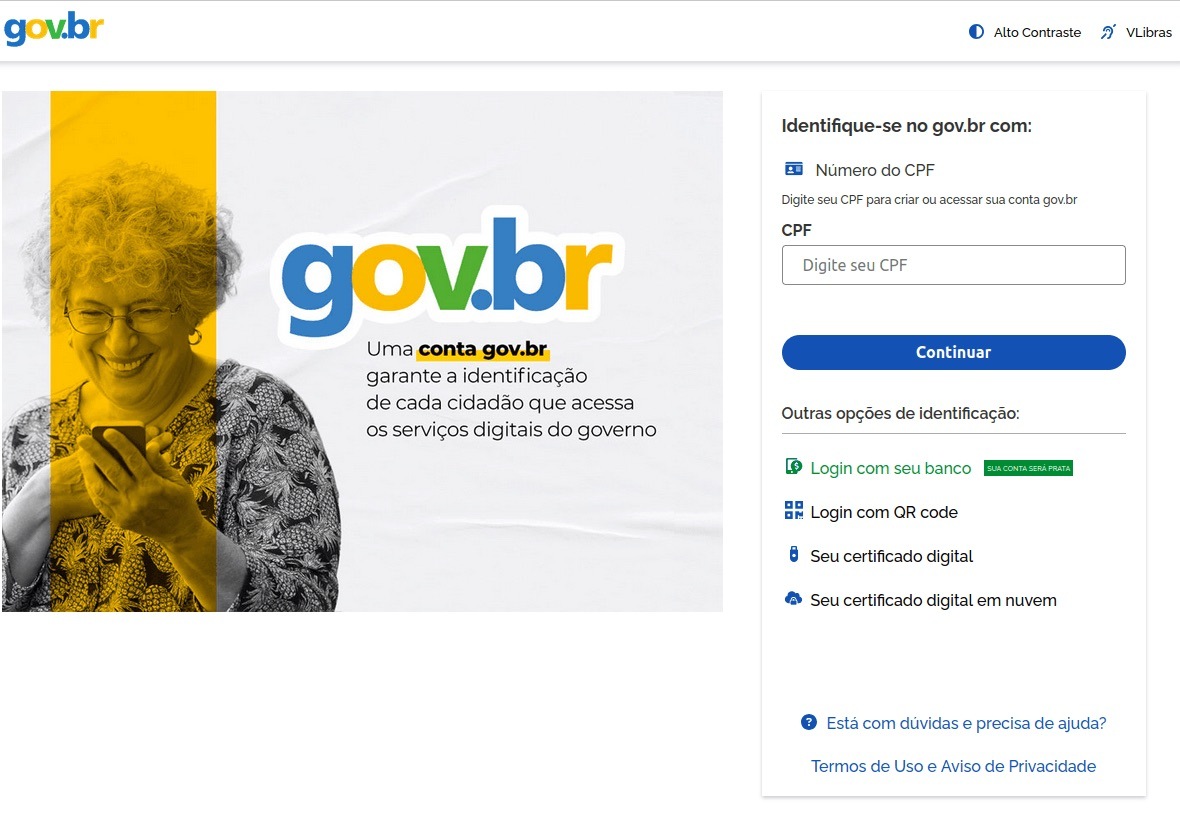
In Brazil, attackers hunted for taxpayer numbers (CPF numbers) by creating counterfeit government portals. Since this ID is the master key for accessing state services, national databases, and personal documents, a hijacked CPF is essentially a fast track to identity theft.

A fake Brazilian government services portal

This fraudulent Brazilian government portal of surprisingly high quality

In Norway, scammers targeted people looking to renew their driver’s licenses. A site mimicking the Norwegian Public Roads Administration collected a mountain of personal data: everything from license plate numbers, full names, addresses, and phone numbers to the unique personal identification numbers assigned to every resident. For the cherry on top, drivers were asked to pay a “license replacement fee” of 1200 NOK (over US$125). The scammers walked away with personal data, credit card details, and cash. A literal triple-combo move!

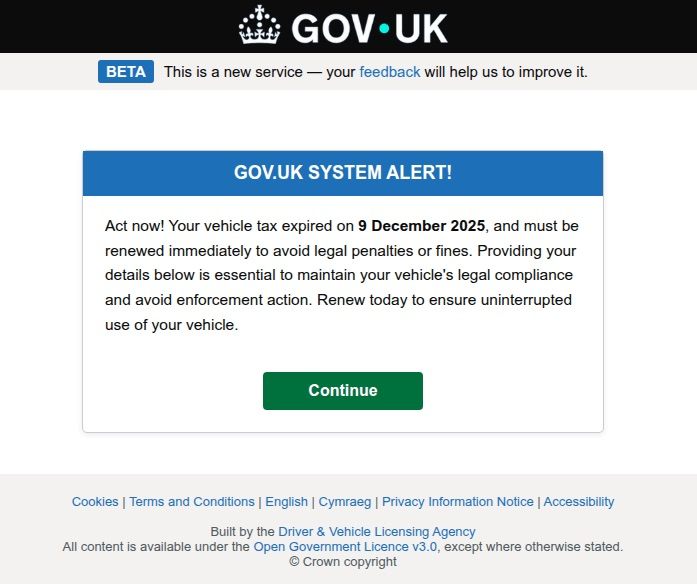
Generally speaking, motorists are an attractive target: they clearly have money and a car and a fear of losing it. UK-based scammers played on this by sending out demands to urgently pay some overdue vehicle tax to avoid some unspecified “enforcement action”. This “act now!” urgency is a classic phishing trope designed to distract the victim from a sketchy URL or janky formatting.

A fake demand for British motorists to pay overdue vehicle tax

Scammers pressured Brits to pay purportedly overdue vehicle taxes “immediately” to keep something bad from happening

Let us borrow your identity, please

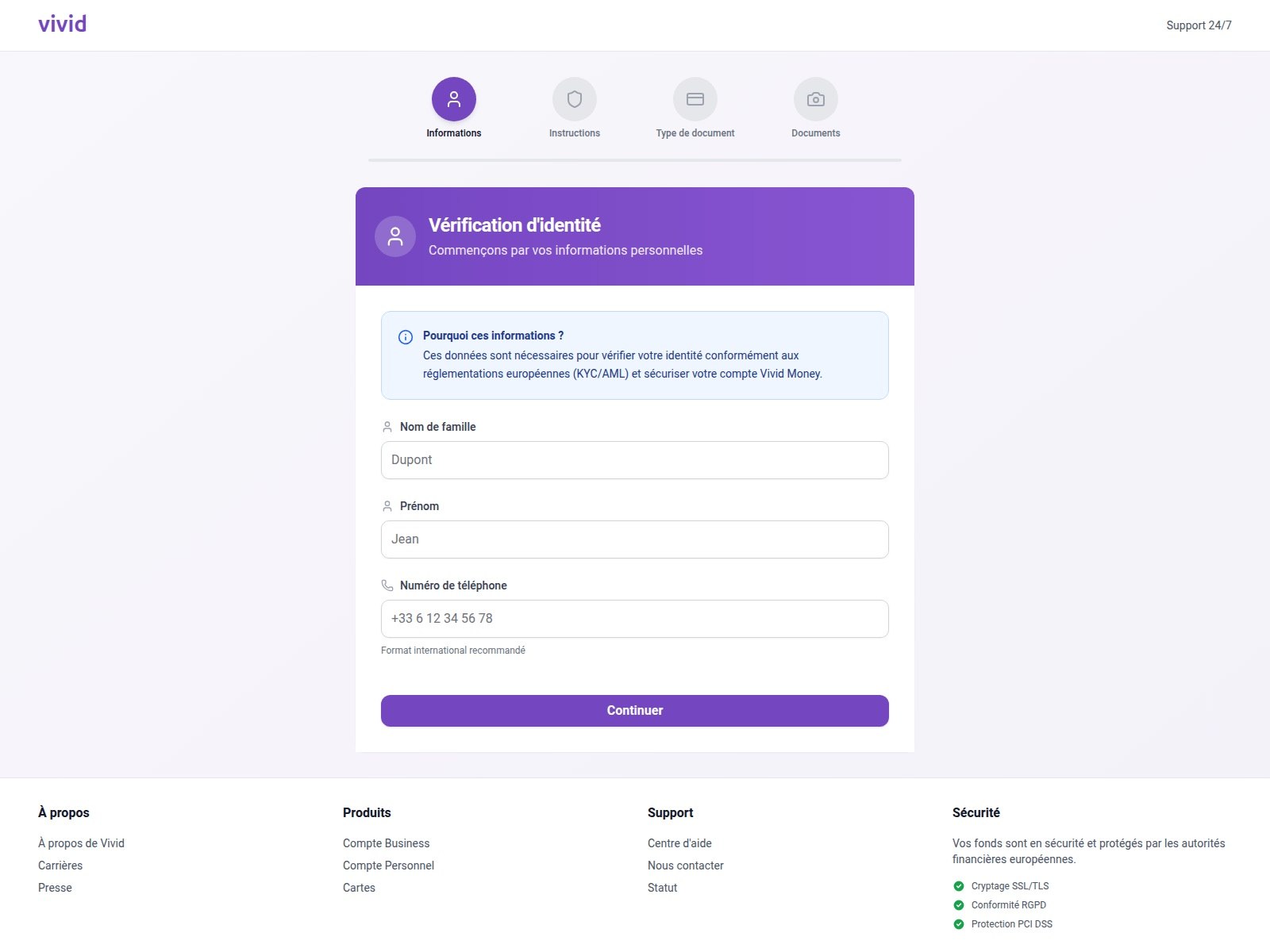
In 2025, we saw a spike in phishing attacks revolving around Know Your Customer (KYC) checks. To boost security, many services now verify users via biometrics and government IDs. Scammers have learned to harvest this data by spoofing the pages of popular services that implement these checks.

A fake Vivid Money page

On this fraudulent Vivid Money page, scammers systematically collected incredibly detailed information about the victim

What sets these attacks apart is that, in addition to standard personal info, phishers demand photos of IDs or the victim’s face — sometimes from multiple angles. This kind of full profile can later be sold on dark web marketplaces or used for identity theft. We took a deep dive into this process in our post, What happens to data stolen using phishing?

AI scammers

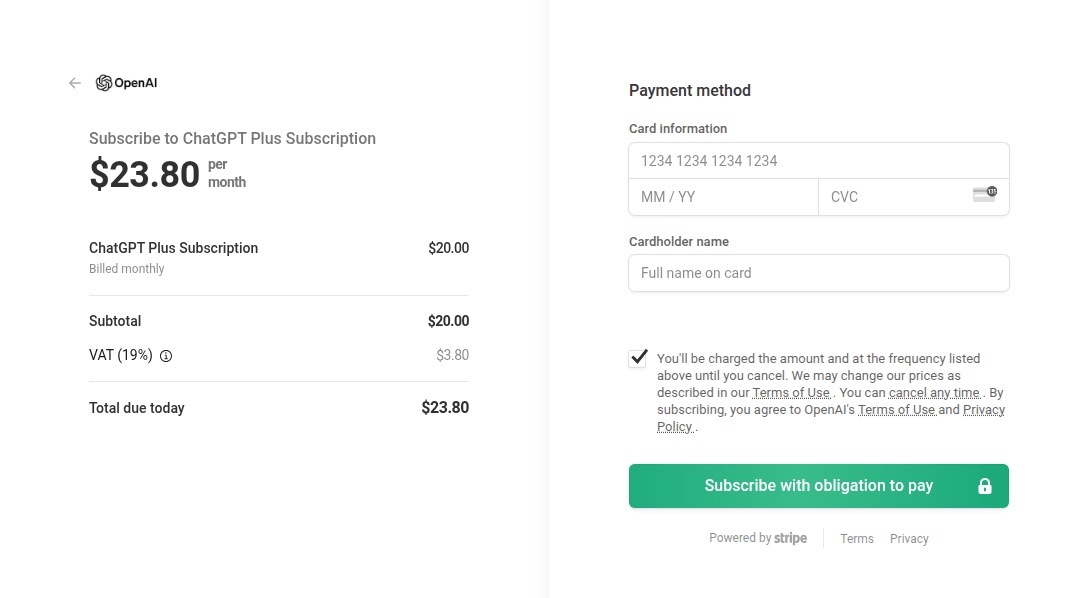
Naturally, scammers weren’t about to sit out the artificial intelligence boom. ChatGPT became a major lure: fraudsters built fake ChatGPT Plus subscription checkout pages, and offered “unique prompts” guaranteed to make you go viral on social media.

A fake ChatGPT checkout page

This is a nearly pixel-perfect clone of the original OpenAI checkout page

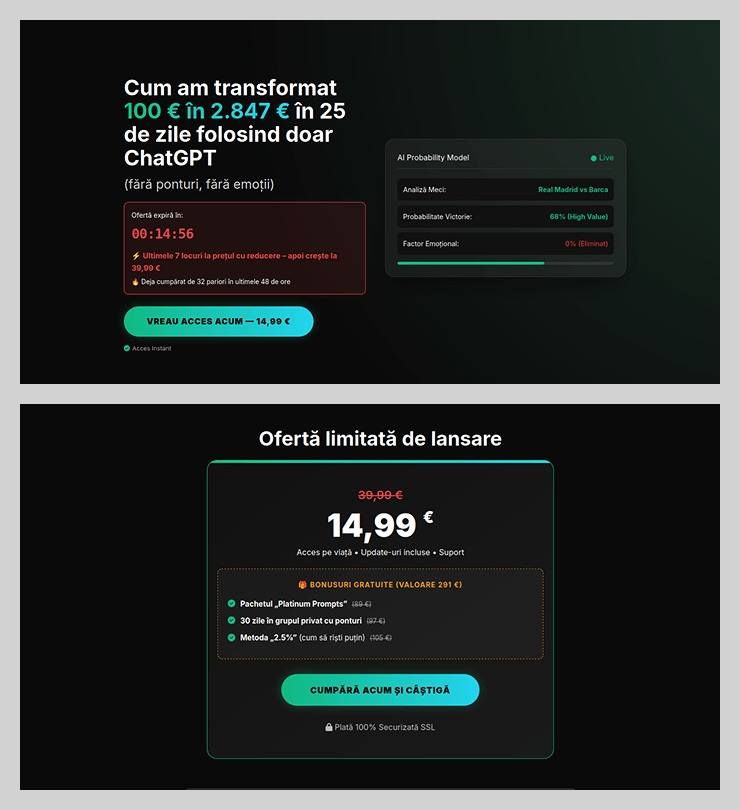
The “earn money with AI” scheme was particularly cynical. Scammers offered passive income from bets allegedly placed by ChatGPT: the bot does all the heavy lifting while the user just watches the cash roll in. Sounds like a dream, right? But to “catch” this opportunity, you had to act fast. A special price on this easy way to lose your money was valid for only 15 minutes from the moment you hit the page, leaving victims with no time to think twice.

A phishing page offering AI-powered earnings

You’ve exactly 15 minutes to lose €14.99! After that, you lose €39.99

Across the board, scammers are aggressively adopting AI. They’re leveraging deepfakes, automating high-quality website design, and generating polished copy for their email blasts. Even live calls with victims are becoming components of more complex schemes, which we detailed in our post, How phishers and scammers use AI.

Booby-trapped job openings

Someone looking for work is a prime target for bad actors. By dangling high-paying remote roles at major brands, phishers harvested applicants’ personal data — and sometimes even squeezed them for small “document processing fees” or “commissions”.

A phishing page offering remote work at Amazon

“$1000 on your first day” for remote work at Amazon. Yeah, right

In more sophisticated setups, “employment agency” phishing sites would ask for the phone number linked to the user’s Telegram account during registration. To finish “signing up”, the victim had to enter a “confirmation code”, which was actually a Telegram authorization code. After entering it, the site kept pestering the applicant for more profile details — clearly a distraction to keep them from noticing the new login notification on their phone. To “verify the user”, the victim was told to wait 24 hours, giving the scammers, who already had a foot in the door, enough time to hijack the Telegram account permanently.

Hype is a lie (but a very convincing one)

As usual, scammers in 2025 were quick to jump on every trending headline, launching email campaigns at breakneck speed.

For instance, following the launch of $TRUMP meme coins by the U.S. President, scam blasts appeared promising free NFTs from “Trump Meme Coin” and “Trump Digital Trading Cards”. We’ve previously broken down exactly how meme coins work, and how to (not) lose your shirt on them.

The second the iPhone 17 Pro hit the market, it became the prize in countless fake surveys. After “winning”, users just had to provide their contact info and pay for shipping. Once those bank details were entered, the “winner” risked losing not just the shipping fee, but every cent in their account.

Riding the Ozempic wave, scammers flooded inboxes with offers for counterfeit versions of the drug, or sketchy “alternatives” that real pharmacists have never even heard of.

And during the BLACKPINK world tour, spammers pivoted to advertising “scooter suitcases just like the band uses”.

Even Jeff Bezos’s wedding in the summer of 2025 became fodder for “Nigerian” email scams. Users received messages purportedly from Bezos himself or his ex-wife, MacKenzie Scott. The emails promised massive sums in the name of charity or as “compensation” from Amazon.

How to stay safe

As you can see, scammers know no bounds when it comes to inventing new ways to separate you from your money and personal data — or even stealing your entire identity. These are just a few of the wildest examples from 2025; you can dive into the full analysis of the phishing and spam threat landscape over at Securelist. In the meantime, here are a few tips to keep you from becoming a victim. Be sure to share these with your friends and family — especially kids, teens, and older relatives. These groups are often the main targets in the scammers’ crosshairs.

  1. Check the URL before entering any data. Even if the page looks pixel-perfect, the address bar can give the game away.
  2. Don’t follow links in suspicious messages, even if they come from someone you know. Their account could easily have been hijacked.
  3. Never share verification codes with anyone. These codes are the master keys to your digital life.
  4. Enable two-factor authentication everywhere you can. It adds a crucial extra hurdle for hackers.
  5. Be skeptical of “too good to be true” offers. Free iPhones, easy money, and gifts from strangers are almost always a trap. For a refresher, check out our post, Phishing 101: what to do if you get a phishing email.
  6. Install robust protection on all your devices. Kaspersky Premium automatically blocks phishing sites, malicious attachments, and spam blasts before you even have a chance to click. Plus, our Kaspersky for Android app features a three-tier anti-phishing system that can sniff out and neutralize malicious links in any message from any app. Read more about it in our post, A new layer of anti-phishing security in Kaspersky for Android.

  •  

Phishing in Telegram Mini Apps: how to avoid taking the bait | Kaspersky official blog

Admit it: you’ve been meaning to jump on the latest NFT reincarnation — Telegram Gifts — but just haven’t gotten around to it. It’s the hottest trend right now. Developers are churning out collectible images in partnership with celebs like Snoop Dogg. All your friends’ profiles are already decked out with these modish pictures, and you’re dying to hop on this hype train — but pay as little as possible for it.

And then it happens — a stranger messages you privately with a generous offer: a chance to snag a couple of these digital gifts — with no investment required. A bot that looks completely legit is running an airdrop. In the world of NFTs, an airdrop is a promotional stunt where a small number of new crypto assets are given away for free. The buzzword has been adopted on Telegram, thanks to the crypto nature of these gifts and the NFT mechanics running under the hood.

Limited time offer: a scammer's favorite trick

Limited time offer: a marketer’s favorite trick… and a scammer’s tool

They’re offering you these gift images for free — or so they say. You could later attach them to your profile or sell them for Telegram’s native currency, Toncoin. You don’t even have to tap an external link. Just hit a button in the message, launch a Mini App right inside Telegram itself, and enter your login credentials. And then… your account immediately gets hijacked. You won’t get any gifts, and overall, you’ll be left with anything but a celebratory feeling.

By filling in these fields, you lose access to your Telegram account

This is the first of the screens where, by filling in the fields, you receive a gift lose access to your Telegram account

Today, we break down a phishing scheme that exploits Telegram’s built-in Mini Apps, and share tips to help you avoid falling for these attacks.

How the new phishing scheme works

The principle of classic phishing is straightforward: the user gets a link to a fake website that mimics a legitimate sign-in form. When the victim enters their credentials, this data goes straight to the scammer. However, phishing tactics are constantly evolving, and this new attack method is far more insidious.

The bad actors create phishing Mini Apps directly inside Telegram. These appear as standard web pages but are embedded within the messaging app’s interface instead of opening in an external browser. To the user, these apps look completely legitimate. After all, they run within the official Telegram app itself.

Scammers add a plausible-sounding limit on gifts per user

To make it even more convincing, scammers often add a plausible-sounding limit on gifts per user

This leads the victim to think, “If this app runs inside Telegram, there must be some kind of vetting process for these apps. Surely they wouldn’t let an obvious scam through?” In practice, it turns out that’s not the case at all.

How is this scheme even a thing?

A core security issue with Telegram Mini Apps is that the platform does almost no vetting before an app goes live. This is a world apart from the strict review processes used by Google Play and the App Store — although even there, obvious malware occasionally slips through.

On Telegram, it’s far easier for bad actors. Essentially, anyone who wishes to create and launch a Mini App can do so. Telegram does not review the code, functionality, or the developer’s intent. This turns a security flaw within a messaging service boasting nearly a billion global users into a global-scale problem. To make matters worse, moderation of these Mini Apps within Telegram is entirely reactive — meaning action is only taken after users start complaining or law enforcement gets involved.

Phishing lures being distributed simultaneously in both Russian and English

This is a global operation, with phishing lures being distributed simultaneously in both Russian and English. However, the Russian version gives away a tell-tale sign of the scammers’ haste and lack of polish. They forgot to remove a clarification question from the AI that generated the text: “Do you need bolder, more official, or humorous options?”

In this case, the bait was “gifts” from UFC fighters: a giveaway of “papakhas” — digital gift images of the traditional Dagestani hat released by Telegram in partnership with Khabib Nurmagomedov. An auction for these items did take place, with Pavel Durov even posting about it on his X and Telegram (Khabib reposted these announcements but later deleted them after the auction ended). However, there were only 29 000 of these “papakhas” released, which wasn’t enough to satisfy all the eager fans. Scammers seized on the opportunity, assuring fans they could get the exclusive items for free. The phishing campaign was a targeted one — focusing on users who’d been active on the athlete’s channel.

How the scammers lull their victims

The criminals leveraged the name of the popular Portals platform — a legitimate service for games, apps, and entertainment within Telegram. They created a series of Mini Apps that were visually almost indistinguishable from the real ones, and promoted them as free giveaways — airdrops.

The scammers even listed the official Telegram channel for Portals in the phishing Mini App's profile

To add a veneer of authenticity, the scammers even listed the official Telegram channel for Portals in the phishing Mini App’s profile. However, the legitimate Portals Market bot has a different username: @portals

That said, the scam campaigns themselves show signs of being rushed and cutting design and copywriting costs — with obvious signs of AI involvement. Some of the messages contain leftover text fragments clearly generated by a neural network, which the scammers either forgot or couldn’t be bothered to edit.

How to protect your Telegram account from being hacked

The golden security rules are simple: stay vigilant, and learn the key hallmarks of these attacks:

  • Verify the source. If you receive a link promising a giveaway from a celebrity or even Telegram itself but sent from an unfamiliar account or a dubious group, don’t click. Cross-check through the celebrity or company’s official channel to see if they’re actually running a promo like that.
  • Inspect the account verification badge. Ascertain that the blue checkmark is real and not just an emoji status or part of the profile name. You can verify this by simply tapping that checkmark icon in the profile. If it’s a Premium emoji status, Telegram will explicitly tell you so. If a checkmark emoji is simply added to the profile name, tapping it doesn’t do anything. But if the account is genuinely verified, tapping the blue checkmark will bring up an official confirmation message from Telegram.
  • Don’t be in a rush to authenticate in Mini Apps. Legitimate Telegram apps typically don’t require you to sign in again through a form inside the Mini App. If you’re prompted to enter your phone number or a verification code, it’s likely a phishing attempt.
  • Look for signs of AI-generated text or design. Weird grammar, unnatural phrasing, or leftover neural network prompts within a message are a red flag. Scammers frequently use AI-powered generation to churn out text quickly and cheaply.
  • Turn on two-step verification (your Telegram password). Do this right now in SettingsPrivacy and SecurityTwo-Step Verification. Even if a scammer manages to get your phone number and SMS code, they won’t be able to access your account without this password. Obviously, never share your password with anyone — it’s meant only for you to sign in to your Telegram account.
  • Use a passkey to secure your account. A recent Telegram update added the ability to securely sign in with a passkey. We’ve covered using passkeys with popular services and the associated caveats in detail. A passkey makes it nearly impossible for a malicious actor to steal your account. You can set one up in SettingsPrivacy and SecurityPasskeys.
  • Store your password and passkey in a password manager. If you’ve secured your account with both a password and a passkey, remember that a weak, reused, or compromised password can still be the proverbial “spare key under the mat” for attackers — even if the “front door” is locked with a passkey. Therefore, we recommend creating a strong, unique password for Telegram and storing it — along with your passkey — in Kaspersky Password Manager. This keeps your credentials and keys available across all your devices.
  • Install Kaspersky for Android on your smartphone. Its new anti-phishing technology protects you from phishing links embedded in notifications from any app.

What to do if your Telegram account was already stolen

The key is keeping calm and acting swiftly. You have just 24 hours to reclaim your account, or you risk losing it permanently. Follow the step-by-step guide to restoring access in our post What to do if your Telegram account is hacked.

Finally, a reminder that has become our classic mantra: if an offer looks too good to be true, it almost certainly is. Always verify information through official channels, and never enter your passwords or passkeys into unofficial apps or forms — even if they look legit. Stay vigilant and stay safe.

Want more tips on securing your messenger accounts and chats? Check out our related posts:

  •  
❌