Reading view

Elon Musk’s XChat: how secure is the new messaging app? | Kaspersky official blog

Pavel Durov and his “private” messaging app have a brand new rival, and it’s — drumroll, please — Elon Musk and his XChat. On our blog, we’ve discussed more than once why Durov’s claims about Telegram privacy and security are exaggerated, to put it mildly. Here, I’ll just remind the reader that standard (non-secret) chats on Telegram aren’t protected by end-to-end encryption — the bare minimum required for user data to stay private.

But let’s get back to Musk. In late April 2026, the XChat app launched for iOS users. The tech mogul had been touting his messaging app for a long time, pitching it from day one as an incredibly private and secure way to communicate, and as a direct threat to Signal, WhatsApp, Telegram, and iMessage. Today, we look at whether we should actually trust Musk’s promises this new service, break down its core features, and stack it up against the competition.

Bitcoin-style encryption

Musk initially teased XChat on June 1, 2025, naturally via his X (formerly Twitter) account. Responding to another user’s question about when to expect the new service, Musk wrote: “This week if there are no scaling issues.”

Apparently, scaling issues there were: the app’s beta didn’t drop until September 2025, and iOS users didn’t get full access until April 2026. As for Android, there is zero info on when that version would launch at the time of this writing. That said, an XChat page is already live on Google Play where users can queue up “pre-register”, whatever that means.

But let’s go back to Musk’s post announcing XChat. That specific post turned a lot of heads in the privacy and cybersecurity community, and here’s why: the tech mogul wrote that the service would be built on an “entirely new architecture”, written in Rust, and featuring “Bitcoin-style encryption”.

Elon Musk's announcement of XChat

Elon Musk announces the launch of XChat, claiming the new messaging app is written in Rust and uses “Bitcoin-style encryption”. Source

The expert community spent a long time scratching their heads and trying to figure out what Musk actually meant. After all, Bitcoin isn’t an anonymous, encrypted data exchange system. The blockchain does use public and private cryptographic keys, but for something entirely different: signing transactions. Meanwhile, these transactions aren’t hidden from prying eyes; they’re out in the open for anyone to see, forever. Simply put, Bitcoin protects its users not by ensuring privacy, but quite the opposite — through ultimate transparency.

Most likely, Musk used “Bitcoin-style encryption” as a marketing gimmick. Bitcoin was trading near all-time highs at the time of his announcement, and cryptocurrency was the talk of the town. Technically, the XChat beta that dropped in September 2025 protected user chats with a “kind of” end-to-end encryption, but this was implemented in a way that raised serious doubts among cryptography experts.

And not without a reason. Normally, setting up an end-to-end encrypted chat automatically generates a public and private key pair. The public key is used to encrypt messages, while the private key decrypts them. Because other users need your public key to start a secure chat with you, these keys are usually stored on the app’s servers.

The private key, however, should ideally live only on the user’s device — which is exactly how Signal does it. This serves as a simple, ironclad guarantee that neither the company itself nor any third party breaching its infrastructure can access user chats, even if they really want to.

But Elon Musk’s projects always march to the beat of their own drum: the XChat developers decided it would be a great idea to store users’ private keys on XChat servers. X claims they’ll use hardware security modules (HSMs) to store these private keys — specialized appliances designed to prevent even the system owner from easily accessing the data inside. However, experts are also questioning the reliability of this setup, and coming to a grim conclusion: if X really wants to get a user’s private key, they will most likely be able to do so.

How encrypted messaging in XChat works in practice

Finally, once the scaling issues were ironed out nearly a year after the announcement, X officially rolled out the XChat app for iOS in April 2026. Now anyone can use it, but from a practical standpoint, the situation with encrypted chats seems even more convoluted than in Telegram.

According to the social network’s help center, to use end-to-end chat encryption in XChat, both users must have an X account, set up XChat, and have some sort of connection between them:

  • Follow, or be subscribed to each other
  • Have exchanged messages before
  • Have previously accepted a direct message request
  • Be a member of the same Premium Business / Premium Organization subscription on X

If users don’t follow each other and haven’t interacted before, XChat might still let them send a message request. However, that initial request goes out without end-to-end encryption.

Again, this is how the process is described in the messaging app’s official help documentation. Sound overly complicated? Let me reassure you: in practice, it works — or rather, doesn’t — completely differently. I personally managed to send a message to another user who had NOT set up XChat. The app itself, of course, gave me absolutely no warning about this.

XChat lets users send messages to people who haven't set up the app

The app allows you to start a chat with a user who hasn’t even set up XChat yet, without giving the sender any heads-up.

It gets even better. The user I messaged saw a notification for it on the web version of X, but couldn’t actually access the message. Here’s the catch: to start using XChat, the user first has to create a four-digit PIN. Yet, the app asks for this PIN the very first time the user tries to open it — meaning, before they even get a chance to create one. Along with this prompt, the user also sees a warning stating that without the PIN, they won’t be able to view past encrypted chats.
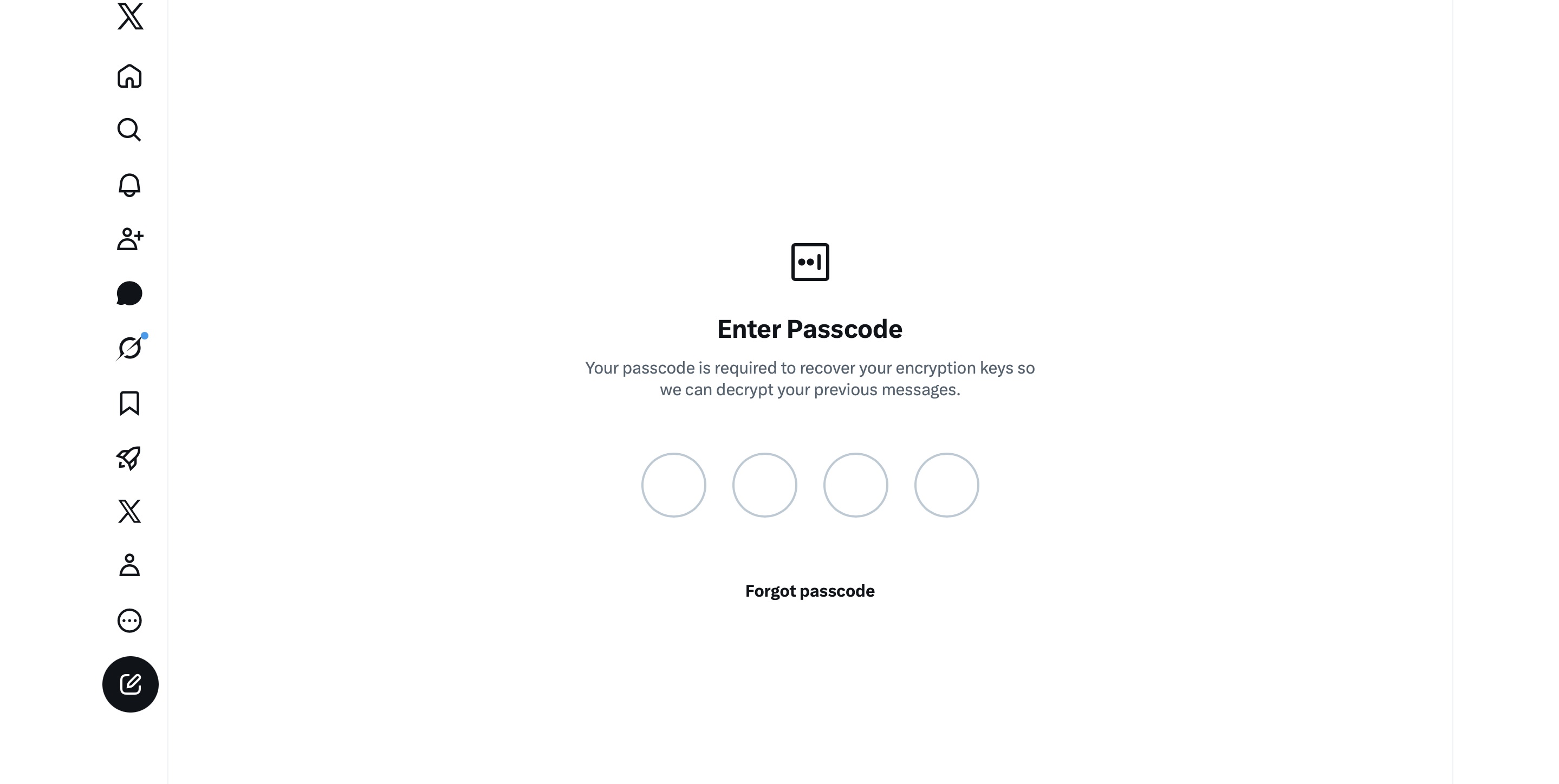
XChat asks for a PIN before one is even created

The user is prompted to enter a PIN to decrypt past messages before even completing the initial XChat setup.

The only workaround I found to actually start using XChat is to tap “Forgot PIN?” — even though that PIN never existed in the first place — confirm your identity, and create a new (well, your first) PIN. Naturally, you lose access to your chat history this way, so you won’t be able to read any messages sent to you in XChat before you officially set up the app.

XChat: the new Telegram, WhatsApp, Signal… or Facebook Messenger?

All these PIN hurdles actually exist for a reason. Remember, unlike WhatsApp and Signal, the XChat developers decided to store users’ private keys on their own servers. Consequently, the app uses these four-digit PINs to encrypt those keys.

According to the XChat help documentation, this mechanism was designed to ensure a “seamless” multi-device experience. It’s impossible not to point out that both WhatsApp and Signal managed to pull this off without sketchy workarounds like PIN requirements or server-side private key storage.

The problem is, workarounds like these undermine any claims of app privacy and security. First and chief among them, a PIN isn’t exactly the most secure way to protect sensitive data. We’ve mentioned time and again that four-digit combinations are easy to crack via brute force — especially since XChat gives you a generous 20 attempts to guess the right code.
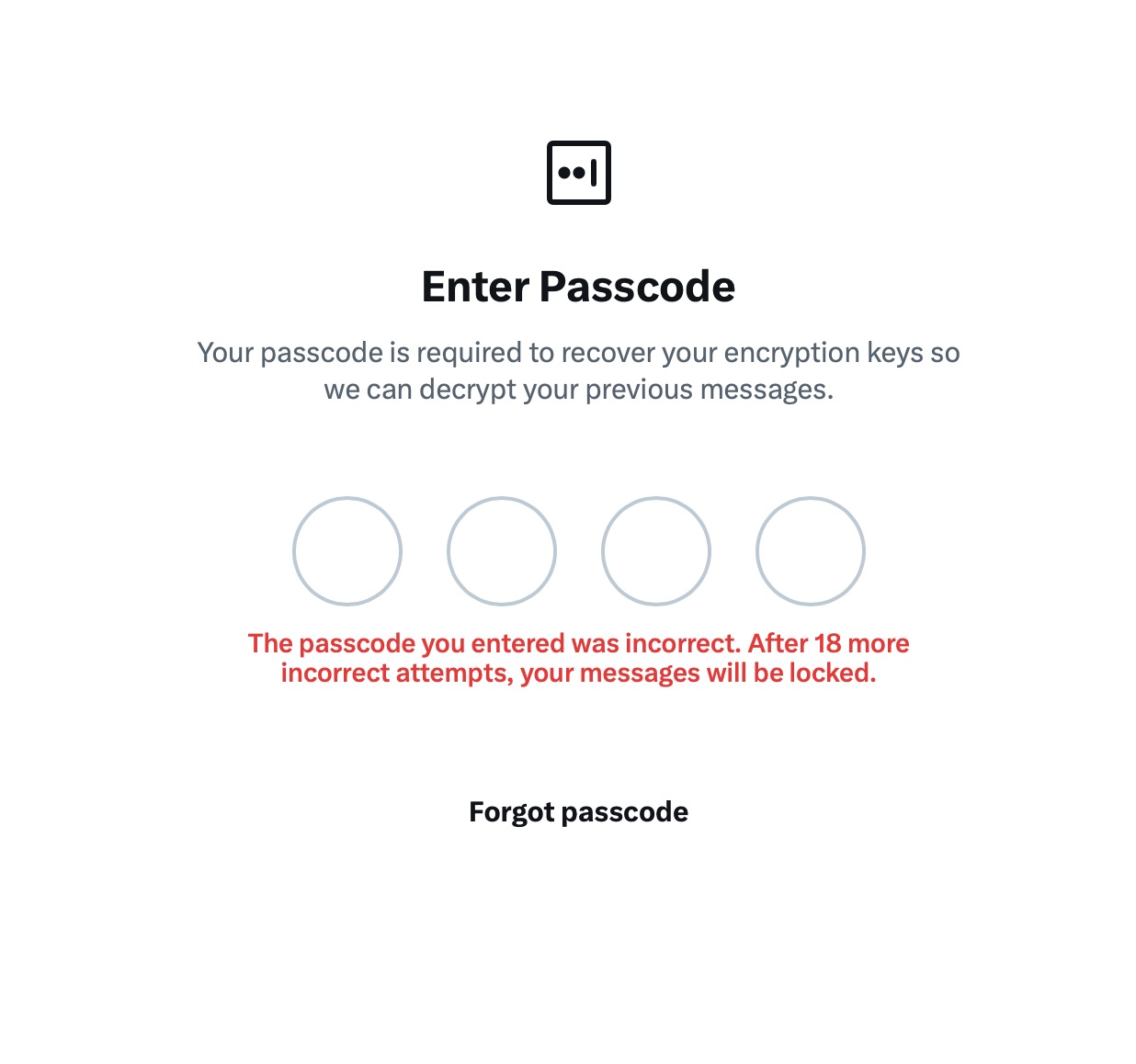
XChat warns of lockout after 20 failed attempts

The app allows up to 20 attempts to enter the four-digit PIN. Once the limit is reached, XChat warns that access to messages will be permanently lost.

Stepping away from the bizarre implementation of end-to-end encryption compared to other messaging apps, it’s hard to ignore the overall sense of pointlessness that comes with trying to use XChat. As a Wired journalist rightly pointed out, the app feels less like a relative of WhatsApp, Signal, or Telegram, and much more like Facebook Messenger. Except people usually open Messenger to read a text from their mom or grandma, whereas XChat seems meant for anyone wanting to check in on that weird nephew who spends all his free time on X, still believes John McAfee’s promise of $500 000 Bitcoin, and fanboys over Elon Musk.

So, what’s the bottom line on XChat?

The best way to wrap up this post is with a quote from a cybersecurity expert: “If what you want is good security, use Signal. If what you want is to be able to talk to pretty much anybody using encrypted messages, use WhatsApp. If your whole life is based around X, I guess this is better than nothing.”

If you do use XChat, rule number one is to avoid a predictable PIN — absolutely don’t use your birth year or, worse, 1234. It’s also crucial not to forget this code, because if you do, your entire chat history is gone for good. Finally, just like your other passwords, you shouldn’t keep it in your notes app, but rather in a secure password manager. This won’t only save you from having to memorize dozens of character combinations, but will also reduce the risk of losing access to your vital data and conversations.

To learn more about secure messaging in other apps, check out our other posts:

  •  

How VoidStealer bypasses Chrome’s protections to hijack sessions and steal data | Kaspersky official blog

Malicious actors have developed a new way to steal data stored by Chrome for Windows. Researchers discovered the technique while analyzing a fresh build of an infostealer known as VoidStealer. The new method allows the malware to bypass Chrome’s Application-Bound (App-Bound) Encryption (ABE), a mechanism intended to protect session cookies and other valuable information stored in the browser.

Google hoped this mechanism would secure the master key Chrome uses to encrypt all sensitive data. Unfortunately, this isn’t the first time malware authors have found a workaround for this defense — leaving secrets stored in Chrome vulnerable once again.

How App-Bound Encryption works in Chrome

Google introduced App-Bound Encryption in July 2024 with the release of Chrome version 127. The company’s announcement mentioned infostealers snatching cookies from Chrome users on Windows as the primary problem ABE was intended to solve. We’ve already covered in detail what these files are and the consequences of their theft, so we’ll only briefly recap the main facts here.

Cookies are small files that the browser saves to the user’s device at a website’s request to remember various site settings. Of particular value to attackers are session cookies, which are used for automatic authentication on websites. It’s thanks to these files that we don’t have to enter a username and password every time we revisit a site.

But this convenience carries a risk: stealing these files allows an attacker to use an already-authenticated session without entering a username or password. This allows them to impersonate the user, which can lead to account hijacking, theft of personal or financial data, and other adverse consequences.

Infostealer Trojans are particularly dangerous for Chrome users on Windows. This is because, on this OS, Chrome previously relied solely on the standard built-in Data Protection API (DPAPI). With this system encryption mechanism, applications don’t need to create and store encryption keys to protect data.

The limitation of DPAPI is that it doesn’t protect data from malware that’s already successfully compromised the system and is capable of executing code on behalf of the logged-in user. This is exactly what stealers exploit: since they typically run with the user’s privileges, they can simply request DPAPI to decrypt the browser’s protected data.

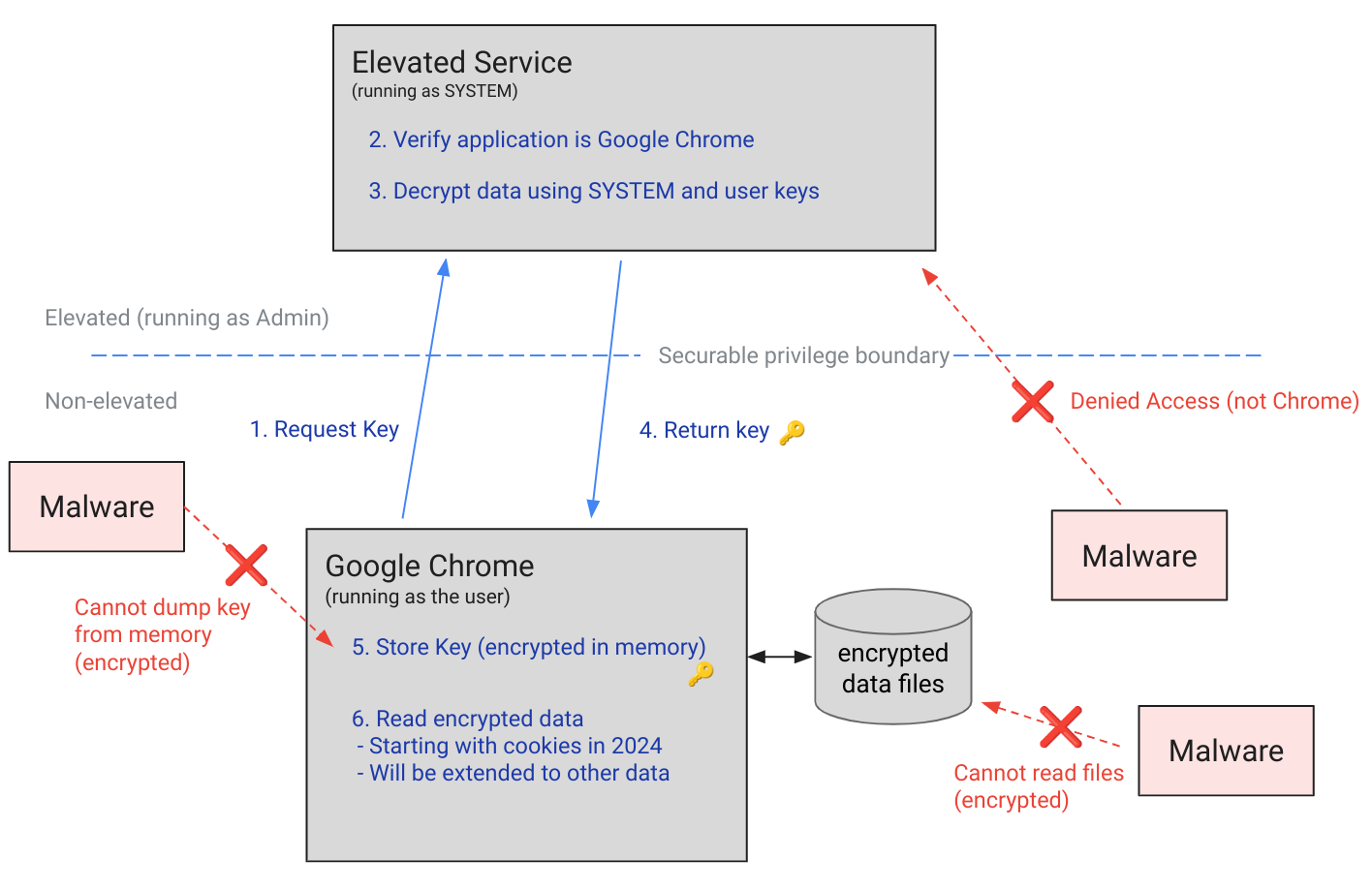
The ABE mechanism was designed to solve that specific problem. The core idea is right in the name: App-Bound Encryption means the encryption is tied to a specific application. To achieve this, a separate service running with system privileges is responsible for protecting the key used to encrypt Chrome’s data. It verifies which application is requesting access to the key, and denies the request if it doesn’t originate from Chrome.

How Chrome's App-Bound Encryption (ABE) works

Chrome’s App-Bound Encryption (ABE) was designed so that only Chrome itself could retrieve the master key needed to decrypt the browser’s stored data. Source

As a result, the architects of this feature assumed that to access ABE-protected browser data, an infostealer would either need to escalate its privileges to system-level, or inject malicious code directly into Chrome. In theory, this should have made attacking Chrome significantly harder and reduced the effectiveness of mass-market infostealers. As you might have guessed, things didn’t go quite that smoothly in practice.

Previous successful bypasses of Chrome’s ABE

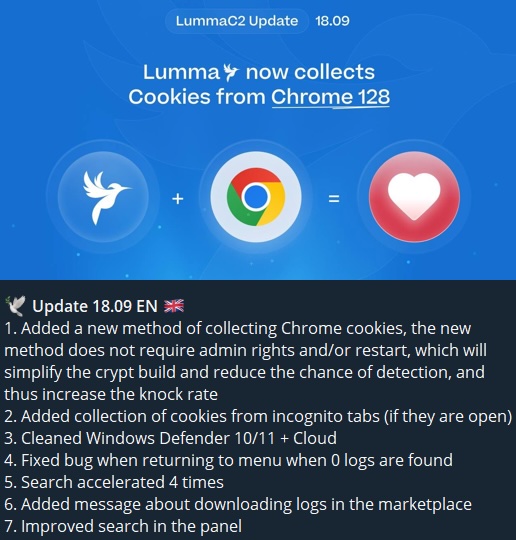
Just a couple of months after Google announced the implementation of App-Bound Encryption in Chrome, many infostealer developers claimed they’d already bypassed the protection. Among them were the creators of Meduza Stealer, Whitesnake, Lumma Stealer, and Lumar (also known as PovertyStealer).

Announcement of a new version of the Lumma stealer

Lumma stealer developers announce a bypass for Chrome’s App-Bound Encryption in a new version of the malware

Of course, you shouldn’t take malware developers at their word, but legitimate security researchers were able to confirm at least some of the claims. Bypasses for Google Chrome’s new data protection feature did become available almost immediately after its release.

A month later, in October 2024, tech enthusiast Alex Hagenah published a tool on GitHub called Chrome-App-Bound-Encryption-Decryption to bypass Google’s new security mechanism. Analysis of the tool’s code revealed that its author used roughly the same methods that attackers were already heavily exploiting.

What followed was a game of cat and mouse: security researchers and stealer developers came up with new tricks to circumvent App-Bound Encryption, while Google patched the newly discovered loopholes with varying degrees of success.

VoidStealer — a new data-nabbing menace

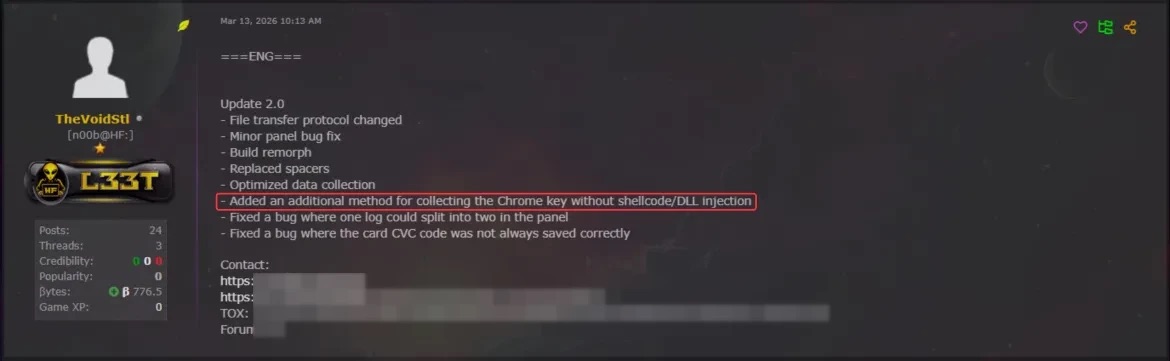
This brings us to recent events: in March 2026, news broke about a stealer named VoidStealer, which utilizes a brand-new and, by all accounts, highly effective method for bypassing ABE.

Announcement of a new VoidStealer version

VoidStealer developers advertising a new method for bypassing ABE. Source

The malware authors developed an attack technique that targets the brief moment when the master key sits in the browser’s memory in plaintext. This occurs because, at a certain point, the browser inevitably has to decrypt its data to actually use it — for instance, to automatically sign in to a website with the relevant session cookie or to access saved credentials.

To exploit this window of opportunity, the malware attaches itself to the Chrome process as a debugger — a tool that allows one to control a program’s execution, pause it, and inspect its memory. In legitimate scenarios, these tools are used by developers to find and fix bugs, analyze application behavior, and test performance.

The malware identifies the specific section of code where data decryption takes place. It then sets a breakpoint at that location; when the program’s execution reaches that point, the browser effectively freezes. This is how the malware catches the exact moment the master key is sitting in RAM in plaintext; it then reads the key directly from memory.

It’s worth noting that everything mentioned above also applies to other Chromium-based browsers that use ABE, including Microsoft Edge, Brave, Opera, Vivaldi, and others.

How to avoid falling victim to infostealers

The scale of VoidStealer’s reach could be significant, as its developers operate under the malware-as-a-service (MaaS) model. This means they rent out the ready-made tool to other attackers, so they don’t need to develop custom malware from scratch.

This situation demonstrates that relying solely on built-in security mechanisms isn’t enough. Unfortunately, stealer developers are coming up with new workarounds faster than browser and operating system developers can roll out patches.

Here’s what users can do about it:

  • Avoid installing programs from suspicious sources. This will minimize the chances of malware infiltrating your system.
  • Learn how ClickFix attacks Lately, stealers have frequently been distributed using this specific malicious tactic.
  • Keep your OS and software updated on all devices. Timely updates help patch many of the vulnerabilities that malware exploits.
  • Install a robust security solution on all your devices. It’ll block suspicious activity in real time and alert you to potential threats.

As an added precaution, avoid storing passwords and bank card info in Google Chrome or your Notes app, as these are the first places any self-respecting stealer looks. Instead, use a secure password manager.

Stealers are hunting for your data, finding ways to infiltrate both computers and smartphones alike. To protect yourself from theft, check out our other related posts:

  •  

How to protect your organization from AirSnitch Wi-Fi vulnerabilities | Kaspersky official blog

At the NDSS Symposium 2026 in San Diego in February, a group of respected researchers presented a study unveiling the AirSnitch attack, which bypasses the Wi-Fi client isolation feature — also commonly known as guest network or device isolation. This attack allows connecting to a single wireless network via an access point, and then gaining access to other connected devices, including those using entirely different service set identifiers (SSIDs) on that same hardware. Targeted devices could easily be running on wireless subnets protected by WPA2 or WPA3 protocols. The attack doesn’t actually break encryption; instead, it exploits the way access points handle group keys and packet routing.

In practical terms, this means that a guest network provides very little in the way of real security. If your guest and employee networks are running on the same physical device, AirSnitch allows a connected attacker to inject malicious traffic into neighboring SSIDs. In some cases, they can even pull off a full-blown man-in-the-middle (MitM) attack.

Wi-Fi security and the role of isolation

Wi-Fi security is constantly evolving; every time a practical attack is made against the latest generation of protection, the industry shifts toward more complex algorithms and procedures. This cycle started with the FMS attacks used to crack WEP encryption keys, and continues to this day: recent examples include the KRACK attacks on WPA2, and the FragAttacks, which impacted every security protocol version from WEP all the way through WPA3.

Attacking modern Wi-Fi networks effectively (and quietly) is no small feat. Most professionals agree that using WPA2/WPA3 with complex keys and separating networks based on their purpose is usually enough for protection. However, only specialists really know that client isolation was never actually standardized within the IEEE 802.11 protocols. Different manufacturers implement isolation in completely different ways — using Layer 2 or Layer 3 of network architecture; in other words, handling it at either the router or the Wi-Fi controller level — meaning the behavior of isolated subnets varies wildly depending on your specific access point or router model.

While marketing claims that client isolation is perfect for keeping restaurant or hotel guests from attacking one another — or ensuring corporate visitors can’t access anything but the internet — in reality, isolation often relies on people not trying to hack it. This is exactly what the AirSnitch research highlights.

Types of AirSnitch attacks

The name AirSnitch doesn’t just refer to a single vulnerability, but a whole family of architectural flaws found in Wi-Fi access points. It’s also the name of an open-source tool used to test routers for these specific weaknesses. However, security professionals need to keep in mind that there’s only a very thin line between testing and attacking.

The model for all these attacks is the same: a malicious client is connected to an access point (AP) where isolation is active. Other users — the targets — are connected to the same SSID or even different SSIDs on that same AP. This is a very realistic scenario; for example, a guest network might be open and unencrypted, or an attacker could simply get the guest Wi-Fi password by posing as a legitimate visitor.

For certain AirSnitch attacks, the attacker needs to know the victim’s MAC or IP address beforehand.  Ultimately, how effective each attack is depends on the specific hardware manufacturer (more on that below).

GTK attack

After the WPA2/WPA3 handshake, the access point and the clients agree on a Group Transient Key (GTK) to handle broadcast traffic. In this scenario, the attacker wraps packets destined for a specific victim inside a broadcast traffic envelope. They then send these directly to the victim while spoofing the access point’s MAC address. This attack only allows for traffic injection, meaning the attacker won’t receive a response. However, even that is enough to deliver malicious ICMPv6 routing advertisements, or DNS and ARP messages to the client — effectively bypassing isolation. This is the most universal version of the attack working on any WPA2/WPA3 network that uses a shared GTK. That said, some enterprise-grade access points support GTK randomization for each individual client, which renders this specific method ineffective.

Broadcast packet redirection

This version of the attack doesn’t even require the attacker to authenticate at the access point first. The attacker sends packets to the AP with a broadcast destination address (FF:FF:FF:FF:FF:FF) and the ToDS flag set to 1.  As a result, many access points treat this packet as legitimate broadcast traffic; they encrypt it using the GTK, and blast it out to every client on the subnet, including the victim. Just like in the previous method, traffic specifically meant for a single victim can be pre-packaged inside.

Router redirection

This attack exploits an architectural gap between Layer 2 and Layer 3 security found in some manufacturers’ hardware. The attacker sends a packet to the access point, setting the victim’s IP address as the destination at the network layer (L3).  However, at the wireless layer (L2), the destination is set to the access point’s own MAC address, so the isolation filter doesn’t trip. The routing subsystem (L3) then dutifully routes the packet back out to the victim, bypassing the L2 isolation entirely. Like the previous methods, this is another transmit-only attack where the attacker can’t see the reply.

Port stealing to intercept packets

The attacker connects to the network using a spoofed version of the victim’s MAC address, and floods the network with ARP responses claiming, “this MAC address is on my port and SSID”.  The target network’s router updates its MAC tables, and starts sending the victim’s traffic to this new port instead. Consequently, traffic intended for the victim ends up with the attacker — even if the victim is connected to a completely different SSID.

In a scenario where the attacker connects via an open, unencrypted network, this means traffic meant for a client on a WPA2/WPA3-secured network is actually broadcast over the open air, where not only the attacker but anyone nearby can sniff it.

Port stealing to send packets

In this version, the attacker connects directly to the victim’s Wi-Fi adapter, and bombards it with ARP requests spoofing the access point’s MAC address. As a result, the victim’s computer starts sending its outgoing traffic to the attacker instead of the network. By running both stealing attacks simultaneously, an attacker can, in several scenarios, execute a full MitM attack.

Practical consequences of AirSnitch attacks

By combining several of the techniques described above, a hacker can pull off some pretty serious moves:

  • Complete bidirectional traffic interception for a MitM attack. This means they can snatch and modify data moving between the victim and the access point without the victim ever knowing.
  • Hopping between SSIDs. An attacker sitting on a guest network can reach hosts on a locked-down corporate network if both are running off the same physical access point.
  • Attacks on RADIUS. Since many companies use RADIUS authentication for their corporate Wi-Fi, an attacker can spoof the access point’s MAC address to intercept initial RADIUS authentication packets. From there, they can brute-force the shared secret. Once they have that, they can spin up a rogue RADIUS server and access point to hijack data from any device that connects to it.
  • Exposing unencrypted data from “secure” subnets: Traffic that’s supposed to be sent to a client under the protection of WPA2/WPA3 can be retransmitted onto an open guest network, where it’s essentially broadcast for anyone to hear.

To pull off these attacks effectively, a hacker needs a device capable of simultaneous data transmission and reception with both the victim’s adapter and the access point. In a real-world scenario, this usually means a laptop with two Wi-Fi adapters running specifically configured Linux drivers. It’s worth noting that the attack isn’t exactly silent: it requires a flood of ARP packets, it can cause brief Wi-Fi glitches when it starts, and network speeds might tank to around 10Mbps. Despite these red flags, it’s still very much a practical threat in many environments.

Vulnerable devices

As part of the study, several enterprise and home access points and routers were put to the test. The list included products from Cisco, Netgear, Ubiquiti, Tenda, D-Link, TP-Link, LANCOM, and ASUS, as well as routers running popular community firmware like DD-WRT and OpenWrt. Every single device tested was vulnerable to at least some of the attacks described here. Even more concerning, the D-Link DIR-3040 and LANCOM LX-6500 were susceptible to every single variation of AirSnitch.

Interestingly, some routers were equipped with protective mechanisms that blocked the attacks, even though the underlying architectural flaws were still present. For example, the Tenda RX2 Pro automatically disconnects any client whose MAC address appears on two BSSIDs simultaneously, which effectively shuts down port stealing.

The researchers emphasize that any network administrator or IT security team serious about defense should test their own specific configurations. That’s the only way to pinpoint exactly which threats are relevant to your organization’s setup.

How to protect your corporate network from AirSnitch

The threat is most immediate for organizations running guest and corporate Wi-Fi networks on the same access points without additional VLAN segmentation. There are also significant risks for companies using RADIUS with outdated settings or weak shared secrets for wireless authentication.

The bottom line is that we need to stop viewing client isolation on an access point as a real security measure, and start seeing it as just a convenience feature. Real security needs to be handled differently:

  • Segment the network using VLANs. Each SSID should have its own VLAN, with strict 802.1Q packet tagging maintained all the way from the access point to the firewall or router.
  • Implement stricter packet inspection at the routing level — depending on the hardware capabilities. Features like Dynamic ARP Inspection, DHCP snooping, and limiting the number of MAC addresses per port help defend against IP/MAC spoofing.
  • Enable individual GTK keys for each client, if your equipment supports it.
  • Use more resilient RADIUS and 802.1X settings, including modern cipher suites and robust shared secrets.
  • Log and analyze EAP/RADIUS authentication anomalies in your SIEM. This helps track many attack attempts beyond just AirSnitch. Other red flag events to watch for include the same MAC address appearing on different SSIDs, spikes in ARP requests, or clients rapidly jumping between BSSIDs or VLANs.
  • Apply security at higher levels of the network topology. Many of these attacks lose their punch if the organization has universally implemented TLS and HSTS for all business application traffic, requires an active VPN for all Wi-Fi connections, or has fully embraced a Zero Trust architecture.

  •  
❌