
 Login
Login
Reading view
Why Malwarebytes blocks some Yahoo Mail redirects
Some Malwarebytes users have recently noticed frequent web protection alerts while reading email in Yahoo Mail’s web interface. These alerts are caused by background connections from the Yahoo Mail page to a set of third‑party domains that our products and other security tools currently classify as risky.
What we are seeing under the hood
When you open Yahoo Mail in a browser, the page loads various embedded components for navigation, features, and metrics. As part of this, the interface makes calls to domains such as cook.howduhtable.com and related subdomains, sometimes in the context of URLs that include /ybar/mail.yahoo.com/ and a long encoded parameter. That encoded string often resolves to a URL like:
https://gpt.mail.yahoo.net/sandbox?client=novation&version=0.1&haq=1&cache=1
This suggests the traffic is being routed through what appears to be a sandboxed web component that Yahoo can use for things like telemetry, testing infrastructure, or mail features. It may also be part of an advertising or tracking flow, but at this time we cannot say with certainty exactly what purpose Yahoo is using it for.
Regardless of intent, multiple security systems have observed these redirect domains and assigned them poor reputations. Characteristics include:
- Frequently changing, opaque subdomains that do not resemble normal consumer‑facing Yahoo addresses
- Use of encoded parameters and chained redirects that make it difficult for users, and sometimes defenders, to see the final destination at a glance
- Existing detections and blocklists from other vendors that classify the infrastructure as suspicious or potentially malicious
Because of these signals, Malwarebytes Web Protection and Browser Guard have been blocking a growing list of related subdomains to protect users, which is why some people see repeated alerts while using Yahoo Mail.
What we are not saying
It is important to be clear about what we do and do not know.
We have not established that Yahoo Mail itself is compromised or that Yahoo is deliberately distributing malware through its mail platform. What we can say is that third‑party or internal components invoked from within the Yahoo Mail web interface are making connections through domains that behave very similarly to infrastructure commonly associated with malicious or deceptive advertising and tracking.
From a security standpoint, this creates unnecessary risk. Any mechanism that injects content or runs sandboxed components via opaque redirect chains could, if misused or subverted in the future, expose users to harmful content without them ever clicking a suspicious link.
Blocking these domains is a precautionary step in line with our normal protection standards.
Why Malwarebytes blocks these redirects
Our decision to block these connections is based on a combination of technical behavior and third‑party reputation data:
- The redirects are triggered by embedded components in the Yahoo Mail interface, not by users intentionally browsing to those domains
- The infrastructure relies on frequently changing, non‑descriptive domains and subdomains, a pattern we often see in malicious or evasive advertising and tracking systems
- Multiple security vendors and automated reputation feeds already flag these domains as risky or malicious, and some have seen them associated with unwanted or harmful activity
Because of this, Malwarebytes products currently block connections to these third‑party domains when they are invoked as part of Yahoo Mail’s web experience. This does not mean that all of Yahoo Mail is considered malicious. It means we are specifically interrupting a narrow set of background calls that present elevated risk.
What this means for users
If you use Yahoo Mail in a browser with Malwarebytes enabled, you may see:
- Web protection or MWAC alerts referencing domains like
cook.howduhtable.comor similar names while you are reading or composing email - Multiple alerts in a short period, because the mail interface may retry or rotate through different subdomains or IP addresses in the same family
In most cases, your email content itself still loads, though certain embedded elements, metrics, or ad‑related content may fail to load or behave differently.
How to stay safe and reduce interruptions
You should not need to lower your protection to continue using Yahoo Mail. Here are some practical steps you can take:
- Keep Malwarebytes protection enabled
Leaving Web Protection and Browser Guard on ensures blocks remain in place if these redirects change behavior or begin serving harmful content in the future. - Avoid allowlisting the suspicious domains
While it’s technically possible to add exclusions for individual domains, doing so would allow their traffic to load unfiltered in your browser. We don’t recommend this unless you fully understand and accept the risk. - Use private/incognito windows for Yahoo Mail
Accessing Yahoo Mail in a private/incognito session can help reduce persistence of certain tracking and advertising data because the browser discards cookies and local storage when you close the window. - Clear cookies and site data periodically
If you see repeated alerts, clearing Yahoo‑related cookies and cached data may reduce some of the underlying tracking behavior that triggers these redirects. - Consider fewer‑ads options
Yahoo offers paid plans that reduce or remove ads, and users can also use reputable content‑blocking extensions alongside Malwarebytes to cut down on ad‑driven behavior in webmail interfaces.
Our ongoing monitoring
The domains and infrastructure involved in these redirects are operated outside Malwarebytes, and their configuration or behavior may change over time. We are actively monitoring telemetry, sandbox reports, and reputation data for these domains and related infrastructure, and we will adjust our detections if new information emerges.
Our priority is to keep users safe while being transparent about why protection events occur, especially in widely used services such as webmail. If we learn more about the exact role of this component within Yahoo Mail, or if Yahoo provides additional clarity, we will update this article accordingly.
Stop threats before they can do any harm.
Malwarebytes Browser Guard blocks phishing pages and malicious sites automatically. Free, one click to install. Add it to your browser →
Attackers adopt JavaScript runtime Bun to spread NWHStealer
In our previous research, we analyzed a Windows infostealer we track as NWHStealer. The attackers behind this stealer are continuously finding new methods to distribute the stealer. During our hunting activities, we noticed how attackers are using a JavaScript runtime called Bun to help distribute it.
Bun is a legitimate, fast, all-in-one JavaScript and TypeScript toolkit designed as a modern, high-performance replacement for Node.js. It is built from the ground up to simplify modern web development by integrating several essential tools into a single executable.
Its relative newness also makes it appealing for attackers. Bun has not yet been widely seen in malware campaigns, and it allows them to package malicious code into larger executables that may be less easily detected.
What is NWHStealer and what can it do?
NWHStealer is a Rust-based stealer distributed using a range of lures and delivery methods. These include Node.js scripts, MSI installers, and, more recently, JavaScript loaders built with the Bun runtime.
It is often hosted on legitimate platforms such as GitHub, GitLab, MediaFire, Itch.io, and SourceForge, which helps it blend in with normal software and increases the chances of users downloading it. Attackers continue to create new profiles and lures to spread the stealer.
Once installed on your PC, NWHStealer can:
- Collect system information, including operating system, hardware, security software, user data and connected devices.
- Steal data from browsers, extensions and crypto wallets.
- Steal data from different applications, including FTP applications such as FileZilla, CoreFTP and messaging apps such as Steam and Discord.
- Inject malicious code into browser processes and run additional payloads (e.g. XMRig).
- Attempt to bypass User Account Control (UAC).
- Achieve persistence via scheduled tasks.
- Get new command-and-control (C2) addresses from Telegram.
How to stay safe
Attackers are constantly adapting their techniques, and the use of newer tools like Bun shows how they try to stay ahead of detection.
NWHStealer is particularly concerning because of how widely it is distributed, and the types of data it targets. Stolen browser data, saved passwords, and cryptocurrency wallet information can quickly lead to account takeovers, financial loss, and further compromise.
Here are a few simple ways to stay safe:
- Only download software from official websites.
- Be cautious with downloads from platforms like GitHub, SourceForge, or file-sharing platforms unless you trust the source.
- Attackers are continuing to create new profiles to distribute this stealer across platforms. Check the profile/developer/publisher’s profile, reputation, and how new it is when downloading something from file hosting providers or blogs.
- Check the structure of the archives, that the content, images, txt files are consistent with what you downloaded. Also check the archive name, they usually have recognizable patterns.
- Check the file’s publisher and signature before you run it.

Pro tip: Install Malwarebytes Browser Guard to block malicious sites before they load.
Technical analysis
The new distribution method: Bun JavaScript Runtime
According to its official site, Bun is an all-in-one JavaScript, TypeScript & JSX toolkit. It’s built from scratch in Zig and powered by Apple’s JavaScriptCore engine, with a focus on fast startup and low memory usage.
Bun is composed of four main components:
- JavaScript Runtime: a JavaScript runtime designed as a drop-in replacement for Node.js.
- Package Manager: a fast alternative for npm.
- Test Runner: a built-in, Jest-compatible runner that executes tests much faster than standard runners.
- Bundler: replaces tools like Webpack, Vite, or esbuild for packaging code.
In recent campaigns, we detected that NWHStealer is being distributed using a Bun JavaScript Runtime bundle.
As we saw in our previous research, game-related and other software lures are used to start the infection chain. Some of the detected ZIP names in these recent campaigns include:
- Game-related software and cheats such as:
MOUSE_PI_Trainer_v1.0.zipFiveM Mod.zipVampireCrawlers_Trainer_v1.0.zipMagicalPrincess_Trainer_v1.0.zipTerraTechLegion_Trainer_v1.0.zip
- Other software such as:
TradingView-Activation-Script-0.9.zipAutoTune 2026.zipMetatune by Slate Digital 2026.zipGoGoTv_Plus.zip,Autodesk.zip
In the case analyzed in this article, the infection chain starts with an archive containing Installer.exe, which embeds JavaScript code bundled with the Bun runtime.
The “DW” folder contains another loader, called dw.exe. This self-injection loader is similar to the one analyzed previously, but with a different decryption routine. This loader is not present in all ZIP files analyzed.
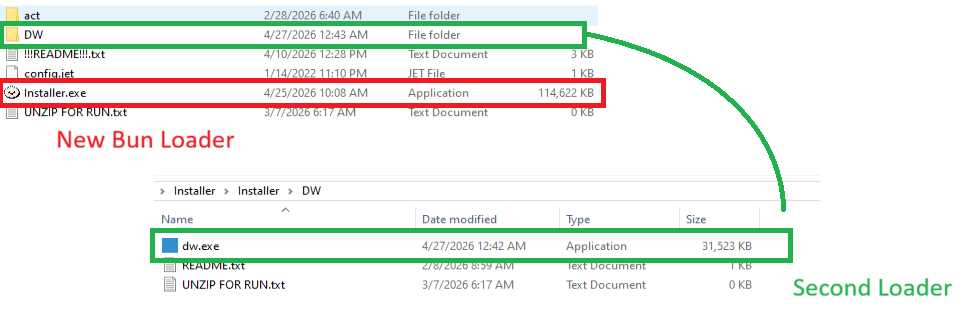
The Readme.txt file asks the user to manually launch dw.exe if the main .exe file fails to run properly. This gives the attacker two ways to distribute the stealer if the C2 of the main Bun loader is offline. The loader in dw.exe works independently from the Bun JavaScript loader.

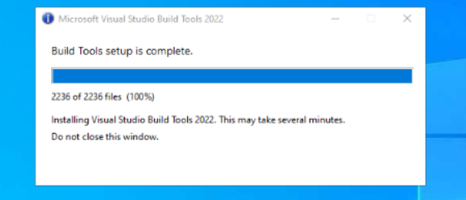
dw.exe is startedIn this article, we don’t analyze dw.exe, as it’s a variant of the previous loaders. Instead, we focus on the JavaScript loader executed with the Bun JavaScript runtime.
Analysis of the JavaScript Loader
The executed JavaScript code by the Bun JavaScript runtime is inside the .bun section and is obfuscated.
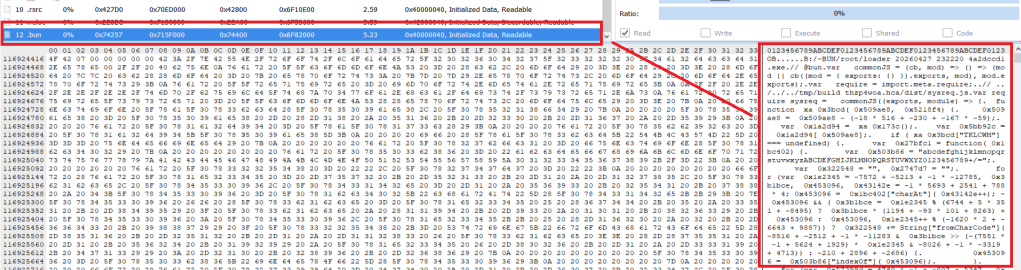
.bun section with the obfuscated JavaScript code The malicious code is implemented in two parts of the code:
sysreq.js: performs the anti-virtualization checks with a score system.memload.js: communicates with the C2 server, performs decryption and loads the next stage.
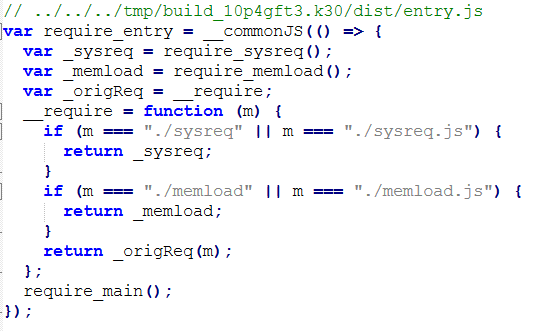
The loader runs several PowerShell CIM (Common Information Model) commands and WMI (Windows Management Instrumentation) commands to detect virtual environments. There are different controls related to CPU numbers, disk space, screen resolution, USB devices, hardware manufacturers and products, number of installed software, presence of specific folders such as Browser folders, number of running processes and username. A scoring system is implemented, and based on this score, the loader decides whether to continue with the infection or terminate it.
To detect a virtual environment, the loader executes more than 10 PowerShell commands, such as:
Get-CimInstance -ClassName Win32_DiskDrive | Select-Object ModelGet-CimInstance -ClassName Win32_PhysicalMemory | Select-Object Manufacturer,SpeedGet-CimInstance -ClassName Win32_BIOS | Select-Object ManufacturerGet-CimInstance -ClassName Win32_BaseBoard | Select-Object Manufacturer,ProductGet-CimInstance -ClassName Win32_DiskDrive | Select-Object PNPDeviceID- (
Get-Process -ErrorAction SilentlyContinue).Count
The results are compared against different strings, for example:
- Virtualization indicators: qemu, seabios, bochs, vbox, vmware, virtualbox, kvm, xen, parallels, virtio, vmbus, red hat, edk ii
- Username sandbox: sandbox, malware, virus, sample, vmuser, wdagutilityaccount, defaultuser0
- MAC associated with virtual environments
The strings are decrypted using XOR and base64 decoding; there are arrays of tuples and each contains the encrypted strings and a key used for XOR decryption.

Several functions handle string decryption, including one that decrypts the config used in the C2 communication. Partial config:
C2 server: https://silent-harvester.cc
BUILD_ID: 0ddbfec60307
C2 Path: /api/status, /api/update
The loader obtains and sends an initial request to the endpoint https://C2-server/api/report with encrypted data about the compromised system:
- Public IP obtained with a request to api.ipify.org.
- System information
- Anti-VM result
- Base-64 encoded screenshot
- Timestamp
Then it makes two GET HTTP requests:
https://C2-server/api/status?v={BUILD_ID}, to obtain the seed used for AES key derivation.https://C2-server/api/update?v={BUILD_ID}, to obtain the encrypted payload with AES nonce and authentication tag.
The next stage is decrypted using AES-256-CBC, with the AES data returned by the C2 and loaded with a self-injection loader using the following APIs:
VirtualAllocVirtualProtectLoadLibraryAGetProcAddressRtlAddFunctionTableCreateThreadSearchPathA
These Win32 APIs are executed through the Bun module bun:ffi, which allows JavaScript to call native libraries.
At the end of this process, NWHStealer was deployed in the analyzed cases.
Indicators of Compromise (IOCs)
Domains
whale-ether[.]pro: NWH Stealer C2 server
cosmic-nebula[.]cc: NWH Stealer C2 server
silent-harvester[.]cc: Bun Loader C2 server
silent-orbit[.]cc: Bun Loader C2 server
support-onion[.]club: Bun Loader C2 server
Hash
d3a896f450561b2546b418b469a8e10949c7320212eb1c72b48e2b1e37c34ba5
96fe4ddfe256dc9d2c6faea7c18e2583cd9d9c0099a4ad2cf082f569ee8379f4
3710fb27d2032ef1eb1252ebf5c4dd516d2b2c0a83fb82c664c89e504b990fa9
33d07aa24b217f27df6a483295c817da198e12511a6989bcc6b917feaf8e491d
5427b4cefb329ed0e9585b3ce58a2788baf87e3b0c7221373f9bbd5f32c85b62
308da9f49ffa1d1744e428b567792ab22712159974e9da8d8e0414ecd81de93e
021838f30a43026084978bce187c165c6b640d8d474ec009d48078d21ec62025
c8e96b55f13435c4b43b7209d2403f1a0e0f9deb05edc50e0f777430be693b07
0614c4cc6375ab6bdcdd2dfa913a67d32c3e8be9b95a4a2aa09bb131b98191c8
0020999b2e3e4d1b2cfb69e4df9440d3ce05d508573889fdc12b724ce75a0cd8
0fa42df08cc467ec52b2d388b5575114a8ec067d13f6b1a653ec33fe879f88ca
15f79980650393d182f81cd6e389210568aa1f5f875e515efe6cb9485d64b7fb
20454ba58d509300fd694ae6159db4efa1b7ff965f98c29e7d087e20f96578c1

“One of the best cybersecurity suites on the planet.”
According to CNET. Read their review →
The 2026 World Cup scam economy is already running before the first whistle
The FIFA World Cup 2026 is scheduled to begin June 11 across the US, Canada, and Mexico. The web is filling with sites impersonating ticket vendors, telecoms, sticker publishers, toy manufacturers, immigration services, and crypto projects, all linked to the World Cup brand. Together, they map out four recurring patterns of fraud and risk targeting fans.
What World Cup fans need to know
If you’re planning anything around the 2026 World Cup, whether it’s buying a ticket or merchandise, booking a flight, applying for a US visa, or speculating on “World Cup” crypto, expect a surge in scams and other risky World Cup-related activity.
The good news is the patterns are obvious once you know what to look for:
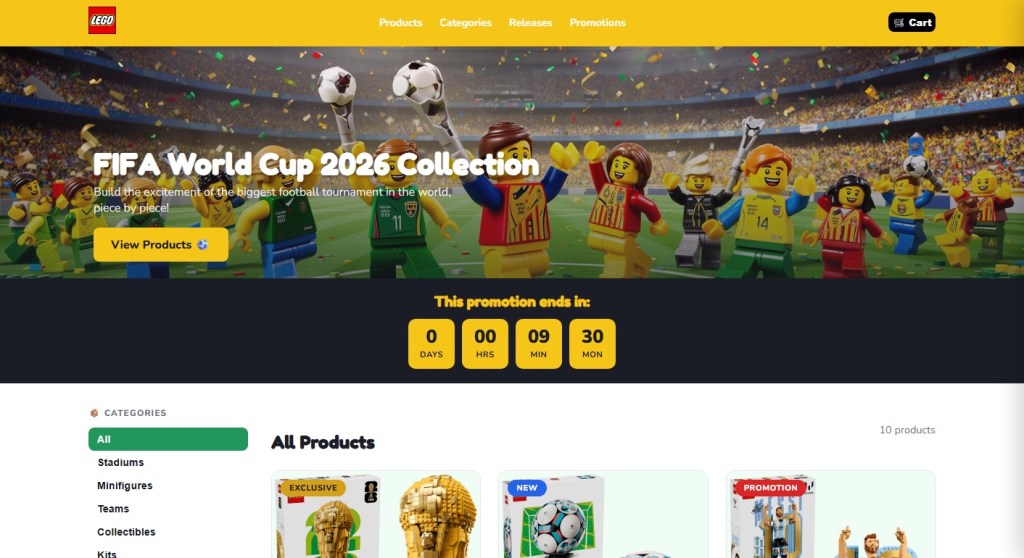
- Countdown timers that reset when you reload the page
- Prices 80–90% below retail
- The word “official” used without a clear link to the brand behind it
- Crypto tokens claiming to be “official” World Cup products
Your headline rule for the next two months: If a site uses the World Cup or a known brand to get your money, stop and verify it from the official source before you do anything else.
How these World Cup scams work
The path to these scam sites is almost always the same: a fan searches for something on search engines or social media (for example, “World Cup 2026 jersey,” “buy Panini sticker album,” “visa to attend the World Cup,” “FIFA World Cup token”) and lands one of the hundreds of sites set up to exploit that demand.
Often the route there runs through an ad network. That might involve a sponsored search result, a banner on an unrelated site, or a redirect chain that sends the victim to a different domain than the one they clicked. (Note that tools like Malwarebytes Browser Guard can block malicious ads, scam domains, and redirect chains before the page loads.)
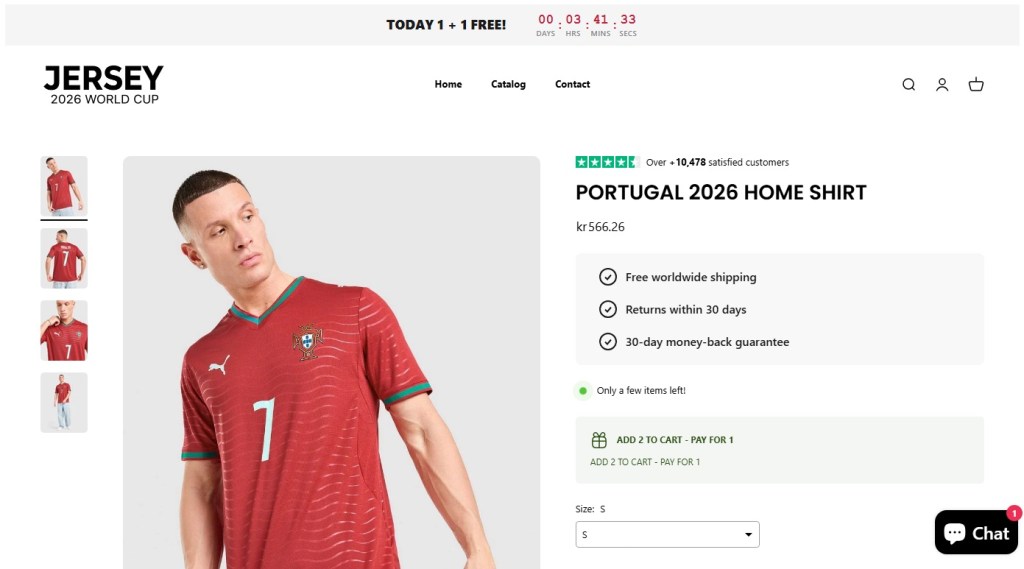
The branding on the destination site is consistent with the legitimate company. There are testimonials and satisfied-customer counts, so nothing looks immediately wrong. Urgency tricks like “Only a few items left” and the countdown timer are there to prevent you from looking too closely or investigating too deeply.
We’ve found these sites group naturally into four categories: crypto, travel, merchandise, and predictors. The sites in each category have their own tells, but they’re united by brand parasitism: borrowing authority from FIFA, the host nations, or a real licensee like LEGO or Panini.
Crypto
The most crowded category is crypto, and the biggest risk comes from sites that claim or imply official links to the World Cup.
One site marketed its token as “the official community token celebrating the FIFA World Cup 2026,” advertising a “Mega Airdrop,” a 7-billion-token total supply, and a participant counter pinned to the symbolic number 48 (the count of qualified national teams). Another shows FIFA’s official mascot, using tournament branding to sell an unlicensed token.
None of the sites we examined are connected to FIFA. FIFA does have a real digital-collectibles ecosystem—the FIFA Collect NFT marketplace, the Right-to-Buy ticket NFTs, and the FIFA Rivals game on the Mythos chain—all of which sit on FIFA-controlled infrastructure and are documented at FIFA’s own domains. None of the sites we examined sit inside that ecosystem. The real partners for 2026 are documented and easy to verify. “World Cup token” is not one of them.
We found multiple sites using FIFA branding to create a false sense of legitimacy. But there’s a real risk you’ll receive nothing, receive something you can’t sell, or sign a transaction that gives the operator access to your wallet.
Some sites don’t pretend to be official, but still carry risk to World Cup fans. One Solana-based token branded itself the “World Cup Rug Index,” with the tagline “Every match is a market. Every loss is a rug,” and a contract ending in “pump,” the signature of pump.fun launches.
In crypto, a “rug” is when early holders sell and the price collapses, leaving later buyers with losses. These projects are not scams in the sense of pretending to be something they’re not. They are openly speculative. The risk is in the structure: early buyers can sell into demand from later buyers, who are left holding the losses.
This is different from the fake “World Cup tokens” above. Those rely on FIFA branding to create a false sense of legitimacy. These rely on momentum, where most participants arrive late.




Travel
The most dangerous category is the “World Cup visa.” One site, WC2026 Visa, advertised a “Visa to the World Cup 2026 US” for $270 per person, with a “98% Success Rate,” a countdown to June 11, and the standard reassuring trio: “Secure Process,” “Fast Processing,” “18+ only.”
There is no such product. The US Department of State has stated this directly: there is no special tournament visa. Foreign visitors traveling to the United States for the World Cup must use the same B1/B2 visitor visa, or the Visa Waiver Program with an ESTA authorisation, that any other tourist would. The only tournament-specific visa programme is FIFA PASS (the Priority Appointment Scheduling System), a routing mechanism that gives ticket holders earlier interview slots at US consulates. It doesn’t bypass the interview, it doesn’t issue a visa, it doesn’t cost $270, and access to it begins with buying a ticket directly from FIFA.
A site advertising a dedicated “World Cup visa” tricks people into believing they’re going down an official immigration pathway. Any personal data harvested in the process, such as passport details, date of birth, travel plans, and in some flows a payment instrument, gives the operator all the data they need for identity theft. Fans should only apply through .gov sites in the US, .gc.ca in Canada, and .gob.mx in Mexico.
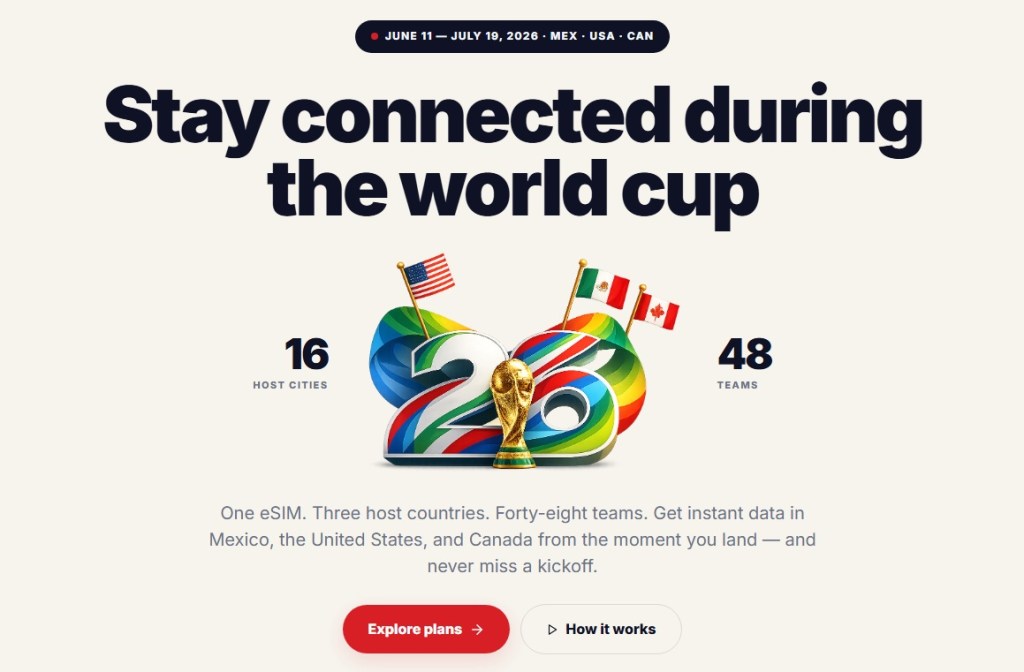
Travel portals aggregating tickets, flights, and hotels, and eSIM sites selling connectivity for the tournament are not inherently fraudulent and are often real businesses. But any site invoking the World Cup deserves the same scrutiny: who actually fulfils this product, what is the refund policy in writing, and is this domain legitimately connected to a known brand or partner?



Merchandise
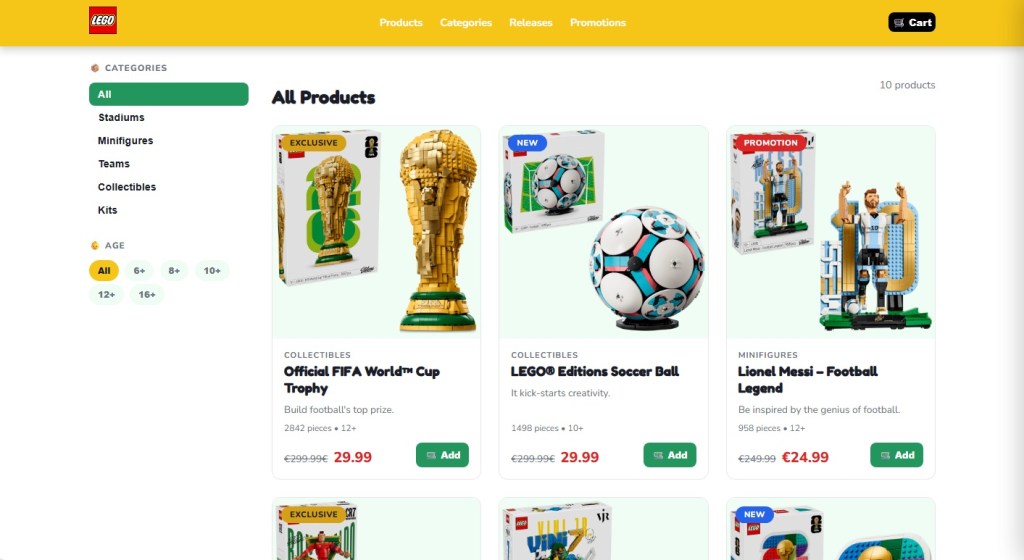
The merchandise category is where the impersonation gets most aggressive, because there are real licensees to imitate. LEGO’s partnership with FIFA is genuine, announced in late 2025. It debuted with the LEGO Editions FIFA World Cup Official Trophy, joined in 2026 by player sets featuring Messi, Ronaldo, Mbappé, and Vinicius Jr. A whole cluster of LEGO-styled scam storefronts now prices the trophy set at €29.99, marked down from €299.99, an 83–90% discount. LEGO does not discount its premium licensed sets by 90%.
Related to those storefronts is the “LEGO FIFA World Cup 2026 Quiz Challenge” pattern, promising “exclusive edition rewards” for fans who complete a quiz. Quiz-funnel scams are a long-running affiliate-marketing genre, and the typical mechanic is to harvest contact information and push the user toward a subscription billing flow disguised as a shipping fee for the “prize.” LEGO does not run quiz funnels. Its real World Cup activity runs through LEGO.com and physical LEGO stores.
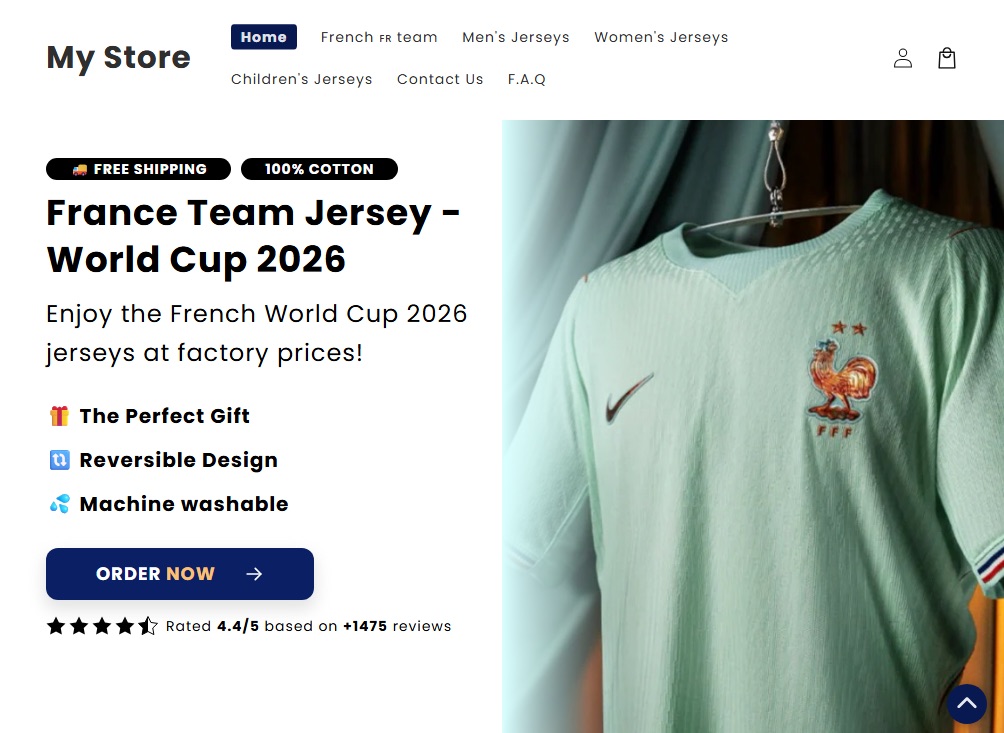
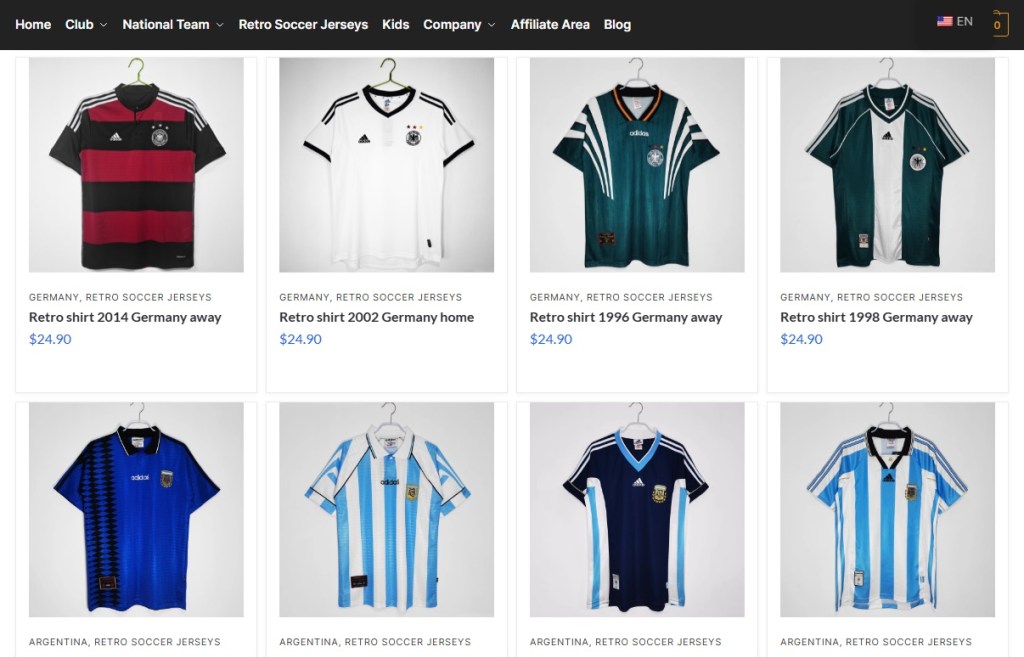
Counterfeit jersey storefronts have been a fixture of the open web for years, and the World Cup cycle multiplies them. Typical examples: a site branded simply “JERSEY 2026 World Cup” selling a Portugal home shirt with a “BUY 2, PAY FOR 1” overlay, a 30-day countdown, and a Trustpilot-shaped widget claiming over ten thousand satisfied customers; or a retro-jersey storefront offering Germany and Argentina shirts at $24.90 each. Search demand spikes during a World Cup year and counterfeit storefronts spin up to meet it; many will be offline shortly after the tournament ends.
Then there is the Panini-styled storefront pattern: pages advertising the official 2026 sticker album under headers like “ONE-TIME PURCHASE BY NIF” (NIF being the Portuguese personal tax identifier, a phrase that appears nowhere in legitimate Panini commerce). These pages combine sub-ten-minute countdowns, inventory counters (“There are still 127 Units”), and country-specific scarcity claims (“Only 5,000 units available for Portugal!”).
The high-pressure funnel and unusual NIF framing point to localised affiliate or look-alike storefronts, not Panini’s own commerce flow, which runs through paninistore.com and licensed retail. These are not Panini storefronts. They are look-alike commerce flows using Panini’s brand to sell through high-pressure funnels. Whether the product arrives or not, the user is not buying from the company they think they are.



Predictions and prize pools
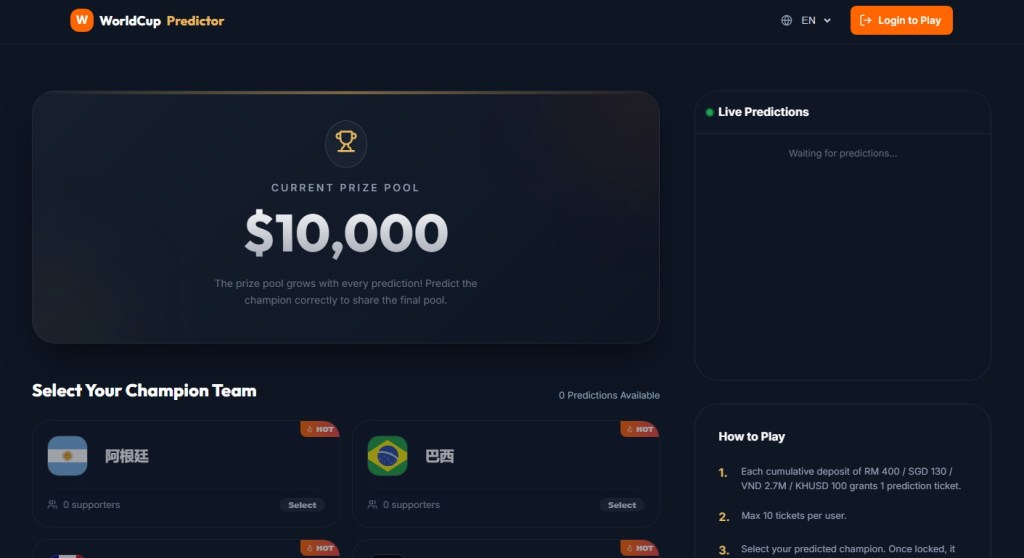
“WorldCup Predictor” sites present a prize pool that supposedly grows with every prediction, and ask users to select a champion team from flag tiles. You are paying for entries into a pooled outcome tied to the tournament.
These sites are not pretending to be something they’re not. The risk is that they operate without clear oversight. There is no visible licensing, no clear jurisdiction, and no way to verify from the front end whether payouts are enforced or even guaranteed.
Licensed sportsbooks and regulated platforms typically do not present themselves this way. They identify their licensing authority, provide responsible gambling tools, and use verified payment processors. A “Login to play” button, a flag picker, and a floating prize pool are not the same thing.

What FIFA, the brands, and the platforms could be doing better
Many of these sites would not exist, or would be far shorter-lived, if a few things changed upstream. Brand owners with active 2026 partnerships—LEGO, Panini, the national federations, the kit manufacturers—could reduce confusion by publishing a single canonical page each, well before kickoff, listing authorized retailers and the exact SKUs and prices of their World Cup products. Someone trying to verify whether a €29.99 LEGO trophy is real should not have to triangulate between Brickset, LEGO’s newsroom, and a third-party blog.
FIFA’s own licensing communications have improved compared with past tournaments, and the LEGO and Panini announcements were clearly disclosed on inside.fifa.com. But the gap between “FIFA has announced a partnership” and “here are the only sites authorized to sell on FIFA’s behalf” remains wide. Closing it would make impersonation much harder.
Search engines and ad networks carry a large share of the structural responsibility. Visa-impersonation pages are precisely the kind of sites that surface through paid search ads against terms like “world cup visa,” and platforms have the data to detect and block them at scale.
What to do if you may have been caught
Every World Cup cycle generates its own scam economy. 2018 had fake ticket marketplaces; 2022 leaned on phishing around Qatar’s Hayya system; 2026 is building around meme coins and visa impersonation. What’s different this time is the speed: sites can be spun up, monetized, and abandoned within weeks, and AI-generated copy, mascot art, and product images have stripped away many of the visual cues people used to rely on.
This cycle’s scam economy moves fast, but the basics still work: treat unsolicited “World Cup” links with suspicion, type official domains yourself, and ignore pressure from countdown timers.
If you think you’ve been caught:
- If you entered card details: Contact your card issuer immediately and request a refund for an unauthorized or non-delivered transaction.
- If you submitted personal or passport data: Treat it as compromised. Monitor your credit, place a fraud alert if available, and watch for targeted phishing.
- If you connected your crypto wallet or signed a transaction: Revoke permissions, move remaining assets to a new wallet, and stop using the old one for anything valuable.
- If you bought goods that weren’t delivered: Keep your order confirmation, URL, and payment record. Report it to your national consumer protection body (FTC in the US, Action Fraud in the UK, or your local equivalent).
Always verify through official channels. That’s FIFA.com for tickets, paniniamerica.net or paninistore.com for stickers, LEGO.com for LEGO Editions sets, and official government sites for visas. Remember, legitimate sources do not rely on countdown timers.
Stop threats before they can do any harm.
Malwarebytes Browser Guard blocks phishing pages and malicious sites automatically. Free, one click to install. Add it to your browser →
Malicious trading website drops malware that hands your browser to attackers
During our threat hunting, we found a campaign using the same malware loader from our previous research to deliver a different threat: Needle Stealer, data-stealing malware designed to quietly harvest sensitive information from infected devices, including browser data, login sessions, and cryptocurrency wallets.
In this case, attackers used a website promoting a tool called TradingClaw (tradingclaw[.]pro), which claims to be an AI-powered assistant for TradingView.
TradingView is a legitimate platform used by traders to analyze financial markets, but this fake TradingClaw site is not part of TradingView, nor is it related to the legitimate startup tradingclaw.chat. Instead, it’s being used here as a lure to trick people into downloading malware.
What is Needle Stealer?
Needle is a modular infostealer written in Golang. In simple terms, that means it’s built in pieces, so attackers can turn features on or off depending on what they want to steal.
According to its control panel, Needle includes:
- Needle Core: The main component, with features like form grabbing (capturing data you enter into websites) and clipboard hijacking
- Extension module: Controls browsers, redirects traffic, injects scripts, and replaces downloads
- Desktop wallet spoofer: Targets cryptocurrency wallet apps like Ledger, Trezor, and Exodus
- Browser wallet spoofer: Targets browser-based wallets like MetaMask and Coinbase, including attempts to extract seed phrases
The panel also shows a “coming soon” feature to generate fake Google or Cloudflare-style pages, suggesting the attackers plan to expand into more advanced phishing techniques.
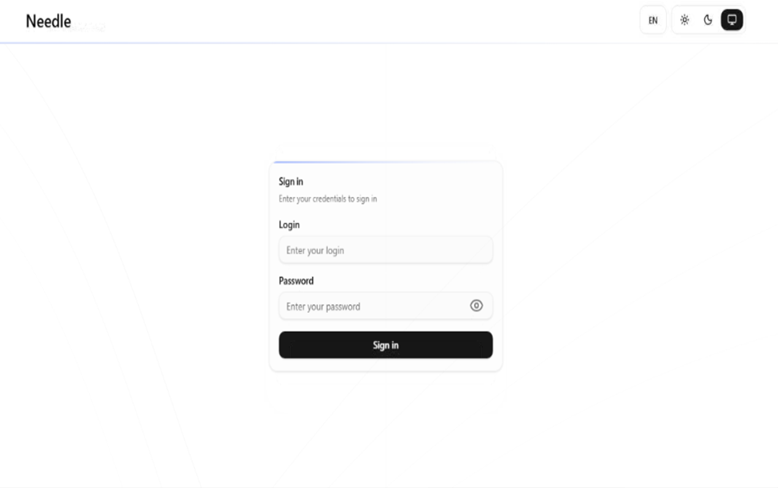
In this article, we analyze the distribution of the stealer through a fake website related to an AI service called TradingClaw. We have detected that the same stealer is also distributed by other malware such as Amadey and GCleaner.
Analysis of the TradingClaw campaign
In this campaign, the malware is distributed through a fake website advertising TradingClaw as an AI trading tool.
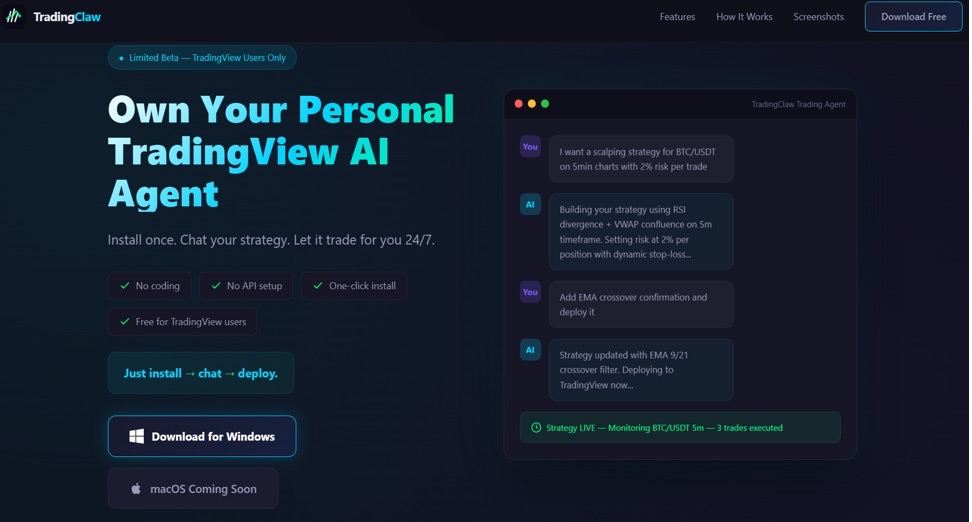
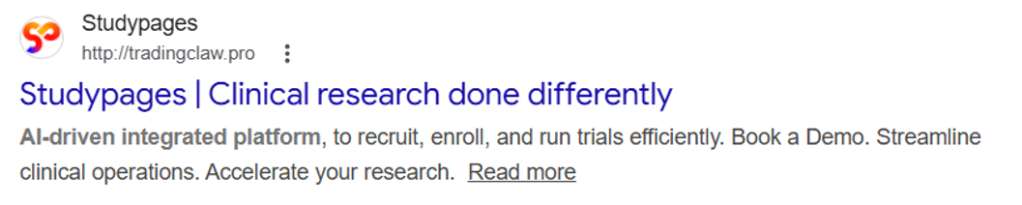
The site itself behaves selectively. In some cases, visitors are shown the fake TradingClaw page, while in others they are redirected to a different site (studypages[.]com). This kind of filtering is commonly used by attackers to avoid detection and only show the malicious content to intended targets. Search engines, for example, see the Studypages version:
If a user proceeds, they are prompted to download a ZIP file. This file contains the first stage of the infection chain.
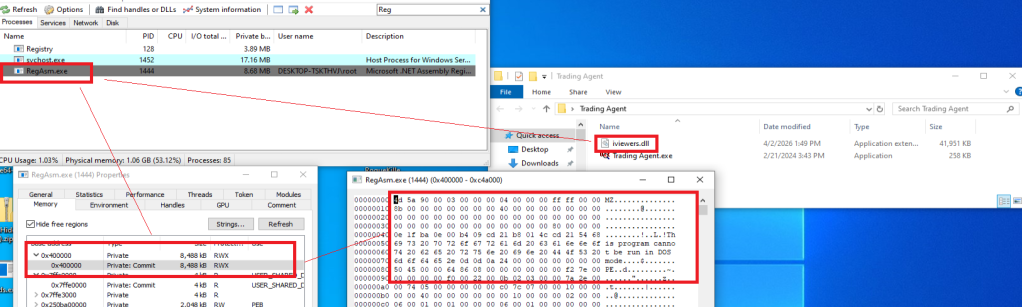
Like in the previous campaign, the attack relies on a technique called DLL hijacking. In simple terms, this means the malware disguises itself as a legitimate file that a trusted program will load automatically. When the program runs, it unknowingly executes the malicious code instead.
In this case, the DLL loader (named iviewers.dll) is executed first. It then loads a second-stage DLL, which ultimately injects the Needle Stealer into a legitimate Windows process (RegAsm.exe) using a technique known as process hollowing.
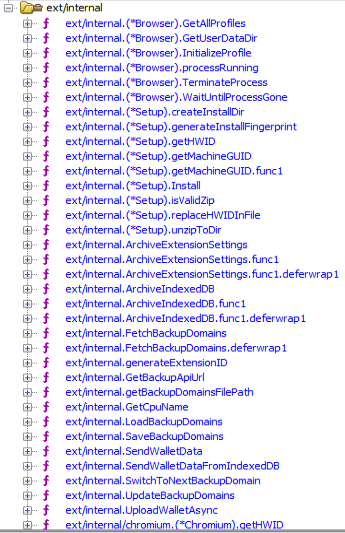
The stealer is developed in Golang, and most of the functions are implemented in the “ext” package.
What the malware does
Once installed, the Needle core module can:
- Take screenshots of the infected system
- Steal browser data, including history, cookies, and saved information
- Extract data from apps like Telegram and FTP clients
- Collect files such as .txt documents and wallet data
- Steal cryptocurrency wallet information
One of the more concerning features is its ability to install malicious browser extensions.
Malicious browser extensions
The stealer also supports the distribution of malicious browser extensions, giving attackers a powerful way to take control of the victim’s browser.
We identified multiple variations of these extensions, each with slightly different file structures and components. Behind the scenes, the malware uses built-in Golang features to unpack a hidden ZIP archive (often named base.zip or meta.zip) that contains the extension files, along with a configuration file (cfg.json).
Partial cfg.json config file:
{
  "extension_host": {},
  "api_key": "…
  "server_url": "https://C2/api/v2",
  "self_destruct": true,
  "base_extension": true,
  "ext_manifest": {
    "account_extension_type": 0,
    "active_permissions": {
      "api": [
        "history",
        "notifications",
        "storage",
        "tabs",
        "webNavigation",
        "declarativeNetRequest",
        "scripting",
        "declarativeNetRequestWithHostAccess",
        "sidePanel"
      ],
      "explicit_host": [
        "<all_urls>"
      ],
      "manifest_permissions": [],
      "scriptable_host": [
        "<all_urls>"
      ]
    },
    "commands": {
      "_execute_action": {
        "was_assigned": true
      }
    },
…
This configuration file is key. It tells the malware where to send stolen data (the command-and-control server), which malicious extension to install, and which features to enable.
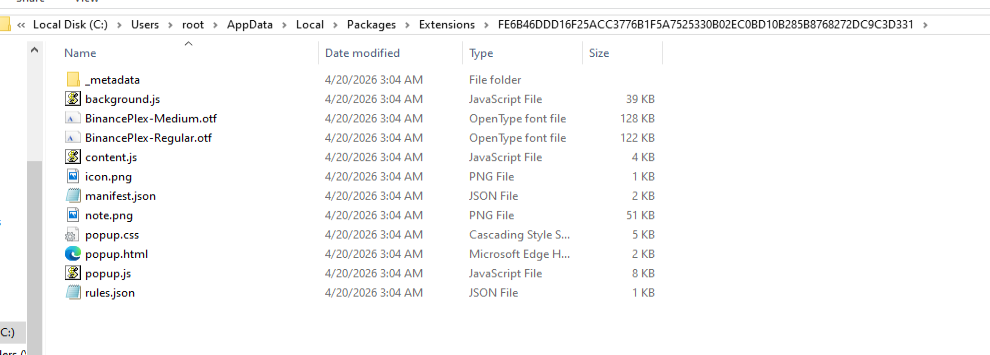
The stealer extension is dropped in a random folder in the path %LOCALAPPDATA%\Packages\Extensions. The folder contains three main files popup.js, content.js, and background.js.
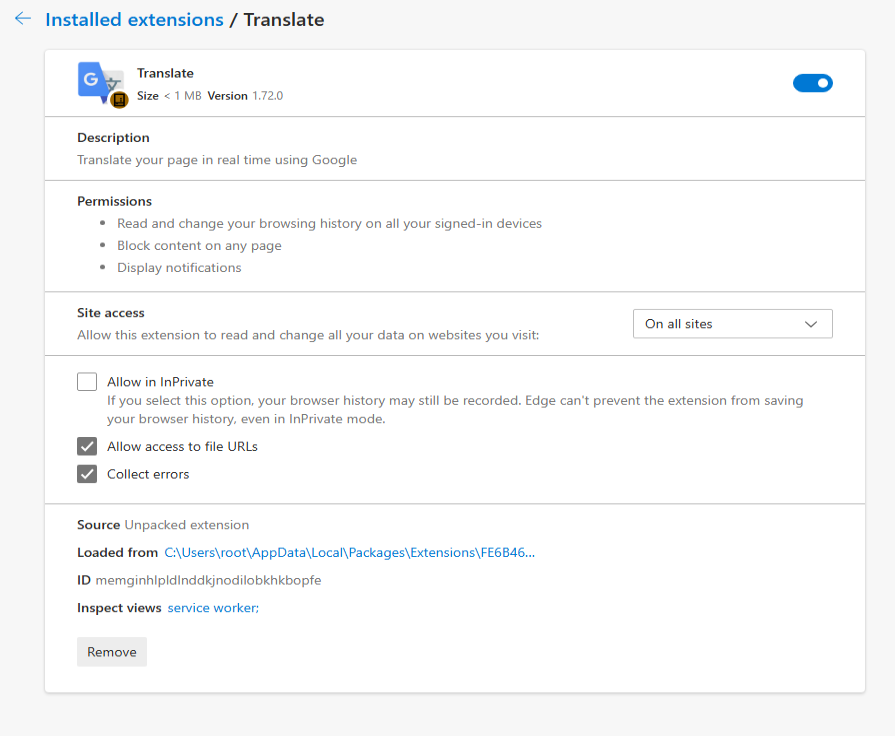
The extensions analyzed have Google-related names.
What the malicious extensions can do
The extension gives attackers near full control over the browser, with capabilities that go far beyond typical malware.
It can:
- Connect to a remote server using a built-in API key and regularly check in for instructions. It can also switch to backup domains if the main server goes offline.
- Generate a unique ID to track the infected user over time.
- Collect full browsing history and send it to a remote server (
/upload). - Monitor what you’re doing in real time, including which sites you visit, and apply attacker-controlled redirect rules. This allows it to silently send you to different websites or alter what you see on a page, including injecting or hiding content.
- Intercept downloads, cancel legitimate files, and replace them with malicious ones from attacker-controlled servers.
- Inject scripts directly into web pages, enabling further data theft or manipulation.
- Display fake browser notifications with attacker-controlled text and images.
How it communicates with attackers
The stealer and its extension communicate with command-and-control (C2) servers using several API endpoints. These are essentially different “channels” used for specific tasks:
/backup-domains/active—retrieves backup servers to stay connected if the main one is blocked/upload—sends stolen data back to the attackers/extension—receives instructions for redirects, downloads, and notifications/scripts—downloads malicious code to inject into web pages
How to stay safe
Scammers are increasingly using AI-themed tools to make fake websites look legitimate. In this case, a supposed “AI trading assistant” was used to trick people into installing malware.
To reduce your risk:
- Download software only from official websites. If a tool claims to work with a well-known platform, check the platform’s official site to confirm it’s real.
- Check who created the file before running it. Look at the publisher name and avoid anything that looks unfamiliar or inconsistent.
- Review your browser extensions regularly. Remove anything you don’t recognize, especially extensions you didn’t knowingly install.
What to do if you think you’ve been affected
If you think you may have downloaded this infostealer:
- Check EDR and firewall logs for communications with the C2s listed in the IOCs part.
- From a different, clean device, sign out of every active session on your important accounts: Google, Microsoft 365, any banking portal, GitHub, Discord, Telegram, Steam, and your crypto exchange. Change all passwords and enable 2FA for accounts you have accessed from this machine.
- Check the folder
%LOCALAPPDATA%\Packages\Extensionsand suspicious browser extensions. - If you have cryptocurrency wallets on the machine, move the funds from a clean device immediately. This is what these operators monetize first.
- Run a full scan with Malwarebytes.
Indicators of Compromise (IOCs)
HASH
95dcac62fc15e99d112d812f7687292e34de0e8e0a39e4f12082f726fa1b50ed
0d10a6472facabf7d7a8cfd2492fc990b890754c3d90888ef9fe5b2d2cca41c0
Domains
Tradingclaw[.]pro: fake website
Chrocustumapp[.]com: related to malicious extension
Chrocustomreversal[.]com: related to malicious extension
google-services[.]cc: related to malicious extension
Coretest[.]digital: C2 panel
Reisen[.]work: C2 panel
IPs
178[.]16[.]55[.]234: C2 panel
185[.]11[.]61[.]149: C2 panel
37[.]221[.]66[.]27: C2 panel
2[.]56[.]179[.]16: C2 panel
178[.]16[.]54[.]109: C2 panel
37[.]221[.]66[.]27: C2 panel
209[.]17[.]118[.]17: C2 panel
162[.]216[.]5[.]130: C2 panel
We don’t just report on threats—we remove them
Cybersecurity risks should never spread beyond a headline. Keep threats off your devices by downloading Malwarebytes today.
