❌

Normal view

Fake PDF and search tools hijacked searches for 13.4 million Chrome users

30 October 2026 at 16:25

Ads promoted browser extensions as tools to find manuals, convert PDFs, or make searches safer. But many of these extensions sent users’ search queries through servers controlled by their operators.

Socket researcher John Tuckner identified 319 extensions with an estimated 13.4 million installs over a decade. The extensions hijacked users’ default search settings and routed their searches through servers controlled by the operators before sending them to Yahoo or Bing. This gave the operators access to users’ queries and let them earn referral payments.

Socket says the extensions were promoted through ads on networks including Google Ads, promoting tools such as β€œmanual finders,” β€œPDF converters,” β€œsafe search,” and β€œAI search.”

The extensions were listed in Google’s official store, but most were unlisted. That means people with a direct link could visit a listing and install an extension, while ordinary searches in the store would not show it. An ad offered help with an immediate task, a landing page encouraged installation, and the official store provided a familiar place to complete it.

Search hijacking

The main risk was that operators could see what users searched for. Searches can reveal health worries, financial problems, workplace interests, or other personal matters. Socket says queries were often associated with a unique identifier, which could let the operators link a user’s searches over time.

The proxy could also choose where to send a search. Socket says this could potentially direct users to phishing or malware pages, but it did not find evidence that the extensions had done so.

What should users do?

If your searches start going astray, or you installed a search, PDF-converter, manual-finder, or security extension after clicking an ad, check what’s installed.

  • Review your extensions. Enter chrome://extensions in Chrome’s address bar. Remove extensions you don’t recognize, no longer use, or don’t trust. To remove one, select Remove and confirm. If you’re unsure about an extension, check it against the list at the end of Socket’s blog.
  • Check your search settings. In Chrome, at the top right, select More (the three-dot menu), then Settings > Search engine. If Chrome says an extension is controlling a setting, review or remove that extension. The absence of this notice doesn’t confirm that all your extensions are safe.
  • Run a Malwarebytes scan to check for malicious extensions and other malware that could be affecting your device.

From reporting threats to removing them.

Cybersecurity risks should never spread beyond a headline. Keep threats off your devices byΒ downloading Malwarebytes today.

Malicious Firefox extensions impersonate popular crypto wallets

29 October 2026 at 15:06

Socket’s threat researchers found three malicious Firefox extensions that impersonated the Phantom, Jupiter, and Bitget crypto wallets.

Once installed, the malicious extensions stole recovery phrases and private keys, which would provide the attacker with full control of a wallet.

A crypto wallet is an app, browser extension, or physical device that lets you manage cryptocurrency such as Bitcoin. Despite its name, it doesn’t actually hold your coins. Those are recorded on a blockchain, a shared digital record of transactions. Instead, the wallet manages the secret digital keys that let you access and spend them.

When you create a wallet, you may be given a recovery phrase: a list of words you can use to restore access. Write it down and store it offline. It’s a backup of your keys, not just an ordinary password. Anyone who gets hold of it can take control of your funds, which is why fake wallet extensions try to steal it.

Cybercriminals listed three fake wallet extensions on Firefox Add-ons, impersonating Phantom, Jupiter, and Bitget. The genuine wallets offer extensions for other browsers: Jupiter lists Chrome, Brave, and Edge; Bitget’s extension is for Chrome; and Phantom says its Firefox extension is no longer supported.

The malicious extensions looked for 12-, 15-, 18-, and 24-word recovery phrases, as well as Ethereum and Solana private keys. They could read input fields, detect pasted text, and scan screens displaying recovery phrases.

A recovery phrase or private key is a bearer secret: whoever holds it controls the wallet and can move its assets. The Phantom variant’s backend logged captured secrets, sent them to a Telegram bot, and automatically moved funds to hardcoded payout addresses. Those addresses covered Ethereum, BSC, Polygon, Arbitrum, Optimism, Base, Avalanche, Solana, and Bitcoin. The Phantom variant could read a phrase both when it was typed during import and when it was displayed on a reveal screen.

How to stay safe

Socket says all three listings were live on Firefox Add-ons during its analysis and have since been removed. But if you find one of these extensions in your Firefox browser, you should:

  • Remove the extension. Use the three-dot menu next to it and choose Remove.
  • If you ever entered a phrase or key, create a new wallet on a clean device and move your assets immediately. Treat the old wallet as compromised.
  • In the future, install wallets only from the vendor’s official website link, not from store search results.
  • The fake Phantom listing asked to access data on all websites and had no privacy policy. These are warning signs to look out for.
  • Use an up-to-date, real-time anti-malware solution that blocks malicious websites.
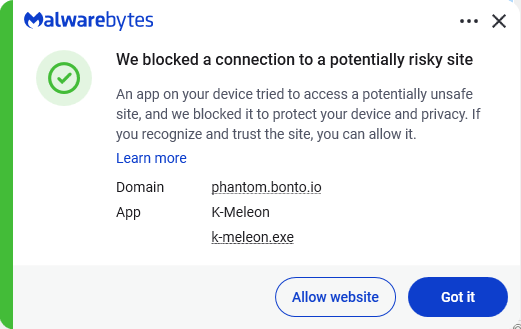
Malwarebytes blocks phantom.bonto.io
Malwarebytes blocks bonto.io subdomains

Never enter your recovery phrase on a website. Enter it only in the official wallet app when restoring. Wallet support will never ask for it.

IOCs

The malicious extensions:

  • Phantom impersonator: add-on ID 3092199
  • Jupiter impersonator: add-on ID 3092666
  • Bitget impersonator: add-on ID 3092059

Subdomains:

  • bonto[.]io
  • phantom[.]bonto[.]io
  • jupiter[.]bonto[.]io
  • bitget[.]bonto[.]io
  • coinbase[.]bonto[.]io
  • exodus[.]bonto[.]io

IP addresses:

  • 104.21.34[.]69
  • 172.67.155[.]198

From reporting threats to removing them.

Cybersecurity risks should never spread beyond a headline. Keep threats off your devices byΒ downloading Malwarebytes today.

❌