
 Login


NeedyMantis: Unpacking a post-compromise malware family used in targeted operations
Microsoft Threat Intelligence has identified NeedyMantis, a modular post-compromise malware family observed in a limited number of targeted operations affecting telecommunications organizations, universities, medical nonprofits, intergovernmental organizations, and government contractors. Based on observed activity, NeedyMantis is typically deployed after a threat actor has already established access to a target environment, indicating that the malware is used to maintain long-term access and support follow-on operations.
NeedyMantis activity dates back to at least October 2025. We discovered the malware family while analyzing and pivoting from research and indicators of compromise associated with the DAEMON Tools supply chain compromise, which Kaspersky previously reported on as part of its investigation into the campaign. Observed activity involving NeedyMantis has thus far aligned with activity that Microsoft associates with threat actors operating from China, although Microsoft has not determined whether all observed activity is attributable to the same operator.
While NeedyMantis employs techniques commonly used by modern malware, its architecture combines multiple loaders, custom encrypted file archives, a custom executable file format, and modular components that enable operators to evade analysis and extend functionality through additional modules. These characteristics, combined with its use in targeted intrusions, make NeedyMantis a useful case study for understanding how threat actors establish and maintain long-term access within victim environments.
In this blog, we analyze the NeedyMantis malware framework. We examine its packaging and deployment, custom archive format, loader architecture, command-and-control (C2) communications, and modular design. We also provide indicators of compromise (IOCs), Microsoft Defender detections, and mitigation guidance to help organizations defend against this threat and related activity.
Observed operators and targeting
At the time of writing, Microsoft has observed at least one threat actor using NeedyMantis malware: Storm-3069. Storm-3069 is Microsoft Threat Intelligence’s designator for activity associated with the DAEMON Tools supply chain compromise. While Microsoft assesses the activity originates from China, it has not attributed Storm-3069 to a Chinese nation-state actor. Microsoft identified NeedyMantis through follow-on analysis of indicators associated with Kaspersky’s investigation of the DAEMON Tools compromise.
Microsoft has observed additional NeedyMantis activity beyond Storm-3069’s activity in the DAEMON Tools campaign, indicating that the malware might be used by more than one operator. Observed activity involving NeedyMantis has thus far aligned with activity Microsoft associates with threat actors operating from China, such as targeting that aligns with Chinese interests and the use of selective deployment.
NeedyMantis has been observed in intrusions affecting telecommunications organizations, universities, intergovernmental organizations, medical nonprofits, and government contractors. Combined with the malware’s limited observed deployment and alignment with activity Microsoft associates with China-based threat actors, this victimology suggests NeedyMantis is deployed selectively rather than broadly. However, Microsoft has not determined whether all observed activity is attributable to the same threat actor or whether multiple actors have access to the malware.
Malware packaging and distribution
As previously mentioned, observed activity suggests that the malware is typically deployed after a threat actor has established access to a target environment. As a result, the methods used to gain access before NeedyMantis is deployed may vary across intrusions.
NeedyMantis is composed of multiple components written in C++ and x64 shellcode. The malware starts with a first-stage loader and a file archive. The loader and archive have been found packaged alongside legitimate software, with the first-stage loader–masquerading as a required DLL—being loaded through DLL sideloading.
Some of the open-source, software abused by the malware include: Poedit (translation), curl (data transfer), Vim (text editor), and TightVNC (remote access). Microsoft has also observed NeedyMantis masquerading as Microsoft Office, Broadcom, Intel, and NVIDIA DLL components. The following is a list of some of the DLL path names used by the malware:
- %ProgramFiles%\Poedit\WinSparkle.dll
- %ProgramData%\USOShared\libcurl.dll
- %ProgramData%\VIM\vim64.dll
- %ProgramData%\TightVNC\VIM\vim64.dll
- %ProgramData%\office\dbghelp.dll
- %ProgramData%\broadcom\dbghelp.dll
- %ProgramData%\Intel\jli.dll
- %ProgramFiles%\modifiable\nvml.dll
- %ProgramData%\ics\nvml.dll
The malware’s file archive is named the same as the loader DLL without the extension, for example WinSparkle or libcurl.
In one observed incident, an operator used the Impacket toolkit during hands-on-keyboard activity to copy the legitimate software, malicious DLL, and file archive from a network share and execute it on a targeted device. This activity occurred after the actor had already obtained access to the environment and illustrates one method by which NeedyMantis can be introduced during an intrusion post-compromise.
NeedyMantis is observed during the post-compromise stage of an intrusion after an actor has established access to the target environment. While one known user of the malware, Storm-3069, has been associated with supply chain compromises, Microsoft has not observed NeedyMantis itself being distributed through a supply chain compromise. However, supply chain activity remains one possible means by which an actor could gain the access necessary to deploy the malware.
NeedyMantis architecture and capabilities
First-stage loader
NeedyMantis’ first-stage loader is DLL sideloaded and launched when the legitimate software it is packaged with is run. Its only task is to extract the second-stage loader from its file archive and continue execution there.
In the analyzed sample, the loader DLL was named WinSparkle.dll (SHA-256: e842dd7642c8e04b5ec20b6393848a9c904e4832930950c16664fe7800ba382e) and its file archive was named WinSparkle (SHA-256: 9cb68f986043a576e19d32184c583b7d8f571c7219d8dc0065dced1c13f077ef). NeedyMantis spoofed and replaced the WinSparkle software update component of the Poedit translation software.
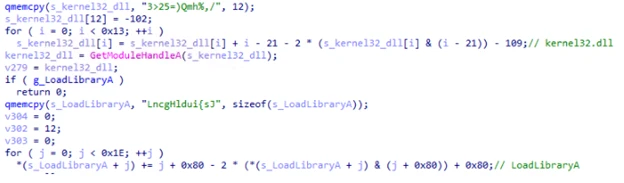
The loader employs common anti-analysis techniques to hinder analysis, like obfuscating most of its important strings.

This technique is known as obfuscated stack strings because each piece of the string is built up one at a time on the function’s stack. Once built up, it is deobfuscated using various mathematical operations. Most of the obfuscated strings in this loader are Windows DLL and API names. These deobfuscated strings are used to resolve Windows APIs dynamically at runtime.
In addition to obfuscated strings, a lot of the code’s constant values are stored obfuscated as well.
Finally, the loader has two anti-debugger methods: one based on ProcessDebugFlags and the other using ThreadHideFromDebugger.
As noted above, the loader’s main objective is to extract the next stage from its file archive and launch it. In the analyzed sample, the next stage was named encryptbase64.ps1.
Custom file archives
NeedyMantis’ file archives are in an encrypted and compressed custom file format. To get access to the files, the outer layer of the archive is XOR-decoded and RtlDecompressBuffer decompressed. Once decompressed, there are individual file entries. In each file entry, the file’s name is XOR-decoded and its contents are RtlDecompressBuffer decompressed.
The file format’s offsets, XOR keys, and values change from sample to sample.
This archive contains the following 11 files:
- 7-zip.chm – Legitimate component of 7-Zip
- 7-zip.dll – Legitimate component of 7-Zip
- 7-zip32.dll – Legitimate component of 7-Zip
- 7z.exe – Legitimate component of 7-Zip
- Disk2vhd.dll – Legitimate Sysinternals component Disk2vhd
- main.dll – Legitimate Sysinternals component Ctrl2Cap
- kernel32.dll – Legitimate kernel32.dll
- encryptbase64.ps1 – Second-stage loader
- dnsapi.dll – Not a dnsapi.dll, but contains the malware’s configuration
- ws2_32.dll – Not a ws2_32.dll, but contains a WebSockets based communications DLL
- msvcrt140.dll – Not a msvcrt140.dll, but contains shellcode to load module DLLs and resolve exports
While this archive contains several legitimate software components, the malware’s functionality is implemented by the remaining files, discussed below.
Other analyzed NeedyMantis file archives have contained different file names and components. An older version of the malware, for example, used a libcurl (SHA-256: c82520eb03c084226be4eafbff46f56dca0aa8804a2a7f23a085a96afe71ef77) file archive, and it contained only four files:
- 300.c – Malware’s configuration
- 300.s – WebSockets-based communications DLL
- is – Persistence module using Windows Services
- m.l – Main component
Second-stage loader
In the analyzed sample, encryptbase64.ps1 was the second-stage loader. Despite its .ps1 PowerShell extension, the file contains x64 shellcode. Its purpose is to decode and decompress an embedded binary which is NeedyMantis’ main component.
This loader also has some anti-analysis functionality that differs from stage one. For string decoding, it locates two encoded blocks of data and XOR keys at calculated offsets and then decodes them. The first block, most relevantly, contains a few Windows DLL and API names that are resolved dynamically. The second block, shown below, contains a list of Windows DLL names and Windows API hash values:
The component uses a rotate right (ROR) based algorithm with a configurable rotation value (the analyzed sample used value 11) to resolve these Windows API hashes. Figure 5 shows a snippet of Python code reproducing the algorithm:
This second-stage loader’s objective is to extract embedded data, XOR-decode it, and then RtlDecompressBuffer decompress it. The location of the encoded data and XOR key are at calculated offsets, which change from sample to sample.
Once decoded the resulting data is a DLL that has been formatted using a custom executable file format. It is a minimized version of a PE file.
Main component
NeedyMantis’ main component orchestrates C2 communications and handles additional downloaded modules.
It creates a mutex named <username>-<process name>, such as Contoso-Poedit.exe. Like in the first-stage loader, most of the main component’s strings and constant values are stored as obfuscated stack strings.
Configuration
The malware’s configuration was stored in a dnsapi.dll file from the custom file archive. This file name spoofs a Windows networking library. In the sample analyzed, the file contains a 3448-byte binary structure. The structure includes the following fields:
- 0x00: Unknown (config contained “300”, but components also reference “400”)
- 0x1c: Communication component name (ws2_32.dll)
- 0x128: C2 port (443)
- 0x12c: C2 host (corp.tripswithengine[.]com)
- 0x334: C2 URI (/library/zip/)
- 0x53C: WinHttpOpen AccessType (0)
- 0x954: Proxy username (not set)
- 0xB5C: Proxy password (not set)
- 0xD64: Sleep time related (300)
- 0xD68: Sleep time related (300)
Communications DLL
As referenced in the configuration, NeedyMantis makes use of a communication component called ws2_32.dll. This component is also stored in the custom file archive. Like the config file, the file name spoofs a Windows networking library.
This communications DLL has one export named SystemInfo. As shown below in Figure 7, SystemInfo exposes 10 functions for the main component to initiate and maintain a WebSockets connection with the C2:
The library uses WinINet APIs for WebSockets. It also has a hard-coded user-agent of firefox/21.0.
We have also spotted a second version of the communications DLL in a file archive. It implements the same communications API but uses Libwebsockets (LWS) instead of WinINet.
Command and control
The initial C2 beacon is an HTTPS GET request, similar to Figure 8 below:
The Set-Cookie header contains system information. The header value can be Base64-decoded and RtlDecompressBuffer decompressed. Once decompressed it contains a JSON object. The key values are:
- c – Computer name
- u – Username
- o – Base64-encoded data, once decoded it contains line separated “
- f – Files in ProgramFiles directory
- pa – Parent process
- p – Process name
- p – Process list
The connection is then converted to WebSockets and a binary C2 protocol is continued. The binary protocol is separated into a header and optional data components. The 44-byte header includes the following fields:
- 0x00: 16-byte XOR key
- 0x10: Uncompressed data length
- 0x14: Compressed data length
- 0x18: Command number
- 0x28: Data length
- 0x2c: Optional data
A 16-byte random XOR key is generated and the header is XOR-encoded, starting at offset 0x18. If there is any data, it is compressed with RtlCompressBuffer and optionally encrypted with RC4.
The initial messages of the binary protocol are a key exchange with the C2 server. The protocol is performed as such:
- 32-bytes are received from the C2 server, but then ignored
- A 1024-byte random buffer is created
- The first 32-bytes of this random buffer are used as the RC4 key for further communications
- A 256-byte buffer is created that starts with google.com followed by random bytes
- The 256-byte buffer is RC4 encrypted
- A random length between 292 and 1282 is picked
- The C2 protocol message data is structured as such:
- 0x00: The random length
- 0x04: RC4 encrypted google.com buffer
- 0x104: The random 1024-byte buffer used to create the RC4 key (at least 32 bytes of it)
- This message data is compressed, but not RC4 encrypted
- A random command number between 1 and 45 is chosen
- The C2 server uses the buffer at offset 0x104 to recreate the RC4 key and presumably checks the RC4 encrypted google.com buffer
- The server sends back the random command number as an acknowledgement
Commands
The main component only has a handful of commands. Commands sent to the C2 include:
- 1110 – Sends computer name and username
- 1112 – Sends a hard-coded identifier (like 20001)
- 1150 – Keep alive
Commands received from the C2 include:
- 1020 – Load module
- 1030 – Unload module
- 1050 / 1150 – Dispatch data to module
- 1070 – Turn off active flags
The main component’s load, unload, and data dispatch commands show that NeedyMantis can extend its functionality through additional modules, but the capabilities of those modules remain unconfirmed.
Mitigation and protection guidance
Microsoft recommends the following mitigations to reduce the impact of this threat.
- Look for outbound connections in network egress traffic to corp.tripswithengine[.]com.
- Turn on cloud-delivered protection and block at first sight to rapidly identify and block new and unknown malware variants.
- Run Endpoint Detection and Response (EDR) in block mode so that Microsoft Defender for Endpoint can block malicious artifacts, even when your non-Microsoft antivirus does not detect the threat or when Microsoft Defender Antivirus is running in passive mode. EDR in block mode works behind the scenes to remediate malicious artifacts that are detected post-breach.
- Enable network protection in Microsoft Defender for Endpoint.
- Configure automatic attack disruption in Microsoft Defender XDR. Automatic attack disruption is designed to contain attacks in progress, limit the impact on an organization’s assets, and provide more time for security teams to remediate the attack fully.
- Microsoft Defender XDR customers can turn on the following attack surface reduction rules to prevent common attack techniques used by threat actors.
You can assess how an attack surface reduction rule might impact your network by opening the security recommendation for that rule in threat and vulnerability management. In the recommendation details pane, check the user impact to determine what percentage of your devices can accept a new policy enabling the rule in blocking mode without adverse impact to user productivity.
Microsoft Defender detections
Microsoft Defender customers can refer to the list of applicable detections below. Microsoft Defender coordinates detection, prevention, investigation, and response across endpoints, identities, email, apps to provide integrated protection against attacks like the threat discussed in this blog.
| Tactic | Observed activity | Microsoft Defender coverage |
| Execution | Shellcode loading, DLL sideloading, decryption, and decompression | Microsoft Defender for Endpoint – Suspicious DLL loaded – An executable file loaded an unexpected DLL file – Suspicious decode command Microsoft Defender Antivirus – TrojanDropper:Win64/NeedyMantis |
| Execution | Hands-on-keyboard leveraging Impacket tool for follow-on activity | Microsoft Defender for Endpoint – Ongoing hands-on-keyboard attack via Impacket toolkit – Impacket toolkit – Impacket module execution Microsoft Defender Antivirus – HackTool:Win32/Impacket |
| Execution | Storm-3069 threat actor TTPs | Microsoft Defender for Endpoint – Suspicious activity linked to an emerging threat actor has been detected |
| Command and control | Network connectivity to NeedyMantis infrastructure | Microsoft Defender Antivirus – Behavior:Win64/NeedyMantis |
Microsoft Security Copilot
Microsoft Security Copilot is embedded in Microsoft Defender and provides security teams with AI-powered capabilities to summarize incidents, analyze files and scripts, summarize identities, use guided responses, and generate device summaries, hunting queries, and incident reports.
Customers can also deploy AI agents, including the following Microsoft Security Copilot agents, to perform security tasks efficiently:
- Threat Intelligence Briefing agent
- Phishing Triage agent
- Threat Hunting agent
- Dynamic Threat Detection agent
Security Copilot is also available as a standalone experience where customers can perform specific security-related tasks, such as incident investigation, user analysis, and vulnerability impact assessment. In addition, Security Copilot offers developer scenarios that allow customers to build, test, publish, and integrate AI agents and plugins to meet unique security needs.
Threat intelligence reports
Microsoft Defender XDR customers can use the following threat analytics reports in the Defender portal (requires license for at least one Defender XDR product) to get the most up-to-date information about the threat actor, malicious activity, and techniques discussed in this blog. These reports provide the intelligence, protection information, and recommended actions to prevent, mitigate, or respond to associated threats found in customer environments.
Microsoft Security Copilot customers can also use the Microsoft Security Copilot integration in Microsoft Defender Threat Intelligence, either in the Security Copilot standalone portal or in the embedded experience in the Microsoft Defender portal to get more information about this malware and associated activity.
Hunting queries
Microsoft Defender XDR
Microsoft Defender XDR customers can run the following advanced hunting queries to find related activity in their networks:
NeedyMantis masquerading as software
A listing of legitimate, unmodified application folders, along with malicious replacement DLL filenames sideloaded by NeedyMantis.
DeviceFileEvents
| where Timestamp > ago(7d)
| where (
    (FolderPath matches regex @"^[A-Za-z]:\\Program Files\\Poedit" and FileName == "WinSparkle.dll")
    or (FolderPath matches regex @"^[A-Za-z]:\\Program Files \(x86\)\\Poedit" and FileName == "WinSparkle.dll")
    or (FolderPath matches regex @"^[A-Za-z]:\\ProgramData\\USOShared" and FileName == "libcurl.dll")
    or (FolderPath matches regex @"^[A-Za-z]:\\ProgramData\\VIM" and FileName == "vim64.dll")
    or (FolderPath matches regex @"^[A-Za-z]:\\ProgramData\\TightVNC\\VIM" and FileName == "vim64.dll")
    or (FolderPath matches regex @"^[A-Za-z]:\\ProgramData\\office" and FileName == "dbghelp.dll")
    or (FolderPath matches regex @"^[A-Za-z]:\\ProgramData\\broadcom" and FileName == "dbghelp.dll")
    or (FolderPath matches regex @"^[A-Za-z]:\\ProgramData\\Intel" and FileName == "jli.dll")
    or (FolderPath matches regex @"^[A-Za-z]:\\Program Files\\modifiable" and FileName == "nvml.dll")
    or (FolderPath matches regex @"^[A-Za-z]:\\Program Files \(x86\)\\modifiable" and FileName == "nvml.dll")
    or (FolderPath matches regex @"^[A-Za-z]:\\ProgramData\\ics" and FileName == "nvml.dll")
)
| project Timestamp, DeviceId, DeviceName, ActionType, FolderPath, FileName,
          SHA1, SHA256, MD5,
          InitiatingProcessAccountDomain, InitiatingProcessAccountName, InitiatingProcessAccountSid,
          InitiatingProcessAccountUpn,
          InitiatingProcessMD5, InitiatingProcessSHA1, InitiatingProcessSHA256,
          InitiatingProcessFolderPath, InitiatingProcessFileName, InitiatingProcessCommandLine,
          InitiatingProcessCreationTime,
          ReportId, TenantId
NeedyMantis C2
This query identifies connectivity to the NeedyMantis command and control site for this activity.
search in (DeviceNetworkEvents, EmailUrlInfo, UrlClickEvents, DeviceEvents, DeviceFileEvents, DeviceProcessEvents)
  "corp.tripswithengine.com"
| where Timestamp > ago(7d)
| extend SourceTable = $table
| project Timestamp,
          DeviceName,
          InitiatingProcessAccountName,
          InitiatingProcessAccountUpn,
          AccountName,
          AccountUpn,
          RemoteIP,
          LocalIP,
          IPAddress,
          RemoteUrl,
          Url,
          UrlDomain,
          FileOriginUrl,
          FileOriginReferrerUrl,
          FileOriginIP,
          ProcessCommandLine,
          InitiatingProcessCommandLine,
          InitiatingProcessFileName,
          FileName,
          FolderPath,
          NetworkMessageId,
          SourceTable
NeedyMantis communications DLL hard-coded user-agent
Identify connectivity utilizing the NeedyMantis hard-coded user-agent.
search in (DeviceNetworkEvents, DeviceEvents, UrlClickEvents, EmailUrlInfo)
  "Firefox/21.0"
| where Timestamp > ago(7d)
| extend SourceTable = $table
| project Timestamp,
          DeviceName = iff(isnull(DeviceName), "", DeviceName),
          AccountUpn = coalesce(InitiatingProcessAccountUpn, AccountUpn, ""),
          AccountName = coalesce(InitiatingProcessAccountName, AccountName, ""),
          RemoteIP = coalesce(RemoteIP, IPAddress, ""),
          Url = coalesce(RemoteUrl, Url, ""),
          UserAgent = AdditionalFields,
          SourceTable
Microsoft Sentinel
Microsoft Sentinel customers can use the TI Mapping analytics (a series of analytics all prefixed with ‘TI map’) to automatically match the malicious domain indicators mentioned in this blog post with data in their workspace. If the TI Map analytics are not currently deployed, customers can install the Threat Intelligence solution from the Microsoft Sentinel Content Hub to have the analytics rule deployed in their Sentinel workspace.
NeedyMantis C2
This query identifies connectivity to the NeedyMantis command and control site for this activity.
search in (CommonSecurityLog, SecurityEvent, AzureDiagnostics)
  "corp.tripswithengine.com"
| where TimeGenerated > ago(7d)
| project TimeGenerated,
          DeviceName,
          Computer,
          SourceIP,
          SourcePort,
          SourceUserName,
          DestinationIP,
          DestinationPort,
          DestinationHostName,
          DestinationDnsDomain,
          RequestURL,
          ProcessName,
          DestinationUserName,
          SourceHostName,
          Message,
          $table
NeedyMantis communications DLL hard-code user-agent
Identify connectivity utilizing the NeedyMantis hard-code user-agent.
CommonSecurityLog
| where TimeGenerated > ago(7d)
| where RequestClientApplication contains "Firefox/21.0" or Message contains "Firefox/21.0"
| project TimeGenerated, DeviceName, SourceUserName, SourceIP, DestinationIP, RequestURL, RequestClientApplication
Indicators of compromise
| Indicator | Type | Description | First seen | Last seen |
| e842dd7642c8e04b5ec20b6393848a9c904e4832930950c16664fe7800ba382e | SHA-256 | First-stage loader WinSparkle.dll | 2026-05-21 | 2026-05-21 |
| 9cb68f986043a576e19d32184c583b7d8f571c7219d8dc0065dced1c13f077ef | SHA-256 | Custom file archive WinSparkle | 2026-05-23 | 2026-05-23 |
| c82520eb03c084226be4eafbff46f56dca0aa8804a2a7f23a085a96afe71ef77 | SHA-256 | Custom file archive libcurl | 2025-10-03 | 2025-10-03 |
| corp.tripswithengine[.]com | Host name | C2 host name |
References
Learn more
For the latest security research from the Microsoft Threat Intelligence community, check out the Microsoft Threat Intelligence Blog.
To get notified about new publications and to join discussions on social media, follow us on LinkedIn, X (formerly Twitter), and Bluesky.
To hear stories and insights from the Microsoft Threat Intelligence community about the ever-evolving threat landscape, listen to the Microsoft Threat Intelligence podcast.
The post NeedyMantis: Unpacking a post-compromise malware family used in targeted operations appeared first on Microsoft Security Blog.

