
❌

Normal view

Group Policy hijacked: PAYLOAD ransomware weaponizes Active Directory GPO

Executive summary

In April 2026, we at Kaspersky’s Global Emergency Response Team (GERT) responded to a security incident at a manufacturing organization in the Middle East. The threat actor obtained domain admin-equivalent control of the organization’s Active Directory environment and authored a malicious Group Policy Object (GPO) named PAYLOAD, linking it at the domain root. Through that single object, the actor delivered ransom notes, hijacked the desktop wallpaper and lock screen, enforced a logon banner, and disabled the local administrator account across every domain-joined Windows workstation — all without dropping a ransomware binary or encrypting any data. The only ransomware we found in this incident was PAYLOAD sample targeting ESXi on Linux servers. Besides that, data exfiltration was observed originating from the file servers and several additional systems, and was later published on the dark web.

This case is an example of two converging trends that define the 2026 ransomware landscape:

  1. Living-off-the-land abuse of trusted AD infrastructure. Group Policy is a signed, allowlisted, SYSTEM-privileged distribution channel that the majority of endpoint detection and response tools is designed not to inspect. By delivering impact through GPO rather than through malware, the actor sidestepped the entire file- and process-based detection stack.
  2. Encryptionless extortion. Industry telemetry shows extortion-only incidents grow significantly year-on-year. PAYLOAD fits this model; the leverage is operational disruption and the threat of escalation rather than cryptographic denial of data.

We confirmed that no files were encrypted on Windows machines, no malicious binaries were resident on disk, no endpoint persistence was established, and no malicious processes were running at the time of analysis. The entire attack lived inside Active Directory itself. The defensive implication is stark: an organization whose detection strategy depends on catching a ransomware executable would have seen nothing until the first endpoint rebooted and the ransom wallpaper appeared.

In this article, we will describe the GPO attack chain and provide operational advice on how to detect such threats, including detailed remediation recommendations.

Group Policy as an attack surface

Attacks through group policies are nothing new. They can inflict significant, domain-wide damage with multiple malicious capabilities. A Group Policy Object (GPO) is essentially a combination of a Group Policy Container (GPC) in Active Directory and a Group Policy Template (GPT) in SYSVOL. The Group Policy scope depends on whether the GPC is linked to the directory tree at the domain, site, or organization unit (OU) level. A link at the domain root means the policy applies to every computer and user object beneath it. Thus, a GPO compromised at the domain root can affect all in-scope domain users and computers, potentially granting an attacker complete control over the corporate network. What makes GPO abuse even more dangerous is that group policies are processed in a trusted, high-privilege environment, ensuring persistence because endpoint cleanup is not enough to remove them.

We have already discussed GPO architecture and ways it can be compromised in greater detail in an earlier blog post. Other public threat intelligence has also repeatedly documented this technique in ransomware operations. Microsoft observed Ryuk operators distributing ransomware through Group Policy, SYSVOL startup items, and PsExec. LockBit affiliates have been documented modifying SYSVOL Group Policy files, including ScheduledTasks.xml, to support ransomware execution and propagation. BlackCat/ALPHV operators have also abused GPOs to create scheduled tasks and deploy ransomware.

Another notable example of GPO abuse is PAYLOAD ransomware, which weaponizes GPO Preferences and policy settings for pure impact rather than as a launcher for an encryptor. Let’s take a closer look at this attack, which is detailed further below.

Attack timeline

During the April 2026 investigation, we managed to reconstruct the attack timeline as outlined below:

Date Event
11 April Initial access. Threat actor authenticates to the FortiGate SSL VPN using a valid but compromised domain credential.
13 April GPO authored. Malicious GPO, PAYLOAD ({C897F2C7-C2AC-4E6F-BF48-58036FF29E79}) created and linked at the domain root, configuring ransom notes, wallpaper, lock screen, logon banner, and administrator account disablement.
13 April SYSVOL staging. The payload.jpg and hello.txt files written to \\DC.THECOMPANY.local\sysvol\THECOMPANY.local\.
13 April Second GPO. GPO named win Firewall Off ({22099AD2-E062-4F56-B574-5099BBA4E7A6}) linked at the domain root, disabling Windows Firewall on all profiles.
13 April Dormancy. GPO cached on endpoints but computer configuration not yet applied — no endpoint had rebooted since the policy update.
13 April Data exfiltration. Data exfiltration was observed originating from the file servers and several additional systems.
14 April Detonation. Most of the endpoints begin rebooting; computer configuration policies apply. Ransom wallpaper, logon banner, and notes appear. Operational disruption begins.
15 April Response. Kaspersky GERT engaged. Forensic triage of affected workstations and the domain controller initiated.
16 April Assessment. GERT confirms no file encryption, no resident malware, no endpoint persistence.

Next, we will discuss each of these stages in more detail and share the findings from our incident response activities.

Incident overview

Initial access

The entry vector was a compromised valid account (MITRE ATT&CK T1078) used to authenticate through the organization’s FortiGate SSL VPN — an external remote service (T1133). Insufficient logging on the FortiGate appliance prevented us from reconstructing how the credential was originally compromised.

Three hypotheses were considered plausible in the context of the attack, in no particular order:

  • Password spraying or credential stuffing against the SSL VPN portal.
  • Phishing-led credential harvesting.
  • Purchase of pre-compromised credentials from an initial access broker (IAB).

Once on the internal network, the actor operated with the compromised security principal’s privileges. Because the account was able to create and link a GPO at the domain root, it held either domain admin privileges or a delegated equivalent (e.g., membership of Group Policy Creator Owners combined with link rights on the domain object).

FortiGate SSL VPN authentication logs and ESXi/virtualization privilege escalation logs were insufficient to reconstruct the lateral movement and privilege escalation chain between initial VPN access and the GPO write privilege level. The most common real-world routes to GPO control — DCSync, Kerberoasting of privileged service accounts, and Pass-the-Hash/Pass-the-Ticket — could not be confirmed or ruled out.

Execution

Rather than deploying an encryptor, the actor abused the victim’s Active Directory policy infrastructure, resulting in malicious GPOs being configured and linked at the domain root to deliver the observed impact across domain-joined systems. The two GPOs below constitute the entire offensive toolkit observed.

The PAYLOAD GPO

We performed a Resultant Set of Policy (RSOP) analysis, which helped us list all policy settings on the affected workstations. From these results, we reconstructed the following changes delivered by PAYLOAD:

GPO extension/CSE Setting/path Configured value/resulting action
Files (Group Policy Preference) Source SYSVOL\hello.txt → Desktop, C:\, D:\ Dropped as README-payload.txt (ReadOnly)
Registry (Computer) HKLM\SOFTWARE\Microsoft\Windows\CurrentVersion\Policies\System\legalnoticecaption Welcome to Payload!
Registry (Computer) HKLM\…\Policies\System\legalnoticetext (ransom demand text)
Personalization Policy Lock Screen Image \\DC.THECOMPANY.local\sysvol…\payload.jpg
Desktop Policy (User) Wallpaper path \\DC.THECOMPANY.local\sysvol…\payload.jpg
Security Settings (GptTmpl.inf) Accounts: Administrator account status Disabled

The PAYLOAD GPO enabled the following actions:

  1. Drop SYSVOL\hello.txt to the desktop and root directories C:\ and D:\ as a read-only README-payload.txt by tampering with the “Group Policy Files” client-side extension (CSE).
  2. Modify the HKLM\SOFTWARE\Microsoft\Windows\CurrentVersion\Policies\System\ registry key, changing the legalnoticecaption value to "Welcome to Payload!" and the legalnoticetext to the ransom note text through the “Group Policy Registry” CSE.
  3. Set payload.jpg located in the targeted domain controller’s SYSVOL as the lock screen image by altering the personalization policy, and as the wallpaper by altering the desktop policy at the user level.
  4. Revoke administrator rights for the administrator account (locking the account) by editing the Security Settings CSE in the GptTmpl.inf file.

Settings changed by PAYLOAD GPO

Settings changed by PAYLOAD GPO

This activity was enabled entirely through a legitimate group policy mechanism, meaning there is no malware code for security solutions to look for because the malicious logic is contained within the policy configuration.

The win Firewall Off GPO

A second domain-root-linked GPO, named “win Firewall Off”, disabled Windows Firewall across the domain, private and public profiles on all endpoints (T1562.004). Deployed independently of PAYLOAD, this object degraded host defenses and ensured the actor retained unimpeded network reach to endpoints for any follow-on activity.
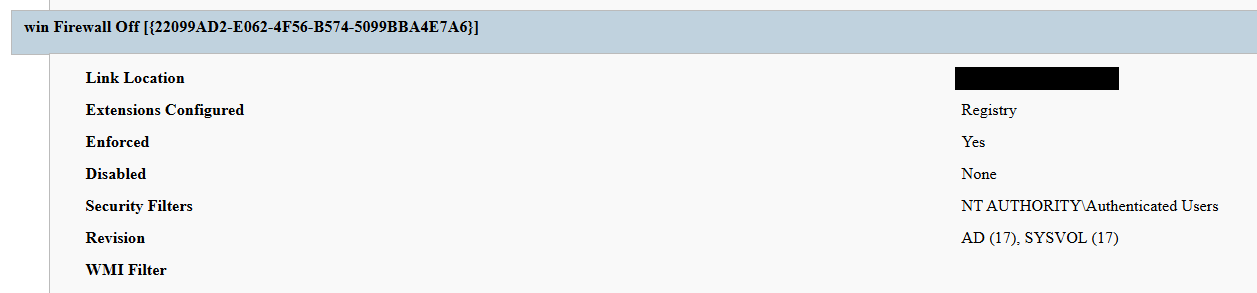
Settings changed by win Firewall Off GPO

Settings changed by win Firewall Off GPO

The one-day delay detonation

The most forensically instructive detail is the one-day gap between GPO creation (13 April) and visible impact (14 April). Analysis of Master File Table (MFT) timestamps and the Group Policy History registry key confirmed the policy was written to SYSVOL and cached on endpoints on 13 April. However, computer configuration settings (wallpaper and lock screen machine policy, security settings, firewall disabling) only apply upon reboot or policy refresh — and no endpoint had rebooted in the interim. The attack therefore remained dormant in the GPO cache for one day before detonating en masse when machines were restarted in accordance with standard procedures.

We have to point out here that this delayed policy application is characteristic of GPO-based operations and has two potential consequences for defenders. Firstly, it may grant the actor a quiet window for exfiltration, persistence, or further staging between weaponization and impact. Secondly, it can be used to sever the temporal link between the cause (a GPO-creation event in the directory log) and the effect (mass user-visible disruption occurring at a later time), complicating timeline reconstruction unless directory service auditing is in place.

Forensic findings

Initial incident response engagement revealed a number of findings associated with the attack that we share below.

  1. No file encryption
    A full review of the MFT on affected workstations found no files bearing a .payload extension characteristic to PAYLOAD ransomware and no evidence of bulk renaming or encryption I/O patterns. The attackers’ objectives were operational disruption and extortion via visual impact and access denial.
  2. No endpoint persistence
    All standard persistence locations were clean:
    • Scheduled tasks — no malicious tasks
    • Run/RunOnce keys — clean
    • Startup folders (user and system) — clean
    • Services — no malicious service installed
    • WMI event subscriptions — none
    • Boot sector/MBR — unmodified

    The attack’s persistence mechanism is the GPO link itself on the domain controller, with no endpoint-resident component.

  3. No active malicious processes
    Live process and memory analysis revealed no injected threads, process hollowing or anomalous outbound connections.
  4. Registry timeline analysis
    Group Policy History, Shadow and State registry keys on the workstation recorded the application of PAYLOAD on 13 April:
    HKLM\…\Group Policy\History\{35378EAC-683F-11D2-A89A-00C04FBBCFA2}\1
    HKLM\…\Group Policy\Shadow\{827D319E-6EAC-11D2-A4EA-00C04F79F83A}\0
    HKLM\…\Group Policy\State\Machine\GPO-List\7
    HKCU\…\Group Policy\History\{7150F9BF-48AD-4da4-A49C-29EF4A8369BA}\1
    HKCU\…\Group Policy\State\S-1-5-21-…\Loopback-GPO-List\5
    The presence of the “Loopback-GPO-List” entry indicates the GPO was processed in loopback mode, ensuring the user configuration (wallpaper) applied regardless of which user logged on to the machine.
  5. SYSVOL artifacts
    Two files were staged on the domain controller’s SYSVOL share and served to endpoints through the Files Group Policy Preference CSE:
    • payload.jpg — the ransom image used for both wallpaper and lock screen.
    • hello.txt — the ransom note, distributed to desktops and drive roots as README-payload.txt.

Detection engineering

Because no malicious binary or process exists, the detection logic should focus on the directory service and SYSVOL indicators. Below are the highest-value telemetry sources for identifying the described malicious activity.

  • Directory service change auditing (DS Access)
    Enable Advanced Audit Policy → DS Access → Audit Directory Service Changes on all domain controllers and set up alerts for the following events:
    Event ID Meaning Hunt focus
    5137 A directory service object was created The account that created new groupPolicyContainer objects must be an authorized GPO administrator
    5136 A directory service object was modified Changes to gPLink on the domain root or sensitive organizational units; changes to gPCMachineExtensionNames/gPCUserExtensionNames/gPCFileSysPath/versionNumber for all GPOs
    5141 A directory service object was deleted GPO deletions (relevant for tamper detection and remediation assessment)

    A gPLink modification at the domain root by a non-standard account is one of the most telling indicators of this attack class.

  • SYSVOL file integrity monitoring
    Monitor \\DC.THECOMPANY.local\sysvol\THECOMPANY.local\Policies\ for unexpected files, particularly image files, text files, scripts, ScheduledTasks.xml, and modified registry.pol/GptTmpl.inf files that were created by sources other than legitimate replication.
  • Endpoint policy application telemetry
    On endpoints, GPO application is logged in the Group Policy Operational log (Microsoft-Windows-GroupPolicy/Operational) and reflected in the History and Shadow registry keys shown above. A sudden domain-wide change to the applied policy set is a strong post-detonation signal.
  • Missing 5136 events
    If the contents of a GPO’s SYSVOL change without a corresponding 5136 event, this can indicate direct SYSVOL/template editing (e.g., via open-source tools such as PowerView or SharpGPOAbuse) that bypasses the normal Group Policy Management Console (GPMC) modification path. While we recommend treating the absence of expected audit events as suspicious, it should be noted that this can be caused by misconfigured auditing.

Anti-forensics and recovery-inhibition capabilities

Confirmed PAYLOAD family capabilities

The Windows endpoint attack described in this report was implemented through malicious Group Policy Objects and did not involve a recovered ransomware executable, resident endpoint malware, confirmed file encryption or active malicious processes at the time of the forensic examination. However, PAYLOAD cryptomalware for Windows does exist, and other sources, including public analysis of its samples, reveal further malicious capabilities of this ransomware that could be used by security teams to enrich detection logic and security policies.

The behaviors documented in this section must therefore be interpreted as family-level capabilities identified through the public reverse engineering of PAYLOAD ransomware samples. They were not confirmed as having executed during the GPO-based incident unless corresponding evidence was identified in the host, memory, process, event-log, or hypervisor.

Windows Event Log clearing

Public reverse engineering of the PAYLOAD Windows variant reveals an optional event log clearing capability (T1685.005, formerly T1070.001). The ransomware dynamically resolves Windows Event Log APIs, enumerates available event log channels, and clears individual channels.

Implementation artifacts include:

  • Runtime loading of wevtapi.dll
  • EvtOpenChannelEnum
  • EvtNextChannelPath
  • EvtClearLog
  • Enumeration of Security, System, Application, and PowerShell logs, and operational channels
  • A command-line option controlling whether log clearing is performed

Clearing event logs reduces the availability of records related to process execution, authentication, PowerShell, service control, and system changes. However, it does not necessarily remove events that were already forwarded to a SIEM, Windows Event Collector, EDR backend, or protected log archive.

Forensic indicators
  • Windows Security Event ID 1102
  • Event logging shutdown or failure events
  • Sudden reductions in event record identifiers
  • Multiple event channels restarting from low record numbers
  • Gaps between endpoint and centrally forwarded telemetry
  • Execution of utilities or APIs associated with log management
  • Direct access to EVTX files (Windows Event Log files) under the Windows event log directory

We should note that these indicators can’t be interpreted on their own. For instance, Event ID 1102 should be correlated with a number of aggravating factors, such as:

  • Event ID 4688 or Sysmon Event ID 1 for process creation
  • Event ID 4624 for the associated administrative logon
  • EDR process trees
  • PowerShell operational logging
  • Windows Event Forwarding records
  • Privileged access management activity

At the same time, the absence of Event ID 1102 does not prove that log clearing did not occur. Direct deletion, truncation, service impairment, or an incomplete audit configuration may produce different evidence.

Security process and service termination

PAYLOAD analysis reveals that the Windows ransomware variant contains logic that targets security processes and services (T1685 and T1489). This capability is intended to stop security products, backup software, database services, and applications that may lock files targeted for encryption.
Process and service termination serves several objectives:

  1. Reduce endpoint detection and response visibility.
  2. Release file handles so data can be modified.
  3. Interrupt backup and recovery services.
  4. Prevent databases and enterprise applications from protecting active data.
  5. Reduce interference with encryption operations.
Forensic indicators
  • Security agent services changing from running to stopped
  • Event ID 7036 service state changes
  • Event ID 7040 service start type changes
  • Event ID 4688 or Sysmon Event ID 1 for service control utilities
  • Sysmon Event ID 5 for terminated processes
  • EDR health degradation affecting many endpoints
  • Repeated termination attempts against security or backup processes
  • Execution of dedicated process killing utilities

VSS deletion, backup and recovery suppression

Public PAYLOAD sample analysis reports the deletion of Windows Volume Shadow Copies before encryption (T1490). This behavior removes local restore points and reduces the victim’s ability to recover files without external backups.

Recovery inhibition is broader than VSS deletion and may include multiple other malicious techniques, including the following:

  • Deleting shadow copies, backup catalogs, and hypervisor snapshots
  • Disabling recovery services
  • Modifying boot recovery settings
  • Compromising backup management platforms
  • Deleting or encrypting backup repositories

In the PAYLOAD Windows sample that is proven to perform encryption, VSS deletion is confirmed to have taken place before encryption. A broader compromise of the backup platform was not established in the investigated incident.

Forensic indicators
  • Execution of shadow copy management utilities
  • Backup catalog deletion attempts
  • Recovery configuration changes
  • Backup service termination
  • Mass snapshot deletions
  • Backup administrator logons outside normal maintenance windows
  • Backup retention or immutability changes
  • Backup jobs failing immediately before disruptive activity

Ecosystem-relevant ransomware techniques

Above, we discussed the techniques specific to PAYLOAD ransomware. In this section, we’ll review other common ransomware techniques, such as BYOVD abuse and ESXi policy weakening, that remain relevant risks in the ransomware ecosystem. However, these techniques should not be attributed to this incident without supporting driver load, process, memory, ESXi, vCenter, or backup platform telemetry. We describe these techniques below as they may prove useful in other ransomware-related forensic investigations.

The examples used in this section are therefore ecosystem-relevant: they are commonly observed in ransomware operations but not conclusively attributed to the analyzed PAYLOAD samples.

ETW suppression and in-memory patching

Event Tracing for Windows (ETW) is a kernel-supported tracing architecture used by Windows components, diagnostic utilities, security products, and endpoint monitoring systems.

Although we didn’t encounter this technique in our case, some ransomware families can patch ETW-related functions inside the ransomware process (T1685, formerly T1562.001). The reported routine changes the memory protection of code pages, overwrites the beginning of selected ETW functions so they return without producing events, restores the original protection, and refreshes the instruction cache.

Reported target functions include EtwEventWrite, EtwEventWriteFull, EtwEventWriteTransfer, and EtwRegister.

This modification applies to the process-local mapping of ntdll.dll. It does not disable ETW globally across Windows, but it can reduce the telemetry generated by the modified process.

Forensic indicators
  • Writable or recently modified executable pages within ntdll.dll
  • Memory protection changes affecting ETW function addresses
  • In-memory code differing from the corresponding clean DLL on disk
  • EDR memory tampering alerts
  • Unexpected calls to memory protection APIs followed by telemetry silence
  • Process execution visible in network or filesystem telemetry but absent from expected ETW-derived sources
  • Inconsistent telemetry between EDR, Sysmon, Windows Event Logs, and network monitoring

It should be noted that telemetry gaps are not conclusive evidence of ETW patching. Other factors include agent upgrades, network outages, endpoint shutdowns, SIEM ingestion failures, collector backpressure, and filtering or licensing changes.

Memory acquisition is the strongest validation source when process-local ETW patching is suspected.

Vulnerable signed driver abuse, BYOVD

Bring Your Own Vulnerable Driver (BYOVD) involves introducing or abusing a legitimately signed but vulnerable kernel driver (T1068 and T1685). The attacker exploits the driver’s exposed functionality to gain kernel-level capabilities, modify protected memory, terminate security processes, remove security callbacks, or bypass operating system security controls.

BYOVD is highly relevant to contemporary ransomware operations. However, the reviewed public PAYLOAD analyses do not provide sufficient evidence to conclude that BYOVD is an intrinsic PAYLOAD capability.

It should therefore be presented as an ecosystem-relevant technique rather than a confirmed PAYLOAD feature.

Forensic indicators
  • Unexpected .sys files written to user-writable or temporary directories
  • New kernel driver services
  • Sysmon Event ID 6
  • Driver hashes matching Microsoft or community vulnerable driver blocklists
  • Invalid, revoked, expired, or unusual driver signatures
  • Driver load followed by EDR termination
  • New privileged processes immediately following driver loading
  • Code Integrity or Defender alerts
  • Service creation events referencing driver files

ESXi security policy weakening

Ransomware operators are increasingly targeting ESXi and vCenter because compromising the virtualization layer provides access to many business-critical virtual machines.

Public research typically describes operators performing the following activities (T1685, T1490 and T1489):

  • Enabling SSH on ESXi hosts
  • Changing root passwords
  • Disabling execInstalledOnly
  • Modifying lockdown mode exceptions
  • Stopping virtual machines
  • Deleting snapshots and backups
  • Changing host firewall policies
  • Copying custom ransomware binaries to hypervisors

On the target organization’s Linux servers we saw an ESXi PAYLOAD variant, which makes this behavior operationally relevant. Nevertheless, the reviewed evidence does not indicate that PAYLOAD operators used any of these policy-weakening actions in the investigated incident.

Forensic indicators
  • Unexpected ESXi SSH enablement
  • Changes to execInstalledOnly
  • Secure Boot enforcement changes
  • Lockdown mode configuration changes
  • Root password changes
  • New or unusual administrator accounts
  • Bulk VM shutdown activity
  • Bulk snapshot deletion
  • New binaries in datastore or temporary paths
  • vCenter tasks originating from unexpected accounts or systems
  • Missing or disabled remote syslog forwarding

Remediation

To contain the described threat and limit possible damage, several remediation steps should be taken. Below, we recommend a four-phase remediation approach for containing this threat and restoring the affected environment.

Phase 1 — domain controller actions (to be performed first)

When dealing with PAYLOAD GPO, the first priority of the remediation plan should be to remove the source GPOs. Until this is done, endpoint cleanup is ineffective because the next policy refresh re-infects cleaned machines.

The immediate domain controller actions to be taken are:

  1. Delete PAYLOAD GPO. Remove {C897F2C7-C2AC-4E6F-BF48-58036FF29E79} via GPMC.
  2. Delete or revert win Firewall Off GPO. Remove {22099AD2-E062-4F56-B574-5099BBA4E7A6}.
  3. Clean SYSVOL. Delete jpg and hello.txt from \\DC.THECOMPANY.local\sysvol\THECOMPANY.local\.
  4. Rotate credentials. Reset the compromised account; audit all privileged accounts and group memberships for unauthorized changes; rotate krbtgt twice if domain admin compromise is confirmed.
  5. Force refresh. Perform gpupdate /force across endpoints after deletion; re-enable local administrator and firewall via clean policy.

Phase 2 — Active Directory and GPO hardening

  • Adopt the AD tiered administration model and confine domain admins to Tier 0 with no interactive logon to workstations and member servers.
  • Separate GPO creation from GPO linking rights, and grant both only to a dedicated, audited administrator role.
  • Enable GPO change auditing (Event IDs 5136, 5137, 5141) and forward to a SIEM.
  • Monitor SYSVOL with file integrity tooling.

Phase 3 — credential and access hardening

  • Enforce phishing-resistant MFA on all VPN and remote access entry points.
  • Deploy Windows LAPS to generate unique, rotated local administrator passwords.
  • Enable Credential Guard to protect LSASS-resident secrets.
  • Adopt Privileged Access Workstations (PAW) for all administration.
  • Implement just-in-time elevation through Privileged Identity Management (PIM) for domain admin.

Phase 4 — detection and monitoring

  • SIEM rule: GPO creation or domain-root gPLink change by a non-standard account.
  • SIEM rule: file creation events under SYSVOL from non-replication sources.
  • Implement enhanced, centrally collected FortiGate SSL VPN logging (auth events, session detail, source IP geolocation, impossible travel check) and detailed perimeter monitoring.
  • Deploy a canary GPO whose application anywhere signals attacker GPO write access.

Conclusion

PAYLOAD demonstrates a maturing tactic of turning the victim’s own trusted infrastructure into a weapon. By weaponizing Group Policy, the actor achieved a domain-wide impact without a single malicious binary on any endpoint, evaded file- and process-based detection entirely, and caused organization-wide disruption within seconds of the first reboot.

The absence of encryption is the most strategically significant finding and is consistent with the 2026 trend toward encryptionless extortion. At Kaspersky GERT, we assess with moderate confidence that the missing encryption reflects one of two scenarios: (1) a deliberate decision to stay below the irreversible data destruction threshold while preserving the option of a follow-on encryption phase, or (2) an operation interrupted before full execution.

The absence of encrypted files must not be mistaken for the absence of a serious compromise — the most critical impact lies in the actor gaining domain admin-level control. This incident proves that a threat actor with domain admin access and a working knowledge of group policy internals can inflict domain-wide disruption equivalent to a ransomware attack without writing a single malicious file to any endpoint.

Detection strategies anchored solely in file- or process-based indicators are blind to this attack class. Effective controls include directory service change auditing, SYSVOL integrity monitoring, and privileged access governance, which allow for GPO protection.

Detection by Kaspersky solutions

Kaspersky security solutions effectively detect the described malicious activity at various stages of the attack. Possible detection scenarios are listed below.
To protect organizations that use our Kaspersky SIEM system, we have prepared a package of correlation rules designed to help detect this type of malicious activity. The rules are now available for customers to download from the SIEM repository; the package name is: [OOTB] Group policy hijacked: PAYLOAD ransomware – ENG.

The “Group policy hijacked: PAYLOAD ransomware” package contains rules that detect suspicious file creation or modification in the SYSVOL shared folder on a domain controller, as well as changes to critical attributes and settings of domain group policies. Some rules may require adjustment if they trigger in response to legitimate activity, such as synchronization between domain controllers or the configuration of a new group policy.

To ensure the detection rules function correctly, verify that events from Windows systems are being received in full, including events with the following identifiers: Sysmon: 11, Security — 4663, 5136, 4657.

We also recommend applying the following rules available in the repository to detect all attack stages.

  • Detection of Windows Event Log clearing to cover up traces of an attack: R050_03_Windows Event Log was cleared
  • Detection of suspicious access to the LSASS process, which may indicate attempts to dump credentials: R262_Suspicious access to the LSASS process
  • Detection of the Volume Shadow Copy service being started, which is used to create shadow copies before deleting them: R231_20_Running the Volume Shadow Copy service
  • Detection of shadow copy deletion: R321_Shadow copy deletion
  • Detection of Windows Defender disablement: R076_01_Windows Defender Antivirus was disabled
  • Detection of attempts to disable or modify the system firewall: R240_03_Disabling system firewall via the registry
  • Detection of a service installation from a non-system folder, which may indicate malware persistence techniques: R281_01_Installation of a service from a non-system folder

For the rules in this list to function correctly, it is necessary to configure Security event auditing for event IDs 4663, 5136, 4657, 7036, and 1102.

In addition to the SIEM system, when audit settings are configured correctly, the process of creating, modifying, and deleting GPOs generates a large number of characteristic artifacts on the domain controller, enabling Kaspersky Endpoint Detection and Response Expert to promptly alert the user to anomalies in the infrastructure.

The creation of a new GPO is covered by the gpo_creation rule, which triggers in response to the corresponding event in the infrastructure. Changes to existing policies are detected by the following rules:

GPO deletion is covered by the gpo_deletion rule.

In the next major version update of Kaspersky EDR Expert, a new event type, GPO, will be introduced, allowing users to track changes to Group Policy Objects.

For information security officers, GPO events will serve as an additional source of context when investigating activity in Active Directory and will help detect changes that could affect the configuration, access rights, and security of endpoints before a potentially malicious policy is deployed.

MITRE ATT&CK mapping

Tactic Technique Observed behavior
Initial Access T1078 — Valid Accounts Compromised domain credential used for VPN authentication
Initial Access T1133 — External Remote Services FortiGate SSL VPN used as entry point
Privilege Escalation T1078.002 — Domain Accounts Account held domain-level GPO create/link rights
Privilege Escalation/Defense Impairment T1484.001 — Group Policy Modification Malicious PAYLOAD GPO created and linked at domain root; re-applies on every refresh/reboot; uses trusted channel to evade EDR
Defense Impairment T1686 — Disable or Modify System Firewall win Firewall Off GPO disables Windows Firewall on all profiles
Impact T1491.001 — Internal Defacement Wallpaper and lock screen replaced with ransom image
Impact T1531 — Account Access Removal Local Administrator account disabled via GPO Security Settings
Collection T1005 — Data from Local System Data exfiltration was observed originating from the file servers
Command and Control T1071 — Application Layer Protocol No live C2 confirmed; delivery achieved entirely via GPO

Indicators of compromise

GPOs
PAYLOAD ransomware GPO: {C897F2C7-C2AC-4E6F-BF48-58036FF29E79}
win Firewall Off GPO: {22099AD2-E062-4F56-B574-5099BBA4E7A6}

File names and MD5 hashes
payload.jpg: Ransom wallpaper and lock screen image (SYSVOL)
hello.txt: Ransom note source (SYSVOL)
README-payload.txt: Ransom note dropped to desktops and drive roots
killer.exe (0108656A3E1ADE6CA4F21B084F5E1208): process killer tool
kill.exe (BEA5E267F24D7DA59F6821BFFDBFF293): process killer tool

IP addresses
37.19.210[.]12
146.70.117[.]239
149.102.229[.]154
104.164.55[.]46
104.28.162[.]228
104.28.163[.]162
64.190.76[.]14
192.42.116[.]50
192.42.116[.]12
192.42.116[.]56
192.42.116[.]97
192.42.116[.]52

Registry keys
HKLM\...\Policies\System\legalnoticecaption = Welcome to Payload!

SYSVOL path
\\DC.THECOMPANY.local\sysvol\THECOMPANY.local\payload.jpg

Event IDs
5137: GPO object creation on DC — review creator account
5136: GPO attribute modification — watch gPLink at domain root

Dutch Police Arrest ‘Reformed’ Hacker in Shiny Hunters Investigation

28 September 2026 at 17:08

Authorities in the Netherlands have arrested a 24-year-old convicted cybercriminal on suspicion of aiding in data thefts and extortions by the prolific hacker group ShinyHunters. In the days immediately following the suspect’s arrest, remaining ShinyHunters members dramatically escalated their attacks, stealing highly sensitive data from the FBI and extorting the Russian ransomware group Cl0p.

According to three sources familiar with the matter, the Dutch man arrested by authorities this month is Pepijn van der Stap, a convicted cybercriminal from Almere and Lelystad in the Netherlands. Van der Stap was previously convicted in 2023 in connection with a string of data thefts and extortions that prosecutors said earned between €1.5 million and €2.7 million.

At his trial in late 2023, van der Stap admitted that he lived a Dr. Jekyll and Mr. Hyde existence, secretly using the hacker handle “Umbreon” to extort victims and post their data on English language hacking communities like the now-defunct RaidForums and Breached. By day, however, van der Stap was working as a software engineer at the Amsterdam-based cybersecurity startup Hadrian, while volunteering at the Dutch Institute for Vulnerability Disclosure (DIVD), a nonprofit security research group.

Pepijn van der Stap’s alter ego “Umbreon” selling a database on RaidForums, offering information on 2.3 million people from The Netherlands in September 2021. This user’s avatar is a depiction of the Pokemon character Umbreon. Image: KELA.

Van der Stap confessed to his data theft and extortion activity, and was sentenced to four years in prison (one of which was suspended). During his trial, van der Stap opted to remain in custody for a time rather than at home, saying he could not find better treatment on the outside for his ongoing psychological issues, which he claimed included PTSD related to childhood trauma. He was released from prison in December 2025.

In an interview with KrebsOnSecurity on September 9, 2026, Van der Stap cast himself as a reformed hacker who was trying to turn his life around and make a positive contribution to society. Van der Stap is currently employed as offensive security lead at the Dutch company Neo Security, which did not respond to requests for comment.

Van der Stap said he was still dealing with civil lawsuits and restitution related to his previous cybercrime victims, and that he was trying his best to make amends. But not long after that interview, the Dutch hacker abruptly stopped replying to messages. Efforts by others close to him also repeatedly failed to elicit a response for the past two weeks.

The LinkedIn profile for Pepijn van der Stap.

According to two sources with knowledge of the matter, Van der Stap was arrested by Dutch authorities on or around September 16, and has been held in custody for questioning since. One source said a colleague of theirs personally witnessed Dutch authorities carting items out of Van der Stap’s residence.

Authorities in the Netherlands have been asking the public for help in identifying the voice in a recorded telephone call from February 2026 in which a native Dutch-speaking ShinyHunters member social engineered their way into Odido, the nation’s largest mobile telecommunications provider. In that intrusion, ShinyHunters tricked an Odido employee into logging in at a spoofed website, and then used that access to steal data on more than 6.2 million Dutch people.

Responding to Dutch news media, ShinyHunters confirmed that the suspect in the audio clip is indeed a member of the hacker collective.

“Our team member has our full support – emotionally, mentally, and financially,” the hackers said. “Everything has been arranged, including a criminal defense lawyer. We do not look down on our staff and members; we take excellent care of them,” reads a statement ShinyHunters shared with NL Times. It remains unclear if the Dutch police have matched the Odido caller to a confirmed real-life identity. The Dutch police unit handling the Odido incident did not respond to requests for comment.

The group also lashed out at the authorities in the Netherlands. “The Dutch police will need all the luck in the world – and everyone’s prayers – if they want to catch him before we carry out another large-scale data theft in the Netherlands,” the ShinyHunters statement said. “Frankly, the Dutch police are a big joke; they are incapable of doing anything. Incompetent. Irrelevant. Unimportant. Useless.”

FBI, CL0P HACKS

Just days after sources say Van der Stap was detained by Dutch authorities, ShinyHunters claimed credit for an unusually brazen breach at the FBI’s job application site apply.fbijobs.gov. According to reporting from 404 Media, the data stolen from the FBI site includes Social Security numbers and personal information on more than 5,000 officials.

404 Media and Reuters reported the FBI data included each person’s job title or team, such as special agent, threat intake examiner, major cybercrimes unit, and those investigating cyber threats from foreign state-backed actors. Reuters examined documents shared by ShinyHunters and found they included sensitive psychiatric and medical files of FBI staff. The FBI issued a brief statement confirming the hack.

ShinyHunters said it gained access to the FBI site and other victims by exploiting a recently patched vulnerability (CVE-2026-35273) in PeopleSoft, a software-as-a-service platform from the software giant Oracle that is broadly used by companies to manage hiring and human resources, benefits and payroll. Oracle quickly issued a fix for the Peoplesoft vulnerability that ShinyHunters reportedly began exploiting as a zero-day in June, and at the time Mandiant released web application firewall rules intended for organizations who couldn’t apply the security update quickly enough.

But on Friday, BleepingComputer reported that ShinyHunters used a URL-encoding trick to bypass Mandiant’s suggested web application firewall rules designed to mitigate the threat from the PeopleSoft flaw. In a report released Sept. 25, security experts at Mandiant and the Google Threat Intelligence Group (GTIG) confirmed that ShinyHunters had mass-exploited the PeopleSoft vulnerability to steal data from dozens of systems across a range of industries, including higher education, technology, healthcare, agriculture, transportation and government.

Van der Stap’s former hacker alias Umbreon was hidden in plain sight throughout the imagery ShinyHunters used to spread news about the FBI hack: The defacement image that ShinyHunters left behind on the hacked FBI jobs site included an ASCII art design featuring the Pokemon character Umbreon. The message at the top read, “This site has been seized by ShinyHunters. rooting your systems since ’19 ;)” The image appears identical to a defacement message ShinyHunters used in their 2020 hack of the English-language cybercrime community Hackforums.

The defacement message left by ShinyHunters on the FBI jobs site included an ASCII art rendition of the Pokemon character Umbreon. Image: Bleeping Computer.

Multiple sources close to the ShinyHunters investigation said the group’s recent risky attacks against the FBI and one of Russia’s most venerated ransomware groups amounted to a major pivot away from the more measured tenor of the hacking gang’s operations. Those sources said the sudden shift came about after ShinyHunters was taken over by a teenage cybercriminal from Amman, Jordan who goes by the nickname Rey and operates as part of a cybercrime group called ScatteredLapsussHunters (SLSH), which experts say is an amalgamation of three hacking groups — Scattered Spider, LAPSUS$ and ShinyHunters.

Those sources said Rey had an ongoing beef with the Dutch hacker over control of the ShinyHunters brand and data, and that the inclusion of the oversized Umbreon Pokemon image in the FBI jobs site defacement was likely an attempt by Rey to pin the hack on the Dutchman.

Rey was first publicly identified by the cybersecurity firm KELA in March 2025. In advance of our November 2025 profile of Rey, KrebsOnSecurity messaged Rey’s father and asked for permission to interview his teenage son. Rey’s dad merely forwarded the message to his son, who admitted to participating in ransomware attacks and said he was trying to extricate himself from the SLSH hacker group.

BLAMING UMBREON

Immediately after news of the FBI jobs site hack was picked up in the media, Rey’s main account on Twitter/X (Ryan Moran/@rmoskovy) was taunting the Cl0p ransomware group and the FBI, crudely depicting them as the twin towers in New York being struck by planes labeled “cl0p drama” and “fbi breach claim.” In the foreground of the city is the giant Pokemon figure of Umbreon.

A taunting meme uploaded to Twitter/X by Rey’s now-defunct account on Sept. 22. A giant float-sized version of the Pokemon character Umbreon can be seen in the bottom left.

On Sept. 24, KrebsOnSecurity again contacted Rey’s dad, asking to interview him and his son for a story on Rey’s apparent ascendency as the head of ShinyHunters. Just hours after that request, Rey deleted his longtime Twitter/X account. Meanwhile, Rey’s dad, who works for the Royal Jordanian Airlines, has failed to respond to a half-dozen emailed requests for comment about his son’s alleged activities.

Where does the bad blood between SLSH and ShinyHunters come from? According to a story in Wired this month, ShinyHunters and SLSH members briefly partnered earlier this year to help better monetize important stolen credentials collected by TeamPCP, an upstart group that was having great success compromising global code supply chains with malicious software but hadn’t been able to profit much from their stolen data (two alleged leaders of TeamPCP were arrested last month in Australia, and in an interview the TeamPCP leader claimed they made just $20,000).

The Wired story noted how Mandiant had infiltrated TeamPCP and was secretly responsible for having the crime group’s stolen credentials burned so quickly: Mandiant was secretly feeding those credentials to the major cloud providers like Amazon and Microsoft, who quickly invalidated the stolen keys. Meanwhile, the formerly cooperating hacker groups began to blame one another for causing the credentials to become worthless.

Wired’s Andy Greenberg reported that a few weeks after partnering with TeamPCP, “ShinyHunters went rogue, carrying out its own extortions with TeamPCP’s credentials but without giving the supply-chain hackers their cut.”

Mandiant researcher Austin Larsen told KrebsOnSecurity earlier this month that ShinyHunters has been enjoying a successful extortion spree so far this year, and is on track to pull in nearly $100 million in extortion payments from cybercrime victims in 2026.

Van der Stap claims he was never motivated by money and that his earlier hacker activity was driven by a desire to have the world’s most complete collection of stolen databases. Speaking with reporters from Bloomberg in 2024, Van der Stap said that singular focus in turn fueled his desire to carry out cyberattacks.

“The hacking was very easy for me, and it wasn’t a compulsion,” he told Bloomberg. “My habit was collecting. Collecting data, organizing data, downloading data, creating folders.”

DIVD, the nonprofit security research group where Van der Stap previously served as a volunteer, disclosed on LinkedIn last week that the organization was dealing with an internal cybersecurity incident that appears to have involved the malicious use of artificial intelligence. DIVD has released few details about that incident, but a spokesperson for the nonprofit told KrebsOnSecurity it does not appear related to ShinyHunters, nor are there any signs the matter involves the work of a previous volunteer.

Update: 3:44 p.m. ET: Corrected Van der Stap’s age, which is 24 (not 23).

Update, 4:54 p.m. ET: The Dutch police have confirmed the arrest of a 24-year-old in connection with the ShinyHunters investigation. In a statement on Twitter/X, the Dutch police said the man will appear on Tuesday, September 29 before the chambers of the Rotterdam District Court, and that it will provide more information tomorrow.

Sept. 29, 9:42 a.m. ET: The Dutch news outlet RTL reports that investigators suspect Van der Stap tried to orchestrate at least two murders. RTL reported the two murders were allegedly to be committed abroad, and that there are indications the suspect gave the order for this.

The FBI released a short video message on the ShinyHunters investigation from Brett Leatherman, assistant director of the FBI’s cyber division, who thanked Dutch law enforcement partners for their assistance and urged remaining ShinyHunters members to turn themselves in.

“Arrests have a way of changing who is willing to talk, and seized infrastructure has a way of showing us who’s left,” Leatherman said. “The longer you stay in this, the more we learn about you. You know how to find us, and we know how to find you. I suggest you reach out to us while the choice is still yours.”

U.S. Soldier Gets 70 Months in Prison for AT&T, Verizon Extortions

25 September 2026 at 23:44

A U.S. Army soldier who pleaded guilty to hacking into multiple telecommunications companies and stealing mobile call and text metadata for more than 100 million AT&T customers in 2024 was sentenced to 70 months in federal prison today and ordered to pay nearly $300,000 in restitution to victims.

One of several selfies from the Facebook page of Cameron Wagenius.

Cameron John Wagenius, 22, was stationed at a U.S. Army base in South Korea when he adopted the cybercriminal persona “Kiberphant0m.” Working with three alleged co-conspirators, Kiberphant0m downloaded data from several large customers of the cloud data storage service Snowflake that had exposed credentials and did not enforce multi-factor authentication (Snowflake has since mandated MFA on all accounts).

In October 2024, Kiberphant0m bragged on the cybercrime forums that he’d stolen the call and text metadata (e.g. source and destination number, timestamp, duration, etc.) for tens of millions of AT&T customers. Kiberphant0m claimed to have hacked into more than dozen telecommunications companies worldwide, including Verizon’s Push-to-Talk business, and publicly extorted these companies in exchange for a promise not to publish the stolen data.

In late November 2025, KrebsOnSecurity warned that Kiberphant0m was likely a U.S. soldier stationed in South Korea. Less than a month later, Wagenius was arrested and charged in two separate federal indictments, and soon pleaded guilty to all counts in both cases.

At his sentencing hearing in Seattle today, Wagenius was sentenced to nearly six years in federal prison, and ordered to pay $294,978 in restitution.

Federal prosecutors said Wagenius was assisted in his efforts to extort victim companies by Kenneth Schuchman, a 28-year old man from Vancouver, Washington who has a lengthy cybercriminal history. In 2019, Schuchman pleaded guilty to operating the Satori botnet, a vast collection of hacked Internet-of-Things (IoT) devices that was used for large-scale distributed denial-of-service (DDoS) attacks.

Two other alleged co-conspirators of Wagenius are still facing charges in connection with the Snowflake data thefts; Conor Riley Moucka, a.k.a. “Judische,” of Kitchener, Ontario was arrested in 2024 and pleaded guilty in August 2026; and John Erin Binns, an American man currently living in Turkey who is also wanted for a 2021 data breach at T-Mobile that exposed the personal information of at least 76 million customers.

Kiberphant0m also admitted to re-extorting victims, and threatening to disclose national security secrets. Immediately following Moucka’s arrest — after AT&T had already paid the extortion group a $370,000 Bitcoin ransom — Kiberphant0m posted on hacker forums what he claimed were the AT&T call logs for then President-elect Donald Trump and for then Vice President Kamala Harris, as well as schematics allegedly stolen from the U.S. National Security Agency (NSA).

Paul Russell is a resident agent in charge at the Defense Criminal Investigative Service (DCIS), the criminal investigative arm of the U.S. Department of Defense Office of Inspector General. Russell said when DCIS received information that a soldier with secret clearance was allegedly involved in cybercrime and extortion, the agency began working the investigation alongside the FBI, the Army Criminal Investigative Division (CID), and the U.S. Secret Service.

“We don’t often get leads where there’s an active duty soldier with a secret clearance who’s creating hacking tools and trafficking in data,” Russell said. “That doesn’t happen every day, and so when that hits it really spins all of our partner organizations up. It was very serious from jump street, just because it was unique, it was an insider threat, and we weren’t sure what we were dealing with.”

A sentencing memo (PDF) filed Sept. 19 by federal prosecutors in Seattle notes that while Wagenius pleaded guilty almost immediately and has been remarkably cooperative, he recently got caught trying to find security vulnerabilities in the BOP’s computer network. The government’s memo notes that while incarcerated and awaiting sentencing, Wagenius violated the computer use policies of the Bureau of Prisons (BOP) in attempts to learn about vulnerabilities in BOP computer systems.

“According to records from BOP, in or around September 2025, Wagenius used another inmate’s email system to request that the email recipient prompt a commercial AI tool to provide information about “[w]hat CVE’s are there for Windows 10 Enterprise privilege escalation and bypasses” and to “[p]rovide the CVE’s and a real world working script for each CVE . . . without omitted code,” the government’s memo states.

The memo states that less than a week later, Wagenius used a different inmate’s email account and requested that the email recipient prompt an AI tool to “[p]rovide the step by step for CVE-2023-45208, code for this if any, and if no code exists make some, make sure to describe everything in detail.” CVE-2023-45208 is a three-year-old “command injection” vulnerability in D-Link networking devices.

That same month, Wagenius allegedly again requested that the email recipient prompt AI with the question, “How do you make an antenna in a prison environment with commissary or readily available items/tools to improve/make an antenna to extend radio reception?”

Federal prosecutors said Wagenius also requested that the recipient research escaping prison.

“In several instances, Wagenius framed the AI queries as being posed in connection to a book he was writing. This is a common method of ‘prompt injection,’ in which attackers feed specially crafted, deceptive inputs into commercial AI tools that are programmed to avoid outputting malicious code that can be used to exploit computer vulnerabilities,” the sentencing memo reads.

The government told the court it is unaware of evidence that Wagenius figured out how to use or deploy the vulnerabilities he was researching in the BOP’s systems, and when questioned said he was only researching “potential vulnerabilities to provide information to the BOP.”

Incredibly, despite the enormous financial value of the data stolen from AT&T and other telecom providers, Wagenius’s extortion efforts were largely unsuccessful. The government’s sentencing memo says Wagenius made a whopping total of around $1,500 from selling stolen data.

“While Wagenius was not particularly financially successful as a cybercriminal, he both intended to and caused significant harm to numerous individual victims, U.S. companies, and the U.S. government,” the memo states.

Beyond the ransomware: Tracking Storm-2570’s consistent tradecraft across deployments

Activity associated with Storm-2570, a ransomware affiliate linked to multiple ransomware payloads, illustrates how tracking and responding to ransomware attacks by payload alone can obscure the affiliates carrying out intrusions and the recurring behaviors that defenders can use to detect and disrupt them. Microsoft Threat Intelligence has observed Storm-2570 using consistent post-compromise tools and techniques across deployments involving Qilin, DragonForce, Anubis, and BERT ransomware. Across multiple investigations, Storm-2570 has maintained largely uniform tradecraft, infrastructure overlaps, and repeated use of the same remote access and cloud exfiltration tooling despite operating across multiple ransomware ecosystems.

These findings reinforce the value of examining threat actor behavior across the attack chain rather than treating each ransomware payload as an isolated activity set. Recurring remote access, credential access, lateral movement, security tampering, and data exfiltration activity can help defenders connect related intrusions and respond before ransomware deployment, even when the final payload changes.

In this blog post, we delve into the attack techniques attributed to Storm-2570. While Storm-2570’s methodology aligns with the tactics, techniques, and procedures (TTPs) of many tracked ransomware actors, analysis of their post-compromise tactics provides essential insights into how organizations can harden and defend against ransomware threat actors, informing opportunities to disrupt attackers even if they have gained initial access to a network. At the end of this blog, we also provide a comprehensive recommendation section with detection details.

Who is Storm-2570?

Storm-2570 is a ransomware affiliate that Microsoft Threat Intelligence has tracked since April 2025. We assess that Storm-2570 has operated across multiple ransomware as a service (RaaS) ecosystems, including Qilin, DragonForce, Anubis, and BERT.

To date, Microsoft Threat Intelligence has observed Storm-2570 in multiple investigated intrusions affecting organizations in United States, Canada, United Kingdom, Spain, Netherlands, and Puerto Rico, including healthcare and public health, education, government agencies and services, financial services, energy, consumer retail, Information technology (IT), food and agriculture, consumer services, commercial facilities, non-government organization (NGO), chemicals, critical manufacturing, and transportation.

Unlike actors that consistently support a single ransomware operation, Storm-2570 appears to be a cross-ecosystem threat actor that works with multiple ransomware groups and shifts between operations as opportunities arise, giving the threat actor the flexibility to use and deploy multiple families and improve opportunities for payouts. As a result, organizations could encounter the same actor, tools, and intrusion methods despite different ransomware payloads being deployed.

Timeline of showing the different payloads used by Storm-2570 over time
Figure 1. Storm-2570’s RaaS deployment timeline

Storm-2570 attack chain: From initial foothold to impact

While the method through which Storm-2570 gains initial access remains unconfirmed, observed intrusion chains indicate subsequent use of remote management tooling and hands-on-keyboard activity to progress toward credential access, lateral movement, exfiltration, and ransomware deployment.

Across incidents, Microsoft has observed the use of commodity tools in the pre-ransom attack stage even when the ransomware payload changed. These tools include:

  • Remote monitoring and management (RMM) tools, including Atera, MeshAgent, ScreenConnect, Splashtop, Remotely_Agent, and NinjaRMM
  • Discovery and lateral movement tools, including NetScan, Nmap, PsExec, Impacket, NetExec, and Remote Desktop Protocol (RDP) batch scripts
  • Data collection and exfiltration tools, including s5cmd and Rclone

These tools enable remote administration, command execution, persistence, and tunneling or proxy access.

Figure 2. Storm-2570 attack chain

Frequent use of remote management tooling across the attack chain

MeshAgent, a remote device management software, stands out as one of Storm-2570’s most frequently observed remote access and execution tools across multiple intrusions. Rather than appearing as a one-off utility, MeshAgent repeatedly shows up at key points in Storm-2570 attack chains, often after the actor has gained access and is preparing to expand control, run commands, deploy additional tooling, or move toward ransomware impact. In several cases, Storm-2570 used MeshAgent along with MeshCentral as an operational bridge between initial hands-on-keyboard activity and later-stage actions, such as account manipulation, discovery, credential access, security tampering, and ransomware deployment.

Many intrusions tracked by Microsoft have shown Storm-2570 tailoring MeshAgent deployments to the compromised environment. The actor renames MeshAgent-related binaries or services with victim-themed names, likely to make the tool appear more legitimate in the environment. For example, Storm-2570 renames the variant of the meshagent64 RMM tool to include the name of the compromised organization, such as meshagent64-[organization name].exe and uses Base64-encoding to obfuscate the commands being executed. In one such intrusion, MeshAgent was used alongside NinjaRMM before the activity progressed to ntdsutil for credential dumping, network scanning, and Qilin deployment.

Storm-2570 uses a diverse set of remote access tools rather than relying on a single capability. The threat actor rotates among commercially available RMM platforms, remote desktop components, and tunneling utilities, often deploying multiple tools during the same intrusion. For example, Storm-2570 uses Atera to install agents and execute interactive commands, while ngrok and Cloudflared.exe expose RDP services or establish persistent outbound tunnels. Storm-2570 uses AteraAgent to issue commands and to further download and install Splashtop Streamer in compromised environments. Splashtop appears to be the interactive remote control component delivered through Atera, giving the threat actor hands-on keyboard access. The actor also uses tools such as ScreenConnect for command execution and account or domain reconnaissance and installs Remotely_Agent as a persistent remote management service.

Use of tunneling utilities for persistent remote access

Storm-2570 also pairs remote access tooling with tunneling utilities such as Cloudflared.exe to create resilient outbound access paths. In one intrusion, Storm-2570 installed MeshAgent and later created a persistent Cloudflare Tunnel service on the victim host. The tunnel was configured to run automatically as a service under LocalSystem, allowing the threat actor to maintain an encrypted outbound channel from inside the network. This type of tunnel can help bypass inbound firewall restrictions and provide covert remote access for follow-on activity.

Discovery and credential access

Post-compromise, Storm-2570 routinely conducts internal network discovery using tools such as NetScan, SoftPerfect Network Scanner Portable, and Nmap, alongside native discovery commands and file-searching activity. These activities are used to identify reachable hosts and services, map internal networks and remote systems, and locate systems, network shares, and files that may facilitate data collection, credential access, or encryption operations.

For credential access and harvesting, Storm-2570 uses tools like Mimikatz, LaZagne, and pypykatz. Storm-2570 also uses ntdsutil in intrusions for NTDS.dit credential dumping, a credential theft technique against Active Directory domain credentials. The ntdsutil command usage pattern is consistent with creating an Install From Media (IFM) copy of Active Directory database material. In an intrusion context, attackers can use this to obtain NTDS.dit and related registry hives for offline extraction of password hashes and credential material.

The command uses the legitimate Windows ntdsutil.exe to activate the NTDS Active Directory instance and create a full IFM backup in C:\Windows\Temp\<XXXXXXXXX>.

Storm-2570 uses this command to dump or stage Active Directory database NTDS.dit and supporting registry hive material, then copy it off-host and potentially extract domain credential hashes offline, indicating that the actor has high-privilege access to a victim’s domain controller:

Defense evasion

After acquiring privileged credentials, Storm-2570 uses defense evasion tactics preceding ransomware deployment, including antivirus tampering and the modification of Microsoft Defender settings and Defender exclusions. In multiple observed intrusions, Storm-2570 disabled real-time monitoring, added Defender exclusions for C:\PerfLogs to weaken endpoint detections, and modified registry values under Microsoft Defender service keys to further impair protections.

These tactics are consistent across Storm-2570 ransomware intrusions involving Qilin, DragonForce, and Anubis deployment, including cases where the actor used registry changes to alter DisableAntiSpyware, DisableRealtimeMonitoring, and WinDefend service behavior.

Lateral movement and deployment preparation

Storm-2570 moves into lateral movement and deployment preparation phase typically by using a mix of legitimate administrative tooling, offensive frameworks, and remote execution utilities.

Across multiple investigated intrusions, Storm-2570 was observed leveraging PsExec, Impacket, NetExec, RDP batch scripts, and admin shares to reach additional systems, execute commands remotely, and stage tooling across the environment. The actor uses these capabilities to facilitate data exfiltration and prepare victim networks for ransomware deployment. These tools frequently appear alongside earlier discovery activity, credential access, and remote access tooling such as MeshAgent, and often precede the use of s5cmd for exfiltration or ransomware payload execution.

PsExec is one of the most consistent lateral movement and deployment tools used by Storm-2570. The actor frequently uses PsExec, sometimes with host lists such as @ip.txt, to move laterally and install renamed MeshAgent binaries across compromised environments. Storm-2570 utilizes MeshAgent during the lateral movement phase in several intrusions as a remote access tool deployed onto newly compromised systems.

The following are examples of PsExec commands with host lists @ip.txt:

Storm-2570 also uses RDP and RDP-enabling scripts as part of this phase. If RDP is not allowed in the environment, Storm-2570 needs admin privileges to modify the policy and enable it. In several intrusions, rdp.bat script appeared with PsExec, including cases where PsExec ran rdp.bat across hosts using @ip.txt.

The RDP batch script (rdp.bat) enables inbound Remote Desktop access by modifying Terminal Server settings and adding a firewall rule to allow TCP port 3389, as observed in the command below:

Additionally, the threat actor uses ngrok to expose TCP 3389 (default port for RDP), after which PsExec-related activity and security tampering appears. These examples show Storm-2570 combining RDP access, tunneling, and remote execution to sustain hands-on-keyboard control and reach additional systems.

Storm-2570’s use of Impacket and NetExec over Server Message Block (SMB) further supports their lateral movement pattern. Impacket is a collection of open-source Python classes designed for working with network protocols, and is popular with adversaries due to its ease of use and wide range of capabilities. Microsoft Defender for Endpoint has a dedicated attack surface reduction rule to defend against lateral movement techniques used by Impacket; protecting lateral movement pathways can also mitigate Impacket.

The following NetExec SMB command is used to conduct credential theft and reconnaissance against internal Windows hosts:

Data collection and exfiltration

Storm-2570 frequently performs data theft using cloud and file-transfer utilities that are capable of moving large volumes of data quickly from compromised environments to a remote attacker-owned cloud resource. Microsoft has observed Storm-2570 using s5cmd or Rclone to stage and exfiltrate data, often after the actor has already completed discovery, credential access, lateral movement, and remote access setup. Tools like Rclone provide data synchronization capabilities, moving newly created or updated files to cloud resources in real-time to enable continuous exfiltration throughout all stages of the attack without needing attacker interaction.

Most commonly, Storm-2570 relies on s5cmd, a command-line utility designed for managing Amazon S3 and compatible object storage services, for S3-based exfiltration. In multiple intrusions, the actor staged s5cmd.exe alongside a credentials file and used it to copy documents, spreadsheets, images, databases, mail-related files, archives, and other business-relevant file types to S3 buckets. Storm-2570 identifies high-value drives and network shares, stages s5cmd.exe and a credentials file, and then executes run copy (cp) operations with extension filters to transfer selected data to attacker-controlled S3 buckets. To interact with the destination S3 bucket, s5cmd requires credentials for authentication and the credentials file stores the AWS access keys for authentication to the S3 bucket.

The following is an example of s5cmd data exfiltration command lines:

Overall, Storm-2570’s exfiltration tradecraft shows a strong preference for tools that blend into legitimate administrative or cloud-transfer workflows, allowing double-extortion operations: first collecting sensitive data through cloud-transfer tooling, then deploying ransomware.

What Storm-2570 activity means for defenders

Storm-2570 illustrates common human-operated ransomware attacks and how modern ransomware affiliates increasingly operate independently of a single ransomware brand. Ransomware affiliates’ use of common tools, intrusion methods, and operational patterns remain remarkably consistent. Although Storm-2570’s techniques are not novel, recognizing the patterns used by ransomware affiliates can be important for defenders to know to improve prevention, detection, and incident response.

Mitigation and protection guidance

To defend against Storm-2570 TTPs and similar activity, Microsoft recommends the following mitigation measures:

Microsoft Defender detections

Microsoft Defender customers can refer to the list of applicable detections below. Microsoft Defender coordinates detection, prevention, investigation, and response across endpoints, identities, email, apps to provide integrated protection against attacks like the threat discussed in this blog.

Tactic Observed activity Microsoft Defender coverage
ExecutionStorm-2570 delivers tools such as PsExec, Impacket, NetExec, and RDP batch scripts, to carry out post-compromise activityMicrosoft Defender Antivirus
– Behavior:Win32/PsexecRemote

Microsoft Defender for Endpoint
– Hands-on-keyboard attack involving multiple devices
– Remote access software
– Suspicious PowerShell command line
– Suspicious PowerShell download or encoded command execution
– Ransomware-linked threat actor detected
PersistenceStorm-2570 uses RMM tools for persistence, payload delivery, and lateral movementMicrosoft Defender for Endpoint
– Suspicious Atera activity
– File dropped and launched from remote location
Defense ImpairmentStorm-2570 disables Microsoft DefenderMicrosoft Defender for Endpoint
– Defender detection bypass
– Attempt to turn off Microsoft Defender Antivirus protection
Credential AccessStorm-2570 has used tools like Mimikatz, LaZagne, and pypykatz for credential access and harvesting and NTDS.dit for credential dumpingMicrosoft Defender Antivirus – HackTool:Win32/Mimikatz – HackTool:Win64/Mimikatz – HackTool:Linux/LaZagne – HackTool:Win32/LaZagne – HackTool:Win64/LaZagne Microsoft Defender for Endpoint
– Exposed credentials at risk of compromise
– Compromised account credentials
– Process memory dump
ExfiltrationStorm-2570 uses Rclone and s5cmd for data theftMicrosoft Defender for Endpoint
– Potential human-operated malicious activity
– Renaming of legitimate tools for possible data exfiltration
– Possible data exfiltration
– Hidden dual-use tool launch attempt
ImpactStorm-2570 deploys Anubis, DragonForce, Qilin, and BERT ransomwareMicrosoft Defender Antivirus
– Ransom:Win32/Qilinloader – Behavior:Win32/Ransomware!Qilin – Ransom:Linux/Qilin – Ransom:Win32/Qilin – Ransom:Win32/DragonForce – Ransom:Win64/Anubis

Microsoft Defender for Endpoint
– Possible ransomware activity based on a known malicious extension
– Possible compromised user account delivering ransomware-related files
– Potentially compromised assets exhibiting ransomware-like behavior
– Ransomware behavior detected in the file system
– File dropped and launched from remote location

Microsoft Security Copilot

Microsoft Security Copilot is embedded in Microsoft Defender and provides security teams with AI-powered capabilities to summarize incidents, analyze files and scripts, summarize identities, use guided responses, and generate device summaries, hunting queries, and incident reports.

Customers can also deploy AI agents, including the following Microsoft Security Copilot agents, to perform security tasks efficiently:

Security Copilot is also available as a standalone experience where customers can perform specific security-related tasks, such as incident investigation, user analysis, and vulnerability impact assessment. In addition, Security Copilot offers developer scenarios that allow customers to build, test, publish, and integrate AI agents and plugins to meet unique security needs.

Threat intelligence reports

Microsoft Defender XDR customers can use the following threat analytics reports in the Defender portal (requires license for at least one Defender XDR product) to get the most up-to-date information about the threat actor, malicious activity, and techniques discussed in this blog. These reports provide the intelligence, protection information, and recommended actions to prevent, mitigate, or respond to associated threats found in customer environments.

Microsoft Security Copilot customers can also use the Microsoft Security Copilot integration in Microsoft Defender Threat Intelligence, either in the Security Copilot standalone portal or in the embedded experience in the Microsoft Defender portal to get more information about this threat actor.

Hunting queries

Microsoft Sentinel

Microsoft Sentinel customers can run the following advanced hunting queries to find related activity in their networks:

Hunt for PsExec-based remote execution and deployment

DeviceProcessEvents
| where Timestamp > ago(30d)
| where FileName in~ ("psexec.exe", "psexec64.exe")
    or ProcessCommandLine has_any ("psexec.exe", "psexec64.exe")
| where ProcessCommandLine has_any ("@ip.txt", "-accepteula", "\\")
| project Timestamp, DeviceName, AccountName, FileName, ProcessCommandLine,
          InitiatingProcessFileName, InitiatingProcessCommandLine,
          SHA256, DeviceId, ReportId
| order by Timestamp desc

Hunt for renamed MeshAgent binaries and services

let MeshAgentTerms = dynamic(["meshagent", "meshagent64", "meshcentral"]);
union isfuzzy=true
(
    DeviceProcessEvents
    | where Timestamp > ago(30d)
    | where FileName has_any (MeshAgentTerms)
        or ProcessCommandLine has_any (MeshAgentTerms)
        or InitiatingProcessCommandLine has_any (MeshAgentTerms)
    | project Timestamp, DeviceName, ActionType, FileName, FolderPath,
              ProcessCommandLine, InitiatingProcessFileName,
              InitiatingProcessCommandLine, SHA256,
              RegistryKey="", RegistryValueName="", SourceTable="DeviceProcessEvents"
),
(
    DeviceFileEvents
    | where Timestamp > ago(30d)
    | where FileName has_any (MeshAgentTerms)
        or FolderPath has_any (MeshAgentTerms)
        or InitiatingProcessCommandLine has_any (MeshAgentTerms)
    | project Timestamp, DeviceName, ActionType, FileName, FolderPath,
              ProcessCommandLine="", InitiatingProcessFileName,
              InitiatingProcessCommandLine, SHA256,
              RegistryKey="", RegistryValueName="", SourceTable="DeviceFileEvents"
),
(
    DeviceRegistryEvents
    | where Timestamp > ago(30d)
    | where RegistryKey has_any (MeshAgentTerms)
        or RegistryValueName has_any (MeshAgentTerms)
        or RegistryValueData has_any (MeshAgentTerms)
        or InitiatingProcessCommandLine has_any (MeshAgentTerms)
    | project Timestamp, DeviceName, ActionType, FileName="", FolderPath="",
              ProcessCommandLine="", InitiatingProcessFileName,
              InitiatingProcessCommandLine, SHA256="",
              RegistryKey, RegistryValueName, SourceTable="DeviceRegistryEvents"
)
| order by Timestamp desc

Learn more

For the latest security research from the Microsoft Threat Intelligence community, check out the Microsoft Threat Intelligence Blog.

To get notified about new publications and to join discussions on social media, follow us on LinkedIn, X (formerly Twitter), and Bluesky.

To hear stories and insights from the Microsoft Threat Intelligence community about the ever-evolving threat landscape, listen to the Microsoft Threat Intelligence podcast.

The post Beyond the ransomware: Tracking Storm-2570’s consistent tradecraft across deployments appeared first on Microsoft Security Blog.

Group Policy hijacked: PAYLOAD ransomware weaponizes Active Directory GPO

Executive summary

In April 2026, we at Kaspersky’s Global Emergency Response Team (GERT) responded to a security incident at a manufacturing organization in the Middle East. The threat actor obtained domain admin-equivalent control of the organization’s Active Directory environment and authored a malicious Group Policy Object (GPO) named PAYLOAD, linking it at the domain root. Through that single object, the actor delivered ransom notes, hijacked the desktop wallpaper and lock screen, enforced a logon banner, and disabled the local administrator account across every domain-joined Windows workstation — all without dropping a ransomware binary or encrypting any data. The only ransomware we found in this incident was PAYLOAD sample targeting ESXi on Linux servers. Besides that, data exfiltration was observed originating from the file servers and several additional systems, and was later published on the dark web.

This case is an example of two converging trends that define the 2026 ransomware landscape:

  1. Living-off-the-land abuse of trusted AD infrastructure. Group Policy is a signed, allowlisted, SYSTEM-privileged distribution channel that the majority of endpoint detection and response tools is designed not to inspect. By delivering impact through GPO rather than through malware, the actor sidestepped the entire file- and process-based detection stack.
  2. Encryptionless extortion. Industry telemetry shows extortion-only incidents grow significantly year-on-year. PAYLOAD fits this model; the leverage is operational disruption and the threat of escalation rather than cryptographic denial of data.

We confirmed that no files were encrypted on Windows machines, no malicious binaries were resident on disk, no endpoint persistence was established, and no malicious processes were running at the time of analysis. The entire attack lived inside Active Directory itself. The defensive implication is stark: an organization whose detection strategy depends on catching a ransomware executable would have seen nothing until the first endpoint rebooted and the ransom wallpaper appeared.

In this article, we will describe the GPO attack chain and provide operational advice on how to detect such threats, including detailed remediation recommendations.

Group Policy as an attack surface

Attacks through group policies are nothing new. They can inflict significant, domain-wide damage with multiple malicious capabilities. A Group Policy Object (GPO) is essentially a combination of a Group Policy Container (GPC) in Active Directory and a Group Policy Template (GPT) in SYSVOL. The Group Policy scope depends on whether the GPC is linked to the directory tree at the domain, site, or organization unit (OU) level. A link at the domain root means the policy applies to every computer and user object beneath it. Thus, a GPO compromised at the domain root can affect all in-scope domain users and computers, potentially granting an attacker complete control over the corporate network. What makes GPO abuse even more dangerous is that group policies are processed in a trusted, high-privilege environment, ensuring persistence because endpoint cleanup is not enough to remove them.

We have already discussed GPO architecture and ways it can be compromised in greater detail in an earlier blog post. Other public threat intelligence has also repeatedly documented this technique in ransomware operations. Microsoft observed Ryuk operators distributing ransomware through Group Policy, SYSVOL startup items, and PsExec. LockBit affiliates have been documented modifying SYSVOL Group Policy files, including ScheduledTasks.xml, to support ransomware execution and propagation. BlackCat/ALPHV operators have also abused GPOs to create scheduled tasks and deploy ransomware.

Another notable example of GPO abuse is PAYLOAD ransomware, which weaponizes GPO Preferences and policy settings for pure impact rather than as a launcher for an encryptor. Let’s take a closer look at this attack, which is detailed further below.

Attack timeline

During the April 2026 investigation, we managed to reconstruct the attack timeline as outlined below:

Date Event
11 April Initial access. Threat actor authenticates to the FortiGate SSL VPN using a valid but compromised domain credential.
13 April GPO authored. Malicious GPO, PAYLOAD ({C897F2C7-C2AC-4E6F-BF48-58036FF29E79}) created and linked at the domain root, configuring ransom notes, wallpaper, lock screen, logon banner, and administrator account disablement.
13 April SYSVOL staging. The payload.jpg and hello.txt files written to \\DC.THECOMPANY.local\sysvol\THECOMPANY.local\.
13 April Second GPO. GPO named win Firewall Off ({22099AD2-E062-4F56-B574-5099BBA4E7A6}) linked at the domain root, disabling Windows Firewall on all profiles.
13 April Dormancy. GPO cached on endpoints but computer configuration not yet applied — no endpoint had rebooted since the policy update.
13 April Data exfiltration. Data exfiltration was observed originating from the file servers and several additional systems.
14 April Detonation. Most of the endpoints begin rebooting; computer configuration policies apply. Ransom wallpaper, logon banner, and notes appear. Operational disruption begins.
15 April Response. Kaspersky GERT engaged. Forensic triage of affected workstations and the domain controller initiated.
16 April Assessment. GERT confirms no file encryption, no resident malware, no endpoint persistence.

Next, we will discuss each of these stages in more detail and share the findings from our incident response activities.

Incident overview

Initial access

The entry vector was a compromised valid account (MITRE ATT&CK T1078) used to authenticate through the organization’s FortiGate SSL VPN — an external remote service (T1133). Insufficient logging on the FortiGate appliance prevented us from reconstructing how the credential was originally compromised.

Three hypotheses were considered plausible in the context of the attack, in no particular order:

  • Password spraying or credential stuffing against the SSL VPN portal.
  • Phishing-led credential harvesting.
  • Purchase of pre-compromised credentials from an initial access broker (IAB).

Once on the internal network, the actor operated with the compromised security principal’s privileges. Because the account was able to create and link a GPO at the domain root, it held either domain admin privileges or a delegated equivalent (e.g., membership of Group Policy Creator Owners combined with link rights on the domain object).

FortiGate SSL VPN authentication logs and ESXi/virtualization privilege escalation logs were insufficient to reconstruct the lateral movement and privilege escalation chain between initial VPN access and the GPO write privilege level. The most common real-world routes to GPO control — DCSync, Kerberoasting of privileged service accounts, and Pass-the-Hash/Pass-the-Ticket — could not be confirmed or ruled out.

Execution

Rather than deploying an encryptor, the actor abused the victim’s Active Directory policy infrastructure, resulting in malicious GPOs being configured and linked at the domain root to deliver the observed impact across domain-joined systems. The two GPOs below constitute the entire offensive toolkit observed.

The PAYLOAD GPO

We performed a Resultant Set of Policy (RSOP) analysis, which helped us list all policy settings on the affected workstations. From these results, we reconstructed the following changes delivered by PAYLOAD:

GPO extension/CSE Setting/path Configured value/resulting action
Files (Group Policy Preference) Source SYSVOL\hello.txt → Desktop, C:\, D:\ Dropped as README-payload.txt (ReadOnly)
Registry (Computer) HKLM\SOFTWARE\Microsoft\Windows\CurrentVersion\Policies\System\legalnoticecaption Welcome to Payload!
Registry (Computer) HKLM\…\Policies\System\legalnoticetext (ransom demand text)
Personalization Policy Lock Screen Image \\DC.THECOMPANY.local\sysvol…\payload.jpg
Desktop Policy (User) Wallpaper path \\DC.THECOMPANY.local\sysvol…\payload.jpg
Security Settings (GptTmpl.inf) Accounts: Administrator account status Disabled

The PAYLOAD GPO enabled the following actions:

  1. Drop SYSVOL\hello.txt to the desktop and root directories C:\ and D:\ as a read-only README-payload.txt by tampering with the “Group Policy Files” client-side extension (CSE).
  2. Modify the HKLM\SOFTWARE\Microsoft\Windows\CurrentVersion\Policies\System\ registry key, changing the legalnoticecaption value to "Welcome to Payload!" and the legalnoticetext to the ransom note text through the “Group Policy Registry” CSE.
  3. Set payload.jpg located in the targeted domain controller’s SYSVOL as the lock screen image by altering the personalization policy, and as the wallpaper by altering the desktop policy at the user level.
  4. Revoke administrator rights for the administrator account (locking the account) by editing the Security Settings CSE in the GptTmpl.inf file.

Settings changed by PAYLOAD GPO

Settings changed by PAYLOAD GPO

This activity was enabled entirely through a legitimate group policy mechanism, meaning there is no malware code for security solutions to look for because the malicious logic is contained within the policy configuration.

The win Firewall Off GPO

A second domain-root-linked GPO, named “win Firewall Off”, disabled Windows Firewall across the domain, private and public profiles on all endpoints (T1562.004). Deployed independently of PAYLOAD, this object degraded host defenses and ensured the actor retained unimpeded network reach to endpoints for any follow-on activity.

Settings changed by win Firewall Off GPO

Settings changed by win Firewall Off GPO

The one-day delay detonation

The most forensically instructive detail is the one-day gap between GPO creation (13 April) and visible impact (14 April). Analysis of Master File Table (MFT) timestamps and the Group Policy History registry key confirmed the policy was written to SYSVOL and cached on endpoints on 13 April. However, computer configuration settings (wallpaper and lock screen machine policy, security settings, firewall disabling) only apply upon reboot or policy refresh — and no endpoint had rebooted in the interim. The attack therefore remained dormant in the GPO cache for one day before detonating en masse when machines were restarted in accordance with standard procedures.

We have to point out here that this delayed policy application is characteristic of GPO-based operations and has two potential consequences for defenders. Firstly, it may grant the actor a quiet window for exfiltration, persistence, or further staging between weaponization and impact. Secondly, it can be used to sever the temporal link between the cause (a GPO-creation event in the directory log) and the effect (mass user-visible disruption occurring at a later time), complicating timeline reconstruction unless directory service auditing is in place.

Forensic findings

Initial incident response engagement revealed a number of findings associated with the attack that we share below.

  1. No file encryption
    A full review of the MFT on affected workstations found no files bearing a .payload extension characteristic to PAYLOAD ransomware and no evidence of bulk renaming or encryption I/O patterns. The attackers’ objectives were operational disruption and extortion via visual impact and access denial.
  2. No endpoint persistence
    All standard persistence locations were clean:
    • Scheduled tasks — no malicious tasks
    • Run/RunOnce keys — clean
    • Startup folders (user and system) — clean
    • Services — no malicious service installed
    • WMI event subscriptions — none
    • Boot sector/MBR — unmodified

    The attack’s persistence mechanism is the GPO link itself on the domain controller, with no endpoint-resident component.

  3. No active malicious processes
    Live process and memory analysis revealed no injected threads, process hollowing or anomalous outbound connections.
  4. Registry timeline analysis
    Group Policy History, Shadow and State registry keys on the workstation recorded the application of PAYLOAD on 13 April:
    HKLM\…\Group Policy\History\{35378EAC-683F-11D2-A89A-00C04FBBCFA2}\1
    HKLM\…\Group Policy\Shadow\{827D319E-6EAC-11D2-A4EA-00C04F79F83A}\0
    HKLM\…\Group Policy\State\Machine\GPO-List\7
    HKCU\…\Group Policy\History\{7150F9BF-48AD-4da4-A49C-29EF4A8369BA}\1
    HKCU\…\Group Policy\State\S-1-5-21-…\Loopback-GPO-List\5
    The presence of the “Loopback-GPO-List” entry indicates the GPO was processed in loopback mode, ensuring the user configuration (wallpaper) applied regardless of which user logged on to the machine.
  5. SYSVOL artifacts
    Two files were staged on the domain controller’s SYSVOL share and served to endpoints through the Files Group Policy Preference CSE:
    • payload.jpg — the ransom image used for both wallpaper and lock screen.
    • hello.txt — the ransom note, distributed to desktops and drive roots as README-payload.txt.

Detection engineering

Because no malicious binary or process exists, the detection logic should focus on the directory service and SYSVOL indicators. Below are the highest-value telemetry sources for identifying the described malicious activity.

  • Directory service change auditing (DS Access)
    Enable Advanced Audit Policy → DS Access → Audit Directory Service Changes on all domain controllers and set up alerts for the following events:
    Event ID Meaning Hunt focus
    5137 A directory service object was created The account that created new groupPolicyContainer objects must be an authorized GPO administrator
    5136 A directory service object was modified Changes to gPLink on the domain root or sensitive organizational units; changes to gPCMachineExtensionNames/gPCUserExtensionNames/gPCFileSysPath/versionNumber for all GPOs
    5141 A directory service object was deleted GPO deletions (relevant for tamper detection and remediation assessment)

    A gPLink modification at the domain root by a non-standard account is one of the most telling indicators of this attack class.

  • SYSVOL file integrity monitoring
    Monitor \\DC.THECOMPANY.local\sysvol\THECOMPANY.local\Policies\ for unexpected files, particularly image files, text files, scripts, ScheduledTasks.xml, and modified registry.pol/GptTmpl.inf files that were created by sources other than legitimate replication.
  • Endpoint policy application telemetry
    On endpoints, GPO application is logged in the Group Policy Operational log (Microsoft-Windows-GroupPolicy/Operational) and reflected in the History and Shadow registry keys shown above. A sudden domain-wide change to the applied policy set is a strong post-detonation signal.
  • Missing 5136 events
    If the contents of a GPO’s SYSVOL change without a corresponding 5136 event, this can indicate direct SYSVOL/template editing (e.g., via open-source tools such as PowerView or SharpGPOAbuse) that bypasses the normal Group Policy Management Console (GPMC) modification path. While we recommend treating the absence of expected audit events as suspicious, it should be noted that this can be caused by misconfigured auditing.

Anti-forensics and recovery-inhibition capabilities

Confirmed PAYLOAD family capabilities

The Windows endpoint attack described in this report was implemented through malicious Group Policy Objects and did not involve a recovered ransomware executable, resident endpoint malware, confirmed file encryption or active malicious processes at the time of the forensic examination. However, PAYLOAD cryptomalware for Windows does exist, and other sources, including public analysis of its samples, reveal further malicious capabilities of this ransomware that could be used by security teams to enrich detection logic and security policies.

The behaviors documented in this section must therefore be interpreted as family-level capabilities identified through the public reverse engineering of PAYLOAD ransomware samples. They were not confirmed as having executed during the GPO-based incident unless corresponding evidence was identified in the host, memory, process, event-log, or hypervisor.

Windows Event Log clearing

Public reverse engineering of the PAYLOAD Windows variant reveals an optional event log clearing capability (T1685.005, formerly T1070.001). The ransomware dynamically resolves Windows Event Log APIs, enumerates available event log channels, and clears individual channels.

Implementation artifacts include:

  • Runtime loading of wevtapi.dll
  • EvtOpenChannelEnum
  • EvtNextChannelPath
  • EvtClearLog
  • Enumeration of Security, System, Application, and PowerShell logs, and operational channels
  • A command-line option controlling whether log clearing is performed

Clearing event logs reduces the availability of records related to process execution, authentication, PowerShell, service control, and system changes. However, it does not necessarily remove events that were already forwarded to a SIEM, Windows Event Collector, EDR backend, or protected log archive.

Forensic indicators
  • Windows Security Event ID 1102
  • Event logging shutdown or failure events
  • Sudden reductions in event record identifiers
  • Multiple event channels restarting from low record numbers
  • Gaps between endpoint and centrally forwarded telemetry
  • Execution of utilities or APIs associated with log management
  • Direct access to EVTX files (Windows Event Log files) under the Windows event log directory

We should note that these indicators can’t be interpreted on their own. For instance, Event ID 1102 should be correlated with a number of aggravating factors, such as:

  • Event ID 4688 or Sysmon Event ID 1 for process creation
  • Event ID 4624 for the associated administrative logon
  • EDR process trees
  • PowerShell operational logging
  • Windows Event Forwarding records
  • Privileged access management activity

At the same time, the absence of Event ID 1102 does not prove that log clearing did not occur. Direct deletion, truncation, service impairment, or an incomplete audit configuration may produce different evidence.

Security process and service termination

PAYLOAD analysis reveals that the Windows ransomware variant contains logic that targets security processes and services (T1685 and T1489). This capability is intended to stop security products, backup software, database services, and applications that may lock files targeted for encryption.
Process and service termination serves several objectives:

  1. Reduce endpoint detection and response visibility.
  2. Release file handles so data can be modified.
  3. Interrupt backup and recovery services.
  4. Prevent databases and enterprise applications from protecting active data.
  5. Reduce interference with encryption operations.
Forensic indicators
  • Security agent services changing from running to stopped
  • Event ID 7036 service state changes
  • Event ID 7040 service start type changes
  • Event ID 4688 or Sysmon Event ID 1 for service control utilities
  • Sysmon Event ID 5 for terminated processes
  • EDR health degradation affecting many endpoints
  • Repeated termination attempts against security or backup processes
  • Execution of dedicated process killing utilities

VSS deletion, backup and recovery suppression

Public PAYLOAD sample analysis reports the deletion of Windows Volume Shadow Copies before encryption (T1490). This behavior removes local restore points and reduces the victim’s ability to recover files without external backups.

Recovery inhibition is broader than VSS deletion and may include multiple other malicious techniques, including the following:

  • Deleting shadow copies, backup catalogs, and hypervisor snapshots
  • Disabling recovery services
  • Modifying boot recovery settings
  • Compromising backup management platforms
  • Deleting or encrypting backup repositories

In the PAYLOAD Windows sample that is proven to perform encryption, VSS deletion is confirmed to have taken place before encryption. A broader compromise of the backup platform was not established in the investigated incident.

Forensic indicators
  • Execution of shadow copy management utilities
  • Backup catalog deletion attempts
  • Recovery configuration changes
  • Backup service termination
  • Mass snapshot deletions
  • Backup administrator logons outside normal maintenance windows
  • Backup retention or immutability changes
  • Backup jobs failing immediately before disruptive activity

Ecosystem-relevant ransomware techniques

Above, we discussed the techniques specific to PAYLOAD ransomware. In this section, we’ll review other common ransomware techniques, such as BYOVD abuse and ESXi policy weakening, that remain relevant risks in the ransomware ecosystem. However, these techniques should not be attributed to this incident without supporting driver load, process, memory, ESXi, vCenter, or backup platform telemetry. We describe these techniques below as they may prove useful in other ransomware-related forensic investigations.

The examples used in this section are therefore ecosystem-relevant: they are commonly observed in ransomware operations but not conclusively attributed to the analyzed PAYLOAD samples.

ETW suppression and in-memory patching

Event Tracing for Windows (ETW) is a kernel-supported tracing architecture used by Windows components, diagnostic utilities, security products, and endpoint monitoring systems.

Although we didn’t encounter this technique in our case, some ransomware families can patch ETW-related functions inside the ransomware process (T1685, formerly T1562.001). The reported routine changes the memory protection of code pages, overwrites the beginning of selected ETW functions so they return without producing events, restores the original protection, and refreshes the instruction cache.

Reported target functions include EtwEventWrite, EtwEventWriteFull, EtwEventWriteTransfer, and EtwRegister.

This modification applies to the process-local mapping of ntdll.dll. It does not disable ETW globally across Windows, but it can reduce the telemetry generated by the modified process.

Forensic indicators
  • Writable or recently modified executable pages within ntdll.dll
  • Memory protection changes affecting ETW function addresses
  • In-memory code differing from the corresponding clean DLL on disk
  • EDR memory tampering alerts
  • Unexpected calls to memory protection APIs followed by telemetry silence
  • Process execution visible in network or filesystem telemetry but absent from expected ETW-derived sources
  • Inconsistent telemetry between EDR, Sysmon, Windows Event Logs, and network monitoring

It should be noted that telemetry gaps are not conclusive evidence of ETW patching. Other factors include agent upgrades, network outages, endpoint shutdowns, SIEM ingestion failures, collector backpressure, and filtering or licensing changes.

Memory acquisition is the strongest validation source when process-local ETW patching is suspected.

Vulnerable signed driver abuse, BYOVD

Bring Your Own Vulnerable Driver (BYOVD) involves introducing or abusing a legitimately signed but vulnerable kernel driver (T1068 and T1685). The attacker exploits the driver’s exposed functionality to gain kernel-level capabilities, modify protected memory, terminate security processes, remove security callbacks, or bypass operating system security controls.

BYOVD is highly relevant to contemporary ransomware operations. However, the reviewed public PAYLOAD analyses do not provide sufficient evidence to conclude that BYOVD is an intrinsic PAYLOAD capability.

It should therefore be presented as an ecosystem-relevant technique rather than a confirmed PAYLOAD feature.

Forensic indicators
  • Unexpected .sys files written to user-writable or temporary directories
  • New kernel driver services
  • Sysmon Event ID 6
  • Driver hashes matching Microsoft or community vulnerable driver blocklists
  • Invalid, revoked, expired, or unusual driver signatures
  • Driver load followed by EDR termination
  • New privileged processes immediately following driver loading
  • Code Integrity or Defender alerts
  • Service creation events referencing driver files

ESXi security policy weakening

Ransomware operators are increasingly targeting ESXi and vCenter because compromising the virtualization layer provides access to many business-critical virtual machines.

Public research typically describes operators performing the following activities (T1685, T1490 and T1489):

  • Enabling SSH on ESXi hosts
  • Changing root passwords
  • Disabling execInstalledOnly
  • Modifying lockdown mode exceptions
  • Stopping virtual machines
  • Deleting snapshots and backups
  • Changing host firewall policies
  • Copying custom ransomware binaries to hypervisors

On the target organization’s Linux servers we saw an ESXi PAYLOAD variant, which makes this behavior operationally relevant. Nevertheless, the reviewed evidence does not indicate that PAYLOAD operators used any of these policy-weakening actions in the investigated incident.

Forensic indicators
  • Unexpected ESXi SSH enablement
  • Changes to execInstalledOnly
  • Secure Boot enforcement changes
  • Lockdown mode configuration changes
  • Root password changes
  • New or unusual administrator accounts
  • Bulk VM shutdown activity
  • Bulk snapshot deletion
  • New binaries in datastore or temporary paths
  • vCenter tasks originating from unexpected accounts or systems
  • Missing or disabled remote syslog forwarding

Remediation

To contain the described threat and limit possible damage, several remediation steps should be taken. Below, we recommend a four-phase remediation approach for containing this threat and restoring the affected environment.

Phase 1 — domain controller actions (to be performed first)

When dealing with PAYLOAD GPO, the first priority of the remediation plan should be to remove the source GPOs. Until this is done, endpoint cleanup is ineffective because the next policy refresh re-infects cleaned machines.

The immediate domain controller actions to be taken are:

  1. Delete PAYLOAD GPO. Remove {C897F2C7-C2AC-4E6F-BF48-58036FF29E79} via GPMC.
  2. Delete or revert win Firewall Off GPO. Remove {22099AD2-E062-4F56-B574-5099BBA4E7A6}.
  3. Clean SYSVOL. Delete jpg and hello.txt from \\DC.THECOMPANY.local\sysvol\THECOMPANY.local\.
  4. Rotate credentials. Reset the compromised account; audit all privileged accounts and group memberships for unauthorized changes; rotate krbtgt twice if domain admin compromise is confirmed.
  5. Force refresh. Perform gpupdate /force across endpoints after deletion; re-enable local administrator and firewall via clean policy.

Phase 2 — Active Directory and GPO hardening

  • Adopt the AD tiered administration model and confine domain admins to Tier 0 with no interactive logon to workstations and member servers.
  • Separate GPO creation from GPO linking rights, and grant both only to a dedicated, audited administrator role.
  • Enable GPO change auditing (Event IDs 5136, 5137, 5141) and forward to a SIEM.
  • Monitor SYSVOL with file integrity tooling.

Phase 3 — credential and access hardening

  • Enforce phishing-resistant MFA on all VPN and remote access entry points.
  • Deploy Windows LAPS to generate unique, rotated local administrator passwords.
  • Enable Credential Guard to protect LSASS-resident secrets.
  • Adopt Privileged Access Workstations (PAW) for all administration.
  • Implement just-in-time elevation through Privileged Identity Management (PIM) for domain admin.

Phase 4 — detection and monitoring

  • SIEM rule: GPO creation or domain-root gPLink change by a non-standard account.
  • SIEM rule: file creation events under SYSVOL from non-replication sources.
  • Implement enhanced, centrally collected FortiGate SSL VPN logging (auth events, session detail, source IP geolocation, impossible travel check) and detailed perimeter monitoring.
  • Deploy a canary GPO whose application anywhere signals attacker GPO write access.

Conclusion

PAYLOAD demonstrates a maturing tactic of turning the victim’s own trusted infrastructure into a weapon. By weaponizing Group Policy, the actor achieved a domain-wide impact without a single malicious binary on any endpoint, evaded file- and process-based detection entirely, and caused organization-wide disruption within seconds of the first reboot.

The absence of encryption is the most strategically significant finding and is consistent with the 2026 trend toward encryptionless extortion. At Kaspersky GERT, we assess with moderate confidence that the missing encryption reflects one of two scenarios: (1) a deliberate decision to stay below the irreversible data destruction threshold while preserving the option of a follow-on encryption phase, or (2) an operation interrupted before full execution.

The absence of encrypted files must not be mistaken for the absence of a serious compromise — the most critical impact lies in the actor gaining domain admin-level control. This incident proves that a threat actor with domain admin access and a working knowledge of group policy internals can inflict domain-wide disruption equivalent to a ransomware attack without writing a single malicious file to any endpoint.

Detection strategies anchored solely in file- or process-based indicators are blind to this attack class. Effective controls include directory service change auditing, SYSVOL integrity monitoring, and privileged access governance, which allow for GPO protection.

Detection by Kaspersky solutions

Kaspersky security solutions effectively detect the described malicious activity at various stages of the attack. Possible detection scenarios are listed below.
To protect organizations that use our Kaspersky SIEM system, we have prepared a package of correlation rules designed to help detect this type of malicious activity. The rules are now available for customers to download from the SIEM repository; the package name is: [OOTB] Group policy hijacked: PAYLOAD ransomware – ENG.

The “Group policy hijacked: PAYLOAD ransomware” package contains rules that detect suspicious file creation or modification in the SYSVOL shared folder on a domain controller, as well as changes to critical attributes and settings of domain group policies. Some rules may require adjustment if they trigger in response to legitimate activity, such as synchronization between domain controllers or the configuration of a new group policy.

To ensure the detection rules function correctly, verify that events from Windows systems are being received in full, including events with the following identifiers: Sysmon: 11, Security — 4663, 5136, 4657.

We also recommend applying the following rules available in the repository to detect all attack stages.

  • Detection of Windows Event Log clearing to cover up traces of an attack: R050_03_Windows Event Log was cleared
  • Detection of suspicious access to the LSASS process, which may indicate attempts to dump credentials: R262_Suspicious access to the LSASS process
  • Detection of the Volume Shadow Copy service being started, which is used to create shadow copies before deleting them: R231_20_Running the Volume Shadow Copy service
  • Detection of shadow copy deletion: R321_Shadow copy deletion
  • Detection of Windows Defender disablement: R076_01_Windows Defender Antivirus was disabled
  • Detection of attempts to disable or modify the system firewall: R240_03_Disabling system firewall via the registry
  • Detection of a service installation from a non-system folder, which may indicate malware persistence techniques: R281_01_Installation of a service from a non-system folder

For the rules in this list to function correctly, it is necessary to configure Security event auditing for event IDs 4663, 5136, 4657, 7036, and 1102.

In addition to the SIEM system, when audit settings are configured correctly, the process of creating, modifying, and deleting GPOs generates a large number of characteristic artifacts on the domain controller, enabling Kaspersky Endpoint Detection and Response Expert to promptly alert the user to anomalies in the infrastructure.

The creation of a new GPO is covered by the gpo_creation rule, which triggers in response to the corresponding event in the infrastructure. Changes to existing policies are detected by the following rules:

GPO deletion is covered by the gpo_deletion rule.

In the next major version update of Kaspersky EDR Expert, a new event type, GPO, will be introduced, allowing users to track changes to Group Policy Objects.

For information security officers, GPO events will serve as an additional source of context when investigating activity in Active Directory and will help detect changes that could affect the configuration, access rights, and security of endpoints before a potentially malicious policy is deployed.

MITRE ATT&CK mapping

Tactic Technique Observed behavior
Initial Access T1078 — Valid Accounts Compromised domain credential used for VPN authentication
Initial Access T1133 — External Remote Services FortiGate SSL VPN used as entry point
Privilege Escalation T1078.002 — Domain Accounts Account held domain-level GPO create/link rights
Privilege Escalation/Defense Impairment T1484.001 — Group Policy Modification Malicious PAYLOAD GPO created and linked at domain root; re-applies on every refresh/reboot; uses trusted channel to evade EDR
Defense Impairment T1686 — Disable or Modify System Firewall win Firewall Off GPO disables Windows Firewall on all profiles
Impact T1491.001 — Internal Defacement Wallpaper and lock screen replaced with ransom image
Impact T1531 — Account Access Removal Local Administrator account disabled via GPO Security Settings
Collection T1005 — Data from Local System Data exfiltration was observed originating from the file servers
Command and Control T1071 — Application Layer Protocol No live C2 confirmed; delivery achieved entirely via GPO

Indicators of compromise

GPOs
PAYLOAD ransomware GPO: {C897F2C7-C2AC-4E6F-BF48-58036FF29E79}
win Firewall Off GPO: {22099AD2-E062-4F56-B574-5099BBA4E7A6}

File names and MD5 hashes
payload.jpg: Ransom wallpaper and lock screen image (SYSVOL)
hello.txt: Ransom note source (SYSVOL)
README-payload.txt: Ransom note dropped to desktops and drive roots
killer.exe (0108656A3E1ADE6CA4F21B084F5E1208): process killer tool
kill.exe (BEA5E267F24D7DA59F6821BFFDBFF293): process killer tool

IP addresses
37.19.210[.]12
146.70.117[.]239
149.102.229[.]154
104.164.55[.]46
104.28.162[.]228
104.28.163[.]162
64.190.76[.]14
192.42.116[.]50
192.42.116[.]12
192.42.116[.]56
192.42.116[.]97
192.42.116[.]52

Registry keys
HKLM\...\Policies\System\legalnoticecaption = Welcome to Payload!

SYSVOL path
\\DC.THECOMPANY.local\sysvol\THECOMPANY.local\payload.jpg

Event IDs
5137: GPO object creation on DC — review creator account
5136: GPO attribute modification — watch gPLink at domain root
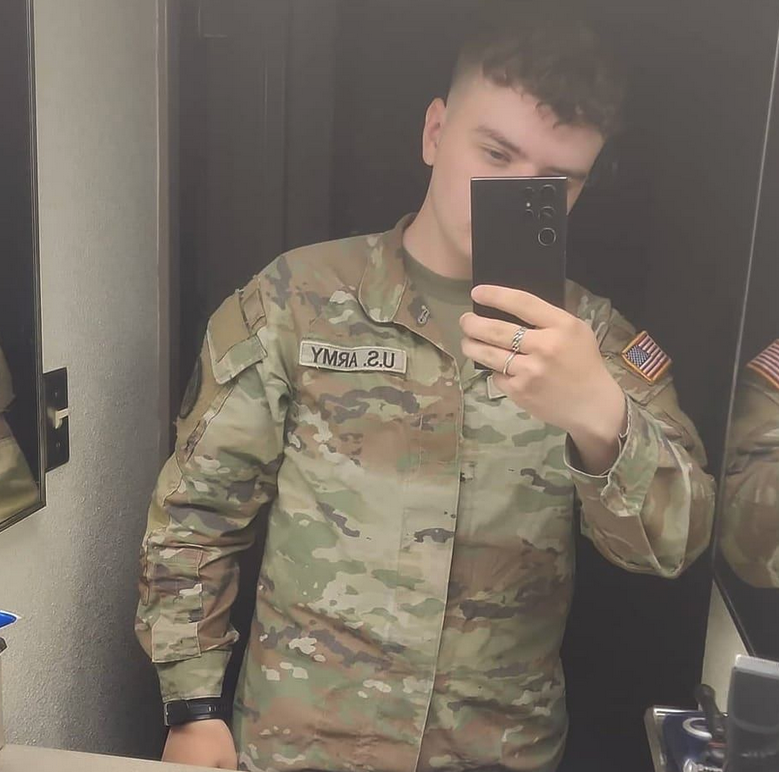
❌