
Normal view

Breaking the code: Multi-stage ‘code of conduct’ phishing campaign leads to AiTM token compromise

Phishing campaigns continue to improve sophistication and refinement in blending social engineering, delivery and hosting infrastructure, and authentication abuse to remain effective against evolving security controls. A large-scale credential theft campaign observed by Microsoft Defender Research exemplifies this trend, using code of conduct-themed lures, a multi-step attack chain, and legitimate email services to distribute fully authenticated messages from attacker-controlled domains.

The campaign targeted tens of thousands of users, primarily in the United States, and directed them through several stages of CAPTCHA and intermediate staging pages designed to reinforce legitimacy while filtering out automated defenses. The lures in this campaign used polished, enterprise-style HTML templates with structured layouts and preemptive authenticity statements, making them appear more credible than typical phishing emails and increasing their plausibility as legitimate internal communications. Because the messages contained concerning accusations and repeated time-bound action prompts, the campaign created a sense of urgency and pressure to act.  

Email threat landscape

Q1 2026 trends and insights ›

The attack chain ultimately led to a legitimate sign-in experience that was part of an adversary‑in‑the‑middle (AiTM) phishing flow, which allowed the attackers to proxy the authentication session and capture authentication tokens that could provide immediate account access. Unlike traditional credential harvesting, AiTM attacks intercept authentication traffic in real time, bypassing non-phishing-resistant multifactor authentication (MFA).

In this blog, we’re sharing our analysis of this campaign’s lures, infrastructure, and techniques. Organizations can defend against financial fraud initiated through phishing emails by educating users about phishing lures, investing in advanced anti-phishing solutions like Microsoft Defender for Office 365 and configuring essential email security settings, and encouraging users to employ web browsers that support SmartScreen. Organizations can also enable network protection, which lets Windows use SmartScreen as a host-based web proxy.

Multi-step social engineering campaign leading to credential theft

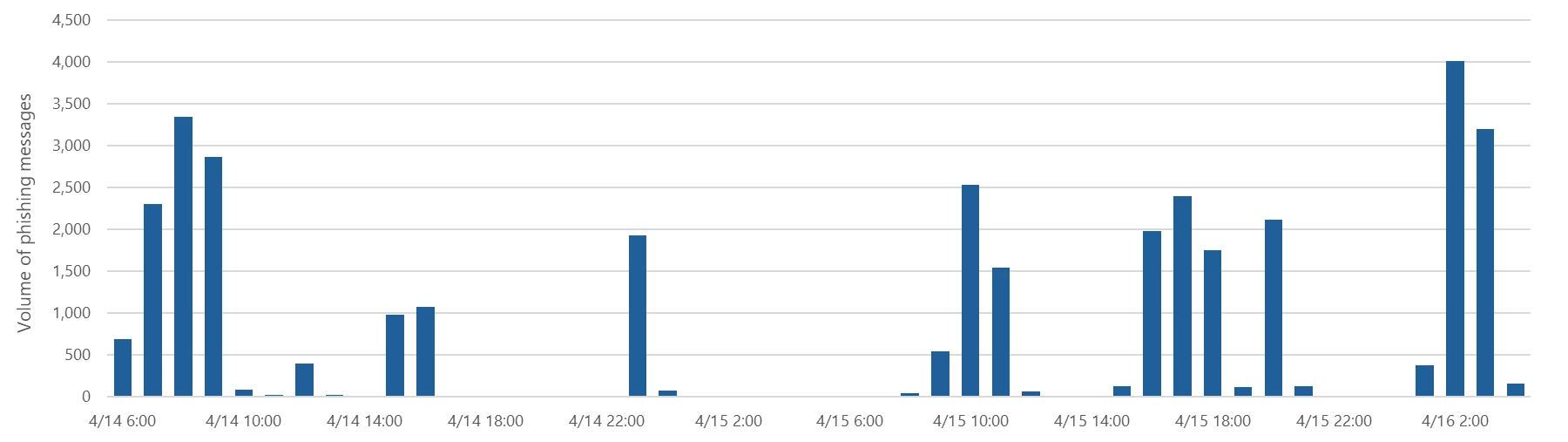
Between April 14 and 16, 2026, the Microsoft Defender Research team observed a series of sophisticated phishing campaigns targeting more than 35,000 users across over 13,000 organizations in 26 countries, with majority of targets located in the United States (92%). The campaign did not focus on a single vertical but instead impacted a broad range of industries, most notably Healthcare & life sciences (19%), Financial services (18%), Professional services (11%), and Technology & software (11%). Messages were distributed in multiple distinct waves between 06:51 UTC on April 14 and 03:54 UTC on April 16. 

Bar graph showing volume of messages sent by hour between April 14 and 16, 2026
Figure 1. Timeline of campaign messages sent by hour
Pie charts showing the breakdown of campaign recipients by country and industry.
Figure 2. Campaign recipients by country and industry

Emails in this campaign posed as internal compliance or regulatory communications, using display names such as “Internal Regulatory COC”, “Workforce Communications”, and “Team Conduct Report”. Subject lines included “Internal case log issued under conduct policy” and “Reminder: employer opened a non-compliance case log”.

Message bodies claimed that a “code of conduct review” had been initiated, referenced organization-specific names embedded within the text, and instructed recipients to “open the personalized attachment” to review case materials. At the top of each message, a notice stated that the message had been “issued through an authorized internal channel” and that links and attachments had been “reviewed and approved for secure access”, reinforcing the email’s purported legitimacy. To further support the confidentiality of the supposed review, the end of each message contained a green banner stating that the contents had been encrypted using Paubox, a legitimate service associated with HIPAA-compliant communications.

Screenshot of sample phishing email
Figure 3. Sample phishing email

Analysis of the sending infrastructure indicated that the campaign emails were sent using a legitime email delivery service, likely originating from a cloud-hosted Windows virtual machine. The messages were sent from multiple sender addresses using domains that are likely attacker-controlled.

Each campaign email included a PDF attachment with filenames such as Awareness Case Log File – Tuesday 14th, April 2026.pdf and Disciplinary Action – Employee Device Handling Case.pdf. The attachment provided additional context about the supposed conduct review, including a summary of the review process and instructions for accessing supporting documentation. Recipients were directed to click a “Review Case Materials” link within the PDF, which initiated the credential harvesting flow.

Screenshot of PDF attachment used in the campaign
Figure 4. PDF attachment

When clicked, users were initially directed to one of two attacker-controlled domains (for example, acceptable-use-policy-calendly[.]de or compliance-protectionoutlook[.]de). These landing pages displayed a Cloudflare CAPTCHA, presented as a mechanism to validate that the user was coming “from a valid session”. This CAPTCHA likely served as a gating mechanism to impede automated analysis and sandbox detonation. 

Screenshot of captcha challenge.
Figure 5. CAPTCHA challenge

After completing the CAPTCHA, users were redirected to an intermediate site designed to prepare them for the final stage of the attack. This page informed users that the requested documentation was encrypted and required account authentication. While this stage of the attack has several hallmarks of device code phishing, we were only able to confirm the AITM portion of the attack chain.

Screenshot of intermediate site asking users to click review & sign button
Figure 6. Intermediate site asking users to click “Review & Sign”

After clicking the provided “Review & Sign” button, users were presented with a sign-in prompt requesting their email address.

Screenshot of prompt directing users to enter email address
Figure 7. Prompt directing users to enter their email address

After submission, users were required to complete a second CAPTCHA involving image selection.

Screenshot of second captcha challenge
Figure 8. Second CAPTCHA challenge

Once these steps were completed, users were shown a message indicating that verification was successful and that their “case” was being prepared.

Screenshot of message telling users that verification completed successfully
Figure 9. Message telling users that “Verification completed successfully”

Following these steps, users were redirected to a third site hosting the final stage of the attack. Analysis of the underlying code indicates that the final destination varied depending on whether the user accessed the workflow from a mobile device or a desktop system.

Screenshot of code used to redirect users based on platform, whether mobile or dekstop
Figure 10. Code used to redirect users based on platform

On the final page, users were informed that all materials related to their code of conduct review had been “securely logged”, “time-stamped”, and “maintained within the organization’s centralized compliance tracking system”. They were then prompted to schedule a time to discuss the case, which required signing in to their account.

screenshot of final page instructing users to sign in
Figure 11. Final page instructed users to sign in

Selecting the “Sign in with Microsoft” option redirected users to a Microsoft authentication page, initiating an AiTM session hijacking flow designed to capture authentication tokens and compromise user accounts.

Mitigation and protection guidance

Microsoft recommends the following mitigations to reduce the impact of this threat. Check the recommendations card for the deployment status of monitored mitigations.

  • Review the recommended settings for Exchange Online Protection and Microsoft Defender for Office 365 to ensure your organization has established essential defenses and knows how to monitor and respond to threat activity.
  • Invest in user awareness training and phishing simulations. Attack simulation training in Microsoft Defender for Office 365, which also includes simulating phishing messages in Microsoft Teams, is one approach to running realistic attack scenarios in your organization.
  • Enable Zero-hour auto purge (ZAP) in Defender for Office 365 to quarantine sent mail in response to newly acquired threat intelligence and retroactively neutralize malicious phishing, spam, or malware messages that have already been delivered to mailboxes.
  • Responders could also manually check for and purge unwanted emails containing URLs and/or Subject fields that are similar, but not identical, to those of known bad messages. Investigate malicious email that was delivered in Microsoft 365 and use Threat Explorer to find and delete phishing emails.
  • Turn on Safe Links and Safe Attachments in Microsoft Defender for Office 365.
  • Enable network protection in Microsoft Defender for Endpoint.
  • Encourage users to use Microsoft Edge and other web browsers that support Microsoft Defender SmartScreen, which identifies and blocks malicious websites, including phishing sites, scam sites, and sites that host malware.
  • Enable password-less authentication methods (for example, Windows Hello, FIDO keys, or Microsoft Authenticator) for accounts that support password-less. For accounts that still require passwords, use authenticator apps like Microsoft Authenticator for multifactor authentication (MFA). Refer to this article for the different authentication methods and features.
  • Configure automatic attack disruption in Microsoft Defender XDR. Automatic attack disruption is designed to contain attacks in progress, limit the impact on an organization’s assets, and provide more time for security teams to remediate the attack fully.

Microsoft Defender detections

Microsoft Defender customers can refer to the list of applicable detections below. Microsoft Defender coordinates detection, prevention, investigation, and response across endpoints, identities, email, apps to provide integrated protection against attacks like the threat discussed in this blog.

Tactic Observed activity Microsoft Defender coverage 
Initial accessPhishing emailsMicrosoft Defender for Office 365
– A potentially malicious URL click was detected
– A user clicked through to a potentially malicious URL
– Suspicious email sending patterns detected
– Email messages containing malicious URL removed after delivery
– Email messages removed after delivery
– Email reported by user as malware or phish
PersistenceThreat actors sign in with stolen valid entitiesMicrosoft Entra ID Protection
– Anomalous Token
– Unfamiliar sign-in properties
– Unfamiliar sign-in properties for session cookies  

Microsoft Defender for Cloud Apps
– Impossible travel activity

Microsoft Security Copilot

Microsoft Security Copilot is embedded in Microsoft Defender and provides security teams with AI-powered capabilities to summarize incidents, analyze files and scripts, summarize identities, use guided responses, and generate device summaries, hunting queries, and incident reports.

Customers can also deploy AI agents, including the following Microsoft Security Copilot agents, to perform security tasks efficiently:

Security Copilot is also available as a standalone experience where customers can perform specific security-related tasks, such as incident investigation, user analysis, and vulnerability impact assessment. In addition, Security Copilot offers developer scenarios that allow customers to build, test, publish, and integrate AI agents and plugins to meet unique security needs.

Threat intelligence reports

Microsoft Defender XDR customers can use the following threat analytics reports in the Defender portal (requires license for at least one Defender XDR product) to get the most up-to-date information about the threat actor, malicious activity, and techniques discussed in this blog. These reports provide the intelligence, protection information, and recommended actions to prevent, mitigate, or respond to associated threats found in customer environments.

Microsoft Security Copilot customers can also use the Microsoft Security Copilot integration in Microsoft Defender Threat Intelligence, either in the Security Copilot standalone portal or in the embedded experience in the Microsoft Defender portal to get more information about this threat actor.

Hunting queries

Microsoft Defender XDR customers can run the following advanced hunting queries to find related activity in their networks:

Campaign emails by sender address

The following query identifies emails associated with this campaign using a message’s sending email address.

EmailEvents
| where SenderMailFromAddress in (" cocpostmaster@cocinternal.com "," nationaladmin@gadellinet.com ","
nationalintegrity@harteprn.com”,” m365premiumcommunications@cocinternal.com”,” documentviewer@na.businesshellosign.de”)

Indicators of compromise

IndicatorTypeDescriptionFirst seenLast seen
compliance-protectionoutlook[.]deDomainDomain hosting malicious campaign content2026-04-142026-04-16
acceptable-use-policy-calendly[.]deDomainDomain hosting malicious campaign content2026-04-142026-04-16
cocinternal[.]comDomainDomain hosting sender email address2026-04-142026-04-16
Gadellinet[.]comDomainDomain hosting sender email address2026-04-142026-04-16
Harteprn[.]comDomainDomain hosting sender email address2026-04-142026-04-16
Cocpostmaster[@]cocinternal.comEmail addressEmail address used to send campaign emails2026-04-142026-04-16
Nationaladmin[@]gadellinet.comEmail addressEmail address used to send campaign emails2026-04-142026-04-16
Nationalintegrity[@]harteprn.comEmail addressEmail address used to send campaign emails2026-04-142026-04-16
M365premiumcommunications[@]cocinternal.comEmail addressEmail address used to send campaign emails2026-04-142026-04-16
Documentviewer[@]na.businesshellosign.deEmail addressEmail address used to send campaign emails2026-04-142026-04-16
Awareness Case Log File – Monday 13th, April 2026.pdfFilenameName of PDF attachment containing phishing link2026-04-142026-04-14
Awareness Case Log File – Tuesday 14th, April 2026.pdfFilenameName of PDF attachment containing phishing link2026-04-152026-04-15
Awareness Case Log File – Wednesday 15th, April 2026.pdfFilenameName of PDF attachment containing phishing link2026-04-162026-04-16
5DB1ECBBB2C90C51D81BDA138D4300B90EA5EB2885CCE1BD921D692214AECBC6SHA-256File hash of campaign PDF attachment2026-04-14  2026-04-16  
B5A3346082AC566B4494E6175F1CD9873B64ABE6C902DB49BD4E8088876C9EADSHA-256File hash of campaign PDF attachment2026-04-142026-04-16
11420D6D693BF8B19195E6B98FEDD03B9BCBC770B6988BC64CB788BFABE1A49DSHA-256File hash of campaign PDF attachment2026-04-142026-04-16

Learn more

For the latest security research from the Microsoft Threat Intelligence community, check out the Microsoft Threat Intelligence Blog.

To get notified about new publications and to join discussions on social media, follow us on LinkedIn, X (formerly Twitter), and Bluesky.

To hear stories and insights from the Microsoft Threat Intelligence community about the ever-evolving threat landscape, listen to the Microsoft Threat Intelligence podcast.

The post Breaking the code: Multi-stage ‘code of conduct’ phishing campaign leads to AiTM token compromise appeared first on Microsoft Security Blog.

Email threat landscape: Q1 2026 trends and insights

During the first quarter of 2026 (January-March), Microsoft Threat Intelligence detected approximately 8.3 billion email-based phishing threats, with monthly volumes declining slightly from 2.9 billion in January to 2.6 billion in March. By the end of the quarter, QR code phishing emerged as the fastest-growing attack vector, more than doubling over the period, while CAPTCHA-gated phishing evolved rapidly across payload types. Overall, 78% of email threats were link-based, while malicious payloads accounted for 19% of attacks in January—boosted by large HTML and ZIP campaigns—before settling at 13% in both February and March. Credential phishing remained the dominant objective behind malicious payloads throughout the quarter. This shift toward link-based delivery, combined with the payload trends, suggests that threat actors increasingly preferred hosted credential phishing infrastructure over locally-rendered payloads as the quarter progressed.

These trends reflect how threat actors continue to iterate on both scale and delivery techniques to improve effectiveness. At the same time, disruption efforts can meaningfully impact this activity. Following Microsoft’s Digital Crime Unit-led action against the Tycoon2FA phishing-as-a-service (PhaaS) platform in early March, associated email volume declined 15% over the remainder of the month, alongside a significant reduction in access to active phishing pages, limiting the platform’s immediate effectiveness. While Tycoon2FA has since adapted by shifting hosting providers and domain registration patterns, these changes reflect partial recovery rather than full restoration of previous capabilities. Alongside these shifts, business email compromise (BEC) activity remained prevalent, totaling approximately 10.7 million attacks in the quarter, largely driven by low-effort, generic outreach messages. At the same time, Microsoft Defender Research observed early indications of emerging techniques such as device code phishing—sometimes enabled by offerings like EvilTokens—which, while not yet at the scale of the trends discussed below, reflect continued innovation in credential theft methods.

This blog provides a view of email threat activity across the first quarter of 2026, highlighting key trends in phishing techniques, payload delivery, and threat actor behavior observed by Microsoft Threat Intelligence. We examine shifts in QR code phishing, CAPTCHA evasion tactics, malicious payloads, and BEC activity, analyze how disruption efforts and infrastructure changes influenced threat actor operations, and provide recommendations and Microsoft Defender detections to help mitigate these threats. By bringing these trends together, this blog can help defenders understand how email-based attacks are evolving and where to focus detection, mitigation, and user protection strategies.

Tycoon2FA disruption impact

Since its emergence in August 2023, Tycoon2FA has rapidly become one of the most widespread PhaaS platforms, leveraging adversary-in-the-middle (AiTM) techniques to attempt to defeat non-phishing-resistant multifactor authentication (MFA) defenses. The group behind the PhaaS platform (tracked by Microsoft Threat Intelligence as Storm-1747) leases malicious infrastructure and sells phishing kits that impersonate various enterprise application sign-in pages and incorporate evasion tactics, such as fake CAPTCHA pages.

The quarter began with Tycoon2FA in a period of reduced activity. January volumes represented a 54% decline from December 2025, marking the second consecutive month of sharp decreases. While post-holiday seasonal effects may have contributed to this decrease in volume, some of the reduction might also have been the result of Microsoft’s Digital Crimes Unit disruption of RedVDS, a service used by many Tycoon2FA customers to distribute malicious email campaigns.

After surging 44% in February, phishing attacks pointing to Tycoon2FA fell 15% in March driven largely by the effects of a coordinated disruption operation. In early March 2026, Microsoft’s Digital Crimes Unit, in coordination with Europol and industry partners, took action to disrupt Tycoon2FA’s infrastructure and operations, significantly impairing the platform’s hosting capabilities. While Tycoon2FA-linked messages continued to circulate after the disruption, almost one-third of March’s total volume was concentrated in a three-day period early in the month; daily volumes for the remainder of March were notably lower than historical averages, and targets’ ability to reach active phishing pages was substantially reduced.

Line graph displays monthly phishing email volume from November to March for Tycoon2FA, showing a sharp decline from about 23 million in November to around 9 million in January, followed by a slight increase and stabilization near 11 million in February and March.
Figure 1. Tycoon2FA monthly malicious messages volume (November 2025 – March 2026)

Tycoon2FA’s infrastructure composition evolved multiple times during the first three months of 2026. In January, Tycoon2FA domains started shifting toward newer generic top-level domains (TLDs) such as .DIGITAL, .BUSINESS, .CONTRACTORS, .CEO, and .COMPANY, moving away from previous commonly used TLDs or second-level domains like .SA.COM, .RU, and .ES. This trend became even more well-established in February. Following the March disruption, however, Microsoft Threat Intelligence observed a notable increase in Tycoon2FA domains with .RU registrations, with more than 41% of all Tycoon2FA domains using a .RU TLD since the last week of March.

Line chart showing percentage trends of Tycoon2FA TLDs and 2LDs from November 2025 to March 2026, with six categories: SA.COM, RU, ES, DIGITAL, DE, and DEV. SA.COM starts highest near 22% and declines to about 6%, while RU rises sharply from 13% to 23% in March, with other categories remaining below 7% throughout.
Figure 2. Top TLDs and second-level domains (2LDs) associated with Tycoon2FA infrastructure (November 2025 – March 2026)

Additionally, toward the end of March, we saw Tycoon2FA moving away from Cloudflare as a hosting service and now hosts most of its domains across a variety of alternative platforms, suggesting the group is attempting to find replacement services that offer comparable anti-analysis protections.  

QR code phishing attacks

In recent years, QR codes have rapidly emerged as a preferred tool among phishing threat actors seeking to bypass traditional email defenses. By embedding malicious URLs within image-based QR codes in the body of an email or within the contents of an attachment, threat actors attempt to exploit the limitations of text-based scanning engines and redirect victims to phishing sites on unmanaged mobile devices.

The most significant shift in Q1 2026 was the rapid escalation of QR code phishing, with attack volumes increasing from 7.6 million in January to 18.7 million in March, a 146% increase over the quarter. After an initial 35% decline in January (continuing a late-2025 downtrend), volumes reversed course dramatically, growing 59% in February and another 55% in March. By the end of the quarter, QR code phishing had reached its highest monthly volume in at least a year.

Line graph showing weekly volume of QR-code phishing attacks from November 2025 to March 2026, with phishing email counts fluctuating and peaking in March 2026.
Figure 3. Trend of QR code phishing attacks by weekly volume (November 2025 – March 2026)

PDF attachments were the dominant delivery method throughout the quarter, growing from 65% of QR code attacks in January to 70% in March. While the overall volume of DOC/DOCX payloads containing malicious QR codes steadily increased each month, their share of overall delivery payloads decreased from 31% in January to 24% in March. A notable late-quarter development was the emergence of QR codes embedded directly in email bodies, which surged 336% in March. While still a small share of total volume (5%), this approach eliminates the need for an attachment altogether and highlights a shift in threat actor delivery methods that defenders should continue to monitor.

CAPTCHA tactics

Threat actors use CAPTCHA pages to delay detection and increase user interaction. These pages function as a visual decoy, giving the appearance of a legitimate security check while concealing a transition to malicious content. By forcing users to engage with the CAPTCHA before accessing the payload, threat actors reduce the likelihood of automated scanning tools identifying the threat and increase the chances of successful credential harvesting or malware delivery. Additionally, fake CAPTCHAs are used in ClickFix attacks to trick users into copying and executing malicious commands under the guise of human verification, allowing malware to bypass conventional security controls.

After declining in both January (-45%) and February (-8%), CAPTCHA-gated phishing volumes exploded in March, more than doubling (+125%) to 11.9 million attacks, the highest volume observed over the last year.

Line chart showing CAPTCHA-gated phishing volume between November 2025 and March 2026. The chart highlights a peak around December, a decline through January and February, followed by a sharp increase in March to over 12 million attacks.
Figure 4. CAPTCHA-gated phishing volume (November 2025 – March 2026)

The most notable aspect of Q1 CAPTCHA trends was the rapid rotation of delivery methods, as threat actors appeared to actively experiment with which payload formats most effectively evade email defenses:

  • HTML attachments started the year as the most common method to deliver CAPTCHA-gated phishing (37% in January), but dropped 34% in February, hitting its lowest monthly volume since August 2025. Although their volume more than doubled in March, hitting an annual monthly high, HTML files were still only the second-most common delivery method to close the quarter.
  • SVG files, which had seen consecutive months of decreasing volumes, grew by 49% in February at the same time nearly every other delivery payload type decreased. Because of this, it was the most common delivery method for the month, which had not happened since November 2025. This one-month spike reversed itself in March, however, and the number of SVG files delivering CAPTCHA-gated phish fell by 57%, accounting for just 7% of delivery payloads.
  • PDF files saw a meteoric rise in volume during the first quarter of the year. After seeing steady month-over-month declines since July 2025, and hitting an annual monthly low point in January 2026, the number of PDF attachments leading to CAPTCHA-gated phishing sites more than quadrupled in March (+356%). Not only did it retake its spot as the most common delivery method for these attacks since last July, but it eclipsed its annual high by more than 37%.
  • DOC/DOCX files, which didn’t make up more than 9% of CAPTCHA-gated phishing payloads over the previous nine months, increased almost five times (+373%) in March to account for 15% of payloads.
  • Email-embedded URLs, which had once delivered more than half of CAPTCHA-gated phish at the end of August 2025, hit an eight-month low after falling 85% between December and February. While their volume nearly doubled in March, they remained well below late-2025 levels.
Line graph comparing monthly data usage for five file types. XLS shows a sharp increase in March, PDF declines steadily, HTML peaks in December, and DOC/DOCX and URL remain relatively low with slight fluctuations.
Figure 5. Monthly CAPTCHA-gated phishing volume by distribution method (Q1 2026)

Another notable shift in CAPTCHA-gated phishing attacks was the erosion of Tycoon2FA’s impact on the landscape. At the end of 2025, more than three-quarters of CAPTCHA-gated phishing sites were hosted on Tycoon2FA infrastructure. This share decreased significantly over the course of the first three months of 2026, falling to just 41% in March. This broadening of CAPTCHA-gated phishing sites being used by an increasing number of threat actors and phishing kits, combined with the overall surge in volume, indicates that this technique is becoming a more entrenched component of the phishing playbook rather than a specialty of a small number of tools.

Three-day campaign delivers CAPTCHA-gated phishing content using malicious SVG attachments

Between February 23 and February 25, 2026, a large, sustained campaign sent more than 1.2 million messages to users at more than 53,000 organizations in 23 countries. Messages in the campaign included a number of different themes, including an important 401K update, a credit hold warning, a question about a received payment, a payment request for a past due invoice, and a voice message notification.

Many of the messages contained a fake confidentiality disclaimer to enhance the credibility of the messages and provide a proactive excuse about why a recipient may have mistakenly received an email that may not be applicable to them.

A screenshot of an email confidentiality notice warning recipients against sharing the message with third parties without sender consent. The text emphasizes the message's intended recipient, prohibits unauthorized distribution, and clarifies that the email does not constitute a legally binding agreement.
Figure 6. Example fake confidentiality message used in February 23-25 phishing campaign

Attached to each message was an SVG file that was named to appropriately match the theme of the email. All the file names included a Base64-encoded version of the recipient’s email address. Example of file names used in the campaign include the following:

  • <Recipient Email Domain>_statements_inv_<Base64-encoded Email Address>.svg
  • 401K_copy_<Recipient Name>_<Base64-encoded Email Address>_241.svg
  • Check_2408_Payment_Copy_<Recipient First Name>_<Base64-encoded Email Address>_241.svg
  • INV#_1709612175_<Base64-encoded Email Address>.svg
  • Listen_(<Base64-encoded Email Address>).svg
  • PLAY_AUDIO_MESSAGE__<Recipient Name>_<Base64-encoded Email Address>_241.svg

If an attached SVG file was opened, the user’s browser would open locally and fetch content from one of the three following hostnames:

  • bouleversement.niovapahrm[.]com
  • haematogenesis.hvishay[.]com
  • ubiquitarianism.drilto[.]com

Initially, the user would be shown a “security check” CAPTCHA. Once the CAPTCHA had been successfully completed, the user would then be shown a fake sign-in page used to compromise their account credentials.

Malicious payloads

Credential phishing tightened its grip on the malicious payload landscape across Q1, growing from 89% of all payload-based attacks in January to 95% in February before settling at 94% in March. These credential phishing payloads either linked users to phishing pages or locally loaded spoofed sign-in screens on a user’s device. Traditional malware delivery continued its long-term decline, representing just 5–6% of payloads by the end of the quarter.

Pie chart showing distribution of malicious payloads: HTML (31%), PDF (28%), SVG (19%), DOC/DOCX (12%), and URL (10%).
Figure 7. Malicious payloads by file type (Q1 2026)

The most striking payload trend was the volatility across file types, driven by large campaigns that created dramatic week-to-week swings:

  • HTML attachments started Q1 as the leading file type (37% of payloads in January), fell to an annual low in February (-57%), then nearly tripled in March (+175%). This volatility was largely campaign-driven, with concentrated activity in the first half of January and the third week of March.
  • Malicious PDFs followed a steady upward trajectory, increasing 38% in February and another 50% in March to reach their highest monthly volume in over a year. By March, PDFs accounted for 29% of payloads, up from 19% in January.
  • ZIP/GZIP attachments were similarly volatile by nearly doubling in January (+94%), dropping 38% in February, then surging 79% in March. Threat actors commonly use ZIP files to circumvent Mark of the Web (MOTW) protections.
  • SVG files emerged briefly in February as a notable delivery method (with a 50% volume increase) before declining 32% in March, mirroring the pattern seen in CAPTCHA-gated phishing.
Line graph showing daily usage trends of five file formats (DOC/DOCX, HTML, PDF, SVG, and ZIP). HTML files exhibit the highest and most frequent spikes, reaching over 2 million, while other formats maintain lower, more stable usage with occasional peaks.
Figure 8. Daily malicious payload file type (Q1 2026)

Large-scale HTML phishing campaign hosts content on multiple PhaaS infrastructures

On March 17, 2026, Microsoft Threat Intelligence observed a massive phishing campaign that drove a significant surge in malicious HTML attachments during the month. The campaign involved more than 1.5 million confirmed malicious messages sent to over 179,000 organizations across 43 countries, accounting for approximately 7% of all malicious HTML attachments observed in March.

All messages in this campaign were likely sent using the same tool or service, which exhibited several distinct and highly consistent characteristics. Most notably, sender addresses across the campaign featured excessively long, keyword‑stuffed usernames that embedded URLs, tracking identifiers, and service references. These usernames were crafted to resemble legitimate transactional, billing, or document‑related notification senders. Examples of observed sender usernames include:

  • eReceipt_Payment_Alert_Noreply-/m939k6d7.r.us-west-2.awstrack.me/L0/%2F%2Fspectrumbusiness.net%2Fbilling%2F/2/010101989f2c1f29-ab5789bd-1426-4800-ae7d-877ea7f61d24-000000/LHnBIXX0VmCLVoXwNWtt23hGCdc=439/us02web.zoom.nl/j/81163775943?pwd=bLoo4JaWavsiTAuLWNoRsmbmALwjLB.1-qq8m2tzd
  • Center-=AAP1eU7NKykAABXNznVa8w___listenerId=AAP1eU7NKykAABXNznVa8w___aw_0_device.player_name=Chrome___aw_0_ivt.result=unknown___cbs=9901711___aw_0_azn.zposition=%5B%22undefined%22%5D___us_privacy=___aw_0_app.name=Second+Screen___externalClickUrl=otdk-takaki-h
  • DocExchange_Noreply-m939k6d7.r.us_west_2.awstrack.me/L0/%2F%2Fspectrumbusiness.net%2Fbilling%2F/2/010101989f2c1f29ab5789bd14264800ae7d877ea7f61d24000000/LHnBIXX0VmCLVoXwNWtt23hGCdc=439/us02web.zoom.nl/j/81163775943?pwd=bLoo4JaWavsiTAuLWNoRsmbmALwjLB.1-angie

The emails themselves contained little to no message body content. While subject lines varied, they consistently impersonated routine business and workflow notifications, including payment and remittance alerts (for example, Automated Clearing House (ACH), Electronic Funds Transfer (EFT), wire), invoice or aging statements, and e‑signature or document delivery requests. These subjects relied on urgency, approval language, and transactional framing to prompt recipients to review, sign, or access an attached document.

Each message included an HTML attachment with a file name aligned to the email’s theme. When opened, the HTML file launched locally on the recipient’s device and immediately redirected the user to an initial external staging page. This page performed basic screening and then redirected the user to a secondary landing page hosting the phishing content. On the final landing page, users were presented with a CAPTCHA challenge before being directed to a fraudulent sign‑in page designed to harvest account credentials.

Interestingly, although messages in this campaign shared common tooling, structure, and delivery characteristics, the infrastructure hosting the final phishing payload was linked to multiple different PhaaS providers. Most observed phishing endpoints were associated with Tycoon2FA, while additional activity was linked to Kratos (formerly Sneaky2FA) and EvilTokens infrastructure.

Business email compromise

Microsoft defines business email compromise (BEC) as a text-based attack targeting enterprise users that impersonates a trusted entity for the purpose of persuading a recipient into initiating a fraudulent financial transaction or sending the threat actor sensitive documents. These attacks fluctuated across Q1, totaling approximately 10.7 million attacks: rising 24% in January, dipping 8% in February, then surging 26% in March.

Line chart displays monthly BEC attack volume data for five months, with attacks starting high in November, dip in December, rise through January and February, and peak sharply in March to over 4 million attacks.
Figure 9. Monthly BEC attack volume (November 2025 – March 2026)

The composition of BEC attacks remained consistent throughout Q1. Generic outreach messages (like “Are you at your desk?”) accounted for 82–84% of initial contact emails each month, while explicit requests for specific financial transactions or documents represented just 9–10%. This pattern underscores that BEC operators overwhelmingly favor establishing a conversational rapport before making fraudulent requests, rather than leading with direct financial asks.

Within the smaller subset of explicit financial requests, two sub-categories showed notable movement. Payroll update requests grew 15% in February, reaching their highest volume in eight months, potentially reflecting tax season-related social engineering. Gift card requests fell 37% in February to their lowest level since July before rebounding sharply in March (+108%), though they still represented less than 3% of overall BEC messages. These fluctuations suggest that BEC operators adjust their specific financial pretexts seasonally while maintaining a consistent overall approach.

Pie chart displays BEC email content distribution for Q1 2026. Generic outreach contact dominates at 83.1%, followed by generic task request at 7.0%, payroll update at 4.2%, invoice payment at 3.1%, gift card request at 2.2%, and other at 0.4%, with each segment color-coded and labeled.
Figure 10. Initial BEC email content by type (Q1 2026)

Defending against email threats

Microsoft recommends the following mitigations to reduce the impact of this threat.

  • Review the recommended settings for Exchange Online Protection and Microsoft Defender for Office 365 to ensure your organization has established essential defenses and knows how to monitor and respond to threat activity.
  • Invest in user awareness training and phishing simulations. Attack simulation training in Microsoft Defender for Office 365, which also includes simulating phishing messages in Microsoft Teams, is one approach to running realistic attack scenarios in your organization.
  • Enable Zero-hour auto purge (ZAP) in Defender for Office 365 to quarantine sent mail in response to newly acquired threat intelligence and retroactively neutralize malicious phishing, spam, or malware messages that have already been delivered to mailboxes.
  • Responders could also manually check for and purge unwanted emails containing URLs and/or Subject fields that are similar, but not identical, to those of known bad messages. Investigate malicious email that was delivered in Microsoft 365 and use Threat Explorer to find and delete phishing emails.
  • Turn on Safe Links and Safe Attachments in Microsoft Defender for Office 365.
  • Enable network protection in Microsoft Defender for Endpoint.
  • Encourage users to use Microsoft Edge and other web browsers that support Microsoft Defender SmartScreen, which identifies and blocks malicious websites, including phishing sites, scam sites, and sites that host malware.
  • Enable password-less authentication methods (for example, Windows Hello, FIDO keys, or Microsoft Authenticator) for accounts that support password-less. For accounts that still require passwords, use authenticator apps like Microsoft Authenticator for MFA. Refer to this article for the different authentication methods and features.
  • Configure automatic attack disruption in Microsoft Defender XDR. Automatic attack disruption is designed to contain attacks in progress, limit the impact on an organization’s assets, and provide more time for security teams to remediate the attack fully.

Microsoft Defender detections

Microsoft Defender customers can refer to the list of applicable detections below. Microsoft Defender coordinates detection, prevention, investigation, and response across endpoints, identities, email, apps to provide integrated protection against attacks like the threat discussed in this blog.

Microsoft Defender for Endpoint

The following alert might indicate threat activity associated with this threat. The alert, however, can be triggered by unrelated threat activity.

  • Suspicious activity likely indicative of a connection to an adversary-in-the-middle (AiTM) phishing site

Microsoft Defender for Office 365

The following alerts might indicate threat activity associated with this threat. These alerts, however, can be triggered by unrelated threat activity.

  • A potentially malicious URL click was detected
  • A user clicked through to a potentially malicious URL
  • Suspicious email sending patterns detected
  • Email messages containing malicious URL removed after delivery
  • Email messages removed after delivery
  • Email reported by user as malware or phish

Microsoft Security Copilot

Microsoft Security Copilot is embedded in Microsoft Defender and provides security teams with AI-powered capabilities to summarize incidents, analyze files and scripts, summarize identities, use guided responses, and generate device summaries, hunting queries, and incident reports.

Customers can also deploy AI agents, including the following Microsoft Security Copilot agents, to perform security tasks efficiently:

Security Copilot is also available as a standalone experience where customers can perform specific security-related tasks, such as incident investigation, user analysis, and vulnerability impact assessment. In addition, Security Copilot offers developer scenarios that allow customers to build, test, publish, and integrate AI agents and plugins to meet unique security needs.

Threat intelligence reports

Microsoft Defender XDR customers can use the following Threat Analytics reports in the Defender portal (requires license for at least one Defender XDR product) to get the most up-to-date information about the threat actor, malicious activity, and techniques discussed in this blog. These reports provide intelligence, protection information, and recommended actions to prevent, mitigate, or respond to associated threats found in customer environments.

Microsoft Defender XDR threat analytics

Microsoft Security Copilot customers can also use the Microsoft Security Copilot integration in Microsoft Defender Threat Intelligence, either in the Security Copilot standalone portal or in the embedded experience in the Microsoft Defender portal to get more information about this threat actor.

Learn more

For the latest security research from the Microsoft Threat Intelligence community, check out the Microsoft Threat Intelligence Blog.

To get notified about new publications and to join discussions on social media, follow us on LinkedIn, X (formerly Twitter), and Bluesky.

To hear stories and insights from the Microsoft Threat Intelligence community about the ever-evolving threat landscape, listen to the Microsoft Threat Intelligence podcast.

The post Email threat landscape: Q1 2026 trends and insights appeared first on Microsoft Security Blog.

❌